Chemical Pump Bucket Test Using ACE
Software.
By
David Aakre
Technologist
Prime Pump
• Never Run a Dry PUMP
• Full Throttle on Blender Engine
• Prime Pump with Manual Switch
• Recirculate to get rid of Air
• Use Chem-tanks so limit switches can be tested
• Check settings such as right pump slope / Rate
• Check Micro-motion slope 6000
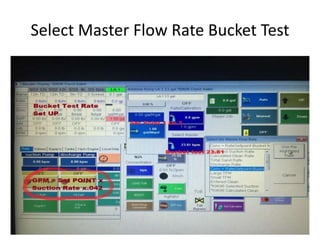
• Select master rate to bucket Test-23.81
• Use a calibrated bucket to test
Select Master Flow Rate Bucket Test
Run Pump In Auto at Set point 1 or 2
• Why 23.81 for Rate because at set point of 1
you will get 1 gallon in 1 minute.
• GPM = Set point x suction rate x .042
• Make sure rate lines up in auto to set point
• If not check your settings Right pump slope?
• If rate lines up to set point calibrate tack to
micromotion.
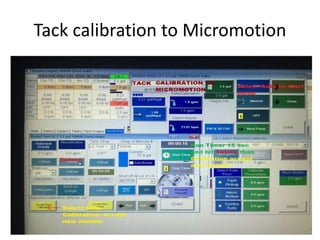
Tack calibration to Micromotion
Tack Calibration to Micromotion Steps
• On auto, pump rate lines out to set point
• Open Bucket test screen
• Start Timer run for 15 seconds
• Stop
• Depress volume below Micromotion Button
• A new calibration number will be displayed
• Select yellow button accept new calibration
• Select number
• Calibration complete
• This can be done during job as well
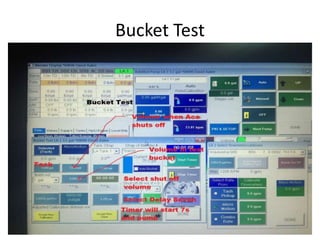
Bucket Test
Bucket Test Steps
• Place calibrated bucket under LA manifold hose
• Enter set point (1)
• Master flow rate bucket test =23.81
• Open bucket test menu
• Enter shut off volume (1 gallon)
• Select Delay 7 Auto button
• After pump shuts off compare volume in test
bucket with volume pumped in Ace, 1 min = 1 gal
Looks good go to next pump and bucket test
Not good- zero micromotion or Auto tune pump
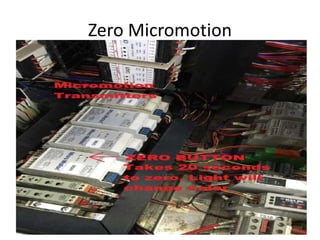
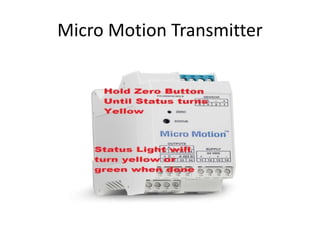
Zero Micromotion
Micro Motion Transmitter
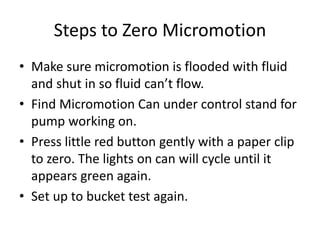
Steps to Zero Micromotion
• Make sure micromotion is flooded with fluid
and shut in so fluid can’t flow.
• Find Micromotion Can under control stand for
pump working on.
• Press little red button gently with a paper clip
to zero. The lights on can will cycle until it
appears green again.
• Set up to bucket test again.
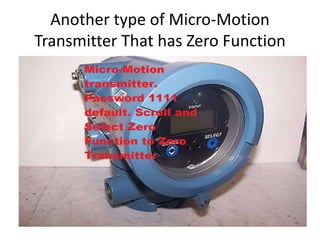
Another type of Micro-Motion
Transmitter That has Zero Function
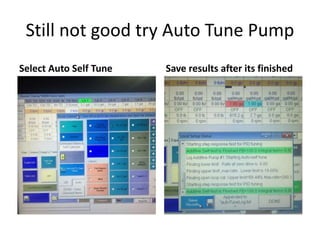
Still not good try Auto Tune Pump
Select Auto Self Tune Save results after its finished
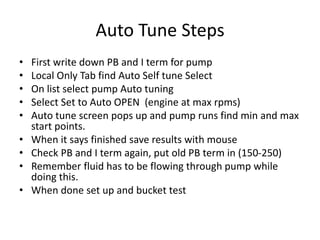
Auto Tune Steps
• First write down PB and I term for pump
• Local Only Tab find Auto Self tune Select
• On list select pump Auto tuning
• Select Set to Auto OPEN (engine at max rpms)
• Auto tune screen pops up and pump runs find min and max
start points.
• When it says finished save results with mouse
• Check PB and I term again, put old PB term in (150-250)
• Remember fluid has to be flowing through pump while
doing this.
• When done set up and bucket test
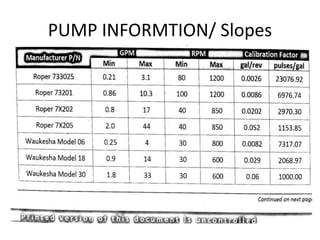
PUMP INFORMTION/ Slopes
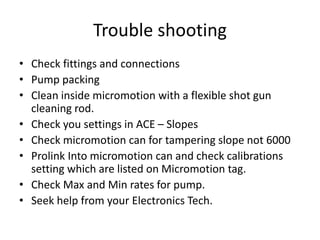
Trouble shooting
• Check fittings and connections
• Pump packing
• Clean inside micromotion with a flexible shot gun
cleaning rod.
• Check you settings in ACE – Slopes
• Check micromotion can for tampering slope not 6000
• Prolink Into micromotion can and check calibrations
setting which are listed on Micromotion tag.
• Check Max and Min rates for pump.
• Seek help from your Electronics Tech.
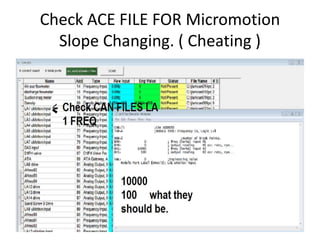
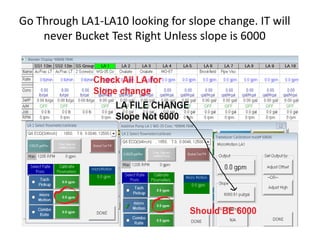
Check ACE FILE FOR Micromotion
Slope Changing. ( Cheating )
Go Through LA1-LA10 looking for slope change. IT will
never Bucket Test Right Unless slope is 6000
Congrats you’re a PRO. Practice
makes you perfect.
LA Pump Bucket Testing
By
David Aakre
DRY GEL SET UP FOR DA1 and
LA1
David Aakre
Technologist
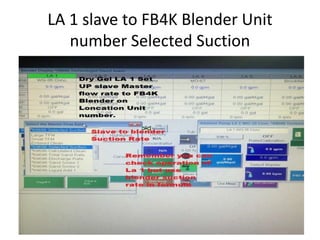
LA 1 slave to FB4K Blender Unit
number Selected Suction
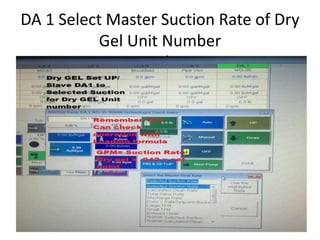
DA 1 Select Master Suction Rate of Dry
Gel Unit Number
Number
Now You Dry Gel is Set UP.
David Aakre
Technologist

Bucket testing on ace blender

  • 1.
    Chemical Pump BucketTest Using ACE Software. By David Aakre Technologist
  • 2.
    Prime Pump • NeverRun a Dry PUMP • Full Throttle on Blender Engine • Prime Pump with Manual Switch • Recirculate to get rid of Air • Use Chem-tanks so limit switches can be tested • Check settings such as right pump slope / Rate • Check Micro-motion slope 6000 • Select master rate to bucket Test-23.81 • Use a calibrated bucket to test
  • 3.
    Select Master FlowRate Bucket Test
  • 4.
    Run Pump InAuto at Set point 1 or 2 • Why 23.81 for Rate because at set point of 1 you will get 1 gallon in 1 minute. • GPM = Set point x suction rate x .042 • Make sure rate lines up in auto to set point • If not check your settings Right pump slope? • If rate lines up to set point calibrate tack to micromotion.
  • 5.
  • 6.
    Tack Calibration toMicromotion Steps • On auto, pump rate lines out to set point • Open Bucket test screen • Start Timer run for 15 seconds • Stop • Depress volume below Micromotion Button • A new calibration number will be displayed • Select yellow button accept new calibration • Select number • Calibration complete • This can be done during job as well
  • 7.
  • 8.
    Bucket Test Steps •Place calibrated bucket under LA manifold hose • Enter set point (1) • Master flow rate bucket test =23.81 • Open bucket test menu • Enter shut off volume (1 gallon) • Select Delay 7 Auto button • After pump shuts off compare volume in test bucket with volume pumped in Ace, 1 min = 1 gal Looks good go to next pump and bucket test Not good- zero micromotion or Auto tune pump
  • 9.
  • 10.
  • 11.
    Steps to ZeroMicromotion • Make sure micromotion is flooded with fluid and shut in so fluid can’t flow. • Find Micromotion Can under control stand for pump working on. • Press little red button gently with a paper clip to zero. The lights on can will cycle until it appears green again. • Set up to bucket test again.
  • 12.
    Another type ofMicro-Motion Transmitter That has Zero Function
  • 13.
    Still not goodtry Auto Tune Pump Select Auto Self Tune Save results after its finished
  • 14.
    Auto Tune Steps •First write down PB and I term for pump • Local Only Tab find Auto Self tune Select • On list select pump Auto tuning • Select Set to Auto OPEN (engine at max rpms) • Auto tune screen pops up and pump runs find min and max start points. • When it says finished save results with mouse • Check PB and I term again, put old PB term in (150-250) • Remember fluid has to be flowing through pump while doing this. • When done set up and bucket test
  • 15.
  • 16.
    Trouble shooting • Checkfittings and connections • Pump packing • Clean inside micromotion with a flexible shot gun cleaning rod. • Check you settings in ACE – Slopes • Check micromotion can for tampering slope not 6000 • Prolink Into micromotion can and check calibrations setting which are listed on Micromotion tag. • Check Max and Min rates for pump. • Seek help from your Electronics Tech.
  • 17.
    Check ACE FILEFOR Micromotion Slope Changing. ( Cheating )
  • 18.
    Go Through LA1-LA10looking for slope change. IT will never Bucket Test Right Unless slope is 6000
  • 19.
    Congrats you’re aPRO. Practice makes you perfect. LA Pump Bucket Testing By David Aakre
  • 20.
    DRY GEL SETUP FOR DA1 and LA1 David Aakre Technologist
  • 21.
    LA 1 slaveto FB4K Blender Unit number Selected Suction
  • 22.
    DA 1 SelectMaster Suction Rate of Dry Gel Unit Number Number
  • 23.
    Now You DryGel is Set UP. David Aakre Technologist