Blended by Design: Designing and Developing a Blended Course Veronica Diaz, PhD, [email_address] Jennifer Strickland, PhD,  [email_address] Laura Ballard,  [email_address]
Day 2 Course redesign and engagement
Objectives Continue with the module design process Describe instructional design techniques used to organize content  Identify course activities suited to the online or classroom environment Review some classroom technologies  Explore strategies and techniques to infuse student-student and instructor-student interaction and engagement
Why (re)design into blended? Ensures your design facilitates your course Engage students in dynamic and vital communities Students take more responsibility for content and learning Students learn through active participation and inquiry Assessing the Role of Teaching Presence from the Learner Perspective Dr. Randy Garrison,  Dr. Norm Vaughan. Available at  Blended Learning and Course  Redesign in Higher Education  & http://net.educause.edu/ir/library/pdf/ELI07159.pdf .
5 Principles of Successful Course Redesign Redesign the whole course. Encourage active learning. Provide students with individualized assistance. Build in ongoing assessment and prompt feedback. Ensure sufficient time on task and monitor student progress. http://thencat.org/PlanRes/R2R_PrinCR.htm
4 Basic Redesign Steps Identify course content for a module Write learning objectives and develop instructional modules Select course (re) design strategies: determining which strategy is most appropriate for your course Integrate course content activities in classroom and online environments: determining what is best suited in either the online or classroom environment
Why Objectives? Clear statement of what students will be able to do when they are finished with an instructional component Focuses on student performance Provides structure: beginning, middle, and end What are the core concepts your students must learn for each module? What do they need to know? What do they need to be able to do? What will they know as a result of my instruction?
Support Objectives by Integrating learning technologies  Classroom technologies Emerging technologies  Online resources  Developing diverse assessment techniques  Infusing active learning, interaction, and peer engagement
Why Modules? Easier to find course content Support consistency Allows students to focus on content rather than form Content becomes manageable  Prevents information overload “ 7 +/-2 rule” Source: Blending In, March 2007
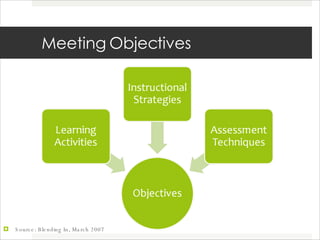
Meeting Objectives Source: Blending In, March 2007
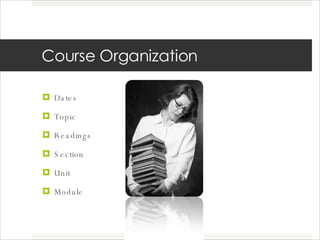
Course Organization Dates Topic Readings  Section Unit Module
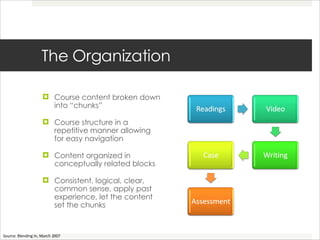
The Organization Course content broken down into “chunks”  Course structure in a repetitive manner allowing for easy navigation Content organized in conceptually related blocks Consistent, logical, clear, common sense, apply past experience, let the content set the chunks Source: Blending In, March 2007
Mapping Your Course Part II Select one chunk or module  What does the instructor do? What does the learner do? What can stay in the classroom? What can happen online? What is the relationship between the two? Apply Bloom’s levels
Building Community among Students
What makes a successful community? Individuals feel safe Get questions answered Have conversations Get resources/information Support Friendship Produce a product Individual and shared identities
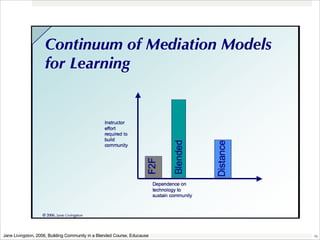
Jane Livingston, 2006, Building Community in a Blended Course, Educause
Building Community Start early Make it relevant Identify connections Create opportunities for engagement Encourage participation
Collaboration Benefits Passive to interactive Increase retention of class materials Develops critical thinking skills Knowledge construction Builds community Team building Interpersonal skills Importance of emphasizing the relationship of interactive activities to “content”
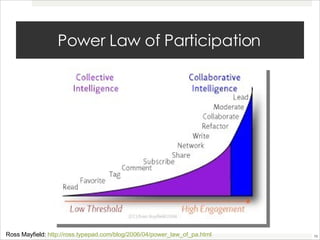
Power Law of Participation Ross Mayfield:  http://ross.typepad.com/blog/2006/04/power_law_of_pa.html
In Class: Student Collaborative or Interactive Activities In class writing activities 5 minute discussion questions Scripted scenarios for role playing Think-Pair-Share Note Check Case Studies Discussions Group Projects
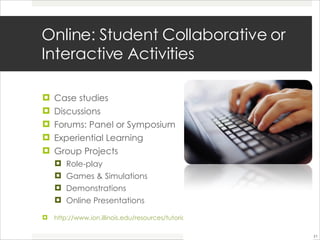
Online: Student Collaborative or Interactive Activities  Case studies Discussions Forums: Panel or Symposium Experiential Learning Group Projects Role-play  Games & Simulations Demonstrations Online Presentations http://www.ion.illinois.edu/resources/tutorials/pedagogy/instructionalstrategies.asp
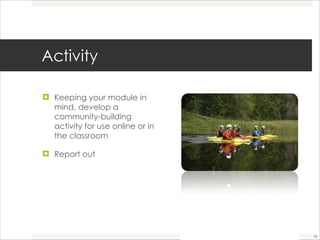
Activity  Keeping your module in mind, develop a community-building activity for use online or in the classroom  Report out
Break
Facilitating and Assessing Online Discussions Laura Ballard
Please think about and answer the following questions.  How do you use classroom discussion in your current courses?  How do you assess students?
Written Communication in the Online Environment Netiquette: http://www.albion.com/netiquette/corerules.html
Discussion boards must be graded with substantial points assigned
Ways to Use a Discussion Board Prepare for upcoming in-class discussion (pre-assignment) Reading Review of literature Follow-up to in-class discussion (continue discussion or post-assignment) Extension of in-class discussion and assignments (exploratory, will not be covered in class) Source: Teaching Online A Practical Guide by Ko and Rossen
Ways to Use a Discussion Board Continued Question and answer forum (to create an FAQ page) Pose a problem and have students generate possible solutions – discuss those solutions Students post homework or projects and get classmate feedback Case study Source: Teaching Online A Practical Guide by Ko and Rossen
Ways to Use a Discussion Board Continued Students critique classmates’ work using provided evaluation guidelines Find/evaluate web resources on lesson/topic and discuss results  Invite guest speakers/lecturers Debate about topic
Quick Tip! Consider allowing students to self assign groups that will take charge of a particular week’s DB creation, facilitation, and summary.
Questioning Techniques “ Name and describe three social systems theories that apply to community development.” “ What theory of community development did you find yourself relating to most? Why? How would you apply that theory to our learning community?” Lessons from the Cyberspace Classroom: The Realities of Online Teaching, Rena Palloff and Keith Pratt (pg. 121)
Moderating and Facilitating Online Discussion Encourage participation Ensure that some students don’t dominate Keep discussion focused Bring out multiple perspectives Summarize highlights Do not dominate or be over-involved in the discussion Source: Gregg Kearsley Online Education: Learning and Teaching in Cyberspace, Wadsworth: 2000, p. 85  Source: Tom Nolan, Sonoma State University  http://www.sonoma.edu/users/n/nolan/501/powerpoint/moderating_facilitating/
Discussion Boards in Your Hybrids How will you use the discussion board? See Discussion Board Ideas handout
Utilizing Student Teams and Community Building
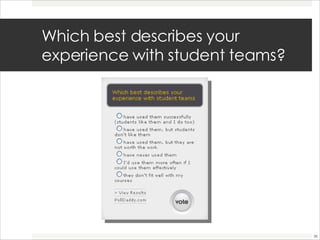
Which best describes your experience with student teams?
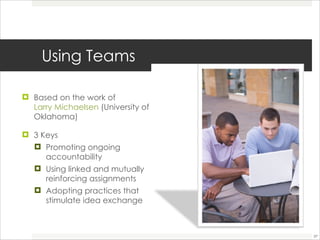
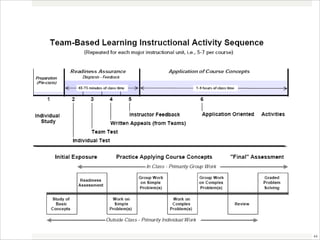
Using Teams  Based on the work of  Larry Michaelsen  (University of Oklahoma)  3 Keys Promoting ongoing accountability  Using linked and mutually reinforcing assignments  Adopting practices that stimulate idea exchange
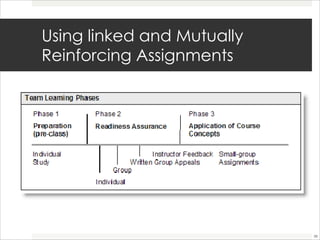
Promoting Ongoing Accountability  Require pre-group work  Require group members to express individual opinions and monitor via another member Include peer evaluation in grading Readiness Assurance Process  Test over readings  Group: Test, discuss, reach consensus and retest Provide information for peer feedback process
Using linked and Mutually Reinforcing Assignments
Adopting Practices that Stimulate Idea Exchange Use of assignments that create conditions that foster give-and-take interaction  Assign roles  Use permanent groups Allow some in-class group work  Size: 4-7 Diversity of opinion, ideas, and perspectives Not too easy Not too much writing  Employ, select, apply concepts from the course
Team Teaching Tips Outline learning goals Teach team skills  Clear and detailed instructions Rubric  Stages of team development  Forming - polite but untrusting  Storming - testing others  Norming - valuing other types  Performing - flexibility from trust
Team Contracts  Purpose, goals, and missions  Expectations  Roles Conflict resolution strategies  Meetings Communication  Decision-making policy  Agendas Record-keeping
Other Resources Team Based Learning (Michaelsen)  http://www.ou.edu/pii/teamlearning/index.htm Video Demonstrations http ://www.ou.edu/pii/teamlearning/video.htm
4 Questions What do I want students to be able to DO after this unit of instruction (behavioral outcomes)  What will students have to KNOW to do XYZ (learning outcomes)  How can I ASSESS whether or not students have successfully mastered key course concepts?  How can I tell if students will be able to USE their knowledge of key course concepts? (application)
Activity Using the 4 questions, develop some type of team activity for a unit in your course Report out

Blended by Design: Day 2

  • 1.
    Blended by Design:Designing and Developing a Blended Course Veronica Diaz, PhD, [email_address] Jennifer Strickland, PhD, [email_address] Laura Ballard, [email_address]
  • 2.
    Day 2 Courseredesign and engagement
  • 3.
    Objectives Continue withthe module design process Describe instructional design techniques used to organize content Identify course activities suited to the online or classroom environment Review some classroom technologies Explore strategies and techniques to infuse student-student and instructor-student interaction and engagement
  • 4.
    Why (re)design intoblended? Ensures your design facilitates your course Engage students in dynamic and vital communities Students take more responsibility for content and learning Students learn through active participation and inquiry Assessing the Role of Teaching Presence from the Learner Perspective Dr. Randy Garrison, Dr. Norm Vaughan. Available at Blended Learning and Course Redesign in Higher Education & http://net.educause.edu/ir/library/pdf/ELI07159.pdf .
  • 5.
    5 Principles ofSuccessful Course Redesign Redesign the whole course. Encourage active learning. Provide students with individualized assistance. Build in ongoing assessment and prompt feedback. Ensure sufficient time on task and monitor student progress. http://thencat.org/PlanRes/R2R_PrinCR.htm
  • 6.
    4 Basic RedesignSteps Identify course content for a module Write learning objectives and develop instructional modules Select course (re) design strategies: determining which strategy is most appropriate for your course Integrate course content activities in classroom and online environments: determining what is best suited in either the online or classroom environment
  • 7.
    Why Objectives? Clearstatement of what students will be able to do when they are finished with an instructional component Focuses on student performance Provides structure: beginning, middle, and end What are the core concepts your students must learn for each module? What do they need to know? What do they need to be able to do? What will they know as a result of my instruction?
  • 8.
    Support Objectives byIntegrating learning technologies Classroom technologies Emerging technologies Online resources Developing diverse assessment techniques Infusing active learning, interaction, and peer engagement
  • 9.
    Why Modules? Easierto find course content Support consistency Allows students to focus on content rather than form Content becomes manageable Prevents information overload “ 7 +/-2 rule” Source: Blending In, March 2007
  • 10.
    Meeting Objectives Source:Blending In, March 2007
  • 11.
    Course Organization DatesTopic Readings Section Unit Module
  • 12.
    The Organization Coursecontent broken down into “chunks” Course structure in a repetitive manner allowing for easy navigation Content organized in conceptually related blocks Consistent, logical, clear, common sense, apply past experience, let the content set the chunks Source: Blending In, March 2007
  • 13.
    Mapping Your CoursePart II Select one chunk or module What does the instructor do? What does the learner do? What can stay in the classroom? What can happen online? What is the relationship between the two? Apply Bloom’s levels
  • 14.
  • 15.
    What makes asuccessful community? Individuals feel safe Get questions answered Have conversations Get resources/information Support Friendship Produce a product Individual and shared identities
  • 16.
    Jane Livingston, 2006,Building Community in a Blended Course, Educause
  • 17.
    Building Community Startearly Make it relevant Identify connections Create opportunities for engagement Encourage participation
  • 18.
    Collaboration Benefits Passiveto interactive Increase retention of class materials Develops critical thinking skills Knowledge construction Builds community Team building Interpersonal skills Importance of emphasizing the relationship of interactive activities to “content”
  • 19.
    Power Law ofParticipation Ross Mayfield: http://ross.typepad.com/blog/2006/04/power_law_of_pa.html
  • 20.
    In Class: StudentCollaborative or Interactive Activities In class writing activities 5 minute discussion questions Scripted scenarios for role playing Think-Pair-Share Note Check Case Studies Discussions Group Projects
  • 21.
    Online: Student Collaborativeor Interactive Activities Case studies Discussions Forums: Panel or Symposium Experiential Learning Group Projects Role-play Games & Simulations Demonstrations Online Presentations http://www.ion.illinois.edu/resources/tutorials/pedagogy/instructionalstrategies.asp
  • 22.
    Activity Keepingyour module in mind, develop a community-building activity for use online or in the classroom Report out
  • 23.
  • 24.
    Facilitating and AssessingOnline Discussions Laura Ballard
  • 25.
    Please think aboutand answer the following questions. How do you use classroom discussion in your current courses? How do you assess students?
  • 26.
    Written Communication inthe Online Environment Netiquette: http://www.albion.com/netiquette/corerules.html
  • 27.
    Discussion boards mustbe graded with substantial points assigned
  • 28.
    Ways to Usea Discussion Board Prepare for upcoming in-class discussion (pre-assignment) Reading Review of literature Follow-up to in-class discussion (continue discussion or post-assignment) Extension of in-class discussion and assignments (exploratory, will not be covered in class) Source: Teaching Online A Practical Guide by Ko and Rossen
  • 29.
    Ways to Usea Discussion Board Continued Question and answer forum (to create an FAQ page) Pose a problem and have students generate possible solutions – discuss those solutions Students post homework or projects and get classmate feedback Case study Source: Teaching Online A Practical Guide by Ko and Rossen
  • 30.
    Ways to Usea Discussion Board Continued Students critique classmates’ work using provided evaluation guidelines Find/evaluate web resources on lesson/topic and discuss results Invite guest speakers/lecturers Debate about topic
  • 31.
    Quick Tip! Considerallowing students to self assign groups that will take charge of a particular week’s DB creation, facilitation, and summary.
  • 32.
    Questioning Techniques “Name and describe three social systems theories that apply to community development.” “ What theory of community development did you find yourself relating to most? Why? How would you apply that theory to our learning community?” Lessons from the Cyberspace Classroom: The Realities of Online Teaching, Rena Palloff and Keith Pratt (pg. 121)
  • 33.
    Moderating and FacilitatingOnline Discussion Encourage participation Ensure that some students don’t dominate Keep discussion focused Bring out multiple perspectives Summarize highlights Do not dominate or be over-involved in the discussion Source: Gregg Kearsley Online Education: Learning and Teaching in Cyberspace, Wadsworth: 2000, p. 85 Source: Tom Nolan, Sonoma State University http://www.sonoma.edu/users/n/nolan/501/powerpoint/moderating_facilitating/
  • 34.
    Discussion Boards inYour Hybrids How will you use the discussion board? See Discussion Board Ideas handout
  • 35.
    Utilizing Student Teamsand Community Building
  • 36.
    Which best describesyour experience with student teams?
  • 37.
    Using Teams Based on the work of Larry Michaelsen (University of Oklahoma) 3 Keys Promoting ongoing accountability Using linked and mutually reinforcing assignments Adopting practices that stimulate idea exchange
  • 38.
    Promoting Ongoing Accountability Require pre-group work Require group members to express individual opinions and monitor via another member Include peer evaluation in grading Readiness Assurance Process Test over readings Group: Test, discuss, reach consensus and retest Provide information for peer feedback process
  • 39.
    Using linked andMutually Reinforcing Assignments
  • 40.
    Adopting Practices thatStimulate Idea Exchange Use of assignments that create conditions that foster give-and-take interaction Assign roles Use permanent groups Allow some in-class group work Size: 4-7 Diversity of opinion, ideas, and perspectives Not too easy Not too much writing Employ, select, apply concepts from the course
  • 41.
    Team Teaching TipsOutline learning goals Teach team skills Clear and detailed instructions Rubric Stages of team development Forming - polite but untrusting Storming - testing others Norming - valuing other types Performing - flexibility from trust
  • 42.
    Team Contracts Purpose, goals, and missions Expectations Roles Conflict resolution strategies Meetings Communication Decision-making policy Agendas Record-keeping
  • 43.
    Other Resources TeamBased Learning (Michaelsen) http://www.ou.edu/pii/teamlearning/index.htm Video Demonstrations http ://www.ou.edu/pii/teamlearning/video.htm
  • 45.
    4 Questions Whatdo I want students to be able to DO after this unit of instruction (behavioral outcomes) What will students have to KNOW to do XYZ (learning outcomes) How can I ASSESS whether or not students have successfully mastered key course concepts? How can I tell if students will be able to USE their knowledge of key course concepts? (application)
  • 46.
    Activity Using the4 questions, develop some type of team activity for a unit in your course Report out