NGS Bioinformatics Workshop
2.1 Tutorial – Next Generation Sequencing
and Sequence Assembly Algorithms
May 3rd, 2012
IRMACS 10900
Facilitator: Richard Bruskiewich
Adjunct Professor, MBB
Agenda
Data format review (and some associated
tools)
Revisit Galaxy
Revisit data visualization
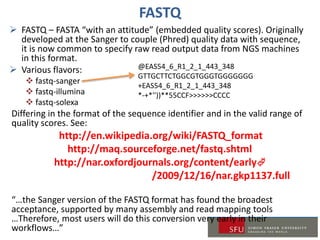
FASTQ
 FASTQ – FASTA “with an attitude” (embedded quality scores). Originally
developed at the Sanger to couple (Phred) quality data with sequence,
it is now common to specify raw read output data from NGS machines
in this format.
 Various flavors:
 fastq-sanger
 fastq-illumina
 fastq-solexa
Differing in the format of the sequence identifier and in the valid range of
quality scores. See:
http://en.wikipedia.org/wiki/FASTQ_format
http://maq.sourceforge.net/fastq.shtml
http://nar.oxfordjournals.org/content/early
/2009/12/16/nar.gkp1137.full
“…the Sanger version of the FASTQ format has found the broadest
acceptance, supported by many assembly and read mapping tools
…Therefore, most users will do this conversion very early in their
workflows…”
@EAS54_6_R1_2_1_443_348
GTTGCTTCTGGCGTGGGTGGGGGGG
+EAS54_6_R1_2_1_443_348
*-+*''))**55CCF>>>>>>CCCC
SAM/BAM
SAM– a tab-delimited text file that contains a
compact and index-able representation of
nucleotide sequence alignments
http://samtools.sourceforge.net/SAM1.pdf
http://samtools.sourceforge.net/
BAM – binary version of SAM (preferred by IGV)
I/O format of several NGS tools, see:
http://samtools.sourceforge.net/swlist.shtml
See also:
Li H.*, Handsaker B.*, Wysoker A., Fennell T., Ruan J., Homer N., Marth
G., Abecasis G., Durbin R. and 1000 Genome Project Data Processing
Subgroup (2009) The Sequence alignment/map (SAM) format and
SAMtools. Bioinformatics, 25, 2078-9.
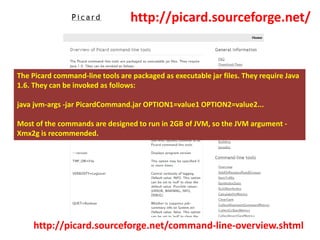
http://picard.sourceforge.net/command-line-overview.shtml
http://picard.sourceforge.net/
The Picard command-line tools are packaged as executable jar files. They require Java
1.6. They can be invoked as follows:
java jvm-args -jar PicardCommand.jar OPTION1=value1 OPTION2=value2...
Most of the commands are designed to run in 2GB of JVM, so the JVM argument -
Xmx2g is recommended.
Getting & Running Picard…
Obtain archive using project “Download” link
Extract zip file to sensible location
Ensure that you have Java 6 on your machine
Run from command shell as indicated
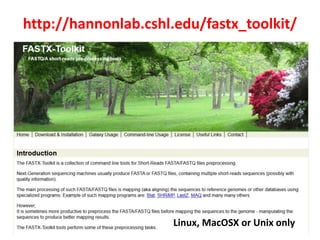
http://hannonlab.cshl.edu/fastx_toolkit/
Linux, MacOSX or Unix only
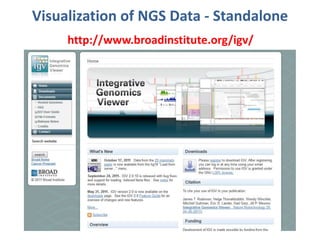
Visualization of NGS Data - Standalone
http://www.broadinstitute.org/igv/
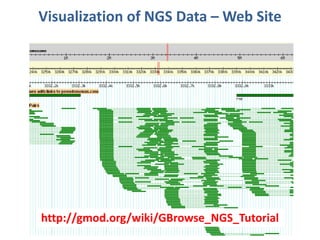
Visualization of NGS Data – Web Site
http://gmod.org/wiki/GBrowse_NGS_Tutorial
GALAXY REVISITED
2.1 Next Generation Sequencing and Sequence Assembly Algorithms
Learning about Galaxy
Extensive web resources available:
http://wiki.g2.bx.psu.edu/Learn/
Getting started: “Galaxy 101”
Other screencasts
Information pages about dataset management,
tool usage and data visualization
Published pages/protocols:
https://main.g2.bx.psu.edu/page/list_published
Logging into Galaxy @ WestGrid
https://joffre.westgrid.ca/galaxy/
Accessing the Westgrid Galaxy instance
Use your Westgrid ID (email name without @part)
to log into Joffre, e.g. if your email is
‘rbruskie@sfu.ca’, your server access id is
‘rbruskie’, and use your WestGrid password
Logging into the Galaxy instance
Once into Galaxy, you need to register (initially) or
log in (if already registered) using your username
(your full email, e.g. ‘rbruskie@sfu.ca’) and
(important!) use your WestGrid password as the
Galaxy password
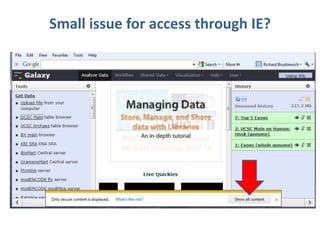
Small issue for access through IE?
We will run through “Galaxy 101”
https://main.g2.bx.psu.edu/galaxy101
Try it! Ask questions along the way….
Some sensible steps for processing NGS data
Obtain the data (i.e. upload to Galaxy)
Assess quality of read data
Convert reads to convenient form (fastq?)
Filter out questionable data: low quality,
vector
Process to integrate
de novo assembly: Allpaths, ABySS, Velvet,
SOAPdenovo, etc., or…
Map onto reference: SAM, Bowtie, MAQ, etc.
Clean up and visualize

Sfu ngs course_workshop tutorial_2.1

  • 1.
    NGS Bioinformatics Workshop 2.1Tutorial – Next Generation Sequencing and Sequence Assembly Algorithms May 3rd, 2012 IRMACS 10900 Facilitator: Richard Bruskiewich Adjunct Professor, MBB
  • 2.
    Agenda Data format review(and some associated tools) Revisit Galaxy Revisit data visualization
  • 3.
    FASTQ  FASTQ –FASTA “with an attitude” (embedded quality scores). Originally developed at the Sanger to couple (Phred) quality data with sequence, it is now common to specify raw read output data from NGS machines in this format.  Various flavors:  fastq-sanger  fastq-illumina  fastq-solexa Differing in the format of the sequence identifier and in the valid range of quality scores. See: http://en.wikipedia.org/wiki/FASTQ_format http://maq.sourceforge.net/fastq.shtml http://nar.oxfordjournals.org/content/early /2009/12/16/nar.gkp1137.full “…the Sanger version of the FASTQ format has found the broadest acceptance, supported by many assembly and read mapping tools …Therefore, most users will do this conversion very early in their workflows…” @EAS54_6_R1_2_1_443_348 GTTGCTTCTGGCGTGGGTGGGGGGG +EAS54_6_R1_2_1_443_348 *-+*''))**55CCF>>>>>>CCCC
  • 4.
    SAM/BAM SAM– a tab-delimitedtext file that contains a compact and index-able representation of nucleotide sequence alignments http://samtools.sourceforge.net/SAM1.pdf http://samtools.sourceforge.net/ BAM – binary version of SAM (preferred by IGV) I/O format of several NGS tools, see: http://samtools.sourceforge.net/swlist.shtml See also: Li H.*, Handsaker B.*, Wysoker A., Fennell T., Ruan J., Homer N., Marth G., Abecasis G., Durbin R. and 1000 Genome Project Data Processing Subgroup (2009) The Sequence alignment/map (SAM) format and SAMtools. Bioinformatics, 25, 2078-9.
  • 5.
    http://picard.sourceforge.net/command-line-overview.shtml http://picard.sourceforge.net/ The Picard command-linetools are packaged as executable jar files. They require Java 1.6. They can be invoked as follows: java jvm-args -jar PicardCommand.jar OPTION1=value1 OPTION2=value2... Most of the commands are designed to run in 2GB of JVM, so the JVM argument - Xmx2g is recommended.
  • 6.
    Getting & RunningPicard… Obtain archive using project “Download” link Extract zip file to sensible location Ensure that you have Java 6 on your machine Run from command shell as indicated
  • 7.
  • 8.
    Visualization of NGSData - Standalone http://www.broadinstitute.org/igv/
  • 9.
    Visualization of NGSData – Web Site http://gmod.org/wiki/GBrowse_NGS_Tutorial
  • 10.
    GALAXY REVISITED 2.1 NextGeneration Sequencing and Sequence Assembly Algorithms
  • 11.
    Learning about Galaxy Extensiveweb resources available: http://wiki.g2.bx.psu.edu/Learn/ Getting started: “Galaxy 101” Other screencasts Information pages about dataset management, tool usage and data visualization Published pages/protocols: https://main.g2.bx.psu.edu/page/list_published
  • 12.
    Logging into Galaxy@ WestGrid https://joffre.westgrid.ca/galaxy/ Accessing the Westgrid Galaxy instance Use your Westgrid ID (email name without @part) to log into Joffre, e.g. if your email is ‘rbruskie@sfu.ca’, your server access id is ‘rbruskie’, and use your WestGrid password Logging into the Galaxy instance Once into Galaxy, you need to register (initially) or log in (if already registered) using your username (your full email, e.g. ‘rbruskie@sfu.ca’) and (important!) use your WestGrid password as the Galaxy password
  • 13.
    Small issue foraccess through IE?
  • 14.
    We will runthrough “Galaxy 101” https://main.g2.bx.psu.edu/galaxy101 Try it! Ask questions along the way….
  • 15.
    Some sensible stepsfor processing NGS data Obtain the data (i.e. upload to Galaxy) Assess quality of read data Convert reads to convenient form (fastq?) Filter out questionable data: low quality, vector Process to integrate de novo assembly: Allpaths, ABySS, Velvet, SOAPdenovo, etc., or… Map onto reference: SAM, Bowtie, MAQ, etc. Clean up and visualize