Data formats and visualization in 
next-generation sequencing analysis 
Li Shen, Asst. Prof. 
Neuro core 
Sep 2014
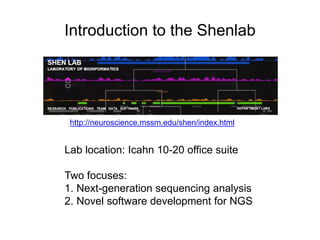
Introduction to the Shenlab 
http://neuroscience.mssm.edu/shen/index.html 
Lab location: Icahn 10-20 office suite 
Two focuses: 
1. Next-generation sequencing analysis 
2. Novel software development for NGS
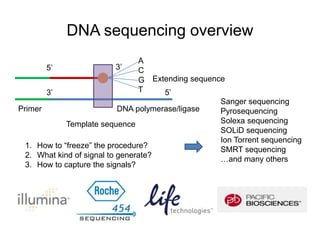
DNA sequencing overview 
Primer 
Extending sequence 
DNA polymerase/ligase 
Template sequence 
A 
C 
G 
T 
5’ 3’ 
3’ 5’ 
1. How to “freeze” the procedure? 
2. What kind of signal to generate? 
3. How to capture the signals? 
Sanger sequencing 
Pyrosequencing 
Solexa sequencing 
SOLiD sequencing 
Ion Torrent sequencing 
SMRT sequencing 
…and many others
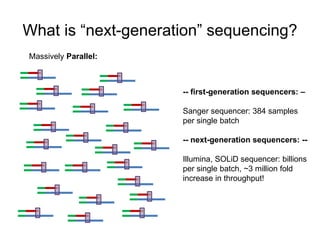
What is “next-generation” sequencing? 
-- first-generation sequencers: – 
Sanger sequencer: 384 samples 
per single batch 
-- next-generation sequencers: -- 
Illumina, SOLiD sequencer: billions 
per single batch, ~3 million fold 
increase in throughput! 
Massively Parallel:
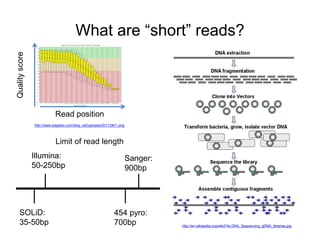
What are “short” reads? 
http://www.edgebio.com/blog_old/uploads/2011/06/1.png 
http://en.wikipedia.org/wiki/File:DNA_Sequencing_gDNA_libraries.jpg 
Read position 
Quality score 
Limit of read length 
Illumina: 
50-250bp 
SOLiD: 
35-50bp 
Sanger: 
900bp 
454 pyro: 
700bp
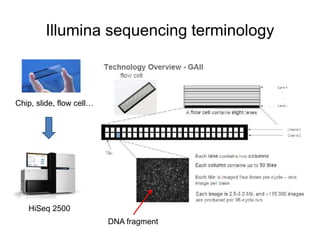
Illumina sequencing terminology 
Chip, slide, flow cell… 
HiSeq 2500 
DNA fragment
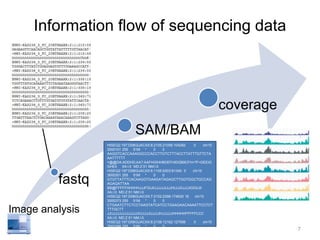
Information flow of sequencing data 
fastq 
SAM/BAM 
coverage 
HISEQ2:197:D08GUACXX:8:2105:21056:104282 0 chr10 
3000101 255 51M * 0 0 
AAGGTCACCAAAGGCCCACCTTGTCTTTACCTTATTTGTTCTA 
AATTTTTT 
=@@DA:ADDHD;AA?:AAFHGIHHBDEFHIDGB9CFH<?F<DEEIG 
GHEII XA:i:0 MD:Z:51 NM:i:0 
HISEQ2:197:D08GUACXX:6:1105:9303:81340 0 chr10 
3000301 255 51M * 0 0 
GTGTTATTTCACAAGGTGAAGATAGAGCTTGGTGGCTGCCAG 
AGAGATTAA 
BB@FFFFFHHHHHJJJFGIJIIJJJJJJIJJJHIJJJIIJJJJIGIGIJII 
XA:i:0 MD:Z:51 NM:i:0 
HISEQ2:197:D08GUACXX:7:2102:2396:174630 16 chr10 
3000373 255 51M * 0 0 
CTGAATCTTCTCCTAAGTATCATCCTGAAGAACAAAATTCCTCT 
TTTGCTT 
JJIJJJJJJJJJJJJJJJIIJJJJJIJJJJJHJJJJJJHHHHHFFFFFCCC 
XA:i:0 MD:Z:51 NM:i:0 
HISEQ2:197:D08GUACXX:8:2108:12162:127556 0 chr10 
3000388 255 51M * 0 0 
AGTATCATCCTGAAGAACAAAATTCCTCTTTTGCTTAAAATTCA 
CTGGGGA 
@@?DDFFDBHFFGJIIGIGGGGGIJGHHIHIIGEGIIIIIJJJIIJIGGGG 
7 
Image analysis
Raw sequence format 
FASTQ
What is FASTQ? 
• Text-based format for storing both biological 
sequences and corresponding quality scores. 
• FASTQ = FASTA + QUALITY 
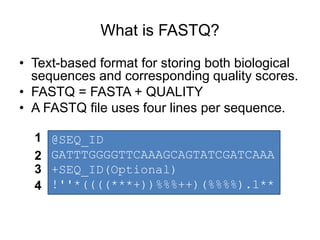
• A FASTQ file uses four lines per sequence. 
@SEQ_ID 
GATTTGGGGTTCAAAGCAGTATCGATCAAA 
+SEQ_ID(Optional) 
!''*((((***+))%%%++)(%%%%).1** 
1 
2 
3 
4
Illumina sequence identifiers 
Instrument name 
Lane 
Paired read 
@SOLEXA-DELL:6:1:8:1376#0/1 
Tile 
X-coordinate 
Y-coordinate 
Index number 
@SEQ_ID
Quality score calculation 
+SEQ_ID 
!''*((((***+))%%%++)(%%%%).1** ? 
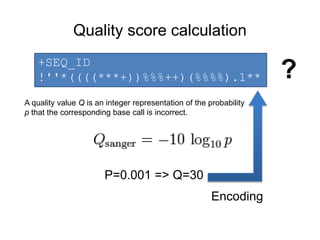
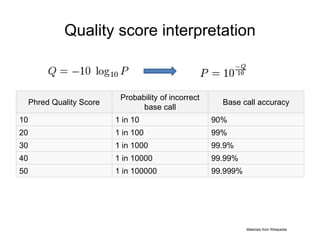
A quality value Q is an integer representation of the probability 
p that the corresponding base call is incorrect. 
P=0.001 => Q=30 
Encoding
Quality score interpretation 
Phred Quality Score 
Probability of incorrect 
base call 
Base call accuracy 
10 1 in 10 90% 
20 1 in 100 99% 
30 1 in 1000 99.9% 
40 1 in 10000 99.99% 
50 1 in 100000 99.999% 
Materials from Wikepedia
Quality score encoding 
1. A quality score is typically: [0, 40] 
http://ascii-table.com/img/ascii-table.gif 
Not efficient space use 
2. An ascii table contains 128 symbols, incl. 
quality score range 
3. Formula: score + offset => index 
Two variants: 
• offset=64(Illumina 1.0-before 1.8) 
• offset=33(Sanger, Illumina 1.8+). 
(33): !"#$%&'()*+,-./0123456789:;<=>?@ABCDEFGHI 
(64): @ABCDEFGHIJKLMNOPQRSTUVWXYZ[]^_`abcdefgh
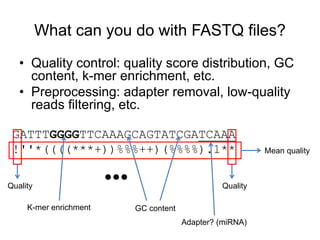
What can you do with FASTQ files? 
• Quality control: quality score distribution, GC 
content, k-mer enrichment, etc. 
• Preprocessing: adapter removal, low-quality 
reads filtering, etc. 
GATTTGGGGTTCAAAGCAGTATCGATCAAA 
!''*((((***+))%%%++)(%%%%).1** Mean quality 
Quality Quality 
K-mer enrichment GC content 
Adapter? (miRNA) 
…
Alignment format 
SAM/BAM
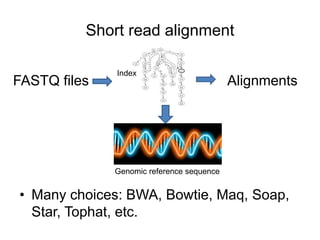
Short read alignment 
Index 
FASTQ files Alignments 
Genomic reference sequence 
• Many choices: BWA, Bowtie, Maq, Soap, 
Star, Tophat, etc.
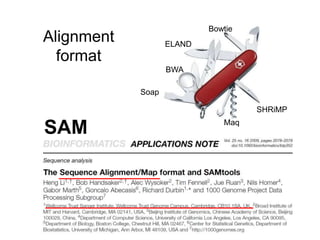
Alignment 
format 
Bowtie 
ELAND 
BWA 
Soap 
Maq 
SHRiMP 
SAM
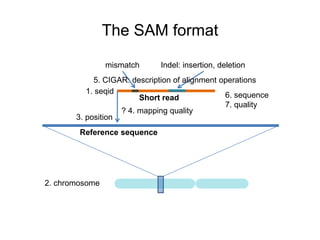
The SAM format 
mismatch Indel: insertion, deletion 
5. CIGAR: description of alignment operations 
1. seqid 
3. position 
2. chromosome 
Short read 
? 4. mapping quality 
Reference sequence 
6. sequence 
7. quality
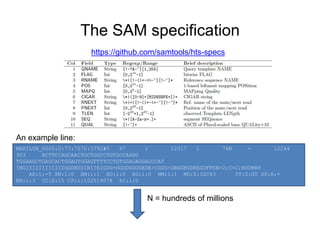
The SAM specification 
https://github.com/samtools/hts-specs 
An example line: 
MARILYN_0005:2:77:7570:3792#0 97 1 12017 1 76M = 12244 
303 ACTTCCAGCAACTGCTGGCCTGTGCCAGGG 
TGGAAGCTGAGCACTGGAGTGGAGTTTTCCTGTGGAGAGGAGCCAT 
IHGIIIIIIIIIIIIGGDBDIIHIIEIGDG=GGDDGGGGEDE>CGDG<GBGGBGDEEGDFFEB>2;C<C;BDDBB8 
AS:i:-5 XN:i:0 XM:i:1 XO:i:0 XG:i:0 NM:i:1 MD:Z:32C43 YT:Z:UU XS:A:+ 
NH:i:3 CC:Z:15 CP:i:102519078 HI:i:0 
N = hundreds of millions
BAM: the binary version of SAM 
• SAM files are large: 1M short reads => 
200MB; 100M short reads => 20GB. 
• Makes sense for compression 
• BAM: Binary sAM; compress using gzip 
library. 
• Two parts: compressed data + index 
• Index: random access (visualization, 
analysis, etc.)
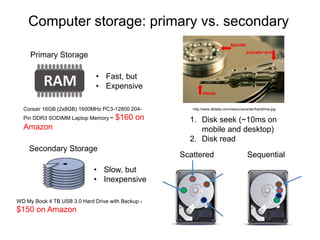
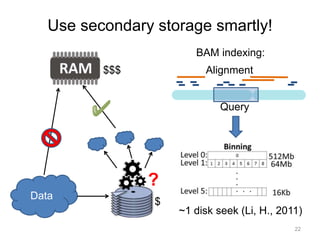
Computer storage: primary vs. secondary 
Primary Storage 
• Fast, but 
• Expensive 
Corsair 16GB (2x8GB) 1600MHz PC3-12800 204- 
Pin DDR3 SODIMM Laptop Memory - $160 on 
Amazon 
Secondary Storage 
• Slow, but 
• Inexpensive 
WD My Book 4 TB USB 3.0 Hard Drive with Backup - 
$150 on Amazon 
http://www.dtidata.com/resourcecenter/harddrive.jpg 
1. Disk seek (~10ms on 
mobile and desktop) 
2. Disk read 
Scattered Sequential
Use secondary storage smartly! 
22 
Data 
? 
BAM indexing: 
Alignment 
Query 
~1 disk seek (Li, H., 2011) 
$$$ 
$
Coverage format 
WIGGLE
From alignment to read depth 
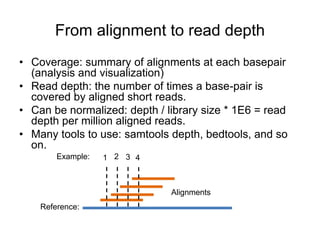
• Coverage: summary of alignments at each basepair 
(analysis and visualization) 
• Read depth: the number of times a base-pair is 
covered by aligned short reads. 
• Can be normalized: depth / library size * 1E6 = read 
depth per million aligned reads. 
• Many tools to use: samtools depth, bedtools, and so 
on. 
1 2 3 4 
Reference: 
Alignments 
Example:
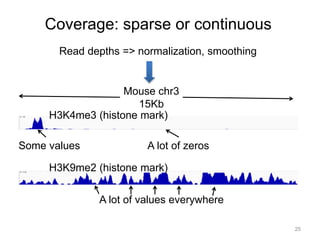
Coverage: sparse or continuous 
Read depths => normalization, smoothing 
H3K4me3 (histone mark) 
25 
Mouse chr3 
15Kb 
Some values A lot of zeros 
H3K9me2 (histone mark) 
A lot of values everywhere
Describing coverage: the Wiggle format 
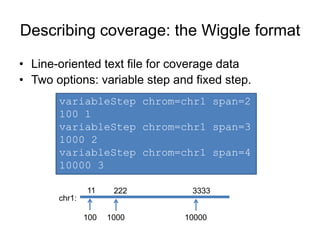
• Line-oriented text file for coverage data 
• Two options: variable step and fixed step. 
variableStep chrom=chr1 span=2 
100 1 
variableStep chrom=chr1 span=3 
1000 2 
variableStep chrom=chr1 span=4 
10000 3 
11 222 3333 
chr1: 
100 1000 10000
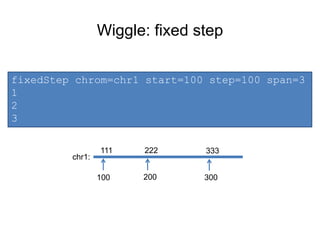
Wiggle: fixed step 
fixedStep chrom=chr1 start=100 step=100 span=3 
1 
2 
3 
111 222 333 
chr1: 
100 200 300
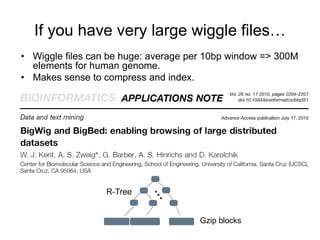
If you have very large wiggle files… 
• Wiggle files can be huge: average per 10bp window => 300M 
elements for human genome. 
• Makes sense to compress and index. 
Gzip blocks
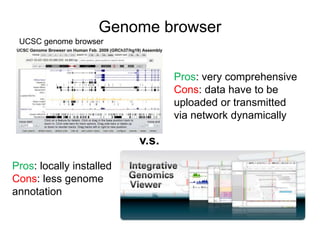
Genome browser 
v.s. 
Pros: very comprehensive 
Cons: data have to be 
uploaded or transmitted 
via network dynamically 
UCSC genome browser 
Pros: locally installed 
Cons: less genome 
annotation
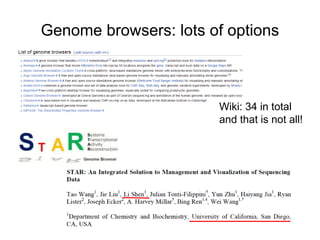
Genome browsers: lots of options 
Wiki: 34 in total 
and that is not all!
Alignment, BAM, Wiggle, Peak calling, BED… 
DEMO: GENOME BROWSER
The coolest way to visualize your NGS data 
NGS.PLOT: QUICK MINING AND 
VISUALIZATION FOR NEXT 
GENERATION SEQUENCING DATA
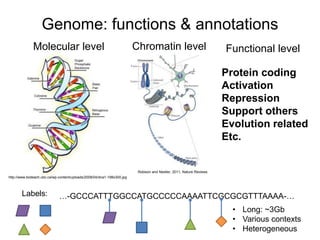
Genome: functions & annotations 
Molecular level Chromatin level 
http://www.bioteach.ubc.ca/wp-content/uploads/2008/04/dna1-198x300.jpg 
Robison and Nestler, 2011, Nature Reviews 
…-GCCCATTTGGCCATGCCCCCAAAATTCGCGCGTTTAAAA-… 
• Long: ~3Gb 
• Various contexts 
• Heterogeneous 
Labels: 
Functional level 
Protein coding 
Activation 
Repression 
Support others 
Evolution related 
Etc.
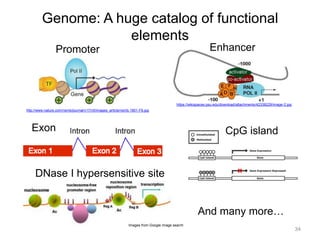
Genome: A huge catalog of functional 
elements 
34 
Promoter 
http://www.nature.com/nsmb/journal/v17/n5/images_article/nsmb.1801-F6.jpg 
Enhancer 
https://wikispaces.psu.edu/download/attachments/42338229/image-2.jpg 
Exon CpG island 
DNase I hypersensitive site 
And many more… 
Images from Google image search
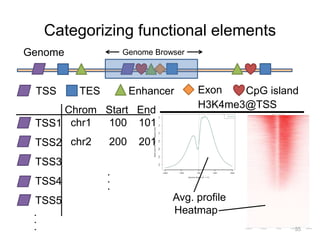
Categorizing functional elements 
Genome Browser 
TSS TES Enhancer Exon CpG island 
TSS1 
TSS2 
TSS3 
TSS4 
TSS5 
... 
Chrom Start End 
chr1 100 101 
chr2 200 201 
.. 
. 
H3K4me3@TSS 
Avg. profile 
Heatmap 
35 
Genome
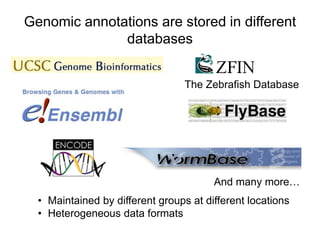
Genomic annotations are stored in different 
databases 
The Zebrafish Database 
And many more… 
• Maintained by different groups at different locations 
• Heterogeneous data formats
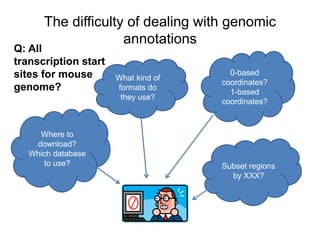
The difficulty of dealing with genomic 
annotations 
Where to 
download? 
Which database 
to use? 
What kind of 
formats do 
they use? 
0-based 
coordinates? 
1-based 
coordinates? 
Subset regions 
by XXX? 
Q: All 
transcription start 
sites for mouse 
genome?
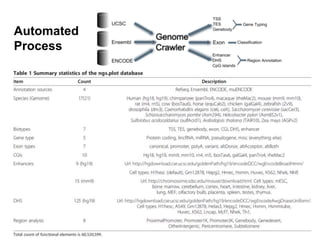
Automated 
Process
ngs.plot: quick mining & visualization for 
NGS data 
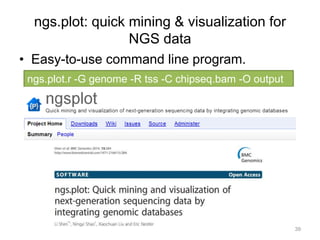
• Easy-to-use command line program. 
ngs.plot.r -G genome -R tss -C chipseq.bam -O output 
39
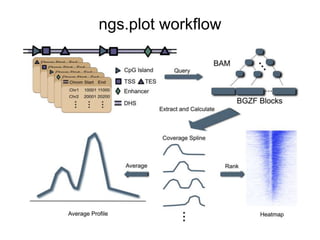
ngs.plot workflow
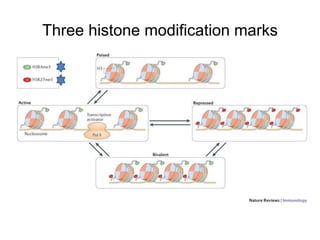
Three histone modification marks
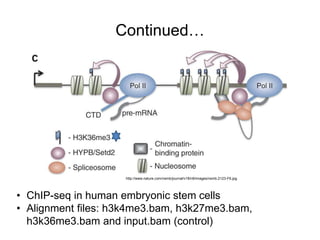
Continued… 
http://www.nature.com/nsmb/journal/v18/n9/images/nsmb.2123-F6.jpg 
• ChIP-seq in human embryonic stem cells 
• Alignment files: h3k4me3.bam, h3k27me3.bam, 
h3k36me3.bam and input.bam (control)
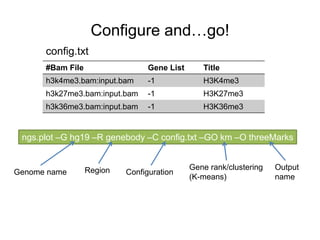
Configure and…go! 
config.txt 
#Bam File Gene List Title 
h3k4me3.bam:input.bam -1 H3K4me3 
h3k27me3.bam:input.bam -1 H3K27me3 
h3k36me3.bam:input.bam -1 H3K36me3 
ngs.plot –G hg19 –R genebody –C config.txt –GO km –O threeMarks 
Genome name Region Configuration 
Gene rank/clustering 
(K-means) 
Output 
name
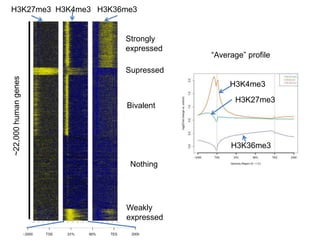
H3K27me3 H3K4me3 H3K36me3 
Strongly 
expressed 
Supressed 
Bivalent 
Nothing 
Weakly 
expressed 
~22,000 human genes 
“Average” profile 
H3K4me3 
H3K27me3 
H3K36me3
Global visualization made easy… 
(OPTIONAL) DEMO: NGS.PLOT

Bioinfo ngs data format visualization v2

  • 1.
    Data formats andvisualization in next-generation sequencing analysis Li Shen, Asst. Prof. Neuro core Sep 2014
  • 2.
    Introduction to theShenlab http://neuroscience.mssm.edu/shen/index.html Lab location: Icahn 10-20 office suite Two focuses: 1. Next-generation sequencing analysis 2. Novel software development for NGS
  • 3.
    DNA sequencing overview Primer Extending sequence DNA polymerase/ligase Template sequence A C G T 5’ 3’ 3’ 5’ 1. How to “freeze” the procedure? 2. What kind of signal to generate? 3. How to capture the signals? Sanger sequencing Pyrosequencing Solexa sequencing SOLiD sequencing Ion Torrent sequencing SMRT sequencing …and many others
  • 4.
    What is “next-generation”sequencing? -- first-generation sequencers: – Sanger sequencer: 384 samples per single batch -- next-generation sequencers: -- Illumina, SOLiD sequencer: billions per single batch, ~3 million fold increase in throughput! Massively Parallel:
  • 5.
    What are “short”reads? http://www.edgebio.com/blog_old/uploads/2011/06/1.png http://en.wikipedia.org/wiki/File:DNA_Sequencing_gDNA_libraries.jpg Read position Quality score Limit of read length Illumina: 50-250bp SOLiD: 35-50bp Sanger: 900bp 454 pyro: 700bp
  • 6.
    Illumina sequencing terminology Chip, slide, flow cell… HiSeq 2500 DNA fragment
  • 7.
    Information flow ofsequencing data fastq SAM/BAM coverage HISEQ2:197:D08GUACXX:8:2105:21056:104282 0 chr10 3000101 255 51M * 0 0 AAGGTCACCAAAGGCCCACCTTGTCTTTACCTTATTTGTTCTA AATTTTTT =@@DA:ADDHD;AA?:AAFHGIHHBDEFHIDGB9CFH<?F<DEEIG GHEII XA:i:0 MD:Z:51 NM:i:0 HISEQ2:197:D08GUACXX:6:1105:9303:81340 0 chr10 3000301 255 51M * 0 0 GTGTTATTTCACAAGGTGAAGATAGAGCTTGGTGGCTGCCAG AGAGATTAA BB@FFFFFHHHHHJJJFGIJIIJJJJJJIJJJHIJJJIIJJJJIGIGIJII XA:i:0 MD:Z:51 NM:i:0 HISEQ2:197:D08GUACXX:7:2102:2396:174630 16 chr10 3000373 255 51M * 0 0 CTGAATCTTCTCCTAAGTATCATCCTGAAGAACAAAATTCCTCT TTTGCTT JJIJJJJJJJJJJJJJJJIIJJJJJIJJJJJHJJJJJJHHHHHFFFFFCCC XA:i:0 MD:Z:51 NM:i:0 HISEQ2:197:D08GUACXX:8:2108:12162:127556 0 chr10 3000388 255 51M * 0 0 AGTATCATCCTGAAGAACAAAATTCCTCTTTTGCTTAAAATTCA CTGGGGA @@?DDFFDBHFFGJIIGIGGGGGIJGHHIHIIGEGIIIIIJJJIIJIGGGG 7 Image analysis
  • 8.
  • 9.
    What is FASTQ? • Text-based format for storing both biological sequences and corresponding quality scores. • FASTQ = FASTA + QUALITY • A FASTQ file uses four lines per sequence. @SEQ_ID GATTTGGGGTTCAAAGCAGTATCGATCAAA +SEQ_ID(Optional) !''*((((***+))%%%++)(%%%%).1** 1 2 3 4
  • 10.
    Illumina sequence identifiers Instrument name Lane Paired read @SOLEXA-DELL:6:1:8:1376#0/1 Tile X-coordinate Y-coordinate Index number @SEQ_ID
  • 11.
    Quality score calculation +SEQ_ID !''*((((***+))%%%++)(%%%%).1** ? A quality value Q is an integer representation of the probability p that the corresponding base call is incorrect. P=0.001 => Q=30 Encoding
  • 12.
    Quality score interpretation Phred Quality Score Probability of incorrect base call Base call accuracy 10 1 in 10 90% 20 1 in 100 99% 30 1 in 1000 99.9% 40 1 in 10000 99.99% 50 1 in 100000 99.999% Materials from Wikepedia
  • 13.
    Quality score encoding 1. A quality score is typically: [0, 40] http://ascii-table.com/img/ascii-table.gif Not efficient space use 2. An ascii table contains 128 symbols, incl. quality score range 3. Formula: score + offset => index Two variants: • offset=64(Illumina 1.0-before 1.8) • offset=33(Sanger, Illumina 1.8+). (33): !"#$%&'()*+,-./0123456789:;<=>?@ABCDEFGHI (64): @ABCDEFGHIJKLMNOPQRSTUVWXYZ[]^_`abcdefgh
  • 14.
    What can youdo with FASTQ files? • Quality control: quality score distribution, GC content, k-mer enrichment, etc. • Preprocessing: adapter removal, low-quality reads filtering, etc. GATTTGGGGTTCAAAGCAGTATCGATCAAA !''*((((***+))%%%++)(%%%%).1** Mean quality Quality Quality K-mer enrichment GC content Adapter? (miRNA) …
  • 15.
  • 16.
    Short read alignment Index FASTQ files Alignments Genomic reference sequence • Many choices: BWA, Bowtie, Maq, Soap, Star, Tophat, etc.
  • 17.
    Alignment format Bowtie ELAND BWA Soap Maq SHRiMP SAM
  • 18.
    The SAM format mismatch Indel: insertion, deletion 5. CIGAR: description of alignment operations 1. seqid 3. position 2. chromosome Short read ? 4. mapping quality Reference sequence 6. sequence 7. quality
  • 19.
    The SAM specification https://github.com/samtools/hts-specs An example line: MARILYN_0005:2:77:7570:3792#0 97 1 12017 1 76M = 12244 303 ACTTCCAGCAACTGCTGGCCTGTGCCAGGG TGGAAGCTGAGCACTGGAGTGGAGTTTTCCTGTGGAGAGGAGCCAT IHGIIIIIIIIIIIIGGDBDIIHIIEIGDG=GGDDGGGGEDE>CGDG<GBGGBGDEEGDFFEB>2;C<C;BDDBB8 AS:i:-5 XN:i:0 XM:i:1 XO:i:0 XG:i:0 NM:i:1 MD:Z:32C43 YT:Z:UU XS:A:+ NH:i:3 CC:Z:15 CP:i:102519078 HI:i:0 N = hundreds of millions
  • 20.
    BAM: the binaryversion of SAM • SAM files are large: 1M short reads => 200MB; 100M short reads => 20GB. • Makes sense for compression • BAM: Binary sAM; compress using gzip library. • Two parts: compressed data + index • Index: random access (visualization, analysis, etc.)
  • 21.
    Computer storage: primaryvs. secondary Primary Storage • Fast, but • Expensive Corsair 16GB (2x8GB) 1600MHz PC3-12800 204- Pin DDR3 SODIMM Laptop Memory - $160 on Amazon Secondary Storage • Slow, but • Inexpensive WD My Book 4 TB USB 3.0 Hard Drive with Backup - $150 on Amazon http://www.dtidata.com/resourcecenter/harddrive.jpg 1. Disk seek (~10ms on mobile and desktop) 2. Disk read Scattered Sequential
  • 22.
    Use secondary storagesmartly! 22 Data ? BAM indexing: Alignment Query ~1 disk seek (Li, H., 2011) $$$ $
  • 23.
  • 24.
    From alignment toread depth • Coverage: summary of alignments at each basepair (analysis and visualization) • Read depth: the number of times a base-pair is covered by aligned short reads. • Can be normalized: depth / library size * 1E6 = read depth per million aligned reads. • Many tools to use: samtools depth, bedtools, and so on. 1 2 3 4 Reference: Alignments Example:
  • 25.
    Coverage: sparse orcontinuous Read depths => normalization, smoothing H3K4me3 (histone mark) 25 Mouse chr3 15Kb Some values A lot of zeros H3K9me2 (histone mark) A lot of values everywhere
  • 26.
    Describing coverage: theWiggle format • Line-oriented text file for coverage data • Two options: variable step and fixed step. variableStep chrom=chr1 span=2 100 1 variableStep chrom=chr1 span=3 1000 2 variableStep chrom=chr1 span=4 10000 3 11 222 3333 chr1: 100 1000 10000
  • 27.
    Wiggle: fixed step fixedStep chrom=chr1 start=100 step=100 span=3 1 2 3 111 222 333 chr1: 100 200 300
  • 28.
    If you havevery large wiggle files… • Wiggle files can be huge: average per 10bp window => 300M elements for human genome. • Makes sense to compress and index. Gzip blocks
  • 29.
    Genome browser v.s. Pros: very comprehensive Cons: data have to be uploaded or transmitted via network dynamically UCSC genome browser Pros: locally installed Cons: less genome annotation
  • 30.
    Genome browsers: lotsof options Wiki: 34 in total and that is not all!
  • 31.
    Alignment, BAM, Wiggle,Peak calling, BED… DEMO: GENOME BROWSER
  • 32.
    The coolest wayto visualize your NGS data NGS.PLOT: QUICK MINING AND VISUALIZATION FOR NEXT GENERATION SEQUENCING DATA
  • 33.
    Genome: functions &annotations Molecular level Chromatin level http://www.bioteach.ubc.ca/wp-content/uploads/2008/04/dna1-198x300.jpg Robison and Nestler, 2011, Nature Reviews …-GCCCATTTGGCCATGCCCCCAAAATTCGCGCGTTTAAAA-… • Long: ~3Gb • Various contexts • Heterogeneous Labels: Functional level Protein coding Activation Repression Support others Evolution related Etc.
  • 34.
    Genome: A hugecatalog of functional elements 34 Promoter http://www.nature.com/nsmb/journal/v17/n5/images_article/nsmb.1801-F6.jpg Enhancer https://wikispaces.psu.edu/download/attachments/42338229/image-2.jpg Exon CpG island DNase I hypersensitive site And many more… Images from Google image search
  • 35.
    Categorizing functional elements Genome Browser TSS TES Enhancer Exon CpG island TSS1 TSS2 TSS3 TSS4 TSS5 ... Chrom Start End chr1 100 101 chr2 200 201 .. . H3K4me3@TSS Avg. profile Heatmap 35 Genome
  • 36.
    Genomic annotations arestored in different databases The Zebrafish Database And many more… • Maintained by different groups at different locations • Heterogeneous data formats
  • 37.
    The difficulty ofdealing with genomic annotations Where to download? Which database to use? What kind of formats do they use? 0-based coordinates? 1-based coordinates? Subset regions by XXX? Q: All transcription start sites for mouse genome?
  • 38.
  • 39.
    ngs.plot: quick mining& visualization for NGS data • Easy-to-use command line program. ngs.plot.r -G genome -R tss -C chipseq.bam -O output 39
  • 40.
  • 41.
  • 42.
    Continued… http://www.nature.com/nsmb/journal/v18/n9/images/nsmb.2123-F6.jpg •ChIP-seq in human embryonic stem cells • Alignment files: h3k4me3.bam, h3k27me3.bam, h3k36me3.bam and input.bam (control)
  • 43.
    Configure and…go! config.txt #Bam File Gene List Title h3k4me3.bam:input.bam -1 H3K4me3 h3k27me3.bam:input.bam -1 H3K27me3 h3k36me3.bam:input.bam -1 H3K36me3 ngs.plot –G hg19 –R genebody –C config.txt –GO km –O threeMarks Genome name Region Configuration Gene rank/clustering (K-means) Output name
  • 44.
    H3K27me3 H3K4me3 H3K36me3 Strongly expressed Supressed Bivalent Nothing Weakly expressed ~22,000 human genes “Average” profile H3K4me3 H3K27me3 H3K36me3
  • 45.
    Global visualization madeeasy… (OPTIONAL) DEMO: NGS.PLOT

Editor's Notes

  • #2 Good morning. How are you? Today we’ll talk about Data formats and visualization in next-generation sequencing analysis.
  • #3 I want to briefly introduce myself. My name is Li Shen. I’m an assistant professor in the neuroscience department. This is my group’s website. And my group has two focuses: first, next-generation sequencing analysis. I have collaborations with many PIs in the department. Second, we are also highly interested in developing novel software to analyze the sequencing data. And I’ll talk about one of the of them in today’s lecture.
  • #4 To give you a bit of the background information. I want you to get a feel of: what are those sequencing data? And how are they generated? Sequencing is basically a process to determine the order of nucleotides of a DNA sequence. Despite the fact that there are many sequencing technologies on the market, the basic idea is the same. And it can be summarized as this figure. Starting from a primer sequence, the DNA polymerase [pol-uh-muh-reys, -reyz] will try to produce the complement of the template sequence, one by one. A DNA sequencer will try to capture the activity of the DNA polymerase, and record the nucleotide that is being added. Finally, a complete readout gives us the template sequence. Now, there are several questions need to be answered: first, at each step, how do you freeze the sequencing procedure so that the system has enough time to take a snapshot of the nucleotide? Second, what kind of signals shall be generated? Third, how to capture those signals? There are many different answers to the three questions. Considering the combinations of these answers gives us a large array of different sequencing technologies. Such as, sanger sequencing, pyrosequencing, solexa sequencing, solid sequencing, and many others. Most of these sequencing technologies have been commercialized and backed up by various companies. And these are some of the major players.
  • #5 So what do you mean by next-generation sequencing, what’s the technology behind this buzz word, or market hype? Well, the keyword is parallel. The next-generation sequencing is massively parallel. For example, the first generation sequencers, represented by the automated sanger sequencer, can only analyze less than 400 samples per single batch. While for the next-gen sequencers, the illumina and solid sequencers can analyze billions of samples per single batch, that is about 3 million fold increase in throughput, which generate a huge amount of data.
  • #6 However, these sequencers are not without limitations. One of the major limits is the read length. The sequencing quality always degenerates by read length. At certain point, the quality would become so low that it is basically meaningless to continue sequencing. This figure shows you the typical read length of the different sequencers. The old sanger sequencer can actually produce very long reads, up to 900 basepairs. The 454 pyrosequencers can also produce long reads, up to 700 basepairs. While the illumina and solid sequencers are on the other side, they produce very short reads, typically between 35 and 250 basepairs. So how do you sequence the entire genome which can be as long as 3 billion basepairs? What people do is to randomly break the long DNA sequence into many smaller fragments and sequence those fragments. So you get a little piece of data from here and there. And later, a compter program has to be used to assemle those little pieces into the whole genome.
  • #7 This picture gives you a feel of the illumina sequencing machine. This hand is holding a sequencing chip, as you can see, it is actually fairly small. You can call it a chip, a slide, or a flow cell, basically the same thing. Before sequencing begins, you need to load your DNA samples into this small chip and then send it to the sequencer for sequencing. This figure explains some of the concepts involving a flow cell. Each flow cell is separated into 8 different lanes. All lanes are sequenced together but you can load different samples into each lane. A lane is further separated into two columns and each column is divided into many tiles. A tile is like a small grid on the flow cell, which is basically the smallest unit for imagining. On this image, you can see that there are a lot of little dots. Each dot represents a nucleotide that is being added to the extension DNA strand. Altogether, a lot of images will be generated during sequencing, each of which has to be analyzed to extract the information about the sequencing reads.
  • #8 This is a flowchart of the data that are transformed once the sequencing is done. After image analysis, the short read data obtained from a sequencing machine is stored in a so called fastq format. These short reads must be aligned to a reference genome before they can be further analyzed, producing alignment files such as the sam/bam format. The alignment files can be summarized to generate coverage and be displayed in a human-readable way such as this figure.
  • #10 Fastq is a text-based format for storing…if you are familiar with the fasta format, then fastq is basically fasta plus quality. A fastq file uses four lines to represent a sequence. The first line is a sequence id, which always starts with an “@” sign; the second line is the base-pairs, all the acgt’s; and the third line is again the same sequence id starts with a “+” sign, or just the “+” sign; the fourth line is the sequencing quality scores which are encoded in ascii symbols. And this quality line has to be the same length as the sequence line.
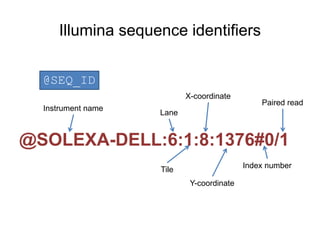
  • #11 In the case of illumina sequencers, the sequence id is very systematic. This is an actual sequence id from mount sinai’s sequencing core. After the “@” sign, there is the instrument name, followed by a colon, then goes lane number, colon, tile number, colon, and then the x and y coordinates of the dot on the tile image. Finally, after the pound sign, there is the index number and paired read number. In this case, the sample is not multiplexed so the index number is 0. if the sequencing was single end, then this number is always 1. if it’s paired-end, then it can be 1 or 2.
  • #12 The trickiest part of a fastq file is probably the sequence quality encoding. The definition of a quality score is that it is an integer representation of the probability p that the corresponding base pair is incorrect. There has been two variants in terms of how the quality score is calculated. In the standard Sanger encoding, q equals negative 10 times log10 p. while in the illumina encoding prior to version 1.3, q equals negative 10 times log10 p over 1 minus p. so the two versions are slightly different. But you can see that when p is very small, they are almost identical.
  • #13 The quality score encoding actually leads to very intuitive interpretation. Using the Sanger encoding as an example, if the score equals 10, that means 1 out of 10 base calls is incorrect, or the base call accuracy is 90%. If the score is 20, 1 out of 100 base calls is incorrect, base call accuracy is 99%. If it is 30, base call accuracy is 99.9%, and so on.
  • #14 To represent the quality scores in a concise fashion, each score is recorded as an ascii symbol. The formula to do this is to add an offset to the score and look for the symbol in this ascii table on the right side. And again, there are two variants in doing this. In the case of illumina score, the offset is 64 before version 1.8. while for Sanger score, the offset is 33. since a quality score is typically between 0 and 40, if it is 33 encoding, then it is represented as one of these symbols. While if it is 64 encoding, then it is represented as one of these symbols. this leas to the following rule of thumb in practice. If somebody throws you a fastq file without letting you know where it comes from. You can just open the fastq file, look at the quality scores, if they are mostly signs, numbers, and big letters, then they are 33 encoded. If they are mostly big letters, brackets and little letters, then they are 64 encoded.
  • #15 So we’ve talked so much about the format of fastq files. What can we do about them? Well, the first thing we often do is to check the quality of the sequencing. We have a quality score for each nucleotide of each short read, it’s very easy to get an average score for this read. Repeating the procedure for all reads in your library, you can get an overall feel about the quality of your library. Some other interesting things to check is like the GC content. It is known that on the old illumina machines, the sequenced reads tend to be GC rich. And you can also calculate the enrichment of different k-mers. Sometimes, your library may become contaminated, and you’ll see spikes of enrichment of different k-mers. After quality check, you may also want to perform preprocessing on your fastq files. In the case of micro RNA sequencing, this is a must-do because micro RNAs are very short, about 20bp. While your read length may be much longer than that. So you’ll see adapter sequences at the 3’ end of the short reads and they must be clipped before alignment.
  • #17 Fastq files are just the raw sequence reads and they must be aligned to the reference genome to make any sense. This works by building an index on the reference sequences so that the alignment can be done efficiently. Luckily, you don’t have to do it yourself. Sequence alignment has been a very hot field in the past decade and there are many choices when it comes to short read alignment. Some popular choices are like BWA, bowtie, map, soap, etc.
  • #18 Just a few years ago, each alignment software will produce alignment files in their own format. If you are an application developer, this really sucks. That basically means you’ll have to write your program like a swiss knife so that it can read all these formats properly. Finally, a group of researchers, mainly from the Sanger institute and the broad institute, developed a format called SAM which is supposed to be a generic format for sequence alignment. And it soon becomes the standard.
  • #19 So, instead of giving you an elaboration on the SAM format, I’d like to flip the question and ask, if you were going to design an alignment format, what will you put there? first, each short read comes with a sequence id, then you want to know which chromosome it has been aligned, and of course, the starting position of the alignment. Due to the existence of sequencing errors, and especially the repetitive regions on the genome, the sequence alignment cannot be 100% accurate. So you want to associate each alignment with a mapping quality score. In the case of mismatch, insertions or deletions, you also need to describe that using a string called CIGAR. Finally, you can keep the raw sequences and quality strings just in case some programs may need them.
  • #20 The actual Sam format is just like what I described. It has 11 required fields that are separated by the tab. If you are interested to know more details, you can go to its website and read the specification. An example line of a sam file is sth. like this. And you may have hundreds of millions of lines like this in your sam file.
  • #21 As I mentioned earlier, the next-generation sequencers can produce a huge number of short reads these days, so the sam files can be very large. A sam file with one million short reads is around 200 mega bytes, and a file with 100 million reads is about 20 giga bytes. If you have a large project with many sequencing samples, the data storage could become a problem. So it totally makes sense that we should convert the text based sam into binary format for compression. The bam format is developed as the binary counter part of sam, which uses the standard gzip library for compression. And it has two parts: one is the compressed data and the other is the index. Having an index on the bam file is very useful because it allows random access to the short reads. For example, if you want to retrieve the aligned reads for a certain gene, you don’t want to go through the entire sam file. You just want that part of the file to be retrieved precisely. This kind of function can be very important for visualization and analysis.
  • #22 There are roughly two types of computer storage – ram and harddrive. Rams are fast but they are also very expensive. To give you an example…on the other hand, harddirves are slow but much cheaper. For example, … so if you have a lot of data, you have to put them on a harddrive. So It’s important to understand how darddirve works so that you may optimize the speed. This is a nice picture of how the inside of a harddrive looks like. when a disk head reads data, it’s basically two steps. First, the disk has to rotate to the right sectior and this mechanic arm moves the disk head to the right location…this is called disk seek, it costs around 10 ms on a mobile and desktop computer. Once the disk head moves to the right location, it can start to read data. So imagine that your data are scattered all over the places, you will end up doing a lot of disk seeks and reads. That is very slow. However, if your data are sequentially located, you just need to do one disk seek and then start reading. That’ll save you a lot of time.
  • #23 Storing and retrieving a large amount of data is a classic problem in computer science. Basically, you have a large amount of data that simply does not fit in your ram. Because hard drive is so much cheaper than ram, you can put the data on the hard drive intead and figure out a way to retrieve the data dynamically when you need them. The challenging part is how to design a smart algorithm to do it efficiently, since hard drive is much slower than ram. To be more specific, bam indexing is a nice solution. By using a binning strategy that separates the chromosome into bins of fixed size and creates a hierachical structure of bin size, we can retrieve the alignments for any interval query efficiently. Study also showed that for most queries of reading one gene into memory, only 1 disk seek is required.
  • #25 After the short reads have been aligned to the reference sequences, we can convert the alignment information into read depth which basically tells you the number of times a base pair is covered by aligned short reads. Sometimes, this depth can be further normalized using the library size to get the read depth per million aligned reads. The purpose of doing this is to remove the effect of different library sizes so that two sequencing samples can be compared. There are many tools you can use to do this, such as the samtools depth or bedtools. Here is an example of the read depth calculation. Assuming we have four short reads aligned to the reference, then the depth at these four different positions are 1, 2, 3 and 4.
  • #26 Now, I want to talk a little about ngs.plot’s mechanisms under the hood. Coverage is the most important data structure in ngs.plot. It represents the enrichment on the whole genome and can be very large. Initially, we were using a method called rle, run length encoding for coverage storage. It basically encodes the data as a pair of value and the number of repeats. So it’s a very simple strategy. For marks that generate sharp peaks, such as h3k4me3, this works very well. Because it only has some values in a narrowed region and a lot of zeros everywhere else. So it’s a sparse vector and we can achieve very good compression. For other marks such as h3k9me2, there is a continuous change of values. Then the compression becomes poor and we’ve got trouble. As a guideline in practice, the coverage file is typically 10-30MB for shallow peaks. So we can load the whole coverage vector into memory and it is very fast. However, for broad peaks, the coverage file is typically 300-700MB. It is very slow to load such a large file and it consumes a lot of memory. In the old time, we had a lot of machine crashes due to coverage loading. So we must figure out a better way to deal with this.
  • #27 There is a format that is often used to describe read depth, which is called wiggle format. A wiggle file is a line oriented text file. There are two options to specify a wiggle file, they are variable step and fixed step. In variable step, you put down the chromosome name, the start position and the read depth. You can also specify the number of times that the depth should be repeated using parameter “span”. Here is an example wiggle file using variable step. It basically tells us that value 1 should be repeated 2 times at position 100 on chromosome 1; value 2 should be repeated 3 times at position 1000; and value 3 should be repeated 4 times at position 10,000.
  • #28 In the fixed step option, you specify the chromosome, start position, step and span, then just dump all the data in the following. In this example, you have 1 repeated for 3 times at 100, then jump to 200, repeat 2 for 3 times, and then jump to 300, repeat 3 for 3 times. The fixed step option can be useful when you want to use tiling windows to divide the reference sequences and then summarize for each window. … this is often used to represent the coverage information of a chip-seq sample.
  • #29 If Wiggle files are used to describe coverage information for the entire genome, then they can be huge. For example, if you want to calculate the average value for 10bp tiling windows, your wiggle will contain 300 million values for the human genome. So it makes sense to convert wiggles to binary format and then compress and index them. Jim kent, the guy who invented the ucsc genome browser, also invented bigwig format. In big wig, the wiggle information are compressed into gzip blocks and then indexed using a data structure called r-tree. In a way that is similar to bam file indexing.
  • #30 Alright, now we’ve talked about coveage format, how can you visualize them? A genome browser can be a handy tool when it comes to visualizing sequencing data. Two popular choices are the ucsc genome browser and the igv genome browser. The pros of the ucsc is that it is very comprehensive. But if you want to see your own data, you’ll have to upload them via the internet. That can be cumbersome if you have a large amount of data. On the other hand, the igv genome browser is locally installed application. It is written in java so it basically run everywhere. The cons of the igv is that it contains less genome annotation.
  • #31 Genome browser has been another hot area of research in the past few years. Somebody actually created a wiki page to list the genome browsers that he or she knows. And there are 34 in total. But that is not all. I was involved in building the star genome browser when I was still doing my postdoc at ucsd. The paper about star was recently submitted to bioinformatics and should be accepted soon. If you are interested, you can try it out at home.
  • #33 I want to spend the rest of my lecture talking about ngs.plot, a tool that my group has been focusing. It’s a very useful tool for global visualization of ngs data.
  • #34 To tell you our incentive in developing this tool, I want to talk about genomic annotations first.
  • #35 So the genome is really like a huge catalog of functional elements. Promoter is often heavily regulated by different proteins to control gene expression. Enhancer can activate gene that is located far away through DNA bending. Exons are concatenated together in rna splicing and often contain regulatory information. Dnase hypersensitive sites are regions where the nucleosomes are loosen up and allow proteins to bind and further regulate genes. Cpg islands can either be methylated or unmethylated to regulate genes.
  • #36 When you look at the genome using tools such as a genome browser, it typically displays the genome as a straight line of nucleotides. All these functional elements are scattered around the genome in a kind of random way. The genome browser would allow you to look at a slice of the genome. But you can certainly re-organize them into different categories. For example, all the transcriptional start sites can be listed in a table like this. A striking feature of these functional elements is that the same type often share high similarity in chromatin modification. As this averaged profile or heatmap shows. This is histone mark h3k4me3, which is depleted right at the TSS but enriched on both sides. So a figure like this can often speak for itself and tell you a story about the protein of interest. However, it is not trivial to create such kind of figures.
  • #38 So how do you create those figures? Well, there are basically two steps. In step 1, you want to choose a region of interest, such as tss up down 2 kb. Somebody may tell you that: that’s easy. jut go ahead and download the genomic coordinates from some website. However, these questions may pop into your mind. Where shall I download the annotation? Which databases shall I use? What kind of formats do those databases use? Are these coordinates 0-based or 1-based? What if I want to subset those regions by function? Even if you are a seasoned bioinformatician, if you have to repeat this procedure for many times, that’s gonna make your head explode.
  • #39 So when we were designing ngs.plot, we were thinking: why not let us do the dirty job and do this all at once? We can collect the genome annotations from different databases and convert them into a unified format. Then in the future, all you need to do is to tell the program: I want this genome, at that functjional element, then everthing is there. So this is how we did it. We developed a genome crawler that will go to the major databases like ucsc, ensembl and encode and automaticaly download the annotatios for a genome, transform and organize them into different categories. And our program can even analzye the relationships between different transcripts and perform exon classification. This table is a bit old already. But it give you a brief summary. our program collects information from 3 databases, for 9 genomes. It considers 7 biotypes, such as tss, tes, genebody and enhancer. It classifies genes into protein coding, lincrna, microrna and pseudogene. It even contains information about cell lines for enhancers and dhs. In total, there are nearly 16 million functional elements, all at the touch of your finger tips.
  • #40 Ngs.plot is written in R and developed as a command line tool. And it is really easy to use. For example, to create a TSS plot, you only need to type a command like this…. It is an open source project and is hosted on google code. Since it was born, it has been downloaded for hundreds of times by people from all over the world.