DATA COMMUNICATION AND
NETWORKING
LECTURER: SIDRA AHMAD
NATIONAL COLLEGE OF BUSINESS & ADMINISTRATION(NCBA)
TABLE OF CONTENTS
• Data Communication
• Components of Data Communication
• Data Flow
• Network
• Type of Connections
• NetworkTopology
• NetworkTypes
TABLE OF CONTENTS
• Protocol & its Types
• TCP/IP Protocol
• OSI Model
DATA COMMUNICATION
• Data communication is the transfer of data or information between sender and the
receiver.
• The source transmits the data and the receiver receive it.
• The purpose of data communication is to provide the rules and regulations that allow
computer with different disk operating system, languages, cabling and locations to share
resources.
• The rules and regulations are called protocols and standards in the data communication.
COMPONENTS OF DATA COMMUNICATION
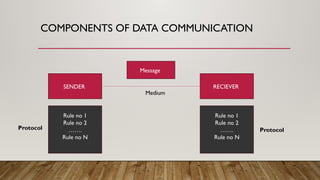
Rule no 1
Rule no 2
…….
Rule no N
Rule no 1
Rule no 2
…….
Rule no N
Protocol Protocol
SENDER RECIEVER
Message
Medium
DATA FLOW
• Data flow is the flow of data between the data points.
• The direction of data can be defined as:
• Simplex : Data flows in only one direction on the data communication line(medium).
• Half Duplex: Data flows in both direction but only one direction at a time on the data
communication line. For example, a communication on a walkie-talkies is a half duplex data
flow.
• Full Duplex: Data flow in both direction simultaneously. Modems are configured to flow
data in both directions.
WHAT IS A NETWORK?
• A network is a set of devices (often referred to as nodes) connected by communication
links. A node can be computer, printer or any other device capable of sending or
receiving data generated by other nodes on the network.
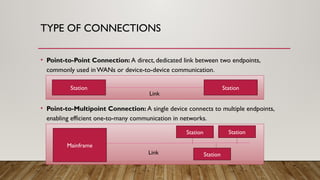
TYPE OF CONNECTIONS
• Point-to-Point Connection: A direct, dedicated link between two endpoints,
commonly used in WANs or device-to-device communication.
• Point-to-Multipoint Connection: A single device connects to multiple endpoints,
enabling efficient one-to-many communication in networks.
Station Station
Link
Mainframe
Link
Station Station
Station
NETWORKTOPOLOGY
• Arrangement of nodes of a computer network.
• PhysicalTopology – Placement of various nodes.
• LogicalTopology – Deals with the data flow in the network.
BUSTOPOLOGY
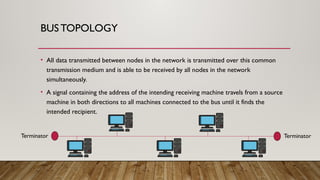
• All data transmitted between nodes in the network is transmitted over this common
transmission medium and is able to be received by all nodes in the network
simultaneously.
• A signal containing the address of the intending receiving machine travels from a source
machine in both directions to all machines connected to the bus until it finds the
intended recipient.
Terminator Terminator
BUSTOPOLOGY
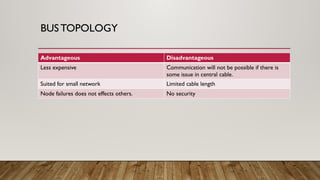
Advantageous Disadvantageous
Less expensive Communication will not be possible if there is
some issue in central cable.
Suited for small network Limited cable length
Node failures does not effects others. No security
RING TOPOLOGY
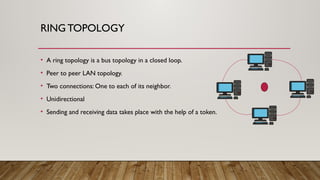
• A ring topology is a bus topology in a closed loop.
• Peer to peer LAN topology.
• Two connections: One to each of its neighbor.
• Unidirectional
• Sending and receiving data takes place with the help of a token.
RING TOPOLOGY
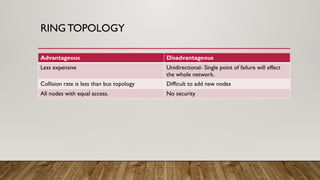
Advantageous Disadvantageous
Less expensive Unidirectional- Single point of failure will effect
the whole network.
Collision rate is less than bus topology Difficult to add new nodes
All nodes with equal access. No security
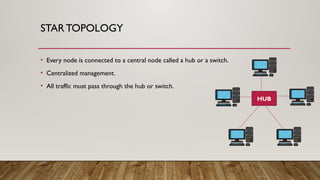
STARTOPOLOGY
• Every node is connected to a central node called a hub or a switch.
• Centralized management.
• All traffic must pass through the hub or switch.
HUB
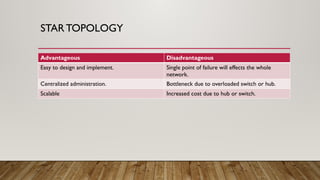
STARTOPOLOGY
Advantageous Disadvantageous
Easy to design and implement. Single point of failure will effects the whole
network.
Centralized administration. Bottleneck due to overloaded switch or hub.
Scalable Increased cost due to hub or switch.
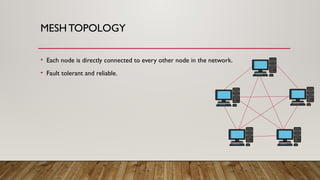
MESH TOPOLOGY
• Each node is directly connected to every other node in the network.
• Fault tolerant and reliable.
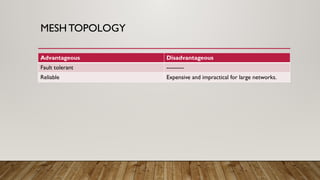
MESH TOPOLOGY
Advantageous Disadvantageous
Fault tolerant ---------
Reliable Expensive and impractical for large networks.
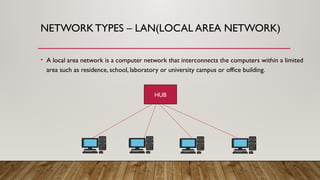
NETWORKTYPES – LAN(LOCAL AREA NETWORK)
• A local area network is a computer network that interconnects the computers within a limited
area such as residence, school, laboratory or university campus or office building.
HUB
NETWORKTYPES – MAN(METROPOLITAN AREA
NETWORK)
• A metropolitan area network (MAN) is a computer network that interconnects users with
computer resources in a geographic region of the size of a metropolitan area.
NETWORKTYPES – WAN(WIDE AREA NETWORK)
• A wide area network(WAN) is a telecommunication network that extends over a large
geographical area for the primary purpose of computer networking.
PROTOCOLS
• Network protocols are needed to enable communication over a network which allows different
devices to communicate with each other and share resources.
• Without network protocols network would not be able to transfer data between different
devices making the internet as it possible today.
• When two devices connect to a network they need to communicate, Network protocols provide
this method of communication by establishing a rules ad protocols they must be followed when
transmitting data.
• Network protocols are like rules , how data should be sent , received, understood by the devices.
TCP (TRANSMISSION CONTROL PROTOCOL)
• TCP is a network protocol that ensures ordered and reliable delivery of data between devices. It
break downs the data into smaller packets, sends them across the network and ensures that they
are reassembled at the receiving end correctly.
• TCP also handles error detection and re-transmission if any packets are lost or corrupted during
transmission.
IP(INTERNET PROTOCOL)
• IP is another network protocol that handles addressing and routing of packets across the internet.
It assigns the unique IP to the devices and determines that how the data is sent from source
device to destination device.
• IP ensures that the data packets reach the right destination by routing them through various
network device like routers.
UDP(USER DATAGRAM PROTOCOL)
• UDP is a network protocol that provides a faster but less reliable method of data transmission
compared to TCP.
• It does not establish a connection or guarantee packet delivery or order.
• UDP is commonly used for time streaming applications like video streaming or online gaming
where a small amount of data loss is possible.
SMTP(SIMPLE MAIL TRANSFER PROTOCOL)
• SMTP is a network protocol used for form sending emails from a client device to a mail server.
• It handles the transmission of email messages and ensures that they are delivered to the
appropriate recipient mail server.
POP(POST OFFICE PROTOCOL)
• POP is a network protocol used for retrieving emails from a mail server to a client device.
• It allows users to download emails from the server onto their device and manage them locally.
• POP is commonly used by email client Outlook or Thunderbird.
FTP(FILE TRANSFER PROTOCOL)
• FTP is a network protocol used for transferring files between devices over a network.
• It allow users to navigate the directions, transfer files and manage file permissions.
HTTPS(HYPER TEXT TRANSFER PROTOCOL)
• It enables users to request and access web pages , download files and interact with the web
applications.
• HTTP defines how information is formatted , transmitted and displayed on the web.
TCP/IP(TRANSMISSION CONTROL
PROTOCOL/INTERNET PROTOCOL)
• The computers should be sharing a common message format.They should know how long the
message is? Which part of the message is actual data? Which part of the message is sender and
receiver address?
• In computer network the agreed upon set of ground rules that make communication possible are
called protocols.
• TCP/IP is a set of protocols that supports network communication.
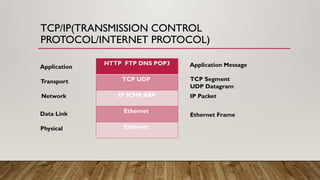
• In TCP/IP protocol suite,TCP breaks messages into small data units called segments and hands
them off to IP which deals with routing segments through the networks to their final destination.
• TCP module in the receiver combines the segments to from the original messages.
TCP/IP(TRANSMISSION CONTROL
PROTOCOL/INTERNET PROTOCOL)
Application
Physical
HTTP FTP DNS POP3
TCP UDP
IP ICMP ARP
Ethernet
Ethernet
Transport
Network
Data Link Ethernet Frame
IP Packet
TCP Segment
UDP Datagram
Application Message
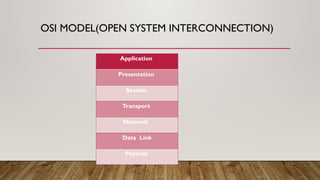
OSI MODEL(OPEN SYSTEM INTERCONNECTION)
Application
Presentation
Session
Transport
Network
Data Link
Physical
OSI MODEL(OPEN SYSTEM INTERCONNECTION)
1- APPLICATION LAYER
• The application layer is used by network application. Network application means computer
applications that uses internet like Google Chrome, Firefox, Outlook Skype etc.
• Web browser is a network application running in your PC. It uses application layer protocol
HTTP, HTTPS to do web surfing.
• Not only web browsers but all applications including outlook, skype etc all are dependent on
application layer protocols to function. There are dozens of application layer protocols such as
HTTP, HTTPS , FTP, SMTP etc.
OSI MODEL(OPEN SYSTEM INTERCONNECTION)
2- PRESENTATION LAYER
• Presentation layer receives the data from the application layer. This data is in the from of
characters and the numbers.
• This layer convert these characters and numbers to machine understandable binary , known as
translation.
• This layer also reduce the number of bits that are used to represent the original data, known as
compression.
• To maintain the integrity of data before transmission data is encrypted, known as data encryption.
Encryption enhances the security of sensitive data.
OSI MODEL(OPEN SYSTEM INTERCONNECTION)
3- SESSION LAYER
• Session layer helps in setting up and managing connections, enabling sending and receiving of data
followed by termination of connections or sessions.
• This layer uses APIs(Application program interfaces) which allows application on different
computers to communicate with each other.
• Before a session a connection is established with server, where server performs an
authentication.
• Once the connection is established in authentication process, server determine if you have a
permission to access a file, known as authorization.
• Session layer also helps in session management.
OSI MODEL(OPEN SYSTEM INTERCONNECTION)
4- TRANSPORT LAYER
• Transport layer control the reliability of communication through segmentation, flow control and
error control.
• In segmentation data received from the session layer is divided into small data units called
segments. Each segment contains a source and destination port number and a sequence number.
• In flow control, transport layer controls the amount data transmitted to a level that the receiver
can process.
• If some data units do not arrive the destination transport layer automatic repeat request to
retransmit the lost or corrupted data, known as error control.
OSI MODEL(OPEN SYSTEM INTERCONNECTION)
4- PROTOCOLS OFTRANSPORT LAYER
• Protocols of transport layers are: Transmission Control Protocol & User Datagram Protocol
• Services of transport layers are: Connection-oriented Transmission & Connectionless
Transmission
OSI MODEL(OPEN SYSTEM INTERCONNECTION)
5- NETWORK LAYER
• Transport layer passes the data segments to the network layer. Network layer works for the
transmission of received data segments from one computer to another located in different
networks.
• Segments in network layer are called packets.
• The function of network layers are: Logical addressing , Routing & Path Determination
• IP addressing is done in network layer is called logical addressing. Every computer in a network
has a unique IP address.This layer deals with the data delivery. So, it assigns sender and receiver IP
address to each data packet, so that each data packet can reach the correct destination.
OSI MODEL(OPEN SYSTEM INTERCONNECTION)
5- NETWORK LAYER
• A computer can be connected to an internet server or a computer in a number of ways.
• Choosing the best data path for delivery is called path determination
• Layer 3 uses protocols such as (OSPF)Open Shortest Path First, BGP(Broader Gateway Protocol)
etc.
OSI MODEL(OPEN SYSTEM INTERCONNECTION)
6- DATA LINK LAYER
• Data link layer receive the data packets from network layer which contain IP addresses of sender and
receiver.
• There are two kinds of addressing: Logical Addressing & Physical Addressing
• Logical addressing is done at network layer whereas physical addressing is done at data link layer where
MAC address of both devices are assigned to the received data packets.
• The data link layer performs two operations. It allows upper layers to access the media using techniques
such as framing.
• It also controls how data is placed and received from a media using techniques such as media access
control and error detection.
OSI MODEL(OPEN SYSTEM INTERCONNECTION)
6- DATA LINK LAYER
• Data link layer receive the data packets from network layer which contain IP addresses of sender and
receiver.
• There are two kinds of addressing: Logical Addressing & Physical Addressing
• Logical addressing is done at network layer whereas physical addressing is done at data link layer where
MAC address of both devices are assigned to the received data packets.
• The data link layer performs two operations. It allows upper layers to access the media using techniques
such as framing.
• It also controls how data is placed and received from a media using techniques such as media access
control and error detection.
OSI MODEL(OPEN SYSTEM INTERCONNECTION)
7- PHYSICAL LAYER
• Physical link convert this binary sequence into signals and transmit over local media. It can be an
electrical signal in case of cooper wire , light signal in case of fiber optic and radio signal in case of
air.
• Cables and Connectors
• PhysicalTopology
• Hardware(Repeaters , Hub)
• Transmission Mode
• Multiplexing

Data Communication and Newtworking 1 .pptx

  • 1.
    DATA COMMUNICATION AND NETWORKING LECTURER:SIDRA AHMAD NATIONAL COLLEGE OF BUSINESS & ADMINISTRATION(NCBA)
  • 2.
    TABLE OF CONTENTS •Data Communication • Components of Data Communication • Data Flow • Network • Type of Connections • NetworkTopology • NetworkTypes
  • 3.
    TABLE OF CONTENTS •Protocol & its Types • TCP/IP Protocol • OSI Model
  • 4.
    DATA COMMUNICATION • Datacommunication is the transfer of data or information between sender and the receiver. • The source transmits the data and the receiver receive it. • The purpose of data communication is to provide the rules and regulations that allow computer with different disk operating system, languages, cabling and locations to share resources. • The rules and regulations are called protocols and standards in the data communication.
  • 5.
    COMPONENTS OF DATACOMMUNICATION Rule no 1 Rule no 2 ……. Rule no N Rule no 1 Rule no 2 ……. Rule no N Protocol Protocol SENDER RECIEVER Message Medium
  • 6.
    DATA FLOW • Dataflow is the flow of data between the data points. • The direction of data can be defined as: • Simplex : Data flows in only one direction on the data communication line(medium). • Half Duplex: Data flows in both direction but only one direction at a time on the data communication line. For example, a communication on a walkie-talkies is a half duplex data flow. • Full Duplex: Data flow in both direction simultaneously. Modems are configured to flow data in both directions.
  • 7.
    WHAT IS ANETWORK? • A network is a set of devices (often referred to as nodes) connected by communication links. A node can be computer, printer or any other device capable of sending or receiving data generated by other nodes on the network.
  • 8.
    TYPE OF CONNECTIONS •Point-to-Point Connection: A direct, dedicated link between two endpoints, commonly used in WANs or device-to-device communication. • Point-to-Multipoint Connection: A single device connects to multiple endpoints, enabling efficient one-to-many communication in networks. Station Station Link Mainframe Link Station Station Station
  • 9.
    NETWORKTOPOLOGY • Arrangement ofnodes of a computer network. • PhysicalTopology – Placement of various nodes. • LogicalTopology – Deals with the data flow in the network.
  • 10.
    BUSTOPOLOGY • All datatransmitted between nodes in the network is transmitted over this common transmission medium and is able to be received by all nodes in the network simultaneously. • A signal containing the address of the intending receiving machine travels from a source machine in both directions to all machines connected to the bus until it finds the intended recipient. Terminator Terminator
  • 11.
    BUSTOPOLOGY Advantageous Disadvantageous Less expensiveCommunication will not be possible if there is some issue in central cable. Suited for small network Limited cable length Node failures does not effects others. No security
  • 12.
    RING TOPOLOGY • Aring topology is a bus topology in a closed loop. • Peer to peer LAN topology. • Two connections: One to each of its neighbor. • Unidirectional • Sending and receiving data takes place with the help of a token.
  • 13.
    RING TOPOLOGY Advantageous Disadvantageous Lessexpensive Unidirectional- Single point of failure will effect the whole network. Collision rate is less than bus topology Difficult to add new nodes All nodes with equal access. No security
  • 14.
    STARTOPOLOGY • Every nodeis connected to a central node called a hub or a switch. • Centralized management. • All traffic must pass through the hub or switch. HUB
  • 15.
    STARTOPOLOGY Advantageous Disadvantageous Easy todesign and implement. Single point of failure will effects the whole network. Centralized administration. Bottleneck due to overloaded switch or hub. Scalable Increased cost due to hub or switch.
  • 16.
    MESH TOPOLOGY • Eachnode is directly connected to every other node in the network. • Fault tolerant and reliable.
  • 17.
    MESH TOPOLOGY Advantageous Disadvantageous Faulttolerant --------- Reliable Expensive and impractical for large networks.
  • 18.
    NETWORKTYPES – LAN(LOCALAREA NETWORK) • A local area network is a computer network that interconnects the computers within a limited area such as residence, school, laboratory or university campus or office building. HUB
  • 19.
    NETWORKTYPES – MAN(METROPOLITANAREA NETWORK) • A metropolitan area network (MAN) is a computer network that interconnects users with computer resources in a geographic region of the size of a metropolitan area.
  • 20.
    NETWORKTYPES – WAN(WIDEAREA NETWORK) • A wide area network(WAN) is a telecommunication network that extends over a large geographical area for the primary purpose of computer networking.
  • 21.
    PROTOCOLS • Network protocolsare needed to enable communication over a network which allows different devices to communicate with each other and share resources. • Without network protocols network would not be able to transfer data between different devices making the internet as it possible today. • When two devices connect to a network they need to communicate, Network protocols provide this method of communication by establishing a rules ad protocols they must be followed when transmitting data. • Network protocols are like rules , how data should be sent , received, understood by the devices.
  • 22.
    TCP (TRANSMISSION CONTROLPROTOCOL) • TCP is a network protocol that ensures ordered and reliable delivery of data between devices. It break downs the data into smaller packets, sends them across the network and ensures that they are reassembled at the receiving end correctly. • TCP also handles error detection and re-transmission if any packets are lost or corrupted during transmission.
  • 23.
    IP(INTERNET PROTOCOL) • IPis another network protocol that handles addressing and routing of packets across the internet. It assigns the unique IP to the devices and determines that how the data is sent from source device to destination device. • IP ensures that the data packets reach the right destination by routing them through various network device like routers.
  • 24.
    UDP(USER DATAGRAM PROTOCOL) •UDP is a network protocol that provides a faster but less reliable method of data transmission compared to TCP. • It does not establish a connection or guarantee packet delivery or order. • UDP is commonly used for time streaming applications like video streaming or online gaming where a small amount of data loss is possible.
  • 25.
    SMTP(SIMPLE MAIL TRANSFERPROTOCOL) • SMTP is a network protocol used for form sending emails from a client device to a mail server. • It handles the transmission of email messages and ensures that they are delivered to the appropriate recipient mail server.
  • 26.
    POP(POST OFFICE PROTOCOL) •POP is a network protocol used for retrieving emails from a mail server to a client device. • It allows users to download emails from the server onto their device and manage them locally. • POP is commonly used by email client Outlook or Thunderbird.
  • 27.
    FTP(FILE TRANSFER PROTOCOL) •FTP is a network protocol used for transferring files between devices over a network. • It allow users to navigate the directions, transfer files and manage file permissions.
  • 28.
    HTTPS(HYPER TEXT TRANSFERPROTOCOL) • It enables users to request and access web pages , download files and interact with the web applications. • HTTP defines how information is formatted , transmitted and displayed on the web.
  • 29.
    TCP/IP(TRANSMISSION CONTROL PROTOCOL/INTERNET PROTOCOL) •The computers should be sharing a common message format.They should know how long the message is? Which part of the message is actual data? Which part of the message is sender and receiver address? • In computer network the agreed upon set of ground rules that make communication possible are called protocols. • TCP/IP is a set of protocols that supports network communication. • In TCP/IP protocol suite,TCP breaks messages into small data units called segments and hands them off to IP which deals with routing segments through the networks to their final destination. • TCP module in the receiver combines the segments to from the original messages.
  • 30.
    TCP/IP(TRANSMISSION CONTROL PROTOCOL/INTERNET PROTOCOL) Application Physical HTTPFTP DNS POP3 TCP UDP IP ICMP ARP Ethernet Ethernet Transport Network Data Link Ethernet Frame IP Packet TCP Segment UDP Datagram Application Message
  • 31.
    OSI MODEL(OPEN SYSTEMINTERCONNECTION) Application Presentation Session Transport Network Data Link Physical
  • 32.
    OSI MODEL(OPEN SYSTEMINTERCONNECTION) 1- APPLICATION LAYER • The application layer is used by network application. Network application means computer applications that uses internet like Google Chrome, Firefox, Outlook Skype etc. • Web browser is a network application running in your PC. It uses application layer protocol HTTP, HTTPS to do web surfing. • Not only web browsers but all applications including outlook, skype etc all are dependent on application layer protocols to function. There are dozens of application layer protocols such as HTTP, HTTPS , FTP, SMTP etc.
  • 33.
    OSI MODEL(OPEN SYSTEMINTERCONNECTION) 2- PRESENTATION LAYER • Presentation layer receives the data from the application layer. This data is in the from of characters and the numbers. • This layer convert these characters and numbers to machine understandable binary , known as translation. • This layer also reduce the number of bits that are used to represent the original data, known as compression. • To maintain the integrity of data before transmission data is encrypted, known as data encryption. Encryption enhances the security of sensitive data.
  • 34.
    OSI MODEL(OPEN SYSTEMINTERCONNECTION) 3- SESSION LAYER • Session layer helps in setting up and managing connections, enabling sending and receiving of data followed by termination of connections or sessions. • This layer uses APIs(Application program interfaces) which allows application on different computers to communicate with each other. • Before a session a connection is established with server, where server performs an authentication. • Once the connection is established in authentication process, server determine if you have a permission to access a file, known as authorization. • Session layer also helps in session management.
  • 35.
    OSI MODEL(OPEN SYSTEMINTERCONNECTION) 4- TRANSPORT LAYER • Transport layer control the reliability of communication through segmentation, flow control and error control. • In segmentation data received from the session layer is divided into small data units called segments. Each segment contains a source and destination port number and a sequence number. • In flow control, transport layer controls the amount data transmitted to a level that the receiver can process. • If some data units do not arrive the destination transport layer automatic repeat request to retransmit the lost or corrupted data, known as error control.
  • 36.
    OSI MODEL(OPEN SYSTEMINTERCONNECTION) 4- PROTOCOLS OFTRANSPORT LAYER • Protocols of transport layers are: Transmission Control Protocol & User Datagram Protocol • Services of transport layers are: Connection-oriented Transmission & Connectionless Transmission
  • 37.
    OSI MODEL(OPEN SYSTEMINTERCONNECTION) 5- NETWORK LAYER • Transport layer passes the data segments to the network layer. Network layer works for the transmission of received data segments from one computer to another located in different networks. • Segments in network layer are called packets. • The function of network layers are: Logical addressing , Routing & Path Determination • IP addressing is done in network layer is called logical addressing. Every computer in a network has a unique IP address.This layer deals with the data delivery. So, it assigns sender and receiver IP address to each data packet, so that each data packet can reach the correct destination.
  • 38.
    OSI MODEL(OPEN SYSTEMINTERCONNECTION) 5- NETWORK LAYER • A computer can be connected to an internet server or a computer in a number of ways. • Choosing the best data path for delivery is called path determination • Layer 3 uses protocols such as (OSPF)Open Shortest Path First, BGP(Broader Gateway Protocol) etc.
  • 39.
    OSI MODEL(OPEN SYSTEMINTERCONNECTION) 6- DATA LINK LAYER • Data link layer receive the data packets from network layer which contain IP addresses of sender and receiver. • There are two kinds of addressing: Logical Addressing & Physical Addressing • Logical addressing is done at network layer whereas physical addressing is done at data link layer where MAC address of both devices are assigned to the received data packets. • The data link layer performs two operations. It allows upper layers to access the media using techniques such as framing. • It also controls how data is placed and received from a media using techniques such as media access control and error detection.
  • 40.
    OSI MODEL(OPEN SYSTEMINTERCONNECTION) 6- DATA LINK LAYER • Data link layer receive the data packets from network layer which contain IP addresses of sender and receiver. • There are two kinds of addressing: Logical Addressing & Physical Addressing • Logical addressing is done at network layer whereas physical addressing is done at data link layer where MAC address of both devices are assigned to the received data packets. • The data link layer performs two operations. It allows upper layers to access the media using techniques such as framing. • It also controls how data is placed and received from a media using techniques such as media access control and error detection.
  • 41.
    OSI MODEL(OPEN SYSTEMINTERCONNECTION) 7- PHYSICAL LAYER • Physical link convert this binary sequence into signals and transmit over local media. It can be an electrical signal in case of cooper wire , light signal in case of fiber optic and radio signal in case of air. • Cables and Connectors • PhysicalTopology • Hardware(Repeaters , Hub) • Transmission Mode • Multiplexing

Editor's Notes