Logic Gates
Dr.Ahmed Bayoumi
Dr.Shady Elmashad
Objectives
 Identify the basic gates and describe the behavior of each
 Combine basic gates into circuits
 Describe the behavior of a gate using Boolean
expressions, truth tables, and logic diagrams
Definition
 A gate is a device that performs a basic operation on
electrical signals
 Gates are combined into circuits to perform more
complicated tasks
 describing the behavior of gates
and circuits by
 Boolean expressions
 logic diagrams
 truth tables
Gates
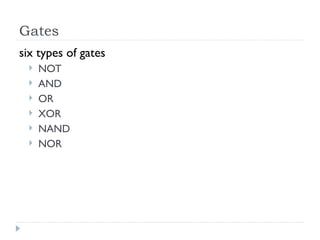
six types of gates
 NOT
 AND
 OR
 XOR
 NAND
 NOR
NOT Gate
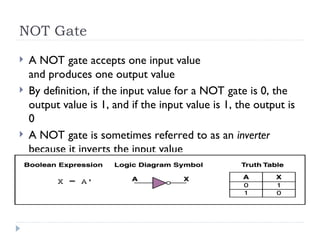
 A NOT gate accepts one input value
and produces one output value
 By definition, if the input value for a NOT gate is 0, the
output value is 1, and if the input value is 1, the output is
0
 A NOT gate is sometimes referred to as an inverter
because it inverts the input value
AND Gate
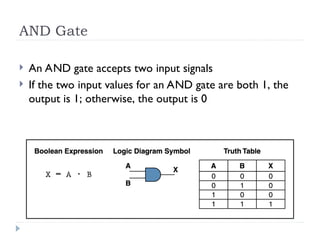
 An AND gate accepts two input signals
 If the two input values for an AND gate are both 1, the
output is 1; otherwise, the output is 0
OR Gate
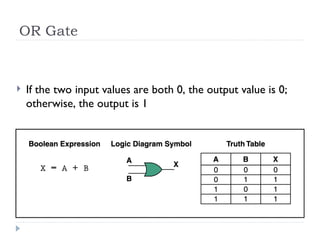
 If the two input values are both 0, the output value is 0;
otherwise, the output is 1
XOR Gate
4–8
 XOR, or exclusive OR, gate
 An XOR gate produces 0 if its two inputs are the same, and a 1
otherwise
 Note the difference between the XOR gate
and the OR gate; they differ only in one
input situation
 When both input signals are 1, the OR gate produces a 1 and
the XOR produces a 0
NAND and NOR Gates
 The NAND and NOR gates are essentially the
opposite of the AND and OR gates, respectively
Review of Gate Processing
 A NOT gate inverts its single input value
 An AND gate produces 1 if both input values are 1
 An OR gate produces 1 if one or the other or both input
values are 1
 An XOR gate produces 1 if one or the other (but not
both) input values are 1
 A NAND gate produces the opposite results of an AND
gate
 A NOR gate produces the opposite results of an OR gate
Gates with More Inputs
 Gates can be designed to accept three or more input
values
 A three-input AND gate, for example, produces an
output of 1 only if all input values are 1
Circuits
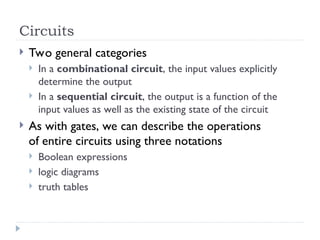
 Two general categories
 In a combinational circuit, the input values explicitly
determine the output
 In a sequential circuit, the output is a function of the
input values as well as the existing state of the circuit
 As with gates, we can describe the operations
of entire circuits using three notations
 Boolean expressions
 logic diagrams
 truth tables
Combinational Circuits
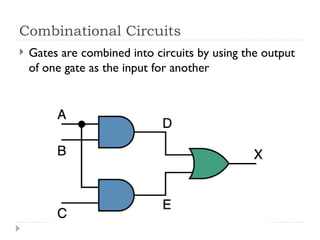
 Gates are combined into circuits by using the output
of one gate as the input for another
Combinational Circuits
4–14
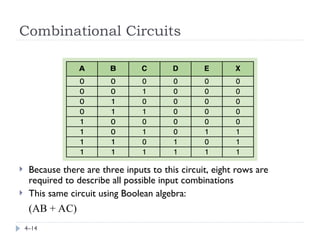
 Because there are three inputs to this circuit, eight rows are
required to describe all possible input combinations
 This same circuit using Boolean algebra:
(AB + AC)
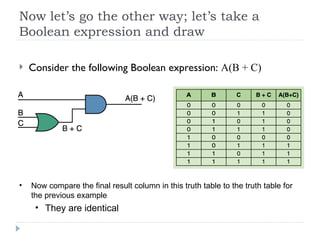
Now let’s go the other way; let’s take a
Boolean expression and draw
 Consider the following Boolean expression: A(B + C)
• Now compare the final result column in this truth table to the truth table for
the previous example
• They are identical
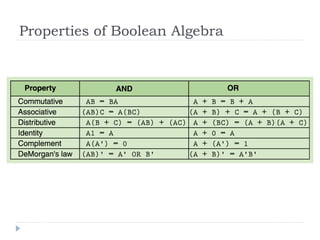
Properties of Boolean Algebra
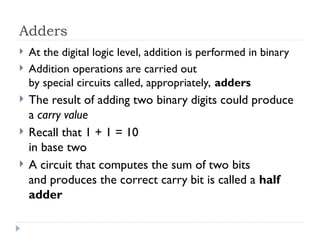
Adders
 At the digital logic level, addition is performed in binary
 Addition operations are carried out
by special circuits called, appropriately, adders
 The result of adding two binary digits could produce
a carry value
 Recall that 1 + 1 = 10
in base two
 A circuit that computes the sum of two bits
and produces the correct carry bit is called a half
adder
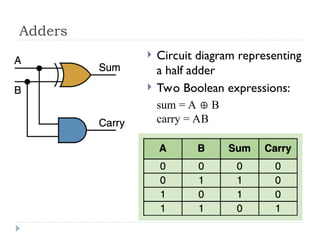
Adders
 Circuit diagram representing
a half adder
 Two Boolean expressions:
sum = A  B
carry = AB
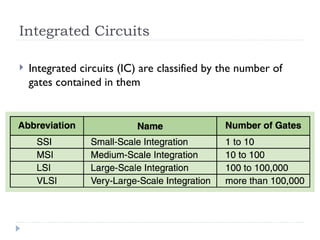
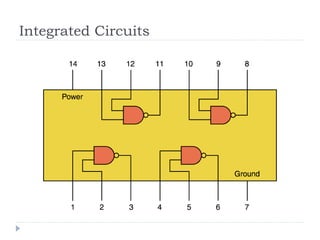
Integrated Circuits
 Integrated circuits (IC) are classified by the number of
gates contained in them
Integrated Circuits
CPU Chips
 The most important integrated circuit
in any computer is the Central Processing Unit, or CPU
 Each CPU chip has a large number
of pins through which essentially all communication in a
computer system occurs
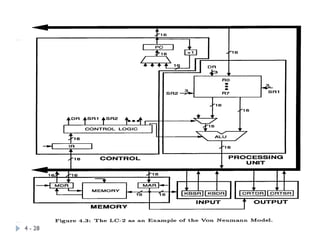
The Von Neumann Model
Basic components
 Instruction processing
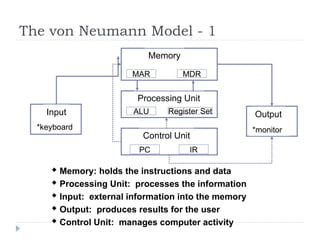
The von Neumann Model - 1
 Memory: holds the instructions and data
 Processing Unit: processes the information
 Input: external information into the memory
 Output: produces results for the user
 Control Unit: manages computer activity
Memory
Processing Unit
Input Output
MAR MDR
ALU Register Set
Control Unit
PC IR
*keyboard *monitor
The von Neumann Model - 2
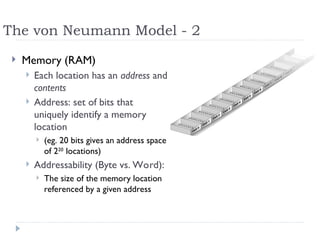
 Memory (RAM)
 Each location has an address and
contents
 Address: set of bits that
uniquely identify a memory
location
 (eg. 20 bits gives an address space
of 220
locations)
 Addressability (Byte vs. Word):
 The size of the memory location
referenced by a given address
Measuring Memory Capacity
• Kilobyte: 210
bytes = 1024 bytes
– Example: 3 KB = 3 times1024 bytes
• Megabyte: 220
bytes = 1,048,576 bytes
– Example: 3 MB = 3 times 1,048,576 bytes
• Gigabyte: 230
bytes = 1,073,741,824 bytes
– Example: 3 GB = 3 times 1,073,741,824 bytes
0-26
Data Communication Rates
 Measurement units
 Bps: Bits per second
 Kbps: Kilo-bps (1,000 bps)
 Mbps: Mega-bps (1,000,000 bps)
 Gbps: Giga-bps (1,000,000,000 bps)
 Bandwidth: Maximum available rate
The von Neumann Model - 3
4 - 27
 Processing Unit
 ALU (Arithmetic and Logic Unit)
 Generally operates on entire words of data
 Some also work on subsets of words (eg. bits and bytes)
 Registers:
 Small, fast “on-board” storage for words
 Close to the ALU (much faster access than RAM)
 Control Unit
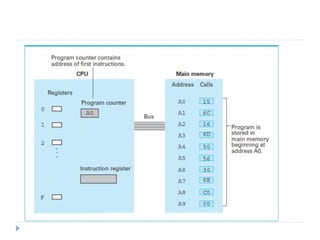
 Program Counter (PC) or Instruction Pointer
 Holds the address of the next instruction to be executed
 Instruction Register (IR)
 Holds the instruction being executed
 The control unit coordinates all actions needed to execute the instruction
4 - 28
0-30
Arithmetic/Logic Operations
 Logic: AND, OR, XOR
 Rotate and Shift: circular shift, logical shift, arithmetic
shift
 Arithmetic: add, subtract, multiply, divide
Instructions
 Instruction word: 16 bits
 Opcode
 defines (names) the instruction to be executed
 bits[15:12]: 4 bits allow 16 instructions
 Operands
 Registers: 8 registers (i.e. require 3 bits for addressing)
 Address parameters: Offset (9 bits) or Index (6 bits) (more later)
 Immediate value: 5 bits
 Examples
 ADD DR, SR1, SR2 ; DR  (SR1) + (SR2)
[15:12] [11:9] [8:6] [2:0] - Note: (Reg1) means “content of Reg1”
 LDR DR, BaseR, Offset ; DR  Mem[BaseR + Offset]
[15:12] [11:9] [8:6] [5:0] - Note: Mem[loc] means “content of memory location loc”
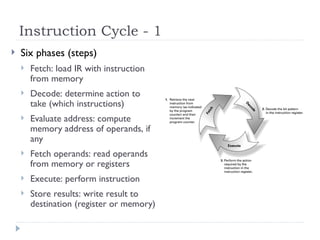
Instruction Cycle - 1
 Six phases (steps)
 Fetch: load IR with instruction
from memory
 Decode: determine action to
take (which instructions)
 Evaluate address: compute
memory address of operands, if
any
 Fetch operands: read operands
from memory or registers
 Execute: perform instruction
 Store results: write result to
destination (register or memory)
Instruction Cycle - 2
 Fetch
 This actually takes several steps, represented here as “micro-
instructions”, each of which can take a number of machine cycles
to implement:
 MAR  (PC) ; use the value in PC to access memory
 MDR  Mem[MAR] ; read memory location to MDR
 IR  (MDR) ; move (MDR) to IR
 PC (PC) + 1 ; increment the value of PC
 Decode
 A decoder reads the opcode bit pattern & sets up the next state
of the machine to appropriately use the remaining bits of the
instruction.
Instruction Cycle - 3
 Evaluate Address
 Computes the address of the memory location required to
process the instruction (if any): e.g. the location from which to
obtain a value.
This is known as the Effective Address (EA).
 Fetch Operands
 Obtains the source operand(s) (if any) either from Registers or
from memory, i.e. from the EA calculated in the previous step.
Instruction Cycle - 4
 Execute
 Carries out the execution of the instruction - e.g. add two
operands present at the input of the ALU
 Store Result
 Writes the result (if any) to its designated destination, either
register or memory (using the EA calculated earlier)
 Start over …
 Recall that the PC was incremented already in the first step, so the
next Fetch will bring back the next instruction - unless the
instruction just executed changed the PC.
Instruction Cycle - 5
 Some instructions don't need all 6 phases
 If only using registers, skip Evaluate Address
 If only moving data, skip Execute
 Control Instructions
 These change the sequence of instructions
 Branch
 Loop
 Function or procedure call
 Execute phase changes the content of the PC, so the next
instruction will be out of sequence.

Basic Logic gates and universal logic gates oerview.ppt

  • 1.
  • 2.
    Objectives  Identify thebasic gates and describe the behavior of each  Combine basic gates into circuits  Describe the behavior of a gate using Boolean expressions, truth tables, and logic diagrams
  • 3.
    Definition  A gateis a device that performs a basic operation on electrical signals  Gates are combined into circuits to perform more complicated tasks  describing the behavior of gates and circuits by  Boolean expressions  logic diagrams  truth tables
  • 4.
    Gates six types ofgates  NOT  AND  OR  XOR  NAND  NOR
  • 5.
    NOT Gate  ANOT gate accepts one input value and produces one output value  By definition, if the input value for a NOT gate is 0, the output value is 1, and if the input value is 1, the output is 0  A NOT gate is sometimes referred to as an inverter because it inverts the input value
  • 6.
    AND Gate  AnAND gate accepts two input signals  If the two input values for an AND gate are both 1, the output is 1; otherwise, the output is 0
  • 7.
    OR Gate  Ifthe two input values are both 0, the output value is 0; otherwise, the output is 1
  • 8.
    XOR Gate 4–8  XOR,or exclusive OR, gate  An XOR gate produces 0 if its two inputs are the same, and a 1 otherwise  Note the difference between the XOR gate and the OR gate; they differ only in one input situation  When both input signals are 1, the OR gate produces a 1 and the XOR produces a 0
  • 9.
    NAND and NORGates  The NAND and NOR gates are essentially the opposite of the AND and OR gates, respectively
  • 10.
    Review of GateProcessing  A NOT gate inverts its single input value  An AND gate produces 1 if both input values are 1  An OR gate produces 1 if one or the other or both input values are 1  An XOR gate produces 1 if one or the other (but not both) input values are 1  A NAND gate produces the opposite results of an AND gate  A NOR gate produces the opposite results of an OR gate
  • 11.
    Gates with MoreInputs  Gates can be designed to accept three or more input values  A three-input AND gate, for example, produces an output of 1 only if all input values are 1
  • 12.
    Circuits  Two generalcategories  In a combinational circuit, the input values explicitly determine the output  In a sequential circuit, the output is a function of the input values as well as the existing state of the circuit  As with gates, we can describe the operations of entire circuits using three notations  Boolean expressions  logic diagrams  truth tables
  • 13.
    Combinational Circuits  Gatesare combined into circuits by using the output of one gate as the input for another
  • 14.
    Combinational Circuits 4–14  Becausethere are three inputs to this circuit, eight rows are required to describe all possible input combinations  This same circuit using Boolean algebra: (AB + AC)
  • 15.
    Now let’s gothe other way; let’s take a Boolean expression and draw  Consider the following Boolean expression: A(B + C) • Now compare the final result column in this truth table to the truth table for the previous example • They are identical
  • 16.
  • 17.
    Adders  At thedigital logic level, addition is performed in binary  Addition operations are carried out by special circuits called, appropriately, adders  The result of adding two binary digits could produce a carry value  Recall that 1 + 1 = 10 in base two  A circuit that computes the sum of two bits and produces the correct carry bit is called a half adder
  • 18.
    Adders  Circuit diagramrepresenting a half adder  Two Boolean expressions: sum = A  B carry = AB
  • 19.
    Integrated Circuits  Integratedcircuits (IC) are classified by the number of gates contained in them
  • 20.
  • 21.
    CPU Chips  Themost important integrated circuit in any computer is the Central Processing Unit, or CPU  Each CPU chip has a large number of pins through which essentially all communication in a computer system occurs
  • 22.
    The Von NeumannModel Basic components  Instruction processing
  • 23.
    The von NeumannModel - 1  Memory: holds the instructions and data  Processing Unit: processes the information  Input: external information into the memory  Output: produces results for the user  Control Unit: manages computer activity Memory Processing Unit Input Output MAR MDR ALU Register Set Control Unit PC IR *keyboard *monitor
  • 24.
    The von NeumannModel - 2  Memory (RAM)  Each location has an address and contents  Address: set of bits that uniquely identify a memory location  (eg. 20 bits gives an address space of 220 locations)  Addressability (Byte vs. Word):  The size of the memory location referenced by a given address
  • 25.
    Measuring Memory Capacity •Kilobyte: 210 bytes = 1024 bytes – Example: 3 KB = 3 times1024 bytes • Megabyte: 220 bytes = 1,048,576 bytes – Example: 3 MB = 3 times 1,048,576 bytes • Gigabyte: 230 bytes = 1,073,741,824 bytes – Example: 3 GB = 3 times 1,073,741,824 bytes
  • 26.
    0-26 Data Communication Rates Measurement units  Bps: Bits per second  Kbps: Kilo-bps (1,000 bps)  Mbps: Mega-bps (1,000,000 bps)  Gbps: Giga-bps (1,000,000,000 bps)  Bandwidth: Maximum available rate
  • 27.
    The von NeumannModel - 3 4 - 27  Processing Unit  ALU (Arithmetic and Logic Unit)  Generally operates on entire words of data  Some also work on subsets of words (eg. bits and bytes)  Registers:  Small, fast “on-board” storage for words  Close to the ALU (much faster access than RAM)  Control Unit  Program Counter (PC) or Instruction Pointer  Holds the address of the next instruction to be executed  Instruction Register (IR)  Holds the instruction being executed  The control unit coordinates all actions needed to execute the instruction
  • 28.
  • 30.
    0-30 Arithmetic/Logic Operations  Logic:AND, OR, XOR  Rotate and Shift: circular shift, logical shift, arithmetic shift  Arithmetic: add, subtract, multiply, divide
  • 31.
    Instructions  Instruction word:16 bits  Opcode  defines (names) the instruction to be executed  bits[15:12]: 4 bits allow 16 instructions  Operands  Registers: 8 registers (i.e. require 3 bits for addressing)  Address parameters: Offset (9 bits) or Index (6 bits) (more later)  Immediate value: 5 bits  Examples  ADD DR, SR1, SR2 ; DR  (SR1) + (SR2) [15:12] [11:9] [8:6] [2:0] - Note: (Reg1) means “content of Reg1”  LDR DR, BaseR, Offset ; DR  Mem[BaseR + Offset] [15:12] [11:9] [8:6] [5:0] - Note: Mem[loc] means “content of memory location loc”
  • 32.
    Instruction Cycle -1  Six phases (steps)  Fetch: load IR with instruction from memory  Decode: determine action to take (which instructions)  Evaluate address: compute memory address of operands, if any  Fetch operands: read operands from memory or registers  Execute: perform instruction  Store results: write result to destination (register or memory)
  • 33.
    Instruction Cycle -2  Fetch  This actually takes several steps, represented here as “micro- instructions”, each of which can take a number of machine cycles to implement:  MAR  (PC) ; use the value in PC to access memory  MDR  Mem[MAR] ; read memory location to MDR  IR  (MDR) ; move (MDR) to IR  PC (PC) + 1 ; increment the value of PC  Decode  A decoder reads the opcode bit pattern & sets up the next state of the machine to appropriately use the remaining bits of the instruction.
  • 34.
    Instruction Cycle -3  Evaluate Address  Computes the address of the memory location required to process the instruction (if any): e.g. the location from which to obtain a value. This is known as the Effective Address (EA).  Fetch Operands  Obtains the source operand(s) (if any) either from Registers or from memory, i.e. from the EA calculated in the previous step.
  • 35.
    Instruction Cycle -4  Execute  Carries out the execution of the instruction - e.g. add two operands present at the input of the ALU  Store Result  Writes the result (if any) to its designated destination, either register or memory (using the EA calculated earlier)  Start over …  Recall that the PC was incremented already in the first step, so the next Fetch will bring back the next instruction - unless the instruction just executed changed the PC.
  • 36.
    Instruction Cycle -5  Some instructions don't need all 6 phases  If only using registers, skip Evaluate Address  If only moving data, skip Execute  Control Instructions  These change the sequence of instructions  Branch  Loop  Function or procedure call  Execute phase changes the content of the PC, so the next instruction will be out of sequence.