Web-Designing (1)
HTML Basic Coding
A
Presentation by,
MD. Rabiul Islam (robi)
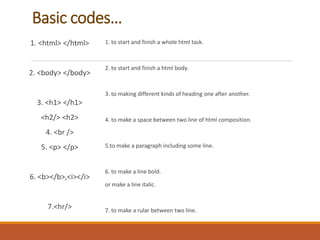
Basic codes…
1. <html> </html>
2. <body> </body>
3. <h1> </h1>
<h2/> <h2>
4. <br />
5. <p> </p>
6. <b></b>,<i></i>
7.<hr/>
1. to start and finish a whole html task.
2. to start and finish a html body.
3. to making different kinds of heading one after another.
4. to make a space between two line of html composition.
5.to make a paragraph including some line.
6. to make a line bold.
or make a line italic.
7. to make a rular between two line.
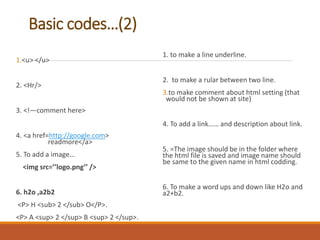
Basic codes…(2)
1.<u> </u>
2. <Hr/>
3. <!—comment here>
4. <a href=http://google.com>
readmore</a>
5. To add a image…
<img src=’’logo.png’’ />
6. h2o ,a2b2
<P> H <sub> 2 </sub> O</P>.
<P> A <sup> 2 </sup> B <sup> 2 </sup>.
1. to make a line underline.
2. to make a rular between two line.
3.to make comment about html setting (that
would not be shown at site)
4. To add a link…… and description about link.
5. =The image should be in the folder where
the html file is saved and image name should
be same to the given name in html codding.
6. To make a word ups and down like H2o and
a2+b2.
Email, Title, Background & Font Color
1. <body style=”background-color-blue”>
2. <p style=”font-family:courier
new;color:red; font size :30px;”> Text
Here</p>
3. <h1 style=”text align:center> this is
heading</h>
4. <a href=rabiulrobi33@gmail.com>send me
email</a>
N:B(1) .. To make color of background of
html body…..
N:B(2) .. Different color font and
different size making…
N:B (3) .. Fixing a title in center,left, or
right
N:B (4) .. To add mail option……
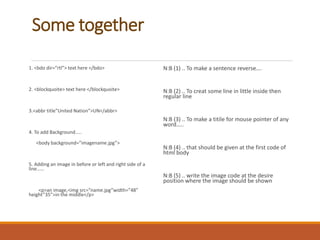
Some together
1. <bdo dir=”rtl”> text here </bdo>
2. <blockquoite> text here </blockquoite>
3.<abbr title”United Nation”>UN</abbr>
4. To add Background…..
<body background=”imagename.jpg”>
5. Adding an image in before or left and right side of a
line……
<p>an image,<img src=”name.jpg”width=”48”
height”35”>in the middle</p>
N:B (1) .. To make a sentence reverse….
N:B (2) .. To creat some line in little inside then
regular line
N:B (3) .. To make a titile for mouse pointer of any
word…..
N:B (4) .. that should be given at the first code of
html body
N:B (5) .. write the image code at the desire
position where the image should be shown
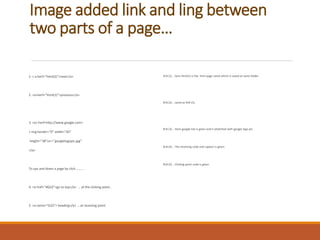
Image added link and ling between
two parts of a page…
1. < a herf=”html(2)”>next</a>
2. <a>herf=”html(1)”>previous</a>
3. <a> herf=http://www.google.com>
< img border=”0” width=”65”
height=”38”src=’’googlelogopic.jpg’’
</a>
To ups and down a page by click………..
4. <a href=”#G22”>go to top</a> .. at the clicking point..
5. <a name=”G22”> heading</a> … at receiving point.
N:B (1) .. here html(1) is the html page name which is saved at same folder.
N:B (2) .. same as N:B (1).
N:B (3) .. Here google link is given and it attatched with google logo pic.
N:B (4) .. The receiving code and caption is given.
N:B (5) .. Clicking point code is given.
Different.. Types sub line button……
Sub line Numbering..
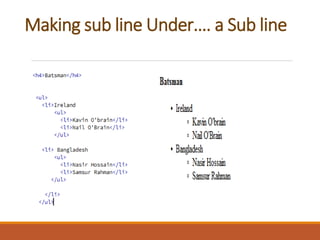
Making sub line Under…. a Sub line
Sub line Details…
Table…
( Dw.. Insert-table)
How to make a style line form with
submit it to a email.. Id
To add some required for the form
box.. (Number,Text,Email)
Option.. DW-windows-behavior-valid
code
Link,Audio,Video
1. <Head>
<meta http-equiv=”refreash”
Conrent=”5;”url=http://www.google.com”>
</head>
<body><p>sorry we moved. you will go to new
page within 5 seconds</p></body>
2. <embd src=”song.name.mp3” autostart=”true”
width=”” length=””>
3. <emded src=”video.wmv” autostart=”false”
width=”450” height=”400”>
(1) N:B.. To connect a link
automaticly…. After some second…
(2) N:B.. To add an audio file to listen
online.. (N:B.. If you don’t want to auto
start by opening the page.. then make it
false..)
(3) N:B.. To add a video…
Running style line… I web page…
<marque hspace=20 Width=”25%”
bgcolor=yellow>
Hi.. there !<p>
Good to see you …
</marquee>
N:B… To add a slow running text to
make a style….
N:B.. Hspace=40,20.60 its used in
the tag to make space from the last
marquee…

Web designing (1) - Html Basic Codding

  • 1.
    Web-Designing (1) HTML BasicCoding A Presentation by, MD. Rabiul Islam (robi)
  • 2.
    Basic codes… 1. <html></html> 2. <body> </body> 3. <h1> </h1> <h2/> <h2> 4. <br /> 5. <p> </p> 6. <b></b>,<i></i> 7.<hr/> 1. to start and finish a whole html task. 2. to start and finish a html body. 3. to making different kinds of heading one after another. 4. to make a space between two line of html composition. 5.to make a paragraph including some line. 6. to make a line bold. or make a line italic. 7. to make a rular between two line.
  • 3.
    Basic codes…(2) 1.<u> </u> 2.<Hr/> 3. <!—comment here> 4. <a href=http://google.com> readmore</a> 5. To add a image… <img src=’’logo.png’’ /> 6. h2o ,a2b2 <P> H <sub> 2 </sub> O</P>. <P> A <sup> 2 </sup> B <sup> 2 </sup>. 1. to make a line underline. 2. to make a rular between two line. 3.to make comment about html setting (that would not be shown at site) 4. To add a link…… and description about link. 5. =The image should be in the folder where the html file is saved and image name should be same to the given name in html codding. 6. To make a word ups and down like H2o and a2+b2.
  • 4.
    Email, Title, Background& Font Color 1. <body style=”background-color-blue”> 2. <p style=”font-family:courier new;color:red; font size :30px;”> Text Here</p> 3. <h1 style=”text align:center> this is heading</h> 4. <a href=rabiulrobi33@gmail.com>send me email</a> N:B(1) .. To make color of background of html body….. N:B(2) .. Different color font and different size making… N:B (3) .. Fixing a title in center,left, or right N:B (4) .. To add mail option……
  • 5.
    Some together 1. <bdodir=”rtl”> text here </bdo> 2. <blockquoite> text here </blockquoite> 3.<abbr title”United Nation”>UN</abbr> 4. To add Background….. <body background=”imagename.jpg”> 5. Adding an image in before or left and right side of a line…… <p>an image,<img src=”name.jpg”width=”48” height”35”>in the middle</p> N:B (1) .. To make a sentence reverse…. N:B (2) .. To creat some line in little inside then regular line N:B (3) .. To make a titile for mouse pointer of any word….. N:B (4) .. that should be given at the first code of html body N:B (5) .. write the image code at the desire position where the image should be shown
  • 6.
    Image added linkand ling between two parts of a page… 1. < a herf=”html(2)”>next</a> 2. <a>herf=”html(1)”>previous</a> 3. <a> herf=http://www.google.com> < img border=”0” width=”65” height=”38”src=’’googlelogopic.jpg’’ </a> To ups and down a page by click……….. 4. <a href=”#G22”>go to top</a> .. at the clicking point.. 5. <a name=”G22”> heading</a> … at receiving point. N:B (1) .. here html(1) is the html page name which is saved at same folder. N:B (2) .. same as N:B (1). N:B (3) .. Here google link is given and it attatched with google logo pic. N:B (4) .. The receiving code and caption is given. N:B (5) .. Clicking point code is given.
  • 7.
    Different.. Types subline button……
  • 8.
  • 9.
    Making sub lineUnder…. a Sub line
  • 10.
  • 11.
  • 12.
    How to makea style line form with submit it to a email.. Id
  • 13.
    To add somerequired for the form box.. (Number,Text,Email) Option.. DW-windows-behavior-valid code
  • 14.
    Link,Audio,Video 1. <Head> <meta http-equiv=”refreash” Conrent=”5;”url=http://www.google.com”> </head> <body><p>sorrywe moved. you will go to new page within 5 seconds</p></body> 2. <embd src=”song.name.mp3” autostart=”true” width=”” length=””> 3. <emded src=”video.wmv” autostart=”false” width=”450” height=”400”> (1) N:B.. To connect a link automaticly…. After some second… (2) N:B.. To add an audio file to listen online.. (N:B.. If you don’t want to auto start by opening the page.. then make it false..) (3) N:B.. To add a video…
  • 15.
    Running style line…I web page… <marque hspace=20 Width=”25%” bgcolor=yellow> Hi.. there !<p> Good to see you … </marquee> N:B… To add a slow running text to make a style…. N:B.. Hspace=40,20.60 its used in the tag to make space from the last marquee…