Basic Example using
FILE Connector in
Anypoint Studio
Prudhvi
 The File connector allows your Mule
application to exchange files with a file system.
You can implement the File connector as an
inbound endpoint or as an outbound endpoint.
 This endpoint implements a one-way exchange
pattern only.
Prudhvi
Prudhvi
Prudhvi
Prudhvi
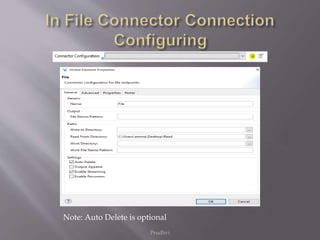
Note: Auto Delete is optional
Prudhvi
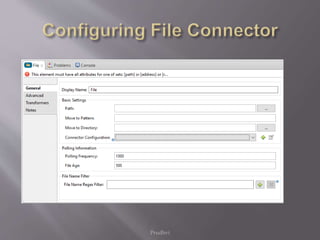
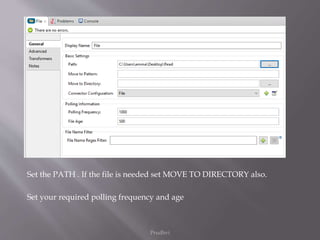
Set the PATH . If the file is needed set MOVE TO DIRECTORY also.
Set your required polling frequency and age
Prudhvi
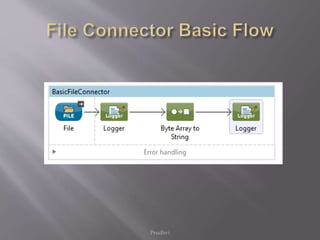
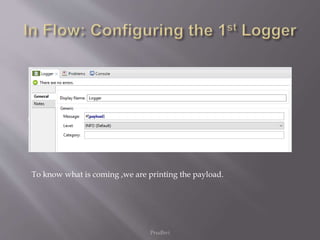
To know what is coming ,we are printing the payload.
Prudhvi
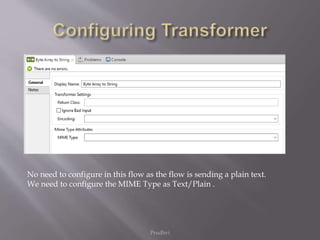
No need to configure in this flow as the flow is sending a plain text.
We need to configure the MIME Type as Text/Plain .
Prudhvi
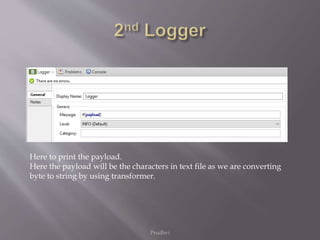
Here to print the payload.
Here the payload will be the characters in text file as we are converting
byte to string by using transformer.
Prudhvi
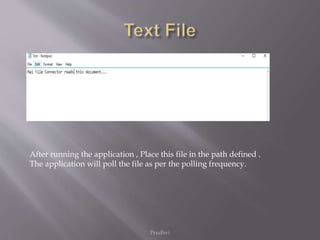
After running the application , Place this file in the path defined .
The application will poll the file as per the polling frequency.
<?xml version="1.0" encoding="UTF-8"?>
<mule xmlns:file="http://www.mulesoft.org/schema/mule/file" xmlns:tracking="http://www.mulesoft.org/schema/mule/ee/tracking"
xmlns:quartz="http://www.mulesoft.org/schema/mule/quartz" xmlns="http://www.mulesoft.org/schema/mule/core"
xmlns:doc="http://www.mulesoft.org/schema/mule/documentation"
xmlns:spring="http://www.springframework.org/schema/beans" version="EE-3.6.1"
xmlns:xsi="http://www.w3.org/2001/XMLSchema-instance"
xsi:schemaLocation="http://www.springframework.org/schema/beans http://www.springframework.org/schema/beans/spring-beans-current.xsd
http://www.mulesoft.org/schema/mule/core http://www.mulesoft.org/schema/mule/core/current/mule.xsd
http://www.mulesoft.org/schema/mule/quartz http://www.mulesoft.org/schema/mule/quartz/current/mule-quartz.xsd
http://www.mulesoft.org/schema/mule/file http://www.mulesoft.org/schema/mule/file/current/mule-file.xsd
http://www.mulesoft.org/schema/mule/ee/tracking http://www.mulesoft.org/schema/mule/ee/tracking/current/mule-tracking-ee.xsd">
<file:connector name="File" readFromDirectory="C:UsersammaDesktopRead" autoDelete="true" streaming="true"
validateConnections="true" doc:name="File"/>
<flow name="BasicFileConnector">
<file:inbound-endpoint path="C:UsersammaDesktopRead" connector-ref="File" responseTimeout="10000" doc:name="File"/>
<logger message="#[payload]" level="INFO" doc:name="Logger"/>
<byte-array-to-string-transformer mimeType="text/plain" doc:name="Byte Array to String"/>
<logger message="#[payload]" level="INFO" doc:name="Logger"/>
</flow>
</mule>
Prudhvi
Prudhvi
Prudhvi
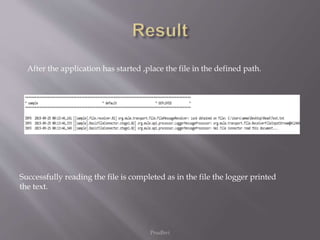
Successfully reading the file is completed as in the file the logger printed
the text.
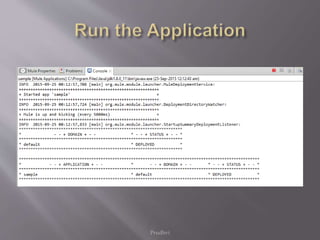
After the application has started ,place the file in the defined path.
 Mulesoft:
https://docs.mulesoft.com/mule-user-
guide/v/3.7/file-connector
Prudhvi
Prudhvi

Basic example using file connector in anypoint studio

  • 1.
    Basic Example using FILEConnector in Anypoint Studio Prudhvi
  • 2.
     The Fileconnector allows your Mule application to exchange files with a file system. You can implement the File connector as an inbound endpoint or as an outbound endpoint.  This endpoint implements a one-way exchange pattern only. Prudhvi
  • 3.
  • 4.
  • 5.
  • 6.
    Prudhvi Set the PATH. If the file is needed set MOVE TO DIRECTORY also. Set your required polling frequency and age
  • 7.
    Prudhvi To know whatis coming ,we are printing the payload.
  • 8.
    Prudhvi No need toconfigure in this flow as the flow is sending a plain text. We need to configure the MIME Type as Text/Plain .
  • 9.
    Prudhvi Here to printthe payload. Here the payload will be the characters in text file as we are converting byte to string by using transformer.
  • 10.
    Prudhvi After running theapplication , Place this file in the path defined . The application will poll the file as per the polling frequency.
  • 11.
    <?xml version="1.0" encoding="UTF-8"?> <mulexmlns:file="http://www.mulesoft.org/schema/mule/file" xmlns:tracking="http://www.mulesoft.org/schema/mule/ee/tracking" xmlns:quartz="http://www.mulesoft.org/schema/mule/quartz" xmlns="http://www.mulesoft.org/schema/mule/core" xmlns:doc="http://www.mulesoft.org/schema/mule/documentation" xmlns:spring="http://www.springframework.org/schema/beans" version="EE-3.6.1" xmlns:xsi="http://www.w3.org/2001/XMLSchema-instance" xsi:schemaLocation="http://www.springframework.org/schema/beans http://www.springframework.org/schema/beans/spring-beans-current.xsd http://www.mulesoft.org/schema/mule/core http://www.mulesoft.org/schema/mule/core/current/mule.xsd http://www.mulesoft.org/schema/mule/quartz http://www.mulesoft.org/schema/mule/quartz/current/mule-quartz.xsd http://www.mulesoft.org/schema/mule/file http://www.mulesoft.org/schema/mule/file/current/mule-file.xsd http://www.mulesoft.org/schema/mule/ee/tracking http://www.mulesoft.org/schema/mule/ee/tracking/current/mule-tracking-ee.xsd"> <file:connector name="File" readFromDirectory="C:UsersammaDesktopRead" autoDelete="true" streaming="true" validateConnections="true" doc:name="File"/> <flow name="BasicFileConnector"> <file:inbound-endpoint path="C:UsersammaDesktopRead" connector-ref="File" responseTimeout="10000" doc:name="File"/> <logger message="#[payload]" level="INFO" doc:name="Logger"/> <byte-array-to-string-transformer mimeType="text/plain" doc:name="Byte Array to String"/> <logger message="#[payload]" level="INFO" doc:name="Logger"/> </flow> </mule> Prudhvi
  • 12.
  • 13.
    Prudhvi Successfully reading thefile is completed as in the file the logger printed the text. After the application has started ,place the file in the defined path.
  • 14.
  • 15.