
By Anirban Sen Chowdhary
.
Fortunately we have base64-encoder-transformer and base64-
decoder-transformer available in our Mule
So, to encrypt a payload in our Mule flow, we can use
base64-encoder-transformer as follows :-
As you can see we have used a file inbound to pick a file in our flow,
and then we encrypt it with base64-encoder-transformer and the
output of the flow will produce a encrypted file
Our corresponding Mule flow will be as follows :-
<flow name="encryptFlow1" doc:name="encryptFlow1">
<file:inbound-endpoint path="E:backuptest"
responseTimeout="10000" doc:name="File">
<file:filename-regex-filter pattern="abc.doc"
caseSensitive="false" />
</file:inbound-endpoint>
<base64-encoder-transformer encoding="utf8" />
<logger level="INFO" message="#[message.payloadAs(java.lang.String)]" />
<file:outbound-endpoint path="E:backuptestnewfolder"
responseTimeout="10000" doc:name="File" />
</flow>
As you can see in the code it will pick a file called abc.doc from
E:backuptest location , encrypt it and put the encrypted file to
E:backuptestnewfolder
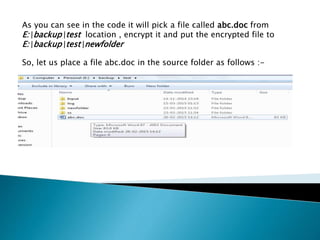
So, let us place a file abc.doc in the source folder as follows :-
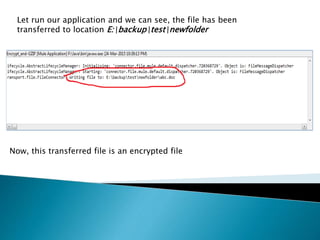
Let run our application and we can see, the file has been
transferred to location E:backuptestnewfolder
Now, this transferred file is an encrypted file
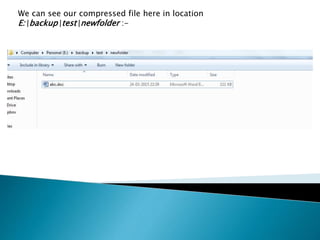
We can see our compressed file here in location
E:backuptestnewfolder :-
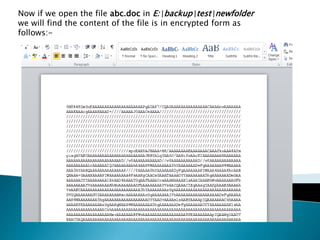
Now if we open the file abc.doc in E:backuptestnewfolder
we will find the content of the file is in encrypted form as
follows:-
Now what about decrypting the file back to the original content
???
In case of decrypting a file back to original content ( content
before the encryption) we will be using base64-decoder-
transformer as follows:-
As you can see, it will pick up the encrypted file abc.doc from the
location E:backuptestnewfolder and put it into a new location
E:backuptestoriginalFile
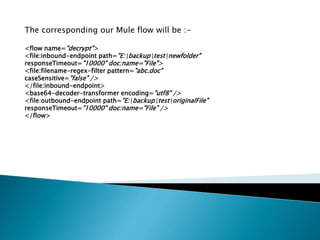
The corresponding our Mule flow will be :-
<flow name="decrypt">
<file:inbound-endpoint path="E:backuptestnewfolder"
responseTimeout="10000" doc:name="File">
<file:filename-regex-filter pattern="abc.doc"
caseSensitive="false" />
</file:inbound-endpoint>
<base64-decoder-transformer encoding="utf8" />
<file:outbound-endpoint path="E:backuptestoriginalFile"
responseTimeout="10000" doc:name="File" />
</flow>
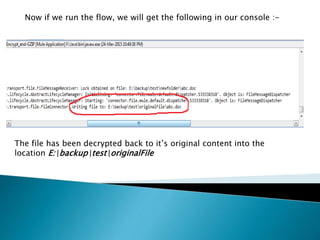
Now if we run the flow, we will get the following in our console :-
The file has been decrypted back to it’s original content into the
location E:backuptestoriginalFile
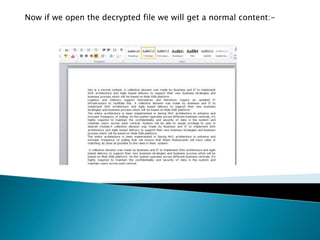
Now if we open the decrypted file we will get a normal content:-
Hope you enjoyed the tips of compressing and decompressing using
base64-encoder-transformer/base64-decoder-transformer in Mule
Next slide I will bring some more simple yet interesting topic
Encrypting/Decrypting  mule

Encrypting/Decrypting mule

  • 1.
    By Anirban SenChowdhary
  • 3.
  • 4.
    Fortunately we havebase64-encoder-transformer and base64- decoder-transformer available in our Mule
  • 5.
    So, to encrypta payload in our Mule flow, we can use base64-encoder-transformer as follows :- As you can see we have used a file inbound to pick a file in our flow, and then we encrypt it with base64-encoder-transformer and the output of the flow will produce a encrypted file
  • 6.
    Our corresponding Muleflow will be as follows :- <flow name="encryptFlow1" doc:name="encryptFlow1"> <file:inbound-endpoint path="E:backuptest" responseTimeout="10000" doc:name="File"> <file:filename-regex-filter pattern="abc.doc" caseSensitive="false" /> </file:inbound-endpoint> <base64-encoder-transformer encoding="utf8" /> <logger level="INFO" message="#[message.payloadAs(java.lang.String)]" /> <file:outbound-endpoint path="E:backuptestnewfolder" responseTimeout="10000" doc:name="File" /> </flow>
  • 7.
    As you cansee in the code it will pick a file called abc.doc from E:backuptest location , encrypt it and put the encrypted file to E:backuptestnewfolder So, let us place a file abc.doc in the source folder as follows :-
  • 8.
    Let run ourapplication and we can see, the file has been transferred to location E:backuptestnewfolder Now, this transferred file is an encrypted file
  • 9.
    We can seeour compressed file here in location E:backuptestnewfolder :-
  • 10.
    Now if weopen the file abc.doc in E:backuptestnewfolder we will find the content of the file is in encrypted form as follows:-
  • 11.
    Now what aboutdecrypting the file back to the original content ???
  • 12.
    In case ofdecrypting a file back to original content ( content before the encryption) we will be using base64-decoder- transformer as follows:- As you can see, it will pick up the encrypted file abc.doc from the location E:backuptestnewfolder and put it into a new location E:backuptestoriginalFile
  • 13.
    The corresponding ourMule flow will be :- <flow name="decrypt"> <file:inbound-endpoint path="E:backuptestnewfolder" responseTimeout="10000" doc:name="File"> <file:filename-regex-filter pattern="abc.doc" caseSensitive="false" /> </file:inbound-endpoint> <base64-decoder-transformer encoding="utf8" /> <file:outbound-endpoint path="E:backuptestoriginalFile" responseTimeout="10000" doc:name="File" /> </flow>
  • 14.
    Now if werun the flow, we will get the following in our console :- The file has been decrypted back to it’s original content into the location E:backuptestoriginalFile
  • 15.
    Now if weopen the decrypted file we will get a normal content:-
  • 16.
    Hope you enjoyedthe tips of compressing and decompressing using base64-encoder-transformer/base64-decoder-transformer in Mule Next slide I will bring some more simple yet interesting topic