Anypoint MQ Queues and
Exchanges
• Anypoint MQ is a messaging broker that lets applications communicate by
publishing a Mule Message to a queue so that another application can
consume the message.
• This guide describes how to create a queue, exchange, and client
application using Anypoint Platform.
• Note: Queue and exchange names can contain alphanumeric characters (a-
z, A-Z, 0-9), dots (.), and dashes (-). All other characters are not allowed.
Queue and exchange names are limited to 128 characters in length.
• Organization administrators or owners can view the current and past
months usage - the total number of messages and API requests. This
information is accessed from the Access Management page. For more
information, see Anypoint MQ Usage Information.
Create a Queue
• A queue is a temporary storage area for a message.
• To create a queue:
• Log into Anypoint Platform.
• Click MQ from the left navigation bar or click MQ from the main
Anypoint Platform screen:
Click Destinations:
• Click the blue plus circle.
• Click Queue.
• In the Create Queue screen:
• Specify a name.
• (Optional) Change the time-to-live (TTL) durations for:
• Default Message TTL - How long unprocessed messages persist before being
deleted.
• Default Lock TTL - If there is a server failure and a message is not acknowledged,
specifies the duration that a message would wait before being put back into the
queue. A locked message does not block other messages to be read. The lock
makes a message unavailable to other applications while locked.
• The duration for each TTL can be from milliseconds up to 14 days.
• (Optional) Set the queue to encrypted. Anypoint MQ uses PBE with MD5 and
triple DES to encrypt messages.
• Click Save Changes.
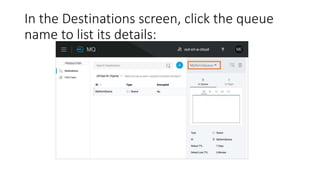
In the Destinations screen, click the queue
name to list its details:
• The next section describes how Anypoint Platform lets you send
messages to a queue and view, return the messages to the queue, or
delete the messages. Message content (called a payload) can be text,
JSON, or CSV (comma-separated values).
Send a Message to a Queue
• To send a message to a queue:
• Log into Anypoint Platform.
• In the top task bar, click MQ.
• Click Destinations.
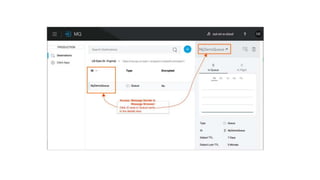
• Click the queue entry in Destinations to view details about the queue.
• Click the queue name in the details to open the Messaging feature:
Verify the Message in a Queue
• To verify that the message arrived in the queue, either return to the
Destinations screen to observe the number of messages in the queue,
or you can assume the message is in the queue, and you can Get a
Message From a Queue.
• To return to the Destinations screen to verify that the message is in
the queue:
Get a Message From a Queue
• To get a message from a queue:
• Follow the directions in Send a Message to a Queue and advance to
Step 6, except click Message Browser:
• Click Get Messages.
• Click the message ID value to view the message.
• If you want to return the message to the queue, such as if other
applications may also want to read the message, click the Return
Messages icon - this is the default condition. If you switch screens
back to the Message Sender or to Destinations, messages
automatically return to the queue. In Anypoint MQ, returning the
messages to the queue is known as nack - the message is not altered.
However, the time to live (TTL) value you set when you created your
queue determines how long the message is available before Anypoint
MQ deletes it.
• Alternatively, you can delete the message by clicking the trash can
icon. In Anypoint MQ, deleting a message is called an ack - For
information on how Anypoint MQ processes ack messages for you,
see Acknowledgement Mode.
• Organization administrators or owners can view the current and past
months usage - the total number of messages and API requests. This
information is accessed from the Access Management page. For more
information, see Anypoint MQ Usage Information.
• In the next section, you can try alternate ways of formatting
messages.

Anypoint mq queues and exchanges

  • 1.
    Anypoint MQ Queuesand Exchanges
  • 2.
    • Anypoint MQis a messaging broker that lets applications communicate by publishing a Mule Message to a queue so that another application can consume the message. • This guide describes how to create a queue, exchange, and client application using Anypoint Platform. • Note: Queue and exchange names can contain alphanumeric characters (a- z, A-Z, 0-9), dots (.), and dashes (-). All other characters are not allowed. Queue and exchange names are limited to 128 characters in length.
  • 3.
    • Organization administratorsor owners can view the current and past months usage - the total number of messages and API requests. This information is accessed from the Access Management page. For more information, see Anypoint MQ Usage Information.
  • 4.
    Create a Queue •A queue is a temporary storage area for a message. • To create a queue: • Log into Anypoint Platform. • Click MQ from the left navigation bar or click MQ from the main Anypoint Platform screen:
  • 6.
  • 7.
    • Click theblue plus circle. • Click Queue. • In the Create Queue screen:
  • 9.
    • Specify aname. • (Optional) Change the time-to-live (TTL) durations for: • Default Message TTL - How long unprocessed messages persist before being deleted. • Default Lock TTL - If there is a server failure and a message is not acknowledged, specifies the duration that a message would wait before being put back into the queue. A locked message does not block other messages to be read. The lock makes a message unavailable to other applications while locked. • The duration for each TTL can be from milliseconds up to 14 days. • (Optional) Set the queue to encrypted. Anypoint MQ uses PBE with MD5 and triple DES to encrypt messages. • Click Save Changes.
  • 10.
    In the Destinationsscreen, click the queue name to list its details:
  • 11.
    • The nextsection describes how Anypoint Platform lets you send messages to a queue and view, return the messages to the queue, or delete the messages. Message content (called a payload) can be text, JSON, or CSV (comma-separated values).
  • 12.
    Send a Messageto a Queue • To send a message to a queue: • Log into Anypoint Platform. • In the top task bar, click MQ. • Click Destinations. • Click the queue entry in Destinations to view details about the queue. • Click the queue name in the details to open the Messaging feature:
  • 14.
    Verify the Messagein a Queue • To verify that the message arrived in the queue, either return to the Destinations screen to observe the number of messages in the queue, or you can assume the message is in the queue, and you can Get a Message From a Queue. • To return to the Destinations screen to verify that the message is in the queue:
  • 16.
    Get a MessageFrom a Queue • To get a message from a queue: • Follow the directions in Send a Message to a Queue and advance to Step 6, except click Message Browser: • Click Get Messages. • Click the message ID value to view the message.
  • 17.
    • If youwant to return the message to the queue, such as if other applications may also want to read the message, click the Return Messages icon - this is the default condition. If you switch screens back to the Message Sender or to Destinations, messages automatically return to the queue. In Anypoint MQ, returning the messages to the queue is known as nack - the message is not altered. However, the time to live (TTL) value you set when you created your queue determines how long the message is available before Anypoint MQ deletes it.
  • 18.
    • Alternatively, youcan delete the message by clicking the trash can icon. In Anypoint MQ, deleting a message is called an ack - For information on how Anypoint MQ processes ack messages for you, see Acknowledgement Mode. • Organization administrators or owners can view the current and past months usage - the total number of messages and API requests. This information is accessed from the Access Management page. For more information, see Anypoint MQ Usage Information. • In the next section, you can try alternate ways of formatting messages.