The Enterprise Service Bus
Introduction using Mule
Introduction to Open-Source ESB
1
Agenda
• What is Mule?
• How do you use Mule?
• What are the core Mule concepts?
• Learning mule with File endpoints
2
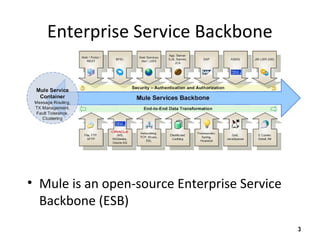
Enterprise Service Backbone
• Mule is an open-source Enterprise Service
Backbone (ESB)
3
Mule is Has Advanced
Technologies
• SEDA
– Staged Event-Driven Architecture
• Java NIO
– Java New Input/Output
4
SEDA
• SEDA decomposes a complex, event-driven software application into a set
of stages connected by queues
• This design avoids the high overhead associated with thread-based
concurrency models, and decouples event and thread scheduling from
application logic
• By performing admission control on each event queue, the service can be
well-conditioned to load, preventing resources from being overcommitted
when demand exceeds service capacity
• SEDA employs dynamic control to automatically tune runtime parameters
(such as the scheduling parameters of each stage) as well as to manage
load, for example, by performing adaptive load shedding
• Decomposing services into a set of stages also enables modularity and
code reuse, as well as the development of debugging tools for complex
event-driven applications
5
Java NIO
• NIO is a collection of Java programming language APIs that
offer advanced features for intensive I/O operations
• NIO facilitates an implementations that can directly use the
most efficient operations of the underlying platform
• NIO includes:
– Buffers for data of primitive types
– Character set encoders and decoders
– A pattern-matching facility based on Perl-style regular expressions (in
package java.util.regex)
– Channels, a new primitive I/O abstraction
– A file interface that supports locks and memory mapping
– A multiplexed, non-blocking I/O facility for writing scalable servers
6
Mule’s “Moves Things Around”
• Folder to folder
• Queue to queue
• Shared memory to shared memory
• Using different types of transports
• In a flexible way
7
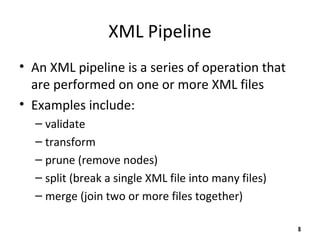
XML Pipeline
• An XML pipeline is a series of operation that
are performed on one or more XML files
• Examples include:
– validate
– transform
– prune (remove nodes)
– split (break a single XML file into many files)
– merge (join two or more files together)
8
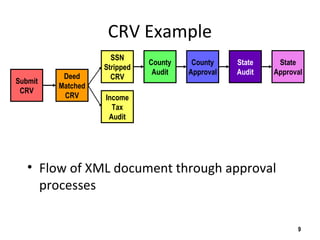
CRV Example
• Flow of XML document through approval
processes
9
Submit
CRV
Deed
Matched
CRV
SSN
Stripped
CRV
Income
Tax
Audit
County
Audit
County
Approval
State
Audit
State
Approval
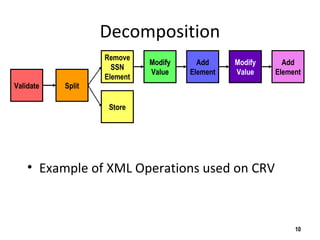
Decomposition
• Example of XML Operations used on CRV
10
Validate Split
Remove
SSN
Element
Store
Modify
Value
Add
Element
Modify
Value
Add
Element
Declarative Approach
• Focus on specifying "What" not "How"
• Empower business analysis to write machine-
readable specifications
• Hide the "How" behind services with clear
interfaces (SOA)
11
Core Mule Concepts
• Mule Manager
• Mule Model
• Universal Message Object (UMO)
• Endpoints
• External Applications
12
Universal Message Object (UMO)
• A UMO is a type of Java object that can
– receive events "from anywhere"
– send events
• UMO Components are usually your business objects.
They are components that execute business logic on
an incoming event
• UMO are standard JavaBeans (containers)
• There is no Mule-specific code in your components
• Mule handles all routing and transformation of
events to and from your objects based on the
configuration of your component
13
Transport
• A transport or "provider", is a set of objects
that add support to Mule to handle a specific
kind of transport or protocol
• Examples
– the "Email Provider" enables Mule to send and
receive messages via the SMTP, POP and IMAP
protocols
14
Connector
• A connector is the object that sends and
receives messages on behalf of an endpoint.
• Connectors are bundled as part of specific
transports or providers.
• For example, the FileConnector can read
and write file system files.
15
Router
• A router is the object that do something with
messages once they have been received by a
connector, or prior to being sent out by the
connector
16
Filter
• A filter optionally filters incoming or outgoing
messages that are coming into or going out from a
connector.
• For example, the File Provider comes with a
FilenameWildcardFilter that restricts which
files are read by the connector based on file name
patterns. For example only files with the .xml
extension can be routed.
• Filters are used in conjunction with Routers.
17
Transformer
• A transformer optionally changes incoming or
outgoing messages in some way
• This is usually done to make the message
format useable by a downstream function
• Examples:
– the ByteArrayToString transformer converts byte
arrays into String objects.
18
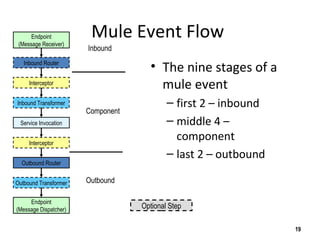
Mule Event Flow
• The nine stages of a
mule event
– first 2 – inbound
– middle 4 –
component
– last 2 – outbound
19
Endpoint
(Message Receiver)
Endpoint
(Message Dispatcher)
Inbound Router
Outbound Router
Inbound Transformer
Outbound Transformer
Interceptor
Service Invocation
Interceptor
Inbound
Component
Outbound
Optional Step
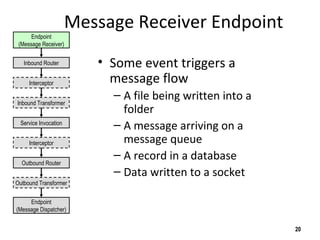
Message Receiver Endpoint
• Some event triggers a
message flow
– A file being written into a
folder
– A message arriving on a
message queue
– A record in a database
– Data written to a socket
20
Endpoint
(Message Dispatcher)
Inbound Router
Outbound Router
Inbound Transformer
Outbound Transformer
Interceptor
Service Invocation
Interceptor
Endpoint
(Message Receiver)
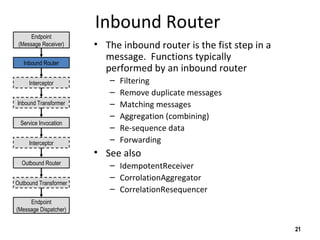
Inbound Router
• The inbound router is the fist step in a
message. Functions typically
performed by an inbound router
– Filtering
– Remove duplicate messages
– Matching messages
– Aggregation (combining)
– Re-sequence data
– Forwarding
• See also
– IdempotentReceiver
– CorrolationAggregator
– CorrelationResequencer
21
Endpoint
(Message Dispatcher)
Inbound Router
Outbound Router
Inbound Transformer
Outbound Transformer
Interceptor
Service Invocation
Interceptor
Endpoint
(Message Receiver)
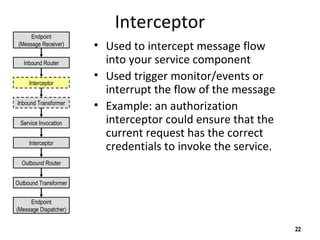
Interceptor
• Used to intercept message flow
into your service component
• Used trigger monitor/events or
interrupt the flow of the message
• Example: an authorization
interceptor could ensure that the
current request has the correct
credentials to invoke the service.
22
Endpoint
(Message Dispatcher)
Inbound Router
Outbound Router
Inbound Transformer
Outbound Transformer
Service Invocation
Interceptor
Endpoint
(Message Receiver)
Interceptor
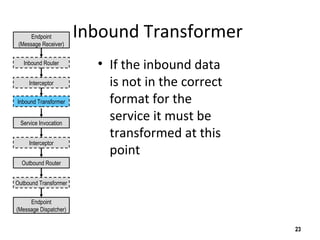
Inbound Transformer
• If the inbound data
is not in the correct
format for the
service it must be
transformed at this
point
23
Endpoint
(Message Receiver)
Endpoint
(Message Dispatcher)
Inbound Router
Outbound Router
Outbound Transformer
Interceptor
Service Invocation
Interceptor
Inbound Transformer
Service Invocation
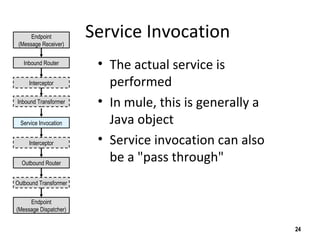
• The actual service is
performed
• In mule, this is generally a
Java object
• Service invocation can also
be a "pass through"
24
Endpoint
(Message Receiver)
Endpoint
(Message Dispatcher)
Inbound Router
Outbound Router
Outbound Transformer
Interceptor
Interceptor
Inbound Transformer
Service Invocation
Outbound Router
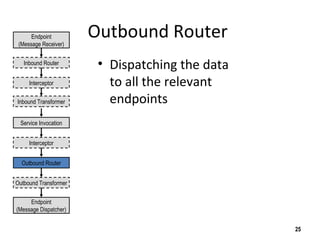
• Dispatching the data
to all the relevant
endpoints
25
Endpoint
(Message Receiver)
Endpoint
(Message Dispatcher)
Inbound Router
Outbound Transformer
Interceptor
Interceptor
Inbound Transformer
Service Invocation
Outbound Router
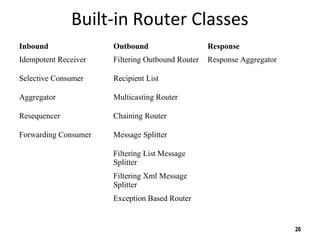
Built-in Router Classes
Inbound Outbound Response
Idempotent Receiver Filtering Outbound Router Response Aggregator
Selective Consumer Recipient List
Aggregator Multicasting Router
Resequencer Chaining Router
Forwarding Consumer Message Splitter
Filtering List Message
Splitter
Filtering Xml Message
Splitter
Exception Based Router
26
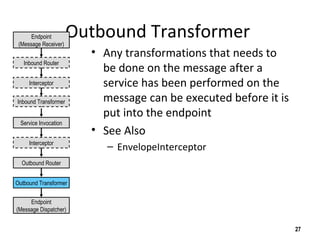
Outbound Transformer
• Any transformations that needs to
be done on the message after a
service has been performed on the
message can be executed before it is
put into the endpoint
• See Also
– EnvelopeInterceptor
27
Endpoint
(Message Receiver)
Endpoint
(Message Dispatcher)
Inbound Router
Interceptor
Interceptor
Inbound Transformer
Service Invocation
Outbound Router
Outbound Transformer
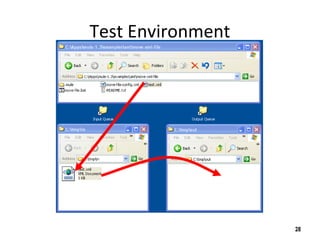
Test Environment
28
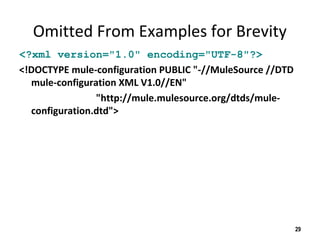
Omitted From Examples for Brevity
<?xml version="1.0" encoding="UTF-8"?>
<!DOCTYPE mule-configuration PUBLIC "-//MuleSource //DTD
mule-configuration XML V1.0//EN"
"http://mule.mulesource.org/dtds/mule-
configuration.dtd">
29
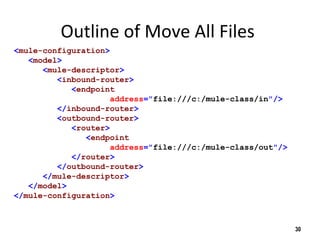
Outline of Move All Files
<mule-configuration>
<model>
<mule-descriptor>
<inbound-router>
<endpoint
address="file:///c:/mule-class/in"/>
</inbound-router>
<outbound-router>
<router>
<endpoint
address="file:///c:/mule-class/out"/>
</router>
</outbound-router>
</mule-descriptor>
</model>
</mule-configuration>
30
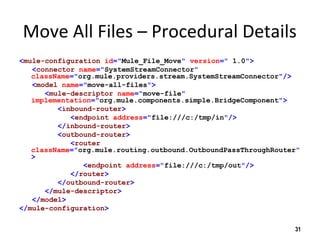
Move All Files – Procedural Details
<mule-configuration id="Mule_File_Move" version=" 1.0">
<connector name="SystemStreamConnector"
className="org.mule.providers.stream.SystemStreamConnector"/>
<model name="move-all-files">
<mule-descriptor name="move-file"
implementation="org.mule.components.simple.BridgeComponent">
<inbound-router>
<endpoint address="file:///c:/tmp/in"/>
</inbound-router>
<outbound-router>
<router
className="org.mule.routing.outbound.OutboundPassThroughRouter"
>
<endpoint address="file:///c:/tmp/out"/>
</router>
</outbound-router>
</mule-descriptor>
</model>
</mule-configuration>
31
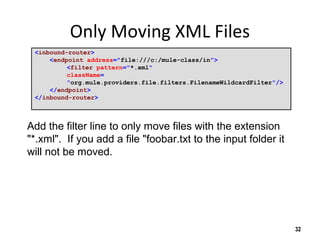
Only Moving XML Files
<inbound-router>
<endpoint address="file:///c:/mule-class/in">
<filter pattern="*.xml"
className=
"org.mule.providers.file.filters.FilenameWildcardFilter"/>
</endpoint>
</inbound-router>
32
Add the filter line to only move files with the extension
"*.xml". If you add a file "foobar.txt to the input folder it
will not be moved.
Keeping the Name The Same
<outbound-router>
<router
className="org.mule.routing.outbound.OutboundPassThroughRouter">
<endpoint
address=
"file:///c:/mule-class/out?outputPattern=$[ORIGINALNAME]"
/>
</router>
</outbound-router>
33
Add the outputPattern parameter to keep the output
name the same as the input.
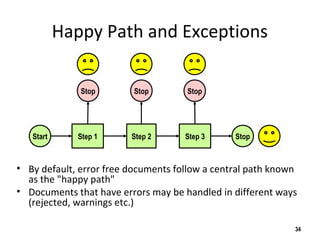
Happy Path and Exceptions
• By default, error free documents follow a central path known
as the "happy path"
• Documents that have errors may be handled in different ways
(rejected, warnings etc.)
34
Start StopStep 1 Step 2 Step 3
Stop Stop Stop
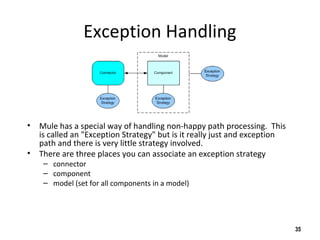
Exception Handling
• Mule has a special way of handling non-happy path processing. This
is called an "Exception Strategy" but is it really just and exception
path and there is very little strategy involved.
• There are three places you can associate an exception strategy
– connector
– component
– model (set for all components in a model)
35
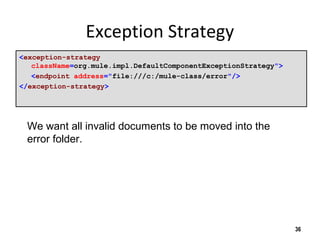
Exception Strategy
<exception-strategy
className=org.mule.impl.DefaultComponentExceptionStrategy">
<endpoint address="file:///c:/mule-class/error"/>
</exception-strategy>
36
We want all invalid documents to be moved into the
error folder.
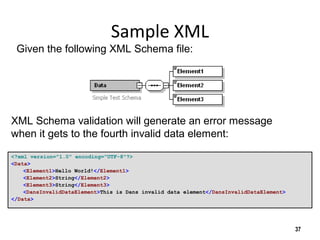
Sample XML
<?xml version="1.0" encoding="UTF-8"?>
<Data>
<Element1>Hello World!</Element1>
<Element2>String</Element2>
<Element3>String</Element3>
<DansInvalidDataElement>This is Dans invalid data element</DansInvalidDataElement>
</Data>
37
XML Schema validation will generate an error message
when it gets to the fourth invalid data element:
Given the following XML Schema file:
Validating against an XML Schema
<outbound-router>
<router className="org.mule.routing.outbound.FilteringXmlMessageSplitter">
<endpoint
address="file:///c:/mule-class/out?outputPattern=$[ORIGINALNAME]"/>
<properties>
<property name="validateSchema" value="true"/>
<property name="externalSchemaLocation"
value="file:///c:/mule-class/labs/07-validate/my-
schema.xsd"/>
</properties>
</router>
</outbound-router>
38
To validate the XML Schema, just add two properties:
1) tell it to validate the document
2) tell it what file to use and where to find it
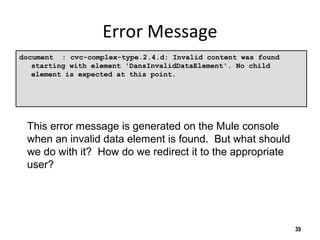
Error Message
document : cvc-complex-type.2.4.d: Invalid content was found
starting with element 'DansInvalidDataElement'. No child
element is expected at this point.
39
This error message is generated on the Mule console
when an invalid data element is found. But what should
we do with it? How do we redirect it to the appropriate
user?
Thank You!
Please contact me for more information:
• Enterprise Service Bus
• Enterprise Integration
• Metadata Management
• Metadata Registries
• Service Oriented Architectures
• Business Intelligence and Data Warehouse
• Semantic Web
40

Mule overview

  • 1.
    The Enterprise ServiceBus Introduction using Mule Introduction to Open-Source ESB 1
  • 2.
    Agenda • What isMule? • How do you use Mule? • What are the core Mule concepts? • Learning mule with File endpoints 2
  • 3.
    Enterprise Service Backbone •Mule is an open-source Enterprise Service Backbone (ESB) 3
  • 4.
    Mule is HasAdvanced Technologies • SEDA – Staged Event-Driven Architecture • Java NIO – Java New Input/Output 4
  • 5.
    SEDA • SEDA decomposesa complex, event-driven software application into a set of stages connected by queues • This design avoids the high overhead associated with thread-based concurrency models, and decouples event and thread scheduling from application logic • By performing admission control on each event queue, the service can be well-conditioned to load, preventing resources from being overcommitted when demand exceeds service capacity • SEDA employs dynamic control to automatically tune runtime parameters (such as the scheduling parameters of each stage) as well as to manage load, for example, by performing adaptive load shedding • Decomposing services into a set of stages also enables modularity and code reuse, as well as the development of debugging tools for complex event-driven applications 5
  • 6.
    Java NIO • NIOis a collection of Java programming language APIs that offer advanced features for intensive I/O operations • NIO facilitates an implementations that can directly use the most efficient operations of the underlying platform • NIO includes: – Buffers for data of primitive types – Character set encoders and decoders – A pattern-matching facility based on Perl-style regular expressions (in package java.util.regex) – Channels, a new primitive I/O abstraction – A file interface that supports locks and memory mapping – A multiplexed, non-blocking I/O facility for writing scalable servers 6
  • 7.
    Mule’s “Moves ThingsAround” • Folder to folder • Queue to queue • Shared memory to shared memory • Using different types of transports • In a flexible way 7
  • 8.
    XML Pipeline • AnXML pipeline is a series of operation that are performed on one or more XML files • Examples include: – validate – transform – prune (remove nodes) – split (break a single XML file into many files) – merge (join two or more files together) 8
  • 9.
    CRV Example • Flowof XML document through approval processes 9 Submit CRV Deed Matched CRV SSN Stripped CRV Income Tax Audit County Audit County Approval State Audit State Approval
  • 10.
    Decomposition • Example ofXML Operations used on CRV 10 Validate Split Remove SSN Element Store Modify Value Add Element Modify Value Add Element
  • 11.
    Declarative Approach • Focuson specifying "What" not "How" • Empower business analysis to write machine- readable specifications • Hide the "How" behind services with clear interfaces (SOA) 11
  • 12.
    Core Mule Concepts •Mule Manager • Mule Model • Universal Message Object (UMO) • Endpoints • External Applications 12
  • 13.
    Universal Message Object(UMO) • A UMO is a type of Java object that can – receive events "from anywhere" – send events • UMO Components are usually your business objects. They are components that execute business logic on an incoming event • UMO are standard JavaBeans (containers) • There is no Mule-specific code in your components • Mule handles all routing and transformation of events to and from your objects based on the configuration of your component 13
  • 14.
    Transport • A transportor "provider", is a set of objects that add support to Mule to handle a specific kind of transport or protocol • Examples – the "Email Provider" enables Mule to send and receive messages via the SMTP, POP and IMAP protocols 14
  • 15.
    Connector • A connectoris the object that sends and receives messages on behalf of an endpoint. • Connectors are bundled as part of specific transports or providers. • For example, the FileConnector can read and write file system files. 15
  • 16.
    Router • A routeris the object that do something with messages once they have been received by a connector, or prior to being sent out by the connector 16
  • 17.
    Filter • A filteroptionally filters incoming or outgoing messages that are coming into or going out from a connector. • For example, the File Provider comes with a FilenameWildcardFilter that restricts which files are read by the connector based on file name patterns. For example only files with the .xml extension can be routed. • Filters are used in conjunction with Routers. 17
  • 18.
    Transformer • A transformeroptionally changes incoming or outgoing messages in some way • This is usually done to make the message format useable by a downstream function • Examples: – the ByteArrayToString transformer converts byte arrays into String objects. 18
  • 19.
    Mule Event Flow •The nine stages of a mule event – first 2 – inbound – middle 4 – component – last 2 – outbound 19 Endpoint (Message Receiver) Endpoint (Message Dispatcher) Inbound Router Outbound Router Inbound Transformer Outbound Transformer Interceptor Service Invocation Interceptor Inbound Component Outbound Optional Step
  • 20.
    Message Receiver Endpoint •Some event triggers a message flow – A file being written into a folder – A message arriving on a message queue – A record in a database – Data written to a socket 20 Endpoint (Message Dispatcher) Inbound Router Outbound Router Inbound Transformer Outbound Transformer Interceptor Service Invocation Interceptor Endpoint (Message Receiver)
  • 21.
    Inbound Router • Theinbound router is the fist step in a message. Functions typically performed by an inbound router – Filtering – Remove duplicate messages – Matching messages – Aggregation (combining) – Re-sequence data – Forwarding • See also – IdempotentReceiver – CorrolationAggregator – CorrelationResequencer 21 Endpoint (Message Dispatcher) Inbound Router Outbound Router Inbound Transformer Outbound Transformer Interceptor Service Invocation Interceptor Endpoint (Message Receiver)
  • 22.
    Interceptor • Used tointercept message flow into your service component • Used trigger monitor/events or interrupt the flow of the message • Example: an authorization interceptor could ensure that the current request has the correct credentials to invoke the service. 22 Endpoint (Message Dispatcher) Inbound Router Outbound Router Inbound Transformer Outbound Transformer Service Invocation Interceptor Endpoint (Message Receiver) Interceptor
  • 23.
    Inbound Transformer • Ifthe inbound data is not in the correct format for the service it must be transformed at this point 23 Endpoint (Message Receiver) Endpoint (Message Dispatcher) Inbound Router Outbound Router Outbound Transformer Interceptor Service Invocation Interceptor Inbound Transformer
  • 24.
    Service Invocation • Theactual service is performed • In mule, this is generally a Java object • Service invocation can also be a "pass through" 24 Endpoint (Message Receiver) Endpoint (Message Dispatcher) Inbound Router Outbound Router Outbound Transformer Interceptor Interceptor Inbound Transformer Service Invocation
  • 25.
    Outbound Router • Dispatchingthe data to all the relevant endpoints 25 Endpoint (Message Receiver) Endpoint (Message Dispatcher) Inbound Router Outbound Transformer Interceptor Interceptor Inbound Transformer Service Invocation Outbound Router
  • 26.
    Built-in Router Classes InboundOutbound Response Idempotent Receiver Filtering Outbound Router Response Aggregator Selective Consumer Recipient List Aggregator Multicasting Router Resequencer Chaining Router Forwarding Consumer Message Splitter Filtering List Message Splitter Filtering Xml Message Splitter Exception Based Router 26
  • 27.
    Outbound Transformer • Anytransformations that needs to be done on the message after a service has been performed on the message can be executed before it is put into the endpoint • See Also – EnvelopeInterceptor 27 Endpoint (Message Receiver) Endpoint (Message Dispatcher) Inbound Router Interceptor Interceptor Inbound Transformer Service Invocation Outbound Router Outbound Transformer
  • 28.
  • 29.
    Omitted From Examplesfor Brevity <?xml version="1.0" encoding="UTF-8"?> <!DOCTYPE mule-configuration PUBLIC "-//MuleSource //DTD mule-configuration XML V1.0//EN" "http://mule.mulesource.org/dtds/mule- configuration.dtd"> 29
  • 30.
    Outline of MoveAll Files <mule-configuration> <model> <mule-descriptor> <inbound-router> <endpoint address="file:///c:/mule-class/in"/> </inbound-router> <outbound-router> <router> <endpoint address="file:///c:/mule-class/out"/> </router> </outbound-router> </mule-descriptor> </model> </mule-configuration> 30
  • 31.
    Move All Files– Procedural Details <mule-configuration id="Mule_File_Move" version=" 1.0"> <connector name="SystemStreamConnector" className="org.mule.providers.stream.SystemStreamConnector"/> <model name="move-all-files"> <mule-descriptor name="move-file" implementation="org.mule.components.simple.BridgeComponent"> <inbound-router> <endpoint address="file:///c:/tmp/in"/> </inbound-router> <outbound-router> <router className="org.mule.routing.outbound.OutboundPassThroughRouter" > <endpoint address="file:///c:/tmp/out"/> </router> </outbound-router> </mule-descriptor> </model> </mule-configuration> 31
  • 32.
    Only Moving XMLFiles <inbound-router> <endpoint address="file:///c:/mule-class/in"> <filter pattern="*.xml" className= "org.mule.providers.file.filters.FilenameWildcardFilter"/> </endpoint> </inbound-router> 32 Add the filter line to only move files with the extension "*.xml". If you add a file "foobar.txt to the input folder it will not be moved.
  • 33.
    Keeping the NameThe Same <outbound-router> <router className="org.mule.routing.outbound.OutboundPassThroughRouter"> <endpoint address= "file:///c:/mule-class/out?outputPattern=$[ORIGINALNAME]" /> </router> </outbound-router> 33 Add the outputPattern parameter to keep the output name the same as the input.
  • 34.
    Happy Path andExceptions • By default, error free documents follow a central path known as the "happy path" • Documents that have errors may be handled in different ways (rejected, warnings etc.) 34 Start StopStep 1 Step 2 Step 3 Stop Stop Stop
  • 35.
    Exception Handling • Mulehas a special way of handling non-happy path processing. This is called an "Exception Strategy" but is it really just and exception path and there is very little strategy involved. • There are three places you can associate an exception strategy – connector – component – model (set for all components in a model) 35
  • 36.
  • 37.
    Sample XML <?xml version="1.0"encoding="UTF-8"?> <Data> <Element1>Hello World!</Element1> <Element2>String</Element2> <Element3>String</Element3> <DansInvalidDataElement>This is Dans invalid data element</DansInvalidDataElement> </Data> 37 XML Schema validation will generate an error message when it gets to the fourth invalid data element: Given the following XML Schema file:
  • 38.
    Validating against anXML Schema <outbound-router> <router className="org.mule.routing.outbound.FilteringXmlMessageSplitter"> <endpoint address="file:///c:/mule-class/out?outputPattern=$[ORIGINALNAME]"/> <properties> <property name="validateSchema" value="true"/> <property name="externalSchemaLocation" value="file:///c:/mule-class/labs/07-validate/my- schema.xsd"/> </properties> </router> </outbound-router> 38 To validate the XML Schema, just add two properties: 1) tell it to validate the document 2) tell it what file to use and where to find it
  • 39.
    Error Message document :cvc-complex-type.2.4.d: Invalid content was found starting with element 'DansInvalidDataElement'. No child element is expected at this point. 39 This error message is generated on the Mule console when an invalid data element is found. But what should we do with it? How do we redirect it to the appropriate user?
  • 40.
    Thank You! Please contactme for more information: • Enterprise Service Bus • Enterprise Integration • Metadata Management • Metadata Registries • Service Oriented Architectures • Business Intelligence and Data Warehouse • Semantic Web 40