



By Anirban Sen Chowdhary
Mule ESB File connector allows our Mule application to exchange files with a file
system.
Mule has different types of connector or components all around for performing
different types of functions. Mule is actually very dynamic and flexible towards it’s
user and provide them a lot of feature in different ways.
One of the important component and connector is File.
We can implement the File connector as an inbound endpoint (as a message
source), or as an outbound endpoint.
Generally a File component and connectors are configured with a flow during
design time.
But it is also possible to set the File component/connector attributes value
dynamically at runtime.
For more info :- https://docs.mulesoft.com/mule-user-guide/v/3.7/file-connector
Let us consider we have a JSON file as following :-
{
"Folder": "E:/test",
"Pattern": "abc.json",
"WorkDirectory": "E:/test/New folder"
}
Here we can see the JSON input an attribute called Folder which contains the folder name,
pattern and work directory given. Now we will design a Mule flow where the file will be
read by Mule’s file inbound endpoint, parse the JSON and put the values as the attribute of
the file outbound endpoint, where the file will be dispatched… and all this will be set
dynamically !!!
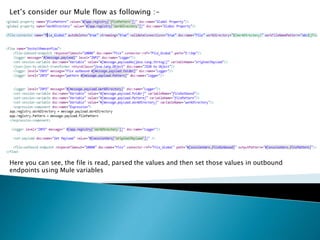
Let’s consider our Mule flow as following :-
Here you can see, the file is read, parsed the values and then set those values in outbound
endpoints using Mule variables
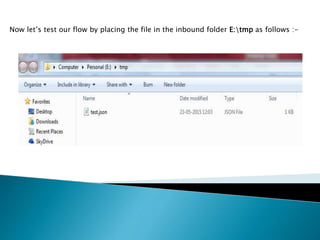
Now let’s test our flow by placing the file in the inbound folder E:tmp as follows :-
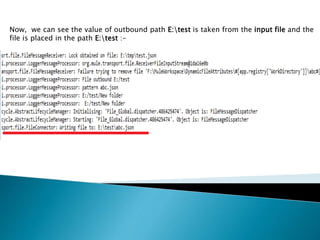
Now, we can see the value of outbound path E:test is taken from the input file and the
file is placed in the path E:test :-
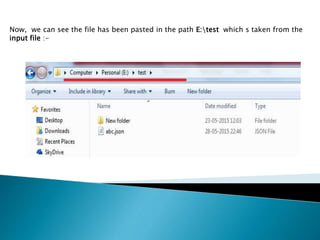
Now, we can see the file has been pasted in the path E:test which s taken from the
input file :-
So, here you can see how to use a Dynamically set the attributes of a file outbound
component and connectors during runtime, you can try this with other component
as well !!!….
Setting filedynamically

Setting filedynamically

  • 1.
    By Anirban SenChowdhary
  • 2.
    Mule ESB Fileconnector allows our Mule application to exchange files with a file system. Mule has different types of connector or components all around for performing different types of functions. Mule is actually very dynamic and flexible towards it’s user and provide them a lot of feature in different ways. One of the important component and connector is File. We can implement the File connector as an inbound endpoint (as a message source), or as an outbound endpoint. Generally a File component and connectors are configured with a flow during design time. But it is also possible to set the File component/connector attributes value dynamically at runtime. For more info :- https://docs.mulesoft.com/mule-user-guide/v/3.7/file-connector
  • 4.
    Let us considerwe have a JSON file as following :- { "Folder": "E:/test", "Pattern": "abc.json", "WorkDirectory": "E:/test/New folder" } Here we can see the JSON input an attribute called Folder which contains the folder name, pattern and work directory given. Now we will design a Mule flow where the file will be read by Mule’s file inbound endpoint, parse the JSON and put the values as the attribute of the file outbound endpoint, where the file will be dispatched… and all this will be set dynamically !!!
  • 5.
    Let’s consider ourMule flow as following :- Here you can see, the file is read, parsed the values and then set those values in outbound endpoints using Mule variables
  • 6.
    Now let’s testour flow by placing the file in the inbound folder E:tmp as follows :-
  • 7.
    Now, we cansee the value of outbound path E:test is taken from the input file and the file is placed in the path E:test :-
  • 8.
    Now, we cansee the file has been pasted in the path E:test which s taken from the input file :-
  • 9.
    So, here youcan see how to use a Dynamically set the attributes of a file outbound component and connectors during runtime, you can try this with other component as well !!!….