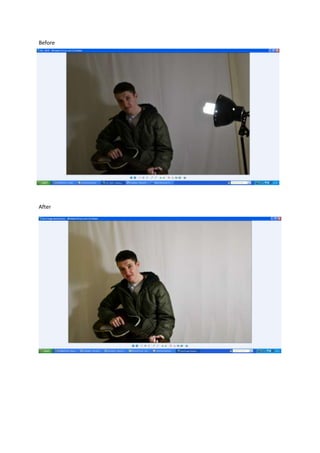
Before
After
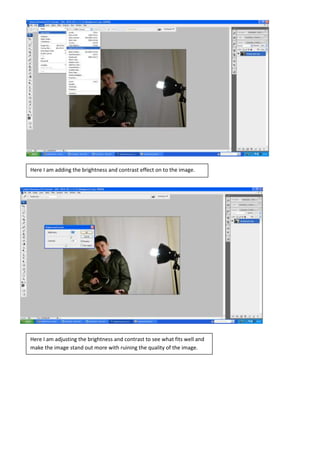
Here I am adding the brightness and contrast effect on to the image.
Here I am adjusting the brightness and contrast to see what fits well and
make the image stand out more with ruining the quality of the image.
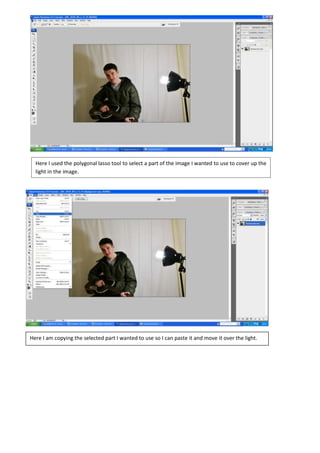
Here I used the polygonal lasso tool to select a part of the image I wanted to use to cover up the
light in the image.
Here I am copying the selected part I wanted to use so I can paste it and move it over the light.
So overall I increased the brightness a lot because when I took the picture it was in a dull lighting
which isn’t what I wanted, so by brightening it up it makes the image standout more which was
wanted. I also got rid of the light on the right, as this was a mistake and one of the first photos that I
took. So I got rid of the light by copying a layer over the light until it disappeared.
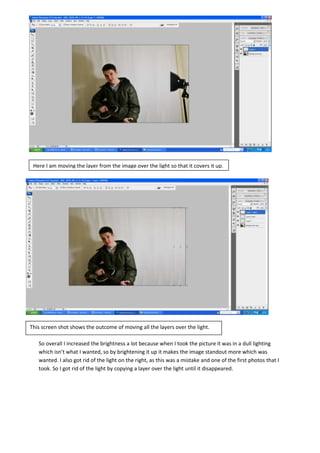
Here I am moving the layer from the image over the light so that it covers it up.
This screen shot shows the outcome of moving all the layers over the light.

Band image manipulation

  • 1.
  • 2.
    Here I amadding the brightness and contrast effect on to the image. Here I am adjusting the brightness and contrast to see what fits well and make the image stand out more with ruining the quality of the image.
  • 3.
    Here I usedthe polygonal lasso tool to select a part of the image I wanted to use to cover up the light in the image. Here I am copying the selected part I wanted to use so I can paste it and move it over the light.
  • 4.
    So overall Iincreased the brightness a lot because when I took the picture it was in a dull lighting which isn’t what I wanted, so by brightening it up it makes the image standout more which was wanted. I also got rid of the light on the right, as this was a mistake and one of the first photos that I took. So I got rid of the light by copying a layer over the light until it disappeared. Here I am moving the layer from the image over the light so that it covers it up. This screen shot shows the outcome of moving all the layers over the light.