Volume I
Report – Budget – Appendix
TREBALL DE FI DE GRAU
“ACCELERATION-BASED
CONTROL OF OFFSHORE
FIXED WIND TURBINES:
SIMULATION AND
PARAMETER TUNING”
TFG presentat per obtenir el títol de GRAU en
ENGINYERIA de l’ENERGIA
Per Ignasi Cifre Font i Àlex Garcia Manzanera
Barcelona, 8 de Juny de 2016
Directors: Francesc Pozo Montero i José Rodellar Benedé
Departament de Matemàtiques (MAT: 749)
Universitat Politècnica de Catalunya (UPC)
General index
Figures index v
Tables index ix
I Report 1
Abstracts 11
Acknowledgements 13
1 Introduction 15
1.1 Wind energy situation . . . . . . . . . . . . . . . . . . . . . . . . . . . . . . . . . 15
1.2 Wind turbines: structure, control and simulation . . . . . . . . . . . . . . . . . . . 18
1.3 Objectives . . . . . . . . . . . . . . . . . . . . . . . . . . . . . . . . . . . . . . . . 23
1.3.1 Objectives related to the acceleration-based control system . . . . . . . . 24
1.3.2 Objectives related to FAST and Simulink . . . . . . . . . . . . . . . . . . . 24
1.3.3 Objectives of the parameter tuning . . . . . . . . . . . . . . . . . . . . . . 24
2 Control systems 27
2.1 Actuator models . . . . . . . . . . . . . . . . . . . . . . . . . . . . . . . . . . . . . 28
2.1.1 Equations of Generator-converter model . . . . . . . . . . . . . . . . . . . 28
2.1.2 Pitch actuator model . . . . . . . . . . . . . . . . . . . . . . . . . . . . . . 29
2.2 Baseline control . . . . . . . . . . . . . . . . . . . . . . . . . . . . . . . . . . . . . 30
2.2.1 Torque controller . . . . . . . . . . . . . . . . . . . . . . . . . . . . . . . . 30
2.2.2 Pitch controller . . . . . . . . . . . . . . . . . . . . . . . . . . . . . . . . . 31
2.3 Acceleration-based control . . . . . . . . . . . . . . . . . . . . . . . . . . . . . . . 32
2.3.1 STA-based torque controller . . . . . . . . . . . . . . . . . . . . . . . . . . 33
2.3.2 Pitch controller . . . . . . . . . . . . . . . . . . . . . . . . . . . . . . . . . 33
3 FAST software 35
3.1 FAST driver: Test21 . . . . . . . . . . . . . . . . . . . . . . . . . . . . . . . . . . . 36
3.2 Input Files and outputs . . . . . . . . . . . . . . . . . . . . . . . . . . . . . . . . . 38
i
GENERAL INDEX Ignasi Cifre and Àlex Garcia
4 Simulation models 41
4.1 FAST fitting procedure . . . . . . . . . . . . . . . . . . . . . . . . . . . . . . . . . 41
4.1.1 Fast-Simulink interface . . . . . . . . . . . . . . . . . . . . . . . . . . . . 42
4.1.2 FAST documents and modules modification . . . . . . . . . . . . . . . . . 44
4.2 Control models . . . . . . . . . . . . . . . . . . . . . . . . . . . . . . . . . . . . . 45
4.2.1 Baseline control model . . . . . . . . . . . . . . . . . . . . . . . . . . . . . 45
4.2.2 Acceleration-based control model . . . . . . . . . . . . . . . . . . . . . . . 48
4.3 Initial conditions . . . . . . . . . . . . . . . . . . . . . . . . . . . . . . . . . . . . . 51
4.3.1 Wind conditions . . . . . . . . . . . . . . . . . . . . . . . . . . . . . . . . 52
4.3.2 Sea conditions . . . . . . . . . . . . . . . . . . . . . . . . . . . . . . . . . 53
5 Simulation results and parameter tuning 55
5.1 Analysis procedure and guidelines . . . . . . . . . . . . . . . . . . . . . . . . . . . 55
5.1.1 Methodology . . . . . . . . . . . . . . . . . . . . . . . . . . . . . . . . . . 55
5.1.2 Resource limits . . . . . . . . . . . . . . . . . . . . . . . . . . . . . . . . . 57
5.1.3 Analysis overview . . . . . . . . . . . . . . . . . . . . . . . . . . . . . . . . 57
5.2 Base simulation . . . . . . . . . . . . . . . . . . . . . . . . . . . . . . . . . . . . . 59
5.2.1 Analysis: figures and results . . . . . . . . . . . . . . . . . . . . . . . . . . 59
5.3 First set of simulations . . . . . . . . . . . . . . . . . . . . . . . . . . . . . . . . . 62
5.3.1 Analysis: figures and results . . . . . . . . . . . . . . . . . . . . . . . . . . 63
5.4 First set: unexpected simulations . . . . . . . . . . . . . . . . . . . . . . . . . . . 67
5.4.1 Analysis: figures and results . . . . . . . . . . . . . . . . . . . . . . . . . . 68
5.5 Second set of simulations . . . . . . . . . . . . . . . . . . . . . . . . . . . . . . . . 70
5.5.1 Analysis: figures and results . . . . . . . . . . . . . . . . . . . . . . . . . . 71
5.6 Third set of simulations . . . . . . . . . . . . . . . . . . . . . . . . . . . . . . . . . 76
5.6.1 Analysis: figures and results . . . . . . . . . . . . . . . . . . . . . . . . . . 76
5.7 Fourth set of simulations . . . . . . . . . . . . . . . . . . . . . . . . . . . . . . . . 80
5.7.1 Analysis: figures and results . . . . . . . . . . . . . . . . . . . . . . . . . . 81
5.8 Fourth set: unexpected simulations . . . . . . . . . . . . . . . . . . . . . . . . . . 86
5.9 Fifth set of simulations . . . . . . . . . . . . . . . . . . . . . . . . . . . . . . . . . 86
5.9.1 Analysis: figures and results . . . . . . . . . . . . . . . . . . . . . . . . . . 87
6 Results analysis: range and optimal set of alphas 91
6.1 Analysis of the process performed . . . . . . . . . . . . . . . . . . . . . . . . . . . 91
6.2 Optimal range for each alpha . . . . . . . . . . . . . . . . . . . . . . . . . . . . . 91
6.3 Best results . . . . . . . . . . . . . . . . . . . . . . . . . . . . . . . . . . . . . . . . 92
6.3.1 Improvements achieved . . . . . . . . . . . . . . . . . . . . . . . . . . . . 93
6.3.2 Assessing the best result . . . . . . . . . . . . . . . . . . . . . . . . . . . . 95
6.3.3 Optimal set of alphas: figures and results . . . . . . . . . . . . . . . . . . 97
6.3.4 Numerical issues . . . . . . . . . . . . . . . . . . . . . . . . . . . . . . . . 102
6.4 Further development . . . . . . . . . . . . . . . . . . . . . . . . . . . . . . . . . . 103
6.5 Approach on a real-implementation . . . . . . . . . . . . . . . . . . . . . . . . . . 104
ii
Ignasi Cifre and Àlex Garcia GENERAL INDEX
7 Conclusions 107
References 113
Bibliographic references . . . . . . . . . . . . . . . . . . . . . . . . . . . . . . . . . . . . 113
Consulting bibliography . . . . . . . . . . . . . . . . . . . . . . . . . . . . . . . . . . . . 114
II Budget 115
Budget 119
7.1 Description of the items . . . . . . . . . . . . . . . . . . . . . . . . . . . . . . . . 120
III Appendix 121
Introduction 125
A FAST documents 127
A.1 FAST driver: Test 21 . . . . . . . . . . . . . . . . . . . . . . . . . . . . . . . . . . . 127
A.2 InflowWind file . . . . . . . . . . . . . . . . . . . . . . . . . . . . . . . . . . . . . 128
A.3 ElastoDyn file . . . . . . . . . . . . . . . . . . . . . . . . . . . . . . . . . . . . . . 130
A.4 ServoDyn file . . . . . . . . . . . . . . . . . . . . . . . . . . . . . . . . . . . . . . . 135
B Simulink models 141
B.1 Baseline control model . . . . . . . . . . . . . . . . . . . . . . . . . . . . . . . . . 142
B.2 Acceleration-based control model . . . . . . . . . . . . . . . . . . . . . . . . . . . 144
C Matlab: Scripts and figures 147
C.1 Simulation scripts . . . . . . . . . . . . . . . . . . . . . . . . . . . . . . . . . . . . 147
C.1.1 First set of simulation . . . . . . . . . . . . . . . . . . . . . . . . . . . . . 147
C.1.2 Second set of simulation . . . . . . . . . . . . . . . . . . . . . . . . . . . . 150
C.1.3 Third set of simulation . . . . . . . . . . . . . . . . . . . . . . . . . . . . . 154
C.1.4 Fourth set of simulation . . . . . . . . . . . . . . . . . . . . . . . . . . . . 156
C.1.5 Fifth set of simulation . . . . . . . . . . . . . . . . . . . . . . . . . . . . . 158
C.2 Simulation results: Figures . . . . . . . . . . . . . . . . . . . . . . . . . . . . . . . 160
C.2.1 Baseline results . . . . . . . . . . . . . . . . . . . . . . . . . . . . . . . . . 160
C.2.2 Base results . . . . . . . . . . . . . . . . . . . . . . . . . . . . . . . . . . . 161
C.2.3 First set of simulations . . . . . . . . . . . . . . . . . . . . . . . . . . . . . 163
C.2.4 First set of simulations: Unexpected results . . . . . . . . . . . . . . . . . 167
C.2.5 Second set of simulations . . . . . . . . . . . . . . . . . . . . . . . . . . . 170
C.2.6 Third set of simulations . . . . . . . . . . . . . . . . . . . . . . . . . . . . 174
C.2.7 Fourth set of simulations . . . . . . . . . . . . . . . . . . . . . . . . . . . 176
C.2.8 Fifth set of simulations . . . . . . . . . . . . . . . . . . . . . . . . . . . . . 180
iii
List of Figures
1.1 Global annual installed wind capacity 2000-2015. Source: GWEC [Sawyer and
Reve (2016)]. . . . . . . . . . . . . . . . . . . . . . . . . . . . . . . . . . . . . . . . 16
1.2 Global cumulative installed wind capacity 2000-2015. Source: GWEC [Sawyer
and Reve (2016)]. . . . . . . . . . . . . . . . . . . . . . . . . . . . . . . . . . . . . 17
1.3 Global and annual offshore wind capacity. Source: GWEC [Sawyer and Reve
(2016)]. . . . . . . . . . . . . . . . . . . . . . . . . . . . . . . . . . . . . . . . . . . 18
1.4 Types of offshore wind turbines foundations. Source: [Bailey et al. (2014)]. . . . . 19
1.5 Wind turbine elements. Source: U.S. Department of Energy [Office of Energy
and Renewable Energy (2016)]. . . . . . . . . . . . . . . . . . . . . . . . . . . . . . 20
1.6 Wind turbine control block diagram. Source: American Control Conference [Pao
L.Y. and K.E. Johnson (2009)]. . . . . . . . . . . . . . . . . . . . . . . . . . . . . . . 21
2.1 Sensors distribution in the jacket structure (left) and in the nacelle (right). Source:
[Jonkman et al. (2012)]. . . . . . . . . . . . . . . . . . . . . . . . . . . . . . . . . . 27
2.2 Gain factor graphic depending on the blade pitch angle. Source: [Jonkman et al.
(2009)]. . . . . . . . . . . . . . . . . . . . . . . . . . . . . . . . . . . . . . . . . . . 32
3.1 FAST architecture including the driver, input files and output files. Source: [Jonkman
and Jonkman (2016)]. . . . . . . . . . . . . . . . . . . . . . . . . . . . . . . . . . . 37
3.2 FAST distribution modules for fixed-bottom systems. Source: [Jonkman and Jonkman
(2016)]. . . . . . . . . . . . . . . . . . . . . . . . . . . . . . . . . . . . . . . . . . . 39
4.1 Block S_Function. It is the beginning of the process of FAST-Simulink interface. . 42
4.2 Block S-Function once the inputs and outputs are added to the initial block. . . . 43
4.3 Simulink model used to implement the baseline control system. Source: [Jonkman
et al. (2009)]. . . . . . . . . . . . . . . . . . . . . . . . . . . . . . . . . . . . . . . . 46
4.4 Sub-model containing the torque and power controller. Source: [Jonkman et al.
(2009)]. . . . . . . . . . . . . . . . . . . . . . . . . . . . . . . . . . . . . . . . . . . 47
4.5 Sub-model containing the blade pitch angle controller. Source: [Jonkman et al.
(2009)]. . . . . . . . . . . . . . . . . . . . . . . . . . . . . . . . . . . . . . . . . . . 48
4.6 Simulink model implementation of acceleration-based control system. Source:
[Tutivén et al. (2015)]. . . . . . . . . . . . . . . . . . . . . . . . . . . . . . . . . . . 49
4.7 Torque and power controller sub-model. Source: [Tutivén et al. (2015)]. . . . . . . 50
4.8 Blade pitch angle controller sub-model. Source: [Tutivén et al. (2015)]. . . . . . . 51
v
LIST OF FIGURES Ignasi Cifre and Àlex Garcia
4.9 Generator torque and speed while start process of the turbine. Source: [Jonkman
et al. (2009)]. . . . . . . . . . . . . . . . . . . . . . . . . . . . . . . . . . . . . . . . 52
4.10 Wind velocity [m/s]. . . . . . . . . . . . . . . . . . . . . . . . . . . . . . . . . . . 53
4.11 Wave elevation [m]. . . . . . . . . . . . . . . . . . . . . . . . . . . . . . . . . . . . 54
5.1 Power output (left) and power index Jp (right) for the base simulation. . . . . . . 60
5.2 Torque signal τr (left) and generator speed ωg (right) for the base simulation. . . . 60
5.3 Side-to-side acceleration (left) and Jass index (right) for the base simulation. . . . 61
5.4 Fore-aft acceleration (left) and blade pitch angle (right) for the base simulation. . 61
5.5 Power zoom (left) and Jp (right) for different α1 in the first set of simulations. . . 64
5.6 Power output (left) and Jp (right) for different α2 in the first set of simulations. . 64
5.7 ass (left) and Jass (right) for different α2 in the first set of simulations. . . . . . . 65
5.8 Jp (left) and Jass (right) for different α3 in the first set of simulations. . . . . . . . 66
5.9 ass (left) and Jass (right) for different α4 in the first set of simulations. . . . . . . 66
5.10 Power output (left) and its Jp index (right) for α3 with original vs. unexpected
values of α2 . . . . . . . . . . . . . . . . . . . . . . . . . . . . . . . . . . . . . . . 69
5.11 Power output Pe (left) and zoomed in power output Pe (right) for α1 = 20 instead
of the original value. . . . . . . . . . . . . . . . . . . . . . . . . . . . . . . . . . . 71
5.12 Jp (left) and ass (right) for α1 = 20 instead of the original value. . . . . . . . . . . 72
5.13 Real generator torque τr (left) and zoomed in torque (right) for base results and
for α1 = 20. . . . . . . . . . . . . . . . . . . . . . . . . . . . . . . . . . . . . . . . 72
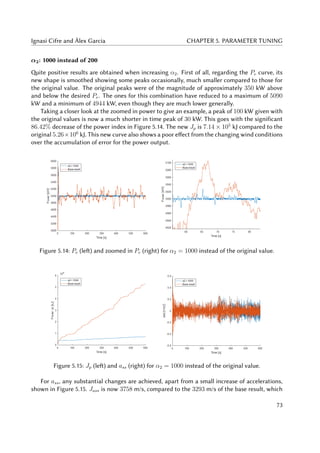
5.14 Pe (left) and zoomed in Pe (right) for α2 = 1000 instead of the original value. . . 73
5.15 Jp (left) and ass (right) for α2 = 1000 instead of the original value. . . . . . . . . 73
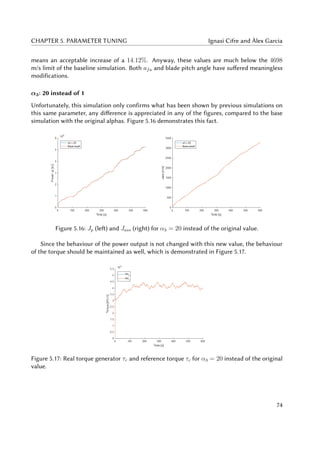
5.16 Jp (left) and Jass (right) for α3 = 20 instead of the original value. . . . . . . . . . 74
5.17 Real torque generator τr and reference torque τc for α3 = 20 instead of the
original value. . . . . . . . . . . . . . . . . . . . . . . . . . . . . . . . . . . . . . . 74
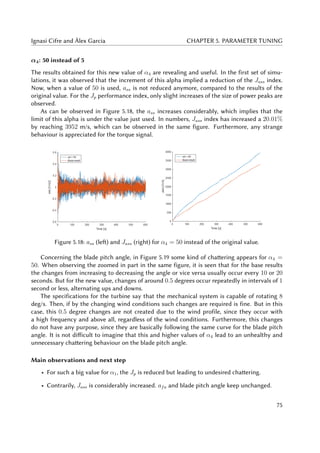
5.18 ass (left) and Jass (right) for α4 = 50 instead of the original value. . . . . . . . . . 75
5.19 Blade pitch angle (left) and zoomed in blade pitch angle (right) for α4 = 50
instead of the original value. . . . . . . . . . . . . . . . . . . . . . . . . . . . . . . 76
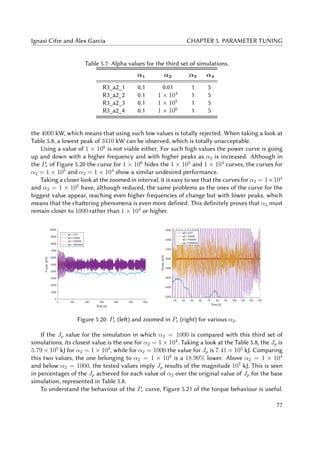
5.20 Pe (left) and zoomed in Pe (right) for various α2. . . . . . . . . . . . . . . . . . . . 77
5.21 Jp (left) and real generator torque τr for various α2. . . . . . . . . . . . . . . . . . 78
5.22 ass (left) and Jass (right) for various α2. . . . . . . . . . . . . . . . . . . . . . . . . 79
5.23 afa (left) and blade pitch angle (right) for various α2. . . . . . . . . . . . . . . . . 80
5.24 Power index Jp for four different combinations. . . . . . . . . . . . . . . . . . . . 82
5.25 Pe (left) and zoomed in Pe (right) for four different combinations. . . . . . . . . . 83
5.26 Realt torque τr (left) and zoomed in real torque (right) for four different combi-
nations. . . . . . . . . . . . . . . . . . . . . . . . . . . . . . . . . . . . . . . . . . . 83
5.27 ass (left) and Jass (right) for four different combinations. . . . . . . . . . . . . . . 84
5.28 afa (left) and blade pitch angle (right) for four different combinations. . . . . . . 85
5.29 Pe (left) and zoomed in Pe (right) for the fifth set of simulations. . . . . . . . . . . 87
5.30 Jp for the fifth set of simulations. . . . . . . . . . . . . . . . . . . . . . . . . . . . 88
5.31 ass (left) Jass (right) for the fifth set of simulations. . . . . . . . . . . . . . . . . . 88
vi
Ignasi Cifre and Àlex Garcia LIST OF FIGURES
6.1 Power output Pe for the optimal combination vs. that of the base result. . . . . . 98
6.2 Zoomed in Pe (left) and Jp (right) for the optimal combination vs. that of the
base result. . . . . . . . . . . . . . . . . . . . . . . . . . . . . . . . . . . . . . . . . 98
6.3 Real torque τr (left) and zoomed in τr (right) for the optimal combination vs. that
of the base result. . . . . . . . . . . . . . . . . . . . . . . . . . . . . . . . . . . . . 99
6.4 afa (left) and Jafa (right) for the optimal combination vs. that of the base result. . 99
6.5 Speed generator ωg for the optimal combination vs. that of the base result. . . . . 100
6.6 ass (left) and Jass index (right) for the optimal combination vs. that of the base
result. . . . . . . . . . . . . . . . . . . . . . . . . . . . . . . . . . . . . . . . . . . . 100
6.7 Blade pitch angle (left) and zoomed in blade pitch angle (right) for the optimal
combination vs. that of the base result. . . . . . . . . . . . . . . . . . . . . . . . . 101
6.8 Numerical errors in the zoomed in Pe for the optimal combination vs. that of the
base result. . . . . . . . . . . . . . . . . . . . . . . . . . . . . . . . . . . . . . . . . 103
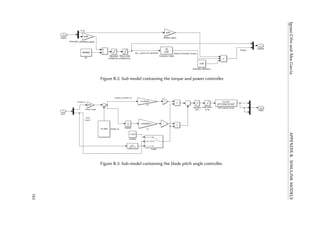
B.1 Simulink model used to implement the baseline control system. . . . . . . . . . . 142
B.2 Sub-model containing the torque and power controller. . . . . . . . . . . . . . . . 143
B.3 Sub-model containing the blade pitch angle controller. . . . . . . . . . . . . . . . 143
B.4 Simulink model implementation of acceleration-based control system. . . . . . . 144
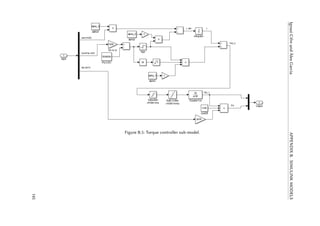
B.5 Torque controller sub-model. . . . . . . . . . . . . . . . . . . . . . . . . . . . . . . 145
B.6 Blade pitch angle controller sub-model. . . . . . . . . . . . . . . . . . . . . . . . . 146
C.1 Baseline results. . . . . . . . . . . . . . . . . . . . . . . . . . . . . . . . . . . . . . 160
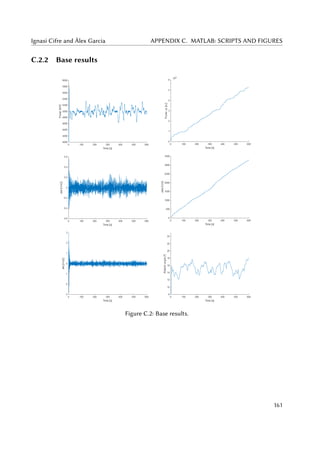
C.2 Base results. . . . . . . . . . . . . . . . . . . . . . . . . . . . . . . . . . . . . . . . 161
C.3 Base results. . . . . . . . . . . . . . . . . . . . . . . . . . . . . . . . . . . . . . . . 162
C.4 Results of the first set of simulations: Sensitivity analysis of α1. . . . . . . . . . . 163
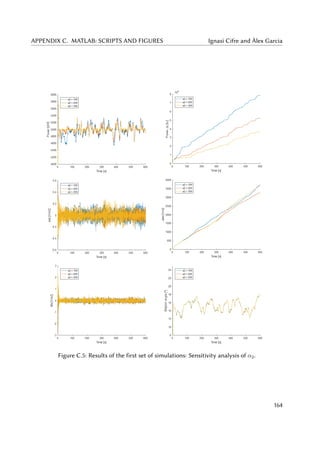
C.5 Results of the first set of simulations: Sensitivity analysis of α2. . . . . . . . . . . 164
C.6 Results of the first set of simulations: Sensitivity analysis of α3. . . . . . . . . . . 165
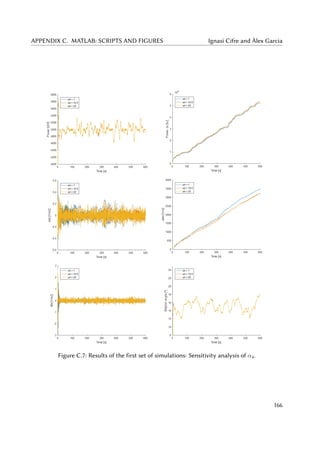
C.7 Results of the first set of simulations: Sensitivity analysis of α4. . . . . . . . . . . 166
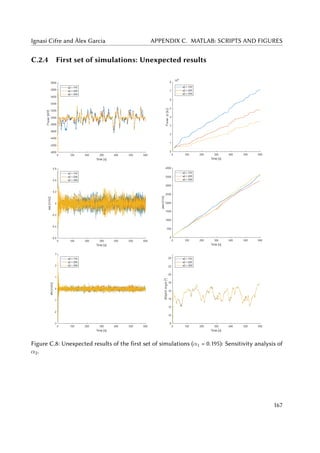
C.8 Unexpected results of the first set of simulations (α1 = 0.195): Sensitivity analysis
of α2. . . . . . . . . . . . . . . . . . . . . . . . . . . . . . . . . . . . . . . . . . . . 167
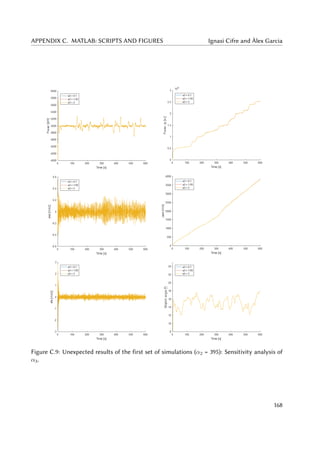
C.9 Unexpected results of the first set of simulations (α2 = 395): Sensitivity analysis
of α3. . . . . . . . . . . . . . . . . . . . . . . . . . . . . . . . . . . . . . . . . . . . 168
C.10 Unexpected results of the first set of simulations (α3 = 4.55): Sensitivity analysis
of α4. . . . . . . . . . . . . . . . . . . . . . . . . . . . . . . . . . . . . . . . . . . . 169
C.11 Results of the second set of simulations: Change order of magnitude of α1. . . . . 170
C.12 Results of the first set of simulations: Change order of magnitude of α2. . . . . . 171
C.13 Results of the first set of simulations: Change order of magnitude of α3. . . . . . 172
C.14 Results of the first set of simulations: Change order of magnitude of α4. . . . . . 173
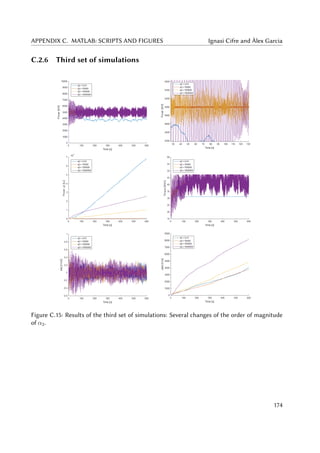
C.15 Results of the third set of simulations: Several changes of the order of magnitude
of α2. . . . . . . . . . . . . . . . . . . . . . . . . . . . . . . . . . . . . . . . . . . . 174
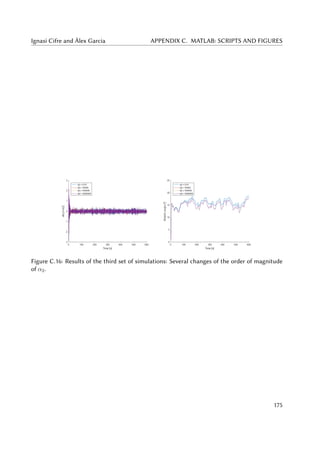
C.16 Results of the third set of simulations: Several changes of the order of magnitude
of α2. . . . . . . . . . . . . . . . . . . . . . . . . . . . . . . . . . . . . . . . . . . . 175
vii
LIST OF FIGURES Ignasi Cifre and Àlex Garcia
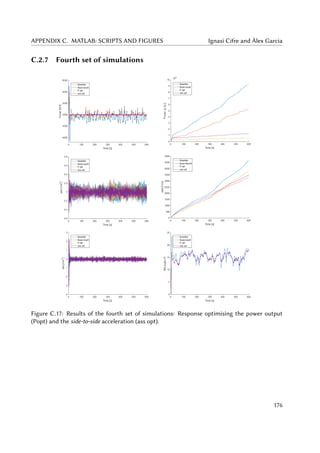
C.17 Results of the fourth set of simulations: Response optimising the power output
(Popt) and the side-to-side acceleration (ass opt). . . . . . . . . . . . . . . . . . . . 176
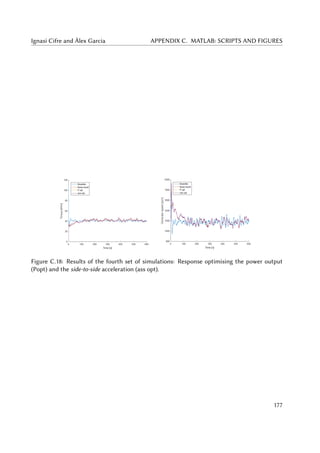
C.18 Results of the fourth set of simulations: Response optimising the power output
(Popt) and the side-to-side acceleration (ass opt). . . . . . . . . . . . . . . . . . . . 177
C.19 Results of the fourth set of simulations: Response optimising both the power
output (Popt) and the side-to-side acceleration (ass opt). . . . . . . . . . . . . . . 178
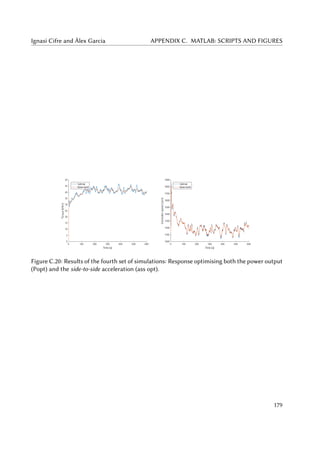
C.20 Results of the fourth set of simulations: Response optimising both the power
output (Popt) and the side-to-side acceleration (ass opt). . . . . . . . . . . . . . . 179
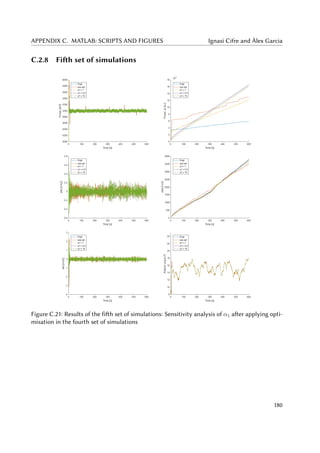
C.21 Results of the fifth set of simulations: Sensitivity analysis of α1 after applying
optimisation in the fourth set of simulations . . . . . . . . . . . . . . . . . . . . . 180
viii
List of Tables
1.1 Main properties of the NREL 5 MW wind turbine. Source: [Jonkman et al. (2009)]. 22
3.1 Some tests distributed with FAST v8 using NREL 5 MW turbine. Source: [Jonkman
and Jonkman (2016)]. . . . . . . . . . . . . . . . . . . . . . . . . . . . . . . . . . . 36
5.1 Values for each α of the base simulation. . . . . . . . . . . . . . . . . . . . . . . . 59
5.2 Indices results for base and baseline simulations. . . . . . . . . . . . . . . . . . . 62
5.3 Power and ass results for base and baseline simulations. . . . . . . . . . . . . . . 62
5.4 Alpha values for the first set of simulations. . . . . . . . . . . . . . . . . . . . . . 63
5.5 Alpha values for the unexpected set of simulations. . . . . . . . . . . . . . . . . . 68
5.6 Alpha values for the second set of simulations. . . . . . . . . . . . . . . . . . . . . 70
5.7 Alpha values for the third set of simulations. . . . . . . . . . . . . . . . . . . . . . 77
5.8 Power results for different values of α2 in the third set of simulations. . . . . . . . 78
5.9 ass results for different values of α2 in the third set of simulations. . . . . . . . . 79
5.10 Alpha values for the fourth set of simulations. . . . . . . . . . . . . . . . . . . . . 81
5.11 Power index for each combination of α2 and α4. . . . . . . . . . . . . . . . . . . . 84
5.12 Jass index for each combination of α2 and α4 [in kJ]. . . . . . . . . . . . . . . . . 84
5.13 Alpha values for the unexpected set of fourth set of simulations. . . . . . . . . . . 86
5.14 Alpha values for the fifth set of simulations. . . . . . . . . . . . . . . . . . . . . . 87
6.1 Optimal range for each of the α gains. . . . . . . . . . . . . . . . . . . . . . . . . 93
6.2 Jp reduction in percentage, Jp of each combination of α2 and α4 over the base
result. . . . . . . . . . . . . . . . . . . . . . . . . . . . . . . . . . . . . . . . . . . . 93
6.3 Jass increment in percentage of each combination of α2 and α4 over the base
result. . . . . . . . . . . . . . . . . . . . . . . . . . . . . . . . . . . . . . . . . . . 94
6.4 Jass reduction in percentage, Jass , of each combination of α2 and α4 over the
baseline result. . . . . . . . . . . . . . . . . . . . . . . . . . . . . . . . . . . . . . . 94
6.5 I1 for the different combinations of α2 and α4. . . . . . . . . . . . . . . . . . . . . 96
6.6 I2 with q = 0.7 for the different combinations of α2 and α4. . . . . . . . . . . . . 96
6.7 Summary of results for the best combinations. . . . . . . . . . . . . . . . . . . . . 97
6.8 Results of the optimal vs base results. . . . . . . . . . . . . . . . . . . . . . . . . . 101
6.9 Differences in kW between optimal, baseline and base combinations in specific
worst moments of the power stability. . . . . . . . . . . . . . . . . . . . . . . . . . 104
ix
LIST OF TABLES Ignasi Cifre and Àlex Garcia
7.1 Thesis budget. . . . . . . . . . . . . . . . . . . . . . . . . . . . . . . . . . . . . . . 119
x
Report
“ACCELERATION-BASED
CONTROL OF OFFSHORE
FIXED WIND TURBINES:
SIMULATION AND
PARAMETER TUNING”
TFG presentat per optar al títol de GRAU en
ENGINYERIA de l’ENERGIA
per Ignasi Cifre Font i Àlex Garcia Manzanera
Barcelona, 8 de Juny de 2016
Directors: Francesc Pozo Montero i José Rodellar Benedé
Departament de Matemàtiques (MAT: 749)
Universitat Politècnica de Catalunya (UPC)
Table of Contents
Abstracts 11
Acknowledgements 13
1 Introduction 15
1.1 Wind energy situation . . . . . . . . . . . . . . . . . . . . . . . . . . . . . . . . . 15
1.2 Wind turbines: structure, control and simulation . . . . . . . . . . . . . . . . . . . 18
1.3 Objectives . . . . . . . . . . . . . . . . . . . . . . . . . . . . . . . . . . . . . . . . 23
1.3.1 Objectives related to the acceleration-based control system . . . . . . . . 24
1.3.2 Objectives related to FAST and Simulink . . . . . . . . . . . . . . . . . . . 24
1.3.3 Objectives of the parameter tuning . . . . . . . . . . . . . . . . . . . . . . 24
2 Control systems 27
2.1 Actuator models . . . . . . . . . . . . . . . . . . . . . . . . . . . . . . . . . . . . . 28
2.1.1 Equations of Generator-converter model . . . . . . . . . . . . . . . . . . . 28
2.1.2 Pitch actuator model . . . . . . . . . . . . . . . . . . . . . . . . . . . . . . 29
2.2 Baseline control . . . . . . . . . . . . . . . . . . . . . . . . . . . . . . . . . . . . . 30
2.2.1 Torque controller . . . . . . . . . . . . . . . . . . . . . . . . . . . . . . . . 30
2.2.2 Pitch controller . . . . . . . . . . . . . . . . . . . . . . . . . . . . . . . . . 31
2.3 Acceleration-based control . . . . . . . . . . . . . . . . . . . . . . . . . . . . . . . 32
2.3.1 STA-based torque controller . . . . . . . . . . . . . . . . . . . . . . . . . . 33
2.3.2 Pitch controller . . . . . . . . . . . . . . . . . . . . . . . . . . . . . . . . . 33
3 FAST software 35
3.1 FAST driver: Test21 . . . . . . . . . . . . . . . . . . . . . . . . . . . . . . . . . . . 36
3.2 Input Files and outputs . . . . . . . . . . . . . . . . . . . . . . . . . . . . . . . . . 38
TABLE OF CONTENTS Ignasi Cifre and Àlex Garcia
4 Simulation models 41
4.1 FAST fitting procedure . . . . . . . . . . . . . . . . . . . . . . . . . . . . . . . . . 41
4.1.1 Fast-Simulink interface . . . . . . . . . . . . . . . . . . . . . . . . . . . . . 42
4.1.2 FAST documents and modules modification . . . . . . . . . . . . . . . . . 44
4.2 Control models . . . . . . . . . . . . . . . . . . . . . . . . . . . . . . . . . . . . . 45
4.2.1 Baseline control model . . . . . . . . . . . . . . . . . . . . . . . . . . . . . 45
4.2.2 Acceleration-based control model . . . . . . . . . . . . . . . . . . . . . . . 48
4.3 Initial conditions . . . . . . . . . . . . . . . . . . . . . . . . . . . . . . . . . . . . . 51
4.3.1 Wind conditions . . . . . . . . . . . . . . . . . . . . . . . . . . . . . . . . 52
4.3.2 Sea conditions . . . . . . . . . . . . . . . . . . . . . . . . . . . . . . . . . . 53
5 Simulation results and parameter tuning 55
5.1 Analysis procedure and guidelines . . . . . . . . . . . . . . . . . . . . . . . . . . . 55
5.1.1 Methodology . . . . . . . . . . . . . . . . . . . . . . . . . . . . . . . . . . 55
5.1.2 Resource limits . . . . . . . . . . . . . . . . . . . . . . . . . . . . . . . . . 57
5.1.3 Analysis overview . . . . . . . . . . . . . . . . . . . . . . . . . . . . . . . 57
5.2 Base simulation . . . . . . . . . . . . . . . . . . . . . . . . . . . . . . . . . . . . . 59
5.2.1 Analysis: figures and results . . . . . . . . . . . . . . . . . . . . . . . . . . 59
5.3 First set of simulations . . . . . . . . . . . . . . . . . . . . . . . . . . . . . . . . . 62
5.3.1 Analysis: figures and results . . . . . . . . . . . . . . . . . . . . . . . . . . 63
5.4 First set: unexpected simulations . . . . . . . . . . . . . . . . . . . . . . . . . . . . 67
5.4.1 Analysis: figures and results . . . . . . . . . . . . . . . . . . . . . . . . . . 68
5.5 Second set of simulations . . . . . . . . . . . . . . . . . . . . . . . . . . . . . . . . 70
5.5.1 Analysis: figures and results . . . . . . . . . . . . . . . . . . . . . . . . . . 71
5.6 Third set of simulations . . . . . . . . . . . . . . . . . . . . . . . . . . . . . . . . . 76
5.6.1 Analysis: figures and results . . . . . . . . . . . . . . . . . . . . . . . . . . 76
5.7 Fourth set of simulations . . . . . . . . . . . . . . . . . . . . . . . . . . . . . . . . 80
5.7.1 Analysis: figures and results . . . . . . . . . . . . . . . . . . . . . . . . . . 81
5.8 Fourth set: unexpected simulations . . . . . . . . . . . . . . . . . . . . . . . . . . 86
5.9 Fifth set of simulations . . . . . . . . . . . . . . . . . . . . . . . . . . . . . . . . . 86
5.9.1 Analysis: figures and results . . . . . . . . . . . . . . . . . . . . . . . . . . 87
8
Ignasi Cifre and Àlex Garcia TABLE OF CONTENTS
6 Results analysis: range and optimal set of alphas 91
6.1 Analysis of the process performed . . . . . . . . . . . . . . . . . . . . . . . . . . . 91
6.2 Optimal range for each alpha . . . . . . . . . . . . . . . . . . . . . . . . . . . . . . 91
6.3 Best results . . . . . . . . . . . . . . . . . . . . . . . . . . . . . . . . . . . . . . . . 92
6.3.1 Improvements achieved . . . . . . . . . . . . . . . . . . . . . . . . . . . . 93
6.3.2 Assessing the best result . . . . . . . . . . . . . . . . . . . . . . . . . . . . 95
6.3.3 Optimal set of alphas: figures and results . . . . . . . . . . . . . . . . . . . 97
6.3.4 Numerical issues . . . . . . . . . . . . . . . . . . . . . . . . . . . . . . . . 102
6.4 Further development . . . . . . . . . . . . . . . . . . . . . . . . . . . . . . . . . . 103
6.5 Approach on a real-implementation . . . . . . . . . . . . . . . . . . . . . . . . . . 104
7 Conclusions 107
References 113
Bibliographic references . . . . . . . . . . . . . . . . . . . . . . . . . . . . . . . . . . . . 113
Consulting bibliography . . . . . . . . . . . . . . . . . . . . . . . . . . . . . . . . . . . . 114
9
Abstracts
Abstract
Providing a reasonably good power stability is an essential fact for an even greater competitive-
ness of large scale wind turbines. The control systems in charge of it are also designed to reduce
mechanical vibrations on the wind turbine and bring effective controls able to face faulty condi-
tions. Complex controllers fulfiling all this demands are being developed, but the power stability
is unfortunately compromised. In this work, an acceleration-based control system from the lit-
erature involving torque and pitch control is implemented using FAST, an aeroelastic computer-
aided engineering (CAE) tool. The first part of this work concerns being able to manage this
powerful software, while due to the complexity of the computational controller system and its
uncertainty, the second part comprises carrying out a sensitivity analysis. This involves devel-
oping a parameter tuning process to determine the effects of the design parameters. The main
contribution of this work is the obtention of a combination of parameters able to provide a bet-
ter power output error tracking without compromising the accelerations involved in the control
loop, achieving up to a 90% reduction of the accumulated error on the desired power output
compared to the original values of the parameters of the control system.
Resum
L’estabilització en la potència generada en turbines eòliques de gran escala és un dels factors de-
terminants per a la seva competitivitat. El sistemes de control que se n’encarreguen es dissenyen
també per a reduir les vibracions mecàniques a la turbina així com fer front a fallades del sistema.
Mentre s’aconsegueixen cobrir aquests aspectes, l’estabilitat de la potència se’n veu afectada. En
aquest projecte, un sistema de control basat en acceleracions que inclou el controlador de gir de
la pala i el controlador del parell de forces s’implementa utilitzant el FAST, una eina d’enginyeria
assistida per ordinador. La primera part del treball és l’aprenentatge d’aquest software, men-
tre que a causa de la complexitat del sistema computacional i de la seva incertesa, la segona
part inclou un anàlisi de sensibilitat. S’hauran de simular diversos valors per als paràmetres de
disseny involucrats per tal d’establir els seus efectes. Aquest projecte pretén obtenir una combi-
nació de paràmetres capaços de disminuir l’error en la potència produïda sense comprometre les
acceleracions del circuit de control. Així, s’aconsegueix una reducció en l’error acumulat en la
potència de sortida de prop d’un 90% comparat amb l’error dels valors originals dels paràmetres
del sistema de control.
11
ABSTRACTS Ignasi Cifre and Àlex Garcia
Resumen
La estabilitzación en la potencia generada en turbinas eólicas de gran escala es uno de los factores
determinantes para su competitividad. Los sistemas de control que se encargan de ello se diseñan
también para reducir las vibraciones mecánicas en la turbina y hacer frente a fallos del sistema.
Mientras se suplen estas demandas, la estabilidad de la potencia se ve afectada. En este proyecto,
un sistema de control basado en aceleraciones que incluye el controlador de giro de la pala y el
controlador del par motor se implementa usando FAST, una herramienta de ingeniería asistida
por ordenador. La primera parte del trabajo trata de aprender a usar dicho software, mientras
que debido a la complejidad computacional del sistema y su incertidumbre, en la segunda parte
se realiza un análisis de sensibilidad. Se deben simular varios valores para los parámetros de
diseño involucrados con el fin de establecer sus efectos. Este proyecto pretende obtener una
combinación de parámetros capaces de reducir el error en la potencia generada sin comprometer
las aceleraciones del circuito de control, consiguiendo una reducción en el error acumulado de
cerca del 90% comparado con el error de los valores originales de los parámetros del sistema de
control.
12
Acknowledgements
The authors would like to acknowledge first of all both Francesc Pozo and José Rodellar, not
only for guiding and reviewing the development of this work, but also for providing helpful tips
from their experience as researchers and paper writers. We would like to deeply acknowledge
Yolanda Vidal, for involving with compromise in the initial stage of this work, providing us with
the guidelines to familiarize with the FAST software and for answering disinterestedly all our
doubts. We would also like to thank the team in charge of assessing this work and making
possible its presentation. Special acknowledgements go for Júlia Ramírez, for revising all the
grammar and helping us express ourselves better. Finally, we are very thankful to our families
for giving support day after day unconditionally.
13
Chapter 1
Introduction
Nowadays, first world societies are provided by an energy model based on fuel fossils combus-
tion and uranium fission. This model has enabled the huge development that countries and
communities have experienced during the 20th
century. However, this model is not sustainable
nor environmentally friendly, and the needing of a change is imposed. Moreover, the imminent
exhaustion of fossil fuels imply that the new methodology or basis has to be developed with
no more delay. Consequently, in the following years fossil fuels will be replaced by renewable
sources.
Renewable sources are those sources that are considered inexhaustible for human uses. The
renewable flows integrate many energy forms: solar, wind, hydraulic, geothermal, etc. Generally,
the process of transforming the energy provided by those sources into electrical energy does not
imply the emission of CO2 nor any kind of damaging pollutants or greenhouse effect gases. As
a consequence, it seems obvious that a model based on the use of renewable sources could be
more robust and sustainable than the one we have nowadays, and it has the potential to put an
end to many problems that our world is facing in the 21st
century in terms of energy. Amongst
these problems, one can consider both the limitations and difficulties of a part of the society
to affording energy access and the planet and environment accumulated damage during last
decades.
1.1 Wind energy situation
Within the renewable technologies, wind energy has become really important thanks to the
strengths that it has. It has the ability to produce big amounts of energy at a country-scale, so
it is a technology that states can seriously consider when thinking about energy development
planning of the future. Moreover, it can be produced offshore, where the wind flows are more
constant and with higher velocities.
Consulting the data collection of the Global Wind Energy Council (GWEC) [Sawyer and Reve
(2016)], the upward trend in both installed wind energy power per year and cumulative installed
wind power can be confirmed.
Figure 1.1 shows that since the beginning of the century there has been a constant increase in
15
CHAPTER 1. INTRODUCTION Ignasi Cifre and Àlex Garcia
Figure 1.1: Global annual installed wind capacity 2000-2015. Source: GWEC [Sawyer and Reve
(2016)].
the amount of wind capacity installed every year (there is only one isolated regression in 2013).
Last year, there was a total power installation of around 63000 MW, whereas in the year 2000
the amount of power installed was 3760 MW. This means that the global wind capacity has been
increasing during the last 15 years. Moreover, this growth is not constant, but it increases every
year.
This first graphic shows what was exposed at the beginning, that is, the big change that has
experienced the importance of wind energy in the last few years. At the end of the last century
and the early 2000s, the rate of development of this technology showed that it was an emergent
science. By 2015, the rate of installation of wind energy plants is suitable to determine that wind
is the future of the energy system worldwide.
With regard to the cumulated wind capacity, it is still far from being a crucial energy source,
but thanks to the last fifteen years of development, it is now really important in some areas of
the world, like northern countries of Europe. In Figure 1.2 one can see that the global wind power
during last fifteen years has increased a 25000%. That may seem a big achievement, and in fact
it is, but is still far from what is needed if renewable systems want to replace fossil fuels in the
energy field hegemony. Basically, considering a typical wind capacity factor of 2250 hours per
year, the installed power in year 2015 is only able to provide 4.5% of the total electric energy
demand in the world. This demand is 21538 TWh, according to the International Energy Agency
(IEA) [IEA (2015)].
Thereby, the real challenge of the wind sector is to increase its presence progressively until it
reaches a considerable percentage of energy provided such as 20-25% of the total electric energy
demand. This range of production has already been achieved in some countries of Europe, where
they have combined onshore plants with offshore installations able to guarantee much more
hours of production and feed the net with much more energy.
The presence of offshore wind turbines is gaining importance in the wind energy scenario.
The benefits that this kind of sea wind usage can provide have already been introduced. Mainly,
offshore wind turbines take advantage of the better conditions that the wind presents in sea
areas, that is, wind flow has higher velocities and it is more constant. There is more than one
type of wind turbine that can be installed in the sea, depending on the depth of the area and
16
Ignasi Cifre and Àlex Garcia CHAPTER 1. INTRODUCTION
Figure 1.2: Global cumulative installed wind capacity 2000-2015. Source: GWEC [Sawyer and
Reve (2016)].
the distance to the coastline. For the moment, there is no specific consideration for any of the
typologies.
Figure 1.3 provides specific information of the offshore wind capacity of the countries that
have invested more in that type of energy production. This graph shows that offshore technology
has presence mainly in Europe and the most developed countries of Asia (P.R. China, South Korea
and Japan). An important requirement for the installation of this kind of wind turbines is having
access to coastline and sea.
It should not be surprising then that the United Kingdom has the biggest amount of offshore
power installed. Also, this country has difficulties in using the other main renewable source,
the sun, because of its characteristic weather. Following this reasoning, the other countries
in the northern area of Europe also have big presence and growth of this technology. In the
case of Denmark, which is one of the countries with more presence of wind turbines in the
sea, the installations have stopped because they have reached their plans of development of the
technology.
Concerning Asian continent, the country where offshore wind turbines has more perspectives
is China, because it takes up a huge amount of territory and population, so it needs an enormous
amount of energy. As it is such a big state, it has different climate conditions, and this global
power will surely invest a lot in trying to solve its energy issues in the northern part of the
country with wind offshore energy.
For the moment, a view on how important offshore wind turbines may become has been
given. Even so, there are still some drawbacks of this field that have to be solved (or improved)
if it wants to become an essential part of the energy supply system worldwide. Main goals to
achieve are reducing the cost of wind energy by increasing the efficiency, and also improving the
turbines control to ensure that electric power output is as constant as possible, independently
from wind flow variances (guarantee the power output at a certain value as long as wind speed
remains in the range between cut-in and cut-off velocities).
17
CHAPTER 1. INTRODUCTION Ignasi Cifre and Àlex Garcia
Figure 1.3: Global and annual offshore wind capacity. Source: GWEC [Sawyer and Reve (2016)].
1.2 Wind turbines: structure, control and simulation
This Bachelor’s thesis will focus on the subject of wind turbines’ control. Assuming that it is a
field in which loads of efforts are done and so there is a lot of material related to regulation and
guidance of these machines. Going into further details, this project focuses on offshore fixed
wind turbines control. The difference between fixed and floating wind turbines is that the first
ones are attached to seabed by a big unmoving structure and the second ones (in which there
exist some different cases) are fixed to seabed by floating lighter structures linked to the land
with strong strings.
Figure 1.4 shows the main types of offshore wind turbine foundations. The type of infras-
tructure that will have the turbine studied in this thesis is a support called jacket. The range of
sea depths in which this installations can be performed is 20 to 50 meters. This kind of fixed
structure can held a turbine between 2 and 5 MW of power. Bigger turbines need a different
kind of structure, mainly, floating structures.
Despite the fact that the foundation of a wind turbine is important when considering con-
trol, there are some more relevant items to take into account. The components of an offshore
fixed wind turbine (excluding the jacket and the tower) are located in the nacelle. Inside these
elements, the most relevant are:
(i) Rotor and blades. The rotor is the set of the three blades connected by the round hub.
18
Ignasi Cifre and Àlex Garcia CHAPTER 1. INTRODUCTION
Figure 1.4: Types of offshore wind turbines foundations. Source: [Bailey et al. (2014)].
Blades are in charge of taking the kinetic energy from air and transform it into rotational
movement. A blade characteristic is the pitch angle. that is the angle that the blade and
wind direction vector create. It is used to regulate the amount of air working on blade
movement. By controlling the blade pitch angle the performance of the wind turbine can
be regulated.
(ii) Gear Box. It is the element that converts the low-speed shaft motion into the high-speed
shaft motion. The first shaft is the one that transport the energy from the rotor to the gear
box. The second shaft is linked to the electric generator axis and provides the movement
to run it.
(iii) Generator. It transforms the kinetic energy into electric energy. It is interesting to control
this element in order to control the power output. The control has to involve both the
generator torque and generator power.
(iv) Yaw motor and yaw drive. Set of machinery in charge of pointing the turbine nacelle
facing the wind direction. It uses a simple method of government based on the information
received by the anemometer and wind vane, so it would not be necessary to optimise this
elements’ methodology.
The parts of the wind turbine presented above can be observed in Figure 1.5, giving a general
view of the nacelle and the position that each element take inside it. After knowing which are
the elements and machinery of wind turbines, the operation and performance of this machine
has to be explained in order to know how a control can be implemented.
In order to perform a good control of the operation of a wind turbine, the controller system
has to guide the generator (power and torque of the generator), the pitch angle and the yaw
motor. Obviously, there are some developed systems on how to apply this guidance. There
19
CHAPTER 1. INTRODUCTION Ignasi Cifre and Àlex Garcia
Figure 1.5: Wind turbine elements. Source: U.S. Department of Energy [Office of Energy and
Renewable Energy (2016)].
are also some computer-aided engineering (CAE) tools oriented to simulate how a wind turbine
operates with some specific conditions. One of these conditions can be the control models that
govern the turbine. So, to finish with the introduction of this project, we would provide brief
information about the different controls of the machine, the simulation tools that will be used
during this work and to set the objectives of the study that will be performed.
Concerning the control systems, the first item to clarify is that this thesis is not interested
on the command that can be computed for the yaw motor. On the one side, the hypotheti-
cal improvement of the yaw control cannot really be determinant in the final performance of a
turbine. On the other side, the generator control (or torque control) and the blade pitch angle
control have significant effects in the machinery performance and their hypothetical improve-
ment would mean better results concerning wind turbine reliability and continuity.
A general view on the typical control block diagram of a wind turbine is presented in Figure
1.6. This figure shows a typical closed-loop control model. Here, the control is applied by setting
a desired rotor speed. For each data recorded at the end of the system, the system makes the
comparison with the desired value (the value that it should be). That provides an error that is
used in two procedures formed by one or more equations.
One of the procedures gives an output that is the value that the pitch should have in order
to reduce the given error to zero: this procedure is the pitch controller. The motor connected
to that controller applies the value given by the controller to the turbine, and a new value of
the rotor speed is obtained. Then, the feedback value is used to compute the new error and the
closed-loop performance starts again.
20
Ignasi Cifre and Àlex Garcia CHAPTER 1. INTRODUCTION
Figure 1.6: Wind turbine control block diagram. Source: American Control Conference [Pao L.Y.
and K.E. Johnson (2009)].
The other procedure works with the same principles as the first one. The difference is that
now the output is the generator torque. As the output is not the same, the equation or equa-
tions used to reach the variable are not the same. Therefore, there are two procedures with
two different outputs, but the variable used for the control is the same in both cases, the rotor
velocity.
Two different control methodologies can be distinguished since the set of equations that
they use to reach the output variables of the control from the desired value of the set variable
are different. They can also change radically and use a different variable to set how the control
should guide the turbine. For instance, in this thesis one control system uses the rotor speed as
main feedback variable and the other one uses the electric generator power.
After giving a brief introduction on how to control a system (in the following chapters of the
thesis each control model used will be explained in detail), it is interesting to present the simula-
tion tool that will be used to perform accurate simulations of the turbine behaviour. This (CAE)
tool is called Fatigue, Aerodynamics, Structure and Turbulence (FAST) software. It is a software
developed by the National Renewable Energy Laboratory (NREL) of the U.S. Department of En-
ergy. It is used by NREL to simulate the coupled dynamic response of wind turbines.
According to NREL laboratory [NREL (2016)], “FAST is NREL’s primary CAE tool for simu-
lating the coupled dynamic response of wind turbines. FAST joins aerodynamics models, hydro-
dynamics models for offshore structures, control and electrical system (servo) dynamics models,
and structural (elastic) dynamics models to enable coupled nonlinear aero-hydro-servo-elastic
simulation in the time domain. The FAST tool enables the analysis of a range of wind turbine
configurations, including two- or three-blade horizontal-axis rotor, pitch or stall regulation, rigid
or teetering hub, upwind or downwind rotor, and lattice or tubular tower. The wind turbine can
21
CHAPTER 1. INTRODUCTION Ignasi Cifre and Àlex Garcia
be modelled on land or offshore on fixed-bottom or floating substructures. FAST is based on
advanced engineering models–derived from fundamental laws, but with appropriate simplifica-
tions and assumptions, and supplemented where applicable with computational solutions and
test data.
”The aerodynamic models use wind-inflow data and solve for the rotor-wake effects and
blade-element aerodynamic loads, including dynamic stall. The hydrodynamics models simu-
late the regular or irregular incident waves and currents and solve for the hydrostatic, radiation,
diffraction, and viscous loads on the offshore substructure. The control and electrical system
models simulate the controller logic, sensors, and actuators of the blade-pitch, generator-torque,
nacelle-yaw, and other control devices, as well as the generator and power-converter components
of the electrical drive. The structural-dynamics models apply the control and electrical system
reactions, apply the aerodynamic and hydrodynamic loads, adds gravitational loads, and simu-
late the elasticity of the rotor, drivetrain, and support structure. Coupling between all models is
achieved through a modular interface and coupler”.
Table 1.1: Main properties of the NREL 5 MW wind turbine. Source: [Jonkman et al. (2009)].
Property Value Unit
Nominal Power (Pe,n) 5 MW
Blade number 3 -
Blade pitch angle range (βr) [0,90] deg
Maximum blade pitch angle rate ( ˙βr) 8 deg/s
Rotor diameter 126 m
Hub height 90 m
Cut-in wind speed 3 m/s
Nominal wind speed 11.4 m/s
Cut-off wind speed 25 m/s
Nominal generator speed (ωg,n) 1173.7 rpm
Nominal torque (τr) 40681.5 Nm
Generator torque range (τr) [0,47402.91] Nm
Maximum generator torque rate ( ˙τr) 15000 Nm
Gearbox ratio 97 -
Generator efficiency 98 %
This quite exhaustive explanation can be simplified saying that FAST is an engineering tool
that performs simulations of almost all types of wind turbines in almost all types of situations,
22
Ignasi Cifre and Àlex Garcia CHAPTER 1. INTRODUCTION
regardless of the number of turbine blades, the number of controllers applied or the configuration
or characteristics of the turbine. Moreover, it takes into account such a big amount of variables
and information, combining all that knowledge to perform with extreme accuracy how a turbine
in real situation behaves. Apart from that, FAST provides the user with all the outputs that it
computes, which is more than one hundred of items.
This simulation software can be implemented with an interface that can work with Simulink,
and that is exactly what is used in this thesis in order to perform the big amount of simulations
realised. There is a chapter in which the main goal is to show how this extremely complex
software is implemented in this thesis proves and this project includes the procedure of creating
the FAST-Simulink interface and the implementation of the overall system.
FAST simulation tool provides a basic baseline controller system [Jonkman et al. (2009)],
which can be implemented together with the software. It is not the goal of this thesis to fo-
cus on this basic control, although the explanation on how it works will be provided. The aim
of this thesis is to focus on a new controller system that is presented in the following article:
“Acceleration-based fault tolerant control design of offshore fixed wind turbines” [Tutivén et al.
(2015)]. This control system (acceleration-based or super-twisting algorithm(STA)-based control
system) has some parameters that are constant variables, which can be modified in order to
achieve better results in some areas of the turbine performance.
The turbine model chosen for this study is NREL 5 MW offshore fixed wind turbine with
jacket structure [Jonkman et al. (2009)]. It is a theoretical engineering machine developed by
NREL to be used in simulations. The aim of developing this turbine is to define a standardised
input data to ensure that different investigations can be compared between them. This machine
characteristics should be representative of typical utility-scale land- and sea-based turbines. The
main properties of the wind turbine can be observed in Table 1.1. It contains the properties of
the wind turbine that are used during this project.
1.3 Objectives
The main goal of this thesis is to be able to simulate the offshore fixed wind turbine with the
acceleration-based control and to develop a parameter tuning study that reaches a clear conclu-
sion on how the constant parameters influence the performance of method. To reach the overal
goal, there are some specific objectives to fulfil, in which at the same time we need to accomplish
other smaller steps in order to succeed in the specific objectives and the main goal.
As a first step, there is the aim of going in depth in the article called "Acceleration-based fault
tolerant control design of offshore fixed wind turbines" [Tutivén et al. (2015)], which proposes
the improved control system. Such a complex system needs to be understood and applied in
detail.
Once this is achieved, we have the purpose of getting familiar with a complex computer-
aided engineering (CAE) tool called FAST (Fatigue, Aerodynamics, Structures, and Turbulences),
used to apply the acceleration-based control system. This CAE tool is used with an interface in
Simulink in order to manage it. As a consequence, the simulation environment will be MATLAB®
software.
23
CHAPTER 1. INTRODUCTION Ignasi Cifre and Àlex Garcia
Finally, we have the target of being able to develop a parameter tuning study of the control
system by means of the ongoing simulations of the FAST model. This parameter tuning study
goal is to provide information on how some variables of the control system influence the wind
turbine performance and use this information to improve the overall wind turbine behaviour.
1.3.1 Objectives related to the acceleration-based control system
When working with the acceleration-based control system we will try to achieve some objectives
that are not specifically related to the main goal. Instead of applying directly the control strategy,
it is more interesting to provide a simplified view about what is theoretically implemented before
in order to make it more comprehensible. Consequently, it is easier to compare it with the
baseline control that FAST compiler uses as desired system. There are some steps that follows
clearly from what is exposed above.
(i) Be able to present and explain the baseline control system of FAST from the available
existing bibliography [Jonkman et al. (2009)].
(ii) Be able to present and explain the acceleration-based control system from the above men-
tioned article [Tutivén et al. (2015)].
(iii) Illustrate the controllers situation by comparison of the theory basics of both control sys-
tems.
1.3.2 Objectives related to FAST and Simulink
In order to obtain realistic results concerning the study of the control system, there is the need to
dominate the CAE tools to be used in the simulations. For this purpose, the following objectives
have to be accomplished:
(i) Understand and set up the FAST software according to our needs.
(ii) Be able to develop a Simulink model for each of the controllers that are tested. Models
must fit together with FAST.
(iii) Adequate the simulator so that it can work using the models developed and extract all the
data that will be used in the subsequent analysis.
(iv) Create a correct code able to compile the FAST-Simulink model and read the provided
results.
1.3.3 Objectives of the parameter tuning
Once the simulation tool is ready, the main goal of this thesis is the parameter tuning develop-
ment. All the information extracted from the control system is oriented to find ways of improv-
ing the wind turbine performance. The steps to be achieved in order to succeed in this section
objective are:
24
Ignasi Cifre and Àlex Garcia CHAPTER 1. INTRODUCTION
(i) Identify the parameters that influence the system performance and can be modelled to
improve wind turbine behaviour.
(ii) Identify the relevant outputs of the model simulation in order to set the results that can
to be optimised by the parameter tuning.
(iii) Find and implement a methodology to realise the parameter tuning. This means analysing
results to propose new simulations.
(iv) Find the tuning limits of the parameters that are going to be studied, making sure that all
the results of the simulation are correct within these limits.
(v) Compare advantages and disadvantages of critical simulations and its viability.
(vi) Obtain the best set of parameters for each of the relevant outputs identified and analyse
those in depth.
The scope of the project remains on developing some parts of the article which where not
studied deeply, in order to find acceptable improvements for the overall behaviour of the offshore
wind turbine without aggravating any features of it. All in all, a detailed study is going to be
carried out proposing new parameter values with their correspondent evidence to support its
implementation in future control strategies.
This thesis can help to the implementation of the acceleration-based control system in real
applications, providing a first study on how each parameter gain of the new system influences
the control behaviour. Moreover, some important information on how to tune its parameters to
optimise some outputs can be obtained. Consequently, this project could help to improve the
performance of offshore wind turbines facilitating its presence and importance in new energy
models for the future.
The project is formed by six chapters. In Chapter 2 the control strategies are explained, and
the equations used to implement them are presented. Chapter 3 contains the FAST software
structure and working features, together with the specific templates and documents used in
this thesis. In Chapter 4 one can find the adaptation of the two previous parts to the Simulink
environment, that is, creating models able to work with FAST software applying the control
systems presented.
Chapter 5 is a view on how the parameter tuning procedure is developed. It is not only the
presentation of the simulation results, because it includes the justification of each of the steps
taken according to the specific results of the last simulation and the other previous outcomes.
Chapter 6 presents the results analysis from a different point of view comparing with the previous
part, considering the parameter tuning outcome as a whole unique unit and extracting the most
possible information of it.
Finally, Chapter 7 contains the conclusions that we have reached from this thesis and thanks
to this thesis work. It can include technical conclusions extracted from the parametrisation
studies and also other kind of considerations concerning the software used, the control systems,
the wind turbine development or any other type of subject related to this thesis.
25
Chapter 2
Control systems
This chapter includes the description of the two control systems that are used in this thesis. The
first one is the baseline control [Jonkman et al. (2009)], which is the default controller of the
FAST software. The scope of the study with respect to this controller is its implementation of it
with FAST-Simulink interface, obtaining the default results that can be used to compare between
the two controller modes and also to give a perspective on how the performance of the turbine
is improved during this project development.
The second system is the acceleration-based torque controller [Tutivén et al. (2015)]. This
strategy is more complex than the initial one, and so it should provide better results. Also, this
model have a pre-defined parameter values (α1, α2, α3 and α4) that can be modified in order to
try to get improved performance of the turbine based on some outputs stabilisation.
Figure 2.1: Sensors distribution in the jacket structure (left) and in the nacelle (right). Source:
[Jonkman et al. (2012)].
Each model has to have three elements: Controllers, actuators, and sensors. By controller,
it is meant the machine that computes the set of equations in charge of achieving the desired
27
CHAPTER 2. CONTROL SYSTEMS Ignasi Cifre and Àlex Garcia
calculations. The so called controllers implement the control theory that will be presented in
this chapter.
All the systems have actuator models that apply the values obtained in the controllers. This
actuator models are the same here for baseline control and acceleration-based control. Before
giving any details about the command systems, there is an introduction of the two actuators
needed to implement correctly the closed-loop structure.
Finally, sensors utility is detecting the value that takes the variable (or variables) that are used
in the feedback control. There are many types of control. Even so, they are part of the hardware
part of the control, and as this thesis is strictly based on the simulations of FAST software, there
is no need on going in depth in the sensors. Just to show briefly a possible composition of the
sensors set, Figure 2.1 is added.
2.1 Actuator models
The two actuators considered in this project are the pitch actuator model and the generator-
converter model. Commonly, also the yaw model would be included, but as there will not be any
study in this direction, it is omitted here. Both models work with a transfer function, although
they might not be of the same order. In any case, from now on there will be enough information to
understand how these two actuators work. These models are the ones applied in some research
with wind turbines ( [Tutivén et al. (2015)], [Odgaard and Johnson (2013)], and [Odgaard et al.
(2009)]).
2.1.1 Equations of Generator-converter model
The benchmark model developed in [Odgaard and Johnson (2013)] stipulates that the topologies
of the generator that can be used in the configuration of this wind turbine are two: a Doubly
fed electric machine (DFIG) with the rotor connected to the grid and rotor connected through a
converter or a full scale converter where the stator and rotor are connected to the grid through
a converter. In any case, the actuator model is useful. Generator and converter can be modelled
by a 1 first order system. It is expressed by Equation (2.1),
˙τr(t) − αgcτr(t) = αgcτc(t), (2.1)
where, τc [Nm] is the input and the reference torque obtained by the controller [Nm] and τr
[Nm] is the output real torque that the actuator has to apply. In addition, αgc [-] is a constant
value given by the turbine characteristics. In this case, αgc = 50.
In order to apply the model to Simulink, the transfer function has to be isolated and Laplace
transform has to be developed. In a real application, the input of this system will be the previously
calculated τc using the controller basics. Then, the output of the model is τr, the real torque that
is required to control the wind turbine performance.
The process to obtain the transfer function starts by applying the Laplace transform to the
equation that defines the model, and it ends by Equation (2.2):
28
Ignasi Cifre and Àlex Garcia CHAPTER 2. CONTROL SYSTEMS
Tr(S)s + αgcTr(S) = αgcTc(S),
Tr(S)(s + αgc) = αgcTc(S),
Tr(S)
Tc(S)
=
αgc
(s + αgc)
. (2.2)
After obtaining the real torque, the power produced by the generator can be obtained. It is
given by the following expression,
Pe(t) = ηgωg(t)τr(t), (2.3)
where the τr obtained in previous steps is used. Apart from that, both the generator speed
(ωg [rad/s]) and the generator efficiency (ηg [-]) are needed. Normally, this efficiency is set as
ηg = 0.98. The value of the generator speed is given by the feedback procedure.
2.1.2 Pitch actuator model
It is an hydraulic pitch servo system that can be expressed with the following transfer function
in Equation (2.4). This equation transforms the reference pitch angle (βc [deg]) obtained by the
controller into the actual pitch angle (βr [deg]). It goes as follows,
¨βr(t) + 2ξωn
˙βr(t) + ω2
nβr(t) = ω2
nβc, (2.4)
where ξ is the damping factor and ωn is the natural frequency. For no-fault cases of study, which
is the environment in which the simulations of this project are done, the three pitch actuators
have the same parameters values. These values are ξ = 0.6 and ωn = 11.11. This actuator is
typically under-damped. The range interval of this model is from 0 deg to 90 deg and the rate is
restricted to ±8 deg/s. These values are taken form Table 1.1.
The pitch actuator model, as it can be observed in Equation (2.4), needs the Laplace transform
to find the transfer function in a form that it can be implemented into a Simulink model. It is a
second order system. After applying Laplace transform and isolating the equation appropriately,
the Laplace transfer function is obtained. This procedure is illustrated in the set of formulation
that ends up with Equation (2.5):
Br(S)s2
+ (2ξωn)Br(S)s + ω2
nBr(S) = ω2
nBc(S),
Br(S)(s2
+ 2ξωns + ω2
n) = ω2
nBc(S),
Br(S)
Bc(S)
=
ω2
n
s2 + 2ξωns + ω2
n
. (2.5)
29
CHAPTER 2. CONTROL SYSTEMS Ignasi Cifre and Àlex Garcia
2.2 Baseline control
All baseline control is deeply explained and developed as the desired control system for reference
NREL 5 MW offshore wind turbine to work with FAST [Jonkman et al. (2009)]. During this
chapter, the equations that define that model are presented together with enough information
to understand what they are modelling and how this guidance is performed. However, any
further information of baseline control can be easily provided by NREL laboratory ( [NREL (2016)]
and [Jonkman et al. (2009)]) .
Just as a reminder, it is important to clearify that this thesis experimentation will deal with
the two most accessible controllers of a wind turbine, these are: torque controller and pitch
controller. Any considerations needed in order to understand this strategy will be explained as
they come during the development of the system.
Before starting with the two controllers, it is relevant to remark that the feedback control
in baseline system is done by the generator speed (ωg). This means that both controllers have
(ωg) as an input. Moreover, this means that the turbine behaviour can be defined by the rated
generator speed (ωg,n).
2.2.1 Torque controller
The torque control value in the baseline system is obtained by the basic equation that relates the
generator power with the torque and speed of the generator. In fact, it is the same expression
that in Equation (2.3). In this case, the control is defined to try to reach and maintain the nominal
generator power (Pe,n) of the machine. This implies that the tendency of this control is to have
a generator speed (ωg) output also equal to the rated value. The result of the demands explained
above results in the following expression,
τc(t) =
Pe,n
ˆωg(t)
, (2.6)
in which the output is the controlled generator torque (τc), but the control is achieved by the
generator power definition, in this case set to the rated value (Pe,n). The velocity used in this
equation is the filtered generator speed (ˆωg). The way to obtain it is illustrated by next para-
graphs.
Filter of generator speed
The filter of generator speed is defined, as all this system, in [Jonkman et al. (2009)]. It is a
single-pole low-pass filter with exponential smoothing [Smith (2006)]. The usage of this item
is motivated by the aim of mitigating the high-frequency excitation of control systems. The
discrete-time recursion equation is,
ˆωg[n] = (1 − λ)ωg[n] + λˆωg[n − 1], (2.7)
λ = e−2πTsfc
, (2.8)
30
Ignasi Cifre and Àlex Garcia CHAPTER 2. CONTROL SYSTEMS
where, apart from the known variables (ωg and ˆωg), there is the low-pass filter coefficient (λ),
the discrete-time-step counter, the discrete time step (Ts) and the corner frequency (fc). The
values assigned to the variables of Equation (2.8) depending on the blade’s first edgewise natural
frequency ( [Jonkman et al. (2009)] and [Strum and Kirk (2000)]). These values are Ts = 0.0125
s and fc = 0.25 Hz.
2.2.2 Pitch controller
The blade pitch angle controller is defined as a gain scheduling PI-controller (GSPI). It omits
the derivative term of a common PID controller, because after some experimentation it has been
proved that the derivative part does not contribute to system’s response. As in the torque con-
troller, the input is the filtered generator speed (ˆωg). What differs between these two controllers
is that in that case the set (or predefined) value is the rated generator speed (ωg,n) and so it
works, specially focused in the task of regulating this item. The PI-controller is implemented by
the following expression,
βr(t) = Kp(θ)(ˆωg(t) − ωg,n) + Ki(θ)
t
0
(ˆωg(t) − ωg,n) dτ, (2.9)
in which the output variable is the pitch servo-set point (βr). Kp(θ) and Ki(θ) are the pro-
portional and integral gains. These two gains are commonly set as constant values when one
defines a control system equation. However, in this case they are non-constant items that can
vary depending on a feedback variable.
Variable proportional and integral gains (Kp(θ) and Ki(θ))
Normally, when one defines a control algorithm, the proportional and integral (and also deriva-
tive, if the controller states it) are defined as constant values. In this case, these parameters are
set as variable values. This decision implies that a law has to be developed modelling how the
variables change and also depending on which parameter it changes.
Although Kp(θ) and Ki(θ) are implemented to control the blade pitch angle (θ), to avoid
confusions with the pitch in the main controller equations), they variate depending on the same
variable. Thus, pitch angle is used as feedback input when computing the gains value. The way
to express these gains is included in next set of equations,
Kp(θ) = KpC(θ), (2.10)
Ki(θ) = KiC(θ), (2.11)
where Kp and Ki are the constant parts of the expression that has to be multiplied by the variable
depending on the pitch angle. Following guideline [Jonkman et al. (2009)], proportional constant
part is Kp = 0.01882681 and constant element is Ki = 0.008068634.
31
CHAPTER 2. CONTROL SYSTEMS Ignasi Cifre and Àlex Garcia
Figure 2.2: Gain factor graphic depending on the blade pitch angle. Source: [Jonkman et al.
(2009)].
Figure 2.2 has to be implemented if one wants to simulate using this kind of variable gains.
It is interesting to find a way to define the function representing the gain factor (C(θ)). In this
case, the function will be a 4th
order polynomial, as it is used in [Tutivén et al. (2015)].
Once Figure 2.2 is observed, one can realise that the graph ends on an angle of θ = 23.47
deg. That induces a problem, because the blade pitch angle has a range that exceeds this value.
The solution adopted in [Tutivén et al. (2015)] is defining the polynomial for the case that blade
pitch angle is in the range of the graph and a constant value after it surpasses the graph values
range. The piecewise-defined function that can be obtained is,
C(θ) =
0.00000786θ4
− 0.000489θ3
+ 0.01156θ2
− 0.13656θ + 1 if θ ≤ 23.47
0.2250 if θ > 23.47,
(2.12)
where the gain factor (C(θ)) is given a value depending on the feedback blade pitch angle input.
2.3 Acceleration-based control
Acceleration-based control system, as it has been presented in the introduction, is developed in
the article [Tutivén et al. (2015)]. It is a control strategy that aims to improve the performance
of the default control, that is, baseline control. In order to achieve this goal, super-twisting
algorithm is implemented in the controllers. Moreover, new feedback variables are defined in
32
Ignasi Cifre and Àlex Garcia CHAPTER 2. CONTROL SYSTEMS
the closed-loop, both in the torque and pitch control. Consequently, new equation models are
obtained.
This section’s goal is illustrating the new control system by showing its equations and ex-
plaining which laws they follow in each case. Both controllers involved in the new strategy have
a similar structure, which consists on a proportional and integral gain depending on the error
between the feedback variables error.
The usage of this control system provides the opportunity to increase the objectives of the
strategy. In fact, apart from the initial goal of stabilising the power output to its rated value
and maintain the generator speed close to its nominal value, this control strategy contributes to
vibration mitigation. By vibration mitigation it is meant to reduce oscillations in the side-to-side
(yp) and fore-aft (xp) direction.
2.3.1 STA-based torque controller
The scalar STA-based torque controller is conceived as a regulator of the electric power that
also contributes to vibration mitigation in side-to-side direction. The structure of this model is
similar to a gain-scheduling controller, in which the power output (Pe) feedback is used in the
stabilisation process. Besides, the side-to-side acceleration (ass) feedback measured at the tower
top is introduced in the integral gain to achieve the vibration mitigation in the yp-direction. This
system is modelled by
τc(t) = −α1 |Pe(t) − Pe,n| sign(Pe(t) − Pe,n) + y, (2.13)
˙y = −α2 sign(Pe(t) − Pe,n) + α3ass(t), (2.14)
where α1, α2 and α3 are the gains of the system [Tutivén et al. (2015)]. These values have to
be always positive. Regarding ass, it is important to notice that it is introduced as a perturba-
tion signal. Therefore, the control aim is to suppress the perturbation, which actually means to
mitigate the vibration.
2.3.2 Pitch controller
On his behalf, pitch controller essence is maintained, although some variations are added. It is
still a gain-scheduling controller that uses the filtered generator speed (ωg) feedback for stabili-
sation purposes, but it includes the fore-aft acceleration (afa) measured at the tower top into the
integral gain to achieve the vibration mitigation in the xp-direction. The equations of the system
are
βc(t) = Kp(θ)(ˆωg(t) − ωg,n) + Ki(θ)z, (2.15)
˙z = − sign(ˆωg(t) − ωg,n) + α4afa(t), (2.16)
where α4 is the gain added to contribute to vibration mitigation. In this case, the gains (Kp and
Ki) in charge of the ωg stabilisation were already set in the baseline controller. They follow their
33
CHAPTER 2. CONTROL SYSTEMS Ignasi Cifre and Àlex Garcia
own variation law, already explained in the baseline control section, so they are not included in
the parametrisation study developed in this thesis. The afa feedback variable follow the same
principle as the ass, which means that it is introduced as a perturbation.
The “sign” operation that is introduced in both the torque and pitch controllers is one of the
main elements that are extracted from the supper-twisting algorithm. It is an important part of
this thesis to show how it influence to the wind turbine performance by tuning the parameters
gain that work with it, or in the case of the pitch controller, how the fact that this operator has
not an associated gain affects its influence in the system strategy.
Introduction to the parameter tuning
The parameter tuning that is developed in this work consists on modifying the characteristic
gains (α1, α2, α3 and α4) of the acceleration-based control system. The aim of this procedure
is already stated in the objectives section. As a reminder, this parameter tuning study goal is
to provide information about how the characteristic parameters of the control influence in the
performance of the wind turbine. At the same time, this procedure has the aim to optimise the
wind turbine outcome.
Now that the acceleration-based control system have been explained, we can specify what
is meant by optimising the wind turbine outcome: stabilising electric power output close to its
rated value while maintaining acceptable results of side-to-side and fore-aft accelerations.
34
Chapter 3
FAST software
FAST software ( [NREL (2016)] and [Jonkman and Buhl (2005)]) is a really complex tool that can
be used for several purposes and is adequate to simulate many complex situations concerning
wind turbines performance. The software version used in this thesis is FAST v8. FAST has two
different forms of operation: simulation and linearisation. We are interested only in simulation
analysis mode, because it is the one that can be used with Simulink. The simulation operation
mode determines the wind turbine aerodynamic and the structural response to wind-inflow in
time.
Simulation can be run as a dynamic-link-library (DLL) interfaced with Simulink. In this
project, this DLL is implemented with what is called FAST-Simulink interface, which is developed
in the following chapter. Using the FAST-Simulink interface, active controls can be implemented
in the Simulink environment in addition to what is available with the FAST executable.
FAST-Simulink interface is connected to FAST by a driver (also called test or primary input
file), which is in charge of providing simulation details. This driver coordinates inputs and out-
puts of the simulation process. The set of input documents (or modules) that FAST has to use is
stated by the driver. These modules are connected between them and with the FAST-Simulink
interface by means of the test. The FAST driver generates output summary documents and time-
series outputs available in FAST-Simulink interface that can be recorded.
Figure 3.1 illustrates FAST structure so that how the simulator works can be easier to under-
stand. Inside the set of input files, there are a lot of documents and all of them are used while
simulating. Each of these modules contributes to a part of the simulation, from the structural
dynamics to hydrodynamics, including control and electrical dynamics. Moreover, in each of
these documents, one can find the characteristics and issues considered in its specific calcula-
tions. In order to ensure the desired performance of the simulation tool, these documents are
not only connected to the driver, but they are connected between them (when necessary). For
instance, if the control dynamics document needs information of the wind condition, it is linked
to wind inflow file, and so on.
Apart from providing the desired calculations and information, each of the documents gener-
ates its own set of outputs. That way, the connection between them can be developed correctly.
This fact implies that the information in the output summary and the variables forming the
output timeseries are defined individually in each of the input files. Consequently, any changes
35
CHAPTER 3. FAST SOFTWARE Ignasi Cifre and Àlex Garcia
required in the output modules have to be implemented in the input documentation.
In order to facilitate the usage of FAST software, the configured set of input files is provided
together with each of the tests. That means that a test that is supposed to implement a certain
turbine model given some specific conditions has the required input modules to reproduce the
experiment. Moreover, FAST v8 provides 26 groups of tests and input files to be used as templates.
Using these templates, one can adequate the experimentation to its own desires.
During the process of simulation of this thesis, we use an specific test that is connected with
its characteristic set of input files. Along this chapter the template structure, including the driver
and the documentation, will be presented. The adjustment of this template to what is specifically
needed in this project is done in the following chapter.
3.1 FAST driver: Test21
The drivers available in FAST v8 version can be found in [Jonkman and Jonkman (2016)]. These
documents are templates that can be used to develop your own model. Each one of these models
presents different conditions: wind turbine prototype, weather conditions, generator type, etc.
Also, the wind turbine prototype has a specific set of characteristics, such as the number of
blades, the rotor diameter and the rated power. The template used in this project is Test21. The
description of Test21 provided in [Jonkman and Jonkman (2016)] is included in Table 3.1.
Table 3.1: Some tests distributed with FAST v8 using NREL 5 MW turbine. Source: [Jonkman and
Jonkman (2016)].
Test Name Turbine type Test Description
Test18 NREL 5 MW - Land-based Flexible, DLL control, tower potential flow
and drag, turbulence.
Test19 NREL 5 MW - OC3-Monopile Flexible, DLL control, tower potential flow,
turbulence, irregular waves.
Test20 NREL 5 MW - OC3-Tripod Flexible, DLL control, tower potential flow,
steady wind, regular waves with 0 phases.
Test21 NREL 5 MW - OC4-Jacket Flexible, DLL control, tower potential flow,
turbulence, irregular waves, marine growth.
File Test21 is a template that uses the NREL 5 MW Baseline offshore turbine with the OC4
jacket structure [Jonkman et al. (2012)]. Some brief explanation concerning this turbine is given
in the introduction of this thesis, together with a summary of its properties in Table 1.1. The
complete documentation of this turbine characteristics can be found in [Jonkman et al. (2009)].
In the driver, one can define the parameters concerning simulation control and computational
features and one can choose the input files and the outputs. The relevant parameters concerning
simulation control are the recommended module time step (DT) and the total run time (TMax).
36
Ignasi Cifre and Àlex Garcia CHAPTER 3. FAST SOFTWARE
Figure 3.1: FAST architecture including the driver, input files and output files. Source: [Jonkman
and Jonkman (2016)].
37
CHAPTER 3. FAST SOFTWARE Ignasi Cifre and Àlex Garcia
The computational features determine how some studies are developed concerning the systems
dynamics. Finally, input files and outputs are chosen by indicating that they have to be part of
the simulation process.
In Test21 we have to state that MooringFile and IceFile (see Figure 3.1) are not used in the
simulation. Concerning the input files that have to be used with this test, we have to look for
that set of documents that ensure that the conditions reproduced are the ones for which the
driver is prepared. The outputs of this driver are not all the variables of the system, but only the
ones that are not located in any of the input files.
3.2 Input Files and outputs
This section aims to present briefly the input files that are defined to work with Test21. These
documents follow the same structure independently from the driver they have to work with.
That means that they are usually adapted by changing operation modes or just changing the
values given to the parameters. First of all, we present the input files: ElastoDyn, BeamDyn,
AeroDyn, InflowWind, ServoDyn, HydroDyn and Subdyn. After that, we would like to give a brief
explanation on what is each document focused on and the relevant outputs that they produce.
(i) ElastoDyn is in charge of structural dynamics computation and it simulates the generator-
converter actuator. It is a really important module, because it has as outputs some of the
parameters that we are interested in using as feedback for the control systems. These
outputs are the generator speed (ωg) and the side-to-side and the fore-aft accelerations
at the top of the nacelle (ass and afa). Apart from that, all the tower, nacelle, rotor and
drivetrain motions can be extracted from this document.
(ii) BeamDyn contains the blade structural dynamics computed using the finite elements method.
It simulates the pitch actuator. In fact, the file represents three inputs, one for each of the
blades. It can provide with outputs as the pitch angle (βr), the pitch rate ( ˙βr) and the pitch
acceleration (¨βr).
(iii) AeroDyn computes the aerodynamics of the blades. This software uses blade element
momentum (BEM) method for aerodynamics calculations. The relevant outputs that this
module provides are the rotor speed and the rotor tip-speed ratio (TSR).
(iv) InflowWind is the document in which the wind file is called. To be sure that it can work
correctly, the type of wind file that is introduced has to be specified. Therefore, it can
provide the wind speed vector for each direction (ux, uy and uz).
(v) ServoDyn includes the control and electrical drive dynamics, which means that it is the
module in charge of the computation of the control issues. Consequently, it is really im-
portant in the process from our point of view. It can provide important control values, such
as the generator torque (τr), the generator electric power (Pe) and the value of the pitch
angle control (βc).
38
Ignasi Cifre and Àlex Garcia CHAPTER 3. FAST SOFTWARE
(vi) HydroDyn computes the hydrodynamics of the simulation. In this module, the waves ele-
vation and currents behaviour is reproduced. As further information, in this file the simu-
lation of the marine growth around the turbine is computed.
(vii) SubDyn is in charge of the simulation of the support structure or substructural dynamics.
It has to reflect the type of subarchitecture used to hold the turbine. By using this file, one
can obtain all the properties and the data from the support structure.
Each of these documents listed generates a document called Summary, which contains all the
values of the output variables. It is not really easy to work with this data once the simulations
have finished. It is easier to work with the timeseries data that is generated and that can be
extracted from the FAST-Simulink interface. This timeseries data is the collection of variable
values depending on the time vector.
Figure 3.2: FAST distribution modules for fixed-bottom systems. Source: [Jonkman and Jonkman
(2016)].
To put an end to the chapter, it is interesting to show how the modules are connected between
them to provide good operation of the simulation tool. Figure 3.2 illustrates the distribution of
the modules and the links that are established in the CAE tool. At first sight, one can observe
that the modules are located in three different areas: external conditions, applied loads and wind
turbine.
Inside the external conditions part, there are two modules located. These modules are In-
flowWind and HydroDyn. The most relevant simulations in this area are the wind flow, the
waves and the ocean currents. The applied loads are the hydrodynamics and the aerodynamics.
The first one is performed in HydroDyn and the second one in AeroDyn.
39
CHAPTER 3. FAST SOFTWARE Ignasi Cifre and Àlex Garcia
Finally, the wind turbine area includes the modules in which the machine parts dynamics
are simulated: rotor, drivetrain, nacelle, tower and substructure dynamics. Apart from that, it
contains the control system and the power generation simulation. To do so, it uses the modules
ServoDyn, ElastoDyn and SubDyn. The foundation dynamics are not included in the module
organisation FAST structure, but it is being developed.
There are two last issues to document from Figure 3.2. Firstly, in this diagram, the BeamDyn
module is omitted. Secondly, the actuators are included together with the control systems in
ServoDyn, while they should not be there. If they are considered as physical parts, they have to
be located properly, each one in the module that corresponds to it (see the explanation of the
input files above). However, in order to simplify the figure, they are considered as values that
can be placed in the module in charge of the control operations (ServoDyn).
40
Chapter 4
Simulation models
This chapter aims to present the models that will be used in order to run the simulations that
are the base of this thesis. The main goal here is to illustrate how the theoretical control systems
presented in Chapter 2 can be implemented in Simulink environment to prepare the simulation
process.
A really interesting step while the models are prepared is the ability to connect FAST with
Simulink, using an interface prepared for FAST v8 version, which is the version that is in use. To
construct this interface, a guide is provided by FAST literature [Jonkman and Jonkman (2016)].
Following the guide, one can create the block that connects with FAST documents and run them
while compiling the Simulink model.
Another step that has to be reminded here is the choice of the wind turbine document and
FAST test depending on the wind turbine typology chosen to fulfil this studies. Finally, it is also
relevant to show how the input files (or modules) included in the routines from the CAE tool will
be adapted to be able to work with the Simulink models that are designed. The input files will
be adapted for the typology of offshore turbine, the wind type and longitude of the simulation,
the region in which the turbine works, etc.
As for both controllers, baseline and acceleration-based, there is the need to adjust FAST
modules and also to create the interface (which will be the same for the two models), first section
of this chapter allocates the generic explanation of these previous steps. Once these two steps
are done, the specific controllers models are included in the chapter.
4.1 FAST fitting procedure
What is here called fitting procedure consists on the adaptation and implementation of FAST
tools to be used and simulated working in the Simulink environment. To begin, the Fast-Simulink
interface is developed. Secondly, the modules of the software are adapted, so it can simulate the
typology of turbine and control models used in this thesis.
As a reminder from the previous chapter, the type of wind turbine is a NREL 5 MW offshore
fixed wind turbine. This turbine is fixed to the seabed by a metallic structure called OC4 jacket
[Jonkman et al. (2012)]. This means that the documents that will be used for the simulation are
41
CHAPTER 4. SIMULATION MODELS Ignasi Cifre and Àlex Garcia
the ones prepared for a jacket fixed turbine, and so the driver that works with these modules is
Test21. Figure 1.4 and Figure 2.1 show a little bit of the wind turbine construction.
4.1.1 Fast-Simulink interface
Simulink works with blocks. If one wants to connect FAST with it, a block representing the CAE
software has to be created and implemented in the model. A guide [Jonkman and Jonkman
(2016)] is provided by the software developers so as to show how the interface and blocks are
created and included in a model.
The FAST Simulink interface is implemented as a S_Function block. It is a 2-level S_Function
block called as FAST_SFunc. This block function has to be filled with some parameters. The
two parameters are the name of the file that this function has to call to start the simulation,
which is the driver, and also the maximum simulation time. In the document, they are called
FAST_InputFileName and TMax, respectively. Figure 4.1 shows how the block looks like.
Figure 4.1: Block S_Function. It is the beginning of the process of FAST-Simulink interface.
The function created has to be provided with inputs and outputs. The established inputs are
eight variables divided in four input arrays. There is only one output variable, which contains
all the timeseries results that the simulator can provide. In this case, the output array contains,
as a start, seventy-one variables, but it can be increased by modifying the input files of the CAE
tool.
The eight variables conforming the input set are presented just below.
(i) Generator torque [Nm].
(ii) Generator electrical power [W].
(iii) Commanded yaw position [radians].
42
Ignasi Cifre and Àlex Garcia CHAPTER 4. SIMULATION MODELS
(iv) Commanded yaw rate [radians/s].
(v) Commanded pitch for blade 1 [radians].
(vi) Commanded pitch for blade 2 [radians].
(vii) Commanded pitch for blade 3 [radians].
(viii) Fraction of maximum high-speed shaft braking torque [fractional value between 0 and 1].
In this thesis scope, it is only included to work with torque and pitch control, so the only
items that in our case are relevant are the generator torque and power and the blades pitch.
This means that items (iii), (iv) and (viii) will be set as zero and will remain to zero for all the
simulation. It is important to remind now that these inputs of FAST are commanders, in other
words, these inputs are the values that the program has to try to implement because they are
the result of applying a control using a closed loop model.
The S-function outputs are included in a single array that can contain all the outputs that the
program is able to calculate, and that it computes in every time step. Also, a list of the outcome
variables is created by the software. In this list one can check the outputs that are obtained
in that moment and modify it by adapting the appropriate modules in FAST architecture. The
results limit that the tool can show is a thousand variables.
So, the initial block created has now some inputs and one output. In order to illustrate the
procedure, Figure 4.2 is added.
Figure 4.2: Block S-Function once the inputs and outputs are added to the initial block.
To end up with this process and have a final block that can be implemented into a common
Simulink model, the previous step function is included in a block. This block has the name of
FAST Non-linear Wind turbine. With this block, one can set the input and output parameters
as it is usually done in Simulink. In order to identify it, this block is a green coloured square
in the centre of the Simulink model. It is filled with four entries, as the initial function, each
one with the number of entries required. To make it work with a control model, it has to be
linked to the block containing the control strategy by the inputs and outputs of this block. In
43
CHAPTER 4. SIMULATION MODELS Ignasi Cifre and Àlex Garcia
the following section, the complete models will be presented once they are already built and that
will completely illustrate how the control is implemented and FAST blocks are linked in order to
work together.
4.1.2 FAST documents and modules modification
As it has been deeply explained in Chapter 3, where the simulation tool has been presented,
FAST works as a routines structure in which several compilation documents are linked together
in order to simulate each of the dynamics and situations included in the global simulation. That
way, there is a module to present the wind type that the simulation will use as well as other
documents for an structure, servo-system, etc.
Well, some of this documents have to be adapted in order to adequate the modes of operation
to the FAST-Simulink interface created. Some other documents have to be changed in order to
adapt other items of the simulation, such as the wind flow or the time step. Here, the summarised
actions that are taken are presented. The documents are included in the first part of the annex,
so they can illustrate the changes done and how FAST modules look like.
Input wind file
The first action to do is changing the input wind file, because the default wind file is not useful
for our kind of studies. This change is applied in module InflowWind. Instead of using the
predetermined wind type, for the simulations in this thesis the wind used is a large wind file
containing a set of wind velocities all above the rated wind speed of the turbine (uw,rated = 11.4
m/s). This wind file is provided by the Mathematics’s department. The upper limit of the wind
speed document is the cut-off wind velocity (uw,cut−off = 25 m/s). So, the wind flow entered
is a variable wind between rated and cut-off speeds, which means that the turbine will be kept
during all the simulation operating in region three. It lasts a little more than what is needed
for the simulations, which is in fact TMax (for our thesis, all the simulations times are set to
TMax = 600 seconds, which is considered enough to evaluate and compare the concerning
control systems).
FAST Servodyn operation mode
The next step is to change the default modes of operation of the control and electrical system
dynamics (ServoDyn). The mode has to be adapted to indicate to the software that the FAST-
Simulink interface has to be used and that the values that will act as inputs will come from
Simulink. In fact, here one indicates that Simulink is in charge of the control system.
Adequate the total run time (TMax) and the module time step (DT)
FAST maximum simulation time is normally set to 100 seconds. Due to the demands related to
that kind of studies, it has to be increased and it is set to 600 seconds. It is important to ensure
that both the wind file and the FAST driver are able to work that much time. For the wind file
44
Ignasi Cifre and Àlex Garcia CHAPTER 4. SIMULATION MODELS
this issue is already solved, but for FAST input file it has to be modified. The driver that will be
used for the simulations of this thesis is Test21. It has to be adapted in order to have a total run
time of 600 seconds, for instance, ten minutes. Concerning the module time step, the default
value is DT = 0.01 seconds. We consider this value good enough to compute the simulations
required.
Accelerations in the output array
The final activity that has to be realised is including two of the factors that are needed to close
the loop in the acceleration-based model (ass and afa) in the array of output variables in FAST-
Simulink interface. In the default output list that is created, these two accelerations are missing.
The document in charge of the computation of these two variables is ElastoDyn. In the last part
of this document, one can modify the list of outputs of this particular module. Therefore, just by
adding the reference names of these two accelerations to the outputs part of ElastoDyn module,
this issue is solved.
A really complete list of the output variables and their reference names is provided by FAST
v8 in an Excel file. In order to add a new output variable in the output array created by FAST-
Simulink, one have to check in the file in which module the variable is computed and which name
this parameter is given. Once the variable is found, it has to be added to the desired module, in
the outputs section of the document.
4.2 Control models
The two control systems that will be used in this thesis have already been presented and theo-
retically developed in Chapter 2. In this section, the idea is showing how they are implemented
in order to compute the simulations, working together with the FAST-Simulink interface. De-
spite that there are two control systems, this thesis is focused on the parametrisation of the
acceleration-based control strategy, and so it is mainly focused on it. The results of the baseline
control system are interesting to show the evolution of the control efficiency from the default
control to an improved acceleration-based implementation.
The main idea here is to develop a Simulink model including the CAE tool interface and the
control applied. Each of the controls systems has a different model. The model has to be a closed-
loop, using the variables return to implement the control method and then send the regulated
variables to FAST so it can go on simulating. After the simulation, new output variables are
generated and are implemented in the loop again, just as a closed loop control usually works.
4.2.1 Baseline control model
The baseline control system is implemented following the already cited reference document
[Jonkman et al. (2009)]. This strategy is not the main focus of this thesis, because our aim is
to work with the acceleration-based controller. In fact, the usage of this model is limited only
45
CHAPTER 4. SIMULATION MODELS Ignasi Cifre and Àlex Garcia
to have the default results and compare it both with the STA-based controller and the modifi-
cations that will be implemented. Moreover, to implement the system the models available that
the Mathematics’ department has provided are used. So, for this case, the only considerations
will be explaining how the system is implemented and illustrating the way how all parts are
prepared and executed.
The theory that can be extracted from the strategy is deeply explained in Chapter 2, con-
cerning theory of control systems. Here the objective is to show how the equations and laws
in the theory are implemented in Simulink environment. It is not the aim of this thesis to give
further information on how Simulink environment works, as it is considered as a common tool
in engineering research worldwide. So, the scope of this section concerning control systems
implementation does not imply the same treatment as it was for FAST software tool.
The models use as a base the FAST-Simulink interface. Beyond this tool, the closed loop model
is developed, providing the control theory equations and placing them in the correct spaces. In
order to illustrate this procedure, some figures are used, one for each step.
Figure 4.3: Simulink model used to implement the baseline control system. Source: [Jonkman et
al. (2009)].
Closed-loop baseline control
The main view of the baseline model is showed in Figure 4.3. In this picture, one can see that
each of the inputs of the interface is linked with a sub-model. In those sub-blocks, the equations
of control are implemented. As Yaw controller and High-Speed Shaft Brake are omitted, these
sub-models contain only a zero value constant. The other two, concerning Torque controller and
Pitch controller will be explained once the main view introduction is ended.
The output of the interface is called OutData. It is an array containing all the output values
specified in FAST documents. Using this array, one can extract each of the output variables
needed (see FAST user’s guide [Jonkman and Buhl (2005)] and other FAST theory [Jonkman and
46
Ignasi Cifre and Àlex Garcia CHAPTER 4. SIMULATION MODELS
Jonkman (2016)]). With regard to place the feedback that is need in the closed-loop, the variables
that have to be used in the controllers sub-blocks are extracted from OutData. In this case, the
variables are the generator speed (ωg) and blade pitch angle (β).
These two values work also as inputs in the controller blocks, closing the feedback loop.
Previously, the generator speed has to be filtered. The procedure of filtration of generator velocity
is explained in Chapter 2, using Equation (2.6) and Equation (2.7). This filtered speed (ˆωg) is also
used in control tasks in the feedback in the acceleration-based control model.
Torque and power controller sub-model
This sub-model consists on a block where all the operations in charge of executing the control
of both the torque and electric power generator are located. This block is showed in Figure
4.4 and it contains the baseline torque controller, combining the torque controller itself and the
generator-converter model (used once the control has been implemented). The torque control
reflects Equation 2.8. The generator-converter model is applied by the transfer function obtained
in Section 2.1, concerning wind turbine actuators. The transfer function is found in the set of
expressions that finish with the Equation (2.2).
Figure 4.4: Sub-model containing the torque and power controller. Source: [Jonkman et al.
(2009)].
The two inputs are ωg and ˆωg. FAST default output units are rpm, but for the model that has
to be changed to rad/s. The two outputs are reference torque (τr) and electric power (Pe). These
outputs are needed by the FAST tool to compute the set of simulations that it uses to work.
Blade pitch angle controller sub-model
This block contains the subsystem formed by the equations that regulate the baseline pitch
control of the wind turbine. Figure 4.5 shows how the subsystem is adapted to the Simulink
environment. It contains both the equations in charge of implementing the theory of the control
system and the pitch actuator model. The pitch angle control is done by applying Equation
(2.9). The pitch actuator model, after applying Laplace transform and adapting it to Simulink
environment, is found in the last expression of process that ends with Equation (2.5).
The two inputs of this block are the generator speed (ωg) and the blade pitch angle (here
it is called θ, to make sure that it is differenced from the output). Variable (ωg) is used by the
47
CHAPTER 4. SIMULATION MODELS Ignasi Cifre and Àlex Garcia
control itself, while (θ) works with the variation of the proportional and integral gains. There is
only one output, which is the blade pitch angle (βr) that the actuator model has to command to
FAST-Simulink interface.
Figure 4.5: Sub-model containing the blade pitch angle controller. Source: [Jonkman et al. (2009)].
One important issue to solve in this part is how to implement Kp(θ) and Ki(θ). According
to [Jonkman et al. (2009)], we can express these two items by Equation (2.10) and Equation (2.11),
implementing what is illustrated in Figure 2.2.
According to the equations and figure referenced (see Chapter 2 for further explanations
on how to implement them), the constant part of each gain are: Kp = 0.01882681 and Ki =
0.008068634. Then, the gain factor (C(θ)) has to be extracted from Figure 2.2 and somehow
included in this sub-model.
The method used for this purpose is representing the function that express the gain factor
as a polynomial for the scope of the graph that one is able to use. After that scope, which ends
when θ > 23.47 deg, the gain factor value is set to a constant value (C(θ) = 0.2250 deg). The
whole function is found in Equation (2.12). In this sub-model, all that procedure explained is
developed by a switch block element.
4.2.2 Acceleration-based control model
STA-based controller model is created from the baseline model that is presented by guide [Jonkman
et al. (2009)] and developed in the last section of this chapter. This means that the equations
that ruled the theory control are changed in each of the sub-models (torque and pitch controller
blocks) and replaced by the new formulas and laws of the acceleration-based control.
It is considered that a deep explanation on how to adapt theory to the Simulink environment
has been provided in the last section, so the aim in this part is to comment possible unexpected
changes of the models, if necessary, or just show how the STA-based control looks like once
implemented in the Simulink environment.
As it is known, the theory concerning control can be found in Chapter 2. For the STA-based
control, one can refer to Section 2.3. The procedure follows the same structure that the one used
48
Ignasi Cifre and Àlex Garcia CHAPTER 4. SIMULATION MODELS
in the section concerning the baseline control. That is, the figure of the global model or a sub-
model is attached together with an explanation on the steps and assumptions taken to develop
it.
Closed-loop acceleration-based control
The closed-loop model is the same as in the baseline case, but here more variables are needed
for the feedback process. Because of the equations that define this control system, it is required
to extract from the output array the electric generated power (Pe), the side-to-side acceleration
at the top of the nacelle (ass) and also the fore-aft acceleration at the top of the nacelle (afa).
These variables are used in addition to what was used in previous case, that is, the generator
speed (ωg) and the blade pitch angle (β).
Figure 4.6: Simulink model implementation of acceleration-based control system. Source: [Tu-
tivén et al. (2015)].
There are more variables involved in the feedback process, that means that the inputs of
the sub-models have to be adapted. By a quick view to Figure 4.6, one can deduce whether the
parameters are used in the torque controller or in the pitch controller. However, it seems better
to summarise it in a list in order to have it accessible.
Then, the inputs of the sub-block containing the torque controller are:
(i) Side-to-side acceleration (ass) [m/s2
].
(ii) Generator electrical power (Pe) [W].
(iii) Generator speed (ωg) [rpm].
49
CHAPTER 4. SIMULATION MODELS Ignasi Cifre and Àlex Garcia
And the list of inputs of the block containing the pitch controller is:
(i) Filtered generator speed (ˆωg) [rpm].
(ii) Fore-aft acceleration (afa) [m/s2
].
(iii) Blade pitch angle (β) [deg].
Torque and power controller sub-model
The torque equations designed in acceleration-based control are more complex than the ones
that were used in the baseline control. That leads to a more complex sub-model concerning
torque control. In order to clearly understand how the sub-block is designed, it is advisable to
review the theory of acceleration-based control, specially the formulas concerning the realisation
of the torque block (Equations (2.13) and (2.14)).
Figure 4.7: Torque and power controller sub-model. Source: [Tutivén et al. (2015)].
The upper side of the block, that can be seen in Figure 4.7, reflects the implementation of the
two equations referenced in the last paragraph. Once the control torque (here referred to the
variable, τc) is obtained, the system applies the same procedure to find the torque actuator (τr).
For instance, the transfer function is maintained and also the method to calculate the electric
power (Pe) from (τr). Basically, the generator-converter model is not changed.
Blade pitch angle controller sub-model
In this case, the control carried out concerning the pitch angle is very similar if one compares
the baseline and STA-based controllers. There are really small differences inserted to adjust the
initial law (Equation (2.9)) to a set of formulas that take into account the theoretic concept of
supper twisting algorithm (Equations (2.15) and (2.16)).
50
Ignasi Cifre and Àlex Garcia CHAPTER 4. SIMULATION MODELS
Figure 4.8: Blade pitch angle controller sub-model. Source: [Tutivén et al. (2015)].
The main differences are the consideration of the sign element and the influence of the fore-
aft acceleration. How this changes are reflected in the model can be observed in Figure 4.8. It
reflects how the main structure is maintained, and the variations are included whenever nec-
essary. As in the cases before, the pitch actuator does not change, neither does the way of
implementing the variable gains (both proportional and integral) in this modulation.
As can be observed in the equations and the figure referenced, the changes between the two
models only influence the integral gain. The proportional gain is exactly the same in the two
models, this could mean that the blade pitch angle performance does not change between the
two control systems. However, the introduction of the two new elements in the integral gain
should play their role and help to improve the new system. In any case, these suppositions can
not be proved until the simulation stage has been completed, so this issue is left for further
discussion once the simulations are computed.
4.3 Initial conditions
Initial conditions are the values that will be given to some variables in order to ensure the correct
operation of the simulation. As the process does not concern the start of the turbine action, this
requires to set the parameters directly to what is established to reproduce region 3 of wind
turbine operation. This is the case of the initial value of the blade pitch angle, that has to be
1 deg so FAST knows that it has to omit the start up process and run directly in the desired
region [Jonkman et al. (2009)].
In order to illustrate how the start process works, Figure 4.9 is attached. Region three is the
area in which the turbine operates to produce the rated electrical power. In the other regions the
objective is to accelerate the generator (that is linked with the rotor) until it reaches region three
conditions. From Figure 4.9 one can obtain the value of the generator torque and speed when
the turbine enters region three. These values are, respectively, τr = 36600 Nm and ωg = 1160
rpm.
51
CHAPTER 4. SIMULATION MODELS Ignasi Cifre and Àlex Garcia
Figure 4.9: Generator torque and speed while start process of the turbine. Source: [Jonkman et
al. (2009)].
By using the values obtained from the graph as the initial conditions of the system, it should
be able to simulate correctly in region three since the starting time. However, there exists a
transitory state that is different when simulating with the baseline model or the acceleration-
based model. For the baseline model simulation this transitory state lasts for a short time, while
for the STA-based control model this state lasts longer.
In the case of the torque control applied in the acceleration-based system, there is an integral
item, called y. As it is an integral, it has the necessity to have also a value close to the one that
is wanted in the final torque. Then, it receives an initial condition that will be found by experi-
mentation. For some values tested, all around the desired torque, the one that reduces the most
the undesired behaviour or transitory state is y = 31000 Nm. Although the optimal situation
would be suppressing this undesired behaviour at the beginning of the simulation, we conclude
that the results using the mentioned value are good enough to consider them acceptable.
4.3.1 Wind conditions
The simulations are carried out with a specific package of wind conditions. For each simulation,
the same file for the wind velocities is used throughout the 600 seconds. This wind conditions
from Figure 4.10 are meant to take place once the wind turbine is already working at rated
conditions. During the 10 minutes of simulation, the maximum and minimum wind speeds are
24.02 m/s and 13.52 m/s respectively, with a mean speed of 18.49 m/s. The rated and cut-out
wind speeds for the given turbine are 11.4 m/s and 25 m/s respectively. Due to this, the wind
profile lies within the rated working region for the given wind turbine. The file containing the
52
Ignasi Cifre and Àlex Garcia CHAPTER 4. SIMULATION MODELS
wind conditions uses a time step of 0.025 seconds, which means that a value for the wind velocity
is given after each increment of time.
Figure 4.10: Wind velocity [m/s].
As observed in Figure 4.10, the wind profile is realistic, thus giving validity to the performed
study. Although as above mentioned the wind velocity stays into the rated range conditions,
changes of 4 m/s to 6 m/s of difference occur in a few seconds. This is important because apart
from being realistic provides a challenging scenario to test the parameter tuning of the control
strategy used.
4.3.2 Sea conditions
As for the wind conditions, specific sea conditions are simulated, being repeated in each sim-
ulation. Although the wind conditions have more weight since the wind is the only source
for the power generation, the waves have a certain influence on the accelerations used in the
acceleration-based control strategies of this work. Consequently, in Figure 4.11 the behaviour
of the wave elevation can be seen throughout the 600 seconds of the simulation. The maximum
and minimum wave elevations are 6.73 m and −6.26 m respectively.
Other aspects of the sea conditions influence the results as well, such as the sea currents or
the marine growth in the jacket structure. However, those do not have a comparable effect to
that of the waves elevation. It is worth mentioning that if the wind turbine instead of having the
jacket structure had a floating holder, the sea conditions would have a much greater influence
on the overall system.
53
CHAPTER 4. SIMULATION MODELS Ignasi Cifre and Àlex Garcia
Figure 4.11: Wave elevation [m].
54
Chapter 5
Simulation results and parameter tuning
As it has been proved throughout the previous chapters, such a control strategy performs as an
uncertain system. Given that the analysis and control of such systems are a true challenge, we
will follow the sensitivity analysis strategy developed in [Pozo et al. (2008)]. With this analytic
procedure involving simulations and evaluation of the results, we are looking for a reasonably
good stability of the power output compared to that of same control system presented in [Tutivén
et al. (2015)] while avoiding undesired performance properties of the control loop.
We have decided that since in [Tutivén et al. (2015)] the design parameters α are selected in
order to fulfil vibrations reductions, we will now try to improve the stability of the power output,
harming the less possible the accelerations, by means of tuning these same design parameters.
They appear in the STA-based torque controller and pitch controller equations. As a reminder, the
α1 gain appears on Equation (2.13) while α2 and α3 are found in Equation (2.14). Both equations
belong to the STA-based torque controller, while α4 appears in Equation (2.16) from the pitch
controller.
Varying the different gain parameters α will directly influence the outcomes that are going
to be studied, since all of them play a direct role in the control strategies designed, although
predicting their effects is a hard task due to the complexity of the controller. Consequently, the
usage of digital computers with the specialised FAST software will be an unconditional require-
ment.
5.1 Analysis procedure and guidelines
5.1.1 Methodology
According to the sensitivity analysis, the most influencing parameters must be identified by
varying their selected inputs and running the simulations. After checking the results and effects,
the variables with the greatest relative changes will be considered more important and thus, we
will put the efforts on those first.
Each new simulation should only differ from the previous one in the value of one of the gain
parameters, while the values of each of the other alphas remain constant. Using this method it
can be easily identified to which α belongs the variation of each output. Otherwise, if more than
55
CHAPTER 5. PARAMETER TUNING Ignasi Cifre and Àlex Garcia
one design parameter is tuned at a time, the resulting changes on the system outputs could not
be identified as belonging to one parameter, the other, or both. Due to this, the first simulations
will consist of varying α1 while other alphas are unchanged. The following ones changing α2
while the original value of α1 is reset up, and so on until the effect of each of the alphas is
correctly determined.
Once this first approach is achieved, the next step is to set the range of values for which
each of the alphas provides acceptable outputs. The upcoming simulations are obtained tuning
each alpha to values of higher or lower order than their originals, while again other parameters
remain unchanged.
After defining the optimum operation range of each of the parameters, it will be the time
to change more than one alpha in a given simulation. This is because the aim after finding the
individual influence of each alpha is finding the best combination of alphas. For this reason, to
combine for example four values for two different alphas, sixteen simulations need to be per-
formed. The values for the gains will be selected according to all previous simulations that will
have given information about where the influence of each alpha and its optimal range is.
The results will always be assessed using the results of the combination of the four gains
specified in [Tutivén et al. (2015)] as a reference, which we will call base results from now on. In
some case, the results could also be compared with those of the baseline control from [Jonkman
et al. (2009)] .The three main guidelines, in order of importance, to carry out the parameter
tuning process are then:
(i) Stabilize and reduce the peaks of the power output Pe through a reduction of the Jp index,
while chattering in Pe is avoided.
(ii) Reduce or maintain, if possible, the ass and afa while the Jp index is decreased.
(iii) If the ass is increased through the process, make sure that it is still below the values of ass
of the baseline simulation.
Minor issues
In some simulations, some alphas take what can be understood as strange or unsightly values.
To avoid distracting the reader from understanding the results, here comes its explanation. This
is due to the way in which the MATLAB scripts are programmed using increment steps. For
instance if for a given alpha the values of 1, 10 and 20 are desired to be tested, the most effi-
cient way is setting all the values in the script, so after one simulation, the next one will start
immediately without the need of human review.
To test all the values in the same script, the option selected has been an increment of the
step computed as the difference between the highest and lowest values, divided by the number
of values to be tested. In the previous example, a step increment of 9 would lead to [1, 10, 19]
and a step of 9.5 would lead to [1, 10.5, 20], which is the reason behind this unattractive values
of 10.5 or 19. With some effort on the programming part, this could have been solved easily,
but the main goal is testing values that can provide remarkable results, and the difference, for
example, between 10 and 10.5 is meaningless for our purposes.
56
Ignasi Cifre and Àlex Garcia CHAPTER 5. PARAMETER TUNING
Another undesired issue that has already been introduced is the disturbance that shows up
in the first 10 seconds of each simulation. During this period, high peaks which seem to be in-
dependent of the wind conditions take place. Although we know that this disturbances, already
appearing in articles such as [Tutivén et al. (2015)], are part of the dynamics of the system, prob-
ably due to measurement errors and digital converters, and do not represent any problem when
putting the system into practice. However, they can influence the analysis procedure somehow,
especially when assessing the power and acceleration indices. This is because of the size of the
disturbance peaks, implying that two Jp indices could have a very similar behaviour from second
10 to 600, but present slightly different values due to the initial issues.
5.1.2 Resource limits
Using digital computers, the accuracy of the solution depends on different factors such as the
machine arithmetic, the computational problem involved and the numerical stability of the sys-
tem. Even though the software used is very powerful and reliable, these factors could sometimes
lead to numerical problems which if correctly identified, will not lead to further problems.
The greatest limitation behind the sensitivity analysis is the amount of simulations that need
to be performed and consequently the amount of time that this implies. For each of the simu-
lations carried out, the FAST-Simulink simulation of 600 seconds requires between 150 and 200
real minutes, somewhat around three hours. This limits to eight the amount simulations that
can be done every day, and giving as an example the combination of alphas with four values for
two different alphas, implying sixteen simulations, two days are required. This means that the
values of each alpha have to be assigned carefully, because a useless simulation or set of them
lead to the loss of hours or even days of potentially useful simulations.
As a consequence, for instance α2 can have a good performance in the range [200, 1400]
but only some of the values within this interval can be simulated, resulting in the possibility
of obtaining even better results with further development, compared to those optimal results
achieved in this work.
5.1.3 Analysis overview
For each of the simulations, different figures are obtained in order to support the results. Al-
though a structured analysis is carried out checking several figures for all simulations, not all
of them will present the same figures. This means that the same process is followed for each
simulation, but the figures presented vary according to the effect on a specific output or the
importance of that simulation in what refers to the development of this work. However, all the
figures obtained from the simulations are presented in the annex.
J indices
The Pe and ass figures will be of fundamental importance for this analysis. Even though this
figures will be very helpful to obtain information about the peaks produced and the overall look
of the curves, some extra data will be required to assess the amount of error accumulated in
57
CHAPTER 5. PARAMETER TUNING Ignasi Cifre and Àlex Garcia
each curve, which can be difficult to assess at first sight. This data is the power index Jp, and the
side-to-side acceleration index, Jass. Moreover, the fore-aft acceleration index Jafa can become
relevant if it suffers substantial variations. What this variables are going to determine is the
amount of accumulated error in each of these outcomes. For the power output Pe, the error is
considered taking Pe,n = 5000 kW as the rated power, while for the accelerations the desired
value is 0 m/s2
since we want to avoid vibrations. The usage of these indices arises from [Tutivén
et al. (2015)], and are presented below:
Jp(t) =
t
0
|Pe(τ) − Pe,n|dτ, [kJ] (5.1)
Jass(t) =
t
0
|ass(τ)|dτ, [m/s] (5.2)
Jafa(t) =
t
0
|afa(τ)|dτ, [m/s] (5.3)
If properly used, the previous equations can be very useful. In order to compare results for
different simulations of some of this indices, they must be computed using the same time step
dτ. If, for instance, two Jp indices are compared but have been computed with different time
steps, the comparison will not be valid. For this project, the FAST tool uses a discrete time of 0.01
seconds to compute all the required elements of the system. As a consequence, all the indices will
be computed using this same time step, thus enabling their comparison throughout the process.
These variables may be called in different ways, but all of them mean the same. For the
Jp index, Jp, power index, Jp performance index or accumulated power error can be used. For
the Jass index, side-to-side acceleration index, Jass, accumulated ass error or Jass performance
index can be used. The fore-aft acceleration index Jafa is only used if this acceleration suffers
substantial variations, which should not be the case. The fore-aft acceleration should remain
pretty much the same for all the simulations.
Figures analysed
The FAST-Simulink tool provides by default 71 outcomes with their values for each time step,
with 60000 steps in total. This information is going to be used to plot the behaviour of some
of the outcomes that are of our interest to carry out this analysis. Apart from this 71 values,
more data can be obtain if desired. In our case, the two extra values ass and afa, playing such
an important role in the acceleration-based control system have been demanded. From all the
outcomes, the ones that may be plotted along this process are:
(i) Power output, Pe [kW], of the current simulation.
(ii) Torque, τr [kNm] throughout the simulation.
(iii) Side-to-side acceleration, ass [m/s2
].
(iv) Fore-aft acceleration, afa [m/s2
].
58
Ignasi Cifre and Àlex Garcia CHAPTER 5. PARAMETER TUNING
(v) Power index, Jp [kJ].
(vi) Side-to-side acceleration index, Jass [m/s].
(vii) Fore-aft acceleration index, Jafa [m/s].
(viii) Blade pitch angle [deg].
(ix) Generator speed, ωg [rpm].
(x) Zooms of particular cases to get a closer approach.
5.2 Base simulation
The base simulation is a key piece, since as said, will be our reference frame. Since this project
aims to optimise these parameters to obtain a smoother power output curve and a lower Jp, the
succeeding results in the following simulations are qualified as acceptable or not compared to
those of this base simulation. In Table 5.1 the original values for α1, α2, α3 and α4 for the base
simulation are indicated.
Table 5.1: Values for each α of the base simulation.
α1 α2 α3 α4
Base simulation 0.1 200 1 5
5.2.1 Analysis: figures and results
The first aspect to be mentioned is that during the 600 seconds of the simulation, the power
varies constantly between 4650 kW and 5300 kW, as seen in Figure 5.1. The maximum value
of Pe is 5347.13 kW and the minimum value is 4627.23 kW. The error both above and below
the desired value of 5000 kW is similar, around 350 kW. These results are a consequence of the
unsteady wind conditions, and due to them, the power is constantly increasing and decreasing,
which as it is well-known is one of the most undesired effects of renewable energy sources, a
discontinuous power output. The upcoming simulations will focus not only in smoothing this
curve, but also reducing these peaks to smaller ones closer to the desired value.
Although the wind is varying continuously, the power index Jp from Figure 5.1 shows a nearly
proportional increase with time. This implies that reducing the value of the peaks is important,
but the constant accumulation of error indicates that it is as much important reducing the num-
ber of peaks, since they have a high contribution to the power error. However, it is worth men-
tioning that if the Jp is the same for two different cases, the preferable case in terms of a desired
constant power output is that with the lowest absolute values of errors, this means the one with
the lowest peaks.
59
CHAPTER 5. PARAMETER TUNING Ignasi Cifre and Àlex Garcia
Figure 5.1: Power output (left) and power index Jp (right) for the base simulation.
After the 600 seconds, a Jp index of 5.26 × 10⁶
kJ is reached. Since in the figures for the Pe
it is easy to distinguish the size of the peaks but it makes evaluating the total error difficult, the
Jp from Figure 5.1 enhances this task.
Figure 5.2: Torque signal τr (left) and generator speed ωg (right) for the base simulation.
The torque behaviour appreciated in Figure 5.2 oscillates around 42 kNm, with maximum
values of 44.98 kNm and minimum values of 31.03 kNm. Any of the succeeding simulations
improving the results should have a healthy torque performance as this one, with moderate
frequencies of change and avoiding chattering.
For the generator speed in the same Figure 5.2, during the disturbed initial seconds of the
simulation the generator speed reduces from around 1500 rpm to the average 1150 rpm around
which oscillates during the simulation. The speed reaches maximums of 1284.76 rpm and mini-
mums of 1059.72 rpm. with an average speed close to 1150 rpm. As for the torque, the upcoming
simulations should present similar behaviours as for this base results curve.
The side-to-side acceleration should not increase while seeking for the output power opti-
mization. Not increasing this acceleration, while minimizing the afa, was the main purpose
60
Ignasi Cifre and Àlex Garcia CHAPTER 5. PARAMETER TUNING
behind the initial set of alphas. Due to this, when simulating to meet a better power output, the
side-to-side acceleration should not raise to the maximum values of 0.25 m/s2
above or below 0
m/s2
, as shown in Figure 5.3.
Figure 5.3: Side-to-side acceleration (left) and Jass index (right) for the base simulation.
The Jass index is also growing proportionally with time. Again, instead of indicating the
acceleration peak values, this index will allow determining whether the total amount of acceler-
ations is reduced from the values achieved in Figure 5.3. In the base simulation, the Jass reaches
a value of 3293 m/s. If new simulations give a very good result for the power output but a slight
worsening of the side-to-side acceleration, it must be ensured that Jass is still below the values
of Jass of the baseline model simulation, which is 4698 m/s.
Figure 5.4: Fore-aft acceleration (left) and blade pitch angle (right) for the base simulation.
When it comes to the fore-aft acceleration, this should never be over 0.4 m/s2
. As with the
side-to-side acceleration, while optimizing the Pe curve, the afa must remain under the limits
shown in Figure 5.4. It does not matter by how much the power curve is smoothed, a significant
increase in any of the two accelerations will definitely have negative consequences, leading to
undesired faulty conditions while damaging the structure. The figures for the afa are already
61
CHAPTER 5. PARAMETER TUNING Ignasi Cifre and Àlex Garcia
optimized for the initial set of alphas, then the objective behind them is avoiding negative effects
on this acceleration while improving the ass and smoothing the power output.
Another aspect to check is the blade pitch angle with time. This angle will usually vary
between 12 and 18 degrees, as seen in Figure 5.4, aiming to reduce or increase the power gained
from wind flow. The pitch actuator varies the angle to capture more or less power from the wind,
depending on the actual and the desired value of Pe. However, the pitch angle is only checked to
ensure that the control is working properly, then by how much does it change is a non-essential
factor.
As a useful tool for succeeding comparison purposes, the results of both this part and from
the baseline simulation will be summarized. In Table 5.2 and Table 5.3 different elements to
analyse, such as the indices and the maximum and minimum peaks, are shown.
Table 5.2: Indices results for base and baseline simulations.
Jp [kJ] Jass [m/s] Jafa [m/s]
Base 5.26 × 10⁶
3293.1 6115.6
Baseline 9.28 × 10⁶
4698 6321.1
Table 5.3: Power and ass results for base and baseline simulations.
Pmax [kW] Pmin [kW] ass max [m/s2
] ass min [m/s2
]
Base 5347.13 4627.23 0.272 -0.269
Baseline 5392.16 3826.56 0.305 -0.349
Next step
Once the main results for the initial set of alphas are exposed, it is time to start with the param-
eter tuning simulations, according to that mentioned in the above methodology part.
5.3 First set of simulations
This first set of twelve simulations is divided into four parts. In each part, three values for one of
the alphas are tested. The combinations of values in each simulation are specified in Table 5.4.
This is the first approach for parameter tuning, and it must be ensured that the values tested
differ substantially from the original ones while the order of magnitude is maintained. The
values for each alpha are chosen mostly due to its order of magnitude. In Table 5.4 we can see
the different combinations executed in the first set of simulations. For each of the four alphas,
there is a value lower than the original one, a higher one, and a third one which is close to the
original value, in order to make comparisons with a similar value to that initial one.
62
Ignasi Cifre and Àlex Garcia CHAPTER 5. PARAMETER TUNING
Table 5.4: Alpha values for the first set of simulations.
α1 α2 α3 α4
RB_a1_1 0.01 200 1 5
RB_a1_2 0.105 200 1 5
RB_a1_3 0.2 200 1 5
RB_a2_1 0.1 100 1 5
RB_a2_2 0.1 205 1 5
RB_a2_3 0.1 300 1 5
RB_a3_1 0.1 200 0.01 5
RB_a3_2 0.1 200 1.55 5
RB_a3_3 0.1 200 5 5
RB_a4_1 0.1 200 1 1
RB_a4_2 0.1 200 1 10.5
RB_a4_3 0.1 200 1 20
5.3.1 Analysis: figures and results
Variation of α1
To summarize the results for the α1, which acts in the torque controller, it can be said that almost
insubstantial effects are obtained. For Pe, a very light difference is appreciated. In Figure 5.5,
the power is zoomed in for a 25 seconds interval and it can be appreciated that the peaks reach
their maximum in the curve with the lowest value for α1. To clearly observe which is the value
that provides better results, the power index in the right side will be useful. For α1 = 0.01 the
total Jp is 5.414 × 10⁶
kJ, then reduced to 5.257 × 10⁶
kJ for α1 = 0.105 and 5.106 × 10⁶
kJ for
α1 = 0.2. The consecutive Jp difference between the three values is less than a 2×10⁵
kJ, which
implies reductions in percentage of Jp close to a 3%. Despite this reductions are small, the trend
can be determined, which indicates that when increasing α1, the power index Jp is reduced.
The side-to-side acceleration does not seem to be affected by the values tested. The Jass
index shows a similar result for the three values, taking the same value as for the base results,
which does not provide information for a future attempt to find a better value. Exactly the same
occurs with the fore-aft acceleration, insubstantial differences with poor information for next
approaches. The blade pitch angle shows a lack of revealing data as well.
Variation of α2
Contrarily to those results of α1, the ones for α2 are much more revealing. There is evidence on
how the variation of this second alpha leads to clear alterations on the output power curves in
Figure 5.6. For a smaller value, this is 100 for α2, the Pe reaches greater peaks in most occasions
than those obtained with other values. On the other side, with a greater value than the initial
63
CHAPTER 5. PARAMETER TUNING Ignasi Cifre and Àlex Garcia
Figure 5.5: Power zoom (left) and Jp (right) for different α1 in the first set of simulations.
of 200, the peaks are reduced, even disappearing in some cases, smoothing the curve. This pro-
vides an idea of the importance of the gain α2, from the torque controller, on the power output
stabilization regardless of the wind velocity.
Figure 5.6: Power output (left) and Jp (right) for different α2 in the first set of simulations.
Due to that, the three curves for the Jp have a similar shape, sharing for instance a steep
error increase around second 400, the wind profile has been plotted together with these curves,
trying to relate the error increase with the changes of velocity. However, as shown in Figure 5.6,
it is very difficult to relate visually the changes of wind velocity with the increment of the Jp.
The above mentioned figure confirms the results. With the higher value the power index is
3.681 × 10⁶
kJ, while for the lower value Jp is 7.88 × 10⁶
kJ. Compared to the value of Jp for the
initial set of alphas, the former results represent a reduction of a 29.98% and an increment of a
49.97% respectively. As expected, lower values produce an increase of the power index, which
means a direct increment of the total accumulated error. If α2 is increased, the Jp is substantially
reduced, as seen in the previous percent results.
64
Ignasi Cifre and Àlex Garcia CHAPTER 5. PARAMETER TUNING
At first sight the ass , which could be an impediment for good Pe results, enhances its viability
showing a decrease of this accumulated acceleration with the raise of α2. This is demonstrated
by the visibility of other curves behind the curve for α2 = 300 throughout the representation
of ass in Figure 5.7. But when looking closely at the Jass, both the increase and decrease of α2
from the initial value show, although not dramatic results, a light raise of the total acceleration
accumulated through the 600 seconds. This implies that for subsequent simulations with the
increase of α2, ass will demand attention playing an important role on the viability of the results.
When the results of the accumulated acceleration are worse than those for the original com-
bination of alphas, the reference to consider them as viable to allow smoothing the power output
are the baseline results. If the Jass is lower than that of the baseline simulation, the combination
is accepted. This does not deny that if both Jp and Jass present lower values than the base result,
then the simulation is considered even better.
Figure 5.7: ass (left) and Jass (right) for different α2 in the first set of simulations.
Concerning afa and blade pitch angle results, any remarkable differences are observed.
Variation of α3
Even less attractive than the results of α1, those of α3 seem to be overall, insubstantial. Any
changes are found neither on the Pe curves nor on any of the two accelerations. The Jp in Figure
5.8 takes the same values for different inputs of α3, only changing between them by a less than
1 kJ, while the Jass remains unchanged. This adds proof of the poor effect of the values used
for this gain, and more important the overall effect of it. The blade pitch angle remains also the
same and so does the afa.
Variation of α4
The last parameter tuned already shows interesting results for the values tested. It is worth
mentioning that α4 is the only one of the four that belongs to the equations of the pitch control.
First of all, since it is not possible to find any differences for the power curves, the power index
suffers a slight increment with the increase of α4.
65
CHAPTER 5. PARAMETER TUNING Ignasi Cifre and Àlex Garcia
Figure 5.8: Jp (left) and Jass (right) for different α3 in the first set of simulations.
However, when it comes to ass, it is intuitively seen in Figure 5.9 that the total acceleration
is reduced by increasing this gain, as confirmed in the right side of the same figure. The Jass
for α4 = 10.5 is 3237 m/s and for α4 = 20 is 3282 m/s, both lower than for the base results.
Although the reduction is not very big, this mentioned values represent a 98.29% and a 99.65%
of the total Jass of the original combination of alphas. Contrarily, for α4 = 1 the Jass is 3506
m/s, representing a 106.46% of the value for the original set of alphas.
This percent results are quite significant, since α4 is the only parameter that has effectively
contributed to the reduction of Jass. However, it is important to notice that there is not a clear
trend of reduction, since for α4 = 10.5 and α4 = 20, the percentages of reduction have slight
differences in comparison with the difference from α4 = 1 to α4 = 10.5. Having a greater
reduction of ass with a lower value of α4 may mean that the a value around 10 could be optimal,
although more simulations need to be performed.
Similarly to other parameters, afa and the blade pitch angle remain fairly unchanged. To
sum up, a proved reduction of ass is produced while the power index is slightly increased.
Figure 5.9: ass (left) and Jass (right) for different α4 in the first set of simulations.
66
Ignasi Cifre and Àlex Garcia CHAPTER 5. PARAMETER TUNING
Main observations and next step
• When increasing α1 both Jp and power peaks are slightly reduced.
• The variations of α1 with these steps do not influence the accelerations or the blade pitch
angle
• Decreasing α2 leads to a meaningful increment of the Jp while increasing α2 implies a
considerable reduction of the Jp, without negative consequences.
• Both increasing and decreasing α2 produce a slight rise of the Jass.
• With variations of α2, afa and blade pitch angle remain fairly unchanged.
• Any effects observed are due to variations of α3.
• Slight increment of the Jp by the raise of α4.
• Increase of the Jass by reducing α4 and vice versa, although small reductions.
The only encouraging result for α1 has been the power output Pe, which has proved that the
total error is decreased when the alpha value is increased. Since the accelerations remain un-
changed, the next step may be using a value of higher magnitude to check whether a remarkable
change is achieved or not.
Regarding α2, there is interest behind its increment, since the Pe curve has been smoothed.
The key is to find the limit when increasing its value leads to worse results. At the same time,
there must be caution, checking that with its increment the ass is not worsened.
For α3, it is not clear whether to increase or decrease the value, but the next step will be trying
to find some sort of response, therefore, what is required is a change in the order of magnitude
of α3.
Finally, α4 shows a potential positive outcome if combined with α2. While the first one
reduces the power index, the second one reduces the Jass, which means that together they could
achieve valuable results. Again, like with the rest of parameters, the next step will be trying a
higher order of magnitude, to see if the results keep improving or not.
5.4 First set: unexpected simulations
When programming the Matlab script to run automatically the previously explained simulations,
several mistakes have been made. Due to this, an extra set of unexpected simulations have been
carried out, that although not desired at first, they are worth checking since could provide extra
useful information.
This simulations come from the mistake of not resetting the original value of each alpha
once their simulations are done. This implies that the requirement of just changing one of the
alphas at once is broken, and for every new alpha simulations, the previous alpha takes an extra
increment instead of retaking its original value. The result is the following set of simulations in
67
CHAPTER 5. PARAMETER TUNING Ignasi Cifre and Àlex Garcia
Table 5.5, which at least could provide new information or give support to previous assumptions
done. When comparing Table 5.5 with Table 5.4, it is easier to identify when do the modifications
occur for this new simulations.
Table 5.5: Alpha values for the unexpected set of simulations.
α1 α2 α3 α4
RB_un_1 0.295 110 1 5
RB_un_2 0.295 205 1 5
RB_un_3 0.295 300 1 5
RB_un_4 0.295 395 0.1 5
RB_un_5 0.295 395 1.55 5
RB_un_6 0.295 395 3 5
RB_un_7 0.295 395 4.45 1
RB_un_8 0.295 395 4.45 10.5
RB_un_9 0.295 395 4.45 20
5.4.1 Analysis: figures and results
For the first part, the variation of α1, the combinations are exactly the same as for the originally
expected simulations, thereby this sets are not shown in the previous table.
Variation of α2 with α1 = 0.295
What changes here is the value of α1 that takes 0.295 instead of the original 0.1. Although the
trend and the magnitude of change is similar to the same case for the expected simulations, this
bigger value of α1 has slightly improved the results for the power output. Now, with the new α1
value, the variation to α2 = 100 implies a Jp of 7.11 × 10⁶
kJ, which is an increment of 135.30%
against the previous increment of 149.97% for the original value of α1. Similarly, for α2 = 300
the reduction is now a 34.15% against the 29.98% for the original α1 value. Then there is still
the need of increasing the order of magnitude of α1 to obtain better results.
Variation of α3 with α1 = 0.295 and α2 = 395
This set of unexpected simulations does provide useful information for α2. In previous simula-
tions of the first set, this second parameter took 300 instead of 200 and the power curve was
smoothed as well as the power index reduced. Now, using 395 instead of 200, the results are even
better for the power curve. The only problem is that the ass, and therefore, the Jass are increased
consequently, which is negative. Nonetheless, the ratio at which the power curve is improved is
higher than the ratio at which the ass is increased.
68
Ignasi Cifre and Àlex Garcia CHAPTER 5. PARAMETER TUNING
In Figure 5.10 the conclusions made above are proved, although only one of the values of α3
is plotted, since the effect of α3 is still meaningless, then all three curves are the same. But as
previously said, the main thing here is comparing the variations for the previous α2 = 200 for
the original simulation and the new α2 = 395 for the unexpected simulations on the variations
of α3 part.
Figure 5.10: Power output (left) and its Jp index (right) for α3 with original vs. unexpected values
of α2
The Jp index presented on the right of the same figure implies a 52.62% reduction with the
new value of α2, from 5.26 × 10⁶
kJ to 2.54 × 10⁶
kJ. The three power curves for different α3
coincide again, which is the reason why only one is shown. The difference between them for the
Jp varying α3 with the specified values is around a 0.08% and 0.1% increase for both the higher
and the lower value. As a consequence, the best option may be leaving the original value of α3.
The Jass index shows an increase from 3293 m/s to 3841 m/s throughout the 600 seconds. This
increase of a 16.64% is again due to the new α2 of 395 used unexpectedly instead of 200. Again,
the difference of the Jass between the three curves varying α3 is minimal, but now a decrease on
Jass of a 0.13% is achieved for both increasing or decreasing this gain. Then, although varying
α3 can lightly improve the ass, at the same time would worsen the power output.
Even though the value of Jass has increased with the new unexpected value of α2, it is still
smaller than the same result of the baseline model, representing a 81.73% of it. This goes in
favour of increasing α2 if meanwhile the Jass does not exceed baseline simulation values.
Variation of α4 with α1 = 0.295, α2 = 395 and α3 = 4.45
In this case, huge improvements for the Pe are produced again, but they are a result of the new α2.
As in the first set of expected simulations, the rise of α4 increases lightly the total power index
while decreases the Jass index. But the most concluding result for this last set of unexpected
simulations comes from α3. Since instead of the original value of α3 = 1 now it takes 4.45, the
total Jass achieved by the different values of α4 is now higher than for the original value of α3.
Unfortunately, is not possible to determine whether this increment is due to the new α3, the new
α1 and α2 or the combination of all of them.
69
CHAPTER 5. PARAMETER TUNING Ignasi Cifre and Àlex Garcia
Even though the shape and relation between them for the three curves of α4 is the same, the
results of Jass are now 4111 m/s for α4 = 1, 3733 m/s for α4 = 10.5 and 3743 m/s for α4 = 20.
This means that the values of the Jass, compared to the original combination, are a 24.85%,
13.37% and 13.67% higher respectively. For the same values of α4 but with α3 = 1 the same
simulations implied a slight reduction instead of an increase. Due to this, it is determined that
α3, apart from not improving the power curve, can only worsen the Jass index.
Main observations and next step
• Need to keep increasing α1.
• Increasing α2 keeps reducing the Jp while, at a lower ratio, increasing Jass.
• Increasing α3 could only lead to worsen Jass results.
• Increasing α4 keeps reducing Jass.
The most important part of this set of unexpected simulations has been that an even bigger
increase of α2 keeps producing better results. It has also been proved that by increasing α1
considerably better results have been achieved for the power output. Apart from this, the other
simulations have contributed to support the hypothesis stated for the effect of each of the alphas
in the previous section on the first set of simulations.
As a consequence, the next step is that one explained in the previous section, but paying
special attention at the proved benefits of increasing both α1 and α2. Moreover, an extra at-
tempt for a higher value of α3 may be useful, although according to previous results, will not be
satisfactory.
5.5 Second set of simulations
As expressed in the last part of the first set of simulations, it is time to change the order of
magnitude for the alphas, one by one, in order to find the limits that the value can take in the
case of α2 and α4, or in the case of α1 and α3 to prove whether its variation produces any effects.
In Table 5.6 the values that each alpha will take are shown.
Table 5.6: Alpha values for the second set of simulations.
α1 α2 α3 α4
R2_a1 20 200 1 5
R2_a2 0.1 1000 1 5
R2_a3 0.1 200 20 5
R2_a4 0.1 200 1 50
70
Ignasi Cifre and Àlex Garcia CHAPTER 5. PARAMETER TUNING
5.5.1 Analysis: figures and results
For each of these 4 cases, the results are going to be compared with those of the original set of
values expressed in table 5.1.
α1: 20 instead of 0.1
With this new value for α1, it seems that the limit has been exceeded. What can be seen in Figure
5.11 shows a rapid variation of the Pe curve from high values to low values. Such behaviour is
identified as the undesired chattering phenomena. This extreme oscillations observed in the
α1 = 20 curve correspond to changes of a maximum of 78 kW above and 98 kW below 5000 kW.
The problem is not the size of these peaks, but the fact that they occur, as seen in the zoomed in
part, more than twenty times in less than 0.5 seconds. For the original set of values, this changes
of similar size occur once each 0.5 seconds, which implies that for such value of α1 the frequency
of change from increase to decrease, and vice versa, of the Pe gets multiplied by 20. At least what
is observed is that this parameter decreases the size of the peaks while at it increases the speed
of the variation. Unfortunately, this kind of behaviour is unacceptable into practice.
Now that has appeared, it is crucial mentioning that any chattering behaviour observed in
the power output, generator torque or the blade pitch angle will be discarded as a bad result.
This phenomena can occur in the simulation as part of the dynamics of the system, but once the
system is put into practice in real conditions this behaviour is unacceptable, presumably leading
to a faulty performance. Due to this, any type of extreme oscillations, high frequencies of change
and chattering in general in any of the previous outcomes must be avoided.
Figure 5.11: Power output Pe (left) and zoomed in power output Pe (right) for α1 = 20 instead
of the original value.
When going to the power index in Figure 5.12, it is seen that it has been reduced substantially.
The new Jp is 1.68 × 10⁶
kJ, which represents a 31.97% of the same result of the original base
set of values, both represented in Figure 5.12. Moreover, the power index curve is completely
straight, growing proportionally with time, which would imply that the control system is almost
independent of the wind velocity.
71
CHAPTER 5. PARAMETER TUNING Ignasi Cifre and Àlex Garcia
Figure 5.12: Jp (left) and ass (right) for α1 = 20 instead of the original value.
The ass is increased, which also limits using such high values for α1. We can find visual
proof in Figure 5.12. The new accumulated acceleration Jass reaches now 3545 m/s against the
former value of 3293 m/s for the base result. Acceleration afa and the blade pitch angle are kept
unchanged in comparison with the previous value.
In Figure 5.13, the behaviour of the torque due to this new value of α1 is shown. Confirming
the high frequencies and extreme oscillations in the Pe curve, the behaviour of the torque has
the same chattering development. If compared to the behaviour for the original set of alphas, the
small oscillations that occur for the new α1 do not occur for the original set. Even though this
behaviour leads to undesired variations on the power output, the controller operating conditions
of the maximum torque value of 47.40 kNm and rate limiter at 15 kNm/s are fully respected.
Figure 5.13: Real generator torque τr (left) and zoomed in torque (right) for base results and for
α1 = 20.
Taking a closer look at the zoomed in part, it is easier to determine the differences between
the two curves and to identify the above mentioned high frequency components.
72
Ignasi Cifre and Àlex Garcia CHAPTER 5. PARAMETER TUNING
α2: 1000 instead of 200
Quite positive results are obtained when increasing α2. First of all, regarding the Pe curve, its
new shape is smoothed showing some peaks occasionally, much smaller compared to those for
the original value. The original peaks were of the magnitude of approximately 350 kW above
and below the desired Pe. The ones for this combination have reduced to a maximum of 5090
kW and a minimum of 4944 kW, even though they are much lower generally.
Taking a closer look at the zoomed in power to give an example, a peak of 100 kW given with
the original values is now a much shorter in time peak of 30 kW. This goes with the significant
86.42% decrease of the power index in Figure 5.14. The new Jp is 7.14 × 10⁵
kJ compared to the
original 5.26×10⁶
kJ. This new curve also shows a poor effect from the changing wind conditions
over the accumulation of error for the power output.
Figure 5.14: Pe (left) and zoomed in Pe (right) for α2 = 1000 instead of the original value.
Figure 5.15: Jp (left) and ass (right) for α2 = 1000 instead of the original value.
For ass, any substantial changes are achieved, apart from a small increase of accelerations,
shown in Figure 5.15. Jass is now 3758 m/s, compared to the 3293 m/s of the base result, which
73
CHAPTER 5. PARAMETER TUNING Ignasi Cifre and Àlex Garcia
means an acceptable increase of a 14.12%. Anyway, these values are much below the 4698
m/s limit of the baseline simulation. Both afa and blade pitch angle have suffered meaningless
modifications.
α3: 20 instead of 1
Unfortunately, this simulation only confirms what has been shown by previous simulations on
this same parameter, any difference is appreciated in any of the figures, compared to the base
simulation with the original alphas. Figure 5.16 demonstrates this fact.
Figure 5.16: Jp (left) and Jass (right) for α3 = 20 instead of the original value.
Since the behaviour of the power output is not changed with this new value, the behaviour
of the torque should be maintained as well, which is demonstrated in Figure 5.17.
Figure 5.17: Real torque generator τr and reference torque τc for α3 = 20 instead of the original
value.
74
Ignasi Cifre and Àlex Garcia CHAPTER 5. PARAMETER TUNING
α4: 50 instead of 5
The results obtained for this new value of α4 are revealing and useful. In the first set of simu-
lations, it was observed that the increment of this alpha implied a reduction of the Jass index.
Now, when a value of 50 is used, ass is not reduced anymore, compared to the results of the
original value. For the Jp performance index, only slight increases of the size of power peaks are
observed.
As can be observed in Figure 5.18, the ass increases considerably, which implies that the
limit of this alpha is under the value just used. In numbers, Jass index has increased a 20.01%
by reaching 3952 m/s, which can be observed in the same figure. Furthermore, any strange
behaviour is appreciated for the torque signal.
Figure 5.18: ass (left) and Jass (right) for α4 = 50 instead of the original value.
Concerning the blade pitch angle, in Figure 5.19 some kind of chattering appears for α4 =
50. When observing the zoomed in part in the same figure, it is seen that for the base results
the changes from increasing to decreasing the angle or vice versa usually occur every 10 or 20
seconds. But for the new value, changes of around 0.5 degrees occur repeatedly in intervals of 1
second or less, alternating ups and downs.
The specifications for the turbine say that the mechanical system is capable of rotating 8
deg/s. Then, if by the changing wind conditions such changes are required is fine. But in this
case, this 0.5 degree changes are not created due to the wind profile, since they occur with
a high frequency and above all, regardless of the wind conditions. Furthermore, this changes
do not have any purpose, since they are basically following the same curve for the blade pitch
angle. It is not difficult to imagine that this and higher values of α4 lead to an unhealthy and
unnecessary chattering behaviour on the blade pitch angle.
Main observations and next step
• For such a big value for α1, the Jp is reduced but leading to undesired chattering.
• Contrarily, Jass is considerably increased. afa and blade pitch angle keep unchanged.
75
CHAPTER 5. PARAMETER TUNING Ignasi Cifre and Àlex Garcia
Figure 5.19: Blade pitch angle (left) and zoomed in blade pitch angle (right) for α4 = 50 instead
of the original value.
• The new value of α2 produces a huge reduction of the Jp, although Jass is lightly increased.
• α3 is definetely confirmed to have meaningless effects on the overall result.
• With the value of α4, Jass is not reducing anymore.
• Strange undesired behaviour similar to chattering occurs with such high α4 on the blade
pitch control.
For α1, a future option can be trying a value above the original but below 20, since there has
been proof that the limits have been exceeded with that value. Regarding α2, only improvements
have occurred until now, so there are reasons to keep increasing its order of magnitude to find
its optimal working range. The only remaining approach for α3 is increasing the value by means
of a much higher step, to prove finally whether it has any effect or not. For α4, the limits have
been established and it is time to find the optimal value within the range that contributes to the
reduction of ass.
5.6 Third set of simulations
This set of simulations is focused on trying to find the limits for the gain that has a higher influ-
ence on the Pe. This is first decreasing and then increasing drastically the order of magnitude
of α2, aiming to find its limits. The values to test are specified in Table 5.7. Each of the four
simulations are plotted in the same figures, so it is easier to see the trend of the values in each
of the results.
5.6.1 Analysis: figures and results
The limits for α2 have been correctly explored. First of all, using a value of 0.01 leads to a power
curve unable to control the Pe around the desired 5000 kW. The curve, instead, is oscillating near
76
Ignasi Cifre and Àlex Garcia CHAPTER 5. PARAMETER TUNING
Table 5.7: Alpha values for the third set of simulations.
α1 α2 α3 α4
R3_a2_1 0.1 0.01 1 5
R3_a2_2 0.1 1 × 10⁴
1 5
R3_a2_3 0.1 1 × 10⁵
1 5
R3_a2_4 0.1 1 × 10⁶
1 5
the 4000 kW, which means that using such low values is totally rejected. When taking a look at
Table 5.8, a lowest peak of 3410 kW can be observed, which is totally unacceptable.
Using a value of 1 × 10⁶
is not viable either. For such high values the power curve is going
up and down with a higher frequency and with higher peaks as α2 is increased. Although in
the Pe of Figure 5.20 the curve for 1 × 10⁶
hides the 1 × 10⁵
and 1 × 10⁴
curves, the curves for
α2 = 1 × 10⁵
and α2 = 1 × 10⁴
show a similar undesired performance.
Taking a closer look at the zoomed in interval, it is easy to see that the curves for α2 = 1×10⁴
and α2 = 1 × 10⁵
have, although reduced, the same problems as the ones of the curve for the
biggest value appear, reaching even higher frequencies of change but with lower peaks, which
means that the chattering phenomena is even more defined. This definitely proves that α2 must
remain closer to 1000 rather than 1 × 10⁴
or higher.
Figure 5.20: Pe (left) and zoomed in Pe (right) for various α2.
If the Jp value for the simulation in which α2 = 1000 is compared with this third set of
simulations, its closest value is the one for α2 = 1 × 10⁴
. Taking a look at the Table 5.8, the Jp is
5.79 × 10⁵
kJ for α2 = 1 × 10⁴
, while for α2 = 1000 the value for Jp is 7.41 × 10⁵
kJ. Comparing
this two values, the one belonging to α2 = 1 × 10⁴
is a 18.90% lower. Above α2 = 1 × 10⁴
and below α2 = 1000, the tested values imply Jp results of the magnitude 107
kJ. This is seen
in percentages of the Jp achieved for each value of α2 over the original value of Jp for the base
simulation, represented in Table 5.8.
To understand the behaviour of the Pe curve, Figure 5.21 of the torque behaviour is useful.
77
CHAPTER 5. PARAMETER TUNING Ignasi Cifre and Àlex Garcia
Figure 5.21: Jp (left) and real generator torque τr for various α2.
For α2 = 0.01, in which the Pe is unable to reach the desired 5000 kW, the torque control is not
even working. The torque is constant throughout the simulation, which means that the blade
pitch angle is the only one working on the control system. For the other values, the same high
frequencies due to chattering obtained for the Pe curve are observed here, and at the same time
these torque curves are limited by the saturation torque of 47402.9 Nm, increasing the error
consequentially.
Table 5.8: Power results for different values of α2 in the third set of simulations.
α2 High peak [kW] Low peak [kW] Jp [kJ] Jp in %
0.01 4934 3410 6.84 × 10⁷
1302.85
1 × 10⁴
5028 4971 5.79 × 10⁵
11.01
1 × 10⁵
5531 4476 1.02 × 10⁷
193.92
1 × 10⁶
7007 3003 2.58 × 10⁷
490.49
Figure 5.22 shows that the accumulated error is extremely high for the first value tested, and
that for the other ones, the lower the value of α2, the lower the accumulated error. Since this is
the exact opposite trend of the first set of simulations, this supports the former conclusion that
the good range of this parameter lies between 1000 and 1 × 10⁴
, at least according to the power
output.
Concerning ass, similar conclusions come out. It can be seen in Figure 5.22 that with these
high values used now, the acceleration peaks are not below 0.25 m/s2
anymore, reaching values
near to 0.6 m/s2
, as expressed in Table 5.9. The higher the value of α2, the higher the acceleration
and, thus, the Jass index. Moreover, this table confirms what is not possible to see on the right
side of Figure 5.22, that for α2 = 1×10⁴
the lowest accumulated error is achieved. This supports
the hypothesis that the α2 value must remain somewhere under 1 × 10⁴
.
Recovering the value for Jass of 3758 m/s when α2 = 1000, the percentage that it represents
over the Jass value of the base simulation is a 114.12%. Comparing this result with those of the
78
Ignasi Cifre and Àlex Garcia CHAPTER 5. PARAMETER TUNING
Table 5.9: ass results for different values of α2 in the third set of simulations.
α2 High peak [m/s2
] Low peak [m/s2
] Jass [m/s] Jass in %
0.01 0.552 -0.424 4043 122.77
1 × 10⁴
0.578 -0.443 3791 115.12
1 × 10⁵
0.553 -0.457 4866 147.76
1 × 10⁶
0.574 -0.581 8170 248.10
fifth column in Table 5.9, it turns out to be the lowest Jass increment achieved. This implies that
although α2 affects the Jass, its effect is much lower than that on the Jp.
As observed in the Jass percentages, both for higher than α2 = 1 × 10⁴
and lower than
α2 = 1000 values the percentage of Jass over the one of the original base result is much higher
than 100%, adding more reasons for narrowing the range of α2.
The peak values shown both in Table 5.8 and Table 5.9 are the ones taken after the first 10
seconds of the simulation, since in the initial stage certain aspects from the initialization process
lead to some unrealistic peaks.
Figure 5.22: ass (left) and Jass (right) for various α2.
When it comes to afa, an unexpected result is obtained. Contrarily to other results, this
acceleration is not much affected by this variation of values. This is proved in Figure 5.23 since
the different curves are seen and all the peaks have a similar size, around 0.5 m/s2
.
On the right side, it is possible to understand what occurs with α2 = 0.01 for the power
output. Some kind of deviation of 1 degree is appreciated for the blade pitch angle, which seems
to be the cause for the stabilization of the power around 4000 kW instead of 5000 kW.
Main observations and next step
• For α2 = 0.01 the system is unable to provide the desired power. The blade pitch angle
has changed.
79
CHAPTER 5. PARAMETER TUNING Ignasi Cifre and Àlex Garcia
Figure 5.23: afa (left) and blade pitch angle (right) for various α2.
• For α2 = 1 × 10⁴
the Jp is slightly smaller than for α2 = 1000.
• For α2 = 1 × 10⁴
the frequencies of change are to high, leading to undesired remarkable
chattering. Jass is worsened but acceptable.
• For 1 × 10⁵
and 1 × 10⁶
the Jp increases in more than a 400% and 1000% respectively.
• Both ass and Jass reach undesired limits for 1 × 10⁵
and 1 × 10⁶
, although the influence
on Jass is not that important as that on Jp.
• The optimum range of α2 is for sure below 1 × 10⁴
.
The different figures in this set of simulations have all lead to setting the value of α2 above
the original value but below 1 × 10⁴
, for various reasons, such as the size of the peaks, the total
accumulated error for the Pe or the accumulated ass. As a consequence, the working range of
this parameter has been narrowed, and doing so will be one of the driving threads of posterior
simulations.
5.7 Fourth set of simulations
After all the previous sets of simulations, it has been demonstrated that α2 and α4 are the pa-
rameters to keep tuning seeking for the best Pe curve while avoiding an excessive ass. Specially
for α2 it has been proved that is the design parameter of the control system responsible of the
largest relative changes in the outcomes, and thus, it must be considered the most important
gain of the sensitivity analysis.
As a consequence, the following set of simulations will combine four different values for α2
and four different values for α4. For α2, using a value of 1000 has proved to be satisfactory and
the third set of simulations has concluded, due to that chattering appears, that the value should
be much more below 1 × 10⁴
. For this reason, and taking into account that the ass increases
with it, the values to test will be close to 1000, specifically 500, 750, 1000 and 1250. For α4, that
80
Ignasi Cifre and Àlex Garcia CHAPTER 5. PARAMETER TUNING
has been proved that should not exceed 50, the test values will be 5, 20, 35 and 50. The resulting
combinations are those expressed in Table 5.10.
Table 5.10: Alpha values for the fourth set of simulations.
α1 α2 α3 α4
R4_11 0.1 500 1 5
R4_12 0.1 500 1 20
R4_13 0.1 500 1 35
R4_14 0.1 500 1 50
R4_21 0.1 750 1 5
R4_22 0.1 750 1 20
R4_23 0.1 750 1 35
R4_24 0.1 750 1 50
R4_31 0.1 1000 1 5
R4_32 0.1 1000 1 20
R4_33 0.1 1000 1 35
R4_34 0.1 1000 1 50
R4_41 0.1 1250 1 5
R4_42 0.1 1250 1 20
R4_43 0.1 1250 1 35
R4_44 0.1 1250 1 50
The combination of this two parameters is issued to smooth the power curve, and thereby,
reduce the total accumulated error, with the effects of α2, and use α4 to counteract the increment
of the accumulated ass. The range of values used for each gain has been designed according to
the results of previous simulations.
5.7.1 Analysis: figures and results
For the exposition of results, four different curves will be represented for each figure. One curve
will be the one using the baseline control model from [Jonkman et al. (2009)], this is without the
STA-based control system, and another curve will be the one for the base result. The other two
curves will be, out of the sixteen different simulations in this fourth set, the combination that
provides the better Pe results, and finally comes the combination that provides the better results
for the ass.
Power output
The improvement on the last simulations, compared to the baseline and base results, is remark-
able and easy to see in Figure 5.25. The curves for the combination that minimizes the Jp and the
81
CHAPTER 5. PARAMETER TUNING Ignasi Cifre and Àlex Garcia
combination that minimizes Jass are flat and smoothed in comparison to the base results. The
right side figure for the power index Jp shows how the index for the combination that minimizes
it is now 5.87 × 10⁵
kJ compared to the 5.26 × 10⁶
kJ of the original set of alphas. This implies a
reduction of a 88.82% of the total error accumulated from the original base results.
Thus, for the combination that minimizes the Jass index, the results are good as well. The Jp
is reduced in a 75.20% from the original base results. The power index in this case is 1.30 × 10⁶
kJ.
Figure 5.24: Power index Jp for four different combinations.
Moreover, this last simulations are more independent from the change of the wind velocity,
and the accumulated error in Figure 5.24 grows almost proportionally with time.
The origin of this numerical results is observed in Figure 5.25, where each curve has a different
shape. Looking in detail at the zoomed interval, the visual reduction of the Pe error is clearly
seen. It is shown that for a situation in which the baseline control model responds with a 300
kW low error peak, the base result reduces this peak to 200 kW, the combination minimizing
Jass has only a 50 kW peak of error, and finally for the combination minimizing the Jp just a few
kW of error appear, which confirms the above mentioned numeric results. This figures can be
considered in the right path as the aimed results for this work.
In Table 5.11, the results of the power index for the sixteen combinations carried out are
shown. There are two highlighted results, the smaller one corresponds to the power index of the
combination that minimizes it and the second one is the power index for the combination that
minimizes Jass.
To ensure that the Pe results are correct, Figure 5.26 shows the torques of the different com-
binations. First of all it is seen that throughout the 600 seconds, with the exception of the initial
seconds, all four curves are maintained within 35 kNm and 47 kNm. When looking at the zoomed
in part, the only curve with a different behaviour is the one for the baseline control strategy, in
which values of torque vary smoothly. For the base results and the two optimized curves, the
82
Ignasi Cifre and Àlex Garcia CHAPTER 5. PARAMETER TUNING
Figure 5.25: Pe (left) and zoomed in Pe (right) for four different combinations.
Figure 5.26: Realt torque τr (left) and zoomed in real torque (right) for four different combina-
tions.
changes of torque are clearly marked with ups and downs. For the optimized power curve and
optimized ass curve, the frequency of change is somewhat higher than for the base results, but
with similar behaviours overall. None of the previous chattering issues are observed.
Acceleration ass
In Figure 5.27 is clearly seen that all other curves are seen above and below the curve that op-
timizes ass. However, the original set of alphas from [Tutivén et al. (2015)] is the combination
reducing at its most the total accumulated ass. This implies that there is always a correlation
between the output power and ass, and the difficulty remains behind finding the equilibrium
between the reduction of the first and avoiding the second from increasing.
In Table 5.12, for each of the sixteen combinations Jass results are shown. Again, both high-
lighted numbers correspond to the combination that minimizes the Jass and the one that mini-
mizes the Jp. The combination with α2 = 750 and α4 = 35 increases a 6.3% the total accumu-
83
CHAPTER 5. PARAMETER TUNING Ignasi Cifre and Àlex Garcia
Table 5.11: Power index for each combination of α2 and α4.
α4 = 5 α4 = 20 α4 = 35 α4 = 50
α2 = 500 1.96 × 10⁶
2.06 × 10⁶
2.32 × 10⁶
2.59 × 10⁶
α2 = 750 1.04 × 10⁶
1.10 × 10⁶
1.30 × 10⁶
1.54 × 10⁶
α2 = 1000 7.14 × 10⁵
7.66 × 10⁵
9.25 × 10⁵
1.12 × 10⁶
α2 = 1250 5.88 × 10⁵
6.16 × 10⁵
7.73 × 10⁵
9.20 × 10⁵
lated ass error, while the combination with α2 = 1250 and α4 = 5 increases a 15.67% the Jass,
both in comparison with the results of the original set of alphas.
Table 5.12: Jass index for each combination of α2 and α4 [in kJ].
α4 = 5 α4 = 20 α4 = 35 α4 = 50
α2 = 500 3913.6 3745.0 3541.1 3876.0
α2 = 750 3805.9 3693.1 3500.6 3904.7
α2 = 1000 3758.2 3693.9 3526.9 3905.9
α2 = 1250 3809.2 3716.5 3560.2 3921.2
Even though the results are worse than the base result, they still imply a Jass reduction of a
25.48% and a 18.91% respectively, in comparison to the results of the baseline. Since the baseline
is the standard case for the FAST simulation, it means that the values of acceleration obtained
are perfectly applicable.
Figure 5.27: ass (left) and Jass (right) for four different combinations.
84
Ignasi Cifre and Àlex Garcia CHAPTER 5. PARAMETER TUNING
Acceleration afa and blade pitch angle
As observed in all the simulations, afa has always remained nearly unchanged. Again with these
new simulations and the original and baseline results, the differences are minimal. The blade
pitch angle is only different for the baseline simulation. For the other curves, the blade pitch
angles follows the same curve throughout the 600 seconds of the simulation.
Figure 5.28: afa (left) and blade pitch angle (right) for four different combinations.
Main observations and next step
• The combination that minimizes the Jp is for α2 = 1250 and α4 = 5.
• The combination that minimizes Jass is for α2 = 750 and α4 = 35.
• All other combinations would work out as well, depending on what is looked for.
• The Jp is much more affected by the improved capability of tracking the error.
• The peaks for both optimizing curves are not only smaller but also shorter in time than the
originals.
• Jass for the two minimizing combinations are above base results but below the baseline
results, as desired.
• Again, afa and blade pitch angle do not present any meaningful changes.
As it has been determined throughout the parameter tuning process, α2 and α4 have been
the ones with a higher potential for obtaining satisfactory results. Due to this, the main objective
has been investing time in those parameters knowing that the results would appear, in order to
achieve good results in the given time.
After this, and having some time left, it can be convenient testing these results of the fourth
set of simulations combined with an increase of α1, which after giving insubstantial results first
85
CHAPTER 5. PARAMETER TUNING Ignasi Cifre and Àlex Garcia
and bad results then in the first and third set of simulations respectively was left unchanged.
Any extra resources will be directed to α3, which contrarily to α1 has not shown any positive
effect in any of the tests.
Furthermore, depending on the resources left, higher values for α2 could be tested. We expect
that higher values could, although increasing Jass, reduce even more Jp and maintain Jass below
the baseline simulation values. However, it is not clear whether to put effort on improving an
aspect knowing that another will be worsened or to put the effort in trying to improve an outcome
without worsening considerably anything else.
5.8 Fourth set: unexpected simulations
Due to a similar mistake as in the first set of simulations, the value for α4 value is not reset
giving place to several extra combinations. Unfortunately, in the second set of simulations is
concluded that if α4 takes values higher than 50, the results are not acceptable. Since this four
extra combinations, shown in Figure 5.13, take values higher than 50 for the last of the alphas, its
is not worth plotting any of the results, since in all of them ass is increased above unacceptable
values.
Table 5.13: Alpha values for the unexpected set of fourth set of simulations.
α1 α2 α3 α4
R4_25 0.1 750 1 65
R4_26 0.1 750 1 80
R4_27 0.1 750 1 95
R4_28 0.1 750 1 110
Main observations
• Increasing α4 above 50 does not improve the power output.
• Increasing α4 above 50 increases both ass and Jass. The tracking of the blade pitch angle
has undesired high frequencies, instead of varying smoothly.
5.9 Fifth set of simulations
As expressed in next step of the fourth set of simulations it is now time for some tests on α1. Its
original value is 0.1, and 0.01, 0.105, and 0.2 have been tested in the first set of simulations. The
only slightly positive result has been for α1 = 0.2. After that, the next test was with α1 = 20,
giving bad results due to that chattering phenomena appears, as well as an increment of ass. Due
to this, next attempts will be for 1, 5.5 and 10.
86
Ignasi Cifre and Àlex Garcia CHAPTER 5. PARAMETER TUNING
Table 5.14: Alpha values for the fifth set of simulations.
α1 α2 α3 α4
Pe opt. 0.1 1250 1 5
ass opt. 0.1 750 1 35
R5_1 1 1250 1 5
R5_2 5.5 1250 1 5
R5_3 10 1250 1 5
5.9.1 Analysis: figures and results
The new attempts to find a better α1 contributing to improve the results have not succeeded.
The same behaviour as in the second set of simulations occurs, with extremely fast oscillations
throughout the simulation. According to Figure 5.29, when taking a look at the zoomed in part,
the new curves for α1 = 1, α1 = 5.5 and α1 = 10 have a completely different behaviour than
the Pe and ass curves. The new ones change approximately each less than a tenth of a second
50 kW up or down.
Figure 5.29: Pe (left) and zoomed in Pe (right) for the fifth set of simulations.
When instead of comparing the behaviour of the curves, the Jp index is used, the new results
are not better either. Since the other values of α2, α3 and α4 are the values used in the fourth
set that provide the optimized and, thus, minimized power output, the new results should be
compared to that simulation. When doing so, which is visually shown in Figure 5.30, all three
new values of α1 exceed the Jp index of the optimized Pe curve, and only for α1 = 1 the power
index result is lower than that of the ass optimized curve. For 1, Jp is 1.22 × 10⁶
kJ, for 5.5 it
is 1.66 × 10⁶
kJ and for 10 is 1.62 × 10⁶
kJ. This values represent an increase in percentage of
107.48%, a 182.31% and a 175.51% respectively, which would mean ruining everything achieved
up to now.
Even though the Pe curves have worse results, the side-to-side acceleration results are quite
similar than those of previous simulations. This is seen in the acceleration peaks of Figure 5.31,
87
CHAPTER 5. PARAMETER TUNING Ignasi Cifre and Àlex Garcia
Figure 5.30: Jp for the fifth set of simulations.
which are still around 0.25 m/s2
. By observing the other part of the figure, Jass index confirms
that for an α1 of 1, 5.5 and 10 this index would now be 3774 m/s, 3717 m/s and 3602 m/s respec-
tively. Comparing these results with that of the curve that minimizes the Pe in the fourth set of
simulations, which is 3809.2 m/s, the new values of α1 imply reductions of 1%, 2.42% and 5.44%.
Unfortunately, this reductions on the Jass index cannot become a reality due to the extremely
negative effects on the Jp index previously seen.
Figure 5.31: ass (left) Jass (right) for the fifth set of simulations.
As in most of the cases, the fore-aft acceleration seems to remain unchanged, or at least
with meaningless differences in comparison to previous results. For the blade pitch angle, it is
worth mentioning that the same chattering effect takes place as in the case of the second set of
simulations when α4 takes 50 instead of 5.
88
Ignasi Cifre and Àlex Garcia CHAPTER 5. PARAMETER TUNING
Main observations
• All three new values of α1 produce chattering in the power output.
• Only α1 = 1 provides lower Jp values than the ass optimized curve.
• Both ass and Jass present similar results to those of previous simulations.
• afa and the blade pitch angle remain unchanged.
After not succeeding with these new approaches for α1, the combinations that deserve a
deeper analysis in the following chapter are those from the fourth set of simulations.
89
Chapter 6
Results analysis: range and optimal set of
alphas
6.1 Analysis of the process performed
The parameter tuning procedure it is not a simple process. Even though the analysis is based on
the observation of figures and comparison of values with their respective percentages, following
the correct path to obtain good results after each simulation is not always possible. The main dif-
ficulty behind the design parameters α is that they are used as gain factors inside the equations
for the torque and pitch controllers. Since those equations perform a complex system where two
gain scheduling PI-controllers interact, it is not always clear to predict which is going to be the
behaviour of each alpha. Moreover, since all the alphas usually have effects on more than one
of the results, weighting which of the output results should be given a higher importance it is a
hard decision.
However, the desired results have been obtained throughout the parameter tuning process.
Those have only been superficially analysed there, since it was not sure whether any further
steps would end up with better results or not, being that analysis a part of the process carried
out. As a consequence, in this chapter the best results obtained will be presented with a deeper
analysis.
6.2 Optimal range for each alpha
The range that provides better working conditions for each of the alphas depends on the ob-
jectives behind the process and the values of other alphas itself. If for instance only one of the
alphas could be changed, the value for that alpha would not probably be the same as for when
more than one alphas are modified. Recalling the three main guidelines, in order of importance:
(i) Smooth and reduce peaks of the power output through a reduction of the Jp index, while
chattering in Pe is avoided.
(ii) Reduce or maintain, if possible, the ass and afa while the Jp index is reduced.
91
CHAPTER 6. RESULTS ANALYSIS Ignasi Cifre and Àlex Garcia
(iii) If the ass is increased through the process, make sure that it is still below the values of the
baseline simulation.
According to the previous guidelines, the following range for each of the alphas has been estab-
lished:
Range of α1
This value should range between the original value of 0.1 and somewhere close to 0.5, although
0.5 has not been tested. For 0.295 the results are still good and for values of 1 or greater chatter-
ing phenomena occurs. However, is not a great deal important since the improvements on the
reduction of Jp are minimal.
Range of α2
Due to its order of magnitude, α2 is the parameter with a wider operation range. For this study,
its original value is not included inside the range, which we set between 750 and 1250. Within
this values, it has been proved that the value that provides a lower Jp is for α2 = 1250. Contrarily,
the one that provides the smallest Jass while obtaining a good result for the Jp is for α2 = 750. A
higher value than 1250 would keep reducing Jp but placing Jass above the limits of the baseline
results.
Range of α3
After several attempts for achieving some response coming from the variation of α3, any mod-
ifications have been obtained. Due to this and taking into account the time that would take
implementing a deeper study on this gain, the best option is leaving the original value of α3 = 1.
Nevertheless, we could also say that the range is not determined, since any information has been
obtained to set the range.
Range of α4
Increasing this gain leads to quantifiable reductions of the Jass. The limit that should never be
exceeded is α4 = 50. Closely prior to this value, Jass starts increasing and strange chattering be-
haviour takes place on the blade pitch control. As a consequence, and depending on the amount
of Jass that we can accept, the range for α4 is between its original value of 5 and 40. As proved,
for α4 = 35 the lowest values for Jass are achieved but after this value the Jass performance
index starts growing rapidly.
All this ranges established are summarized in Table 6.1.
6.3 Best results
Throughout the parameter tuning process we have tried to improve the results after each new
set of simulations. Unfortunately, the outcomes are not always as desired, and due to this, the
92
Ignasi Cifre and Àlex Garcia CHAPTER 6. RESULTS ANALYSIS
Table 6.1: Optimal range for each of the α gains.
α1 α2 α3 α4
[0.1, 0.3] [750, 1250] [1, ?] [5, 40]
best combinations of α gains are the ones achieved in the fourth set of simulations instead of
the final set of simulations performed.
In the following parts, the results that have already been shown in Table 5.11 and Table 5.12
for Jp and Jass are going to be treated. In the following tables, the percentages of increase or
reduction respect to the base results and respect to the baseline results in some cases will be
obtained.
6.3.1 Improvements achieved
Jp reduction
The improvement corresponding to the first guideline comes first. Having the power stabilization
and smoothness as the first objective has been well-accomplished. Comparing the Jp index
values with that of the base result, the following percentages of reduction expressed in Table 6.2
are obtained.
The highest reduction arises from the combination with α2 = 1250 and α4 = 5, with a
reduction of a 88.82%, closely followed by α2 = 1250 and α4 = 20 with a reduction of 88.29%.
When observing carefully all the reductions, there is a clear tendency showing that the highest
values are placed close to the bottom left corner of Table 6.2. This is for high values of α2 and
low values of α4. However, any of the combinations with α2 = 1250 provides reductions higher
than 80%.
Table 6.2: Jp reduction in percentage, Jp of each combination of α2 and α4 over the base result.
α4 = 5 α4 = 20 α4 = 35 α4 = 50
α2 = 500 62,75% 60,74% 55,86% 50,69%
α2 = 750 80,18% 79,03% 75,20% 70,72%
α2 = 1000 86,42% 85,42% 82,40% 78,70%
α2 = 1250 88,82% 88,29% 85,30% 82,51%
Aiming to identify the trend, it is seen that within this range of α2, for any of their values
the percentage of reduction decreases as α4 increases. Similarly, for any of the values of α4, it is
seen that the percentage of reduction increases as α2 is increased. As a consequence, it is easy
to understand that the highest reduction is for the highest α2 and lowest α4, and exactly the
opposite occurs for the lowest reduction, which anyway achieves a 50.69% of reduction.
93
CHAPTER 6. RESULTS ANALYSIS Ignasi Cifre and Àlex Garcia
Jass reduction
According to the second guideline, the ass must be either reduced or maintained compared to
the base results. As proved in Table 6.3, it is not possible to reduce the Jass for any of the com-
binations, since the numbers presented represent percentages of increase. The smallest increase
corresponds to the combination with α2 = 750 and α4 = 35 representing a 6.30% of increase,
while a 19.07% of increase is produced with the combination of α2 = 1250 and α4 = 50.
Table 6.3: Jass increment in percentage of each combination of α2 and α4 over the base result.
α4 = 5 α4 = 20 α4 = 35 α4 = 50
α2 = 500 18,84% 13,72% 7,53% 17,70%
α2 = 750 15,57% 12,15% 6,30% 18,57%
α2 = 1000 14,12% 12,17% 7,10% 18,61%
α2 = 1250 15,67% 12,86% 8,11% 19,07%
Since it is not possible to fulfil the second guideline of reducing Jass respect to the base
results, it is required to fulfil the third guideline. In Table 6.4, all the percentages of reduction
respect to the baseline model results are shown. Of course, since we are talking of the same
values respect to a fixed value, the highest and lowest reductions are corresponded with those
same combinations of the Table 6.3.
Table 6.4: Jass reduction in percentage, Jass , of each combination of α2 and α4 over the baseline
result.
α4 = 5 α4 = 20 α4 = 35 α4 = 50
α2 = 500 16,70% 20,29% 24,63% 17,50%
α2 = 750 18,99% 21,39% 25,49% 16,89%
α2 = 1000 20,00% 21,37% 24,93% 16,86%
α2 = 1250 18,92% 20,89% 24,22% 16,53%
Identifying the behaviour trend of the combination of α2 and α4 is not that clear now as for
the Jp results. Taking a closer look at Table 6.4, it can be observed that the highest reductions
occur always for α4 = 35. When studying the trend for α4, the reductions become of higher
importance as this gain increases up to 35, but for 50 the reductions decrease again. Furthermore,
it is impossible to determine a trend for the effect of α4 on the Jass. Looking at the combinations
for α4 = 5 while the second alpha gain increases, the Jass reaches its highest reduction for
α2 = 1000 and then this reduction decreases back. But for α4 = 20, the increase of reduction
reaches its highest at α2 = 750. The same occurs for α4 = 35 but with very light differences as
α2 varies, and finally for α4 = 50, the reduction decreases as α2 increases.
With these various trends and behaviours, it has been proved that the best thing to do is
what we have been doing, that is simulating everything to obtain realistic results. Identifying
the trend is a very hard task but above all is unreliable, at least for the Jass.
94
Ignasi Cifre and Àlex Garcia CHAPTER 6. RESULTS ANALYSIS
One of the options that has come to mind to reduce the amount of simulations to be per-
formed is to carry out an interpolation. But due to the uncertainty of the system and the impos-
sibility of determining the trends, it is not possible to chose which interpolation method could be
effective. Moreover, four values involved definitely rejects its viability. This is one of the reasons
why deepening in the process can only be done via simulations.
This implies that without any further simulations, it is impossible to say whether an hypo-
thetical α4 = 40 or α4 = 30 would present either higher or lower percentages of reduction.
As a consequence, the correct decision would be, as done in this work, keeping carrying out
simulations.
6.3.2 Assessing the best result
Two main elements can influence our decision to choose the optimal results for our purposes set
in the guidelines, the Pe stabilization through Jp and the reduction of the side-to-side acceleration
through Jass. Due to this, it is necessary to develop a simple variable that takes into account
both parameters in the result.
First of all, working in percentage as we have been doing in this chapter is a requirement,
since the order of magnitude of Jp and Jass are quite different. The values used to compute the
variable will be those reductions in percentage of Table 6.2 and Table 6.4.
Two simple methods will be used. The first indicator I1 will be as simple as multiplying the
two percentages of reduction, obtaining a number as an indicator. The higher the number, the
best the combination. This method is done by means of Equation (6.1)
I1 =
Jp Jass
1000
, (6.1)
where Jp and Jass represent the reduction in percentage of Jp respect to that of the base results
and the reduction in percentage of Jass respect to that of the baseline results respectively.
The second indicator I2, which is implemented by means of Equation (6.2) will be a simple
weighting where q, 0 ≤ q ≤ 1 , represents the weight we subjectively give to each of the reductions
in percentage.
I2 = Jp q + Jass (1 − q) (6.2)
In Table 6.5 the results for the first indicator are presented. As explained, the higher the in-
dicator the better the combination. By multiplying both reductions in percentage, this indicator
penalizes having a very good value for one of the reductions with an averagely bad value for the
other. For instance, the best result for Jp is for α2 = 1250 and α4 = 5, with an I1 of 1.680, far
from the best result of 2.066 of the combination for α2 = 1250 and α4 = 35. Contrarily, the
combination for the best result of Jass for α2 = 750 and α4 = 35 gives an I1 of 1.917, much
closer to the best result. This indicates that the best Jp result goes with an averagely bad Jass
result, while the best Jass result goes with an average Jp result, therefore having a better result.
95
CHAPTER 6. RESULTS ANALYSIS Ignasi Cifre and Àlex Garcia
Table 6.5: I1 for the different combinations of α2 and α4.
α4 = 5 α4 = 20 α4 = 35 α4 = 50
α2 = 500 1.048 1.232 1.376 0.887
α2 = 750 1.522 1.690 1.917 1.194
α2 = 1000 1.729 1.826 2.054 1.327
α2 = 1250 1.680 1.845 2.066 1.364
Anyway, the best combinations by far are for α2 = 1000 and α4 = 35, and α2 = 1250 and
α4 = 35. It is proved that using α4 = 50 is totally unacceptable.
The results for the second indicator I2 are those represented in Table 6.6. We have decided
to use q = 0.7 giving a 70% of the weight to the Jp reduction and thus a 30% of the weight lying
on the Jass reduction. Giving more importance to the Jp reduction makes the combination of
α2 = 1250 and α4 = 20 the best combination according to this indicator. Taking a closer look at
this table, it is seen that the best solutions are those obtained for α2 = 1250 and α4 any of them
but 50. Again, as for the previous I1 table, the results for α4 = 50 are undesirable.
Table 6.6: I2 with q = 0.7 for the different combinations of α2 and α4.
α4 = 5 α4 = 20 α4 = 35 α4 = 50
α2 = 500 48.93 48.60 46.49 40.73
α2 = 750 61.82 61.74 60.29 54.57
α2 = 1000 66.49 66.21 65.16 60.15
α2 = 1250 67.85 68.07 66.98 62.72
As a summary for the results within the tables of this chapter, the Table 6.7 presents the
best combinations and their results for the different reduction percentages and indicators. If
something is clear is that α2 = 1250 should be in the optimal combination, since it is in common
in both combinations for both indicators developed. For α4 is somehow more difficult, since
the trends have not been identified evidently. The only sure statement is that α4 = 5 should
be avoided because we also desire the reduction of ass, leading to α4 = 20 or α4 = 35 as the
possible final combination.
Choosing the best result is something subjective depending on the purposes someone is aim-
ing for. The combinations for the best Jp and for the best Jass are clearly discarded, otherwise
there is no need for the creation of the indicators to assess the results. Following the same rea-
soning as during the last chapter for parameter tuning, which is having the power stabilization
as the main goal, we will rely on I2 because gives more weight to it.
As a consequence, the optimal simulation achieved for our work is for α2 = 1250 and for
α4 = 20, although the one for α4 = 35 could be effective as well.
96
Ignasi Cifre and Àlex Garcia CHAPTER 6. RESULTS ANALYSIS
Table 6.7: Summary of results for the best combinations.
Combination α2 = 1250 α2 = 750 α2 = 1250 α2 = 1250
α4 = 5 α4 = 35 α4 = 35 α4 = 20
Best for: Jp Jass I1 I2
Jp [kJ] 5.88 × 10⁵
1.30 × 10⁶
7.73 × 10⁵
6.16 × 10⁵
Jass [m/s] 3809.2 3500.6 3560.2 3716.5
Jp [-] 88.82% 75.20% 85.30% 88.29%
Jass [-] 18.92% 25.49% 24.22% 20.89%
I1 [-] 1.680 1.917 2.066 1.845
I2 [-] 67.85 60.29 66.98 68.07
6.3.3 Optimal set of alphas: figures and results
In the fourth section, the results for the optimal combination were not plotted. Here, to ensure
that the selected combination of alphas does not suffer any strange behaviours in any of the
results, the different types of figures that have been checked during the parameter tuning process
will be shown for the optimal combination. In the figures, this combination will be compared
with the base simulation combination.
First of all, the power output Pe is shown for the two combinations in Figure 6.1. This is
probably the figure that represents better where do we have put our efforts. The new curve
has a definitely improved tracking error performance, is well-stabilized, almost invariable with
the wind conditions, and almost all the previous peaks from the base simulation curve are now
perfectly smoothed.
The peaks for this optimal combination are now 5047 kW and 4957 kW, only less than 50 kW
above or below the desired value, and far from the previous 5347 kW and 4627 kW of the base
result.
To ensure that no chattering occurs, the Figure 6.2 shows an interval of 100 seconds of the
simulation. In this part it can be observed in more detail that the shapes that this optimal
combination curve presents is very flat, but when any variations occur, coinciding with the peaks
of the base results curve, any behaviours of high frequencies or chattering appear, or at least the
frequencies of change are of the same size, thereby making the results valid. Moreover, this
closer view provides a better approach to compare the duration and size of the peaks for the two
curves.
For the Jp results, anything new is said since we have been working with this result and
the reduction that implies throughout this chapter. However, it is worth mentioning that the
accumulation of error grows now almost proportionally with time and that most part of this
values is due to the strange disturbances that we have for the initial seconds. Anyway, the
figure gives a visual idea of the size of the reduction.
Regarding the torque behaviour seen in Figure 6.3, it is seen that the torque for the optimal
results follows similar τr values, but instead of clearly marked ups and downs as for the base
result, the transition now from increasing to decreasing the torque and vice versa has a much
97
CHAPTER 6. RESULTS ANALYSIS Ignasi Cifre and Àlex Garcia
Figure 6.1: Power output Pe for the optimal combination vs. that of the base result.
Figure 6.2: Zoomed in Pe (left) and Jp (right) for the optimal combination vs. that of the base
result.
more transient performance. This is the main reason why the power output is now stabilized
close to the desired value. The torque values are somewhat higher than the values for the same
result, reaching maximums of 46.79 kNm and minimums of 37.77 kNm.
As known, the control that we have been trying to apply at the power output is always im-
plemented through the torque behaviour, specifically in our work through the STA-based torque
controller. What the increasing of α2 has been contributing to is, as clearly observed in the
zoomed in torque curve, freeing up the variation of a specific torque for any moment. For this
optimal combination, no clear ups and downs enclosing torque values within straight lines oc-
98
Ignasi Cifre and Àlex Garcia CHAPTER 6. RESULTS ANALYSIS
Figure 6.3: Real torque τr (left) and zoomed in τr (right) for the optimal combination vs. that of
the base result.
cur, the torque behaviour flows continuously with a higher degree of freedom, thus reducing
the power peaks and enabling the power stabilization. As a consequence, the error tracking
performance is a lot more efficient.
For the fore-aft acceleration any meaningful changes in the shape have been observed in
Figure 6.4. This is exactly the same result as for almost all the simulations. To ensure that the
changes are insubstantial, the optimal Jafa curve is compared against the base result curve. As
seen, a slight difference is produced between them due to the initial disturbances of the system.
Figure 6.4: afa (left) and Jafa (right) for the optimal combination vs. that of the base result.
But above all, the surprising thing is that in fact the Jafa has been reduced without expect-
ing it. However, this new value of 6041 m/s against the 6115 m/s of the base result represents
a minimal difference that as said, may be due to the disturbances in the first seconds of the
simulation.
The generator speed does not show any undesired behaviour or a very different performance
from that of the base results. The same shape is tracked, the only difference observed in Figure
99
CHAPTER 6. RESULTS ANALYSIS Ignasi Cifre and Àlex Garcia
6.5 is that some peaks are lightly higher or lower than those same peaks of the base result.
Comparing them, the maximum peak for the optimal combination is 1289.19 rpm for the 1284.76
rpm of the base simulation and the minimum peak is now 1041.53 rpm for the 1059.72 rpm of
the base simulation.
Figure 6.5: Speed generator ωg for the optimal combination vs. that of the base result.
To asses the side-to-side acceleration, Figure 6.6 must be examined. There is a good behaviour
for the optimal combination, since any undesired phenomena occur and the peaks are quite
similar as those of the base simulation. To give more detail, the maximum and minimum peaks
for the ass are now 0.248 m/s and −0.238 m/s respectively, compared to the original 0.272 m/s
and −0.269 m/s of the base simulation. Although the Jass has already been deeply analysed
throughout this chapter, this figure enables us getting a visual idea about the increase of Jass
with respect to the base simulation value.
Figure 6.6: ass (left) and Jass index (right) for the optimal combination vs. that of the base result.
The last parameter to ensure and conclude with our optimal results is the blade pitch an-
gle. As we can check in Figure 6.7, the behaviour is almost the same for the two combinations,
100
Ignasi Cifre and Àlex Garcia CHAPTER 6. RESULTS ANALYSIS
since the optimal combination tracks the performance of the base simulation with only slight
differences such as a small increase of the peaks.
Figure 6.7: Blade pitch angle (left) and zoomed in blade pitch angle (right) for the optimal com-
bination vs. that of the base result.
However, when checking the zoomed in part, some changes with ups and downs of around a
tenth of degree are observed for the optimal results. Even though this changes do not corrupt the
mechanical limits of the rate of 8 deg/s, and do not correspond to chattering either. As expected,
this behaviour is due to the new value used for α4, that tries to reduce the ass by tracking more
accurately the blade pitch angle.
Finally, the main outcomes for this chosen best combination are presented in Table 6.8, com-
pared with the results of the base simulation.
Table 6.8: Results of the optimal vs base results.
Base Optimal
Combination α2 = 200, α4 = 5 α2 = 1250, α4 = 20
High peak [kW] 5347.13 5047.73
Low peak [kW] 4627.23 4957.17
Jp [kJ] 5.26 × 10⁶
6.16 × 10⁵
Jp [-] - 88.29%
High peak [m/s2
] 0.272 0.248
Low peak [m/s2
] -0.269 -0.238
Jass [m/s] 3293.10 3716.50
Jass [-] 29.90% 20.89%
101
CHAPTER 6. RESULTS ANALYSIS Ignasi Cifre and Àlex Garcia
6.3.4 Numerical issues
Along the parameter tuning process, a lot of combinations have given results which we have
rejected due to the chattering phenomena and high frequency components observed. Once we
have decided for the optimal combination, most of its figures have been zoomed in and examined
with determination, aiming to ensure that any undesired effects are produced.
For the Pe in Figure 6.1, a strange behaviour is observed when zooming in deeply. The Figure
6.8 shows it, although it is important to look at the interval shown, which is for less than 4
seconds. This implies that this behaviour is very small in size and duration, even though it is
repeated constantly along the simulation.
After some research, it has been concluded that this can be explained as numerical issues,
which are treated in detail in [Pozo et al. (2008)]. They usually occur in uncertain systems with
complex algorithms in the mathematical formulation and in the numerical implementation.
As explained there, the control of the system needs to:
(i) measure the output in order to feedback the system,
(ii) solve the differential equations involved, such as Equation (2.14) and Equation (2.16) to
estimate the parameters of the system, and
(iii) process the control system.
Due to these steps that the computational problem involves, several numerical errors may ap-
pear:
(i) measurement errors when measuring the output,
(ii) errors due to the numerical integration of the differential equations, and
(iii) errors in floating-point arithmetic when processing the control system.
Once explained why do these numerical issues appear, they can be easily identified in Fig-
ure 6.8 for the optimal curve that we have obtained. But even though the base result curve is
implemented using the same control strategy, this numerical errors do not appear for this curve.
The reason why this happens is because some design parameters can be amplifiers of this
errors. In our case, α2 is the variable that has created this numerical errors by increasing the
value of this gain. Taking a closer look at the zoomed in Pe, around 20 peaks are identified in
less than 0.3 seconds. The frequency of this peaks then corresponds quite well to the sampling
rate of the system of 0.01 seconds, and thereby, it ensures that this high frequency components
have a numerical origin.
These numerical errors are negligible due to their size and would not suppose any problem to
our system, they only indicate the numerical complexity of the control strategy. However, they
should be avoided as much as possible since their increase could damage the actuators involved
because of their working rates and compromise the stability of the system.
In other cases of this work, high frequency components have been identified as well, but
with much greater peaks. Furthermore, those peaks have not corresponded with the sampling
102
Ignasi Cifre and Àlex Garcia CHAPTER 6. RESULTS ANALYSIS
Figure 6.8: Numerical errors in the zoomed in Pe for the optimal combination vs. that of the base
result.
rate, and that is the reason why they are understood as part of the dynamics of the system. In
that case the problems do not have the origin on numerical computations and the power output
signal is clearly corrupted by high frequencies independent from these numerical errors.
6.4 Further development
After analysing in detail the best results achieved, several ideas come to mind about how would
we set the pathway for further improvement. These ideas are explained in a priority order.
First of all, trying to reduce the Jp index as much as possible making sure that the Jass is
still equal or below the baseline simulation Jass value. To reach this goal the trend is clearly
rising the gain in the control equations responsible for the largest improvements. Thus, the
design parameter α2 value should be raised above the highest value producing good results tried,
1250, but much below 1 × 10⁴
. Consequently, the range of values that we would test for α2 is
[1250, 2500].
For α4, the trend has not been possible to identify evidently. It is clear that values either
below α4 = 5 or above α4 = 50 should be avoided, either because the Jass is not reduced or
because chattering and undesired behaviours in the blade pitch angle occur. What we would
probably do is narrowing the range already used and testing more values within this range since
any trend exists, thereby, the most effective way is performing more simulations. The range
would probably be [15, 40].
Some more time could be spent on α1. Even though their effects are only lightly substantial,
it could be worth trying to narrow the range of it, and knowing that below α1 = 0.1 or above
α1 = 1 the results provided are not desirable, the new range to explore more deeply would be
103
CHAPTER 6. RESULTS ANALYSIS Ignasi Cifre and Àlex Garcia
[0.1, 0.5].
Finally, for α3 we would not develop any more investigation due to the lack of its influence
and results. Instead, we would try to remove it from the control equations in order to check
whether the control strategy keeps working as desired or not.
6.5 Approach on a real-implementation
To correctly understand all the benefits that the achievements of this work would provide, a
complete study implementing this control system in a real wind should be performed accurately.
Since it is not the aim of this thesis to do so, only a superficial approximation is carried out here.
This simple study only takes into account the main goal of the power stability, without deepening
in the mechanical vibrations.
We will take as an example the offshore wind power plant Horns Rev in Denmark, of 160 MW.
Although it is composed of 80 units of 2 MW, we will assume that is composed of 32 units of the
used NREL 5 MW wind turbine from this work. The turbines are distributed, as in the real case,
as an obliqued rectangle, with horizontal and vertical rows.
Recalling the results for our optimal combination compared to the base simulation and the
baseline simulation results, found in 6.9, we will accumulate the differences obtained between
the different combinations taking into account all the wind turbine units of the plant. Those are
separated 560 m in both directions in the real case. Due to the size of our turbines, this distance
would be even greater, meaning that all the wind turbines would receive similar wind conditions
but not the same wind velocities would act in each wind turbine at a time.
Thereby, Table 6.9 considers the worst case for the biggest differences of the peaks, occurring
around the second 134 for the maximum peak and second 395 for the minimum peak:
Table 6.9: Differences in kW between optimal, baseline and base combinations in specific worst
moments of the power stability.
Optimal Baseline Base
High peak [kW] 5047.73 5392.16 5347.13
Difference [kW] - 344.43 299.4
Accumulated [kW] - 11017.6 9580.8
Low peak [kW] 4957.17 3826.56 4627.23
Difference [kW] - 1130.61 329.94
Accumulated [kW] - 36179.52 10558.08
The accumulated error in the peaks from this table involve multiplying the power difference
by the 32 turbines of the wind farm. It must be said that these are cases that could hardly
ever occur, since although the wind conditions are real, each wind turbine would have slightly
different wind velocities, thus implying that the peaks would not necessarily occur at the same
time.
104
Ignasi Cifre and Àlex Garcia CHAPTER 6. RESULTS ANALYSIS
However, assuming that the order of magnitude of the total accumulated difference of the
wind farm using the base and optimal combinations for the worst cases is around 10 MW, it
is not unrealistic to assume that in some moments there could exist between 3 and 5 MW of
difference in the total delivered power output. These values are extrapolated taking into account
that different velocities would act in the different wind turbines separated in some cases by
several kilometres along the wind farm.
Consequently, this reduced extra power supply due to the improved power stability would
clearly require simpler power electronics engineering, such as smaller power regulators. More-
over, such wind farm would be better integrated in the power grid.
As said, this study only provides values to get a global idea of the implications of what has
been achieved in this work, even though a much deeper study should be carried out to assess
properly the results. These deeper studies should consider not only the most critical case, but a
set of random cases in specific situations, large enough to extract more accurate results.
105
Chapter 7
Conclusions
This Bachelor’s thesis has had the aim of solving some specified objectives that were presented
in the first chapter. The first issue to remark is that all these objectives have been achieved, even
though we have gone in different depth depending on the importance of the goal. That way, the
chapter that concerns parameter tuning is longer and more complex than the one dedicated to
control systems, but they both fulfil the requirements established in the objectives section.
Conclusions concerning the control systems
(i) In the process of presenting and explaining the two control systems implemented in this
thesis, we have realised that a turbine is a much more complex machine that one could
think. Working in detail with the control systems shows all the elements that have to
be guided and controlled in order to ensure the correct performance of the wind turbine.
Taking into account the two controllers that form each of the control strategies (torque
controller and pitch controller), we can compare the two control systems and state which
of the elements of the acceleration-based control are based on the baseline control and
which ones are completely independent of it.
(ii) Regarding the new elements introduced in the acceleration-based system, we have con-
sulted the specialised bibliography related to super-twisting algorithms and we have tried
to implement the obtained information during the sensitivity analysis and parameter tun-
ing. For instance, we have realised that the operation “sign” in the acceleration-based pith
controller does not have a parameter gain, and thus, the application of this element of the
super-twisting algorithm does not have the relevance that it could have in the performance
of the wind turbine.
(iii) Concerning the last remark, we conclude that a very interesting action to include in fu-
ture research and studies is introducing that new parameter gain and determine how the
control strategy and the turbine performance react to that change.
107
CHAPTER 7. CONCLUSIONS Ignasi Cifre and Àlex Garcia
Conclusions concerning FAST, Simulink and MATLAB softwares
(i) When it comes to the implementation of the control systems, we are proud of having
been able to work with FAST software, even though we have received guidelines for that
purpose. During this thesis, we have succeeded on developing the required FAST-Simulink
models and to adequate the desired FAST documents. For the development of the FAST-
Simulink interface, we have gone in deep into the available bibliography in order to clearly
understand how it is created.
(ii) Apart from that, we have fulfilled the objective concerning the development of the neces-
sary MATLAB code to run the simulations of the parameter tuning procedure. This code
include both running the Simulink models and also to analyse the results that the simu-
lations obtain, providing enough information to set the new steps and the conclusions of
the sensitivity analysis.
Conclusions concerning the simulations and parameter tuning
(i) Once achieved various results for the different simulations performed, we have tried to
identify the trends for the effect of each α. This has not been an easy task, and due to it,
we have assessed whether to carry out interpolations on the results in order to facilitate the
parameter tuning process by predicting the behaviours or not. Unfortunately, identifying
an interpolation method to predict the behaviour of an outcome depending on the design
parameters is not possible. Basically, the complexity of the system is the reason why this
extensive simulations need to be performed, but once the first results are obtained it is still
unviable to apply mathematical methods to shorten the parameter tuning process.
(ii) The sensitivity analysis has proved to be useful. When changing only one of the variables,
the effects of it can be identified, and thus, its magnitude. When all the effects of each
design parameter have been correctly determined, their effects are mixed in the succeeding
simulations. Since the different gains influence the same outcomes, identifying to which
gain belongs the effect on an outcome can only be done, and not accurately, by means of
the magnitude of the relative change of each parameter. However, a general idea is made,
enabling the continuity of the parameter tuning process.
(iii) Due to the lack of reliability of the attempts to extract information of the behaviours of
each α, in some occasions the simulations have not performed properly or as expected.
This gives an idea of the complexity of the system, but at the same time is part of the
parameter tuning process, try and fail repeatedly until the desired outcomes are reached.
(iv) A common fact for the four gains has been that its improvements, if achieved, have been
as a consequence of their increase. Contrarily, any positive results have come out from
decreasing any of the gains.
(v) The parameter α1 from the torque controller equations, has proved to have a small positive
influences on the power stabilization when increasing it, while the side-to-side acceleration
108
Ignasi Cifre and Àlex Garcia CHAPTER 7. CONCLUSIONS
remains unchanged. Increasing it up to a value of 1 or above leads to chattering phenom-
ena. Anyway, although this gain can contribute to the power stabilization, all the time
invested investigating it it is not worth due to its meaningless effects.
(vi) The second gain α2 has been by far the parameter in the torque control equations providing
the greatest relative changes in the power output. Although the side-to-side accelerations
are slightly increased by the raise of this gain, this does not restrict its positive contribution
of being the main responsible for the power stability improvement. However, it can not
be increased above certain values, since then chattering phenomena occurs. The efforts to
put on this parameter should be finding an equilibrium between the power output stability
and the increase of ass acceleration.
(vii) For α3, any of the attempts for obtaining information about its influence have succeeded.
Consequently, the parameter has been left with its original value while the interest has
been placed on the other gains. It could be worth trying to remove this gain from the
torque equations since its effect is completely negligible. By doing this, it could be discov-
ered whether the gain is necessary within the control system, meaning that it is relatively
independent of α3 value, or it is not required in the controller equations.
(viii) The last of the parameters tested, α4 is the only one from the pitch controller equations
and is also the only one with a clear effect on the reduction of the ass. Unfortunately, at the
same time produces a clear increase of the Jp index, although not of a comparable magni-
tude as the reduction due to α2 increment. However, α4 can not be increased above a value
of 50 since undesired behaviours occur. On the other side, it can be deeply investigated
within its optimal range since the results have proved to be beneficial.
(ix) The best combination has been for α2 = 1250 and α4 = 20. However, that is the best com-
bination which we have chosen according to our objectives, but other combinations from
the fourth set can be valid as well. Moreover with further research, obtaining a combina-
tion providing better results is perfectly possible by deepening within the optimal ranges
for this two gains.
(x) The gains of the torque controller equations have their main influence on the power and
the gain from the pitch controller equations influences mainly the acceleration’s behaviour.
However, this does not mean the they can have influence on the other field as well.
(xi) The improvement on tracking the error of the power output is the reason for its smoothness
and stability. As known, this is due to the increase of the parameter α2 which has led to a
much more effective behaviour of the torque of the generator, enabling changing rapidly
its value to face the changing wind velocities.
(xii) The great influence of α2 may be mostly due to that in the equation where appears is
multiplied by the "sign" operator, which is a characteristic element of the super-twisting
algorithm.
109
CHAPTER 7. CONCLUSIONS Ignasi Cifre and Àlex Garcia
(xiii) The reductions of the accelerations, as said, are mainly due to the effect of new values
of α4. The reason is found in the blade pitch angle performance, that similarly to what
has occurred with the torque and α2, tracks the angle more efficiently presenting slight
differences with the tracking of the base results.
(xiv) The reason why in the optimal combination the ass is not reduced below the base values
is because the increase of α2 has produced bigger increases of it rather than the decrease
achieved by α4.
(xv) Even though remarkable differences appear with the new values for the design parameters
concerning the power output, the blade pitch angle curve has not changed that much. This
is because the pitch controller only has one alpha in its control model and that makes it
more difficult to improve. A possible way of deepening in the pitch response and reduce the
vibrations could be introducing more parameter gains in the STA-based pitch controller,
specially in the “sign” operator.
(xvi) When simulating, several disturbances independent from the wind conditions appear in
the initial seconds. These arise probably due to measurement errors and the digital con-
verters. However, similar problems appear in the literature of the base results, making us
understand it as a negligible fact even though some efforts have been put to reduce this
disturbances.
(xvii) The last combination has fulfilled the first guideline remarkably. This means that the
power stability as the main objective has been clearly improved and the fore-aft accel-
eration maintained similar to the values of the base results. Unfortunately, it has not been
possible to accompany the power stability with reductions of the side-to-side acceleration
below the base results, as expressed in the second guideline. Anyway, the third guide-
line has been accomplished as well by this last reduction below the values of the baseline
control model simulation.
(xviii) This project has studied the influences of such parameters in the control equations under
rated conditions of the system. It is not clear if by these changes the system would have a
better or worse performance for the start-up regions.
(ixx) The numerical errors that can appear in the system also play a part for the decision-
making. The increase of the design parameter α2 is desirable to achieve all the above
mentioned advantages, but it can become an amplifier of numerical errors, damaging the
control efficiency by introducing high frequency components. Consequently, as we have
done, further studies should respect a need for compromise between the power stability
improvements and the numerical errors created in order to be reliable.
(xx) An effective way of testing the viability of this work would be applying it in a real imple-
mentation case. In the project we have defined the optimal range for the alphas, we have
presented combinations already providing satisfactory results and, furthermore, the next
steps have been set for further development.
110
Ignasi Cifre and Àlex Garcia CHAPTER 7. CONCLUSIONS
(xxi) To sum up, the achievements could truly mean an improvement on the power stability of
wind farms by improving the reliability of such renewable sources and making them more
competitive in the energy market, while also reducing the costs of power electronics to
mitigate the undesired effects of a poor power stability.
111
References
Bibliographic references
[Sawyer and Reve (2016)] Sawyer, S. and K. Reve. Abril 2016. Global wind report: Anual Market
Update. Brussels: Global Wind Energy Council (GWEC).
[IEA (2015)] International Energy Agency (IEA). 2016. World Energy Outlook. Paris: Interna-
tional Energy Agency.
[Bailey et al. (2014)] Bailey H., P.M. Thompson, and K.L. Brookes. September 2014. “Assessing
Environmental Impacts of Offshore Wind Farms: Lessons Learned and Recommendations
for the Future.” Bailey et al. Aquatic Biosystems 10:8.
[Office of Energy and Renewable Energy (2016)] Office of Energy and Renewable Energy, U.S
Department of Energy. 2016. http://www.eere.energy.gov/windandhydro/wind_how.html.
Accessed May 20.
[Pao L.Y. and K.E. Johnson (2009)] Pao L.Y. and K.E. Johnson. 2009. “A Tutorial on the Dynamics
and Control of Wind Turbines and Wind Farms.” In Proceedings of the 2009 American
Control Conference (ACC), St. Louis , MO, USA, June 10—12.
[NREL (2016)] National Renewable Energy Laboratory (NREL). 2016. “NTWC Information Por-
tal.” Accesed March 23. https://nwtc.nrel.gov/FAST.
[Jonkman et al. (2009)] Jonkman J., S.Butterfield, W. Musial, and G. Scott. 2009. “Definition of a
5-MW Reference Wind Turbine for Offshore System Development.” NREL: Technical Report
NREL/TP-500-38060.
[Tutivén et al. (2015)] Tutivén C., Y. Vidal, J. Rodellar, and L. Acho. 2015. “Acceleration-based
fault tolerant control design of offshore fixed wind turbines.” Struct. Control Health Monit.
00:1—15.
[Odgaard and Johnson (2013)] Odgaard P., K. Johnson. 2013 “Wind Turbine Fault Diagnosis and
Fault Tolerant Control–An Enhanced Benchmark Challenge.” In Proceedings of the 2013
American Control Conference (ACC), Washington, DC, USA, June 17—19.
113
REFERENCES Ignasi Cifre and Àlex Garcia
[Odgaard et al. (2009)] Odgaard P., J. Stourstrup, and M. Kinnaert. 2009. “ Fault toerant control
of wind turbines, a benchmark model.” Proc 7th IFAC Symposium on Fault Detection,
Supervision and Safety of Technical Processes, Barcelona, Spain, 155—160.
[Smith (2006)] Smith S. W. 2006. “The Scientist and Engineer’s Guide to Digital Signal Process-
ing.” San Diego, CA: California Technical Publishing, 2006.
[Strum and Kirk (2000)] Strum R.D., D. E. Kirk. 2000. “Contemporany Linear Systems Using
MATLAB®
.” Brooks/Cole, Pacific Grove, CA, USA, 2000, 221—297.
[Jonkman and Buhl (2005)] Jonkman J., M. L. Buhl Jr. 2005. “FAST User’s Guide.” NREL: Tech-
nical Report NREL/EL-500-38230.
[Jonkman and Jonkman (2016)] Jonkman B., J. Jonkman. 2016. “FAST v8 guide: FAST v8.15.00a-
bjj.” NREL.
[Jonkman et al. (2012)] Jonkman J., A. Robertson et al. 2012. “Offshore Code Comparison Col-
laboration Continuation (OC4), Phase I—Results of Coupled Simulations of an Offshore
Wind Turbine with Jacket Support Structure.” To be presented at the 22nd
International
Society of Offshore and Polar Engineers Conference, Rhodes, Greeces, June 17.
[Pozo et al. (2008)] Pozo F., F. Ikhouane, J. Rodellar. 2008 “Numerical issues in backstepping
control: Sensitivity and parameter tuning”. Journal of the Franklin Institute 345: 891—905.
Consulting bibliography
[Edwards and Spurgeon (1998)] Edwards C., S. K. Spurgeon. Sliding Mode Control: Theory and
Applications (Florida: Taylor & Francis group, 1998).
[Slotine and Li (1998)] Slotine J.J. E., W. Li. Applied Nonlinear Control (New Jersey: Prentice-Hall,
Inc., 1991).
114
Budget
“ACCELERATION-BASED
CONTROL OF OFFSHORE
FIXED WIND TURBINES:
SIMULATION AND
PARAMETER TUNING”
TFG presentat per optar al títol de GRAU en
ENGINYERIA de l’ENERGIA
per Ignasi Cifre Font i Àlex Garcia Manzanera
Barcelona, 8 de Juny de 2016
Directors: Francesc Pozo Montero i José Rodellar Benedé
Departament de Matemàtiques (MAT: 749)
Universitat Politècnica de Catalunya (UPC)
Table of Contents
Budget 119
7.1 Description of the items . . . . . . . . . . . . . . . . . . . . . . . . . . . . . . . . . 120
Budget
This chapter contains the budget of the Bachelor’s thesis. Our thesis is a theoretical thesis, that
only involves research and simulation, and so it does not have any type of building or installation,
neither materials nor working machines. Due to that fact, the budget in this thesis is not an
important part. Consequently, it has not been cited in the report and the values obtained in this
chapter are not used.
Table 7.1 contains the calculations and the costs of the thesis that have been developed. It
includes the name of each of the items considered, the number of items used, the cost of each
of them, and the total cost considering all the items set.
Table 7.1: Thesis budget.
Concept No. of items [-] Individual cost [e] Total cost [e]
Software licenses
FAST software 1 0 0
MATLAB®
2 400 800
Texworks 1 0 0
Working hours 1440 36 51840
Thesis report 1 60 60
Office equipment
Working station 1 2800 2800
Laptop 2 600 1200
Total 56300
119
BUDGET Ignasi Cifre and Àlex Garcia
7.1 Description of the items
In order to clarify Table 7.1, the description of each of the items is included just below.
(i) FAST software: it is provided by free by NREL.
(ii) MATLAB®
: it is provided by Mathworks. A year student licence costs around 400 e. As it
is used for more projects or works than these one during this year, a percentage of usage
is applied to the cost. This percentage of usage is 50%.
(iii) Texworks: it is the compiler that works with LATEX code. It is available for free in Texworks
website.
(iv) Working hours: it includes the hours that the two students that are doing this thesis have
invested in it. The salary considered for each one of the students is a typical technical
engineer salary, 36 e/hour.
(v) Thesis report: it includes all the actions that have to be done in order to handle the thesis
report after finishing it.
(vi) Working station: it is the computer in charge of running all the software and perform the
simulations.
(vii) Laptop: it include the two PCs used to write the thesis and to analyse the results obtained
by the working station.
120
Appendix
“ACCELERATION-BASED
CONTROL OF OFFSHORE
FIXED WIND TURBINES:
SIMULATION AND
PARAMETER TUNING”
TFG presentat per optar al títol de GRAU en
ENGINYERIA de l’ENERGIA
per Ignasi Cifre Font i Àlex Garcia Manzanera
Barcelona, 8 de Juny de 2016
Directors: Francesc Pozo Montero i José Rodellar Benedé
Departament de Matemàtiques (MAT: 749)
Universitat Politècnica de Catalunya (UPC)
Table of Contents
Introduction 125
A FAST documents 127
A.1 FAST driver: Test 21 . . . . . . . . . . . . . . . . . . . . . . . . . . . . . . . . . . . 127
A.2 InflowWind file . . . . . . . . . . . . . . . . . . . . . . . . . . . . . . . . . . . . . . 128
A.3 ElastoDyn file . . . . . . . . . . . . . . . . . . . . . . . . . . . . . . . . . . . . . . 130
A.4 ServoDyn file . . . . . . . . . . . . . . . . . . . . . . . . . . . . . . . . . . . . . . . 135
B Simulink models 141
B.1 Baseline control model . . . . . . . . . . . . . . . . . . . . . . . . . . . . . . . . . 142
B.2 Acceleration-based control model . . . . . . . . . . . . . . . . . . . . . . . . . . . 144
C Matlab: Scripts and figures 147
C.1 Simulation scripts . . . . . . . . . . . . . . . . . . . . . . . . . . . . . . . . . . . . 147
C.1.1 First set of simulation . . . . . . . . . . . . . . . . . . . . . . . . . . . . . 147
C.1.2 Second set of simulation . . . . . . . . . . . . . . . . . . . . . . . . . . . . 150
C.1.3 Third set of simulation . . . . . . . . . . . . . . . . . . . . . . . . . . . . . 154
C.1.4 Fourth set of simulation . . . . . . . . . . . . . . . . . . . . . . . . . . . . 156
C.1.5 Fifth set of simulation . . . . . . . . . . . . . . . . . . . . . . . . . . . . . 158
C.2 Simulation results: Figures . . . . . . . . . . . . . . . . . . . . . . . . . . . . . . . 160
C.2.1 Baseline results . . . . . . . . . . . . . . . . . . . . . . . . . . . . . . . . . 160
C.2.2 Base results . . . . . . . . . . . . . . . . . . . . . . . . . . . . . . . . . . . 161
C.2.3 First set of simulations . . . . . . . . . . . . . . . . . . . . . . . . . . . . . 163
C.2.4 First set of simulations: Unexpected results . . . . . . . . . . . . . . . . . 167
TABLE OF CONTENTS Ignasi Cifre and Àlex Garcia
C.2.5 Second set of simulations . . . . . . . . . . . . . . . . . . . . . . . . . . . 170
C.2.6 Third set of simulations . . . . . . . . . . . . . . . . . . . . . . . . . . . . 174
C.2.7 Fourth set of simulations . . . . . . . . . . . . . . . . . . . . . . . . . . . . 176
C.2.8 Fifth set of simulations . . . . . . . . . . . . . . . . . . . . . . . . . . . . . 180
124
Introduction
This annex aims to be a collection of the documents, scripts, models and figures used in this
thesis. It is divide into three parts: FAST documents, Simulink models and Matlab scripts and
figures. Each one of these chapters in focused in a software used during the development of the
thesis.
FAST documents part contains all the documents of the software (driver and input files)
that have been modified in order to implement the control systems tested. It is an annex that
aims to provide further information in what is explained in Chapters 3 and 4 of the report. The
documents that are included are the ones that have been modified during the development of
the test. The other ones are the same that FAST provides, and so it is not much interesting to
include them.
Chapter 3 includes the Simulink environment tool used, that is, the Simulink models that
are used to perform the simulations. Finally, Chapter 4 include the scripts developed to run the
simulations and also the figures that are obtained from the results. These information aims to
help the reader during the parameter tuning process and the analysis performed in Chapters
5 and 6 of the report respectively. In this part of the annex one can check out all the figures
extracted from the results obtained while simulating, while in the report only the most significant
graphs are included.
125
Appendix A
FAST documents
A.1 FAST driver: Test 21
1
2 −−−−−−− FAST v8 . 1 2 . ∗ INPUT FILE −−−−−−−−−−−−−−−−−−−−−−−−−−−−−−−−−−−−−−−−−−−−−−
3 FAST C e r t i f i c a t i o n Test # 2 1 : NREL 5 . 0 MW Baseline Offshore Turbine with OC4
J a c k e t Configuration
4 −−−−−−−−−−−−−−−−−−−−−− SIMULATION CONTROL −−−−−−−−−−−−−−−−−−−−−−−−−−−−−−−−−−−−
5 F a l s e Echo − Echo input data to <RootName > . ech ( f l a g )
6 " FATAL " AbortLevel − Error l e v e l when simulation should abort (
s t r i n g ) { "WARNING" , " SEVERE " , " FATAL " }
7 600 TMax − Total run time ( s )
8 0 . 0 1 DT − Recommended module time step ( s )
9 2 InterpOrder − I n t e r p o l a t i o n order f o r input / output time
h i s t o r y ( −) {1= l i n e a r , 2= quadratic }
10 1 NumCrctn − Number of c o r r e c t i o n i t e r a t i o n s ( −) {0=
e x p l i c i t c a l c u l a t i o n , i . e . , no c o r r e c t i o n s }
11 99999 DT_UJac − Time between c a l l s to get Jacobians ( s )
12 1E+06 UJacSclFact − S c a l i n g f a c t o r used in Jacobians ( −)
13 −−−−−−−−−−−−−−−−−−−−−− FEATURE SWITCHES AND FLAGS −−−−−−−−−−−−−−−−−−−−−−−−−−−−
14 1 CompElast − Compute s t r u c t u r a l dynamics ( switch ) {1=
ElastoDyn ; 2= ElastoDyn + BeamDyn f o r blades }
15 1 CompInflow − Compute inflow wind v e l o c i t i e s ( switch ) {0=
s t i l l a i r ; 1= InflowWind ; 2= e x t e r n a l from OpenFOAM}
16 1 CompAero − Compute aerodynamic loads ( switch ) {0= None ; 1=
AeroDyn v14 ; 2=AeroDyn v15 }
17 1 CompServo − Compute c o n t r o l and e l e c t r i c a l −d r i v e dynamics
( switch ) {0= None ; 1= ServoDyn }
18 1 CompHydro − Compute hydrodynamic loads ( switch ) {0= None ;
1=HydroDyn }
19 1 CompSub − Compute sub−s t r u c t u r a l dynamics ( switch ) {0=
None ; 1=SubDyn }
20 0 CompMooring − Compute mooring system ( switch ) {0= None ; 1=MAP
++; 2=FEAMooring ; 3=MoorDyn ; 4= OrcaFlex }
21 0 CompIce − Compute i c e loads ( switch ) {0= None ; 1= I c e F l o e ;
2= IceDyn }
127
APPENDIX A. FAST DOCUMENTS Ignasi Cifre and Àlex Garcia
22 −−−−−−−−−−−−−−−−−−−−−− INPUT FILES −−−−−−−−−−−−−−−−−−−−−−−−−−−−−−−−−−−−−−−−−−−
23 "5 MW_Baseline / NRELOffshrBsline5MW_OC4Jacket_ElastoDyn . dat " EDFile
− Name of f i l e containing ElastoDyn input parameters ( quoted s t r i n g )
24 "5 MW_Baseline / NRELOffshrBsline5MW_BeamDyn . dat " BDBldFile ( 1 ) − Name of
f i l e containing BeamDyn input parameters f o r blade 1 ( quoted s t r i n g )
25 "5 MW_Baseline / NRELOffshrBsline5MW_BeamDyn . dat " BDBldFile ( 2 ) − Name of
f i l e containing BeamDyn input parameters f o r blade 2 ( quoted s t r i n g )
26 "5 MW_Baseline / NRELOffshrBsline5MW_BeamDyn . dat " BDBldFile ( 3 ) − Name of
f i l e containing BeamDyn input parameters f o r blade 3 ( quoted s t r i n g )
27 "5 MW_Baseline / NRELOffshrBsline5MW_InflowWind_12mps . dat " I n f l o w F i l e −
Name of f i l e containing inflow wind input parameters ( quoted s t r i n g )
28 "5 MW_Baseline / NRELOffshrBsline5MW_OC4Jacket_AeroDyn . dat " A e r o F i l e −
Name of f i l e containing aerodynamic input parameters ( quoted s t r i n g )
29 "5 MW_Baseline / NRELOffshrBsline5MW_OC4Jacket_ServoDyn . dat " S e r v o F i l e −
Name of f i l e containing c o n t r o l and e l e c t r i c a l −d r i v e input parameters (
quoted s t r i n g )
30 "5 MW_Baseline / NRELOffshrBsline5MW_OC4Jacket_HydroDyn . dat " HydroFile −
Name of f i l e containing hydrodynamic input parameters ( quoted s t r i n g )
31 "5 MW_Baseline / NRELOffshrBsline5MW_OC4Jacket_SubDyn . dat " SubFile −
Name of f i l e containing sub−s t r u c t u r a l input parameters ( quoted s t r i n g )
32 " unused " MooringFile − Name of f i l e containing mooring system input
parameters ( quoted s t r i n g )
33 " unused " I c e F i l e − Name of f i l e containing i c e input parameters (
quoted s t r i n g )
34 −−−−−−−−−−−−−−−−−−−−−− OUTPUT −−−−−−−−−−−−−−−−−−−−−−−−−−−−−−−−−−−−−−−−−−−−−−−−
35 True SumPrint − P r i n t summary data to " <RootName > . sum" ( f l a g )
36 1 SttsTime − Amount of time between screen s t a t u s messages
( s )
37 99999 ChkptTime − Amount of time between c r e a t i n g checkpoint
f i l e s f o r p o t e n t i a l r e s t a r t ( s )
38 0 . 0 5 DT_Out − Time step f o r t a b u l a r output ( s ) ( or " d e f a u l t
" )
39 0 TStart − Time to begin t a b u l a r output ( s )
40 2 OutFileFmt − Format f o r t a b u l a r ( time−marching ) output f i l e
( switch ) { 1 : t e x t f i l e [ <RootName > . out ] , 2 : binary f i l e [ <
RootName > . outb ] , 3 : both }
41 True TabDelim − Use tab d e l i m i t e r s in t e x t t a b u l a r output f i l e
? ( f l a g ) { uses spaces i f f a l s e }
42 " ES10 . 3 E2 " OutFmt − Format used f o r t e x t t a b u l a r output , excluding
the time channel . R e s u l t i n g f i e l d should be 10 c h a r a c t e r s . ( quoted
s t r i n g )
A.2 InflowWind file
1
2 −−−−−−− InflowWind v3 . 0 1 . ∗ INPUT FILE
−−−−−−−−−−−−−−−−−−−−−−−−−−−−−−−−−−−−−−−−−−−−−−−−−−−−−−−−−−−−−−−−−−−−−−−−−
3 12 m/ s t u r b u l e n t winds on 31 x31 FF g r i d and tower f o r FAST CertTests #18 , #19 ,
#21 , #22 , #23 , and #24
128
Ignasi Cifre and Àlex Garcia APPENDIX A. FAST DOCUMENTS
4 −−−−−−−−−−−−−−−−−−−−−−−−−−−−−−−−−−−−−−−−−−−−−−−−−−−−−−−−−−−−−−−−−−−−−−−−−−
5 F a l s e Echo − Echo input data to <RootName > . ech ( f l a g )
6 4 WindType − switch f o r wind f i l e type (1= steady ; 2= uniform ;
3= binary TurbSim FF ; 4= binary Bladed−s t y l e FF ; 5=HAWC format ;
6= User defined )
7 0 PropogationDir − D i r e c t i o n of wind propogation ( m e t e o r o l i g i c a l
r o t a t i o n from aligned with X ( p o s i t i v e r o t a t e s towards −Y ) −−
degrees )
8 1 NWindVel − Number of points to output the wind v e l o c i t y (0
to 9)
9 0 WindVxiList − L i s t of c o o r d i n a t e s in the i n e r t i a l X d i r e c t i o n
(m)
10 0 WindVyiList − L i s t of c o o r d i n a t e s in the i n e r t i a l Y d i r e c t i o n
(m)
11 90 WindVziList − L i s t of c o o r d i n a t e s in the i n e r t i a l Z d i r e c t i o n
(m)
12 ================== Parameters f o r Steady Wind Conditions [ used only f o r
WindType = 1] =========================
13 0 HWindSpeed − Horizontal windspeed
14 90 RefHt − Reference height f o r h o r i z o n t a l wind speed
15 0 . 2 PLexp − Power law exponent
16 ================== Parameters f o r Uniform wind f i l e [ used only f o r WindType
= 2] ============================
17 " Wind /90 m_12mps_twr . bts " Filename − Filename of time s e r i e s data f o r
uniform wind f i e l d .
18 90 RefHt − Reference height f o r h o r i z o n t a l wind speed
19 1 25 . 8 8 RefLength − Reference length f o r l i n e a r h o r i z o n t a l and
v e r t i c a l sheer
20 ================== Parameters f o r Binary TurbSim Full −F i e l d f i l e s [ used only
f o r WindType = 3] ==============
21 " Wind /90 m_12mps_twr . bts " Filename − Name of the F u l l f i e l d wind f i l e
to use ( . bts )
22 ================== Parameters f o r Binary Bladed−s t y l e Full −F i e l d f i l e s [ used
only f o r WindType = 4] =========
23 " Wind /90 m_12mps " FilenameRoot − Rootname of the f u l l −f i e l d wind f i l e to
use ( . wnd , . sum )
24 F a l s e TowerFile − Have tower f i l e ( . twr ) [ f l a g ]
25 ================== Parameters f o r HAWC−format binary f i l e s [ Only used with
WindType = 5] =====================
26 " wasp  Output  basic_5u . bin " FileName_u − name of the f i l e containing
the u−component f l u c t u a t i n g wind
27 " wasp  Output  basic_5v . bin " FileName_v − name of the f i l e containing
the v−component f l u c t u a t i n g wind
28 " wasp  Output  basic_5w . bin " FileName_w − name of the f i l e containing
the w−component f l u c t u a t i n g wind
29 64 nx − number of g r i d s in the x d i r e c t i o n ( in the 3
f i l e s above )
30 32 ny − number of g r i d s in the y d i r e c t i o n ( in the 3
f i l e s above )
31 32 nz − number of g r i d s in the z d i r e c t i o n ( in the 3
f i l e s above )
129
APPENDIX A. FAST DOCUMENTS Ignasi Cifre and Àlex Garcia
32 16 dx − d i s t a n c e ( in meters ) between points in the x
d i r e c t i o n
33 3 dy − d i s t a n c e ( in meters ) between points in the y
d i r e c t i o n
34 3 dz − d i s t a n c e ( in meters ) between points in the z
d i r e c t i o n
35 90 RefHt − r e f e r e n c e height ; the height ( in meters ) of the
v e r t i c a l center of the g r i d
36 −−−−−−−−−−−−− S c a l i n g parameters f o r turbulence
−−−−−−−−−−−−−−−−−−−−−−−−−−−−−−−−−−−−−−−−−−−−−−−−−−−−−−−−−
37 1 ScaleMethod − Turbulence s c a l i n g method [0 = none , 1 =
d i r e c t scaling , 2 = c a l c u l a t e s c a l i n g f a c t o r based on a d e s i r e d
standard d e v i a t i o n ]
38 1 SFx − Turbulence s c a l i n g f a c t o r f o r the x d i r e c t i o n
( −) [ ScaleMethod =1]
39 1 SFy − Turbulence s c a l i n g f a c t o r f o r the y d i r e c t i o n
( −) [ ScaleMethod =1]
40 1 SFz − Turbulence s c a l i n g f a c t o r f o r the z d i r e c t i o n
( −) [ ScaleMethod =1]
41 12 SigmaFx − Turbulence standard d e v i a t i o n to c a l c u l a t e
s c a l i n g from in x d i r e c t i o n (m/ s ) [ ScaleMethod =2]
42 8 SigmaFy − Turbulence standard d e v i a t i o n to c a l c u l a t e
s c a l i n g from in y d i r e c t i o n (m/ s ) [ ScaleMethod =2]
43 2 SigmaFz − Turbulence standard d e v i a t i o n to c a l c u l a t e
s c a l i n g from in z d i r e c t i o n (m/ s ) [ ScaleMethod =2]
44 −−−−−−−−−−−−− Mean wind p r o f i l e parameters ( added to HAWC−format f i l e s )
−−−−−−−−−−−−−−−−−−−−−−−−−−−−−−−−−
45 5 URef − Mean u−component wind speed at the r e f e r e n c e
height [m/ s ]
46 2 WindProfile − Wind p r o f i l e type (0= constant ;1= logarithmic ,2=
power law )
47 0 . 2 PLExp − Power law exponent [−] ( used only when
WindProfile =2)
48 0 . 0 3 Z0 − Surface roughness length [m] ( used only when
WindProfile =1)
49 ====================== OUTPUT ================================
50 F a l s e SumPrint − P r i n t summary data to <RootName > . IfW . sum ( f l a g )
51 OutList − The next l i n e ( s ) contains a l i s t of output
parameters . See OutListParameters . x l s x f o r a l i s t i n g of
a v a i l a b l e output channels , ( −)
52 " Wind1VelX " X−d i r e c t i o n wind v e l o c i t y at point WindList ( 1 )
53 " Wind1VelY " Y−d i r e c t i o n wind v e l o c i t y at point WindList ( 1 )
54 " Wind1VelZ " Z−d i r e c t i o n wind v e l o c i t y at point WindList ( 1 )
55 END of input f i l e ( the word "END" must appear in the f i r s t 3 columns of t h i s
l a s t OutList l i n e )
56 −−−−−−−−−−−−−−−−−−−−−−−−−−−−−−−−−−−−−−−−−−−−−−−−−−−−−−−−−−−−−−−−−−−−−−−−−−−−−
130
Ignasi Cifre and Àlex Garcia APPENDIX A. FAST DOCUMENTS
A.3 ElastoDyn file
1
2 −−−−−−− ELASTODYN v1 . 0 3 . ∗ INPUT FILE
−−−−−−−−−−−−−−−−−−−−−−−−−−−−−−−−−−−−−−−−−−−
3 OC4 TOWER+ NREL 5 . 0 MW Baseline Wind Turbine f o r Use in Offshore Analysis .
P r o p e r t i e s from Dutch Offshore Wind Energy Converter (DOWEC) 6MW Pre−
Design (10046 _009 . pdf ) and REpower 5M 5MW (5 m_uk . pdf ) ;
4 −−−−−−−−−−−−−−−−−−−−−− SIMULATION CONTROL
−−−−−−−−−−−−−−−−−−−−−−−−−−−−−−−−−−−−−−
5 F a l s e Echo − Echo input data to " <RootName > . ech " ( f l a g )
6 3 Method − I n t e g r a t i o n method : { 1 : RK4 , 2 : AB4 , or 3 : ABM4}
( −)
7 "DEFAULT" DT − I n t e g r a t i o n time step ( s )
8 −−−−−−−−−−−−−−−−−−−−−− ENVIRONMENTAL CONDITION
−−−−−−−−−−−−−−−−−−−−−−−−−−−−−−−−−
9 9.80665 Gravity − G r a v i t a t i o n a l a c c e l e r a t i o n (m/ s ^2)
10 −−−−−−−−−−−−−−−−−−−−−− DEGREES OF FREEDOM
−−−−−−−−−−−−−−−−−−−−−−−−−−−−−−−−−−−−−−
11 True FlapDOF1 − F i r s t f l a p w i s e blade mode DOF ( f l a g )
12 True FlapDOF2 − Second f l a p w i s e blade mode DOF ( f l a g )
13 True EdgeDOF − F i r s t edgewise blade mode DOF ( f l a g )
14 F a l s e TeetDOF − Rotor−t e e t e r DOF ( f l a g ) [ unused f o r 3 blades ]
15 True DrTrDOF − D r i v e t r a i n r o t a t i o n a l −f l e x i b i l i t y DOF ( f l a g )
16 True GenDOF − Generator DOF ( f l a g )
17 True YawDOF − Yaw DOF ( f l a g )
18 True TwFADOF1 − F i r s t fore −a f t tower bending−mode DOF ( f l a g )
19 True TwFADOF2 − Second fore −a f t tower bending−mode DOF ( f l a g )
20 True TwSSDOF1 − F i r s t side −to−s i d e tower bending−mode DOF ( f l a g )
21 True TwSSDOF2 − Second side −to−s i d e tower bending−mode DOF ( f l a g )
22 True PtfmSgDOF − Platform h o r i z o n t a l surge t r a n s l a t i o n DOF ( f l a g )
23 True PtfmSwDOF − Platform h o r i z o n t a l sway t r a n s l a t i o n DOF ( f l a g )
24 True PtfmHvDOF − Platform v e r t i c a l heave t r a n s l a t i o n DOF ( f l a g )
25 True PtfmRDOF − Platform r o l l t i l t r o t a t i o n DOF ( f l a g )
26 True PtfmPDOF − Platform pitch t i l t r o t a t i o n DOF ( f l a g )
27 True PtfmYDOF − Platform yaw r o t a t i o n DOF ( f l a g )
28 −−−−−−−−−−−−−−−−−−−−−− INITIAL CONDITIONS
−−−−−−−−−−−−−−−−−−−−−−−−−−−−−−−−−−−−−−
29 0 OoPDefl − I n i t i a l out−of−plane blade−t i p displacement (
meters )
30 0 IPDefl − I n i t i a l in−plane blade−t i p d e f l e c t i o n ( meters )
31 0 BlPitch ( 1 ) − Blade 1 i n i t i a l pitch ( degrees )
32 0 BlPitch ( 2 ) − Blade 2 i n i t i a l pitch ( degrees )
33 0 BlPitch ( 3 ) − Blade 3 i n i t i a l pitch ( degrees ) [ unused f o r 2
blades ]
34 0 TeetDefl − I n i t i a l or f i x e d t e e t e r angle ( degrees ) [ unused
f o r 3 blades ]
35 0 Azimuth − I n i t i a l azimuth angle f o r blade 1 ( degrees )
36 1 2 . 1 RotSpeed − I n i t i a l or f i x e d r o t o r speed ( rpm )
37 0 NacYaw − I n i t i a l or f i x e d nacelle −yaw angle ( degrees )
38 0 TTDspFA − I n i t i a l fore −a f t tower−top displacement ( meters )
131
APPENDIX A. FAST DOCUMENTS Ignasi Cifre and Àlex Garcia
39 0 TTDspSS − I n i t i a l side −to−s i d e tower−top displacement (
meters )
40 0 PtfmSurge − I n i t i a l or f i x e d h o r i z o n t a l surge t r a n s l a t i o n a l
displacement of platform ( meters )
41 0 PtfmSway − I n i t i a l or f i x e d h o r i z o n t a l sway t r a n s l a t i o n a l
displacement of platform ( meters )
42 −0.00702 PtfmHeave − I n i t i a l or f i x e d v e r t i c a l heave t r a n s l a t i o n a l
displacement of platform ( meters )
43 0 PtfmRoll − I n i t i a l or f i x e d r o l l t i l t r o t a t i o n a l displacement
of platform ( degrees )
44 0 PtfmPitch − I n i t i a l or f i x e d pitch t i l t r o t a t i o n a l
displacement of platform ( degrees )
45 0 PtfmYaw − I n i t i a l or f i x e d yaw r o t a t i o n a l displacement of
platform ( degrees )
46 −−−−−−−−−−−−−−−−−−−−−− TURBINE CONFIGURATION
−−−−−−−−−−−−−−−−−−−−−−−−−−−−−−−−−−−
47 3 NumBl − Number of blades ( −)
48 63 TipRad − The d i s t a n c e from the r o t o r apex to the blade t i p
( meters )
49 1 . 5 HubRad − The d i s t a n c e from the r o t o r apex to the blade root
( meters )
50 −2.5 PreCone ( 1 ) − Blade 1 cone angle ( degrees )
51 −2.5 PreCone ( 2 ) − Blade 2 cone angle ( degrees )
52 −2.5 PreCone ( 3 ) − Blade 3 cone angle ( degrees ) [ unused f o r 2 blades ]
53 0 HubCM − Distance from r o t o r apex to hub mass [ p o s i t i v e
downwind ] ( meters )
54 0 UndSling − Undersling length [ d i s t a n c e from t e e t e r pin to the
r o t o r apex ] ( meters ) [ unused f o r 3 blades ]
55 0 Delta3 − Delta −3 angle f o r t e e t e r i n g r o t o r s ( degrees ) [
unused f o r 3 blades ]
56 0 AzimB1Up − Azimuth value to use f o r I /O when blade 1 points
up ( degrees )
57 −5.0191 OverHang − Distance from yaw a x i s to r o t o r apex [3 blades ] or
t e e t e r pin [2 blades ] ( meters )
58 1 . 9 1 2 ShftGagL − Distance from r o t o r apex [3 blades ] or t e e t e r pin
[2 blades ] to s h a f t s t r a i n gages [ p o s i t i v e f o r upwind r o t o r s ] (
meters )
59 −5 S h f t T i l t − Rotor s h a f t t i l t angle ( degrees )
60 1 . 9 NacCMxn − Downwind d i s t a n c e from the tower−top to the
n a c e l l e CM ( meters )
61 0 NacCMyn − L a t e r a l d i s t a n c e from the tower−top to the
n a c e l l e CM ( meters )
62 1 . 7 5 NacCMzn − V e r t i c a l d i s t a n c e from the tower−top to the
n a c e l l e CM ( meters )
63 −3.09528 NcIMUxn − Downwind d i s t a n c e from the tower−top to the
n a c e l l e IMU ( meters )
64 0 NcIMUyn − L a t e r a l d i s t a n c e from the tower−top to the
n a c e l l e IMU ( meters )
65 2.23336 NcIMUzn − V e r t i c a l d i s t a n c e from the tower−top to the
n a c e l l e IMU ( meters )
66 1.96256 Twr2Shft − V e r t i c a l d i s t a n c e from the tower−top to the r o t o r
s h a f t ( meters )
132
Ignasi Cifre and Àlex Garcia APPENDIX A. FAST DOCUMENTS
67 8 8 . 1 5 TowerHt − Height of tower above ground l e v e l [ onshore ] or
MSL [ o f f s h o r e ] ( meters )
68 2 0 . 1 5 TowerBsHt − Height of tower base above ground l e v e l [ onshore ]
or MSL [ o f f s h o r e ] ( meters )
69 0 PtfmCMxt − Downwind d i s t a n c e from the ground l e v e l [ onshore ]
or MSL [ o f f s h o r e ] to the platform CM ( meters )
70 0 PtfmCMyt − L a t e r a l d i s t a n c e from the ground l e v e l [ onshore ]
or MSL [ o f f s h o r e ] to the platform CM ( meters )
71 1 8 . 1 5 PtfmCMzt − V e r t i c a l d i s t a n c e from the ground l e v e l [ onshore ]
or MSL [ o f f s h o r e ] to the platform CM ( meters )
72 1 8 . 1 5 PtfmRefzt − V e r t i c a l d i s t a n c e from the ground l e v e l [ onshore ]
or MSL [ o f f s h o r e ] to the platform r e f e r e n c e point ( meters )
73 −−−−−−−−−−−−−−−−−−−−−− MASS AND INERTIA
−−−−−−−−−−−−−−−−−−−−−−−−−−−−−−−−−−−−−−−−
74 0 TipMass ( 1 ) − Tip−brake mass , blade 1 ( kg )
75 0 TipMass ( 2 ) − Tip−brake mass , blade 2 ( kg )
76 0 TipMass ( 3 ) − Tip−brake mass , blade 3 ( kg ) [ unused f o r 2 blades ]
77 56780 HubMass − Hub mass ( kg )
78 115926 HubIner − Hub i n e r t i a about r o t o r a x i s [3 blades ] or t e e t e r
a x i s [2 blades ] ( kg m^2)
79 534.116 GenIner − Generator i n e r t i a about HSS ( kg m^2)
80 240000 NacMass − Nacelle mass ( kg )
81 2.60789 E+06 NacYIner − Nacelle i n e r t i a about yaw a x i s ( kg m^2)
82 0 YawBrMass − Yaw bearing mass ( kg )
83 666000 PtfmMass − Platform mass ( kg )
84 6.00288 E+06 PtfmRIner − Platform i n e r t i a f o r r o l l t i l t r o t a t i o n about the
platform CM ( kg m^2)
85 6.00288 E+06 PtfmPIner − Platform i n e r t i a f o r pitch t i l t r o t a t i o n about the
platform CM ( kg m^2)
86 1.02298 E+07 PtfmYIner − Platform i n e r t i a f o r yaw r o t a t i o n about the
platform CM ( kg m^2)
87 −−−−−−−−−−−−−−−−−−−−−− BLADE
−−−−−−−−−−−−−−−−−−−−−−−−−−−−−−−−−−−−−−−−−−−−−−−−−−−
88 17 BldNodes − Number of blade nodes ( per blade ) used f o r
a n a l y s i s ( −)
89 " NRELOffshrBsline5MW_Blade . dat " B l d F i l e ( 1 ) − Name of f i l e containing
p r o p e r t i e s f o r blade 1 ( quoted s t r i n g )
90 " NRELOffshrBsline5MW_Blade . dat " B l d F i l e ( 2 ) − Name of f i l e containing
p r o p e r t i e s f o r blade 2 ( quoted s t r i n g )
91 " NRELOffshrBsline5MW_Blade . dat " B l d F i l e ( 3 ) − Name of f i l e containing
p r o p e r t i e s f o r blade 3 ( quoted s t r i n g ) [ unused f o r 2 blades ]
92 −−−−−−−−−−−−−−−−−−−−−− ROTOR−TEETER
−−−−−−−−−−−−−−−−−−−−−−−−−−−−−−−−−−−−−−−−−−−−
93 0 TeetMod − Rotor−t e e t e r spring / damper model { 0 : none , 1 :
standard , 2 : user−defined from r o u t i n e UserTeet } ( switch ) [
unused f o r 3 blades ]
94 0 TeetDmpP − Rotor−t e e t e r damper p o s i t i o n ( degrees ) [ used only
f o r 2 blades and when TeetMod =1]
95 0 TeetDmp − Rotor−t e e t e r damping constant (N−m/ ( rad / s ) ) [ used
only f o r 2 blades and when TeetMod =1]
96 0 TeetCDmp − Rotor−t e e t e r rate −independent Coulomb−damping
moment (N−m) [ used only f o r 2 blades and when TeetMod =1]
133
APPENDIX A. FAST DOCUMENTS Ignasi Cifre and Àlex Garcia
97 0 TeetSStP − Rotor−t e e t e r soft −stop p o s i t i o n ( degrees ) [ used
only f o r 2 blades and when TeetMod =1]
98 0 TeetHStP − Rotor−t e e t e r hard−stop p o s i t i o n ( degrees ) [ used
only f o r 2 blades and when TeetMod =1]
99 0 TeetSSSp − Rotor−t e e t e r soft −stop l i n e a r −spring constant (N−m
/ rad ) [ used only f o r 2 blades and when TeetMod =1]
100 0 TeetHSSp − Rotor−t e e t e r hard−stop l i n e a r −spring constant (N−m
/ rad ) [ used only f o r 2 blades and when TeetMod =1]
101 −−−−−−−−−−−−−−−−−−−−−− DRIVETRAIN
−−−−−−−−−−−−−−−−−−−−−−−−−−−−−−−−−−−−−−−−−−−−−−
102 100 GBoxEff − Gearbox e f f i c i e n c y (%)
103 97 GBRatio − Gearbox r a t i o ( −)
104 8.67637 E+08 DTTorSpr − D r i v e t r a i n t o r s i o n a l spring (N−m/ rad )
105 6 . 2 1 5 E+06 DTTorDmp − D r i v e t r a i n t o r s i o n a l damper (N−m/ ( rad / s ) )
106 −−−−−−−−−−−−−−−−−−−−−− FURLING
−−−−−−−−−−−−−−−−−−−−−−−−−−−−−−−−−−−−−−−−−−−−−−−−−
107 F a l s e F u r l i n g − Read in a d d i t i o n a l model p r o p e r t i e s f o r f u r l i n g
t u r b i n e ( f l a g ) [ must c u r r e n t l y be FALSE )
108 " unused " F u r l F i l e − Name of f i l e containing f u r l i n g p r o p e r t i e s ( quoted
s t r i n g ) [ unused when F u r l i n g = F a l s e ]
109 −−−−−−−−−−−−−−−−−−−−−− TOWER −−−−−−−−−−−−−−−−−−−−−−−−−−−−−−−−−−−−−−−−−
110 20 TwrNodes − Number of tower nodes used f o r a n a l y s i s ( −)
111 " NRELOffshrBsline5MW_OC4Jacket_ElastoDyn_Tower . dat " TwrFile − Name of
f i l e containing tower p r o p e r t i e s ( quoted s t r i n g )
112 −−−−−−−−−−−−−−−−−−−−−− OUTPUT −−−−−−−−−−−−−−−−−−−−−−−−−−−−−−−−−−−−−−−−
113 True SumPrint − P r i n t summary data to " <RootName > . sum" ( f l a g )
114 2 OutFile − Switch to determine where output w i l l be placed :
{ 1 : in module output f i l e only ; 2 : in glue code output f i l e only
; 3 : both } ( c u r r e n t l y unused )
115 True TabDelim − Use tab d e l i m i t e r s in t e x t t a b u l a r output f i l e ? (
f l a g ) ( c u r r e n t l y unused )
116 " ES10 . 3 E2 " OutFmt − Format used f o r t e x t t a b u l a r output ( except time ) .
R e s u l t i n g f i e l d should be 10 c h a r a c t e r s . ( quoted s t r i n g ) ( c u r r e n t l y
unused )
117 30 TStart − Time to begin t a b u l a r output ( s ) ( c u r r e n t l y unused
)
118 1 DecFact − Decimation f a c t o r f o r t a b u l a r output { 1 : output
every time step } ( −) ( c u r r e n t l y unused )
119 0 NTwGages − Number of tower nodes that have s t r a i n gages f o r
output [0 to 9] ( −)
120 0 TwrGagNd − L i s t of tower nodes that have s t r a i n gages [1 to
TwrNodes ] ( −) [ unused i f NTwGages=0]
121 3 NBlGages − Number of blade nodes that have s t r a i n gages f o r
output [0 to 9] ( −)
122 5 , 9 , 13 BldGagNd − L i s t of blade nodes that
have s t r a i n gages [1 to BldNodes ] ( −) [ unused i f NBlGages =0]
123 OutList − The next l i n e ( s ) contains a l i s t of output
parameters . See OutListParameters . x l s x f o r a l i s t i n g of
a v a i l a b l e output channels , ( −)
124 " OoPDefl1 , IPDefl1 , TwstDefl1 " − Blade 1 out−of−plane and in−plane
d e f l e c t i o n s and t i p t w i s t
125 " BldPitch1 " − Blade 1 pitch angle
134
Ignasi Cifre and Àlex Garcia APPENDIX A. FAST DOCUMENTS
126 " YawBrTAyp , YawBrTAxp " − Side−to−s i d e a c c e l e r a t i o n and fore −a f t
a c c e l e r a t i o n
127 " Azimuth " − Blade 1 azimuth angle
128 " RotSpeed , GenSpeed " − Low−speed s h a f t and high−speed s h a f t
speeds
129 " TTDspFA , TTDspSS , TTDspTwst " − Tower fore −a f t and side −to−s i d e
displacements and top t w i s t
130 " Spn2MLxb1 , Spn2MLyb1 " − Blade 1 l o c a l edgewise and f l a p w i s e
bending moments at span s t a t i o n 2 ( approx . 50% span )
131 " RootFxc1 , RootFyc1 , RootFzc1 " − Out−of−plane shear , in−plane shear , and
a x i a l f o r c e s at the root of blade 1
132 " RootMxc1 , RootMyc1 , RootMzc1 " − In−plane bending , out−of−plane bending ,
and p i t c h i n g moments at the root of blade 1
133 " RotTorq , LSSGagMya , LSSGagMza " − Rotor torque and low−speed s h a f t 0− and
90−bending moments at the main bearing
134 " YawBrFxp , YawBrFyp , YawBrFzp " − Fore−a f t shear , side −to−s i d e shear , and
v e r t i c a l f o r c e s at the top of the tower ( not r o t a t i n g with n a c e l l e yaw )
135 " YawBrMxp , YawBrMyp , YawBrMzp " − Side−to−s i d e bending , fore −a f t bending ,
and yaw moments at the top of the tower ( not r o t a t i n g with n a c e l l e yaw )
136 " TwrBsMxt , TwrBsMyt , TwrBsMzt " − Side−to−s i d e bending , fore −a f t bending ,
and yaw moments at the mudline
137 " PtfmSurge , PtfmSway , PtfmHeave " − TP t r a n s l a t i o n a l displacements
138 " PtfmRoll , PtfmPitch , PtfmYaw " − TP r o t a t i o n a l displacements
139 END of input f i l e ( the word "END" must appear in the f i r s t 3 columns of t h i s
l a s t OutList l i n e )
140 −−−−−−−−−−−−−−−−−−−−−−−−−−−−−−−−−−−−−−−−−−−−−−−−−−−−−−−−−−−−−−−−−−−−−−−−−−−−−
A.4 ServoDyn file
1
2 −−−−−−− SERVODYN v1 . 0 3 . ∗ INPUT FILE
−−−−−−−−−−−−−−−−−−−−−−−−−−−−−−−−−−−−−−−−−−−−
3 OC4 J a c k e t +NREL 5 . 0 MW Baseline Wind Turbine f o r Use in Offshore Analysis .
P r o p e r t i e s from Dutch Offshore Wind Energy Converter (DOWEC) 6MW Pre−
Design (10046 _009 . pdf ) and REpower 5M 5MW (5 m_uk . pdf ) ;
4 −−−−−−−−−−−−−−−−−−−−−− SIMULATION CONTROL
−−−−−−−−−−−−−−−−−−−−−−−−−−−−−−−−−−−−−−
5 F a l s e Echo − Echo input data to <RootName > . ech ( f l a g )
6 "DEFAULT" DT − Communication i n t e r v a l f o r c o n t r o l l e r s ( s ) ( or "
d e f a u l t " )
7 −−−−−−−−−−−−−−−−−−−−−− PITCH CONTROL
−−−−−−−−−−−−−−−−−−−−−−−−−−−−−−−−−−−−−−−−−−−
8 4 PCMode − Pitch c o n t r o l mode { 0 : none , 3 : user−defined from
r o u t i n e PitchCntrl , 4 : user−defined from Simulink / Labview , 5 :
user−defined from Bladed−s t y l e DLL } ( switch )
9 0 TPCOn − Time to enable a c t i v e pitch c o n t r o l ( s ) [ unused
when PCMode=0]
10 9 99 9 . 9 TPitManS ( 1 ) − Time to s t a r t o v e r r i d e pitch maneuver f o r blade 1
and end standard pitch c o n t r o l ( s )
135
APPENDIX A. FAST DOCUMENTS Ignasi Cifre and Àlex Garcia
11 9 99 9 . 9 TPitManS ( 2 ) − Time to s t a r t o v e r r i d e pitch maneuver f o r blade 2
and end standard pitch c o n t r o l ( s )
12 9 99 9 . 9 TPitManS ( 3 ) − Time to s t a r t o v e r r i d e pitch maneuver f o r blade 3
and end standard pitch c o n t r o l ( s ) [ unused f o r 2 blades ]
13 8 PitManRat ( 1 ) − Pitch r a t e at which o v e r r i d e pitch maneuver heads
toward f i n a l pitch angle f o r blade 1 ( deg / s )
14 8 PitManRat ( 2 ) − Pitch r a t e at which o v e r r i d e pitch maneuver heads
toward f i n a l pitch angle f o r blade 2 ( deg / s )
15 8 PitManRat ( 3 ) − Pitch r a t e at which o v e r r i d e pitch maneuver heads
toward f i n a l pitch angle f o r blade 3 ( deg / s ) [ unused f o r 2
blades ]
16 90 BlPitchF ( 1 ) − Blade 1 f i n a l pitch f o r pitch maneuvers ( degrees )
17 90 BlPitchF ( 2 ) − Blade 2 f i n a l pitch f o r pitch maneuvers ( degrees )
18 90 BlPitchF ( 3 ) − Blade 3 f i n a l pitch f o r pitch maneuvers ( degrees )
[ unused f o r 2 blades ]
19 −−−−−−−−−−−−−−−−−−−−−− GENERATOR AND TORQUE CONTROL
−−−−−−−−−−−−−−−−−−−−−−−−−−−−
20 4 VSContrl − Variable −speed c o n t r o l mode { 0 : none , 1 : simple
VS , 3 : user−defined from r o u t i n e UserVSCont , 4 : user−defined
from Simulink / Labview , 5 : user−defined from Bladed−s t y l e DLL } (
switch )
21 2 GenModel − Generator model { 1 : simple , 2 : Thevenin , 3 : user−
defined from r o u t i n e UserGen } ( switch ) [ used only when VSContrl
=0]
22 9 4 . 4 GenEff − Generator e f f i c i e n c y [ ignored by the Thevenin and
user−defined generator models ] (%)
23 True GenTiStr − Method to s t a r t the generator { T : timed using
TimGenOn , F : generator speed using SpdGenOn } ( f l a g )
24 True GenTiStp − Method to stop the generator { T : timed using
TimGenOf , F : when generator power = 0 } ( f l a g )
25 9 99 9 . 9 SpdGenOn − Generator speed to turn on the generator f o r a
s t a r t u p ( HSS speed ) ( rpm ) [ used only when GenTiStr = F a l s e ]
26 0 TimGenOn − Time to turn on the generator f o r a s t a r t u p ( s ) [
used only when GenTiStr =True ]
27 9 99 9 . 9 TimGenOf − Time to turn o f f the generator ( s ) [ used only
when GenTiStp=True ]
28 −−−−−−−−−−−−−−−−−−−−−− SIMPLE VARIABLE−SPEED TORQUE CONTROL
−−−−−−−−−−−−−−−−−−−−
29 9 99 9 . 9 VS_RtGnSp − Rated generator speed f o r simple v a r i a b l e −speed
generator c o n t r o l ( HSS s i d e ) ( rpm ) [ used only when VSContrl =1]
30 9 99 9 . 9 VS_RtTq − Rated generator torque / constant generator torque
in Region 3 f o r simple v a r i a b l e −speed generator c o n t r o l ( HSS s i d e ) (N
−m) [ used only when VSContrl =1]
31 9 99 9 . 9 VS_Rgn2K − Generator torque constant in Region 2 f o r simple
v a r i a b l e −speed generator c o n t r o l ( HSS s i d e ) (N−m/ rpm ^2) [ used only
when VSContrl =1]
32 9 99 9 . 9 VS_SlPc − Rated generator s l i p percentage in Region 2 1/2
f o r simple v a r i a b l e −speed generator c o n t r o l (%) [ used only when
VSContrl =1]
33 −−−−−−−−−−−−−−−−−−−−−− SIMPLE INDUCTION GENERATOR
−−−−−−−−−−−−−−−−−−−−−−−−−−−−−−
136
Ignasi Cifre and Àlex Garcia APPENDIX A. FAST DOCUMENTS
34 9 99 9 . 9 SIG_SlPc − Rated generator s l i p percentage (%) [ used only
when VSContrl =0 and GenModel =1]
35 9 99 9 . 9 SIG_SySp − Synchronous ( zero−torque ) generator speed ( rpm ) [
used only when VSContrl =0 and GenModel =1]
36 9 99 9 . 9 SIG_RtTq − Rated torque (N−m) [ used only when VSContrl =0 and
GenModel =1]
37 9 99 9 . 9 SIG_PORt − Pull −out r a t i o ( Tpullout / Trated ) ( −) [ used only
when VSContrl =0 and GenModel =1]
38 −−−−−−−−−−−−−−−−−−−−−− THEVENIN−EQUIVALENT INDUCTION GENERATOR
−−−−−−−−−−−−−−−−−
39 9 99 9 . 9 TEC_Freq − Line frequency [50 or 60] ( Hz ) [ used only when
VSContrl =0 and GenModel =2]
40 9998 TEC_NPol − Number of poles [ even i n t e g e r > 0] ( −) [ used only
when VSContrl =0 and GenModel =2]
41 9 99 9 . 9 TEC_SRes − S t a t o r r e s i s t a n c e ( ohms ) [ used only when VSContrl
=0 and GenModel =2]
42 9 99 9 . 9 TEC_RRes − Rotor r e s i s t a n c e ( ohms ) [ used only when VSContrl
=0 and GenModel =2]
43 9 99 9 . 9 TEC_VLL − Line−to−l i n e RMS v o l t a g e ( v o l t s ) [ used only when
VSContrl =0 and GenModel =2]
44 9 99 9 . 9 TEC_SLR − S t a t o r leakage reactance ( ohms ) [ used only when
VSContrl =0 and GenModel =2]
45 9 99 9 . 9 TEC_RLR − Rotor leakage reactance ( ohms ) [ used only when
VSContrl =0 and GenModel =2]
46 9 99 9 . 9 TEC_MR − Magnetizing reactance ( ohms ) [ used only when
VSContrl =0 and GenModel =2]
47 −−−−−−−−−−−−−−−−−−−−−− HIGH−SPEED SHAFT BRAKE
−−−−−−−−−−−−−−−−−−−−−−−−−−−−−−−−−−
48 0 HSSBrMode − HSS brake model { 0 : none , 1 : simple , 3 : user−
defined from r o u t i n e UserHSSBr , 4 : user−defined from Simulink /
Labview , 5 : user−defined from Bladed−s t y l e DLL } ( switch )
49 9 99 9 . 9 THSSBrDp − Time to i n i t i a t e deployment of the HSS brake ( s )
50 0 . 6 HSSBrDT − Time f o r HSS−brake to reach f u l l deployment once
i n i t i a t e d ( sec ) [ used only when HSSBrMode=1]
51 28116.2 HSSBrTqF − F u l l y deployed HSS−brake torque (N−m)
52 −−−−−−−−−−−−−−−−−−−−−− NACELLE−YAW CONTROL
−−−−−−−−−−−−−−−−−−−−−−−−−−−−−−−−−−−−−
53 0 YCMode − Yaw c o n t r o l mode { 0 : none , 3 : user−defined from
r o u t i n e UserYawCont , 4 : user−defined from Simulink / Labview , 5 :
user−defined from Bladed−s t y l e DLL } ( switch )
54 9 99 9 . 9 TYCOn − Time to enable a c t i v e yaw c o n t r o l ( s ) [ unused
when YCMode=0]
55 0 YawNeut − Neutral yaw position −−yaw spring f o r c e i s zero at
t h i s yaw ( degrees )
56 9.02832 E+09 YawSpr − Nacelle −yaw spring constant (N−m/ rad )
57 1 . 9 1 6 E+07 YawDamp − Nacelle −yaw damping constant (N−m/ ( rad / s ) )
58 9 99 9 . 9 TYawManS − Time to s t a r t o v e r r i d e yaw maneuver and end
standard yaw c o n t r o l ( s )
59 0 . 3 YawManRat − Yaw maneuver r a t e ( in absolute value ) ( deg / s )
60 0 NacYawF − F i n a l yaw angle f o r o v e r r i d e yaw maneuvers (
degrees )
137
APPENDIX A. FAST DOCUMENTS Ignasi Cifre and Àlex Garcia
61 −−−−−−−−−−−−−−−−−−−−−− TUNED MASS DAMPER
−−−−−−−−−−−−−−−−−−−−−−−−−−−−−−−−−−−−−−−
62 F a l s e CompNTMD − Compute n a c e l l e tuned mass damper { true / f a l s e } (
f l a g )
63 " unused " NTMDfile − Name of the f i l e f o r n a c e l l e tuned mass damper (
quoted s t r i n g ) [ unused when CompNTMD i s f a l s e ]
64 −−−−−−−−−−−−−−−−−−−−−− BLADED INTERFACE
−−−−−−−−−−−−−−−−−−−−−−−−−−−−−−−−−−−−−−−−
65 " ServoData  DISCON_win32 . d l l " DLL_FileName − Name/ l o c a t i o n of the dynamic
l i b r a r y { . d l l [ Windows ] or . so [ Linux ] } in the Bladed−DLL format ( −) [ used
only with Bladed I n t e r f a c e ]
66 "DISCON . IN " DLL_InFile − Name of input f i l e sent to the DLL [ used only
with Bladed I n t e r f a c e ] ( −)
67 " d e f a u l t " DLL_DT − Communication i n t e r v a l f o r dynamic l i b r a r y [ used
only with Bladed I n t e r f a c e ] ( s ) ( or " d e f a u l t " )
68 f a l s e DLL_Ramp − Whether a l i n e a r ramp should be used between
DLL_DT time steps [ i n t r o d u c e s time s h i f t when true ] ( f l a g )
69 9 99 9 . 9 BPCutoff − Cuttoff frequency f o r low−pass f i l t e r on blade
pitch from DLL ( Hz )
70 0 NacYaw_North − Reference yaw angle of the n a c e l l e when the
upwind end points due North ( deg ) [ used only with Bladed
I n t e r f a c e ]
71 0 Ptch_Cntrl − Record 2 8 : Use i n d i v i d u a l pitch c o n t r o l { 0 :
c o l l e c t i v e pitch ; 1 : i n d i v i d u a l pitch c o n t r o l } ( switch ) [ used
only with Bladed I n t e r f a c e ]
72 0 Ptch_SetPnt − Record 5 : Below−rated pitch angle set −point ( deg
) [ used only with Bladed I n t e r f a c e ]
73 0 Ptch_Min − Record 6 : Minimum pitch angle ( deg ) [ used only
with Bladed I n t e r f a c e ]
74 0 Ptch_Max − Record 7 : Maximum pitch angle ( deg ) [ used only
with Bladed I n t e r f a c e ]
75 0 PtchRate_Min − Record 8 : Minimum pitch r a t e ( most negative
value allowed ) ( deg / s ) [ used only with Bladed I n t e r f a c e ]
76 0 PtchRate_Max − Record 9 : Maximum pitch r a t e ( deg / s ) [ used only
with Bladed I n t e r f a c e ]
77 0 Gain_OM − Record 1 6 : Optimal mode gain (Nm/ ( rad / s ) ^2) [ used
only with Bladed I n t e r f a c e ]
78 0 GenSpd_MinOM − Record 1 7 : Minimum generator speed ( rpm ) [ used
only with Bladed I n t e r f a c e ]
79 0 GenSpd_MaxOM − Record 1 8 : Optimal mode maximum speed ( rpm ) [ used
only with Bladed I n t e r f a c e ]
80 0 GenSpd_Dem − Record 1 9 : Demanded generator speed above rated (
rpm ) [ used only with Bladed I n t e r f a c e ]
81 0 GenTrq_Dem − Record 2 2 : Demanded generator torque above rated
(Nm) [ used only with Bladed I n t e r f a c e ]
82 0 GenPwr_Dem − Record 1 3 : Demanded power (W) [ used only with
Bladed I n t e r f a c e ]
83 −−−−−−−−−−−−−−−−−−−−−− BLADED INTERFACE TORQUE−SPEED LOOK−UP TABLE
−−−−−−−−−−−−−
84 0 DLL_NumTrq − Record 2 6 : No . of points in torque−speed look−up
t a b l e { 0 = none and use the optimal mode parameters ; nonzero =
ignore the optimal mode PARAMETERs by s e t t i n g Record 16 to 0 . 0 }
138
Ignasi Cifre and Àlex Garcia APPENDIX A. FAST DOCUMENTS
( −) [ used only with Bladed I n t e r f a c e ]
85 GenSpd_TLU GenTrq_TLU
86 ( rpm ) (Nm)
87 −−−−−−−−−−−−−−−−−−−−−− OUTPUT
−−−−−−−−−−−−−−−−−−−−−−−−−−−−−−−−−−−−−−−−−−−−−−−−−−
88 True SumPrint − P r i n t summary data to <RootName > . sum ( f l a g ) (
c u r r e n t l y unused )
89 2 OutFile − Switch to determine where output w i l l be placed :
{ 1 : in module output f i l e only ; 2 : in glue code output f i l e only
; 3 : both } ( c u r r e n t l y unused )
90 True TabDelim − Use tab d e l i m i t e r s in t e x t t a b u l a r output f i l e ? (
f l a g ) ( c u r r e n t l y unused )
91 " ES10 . 3 E2 " OutFmt − Format used f o r t e x t t a b u l a r output ( except time )
. R e s u l t i n g f i e l d should be 10 c h a r a c t e r s . ( quoted s t r i n g ) ( c u r r e n t l y
unused )
92 30 TStart − Time to begin t a b u l a r output ( s ) ( c u r r e n t l y
unused )
93 OutList − The next l i n e ( s ) contains a l i s t of output
parameters . See OutListParameters . x l s x f o r a l i s t i n g of
a v a i l a b l e output channels , ( −)
94 " GenPwr " − E l e c t r i c a l generator power and torque
95 " GenTq " − E l e c t r i c a l generator power and torque
96 END of input f i l e ( the word "END" must appear in the f i r s t 3 columns of t h i s
l a s t OutList l i n e )
97 −−−−−−−−−−−−−−−−−−−−−−−−−−−−−−−−−−−−−−−−−−−−−−−−−−−−−−−−−−−−−−−−−−−−−−−−
139
Appendix B
Simulink models
141
APPENDIXB.SIMULINKMODELSIgnasiCifreandÀlexGarcia
B.1 Baseline control model
Figure B.1: Simulink model used to implement the baseline control system.
142
IgnasiCifreandÀlexGarciaAPPENDIXB.SIMULINKMODELS
Figure B.2: Sub-model containing the torque and power controller.
Figure B.3: Sub-model containing the blade pitch angle controller.
143
APPENDIXB.SIMULINKMODELSIgnasiCifreandÀlexGarcia
B.2 Acceleration-based control model
Figure B.4: Simulink model implementation of acceleration-based control system.
144
IgnasiCifreandÀlexGarciaAPPENDIXB.SIMULINKMODELS
Figure B.5: Torque controller sub-model.
145
APPENDIXB.SIMULINKMODELSIgnasiCifreandÀlexGarcia
Figure B.6: Blade pitch angle controller sub-model.
146
Appendix C
Matlab: Scripts and figures
C.1 Simulation scripts
C.1.1 First set of simulation
1
2 %
3 % ∗ Matlab s c r i p t : 1 s t s e t of simulation . ∗
4 %
5 % Set up and run the Simulink model . This matlab s c r i p t corresponds to
6 % the f i r s t simulation , in which we aim to t e s t three values of each
7 % of the alphas keeping the order of magnitude of the o r i g i n a l value .
8 % In order to provide us enoough information , t h i s simulation i s
9 % s t r u c t u r e d in a way that f o r each alpha we t e s t a sm al le r and a
10 % bigger value than the o r i g i n a l .
11
12
13 c l e a r a l l ;
14 c l o s e a l l ;
15 c l c ;
16
17 %% D e f i n i t i o n of the parameters .
18
19 TMax = 6 0 0 ;
20 % Simulation time , 600 s or 10 min
21 alpha_1 = 0 . 1 ;
22 % O r i g i n a l value of the v a r i a b l e alpha 1 [−]
23 alpha_2 = 2 0 0 ;
24 % O r i g i n a l value of the v a r i a b l e alpha 2 [−]
25 alpha_3 = 1 ;
26 % O r i g i n a l value of the v a r i a b l e alpha 3 [−]
27 alpha_4 = 5 ;
28 % O r i g i n a l value of the v a r i a b l e alpha 4 [−]
29 i_min = 1 ;
30 i_max = 3 ;
31 % Set number of r e p e t i t i o n s
147
APPENDIX C. MATLAB: SCRIPTS AND FIGURES Ignasi Cifre and Àlex Garcia
32 counter = 0 ;
33
34
35 %% S e n i s t i v e a n a l y s i s of the f i r s t v a r i a b l e , alpha 1 , keeping the other
36 % v a r i a b l e s values as they were in the o r i g i n a l study . Also keeping the
37 % order of magnitude of the v a r i a b l e in the o r i g i n a l study .
38
39 alpha_1_min = 0 . 5 ;
40 % Set minimum alpha
41 alpha_1_max = 3 ;
42 % Set maximum alpha
43 alpha_1 = alpha_1_min ;
44 % Set alpha it ’ s being used
45 inc_alpha_1 = ( alpha_1_max−alpha_1_min ) / ( i_max−i_min ) ;
46 % Compute the required increment of the alpha .
47
48 f o r i = i_min : i_max ;
49 % Loop to t e s t values in alpha_1
50 FAST_InputFileName = ’ Test21 . fst ’ ;
51 % C a l l i n g t e s t 21
52 sim ( ’ STAFine . mdl ’ , [ 0 , TMax ] ) ;
53 % C a l l i n g Simulink
54 counter = counter + 1
55 f i n i s h =0;
56 % Set v a r i a b l e to check i f finished , to f a l s e
57 set_param ( ’ STAFine ’ , ’ SimulationCommand ’ , ’ Start ’ ) ;
58 % S t a r t s Simulink
59 while f i n i s h ==0
60 % Loop that f i n i s h e s once f i n i s h i s true
61 pause ( 6 0 0 ) ;
62 % Check each 10 minutes i f f i n i s h e d
63 s t a t e =get_param ( ’ STAFine ’ , ’ SimulationStatus ’ ) ;
64 % Get the s t a t e of the simulation
65 f i n i s h =strcmp ( state , ’ stopped ’ ) ;
66 % I f s t a t e g i v e s stopped , f i n i s h i s true
67 end
68
69 filename = s t r c a t ( ’ RB_a1_ ’ , num2str ( i ) ) ;
70 % Give a d i f f e r e n t name of f i l e f o r every i used
71 filename = s t r c a t ( filename , ’ . mat ’ ) ;
72 % Add . mat
73 save ( filename )
74 % Save the f i l e
75 alpha_1 = alpha_1 + inc_alpha_1 ;
76 % I n c r e a s e to next value of alpha
77 end
78
79 %% S e n i s t i v e a n a l y s i s of the second v a r i a b l e , alpha 2 , keeping the other
80 % v a r i a b l e s values as they were in the o r i g i n a l study . Also keeping the
81 % magnitude of the v a r i a b l e in the o r i g i n a l study .
82
83 alpha_1 = 0 . 1 ;
148
Ignasi Cifre and Àlex Garcia APPENDIX C. MATLAB: SCRIPTS AND FIGURES
84 %Reset alpha_1 to i t s i n i t i a l value .
85
86 % From that point , i t f o l l o w s e x a c t l y the
87 % same s t r u c t u r e as the f i r s t s e n s i t i v e a n a l y s i s .
88
89 alpha_2_min = 1 0 0 ;
90 alpha_2_max = 3 0 0 ;
91 alpha_2 = alpha_2_min ;
92 inc_alpha_2 = ( alpha_2_max−alpha_2_min ) / ( i_max−i_min ) ;
93
94 f o r i = i_min : i_max ;
95 FAST_InputFileName = ’ Test21 . fst ’ ;
96 sim ( ’ STAFine . mdl ’ , [ 0 , TMax ] ) ;
97 counter = counter + 1
98 f i n i s h =0;
99 set_param ( ’ STAFine ’ , ’ SimulationCommand ’ , ’ Start ’ ) ;
100 while f i n i s h ==0
101 pause ( 6 0 0 ) ;
102 s t a t e =get_param ( ’ STAFine ’ , ’ SimulationStatus ’ ) ;
103 f i n i s h =strcmp ( state , ’ stopped ’ ) ;
104 end
105 filename = s t r c a t ( ’ RB_a2_ ’ , num2str ( i ) ) ;
106 filename = s t r c a t ( filename , ’ . mat ’ ) ;
107 save ( filename )
108 alpha_2 = alpha_2 + inc_alpha_2 ;
109 end
110
111 %% S e n i s t i v e a n a l y s i s of the t h i r d v a r i a b l e , alpha 3 , keeping the other
112 % v a r i a b l e s values as they were in the o r i g i n a l study . Also keeping the
113 % magnitude of the v a r i a b l e in the o r i g i n a l study
114
115 alpha_2 = 200 ;
116
117 %Reset alpha_2 to i t s i n i t i a l value .
118
119 % From that point , i t f o l l o w s e x a c t l y the
120 % same s t r u c t u r e as the other s e n s i t i v e a n a l y s i s .
121
122 alpha_3_min = 0 . 0 1 ;
123 alpha_3_max = 5 ;
124 alpha_3 = alpha_3_min ;
125 inc_alpha_3 = ( alpha_3_max−alpha_3_min ) / ( i_max−i_min ) ;
126
127 f o r i = i_min : i_max ;
128 FAST_InputFileName = ’ Test21 . fst ’ ;
129 sim ( ’ STAFine . mdl ’ , [ 0 , TMax ] ) ;
130 counter = counter + 1
131 f i n i s h =0;
132 set_param ( ’ STAFine ’ , ’ SimulationCommand ’ , ’ Start ’ ) ;
133 while f i n i s h ==0
134 pause ( 6 0 0 ) ;
135 s t a t e =get_param ( ’ STAFine ’ , ’ SimulationStatus ’ ) ;
149
APPENDIX C. MATLAB: SCRIPTS AND FIGURES Ignasi Cifre and Àlex Garcia
136 f i n i s h =strcmp ( state , ’ stopped ’ ) ;
137 end
138 filename = s t r c a t ( ’ RB_a3_ ’ , num2str ( i ) ) ;
139 filename = s t r c a t ( filename , ’ . mat ’ ) ;
140 save ( filename )
141 alpha_3 = alpha_3 + inc_alpha_3 ;
142
143 end
144
145 %% S e n i s t i v e a n a l y s i s of the fourth v a r i a b l e , alpha 4 .
146
147 alpha_3 = 1 ;
148 %Reset alpha_2 to i t s i n i t i a l value .
149
150 % From that point , i t f o l l o w s e x a c t l y the
151 % same s t r u c t u r e as the other s e n s i t i v e a n a l y s i s .
152
153 alpha_4_min = 1 ;
154 alpha_4_max = 2 0 ;
155 alpha_4 = alpha_4_min ;
156 inc_alpha_4 = ( alpha_4_max−alpha_4_min ) / ( i_max−i_min ) ;
157
158 f o r i = i_min : i_max ;
159 FAST_InputFileName = ’ Test21 . fst ’ ;
160 sim ( ’ STAFine . mdl ’ , [ 0 , TMax ] ) ;
161 counter = counter + 1
162 f i n i s h =0;
163 set_param ( ’ STAFine ’ , ’ SimulationCommand ’ , ’ Start ’ ) ;
164 while f i n i s h ==0
165 pause ( 6 0 0 ) ;
166 s t a t e =get_param ( ’ STAFine ’ , ’ SimulationStatus ’ ) ;
167 f i n i s h =strcmp ( state , ’ stopped ’ ) ;
168 end
169 filename = s t r c a t ( ’ RB_a4_ ’ , num2str ( i ) ) ;
170 filename = s t r c a t ( filename , ’ . mat ’ ) ;
171 save ( filename )
172 alpha_4 = alpha_4 + inc_alpha_4 ;
173
174 end
C.1.2 Second set of simulation
1
2 %
3 % ∗ Matlab s c r i p t : 2nd s e t of s i m u l a t i o n . ∗
4 %
5 % Set up and run the Simulink model . This matlab s c r i p t c o r r e s p o n d s to
6 % the second simulation , in which we aim to t e s t a v a l u e f o r each alpha
7 % changing the order of magnitude .
8
150
Ignasi Cifre and Àlex Garcia APPENDIX C. MATLAB: SCRIPTS AND FIGURES
9 clear a l l ;
10 close a l l ;
11 clc ;
12
13 %% D e f i n i t i o n of the parameters .
14
15 TMax = 6 0 0 ;
16 % S i m u l a t i o n time , 600 s or 10 min
17 alpha_1 = 0 . 1 ;
18 % O r i g i n a l v a l u e of the v a r i a b l e alpha 1 [−]
19 alpha_2 = 2 0 0 ;
20 % O r i g i n a l v a l u e of the v a r i a b l e alpha 2 [−]
21 alpha_3 = 1 ;
22 % O r i g i n a l v a l u e of the v a r i a b l e alpha 3 [−]
23 alpha_4 = 5 ;
24 % O r i g i n a l v a l u e of the v a r i a b l e alpha 4 [−]
25 counter = 0 ;
26
27
28 %% A n a l y s i s of the f i r s t v a r i a b l e , alpha 1 , keeping the o t h e r
29 % v a r i a b l e s v a l u e s as they were in the o r i g i n a l study .
30
31 alpha_1 = 2 0 ;
32 % Set alpha 1 to 20 to t e s t i t .
33
34 FAST_InputFileName = ’ Test21 . f s t ’ ;
35 % C a l l i n g t e s t 21
36 sim ( ’STAFine_CONTROL . mdl ’ , [ 0 , TMax ] ) ;
37 % C a l l i n g Simulink model
38 counter = counter + 1
39 f i n i s h =0;
40 % Set v a r i a b l e to check i f f i n i s h e d , to f a l s e
41 set_param ( ’STAFine_CONTROL ’ , ’ SimulationCommand ’ , ’ S t a r t ’ ) ;
42 % S t a r t s Simulink
43 while f i n i s h ==0
44 % Loop t h a t f i n i s h e s once f i n i s h i s t r u e
45 pause ( 6 0 0 ) ;
46 % Check each 10 minutes i f f i n i s h e d
47 s t a t e =get_param ( ’STAFine_CONTROL ’ , ’ SimulationStatus ’ ) ;
48 % Get the s t a t e of the s i m u l a t i o n
49 f i n i s h =strcmp ( state , ’ stopped ’ ) ;
50 % I f s t a t e g i v e s stopped , f i n i s h i s t r u e
51 end
52
53 filename = s t r c a t ( ’ R2_a1 ’ ) ;
54 % Give a d i f f e r e n t name of f i l e f o r every i used
55 filename = s t r c a t ( filename , ’ . mat ’ ) ;
56 % Add . mat
57 save ( filename )
58 % Save the f i l e
59
60
151
APPENDIX C. MATLAB: SCRIPTS AND FIGURES Ignasi Cifre and Àlex Garcia
61 %% A n a l y s i s of the second v a r i a b l e , alpha 2 , keeping the o t h e r
62 % v a r i a b l e s v a l u e s as they were in the o r i g i n a l study .
63
64 alpha_1 = 0 . 1 ;
65 % Set alpha 1 to i t s i n i t i a l v a l u e .
66 alpha_2 = 1 0 0 0 ;
67 % Set alpha 2 to 1000 to t e s t i t .
68
69 FAST_InputFileName = ’ Test21 . f s t ’ ;
70 % C a l l i n g t e s t 21
71 sim ( ’STAFine_CONTROL . mdl ’ , [ 0 , TMax ] ) ;
72 % C a l l i n g Simulink
73 counter = counter + 1
74 f i n i s h =0;
75 % Set v a r i a b l e to check i f f i n i s h e d , to f a l s e
76 set_param ( ’STAFine_CONTROL ’ , ’ SimulationCommand ’ , ’ S t a r t ’ ) ;
77 % S t a r t s Simulink
78 while f i n i s h ==0
79 % Loop t h a t f i n i s h e s once f i n i s h i s t r u e
80 pause ( 6 0 0 ) ;
81 % Check each 10 minutes i f f i n i s h e d
82 s t a t e =get_param ( ’STAFine_CONTROL ’ , ’ SimulationStatus ’ ) ;
83 % Get the s t a t e of the s i m u l a t i o n
84 f i n i s h =strcmp ( state , ’ stopped ’ ) ;
85 % I f s t a t e g i v e s stopped , f i n i s h i s t r u e
86 end
87 filename = s t r c a t ( ’ R2_a2 ’ ) ;
88 % Give a d i f f e r e n t name of f i l e f o r every i used
89 filename = s t r c a t ( filename , ’ . mat ’ ) ;
90 % Add . mat
91 save ( filename )
92 % Save the f i l e
93
94
95 %% A n a l y s i s of the t h i r d v a r i a b l e , alpha 3 , keeping the o t h e r
96 % v a r i a b l e s v a l u e s as they were in the o r i g i n a l study .
97
98 alpha_2 = 2 0 0 ;
99 % Set alpha 2 to i t s i n i t i a l v a l u e .
100 alpha_3 = 2 0 ;
101 % Set alpha 3 to 20 to t e s t i t .
102
103
104 FAST_InputFileName = ’ Test21 . f s t ’ ;
105 % C a l l i n g t e s t 21
106 sim ( ’STAFine_CONTROL . mdl ’ , [ 0 , TMax ] ) ;
107 % C a l l i n g Simulink
108 counter = counter + 1
109 f i n i s h =0;
110 % Set v a r i a b l e to check i f f i n i s h e d , to f a l s e
111 set_param ( ’STAFine_CONTROL ’ , ’ SimulationCommand ’ , ’ S t a r t ’ ) ;
112 % S t a r t s Simulink
152
Ignasi Cifre and Àlex Garcia APPENDIX C. MATLAB: SCRIPTS AND FIGURES
113 while f i n i s h ==0
114 % Loop t h a t f i n i s h e s once f i n i s h i s t r u e
115 pause ( 6 0 0 ) ;
116 % Check each 10 minutes i f the s i m u l a t i o n has f i n i s h e d
117 s t a t e =get_param ( ’STAFine_CONTROL ’ , ’ SimulationStatus ’ ) ;
118 % Get the s t a t e of the s i m u l a t i o n
119 f i n i s h =strcmp ( state , ’ stopped ’ ) ;
120 % I f s t a t e g i v e s stopped , f i n i s h i s t r u e
121 end
122 filename = s t r c a t ( ’ R2_a3 ’ ) ;
123 % Give a d i f f e r e n t name of f i l e f o r every i used
124 filename = s t r c a t ( filename , ’ . mat ’ ) ;
125 % Add . mat
126 save ( filename )
127 % Save the f i l e
128
129
130
131 %% S e n i s t i v e a n a l y s i s of the f o u r t h v a r i a b l e , alpha 4 , keeping the o t h e r
132 % v a r i a b l e s v a l u e s as they were in the o r i g i n a l study .
133
134 alpha_3 = 1 ;
135 % Set alpha 3 to i t s i n i t i a l v a l u e .
136 alpha_4 = 5 0 ;
137 % Set alpha 4 to 50 to t e s t i t .
138
139 FAST_InputFileName = ’ Test21 . f s t ’ ;
140 % C a l l i n g t e s t 21
141 sim ( ’STAFine_CONTROL . mdl ’ , [ 0 , TMax ] ) ;
142 % C a l l i n g Simulink
143 counter = counter + 1
144 f i n i s h =0;
145 % Set v a r i a b l e to check i f f i n i s h e d , to f a l s e
146 set_param ( ’STAFine_CONTROL ’ , ’ SimulationCommand ’ , ’ S t a r t ’ ) ;
147 % S t a r t s Simulink
148 while f i n i s h ==0
149 % Loop t h a t f i n i s h e s once f i n i s h i s t r u e
150 pause ( 6 0 0 ) ;
151 % Check each 10 minutes i f f i n i s h e d
152 s t a t e =get_param ( ’STAFine_CONTROL ’ , ’ SimulationStatus ’ ) ;
153 % Get the s t a t e of the s i m u l a t i o n
154 f i n i s h =strcmp ( state , ’ stopped ’ ) ;
155 % I f s t a t e g i v e s stopped , f i n i s h i s t r u e
156 end
157 filename = s t r c a t ( ’ R2_a4 ’ ) ;
158 % Give a d i f f e r e n t name of f i l e f o r every i used
159 filename = s t r c a t ( filename , ’ . mat ’ ) ;
160 % Add . mat
161 save ( filename )
162 % Save the f i l e
153
APPENDIX C. MATLAB: SCRIPTS AND FIGURES Ignasi Cifre and Àlex Garcia
C.1.3 Third set of simulation
1
2 %
3 % ∗ Matlab s c r i p t : 3 rd s e t of s i m u l a t i o n . ∗
4 %
5 % Set up and run the Simulink model . This matlab s c r i p t c o r r e s p o n d s to
6 % the t h i r d simulation , in which we aim to t e s t four d i f f e r e n t s v a l u e s
7 % f o r alpha 2 , changing each time the magnitude order of the v a l u e .
8
9
10 clear a l l ;
11 close a l l ;
12 clc ;
13
14 %% D e f i n i t i o n of the parameters .
15
16 TMax = 6 0 0 ;
17 % S i m u l a t i o n time , 600 s or 10 min
18 alpha_1 = 0 . 1 ;
19 % O r i g i n a l v a l u e of the v a r i a b l e alpha 1 [−]
20 alpha_3 = 1 ;
21 % O r i g i n a l v a l u e of the v a r i a b l e alpha 3 [−]
22 alpha_4 = 5 ;
23 % O r i g i n a l v a l u e of the v a r i a b l e alpha 4 [−]
24 counter = 0 ;
25
26 %% F i r s t t e s t : alpha_2 = 0 . 0 1 .
27
28 alpha_2 = 0 . 0 1 ;
29 % Set the v a l u e of alpha_2
30
31 FAST_InputFileName = ’ Test21 . f s t ’ ;
32 % C a l l i n g t e s t 21
33 sim ( ’STAFine_CONTROL . mdl ’ , [ 0 , TMax ] ) ;
34 % C a l l i n g Simulink
35 counter = counter + 1
36 f i n i s h =0;
37 % Set v a r i a b l e to check i f f i n i s h e d , to f a l s e
38 set_param ( ’STAFine_CONTROL ’ , ’ SimulationCommand ’ , ’ S t a r t ’ ) ;
39 % S t a r t s Simulink
40 while f i n i s h ==0
41 % Loop t h a t f i n i s h e s once f i n i s h i s t r u e
42 pause ( 6 0 0 ) ;
43 % Check each 10 minutes i f f i n i s h e d
44 s t a t e =get_param ( ’STAFine_CONTROL ’ , ’ SimulationStatus ’ ) ;
45 % Get the s t a t e of the s i m u l a t i o n
46 f i n i s h =strcmp ( state , ’ stopped ’ ) ;
47 % I f s t a t e g i v e s stopped , f i n i s h i s t r u e
48 end
49
50 filename = s t r c a t ( ’ R3_a2_1 ’ ) ;
154
Ignasi Cifre and Àlex Garcia APPENDIX C. MATLAB: SCRIPTS AND FIGURES
51 % Give a name f o r the f i l e .
52 filename = s t r c a t ( filename , ’ . mat ’ ) ;
53 % Add . mat
54 save ( filename )
55
56 %% Second t e s t t e s t : alpha_2 = 1 0 0 0 0 .
57
58 % I t f o l l o w s the same s t e p s as in the f i r s t t e s t of t h i s s c r i p t .
59
60 alpha_2 = 1 0 0 00 ;
61
62
63 FAST_InputFileName = ’ Test21 . f s t ’ ;
64 sim ( ’STAFine_CONTROL . mdl ’ , [ 0 , TMax ] ) ;
65 counter = counter + 1
66 f i n i s h =0;
67 set_param ( ’STAFine_CONTROL ’ , ’ SimulationCommand ’ , ’ S t a r t ’ ) ;
68 while f i n i s h ==0
69 pause ( 6 0 0 ) ;
70 s t a t e =get_param ( ’STAFine_CONTROL ’ , ’ SimulationStatus ’ ) ;
71 f i n i s h =strcmp ( state , ’ stopped ’ ) ;
72 end
73
74 filename = s t r c a t ( ’ R3_a2_2 ’ ) ;
75 filename = s t r c a t ( filename , ’ . mat ’ ) ;
76 save ( filename )
77
78 %% Third t e s t t e s t : alpha_2 = 1 0 0 0 0 0 .
79
80 % I t f o l l o w s the same s t e p s as in the f i r s t t e s t of t h i s s c r i p t .
81
82 alpha_2 = 100000;
83
84 FAST_InputFileName = ’ Test21 . f s t ’ ;
85 sim ( ’STAFine_CONTROL . mdl ’ , [ 0 , TMax ] ) ;
86 counter = counter + 1
87 f i n i s h =0;
88 set_param ( ’STAFine_CONTROL ’ , ’ SimulationCommand ’ , ’ S t a r t ’ ) ;
89 while f i n i s h ==0
90 pause ( 6 0 0 ) ;
91 s t a t e =get_param ( ’STAFine_CONTROL ’ , ’ SimulationStatus ’ ) ;
92 f i n i s h =strcmp ( state , ’ stopped ’ ) ;
93 end
94 filename = s t r c a t ( ’ R3_a2_3 ’ ) ;
95 filename = s t r c a t ( filename , ’ . mat ’ ) ;
96 save ( filename )
97
98
99 %% Fourth t e s t : alpha_2 = 1 0 0 0 0 0 0 .
100
101 % I t f o l l o w s the same s t e p s as in the f i r s t t e s t of t h i s s c r i p t .
102
155
APPENDIX C. MATLAB: SCRIPTS AND FIGURES Ignasi Cifre and Àlex Garcia
103 alpha_2 = 1000000 ;
104
105 FAST_InputFileName = ’ Test21 . f s t ’ ;
106 sim ( ’STAFine_CONTROL . mdl ’ , [ 0 , TMax ] ) ;
107 counter = counter + 1
108 f i n i s h =0;
109 set_param ( ’STAFine_CONTROL ’ , ’ SimulationCommand ’ , ’ S t a r t ’ ) ;
110 while f i n i s h ==0
111 pause ( 6 0 0 ) ;
112 s t a t e =get_param ( ’STAFine_CONTROL ’ , ’ SimulationStatus ’ ) ;
113 f i n i s h =strcmp ( state , ’ stopped ’ ) ;
114 end
115 filename = s t r c a t ( ’ R3_a2_4 ’ ) ;
116 filename = s t r c a t ( filename , ’ . mat ’ ) ;
117 save ( filename )
C.1.4 Fourth set of simulation
1
2 %
3 % ∗ Matlab s c r i p t : 4 th s e t of s i m u l a t i o n . ∗
4 %
5 % Set up and run the Simulink model . This matlab s c r i p t c o r r e s p o n d s to
6 % the f o u r t h simulation , in which we aim to t e s t some combinations of
7 % alpha 2 and alpha 4 . Each of the alphas i s t e s t e s betweeen a
8 % d e s i r e d range . This range i s d e f i n e d with the i n f o r m a t i o n obtained
9 % from p r e v i o u s s i m u l a t i o n s .
10
11
12 clear a l l ;
13 close a l l ;
14 clc ;
15
16 %% D e f i n i t i o n of the parameters .
17
18 TMax = 6 0 0 ;
19 % S i m u l a t i o n time , 600 s or 10 min
20 alpha_1 = 0 . 1 ;
21 % O r i g i n a l v a l u e of the v a r i a b l e alpha 1 [−]
22 alpha_3 = 1 ;
23 % O r i g i n a l v a l u e of the v a r i a b l e alpha 3 [−]
24
25 i_min = 1 ;
26 i_max = 4 ;
27 % Set number of r e p e t i t i o n s of alpha 2
28 j_min = 1 ;
29 j_max = 4 ;
30 % Set number of r e p e t i t i o n s of alpha 4
31 counter = 0 ;
32
156
Ignasi Cifre and Àlex Garcia APPENDIX C. MATLAB: SCRIPTS AND FIGURES
33
34 %% S e n s i t i v e a n a l y s i s of both alpha 2 and alpha 4 . We d e f i n e a double loop
35 % in which we make combinations of some v a l u e s of the parameters .
36
37
38
39 alpha_2_min = 7 5 0 ;
40 % Set minimum alpha 2
41 alpha_2_max = 1 2 5 0 ;
42 % Set maximum alpha 2
43 alpha_2 = alpha_2_min ;
44 % Set alpha 2 t h a t i s used at the b e g i n n i n g
45 inc_alpha_2 = ( alpha_2_max−alpha_2_min ) / ( i_max−i_min ) ;
46 % Compute the r e q u i r e d increment
47
48 for i = i_min : i_max ;
49 % Loop to t e s t v a l u e s in alpha_2
50 alpha_4_min = 5 ;
51 % Set minimum alpha 4
52 alpha_4_max = 5 0 ;
53 % Set maximum alpha 4
54 alpha_4 = alpha_4_min ;
55 % Set alpha 4 t h a t i s used at the b e g i n n i n g
56 inc_alpha_4 = ( alpha_4_max−alpha_4_min ) / ( j_max−j_min ) ;
57 % Compute the r e q u i r e d increment
58 for j = j_min : j_max ;
59 % Loop to t e s t v a l u e s in alpha_2
60 FAST_InputFileName = ’ Test21 . f s t ’ ;
61 % C a l l i n g t e s t 21
62 sim ( ’STAFine_CONTROL . mdl ’ , [ 0 , TMax ] ) ;
63 % C a l l i n g Simulink
64 counter = counter + 1
65 f i n i s h =0;
66 % Set v a r i a b l e to check i f f i n i s h e d , to f a l s e
67 set_param ( ’STAFine_CONTROL ’ , ’ SimulationCommand ’ , ’ S t a r t ’ ) ;
68 % S t a r t s Simulink
69 while f i n i s h ==0
70 % Loop t h a t f i n i s h e s once f i n i s h i s t r u e
71 pause ( 6 0 0 ) ;
72 % Check each 10 seconds i f f i n i s h e d
73 s t a t e =get_param ( ’STAFine_CONTROL ’ , ’ SimulationStatus ’ ) ;
74 % Get the s t a t e of the s i m u l a t i o n
75 f i n i s h =strcmp ( state , ’ stopped ’ ) ;
76 % I f s t a t e g i v e s stopped , f i n i s h i s t r u e
77 end
78
79 filename = s t r c a t ( ’ R4_ ’ , num2str ( i ) , num2str ( j ) ) ;
80 % Give a d i f f e r e n t name of f i l e f o r every i used
81 filename = s t r c a t ( filename , ’ . mat ’ ) ;
82 % Add . mat
83 save ( filename )
84 % Save the f i l e
157
APPENDIX C. MATLAB: SCRIPTS AND FIGURES Ignasi Cifre and Àlex Garcia
85 alpha_4 = alpha_4 + inc_alpha_4 ;
86 % I n c r e a s e to next v a l u e of alpha 4
87 end
88 alpha_2 = alpha_2 + inc_alpha_2 ;
89 % I n c r e a s e to next v a l u e of alpha 4
90 end
C.1.5 Fifth set of simulation
1
2 %
3 % ∗ Matlab s c r i p t : 5 th s e t of s i m u l a t i o n . ∗
4 %
5 % Set up and run the Simulink model . This matlab s c r i p t c o r r e s p o n d s to
6 % the f i f t h simulation , in which we aim to t e s t t h r e e v a l u e s of alpha 1
7 % to t r y to a c c u r a t e the o p e r a t i n g range of t h i s parameter .
8
9 clear a l l ;
10 close a l l ;
11 clc ;
12
13
14 TMax = 6 0 0 ;
15 % S i m u l a t i o n time , 600 s or 10 min
16 alpha_2 = 1 2 5 0 ;
17 % O r i g i n a l v a l u e of the v a r i a b l e alpha 1 [−]
18 alpha_3 = 1 ;
19 % O r i g i n a l v a l u e of the v a r i a b l e alpha 3 [−]
20 alpha_4 = 5 ;
21 % O r i g i n a l v a l u e of the v a r i a b l e alpha 4 [−]
22 i_min = 1 ;
23 i_max = 3 ;
24 % Set number of r e p e t i t i o n s
25 counter = 0 ;
26
27
28 %% S e n i s t i v e a n a l y s i s of alpha 1 , keeping the o t h e r
29 % v a r i a b l e s v a l u e s as they were in the o r i g i n a l study .
30
31 alpha_1_min = 1 ;
32 % Set minimum alpha
33 alpha_1_max = 1 0 ;
34 % Set maximum alpha
35 alpha_1 = alpha_1_min ;
36 % Set alpha i t ’ s being used
37 inc_alpha_1 = ( alpha_1_max−alpha_1_min ) / ( i_max−i_min ) ;
38 % Compute the r e q u i r e d increment
39 for i = i_min : i_max ;
40 % Loop to t e s t v a l u e s in alpha_1
41 FAST_InputFileName = ’ Test21 . f s t ’ ;
158
Ignasi Cifre and Àlex Garcia APPENDIX C. MATLAB: SCRIPTS AND FIGURES
42 % C a l l i n g t e s t 21
43 sim ( ’STAFine_CONTROL . mdl ’ , [ 0 , TMax ] ) ;
44 % C a l l i n g Simulink
45 counter = counter + 1
46 f i n i s h =0;
47 % Set v a r i a b l e to check i f f i n i s h e d , to f a l s e
48 set_param ( ’STAFine_CONTROL ’ , ’ SimulationCommand ’ , ’ S t a r t ’ ) ;
49 % S t a r t s Simulink
50 while f i n i s h ==0
51 % Loop t h a t f i n i s h e s once f i n i s h i s t r u e
52 pause ( 6 0 0 ) ;
53 % Check each 10 minutes i f f i n i s h e d
54 s t a t e =get_param ( ’STAFine_CONTROL ’ , ’ SimulationStatus ’ ) ;
55 % Get the s t a t e of the s i m u l a t i o n
56 f i n i s h =strcmp ( state , ’ stopped ’ ) ;
57 % I f s t a t e g i v e s stopped , f i n i s h i s t r u e
58 end
59
60 filename = s t r c a t ( ’ R5_a1_ ’ , num2str ( i ) ) ;
61 % Give a d i f f e r e n t name of f i l e f o r every i used
62 filename = s t r c a t ( filename , ’ . mat ’ ) ;
63 % Add . mat
64 save ( filename )
65 % Save the f i l e
66 alpha_1 = alpha_1 + inc_alpha_1 ;
67 % I n c r e a s e to next v a l u e of alpha 1
68 end
159
APPENDIX C. MATLAB: SCRIPTS AND FIGURES Ignasi Cifre and Àlex Garcia
C.2 Simulation results: Figures
C.2.1 Baseline results
Figure C.1: Baseline results.
160
Ignasi Cifre and Àlex Garcia APPENDIX C. MATLAB: SCRIPTS AND FIGURES
C.2.2 Base results
Figure C.2: Base results.
161
APPENDIX C. MATLAB: SCRIPTS AND FIGURES Ignasi Cifre and Àlex Garcia
Figure C.3: Base results.
162
Ignasi Cifre and Àlex Garcia APPENDIX C. MATLAB: SCRIPTS AND FIGURES
C.2.3 First set of simulations
Figure C.4: Results of the first set of simulations: Sensitivity analysis of α1.
163
APPENDIX C. MATLAB: SCRIPTS AND FIGURES Ignasi Cifre and Àlex Garcia
Figure C.5: Results of the first set of simulations: Sensitivity analysis of α2.
164
Ignasi Cifre and Àlex Garcia APPENDIX C. MATLAB: SCRIPTS AND FIGURES
Figure C.6: Results of the first set of simulations: Sensitivity analysis of α3.
165
APPENDIX C. MATLAB: SCRIPTS AND FIGURES Ignasi Cifre and Àlex Garcia
Figure C.7: Results of the first set of simulations: Sensitivity analysis of α4.
166
Ignasi Cifre and Àlex Garcia APPENDIX C. MATLAB: SCRIPTS AND FIGURES
C.2.4 First set of simulations: Unexpected results
Figure C.8: Unexpected results of the first set of simulations (α1 = 0.195): Sensitivity analysis of
α2.
167
APPENDIX C. MATLAB: SCRIPTS AND FIGURES Ignasi Cifre and Àlex Garcia
Figure C.9: Unexpected results of the first set of simulations (α2 = 395): Sensitivity analysis of
α3.
168
Ignasi Cifre and Àlex Garcia APPENDIX C. MATLAB: SCRIPTS AND FIGURES
Figure C.10: Unexpected results of the first set of simulations (α3 = 4.55): Sensitivity analysis of
α4.
169
APPENDIX C. MATLAB: SCRIPTS AND FIGURES Ignasi Cifre and Àlex Garcia
C.2.5 Second set of simulations
Figure C.11: Results of the second set of simulations: Change order of magnitude of α1.
170
Ignasi Cifre and Àlex Garcia APPENDIX C. MATLAB: SCRIPTS AND FIGURES
Figure C.12: Results of the first set of simulations: Change order of magnitude of α2.
171
APPENDIX C. MATLAB: SCRIPTS AND FIGURES Ignasi Cifre and Àlex Garcia
Figure C.13: Results of the first set of simulations: Change order of magnitude of α3.
172
Ignasi Cifre and Àlex Garcia APPENDIX C. MATLAB: SCRIPTS AND FIGURES
Figure C.14: Results of the first set of simulations: Change order of magnitude of α4.
173
APPENDIX C. MATLAB: SCRIPTS AND FIGURES Ignasi Cifre and Àlex Garcia
C.2.6 Third set of simulations
Figure C.15: Results of the third set of simulations: Several changes of the order of magnitude
of α2.
174
Ignasi Cifre and Àlex Garcia APPENDIX C. MATLAB: SCRIPTS AND FIGURES
Figure C.16: Results of the third set of simulations: Several changes of the order of magnitude
of α2.
175
APPENDIX C. MATLAB: SCRIPTS AND FIGURES Ignasi Cifre and Àlex Garcia
C.2.7 Fourth set of simulations
Figure C.17: Results of the fourth set of simulations: Response optimising the power output
(Popt) and the side-to-side acceleration (ass opt).
176
Ignasi Cifre and Àlex Garcia APPENDIX C. MATLAB: SCRIPTS AND FIGURES
Figure C.18: Results of the fourth set of simulations: Response optimising the power output
(Popt) and the side-to-side acceleration (ass opt).
177
APPENDIX C. MATLAB: SCRIPTS AND FIGURES Ignasi Cifre and Àlex Garcia
Figure C.19: Results of the fourth set of simulations: Response optimising both the power output
(Popt) and the side-to-side acceleration (ass opt).
178
Ignasi Cifre and Àlex Garcia APPENDIX C. MATLAB: SCRIPTS AND FIGURES
Figure C.20: Results of the fourth set of simulations: Response optimising both the power output
(Popt) and the side-to-side acceleration (ass opt).
179
APPENDIX C. MATLAB: SCRIPTS AND FIGURES Ignasi Cifre and Àlex Garcia
C.2.8 Fifth set of simulations
Figure C.21: Results of the fifth set of simulations: Sensitivity analysis of α1 after applying opti-
misation in the fourth set of simulations
180

BACHELOR_THESIS_ACCELERATIOM-BASED_CONTROL_OF_OFFSHORE_WT

  • 1.
    Volume I Report –Budget – Appendix TREBALL DE FI DE GRAU “ACCELERATION-BASED CONTROL OF OFFSHORE FIXED WIND TURBINES: SIMULATION AND PARAMETER TUNING” TFG presentat per obtenir el títol de GRAU en ENGINYERIA de l’ENERGIA Per Ignasi Cifre Font i Àlex Garcia Manzanera Barcelona, 8 de Juny de 2016 Directors: Francesc Pozo Montero i José Rodellar Benedé Departament de Matemàtiques (MAT: 749) Universitat Politècnica de Catalunya (UPC)
  • 3.
    General index Figures indexv Tables index ix I Report 1 Abstracts 11 Acknowledgements 13 1 Introduction 15 1.1 Wind energy situation . . . . . . . . . . . . . . . . . . . . . . . . . . . . . . . . . 15 1.2 Wind turbines: structure, control and simulation . . . . . . . . . . . . . . . . . . . 18 1.3 Objectives . . . . . . . . . . . . . . . . . . . . . . . . . . . . . . . . . . . . . . . . 23 1.3.1 Objectives related to the acceleration-based control system . . . . . . . . 24 1.3.2 Objectives related to FAST and Simulink . . . . . . . . . . . . . . . . . . . 24 1.3.3 Objectives of the parameter tuning . . . . . . . . . . . . . . . . . . . . . . 24 2 Control systems 27 2.1 Actuator models . . . . . . . . . . . . . . . . . . . . . . . . . . . . . . . . . . . . . 28 2.1.1 Equations of Generator-converter model . . . . . . . . . . . . . . . . . . . 28 2.1.2 Pitch actuator model . . . . . . . . . . . . . . . . . . . . . . . . . . . . . . 29 2.2 Baseline control . . . . . . . . . . . . . . . . . . . . . . . . . . . . . . . . . . . . . 30 2.2.1 Torque controller . . . . . . . . . . . . . . . . . . . . . . . . . . . . . . . . 30 2.2.2 Pitch controller . . . . . . . . . . . . . . . . . . . . . . . . . . . . . . . . . 31 2.3 Acceleration-based control . . . . . . . . . . . . . . . . . . . . . . . . . . . . . . . 32 2.3.1 STA-based torque controller . . . . . . . . . . . . . . . . . . . . . . . . . . 33 2.3.2 Pitch controller . . . . . . . . . . . . . . . . . . . . . . . . . . . . . . . . . 33 3 FAST software 35 3.1 FAST driver: Test21 . . . . . . . . . . . . . . . . . . . . . . . . . . . . . . . . . . . 36 3.2 Input Files and outputs . . . . . . . . . . . . . . . . . . . . . . . . . . . . . . . . . 38 i
  • 4.
    GENERAL INDEX IgnasiCifre and Àlex Garcia 4 Simulation models 41 4.1 FAST fitting procedure . . . . . . . . . . . . . . . . . . . . . . . . . . . . . . . . . 41 4.1.1 Fast-Simulink interface . . . . . . . . . . . . . . . . . . . . . . . . . . . . 42 4.1.2 FAST documents and modules modification . . . . . . . . . . . . . . . . . 44 4.2 Control models . . . . . . . . . . . . . . . . . . . . . . . . . . . . . . . . . . . . . 45 4.2.1 Baseline control model . . . . . . . . . . . . . . . . . . . . . . . . . . . . . 45 4.2.2 Acceleration-based control model . . . . . . . . . . . . . . . . . . . . . . . 48 4.3 Initial conditions . . . . . . . . . . . . . . . . . . . . . . . . . . . . . . . . . . . . . 51 4.3.1 Wind conditions . . . . . . . . . . . . . . . . . . . . . . . . . . . . . . . . 52 4.3.2 Sea conditions . . . . . . . . . . . . . . . . . . . . . . . . . . . . . . . . . 53 5 Simulation results and parameter tuning 55 5.1 Analysis procedure and guidelines . . . . . . . . . . . . . . . . . . . . . . . . . . . 55 5.1.1 Methodology . . . . . . . . . . . . . . . . . . . . . . . . . . . . . . . . . . 55 5.1.2 Resource limits . . . . . . . . . . . . . . . . . . . . . . . . . . . . . . . . . 57 5.1.3 Analysis overview . . . . . . . . . . . . . . . . . . . . . . . . . . . . . . . . 57 5.2 Base simulation . . . . . . . . . . . . . . . . . . . . . . . . . . . . . . . . . . . . . 59 5.2.1 Analysis: figures and results . . . . . . . . . . . . . . . . . . . . . . . . . . 59 5.3 First set of simulations . . . . . . . . . . . . . . . . . . . . . . . . . . . . . . . . . 62 5.3.1 Analysis: figures and results . . . . . . . . . . . . . . . . . . . . . . . . . . 63 5.4 First set: unexpected simulations . . . . . . . . . . . . . . . . . . . . . . . . . . . 67 5.4.1 Analysis: figures and results . . . . . . . . . . . . . . . . . . . . . . . . . . 68 5.5 Second set of simulations . . . . . . . . . . . . . . . . . . . . . . . . . . . . . . . . 70 5.5.1 Analysis: figures and results . . . . . . . . . . . . . . . . . . . . . . . . . . 71 5.6 Third set of simulations . . . . . . . . . . . . . . . . . . . . . . . . . . . . . . . . . 76 5.6.1 Analysis: figures and results . . . . . . . . . . . . . . . . . . . . . . . . . . 76 5.7 Fourth set of simulations . . . . . . . . . . . . . . . . . . . . . . . . . . . . . . . . 80 5.7.1 Analysis: figures and results . . . . . . . . . . . . . . . . . . . . . . . . . . 81 5.8 Fourth set: unexpected simulations . . . . . . . . . . . . . . . . . . . . . . . . . . 86 5.9 Fifth set of simulations . . . . . . . . . . . . . . . . . . . . . . . . . . . . . . . . . 86 5.9.1 Analysis: figures and results . . . . . . . . . . . . . . . . . . . . . . . . . . 87 6 Results analysis: range and optimal set of alphas 91 6.1 Analysis of the process performed . . . . . . . . . . . . . . . . . . . . . . . . . . . 91 6.2 Optimal range for each alpha . . . . . . . . . . . . . . . . . . . . . . . . . . . . . 91 6.3 Best results . . . . . . . . . . . . . . . . . . . . . . . . . . . . . . . . . . . . . . . . 92 6.3.1 Improvements achieved . . . . . . . . . . . . . . . . . . . . . . . . . . . . 93 6.3.2 Assessing the best result . . . . . . . . . . . . . . . . . . . . . . . . . . . . 95 6.3.3 Optimal set of alphas: figures and results . . . . . . . . . . . . . . . . . . 97 6.3.4 Numerical issues . . . . . . . . . . . . . . . . . . . . . . . . . . . . . . . . 102 6.4 Further development . . . . . . . . . . . . . . . . . . . . . . . . . . . . . . . . . . 103 6.5 Approach on a real-implementation . . . . . . . . . . . . . . . . . . . . . . . . . . 104 ii
  • 5.
    Ignasi Cifre andÀlex Garcia GENERAL INDEX 7 Conclusions 107 References 113 Bibliographic references . . . . . . . . . . . . . . . . . . . . . . . . . . . . . . . . . . . . 113 Consulting bibliography . . . . . . . . . . . . . . . . . . . . . . . . . . . . . . . . . . . . 114 II Budget 115 Budget 119 7.1 Description of the items . . . . . . . . . . . . . . . . . . . . . . . . . . . . . . . . 120 III Appendix 121 Introduction 125 A FAST documents 127 A.1 FAST driver: Test 21 . . . . . . . . . . . . . . . . . . . . . . . . . . . . . . . . . . . 127 A.2 InflowWind file . . . . . . . . . . . . . . . . . . . . . . . . . . . . . . . . . . . . . 128 A.3 ElastoDyn file . . . . . . . . . . . . . . . . . . . . . . . . . . . . . . . . . . . . . . 130 A.4 ServoDyn file . . . . . . . . . . . . . . . . . . . . . . . . . . . . . . . . . . . . . . . 135 B Simulink models 141 B.1 Baseline control model . . . . . . . . . . . . . . . . . . . . . . . . . . . . . . . . . 142 B.2 Acceleration-based control model . . . . . . . . . . . . . . . . . . . . . . . . . . . 144 C Matlab: Scripts and figures 147 C.1 Simulation scripts . . . . . . . . . . . . . . . . . . . . . . . . . . . . . . . . . . . . 147 C.1.1 First set of simulation . . . . . . . . . . . . . . . . . . . . . . . . . . . . . 147 C.1.2 Second set of simulation . . . . . . . . . . . . . . . . . . . . . . . . . . . . 150 C.1.3 Third set of simulation . . . . . . . . . . . . . . . . . . . . . . . . . . . . . 154 C.1.4 Fourth set of simulation . . . . . . . . . . . . . . . . . . . . . . . . . . . . 156 C.1.5 Fifth set of simulation . . . . . . . . . . . . . . . . . . . . . . . . . . . . . 158 C.2 Simulation results: Figures . . . . . . . . . . . . . . . . . . . . . . . . . . . . . . . 160 C.2.1 Baseline results . . . . . . . . . . . . . . . . . . . . . . . . . . . . . . . . . 160 C.2.2 Base results . . . . . . . . . . . . . . . . . . . . . . . . . . . . . . . . . . . 161 C.2.3 First set of simulations . . . . . . . . . . . . . . . . . . . . . . . . . . . . . 163 C.2.4 First set of simulations: Unexpected results . . . . . . . . . . . . . . . . . 167 C.2.5 Second set of simulations . . . . . . . . . . . . . . . . . . . . . . . . . . . 170 C.2.6 Third set of simulations . . . . . . . . . . . . . . . . . . . . . . . . . . . . 174 C.2.7 Fourth set of simulations . . . . . . . . . . . . . . . . . . . . . . . . . . . 176 C.2.8 Fifth set of simulations . . . . . . . . . . . . . . . . . . . . . . . . . . . . . 180 iii
  • 7.
    List of Figures 1.1Global annual installed wind capacity 2000-2015. Source: GWEC [Sawyer and Reve (2016)]. . . . . . . . . . . . . . . . . . . . . . . . . . . . . . . . . . . . . . . . 16 1.2 Global cumulative installed wind capacity 2000-2015. Source: GWEC [Sawyer and Reve (2016)]. . . . . . . . . . . . . . . . . . . . . . . . . . . . . . . . . . . . . 17 1.3 Global and annual offshore wind capacity. Source: GWEC [Sawyer and Reve (2016)]. . . . . . . . . . . . . . . . . . . . . . . . . . . . . . . . . . . . . . . . . . . 18 1.4 Types of offshore wind turbines foundations. Source: [Bailey et al. (2014)]. . . . . 19 1.5 Wind turbine elements. Source: U.S. Department of Energy [Office of Energy and Renewable Energy (2016)]. . . . . . . . . . . . . . . . . . . . . . . . . . . . . . 20 1.6 Wind turbine control block diagram. Source: American Control Conference [Pao L.Y. and K.E. Johnson (2009)]. . . . . . . . . . . . . . . . . . . . . . . . . . . . . . . 21 2.1 Sensors distribution in the jacket structure (left) and in the nacelle (right). Source: [Jonkman et al. (2012)]. . . . . . . . . . . . . . . . . . . . . . . . . . . . . . . . . . 27 2.2 Gain factor graphic depending on the blade pitch angle. Source: [Jonkman et al. (2009)]. . . . . . . . . . . . . . . . . . . . . . . . . . . . . . . . . . . . . . . . . . . 32 3.1 FAST architecture including the driver, input files and output files. Source: [Jonkman and Jonkman (2016)]. . . . . . . . . . . . . . . . . . . . . . . . . . . . . . . . . . . 37 3.2 FAST distribution modules for fixed-bottom systems. Source: [Jonkman and Jonkman (2016)]. . . . . . . . . . . . . . . . . . . . . . . . . . . . . . . . . . . . . . . . . . . 39 4.1 Block S_Function. It is the beginning of the process of FAST-Simulink interface. . 42 4.2 Block S-Function once the inputs and outputs are added to the initial block. . . . 43 4.3 Simulink model used to implement the baseline control system. Source: [Jonkman et al. (2009)]. . . . . . . . . . . . . . . . . . . . . . . . . . . . . . . . . . . . . . . . 46 4.4 Sub-model containing the torque and power controller. Source: [Jonkman et al. (2009)]. . . . . . . . . . . . . . . . . . . . . . . . . . . . . . . . . . . . . . . . . . . 47 4.5 Sub-model containing the blade pitch angle controller. Source: [Jonkman et al. (2009)]. . . . . . . . . . . . . . . . . . . . . . . . . . . . . . . . . . . . . . . . . . . 48 4.6 Simulink model implementation of acceleration-based control system. Source: [Tutivén et al. (2015)]. . . . . . . . . . . . . . . . . . . . . . . . . . . . . . . . . . . 49 4.7 Torque and power controller sub-model. Source: [Tutivén et al. (2015)]. . . . . . . 50 4.8 Blade pitch angle controller sub-model. Source: [Tutivén et al. (2015)]. . . . . . . 51 v
  • 8.
    LIST OF FIGURESIgnasi Cifre and Àlex Garcia 4.9 Generator torque and speed while start process of the turbine. Source: [Jonkman et al. (2009)]. . . . . . . . . . . . . . . . . . . . . . . . . . . . . . . . . . . . . . . . 52 4.10 Wind velocity [m/s]. . . . . . . . . . . . . . . . . . . . . . . . . . . . . . . . . . . 53 4.11 Wave elevation [m]. . . . . . . . . . . . . . . . . . . . . . . . . . . . . . . . . . . . 54 5.1 Power output (left) and power index Jp (right) for the base simulation. . . . . . . 60 5.2 Torque signal τr (left) and generator speed ωg (right) for the base simulation. . . . 60 5.3 Side-to-side acceleration (left) and Jass index (right) for the base simulation. . . . 61 5.4 Fore-aft acceleration (left) and blade pitch angle (right) for the base simulation. . 61 5.5 Power zoom (left) and Jp (right) for different α1 in the first set of simulations. . . 64 5.6 Power output (left) and Jp (right) for different α2 in the first set of simulations. . 64 5.7 ass (left) and Jass (right) for different α2 in the first set of simulations. . . . . . . 65 5.8 Jp (left) and Jass (right) for different α3 in the first set of simulations. . . . . . . . 66 5.9 ass (left) and Jass (right) for different α4 in the first set of simulations. . . . . . . 66 5.10 Power output (left) and its Jp index (right) for α3 with original vs. unexpected values of α2 . . . . . . . . . . . . . . . . . . . . . . . . . . . . . . . . . . . . . . . 69 5.11 Power output Pe (left) and zoomed in power output Pe (right) for α1 = 20 instead of the original value. . . . . . . . . . . . . . . . . . . . . . . . . . . . . . . . . . . 71 5.12 Jp (left) and ass (right) for α1 = 20 instead of the original value. . . . . . . . . . . 72 5.13 Real generator torque τr (left) and zoomed in torque (right) for base results and for α1 = 20. . . . . . . . . . . . . . . . . . . . . . . . . . . . . . . . . . . . . . . . 72 5.14 Pe (left) and zoomed in Pe (right) for α2 = 1000 instead of the original value. . . 73 5.15 Jp (left) and ass (right) for α2 = 1000 instead of the original value. . . . . . . . . 73 5.16 Jp (left) and Jass (right) for α3 = 20 instead of the original value. . . . . . . . . . 74 5.17 Real torque generator τr and reference torque τc for α3 = 20 instead of the original value. . . . . . . . . . . . . . . . . . . . . . . . . . . . . . . . . . . . . . . 74 5.18 ass (left) and Jass (right) for α4 = 50 instead of the original value. . . . . . . . . . 75 5.19 Blade pitch angle (left) and zoomed in blade pitch angle (right) for α4 = 50 instead of the original value. . . . . . . . . . . . . . . . . . . . . . . . . . . . . . . 76 5.20 Pe (left) and zoomed in Pe (right) for various α2. . . . . . . . . . . . . . . . . . . . 77 5.21 Jp (left) and real generator torque τr for various α2. . . . . . . . . . . . . . . . . . 78 5.22 ass (left) and Jass (right) for various α2. . . . . . . . . . . . . . . . . . . . . . . . . 79 5.23 afa (left) and blade pitch angle (right) for various α2. . . . . . . . . . . . . . . . . 80 5.24 Power index Jp for four different combinations. . . . . . . . . . . . . . . . . . . . 82 5.25 Pe (left) and zoomed in Pe (right) for four different combinations. . . . . . . . . . 83 5.26 Realt torque τr (left) and zoomed in real torque (right) for four different combi- nations. . . . . . . . . . . . . . . . . . . . . . . . . . . . . . . . . . . . . . . . . . . 83 5.27 ass (left) and Jass (right) for four different combinations. . . . . . . . . . . . . . . 84 5.28 afa (left) and blade pitch angle (right) for four different combinations. . . . . . . 85 5.29 Pe (left) and zoomed in Pe (right) for the fifth set of simulations. . . . . . . . . . . 87 5.30 Jp for the fifth set of simulations. . . . . . . . . . . . . . . . . . . . . . . . . . . . 88 5.31 ass (left) Jass (right) for the fifth set of simulations. . . . . . . . . . . . . . . . . . 88 vi
  • 9.
    Ignasi Cifre andÀlex Garcia LIST OF FIGURES 6.1 Power output Pe for the optimal combination vs. that of the base result. . . . . . 98 6.2 Zoomed in Pe (left) and Jp (right) for the optimal combination vs. that of the base result. . . . . . . . . . . . . . . . . . . . . . . . . . . . . . . . . . . . . . . . . 98 6.3 Real torque τr (left) and zoomed in τr (right) for the optimal combination vs. that of the base result. . . . . . . . . . . . . . . . . . . . . . . . . . . . . . . . . . . . . 99 6.4 afa (left) and Jafa (right) for the optimal combination vs. that of the base result. . 99 6.5 Speed generator ωg for the optimal combination vs. that of the base result. . . . . 100 6.6 ass (left) and Jass index (right) for the optimal combination vs. that of the base result. . . . . . . . . . . . . . . . . . . . . . . . . . . . . . . . . . . . . . . . . . . . 100 6.7 Blade pitch angle (left) and zoomed in blade pitch angle (right) for the optimal combination vs. that of the base result. . . . . . . . . . . . . . . . . . . . . . . . . 101 6.8 Numerical errors in the zoomed in Pe for the optimal combination vs. that of the base result. . . . . . . . . . . . . . . . . . . . . . . . . . . . . . . . . . . . . . . . . 103 B.1 Simulink model used to implement the baseline control system. . . . . . . . . . . 142 B.2 Sub-model containing the torque and power controller. . . . . . . . . . . . . . . . 143 B.3 Sub-model containing the blade pitch angle controller. . . . . . . . . . . . . . . . 143 B.4 Simulink model implementation of acceleration-based control system. . . . . . . 144 B.5 Torque controller sub-model. . . . . . . . . . . . . . . . . . . . . . . . . . . . . . . 145 B.6 Blade pitch angle controller sub-model. . . . . . . . . . . . . . . . . . . . . . . . . 146 C.1 Baseline results. . . . . . . . . . . . . . . . . . . . . . . . . . . . . . . . . . . . . . 160 C.2 Base results. . . . . . . . . . . . . . . . . . . . . . . . . . . . . . . . . . . . . . . . 161 C.3 Base results. . . . . . . . . . . . . . . . . . . . . . . . . . . . . . . . . . . . . . . . 162 C.4 Results of the first set of simulations: Sensitivity analysis of α1. . . . . . . . . . . 163 C.5 Results of the first set of simulations: Sensitivity analysis of α2. . . . . . . . . . . 164 C.6 Results of the first set of simulations: Sensitivity analysis of α3. . . . . . . . . . . 165 C.7 Results of the first set of simulations: Sensitivity analysis of α4. . . . . . . . . . . 166 C.8 Unexpected results of the first set of simulations (α1 = 0.195): Sensitivity analysis of α2. . . . . . . . . . . . . . . . . . . . . . . . . . . . . . . . . . . . . . . . . . . . 167 C.9 Unexpected results of the first set of simulations (α2 = 395): Sensitivity analysis of α3. . . . . . . . . . . . . . . . . . . . . . . . . . . . . . . . . . . . . . . . . . . . 168 C.10 Unexpected results of the first set of simulations (α3 = 4.55): Sensitivity analysis of α4. . . . . . . . . . . . . . . . . . . . . . . . . . . . . . . . . . . . . . . . . . . . 169 C.11 Results of the second set of simulations: Change order of magnitude of α1. . . . . 170 C.12 Results of the first set of simulations: Change order of magnitude of α2. . . . . . 171 C.13 Results of the first set of simulations: Change order of magnitude of α3. . . . . . 172 C.14 Results of the first set of simulations: Change order of magnitude of α4. . . . . . 173 C.15 Results of the third set of simulations: Several changes of the order of magnitude of α2. . . . . . . . . . . . . . . . . . . . . . . . . . . . . . . . . . . . . . . . . . . . 174 C.16 Results of the third set of simulations: Several changes of the order of magnitude of α2. . . . . . . . . . . . . . . . . . . . . . . . . . . . . . . . . . . . . . . . . . . . 175 vii
  • 10.
    LIST OF FIGURESIgnasi Cifre and Àlex Garcia C.17 Results of the fourth set of simulations: Response optimising the power output (Popt) and the side-to-side acceleration (ass opt). . . . . . . . . . . . . . . . . . . . 176 C.18 Results of the fourth set of simulations: Response optimising the power output (Popt) and the side-to-side acceleration (ass opt). . . . . . . . . . . . . . . . . . . . 177 C.19 Results of the fourth set of simulations: Response optimising both the power output (Popt) and the side-to-side acceleration (ass opt). . . . . . . . . . . . . . . 178 C.20 Results of the fourth set of simulations: Response optimising both the power output (Popt) and the side-to-side acceleration (ass opt). . . . . . . . . . . . . . . 179 C.21 Results of the fifth set of simulations: Sensitivity analysis of α1 after applying optimisation in the fourth set of simulations . . . . . . . . . . . . . . . . . . . . . 180 viii
  • 11.
    List of Tables 1.1Main properties of the NREL 5 MW wind turbine. Source: [Jonkman et al. (2009)]. 22 3.1 Some tests distributed with FAST v8 using NREL 5 MW turbine. Source: [Jonkman and Jonkman (2016)]. . . . . . . . . . . . . . . . . . . . . . . . . . . . . . . . . . . 36 5.1 Values for each α of the base simulation. . . . . . . . . . . . . . . . . . . . . . . . 59 5.2 Indices results for base and baseline simulations. . . . . . . . . . . . . . . . . . . 62 5.3 Power and ass results for base and baseline simulations. . . . . . . . . . . . . . . 62 5.4 Alpha values for the first set of simulations. . . . . . . . . . . . . . . . . . . . . . 63 5.5 Alpha values for the unexpected set of simulations. . . . . . . . . . . . . . . . . . 68 5.6 Alpha values for the second set of simulations. . . . . . . . . . . . . . . . . . . . . 70 5.7 Alpha values for the third set of simulations. . . . . . . . . . . . . . . . . . . . . . 77 5.8 Power results for different values of α2 in the third set of simulations. . . . . . . . 78 5.9 ass results for different values of α2 in the third set of simulations. . . . . . . . . 79 5.10 Alpha values for the fourth set of simulations. . . . . . . . . . . . . . . . . . . . . 81 5.11 Power index for each combination of α2 and α4. . . . . . . . . . . . . . . . . . . . 84 5.12 Jass index for each combination of α2 and α4 [in kJ]. . . . . . . . . . . . . . . . . 84 5.13 Alpha values for the unexpected set of fourth set of simulations. . . . . . . . . . . 86 5.14 Alpha values for the fifth set of simulations. . . . . . . . . . . . . . . . . . . . . . 87 6.1 Optimal range for each of the α gains. . . . . . . . . . . . . . . . . . . . . . . . . 93 6.2 Jp reduction in percentage, Jp of each combination of α2 and α4 over the base result. . . . . . . . . . . . . . . . . . . . . . . . . . . . . . . . . . . . . . . . . . . . 93 6.3 Jass increment in percentage of each combination of α2 and α4 over the base result. . . . . . . . . . . . . . . . . . . . . . . . . . . . . . . . . . . . . . . . . . . 94 6.4 Jass reduction in percentage, Jass , of each combination of α2 and α4 over the baseline result. . . . . . . . . . . . . . . . . . . . . . . . . . . . . . . . . . . . . . . 94 6.5 I1 for the different combinations of α2 and α4. . . . . . . . . . . . . . . . . . . . . 96 6.6 I2 with q = 0.7 for the different combinations of α2 and α4. . . . . . . . . . . . . 96 6.7 Summary of results for the best combinations. . . . . . . . . . . . . . . . . . . . . 97 6.8 Results of the optimal vs base results. . . . . . . . . . . . . . . . . . . . . . . . . . 101 6.9 Differences in kW between optimal, baseline and base combinations in specific worst moments of the power stability. . . . . . . . . . . . . . . . . . . . . . . . . . 104 ix
  • 12.
    LIST OF TABLESIgnasi Cifre and Àlex Garcia 7.1 Thesis budget. . . . . . . . . . . . . . . . . . . . . . . . . . . . . . . . . . . . . . . 119 x
  • 13.
    Report “ACCELERATION-BASED CONTROL OF OFFSHORE FIXEDWIND TURBINES: SIMULATION AND PARAMETER TUNING” TFG presentat per optar al títol de GRAU en ENGINYERIA de l’ENERGIA per Ignasi Cifre Font i Àlex Garcia Manzanera Barcelona, 8 de Juny de 2016 Directors: Francesc Pozo Montero i José Rodellar Benedé Departament de Matemàtiques (MAT: 749) Universitat Politècnica de Catalunya (UPC)
  • 19.
    Table of Contents Abstracts11 Acknowledgements 13 1 Introduction 15 1.1 Wind energy situation . . . . . . . . . . . . . . . . . . . . . . . . . . . . . . . . . 15 1.2 Wind turbines: structure, control and simulation . . . . . . . . . . . . . . . . . . . 18 1.3 Objectives . . . . . . . . . . . . . . . . . . . . . . . . . . . . . . . . . . . . . . . . 23 1.3.1 Objectives related to the acceleration-based control system . . . . . . . . 24 1.3.2 Objectives related to FAST and Simulink . . . . . . . . . . . . . . . . . . . 24 1.3.3 Objectives of the parameter tuning . . . . . . . . . . . . . . . . . . . . . . 24 2 Control systems 27 2.1 Actuator models . . . . . . . . . . . . . . . . . . . . . . . . . . . . . . . . . . . . . 28 2.1.1 Equations of Generator-converter model . . . . . . . . . . . . . . . . . . . 28 2.1.2 Pitch actuator model . . . . . . . . . . . . . . . . . . . . . . . . . . . . . . 29 2.2 Baseline control . . . . . . . . . . . . . . . . . . . . . . . . . . . . . . . . . . . . . 30 2.2.1 Torque controller . . . . . . . . . . . . . . . . . . . . . . . . . . . . . . . . 30 2.2.2 Pitch controller . . . . . . . . . . . . . . . . . . . . . . . . . . . . . . . . . 31 2.3 Acceleration-based control . . . . . . . . . . . . . . . . . . . . . . . . . . . . . . . 32 2.3.1 STA-based torque controller . . . . . . . . . . . . . . . . . . . . . . . . . . 33 2.3.2 Pitch controller . . . . . . . . . . . . . . . . . . . . . . . . . . . . . . . . . 33 3 FAST software 35 3.1 FAST driver: Test21 . . . . . . . . . . . . . . . . . . . . . . . . . . . . . . . . . . . 36 3.2 Input Files and outputs . . . . . . . . . . . . . . . . . . . . . . . . . . . . . . . . . 38
  • 20.
    TABLE OF CONTENTSIgnasi Cifre and Àlex Garcia 4 Simulation models 41 4.1 FAST fitting procedure . . . . . . . . . . . . . . . . . . . . . . . . . . . . . . . . . 41 4.1.1 Fast-Simulink interface . . . . . . . . . . . . . . . . . . . . . . . . . . . . . 42 4.1.2 FAST documents and modules modification . . . . . . . . . . . . . . . . . 44 4.2 Control models . . . . . . . . . . . . . . . . . . . . . . . . . . . . . . . . . . . . . 45 4.2.1 Baseline control model . . . . . . . . . . . . . . . . . . . . . . . . . . . . . 45 4.2.2 Acceleration-based control model . . . . . . . . . . . . . . . . . . . . . . . 48 4.3 Initial conditions . . . . . . . . . . . . . . . . . . . . . . . . . . . . . . . . . . . . . 51 4.3.1 Wind conditions . . . . . . . . . . . . . . . . . . . . . . . . . . . . . . . . 52 4.3.2 Sea conditions . . . . . . . . . . . . . . . . . . . . . . . . . . . . . . . . . . 53 5 Simulation results and parameter tuning 55 5.1 Analysis procedure and guidelines . . . . . . . . . . . . . . . . . . . . . . . . . . . 55 5.1.1 Methodology . . . . . . . . . . . . . . . . . . . . . . . . . . . . . . . . . . 55 5.1.2 Resource limits . . . . . . . . . . . . . . . . . . . . . . . . . . . . . . . . . 57 5.1.3 Analysis overview . . . . . . . . . . . . . . . . . . . . . . . . . . . . . . . 57 5.2 Base simulation . . . . . . . . . . . . . . . . . . . . . . . . . . . . . . . . . . . . . 59 5.2.1 Analysis: figures and results . . . . . . . . . . . . . . . . . . . . . . . . . . 59 5.3 First set of simulations . . . . . . . . . . . . . . . . . . . . . . . . . . . . . . . . . 62 5.3.1 Analysis: figures and results . . . . . . . . . . . . . . . . . . . . . . . . . . 63 5.4 First set: unexpected simulations . . . . . . . . . . . . . . . . . . . . . . . . . . . . 67 5.4.1 Analysis: figures and results . . . . . . . . . . . . . . . . . . . . . . . . . . 68 5.5 Second set of simulations . . . . . . . . . . . . . . . . . . . . . . . . . . . . . . . . 70 5.5.1 Analysis: figures and results . . . . . . . . . . . . . . . . . . . . . . . . . . 71 5.6 Third set of simulations . . . . . . . . . . . . . . . . . . . . . . . . . . . . . . . . . 76 5.6.1 Analysis: figures and results . . . . . . . . . . . . . . . . . . . . . . . . . . 76 5.7 Fourth set of simulations . . . . . . . . . . . . . . . . . . . . . . . . . . . . . . . . 80 5.7.1 Analysis: figures and results . . . . . . . . . . . . . . . . . . . . . . . . . . 81 5.8 Fourth set: unexpected simulations . . . . . . . . . . . . . . . . . . . . . . . . . . 86 5.9 Fifth set of simulations . . . . . . . . . . . . . . . . . . . . . . . . . . . . . . . . . 86 5.9.1 Analysis: figures and results . . . . . . . . . . . . . . . . . . . . . . . . . . 87 8
  • 21.
    Ignasi Cifre andÀlex Garcia TABLE OF CONTENTS 6 Results analysis: range and optimal set of alphas 91 6.1 Analysis of the process performed . . . . . . . . . . . . . . . . . . . . . . . . . . . 91 6.2 Optimal range for each alpha . . . . . . . . . . . . . . . . . . . . . . . . . . . . . . 91 6.3 Best results . . . . . . . . . . . . . . . . . . . . . . . . . . . . . . . . . . . . . . . . 92 6.3.1 Improvements achieved . . . . . . . . . . . . . . . . . . . . . . . . . . . . 93 6.3.2 Assessing the best result . . . . . . . . . . . . . . . . . . . . . . . . . . . . 95 6.3.3 Optimal set of alphas: figures and results . . . . . . . . . . . . . . . . . . . 97 6.3.4 Numerical issues . . . . . . . . . . . . . . . . . . . . . . . . . . . . . . . . 102 6.4 Further development . . . . . . . . . . . . . . . . . . . . . . . . . . . . . . . . . . 103 6.5 Approach on a real-implementation . . . . . . . . . . . . . . . . . . . . . . . . . . 104 7 Conclusions 107 References 113 Bibliographic references . . . . . . . . . . . . . . . . . . . . . . . . . . . . . . . . . . . . 113 Consulting bibliography . . . . . . . . . . . . . . . . . . . . . . . . . . . . . . . . . . . . 114 9
  • 23.
    Abstracts Abstract Providing a reasonablygood power stability is an essential fact for an even greater competitive- ness of large scale wind turbines. The control systems in charge of it are also designed to reduce mechanical vibrations on the wind turbine and bring effective controls able to face faulty condi- tions. Complex controllers fulfiling all this demands are being developed, but the power stability is unfortunately compromised. In this work, an acceleration-based control system from the lit- erature involving torque and pitch control is implemented using FAST, an aeroelastic computer- aided engineering (CAE) tool. The first part of this work concerns being able to manage this powerful software, while due to the complexity of the computational controller system and its uncertainty, the second part comprises carrying out a sensitivity analysis. This involves devel- oping a parameter tuning process to determine the effects of the design parameters. The main contribution of this work is the obtention of a combination of parameters able to provide a bet- ter power output error tracking without compromising the accelerations involved in the control loop, achieving up to a 90% reduction of the accumulated error on the desired power output compared to the original values of the parameters of the control system. Resum L’estabilització en la potència generada en turbines eòliques de gran escala és un dels factors de- terminants per a la seva competitivitat. El sistemes de control que se n’encarreguen es dissenyen també per a reduir les vibracions mecàniques a la turbina així com fer front a fallades del sistema. Mentre s’aconsegueixen cobrir aquests aspectes, l’estabilitat de la potència se’n veu afectada. En aquest projecte, un sistema de control basat en acceleracions que inclou el controlador de gir de la pala i el controlador del parell de forces s’implementa utilitzant el FAST, una eina d’enginyeria assistida per ordinador. La primera part del treball és l’aprenentatge d’aquest software, men- tre que a causa de la complexitat del sistema computacional i de la seva incertesa, la segona part inclou un anàlisi de sensibilitat. S’hauran de simular diversos valors per als paràmetres de disseny involucrats per tal d’establir els seus efectes. Aquest projecte pretén obtenir una combi- nació de paràmetres capaços de disminuir l’error en la potència produïda sense comprometre les acceleracions del circuit de control. Així, s’aconsegueix una reducció en l’error acumulat en la potència de sortida de prop d’un 90% comparat amb l’error dels valors originals dels paràmetres del sistema de control. 11
  • 24.
    ABSTRACTS Ignasi Cifreand Àlex Garcia Resumen La estabilitzación en la potencia generada en turbinas eólicas de gran escala es uno de los factores determinantes para su competitividad. Los sistemas de control que se encargan de ello se diseñan también para reducir las vibraciones mecánicas en la turbina y hacer frente a fallos del sistema. Mientras se suplen estas demandas, la estabilidad de la potencia se ve afectada. En este proyecto, un sistema de control basado en aceleraciones que incluye el controlador de giro de la pala y el controlador del par motor se implementa usando FAST, una herramienta de ingeniería asistida por ordenador. La primera parte del trabajo trata de aprender a usar dicho software, mientras que debido a la complejidad computacional del sistema y su incertidumbre, en la segunda parte se realiza un análisis de sensibilidad. Se deben simular varios valores para los parámetros de diseño involucrados con el fin de establecer sus efectos. Este proyecto pretende obtener una combinación de parámetros capaces de reducir el error en la potencia generada sin comprometer las aceleraciones del circuito de control, consiguiendo una reducción en el error acumulado de cerca del 90% comparado con el error de los valores originales de los parámetros del sistema de control. 12
  • 25.
    Acknowledgements The authors wouldlike to acknowledge first of all both Francesc Pozo and José Rodellar, not only for guiding and reviewing the development of this work, but also for providing helpful tips from their experience as researchers and paper writers. We would like to deeply acknowledge Yolanda Vidal, for involving with compromise in the initial stage of this work, providing us with the guidelines to familiarize with the FAST software and for answering disinterestedly all our doubts. We would also like to thank the team in charge of assessing this work and making possible its presentation. Special acknowledgements go for Júlia Ramírez, for revising all the grammar and helping us express ourselves better. Finally, we are very thankful to our families for giving support day after day unconditionally. 13
  • 27.
    Chapter 1 Introduction Nowadays, firstworld societies are provided by an energy model based on fuel fossils combus- tion and uranium fission. This model has enabled the huge development that countries and communities have experienced during the 20th century. However, this model is not sustainable nor environmentally friendly, and the needing of a change is imposed. Moreover, the imminent exhaustion of fossil fuels imply that the new methodology or basis has to be developed with no more delay. Consequently, in the following years fossil fuels will be replaced by renewable sources. Renewable sources are those sources that are considered inexhaustible for human uses. The renewable flows integrate many energy forms: solar, wind, hydraulic, geothermal, etc. Generally, the process of transforming the energy provided by those sources into electrical energy does not imply the emission of CO2 nor any kind of damaging pollutants or greenhouse effect gases. As a consequence, it seems obvious that a model based on the use of renewable sources could be more robust and sustainable than the one we have nowadays, and it has the potential to put an end to many problems that our world is facing in the 21st century in terms of energy. Amongst these problems, one can consider both the limitations and difficulties of a part of the society to affording energy access and the planet and environment accumulated damage during last decades. 1.1 Wind energy situation Within the renewable technologies, wind energy has become really important thanks to the strengths that it has. It has the ability to produce big amounts of energy at a country-scale, so it is a technology that states can seriously consider when thinking about energy development planning of the future. Moreover, it can be produced offshore, where the wind flows are more constant and with higher velocities. Consulting the data collection of the Global Wind Energy Council (GWEC) [Sawyer and Reve (2016)], the upward trend in both installed wind energy power per year and cumulative installed wind power can be confirmed. Figure 1.1 shows that since the beginning of the century there has been a constant increase in 15
  • 28.
    CHAPTER 1. INTRODUCTIONIgnasi Cifre and Àlex Garcia Figure 1.1: Global annual installed wind capacity 2000-2015. Source: GWEC [Sawyer and Reve (2016)]. the amount of wind capacity installed every year (there is only one isolated regression in 2013). Last year, there was a total power installation of around 63000 MW, whereas in the year 2000 the amount of power installed was 3760 MW. This means that the global wind capacity has been increasing during the last 15 years. Moreover, this growth is not constant, but it increases every year. This first graphic shows what was exposed at the beginning, that is, the big change that has experienced the importance of wind energy in the last few years. At the end of the last century and the early 2000s, the rate of development of this technology showed that it was an emergent science. By 2015, the rate of installation of wind energy plants is suitable to determine that wind is the future of the energy system worldwide. With regard to the cumulated wind capacity, it is still far from being a crucial energy source, but thanks to the last fifteen years of development, it is now really important in some areas of the world, like northern countries of Europe. In Figure 1.2 one can see that the global wind power during last fifteen years has increased a 25000%. That may seem a big achievement, and in fact it is, but is still far from what is needed if renewable systems want to replace fossil fuels in the energy field hegemony. Basically, considering a typical wind capacity factor of 2250 hours per year, the installed power in year 2015 is only able to provide 4.5% of the total electric energy demand in the world. This demand is 21538 TWh, according to the International Energy Agency (IEA) [IEA (2015)]. Thereby, the real challenge of the wind sector is to increase its presence progressively until it reaches a considerable percentage of energy provided such as 20-25% of the total electric energy demand. This range of production has already been achieved in some countries of Europe, where they have combined onshore plants with offshore installations able to guarantee much more hours of production and feed the net with much more energy. The presence of offshore wind turbines is gaining importance in the wind energy scenario. The benefits that this kind of sea wind usage can provide have already been introduced. Mainly, offshore wind turbines take advantage of the better conditions that the wind presents in sea areas, that is, wind flow has higher velocities and it is more constant. There is more than one type of wind turbine that can be installed in the sea, depending on the depth of the area and 16
  • 29.
    Ignasi Cifre andÀlex Garcia CHAPTER 1. INTRODUCTION Figure 1.2: Global cumulative installed wind capacity 2000-2015. Source: GWEC [Sawyer and Reve (2016)]. the distance to the coastline. For the moment, there is no specific consideration for any of the typologies. Figure 1.3 provides specific information of the offshore wind capacity of the countries that have invested more in that type of energy production. This graph shows that offshore technology has presence mainly in Europe and the most developed countries of Asia (P.R. China, South Korea and Japan). An important requirement for the installation of this kind of wind turbines is having access to coastline and sea. It should not be surprising then that the United Kingdom has the biggest amount of offshore power installed. Also, this country has difficulties in using the other main renewable source, the sun, because of its characteristic weather. Following this reasoning, the other countries in the northern area of Europe also have big presence and growth of this technology. In the case of Denmark, which is one of the countries with more presence of wind turbines in the sea, the installations have stopped because they have reached their plans of development of the technology. Concerning Asian continent, the country where offshore wind turbines has more perspectives is China, because it takes up a huge amount of territory and population, so it needs an enormous amount of energy. As it is such a big state, it has different climate conditions, and this global power will surely invest a lot in trying to solve its energy issues in the northern part of the country with wind offshore energy. For the moment, a view on how important offshore wind turbines may become has been given. Even so, there are still some drawbacks of this field that have to be solved (or improved) if it wants to become an essential part of the energy supply system worldwide. Main goals to achieve are reducing the cost of wind energy by increasing the efficiency, and also improving the turbines control to ensure that electric power output is as constant as possible, independently from wind flow variances (guarantee the power output at a certain value as long as wind speed remains in the range between cut-in and cut-off velocities). 17
  • 30.
    CHAPTER 1. INTRODUCTIONIgnasi Cifre and Àlex Garcia Figure 1.3: Global and annual offshore wind capacity. Source: GWEC [Sawyer and Reve (2016)]. 1.2 Wind turbines: structure, control and simulation This Bachelor’s thesis will focus on the subject of wind turbines’ control. Assuming that it is a field in which loads of efforts are done and so there is a lot of material related to regulation and guidance of these machines. Going into further details, this project focuses on offshore fixed wind turbines control. The difference between fixed and floating wind turbines is that the first ones are attached to seabed by a big unmoving structure and the second ones (in which there exist some different cases) are fixed to seabed by floating lighter structures linked to the land with strong strings. Figure 1.4 shows the main types of offshore wind turbine foundations. The type of infras- tructure that will have the turbine studied in this thesis is a support called jacket. The range of sea depths in which this installations can be performed is 20 to 50 meters. This kind of fixed structure can held a turbine between 2 and 5 MW of power. Bigger turbines need a different kind of structure, mainly, floating structures. Despite the fact that the foundation of a wind turbine is important when considering con- trol, there are some more relevant items to take into account. The components of an offshore fixed wind turbine (excluding the jacket and the tower) are located in the nacelle. Inside these elements, the most relevant are: (i) Rotor and blades. The rotor is the set of the three blades connected by the round hub. 18
  • 31.
    Ignasi Cifre andÀlex Garcia CHAPTER 1. INTRODUCTION Figure 1.4: Types of offshore wind turbines foundations. Source: [Bailey et al. (2014)]. Blades are in charge of taking the kinetic energy from air and transform it into rotational movement. A blade characteristic is the pitch angle. that is the angle that the blade and wind direction vector create. It is used to regulate the amount of air working on blade movement. By controlling the blade pitch angle the performance of the wind turbine can be regulated. (ii) Gear Box. It is the element that converts the low-speed shaft motion into the high-speed shaft motion. The first shaft is the one that transport the energy from the rotor to the gear box. The second shaft is linked to the electric generator axis and provides the movement to run it. (iii) Generator. It transforms the kinetic energy into electric energy. It is interesting to control this element in order to control the power output. The control has to involve both the generator torque and generator power. (iv) Yaw motor and yaw drive. Set of machinery in charge of pointing the turbine nacelle facing the wind direction. It uses a simple method of government based on the information received by the anemometer and wind vane, so it would not be necessary to optimise this elements’ methodology. The parts of the wind turbine presented above can be observed in Figure 1.5, giving a general view of the nacelle and the position that each element take inside it. After knowing which are the elements and machinery of wind turbines, the operation and performance of this machine has to be explained in order to know how a control can be implemented. In order to perform a good control of the operation of a wind turbine, the controller system has to guide the generator (power and torque of the generator), the pitch angle and the yaw motor. Obviously, there are some developed systems on how to apply this guidance. There 19
  • 32.
    CHAPTER 1. INTRODUCTIONIgnasi Cifre and Àlex Garcia Figure 1.5: Wind turbine elements. Source: U.S. Department of Energy [Office of Energy and Renewable Energy (2016)]. are also some computer-aided engineering (CAE) tools oriented to simulate how a wind turbine operates with some specific conditions. One of these conditions can be the control models that govern the turbine. So, to finish with the introduction of this project, we would provide brief information about the different controls of the machine, the simulation tools that will be used during this work and to set the objectives of the study that will be performed. Concerning the control systems, the first item to clarify is that this thesis is not interested on the command that can be computed for the yaw motor. On the one side, the hypotheti- cal improvement of the yaw control cannot really be determinant in the final performance of a turbine. On the other side, the generator control (or torque control) and the blade pitch angle control have significant effects in the machinery performance and their hypothetical improve- ment would mean better results concerning wind turbine reliability and continuity. A general view on the typical control block diagram of a wind turbine is presented in Figure 1.6. This figure shows a typical closed-loop control model. Here, the control is applied by setting a desired rotor speed. For each data recorded at the end of the system, the system makes the comparison with the desired value (the value that it should be). That provides an error that is used in two procedures formed by one or more equations. One of the procedures gives an output that is the value that the pitch should have in order to reduce the given error to zero: this procedure is the pitch controller. The motor connected to that controller applies the value given by the controller to the turbine, and a new value of the rotor speed is obtained. Then, the feedback value is used to compute the new error and the closed-loop performance starts again. 20
  • 33.
    Ignasi Cifre andÀlex Garcia CHAPTER 1. INTRODUCTION Figure 1.6: Wind turbine control block diagram. Source: American Control Conference [Pao L.Y. and K.E. Johnson (2009)]. The other procedure works with the same principles as the first one. The difference is that now the output is the generator torque. As the output is not the same, the equation or equa- tions used to reach the variable are not the same. Therefore, there are two procedures with two different outputs, but the variable used for the control is the same in both cases, the rotor velocity. Two different control methodologies can be distinguished since the set of equations that they use to reach the output variables of the control from the desired value of the set variable are different. They can also change radically and use a different variable to set how the control should guide the turbine. For instance, in this thesis one control system uses the rotor speed as main feedback variable and the other one uses the electric generator power. After giving a brief introduction on how to control a system (in the following chapters of the thesis each control model used will be explained in detail), it is interesting to present the simula- tion tool that will be used to perform accurate simulations of the turbine behaviour. This (CAE) tool is called Fatigue, Aerodynamics, Structure and Turbulence (FAST) software. It is a software developed by the National Renewable Energy Laboratory (NREL) of the U.S. Department of En- ergy. It is used by NREL to simulate the coupled dynamic response of wind turbines. According to NREL laboratory [NREL (2016)], “FAST is NREL’s primary CAE tool for simu- lating the coupled dynamic response of wind turbines. FAST joins aerodynamics models, hydro- dynamics models for offshore structures, control and electrical system (servo) dynamics models, and structural (elastic) dynamics models to enable coupled nonlinear aero-hydro-servo-elastic simulation in the time domain. The FAST tool enables the analysis of a range of wind turbine configurations, including two- or three-blade horizontal-axis rotor, pitch or stall regulation, rigid or teetering hub, upwind or downwind rotor, and lattice or tubular tower. The wind turbine can 21
  • 34.
    CHAPTER 1. INTRODUCTIONIgnasi Cifre and Àlex Garcia be modelled on land or offshore on fixed-bottom or floating substructures. FAST is based on advanced engineering models–derived from fundamental laws, but with appropriate simplifica- tions and assumptions, and supplemented where applicable with computational solutions and test data. ”The aerodynamic models use wind-inflow data and solve for the rotor-wake effects and blade-element aerodynamic loads, including dynamic stall. The hydrodynamics models simu- late the regular or irregular incident waves and currents and solve for the hydrostatic, radiation, diffraction, and viscous loads on the offshore substructure. The control and electrical system models simulate the controller logic, sensors, and actuators of the blade-pitch, generator-torque, nacelle-yaw, and other control devices, as well as the generator and power-converter components of the electrical drive. The structural-dynamics models apply the control and electrical system reactions, apply the aerodynamic and hydrodynamic loads, adds gravitational loads, and simu- late the elasticity of the rotor, drivetrain, and support structure. Coupling between all models is achieved through a modular interface and coupler”. Table 1.1: Main properties of the NREL 5 MW wind turbine. Source: [Jonkman et al. (2009)]. Property Value Unit Nominal Power (Pe,n) 5 MW Blade number 3 - Blade pitch angle range (βr) [0,90] deg Maximum blade pitch angle rate ( ˙βr) 8 deg/s Rotor diameter 126 m Hub height 90 m Cut-in wind speed 3 m/s Nominal wind speed 11.4 m/s Cut-off wind speed 25 m/s Nominal generator speed (ωg,n) 1173.7 rpm Nominal torque (τr) 40681.5 Nm Generator torque range (τr) [0,47402.91] Nm Maximum generator torque rate ( ˙τr) 15000 Nm Gearbox ratio 97 - Generator efficiency 98 % This quite exhaustive explanation can be simplified saying that FAST is an engineering tool that performs simulations of almost all types of wind turbines in almost all types of situations, 22
  • 35.
    Ignasi Cifre andÀlex Garcia CHAPTER 1. INTRODUCTION regardless of the number of turbine blades, the number of controllers applied or the configuration or characteristics of the turbine. Moreover, it takes into account such a big amount of variables and information, combining all that knowledge to perform with extreme accuracy how a turbine in real situation behaves. Apart from that, FAST provides the user with all the outputs that it computes, which is more than one hundred of items. This simulation software can be implemented with an interface that can work with Simulink, and that is exactly what is used in this thesis in order to perform the big amount of simulations realised. There is a chapter in which the main goal is to show how this extremely complex software is implemented in this thesis proves and this project includes the procedure of creating the FAST-Simulink interface and the implementation of the overall system. FAST simulation tool provides a basic baseline controller system [Jonkman et al. (2009)], which can be implemented together with the software. It is not the goal of this thesis to fo- cus on this basic control, although the explanation on how it works will be provided. The aim of this thesis is to focus on a new controller system that is presented in the following article: “Acceleration-based fault tolerant control design of offshore fixed wind turbines” [Tutivén et al. (2015)]. This control system (acceleration-based or super-twisting algorithm(STA)-based control system) has some parameters that are constant variables, which can be modified in order to achieve better results in some areas of the turbine performance. The turbine model chosen for this study is NREL 5 MW offshore fixed wind turbine with jacket structure [Jonkman et al. (2009)]. It is a theoretical engineering machine developed by NREL to be used in simulations. The aim of developing this turbine is to define a standardised input data to ensure that different investigations can be compared between them. This machine characteristics should be representative of typical utility-scale land- and sea-based turbines. The main properties of the wind turbine can be observed in Table 1.1. It contains the properties of the wind turbine that are used during this project. 1.3 Objectives The main goal of this thesis is to be able to simulate the offshore fixed wind turbine with the acceleration-based control and to develop a parameter tuning study that reaches a clear conclu- sion on how the constant parameters influence the performance of method. To reach the overal goal, there are some specific objectives to fulfil, in which at the same time we need to accomplish other smaller steps in order to succeed in the specific objectives and the main goal. As a first step, there is the aim of going in depth in the article called "Acceleration-based fault tolerant control design of offshore fixed wind turbines" [Tutivén et al. (2015)], which proposes the improved control system. Such a complex system needs to be understood and applied in detail. Once this is achieved, we have the purpose of getting familiar with a complex computer- aided engineering (CAE) tool called FAST (Fatigue, Aerodynamics, Structures, and Turbulences), used to apply the acceleration-based control system. This CAE tool is used with an interface in Simulink in order to manage it. As a consequence, the simulation environment will be MATLAB® software. 23
  • 36.
    CHAPTER 1. INTRODUCTIONIgnasi Cifre and Àlex Garcia Finally, we have the target of being able to develop a parameter tuning study of the control system by means of the ongoing simulations of the FAST model. This parameter tuning study goal is to provide information on how some variables of the control system influence the wind turbine performance and use this information to improve the overall wind turbine behaviour. 1.3.1 Objectives related to the acceleration-based control system When working with the acceleration-based control system we will try to achieve some objectives that are not specifically related to the main goal. Instead of applying directly the control strategy, it is more interesting to provide a simplified view about what is theoretically implemented before in order to make it more comprehensible. Consequently, it is easier to compare it with the baseline control that FAST compiler uses as desired system. There are some steps that follows clearly from what is exposed above. (i) Be able to present and explain the baseline control system of FAST from the available existing bibliography [Jonkman et al. (2009)]. (ii) Be able to present and explain the acceleration-based control system from the above men- tioned article [Tutivén et al. (2015)]. (iii) Illustrate the controllers situation by comparison of the theory basics of both control sys- tems. 1.3.2 Objectives related to FAST and Simulink In order to obtain realistic results concerning the study of the control system, there is the need to dominate the CAE tools to be used in the simulations. For this purpose, the following objectives have to be accomplished: (i) Understand and set up the FAST software according to our needs. (ii) Be able to develop a Simulink model for each of the controllers that are tested. Models must fit together with FAST. (iii) Adequate the simulator so that it can work using the models developed and extract all the data that will be used in the subsequent analysis. (iv) Create a correct code able to compile the FAST-Simulink model and read the provided results. 1.3.3 Objectives of the parameter tuning Once the simulation tool is ready, the main goal of this thesis is the parameter tuning develop- ment. All the information extracted from the control system is oriented to find ways of improv- ing the wind turbine performance. The steps to be achieved in order to succeed in this section objective are: 24
  • 37.
    Ignasi Cifre andÀlex Garcia CHAPTER 1. INTRODUCTION (i) Identify the parameters that influence the system performance and can be modelled to improve wind turbine behaviour. (ii) Identify the relevant outputs of the model simulation in order to set the results that can to be optimised by the parameter tuning. (iii) Find and implement a methodology to realise the parameter tuning. This means analysing results to propose new simulations. (iv) Find the tuning limits of the parameters that are going to be studied, making sure that all the results of the simulation are correct within these limits. (v) Compare advantages and disadvantages of critical simulations and its viability. (vi) Obtain the best set of parameters for each of the relevant outputs identified and analyse those in depth. The scope of the project remains on developing some parts of the article which where not studied deeply, in order to find acceptable improvements for the overall behaviour of the offshore wind turbine without aggravating any features of it. All in all, a detailed study is going to be carried out proposing new parameter values with their correspondent evidence to support its implementation in future control strategies. This thesis can help to the implementation of the acceleration-based control system in real applications, providing a first study on how each parameter gain of the new system influences the control behaviour. Moreover, some important information on how to tune its parameters to optimise some outputs can be obtained. Consequently, this project could help to improve the performance of offshore wind turbines facilitating its presence and importance in new energy models for the future. The project is formed by six chapters. In Chapter 2 the control strategies are explained, and the equations used to implement them are presented. Chapter 3 contains the FAST software structure and working features, together with the specific templates and documents used in this thesis. In Chapter 4 one can find the adaptation of the two previous parts to the Simulink environment, that is, creating models able to work with FAST software applying the control systems presented. Chapter 5 is a view on how the parameter tuning procedure is developed. It is not only the presentation of the simulation results, because it includes the justification of each of the steps taken according to the specific results of the last simulation and the other previous outcomes. Chapter 6 presents the results analysis from a different point of view comparing with the previous part, considering the parameter tuning outcome as a whole unique unit and extracting the most possible information of it. Finally, Chapter 7 contains the conclusions that we have reached from this thesis and thanks to this thesis work. It can include technical conclusions extracted from the parametrisation studies and also other kind of considerations concerning the software used, the control systems, the wind turbine development or any other type of subject related to this thesis. 25
  • 39.
    Chapter 2 Control systems Thischapter includes the description of the two control systems that are used in this thesis. The first one is the baseline control [Jonkman et al. (2009)], which is the default controller of the FAST software. The scope of the study with respect to this controller is its implementation of it with FAST-Simulink interface, obtaining the default results that can be used to compare between the two controller modes and also to give a perspective on how the performance of the turbine is improved during this project development. The second system is the acceleration-based torque controller [Tutivén et al. (2015)]. This strategy is more complex than the initial one, and so it should provide better results. Also, this model have a pre-defined parameter values (α1, α2, α3 and α4) that can be modified in order to try to get improved performance of the turbine based on some outputs stabilisation. Figure 2.1: Sensors distribution in the jacket structure (left) and in the nacelle (right). Source: [Jonkman et al. (2012)]. Each model has to have three elements: Controllers, actuators, and sensors. By controller, it is meant the machine that computes the set of equations in charge of achieving the desired 27
  • 40.
    CHAPTER 2. CONTROLSYSTEMS Ignasi Cifre and Àlex Garcia calculations. The so called controllers implement the control theory that will be presented in this chapter. All the systems have actuator models that apply the values obtained in the controllers. This actuator models are the same here for baseline control and acceleration-based control. Before giving any details about the command systems, there is an introduction of the two actuators needed to implement correctly the closed-loop structure. Finally, sensors utility is detecting the value that takes the variable (or variables) that are used in the feedback control. There are many types of control. Even so, they are part of the hardware part of the control, and as this thesis is strictly based on the simulations of FAST software, there is no need on going in depth in the sensors. Just to show briefly a possible composition of the sensors set, Figure 2.1 is added. 2.1 Actuator models The two actuators considered in this project are the pitch actuator model and the generator- converter model. Commonly, also the yaw model would be included, but as there will not be any study in this direction, it is omitted here. Both models work with a transfer function, although they might not be of the same order. In any case, from now on there will be enough information to understand how these two actuators work. These models are the ones applied in some research with wind turbines ( [Tutivén et al. (2015)], [Odgaard and Johnson (2013)], and [Odgaard et al. (2009)]). 2.1.1 Equations of Generator-converter model The benchmark model developed in [Odgaard and Johnson (2013)] stipulates that the topologies of the generator that can be used in the configuration of this wind turbine are two: a Doubly fed electric machine (DFIG) with the rotor connected to the grid and rotor connected through a converter or a full scale converter where the stator and rotor are connected to the grid through a converter. In any case, the actuator model is useful. Generator and converter can be modelled by a 1 first order system. It is expressed by Equation (2.1), ˙τr(t) − αgcτr(t) = αgcτc(t), (2.1) where, τc [Nm] is the input and the reference torque obtained by the controller [Nm] and τr [Nm] is the output real torque that the actuator has to apply. In addition, αgc [-] is a constant value given by the turbine characteristics. In this case, αgc = 50. In order to apply the model to Simulink, the transfer function has to be isolated and Laplace transform has to be developed. In a real application, the input of this system will be the previously calculated τc using the controller basics. Then, the output of the model is τr, the real torque that is required to control the wind turbine performance. The process to obtain the transfer function starts by applying the Laplace transform to the equation that defines the model, and it ends by Equation (2.2): 28
  • 41.
    Ignasi Cifre andÀlex Garcia CHAPTER 2. CONTROL SYSTEMS Tr(S)s + αgcTr(S) = αgcTc(S), Tr(S)(s + αgc) = αgcTc(S), Tr(S) Tc(S) = αgc (s + αgc) . (2.2) After obtaining the real torque, the power produced by the generator can be obtained. It is given by the following expression, Pe(t) = ηgωg(t)τr(t), (2.3) where the τr obtained in previous steps is used. Apart from that, both the generator speed (ωg [rad/s]) and the generator efficiency (ηg [-]) are needed. Normally, this efficiency is set as ηg = 0.98. The value of the generator speed is given by the feedback procedure. 2.1.2 Pitch actuator model It is an hydraulic pitch servo system that can be expressed with the following transfer function in Equation (2.4). This equation transforms the reference pitch angle (βc [deg]) obtained by the controller into the actual pitch angle (βr [deg]). It goes as follows, ¨βr(t) + 2ξωn ˙βr(t) + ω2 nβr(t) = ω2 nβc, (2.4) where ξ is the damping factor and ωn is the natural frequency. For no-fault cases of study, which is the environment in which the simulations of this project are done, the three pitch actuators have the same parameters values. These values are ξ = 0.6 and ωn = 11.11. This actuator is typically under-damped. The range interval of this model is from 0 deg to 90 deg and the rate is restricted to ±8 deg/s. These values are taken form Table 1.1. The pitch actuator model, as it can be observed in Equation (2.4), needs the Laplace transform to find the transfer function in a form that it can be implemented into a Simulink model. It is a second order system. After applying Laplace transform and isolating the equation appropriately, the Laplace transfer function is obtained. This procedure is illustrated in the set of formulation that ends up with Equation (2.5): Br(S)s2 + (2ξωn)Br(S)s + ω2 nBr(S) = ω2 nBc(S), Br(S)(s2 + 2ξωns + ω2 n) = ω2 nBc(S), Br(S) Bc(S) = ω2 n s2 + 2ξωns + ω2 n . (2.5) 29
  • 42.
    CHAPTER 2. CONTROLSYSTEMS Ignasi Cifre and Àlex Garcia 2.2 Baseline control All baseline control is deeply explained and developed as the desired control system for reference NREL 5 MW offshore wind turbine to work with FAST [Jonkman et al. (2009)]. During this chapter, the equations that define that model are presented together with enough information to understand what they are modelling and how this guidance is performed. However, any further information of baseline control can be easily provided by NREL laboratory ( [NREL (2016)] and [Jonkman et al. (2009)]) . Just as a reminder, it is important to clearify that this thesis experimentation will deal with the two most accessible controllers of a wind turbine, these are: torque controller and pitch controller. Any considerations needed in order to understand this strategy will be explained as they come during the development of the system. Before starting with the two controllers, it is relevant to remark that the feedback control in baseline system is done by the generator speed (ωg). This means that both controllers have (ωg) as an input. Moreover, this means that the turbine behaviour can be defined by the rated generator speed (ωg,n). 2.2.1 Torque controller The torque control value in the baseline system is obtained by the basic equation that relates the generator power with the torque and speed of the generator. In fact, it is the same expression that in Equation (2.3). In this case, the control is defined to try to reach and maintain the nominal generator power (Pe,n) of the machine. This implies that the tendency of this control is to have a generator speed (ωg) output also equal to the rated value. The result of the demands explained above results in the following expression, τc(t) = Pe,n ˆωg(t) , (2.6) in which the output is the controlled generator torque (τc), but the control is achieved by the generator power definition, in this case set to the rated value (Pe,n). The velocity used in this equation is the filtered generator speed (ˆωg). The way to obtain it is illustrated by next para- graphs. Filter of generator speed The filter of generator speed is defined, as all this system, in [Jonkman et al. (2009)]. It is a single-pole low-pass filter with exponential smoothing [Smith (2006)]. The usage of this item is motivated by the aim of mitigating the high-frequency excitation of control systems. The discrete-time recursion equation is, ˆωg[n] = (1 − λ)ωg[n] + λˆωg[n − 1], (2.7) λ = e−2πTsfc , (2.8) 30
  • 43.
    Ignasi Cifre andÀlex Garcia CHAPTER 2. CONTROL SYSTEMS where, apart from the known variables (ωg and ˆωg), there is the low-pass filter coefficient (λ), the discrete-time-step counter, the discrete time step (Ts) and the corner frequency (fc). The values assigned to the variables of Equation (2.8) depending on the blade’s first edgewise natural frequency ( [Jonkman et al. (2009)] and [Strum and Kirk (2000)]). These values are Ts = 0.0125 s and fc = 0.25 Hz. 2.2.2 Pitch controller The blade pitch angle controller is defined as a gain scheduling PI-controller (GSPI). It omits the derivative term of a common PID controller, because after some experimentation it has been proved that the derivative part does not contribute to system’s response. As in the torque con- troller, the input is the filtered generator speed (ˆωg). What differs between these two controllers is that in that case the set (or predefined) value is the rated generator speed (ωg,n) and so it works, specially focused in the task of regulating this item. The PI-controller is implemented by the following expression, βr(t) = Kp(θ)(ˆωg(t) − ωg,n) + Ki(θ) t 0 (ˆωg(t) − ωg,n) dτ, (2.9) in which the output variable is the pitch servo-set point (βr). Kp(θ) and Ki(θ) are the pro- portional and integral gains. These two gains are commonly set as constant values when one defines a control system equation. However, in this case they are non-constant items that can vary depending on a feedback variable. Variable proportional and integral gains (Kp(θ) and Ki(θ)) Normally, when one defines a control algorithm, the proportional and integral (and also deriva- tive, if the controller states it) are defined as constant values. In this case, these parameters are set as variable values. This decision implies that a law has to be developed modelling how the variables change and also depending on which parameter it changes. Although Kp(θ) and Ki(θ) are implemented to control the blade pitch angle (θ), to avoid confusions with the pitch in the main controller equations), they variate depending on the same variable. Thus, pitch angle is used as feedback input when computing the gains value. The way to express these gains is included in next set of equations, Kp(θ) = KpC(θ), (2.10) Ki(θ) = KiC(θ), (2.11) where Kp and Ki are the constant parts of the expression that has to be multiplied by the variable depending on the pitch angle. Following guideline [Jonkman et al. (2009)], proportional constant part is Kp = 0.01882681 and constant element is Ki = 0.008068634. 31
  • 44.
    CHAPTER 2. CONTROLSYSTEMS Ignasi Cifre and Àlex Garcia Figure 2.2: Gain factor graphic depending on the blade pitch angle. Source: [Jonkman et al. (2009)]. Figure 2.2 has to be implemented if one wants to simulate using this kind of variable gains. It is interesting to find a way to define the function representing the gain factor (C(θ)). In this case, the function will be a 4th order polynomial, as it is used in [Tutivén et al. (2015)]. Once Figure 2.2 is observed, one can realise that the graph ends on an angle of θ = 23.47 deg. That induces a problem, because the blade pitch angle has a range that exceeds this value. The solution adopted in [Tutivén et al. (2015)] is defining the polynomial for the case that blade pitch angle is in the range of the graph and a constant value after it surpasses the graph values range. The piecewise-defined function that can be obtained is, C(θ) = 0.00000786θ4 − 0.000489θ3 + 0.01156θ2 − 0.13656θ + 1 if θ ≤ 23.47 0.2250 if θ > 23.47, (2.12) where the gain factor (C(θ)) is given a value depending on the feedback blade pitch angle input. 2.3 Acceleration-based control Acceleration-based control system, as it has been presented in the introduction, is developed in the article [Tutivén et al. (2015)]. It is a control strategy that aims to improve the performance of the default control, that is, baseline control. In order to achieve this goal, super-twisting algorithm is implemented in the controllers. Moreover, new feedback variables are defined in 32
  • 45.
    Ignasi Cifre andÀlex Garcia CHAPTER 2. CONTROL SYSTEMS the closed-loop, both in the torque and pitch control. Consequently, new equation models are obtained. This section’s goal is illustrating the new control system by showing its equations and ex- plaining which laws they follow in each case. Both controllers involved in the new strategy have a similar structure, which consists on a proportional and integral gain depending on the error between the feedback variables error. The usage of this control system provides the opportunity to increase the objectives of the strategy. In fact, apart from the initial goal of stabilising the power output to its rated value and maintain the generator speed close to its nominal value, this control strategy contributes to vibration mitigation. By vibration mitigation it is meant to reduce oscillations in the side-to-side (yp) and fore-aft (xp) direction. 2.3.1 STA-based torque controller The scalar STA-based torque controller is conceived as a regulator of the electric power that also contributes to vibration mitigation in side-to-side direction. The structure of this model is similar to a gain-scheduling controller, in which the power output (Pe) feedback is used in the stabilisation process. Besides, the side-to-side acceleration (ass) feedback measured at the tower top is introduced in the integral gain to achieve the vibration mitigation in the yp-direction. This system is modelled by τc(t) = −α1 |Pe(t) − Pe,n| sign(Pe(t) − Pe,n) + y, (2.13) ˙y = −α2 sign(Pe(t) − Pe,n) + α3ass(t), (2.14) where α1, α2 and α3 are the gains of the system [Tutivén et al. (2015)]. These values have to be always positive. Regarding ass, it is important to notice that it is introduced as a perturba- tion signal. Therefore, the control aim is to suppress the perturbation, which actually means to mitigate the vibration. 2.3.2 Pitch controller On his behalf, pitch controller essence is maintained, although some variations are added. It is still a gain-scheduling controller that uses the filtered generator speed (ωg) feedback for stabili- sation purposes, but it includes the fore-aft acceleration (afa) measured at the tower top into the integral gain to achieve the vibration mitigation in the xp-direction. The equations of the system are βc(t) = Kp(θ)(ˆωg(t) − ωg,n) + Ki(θ)z, (2.15) ˙z = − sign(ˆωg(t) − ωg,n) + α4afa(t), (2.16) where α4 is the gain added to contribute to vibration mitigation. In this case, the gains (Kp and Ki) in charge of the ωg stabilisation were already set in the baseline controller. They follow their 33
  • 46.
    CHAPTER 2. CONTROLSYSTEMS Ignasi Cifre and Àlex Garcia own variation law, already explained in the baseline control section, so they are not included in the parametrisation study developed in this thesis. The afa feedback variable follow the same principle as the ass, which means that it is introduced as a perturbation. The “sign” operation that is introduced in both the torque and pitch controllers is one of the main elements that are extracted from the supper-twisting algorithm. It is an important part of this thesis to show how it influence to the wind turbine performance by tuning the parameters gain that work with it, or in the case of the pitch controller, how the fact that this operator has not an associated gain affects its influence in the system strategy. Introduction to the parameter tuning The parameter tuning that is developed in this work consists on modifying the characteristic gains (α1, α2, α3 and α4) of the acceleration-based control system. The aim of this procedure is already stated in the objectives section. As a reminder, this parameter tuning study goal is to provide information about how the characteristic parameters of the control influence in the performance of the wind turbine. At the same time, this procedure has the aim to optimise the wind turbine outcome. Now that the acceleration-based control system have been explained, we can specify what is meant by optimising the wind turbine outcome: stabilising electric power output close to its rated value while maintaining acceptable results of side-to-side and fore-aft accelerations. 34
  • 47.
    Chapter 3 FAST software FASTsoftware ( [NREL (2016)] and [Jonkman and Buhl (2005)]) is a really complex tool that can be used for several purposes and is adequate to simulate many complex situations concerning wind turbines performance. The software version used in this thesis is FAST v8. FAST has two different forms of operation: simulation and linearisation. We are interested only in simulation analysis mode, because it is the one that can be used with Simulink. The simulation operation mode determines the wind turbine aerodynamic and the structural response to wind-inflow in time. Simulation can be run as a dynamic-link-library (DLL) interfaced with Simulink. In this project, this DLL is implemented with what is called FAST-Simulink interface, which is developed in the following chapter. Using the FAST-Simulink interface, active controls can be implemented in the Simulink environment in addition to what is available with the FAST executable. FAST-Simulink interface is connected to FAST by a driver (also called test or primary input file), which is in charge of providing simulation details. This driver coordinates inputs and out- puts of the simulation process. The set of input documents (or modules) that FAST has to use is stated by the driver. These modules are connected between them and with the FAST-Simulink interface by means of the test. The FAST driver generates output summary documents and time- series outputs available in FAST-Simulink interface that can be recorded. Figure 3.1 illustrates FAST structure so that how the simulator works can be easier to under- stand. Inside the set of input files, there are a lot of documents and all of them are used while simulating. Each of these modules contributes to a part of the simulation, from the structural dynamics to hydrodynamics, including control and electrical dynamics. Moreover, in each of these documents, one can find the characteristics and issues considered in its specific calcula- tions. In order to ensure the desired performance of the simulation tool, these documents are not only connected to the driver, but they are connected between them (when necessary). For instance, if the control dynamics document needs information of the wind condition, it is linked to wind inflow file, and so on. Apart from providing the desired calculations and information, each of the documents gener- ates its own set of outputs. That way, the connection between them can be developed correctly. This fact implies that the information in the output summary and the variables forming the output timeseries are defined individually in each of the input files. Consequently, any changes 35
  • 48.
    CHAPTER 3. FASTSOFTWARE Ignasi Cifre and Àlex Garcia required in the output modules have to be implemented in the input documentation. In order to facilitate the usage of FAST software, the configured set of input files is provided together with each of the tests. That means that a test that is supposed to implement a certain turbine model given some specific conditions has the required input modules to reproduce the experiment. Moreover, FAST v8 provides 26 groups of tests and input files to be used as templates. Using these templates, one can adequate the experimentation to its own desires. During the process of simulation of this thesis, we use an specific test that is connected with its characteristic set of input files. Along this chapter the template structure, including the driver and the documentation, will be presented. The adjustment of this template to what is specifically needed in this project is done in the following chapter. 3.1 FAST driver: Test21 The drivers available in FAST v8 version can be found in [Jonkman and Jonkman (2016)]. These documents are templates that can be used to develop your own model. Each one of these models presents different conditions: wind turbine prototype, weather conditions, generator type, etc. Also, the wind turbine prototype has a specific set of characteristics, such as the number of blades, the rotor diameter and the rated power. The template used in this project is Test21. The description of Test21 provided in [Jonkman and Jonkman (2016)] is included in Table 3.1. Table 3.1: Some tests distributed with FAST v8 using NREL 5 MW turbine. Source: [Jonkman and Jonkman (2016)]. Test Name Turbine type Test Description Test18 NREL 5 MW - Land-based Flexible, DLL control, tower potential flow and drag, turbulence. Test19 NREL 5 MW - OC3-Monopile Flexible, DLL control, tower potential flow, turbulence, irregular waves. Test20 NREL 5 MW - OC3-Tripod Flexible, DLL control, tower potential flow, steady wind, regular waves with 0 phases. Test21 NREL 5 MW - OC4-Jacket Flexible, DLL control, tower potential flow, turbulence, irregular waves, marine growth. File Test21 is a template that uses the NREL 5 MW Baseline offshore turbine with the OC4 jacket structure [Jonkman et al. (2012)]. Some brief explanation concerning this turbine is given in the introduction of this thesis, together with a summary of its properties in Table 1.1. The complete documentation of this turbine characteristics can be found in [Jonkman et al. (2009)]. In the driver, one can define the parameters concerning simulation control and computational features and one can choose the input files and the outputs. The relevant parameters concerning simulation control are the recommended module time step (DT) and the total run time (TMax). 36
  • 49.
    Ignasi Cifre andÀlex Garcia CHAPTER 3. FAST SOFTWARE Figure 3.1: FAST architecture including the driver, input files and output files. Source: [Jonkman and Jonkman (2016)]. 37
  • 50.
    CHAPTER 3. FASTSOFTWARE Ignasi Cifre and Àlex Garcia The computational features determine how some studies are developed concerning the systems dynamics. Finally, input files and outputs are chosen by indicating that they have to be part of the simulation process. In Test21 we have to state that MooringFile and IceFile (see Figure 3.1) are not used in the simulation. Concerning the input files that have to be used with this test, we have to look for that set of documents that ensure that the conditions reproduced are the ones for which the driver is prepared. The outputs of this driver are not all the variables of the system, but only the ones that are not located in any of the input files. 3.2 Input Files and outputs This section aims to present briefly the input files that are defined to work with Test21. These documents follow the same structure independently from the driver they have to work with. That means that they are usually adapted by changing operation modes or just changing the values given to the parameters. First of all, we present the input files: ElastoDyn, BeamDyn, AeroDyn, InflowWind, ServoDyn, HydroDyn and Subdyn. After that, we would like to give a brief explanation on what is each document focused on and the relevant outputs that they produce. (i) ElastoDyn is in charge of structural dynamics computation and it simulates the generator- converter actuator. It is a really important module, because it has as outputs some of the parameters that we are interested in using as feedback for the control systems. These outputs are the generator speed (ωg) and the side-to-side and the fore-aft accelerations at the top of the nacelle (ass and afa). Apart from that, all the tower, nacelle, rotor and drivetrain motions can be extracted from this document. (ii) BeamDyn contains the blade structural dynamics computed using the finite elements method. It simulates the pitch actuator. In fact, the file represents three inputs, one for each of the blades. It can provide with outputs as the pitch angle (βr), the pitch rate ( ˙βr) and the pitch acceleration (¨βr). (iii) AeroDyn computes the aerodynamics of the blades. This software uses blade element momentum (BEM) method for aerodynamics calculations. The relevant outputs that this module provides are the rotor speed and the rotor tip-speed ratio (TSR). (iv) InflowWind is the document in which the wind file is called. To be sure that it can work correctly, the type of wind file that is introduced has to be specified. Therefore, it can provide the wind speed vector for each direction (ux, uy and uz). (v) ServoDyn includes the control and electrical drive dynamics, which means that it is the module in charge of the computation of the control issues. Consequently, it is really im- portant in the process from our point of view. It can provide important control values, such as the generator torque (τr), the generator electric power (Pe) and the value of the pitch angle control (βc). 38
  • 51.
    Ignasi Cifre andÀlex Garcia CHAPTER 3. FAST SOFTWARE (vi) HydroDyn computes the hydrodynamics of the simulation. In this module, the waves ele- vation and currents behaviour is reproduced. As further information, in this file the simu- lation of the marine growth around the turbine is computed. (vii) SubDyn is in charge of the simulation of the support structure or substructural dynamics. It has to reflect the type of subarchitecture used to hold the turbine. By using this file, one can obtain all the properties and the data from the support structure. Each of these documents listed generates a document called Summary, which contains all the values of the output variables. It is not really easy to work with this data once the simulations have finished. It is easier to work with the timeseries data that is generated and that can be extracted from the FAST-Simulink interface. This timeseries data is the collection of variable values depending on the time vector. Figure 3.2: FAST distribution modules for fixed-bottom systems. Source: [Jonkman and Jonkman (2016)]. To put an end to the chapter, it is interesting to show how the modules are connected between them to provide good operation of the simulation tool. Figure 3.2 illustrates the distribution of the modules and the links that are established in the CAE tool. At first sight, one can observe that the modules are located in three different areas: external conditions, applied loads and wind turbine. Inside the external conditions part, there are two modules located. These modules are In- flowWind and HydroDyn. The most relevant simulations in this area are the wind flow, the waves and the ocean currents. The applied loads are the hydrodynamics and the aerodynamics. The first one is performed in HydroDyn and the second one in AeroDyn. 39
  • 52.
    CHAPTER 3. FASTSOFTWARE Ignasi Cifre and Àlex Garcia Finally, the wind turbine area includes the modules in which the machine parts dynamics are simulated: rotor, drivetrain, nacelle, tower and substructure dynamics. Apart from that, it contains the control system and the power generation simulation. To do so, it uses the modules ServoDyn, ElastoDyn and SubDyn. The foundation dynamics are not included in the module organisation FAST structure, but it is being developed. There are two last issues to document from Figure 3.2. Firstly, in this diagram, the BeamDyn module is omitted. Secondly, the actuators are included together with the control systems in ServoDyn, while they should not be there. If they are considered as physical parts, they have to be located properly, each one in the module that corresponds to it (see the explanation of the input files above). However, in order to simplify the figure, they are considered as values that can be placed in the module in charge of the control operations (ServoDyn). 40
  • 53.
    Chapter 4 Simulation models Thischapter aims to present the models that will be used in order to run the simulations that are the base of this thesis. The main goal here is to illustrate how the theoretical control systems presented in Chapter 2 can be implemented in Simulink environment to prepare the simulation process. A really interesting step while the models are prepared is the ability to connect FAST with Simulink, using an interface prepared for FAST v8 version, which is the version that is in use. To construct this interface, a guide is provided by FAST literature [Jonkman and Jonkman (2016)]. Following the guide, one can create the block that connects with FAST documents and run them while compiling the Simulink model. Another step that has to be reminded here is the choice of the wind turbine document and FAST test depending on the wind turbine typology chosen to fulfil this studies. Finally, it is also relevant to show how the input files (or modules) included in the routines from the CAE tool will be adapted to be able to work with the Simulink models that are designed. The input files will be adapted for the typology of offshore turbine, the wind type and longitude of the simulation, the region in which the turbine works, etc. As for both controllers, baseline and acceleration-based, there is the need to adjust FAST modules and also to create the interface (which will be the same for the two models), first section of this chapter allocates the generic explanation of these previous steps. Once these two steps are done, the specific controllers models are included in the chapter. 4.1 FAST fitting procedure What is here called fitting procedure consists on the adaptation and implementation of FAST tools to be used and simulated working in the Simulink environment. To begin, the Fast-Simulink interface is developed. Secondly, the modules of the software are adapted, so it can simulate the typology of turbine and control models used in this thesis. As a reminder from the previous chapter, the type of wind turbine is a NREL 5 MW offshore fixed wind turbine. This turbine is fixed to the seabed by a metallic structure called OC4 jacket [Jonkman et al. (2012)]. This means that the documents that will be used for the simulation are 41
  • 54.
    CHAPTER 4. SIMULATIONMODELS Ignasi Cifre and Àlex Garcia the ones prepared for a jacket fixed turbine, and so the driver that works with these modules is Test21. Figure 1.4 and Figure 2.1 show a little bit of the wind turbine construction. 4.1.1 Fast-Simulink interface Simulink works with blocks. If one wants to connect FAST with it, a block representing the CAE software has to be created and implemented in the model. A guide [Jonkman and Jonkman (2016)] is provided by the software developers so as to show how the interface and blocks are created and included in a model. The FAST Simulink interface is implemented as a S_Function block. It is a 2-level S_Function block called as FAST_SFunc. This block function has to be filled with some parameters. The two parameters are the name of the file that this function has to call to start the simulation, which is the driver, and also the maximum simulation time. In the document, they are called FAST_InputFileName and TMax, respectively. Figure 4.1 shows how the block looks like. Figure 4.1: Block S_Function. It is the beginning of the process of FAST-Simulink interface. The function created has to be provided with inputs and outputs. The established inputs are eight variables divided in four input arrays. There is only one output variable, which contains all the timeseries results that the simulator can provide. In this case, the output array contains, as a start, seventy-one variables, but it can be increased by modifying the input files of the CAE tool. The eight variables conforming the input set are presented just below. (i) Generator torque [Nm]. (ii) Generator electrical power [W]. (iii) Commanded yaw position [radians]. 42
  • 55.
    Ignasi Cifre andÀlex Garcia CHAPTER 4. SIMULATION MODELS (iv) Commanded yaw rate [radians/s]. (v) Commanded pitch for blade 1 [radians]. (vi) Commanded pitch for blade 2 [radians]. (vii) Commanded pitch for blade 3 [radians]. (viii) Fraction of maximum high-speed shaft braking torque [fractional value between 0 and 1]. In this thesis scope, it is only included to work with torque and pitch control, so the only items that in our case are relevant are the generator torque and power and the blades pitch. This means that items (iii), (iv) and (viii) will be set as zero and will remain to zero for all the simulation. It is important to remind now that these inputs of FAST are commanders, in other words, these inputs are the values that the program has to try to implement because they are the result of applying a control using a closed loop model. The S-function outputs are included in a single array that can contain all the outputs that the program is able to calculate, and that it computes in every time step. Also, a list of the outcome variables is created by the software. In this list one can check the outputs that are obtained in that moment and modify it by adapting the appropriate modules in FAST architecture. The results limit that the tool can show is a thousand variables. So, the initial block created has now some inputs and one output. In order to illustrate the procedure, Figure 4.2 is added. Figure 4.2: Block S-Function once the inputs and outputs are added to the initial block. To end up with this process and have a final block that can be implemented into a common Simulink model, the previous step function is included in a block. This block has the name of FAST Non-linear Wind turbine. With this block, one can set the input and output parameters as it is usually done in Simulink. In order to identify it, this block is a green coloured square in the centre of the Simulink model. It is filled with four entries, as the initial function, each one with the number of entries required. To make it work with a control model, it has to be linked to the block containing the control strategy by the inputs and outputs of this block. In 43
  • 56.
    CHAPTER 4. SIMULATIONMODELS Ignasi Cifre and Àlex Garcia the following section, the complete models will be presented once they are already built and that will completely illustrate how the control is implemented and FAST blocks are linked in order to work together. 4.1.2 FAST documents and modules modification As it has been deeply explained in Chapter 3, where the simulation tool has been presented, FAST works as a routines structure in which several compilation documents are linked together in order to simulate each of the dynamics and situations included in the global simulation. That way, there is a module to present the wind type that the simulation will use as well as other documents for an structure, servo-system, etc. Well, some of this documents have to be adapted in order to adequate the modes of operation to the FAST-Simulink interface created. Some other documents have to be changed in order to adapt other items of the simulation, such as the wind flow or the time step. Here, the summarised actions that are taken are presented. The documents are included in the first part of the annex, so they can illustrate the changes done and how FAST modules look like. Input wind file The first action to do is changing the input wind file, because the default wind file is not useful for our kind of studies. This change is applied in module InflowWind. Instead of using the predetermined wind type, for the simulations in this thesis the wind used is a large wind file containing a set of wind velocities all above the rated wind speed of the turbine (uw,rated = 11.4 m/s). This wind file is provided by the Mathematics’s department. The upper limit of the wind speed document is the cut-off wind velocity (uw,cut−off = 25 m/s). So, the wind flow entered is a variable wind between rated and cut-off speeds, which means that the turbine will be kept during all the simulation operating in region three. It lasts a little more than what is needed for the simulations, which is in fact TMax (for our thesis, all the simulations times are set to TMax = 600 seconds, which is considered enough to evaluate and compare the concerning control systems). FAST Servodyn operation mode The next step is to change the default modes of operation of the control and electrical system dynamics (ServoDyn). The mode has to be adapted to indicate to the software that the FAST- Simulink interface has to be used and that the values that will act as inputs will come from Simulink. In fact, here one indicates that Simulink is in charge of the control system. Adequate the total run time (TMax) and the module time step (DT) FAST maximum simulation time is normally set to 100 seconds. Due to the demands related to that kind of studies, it has to be increased and it is set to 600 seconds. It is important to ensure that both the wind file and the FAST driver are able to work that much time. For the wind file 44
  • 57.
    Ignasi Cifre andÀlex Garcia CHAPTER 4. SIMULATION MODELS this issue is already solved, but for FAST input file it has to be modified. The driver that will be used for the simulations of this thesis is Test21. It has to be adapted in order to have a total run time of 600 seconds, for instance, ten minutes. Concerning the module time step, the default value is DT = 0.01 seconds. We consider this value good enough to compute the simulations required. Accelerations in the output array The final activity that has to be realised is including two of the factors that are needed to close the loop in the acceleration-based model (ass and afa) in the array of output variables in FAST- Simulink interface. In the default output list that is created, these two accelerations are missing. The document in charge of the computation of these two variables is ElastoDyn. In the last part of this document, one can modify the list of outputs of this particular module. Therefore, just by adding the reference names of these two accelerations to the outputs part of ElastoDyn module, this issue is solved. A really complete list of the output variables and their reference names is provided by FAST v8 in an Excel file. In order to add a new output variable in the output array created by FAST- Simulink, one have to check in the file in which module the variable is computed and which name this parameter is given. Once the variable is found, it has to be added to the desired module, in the outputs section of the document. 4.2 Control models The two control systems that will be used in this thesis have already been presented and theo- retically developed in Chapter 2. In this section, the idea is showing how they are implemented in order to compute the simulations, working together with the FAST-Simulink interface. De- spite that there are two control systems, this thesis is focused on the parametrisation of the acceleration-based control strategy, and so it is mainly focused on it. The results of the baseline control system are interesting to show the evolution of the control efficiency from the default control to an improved acceleration-based implementation. The main idea here is to develop a Simulink model including the CAE tool interface and the control applied. Each of the controls systems has a different model. The model has to be a closed- loop, using the variables return to implement the control method and then send the regulated variables to FAST so it can go on simulating. After the simulation, new output variables are generated and are implemented in the loop again, just as a closed loop control usually works. 4.2.1 Baseline control model The baseline control system is implemented following the already cited reference document [Jonkman et al. (2009)]. This strategy is not the main focus of this thesis, because our aim is to work with the acceleration-based controller. In fact, the usage of this model is limited only 45
  • 58.
    CHAPTER 4. SIMULATIONMODELS Ignasi Cifre and Àlex Garcia to have the default results and compare it both with the STA-based controller and the modifi- cations that will be implemented. Moreover, to implement the system the models available that the Mathematics’ department has provided are used. So, for this case, the only considerations will be explaining how the system is implemented and illustrating the way how all parts are prepared and executed. The theory that can be extracted from the strategy is deeply explained in Chapter 2, con- cerning theory of control systems. Here the objective is to show how the equations and laws in the theory are implemented in Simulink environment. It is not the aim of this thesis to give further information on how Simulink environment works, as it is considered as a common tool in engineering research worldwide. So, the scope of this section concerning control systems implementation does not imply the same treatment as it was for FAST software tool. The models use as a base the FAST-Simulink interface. Beyond this tool, the closed loop model is developed, providing the control theory equations and placing them in the correct spaces. In order to illustrate this procedure, some figures are used, one for each step. Figure 4.3: Simulink model used to implement the baseline control system. Source: [Jonkman et al. (2009)]. Closed-loop baseline control The main view of the baseline model is showed in Figure 4.3. In this picture, one can see that each of the inputs of the interface is linked with a sub-model. In those sub-blocks, the equations of control are implemented. As Yaw controller and High-Speed Shaft Brake are omitted, these sub-models contain only a zero value constant. The other two, concerning Torque controller and Pitch controller will be explained once the main view introduction is ended. The output of the interface is called OutData. It is an array containing all the output values specified in FAST documents. Using this array, one can extract each of the output variables needed (see FAST user’s guide [Jonkman and Buhl (2005)] and other FAST theory [Jonkman and 46
  • 59.
    Ignasi Cifre andÀlex Garcia CHAPTER 4. SIMULATION MODELS Jonkman (2016)]). With regard to place the feedback that is need in the closed-loop, the variables that have to be used in the controllers sub-blocks are extracted from OutData. In this case, the variables are the generator speed (ωg) and blade pitch angle (β). These two values work also as inputs in the controller blocks, closing the feedback loop. Previously, the generator speed has to be filtered. The procedure of filtration of generator velocity is explained in Chapter 2, using Equation (2.6) and Equation (2.7). This filtered speed (ˆωg) is also used in control tasks in the feedback in the acceleration-based control model. Torque and power controller sub-model This sub-model consists on a block where all the operations in charge of executing the control of both the torque and electric power generator are located. This block is showed in Figure 4.4 and it contains the baseline torque controller, combining the torque controller itself and the generator-converter model (used once the control has been implemented). The torque control reflects Equation 2.8. The generator-converter model is applied by the transfer function obtained in Section 2.1, concerning wind turbine actuators. The transfer function is found in the set of expressions that finish with the Equation (2.2). Figure 4.4: Sub-model containing the torque and power controller. Source: [Jonkman et al. (2009)]. The two inputs are ωg and ˆωg. FAST default output units are rpm, but for the model that has to be changed to rad/s. The two outputs are reference torque (τr) and electric power (Pe). These outputs are needed by the FAST tool to compute the set of simulations that it uses to work. Blade pitch angle controller sub-model This block contains the subsystem formed by the equations that regulate the baseline pitch control of the wind turbine. Figure 4.5 shows how the subsystem is adapted to the Simulink environment. It contains both the equations in charge of implementing the theory of the control system and the pitch actuator model. The pitch angle control is done by applying Equation (2.9). The pitch actuator model, after applying Laplace transform and adapting it to Simulink environment, is found in the last expression of process that ends with Equation (2.5). The two inputs of this block are the generator speed (ωg) and the blade pitch angle (here it is called θ, to make sure that it is differenced from the output). Variable (ωg) is used by the 47
  • 60.
    CHAPTER 4. SIMULATIONMODELS Ignasi Cifre and Àlex Garcia control itself, while (θ) works with the variation of the proportional and integral gains. There is only one output, which is the blade pitch angle (βr) that the actuator model has to command to FAST-Simulink interface. Figure 4.5: Sub-model containing the blade pitch angle controller. Source: [Jonkman et al. (2009)]. One important issue to solve in this part is how to implement Kp(θ) and Ki(θ). According to [Jonkman et al. (2009)], we can express these two items by Equation (2.10) and Equation (2.11), implementing what is illustrated in Figure 2.2. According to the equations and figure referenced (see Chapter 2 for further explanations on how to implement them), the constant part of each gain are: Kp = 0.01882681 and Ki = 0.008068634. Then, the gain factor (C(θ)) has to be extracted from Figure 2.2 and somehow included in this sub-model. The method used for this purpose is representing the function that express the gain factor as a polynomial for the scope of the graph that one is able to use. After that scope, which ends when θ > 23.47 deg, the gain factor value is set to a constant value (C(θ) = 0.2250 deg). The whole function is found in Equation (2.12). In this sub-model, all that procedure explained is developed by a switch block element. 4.2.2 Acceleration-based control model STA-based controller model is created from the baseline model that is presented by guide [Jonkman et al. (2009)] and developed in the last section of this chapter. This means that the equations that ruled the theory control are changed in each of the sub-models (torque and pitch controller blocks) and replaced by the new formulas and laws of the acceleration-based control. It is considered that a deep explanation on how to adapt theory to the Simulink environment has been provided in the last section, so the aim in this part is to comment possible unexpected changes of the models, if necessary, or just show how the STA-based control looks like once implemented in the Simulink environment. As it is known, the theory concerning control can be found in Chapter 2. For the STA-based control, one can refer to Section 2.3. The procedure follows the same structure that the one used 48
  • 61.
    Ignasi Cifre andÀlex Garcia CHAPTER 4. SIMULATION MODELS in the section concerning the baseline control. That is, the figure of the global model or a sub- model is attached together with an explanation on the steps and assumptions taken to develop it. Closed-loop acceleration-based control The closed-loop model is the same as in the baseline case, but here more variables are needed for the feedback process. Because of the equations that define this control system, it is required to extract from the output array the electric generated power (Pe), the side-to-side acceleration at the top of the nacelle (ass) and also the fore-aft acceleration at the top of the nacelle (afa). These variables are used in addition to what was used in previous case, that is, the generator speed (ωg) and the blade pitch angle (β). Figure 4.6: Simulink model implementation of acceleration-based control system. Source: [Tu- tivén et al. (2015)]. There are more variables involved in the feedback process, that means that the inputs of the sub-models have to be adapted. By a quick view to Figure 4.6, one can deduce whether the parameters are used in the torque controller or in the pitch controller. However, it seems better to summarise it in a list in order to have it accessible. Then, the inputs of the sub-block containing the torque controller are: (i) Side-to-side acceleration (ass) [m/s2 ]. (ii) Generator electrical power (Pe) [W]. (iii) Generator speed (ωg) [rpm]. 49
  • 62.
    CHAPTER 4. SIMULATIONMODELS Ignasi Cifre and Àlex Garcia And the list of inputs of the block containing the pitch controller is: (i) Filtered generator speed (ˆωg) [rpm]. (ii) Fore-aft acceleration (afa) [m/s2 ]. (iii) Blade pitch angle (β) [deg]. Torque and power controller sub-model The torque equations designed in acceleration-based control are more complex than the ones that were used in the baseline control. That leads to a more complex sub-model concerning torque control. In order to clearly understand how the sub-block is designed, it is advisable to review the theory of acceleration-based control, specially the formulas concerning the realisation of the torque block (Equations (2.13) and (2.14)). Figure 4.7: Torque and power controller sub-model. Source: [Tutivén et al. (2015)]. The upper side of the block, that can be seen in Figure 4.7, reflects the implementation of the two equations referenced in the last paragraph. Once the control torque (here referred to the variable, τc) is obtained, the system applies the same procedure to find the torque actuator (τr). For instance, the transfer function is maintained and also the method to calculate the electric power (Pe) from (τr). Basically, the generator-converter model is not changed. Blade pitch angle controller sub-model In this case, the control carried out concerning the pitch angle is very similar if one compares the baseline and STA-based controllers. There are really small differences inserted to adjust the initial law (Equation (2.9)) to a set of formulas that take into account the theoretic concept of supper twisting algorithm (Equations (2.15) and (2.16)). 50
  • 63.
    Ignasi Cifre andÀlex Garcia CHAPTER 4. SIMULATION MODELS Figure 4.8: Blade pitch angle controller sub-model. Source: [Tutivén et al. (2015)]. The main differences are the consideration of the sign element and the influence of the fore- aft acceleration. How this changes are reflected in the model can be observed in Figure 4.8. It reflects how the main structure is maintained, and the variations are included whenever nec- essary. As in the cases before, the pitch actuator does not change, neither does the way of implementing the variable gains (both proportional and integral) in this modulation. As can be observed in the equations and the figure referenced, the changes between the two models only influence the integral gain. The proportional gain is exactly the same in the two models, this could mean that the blade pitch angle performance does not change between the two control systems. However, the introduction of the two new elements in the integral gain should play their role and help to improve the new system. In any case, these suppositions can not be proved until the simulation stage has been completed, so this issue is left for further discussion once the simulations are computed. 4.3 Initial conditions Initial conditions are the values that will be given to some variables in order to ensure the correct operation of the simulation. As the process does not concern the start of the turbine action, this requires to set the parameters directly to what is established to reproduce region 3 of wind turbine operation. This is the case of the initial value of the blade pitch angle, that has to be 1 deg so FAST knows that it has to omit the start up process and run directly in the desired region [Jonkman et al. (2009)]. In order to illustrate how the start process works, Figure 4.9 is attached. Region three is the area in which the turbine operates to produce the rated electrical power. In the other regions the objective is to accelerate the generator (that is linked with the rotor) until it reaches region three conditions. From Figure 4.9 one can obtain the value of the generator torque and speed when the turbine enters region three. These values are, respectively, τr = 36600 Nm and ωg = 1160 rpm. 51
  • 64.
    CHAPTER 4. SIMULATIONMODELS Ignasi Cifre and Àlex Garcia Figure 4.9: Generator torque and speed while start process of the turbine. Source: [Jonkman et al. (2009)]. By using the values obtained from the graph as the initial conditions of the system, it should be able to simulate correctly in region three since the starting time. However, there exists a transitory state that is different when simulating with the baseline model or the acceleration- based model. For the baseline model simulation this transitory state lasts for a short time, while for the STA-based control model this state lasts longer. In the case of the torque control applied in the acceleration-based system, there is an integral item, called y. As it is an integral, it has the necessity to have also a value close to the one that is wanted in the final torque. Then, it receives an initial condition that will be found by experi- mentation. For some values tested, all around the desired torque, the one that reduces the most the undesired behaviour or transitory state is y = 31000 Nm. Although the optimal situation would be suppressing this undesired behaviour at the beginning of the simulation, we conclude that the results using the mentioned value are good enough to consider them acceptable. 4.3.1 Wind conditions The simulations are carried out with a specific package of wind conditions. For each simulation, the same file for the wind velocities is used throughout the 600 seconds. This wind conditions from Figure 4.10 are meant to take place once the wind turbine is already working at rated conditions. During the 10 minutes of simulation, the maximum and minimum wind speeds are 24.02 m/s and 13.52 m/s respectively, with a mean speed of 18.49 m/s. The rated and cut-out wind speeds for the given turbine are 11.4 m/s and 25 m/s respectively. Due to this, the wind profile lies within the rated working region for the given wind turbine. The file containing the 52
  • 65.
    Ignasi Cifre andÀlex Garcia CHAPTER 4. SIMULATION MODELS wind conditions uses a time step of 0.025 seconds, which means that a value for the wind velocity is given after each increment of time. Figure 4.10: Wind velocity [m/s]. As observed in Figure 4.10, the wind profile is realistic, thus giving validity to the performed study. Although as above mentioned the wind velocity stays into the rated range conditions, changes of 4 m/s to 6 m/s of difference occur in a few seconds. This is important because apart from being realistic provides a challenging scenario to test the parameter tuning of the control strategy used. 4.3.2 Sea conditions As for the wind conditions, specific sea conditions are simulated, being repeated in each sim- ulation. Although the wind conditions have more weight since the wind is the only source for the power generation, the waves have a certain influence on the accelerations used in the acceleration-based control strategies of this work. Consequently, in Figure 4.11 the behaviour of the wave elevation can be seen throughout the 600 seconds of the simulation. The maximum and minimum wave elevations are 6.73 m and −6.26 m respectively. Other aspects of the sea conditions influence the results as well, such as the sea currents or the marine growth in the jacket structure. However, those do not have a comparable effect to that of the waves elevation. It is worth mentioning that if the wind turbine instead of having the jacket structure had a floating holder, the sea conditions would have a much greater influence on the overall system. 53
  • 66.
    CHAPTER 4. SIMULATIONMODELS Ignasi Cifre and Àlex Garcia Figure 4.11: Wave elevation [m]. 54
  • 67.
    Chapter 5 Simulation resultsand parameter tuning As it has been proved throughout the previous chapters, such a control strategy performs as an uncertain system. Given that the analysis and control of such systems are a true challenge, we will follow the sensitivity analysis strategy developed in [Pozo et al. (2008)]. With this analytic procedure involving simulations and evaluation of the results, we are looking for a reasonably good stability of the power output compared to that of same control system presented in [Tutivén et al. (2015)] while avoiding undesired performance properties of the control loop. We have decided that since in [Tutivén et al. (2015)] the design parameters α are selected in order to fulfil vibrations reductions, we will now try to improve the stability of the power output, harming the less possible the accelerations, by means of tuning these same design parameters. They appear in the STA-based torque controller and pitch controller equations. As a reminder, the α1 gain appears on Equation (2.13) while α2 and α3 are found in Equation (2.14). Both equations belong to the STA-based torque controller, while α4 appears in Equation (2.16) from the pitch controller. Varying the different gain parameters α will directly influence the outcomes that are going to be studied, since all of them play a direct role in the control strategies designed, although predicting their effects is a hard task due to the complexity of the controller. Consequently, the usage of digital computers with the specialised FAST software will be an unconditional require- ment. 5.1 Analysis procedure and guidelines 5.1.1 Methodology According to the sensitivity analysis, the most influencing parameters must be identified by varying their selected inputs and running the simulations. After checking the results and effects, the variables with the greatest relative changes will be considered more important and thus, we will put the efforts on those first. Each new simulation should only differ from the previous one in the value of one of the gain parameters, while the values of each of the other alphas remain constant. Using this method it can be easily identified to which α belongs the variation of each output. Otherwise, if more than 55
  • 68.
    CHAPTER 5. PARAMETERTUNING Ignasi Cifre and Àlex Garcia one design parameter is tuned at a time, the resulting changes on the system outputs could not be identified as belonging to one parameter, the other, or both. Due to this, the first simulations will consist of varying α1 while other alphas are unchanged. The following ones changing α2 while the original value of α1 is reset up, and so on until the effect of each of the alphas is correctly determined. Once this first approach is achieved, the next step is to set the range of values for which each of the alphas provides acceptable outputs. The upcoming simulations are obtained tuning each alpha to values of higher or lower order than their originals, while again other parameters remain unchanged. After defining the optimum operation range of each of the parameters, it will be the time to change more than one alpha in a given simulation. This is because the aim after finding the individual influence of each alpha is finding the best combination of alphas. For this reason, to combine for example four values for two different alphas, sixteen simulations need to be per- formed. The values for the gains will be selected according to all previous simulations that will have given information about where the influence of each alpha and its optimal range is. The results will always be assessed using the results of the combination of the four gains specified in [Tutivén et al. (2015)] as a reference, which we will call base results from now on. In some case, the results could also be compared with those of the baseline control from [Jonkman et al. (2009)] .The three main guidelines, in order of importance, to carry out the parameter tuning process are then: (i) Stabilize and reduce the peaks of the power output Pe through a reduction of the Jp index, while chattering in Pe is avoided. (ii) Reduce or maintain, if possible, the ass and afa while the Jp index is decreased. (iii) If the ass is increased through the process, make sure that it is still below the values of ass of the baseline simulation. Minor issues In some simulations, some alphas take what can be understood as strange or unsightly values. To avoid distracting the reader from understanding the results, here comes its explanation. This is due to the way in which the MATLAB scripts are programmed using increment steps. For instance if for a given alpha the values of 1, 10 and 20 are desired to be tested, the most effi- cient way is setting all the values in the script, so after one simulation, the next one will start immediately without the need of human review. To test all the values in the same script, the option selected has been an increment of the step computed as the difference between the highest and lowest values, divided by the number of values to be tested. In the previous example, a step increment of 9 would lead to [1, 10, 19] and a step of 9.5 would lead to [1, 10.5, 20], which is the reason behind this unattractive values of 10.5 or 19. With some effort on the programming part, this could have been solved easily, but the main goal is testing values that can provide remarkable results, and the difference, for example, between 10 and 10.5 is meaningless for our purposes. 56
  • 69.
    Ignasi Cifre andÀlex Garcia CHAPTER 5. PARAMETER TUNING Another undesired issue that has already been introduced is the disturbance that shows up in the first 10 seconds of each simulation. During this period, high peaks which seem to be in- dependent of the wind conditions take place. Although we know that this disturbances, already appearing in articles such as [Tutivén et al. (2015)], are part of the dynamics of the system, prob- ably due to measurement errors and digital converters, and do not represent any problem when putting the system into practice. However, they can influence the analysis procedure somehow, especially when assessing the power and acceleration indices. This is because of the size of the disturbance peaks, implying that two Jp indices could have a very similar behaviour from second 10 to 600, but present slightly different values due to the initial issues. 5.1.2 Resource limits Using digital computers, the accuracy of the solution depends on different factors such as the machine arithmetic, the computational problem involved and the numerical stability of the sys- tem. Even though the software used is very powerful and reliable, these factors could sometimes lead to numerical problems which if correctly identified, will not lead to further problems. The greatest limitation behind the sensitivity analysis is the amount of simulations that need to be performed and consequently the amount of time that this implies. For each of the simu- lations carried out, the FAST-Simulink simulation of 600 seconds requires between 150 and 200 real minutes, somewhat around three hours. This limits to eight the amount simulations that can be done every day, and giving as an example the combination of alphas with four values for two different alphas, implying sixteen simulations, two days are required. This means that the values of each alpha have to be assigned carefully, because a useless simulation or set of them lead to the loss of hours or even days of potentially useful simulations. As a consequence, for instance α2 can have a good performance in the range [200, 1400] but only some of the values within this interval can be simulated, resulting in the possibility of obtaining even better results with further development, compared to those optimal results achieved in this work. 5.1.3 Analysis overview For each of the simulations, different figures are obtained in order to support the results. Al- though a structured analysis is carried out checking several figures for all simulations, not all of them will present the same figures. This means that the same process is followed for each simulation, but the figures presented vary according to the effect on a specific output or the importance of that simulation in what refers to the development of this work. However, all the figures obtained from the simulations are presented in the annex. J indices The Pe and ass figures will be of fundamental importance for this analysis. Even though this figures will be very helpful to obtain information about the peaks produced and the overall look of the curves, some extra data will be required to assess the amount of error accumulated in 57
  • 70.
    CHAPTER 5. PARAMETERTUNING Ignasi Cifre and Àlex Garcia each curve, which can be difficult to assess at first sight. This data is the power index Jp, and the side-to-side acceleration index, Jass. Moreover, the fore-aft acceleration index Jafa can become relevant if it suffers substantial variations. What this variables are going to determine is the amount of accumulated error in each of these outcomes. For the power output Pe, the error is considered taking Pe,n = 5000 kW as the rated power, while for the accelerations the desired value is 0 m/s2 since we want to avoid vibrations. The usage of these indices arises from [Tutivén et al. (2015)], and are presented below: Jp(t) = t 0 |Pe(τ) − Pe,n|dτ, [kJ] (5.1) Jass(t) = t 0 |ass(τ)|dτ, [m/s] (5.2) Jafa(t) = t 0 |afa(τ)|dτ, [m/s] (5.3) If properly used, the previous equations can be very useful. In order to compare results for different simulations of some of this indices, they must be computed using the same time step dτ. If, for instance, two Jp indices are compared but have been computed with different time steps, the comparison will not be valid. For this project, the FAST tool uses a discrete time of 0.01 seconds to compute all the required elements of the system. As a consequence, all the indices will be computed using this same time step, thus enabling their comparison throughout the process. These variables may be called in different ways, but all of them mean the same. For the Jp index, Jp, power index, Jp performance index or accumulated power error can be used. For the Jass index, side-to-side acceleration index, Jass, accumulated ass error or Jass performance index can be used. The fore-aft acceleration index Jafa is only used if this acceleration suffers substantial variations, which should not be the case. The fore-aft acceleration should remain pretty much the same for all the simulations. Figures analysed The FAST-Simulink tool provides by default 71 outcomes with their values for each time step, with 60000 steps in total. This information is going to be used to plot the behaviour of some of the outcomes that are of our interest to carry out this analysis. Apart from this 71 values, more data can be obtain if desired. In our case, the two extra values ass and afa, playing such an important role in the acceleration-based control system have been demanded. From all the outcomes, the ones that may be plotted along this process are: (i) Power output, Pe [kW], of the current simulation. (ii) Torque, τr [kNm] throughout the simulation. (iii) Side-to-side acceleration, ass [m/s2 ]. (iv) Fore-aft acceleration, afa [m/s2 ]. 58
  • 71.
    Ignasi Cifre andÀlex Garcia CHAPTER 5. PARAMETER TUNING (v) Power index, Jp [kJ]. (vi) Side-to-side acceleration index, Jass [m/s]. (vii) Fore-aft acceleration index, Jafa [m/s]. (viii) Blade pitch angle [deg]. (ix) Generator speed, ωg [rpm]. (x) Zooms of particular cases to get a closer approach. 5.2 Base simulation The base simulation is a key piece, since as said, will be our reference frame. Since this project aims to optimise these parameters to obtain a smoother power output curve and a lower Jp, the succeeding results in the following simulations are qualified as acceptable or not compared to those of this base simulation. In Table 5.1 the original values for α1, α2, α3 and α4 for the base simulation are indicated. Table 5.1: Values for each α of the base simulation. α1 α2 α3 α4 Base simulation 0.1 200 1 5 5.2.1 Analysis: figures and results The first aspect to be mentioned is that during the 600 seconds of the simulation, the power varies constantly between 4650 kW and 5300 kW, as seen in Figure 5.1. The maximum value of Pe is 5347.13 kW and the minimum value is 4627.23 kW. The error both above and below the desired value of 5000 kW is similar, around 350 kW. These results are a consequence of the unsteady wind conditions, and due to them, the power is constantly increasing and decreasing, which as it is well-known is one of the most undesired effects of renewable energy sources, a discontinuous power output. The upcoming simulations will focus not only in smoothing this curve, but also reducing these peaks to smaller ones closer to the desired value. Although the wind is varying continuously, the power index Jp from Figure 5.1 shows a nearly proportional increase with time. This implies that reducing the value of the peaks is important, but the constant accumulation of error indicates that it is as much important reducing the num- ber of peaks, since they have a high contribution to the power error. However, it is worth men- tioning that if the Jp is the same for two different cases, the preferable case in terms of a desired constant power output is that with the lowest absolute values of errors, this means the one with the lowest peaks. 59
  • 72.
    CHAPTER 5. PARAMETERTUNING Ignasi Cifre and Àlex Garcia Figure 5.1: Power output (left) and power index Jp (right) for the base simulation. After the 600 seconds, a Jp index of 5.26 × 10⁶ kJ is reached. Since in the figures for the Pe it is easy to distinguish the size of the peaks but it makes evaluating the total error difficult, the Jp from Figure 5.1 enhances this task. Figure 5.2: Torque signal τr (left) and generator speed ωg (right) for the base simulation. The torque behaviour appreciated in Figure 5.2 oscillates around 42 kNm, with maximum values of 44.98 kNm and minimum values of 31.03 kNm. Any of the succeeding simulations improving the results should have a healthy torque performance as this one, with moderate frequencies of change and avoiding chattering. For the generator speed in the same Figure 5.2, during the disturbed initial seconds of the simulation the generator speed reduces from around 1500 rpm to the average 1150 rpm around which oscillates during the simulation. The speed reaches maximums of 1284.76 rpm and mini- mums of 1059.72 rpm. with an average speed close to 1150 rpm. As for the torque, the upcoming simulations should present similar behaviours as for this base results curve. The side-to-side acceleration should not increase while seeking for the output power opti- mization. Not increasing this acceleration, while minimizing the afa, was the main purpose 60
  • 73.
    Ignasi Cifre andÀlex Garcia CHAPTER 5. PARAMETER TUNING behind the initial set of alphas. Due to this, when simulating to meet a better power output, the side-to-side acceleration should not raise to the maximum values of 0.25 m/s2 above or below 0 m/s2 , as shown in Figure 5.3. Figure 5.3: Side-to-side acceleration (left) and Jass index (right) for the base simulation. The Jass index is also growing proportionally with time. Again, instead of indicating the acceleration peak values, this index will allow determining whether the total amount of acceler- ations is reduced from the values achieved in Figure 5.3. In the base simulation, the Jass reaches a value of 3293 m/s. If new simulations give a very good result for the power output but a slight worsening of the side-to-side acceleration, it must be ensured that Jass is still below the values of Jass of the baseline model simulation, which is 4698 m/s. Figure 5.4: Fore-aft acceleration (left) and blade pitch angle (right) for the base simulation. When it comes to the fore-aft acceleration, this should never be over 0.4 m/s2 . As with the side-to-side acceleration, while optimizing the Pe curve, the afa must remain under the limits shown in Figure 5.4. It does not matter by how much the power curve is smoothed, a significant increase in any of the two accelerations will definitely have negative consequences, leading to undesired faulty conditions while damaging the structure. The figures for the afa are already 61
  • 74.
    CHAPTER 5. PARAMETERTUNING Ignasi Cifre and Àlex Garcia optimized for the initial set of alphas, then the objective behind them is avoiding negative effects on this acceleration while improving the ass and smoothing the power output. Another aspect to check is the blade pitch angle with time. This angle will usually vary between 12 and 18 degrees, as seen in Figure 5.4, aiming to reduce or increase the power gained from wind flow. The pitch actuator varies the angle to capture more or less power from the wind, depending on the actual and the desired value of Pe. However, the pitch angle is only checked to ensure that the control is working properly, then by how much does it change is a non-essential factor. As a useful tool for succeeding comparison purposes, the results of both this part and from the baseline simulation will be summarized. In Table 5.2 and Table 5.3 different elements to analyse, such as the indices and the maximum and minimum peaks, are shown. Table 5.2: Indices results for base and baseline simulations. Jp [kJ] Jass [m/s] Jafa [m/s] Base 5.26 × 10⁶ 3293.1 6115.6 Baseline 9.28 × 10⁶ 4698 6321.1 Table 5.3: Power and ass results for base and baseline simulations. Pmax [kW] Pmin [kW] ass max [m/s2 ] ass min [m/s2 ] Base 5347.13 4627.23 0.272 -0.269 Baseline 5392.16 3826.56 0.305 -0.349 Next step Once the main results for the initial set of alphas are exposed, it is time to start with the param- eter tuning simulations, according to that mentioned in the above methodology part. 5.3 First set of simulations This first set of twelve simulations is divided into four parts. In each part, three values for one of the alphas are tested. The combinations of values in each simulation are specified in Table 5.4. This is the first approach for parameter tuning, and it must be ensured that the values tested differ substantially from the original ones while the order of magnitude is maintained. The values for each alpha are chosen mostly due to its order of magnitude. In Table 5.4 we can see the different combinations executed in the first set of simulations. For each of the four alphas, there is a value lower than the original one, a higher one, and a third one which is close to the original value, in order to make comparisons with a similar value to that initial one. 62
  • 75.
    Ignasi Cifre andÀlex Garcia CHAPTER 5. PARAMETER TUNING Table 5.4: Alpha values for the first set of simulations. α1 α2 α3 α4 RB_a1_1 0.01 200 1 5 RB_a1_2 0.105 200 1 5 RB_a1_3 0.2 200 1 5 RB_a2_1 0.1 100 1 5 RB_a2_2 0.1 205 1 5 RB_a2_3 0.1 300 1 5 RB_a3_1 0.1 200 0.01 5 RB_a3_2 0.1 200 1.55 5 RB_a3_3 0.1 200 5 5 RB_a4_1 0.1 200 1 1 RB_a4_2 0.1 200 1 10.5 RB_a4_3 0.1 200 1 20 5.3.1 Analysis: figures and results Variation of α1 To summarize the results for the α1, which acts in the torque controller, it can be said that almost insubstantial effects are obtained. For Pe, a very light difference is appreciated. In Figure 5.5, the power is zoomed in for a 25 seconds interval and it can be appreciated that the peaks reach their maximum in the curve with the lowest value for α1. To clearly observe which is the value that provides better results, the power index in the right side will be useful. For α1 = 0.01 the total Jp is 5.414 × 10⁶ kJ, then reduced to 5.257 × 10⁶ kJ for α1 = 0.105 and 5.106 × 10⁶ kJ for α1 = 0.2. The consecutive Jp difference between the three values is less than a 2×10⁵ kJ, which implies reductions in percentage of Jp close to a 3%. Despite this reductions are small, the trend can be determined, which indicates that when increasing α1, the power index Jp is reduced. The side-to-side acceleration does not seem to be affected by the values tested. The Jass index shows a similar result for the three values, taking the same value as for the base results, which does not provide information for a future attempt to find a better value. Exactly the same occurs with the fore-aft acceleration, insubstantial differences with poor information for next approaches. The blade pitch angle shows a lack of revealing data as well. Variation of α2 Contrarily to those results of α1, the ones for α2 are much more revealing. There is evidence on how the variation of this second alpha leads to clear alterations on the output power curves in Figure 5.6. For a smaller value, this is 100 for α2, the Pe reaches greater peaks in most occasions than those obtained with other values. On the other side, with a greater value than the initial 63
  • 76.
    CHAPTER 5. PARAMETERTUNING Ignasi Cifre and Àlex Garcia Figure 5.5: Power zoom (left) and Jp (right) for different α1 in the first set of simulations. of 200, the peaks are reduced, even disappearing in some cases, smoothing the curve. This pro- vides an idea of the importance of the gain α2, from the torque controller, on the power output stabilization regardless of the wind velocity. Figure 5.6: Power output (left) and Jp (right) for different α2 in the first set of simulations. Due to that, the three curves for the Jp have a similar shape, sharing for instance a steep error increase around second 400, the wind profile has been plotted together with these curves, trying to relate the error increase with the changes of velocity. However, as shown in Figure 5.6, it is very difficult to relate visually the changes of wind velocity with the increment of the Jp. The above mentioned figure confirms the results. With the higher value the power index is 3.681 × 10⁶ kJ, while for the lower value Jp is 7.88 × 10⁶ kJ. Compared to the value of Jp for the initial set of alphas, the former results represent a reduction of a 29.98% and an increment of a 49.97% respectively. As expected, lower values produce an increase of the power index, which means a direct increment of the total accumulated error. If α2 is increased, the Jp is substantially reduced, as seen in the previous percent results. 64
  • 77.
    Ignasi Cifre andÀlex Garcia CHAPTER 5. PARAMETER TUNING At first sight the ass , which could be an impediment for good Pe results, enhances its viability showing a decrease of this accumulated acceleration with the raise of α2. This is demonstrated by the visibility of other curves behind the curve for α2 = 300 throughout the representation of ass in Figure 5.7. But when looking closely at the Jass, both the increase and decrease of α2 from the initial value show, although not dramatic results, a light raise of the total acceleration accumulated through the 600 seconds. This implies that for subsequent simulations with the increase of α2, ass will demand attention playing an important role on the viability of the results. When the results of the accumulated acceleration are worse than those for the original com- bination of alphas, the reference to consider them as viable to allow smoothing the power output are the baseline results. If the Jass is lower than that of the baseline simulation, the combination is accepted. This does not deny that if both Jp and Jass present lower values than the base result, then the simulation is considered even better. Figure 5.7: ass (left) and Jass (right) for different α2 in the first set of simulations. Concerning afa and blade pitch angle results, any remarkable differences are observed. Variation of α3 Even less attractive than the results of α1, those of α3 seem to be overall, insubstantial. Any changes are found neither on the Pe curves nor on any of the two accelerations. The Jp in Figure 5.8 takes the same values for different inputs of α3, only changing between them by a less than 1 kJ, while the Jass remains unchanged. This adds proof of the poor effect of the values used for this gain, and more important the overall effect of it. The blade pitch angle remains also the same and so does the afa. Variation of α4 The last parameter tuned already shows interesting results for the values tested. It is worth mentioning that α4 is the only one of the four that belongs to the equations of the pitch control. First of all, since it is not possible to find any differences for the power curves, the power index suffers a slight increment with the increase of α4. 65
  • 78.
    CHAPTER 5. PARAMETERTUNING Ignasi Cifre and Àlex Garcia Figure 5.8: Jp (left) and Jass (right) for different α3 in the first set of simulations. However, when it comes to ass, it is intuitively seen in Figure 5.9 that the total acceleration is reduced by increasing this gain, as confirmed in the right side of the same figure. The Jass for α4 = 10.5 is 3237 m/s and for α4 = 20 is 3282 m/s, both lower than for the base results. Although the reduction is not very big, this mentioned values represent a 98.29% and a 99.65% of the total Jass of the original combination of alphas. Contrarily, for α4 = 1 the Jass is 3506 m/s, representing a 106.46% of the value for the original set of alphas. This percent results are quite significant, since α4 is the only parameter that has effectively contributed to the reduction of Jass. However, it is important to notice that there is not a clear trend of reduction, since for α4 = 10.5 and α4 = 20, the percentages of reduction have slight differences in comparison with the difference from α4 = 1 to α4 = 10.5. Having a greater reduction of ass with a lower value of α4 may mean that the a value around 10 could be optimal, although more simulations need to be performed. Similarly to other parameters, afa and the blade pitch angle remain fairly unchanged. To sum up, a proved reduction of ass is produced while the power index is slightly increased. Figure 5.9: ass (left) and Jass (right) for different α4 in the first set of simulations. 66
  • 79.
    Ignasi Cifre andÀlex Garcia CHAPTER 5. PARAMETER TUNING Main observations and next step • When increasing α1 both Jp and power peaks are slightly reduced. • The variations of α1 with these steps do not influence the accelerations or the blade pitch angle • Decreasing α2 leads to a meaningful increment of the Jp while increasing α2 implies a considerable reduction of the Jp, without negative consequences. • Both increasing and decreasing α2 produce a slight rise of the Jass. • With variations of α2, afa and blade pitch angle remain fairly unchanged. • Any effects observed are due to variations of α3. • Slight increment of the Jp by the raise of α4. • Increase of the Jass by reducing α4 and vice versa, although small reductions. The only encouraging result for α1 has been the power output Pe, which has proved that the total error is decreased when the alpha value is increased. Since the accelerations remain un- changed, the next step may be using a value of higher magnitude to check whether a remarkable change is achieved or not. Regarding α2, there is interest behind its increment, since the Pe curve has been smoothed. The key is to find the limit when increasing its value leads to worse results. At the same time, there must be caution, checking that with its increment the ass is not worsened. For α3, it is not clear whether to increase or decrease the value, but the next step will be trying to find some sort of response, therefore, what is required is a change in the order of magnitude of α3. Finally, α4 shows a potential positive outcome if combined with α2. While the first one reduces the power index, the second one reduces the Jass, which means that together they could achieve valuable results. Again, like with the rest of parameters, the next step will be trying a higher order of magnitude, to see if the results keep improving or not. 5.4 First set: unexpected simulations When programming the Matlab script to run automatically the previously explained simulations, several mistakes have been made. Due to this, an extra set of unexpected simulations have been carried out, that although not desired at first, they are worth checking since could provide extra useful information. This simulations come from the mistake of not resetting the original value of each alpha once their simulations are done. This implies that the requirement of just changing one of the alphas at once is broken, and for every new alpha simulations, the previous alpha takes an extra increment instead of retaking its original value. The result is the following set of simulations in 67
  • 80.
    CHAPTER 5. PARAMETERTUNING Ignasi Cifre and Àlex Garcia Table 5.5, which at least could provide new information or give support to previous assumptions done. When comparing Table 5.5 with Table 5.4, it is easier to identify when do the modifications occur for this new simulations. Table 5.5: Alpha values for the unexpected set of simulations. α1 α2 α3 α4 RB_un_1 0.295 110 1 5 RB_un_2 0.295 205 1 5 RB_un_3 0.295 300 1 5 RB_un_4 0.295 395 0.1 5 RB_un_5 0.295 395 1.55 5 RB_un_6 0.295 395 3 5 RB_un_7 0.295 395 4.45 1 RB_un_8 0.295 395 4.45 10.5 RB_un_9 0.295 395 4.45 20 5.4.1 Analysis: figures and results For the first part, the variation of α1, the combinations are exactly the same as for the originally expected simulations, thereby this sets are not shown in the previous table. Variation of α2 with α1 = 0.295 What changes here is the value of α1 that takes 0.295 instead of the original 0.1. Although the trend and the magnitude of change is similar to the same case for the expected simulations, this bigger value of α1 has slightly improved the results for the power output. Now, with the new α1 value, the variation to α2 = 100 implies a Jp of 7.11 × 10⁶ kJ, which is an increment of 135.30% against the previous increment of 149.97% for the original value of α1. Similarly, for α2 = 300 the reduction is now a 34.15% against the 29.98% for the original α1 value. Then there is still the need of increasing the order of magnitude of α1 to obtain better results. Variation of α3 with α1 = 0.295 and α2 = 395 This set of unexpected simulations does provide useful information for α2. In previous simula- tions of the first set, this second parameter took 300 instead of 200 and the power curve was smoothed as well as the power index reduced. Now, using 395 instead of 200, the results are even better for the power curve. The only problem is that the ass, and therefore, the Jass are increased consequently, which is negative. Nonetheless, the ratio at which the power curve is improved is higher than the ratio at which the ass is increased. 68
  • 81.
    Ignasi Cifre andÀlex Garcia CHAPTER 5. PARAMETER TUNING In Figure 5.10 the conclusions made above are proved, although only one of the values of α3 is plotted, since the effect of α3 is still meaningless, then all three curves are the same. But as previously said, the main thing here is comparing the variations for the previous α2 = 200 for the original simulation and the new α2 = 395 for the unexpected simulations on the variations of α3 part. Figure 5.10: Power output (left) and its Jp index (right) for α3 with original vs. unexpected values of α2 The Jp index presented on the right of the same figure implies a 52.62% reduction with the new value of α2, from 5.26 × 10⁶ kJ to 2.54 × 10⁶ kJ. The three power curves for different α3 coincide again, which is the reason why only one is shown. The difference between them for the Jp varying α3 with the specified values is around a 0.08% and 0.1% increase for both the higher and the lower value. As a consequence, the best option may be leaving the original value of α3. The Jass index shows an increase from 3293 m/s to 3841 m/s throughout the 600 seconds. This increase of a 16.64% is again due to the new α2 of 395 used unexpectedly instead of 200. Again, the difference of the Jass between the three curves varying α3 is minimal, but now a decrease on Jass of a 0.13% is achieved for both increasing or decreasing this gain. Then, although varying α3 can lightly improve the ass, at the same time would worsen the power output. Even though the value of Jass has increased with the new unexpected value of α2, it is still smaller than the same result of the baseline model, representing a 81.73% of it. This goes in favour of increasing α2 if meanwhile the Jass does not exceed baseline simulation values. Variation of α4 with α1 = 0.295, α2 = 395 and α3 = 4.45 In this case, huge improvements for the Pe are produced again, but they are a result of the new α2. As in the first set of expected simulations, the rise of α4 increases lightly the total power index while decreases the Jass index. But the most concluding result for this last set of unexpected simulations comes from α3. Since instead of the original value of α3 = 1 now it takes 4.45, the total Jass achieved by the different values of α4 is now higher than for the original value of α3. Unfortunately, is not possible to determine whether this increment is due to the new α3, the new α1 and α2 or the combination of all of them. 69
  • 82.
    CHAPTER 5. PARAMETERTUNING Ignasi Cifre and Àlex Garcia Even though the shape and relation between them for the three curves of α4 is the same, the results of Jass are now 4111 m/s for α4 = 1, 3733 m/s for α4 = 10.5 and 3743 m/s for α4 = 20. This means that the values of the Jass, compared to the original combination, are a 24.85%, 13.37% and 13.67% higher respectively. For the same values of α4 but with α3 = 1 the same simulations implied a slight reduction instead of an increase. Due to this, it is determined that α3, apart from not improving the power curve, can only worsen the Jass index. Main observations and next step • Need to keep increasing α1. • Increasing α2 keeps reducing the Jp while, at a lower ratio, increasing Jass. • Increasing α3 could only lead to worsen Jass results. • Increasing α4 keeps reducing Jass. The most important part of this set of unexpected simulations has been that an even bigger increase of α2 keeps producing better results. It has also been proved that by increasing α1 considerably better results have been achieved for the power output. Apart from this, the other simulations have contributed to support the hypothesis stated for the effect of each of the alphas in the previous section on the first set of simulations. As a consequence, the next step is that one explained in the previous section, but paying special attention at the proved benefits of increasing both α1 and α2. Moreover, an extra at- tempt for a higher value of α3 may be useful, although according to previous results, will not be satisfactory. 5.5 Second set of simulations As expressed in the last part of the first set of simulations, it is time to change the order of magnitude for the alphas, one by one, in order to find the limits that the value can take in the case of α2 and α4, or in the case of α1 and α3 to prove whether its variation produces any effects. In Table 5.6 the values that each alpha will take are shown. Table 5.6: Alpha values for the second set of simulations. α1 α2 α3 α4 R2_a1 20 200 1 5 R2_a2 0.1 1000 1 5 R2_a3 0.1 200 20 5 R2_a4 0.1 200 1 50 70
  • 83.
    Ignasi Cifre andÀlex Garcia CHAPTER 5. PARAMETER TUNING 5.5.1 Analysis: figures and results For each of these 4 cases, the results are going to be compared with those of the original set of values expressed in table 5.1. α1: 20 instead of 0.1 With this new value for α1, it seems that the limit has been exceeded. What can be seen in Figure 5.11 shows a rapid variation of the Pe curve from high values to low values. Such behaviour is identified as the undesired chattering phenomena. This extreme oscillations observed in the α1 = 20 curve correspond to changes of a maximum of 78 kW above and 98 kW below 5000 kW. The problem is not the size of these peaks, but the fact that they occur, as seen in the zoomed in part, more than twenty times in less than 0.5 seconds. For the original set of values, this changes of similar size occur once each 0.5 seconds, which implies that for such value of α1 the frequency of change from increase to decrease, and vice versa, of the Pe gets multiplied by 20. At least what is observed is that this parameter decreases the size of the peaks while at it increases the speed of the variation. Unfortunately, this kind of behaviour is unacceptable into practice. Now that has appeared, it is crucial mentioning that any chattering behaviour observed in the power output, generator torque or the blade pitch angle will be discarded as a bad result. This phenomena can occur in the simulation as part of the dynamics of the system, but once the system is put into practice in real conditions this behaviour is unacceptable, presumably leading to a faulty performance. Due to this, any type of extreme oscillations, high frequencies of change and chattering in general in any of the previous outcomes must be avoided. Figure 5.11: Power output Pe (left) and zoomed in power output Pe (right) for α1 = 20 instead of the original value. When going to the power index in Figure 5.12, it is seen that it has been reduced substantially. The new Jp is 1.68 × 10⁶ kJ, which represents a 31.97% of the same result of the original base set of values, both represented in Figure 5.12. Moreover, the power index curve is completely straight, growing proportionally with time, which would imply that the control system is almost independent of the wind velocity. 71
  • 84.
    CHAPTER 5. PARAMETERTUNING Ignasi Cifre and Àlex Garcia Figure 5.12: Jp (left) and ass (right) for α1 = 20 instead of the original value. The ass is increased, which also limits using such high values for α1. We can find visual proof in Figure 5.12. The new accumulated acceleration Jass reaches now 3545 m/s against the former value of 3293 m/s for the base result. Acceleration afa and the blade pitch angle are kept unchanged in comparison with the previous value. In Figure 5.13, the behaviour of the torque due to this new value of α1 is shown. Confirming the high frequencies and extreme oscillations in the Pe curve, the behaviour of the torque has the same chattering development. If compared to the behaviour for the original set of alphas, the small oscillations that occur for the new α1 do not occur for the original set. Even though this behaviour leads to undesired variations on the power output, the controller operating conditions of the maximum torque value of 47.40 kNm and rate limiter at 15 kNm/s are fully respected. Figure 5.13: Real generator torque τr (left) and zoomed in torque (right) for base results and for α1 = 20. Taking a closer look at the zoomed in part, it is easier to determine the differences between the two curves and to identify the above mentioned high frequency components. 72
  • 85.
    Ignasi Cifre andÀlex Garcia CHAPTER 5. PARAMETER TUNING α2: 1000 instead of 200 Quite positive results are obtained when increasing α2. First of all, regarding the Pe curve, its new shape is smoothed showing some peaks occasionally, much smaller compared to those for the original value. The original peaks were of the magnitude of approximately 350 kW above and below the desired Pe. The ones for this combination have reduced to a maximum of 5090 kW and a minimum of 4944 kW, even though they are much lower generally. Taking a closer look at the zoomed in power to give an example, a peak of 100 kW given with the original values is now a much shorter in time peak of 30 kW. This goes with the significant 86.42% decrease of the power index in Figure 5.14. The new Jp is 7.14 × 10⁵ kJ compared to the original 5.26×10⁶ kJ. This new curve also shows a poor effect from the changing wind conditions over the accumulation of error for the power output. Figure 5.14: Pe (left) and zoomed in Pe (right) for α2 = 1000 instead of the original value. Figure 5.15: Jp (left) and ass (right) for α2 = 1000 instead of the original value. For ass, any substantial changes are achieved, apart from a small increase of accelerations, shown in Figure 5.15. Jass is now 3758 m/s, compared to the 3293 m/s of the base result, which 73
  • 86.
    CHAPTER 5. PARAMETERTUNING Ignasi Cifre and Àlex Garcia means an acceptable increase of a 14.12%. Anyway, these values are much below the 4698 m/s limit of the baseline simulation. Both afa and blade pitch angle have suffered meaningless modifications. α3: 20 instead of 1 Unfortunately, this simulation only confirms what has been shown by previous simulations on this same parameter, any difference is appreciated in any of the figures, compared to the base simulation with the original alphas. Figure 5.16 demonstrates this fact. Figure 5.16: Jp (left) and Jass (right) for α3 = 20 instead of the original value. Since the behaviour of the power output is not changed with this new value, the behaviour of the torque should be maintained as well, which is demonstrated in Figure 5.17. Figure 5.17: Real torque generator τr and reference torque τc for α3 = 20 instead of the original value. 74
  • 87.
    Ignasi Cifre andÀlex Garcia CHAPTER 5. PARAMETER TUNING α4: 50 instead of 5 The results obtained for this new value of α4 are revealing and useful. In the first set of simu- lations, it was observed that the increment of this alpha implied a reduction of the Jass index. Now, when a value of 50 is used, ass is not reduced anymore, compared to the results of the original value. For the Jp performance index, only slight increases of the size of power peaks are observed. As can be observed in Figure 5.18, the ass increases considerably, which implies that the limit of this alpha is under the value just used. In numbers, Jass index has increased a 20.01% by reaching 3952 m/s, which can be observed in the same figure. Furthermore, any strange behaviour is appreciated for the torque signal. Figure 5.18: ass (left) and Jass (right) for α4 = 50 instead of the original value. Concerning the blade pitch angle, in Figure 5.19 some kind of chattering appears for α4 = 50. When observing the zoomed in part in the same figure, it is seen that for the base results the changes from increasing to decreasing the angle or vice versa usually occur every 10 or 20 seconds. But for the new value, changes of around 0.5 degrees occur repeatedly in intervals of 1 second or less, alternating ups and downs. The specifications for the turbine say that the mechanical system is capable of rotating 8 deg/s. Then, if by the changing wind conditions such changes are required is fine. But in this case, this 0.5 degree changes are not created due to the wind profile, since they occur with a high frequency and above all, regardless of the wind conditions. Furthermore, this changes do not have any purpose, since they are basically following the same curve for the blade pitch angle. It is not difficult to imagine that this and higher values of α4 lead to an unhealthy and unnecessary chattering behaviour on the blade pitch angle. Main observations and next step • For such a big value for α1, the Jp is reduced but leading to undesired chattering. • Contrarily, Jass is considerably increased. afa and blade pitch angle keep unchanged. 75
  • 88.
    CHAPTER 5. PARAMETERTUNING Ignasi Cifre and Àlex Garcia Figure 5.19: Blade pitch angle (left) and zoomed in blade pitch angle (right) for α4 = 50 instead of the original value. • The new value of α2 produces a huge reduction of the Jp, although Jass is lightly increased. • α3 is definetely confirmed to have meaningless effects on the overall result. • With the value of α4, Jass is not reducing anymore. • Strange undesired behaviour similar to chattering occurs with such high α4 on the blade pitch control. For α1, a future option can be trying a value above the original but below 20, since there has been proof that the limits have been exceeded with that value. Regarding α2, only improvements have occurred until now, so there are reasons to keep increasing its order of magnitude to find its optimal working range. The only remaining approach for α3 is increasing the value by means of a much higher step, to prove finally whether it has any effect or not. For α4, the limits have been established and it is time to find the optimal value within the range that contributes to the reduction of ass. 5.6 Third set of simulations This set of simulations is focused on trying to find the limits for the gain that has a higher influ- ence on the Pe. This is first decreasing and then increasing drastically the order of magnitude of α2, aiming to find its limits. The values to test are specified in Table 5.7. Each of the four simulations are plotted in the same figures, so it is easier to see the trend of the values in each of the results. 5.6.1 Analysis: figures and results The limits for α2 have been correctly explored. First of all, using a value of 0.01 leads to a power curve unable to control the Pe around the desired 5000 kW. The curve, instead, is oscillating near 76
  • 89.
    Ignasi Cifre andÀlex Garcia CHAPTER 5. PARAMETER TUNING Table 5.7: Alpha values for the third set of simulations. α1 α2 α3 α4 R3_a2_1 0.1 0.01 1 5 R3_a2_2 0.1 1 × 10⁴ 1 5 R3_a2_3 0.1 1 × 10⁵ 1 5 R3_a2_4 0.1 1 × 10⁶ 1 5 the 4000 kW, which means that using such low values is totally rejected. When taking a look at Table 5.8, a lowest peak of 3410 kW can be observed, which is totally unacceptable. Using a value of 1 × 10⁶ is not viable either. For such high values the power curve is going up and down with a higher frequency and with higher peaks as α2 is increased. Although in the Pe of Figure 5.20 the curve for 1 × 10⁶ hides the 1 × 10⁵ and 1 × 10⁴ curves, the curves for α2 = 1 × 10⁵ and α2 = 1 × 10⁴ show a similar undesired performance. Taking a closer look at the zoomed in interval, it is easy to see that the curves for α2 = 1×10⁴ and α2 = 1 × 10⁵ have, although reduced, the same problems as the ones of the curve for the biggest value appear, reaching even higher frequencies of change but with lower peaks, which means that the chattering phenomena is even more defined. This definitely proves that α2 must remain closer to 1000 rather than 1 × 10⁴ or higher. Figure 5.20: Pe (left) and zoomed in Pe (right) for various α2. If the Jp value for the simulation in which α2 = 1000 is compared with this third set of simulations, its closest value is the one for α2 = 1 × 10⁴ . Taking a look at the Table 5.8, the Jp is 5.79 × 10⁵ kJ for α2 = 1 × 10⁴ , while for α2 = 1000 the value for Jp is 7.41 × 10⁵ kJ. Comparing this two values, the one belonging to α2 = 1 × 10⁴ is a 18.90% lower. Above α2 = 1 × 10⁴ and below α2 = 1000, the tested values imply Jp results of the magnitude 107 kJ. This is seen in percentages of the Jp achieved for each value of α2 over the original value of Jp for the base simulation, represented in Table 5.8. To understand the behaviour of the Pe curve, Figure 5.21 of the torque behaviour is useful. 77
  • 90.
    CHAPTER 5. PARAMETERTUNING Ignasi Cifre and Àlex Garcia Figure 5.21: Jp (left) and real generator torque τr for various α2. For α2 = 0.01, in which the Pe is unable to reach the desired 5000 kW, the torque control is not even working. The torque is constant throughout the simulation, which means that the blade pitch angle is the only one working on the control system. For the other values, the same high frequencies due to chattering obtained for the Pe curve are observed here, and at the same time these torque curves are limited by the saturation torque of 47402.9 Nm, increasing the error consequentially. Table 5.8: Power results for different values of α2 in the third set of simulations. α2 High peak [kW] Low peak [kW] Jp [kJ] Jp in % 0.01 4934 3410 6.84 × 10⁷ 1302.85 1 × 10⁴ 5028 4971 5.79 × 10⁵ 11.01 1 × 10⁵ 5531 4476 1.02 × 10⁷ 193.92 1 × 10⁶ 7007 3003 2.58 × 10⁷ 490.49 Figure 5.22 shows that the accumulated error is extremely high for the first value tested, and that for the other ones, the lower the value of α2, the lower the accumulated error. Since this is the exact opposite trend of the first set of simulations, this supports the former conclusion that the good range of this parameter lies between 1000 and 1 × 10⁴ , at least according to the power output. Concerning ass, similar conclusions come out. It can be seen in Figure 5.22 that with these high values used now, the acceleration peaks are not below 0.25 m/s2 anymore, reaching values near to 0.6 m/s2 , as expressed in Table 5.9. The higher the value of α2, the higher the acceleration and, thus, the Jass index. Moreover, this table confirms what is not possible to see on the right side of Figure 5.22, that for α2 = 1×10⁴ the lowest accumulated error is achieved. This supports the hypothesis that the α2 value must remain somewhere under 1 × 10⁴ . Recovering the value for Jass of 3758 m/s when α2 = 1000, the percentage that it represents over the Jass value of the base simulation is a 114.12%. Comparing this result with those of the 78
  • 91.
    Ignasi Cifre andÀlex Garcia CHAPTER 5. PARAMETER TUNING Table 5.9: ass results for different values of α2 in the third set of simulations. α2 High peak [m/s2 ] Low peak [m/s2 ] Jass [m/s] Jass in % 0.01 0.552 -0.424 4043 122.77 1 × 10⁴ 0.578 -0.443 3791 115.12 1 × 10⁵ 0.553 -0.457 4866 147.76 1 × 10⁶ 0.574 -0.581 8170 248.10 fifth column in Table 5.9, it turns out to be the lowest Jass increment achieved. This implies that although α2 affects the Jass, its effect is much lower than that on the Jp. As observed in the Jass percentages, both for higher than α2 = 1 × 10⁴ and lower than α2 = 1000 values the percentage of Jass over the one of the original base result is much higher than 100%, adding more reasons for narrowing the range of α2. The peak values shown both in Table 5.8 and Table 5.9 are the ones taken after the first 10 seconds of the simulation, since in the initial stage certain aspects from the initialization process lead to some unrealistic peaks. Figure 5.22: ass (left) and Jass (right) for various α2. When it comes to afa, an unexpected result is obtained. Contrarily to other results, this acceleration is not much affected by this variation of values. This is proved in Figure 5.23 since the different curves are seen and all the peaks have a similar size, around 0.5 m/s2 . On the right side, it is possible to understand what occurs with α2 = 0.01 for the power output. Some kind of deviation of 1 degree is appreciated for the blade pitch angle, which seems to be the cause for the stabilization of the power around 4000 kW instead of 5000 kW. Main observations and next step • For α2 = 0.01 the system is unable to provide the desired power. The blade pitch angle has changed. 79
  • 92.
    CHAPTER 5. PARAMETERTUNING Ignasi Cifre and Àlex Garcia Figure 5.23: afa (left) and blade pitch angle (right) for various α2. • For α2 = 1 × 10⁴ the Jp is slightly smaller than for α2 = 1000. • For α2 = 1 × 10⁴ the frequencies of change are to high, leading to undesired remarkable chattering. Jass is worsened but acceptable. • For 1 × 10⁵ and 1 × 10⁶ the Jp increases in more than a 400% and 1000% respectively. • Both ass and Jass reach undesired limits for 1 × 10⁵ and 1 × 10⁶ , although the influence on Jass is not that important as that on Jp. • The optimum range of α2 is for sure below 1 × 10⁴ . The different figures in this set of simulations have all lead to setting the value of α2 above the original value but below 1 × 10⁴ , for various reasons, such as the size of the peaks, the total accumulated error for the Pe or the accumulated ass. As a consequence, the working range of this parameter has been narrowed, and doing so will be one of the driving threads of posterior simulations. 5.7 Fourth set of simulations After all the previous sets of simulations, it has been demonstrated that α2 and α4 are the pa- rameters to keep tuning seeking for the best Pe curve while avoiding an excessive ass. Specially for α2 it has been proved that is the design parameter of the control system responsible of the largest relative changes in the outcomes, and thus, it must be considered the most important gain of the sensitivity analysis. As a consequence, the following set of simulations will combine four different values for α2 and four different values for α4. For α2, using a value of 1000 has proved to be satisfactory and the third set of simulations has concluded, due to that chattering appears, that the value should be much more below 1 × 10⁴ . For this reason, and taking into account that the ass increases with it, the values to test will be close to 1000, specifically 500, 750, 1000 and 1250. For α4, that 80
  • 93.
    Ignasi Cifre andÀlex Garcia CHAPTER 5. PARAMETER TUNING has been proved that should not exceed 50, the test values will be 5, 20, 35 and 50. The resulting combinations are those expressed in Table 5.10. Table 5.10: Alpha values for the fourth set of simulations. α1 α2 α3 α4 R4_11 0.1 500 1 5 R4_12 0.1 500 1 20 R4_13 0.1 500 1 35 R4_14 0.1 500 1 50 R4_21 0.1 750 1 5 R4_22 0.1 750 1 20 R4_23 0.1 750 1 35 R4_24 0.1 750 1 50 R4_31 0.1 1000 1 5 R4_32 0.1 1000 1 20 R4_33 0.1 1000 1 35 R4_34 0.1 1000 1 50 R4_41 0.1 1250 1 5 R4_42 0.1 1250 1 20 R4_43 0.1 1250 1 35 R4_44 0.1 1250 1 50 The combination of this two parameters is issued to smooth the power curve, and thereby, reduce the total accumulated error, with the effects of α2, and use α4 to counteract the increment of the accumulated ass. The range of values used for each gain has been designed according to the results of previous simulations. 5.7.1 Analysis: figures and results For the exposition of results, four different curves will be represented for each figure. One curve will be the one using the baseline control model from [Jonkman et al. (2009)], this is without the STA-based control system, and another curve will be the one for the base result. The other two curves will be, out of the sixteen different simulations in this fourth set, the combination that provides the better Pe results, and finally comes the combination that provides the better results for the ass. Power output The improvement on the last simulations, compared to the baseline and base results, is remark- able and easy to see in Figure 5.25. The curves for the combination that minimizes the Jp and the 81
  • 94.
    CHAPTER 5. PARAMETERTUNING Ignasi Cifre and Àlex Garcia combination that minimizes Jass are flat and smoothed in comparison to the base results. The right side figure for the power index Jp shows how the index for the combination that minimizes it is now 5.87 × 10⁵ kJ compared to the 5.26 × 10⁶ kJ of the original set of alphas. This implies a reduction of a 88.82% of the total error accumulated from the original base results. Thus, for the combination that minimizes the Jass index, the results are good as well. The Jp is reduced in a 75.20% from the original base results. The power index in this case is 1.30 × 10⁶ kJ. Figure 5.24: Power index Jp for four different combinations. Moreover, this last simulations are more independent from the change of the wind velocity, and the accumulated error in Figure 5.24 grows almost proportionally with time. The origin of this numerical results is observed in Figure 5.25, where each curve has a different shape. Looking in detail at the zoomed interval, the visual reduction of the Pe error is clearly seen. It is shown that for a situation in which the baseline control model responds with a 300 kW low error peak, the base result reduces this peak to 200 kW, the combination minimizing Jass has only a 50 kW peak of error, and finally for the combination minimizing the Jp just a few kW of error appear, which confirms the above mentioned numeric results. This figures can be considered in the right path as the aimed results for this work. In Table 5.11, the results of the power index for the sixteen combinations carried out are shown. There are two highlighted results, the smaller one corresponds to the power index of the combination that minimizes it and the second one is the power index for the combination that minimizes Jass. To ensure that the Pe results are correct, Figure 5.26 shows the torques of the different com- binations. First of all it is seen that throughout the 600 seconds, with the exception of the initial seconds, all four curves are maintained within 35 kNm and 47 kNm. When looking at the zoomed in part, the only curve with a different behaviour is the one for the baseline control strategy, in which values of torque vary smoothly. For the base results and the two optimized curves, the 82
  • 95.
    Ignasi Cifre andÀlex Garcia CHAPTER 5. PARAMETER TUNING Figure 5.25: Pe (left) and zoomed in Pe (right) for four different combinations. Figure 5.26: Realt torque τr (left) and zoomed in real torque (right) for four different combina- tions. changes of torque are clearly marked with ups and downs. For the optimized power curve and optimized ass curve, the frequency of change is somewhat higher than for the base results, but with similar behaviours overall. None of the previous chattering issues are observed. Acceleration ass In Figure 5.27 is clearly seen that all other curves are seen above and below the curve that op- timizes ass. However, the original set of alphas from [Tutivén et al. (2015)] is the combination reducing at its most the total accumulated ass. This implies that there is always a correlation between the output power and ass, and the difficulty remains behind finding the equilibrium between the reduction of the first and avoiding the second from increasing. In Table 5.12, for each of the sixteen combinations Jass results are shown. Again, both high- lighted numbers correspond to the combination that minimizes the Jass and the one that mini- mizes the Jp. The combination with α2 = 750 and α4 = 35 increases a 6.3% the total accumu- 83
  • 96.
    CHAPTER 5. PARAMETERTUNING Ignasi Cifre and Àlex Garcia Table 5.11: Power index for each combination of α2 and α4. α4 = 5 α4 = 20 α4 = 35 α4 = 50 α2 = 500 1.96 × 10⁶ 2.06 × 10⁶ 2.32 × 10⁶ 2.59 × 10⁶ α2 = 750 1.04 × 10⁶ 1.10 × 10⁶ 1.30 × 10⁶ 1.54 × 10⁶ α2 = 1000 7.14 × 10⁵ 7.66 × 10⁵ 9.25 × 10⁵ 1.12 × 10⁶ α2 = 1250 5.88 × 10⁵ 6.16 × 10⁵ 7.73 × 10⁵ 9.20 × 10⁵ lated ass error, while the combination with α2 = 1250 and α4 = 5 increases a 15.67% the Jass, both in comparison with the results of the original set of alphas. Table 5.12: Jass index for each combination of α2 and α4 [in kJ]. α4 = 5 α4 = 20 α4 = 35 α4 = 50 α2 = 500 3913.6 3745.0 3541.1 3876.0 α2 = 750 3805.9 3693.1 3500.6 3904.7 α2 = 1000 3758.2 3693.9 3526.9 3905.9 α2 = 1250 3809.2 3716.5 3560.2 3921.2 Even though the results are worse than the base result, they still imply a Jass reduction of a 25.48% and a 18.91% respectively, in comparison to the results of the baseline. Since the baseline is the standard case for the FAST simulation, it means that the values of acceleration obtained are perfectly applicable. Figure 5.27: ass (left) and Jass (right) for four different combinations. 84
  • 97.
    Ignasi Cifre andÀlex Garcia CHAPTER 5. PARAMETER TUNING Acceleration afa and blade pitch angle As observed in all the simulations, afa has always remained nearly unchanged. Again with these new simulations and the original and baseline results, the differences are minimal. The blade pitch angle is only different for the baseline simulation. For the other curves, the blade pitch angles follows the same curve throughout the 600 seconds of the simulation. Figure 5.28: afa (left) and blade pitch angle (right) for four different combinations. Main observations and next step • The combination that minimizes the Jp is for α2 = 1250 and α4 = 5. • The combination that minimizes Jass is for α2 = 750 and α4 = 35. • All other combinations would work out as well, depending on what is looked for. • The Jp is much more affected by the improved capability of tracking the error. • The peaks for both optimizing curves are not only smaller but also shorter in time than the originals. • Jass for the two minimizing combinations are above base results but below the baseline results, as desired. • Again, afa and blade pitch angle do not present any meaningful changes. As it has been determined throughout the parameter tuning process, α2 and α4 have been the ones with a higher potential for obtaining satisfactory results. Due to this, the main objective has been investing time in those parameters knowing that the results would appear, in order to achieve good results in the given time. After this, and having some time left, it can be convenient testing these results of the fourth set of simulations combined with an increase of α1, which after giving insubstantial results first 85
  • 98.
    CHAPTER 5. PARAMETERTUNING Ignasi Cifre and Àlex Garcia and bad results then in the first and third set of simulations respectively was left unchanged. Any extra resources will be directed to α3, which contrarily to α1 has not shown any positive effect in any of the tests. Furthermore, depending on the resources left, higher values for α2 could be tested. We expect that higher values could, although increasing Jass, reduce even more Jp and maintain Jass below the baseline simulation values. However, it is not clear whether to put effort on improving an aspect knowing that another will be worsened or to put the effort in trying to improve an outcome without worsening considerably anything else. 5.8 Fourth set: unexpected simulations Due to a similar mistake as in the first set of simulations, the value for α4 value is not reset giving place to several extra combinations. Unfortunately, in the second set of simulations is concluded that if α4 takes values higher than 50, the results are not acceptable. Since this four extra combinations, shown in Figure 5.13, take values higher than 50 for the last of the alphas, its is not worth plotting any of the results, since in all of them ass is increased above unacceptable values. Table 5.13: Alpha values for the unexpected set of fourth set of simulations. α1 α2 α3 α4 R4_25 0.1 750 1 65 R4_26 0.1 750 1 80 R4_27 0.1 750 1 95 R4_28 0.1 750 1 110 Main observations • Increasing α4 above 50 does not improve the power output. • Increasing α4 above 50 increases both ass and Jass. The tracking of the blade pitch angle has undesired high frequencies, instead of varying smoothly. 5.9 Fifth set of simulations As expressed in next step of the fourth set of simulations it is now time for some tests on α1. Its original value is 0.1, and 0.01, 0.105, and 0.2 have been tested in the first set of simulations. The only slightly positive result has been for α1 = 0.2. After that, the next test was with α1 = 20, giving bad results due to that chattering phenomena appears, as well as an increment of ass. Due to this, next attempts will be for 1, 5.5 and 10. 86
  • 99.
    Ignasi Cifre andÀlex Garcia CHAPTER 5. PARAMETER TUNING Table 5.14: Alpha values for the fifth set of simulations. α1 α2 α3 α4 Pe opt. 0.1 1250 1 5 ass opt. 0.1 750 1 35 R5_1 1 1250 1 5 R5_2 5.5 1250 1 5 R5_3 10 1250 1 5 5.9.1 Analysis: figures and results The new attempts to find a better α1 contributing to improve the results have not succeeded. The same behaviour as in the second set of simulations occurs, with extremely fast oscillations throughout the simulation. According to Figure 5.29, when taking a look at the zoomed in part, the new curves for α1 = 1, α1 = 5.5 and α1 = 10 have a completely different behaviour than the Pe and ass curves. The new ones change approximately each less than a tenth of a second 50 kW up or down. Figure 5.29: Pe (left) and zoomed in Pe (right) for the fifth set of simulations. When instead of comparing the behaviour of the curves, the Jp index is used, the new results are not better either. Since the other values of α2, α3 and α4 are the values used in the fourth set that provide the optimized and, thus, minimized power output, the new results should be compared to that simulation. When doing so, which is visually shown in Figure 5.30, all three new values of α1 exceed the Jp index of the optimized Pe curve, and only for α1 = 1 the power index result is lower than that of the ass optimized curve. For 1, Jp is 1.22 × 10⁶ kJ, for 5.5 it is 1.66 × 10⁶ kJ and for 10 is 1.62 × 10⁶ kJ. This values represent an increase in percentage of 107.48%, a 182.31% and a 175.51% respectively, which would mean ruining everything achieved up to now. Even though the Pe curves have worse results, the side-to-side acceleration results are quite similar than those of previous simulations. This is seen in the acceleration peaks of Figure 5.31, 87
  • 100.
    CHAPTER 5. PARAMETERTUNING Ignasi Cifre and Àlex Garcia Figure 5.30: Jp for the fifth set of simulations. which are still around 0.25 m/s2 . By observing the other part of the figure, Jass index confirms that for an α1 of 1, 5.5 and 10 this index would now be 3774 m/s, 3717 m/s and 3602 m/s respec- tively. Comparing these results with that of the curve that minimizes the Pe in the fourth set of simulations, which is 3809.2 m/s, the new values of α1 imply reductions of 1%, 2.42% and 5.44%. Unfortunately, this reductions on the Jass index cannot become a reality due to the extremely negative effects on the Jp index previously seen. Figure 5.31: ass (left) Jass (right) for the fifth set of simulations. As in most of the cases, the fore-aft acceleration seems to remain unchanged, or at least with meaningless differences in comparison to previous results. For the blade pitch angle, it is worth mentioning that the same chattering effect takes place as in the case of the second set of simulations when α4 takes 50 instead of 5. 88
  • 101.
    Ignasi Cifre andÀlex Garcia CHAPTER 5. PARAMETER TUNING Main observations • All three new values of α1 produce chattering in the power output. • Only α1 = 1 provides lower Jp values than the ass optimized curve. • Both ass and Jass present similar results to those of previous simulations. • afa and the blade pitch angle remain unchanged. After not succeeding with these new approaches for α1, the combinations that deserve a deeper analysis in the following chapter are those from the fourth set of simulations. 89
  • 103.
    Chapter 6 Results analysis:range and optimal set of alphas 6.1 Analysis of the process performed The parameter tuning procedure it is not a simple process. Even though the analysis is based on the observation of figures and comparison of values with their respective percentages, following the correct path to obtain good results after each simulation is not always possible. The main dif- ficulty behind the design parameters α is that they are used as gain factors inside the equations for the torque and pitch controllers. Since those equations perform a complex system where two gain scheduling PI-controllers interact, it is not always clear to predict which is going to be the behaviour of each alpha. Moreover, since all the alphas usually have effects on more than one of the results, weighting which of the output results should be given a higher importance it is a hard decision. However, the desired results have been obtained throughout the parameter tuning process. Those have only been superficially analysed there, since it was not sure whether any further steps would end up with better results or not, being that analysis a part of the process carried out. As a consequence, in this chapter the best results obtained will be presented with a deeper analysis. 6.2 Optimal range for each alpha The range that provides better working conditions for each of the alphas depends on the ob- jectives behind the process and the values of other alphas itself. If for instance only one of the alphas could be changed, the value for that alpha would not probably be the same as for when more than one alphas are modified. Recalling the three main guidelines, in order of importance: (i) Smooth and reduce peaks of the power output through a reduction of the Jp index, while chattering in Pe is avoided. (ii) Reduce or maintain, if possible, the ass and afa while the Jp index is reduced. 91
  • 104.
    CHAPTER 6. RESULTSANALYSIS Ignasi Cifre and Àlex Garcia (iii) If the ass is increased through the process, make sure that it is still below the values of the baseline simulation. According to the previous guidelines, the following range for each of the alphas has been estab- lished: Range of α1 This value should range between the original value of 0.1 and somewhere close to 0.5, although 0.5 has not been tested. For 0.295 the results are still good and for values of 1 or greater chatter- ing phenomena occurs. However, is not a great deal important since the improvements on the reduction of Jp are minimal. Range of α2 Due to its order of magnitude, α2 is the parameter with a wider operation range. For this study, its original value is not included inside the range, which we set between 750 and 1250. Within this values, it has been proved that the value that provides a lower Jp is for α2 = 1250. Contrarily, the one that provides the smallest Jass while obtaining a good result for the Jp is for α2 = 750. A higher value than 1250 would keep reducing Jp but placing Jass above the limits of the baseline results. Range of α3 After several attempts for achieving some response coming from the variation of α3, any mod- ifications have been obtained. Due to this and taking into account the time that would take implementing a deeper study on this gain, the best option is leaving the original value of α3 = 1. Nevertheless, we could also say that the range is not determined, since any information has been obtained to set the range. Range of α4 Increasing this gain leads to quantifiable reductions of the Jass. The limit that should never be exceeded is α4 = 50. Closely prior to this value, Jass starts increasing and strange chattering be- haviour takes place on the blade pitch control. As a consequence, and depending on the amount of Jass that we can accept, the range for α4 is between its original value of 5 and 40. As proved, for α4 = 35 the lowest values for Jass are achieved but after this value the Jass performance index starts growing rapidly. All this ranges established are summarized in Table 6.1. 6.3 Best results Throughout the parameter tuning process we have tried to improve the results after each new set of simulations. Unfortunately, the outcomes are not always as desired, and due to this, the 92
  • 105.
    Ignasi Cifre andÀlex Garcia CHAPTER 6. RESULTS ANALYSIS Table 6.1: Optimal range for each of the α gains. α1 α2 α3 α4 [0.1, 0.3] [750, 1250] [1, ?] [5, 40] best combinations of α gains are the ones achieved in the fourth set of simulations instead of the final set of simulations performed. In the following parts, the results that have already been shown in Table 5.11 and Table 5.12 for Jp and Jass are going to be treated. In the following tables, the percentages of increase or reduction respect to the base results and respect to the baseline results in some cases will be obtained. 6.3.1 Improvements achieved Jp reduction The improvement corresponding to the first guideline comes first. Having the power stabilization and smoothness as the first objective has been well-accomplished. Comparing the Jp index values with that of the base result, the following percentages of reduction expressed in Table 6.2 are obtained. The highest reduction arises from the combination with α2 = 1250 and α4 = 5, with a reduction of a 88.82%, closely followed by α2 = 1250 and α4 = 20 with a reduction of 88.29%. When observing carefully all the reductions, there is a clear tendency showing that the highest values are placed close to the bottom left corner of Table 6.2. This is for high values of α2 and low values of α4. However, any of the combinations with α2 = 1250 provides reductions higher than 80%. Table 6.2: Jp reduction in percentage, Jp of each combination of α2 and α4 over the base result. α4 = 5 α4 = 20 α4 = 35 α4 = 50 α2 = 500 62,75% 60,74% 55,86% 50,69% α2 = 750 80,18% 79,03% 75,20% 70,72% α2 = 1000 86,42% 85,42% 82,40% 78,70% α2 = 1250 88,82% 88,29% 85,30% 82,51% Aiming to identify the trend, it is seen that within this range of α2, for any of their values the percentage of reduction decreases as α4 increases. Similarly, for any of the values of α4, it is seen that the percentage of reduction increases as α2 is increased. As a consequence, it is easy to understand that the highest reduction is for the highest α2 and lowest α4, and exactly the opposite occurs for the lowest reduction, which anyway achieves a 50.69% of reduction. 93
  • 106.
    CHAPTER 6. RESULTSANALYSIS Ignasi Cifre and Àlex Garcia Jass reduction According to the second guideline, the ass must be either reduced or maintained compared to the base results. As proved in Table 6.3, it is not possible to reduce the Jass for any of the com- binations, since the numbers presented represent percentages of increase. The smallest increase corresponds to the combination with α2 = 750 and α4 = 35 representing a 6.30% of increase, while a 19.07% of increase is produced with the combination of α2 = 1250 and α4 = 50. Table 6.3: Jass increment in percentage of each combination of α2 and α4 over the base result. α4 = 5 α4 = 20 α4 = 35 α4 = 50 α2 = 500 18,84% 13,72% 7,53% 17,70% α2 = 750 15,57% 12,15% 6,30% 18,57% α2 = 1000 14,12% 12,17% 7,10% 18,61% α2 = 1250 15,67% 12,86% 8,11% 19,07% Since it is not possible to fulfil the second guideline of reducing Jass respect to the base results, it is required to fulfil the third guideline. In Table 6.4, all the percentages of reduction respect to the baseline model results are shown. Of course, since we are talking of the same values respect to a fixed value, the highest and lowest reductions are corresponded with those same combinations of the Table 6.3. Table 6.4: Jass reduction in percentage, Jass , of each combination of α2 and α4 over the baseline result. α4 = 5 α4 = 20 α4 = 35 α4 = 50 α2 = 500 16,70% 20,29% 24,63% 17,50% α2 = 750 18,99% 21,39% 25,49% 16,89% α2 = 1000 20,00% 21,37% 24,93% 16,86% α2 = 1250 18,92% 20,89% 24,22% 16,53% Identifying the behaviour trend of the combination of α2 and α4 is not that clear now as for the Jp results. Taking a closer look at Table 6.4, it can be observed that the highest reductions occur always for α4 = 35. When studying the trend for α4, the reductions become of higher importance as this gain increases up to 35, but for 50 the reductions decrease again. Furthermore, it is impossible to determine a trend for the effect of α4 on the Jass. Looking at the combinations for α4 = 5 while the second alpha gain increases, the Jass reaches its highest reduction for α2 = 1000 and then this reduction decreases back. But for α4 = 20, the increase of reduction reaches its highest at α2 = 750. The same occurs for α4 = 35 but with very light differences as α2 varies, and finally for α4 = 50, the reduction decreases as α2 increases. With these various trends and behaviours, it has been proved that the best thing to do is what we have been doing, that is simulating everything to obtain realistic results. Identifying the trend is a very hard task but above all is unreliable, at least for the Jass. 94
  • 107.
    Ignasi Cifre andÀlex Garcia CHAPTER 6. RESULTS ANALYSIS One of the options that has come to mind to reduce the amount of simulations to be per- formed is to carry out an interpolation. But due to the uncertainty of the system and the impos- sibility of determining the trends, it is not possible to chose which interpolation method could be effective. Moreover, four values involved definitely rejects its viability. This is one of the reasons why deepening in the process can only be done via simulations. This implies that without any further simulations, it is impossible to say whether an hypo- thetical α4 = 40 or α4 = 30 would present either higher or lower percentages of reduction. As a consequence, the correct decision would be, as done in this work, keeping carrying out simulations. 6.3.2 Assessing the best result Two main elements can influence our decision to choose the optimal results for our purposes set in the guidelines, the Pe stabilization through Jp and the reduction of the side-to-side acceleration through Jass. Due to this, it is necessary to develop a simple variable that takes into account both parameters in the result. First of all, working in percentage as we have been doing in this chapter is a requirement, since the order of magnitude of Jp and Jass are quite different. The values used to compute the variable will be those reductions in percentage of Table 6.2 and Table 6.4. Two simple methods will be used. The first indicator I1 will be as simple as multiplying the two percentages of reduction, obtaining a number as an indicator. The higher the number, the best the combination. This method is done by means of Equation (6.1) I1 = Jp Jass 1000 , (6.1) where Jp and Jass represent the reduction in percentage of Jp respect to that of the base results and the reduction in percentage of Jass respect to that of the baseline results respectively. The second indicator I2, which is implemented by means of Equation (6.2) will be a simple weighting where q, 0 ≤ q ≤ 1 , represents the weight we subjectively give to each of the reductions in percentage. I2 = Jp q + Jass (1 − q) (6.2) In Table 6.5 the results for the first indicator are presented. As explained, the higher the in- dicator the better the combination. By multiplying both reductions in percentage, this indicator penalizes having a very good value for one of the reductions with an averagely bad value for the other. For instance, the best result for Jp is for α2 = 1250 and α4 = 5, with an I1 of 1.680, far from the best result of 2.066 of the combination for α2 = 1250 and α4 = 35. Contrarily, the combination for the best result of Jass for α2 = 750 and α4 = 35 gives an I1 of 1.917, much closer to the best result. This indicates that the best Jp result goes with an averagely bad Jass result, while the best Jass result goes with an average Jp result, therefore having a better result. 95
  • 108.
    CHAPTER 6. RESULTSANALYSIS Ignasi Cifre and Àlex Garcia Table 6.5: I1 for the different combinations of α2 and α4. α4 = 5 α4 = 20 α4 = 35 α4 = 50 α2 = 500 1.048 1.232 1.376 0.887 α2 = 750 1.522 1.690 1.917 1.194 α2 = 1000 1.729 1.826 2.054 1.327 α2 = 1250 1.680 1.845 2.066 1.364 Anyway, the best combinations by far are for α2 = 1000 and α4 = 35, and α2 = 1250 and α4 = 35. It is proved that using α4 = 50 is totally unacceptable. The results for the second indicator I2 are those represented in Table 6.6. We have decided to use q = 0.7 giving a 70% of the weight to the Jp reduction and thus a 30% of the weight lying on the Jass reduction. Giving more importance to the Jp reduction makes the combination of α2 = 1250 and α4 = 20 the best combination according to this indicator. Taking a closer look at this table, it is seen that the best solutions are those obtained for α2 = 1250 and α4 any of them but 50. Again, as for the previous I1 table, the results for α4 = 50 are undesirable. Table 6.6: I2 with q = 0.7 for the different combinations of α2 and α4. α4 = 5 α4 = 20 α4 = 35 α4 = 50 α2 = 500 48.93 48.60 46.49 40.73 α2 = 750 61.82 61.74 60.29 54.57 α2 = 1000 66.49 66.21 65.16 60.15 α2 = 1250 67.85 68.07 66.98 62.72 As a summary for the results within the tables of this chapter, the Table 6.7 presents the best combinations and their results for the different reduction percentages and indicators. If something is clear is that α2 = 1250 should be in the optimal combination, since it is in common in both combinations for both indicators developed. For α4 is somehow more difficult, since the trends have not been identified evidently. The only sure statement is that α4 = 5 should be avoided because we also desire the reduction of ass, leading to α4 = 20 or α4 = 35 as the possible final combination. Choosing the best result is something subjective depending on the purposes someone is aim- ing for. The combinations for the best Jp and for the best Jass are clearly discarded, otherwise there is no need for the creation of the indicators to assess the results. Following the same rea- soning as during the last chapter for parameter tuning, which is having the power stabilization as the main goal, we will rely on I2 because gives more weight to it. As a consequence, the optimal simulation achieved for our work is for α2 = 1250 and for α4 = 20, although the one for α4 = 35 could be effective as well. 96
  • 109.
    Ignasi Cifre andÀlex Garcia CHAPTER 6. RESULTS ANALYSIS Table 6.7: Summary of results for the best combinations. Combination α2 = 1250 α2 = 750 α2 = 1250 α2 = 1250 α4 = 5 α4 = 35 α4 = 35 α4 = 20 Best for: Jp Jass I1 I2 Jp [kJ] 5.88 × 10⁵ 1.30 × 10⁶ 7.73 × 10⁵ 6.16 × 10⁵ Jass [m/s] 3809.2 3500.6 3560.2 3716.5 Jp [-] 88.82% 75.20% 85.30% 88.29% Jass [-] 18.92% 25.49% 24.22% 20.89% I1 [-] 1.680 1.917 2.066 1.845 I2 [-] 67.85 60.29 66.98 68.07 6.3.3 Optimal set of alphas: figures and results In the fourth section, the results for the optimal combination were not plotted. Here, to ensure that the selected combination of alphas does not suffer any strange behaviours in any of the results, the different types of figures that have been checked during the parameter tuning process will be shown for the optimal combination. In the figures, this combination will be compared with the base simulation combination. First of all, the power output Pe is shown for the two combinations in Figure 6.1. This is probably the figure that represents better where do we have put our efforts. The new curve has a definitely improved tracking error performance, is well-stabilized, almost invariable with the wind conditions, and almost all the previous peaks from the base simulation curve are now perfectly smoothed. The peaks for this optimal combination are now 5047 kW and 4957 kW, only less than 50 kW above or below the desired value, and far from the previous 5347 kW and 4627 kW of the base result. To ensure that no chattering occurs, the Figure 6.2 shows an interval of 100 seconds of the simulation. In this part it can be observed in more detail that the shapes that this optimal combination curve presents is very flat, but when any variations occur, coinciding with the peaks of the base results curve, any behaviours of high frequencies or chattering appear, or at least the frequencies of change are of the same size, thereby making the results valid. Moreover, this closer view provides a better approach to compare the duration and size of the peaks for the two curves. For the Jp results, anything new is said since we have been working with this result and the reduction that implies throughout this chapter. However, it is worth mentioning that the accumulation of error grows now almost proportionally with time and that most part of this values is due to the strange disturbances that we have for the initial seconds. Anyway, the figure gives a visual idea of the size of the reduction. Regarding the torque behaviour seen in Figure 6.3, it is seen that the torque for the optimal results follows similar τr values, but instead of clearly marked ups and downs as for the base result, the transition now from increasing to decreasing the torque and vice versa has a much 97
  • 110.
    CHAPTER 6. RESULTSANALYSIS Ignasi Cifre and Àlex Garcia Figure 6.1: Power output Pe for the optimal combination vs. that of the base result. Figure 6.2: Zoomed in Pe (left) and Jp (right) for the optimal combination vs. that of the base result. more transient performance. This is the main reason why the power output is now stabilized close to the desired value. The torque values are somewhat higher than the values for the same result, reaching maximums of 46.79 kNm and minimums of 37.77 kNm. As known, the control that we have been trying to apply at the power output is always im- plemented through the torque behaviour, specifically in our work through the STA-based torque controller. What the increasing of α2 has been contributing to is, as clearly observed in the zoomed in torque curve, freeing up the variation of a specific torque for any moment. For this optimal combination, no clear ups and downs enclosing torque values within straight lines oc- 98
  • 111.
    Ignasi Cifre andÀlex Garcia CHAPTER 6. RESULTS ANALYSIS Figure 6.3: Real torque τr (left) and zoomed in τr (right) for the optimal combination vs. that of the base result. cur, the torque behaviour flows continuously with a higher degree of freedom, thus reducing the power peaks and enabling the power stabilization. As a consequence, the error tracking performance is a lot more efficient. For the fore-aft acceleration any meaningful changes in the shape have been observed in Figure 6.4. This is exactly the same result as for almost all the simulations. To ensure that the changes are insubstantial, the optimal Jafa curve is compared against the base result curve. As seen, a slight difference is produced between them due to the initial disturbances of the system. Figure 6.4: afa (left) and Jafa (right) for the optimal combination vs. that of the base result. But above all, the surprising thing is that in fact the Jafa has been reduced without expect- ing it. However, this new value of 6041 m/s against the 6115 m/s of the base result represents a minimal difference that as said, may be due to the disturbances in the first seconds of the simulation. The generator speed does not show any undesired behaviour or a very different performance from that of the base results. The same shape is tracked, the only difference observed in Figure 99
  • 112.
    CHAPTER 6. RESULTSANALYSIS Ignasi Cifre and Àlex Garcia 6.5 is that some peaks are lightly higher or lower than those same peaks of the base result. Comparing them, the maximum peak for the optimal combination is 1289.19 rpm for the 1284.76 rpm of the base simulation and the minimum peak is now 1041.53 rpm for the 1059.72 rpm of the base simulation. Figure 6.5: Speed generator ωg for the optimal combination vs. that of the base result. To asses the side-to-side acceleration, Figure 6.6 must be examined. There is a good behaviour for the optimal combination, since any undesired phenomena occur and the peaks are quite similar as those of the base simulation. To give more detail, the maximum and minimum peaks for the ass are now 0.248 m/s and −0.238 m/s respectively, compared to the original 0.272 m/s and −0.269 m/s of the base simulation. Although the Jass has already been deeply analysed throughout this chapter, this figure enables us getting a visual idea about the increase of Jass with respect to the base simulation value. Figure 6.6: ass (left) and Jass index (right) for the optimal combination vs. that of the base result. The last parameter to ensure and conclude with our optimal results is the blade pitch an- gle. As we can check in Figure 6.7, the behaviour is almost the same for the two combinations, 100
  • 113.
    Ignasi Cifre andÀlex Garcia CHAPTER 6. RESULTS ANALYSIS since the optimal combination tracks the performance of the base simulation with only slight differences such as a small increase of the peaks. Figure 6.7: Blade pitch angle (left) and zoomed in blade pitch angle (right) for the optimal com- bination vs. that of the base result. However, when checking the zoomed in part, some changes with ups and downs of around a tenth of degree are observed for the optimal results. Even though this changes do not corrupt the mechanical limits of the rate of 8 deg/s, and do not correspond to chattering either. As expected, this behaviour is due to the new value used for α4, that tries to reduce the ass by tracking more accurately the blade pitch angle. Finally, the main outcomes for this chosen best combination are presented in Table 6.8, com- pared with the results of the base simulation. Table 6.8: Results of the optimal vs base results. Base Optimal Combination α2 = 200, α4 = 5 α2 = 1250, α4 = 20 High peak [kW] 5347.13 5047.73 Low peak [kW] 4627.23 4957.17 Jp [kJ] 5.26 × 10⁶ 6.16 × 10⁵ Jp [-] - 88.29% High peak [m/s2 ] 0.272 0.248 Low peak [m/s2 ] -0.269 -0.238 Jass [m/s] 3293.10 3716.50 Jass [-] 29.90% 20.89% 101
  • 114.
    CHAPTER 6. RESULTSANALYSIS Ignasi Cifre and Àlex Garcia 6.3.4 Numerical issues Along the parameter tuning process, a lot of combinations have given results which we have rejected due to the chattering phenomena and high frequency components observed. Once we have decided for the optimal combination, most of its figures have been zoomed in and examined with determination, aiming to ensure that any undesired effects are produced. For the Pe in Figure 6.1, a strange behaviour is observed when zooming in deeply. The Figure 6.8 shows it, although it is important to look at the interval shown, which is for less than 4 seconds. This implies that this behaviour is very small in size and duration, even though it is repeated constantly along the simulation. After some research, it has been concluded that this can be explained as numerical issues, which are treated in detail in [Pozo et al. (2008)]. They usually occur in uncertain systems with complex algorithms in the mathematical formulation and in the numerical implementation. As explained there, the control of the system needs to: (i) measure the output in order to feedback the system, (ii) solve the differential equations involved, such as Equation (2.14) and Equation (2.16) to estimate the parameters of the system, and (iii) process the control system. Due to these steps that the computational problem involves, several numerical errors may ap- pear: (i) measurement errors when measuring the output, (ii) errors due to the numerical integration of the differential equations, and (iii) errors in floating-point arithmetic when processing the control system. Once explained why do these numerical issues appear, they can be easily identified in Fig- ure 6.8 for the optimal curve that we have obtained. But even though the base result curve is implemented using the same control strategy, this numerical errors do not appear for this curve. The reason why this happens is because some design parameters can be amplifiers of this errors. In our case, α2 is the variable that has created this numerical errors by increasing the value of this gain. Taking a closer look at the zoomed in Pe, around 20 peaks are identified in less than 0.3 seconds. The frequency of this peaks then corresponds quite well to the sampling rate of the system of 0.01 seconds, and thereby, it ensures that this high frequency components have a numerical origin. These numerical errors are negligible due to their size and would not suppose any problem to our system, they only indicate the numerical complexity of the control strategy. However, they should be avoided as much as possible since their increase could damage the actuators involved because of their working rates and compromise the stability of the system. In other cases of this work, high frequency components have been identified as well, but with much greater peaks. Furthermore, those peaks have not corresponded with the sampling 102
  • 115.
    Ignasi Cifre andÀlex Garcia CHAPTER 6. RESULTS ANALYSIS Figure 6.8: Numerical errors in the zoomed in Pe for the optimal combination vs. that of the base result. rate, and that is the reason why they are understood as part of the dynamics of the system. In that case the problems do not have the origin on numerical computations and the power output signal is clearly corrupted by high frequencies independent from these numerical errors. 6.4 Further development After analysing in detail the best results achieved, several ideas come to mind about how would we set the pathway for further improvement. These ideas are explained in a priority order. First of all, trying to reduce the Jp index as much as possible making sure that the Jass is still equal or below the baseline simulation Jass value. To reach this goal the trend is clearly rising the gain in the control equations responsible for the largest improvements. Thus, the design parameter α2 value should be raised above the highest value producing good results tried, 1250, but much below 1 × 10⁴ . Consequently, the range of values that we would test for α2 is [1250, 2500]. For α4, the trend has not been possible to identify evidently. It is clear that values either below α4 = 5 or above α4 = 50 should be avoided, either because the Jass is not reduced or because chattering and undesired behaviours in the blade pitch angle occur. What we would probably do is narrowing the range already used and testing more values within this range since any trend exists, thereby, the most effective way is performing more simulations. The range would probably be [15, 40]. Some more time could be spent on α1. Even though their effects are only lightly substantial, it could be worth trying to narrow the range of it, and knowing that below α1 = 0.1 or above α1 = 1 the results provided are not desirable, the new range to explore more deeply would be 103
  • 116.
    CHAPTER 6. RESULTSANALYSIS Ignasi Cifre and Àlex Garcia [0.1, 0.5]. Finally, for α3 we would not develop any more investigation due to the lack of its influence and results. Instead, we would try to remove it from the control equations in order to check whether the control strategy keeps working as desired or not. 6.5 Approach on a real-implementation To correctly understand all the benefits that the achievements of this work would provide, a complete study implementing this control system in a real wind should be performed accurately. Since it is not the aim of this thesis to do so, only a superficial approximation is carried out here. This simple study only takes into account the main goal of the power stability, without deepening in the mechanical vibrations. We will take as an example the offshore wind power plant Horns Rev in Denmark, of 160 MW. Although it is composed of 80 units of 2 MW, we will assume that is composed of 32 units of the used NREL 5 MW wind turbine from this work. The turbines are distributed, as in the real case, as an obliqued rectangle, with horizontal and vertical rows. Recalling the results for our optimal combination compared to the base simulation and the baseline simulation results, found in 6.9, we will accumulate the differences obtained between the different combinations taking into account all the wind turbine units of the plant. Those are separated 560 m in both directions in the real case. Due to the size of our turbines, this distance would be even greater, meaning that all the wind turbines would receive similar wind conditions but not the same wind velocities would act in each wind turbine at a time. Thereby, Table 6.9 considers the worst case for the biggest differences of the peaks, occurring around the second 134 for the maximum peak and second 395 for the minimum peak: Table 6.9: Differences in kW between optimal, baseline and base combinations in specific worst moments of the power stability. Optimal Baseline Base High peak [kW] 5047.73 5392.16 5347.13 Difference [kW] - 344.43 299.4 Accumulated [kW] - 11017.6 9580.8 Low peak [kW] 4957.17 3826.56 4627.23 Difference [kW] - 1130.61 329.94 Accumulated [kW] - 36179.52 10558.08 The accumulated error in the peaks from this table involve multiplying the power difference by the 32 turbines of the wind farm. It must be said that these are cases that could hardly ever occur, since although the wind conditions are real, each wind turbine would have slightly different wind velocities, thus implying that the peaks would not necessarily occur at the same time. 104
  • 117.
    Ignasi Cifre andÀlex Garcia CHAPTER 6. RESULTS ANALYSIS However, assuming that the order of magnitude of the total accumulated difference of the wind farm using the base and optimal combinations for the worst cases is around 10 MW, it is not unrealistic to assume that in some moments there could exist between 3 and 5 MW of difference in the total delivered power output. These values are extrapolated taking into account that different velocities would act in the different wind turbines separated in some cases by several kilometres along the wind farm. Consequently, this reduced extra power supply due to the improved power stability would clearly require simpler power electronics engineering, such as smaller power regulators. More- over, such wind farm would be better integrated in the power grid. As said, this study only provides values to get a global idea of the implications of what has been achieved in this work, even though a much deeper study should be carried out to assess properly the results. These deeper studies should consider not only the most critical case, but a set of random cases in specific situations, large enough to extract more accurate results. 105
  • 119.
    Chapter 7 Conclusions This Bachelor’sthesis has had the aim of solving some specified objectives that were presented in the first chapter. The first issue to remark is that all these objectives have been achieved, even though we have gone in different depth depending on the importance of the goal. That way, the chapter that concerns parameter tuning is longer and more complex than the one dedicated to control systems, but they both fulfil the requirements established in the objectives section. Conclusions concerning the control systems (i) In the process of presenting and explaining the two control systems implemented in this thesis, we have realised that a turbine is a much more complex machine that one could think. Working in detail with the control systems shows all the elements that have to be guided and controlled in order to ensure the correct performance of the wind turbine. Taking into account the two controllers that form each of the control strategies (torque controller and pitch controller), we can compare the two control systems and state which of the elements of the acceleration-based control are based on the baseline control and which ones are completely independent of it. (ii) Regarding the new elements introduced in the acceleration-based system, we have con- sulted the specialised bibliography related to super-twisting algorithms and we have tried to implement the obtained information during the sensitivity analysis and parameter tun- ing. For instance, we have realised that the operation “sign” in the acceleration-based pith controller does not have a parameter gain, and thus, the application of this element of the super-twisting algorithm does not have the relevance that it could have in the performance of the wind turbine. (iii) Concerning the last remark, we conclude that a very interesting action to include in fu- ture research and studies is introducing that new parameter gain and determine how the control strategy and the turbine performance react to that change. 107
  • 120.
    CHAPTER 7. CONCLUSIONSIgnasi Cifre and Àlex Garcia Conclusions concerning FAST, Simulink and MATLAB softwares (i) When it comes to the implementation of the control systems, we are proud of having been able to work with FAST software, even though we have received guidelines for that purpose. During this thesis, we have succeeded on developing the required FAST-Simulink models and to adequate the desired FAST documents. For the development of the FAST- Simulink interface, we have gone in deep into the available bibliography in order to clearly understand how it is created. (ii) Apart from that, we have fulfilled the objective concerning the development of the neces- sary MATLAB code to run the simulations of the parameter tuning procedure. This code include both running the Simulink models and also to analyse the results that the simu- lations obtain, providing enough information to set the new steps and the conclusions of the sensitivity analysis. Conclusions concerning the simulations and parameter tuning (i) Once achieved various results for the different simulations performed, we have tried to identify the trends for the effect of each α. This has not been an easy task, and due to it, we have assessed whether to carry out interpolations on the results in order to facilitate the parameter tuning process by predicting the behaviours or not. Unfortunately, identifying an interpolation method to predict the behaviour of an outcome depending on the design parameters is not possible. Basically, the complexity of the system is the reason why this extensive simulations need to be performed, but once the first results are obtained it is still unviable to apply mathematical methods to shorten the parameter tuning process. (ii) The sensitivity analysis has proved to be useful. When changing only one of the variables, the effects of it can be identified, and thus, its magnitude. When all the effects of each design parameter have been correctly determined, their effects are mixed in the succeeding simulations. Since the different gains influence the same outcomes, identifying to which gain belongs the effect on an outcome can only be done, and not accurately, by means of the magnitude of the relative change of each parameter. However, a general idea is made, enabling the continuity of the parameter tuning process. (iii) Due to the lack of reliability of the attempts to extract information of the behaviours of each α, in some occasions the simulations have not performed properly or as expected. This gives an idea of the complexity of the system, but at the same time is part of the parameter tuning process, try and fail repeatedly until the desired outcomes are reached. (iv) A common fact for the four gains has been that its improvements, if achieved, have been as a consequence of their increase. Contrarily, any positive results have come out from decreasing any of the gains. (v) The parameter α1 from the torque controller equations, has proved to have a small positive influences on the power stabilization when increasing it, while the side-to-side acceleration 108
  • 121.
    Ignasi Cifre andÀlex Garcia CHAPTER 7. CONCLUSIONS remains unchanged. Increasing it up to a value of 1 or above leads to chattering phenom- ena. Anyway, although this gain can contribute to the power stabilization, all the time invested investigating it it is not worth due to its meaningless effects. (vi) The second gain α2 has been by far the parameter in the torque control equations providing the greatest relative changes in the power output. Although the side-to-side accelerations are slightly increased by the raise of this gain, this does not restrict its positive contribution of being the main responsible for the power stability improvement. However, it can not be increased above certain values, since then chattering phenomena occurs. The efforts to put on this parameter should be finding an equilibrium between the power output stability and the increase of ass acceleration. (vii) For α3, any of the attempts for obtaining information about its influence have succeeded. Consequently, the parameter has been left with its original value while the interest has been placed on the other gains. It could be worth trying to remove this gain from the torque equations since its effect is completely negligible. By doing this, it could be discov- ered whether the gain is necessary within the control system, meaning that it is relatively independent of α3 value, or it is not required in the controller equations. (viii) The last of the parameters tested, α4 is the only one from the pitch controller equations and is also the only one with a clear effect on the reduction of the ass. Unfortunately, at the same time produces a clear increase of the Jp index, although not of a comparable magni- tude as the reduction due to α2 increment. However, α4 can not be increased above a value of 50 since undesired behaviours occur. On the other side, it can be deeply investigated within its optimal range since the results have proved to be beneficial. (ix) The best combination has been for α2 = 1250 and α4 = 20. However, that is the best com- bination which we have chosen according to our objectives, but other combinations from the fourth set can be valid as well. Moreover with further research, obtaining a combina- tion providing better results is perfectly possible by deepening within the optimal ranges for this two gains. (x) The gains of the torque controller equations have their main influence on the power and the gain from the pitch controller equations influences mainly the acceleration’s behaviour. However, this does not mean the they can have influence on the other field as well. (xi) The improvement on tracking the error of the power output is the reason for its smoothness and stability. As known, this is due to the increase of the parameter α2 which has led to a much more effective behaviour of the torque of the generator, enabling changing rapidly its value to face the changing wind velocities. (xii) The great influence of α2 may be mostly due to that in the equation where appears is multiplied by the "sign" operator, which is a characteristic element of the super-twisting algorithm. 109
  • 122.
    CHAPTER 7. CONCLUSIONSIgnasi Cifre and Àlex Garcia (xiii) The reductions of the accelerations, as said, are mainly due to the effect of new values of α4. The reason is found in the blade pitch angle performance, that similarly to what has occurred with the torque and α2, tracks the angle more efficiently presenting slight differences with the tracking of the base results. (xiv) The reason why in the optimal combination the ass is not reduced below the base values is because the increase of α2 has produced bigger increases of it rather than the decrease achieved by α4. (xv) Even though remarkable differences appear with the new values for the design parameters concerning the power output, the blade pitch angle curve has not changed that much. This is because the pitch controller only has one alpha in its control model and that makes it more difficult to improve. A possible way of deepening in the pitch response and reduce the vibrations could be introducing more parameter gains in the STA-based pitch controller, specially in the “sign” operator. (xvi) When simulating, several disturbances independent from the wind conditions appear in the initial seconds. These arise probably due to measurement errors and the digital con- verters. However, similar problems appear in the literature of the base results, making us understand it as a negligible fact even though some efforts have been put to reduce this disturbances. (xvii) The last combination has fulfilled the first guideline remarkably. This means that the power stability as the main objective has been clearly improved and the fore-aft accel- eration maintained similar to the values of the base results. Unfortunately, it has not been possible to accompany the power stability with reductions of the side-to-side acceleration below the base results, as expressed in the second guideline. Anyway, the third guide- line has been accomplished as well by this last reduction below the values of the baseline control model simulation. (xviii) This project has studied the influences of such parameters in the control equations under rated conditions of the system. It is not clear if by these changes the system would have a better or worse performance for the start-up regions. (ixx) The numerical errors that can appear in the system also play a part for the decision- making. The increase of the design parameter α2 is desirable to achieve all the above mentioned advantages, but it can become an amplifier of numerical errors, damaging the control efficiency by introducing high frequency components. Consequently, as we have done, further studies should respect a need for compromise between the power stability improvements and the numerical errors created in order to be reliable. (xx) An effective way of testing the viability of this work would be applying it in a real imple- mentation case. In the project we have defined the optimal range for the alphas, we have presented combinations already providing satisfactory results and, furthermore, the next steps have been set for further development. 110
  • 123.
    Ignasi Cifre andÀlex Garcia CHAPTER 7. CONCLUSIONS (xxi) To sum up, the achievements could truly mean an improvement on the power stability of wind farms by improving the reliability of such renewable sources and making them more competitive in the energy market, while also reducing the costs of power electronics to mitigate the undesired effects of a poor power stability. 111
  • 125.
    References Bibliographic references [Sawyer andReve (2016)] Sawyer, S. and K. Reve. Abril 2016. Global wind report: Anual Market Update. Brussels: Global Wind Energy Council (GWEC). [IEA (2015)] International Energy Agency (IEA). 2016. World Energy Outlook. Paris: Interna- tional Energy Agency. [Bailey et al. (2014)] Bailey H., P.M. Thompson, and K.L. Brookes. September 2014. “Assessing Environmental Impacts of Offshore Wind Farms: Lessons Learned and Recommendations for the Future.” Bailey et al. Aquatic Biosystems 10:8. [Office of Energy and Renewable Energy (2016)] Office of Energy and Renewable Energy, U.S Department of Energy. 2016. http://www.eere.energy.gov/windandhydro/wind_how.html. Accessed May 20. [Pao L.Y. and K.E. Johnson (2009)] Pao L.Y. and K.E. Johnson. 2009. “A Tutorial on the Dynamics and Control of Wind Turbines and Wind Farms.” In Proceedings of the 2009 American Control Conference (ACC), St. Louis , MO, USA, June 10—12. [NREL (2016)] National Renewable Energy Laboratory (NREL). 2016. “NTWC Information Por- tal.” Accesed March 23. https://nwtc.nrel.gov/FAST. [Jonkman et al. (2009)] Jonkman J., S.Butterfield, W. Musial, and G. Scott. 2009. “Definition of a 5-MW Reference Wind Turbine for Offshore System Development.” NREL: Technical Report NREL/TP-500-38060. [Tutivén et al. (2015)] Tutivén C., Y. Vidal, J. Rodellar, and L. Acho. 2015. “Acceleration-based fault tolerant control design of offshore fixed wind turbines.” Struct. Control Health Monit. 00:1—15. [Odgaard and Johnson (2013)] Odgaard P., K. Johnson. 2013 “Wind Turbine Fault Diagnosis and Fault Tolerant Control–An Enhanced Benchmark Challenge.” In Proceedings of the 2013 American Control Conference (ACC), Washington, DC, USA, June 17—19. 113
  • 126.
    REFERENCES Ignasi Cifreand Àlex Garcia [Odgaard et al. (2009)] Odgaard P., J. Stourstrup, and M. Kinnaert. 2009. “ Fault toerant control of wind turbines, a benchmark model.” Proc 7th IFAC Symposium on Fault Detection, Supervision and Safety of Technical Processes, Barcelona, Spain, 155—160. [Smith (2006)] Smith S. W. 2006. “The Scientist and Engineer’s Guide to Digital Signal Process- ing.” San Diego, CA: California Technical Publishing, 2006. [Strum and Kirk (2000)] Strum R.D., D. E. Kirk. 2000. “Contemporany Linear Systems Using MATLAB® .” Brooks/Cole, Pacific Grove, CA, USA, 2000, 221—297. [Jonkman and Buhl (2005)] Jonkman J., M. L. Buhl Jr. 2005. “FAST User’s Guide.” NREL: Tech- nical Report NREL/EL-500-38230. [Jonkman and Jonkman (2016)] Jonkman B., J. Jonkman. 2016. “FAST v8 guide: FAST v8.15.00a- bjj.” NREL. [Jonkman et al. (2012)] Jonkman J., A. Robertson et al. 2012. “Offshore Code Comparison Col- laboration Continuation (OC4), Phase I—Results of Coupled Simulations of an Offshore Wind Turbine with Jacket Support Structure.” To be presented at the 22nd International Society of Offshore and Polar Engineers Conference, Rhodes, Greeces, June 17. [Pozo et al. (2008)] Pozo F., F. Ikhouane, J. Rodellar. 2008 “Numerical issues in backstepping control: Sensitivity and parameter tuning”. Journal of the Franklin Institute 345: 891—905. Consulting bibliography [Edwards and Spurgeon (1998)] Edwards C., S. K. Spurgeon. Sliding Mode Control: Theory and Applications (Florida: Taylor & Francis group, 1998). [Slotine and Li (1998)] Slotine J.J. E., W. Li. Applied Nonlinear Control (New Jersey: Prentice-Hall, Inc., 1991). 114
  • 127.
    Budget “ACCELERATION-BASED CONTROL OF OFFSHORE FIXEDWIND TURBINES: SIMULATION AND PARAMETER TUNING” TFG presentat per optar al títol de GRAU en ENGINYERIA de l’ENERGIA per Ignasi Cifre Font i Àlex Garcia Manzanera Barcelona, 8 de Juny de 2016 Directors: Francesc Pozo Montero i José Rodellar Benedé Departament de Matemàtiques (MAT: 749) Universitat Politècnica de Catalunya (UPC)
  • 129.
    Table of Contents Budget119 7.1 Description of the items . . . . . . . . . . . . . . . . . . . . . . . . . . . . . . . . . 120
  • 131.
    Budget This chapter containsthe budget of the Bachelor’s thesis. Our thesis is a theoretical thesis, that only involves research and simulation, and so it does not have any type of building or installation, neither materials nor working machines. Due to that fact, the budget in this thesis is not an important part. Consequently, it has not been cited in the report and the values obtained in this chapter are not used. Table 7.1 contains the calculations and the costs of the thesis that have been developed. It includes the name of each of the items considered, the number of items used, the cost of each of them, and the total cost considering all the items set. Table 7.1: Thesis budget. Concept No. of items [-] Individual cost [e] Total cost [e] Software licenses FAST software 1 0 0 MATLAB® 2 400 800 Texworks 1 0 0 Working hours 1440 36 51840 Thesis report 1 60 60 Office equipment Working station 1 2800 2800 Laptop 2 600 1200 Total 56300 119
  • 132.
    BUDGET Ignasi Cifreand Àlex Garcia 7.1 Description of the items In order to clarify Table 7.1, the description of each of the items is included just below. (i) FAST software: it is provided by free by NREL. (ii) MATLAB® : it is provided by Mathworks. A year student licence costs around 400 e. As it is used for more projects or works than these one during this year, a percentage of usage is applied to the cost. This percentage of usage is 50%. (iii) Texworks: it is the compiler that works with LATEX code. It is available for free in Texworks website. (iv) Working hours: it includes the hours that the two students that are doing this thesis have invested in it. The salary considered for each one of the students is a typical technical engineer salary, 36 e/hour. (v) Thesis report: it includes all the actions that have to be done in order to handle the thesis report after finishing it. (vi) Working station: it is the computer in charge of running all the software and perform the simulations. (vii) Laptop: it include the two PCs used to write the thesis and to analyse the results obtained by the working station. 120
  • 133.
    Appendix “ACCELERATION-BASED CONTROL OF OFFSHORE FIXEDWIND TURBINES: SIMULATION AND PARAMETER TUNING” TFG presentat per optar al títol de GRAU en ENGINYERIA de l’ENERGIA per Ignasi Cifre Font i Àlex Garcia Manzanera Barcelona, 8 de Juny de 2016 Directors: Francesc Pozo Montero i José Rodellar Benedé Departament de Matemàtiques (MAT: 749) Universitat Politècnica de Catalunya (UPC)
  • 135.
    Table of Contents Introduction125 A FAST documents 127 A.1 FAST driver: Test 21 . . . . . . . . . . . . . . . . . . . . . . . . . . . . . . . . . . . 127 A.2 InflowWind file . . . . . . . . . . . . . . . . . . . . . . . . . . . . . . . . . . . . . . 128 A.3 ElastoDyn file . . . . . . . . . . . . . . . . . . . . . . . . . . . . . . . . . . . . . . 130 A.4 ServoDyn file . . . . . . . . . . . . . . . . . . . . . . . . . . . . . . . . . . . . . . . 135 B Simulink models 141 B.1 Baseline control model . . . . . . . . . . . . . . . . . . . . . . . . . . . . . . . . . 142 B.2 Acceleration-based control model . . . . . . . . . . . . . . . . . . . . . . . . . . . 144 C Matlab: Scripts and figures 147 C.1 Simulation scripts . . . . . . . . . . . . . . . . . . . . . . . . . . . . . . . . . . . . 147 C.1.1 First set of simulation . . . . . . . . . . . . . . . . . . . . . . . . . . . . . 147 C.1.2 Second set of simulation . . . . . . . . . . . . . . . . . . . . . . . . . . . . 150 C.1.3 Third set of simulation . . . . . . . . . . . . . . . . . . . . . . . . . . . . . 154 C.1.4 Fourth set of simulation . . . . . . . . . . . . . . . . . . . . . . . . . . . . 156 C.1.5 Fifth set of simulation . . . . . . . . . . . . . . . . . . . . . . . . . . . . . 158 C.2 Simulation results: Figures . . . . . . . . . . . . . . . . . . . . . . . . . . . . . . . 160 C.2.1 Baseline results . . . . . . . . . . . . . . . . . . . . . . . . . . . . . . . . . 160 C.2.2 Base results . . . . . . . . . . . . . . . . . . . . . . . . . . . . . . . . . . . 161 C.2.3 First set of simulations . . . . . . . . . . . . . . . . . . . . . . . . . . . . . 163 C.2.4 First set of simulations: Unexpected results . . . . . . . . . . . . . . . . . 167
  • 136.
    TABLE OF CONTENTSIgnasi Cifre and Àlex Garcia C.2.5 Second set of simulations . . . . . . . . . . . . . . . . . . . . . . . . . . . 170 C.2.6 Third set of simulations . . . . . . . . . . . . . . . . . . . . . . . . . . . . 174 C.2.7 Fourth set of simulations . . . . . . . . . . . . . . . . . . . . . . . . . . . . 176 C.2.8 Fifth set of simulations . . . . . . . . . . . . . . . . . . . . . . . . . . . . . 180 124
  • 137.
    Introduction This annex aimsto be a collection of the documents, scripts, models and figures used in this thesis. It is divide into three parts: FAST documents, Simulink models and Matlab scripts and figures. Each one of these chapters in focused in a software used during the development of the thesis. FAST documents part contains all the documents of the software (driver and input files) that have been modified in order to implement the control systems tested. It is an annex that aims to provide further information in what is explained in Chapters 3 and 4 of the report. The documents that are included are the ones that have been modified during the development of the test. The other ones are the same that FAST provides, and so it is not much interesting to include them. Chapter 3 includes the Simulink environment tool used, that is, the Simulink models that are used to perform the simulations. Finally, Chapter 4 include the scripts developed to run the simulations and also the figures that are obtained from the results. These information aims to help the reader during the parameter tuning process and the analysis performed in Chapters 5 and 6 of the report respectively. In this part of the annex one can check out all the figures extracted from the results obtained while simulating, while in the report only the most significant graphs are included. 125
  • 139.
    Appendix A FAST documents A.1FAST driver: Test 21 1 2 −−−−−−− FAST v8 . 1 2 . ∗ INPUT FILE −−−−−−−−−−−−−−−−−−−−−−−−−−−−−−−−−−−−−−−−−−−−−− 3 FAST C e r t i f i c a t i o n Test # 2 1 : NREL 5 . 0 MW Baseline Offshore Turbine with OC4 J a c k e t Configuration 4 −−−−−−−−−−−−−−−−−−−−−− SIMULATION CONTROL −−−−−−−−−−−−−−−−−−−−−−−−−−−−−−−−−−−− 5 F a l s e Echo − Echo input data to <RootName > . ech ( f l a g ) 6 " FATAL " AbortLevel − Error l e v e l when simulation should abort ( s t r i n g ) { "WARNING" , " SEVERE " , " FATAL " } 7 600 TMax − Total run time ( s ) 8 0 . 0 1 DT − Recommended module time step ( s ) 9 2 InterpOrder − I n t e r p o l a t i o n order f o r input / output time h i s t o r y ( −) {1= l i n e a r , 2= quadratic } 10 1 NumCrctn − Number of c o r r e c t i o n i t e r a t i o n s ( −) {0= e x p l i c i t c a l c u l a t i o n , i . e . , no c o r r e c t i o n s } 11 99999 DT_UJac − Time between c a l l s to get Jacobians ( s ) 12 1E+06 UJacSclFact − S c a l i n g f a c t o r used in Jacobians ( −) 13 −−−−−−−−−−−−−−−−−−−−−− FEATURE SWITCHES AND FLAGS −−−−−−−−−−−−−−−−−−−−−−−−−−−− 14 1 CompElast − Compute s t r u c t u r a l dynamics ( switch ) {1= ElastoDyn ; 2= ElastoDyn + BeamDyn f o r blades } 15 1 CompInflow − Compute inflow wind v e l o c i t i e s ( switch ) {0= s t i l l a i r ; 1= InflowWind ; 2= e x t e r n a l from OpenFOAM} 16 1 CompAero − Compute aerodynamic loads ( switch ) {0= None ; 1= AeroDyn v14 ; 2=AeroDyn v15 } 17 1 CompServo − Compute c o n t r o l and e l e c t r i c a l −d r i v e dynamics ( switch ) {0= None ; 1= ServoDyn } 18 1 CompHydro − Compute hydrodynamic loads ( switch ) {0= None ; 1=HydroDyn } 19 1 CompSub − Compute sub−s t r u c t u r a l dynamics ( switch ) {0= None ; 1=SubDyn } 20 0 CompMooring − Compute mooring system ( switch ) {0= None ; 1=MAP ++; 2=FEAMooring ; 3=MoorDyn ; 4= OrcaFlex } 21 0 CompIce − Compute i c e loads ( switch ) {0= None ; 1= I c e F l o e ; 2= IceDyn } 127
  • 140.
    APPENDIX A. FASTDOCUMENTS Ignasi Cifre and Àlex Garcia 22 −−−−−−−−−−−−−−−−−−−−−− INPUT FILES −−−−−−−−−−−−−−−−−−−−−−−−−−−−−−−−−−−−−−−−−−− 23 "5 MW_Baseline / NRELOffshrBsline5MW_OC4Jacket_ElastoDyn . dat " EDFile − Name of f i l e containing ElastoDyn input parameters ( quoted s t r i n g ) 24 "5 MW_Baseline / NRELOffshrBsline5MW_BeamDyn . dat " BDBldFile ( 1 ) − Name of f i l e containing BeamDyn input parameters f o r blade 1 ( quoted s t r i n g ) 25 "5 MW_Baseline / NRELOffshrBsline5MW_BeamDyn . dat " BDBldFile ( 2 ) − Name of f i l e containing BeamDyn input parameters f o r blade 2 ( quoted s t r i n g ) 26 "5 MW_Baseline / NRELOffshrBsline5MW_BeamDyn . dat " BDBldFile ( 3 ) − Name of f i l e containing BeamDyn input parameters f o r blade 3 ( quoted s t r i n g ) 27 "5 MW_Baseline / NRELOffshrBsline5MW_InflowWind_12mps . dat " I n f l o w F i l e − Name of f i l e containing inflow wind input parameters ( quoted s t r i n g ) 28 "5 MW_Baseline / NRELOffshrBsline5MW_OC4Jacket_AeroDyn . dat " A e r o F i l e − Name of f i l e containing aerodynamic input parameters ( quoted s t r i n g ) 29 "5 MW_Baseline / NRELOffshrBsline5MW_OC4Jacket_ServoDyn . dat " S e r v o F i l e − Name of f i l e containing c o n t r o l and e l e c t r i c a l −d r i v e input parameters ( quoted s t r i n g ) 30 "5 MW_Baseline / NRELOffshrBsline5MW_OC4Jacket_HydroDyn . dat " HydroFile − Name of f i l e containing hydrodynamic input parameters ( quoted s t r i n g ) 31 "5 MW_Baseline / NRELOffshrBsline5MW_OC4Jacket_SubDyn . dat " SubFile − Name of f i l e containing sub−s t r u c t u r a l input parameters ( quoted s t r i n g ) 32 " unused " MooringFile − Name of f i l e containing mooring system input parameters ( quoted s t r i n g ) 33 " unused " I c e F i l e − Name of f i l e containing i c e input parameters ( quoted s t r i n g ) 34 −−−−−−−−−−−−−−−−−−−−−− OUTPUT −−−−−−−−−−−−−−−−−−−−−−−−−−−−−−−−−−−−−−−−−−−−−−−− 35 True SumPrint − P r i n t summary data to " <RootName > . sum" ( f l a g ) 36 1 SttsTime − Amount of time between screen s t a t u s messages ( s ) 37 99999 ChkptTime − Amount of time between c r e a t i n g checkpoint f i l e s f o r p o t e n t i a l r e s t a r t ( s ) 38 0 . 0 5 DT_Out − Time step f o r t a b u l a r output ( s ) ( or " d e f a u l t " ) 39 0 TStart − Time to begin t a b u l a r output ( s ) 40 2 OutFileFmt − Format f o r t a b u l a r ( time−marching ) output f i l e ( switch ) { 1 : t e x t f i l e [ <RootName > . out ] , 2 : binary f i l e [ < RootName > . outb ] , 3 : both } 41 True TabDelim − Use tab d e l i m i t e r s in t e x t t a b u l a r output f i l e ? ( f l a g ) { uses spaces i f f a l s e } 42 " ES10 . 3 E2 " OutFmt − Format used f o r t e x t t a b u l a r output , excluding the time channel . R e s u l t i n g f i e l d should be 10 c h a r a c t e r s . ( quoted s t r i n g ) A.2 InflowWind file 1 2 −−−−−−− InflowWind v3 . 0 1 . ∗ INPUT FILE −−−−−−−−−−−−−−−−−−−−−−−−−−−−−−−−−−−−−−−−−−−−−−−−−−−−−−−−−−−−−−−−−−−−−−−−− 3 12 m/ s t u r b u l e n t winds on 31 x31 FF g r i d and tower f o r FAST CertTests #18 , #19 , #21 , #22 , #23 , and #24 128
  • 141.
    Ignasi Cifre andÀlex Garcia APPENDIX A. FAST DOCUMENTS 4 −−−−−−−−−−−−−−−−−−−−−−−−−−−−−−−−−−−−−−−−−−−−−−−−−−−−−−−−−−−−−−−−−−−−−−−−−− 5 F a l s e Echo − Echo input data to <RootName > . ech ( f l a g ) 6 4 WindType − switch f o r wind f i l e type (1= steady ; 2= uniform ; 3= binary TurbSim FF ; 4= binary Bladed−s t y l e FF ; 5=HAWC format ; 6= User defined ) 7 0 PropogationDir − D i r e c t i o n of wind propogation ( m e t e o r o l i g i c a l r o t a t i o n from aligned with X ( p o s i t i v e r o t a t e s towards −Y ) −− degrees ) 8 1 NWindVel − Number of points to output the wind v e l o c i t y (0 to 9) 9 0 WindVxiList − L i s t of c o o r d i n a t e s in the i n e r t i a l X d i r e c t i o n (m) 10 0 WindVyiList − L i s t of c o o r d i n a t e s in the i n e r t i a l Y d i r e c t i o n (m) 11 90 WindVziList − L i s t of c o o r d i n a t e s in the i n e r t i a l Z d i r e c t i o n (m) 12 ================== Parameters f o r Steady Wind Conditions [ used only f o r WindType = 1] ========================= 13 0 HWindSpeed − Horizontal windspeed 14 90 RefHt − Reference height f o r h o r i z o n t a l wind speed 15 0 . 2 PLexp − Power law exponent 16 ================== Parameters f o r Uniform wind f i l e [ used only f o r WindType = 2] ============================ 17 " Wind /90 m_12mps_twr . bts " Filename − Filename of time s e r i e s data f o r uniform wind f i e l d . 18 90 RefHt − Reference height f o r h o r i z o n t a l wind speed 19 1 25 . 8 8 RefLength − Reference length f o r l i n e a r h o r i z o n t a l and v e r t i c a l sheer 20 ================== Parameters f o r Binary TurbSim Full −F i e l d f i l e s [ used only f o r WindType = 3] ============== 21 " Wind /90 m_12mps_twr . bts " Filename − Name of the F u l l f i e l d wind f i l e to use ( . bts ) 22 ================== Parameters f o r Binary Bladed−s t y l e Full −F i e l d f i l e s [ used only f o r WindType = 4] ========= 23 " Wind /90 m_12mps " FilenameRoot − Rootname of the f u l l −f i e l d wind f i l e to use ( . wnd , . sum ) 24 F a l s e TowerFile − Have tower f i l e ( . twr ) [ f l a g ] 25 ================== Parameters f o r HAWC−format binary f i l e s [ Only used with WindType = 5] ===================== 26 " wasp Output basic_5u . bin " FileName_u − name of the f i l e containing the u−component f l u c t u a t i n g wind 27 " wasp Output basic_5v . bin " FileName_v − name of the f i l e containing the v−component f l u c t u a t i n g wind 28 " wasp Output basic_5w . bin " FileName_w − name of the f i l e containing the w−component f l u c t u a t i n g wind 29 64 nx − number of g r i d s in the x d i r e c t i o n ( in the 3 f i l e s above ) 30 32 ny − number of g r i d s in the y d i r e c t i o n ( in the 3 f i l e s above ) 31 32 nz − number of g r i d s in the z d i r e c t i o n ( in the 3 f i l e s above ) 129
  • 142.
    APPENDIX A. FASTDOCUMENTS Ignasi Cifre and Àlex Garcia 32 16 dx − d i s t a n c e ( in meters ) between points in the x d i r e c t i o n 33 3 dy − d i s t a n c e ( in meters ) between points in the y d i r e c t i o n 34 3 dz − d i s t a n c e ( in meters ) between points in the z d i r e c t i o n 35 90 RefHt − r e f e r e n c e height ; the height ( in meters ) of the v e r t i c a l center of the g r i d 36 −−−−−−−−−−−−− S c a l i n g parameters f o r turbulence −−−−−−−−−−−−−−−−−−−−−−−−−−−−−−−−−−−−−−−−−−−−−−−−−−−−−−−−− 37 1 ScaleMethod − Turbulence s c a l i n g method [0 = none , 1 = d i r e c t scaling , 2 = c a l c u l a t e s c a l i n g f a c t o r based on a d e s i r e d standard d e v i a t i o n ] 38 1 SFx − Turbulence s c a l i n g f a c t o r f o r the x d i r e c t i o n ( −) [ ScaleMethod =1] 39 1 SFy − Turbulence s c a l i n g f a c t o r f o r the y d i r e c t i o n ( −) [ ScaleMethod =1] 40 1 SFz − Turbulence s c a l i n g f a c t o r f o r the z d i r e c t i o n ( −) [ ScaleMethod =1] 41 12 SigmaFx − Turbulence standard d e v i a t i o n to c a l c u l a t e s c a l i n g from in x d i r e c t i o n (m/ s ) [ ScaleMethod =2] 42 8 SigmaFy − Turbulence standard d e v i a t i o n to c a l c u l a t e s c a l i n g from in y d i r e c t i o n (m/ s ) [ ScaleMethod =2] 43 2 SigmaFz − Turbulence standard d e v i a t i o n to c a l c u l a t e s c a l i n g from in z d i r e c t i o n (m/ s ) [ ScaleMethod =2] 44 −−−−−−−−−−−−− Mean wind p r o f i l e parameters ( added to HAWC−format f i l e s ) −−−−−−−−−−−−−−−−−−−−−−−−−−−−−−−−− 45 5 URef − Mean u−component wind speed at the r e f e r e n c e height [m/ s ] 46 2 WindProfile − Wind p r o f i l e type (0= constant ;1= logarithmic ,2= power law ) 47 0 . 2 PLExp − Power law exponent [−] ( used only when WindProfile =2) 48 0 . 0 3 Z0 − Surface roughness length [m] ( used only when WindProfile =1) 49 ====================== OUTPUT ================================ 50 F a l s e SumPrint − P r i n t summary data to <RootName > . IfW . sum ( f l a g ) 51 OutList − The next l i n e ( s ) contains a l i s t of output parameters . See OutListParameters . x l s x f o r a l i s t i n g of a v a i l a b l e output channels , ( −) 52 " Wind1VelX " X−d i r e c t i o n wind v e l o c i t y at point WindList ( 1 ) 53 " Wind1VelY " Y−d i r e c t i o n wind v e l o c i t y at point WindList ( 1 ) 54 " Wind1VelZ " Z−d i r e c t i o n wind v e l o c i t y at point WindList ( 1 ) 55 END of input f i l e ( the word "END" must appear in the f i r s t 3 columns of t h i s l a s t OutList l i n e ) 56 −−−−−−−−−−−−−−−−−−−−−−−−−−−−−−−−−−−−−−−−−−−−−−−−−−−−−−−−−−−−−−−−−−−−−−−−−−−−− 130
  • 143.
    Ignasi Cifre andÀlex Garcia APPENDIX A. FAST DOCUMENTS A.3 ElastoDyn file 1 2 −−−−−−− ELASTODYN v1 . 0 3 . ∗ INPUT FILE −−−−−−−−−−−−−−−−−−−−−−−−−−−−−−−−−−−−−−−−−−− 3 OC4 TOWER+ NREL 5 . 0 MW Baseline Wind Turbine f o r Use in Offshore Analysis . P r o p e r t i e s from Dutch Offshore Wind Energy Converter (DOWEC) 6MW Pre− Design (10046 _009 . pdf ) and REpower 5M 5MW (5 m_uk . pdf ) ; 4 −−−−−−−−−−−−−−−−−−−−−− SIMULATION CONTROL −−−−−−−−−−−−−−−−−−−−−−−−−−−−−−−−−−−−−− 5 F a l s e Echo − Echo input data to " <RootName > . ech " ( f l a g ) 6 3 Method − I n t e g r a t i o n method : { 1 : RK4 , 2 : AB4 , or 3 : ABM4} ( −) 7 "DEFAULT" DT − I n t e g r a t i o n time step ( s ) 8 −−−−−−−−−−−−−−−−−−−−−− ENVIRONMENTAL CONDITION −−−−−−−−−−−−−−−−−−−−−−−−−−−−−−−−− 9 9.80665 Gravity − G r a v i t a t i o n a l a c c e l e r a t i o n (m/ s ^2) 10 −−−−−−−−−−−−−−−−−−−−−− DEGREES OF FREEDOM −−−−−−−−−−−−−−−−−−−−−−−−−−−−−−−−−−−−−− 11 True FlapDOF1 − F i r s t f l a p w i s e blade mode DOF ( f l a g ) 12 True FlapDOF2 − Second f l a p w i s e blade mode DOF ( f l a g ) 13 True EdgeDOF − F i r s t edgewise blade mode DOF ( f l a g ) 14 F a l s e TeetDOF − Rotor−t e e t e r DOF ( f l a g ) [ unused f o r 3 blades ] 15 True DrTrDOF − D r i v e t r a i n r o t a t i o n a l −f l e x i b i l i t y DOF ( f l a g ) 16 True GenDOF − Generator DOF ( f l a g ) 17 True YawDOF − Yaw DOF ( f l a g ) 18 True TwFADOF1 − F i r s t fore −a f t tower bending−mode DOF ( f l a g ) 19 True TwFADOF2 − Second fore −a f t tower bending−mode DOF ( f l a g ) 20 True TwSSDOF1 − F i r s t side −to−s i d e tower bending−mode DOF ( f l a g ) 21 True TwSSDOF2 − Second side −to−s i d e tower bending−mode DOF ( f l a g ) 22 True PtfmSgDOF − Platform h o r i z o n t a l surge t r a n s l a t i o n DOF ( f l a g ) 23 True PtfmSwDOF − Platform h o r i z o n t a l sway t r a n s l a t i o n DOF ( f l a g ) 24 True PtfmHvDOF − Platform v e r t i c a l heave t r a n s l a t i o n DOF ( f l a g ) 25 True PtfmRDOF − Platform r o l l t i l t r o t a t i o n DOF ( f l a g ) 26 True PtfmPDOF − Platform pitch t i l t r o t a t i o n DOF ( f l a g ) 27 True PtfmYDOF − Platform yaw r o t a t i o n DOF ( f l a g ) 28 −−−−−−−−−−−−−−−−−−−−−− INITIAL CONDITIONS −−−−−−−−−−−−−−−−−−−−−−−−−−−−−−−−−−−−−− 29 0 OoPDefl − I n i t i a l out−of−plane blade−t i p displacement ( meters ) 30 0 IPDefl − I n i t i a l in−plane blade−t i p d e f l e c t i o n ( meters ) 31 0 BlPitch ( 1 ) − Blade 1 i n i t i a l pitch ( degrees ) 32 0 BlPitch ( 2 ) − Blade 2 i n i t i a l pitch ( degrees ) 33 0 BlPitch ( 3 ) − Blade 3 i n i t i a l pitch ( degrees ) [ unused f o r 2 blades ] 34 0 TeetDefl − I n i t i a l or f i x e d t e e t e r angle ( degrees ) [ unused f o r 3 blades ] 35 0 Azimuth − I n i t i a l azimuth angle f o r blade 1 ( degrees ) 36 1 2 . 1 RotSpeed − I n i t i a l or f i x e d r o t o r speed ( rpm ) 37 0 NacYaw − I n i t i a l or f i x e d nacelle −yaw angle ( degrees ) 38 0 TTDspFA − I n i t i a l fore −a f t tower−top displacement ( meters ) 131
  • 144.
    APPENDIX A. FASTDOCUMENTS Ignasi Cifre and Àlex Garcia 39 0 TTDspSS − I n i t i a l side −to−s i d e tower−top displacement ( meters ) 40 0 PtfmSurge − I n i t i a l or f i x e d h o r i z o n t a l surge t r a n s l a t i o n a l displacement of platform ( meters ) 41 0 PtfmSway − I n i t i a l or f i x e d h o r i z o n t a l sway t r a n s l a t i o n a l displacement of platform ( meters ) 42 −0.00702 PtfmHeave − I n i t i a l or f i x e d v e r t i c a l heave t r a n s l a t i o n a l displacement of platform ( meters ) 43 0 PtfmRoll − I n i t i a l or f i x e d r o l l t i l t r o t a t i o n a l displacement of platform ( degrees ) 44 0 PtfmPitch − I n i t i a l or f i x e d pitch t i l t r o t a t i o n a l displacement of platform ( degrees ) 45 0 PtfmYaw − I n i t i a l or f i x e d yaw r o t a t i o n a l displacement of platform ( degrees ) 46 −−−−−−−−−−−−−−−−−−−−−− TURBINE CONFIGURATION −−−−−−−−−−−−−−−−−−−−−−−−−−−−−−−−−−− 47 3 NumBl − Number of blades ( −) 48 63 TipRad − The d i s t a n c e from the r o t o r apex to the blade t i p ( meters ) 49 1 . 5 HubRad − The d i s t a n c e from the r o t o r apex to the blade root ( meters ) 50 −2.5 PreCone ( 1 ) − Blade 1 cone angle ( degrees ) 51 −2.5 PreCone ( 2 ) − Blade 2 cone angle ( degrees ) 52 −2.5 PreCone ( 3 ) − Blade 3 cone angle ( degrees ) [ unused f o r 2 blades ] 53 0 HubCM − Distance from r o t o r apex to hub mass [ p o s i t i v e downwind ] ( meters ) 54 0 UndSling − Undersling length [ d i s t a n c e from t e e t e r pin to the r o t o r apex ] ( meters ) [ unused f o r 3 blades ] 55 0 Delta3 − Delta −3 angle f o r t e e t e r i n g r o t o r s ( degrees ) [ unused f o r 3 blades ] 56 0 AzimB1Up − Azimuth value to use f o r I /O when blade 1 points up ( degrees ) 57 −5.0191 OverHang − Distance from yaw a x i s to r o t o r apex [3 blades ] or t e e t e r pin [2 blades ] ( meters ) 58 1 . 9 1 2 ShftGagL − Distance from r o t o r apex [3 blades ] or t e e t e r pin [2 blades ] to s h a f t s t r a i n gages [ p o s i t i v e f o r upwind r o t o r s ] ( meters ) 59 −5 S h f t T i l t − Rotor s h a f t t i l t angle ( degrees ) 60 1 . 9 NacCMxn − Downwind d i s t a n c e from the tower−top to the n a c e l l e CM ( meters ) 61 0 NacCMyn − L a t e r a l d i s t a n c e from the tower−top to the n a c e l l e CM ( meters ) 62 1 . 7 5 NacCMzn − V e r t i c a l d i s t a n c e from the tower−top to the n a c e l l e CM ( meters ) 63 −3.09528 NcIMUxn − Downwind d i s t a n c e from the tower−top to the n a c e l l e IMU ( meters ) 64 0 NcIMUyn − L a t e r a l d i s t a n c e from the tower−top to the n a c e l l e IMU ( meters ) 65 2.23336 NcIMUzn − V e r t i c a l d i s t a n c e from the tower−top to the n a c e l l e IMU ( meters ) 66 1.96256 Twr2Shft − V e r t i c a l d i s t a n c e from the tower−top to the r o t o r s h a f t ( meters ) 132
  • 145.
    Ignasi Cifre andÀlex Garcia APPENDIX A. FAST DOCUMENTS 67 8 8 . 1 5 TowerHt − Height of tower above ground l e v e l [ onshore ] or MSL [ o f f s h o r e ] ( meters ) 68 2 0 . 1 5 TowerBsHt − Height of tower base above ground l e v e l [ onshore ] or MSL [ o f f s h o r e ] ( meters ) 69 0 PtfmCMxt − Downwind d i s t a n c e from the ground l e v e l [ onshore ] or MSL [ o f f s h o r e ] to the platform CM ( meters ) 70 0 PtfmCMyt − L a t e r a l d i s t a n c e from the ground l e v e l [ onshore ] or MSL [ o f f s h o r e ] to the platform CM ( meters ) 71 1 8 . 1 5 PtfmCMzt − V e r t i c a l d i s t a n c e from the ground l e v e l [ onshore ] or MSL [ o f f s h o r e ] to the platform CM ( meters ) 72 1 8 . 1 5 PtfmRefzt − V e r t i c a l d i s t a n c e from the ground l e v e l [ onshore ] or MSL [ o f f s h o r e ] to the platform r e f e r e n c e point ( meters ) 73 −−−−−−−−−−−−−−−−−−−−−− MASS AND INERTIA −−−−−−−−−−−−−−−−−−−−−−−−−−−−−−−−−−−−−−−− 74 0 TipMass ( 1 ) − Tip−brake mass , blade 1 ( kg ) 75 0 TipMass ( 2 ) − Tip−brake mass , blade 2 ( kg ) 76 0 TipMass ( 3 ) − Tip−brake mass , blade 3 ( kg ) [ unused f o r 2 blades ] 77 56780 HubMass − Hub mass ( kg ) 78 115926 HubIner − Hub i n e r t i a about r o t o r a x i s [3 blades ] or t e e t e r a x i s [2 blades ] ( kg m^2) 79 534.116 GenIner − Generator i n e r t i a about HSS ( kg m^2) 80 240000 NacMass − Nacelle mass ( kg ) 81 2.60789 E+06 NacYIner − Nacelle i n e r t i a about yaw a x i s ( kg m^2) 82 0 YawBrMass − Yaw bearing mass ( kg ) 83 666000 PtfmMass − Platform mass ( kg ) 84 6.00288 E+06 PtfmRIner − Platform i n e r t i a f o r r o l l t i l t r o t a t i o n about the platform CM ( kg m^2) 85 6.00288 E+06 PtfmPIner − Platform i n e r t i a f o r pitch t i l t r o t a t i o n about the platform CM ( kg m^2) 86 1.02298 E+07 PtfmYIner − Platform i n e r t i a f o r yaw r o t a t i o n about the platform CM ( kg m^2) 87 −−−−−−−−−−−−−−−−−−−−−− BLADE −−−−−−−−−−−−−−−−−−−−−−−−−−−−−−−−−−−−−−−−−−−−−−−−−−− 88 17 BldNodes − Number of blade nodes ( per blade ) used f o r a n a l y s i s ( −) 89 " NRELOffshrBsline5MW_Blade . dat " B l d F i l e ( 1 ) − Name of f i l e containing p r o p e r t i e s f o r blade 1 ( quoted s t r i n g ) 90 " NRELOffshrBsline5MW_Blade . dat " B l d F i l e ( 2 ) − Name of f i l e containing p r o p e r t i e s f o r blade 2 ( quoted s t r i n g ) 91 " NRELOffshrBsline5MW_Blade . dat " B l d F i l e ( 3 ) − Name of f i l e containing p r o p e r t i e s f o r blade 3 ( quoted s t r i n g ) [ unused f o r 2 blades ] 92 −−−−−−−−−−−−−−−−−−−−−− ROTOR−TEETER −−−−−−−−−−−−−−−−−−−−−−−−−−−−−−−−−−−−−−−−−−−− 93 0 TeetMod − Rotor−t e e t e r spring / damper model { 0 : none , 1 : standard , 2 : user−defined from r o u t i n e UserTeet } ( switch ) [ unused f o r 3 blades ] 94 0 TeetDmpP − Rotor−t e e t e r damper p o s i t i o n ( degrees ) [ used only f o r 2 blades and when TeetMod =1] 95 0 TeetDmp − Rotor−t e e t e r damping constant (N−m/ ( rad / s ) ) [ used only f o r 2 blades and when TeetMod =1] 96 0 TeetCDmp − Rotor−t e e t e r rate −independent Coulomb−damping moment (N−m) [ used only f o r 2 blades and when TeetMod =1] 133
  • 146.
    APPENDIX A. FASTDOCUMENTS Ignasi Cifre and Àlex Garcia 97 0 TeetSStP − Rotor−t e e t e r soft −stop p o s i t i o n ( degrees ) [ used only f o r 2 blades and when TeetMod =1] 98 0 TeetHStP − Rotor−t e e t e r hard−stop p o s i t i o n ( degrees ) [ used only f o r 2 blades and when TeetMod =1] 99 0 TeetSSSp − Rotor−t e e t e r soft −stop l i n e a r −spring constant (N−m / rad ) [ used only f o r 2 blades and when TeetMod =1] 100 0 TeetHSSp − Rotor−t e e t e r hard−stop l i n e a r −spring constant (N−m / rad ) [ used only f o r 2 blades and when TeetMod =1] 101 −−−−−−−−−−−−−−−−−−−−−− DRIVETRAIN −−−−−−−−−−−−−−−−−−−−−−−−−−−−−−−−−−−−−−−−−−−−−− 102 100 GBoxEff − Gearbox e f f i c i e n c y (%) 103 97 GBRatio − Gearbox r a t i o ( −) 104 8.67637 E+08 DTTorSpr − D r i v e t r a i n t o r s i o n a l spring (N−m/ rad ) 105 6 . 2 1 5 E+06 DTTorDmp − D r i v e t r a i n t o r s i o n a l damper (N−m/ ( rad / s ) ) 106 −−−−−−−−−−−−−−−−−−−−−− FURLING −−−−−−−−−−−−−−−−−−−−−−−−−−−−−−−−−−−−−−−−−−−−−−−−− 107 F a l s e F u r l i n g − Read in a d d i t i o n a l model p r o p e r t i e s f o r f u r l i n g t u r b i n e ( f l a g ) [ must c u r r e n t l y be FALSE ) 108 " unused " F u r l F i l e − Name of f i l e containing f u r l i n g p r o p e r t i e s ( quoted s t r i n g ) [ unused when F u r l i n g = F a l s e ] 109 −−−−−−−−−−−−−−−−−−−−−− TOWER −−−−−−−−−−−−−−−−−−−−−−−−−−−−−−−−−−−−−−−−− 110 20 TwrNodes − Number of tower nodes used f o r a n a l y s i s ( −) 111 " NRELOffshrBsline5MW_OC4Jacket_ElastoDyn_Tower . dat " TwrFile − Name of f i l e containing tower p r o p e r t i e s ( quoted s t r i n g ) 112 −−−−−−−−−−−−−−−−−−−−−− OUTPUT −−−−−−−−−−−−−−−−−−−−−−−−−−−−−−−−−−−−−−−− 113 True SumPrint − P r i n t summary data to " <RootName > . sum" ( f l a g ) 114 2 OutFile − Switch to determine where output w i l l be placed : { 1 : in module output f i l e only ; 2 : in glue code output f i l e only ; 3 : both } ( c u r r e n t l y unused ) 115 True TabDelim − Use tab d e l i m i t e r s in t e x t t a b u l a r output f i l e ? ( f l a g ) ( c u r r e n t l y unused ) 116 " ES10 . 3 E2 " OutFmt − Format used f o r t e x t t a b u l a r output ( except time ) . R e s u l t i n g f i e l d should be 10 c h a r a c t e r s . ( quoted s t r i n g ) ( c u r r e n t l y unused ) 117 30 TStart − Time to begin t a b u l a r output ( s ) ( c u r r e n t l y unused ) 118 1 DecFact − Decimation f a c t o r f o r t a b u l a r output { 1 : output every time step } ( −) ( c u r r e n t l y unused ) 119 0 NTwGages − Number of tower nodes that have s t r a i n gages f o r output [0 to 9] ( −) 120 0 TwrGagNd − L i s t of tower nodes that have s t r a i n gages [1 to TwrNodes ] ( −) [ unused i f NTwGages=0] 121 3 NBlGages − Number of blade nodes that have s t r a i n gages f o r output [0 to 9] ( −) 122 5 , 9 , 13 BldGagNd − L i s t of blade nodes that have s t r a i n gages [1 to BldNodes ] ( −) [ unused i f NBlGages =0] 123 OutList − The next l i n e ( s ) contains a l i s t of output parameters . See OutListParameters . x l s x f o r a l i s t i n g of a v a i l a b l e output channels , ( −) 124 " OoPDefl1 , IPDefl1 , TwstDefl1 " − Blade 1 out−of−plane and in−plane d e f l e c t i o n s and t i p t w i s t 125 " BldPitch1 " − Blade 1 pitch angle 134
  • 147.
    Ignasi Cifre andÀlex Garcia APPENDIX A. FAST DOCUMENTS 126 " YawBrTAyp , YawBrTAxp " − Side−to−s i d e a c c e l e r a t i o n and fore −a f t a c c e l e r a t i o n 127 " Azimuth " − Blade 1 azimuth angle 128 " RotSpeed , GenSpeed " − Low−speed s h a f t and high−speed s h a f t speeds 129 " TTDspFA , TTDspSS , TTDspTwst " − Tower fore −a f t and side −to−s i d e displacements and top t w i s t 130 " Spn2MLxb1 , Spn2MLyb1 " − Blade 1 l o c a l edgewise and f l a p w i s e bending moments at span s t a t i o n 2 ( approx . 50% span ) 131 " RootFxc1 , RootFyc1 , RootFzc1 " − Out−of−plane shear , in−plane shear , and a x i a l f o r c e s at the root of blade 1 132 " RootMxc1 , RootMyc1 , RootMzc1 " − In−plane bending , out−of−plane bending , and p i t c h i n g moments at the root of blade 1 133 " RotTorq , LSSGagMya , LSSGagMza " − Rotor torque and low−speed s h a f t 0− and 90−bending moments at the main bearing 134 " YawBrFxp , YawBrFyp , YawBrFzp " − Fore−a f t shear , side −to−s i d e shear , and v e r t i c a l f o r c e s at the top of the tower ( not r o t a t i n g with n a c e l l e yaw ) 135 " YawBrMxp , YawBrMyp , YawBrMzp " − Side−to−s i d e bending , fore −a f t bending , and yaw moments at the top of the tower ( not r o t a t i n g with n a c e l l e yaw ) 136 " TwrBsMxt , TwrBsMyt , TwrBsMzt " − Side−to−s i d e bending , fore −a f t bending , and yaw moments at the mudline 137 " PtfmSurge , PtfmSway , PtfmHeave " − TP t r a n s l a t i o n a l displacements 138 " PtfmRoll , PtfmPitch , PtfmYaw " − TP r o t a t i o n a l displacements 139 END of input f i l e ( the word "END" must appear in the f i r s t 3 columns of t h i s l a s t OutList l i n e ) 140 −−−−−−−−−−−−−−−−−−−−−−−−−−−−−−−−−−−−−−−−−−−−−−−−−−−−−−−−−−−−−−−−−−−−−−−−−−−−− A.4 ServoDyn file 1 2 −−−−−−− SERVODYN v1 . 0 3 . ∗ INPUT FILE −−−−−−−−−−−−−−−−−−−−−−−−−−−−−−−−−−−−−−−−−−−− 3 OC4 J a c k e t +NREL 5 . 0 MW Baseline Wind Turbine f o r Use in Offshore Analysis . P r o p e r t i e s from Dutch Offshore Wind Energy Converter (DOWEC) 6MW Pre− Design (10046 _009 . pdf ) and REpower 5M 5MW (5 m_uk . pdf ) ; 4 −−−−−−−−−−−−−−−−−−−−−− SIMULATION CONTROL −−−−−−−−−−−−−−−−−−−−−−−−−−−−−−−−−−−−−− 5 F a l s e Echo − Echo input data to <RootName > . ech ( f l a g ) 6 "DEFAULT" DT − Communication i n t e r v a l f o r c o n t r o l l e r s ( s ) ( or " d e f a u l t " ) 7 −−−−−−−−−−−−−−−−−−−−−− PITCH CONTROL −−−−−−−−−−−−−−−−−−−−−−−−−−−−−−−−−−−−−−−−−−− 8 4 PCMode − Pitch c o n t r o l mode { 0 : none , 3 : user−defined from r o u t i n e PitchCntrl , 4 : user−defined from Simulink / Labview , 5 : user−defined from Bladed−s t y l e DLL } ( switch ) 9 0 TPCOn − Time to enable a c t i v e pitch c o n t r o l ( s ) [ unused when PCMode=0] 10 9 99 9 . 9 TPitManS ( 1 ) − Time to s t a r t o v e r r i d e pitch maneuver f o r blade 1 and end standard pitch c o n t r o l ( s ) 135
  • 148.
    APPENDIX A. FASTDOCUMENTS Ignasi Cifre and Àlex Garcia 11 9 99 9 . 9 TPitManS ( 2 ) − Time to s t a r t o v e r r i d e pitch maneuver f o r blade 2 and end standard pitch c o n t r o l ( s ) 12 9 99 9 . 9 TPitManS ( 3 ) − Time to s t a r t o v e r r i d e pitch maneuver f o r blade 3 and end standard pitch c o n t r o l ( s ) [ unused f o r 2 blades ] 13 8 PitManRat ( 1 ) − Pitch r a t e at which o v e r r i d e pitch maneuver heads toward f i n a l pitch angle f o r blade 1 ( deg / s ) 14 8 PitManRat ( 2 ) − Pitch r a t e at which o v e r r i d e pitch maneuver heads toward f i n a l pitch angle f o r blade 2 ( deg / s ) 15 8 PitManRat ( 3 ) − Pitch r a t e at which o v e r r i d e pitch maneuver heads toward f i n a l pitch angle f o r blade 3 ( deg / s ) [ unused f o r 2 blades ] 16 90 BlPitchF ( 1 ) − Blade 1 f i n a l pitch f o r pitch maneuvers ( degrees ) 17 90 BlPitchF ( 2 ) − Blade 2 f i n a l pitch f o r pitch maneuvers ( degrees ) 18 90 BlPitchF ( 3 ) − Blade 3 f i n a l pitch f o r pitch maneuvers ( degrees ) [ unused f o r 2 blades ] 19 −−−−−−−−−−−−−−−−−−−−−− GENERATOR AND TORQUE CONTROL −−−−−−−−−−−−−−−−−−−−−−−−−−−− 20 4 VSContrl − Variable −speed c o n t r o l mode { 0 : none , 1 : simple VS , 3 : user−defined from r o u t i n e UserVSCont , 4 : user−defined from Simulink / Labview , 5 : user−defined from Bladed−s t y l e DLL } ( switch ) 21 2 GenModel − Generator model { 1 : simple , 2 : Thevenin , 3 : user− defined from r o u t i n e UserGen } ( switch ) [ used only when VSContrl =0] 22 9 4 . 4 GenEff − Generator e f f i c i e n c y [ ignored by the Thevenin and user−defined generator models ] (%) 23 True GenTiStr − Method to s t a r t the generator { T : timed using TimGenOn , F : generator speed using SpdGenOn } ( f l a g ) 24 True GenTiStp − Method to stop the generator { T : timed using TimGenOf , F : when generator power = 0 } ( f l a g ) 25 9 99 9 . 9 SpdGenOn − Generator speed to turn on the generator f o r a s t a r t u p ( HSS speed ) ( rpm ) [ used only when GenTiStr = F a l s e ] 26 0 TimGenOn − Time to turn on the generator f o r a s t a r t u p ( s ) [ used only when GenTiStr =True ] 27 9 99 9 . 9 TimGenOf − Time to turn o f f the generator ( s ) [ used only when GenTiStp=True ] 28 −−−−−−−−−−−−−−−−−−−−−− SIMPLE VARIABLE−SPEED TORQUE CONTROL −−−−−−−−−−−−−−−−−−−− 29 9 99 9 . 9 VS_RtGnSp − Rated generator speed f o r simple v a r i a b l e −speed generator c o n t r o l ( HSS s i d e ) ( rpm ) [ used only when VSContrl =1] 30 9 99 9 . 9 VS_RtTq − Rated generator torque / constant generator torque in Region 3 f o r simple v a r i a b l e −speed generator c o n t r o l ( HSS s i d e ) (N −m) [ used only when VSContrl =1] 31 9 99 9 . 9 VS_Rgn2K − Generator torque constant in Region 2 f o r simple v a r i a b l e −speed generator c o n t r o l ( HSS s i d e ) (N−m/ rpm ^2) [ used only when VSContrl =1] 32 9 99 9 . 9 VS_SlPc − Rated generator s l i p percentage in Region 2 1/2 f o r simple v a r i a b l e −speed generator c o n t r o l (%) [ used only when VSContrl =1] 33 −−−−−−−−−−−−−−−−−−−−−− SIMPLE INDUCTION GENERATOR −−−−−−−−−−−−−−−−−−−−−−−−−−−−−− 136
  • 149.
    Ignasi Cifre andÀlex Garcia APPENDIX A. FAST DOCUMENTS 34 9 99 9 . 9 SIG_SlPc − Rated generator s l i p percentage (%) [ used only when VSContrl =0 and GenModel =1] 35 9 99 9 . 9 SIG_SySp − Synchronous ( zero−torque ) generator speed ( rpm ) [ used only when VSContrl =0 and GenModel =1] 36 9 99 9 . 9 SIG_RtTq − Rated torque (N−m) [ used only when VSContrl =0 and GenModel =1] 37 9 99 9 . 9 SIG_PORt − Pull −out r a t i o ( Tpullout / Trated ) ( −) [ used only when VSContrl =0 and GenModel =1] 38 −−−−−−−−−−−−−−−−−−−−−− THEVENIN−EQUIVALENT INDUCTION GENERATOR −−−−−−−−−−−−−−−−− 39 9 99 9 . 9 TEC_Freq − Line frequency [50 or 60] ( Hz ) [ used only when VSContrl =0 and GenModel =2] 40 9998 TEC_NPol − Number of poles [ even i n t e g e r > 0] ( −) [ used only when VSContrl =0 and GenModel =2] 41 9 99 9 . 9 TEC_SRes − S t a t o r r e s i s t a n c e ( ohms ) [ used only when VSContrl =0 and GenModel =2] 42 9 99 9 . 9 TEC_RRes − Rotor r e s i s t a n c e ( ohms ) [ used only when VSContrl =0 and GenModel =2] 43 9 99 9 . 9 TEC_VLL − Line−to−l i n e RMS v o l t a g e ( v o l t s ) [ used only when VSContrl =0 and GenModel =2] 44 9 99 9 . 9 TEC_SLR − S t a t o r leakage reactance ( ohms ) [ used only when VSContrl =0 and GenModel =2] 45 9 99 9 . 9 TEC_RLR − Rotor leakage reactance ( ohms ) [ used only when VSContrl =0 and GenModel =2] 46 9 99 9 . 9 TEC_MR − Magnetizing reactance ( ohms ) [ used only when VSContrl =0 and GenModel =2] 47 −−−−−−−−−−−−−−−−−−−−−− HIGH−SPEED SHAFT BRAKE −−−−−−−−−−−−−−−−−−−−−−−−−−−−−−−−−− 48 0 HSSBrMode − HSS brake model { 0 : none , 1 : simple , 3 : user− defined from r o u t i n e UserHSSBr , 4 : user−defined from Simulink / Labview , 5 : user−defined from Bladed−s t y l e DLL } ( switch ) 49 9 99 9 . 9 THSSBrDp − Time to i n i t i a t e deployment of the HSS brake ( s ) 50 0 . 6 HSSBrDT − Time f o r HSS−brake to reach f u l l deployment once i n i t i a t e d ( sec ) [ used only when HSSBrMode=1] 51 28116.2 HSSBrTqF − F u l l y deployed HSS−brake torque (N−m) 52 −−−−−−−−−−−−−−−−−−−−−− NACELLE−YAW CONTROL −−−−−−−−−−−−−−−−−−−−−−−−−−−−−−−−−−−−− 53 0 YCMode − Yaw c o n t r o l mode { 0 : none , 3 : user−defined from r o u t i n e UserYawCont , 4 : user−defined from Simulink / Labview , 5 : user−defined from Bladed−s t y l e DLL } ( switch ) 54 9 99 9 . 9 TYCOn − Time to enable a c t i v e yaw c o n t r o l ( s ) [ unused when YCMode=0] 55 0 YawNeut − Neutral yaw position −−yaw spring f o r c e i s zero at t h i s yaw ( degrees ) 56 9.02832 E+09 YawSpr − Nacelle −yaw spring constant (N−m/ rad ) 57 1 . 9 1 6 E+07 YawDamp − Nacelle −yaw damping constant (N−m/ ( rad / s ) ) 58 9 99 9 . 9 TYawManS − Time to s t a r t o v e r r i d e yaw maneuver and end standard yaw c o n t r o l ( s ) 59 0 . 3 YawManRat − Yaw maneuver r a t e ( in absolute value ) ( deg / s ) 60 0 NacYawF − F i n a l yaw angle f o r o v e r r i d e yaw maneuvers ( degrees ) 137
  • 150.
    APPENDIX A. FASTDOCUMENTS Ignasi Cifre and Àlex Garcia 61 −−−−−−−−−−−−−−−−−−−−−− TUNED MASS DAMPER −−−−−−−−−−−−−−−−−−−−−−−−−−−−−−−−−−−−−−− 62 F a l s e CompNTMD − Compute n a c e l l e tuned mass damper { true / f a l s e } ( f l a g ) 63 " unused " NTMDfile − Name of the f i l e f o r n a c e l l e tuned mass damper ( quoted s t r i n g ) [ unused when CompNTMD i s f a l s e ] 64 −−−−−−−−−−−−−−−−−−−−−− BLADED INTERFACE −−−−−−−−−−−−−−−−−−−−−−−−−−−−−−−−−−−−−−−− 65 " ServoData DISCON_win32 . d l l " DLL_FileName − Name/ l o c a t i o n of the dynamic l i b r a r y { . d l l [ Windows ] or . so [ Linux ] } in the Bladed−DLL format ( −) [ used only with Bladed I n t e r f a c e ] 66 "DISCON . IN " DLL_InFile − Name of input f i l e sent to the DLL [ used only with Bladed I n t e r f a c e ] ( −) 67 " d e f a u l t " DLL_DT − Communication i n t e r v a l f o r dynamic l i b r a r y [ used only with Bladed I n t e r f a c e ] ( s ) ( or " d e f a u l t " ) 68 f a l s e DLL_Ramp − Whether a l i n e a r ramp should be used between DLL_DT time steps [ i n t r o d u c e s time s h i f t when true ] ( f l a g ) 69 9 99 9 . 9 BPCutoff − Cuttoff frequency f o r low−pass f i l t e r on blade pitch from DLL ( Hz ) 70 0 NacYaw_North − Reference yaw angle of the n a c e l l e when the upwind end points due North ( deg ) [ used only with Bladed I n t e r f a c e ] 71 0 Ptch_Cntrl − Record 2 8 : Use i n d i v i d u a l pitch c o n t r o l { 0 : c o l l e c t i v e pitch ; 1 : i n d i v i d u a l pitch c o n t r o l } ( switch ) [ used only with Bladed I n t e r f a c e ] 72 0 Ptch_SetPnt − Record 5 : Below−rated pitch angle set −point ( deg ) [ used only with Bladed I n t e r f a c e ] 73 0 Ptch_Min − Record 6 : Minimum pitch angle ( deg ) [ used only with Bladed I n t e r f a c e ] 74 0 Ptch_Max − Record 7 : Maximum pitch angle ( deg ) [ used only with Bladed I n t e r f a c e ] 75 0 PtchRate_Min − Record 8 : Minimum pitch r a t e ( most negative value allowed ) ( deg / s ) [ used only with Bladed I n t e r f a c e ] 76 0 PtchRate_Max − Record 9 : Maximum pitch r a t e ( deg / s ) [ used only with Bladed I n t e r f a c e ] 77 0 Gain_OM − Record 1 6 : Optimal mode gain (Nm/ ( rad / s ) ^2) [ used only with Bladed I n t e r f a c e ] 78 0 GenSpd_MinOM − Record 1 7 : Minimum generator speed ( rpm ) [ used only with Bladed I n t e r f a c e ] 79 0 GenSpd_MaxOM − Record 1 8 : Optimal mode maximum speed ( rpm ) [ used only with Bladed I n t e r f a c e ] 80 0 GenSpd_Dem − Record 1 9 : Demanded generator speed above rated ( rpm ) [ used only with Bladed I n t e r f a c e ] 81 0 GenTrq_Dem − Record 2 2 : Demanded generator torque above rated (Nm) [ used only with Bladed I n t e r f a c e ] 82 0 GenPwr_Dem − Record 1 3 : Demanded power (W) [ used only with Bladed I n t e r f a c e ] 83 −−−−−−−−−−−−−−−−−−−−−− BLADED INTERFACE TORQUE−SPEED LOOK−UP TABLE −−−−−−−−−−−−− 84 0 DLL_NumTrq − Record 2 6 : No . of points in torque−speed look−up t a b l e { 0 = none and use the optimal mode parameters ; nonzero = ignore the optimal mode PARAMETERs by s e t t i n g Record 16 to 0 . 0 } 138
  • 151.
    Ignasi Cifre andÀlex Garcia APPENDIX A. FAST DOCUMENTS ( −) [ used only with Bladed I n t e r f a c e ] 85 GenSpd_TLU GenTrq_TLU 86 ( rpm ) (Nm) 87 −−−−−−−−−−−−−−−−−−−−−− OUTPUT −−−−−−−−−−−−−−−−−−−−−−−−−−−−−−−−−−−−−−−−−−−−−−−−−− 88 True SumPrint − P r i n t summary data to <RootName > . sum ( f l a g ) ( c u r r e n t l y unused ) 89 2 OutFile − Switch to determine where output w i l l be placed : { 1 : in module output f i l e only ; 2 : in glue code output f i l e only ; 3 : both } ( c u r r e n t l y unused ) 90 True TabDelim − Use tab d e l i m i t e r s in t e x t t a b u l a r output f i l e ? ( f l a g ) ( c u r r e n t l y unused ) 91 " ES10 . 3 E2 " OutFmt − Format used f o r t e x t t a b u l a r output ( except time ) . R e s u l t i n g f i e l d should be 10 c h a r a c t e r s . ( quoted s t r i n g ) ( c u r r e n t l y unused ) 92 30 TStart − Time to begin t a b u l a r output ( s ) ( c u r r e n t l y unused ) 93 OutList − The next l i n e ( s ) contains a l i s t of output parameters . See OutListParameters . x l s x f o r a l i s t i n g of a v a i l a b l e output channels , ( −) 94 " GenPwr " − E l e c t r i c a l generator power and torque 95 " GenTq " − E l e c t r i c a l generator power and torque 96 END of input f i l e ( the word "END" must appear in the f i r s t 3 columns of t h i s l a s t OutList l i n e ) 97 −−−−−−−−−−−−−−−−−−−−−−−−−−−−−−−−−−−−−−−−−−−−−−−−−−−−−−−−−−−−−−−−−−−−−−−− 139
  • 153.
  • 154.
    APPENDIXB.SIMULINKMODELSIgnasiCifreandÀlexGarcia B.1 Baseline controlmodel Figure B.1: Simulink model used to implement the baseline control system. 142
  • 155.
    IgnasiCifreandÀlexGarciaAPPENDIXB.SIMULINKMODELS Figure B.2: Sub-modelcontaining the torque and power controller. Figure B.3: Sub-model containing the blade pitch angle controller. 143
  • 156.
    APPENDIXB.SIMULINKMODELSIgnasiCifreandÀlexGarcia B.2 Acceleration-based controlmodel Figure B.4: Simulink model implementation of acceleration-based control system. 144
  • 157.
  • 158.
  • 159.
    Appendix C Matlab: Scriptsand figures C.1 Simulation scripts C.1.1 First set of simulation 1 2 % 3 % ∗ Matlab s c r i p t : 1 s t s e t of simulation . ∗ 4 % 5 % Set up and run the Simulink model . This matlab s c r i p t corresponds to 6 % the f i r s t simulation , in which we aim to t e s t three values of each 7 % of the alphas keeping the order of magnitude of the o r i g i n a l value . 8 % In order to provide us enoough information , t h i s simulation i s 9 % s t r u c t u r e d in a way that f o r each alpha we t e s t a sm al le r and a 10 % bigger value than the o r i g i n a l . 11 12 13 c l e a r a l l ; 14 c l o s e a l l ; 15 c l c ; 16 17 %% D e f i n i t i o n of the parameters . 18 19 TMax = 6 0 0 ; 20 % Simulation time , 600 s or 10 min 21 alpha_1 = 0 . 1 ; 22 % O r i g i n a l value of the v a r i a b l e alpha 1 [−] 23 alpha_2 = 2 0 0 ; 24 % O r i g i n a l value of the v a r i a b l e alpha 2 [−] 25 alpha_3 = 1 ; 26 % O r i g i n a l value of the v a r i a b l e alpha 3 [−] 27 alpha_4 = 5 ; 28 % O r i g i n a l value of the v a r i a b l e alpha 4 [−] 29 i_min = 1 ; 30 i_max = 3 ; 31 % Set number of r e p e t i t i o n s 147
  • 160.
    APPENDIX C. MATLAB:SCRIPTS AND FIGURES Ignasi Cifre and Àlex Garcia 32 counter = 0 ; 33 34 35 %% S e n i s t i v e a n a l y s i s of the f i r s t v a r i a b l e , alpha 1 , keeping the other 36 % v a r i a b l e s values as they were in the o r i g i n a l study . Also keeping the 37 % order of magnitude of the v a r i a b l e in the o r i g i n a l study . 38 39 alpha_1_min = 0 . 5 ; 40 % Set minimum alpha 41 alpha_1_max = 3 ; 42 % Set maximum alpha 43 alpha_1 = alpha_1_min ; 44 % Set alpha it ’ s being used 45 inc_alpha_1 = ( alpha_1_max−alpha_1_min ) / ( i_max−i_min ) ; 46 % Compute the required increment of the alpha . 47 48 f o r i = i_min : i_max ; 49 % Loop to t e s t values in alpha_1 50 FAST_InputFileName = ’ Test21 . fst ’ ; 51 % C a l l i n g t e s t 21 52 sim ( ’ STAFine . mdl ’ , [ 0 , TMax ] ) ; 53 % C a l l i n g Simulink 54 counter = counter + 1 55 f i n i s h =0; 56 % Set v a r i a b l e to check i f finished , to f a l s e 57 set_param ( ’ STAFine ’ , ’ SimulationCommand ’ , ’ Start ’ ) ; 58 % S t a r t s Simulink 59 while f i n i s h ==0 60 % Loop that f i n i s h e s once f i n i s h i s true 61 pause ( 6 0 0 ) ; 62 % Check each 10 minutes i f f i n i s h e d 63 s t a t e =get_param ( ’ STAFine ’ , ’ SimulationStatus ’ ) ; 64 % Get the s t a t e of the simulation 65 f i n i s h =strcmp ( state , ’ stopped ’ ) ; 66 % I f s t a t e g i v e s stopped , f i n i s h i s true 67 end 68 69 filename = s t r c a t ( ’ RB_a1_ ’ , num2str ( i ) ) ; 70 % Give a d i f f e r e n t name of f i l e f o r every i used 71 filename = s t r c a t ( filename , ’ . mat ’ ) ; 72 % Add . mat 73 save ( filename ) 74 % Save the f i l e 75 alpha_1 = alpha_1 + inc_alpha_1 ; 76 % I n c r e a s e to next value of alpha 77 end 78 79 %% S e n i s t i v e a n a l y s i s of the second v a r i a b l e , alpha 2 , keeping the other 80 % v a r i a b l e s values as they were in the o r i g i n a l study . Also keeping the 81 % magnitude of the v a r i a b l e in the o r i g i n a l study . 82 83 alpha_1 = 0 . 1 ; 148
  • 161.
    Ignasi Cifre andÀlex Garcia APPENDIX C. MATLAB: SCRIPTS AND FIGURES 84 %Reset alpha_1 to i t s i n i t i a l value . 85 86 % From that point , i t f o l l o w s e x a c t l y the 87 % same s t r u c t u r e as the f i r s t s e n s i t i v e a n a l y s i s . 88 89 alpha_2_min = 1 0 0 ; 90 alpha_2_max = 3 0 0 ; 91 alpha_2 = alpha_2_min ; 92 inc_alpha_2 = ( alpha_2_max−alpha_2_min ) / ( i_max−i_min ) ; 93 94 f o r i = i_min : i_max ; 95 FAST_InputFileName = ’ Test21 . fst ’ ; 96 sim ( ’ STAFine . mdl ’ , [ 0 , TMax ] ) ; 97 counter = counter + 1 98 f i n i s h =0; 99 set_param ( ’ STAFine ’ , ’ SimulationCommand ’ , ’ Start ’ ) ; 100 while f i n i s h ==0 101 pause ( 6 0 0 ) ; 102 s t a t e =get_param ( ’ STAFine ’ , ’ SimulationStatus ’ ) ; 103 f i n i s h =strcmp ( state , ’ stopped ’ ) ; 104 end 105 filename = s t r c a t ( ’ RB_a2_ ’ , num2str ( i ) ) ; 106 filename = s t r c a t ( filename , ’ . mat ’ ) ; 107 save ( filename ) 108 alpha_2 = alpha_2 + inc_alpha_2 ; 109 end 110 111 %% S e n i s t i v e a n a l y s i s of the t h i r d v a r i a b l e , alpha 3 , keeping the other 112 % v a r i a b l e s values as they were in the o r i g i n a l study . Also keeping the 113 % magnitude of the v a r i a b l e in the o r i g i n a l study 114 115 alpha_2 = 200 ; 116 117 %Reset alpha_2 to i t s i n i t i a l value . 118 119 % From that point , i t f o l l o w s e x a c t l y the 120 % same s t r u c t u r e as the other s e n s i t i v e a n a l y s i s . 121 122 alpha_3_min = 0 . 0 1 ; 123 alpha_3_max = 5 ; 124 alpha_3 = alpha_3_min ; 125 inc_alpha_3 = ( alpha_3_max−alpha_3_min ) / ( i_max−i_min ) ; 126 127 f o r i = i_min : i_max ; 128 FAST_InputFileName = ’ Test21 . fst ’ ; 129 sim ( ’ STAFine . mdl ’ , [ 0 , TMax ] ) ; 130 counter = counter + 1 131 f i n i s h =0; 132 set_param ( ’ STAFine ’ , ’ SimulationCommand ’ , ’ Start ’ ) ; 133 while f i n i s h ==0 134 pause ( 6 0 0 ) ; 135 s t a t e =get_param ( ’ STAFine ’ , ’ SimulationStatus ’ ) ; 149
  • 162.
    APPENDIX C. MATLAB:SCRIPTS AND FIGURES Ignasi Cifre and Àlex Garcia 136 f i n i s h =strcmp ( state , ’ stopped ’ ) ; 137 end 138 filename = s t r c a t ( ’ RB_a3_ ’ , num2str ( i ) ) ; 139 filename = s t r c a t ( filename , ’ . mat ’ ) ; 140 save ( filename ) 141 alpha_3 = alpha_3 + inc_alpha_3 ; 142 143 end 144 145 %% S e n i s t i v e a n a l y s i s of the fourth v a r i a b l e , alpha 4 . 146 147 alpha_3 = 1 ; 148 %Reset alpha_2 to i t s i n i t i a l value . 149 150 % From that point , i t f o l l o w s e x a c t l y the 151 % same s t r u c t u r e as the other s e n s i t i v e a n a l y s i s . 152 153 alpha_4_min = 1 ; 154 alpha_4_max = 2 0 ; 155 alpha_4 = alpha_4_min ; 156 inc_alpha_4 = ( alpha_4_max−alpha_4_min ) / ( i_max−i_min ) ; 157 158 f o r i = i_min : i_max ; 159 FAST_InputFileName = ’ Test21 . fst ’ ; 160 sim ( ’ STAFine . mdl ’ , [ 0 , TMax ] ) ; 161 counter = counter + 1 162 f i n i s h =0; 163 set_param ( ’ STAFine ’ , ’ SimulationCommand ’ , ’ Start ’ ) ; 164 while f i n i s h ==0 165 pause ( 6 0 0 ) ; 166 s t a t e =get_param ( ’ STAFine ’ , ’ SimulationStatus ’ ) ; 167 f i n i s h =strcmp ( state , ’ stopped ’ ) ; 168 end 169 filename = s t r c a t ( ’ RB_a4_ ’ , num2str ( i ) ) ; 170 filename = s t r c a t ( filename , ’ . mat ’ ) ; 171 save ( filename ) 172 alpha_4 = alpha_4 + inc_alpha_4 ; 173 174 end C.1.2 Second set of simulation 1 2 % 3 % ∗ Matlab s c r i p t : 2nd s e t of s i m u l a t i o n . ∗ 4 % 5 % Set up and run the Simulink model . This matlab s c r i p t c o r r e s p o n d s to 6 % the second simulation , in which we aim to t e s t a v a l u e f o r each alpha 7 % changing the order of magnitude . 8 150
  • 163.
    Ignasi Cifre andÀlex Garcia APPENDIX C. MATLAB: SCRIPTS AND FIGURES 9 clear a l l ; 10 close a l l ; 11 clc ; 12 13 %% D e f i n i t i o n of the parameters . 14 15 TMax = 6 0 0 ; 16 % S i m u l a t i o n time , 600 s or 10 min 17 alpha_1 = 0 . 1 ; 18 % O r i g i n a l v a l u e of the v a r i a b l e alpha 1 [−] 19 alpha_2 = 2 0 0 ; 20 % O r i g i n a l v a l u e of the v a r i a b l e alpha 2 [−] 21 alpha_3 = 1 ; 22 % O r i g i n a l v a l u e of the v a r i a b l e alpha 3 [−] 23 alpha_4 = 5 ; 24 % O r i g i n a l v a l u e of the v a r i a b l e alpha 4 [−] 25 counter = 0 ; 26 27 28 %% A n a l y s i s of the f i r s t v a r i a b l e , alpha 1 , keeping the o t h e r 29 % v a r i a b l e s v a l u e s as they were in the o r i g i n a l study . 30 31 alpha_1 = 2 0 ; 32 % Set alpha 1 to 20 to t e s t i t . 33 34 FAST_InputFileName = ’ Test21 . f s t ’ ; 35 % C a l l i n g t e s t 21 36 sim ( ’STAFine_CONTROL . mdl ’ , [ 0 , TMax ] ) ; 37 % C a l l i n g Simulink model 38 counter = counter + 1 39 f i n i s h =0; 40 % Set v a r i a b l e to check i f f i n i s h e d , to f a l s e 41 set_param ( ’STAFine_CONTROL ’ , ’ SimulationCommand ’ , ’ S t a r t ’ ) ; 42 % S t a r t s Simulink 43 while f i n i s h ==0 44 % Loop t h a t f i n i s h e s once f i n i s h i s t r u e 45 pause ( 6 0 0 ) ; 46 % Check each 10 minutes i f f i n i s h e d 47 s t a t e =get_param ( ’STAFine_CONTROL ’ , ’ SimulationStatus ’ ) ; 48 % Get the s t a t e of the s i m u l a t i o n 49 f i n i s h =strcmp ( state , ’ stopped ’ ) ; 50 % I f s t a t e g i v e s stopped , f i n i s h i s t r u e 51 end 52 53 filename = s t r c a t ( ’ R2_a1 ’ ) ; 54 % Give a d i f f e r e n t name of f i l e f o r every i used 55 filename = s t r c a t ( filename , ’ . mat ’ ) ; 56 % Add . mat 57 save ( filename ) 58 % Save the f i l e 59 60 151
  • 164.
    APPENDIX C. MATLAB:SCRIPTS AND FIGURES Ignasi Cifre and Àlex Garcia 61 %% A n a l y s i s of the second v a r i a b l e , alpha 2 , keeping the o t h e r 62 % v a r i a b l e s v a l u e s as they were in the o r i g i n a l study . 63 64 alpha_1 = 0 . 1 ; 65 % Set alpha 1 to i t s i n i t i a l v a l u e . 66 alpha_2 = 1 0 0 0 ; 67 % Set alpha 2 to 1000 to t e s t i t . 68 69 FAST_InputFileName = ’ Test21 . f s t ’ ; 70 % C a l l i n g t e s t 21 71 sim ( ’STAFine_CONTROL . mdl ’ , [ 0 , TMax ] ) ; 72 % C a l l i n g Simulink 73 counter = counter + 1 74 f i n i s h =0; 75 % Set v a r i a b l e to check i f f i n i s h e d , to f a l s e 76 set_param ( ’STAFine_CONTROL ’ , ’ SimulationCommand ’ , ’ S t a r t ’ ) ; 77 % S t a r t s Simulink 78 while f i n i s h ==0 79 % Loop t h a t f i n i s h e s once f i n i s h i s t r u e 80 pause ( 6 0 0 ) ; 81 % Check each 10 minutes i f f i n i s h e d 82 s t a t e =get_param ( ’STAFine_CONTROL ’ , ’ SimulationStatus ’ ) ; 83 % Get the s t a t e of the s i m u l a t i o n 84 f i n i s h =strcmp ( state , ’ stopped ’ ) ; 85 % I f s t a t e g i v e s stopped , f i n i s h i s t r u e 86 end 87 filename = s t r c a t ( ’ R2_a2 ’ ) ; 88 % Give a d i f f e r e n t name of f i l e f o r every i used 89 filename = s t r c a t ( filename , ’ . mat ’ ) ; 90 % Add . mat 91 save ( filename ) 92 % Save the f i l e 93 94 95 %% A n a l y s i s of the t h i r d v a r i a b l e , alpha 3 , keeping the o t h e r 96 % v a r i a b l e s v a l u e s as they were in the o r i g i n a l study . 97 98 alpha_2 = 2 0 0 ; 99 % Set alpha 2 to i t s i n i t i a l v a l u e . 100 alpha_3 = 2 0 ; 101 % Set alpha 3 to 20 to t e s t i t . 102 103 104 FAST_InputFileName = ’ Test21 . f s t ’ ; 105 % C a l l i n g t e s t 21 106 sim ( ’STAFine_CONTROL . mdl ’ , [ 0 , TMax ] ) ; 107 % C a l l i n g Simulink 108 counter = counter + 1 109 f i n i s h =0; 110 % Set v a r i a b l e to check i f f i n i s h e d , to f a l s e 111 set_param ( ’STAFine_CONTROL ’ , ’ SimulationCommand ’ , ’ S t a r t ’ ) ; 112 % S t a r t s Simulink 152
  • 165.
    Ignasi Cifre andÀlex Garcia APPENDIX C. MATLAB: SCRIPTS AND FIGURES 113 while f i n i s h ==0 114 % Loop t h a t f i n i s h e s once f i n i s h i s t r u e 115 pause ( 6 0 0 ) ; 116 % Check each 10 minutes i f the s i m u l a t i o n has f i n i s h e d 117 s t a t e =get_param ( ’STAFine_CONTROL ’ , ’ SimulationStatus ’ ) ; 118 % Get the s t a t e of the s i m u l a t i o n 119 f i n i s h =strcmp ( state , ’ stopped ’ ) ; 120 % I f s t a t e g i v e s stopped , f i n i s h i s t r u e 121 end 122 filename = s t r c a t ( ’ R2_a3 ’ ) ; 123 % Give a d i f f e r e n t name of f i l e f o r every i used 124 filename = s t r c a t ( filename , ’ . mat ’ ) ; 125 % Add . mat 126 save ( filename ) 127 % Save the f i l e 128 129 130 131 %% S e n i s t i v e a n a l y s i s of the f o u r t h v a r i a b l e , alpha 4 , keeping the o t h e r 132 % v a r i a b l e s v a l u e s as they were in the o r i g i n a l study . 133 134 alpha_3 = 1 ; 135 % Set alpha 3 to i t s i n i t i a l v a l u e . 136 alpha_4 = 5 0 ; 137 % Set alpha 4 to 50 to t e s t i t . 138 139 FAST_InputFileName = ’ Test21 . f s t ’ ; 140 % C a l l i n g t e s t 21 141 sim ( ’STAFine_CONTROL . mdl ’ , [ 0 , TMax ] ) ; 142 % C a l l i n g Simulink 143 counter = counter + 1 144 f i n i s h =0; 145 % Set v a r i a b l e to check i f f i n i s h e d , to f a l s e 146 set_param ( ’STAFine_CONTROL ’ , ’ SimulationCommand ’ , ’ S t a r t ’ ) ; 147 % S t a r t s Simulink 148 while f i n i s h ==0 149 % Loop t h a t f i n i s h e s once f i n i s h i s t r u e 150 pause ( 6 0 0 ) ; 151 % Check each 10 minutes i f f i n i s h e d 152 s t a t e =get_param ( ’STAFine_CONTROL ’ , ’ SimulationStatus ’ ) ; 153 % Get the s t a t e of the s i m u l a t i o n 154 f i n i s h =strcmp ( state , ’ stopped ’ ) ; 155 % I f s t a t e g i v e s stopped , f i n i s h i s t r u e 156 end 157 filename = s t r c a t ( ’ R2_a4 ’ ) ; 158 % Give a d i f f e r e n t name of f i l e f o r every i used 159 filename = s t r c a t ( filename , ’ . mat ’ ) ; 160 % Add . mat 161 save ( filename ) 162 % Save the f i l e 153
  • 166.
    APPENDIX C. MATLAB:SCRIPTS AND FIGURES Ignasi Cifre and Àlex Garcia C.1.3 Third set of simulation 1 2 % 3 % ∗ Matlab s c r i p t : 3 rd s e t of s i m u l a t i o n . ∗ 4 % 5 % Set up and run the Simulink model . This matlab s c r i p t c o r r e s p o n d s to 6 % the t h i r d simulation , in which we aim to t e s t four d i f f e r e n t s v a l u e s 7 % f o r alpha 2 , changing each time the magnitude order of the v a l u e . 8 9 10 clear a l l ; 11 close a l l ; 12 clc ; 13 14 %% D e f i n i t i o n of the parameters . 15 16 TMax = 6 0 0 ; 17 % S i m u l a t i o n time , 600 s or 10 min 18 alpha_1 = 0 . 1 ; 19 % O r i g i n a l v a l u e of the v a r i a b l e alpha 1 [−] 20 alpha_3 = 1 ; 21 % O r i g i n a l v a l u e of the v a r i a b l e alpha 3 [−] 22 alpha_4 = 5 ; 23 % O r i g i n a l v a l u e of the v a r i a b l e alpha 4 [−] 24 counter = 0 ; 25 26 %% F i r s t t e s t : alpha_2 = 0 . 0 1 . 27 28 alpha_2 = 0 . 0 1 ; 29 % Set the v a l u e of alpha_2 30 31 FAST_InputFileName = ’ Test21 . f s t ’ ; 32 % C a l l i n g t e s t 21 33 sim ( ’STAFine_CONTROL . mdl ’ , [ 0 , TMax ] ) ; 34 % C a l l i n g Simulink 35 counter = counter + 1 36 f i n i s h =0; 37 % Set v a r i a b l e to check i f f i n i s h e d , to f a l s e 38 set_param ( ’STAFine_CONTROL ’ , ’ SimulationCommand ’ , ’ S t a r t ’ ) ; 39 % S t a r t s Simulink 40 while f i n i s h ==0 41 % Loop t h a t f i n i s h e s once f i n i s h i s t r u e 42 pause ( 6 0 0 ) ; 43 % Check each 10 minutes i f f i n i s h e d 44 s t a t e =get_param ( ’STAFine_CONTROL ’ , ’ SimulationStatus ’ ) ; 45 % Get the s t a t e of the s i m u l a t i o n 46 f i n i s h =strcmp ( state , ’ stopped ’ ) ; 47 % I f s t a t e g i v e s stopped , f i n i s h i s t r u e 48 end 49 50 filename = s t r c a t ( ’ R3_a2_1 ’ ) ; 154
  • 167.
    Ignasi Cifre andÀlex Garcia APPENDIX C. MATLAB: SCRIPTS AND FIGURES 51 % Give a name f o r the f i l e . 52 filename = s t r c a t ( filename , ’ . mat ’ ) ; 53 % Add . mat 54 save ( filename ) 55 56 %% Second t e s t t e s t : alpha_2 = 1 0 0 0 0 . 57 58 % I t f o l l o w s the same s t e p s as in the f i r s t t e s t of t h i s s c r i p t . 59 60 alpha_2 = 1 0 0 00 ; 61 62 63 FAST_InputFileName = ’ Test21 . f s t ’ ; 64 sim ( ’STAFine_CONTROL . mdl ’ , [ 0 , TMax ] ) ; 65 counter = counter + 1 66 f i n i s h =0; 67 set_param ( ’STAFine_CONTROL ’ , ’ SimulationCommand ’ , ’ S t a r t ’ ) ; 68 while f i n i s h ==0 69 pause ( 6 0 0 ) ; 70 s t a t e =get_param ( ’STAFine_CONTROL ’ , ’ SimulationStatus ’ ) ; 71 f i n i s h =strcmp ( state , ’ stopped ’ ) ; 72 end 73 74 filename = s t r c a t ( ’ R3_a2_2 ’ ) ; 75 filename = s t r c a t ( filename , ’ . mat ’ ) ; 76 save ( filename ) 77 78 %% Third t e s t t e s t : alpha_2 = 1 0 0 0 0 0 . 79 80 % I t f o l l o w s the same s t e p s as in the f i r s t t e s t of t h i s s c r i p t . 81 82 alpha_2 = 100000; 83 84 FAST_InputFileName = ’ Test21 . f s t ’ ; 85 sim ( ’STAFine_CONTROL . mdl ’ , [ 0 , TMax ] ) ; 86 counter = counter + 1 87 f i n i s h =0; 88 set_param ( ’STAFine_CONTROL ’ , ’ SimulationCommand ’ , ’ S t a r t ’ ) ; 89 while f i n i s h ==0 90 pause ( 6 0 0 ) ; 91 s t a t e =get_param ( ’STAFine_CONTROL ’ , ’ SimulationStatus ’ ) ; 92 f i n i s h =strcmp ( state , ’ stopped ’ ) ; 93 end 94 filename = s t r c a t ( ’ R3_a2_3 ’ ) ; 95 filename = s t r c a t ( filename , ’ . mat ’ ) ; 96 save ( filename ) 97 98 99 %% Fourth t e s t : alpha_2 = 1 0 0 0 0 0 0 . 100 101 % I t f o l l o w s the same s t e p s as in the f i r s t t e s t of t h i s s c r i p t . 102 155
  • 168.
    APPENDIX C. MATLAB:SCRIPTS AND FIGURES Ignasi Cifre and Àlex Garcia 103 alpha_2 = 1000000 ; 104 105 FAST_InputFileName = ’ Test21 . f s t ’ ; 106 sim ( ’STAFine_CONTROL . mdl ’ , [ 0 , TMax ] ) ; 107 counter = counter + 1 108 f i n i s h =0; 109 set_param ( ’STAFine_CONTROL ’ , ’ SimulationCommand ’ , ’ S t a r t ’ ) ; 110 while f i n i s h ==0 111 pause ( 6 0 0 ) ; 112 s t a t e =get_param ( ’STAFine_CONTROL ’ , ’ SimulationStatus ’ ) ; 113 f i n i s h =strcmp ( state , ’ stopped ’ ) ; 114 end 115 filename = s t r c a t ( ’ R3_a2_4 ’ ) ; 116 filename = s t r c a t ( filename , ’ . mat ’ ) ; 117 save ( filename ) C.1.4 Fourth set of simulation 1 2 % 3 % ∗ Matlab s c r i p t : 4 th s e t of s i m u l a t i o n . ∗ 4 % 5 % Set up and run the Simulink model . This matlab s c r i p t c o r r e s p o n d s to 6 % the f o u r t h simulation , in which we aim to t e s t some combinations of 7 % alpha 2 and alpha 4 . Each of the alphas i s t e s t e s betweeen a 8 % d e s i r e d range . This range i s d e f i n e d with the i n f o r m a t i o n obtained 9 % from p r e v i o u s s i m u l a t i o n s . 10 11 12 clear a l l ; 13 close a l l ; 14 clc ; 15 16 %% D e f i n i t i o n of the parameters . 17 18 TMax = 6 0 0 ; 19 % S i m u l a t i o n time , 600 s or 10 min 20 alpha_1 = 0 . 1 ; 21 % O r i g i n a l v a l u e of the v a r i a b l e alpha 1 [−] 22 alpha_3 = 1 ; 23 % O r i g i n a l v a l u e of the v a r i a b l e alpha 3 [−] 24 25 i_min = 1 ; 26 i_max = 4 ; 27 % Set number of r e p e t i t i o n s of alpha 2 28 j_min = 1 ; 29 j_max = 4 ; 30 % Set number of r e p e t i t i o n s of alpha 4 31 counter = 0 ; 32 156
  • 169.
    Ignasi Cifre andÀlex Garcia APPENDIX C. MATLAB: SCRIPTS AND FIGURES 33 34 %% S e n s i t i v e a n a l y s i s of both alpha 2 and alpha 4 . We d e f i n e a double loop 35 % in which we make combinations of some v a l u e s of the parameters . 36 37 38 39 alpha_2_min = 7 5 0 ; 40 % Set minimum alpha 2 41 alpha_2_max = 1 2 5 0 ; 42 % Set maximum alpha 2 43 alpha_2 = alpha_2_min ; 44 % Set alpha 2 t h a t i s used at the b e g i n n i n g 45 inc_alpha_2 = ( alpha_2_max−alpha_2_min ) / ( i_max−i_min ) ; 46 % Compute the r e q u i r e d increment 47 48 for i = i_min : i_max ; 49 % Loop to t e s t v a l u e s in alpha_2 50 alpha_4_min = 5 ; 51 % Set minimum alpha 4 52 alpha_4_max = 5 0 ; 53 % Set maximum alpha 4 54 alpha_4 = alpha_4_min ; 55 % Set alpha 4 t h a t i s used at the b e g i n n i n g 56 inc_alpha_4 = ( alpha_4_max−alpha_4_min ) / ( j_max−j_min ) ; 57 % Compute the r e q u i r e d increment 58 for j = j_min : j_max ; 59 % Loop to t e s t v a l u e s in alpha_2 60 FAST_InputFileName = ’ Test21 . f s t ’ ; 61 % C a l l i n g t e s t 21 62 sim ( ’STAFine_CONTROL . mdl ’ , [ 0 , TMax ] ) ; 63 % C a l l i n g Simulink 64 counter = counter + 1 65 f i n i s h =0; 66 % Set v a r i a b l e to check i f f i n i s h e d , to f a l s e 67 set_param ( ’STAFine_CONTROL ’ , ’ SimulationCommand ’ , ’ S t a r t ’ ) ; 68 % S t a r t s Simulink 69 while f i n i s h ==0 70 % Loop t h a t f i n i s h e s once f i n i s h i s t r u e 71 pause ( 6 0 0 ) ; 72 % Check each 10 seconds i f f i n i s h e d 73 s t a t e =get_param ( ’STAFine_CONTROL ’ , ’ SimulationStatus ’ ) ; 74 % Get the s t a t e of the s i m u l a t i o n 75 f i n i s h =strcmp ( state , ’ stopped ’ ) ; 76 % I f s t a t e g i v e s stopped , f i n i s h i s t r u e 77 end 78 79 filename = s t r c a t ( ’ R4_ ’ , num2str ( i ) , num2str ( j ) ) ; 80 % Give a d i f f e r e n t name of f i l e f o r every i used 81 filename = s t r c a t ( filename , ’ . mat ’ ) ; 82 % Add . mat 83 save ( filename ) 84 % Save the f i l e 157
  • 170.
    APPENDIX C. MATLAB:SCRIPTS AND FIGURES Ignasi Cifre and Àlex Garcia 85 alpha_4 = alpha_4 + inc_alpha_4 ; 86 % I n c r e a s e to next v a l u e of alpha 4 87 end 88 alpha_2 = alpha_2 + inc_alpha_2 ; 89 % I n c r e a s e to next v a l u e of alpha 4 90 end C.1.5 Fifth set of simulation 1 2 % 3 % ∗ Matlab s c r i p t : 5 th s e t of s i m u l a t i o n . ∗ 4 % 5 % Set up and run the Simulink model . This matlab s c r i p t c o r r e s p o n d s to 6 % the f i f t h simulation , in which we aim to t e s t t h r e e v a l u e s of alpha 1 7 % to t r y to a c c u r a t e the o p e r a t i n g range of t h i s parameter . 8 9 clear a l l ; 10 close a l l ; 11 clc ; 12 13 14 TMax = 6 0 0 ; 15 % S i m u l a t i o n time , 600 s or 10 min 16 alpha_2 = 1 2 5 0 ; 17 % O r i g i n a l v a l u e of the v a r i a b l e alpha 1 [−] 18 alpha_3 = 1 ; 19 % O r i g i n a l v a l u e of the v a r i a b l e alpha 3 [−] 20 alpha_4 = 5 ; 21 % O r i g i n a l v a l u e of the v a r i a b l e alpha 4 [−] 22 i_min = 1 ; 23 i_max = 3 ; 24 % Set number of r e p e t i t i o n s 25 counter = 0 ; 26 27 28 %% S e n i s t i v e a n a l y s i s of alpha 1 , keeping the o t h e r 29 % v a r i a b l e s v a l u e s as they were in the o r i g i n a l study . 30 31 alpha_1_min = 1 ; 32 % Set minimum alpha 33 alpha_1_max = 1 0 ; 34 % Set maximum alpha 35 alpha_1 = alpha_1_min ; 36 % Set alpha i t ’ s being used 37 inc_alpha_1 = ( alpha_1_max−alpha_1_min ) / ( i_max−i_min ) ; 38 % Compute the r e q u i r e d increment 39 for i = i_min : i_max ; 40 % Loop to t e s t v a l u e s in alpha_1 41 FAST_InputFileName = ’ Test21 . f s t ’ ; 158
  • 171.
    Ignasi Cifre andÀlex Garcia APPENDIX C. MATLAB: SCRIPTS AND FIGURES 42 % C a l l i n g t e s t 21 43 sim ( ’STAFine_CONTROL . mdl ’ , [ 0 , TMax ] ) ; 44 % C a l l i n g Simulink 45 counter = counter + 1 46 f i n i s h =0; 47 % Set v a r i a b l e to check i f f i n i s h e d , to f a l s e 48 set_param ( ’STAFine_CONTROL ’ , ’ SimulationCommand ’ , ’ S t a r t ’ ) ; 49 % S t a r t s Simulink 50 while f i n i s h ==0 51 % Loop t h a t f i n i s h e s once f i n i s h i s t r u e 52 pause ( 6 0 0 ) ; 53 % Check each 10 minutes i f f i n i s h e d 54 s t a t e =get_param ( ’STAFine_CONTROL ’ , ’ SimulationStatus ’ ) ; 55 % Get the s t a t e of the s i m u l a t i o n 56 f i n i s h =strcmp ( state , ’ stopped ’ ) ; 57 % I f s t a t e g i v e s stopped , f i n i s h i s t r u e 58 end 59 60 filename = s t r c a t ( ’ R5_a1_ ’ , num2str ( i ) ) ; 61 % Give a d i f f e r e n t name of f i l e f o r every i used 62 filename = s t r c a t ( filename , ’ . mat ’ ) ; 63 % Add . mat 64 save ( filename ) 65 % Save the f i l e 66 alpha_1 = alpha_1 + inc_alpha_1 ; 67 % I n c r e a s e to next v a l u e of alpha 1 68 end 159
  • 172.
    APPENDIX C. MATLAB:SCRIPTS AND FIGURES Ignasi Cifre and Àlex Garcia C.2 Simulation results: Figures C.2.1 Baseline results Figure C.1: Baseline results. 160
  • 173.
    Ignasi Cifre andÀlex Garcia APPENDIX C. MATLAB: SCRIPTS AND FIGURES C.2.2 Base results Figure C.2: Base results. 161
  • 174.
    APPENDIX C. MATLAB:SCRIPTS AND FIGURES Ignasi Cifre and Àlex Garcia Figure C.3: Base results. 162
  • 175.
    Ignasi Cifre andÀlex Garcia APPENDIX C. MATLAB: SCRIPTS AND FIGURES C.2.3 First set of simulations Figure C.4: Results of the first set of simulations: Sensitivity analysis of α1. 163
  • 176.
    APPENDIX C. MATLAB:SCRIPTS AND FIGURES Ignasi Cifre and Àlex Garcia Figure C.5: Results of the first set of simulations: Sensitivity analysis of α2. 164
  • 177.
    Ignasi Cifre andÀlex Garcia APPENDIX C. MATLAB: SCRIPTS AND FIGURES Figure C.6: Results of the first set of simulations: Sensitivity analysis of α3. 165
  • 178.
    APPENDIX C. MATLAB:SCRIPTS AND FIGURES Ignasi Cifre and Àlex Garcia Figure C.7: Results of the first set of simulations: Sensitivity analysis of α4. 166
  • 179.
    Ignasi Cifre andÀlex Garcia APPENDIX C. MATLAB: SCRIPTS AND FIGURES C.2.4 First set of simulations: Unexpected results Figure C.8: Unexpected results of the first set of simulations (α1 = 0.195): Sensitivity analysis of α2. 167
  • 180.
    APPENDIX C. MATLAB:SCRIPTS AND FIGURES Ignasi Cifre and Àlex Garcia Figure C.9: Unexpected results of the first set of simulations (α2 = 395): Sensitivity analysis of α3. 168
  • 181.
    Ignasi Cifre andÀlex Garcia APPENDIX C. MATLAB: SCRIPTS AND FIGURES Figure C.10: Unexpected results of the first set of simulations (α3 = 4.55): Sensitivity analysis of α4. 169
  • 182.
    APPENDIX C. MATLAB:SCRIPTS AND FIGURES Ignasi Cifre and Àlex Garcia C.2.5 Second set of simulations Figure C.11: Results of the second set of simulations: Change order of magnitude of α1. 170
  • 183.
    Ignasi Cifre andÀlex Garcia APPENDIX C. MATLAB: SCRIPTS AND FIGURES Figure C.12: Results of the first set of simulations: Change order of magnitude of α2. 171
  • 184.
    APPENDIX C. MATLAB:SCRIPTS AND FIGURES Ignasi Cifre and Àlex Garcia Figure C.13: Results of the first set of simulations: Change order of magnitude of α3. 172
  • 185.
    Ignasi Cifre andÀlex Garcia APPENDIX C. MATLAB: SCRIPTS AND FIGURES Figure C.14: Results of the first set of simulations: Change order of magnitude of α4. 173
  • 186.
    APPENDIX C. MATLAB:SCRIPTS AND FIGURES Ignasi Cifre and Àlex Garcia C.2.6 Third set of simulations Figure C.15: Results of the third set of simulations: Several changes of the order of magnitude of α2. 174
  • 187.
    Ignasi Cifre andÀlex Garcia APPENDIX C. MATLAB: SCRIPTS AND FIGURES Figure C.16: Results of the third set of simulations: Several changes of the order of magnitude of α2. 175
  • 188.
    APPENDIX C. MATLAB:SCRIPTS AND FIGURES Ignasi Cifre and Àlex Garcia C.2.7 Fourth set of simulations Figure C.17: Results of the fourth set of simulations: Response optimising the power output (Popt) and the side-to-side acceleration (ass opt). 176
  • 189.
    Ignasi Cifre andÀlex Garcia APPENDIX C. MATLAB: SCRIPTS AND FIGURES Figure C.18: Results of the fourth set of simulations: Response optimising the power output (Popt) and the side-to-side acceleration (ass opt). 177
  • 190.
    APPENDIX C. MATLAB:SCRIPTS AND FIGURES Ignasi Cifre and Àlex Garcia Figure C.19: Results of the fourth set of simulations: Response optimising both the power output (Popt) and the side-to-side acceleration (ass opt). 178
  • 191.
    Ignasi Cifre andÀlex Garcia APPENDIX C. MATLAB: SCRIPTS AND FIGURES Figure C.20: Results of the fourth set of simulations: Response optimising both the power output (Popt) and the side-to-side acceleration (ass opt). 179
  • 192.
    APPENDIX C. MATLAB:SCRIPTS AND FIGURES Ignasi Cifre and Àlex Garcia C.2.8 Fifth set of simulations Figure C.21: Results of the fifth set of simulations: Sensitivity analysis of α1 after applying opti- misation in the fourth set of simulations 180