Teaching Tamil and Managing Tamil Schools
                      Using Open Source Computing
                                     Saravanan Mariappan
                                   Nexus NGN Sdn. Bhd., Malaysia.
                                      Email: nexusngn@gmail.com


Abstract
Teaching and managing Tamil schools in Malaysia are going through a enormous development and
synchronization with setting up and commissioning of sustainable Computer Learning, Teaching and
ICT Skill Development Laboratories successfully.        To-date there are over 25 computer labs
commissioned over a period of two years using open source computing advancement in Malaysian
Tamil schools. With the use of open source computing, cost effective solutions for ICT labs were now
made available to schools in Malaysia, providing infrastructures needed for teaching and managing
educational systems. The key to this achievement were laid upon the innovation of our research and
development team.     After a painstaking 3 years of hard work, dedication and a lot of financial
difficulties, we were able to implement a reliable and cost effective solutions using open source
computing.     This pioneering work brings integration to Student Management, Classroom
Management, Teacher Management and School Management. The implemented school computer lab
infrastructure consist of 41 thin clients connected to a server which delivers the required computing
speed enabling the students to access wide spectrum of knowledge freely giving equal opportunity in
education. Furthermore, a school management application were proposed using open source school
ERP (Educational Resource Planning). Managing the educational system were simplified to upgrade
the level of school's teaching and management to be comparable with private educational institutions.
This open sourced ERP proven to be the cost effective and affordable in term of development
implementations and maintenance. This paper will address in detail, how the server based open
source computing along with the integrated open source school ERP for            schools in Malaysia
implemented and how it is gearing up students with sound computing knowledge.

Keywords: Thin Client, Open Source, Server Based Computing, Free-ware, ERP For Schools.


1. Introduction
This paper addresses the key area of institutional concern for the education sector, that of delivering
effective and efficient school and class room management system in a flexible, secure and accessible
way in Malaysian Tamil schools. The system will adopt server based open source computing
technology linked with centralized server to implement school and classroom management.

The proposed system will have secure integration with other key educational systems (student
records, module registration,examination scheduling, conducting trial exams and distribution of


                                                  56
teaching materials), which will be delivered via network services and a centralized server technology
meeting the following requirements:
1.   System is required to be online and can be accessed from anywhere and anytime.
     The system should have a user-friendly interface which is easy to use.
     Provide security functions to avoid any unauthorized access.
     Able to have user friendly database search engine.
     Able to update the particulars of individual or organization involved.

Built using the latest open source technology 'ruby on rails' which works on a web based platform, this
school management system automates school’s diverse operations, with the objective of :-
     2.   Systematic User Management
     3.   Integrated Student Management
     4.   Incorporated Exam Management
     5.   Control over Attendance Management
     6.   Allow for Timetable Management
     7.   Uploading school news management
     8.   Other miscellaneous settings

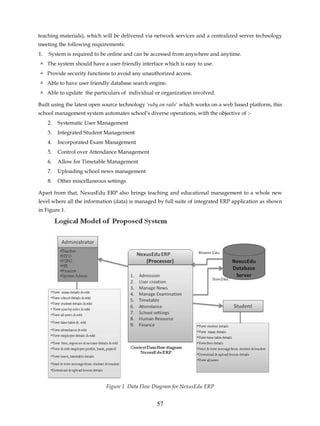
Apart from that, NexusEdu ERP also brings teaching and educational management to a whole new
level where all the information (data) is managed by full suite of integrated ERP application as shown
in Figure 1.


                             Figure 1 Data Flow Diagram for NexusEdu ERP


                                                   57
2. Requirement for System Integration

The integration of School Management System and teaching via Open Source Computing platform is
achievable through:

a)      School Management System - application that is designed to automate a school’s diverse
        operations from classes scheduling, examination schedule to school events and calender in
        order to create a powerful online community, with parents, teachers and students on the
        common interactive platform.

b)      Open Source File/Application Server - that integrates data storage functionality as well as
        structured database modules.

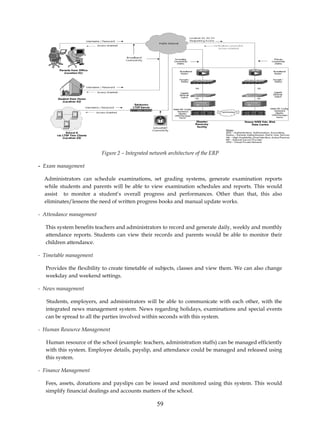
c)      LAN (Local Area Network) that physically connects disk-less Thin Clients to the LTSP Server
        via DHCP (Dynamic Host Configuration Protocol) in the PXE (Pre-boot execution
        Environment).

d)      WAN (Wide Area Network) that acts as a super highway to access valuable information and
        Data Centre.

e)      Thin Client that is made up of a fully functional computer desktop set minus the hard disk as
        data is stored on the LTSP server.

Figure 2 shows the integrated network architecture of the ERP.


3. School Management System

The school management system integrates the following management functions on to a software to
improve the efficiency of school management.

- User management

      Manages the authentication and authorization for different users. For example, students can’t
      access certain management system for security and privacy issues. This management facility
      provides security, integrity and privacy to the data managed under the ERP system.

- Student management

     Students’ information are centralized under the database for easy administration purposes. Student
     data can be extracted from this database for other management purposes.


                                                   58
Figure 2 – Integrated network architecture of the ERP

- Exam management

  Administrators can schedule examinations, set grading systems, generate examination reports
  while students and parents will be able to view examination schedules and reports. This would
  assist to monitor a student’s overall progress and performances. Other than that, this also
  eliminates/lessens the need of written progress books and manual update works.

- Attendance management

  This system benefits teachers and administrators to record and generate daily, weekly and monthly
  attendance reports. Students can view their records and parents would be able to monitor their
  children attendance.

- Timetable management

   Provides the flexibility to create timetable of subjects, classes and view them. We can also change
   weekday and weekend settings.

- News management

    Students, employers, and administrators will be able to communicate with each other, with the
   integrated news management system. News regarding holidays, examinations and special events
   can be spread to all the parties involved within seconds with this system.

- Human Resource Management

   Human resource of the school (example: teachers, administration staffs) can be managed efficiently
   with this system. Employee details, payslip, and attendance could be managed and released using
   this system.

- Finance Management

   Fees, assets, donations and payslips can be issued and monitored using this system. This would
   simplify financial dealings and accounts matters of the school.

                                                  59
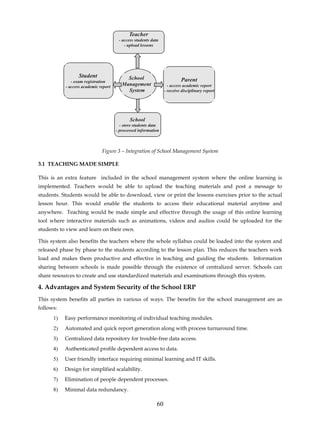
Teacher
                                       - access students data
                                          - upload lessons


                  Student                  School
              - exam registration                                         Parent
           - access academic report
                                         Management                - access academic report
                                           System                - receive disciplinary report


                                             School
                                        - store students data
                                      - processed information


                              Figure 3 – Integration of School Management System

3.1 TEACHING MADE SIMPLE

This is an extra feature included in the school management system where the online learning is
implemented. Teachers would be able to upload the teaching materials and post a message to
students. Students would be able to download, view or print the lessons exercises prior to the actual
lesson hour. This would enable the students to access their educational material anytime and
anywhere. Teaching would be made simple and effective through the usage of this online learning
tool where interactive materials such as animations, videos and audios could be uploaded for the
students to view and learn on their own.

This system also benefits the teachers where the whole syllabus could be loaded into the system and
released phase by phase to the students according to the lesson plan. This reduces the teachers work
load and makes them productive and effective in teaching and guiding the students. Information
sharing between schools is made possible through the existence of centralized server. Schools can
share resources to create and use standardized materials and examinations through this system.

4. Advantages and System Security of the School ERP
This system benefits all parties in various of ways. The benefits for the school management are as
follows:
      1)   Easy performance monitoring of individual teaching modules.
      2)   Automated and quick report generation along with process turnaround time.
      3)   Centralized data repository for trouble-free data access.
      4)   Authenticated profile dependent access to data.
      5)   User friendly interface requiring minimal learning and IT skills.
      6)   Design for simplified scalability.
      7)   Elimination of people dependent processes.
      8)   Minimal data redundancy.

                                                            60
4.1 Advantages to parents are:

-   Frequent interaction with teachers.

-   Reliable update on child's attendance, progress report and fee payment.

-   Prior information about school events and holidays.

-   Regular and prompt availability of school updates such as article's discussions forums, image
    gallery and messaging system.

4.2 Security

This ERP system integrates the information security elements, confidentiality, integrity and
availability (CIA) for the security and privacy. Confidentiality is where the system prevents disclosure
of information to unauthorized individuals or systems. The open source ERP system also provides
integrity where data cannot be modified by everyone and undetectably. Apart from that, the system
also promises availability where the data is available to authorized users anywhere and anytime.
Authorized users can access and view the data through the web based platform which serves as a user
interface to the user.

5. ADVANTAGES OF OPEN SOURCE COMPUTING SYSTEM
The thin client system in Tamil school computer labs are capable of providing affordable server-based
open source computing solutions. The main advantages of using this system in schools are to
increases reliability and consistency of technology. Through a password-accessible account, students,
teachers, and administrators can store and can access saved documents and personal settings. As all
files and programs are stored centrally, users can access their work from any computers on the
network.

Eg. when a teacher or student “logs in”, the server provides them with their “desktop configuration”.
Users can even access their “desktop” from home or other remote locations. The other advantages of
open source computing thin client system can be listed as below:

•      Less Administration – Central management of users, patches, software, data, and backups.

•      Higher Security – Elimination of viruses, Trojans or other vulnerabilities on the user desktops.

•      Hardware Independence – Support of virtually all client devices and computer hardware, with
       low system requirements ( eg - Pentium 3 with 512MB RAM).

•      Easy Access – Teacher and students can access their documents and applications from any
       computers in the local area network.

•      Reduction in TCO – Total Cost of Ownership reduction by up to 50%

Benefits for school in using open source computing thin client system:

•      Lowers cost of technology over time

•      Secure data and equipment

•      Less downtime and greater efficiency

•      Reduces administrator staffing costs

                                                   61
•     Lessen the risk of data theft

•     Disaster recovery: Data is more Secure

•     Reduced time for technical Support

•     Lower power consumption: save electricity

•     Zero licensing management

•     Minimum Maintenance

•     Highly trained individuals are not required

5. Advantages of Thin Client Technology
By using thin client technology rather than standalone computers, it is possible to deliver a wide range
of computer based educational and examination materials while restricting other resources that are
usually accessible to the students if conventional computer system is to be used. With conventional
computer based technology, it is difficult to prevent access to the Internet, chat services, mobile
devices such as USB drive, documents previously stored by other students etc., which could allow
simple cutting and pasting of answers into the assessment or exam sheets by students without thin
client technology in place. It is simple for an administrator to disable USB port on thin client terminals
for the duration of the assessment or examination time, thus further limiting the ability for student's
accessing disallowed information to assist them in the assessment or examination.

Another major attraction of the thin client technology for assessment purpose is that it is very resilient,
given the fact that they have no software or moving parts. Therefore there are unlikely to be an issue
when the assessment are not been delivered due to faulty desktop devices. This causes unnecessary
pressure on the affected student and the additional works involved to the invigilator.

The issue of ensuring that computers have the appropriate software available also affects computers
which are located in teaching spaces. Traditionally such computers are left switched off when not in
use which means that any automated software updates tend to fail or, worse, try to start when a
teacher turns the computers on for a class. This can lead to anti-virus software not being updated,
operating system vulnerability not being patched etc. the start up time of a computers system also
causes difficulties, when a lecturer arrives in a class room, there will be about 5~10 minutes start up
time for the conventional computers and to get the necessary software up and running; if any updated
needed to be done this could delay the start of the class. Using thin client technology there is no need
for the software updates and no need to worry about viruses. The user will always get the appropriate
version of all the software via central server. The new upload of teaching material will be ready for
teaching immediately as the student or teacher starts the class.

5.1 Thin Client System

        Thin client is a general term for a device that relies on a server to operate.

        Thin client has display device, keyboard with mouse and basic processing power in order to
        interact with the server.

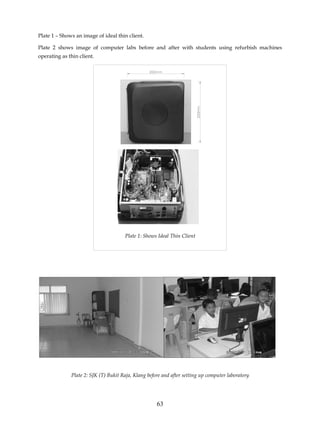
        An ideal thin client device contains no hard drives and CD or DVD-ROM


                                                    62
Plate 1 – Shows an image of ideal thin client.

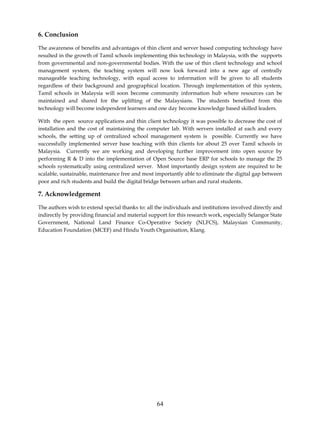
Plate 2 shows image of computer labs before and after with students using refurbish machines
operating as thin client.


                                      Plate 1: Shows Ideal Thin Client


              Plate 2: SJK (T) Bukit Raja, Klang before and after setting up computer laboratory


                                                     63
6. Conclusion

The awareness of benefits and advantages of thin client and server based computing technology have
resulted in the growth of Tamil schools implementing this technology in Malaysia, with the supports
from governmental and non-governmental bodies. With the use of thin client technology and school
management system, the teaching system will now look forward into a new age of centrally
manageable teaching technology, with equal access to information will be given to all students
regardless of their background and geographical location. Through implementation of this system,
Tamil schools in Malaysia will soon become community information hub where resources can be
maintained and shared for the uplifting of the Malaysians. The students benefited from this
technology will become independent learners and one day become knowledge based skilled leaders.

With the open source applications and thin client technology it was possible to decrease the cost of
installation and the cost of maintaining the computer lab. With servers installed at each and every
schools, the setting up of centralized school management system is possible. Currently we have
successfully implemented server base teaching with thin clients for about 25 over Tamil schools in
Malaysia. Currently we are working and developing further improvement into open source by
performing R & D into the implementation of Open Source base ERP for schools to manage the 25
schools systematically using centralized server. Most importantly design system are required to be
scalable, sustainable, maintenance free and most importantly able to eliminate the digital gap between
poor and rich students and build the digital bridge between urban and rural students.

7. Acknowledgement

The authors wish to extend special thanks to: all the individuals and institutions involved directly and
indirectly by providing financial and material support for this research work, especially Selangor State
Government, National Land Finance Co-Operative Society (NLFCS), Malaysian Community,
Education Foundation (MCEF) and Hindu Youth Organisation, Klang.


                                                  64

B5 msaravanan

  • 2.
    Teaching Tamil andManaging Tamil Schools Using Open Source Computing Saravanan Mariappan Nexus NGN Sdn. Bhd., Malaysia. Email: nexusngn@gmail.com Abstract Teaching and managing Tamil schools in Malaysia are going through a enormous development and synchronization with setting up and commissioning of sustainable Computer Learning, Teaching and ICT Skill Development Laboratories successfully. To-date there are over 25 computer labs commissioned over a period of two years using open source computing advancement in Malaysian Tamil schools. With the use of open source computing, cost effective solutions for ICT labs were now made available to schools in Malaysia, providing infrastructures needed for teaching and managing educational systems. The key to this achievement were laid upon the innovation of our research and development team. After a painstaking 3 years of hard work, dedication and a lot of financial difficulties, we were able to implement a reliable and cost effective solutions using open source computing. This pioneering work brings integration to Student Management, Classroom Management, Teacher Management and School Management. The implemented school computer lab infrastructure consist of 41 thin clients connected to a server which delivers the required computing speed enabling the students to access wide spectrum of knowledge freely giving equal opportunity in education. Furthermore, a school management application were proposed using open source school ERP (Educational Resource Planning). Managing the educational system were simplified to upgrade the level of school's teaching and management to be comparable with private educational institutions. This open sourced ERP proven to be the cost effective and affordable in term of development implementations and maintenance. This paper will address in detail, how the server based open source computing along with the integrated open source school ERP for schools in Malaysia implemented and how it is gearing up students with sound computing knowledge. Keywords: Thin Client, Open Source, Server Based Computing, Free-ware, ERP For Schools. 1. Introduction This paper addresses the key area of institutional concern for the education sector, that of delivering effective and efficient school and class room management system in a flexible, secure and accessible way in Malaysian Tamil schools. The system will adopt server based open source computing technology linked with centralized server to implement school and classroom management. The proposed system will have secure integration with other key educational systems (student records, module registration,examination scheduling, conducting trial exams and distribution of 56
  • 3.
    teaching materials), whichwill be delivered via network services and a centralized server technology meeting the following requirements: 1. System is required to be online and can be accessed from anywhere and anytime. The system should have a user-friendly interface which is easy to use. Provide security functions to avoid any unauthorized access. Able to have user friendly database search engine. Able to update the particulars of individual or organization involved. Built using the latest open source technology 'ruby on rails' which works on a web based platform, this school management system automates school’s diverse operations, with the objective of :- 2. Systematic User Management 3. Integrated Student Management 4. Incorporated Exam Management 5. Control over Attendance Management 6. Allow for Timetable Management 7. Uploading school news management 8. Other miscellaneous settings Apart from that, NexusEdu ERP also brings teaching and educational management to a whole new level where all the information (data) is managed by full suite of integrated ERP application as shown in Figure 1. Figure 1 Data Flow Diagram for NexusEdu ERP 57
  • 4.
    2. Requirement forSystem Integration The integration of School Management System and teaching via Open Source Computing platform is achievable through: a) School Management System - application that is designed to automate a school’s diverse operations from classes scheduling, examination schedule to school events and calender in order to create a powerful online community, with parents, teachers and students on the common interactive platform. b) Open Source File/Application Server - that integrates data storage functionality as well as structured database modules. c) LAN (Local Area Network) that physically connects disk-less Thin Clients to the LTSP Server via DHCP (Dynamic Host Configuration Protocol) in the PXE (Pre-boot execution Environment). d) WAN (Wide Area Network) that acts as a super highway to access valuable information and Data Centre. e) Thin Client that is made up of a fully functional computer desktop set minus the hard disk as data is stored on the LTSP server. Figure 2 shows the integrated network architecture of the ERP. 3. School Management System The school management system integrates the following management functions on to a software to improve the efficiency of school management. - User management Manages the authentication and authorization for different users. For example, students can’t access certain management system for security and privacy issues. This management facility provides security, integrity and privacy to the data managed under the ERP system. - Student management Students’ information are centralized under the database for easy administration purposes. Student data can be extracted from this database for other management purposes. 58
  • 5.
    Figure 2 –Integrated network architecture of the ERP - Exam management Administrators can schedule examinations, set grading systems, generate examination reports while students and parents will be able to view examination schedules and reports. This would assist to monitor a student’s overall progress and performances. Other than that, this also eliminates/lessens the need of written progress books and manual update works. - Attendance management This system benefits teachers and administrators to record and generate daily, weekly and monthly attendance reports. Students can view their records and parents would be able to monitor their children attendance. - Timetable management Provides the flexibility to create timetable of subjects, classes and view them. We can also change weekday and weekend settings. - News management Students, employers, and administrators will be able to communicate with each other, with the integrated news management system. News regarding holidays, examinations and special events can be spread to all the parties involved within seconds with this system. - Human Resource Management Human resource of the school (example: teachers, administration staffs) can be managed efficiently with this system. Employee details, payslip, and attendance could be managed and released using this system. - Finance Management Fees, assets, donations and payslips can be issued and monitored using this system. This would simplify financial dealings and accounts matters of the school. 59
  • 6.
    Teacher - access students data - upload lessons Student School - exam registration Parent - access academic report Management - access academic report System - receive disciplinary report School - store students data - processed information Figure 3 – Integration of School Management System 3.1 TEACHING MADE SIMPLE This is an extra feature included in the school management system where the online learning is implemented. Teachers would be able to upload the teaching materials and post a message to students. Students would be able to download, view or print the lessons exercises prior to the actual lesson hour. This would enable the students to access their educational material anytime and anywhere. Teaching would be made simple and effective through the usage of this online learning tool where interactive materials such as animations, videos and audios could be uploaded for the students to view and learn on their own. This system also benefits the teachers where the whole syllabus could be loaded into the system and released phase by phase to the students according to the lesson plan. This reduces the teachers work load and makes them productive and effective in teaching and guiding the students. Information sharing between schools is made possible through the existence of centralized server. Schools can share resources to create and use standardized materials and examinations through this system. 4. Advantages and System Security of the School ERP This system benefits all parties in various of ways. The benefits for the school management are as follows: 1) Easy performance monitoring of individual teaching modules. 2) Automated and quick report generation along with process turnaround time. 3) Centralized data repository for trouble-free data access. 4) Authenticated profile dependent access to data. 5) User friendly interface requiring minimal learning and IT skills. 6) Design for simplified scalability. 7) Elimination of people dependent processes. 8) Minimal data redundancy. 60
  • 7.
    4.1 Advantages toparents are: - Frequent interaction with teachers. - Reliable update on child's attendance, progress report and fee payment. - Prior information about school events and holidays. - Regular and prompt availability of school updates such as article's discussions forums, image gallery and messaging system. 4.2 Security This ERP system integrates the information security elements, confidentiality, integrity and availability (CIA) for the security and privacy. Confidentiality is where the system prevents disclosure of information to unauthorized individuals or systems. The open source ERP system also provides integrity where data cannot be modified by everyone and undetectably. Apart from that, the system also promises availability where the data is available to authorized users anywhere and anytime. Authorized users can access and view the data through the web based platform which serves as a user interface to the user. 5. ADVANTAGES OF OPEN SOURCE COMPUTING SYSTEM The thin client system in Tamil school computer labs are capable of providing affordable server-based open source computing solutions. The main advantages of using this system in schools are to increases reliability and consistency of technology. Through a password-accessible account, students, teachers, and administrators can store and can access saved documents and personal settings. As all files and programs are stored centrally, users can access their work from any computers on the network. Eg. when a teacher or student “logs in”, the server provides them with their “desktop configuration”. Users can even access their “desktop” from home or other remote locations. The other advantages of open source computing thin client system can be listed as below: • Less Administration – Central management of users, patches, software, data, and backups. • Higher Security – Elimination of viruses, Trojans or other vulnerabilities on the user desktops. • Hardware Independence – Support of virtually all client devices and computer hardware, with low system requirements ( eg - Pentium 3 with 512MB RAM). • Easy Access – Teacher and students can access their documents and applications from any computers in the local area network. • Reduction in TCO – Total Cost of Ownership reduction by up to 50% Benefits for school in using open source computing thin client system: • Lowers cost of technology over time • Secure data and equipment • Less downtime and greater efficiency • Reduces administrator staffing costs 61
  • 8.
    Lessen the risk of data theft • Disaster recovery: Data is more Secure • Reduced time for technical Support • Lower power consumption: save electricity • Zero licensing management • Minimum Maintenance • Highly trained individuals are not required 5. Advantages of Thin Client Technology By using thin client technology rather than standalone computers, it is possible to deliver a wide range of computer based educational and examination materials while restricting other resources that are usually accessible to the students if conventional computer system is to be used. With conventional computer based technology, it is difficult to prevent access to the Internet, chat services, mobile devices such as USB drive, documents previously stored by other students etc., which could allow simple cutting and pasting of answers into the assessment or exam sheets by students without thin client technology in place. It is simple for an administrator to disable USB port on thin client terminals for the duration of the assessment or examination time, thus further limiting the ability for student's accessing disallowed information to assist them in the assessment or examination. Another major attraction of the thin client technology for assessment purpose is that it is very resilient, given the fact that they have no software or moving parts. Therefore there are unlikely to be an issue when the assessment are not been delivered due to faulty desktop devices. This causes unnecessary pressure on the affected student and the additional works involved to the invigilator. The issue of ensuring that computers have the appropriate software available also affects computers which are located in teaching spaces. Traditionally such computers are left switched off when not in use which means that any automated software updates tend to fail or, worse, try to start when a teacher turns the computers on for a class. This can lead to anti-virus software not being updated, operating system vulnerability not being patched etc. the start up time of a computers system also causes difficulties, when a lecturer arrives in a class room, there will be about 5~10 minutes start up time for the conventional computers and to get the necessary software up and running; if any updated needed to be done this could delay the start of the class. Using thin client technology there is no need for the software updates and no need to worry about viruses. The user will always get the appropriate version of all the software via central server. The new upload of teaching material will be ready for teaching immediately as the student or teacher starts the class. 5.1 Thin Client System Thin client is a general term for a device that relies on a server to operate. Thin client has display device, keyboard with mouse and basic processing power in order to interact with the server. An ideal thin client device contains no hard drives and CD or DVD-ROM 62
  • 9.
    Plate 1 –Shows an image of ideal thin client. Plate 2 shows image of computer labs before and after with students using refurbish machines operating as thin client. Plate 1: Shows Ideal Thin Client Plate 2: SJK (T) Bukit Raja, Klang before and after setting up computer laboratory 63
  • 10.
    6. Conclusion The awarenessof benefits and advantages of thin client and server based computing technology have resulted in the growth of Tamil schools implementing this technology in Malaysia, with the supports from governmental and non-governmental bodies. With the use of thin client technology and school management system, the teaching system will now look forward into a new age of centrally manageable teaching technology, with equal access to information will be given to all students regardless of their background and geographical location. Through implementation of this system, Tamil schools in Malaysia will soon become community information hub where resources can be maintained and shared for the uplifting of the Malaysians. The students benefited from this technology will become independent learners and one day become knowledge based skilled leaders. With the open source applications and thin client technology it was possible to decrease the cost of installation and the cost of maintaining the computer lab. With servers installed at each and every schools, the setting up of centralized school management system is possible. Currently we have successfully implemented server base teaching with thin clients for about 25 over Tamil schools in Malaysia. Currently we are working and developing further improvement into open source by performing R & D into the implementation of Open Source base ERP for schools to manage the 25 schools systematically using centralized server. Most importantly design system are required to be scalable, sustainable, maintenance free and most importantly able to eliminate the digital gap between poor and rich students and build the digital bridge between urban and rural students. 7. Acknowledgement The authors wish to extend special thanks to: all the individuals and institutions involved directly and indirectly by providing financial and material support for this research work, especially Selangor State Government, National Land Finance Co-Operative Society (NLFCS), Malaysian Community, Education Foundation (MCEF) and Hindu Youth Organisation, Klang. 64