AGENDA
•   About Spanngle
•   Academe
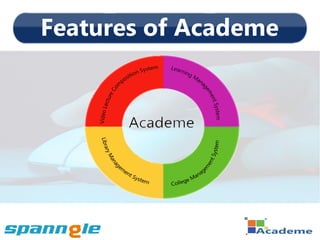
     • Features of Academe
     • Learning Management System
     • College Management System
     • Library Management System
     • Video Lecture Composition
     • Supplementary Features of Academe
     • Value Addition Modules on Demand
     • Technology Academe work on
About Spanngle
•   Providing soft solutions across the world.

•   Team with a right mix of experience,
    enthusiasm and with Vast knowledge across
    technology and business domains.

•   Academe, Spriha are recent products running
    in big institutions of different countries.
Academe
What is Academe?
•   An eLearning and college management suite for
    the ease of learning management, college
    management and student administration.
•   Social web approach to enhance the academic
     and social aspects of the students.
•   Single platform for all entities i.e. students, faculty,
     management and alumni.
•   Provides a bundle of features to organize, express,
    create, interact, search, explore, store, communicate,
    seek and learn.
Features of Academe
Learning
Management
System-LMS
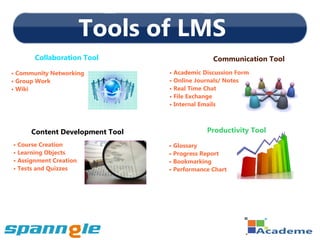
Tools of LMS
       Collaboration Tool                      Communication Tool
• Community Networking           • Academic Discussion Form
• Group Work                     • Online Journals/ Notes
• Wiki                           • Real Time Chat
                                 • File Exchange
                                 • Internal Emails


      Content Development Tool               Productivity Tool
• Course Creation                • Glossary
• Learning Objects               • Progress Report
• Assignment Creation            • Bookmarking
• Tests and Quizzes              • Performance Chart
Uses of LMS
•   Create centralized learning environment to ensure
    consistency of content and study material.
•   Tracking and reporting of courses becomes easy for
    user as well as for management.
•   24/7 access to learning contents and other material
    is possible for every user from anywhere.
•   Allows learning to those who are outside of school
    area due to any reason.
•   Course calendar is helpful module to be on time.
College
Management
System-CMS
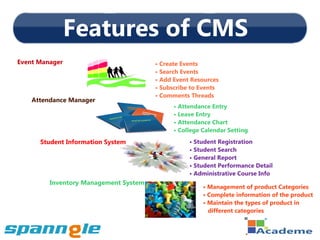
Features of CMS
Event Manager                          • Create Events
                                       • Search Events
                                       • Add Event Resources
                                       • Subscribe to Events
                                       • Comments Threads
    Attendance Manager
                                             • Attendance Entry
                                             • Leave Entry
                                             • Attendance Chart
                                             • College Calendar Setting
      Student Information System                  • Student Registration
                                                  • Student Search
                                                  • General Report
                                                  • Student Performance Detail
                                                  • Administrative Course Info
         Inventory Management System
                                                       • Management of product Categories
                                                       • Complete information of the product
                                                       • Maintain the types of product in
                                                         different categories
Uses of CMS
•   All the general information of a student can be
    displayed on a single click.
•   Makes easy to maintain the student’s course info
    and their performance details.
•   Maintain the attendance entry, leave entry
    and all the holidays of institution.
•   Event management is easy.
•   Easy registration process for students.
•   Management of inventories is easy.
Library
Management
  System
Features of Library Mgt System
•   Management of Books Record

•   Automatic Fine Calculator

•   Check-out Books

•   Check-In Books

•   Management of Periodicals

•   Reports
What Library Mgt System Does ?
•    Automatic fine calculator reduce the chances of
     mistakes in fine calculation.
•    Book search via book name, author name, description
     or notes makes it easy to find out its details.
•    All subscription and transaction information are available
     at any time on a single click.
•    To maintain the statistical reports is no more hectic
      work now.
•    Librarian finds it easy to get the status of a book/ audio/
     video CD's/ Journals, etc.
Video Lecture
Composition
 System-VLC
Features of VLC System

•   Upload and Encode Module

•   Usage Statistics Report

•   Automatic Video Cataloging
Benefits of VLC System
•   Anytime and anywhere access to lectures.
•   Web based interface which accepts a variety of
    video formats.
•   Student can edit the notes which are automatically
    stored in his personal account.
•   Student can store videos on hardware like CD/ DVD
    so that he can revise the lecture even if he has no
    access to internet.
•   Because of video cataloging it is easily searchable.
Supplementary Features of VLC

  •   Institute Dedicated Mail Server


  •   Automated Backup and Restore


  •   Feedback
Value Addition Modules on Demand

 •   E-Portfolio

 •   Staff Management System

 •   Fee Management System

 •   Alumni Management System
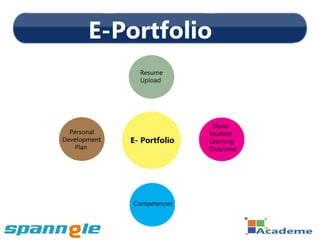
E-Portfolio
Staff Management System
 •   Maintain staff personal and career details

 •   Keep records of staff attendance

 •   Manage staff leave entries

 •   Description of staff work involvement

 •   Search Staff
Fee Management System
•   Generate complete summary of payable fees and
    collected amount.
•   Detail of student's fee history can be viewed by
    entering the id of the student.
•   Dues list can be generated in different types like
    class wise, student wise or any item wise.
•   Fee setting includes different items like annual fee,
    fine, conveyance fee, exam fee, etc.
•   Fee structure can be defined as class wise and/or
    semester wise.
Alumni Management System
•    Alumni Registration

•    Alumni Log-in

•    Search Alumni Records and Contacts

•    Update Alumni Information
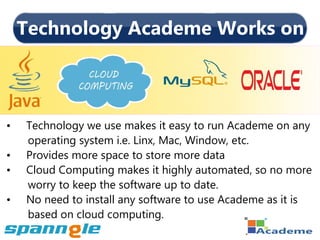
Technology Academe Works on


•   Technology we use makes it easy to run Academe on any
    operating system i.e. Linx, Mac, Window, etc.
•   Provides more space to store more data
•   Cloud Computing makes it highly automated, so no more
    worry to keep the software up to date.
•   No need to install any software to use Academe as it is
    based on cloud computing.
Thank You
Academe- Learning Management System

Academe- Learning Management System

  • 2.
    AGENDA • About Spanngle • Academe • Features of Academe • Learning Management System • College Management System • Library Management System • Video Lecture Composition • Supplementary Features of Academe • Value Addition Modules on Demand • Technology Academe work on
  • 3.
    About Spanngle • Providing soft solutions across the world. • Team with a right mix of experience, enthusiasm and with Vast knowledge across technology and business domains. • Academe, Spriha are recent products running in big institutions of different countries.
  • 4.
  • 5.
    What is Academe? • An eLearning and college management suite for the ease of learning management, college management and student administration. • Social web approach to enhance the academic and social aspects of the students. • Single platform for all entities i.e. students, faculty, management and alumni. • Provides a bundle of features to organize, express, create, interact, search, explore, store, communicate, seek and learn.
  • 6.
  • 7.
  • 8.
    Tools of LMS Collaboration Tool Communication Tool • Community Networking • Academic Discussion Form • Group Work • Online Journals/ Notes • Wiki • Real Time Chat • File Exchange • Internal Emails Content Development Tool Productivity Tool • Course Creation • Glossary • Learning Objects • Progress Report • Assignment Creation • Bookmarking • Tests and Quizzes • Performance Chart
  • 9.
    Uses of LMS • Create centralized learning environment to ensure consistency of content and study material. • Tracking and reporting of courses becomes easy for user as well as for management. • 24/7 access to learning contents and other material is possible for every user from anywhere. • Allows learning to those who are outside of school area due to any reason. • Course calendar is helpful module to be on time.
  • 10.
  • 11.
    Features of CMS EventManager • Create Events • Search Events • Add Event Resources • Subscribe to Events • Comments Threads Attendance Manager • Attendance Entry • Leave Entry • Attendance Chart • College Calendar Setting Student Information System • Student Registration • Student Search • General Report • Student Performance Detail • Administrative Course Info Inventory Management System • Management of product Categories • Complete information of the product • Maintain the types of product in different categories
  • 12.
    Uses of CMS • All the general information of a student can be displayed on a single click. • Makes easy to maintain the student’s course info and their performance details. • Maintain the attendance entry, leave entry and all the holidays of institution. • Event management is easy. • Easy registration process for students. • Management of inventories is easy.
  • 13.
  • 14.
    Features of LibraryMgt System • Management of Books Record • Automatic Fine Calculator • Check-out Books • Check-In Books • Management of Periodicals • Reports
  • 15.
    What Library MgtSystem Does ? • Automatic fine calculator reduce the chances of mistakes in fine calculation. • Book search via book name, author name, description or notes makes it easy to find out its details. • All subscription and transaction information are available at any time on a single click. • To maintain the statistical reports is no more hectic work now. • Librarian finds it easy to get the status of a book/ audio/ video CD's/ Journals, etc.
  • 16.
  • 17.
    Features of VLCSystem • Upload and Encode Module • Usage Statistics Report • Automatic Video Cataloging
  • 18.
    Benefits of VLCSystem • Anytime and anywhere access to lectures. • Web based interface which accepts a variety of video formats. • Student can edit the notes which are automatically stored in his personal account. • Student can store videos on hardware like CD/ DVD so that he can revise the lecture even if he has no access to internet. • Because of video cataloging it is easily searchable.
  • 19.
    Supplementary Features ofVLC • Institute Dedicated Mail Server • Automated Backup and Restore • Feedback
  • 20.
    Value Addition Moduleson Demand • E-Portfolio • Staff Management System • Fee Management System • Alumni Management System
  • 21.
  • 22.
    Staff Management System • Maintain staff personal and career details • Keep records of staff attendance • Manage staff leave entries • Description of staff work involvement • Search Staff
  • 23.
    Fee Management System • Generate complete summary of payable fees and collected amount. • Detail of student's fee history can be viewed by entering the id of the student. • Dues list can be generated in different types like class wise, student wise or any item wise. • Fee setting includes different items like annual fee, fine, conveyance fee, exam fee, etc. • Fee structure can be defined as class wise and/or semester wise.
  • 24.
    Alumni Management System • Alumni Registration • Alumni Log-in • Search Alumni Records and Contacts • Update Alumni Information
  • 25.
    Technology Academe Workson • Technology we use makes it easy to run Academe on any operating system i.e. Linx, Mac, Window, etc. • Provides more space to store more data • Cloud Computing makes it highly automated, so no more worry to keep the software up to date. • No need to install any software to use Academe as it is based on cloud computing.
  • 26.