



Oracle® Application Server
Best Practices Guide
10g Release 2 (10.1.2)
B28654-01


March 2006
Oracle Application Server Best Practices Guide, 10g Release 2 (10.1.2)

B28654-01

Copyright © 2004, 2006, Oracle. All rights reserved.

Primary Author: William Bathurst, Jan Carlin, Fermin Castro, Ron Caneel, Douglas Clark, Mike Donohue,
Shalendra Goel, Nicole Haba, Christian Hauser, Pavana Jain, Michael Lehman, John Lang, Sandhya Rajput,
Gurudatt Shashikumar, Deborah Steiner, Olaf Stullich, Deepak Thomas, Jinyu Wang, Philip Weckerle

The Programs (which include both the software and documentation) contain proprietary information; they
are provided under a license agreement containing restrictions on use and disclosure and are also protected
by copyright, patent, and other intellectual and industrial property laws. Reverse engineering, disassembly,
or decompilation of the Programs, except to the extent required to obtain interoperability with other
independently created software or as specified by law, is prohibited.

The information contained in this document is subject to change without notice. If you find any problems in
the documentation, please report them to us in writing. This document is not warranted to be error-free.
Except as may be expressly permitted in your license agreement for these Programs, no part of these
Programs may be reproduced or transmitted in any form or by any means, electronic or mechanical, for any
purpose.

If the Programs are delivered to the United States Government or anyone licensing or using the Programs on
behalf of the United States Government, the following notice is applicable:

U.S. GOVERNMENT RIGHTS Programs, software, databases, and related documentation and technical data
delivered to U.S. Government customers are "commercial computer software" or "commercial technical data"
pursuant to the applicable Federal Acquisition Regulation and agency-specific supplemental regulations. As
such, use, duplication, disclosure, modification, and adaptation of the Programs, including documentation
and technical data, shall be subject to the licensing restrictions set forth in the applicable Oracle license
agreement, and, to the extent applicable, the additional rights set forth in FAR 52.227-19, Commercial
Computer Software—Restricted Rights (June 1987). Oracle USA, Inc., 500 Oracle Parkway, Redwood City,
CA 94065.

The Programs are not intended for use in any nuclear, aviation, mass transit, medical, or other inherently
dangerous applications. It shall be the licensee's responsibility to take all appropriate fail-safe, backup,
redundancy and other measures to ensure the safe use of such applications if the Programs are used for such
purposes, and we disclaim liability for any damages caused by such use of the Programs.

Oracle, JD Edwards, PeopleSoft, and Siebel are registered trademarks of Oracle Corporation and/or its
affiliates. Other names may be trademarks of their respective owners.

The Programs may provide links to Web sites and access to content, products, and services from third
parties. Oracle is not responsible for the availability of, or any content provided on, third-party Web sites.
You bear all risks associated with the use of such content. If you choose to purchase any products or services
from a third party, the relationship is directly between you and the third party. Oracle is not responsible for:
(a) the quality of third-party products or services; or (b) fulfilling any of the terms of the agreement with the
third party, including delivery of products or services and warranty obligations related to purchased
products or services. Oracle is not responsible for any loss or damage of any sort that you may incur from
dealing with any third party.
Contents

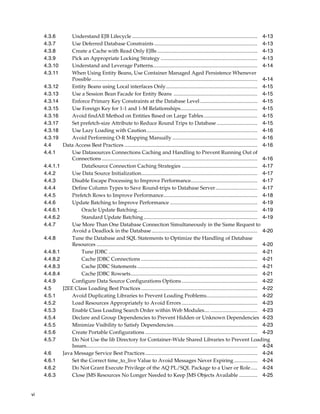
Preface ............................................................................................................................................................... xiii
        Audience.....................................................................................................................................................   xiii
        Documentation Accessibility ...................................................................................................................                 xiii
        Related Documents ...................................................................................................................................           xiv
        Conventions ...............................................................................................................................................     xiv

1       Introduction to Best Practices

2       Management and Monitoring
        2.1     Oracle Enterprise Manager 10g Best Practices........................................................................ 2-1
        2.1.1      Select the Framework Options That Best Suit Your Needs ........................................... 2-1
        2.1.2      Application Server Control Console ................................................................................. 2-2
        2.1.2.1         Use the Deployment Wizard to Deploy Applications ............................................ 2-2
        2.1.2.2         Use Clusters for Application Deployment and Configuration Management to
                        Simplify Management of Application Servers ......................................................... 2-2
        2.1.2.3         Monitor Application Performance During Application Development or Test
                        Cycles to Identify Resource Usage and Identify Bottlenecks................................. 2-3
        2.1.2.4         Use the Host Home Page to Help Diagnose Performance Issues.......................... 2-3
        2.1.2.5         Perform Configuration Changes in Application Server Control to Ensure the
                        Repository is Properly Updated................................................................................. 2-3
        2.1.2.6         Monitor Rate and Aggregated Performance Metrics to Identify Slow Requests 2-3
        2.1.3      Grid Control Console .......................................................................................................... 2-4
        2.1.3.1         Use Alerts and Notifications to Proactively Monitor System Availability .......... 2-4
        2.1.3.2         Set Up Grid Control Console to Monitor for Availability and Performance Issues
                        ............................................................................................................................................2-4
        2.1.3.3         Add OracleAS Farms and OracleAS Clusters to Centrally Manage Application
                        Server.............................................................................................................................. 2-5
        2.1.3.4         Use End-User Performance Monitoring to Monitor Response Times of Web Pages
                        .............................................................................................................................. 2-5
        2.1.3.5         Proactively Monitor Web Application Transactions to Test Performance
                        Monitoring..................................................................................................................... 2-5
        2.1.3.6         Use Diagnostics to Pinpoint OC4J Performance Problems .................................... 2-6
        2.1.3.7         Use Job System to Schedule a Deployment .............................................................. 2-6
        2.1.3.8         Regularly Perform Backups to Prepare for Loss of Data........................................ 2-7
        2.1.3.9         Use Grid Control to Manage Both Oracle Application Server and the Oracle
                        Database......................................................................................................................... 2-7


                                                                                                                                                                          iii
2.1.3.10          Manage Multiple Oracle Application Server Instances on a Single Host to Reduce
                       Resource Usages ........................................................................................................... 2-7
     2.2    Oracle Process Manager and Notification Server Best Practices ......................................... 2-8
     2.2.1      Start OPMN to Manage Components............................................................................... 2-8
     2.2.2      Never Start or Stop OPMN Managed Components Manually ..................................... 2-8
     2.2.3      Review stdout and stderr to Determine Cause of Components Not Starting ............ 2-8
     2.2.4      Increase Timeout For Components to Avoid Timed-Out Requests............................. 2-9
     2.2.5      Set Retry to High Values For Components Running on an Overloaded System to
                Avoid Restart of Computer ................................................................................................ 2-9
     2.2.6      Leverage Additional Logging to Aid in Debugging ...................................................... 2-9
     2.2.7      Configure Log Rotation to Avoid Log File Size Issues ............................................... 2-10
     2.2.8      Configure Additional Start Order Dependencies to Customize Startup ................. 2-10
     2.2.9      Use Event Scripts to Record Important Events ............................................................ 2-10
     2.2.10     Use OPMN to Manage External Components.............................................................. 2-11
     2.3    Distributed Configuration Management Best Practices..................................................... 2-11
     2.3.1      Use DCM Archiving to Take Snapshots of Configuration ......................................... 2-12
     2.3.2      Specify a Single Instance in a Cluster as the Management Point to Provide A Correct
                Order of Operations ......................................................................................................... 2-13
     2.3.3      Avoid Concurrent Administration Operations to Prevent Configuration Conflicts 2-13
     2.3.4      Avoid Running updateConfig Concurrently with Any Other Configuration Operation
                to Prevent Configuration Conflicts ................................................................................ 2-13
     2.3.5      Restart Application Server Control Console after Joining or Leaving a Farm or Cluster
                to Refresh the Console ..................................................................................................... 2-13
     2.3.6      Use High Availability Features for Infrastructure Repository to Synchronize within a
                Farm .................................................................................................................................... 2-14
     2.3.7      Follow dcmctl Tips to Improve Usage........................................................................... 2-14
     2.4    Dynamic Monitoring Services Best Practices....................................................................... 2-15
     2.4.1      Monitor Your System Regularly to Identify Performance Problems ........................ 2-15
     2.4.2      Take Regular Dumps of Metrics to Capture and Save a Record of Performance Data
                 ............................................................................................................................................. 2-15
     2.4.3      Add Performance Instrumentation to Application to Aid Developers .................... 2-16
     2.4.4      Isolate Expensive Intervals Using PhaseEvent Metrics to Validate Code................ 2-16
     2.4.5      Organize Performance Data to Avoid Metrics Not Displaying................................. 2-16
     2.4.6      DMS Naming Conventions to Improve Metric Reports ............................................. 2-16
     2.4.7      Follow DMS Coding Recommendations to Improve Code........................................ 2-17
     2.4.8      Validate New Metrics to Verify Accuracy .................................................................... 2-17

3 Oracle HTTP Server
     3.1         Configure Topology Appropriately For Modem Connections to Prevent Blocking Oracle
                 HTTP Server ................................................................................................................................ 3-1
     3.2         Tune TCP/IP Parameters to Improve Oracle HTTP Server Performance.......................... 3-2
     3.3         Tune KeepAlive Directives to Improve Connection Performance ...................................... 3-2
     3.4         Tune MaxClients Directive to Improve Request Performance............................................. 3-2
     3.5         Avoid Any DNS Lookup to Prevent Performance Degradation ......................................... 3-2
     3.6         Tune Off Access Logging to Reduce Overhead...................................................................... 3-3
     3.7         Use FollowSymLinks and Not SymLinkIfOwnerMatch to Configure Symbolic Links ... 3-3
     3.8         Set AllowOverride to None to Prevent Unnecessary Directive Checking ......................... 3-3
     3.9         Use mod_rewrite to Hide URL Changes For End-Users ...................................................... 3-3


iv
3.10     Use mod_oc4j Sticky Routing Instead of Configuring the External Router....................... 3-3

4 Oracle Application Server Containers for J2EE (OC4J) Applications and
Developer Tools
   4.1      Java Server Pages Best Practices ............................................................................................... 4-1
   4.1.1        Pre-Translate JSPs Before Deployment to Prevent Translation Overhead.................. 4-2
   4.1.2        Separate Presentation Markup from Java to Improve Application Performance ...... 4-2
   4.1.3        Use JSP Template Mechanism to Reserve Resources ..................................................... 4-2
   4.1.4        Set sessions to false If Not Using Sessions to Prevent Overhead of Creating Sessions4-3
   4.1.5        Always Invalidate Sessions When No Longer Used to Prevent Overhead of
                Applications.......................................................................................................................... 4-3
   4.1.6        Set main_mode Parameter to justrun to Prevent Recompilation of JSPs .................... 4-3
   4.1.7        Use Available JSP Tags In Tag Library to Create Clean and Reusable Code ............. 4-4
   4.1.8        Minimize Context Switching Between Servlets and EJBs to Avoid Performance Issues
                .................................................................................................................................... 4-4
   4.1.9        Package JSP Files In EAR File Rather Than Standalone to Standardize Deployment
                Process ................................................................................................................................... 4-4
   4.1.10       Use Compile-Time Object Introspection to Improve Application Performance........ 4-4
   4.1.11       Choose Static Versus Dynamic Includes Appropriately................................................ 4-4
   4.1.12       Disable JSP Page Buffer If Not Used to Improve Performance..................................... 4-4
   4.1.13       Use Forwards Instead of Redirects to Improve Browser Experience........................... 4-5
   4.1.14       Use JSP Cache Tags to Save Development Time............................................................. 4-5
   4.1.15       Use well_known_taglib_loc to Share Tag Libraries........................................................ 4-6
   4.1.16       Use jsp-timeout Attribute to Provide Efficient Memory Utilization............................ 4-6
   4.1.17       Use reduce_tag_code Parameter to Reduce the Size of Generated Java Method....... 4-6
   4.1.18       Use Workarounds to Avoid Reaching JVM Code Size Limit........................................ 4-7
   4.1.19       Hide JSP Pages to Prevent Access ..................................................................................... 4-7
   4.2      Sessions Best Practices................................................................................................................ 4-7
   4.2.1        Persist Session State If Appropriate to Preserve State with Browser........................... 4-8
   4.2.2        Replicate Sessions If Persisting Is Not an Option to Improve Performance ............... 4-8
   4.2.3        Avoid Storing Objects in Sessions to Reuse Shared Resources..................................... 4-9
   4.2.4        Set Session Timeout Appropriately to Optimize Performance..................................... 4-9
   4.2.5        Monitor Session Memory Usage to Determine Data to Store in Session Objects....... 4-9
   4.2.6        Use Small Islands to Improve Fault Tolerance................................................................ 4-9
   4.2.7        Use a Mix of Cookie and Sessions to Improve Performance......................................... 4-9
   4.2.8        Use Coarse Objects Inside HTTP Sessions to Reduce Update Events ...................... 4-10
   4.2.9        Use Transient Data in Sessions Whenever Appropriate to Reduce Replication
                Overhead............................................................................................................................ 4-10
   4.2.10       Invalidate Sessions to Prevent Memory Usage Growth ............................................. 4-10
   4.2.11       Miscellaneous Guidelines................................................................................................ 4-10
   4.3      Enterprise Java Bean Best Practices....................................................................................... 4-11
   4.3.1        Use Local, Remote, and Message-Driven EJBs Appropriately to Improve Performance
                .................................................................................................................................. 4-11
   4.3.2        Use EJB Judiciously .......................................................................................................... 4-12
   4.3.3        Use Service Locator Pattern............................................................................................. 4-12
   4.3.4        Cluster Your EJBs.............................................................................................................. 4-12
   4.3.5        Index Secondary Finder Methods .................................................................................. 4-13


                                                                                                                                                             v
4.3.6         Understand EJB Lifecycle ................................................................................................ 4-13
     4.3.7         Use Deferred Database Constraints ............................................................................... 4-13
     4.3.8         Create a Cache with Read Only EJBs ............................................................................. 4-13
     4.3.9         Pick an Appropriate Locking Strategy .......................................................................... 4-13
     4.3.10        Understand and Leverage Patterns................................................................................ 4-14
     4.3.11        When Using Entity Beans, Use Container Managed Aged Persistence Whenever
                   Possible............................................................................................................................... 4-14
     4.3.12        Entity Beans using Local interfaces Only...................................................................... 4-15
     4.3.13        Use a Session Bean Facade for Entity Beans ................................................................ 4-15
     4.3.14        Enforce Primary Key Constraints at the Database Level ............................................ 4-15
     4.3.15        Use Foreign Key for 1-1 and 1-M Relationships........................................................... 4-15
     4.3.16        Avoid findAll Method on Entities Based on Large Tables ......................................... 4-15
     4.3.17        Set prefetch-size Attribute to Reduce Round Trips to Database ............................... 4-15
     4.3.18        Use Lazy Loading with Caution..................................................................................... 4-16
     4.3.19        Avoid Performing O-R Mapping Manually ................................................................. 4-16
     4.4       Data Access Best Practices ...................................................................................................... 4-16
     4.4.1         Use Datasources Connections Caching and Handling to Prevent Running Out of
                   Connections ....................................................................................................................... 4-16
     4.4.1.1            DataSource Connection Caching Strategies .......................................................... 4-17
     4.4.2         Use Data Source Initialization......................................................................................... 4-17
     4.4.3         Disable Escape Processing to Improve Performance................................................... 4-17
     4.4.4         Define Column Types to Save Round-trips to Database Server ................................ 4-17
     4.4.5         Prefetch Rows to Improve Performance........................................................................ 4-18
     4.4.6         Update Batching to Improve Performance ................................................................... 4-19
     4.4.6.1            Oracle Update Batching............................................................................................ 4-19
     4.4.6.2            Standard Update Batching ....................................................................................... 4-19
     4.4.7         Use More Than One Database Connection Simultaneously in the Same Request to
                   Avoid a Deadlock in the Database ................................................................................. 4-20
     4.4.8         Tune the Database and SQL Statements to Optimize the Handling of Database
                   Resources ........................................................................................................................... 4-20
     4.4.8.1            Tune JDBC .................................................................................................................. 4-21
     4.4.8.2            Cache JDBC Connections ......................................................................................... 4-21
     4.4.8.3            Cache JDBC Statements ............................................................................................ 4-21
     4.4.8.4            Cache JDBC Rowsets................................................................................................. 4-21
     4.4.9         Configure Data Source Configurations Options .......................................................... 4-22
     4.5       J2EE Class Loading Best Practices ......................................................................................... 4-22
     4.5.1         Avoid Duplicating Libraries to Prevent Loading Problems....................................... 4-22
     4.5.2         Load Resources Appropriately to Avoid Errors .......................................................... 4-23
     4.5.3         Enable Class Loading Search Order within Web Modules.... .................................... 4-23
     4.5.4         Declare and Group Dependencies to Prevent Hidden or Unknown Dependencies 4-23
     4.5.5         Minimize Visibility to Satisfy Dependencies................................................................ 4-23
     4.5.6         Create Portable Configurations ...................................................................................... 4-23
     4.5.7         Do Not Use the lib Directory for Container-Wide Shared Libraries to Prevent Loading
                   Issues................................................................................................................................... 4-24
     4.6       Java Message Service Best Practices ...................................................................................... 4-24
     4.6.1         Set the Correct time_to_live Value to Avoid Messages Never Expiring .................. 4-24
     4.6.2         Do Not Grant Execute Privilege of the AQ PL/SQL Package to a User or Role ..... 4-24
     4.6.3         Close JMS Resources No Longer Needed to Keep JMS Objects Available .............. 4-25


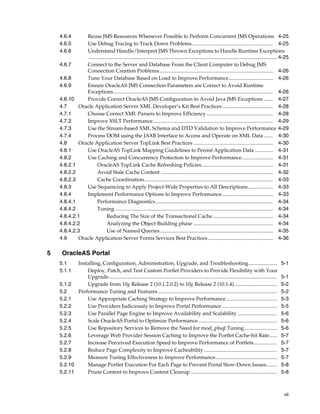
vi
4.6.4      Reuse JMS Resources Whenever Possible to Perform Concurrent JMS Operations 4-25
    4.6.5      Use Debug Tracing to Track Down Problems .............................................................. 4-25
    4.6.6      Understand Handle/Interpret JMS Thrown Exceptions to Handle Runtime Exceptions
                .................................................................................................................................. 4-25
    4.6.7      Connect to the Server and Database From the Client Computer to Debug JMS
               Connection Creation Problems ....................................................................................... 4-26
    4.6.8      Tune Your Database Based on Load to Improve Performance.................................. 4-26
    4.6.9      Ensure OracleAS JMS Connection Parameters are Correct to Avoid Runtime
               Exceptions .......................................................................................................................... 4-26
    4.6.10     Provide Correct OracleAS JMS Configuration to Avoid Java JMS Exceptions ....... 4-27
    4.7     Oracle Application Server XML Developer’s Kit Best Practices ....................................... 4-28
    4.7.1      Choose Correct XML Parsers to Improve Efficiency ................................................... 4-28
    4.7.2      Improve XSLT Performance............................................................................................ 4-29
    4.7.3      Use the Stream-based XML Schema and DTD Validation to Improve Performance 4-29
    4.7.4      Process DOM using the JAXB Interface to Access and Operate on XML Data ....... 4-30
    4.8     Oracle Application Server TopLink Best Practices ............................................................. 4-30
    4.8.1      Use OracleAS TopLink Mapping Guidelines to Persist Application Data .............. 4-31
    4.8.2      Use Caching and Concurrency Protection to Improve Performance........................ 4-31
    4.8.2.1           OracleAS TopLink Cache Refreshing Policies....................................................... 4-31
    4.8.2.2           Avoid Stale Cache Content ...................................................................................... 4-32
    4.8.2.3           Cache Coordination................................................................................................... 4-33
    4.8.3      Use Sequencing to Apply Project-Wide Properties to All Descriptions ................... 4-33
    4.8.4      Implement Performance Options to Improve Performance....................................... 4-33
    4.8.4.1           Performance Diagnostics.......................................................................................... 4-34
    4.8.4.2           Tuning ......................................................................................................................... 4-34
    4.8.4.2.1               Reducing The Size of the Transactional Cache .............................................. 4-34
    4.8.4.2.2               Analyzing the Object-Building phase ............................................................. 4-34
    4.8.4.2.3               Use of Named Queries....................................................................................... 4-35
    4.9     Oracle Application Server Forms Services Best Practices .................................................. 4-36

5    OracleAS Portal
    5.1    Installing, Configuration, Administration, Upgrade, and Troubleshooting......................                                                  5-1
    5.1.1      Deploy, Patch, and Test Custom Portlet Providers to Provide Flexibility with Your
               Upgrade.................................................................................................................................   5-1
    5.1.2      Upgrade from 10g Release 2 (10.1.2.0.2) to 10g Release 2 (10.1.4).................................                                         5-2
    5.2    Performance Tuning and Features ...........................................................................................                    5-2
    5.2.1      Use Appropriate Caching Strategy to Improve Performance.......................................                                             5-3
    5.2.2      Use Providers Judiciously to Improve Portal Performance ..........................................                                         5-5
    5.2.3      Use Parallel Page Engine to Improve Availability and Scalability ..............................                                            5-6
    5.2.4      Scale OracleAS Portal to Optimize Performance ............................................................                                 5-6
    5.2.5      Use Repository Services to Remove the Need for mod_plsql Tuning.........................                                                   5-6
    5.2.6      Leverage Web Provider Session Caching to Improve the Portlet Cache-hit Rate......                                                          5-7
    5.2.7      Increase Perceived Execution Speed to Improve Performance of Portlets..................                                                    5-7
    5.2.8      Reduce Page Complexity to Improve Cacheability ........................................................                                    5-7
    5.2.9      Measure Tuning Effectiveness to Improve Performance...............................................                                         5-7
    5.2.10     Manage Portlet Execution For Each Page to Prevent Portal Slow-Down Issues........                                                          5-8
    5.2.11     Prune Content to Improve Content Cleanup ..................................................................                                5-8


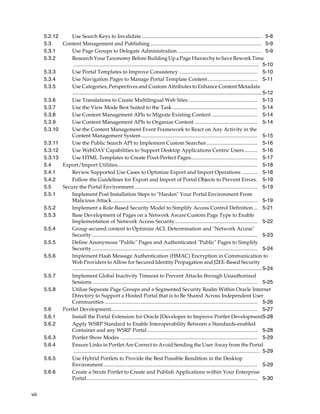
                                                                                                                                                           vii
5.2.12     Use Search Keys to Invalidate............................................................................................ 5-8
       5.3    Content Management and Publishing ..................................................................................... 5-9
       5.3.1      Use Page Groups to Delegate Administration ................................................................ 5-9
       5.3.2      Research Your Taxonomy Before Building Up a Page Hierarchy to Save Rework Time
                   .............................................................................................................................................. 5-10
       5.3.3      Use Portal Templates to Improve Consistency ............................................................ 5-10
       5.3.4      Use Navigation Pages to Manage Portal Template Content ...................................... 5-11
       5.3.5      Use Categories, Perspectives and Custom Attributes to Enhance Content Metadata
                  .................................................................................................................................. 5-12
       5.3.6      Use Translations to Create Multilingual Web Sites ..................................................... 5-13
       5.3.7      Use the View Mode Best Suited to the Task ................................................................. 5-14
       5.3.8      Use Content Management APIs to Migrate Existing Content ................................... 5-14
       5.3.9      Use Content Management APIs to Organize Content ................................................ 5-14
       5.3.10     Use the Content Management Event Framework to React on Any Activity in the
                  Content Management System ......................................................................................... 5-15
       5.3.11     Use the Public Search API to Implement Custom Searches ....................................... 5-16
       5.3.12     Use WebDAV Capabilities to Support Desktop Applications Centric Users .......... 5-16
       5.3.13     Use HTML Templates to Create Pixel-Perfect Pages................................................... 5-17
       5.4    Export/Import Utilities........................................................................................................... 5-18
       5.4.1      Review Supported Use Cases to Optimize Export and Import Operations ............ 5-18
       5.4.2      Follow the Guidelines for Export and Import of Portal Objects to Prevent Errors. 5-19
       5.5    Secure the Portal Environment .............................................................................................. 5-19
       5.5.1      Implement Post Installation Steps to "Harden" Your Portal Environment From
                  Malicious Attack ............................................................................................................... 5-19
       5.5.2      Implement a Role-Based Security Model to Simplify Access Control Definition ... 5-21
       5.5.3      Base Development of Pages on a Network Aware Custom Page Type to Enable
                  Implementation of Network Access Security ............................................................... 5-22
       5.5.4      Group secured content to Optimize ACL Determination and "Network Access"
                  Security............................................................................................................................... 5-23
       5.5.5      Define Anonymous "Public" Pages and Authenticated "Public" Pages to Simplify
                  Security............................................................................................................................... 5-24
       5.5.6      Implement Hash Message Authentication (HMAC) Encryption in Communication to
                  Web Providers to Allow for Secured Identity Propagation and J2EE-Based Security
                  .................................................................................................................................. 5-24
       5.5.7      Implement Global Inactivity Timeout to Prevent Attacks through Unauthorized
                  Sessions .............................................................................................................................. 5-25
       5.5.8      Utilize Separate Page Groups and a Segmented Security Realm Within Oracle Internet
                  Directory to Support a Hosted Portal that is to Be Shared Across Independent User
                  Communities ..................................................................................................................... 5-26
       5.6    Portlet Development................................................................................................................ 5-27
       5.6.1      Install the Portal Extension for Oracle JDeveloper to Improve Portlet Development5-28
       5.6.2      Apply WSRP Standard to Enable Interoperability Between a Standards-enabled
                  Container and any WSRP Portal .................................................................................... 5-28
       5.6.3      Portlet Show Modes ......................................................................................................... 5-29
       5.6.4      Ensure Links in Portlet Are Correct to Avoid Sending the User Away from the Portal
                   ............................................................................................................................................... 5-29
       5.6.5      Use Hybrid Portlets to Provide the Best Possible Rendition in the Desktop
                  Environment ...................................................................................................................... 5-29
       5.6.6      Create a Struts Portlet to Create and Publish Applications within Your Enterprise
                  Portal................................................................................................................................... 5-30


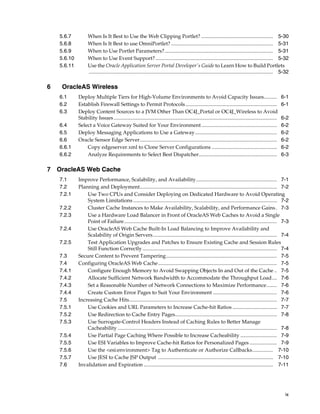
viii
5.6.7          When Is It Best to Use the Web Clipping Portlet? ....................................................... 5-30
    5.6.8          When Is It Best to use OmniPortlet? .............................................................................. 5-31
    5.6.9          When to Use Portlet Parameters?................................................................................... 5-31
    5.6.10         When to Use Event Support? .......................................................................................... 5-32
    5.6.11         Use the Oracle Application Server Portal Developer's Guide to Learn How to Build Portlets
                   ............................................................................................................................................. 5-32

6    OracleAS Wireless
    6.1      Deploy Multiple Tiers for High-Volume Environments to Avoid Capacity Issues..........                                                             6-1
    6.2      Establish Firewall Settings to Permit Protocols ......................................................................                            6-1
    6.3      Deploy Content Sources to a JVM Other Than OC4J_Portal or OC4J_Wireless to Avoid
             Stability Issues .............................................................................................................................    6-2
    6.4      Select a Voice Gateway Suited for Your Environment..........................................................                                      6-2
    6.5      Deploy Messaging Applications to Use a Gateway...............................................................                                     6-2
    6.6      Oracle Sensor Edge Server.........................................................................................................                6-2
    6.6.1        Copy edgeserver.xml to Clone Server Configurations ..................................................                                         6-2
    6.6.2        Analyze Requirements to Select Best Dispatcher............................................................                                    6-3

7 OracleAS Web Cache
    7.1      Improve Performance, Scalability, and Availability.............................................................. 7-1
    7.2      Planning and Deployment......................................................................................................... 7-2
    7.2.1        Use Two CPUs and Consider Deploying on Dedicated Hardware to Avoid Operating
                 System Limitations .............................................................................................................. 7-2
    7.2.2        Cluster Cache Instances to Make Availability, Scalability, and Performance Gains . 7-3
    7.2.3        Use a Hardware Load Balancer in Front of OracleAS Web Caches to Avoid a Single
                 Point of Failure..................................................................................................................... 7-3
    7.2.4        Use OracleAS Web Cache Built-In Load Balancing to Improve Availability and
                 Scalability of Origin Servers............................................................................................... 7-4
    7.2.5        Test Application Upgrades and Patches to Ensure Existing Cache and Session Rules
                 Still Function Correctly ....................................................................................................... 7-4
    7.3      Secure Content to Prevent Tampering..................................................................................... 7-5
    7.4      Configuring OracleAS Web Cache ........................................................................................... 7-5
    7.4.1        Configure Enough Memory to Avoid Swapping Objects In and Out of the Cache .. 7-5
    7.4.2        Allocate Sufficient Network Bandwidth to Accommodate the Throughput Load.... 7-6
    7.4.3        Set a Reasonable Number of Network Connections to Maximize Performance........ 7-6
    7.4.4        Create Custom Error Pages to Suit Your Environment ................................................. 7-6
    7.5      Increasing Cache Hits................................................................................................................. 7-7
    7.5.1        Use Cookies and URL Parameters to Increase Cache-hit Ratios .................................. 7-7
    7.5.2        Use Redirection to Cache Entry Pages.............................................................................. 7-8
    7.5.3        Use Surrogate-Control Headers Instead of Caching Rules to Better Manage
                 Cacheability .......................................................................................................................... 7-8
    7.5.4        Use Partial Page Caching Where Possible to Increase Cacheability ............................ 7-9
    7.5.5        Use ESI Variables to Improve Cache-hit Ratios for Personalized Pages ..................... 7-9
    7.5.6        Use the <esi:environment> Tag to Authenticate or Authorize Callbacks................ 7-10
    7.5.7        Use JESI to Cache JSP Output ........................................................................................ 7-10
    7.6      Invalidation and Expiration ................................................................................................... 7-11


                                                                                                                                                                  ix
7.6.1       Select the Invalidation Method Best Suited for Your Content to Keep Performance in
                Check .................................................................................................................................. 7-11
    7.6.2       Build Programmatic Invalidation Into Application Logic to Invalidate Dynamic
                Content ............................................................................................................................... 7-12
    7.6.3       Combine Invalidation and Expiration Policies to Keep Cache Content Fresh ........ 7-13
    7.6.4       Use Invalidation Propagation in Clusters to Improve Data Consistency ................ 7-13
    7.7      Optimizing Response Times .................................................................................................. 7-14
    7.7.1       Tuning Origin Server and OracleAS Web Cache Settings to Optimize Response Time
                 .................................................................................................................................. 7-14
    7.7.2       Use Compression to Improve Response Times and Reduce Network Bandwidth 7-15
    7.7.3       Use Only Warning or Notification Logging Levels to Conserve Resources............ 7-15

8    Oracle Business Intelligence
    8.1      Oracle Application Server Reports Services ........................................................................... 8-1
    8.1.1       Leverage High Availability to Replace Separate Clustering Solutions for Each
                Component ........................................................................................................................... 8-1
    8.1.2       Design Your Paper Layout to Display Report Output in Microsoft Excel .................. 8-5
    8.1.3       Select Paper Layout to Control Pagination and Web Layout to Control HTML Output
                 ...................................................................................................................................................8-9
    8.1.4       Use Dynamic Environment Switching to Consolidate Reports Servers................... 8-10
    8.2      Oracle Business Intelligence Discoverer Best Practices...................................................... 8-10
    8.2.1       Identify Worksheets That Need Tuning to Improve Performance............................ 8-10
    8.2.2       Establish Scalability to Share the Workload ................................................................. 8-11

9   Platform Security and Identity Management
    9.1      General Best Practices................................................................................................................. 9-1
    9.1.1        HTTPS Best Practices........................................................................................................... 9-2
    9.1.2        Assign Lowest-Level Privileges Adequate for the Task to Contain Security Leaks .. 9-2
    9.1.3        Cookie Security Best Practices .......................................................................................... 9-2
    9.1.4        Systems Setup Best Practices.............................................................................................. 9-3
    9.1.5        Certificates Use Best Practices............................................................................................ 9-3
    9.1.6        Review Code and Content Against Already Known Attacks to Minimize the Attack
                 Recurrence ............................................................................................................................ 9-4
    9.1.7        Firewall Best Practices......................................................................................................... 9-4
    9.1.8        Leverage Declarative Security ........................................................................................... 9-5
    9.1.9        Use Switched Connections in DMZ .................................................................................. 9-5
    9.1.10       Place Application Server in the DMZ to Prevent Security Issues................................. 9-5
    9.1.11       Use Secure Sockets Layer Encryption to Secure LDAP and HTTP Traffic ................. 9-5
    9.1.12       Tune the SSLSessionCacheTimeout Directive to Meet Your Application Needs ...... 9-6
    9.1.13       Plan Out The Final Topology Before Installing Oracle Application Server Security
                 Components.......................................................................................................................... 9-6
    9.2      Oracle Application Server Java Authentication and Authorization Service (JAAS) Provider
             Best Practices ............................................................................................................................... 9-6
    9.3      J2EE Security Best Practices....................................................................................................... 9-6
    9.3.1        Avoid Writing Custom User Managers and Instead Use Included APIs to Focus Time
                 on Business Logic................................................................................................................. 9-7
    9.3.2        Use the Authentication Mechanism with the JAAS Provider to Leverage Benefits .. 9-7
    9.3.3        Use Fine-Grained Access Control...................................................................................... 9-7


x
9.3.4          Use Oracle Internet Directory as the Central Repository to Provide LDAP Standard
                   Features ................................................................................................................................. 9-7
    9.3.5          Develop Appropriate Logout Functionality to Prevent Users from Closing the Web
                   Browsers................................................................................................................................ 9-8
    9.4         OracleAS Single Sign-On Best Practices .................................................................................. 9-8
    9.4.1          Configure for High Availability to Prevent Inaccessible Applications ....................... 9-8
    9.4.2          Leverage OracleAS Single Sign-On to Optimize Administration and Customer
                   Experience............................................................................................................................. 9-9
    9.4.3          Use an Enterprise-Wide Directory to Eliminate User Data in Multiple Systems....... 9-9
    9.4.4          Use OracleAS Single Sign-On to Validate User Credentials ......................................... 9-9
    9.4.5          Always Use SSL with Oracle Application Server to Protect Applications.................. 9-9
    9.4.6          Provide Username and Password Only on Login Screen to Prevent Users from
                   Providing Credentials to Inappropriate Servers ............................................................. 9-9
    9.4.7          Log Out to Prevent Active Cookies................................................................................ 9-10
    9.5         Oracle Internet Directory Deployment Best Practices ........................................................ 9-10
    9.5.1          Use bulkload.sh Utility to Bootstrap System ................................................................ 9-11
    9.5.2          Replicate to Provide High Availability.......................................................................... 9-11
    9.5.3          Use SSL Binding to Secure Traffic .................................................................................. 9-11
    9.5.4          Use Backup and Restore Utilities to Secure Data......................................................... 9-12
    9.5.5          Monitor and Audit Oracle Internet Directory to Improve Availability ................... 9-12
    9.5.6          Assign Oracle Internet Directory Privileges to Limit Access ..................................... 9-13
    9.5.7          Change Access Control Policies to Control User Administration ............................. 9-13
    9.5.8          Best Practice for Directory Integration Platform.......................................................... 9-13
    9.5.8.1             Use Identity Management Realms to Build Connectivity Between Oracle Internet
                        Directory and Third-Party Directories ................................................................... 9-13
    9.5.8.2              Configure Synchronization Service to Enable Users to Interact with Deployed
                        Applications ............................................................................................................... 9-14
    9.5.8.3             Synchronize Oracle Human Resources and Oracle Internet Directory to Provide
                        Access to OracleAS Single Sign-On and Oracle Delegated Administration Services
                        ........................................................................................................................................ 9-14
    9.5.9          Incorporate Group Assignment During User Creation to Avoid Multiple Steps ... 9-15
    9.5.10         Use opmnctl instead of oidmon and oidctl to Manage Processes ............................. 9-15
    9.5.11         Configure Active Directory Synchronization ............................................................... 9-15
    9.5.12         Use User Attributes and Password Hints to Make Resetting Credentials Easier ... 9-16

10 Oracle Application Server High Availability Solutions
    10.1   Oracle Application Server Cluster (Identity Management)............................................... 10-1
    10.2   Oracle Application Server Cold Failover Clusters.............................................................. 10-2
    10.2.1    Use Shared Oracle Home Installs for OracleAS Cold Failover Cluster (Middle-Tier) to
              Simplify Administration.................................................................................................. 10-2
    10.2.2    Use Oracle Universal Installer Commands to Attach OracleAS Cold Failover Cluster
              Oracle Home with the oraInventory.............................................................................. 10-2
    10.2.3    Use Disk Redundancy for OracleAS Cold Failover Cluster to Avoid Oracle Home
              Failures ............................................................................................................................... 10-3
    10.2.4    Allocate Ports to the OracleAS Cold Failover Cluster Instance to Avoid Failures 10-3
    10.3   Load Balancers ......................................................................................................................... 10-3
    10.3.1    Use Fault-Tolerant Hardware Load Balancers to Avoid Single Points of Failure .. 10-3
    10.3.2    Use Monitoring of Services to Automatically Disable Traffic to Unavailable Nodes 10-3


                                                                                                                                                                  xi
10.3.3    Configure All Idle Time Timeouts to Maximize Time for Unused or Idle Service 10-4
      10.4   Oracle Application Server Guard .......................................................................................... 10-4
      10.4.1    Clean Up Invalid Records to Avoid Instantiation and Synchronization Errors...... 10-4
      10.4.2    Use the Same Ports for OracleAS Guard in Avoid Manual Configuration Steps in
                Synchronization Operations............................................................................................ 10-4
      10.4.3    Use Different Labels and Colors in OracleAS Guard Shells to Avoid Errors.......... 10-4
      10.4.4    Enable High-Logging Level to Troubleshoot OracleAS Guard Operations ............ 10-4
      10.5   Backup and Recovery .............................................................................................................. 10-5
      10.5.1    Use Application Server Control as the Standard Way to Perform Backup and Recovery
                to Avoid Errors and Typos .................................................................................... 10-5
      10.5.2    Use Instance-Level Backup to Guarantee Consistency .............................................. 10-5
      10.5.3    Perform an Image Backup to Recover from Loss of Host Scenario........................... 10-5
      10.5.4    Use Incremental Backups to Save Time and Disk Space ............................................ 10-6

Index


xii
Preface

           Oracle Application Server Best Practices Guide provides a collection of common practices
           regarding usage, deployment, or development of Oracle Application Server.


Audience
           Oracle Application Server Best Practices Guide is intended for anyone deploying Oracle
           Application Server.


Documentation Accessibility
           Our goal is to make Oracle products, services, and supporting documentation
           accessible, with good usability, to the disabled community. To that end, our
           documentation includes features that make information available to users of assistive
           technology. This documentation is available in HTML format, and contains markup to
           facilitate access by the disabled community. Accessibility standards will continue to
           evolve over time, and Oracle is actively engaged with other market-leading
           technology vendors to address technical obstacles so that our documentation can be
           accessible to all of our customers. For more information, visit the Oracle Accessibility
           Program Web site at
           http://www.oracle.com/accessibility/

           Accessibility of Code Examples in Documentation
           Screen readers may not always correctly read the code examples in this document. The
           conventions for writing code require that closing braces should appear on an
           otherwise empty line; however, some screen readers may not always read a line of text
           that consists solely of a bracket or brace.

           Accessibility of Links to External Web Sites in Documentation
           This documentation may contain links to Web sites of other companies or
           organizations that Oracle does not own or control. Oracle neither evaluates nor makes
           any representations regarding the accessibility of these Web sites.

           TTY Access to Oracle Support Services
           Oracle provides dedicated Text Telephone (TTY) access to Oracle Support Services
           within the United States of America 24 hours a day, seven days a week. For TTY
           support, call 800.446.2398.


                                                                                                    xiii
Related Documents
          For more information, see the Oracle Application Server Documentation Library.


Conventions
          The following text conventions are used in this document:

          Convention          Meaning
          boldface            Boldface type indicates graphical user interface elements associated
                              with an action, or terms defined in text or the glossary.
          italic              Italic type indicates book titles, emphasis, or placeholder variables for
                              which you supply particular values.
          monospace           Monospace type indicates commands within a paragraph, URLs, code
                              in examples, text that appears on the screen, or text that you enter.


xiv
1
                 Introduction to Best Practices

This book provides a collection of best practices, covering configuration, deployment,
and development of Oracle Application Server. A best practice provides a
recommendation or a common practice on how to perform certain tasks and actions.
This recommendation may involve a combination of tools and manual processes to
achieve a desired result. This collection covers the following technology areas:
■   Administration and management tools for Oracle Application Server
■   Oracle HTTP Server
■   Oracle Application Server Containers for J2EE (OC4J) Applications and associated
    tools
■   Oracle Application Server Portal
■   Oracle Application Server Wireless
■   Oracle Application Server Web Cache
■   Oracle Business Intelligence, including components Oracle Reports and Oracle
    Business Intelligence Discoverer
■   Security and Oracle Identity Management
■   High availability


                                                       Introduction to Best Practices   1-1
1-2 Oracle Application Server Best Practices Guide
2
                                  Management and Monitoring

              This chapter describes management and monitoring best practices for Oracle
              Application Server. It includes the following topics:
              ■   Section 2.1, "Oracle Enterprise Manager 10g Best Practices"
              ■   Section 2.2, "Oracle Process Manager and Notification Server Best Practices"
              ■   Section 2.3, "Distributed Configuration Management Best Practices"
              ■   Section 2.4, "Dynamic Monitoring Services Best Practices"


2.1 Oracle Enterprise Manager 10g Best Practices
              This section describes best practices for Oracle Enterprise Manager 10g. It features the
              following topics:
              ■   Section 2.1.1, "Select the Framework Options That Best Suit Your Needs"
              ■   Section 2.1.2, "Application Server Control Console"
              ■   Section 2.1.3, "Grid Control Console"


2.1.1 Select the Framework Options That Best Suit Your Needs
              There are ways to deploy Enterprise Manager in order to give you the flexibility to
              select the configuration that best suits your needs. If you are working in a simple
              development or test environment, or if you have a single Oracle Application Server
              10g instance to manage, you can use Oracle Enterprise Manager 10g Application
              Server Control Console (Application Server Control Console), which is available with
              any Oracle Application Server middle-tier installation. Application Server Control
              Console enables you to directly access all the pages for managing and monitoring the
              instance.
              In a production environment, you typically manage a wider variety of software and
              hardware components. For example, you need to manage the databases and host
              computers that support your Web applications. For your production environment, you
              should use Oracle Enterprise Manager 10g Grid Control Console. The Grid Control
              Console provides you with a central location from which you can manage your Oracle
              Application Server instances, your databases, and your entire Oracle environment.
              Grid Control Console also supports sharing of information between administrators.


                                                                        Management and Monitoring   2-1
Oracle Enterprise Manager 10g Best Practices


                    Implementation Details

                             See Also: Oracle Enterprise Manager Concepts for further information
                             about the Application Server Control Console and Grid Control
                             Console

2.1.2 Application Server Control Console
                    This section contains the following topics:
                    ■   Section 2.1.2.1, "Use the Deployment Wizard to Deploy Applications"
                    ■   Section 2.1.2.2, "Use Clusters for Application Deployment and Configuration
                        Management to Simplify Management of Application Servers"
                    ■   Section 2.1.2.3, "Monitor Application Performance During Application
                        Development or Test Cycles to Identify Resource Usage and Identify Bottlenecks"
                    ■   Section 2.1.2.4, "Use the Host Home Page to Help Diagnose Performance Issues"
                    ■   Section 2.1.2.5, "Perform Configuration Changes in Application Server Control to
                        Ensure the Repository is Properly Updated"
                    ■   Section 2.1.2.6, "Monitor Rate and Aggregated Performance Metrics to Identify
                        Slow Requests"

                    2.1.2.1 Use the Deployment Wizard to Deploy Applications
                    A simple way to deploy an application is to use the Oracle Enterprise Manager 10g
                    deployment wizard, which you can access from the Application Server Control
                    Console. The wizard walks you systematically through all the essential deployment
                    options to ensure that your application is deployed correctly.

                    Implementation Details

                             See Also: "Deploying a New OC4J Application" in the Application
                             Server Control Console Online Help

                    2.1.2.2 Use Clusters for Application Deployment and Configuration Management to
                    Simplify Management of Application Servers
                    Using OracleAS Clusters simplifies management and maintenance of your application
                    servers. Clustering enforces consistent configurations across all members of the cluster.
                    If you want to make a configuration change in every instance, you only need to make
                    the change once. The clustering mechanism ensures that the new configuration is
                    propagated to all members.
                    Similarly, clustering also enforces consistency of deployed applications across all
                    application server instances. If you wish to deploy a new application or update an
                    existing deployment on every application server instance in the cluster, you only need
                    to deploy or update the application once. The clustering mechanism ensures that the
                    application is properly deployed to all members.

                    Implementation Details

                             See Also: "About Managing Oracle Application Server Clusters" in
                             the Application Server Control Console Online Help


2-2 Oracle Application Server Best Practices Guide
Oracle Enterprise Manager 10g Best Practices


2.1.2.3 Monitor Application Performance During Application Development or Test
Cycles to Identify Resource Usage and Identify Bottlenecks
During application development and testing, you can use the Application Server
Control Console to monitor the application's resource usage and identify bottlenecks.
For example, during a performance or load test you can view memory and CPU use
for the Oracle Application Server instance overall and for the application. You can also
drill down to find sessions, modules, EJBs, and methods that may be bottlenecks in the
application.

Implementation Details

        See Also: "Maintaining OC4J Applications" in the Application
        Server Control Online Help

2.1.2.4 Use the Host Home Page to Help Diagnose Performance Issues
The Application Server Control Console home page not only displays critical
performance data and resource usage for the application server instance, it also
includes a link to information for the host. For example, if your application server is
performing poorly you can first drill down to the related Host home page to determine
if the underlying problem is due to resource problems with the host and other
processes, or to services running on the computer.

Implementation Details

        See Also: "Obtaining Information about the Host Computer " in the
        Application Server Control

2.1.2.5 Perform Configuration Changes in Application Server Control to Ensure the
Repository is Properly Updated
When you edit the configuration of Oracle Application Server components including
Oracle HTTP Server, OC4J, or OPMN, you should do so using Application Server
Control Console. Enterprise Manager ensures that your configuration changes are
updated in the repository. If you edit these configuration files manually, you must use
the command dcmctl updateConfig to notify the DCM repository of the changes.

Implementation

        See Also:   Appendix A, "dcmctl Commands," in the Distributed
        Configuration Management Administrator’s Guide for further information
        about the dcmctl updateConfig command

2.1.2.6 Monitor Rate and Aggregated Performance Metrics to Identify Slow
Requests
Enterprise Manager home pages and drill downs include rate and aggregated
performance data that are not available through command line or other tools. For
example, you can use Enterprise Manager to view average processing time for a HTTP
request, allowing you to zero in on specific requests that may be slow.
Enterprise Manager also displays performance information, such as average
processing time for a servlet for the most recent five minutes, in addition to averages
since startup. This information enables you to more easily diagnose problems in real
time.


                                                          Management and Monitoring       2-3
Oracle Enterprise Manager 10g Best Practices


2.1.3 Grid Control Console
                    This section contains the following topics:
                    ■   Section 2.1.3.1, "Use Alerts and Notifications to Proactively Monitor System
                        Availability"
                    ■   Section 2.1.3.2, "Set Up Grid Control Console to Monitor for Availability and
                        Performance Issues"
                    ■   Section 2.1.3.3, "Add OracleAS Farms and OracleAS Clusters to Centrally Manage
                        Application Server"
                    ■   Section 2.1.3.4, "Use End-User Performance Monitoring to Monitor Response
                        Times of Web Pages"
                    ■   Section 2.1.3.5, "Proactively Monitor Web Application Transactions to Test
                        Performance Monitoring"
                    ■   Section 2.1.3.6, "Use Diagnostics to Pinpoint OC4J Performance Problems"
                    ■   Section 2.1.3.7, "Use Job System to Schedule a Deployment"
                    ■   Section 2.1.3.8, "Regularly Perform Backups to Prepare for Loss of Data"
                    ■   Section 2.1.3.9, "Use Grid Control to Manage Both Oracle Application Server and
                        the Oracle Database"
                    ■   Section 2.1.3.10, "Manage Multiple Oracle Application Server Instances on a Single
                        Host to Reduce Resource Usages"

                    2.1.3.1 Use Alerts and Notifications to Proactively Monitor System Availability
                    Grid Control Console enables you to monitor your systems for specific conditions,
                    such as loss of service or poor performance. When such a condition exists, Enterprise
                    Manager generates an alert, which displays automatically on the appropriate
                    Enterprise Manager home pages. In addition, you can also be notified through email
                    or pager. Minimally, you should set up the Grid Control Console to alert you when
                    your critical or production application servers are unavailable.
                    You can also configure the Grid Control Console to notify specific administrators when
                    an event condition occurs. This feature simplifies cooperation between administrators
                    who share responsibility for the same systems.

                    Implementation Details

                             See Also: Chapter 12, "Configuring Notifications," in Oracle
                             Enterprise Manager Advanced Configuration

                    2.1.3.2 Set Up Grid Control Console to Monitor for Availability and Performance
                    Issues
                    Once you have set up Grid Control Console to monitor for availability and
                    performance issues, you will be alerted when a problem is detected. If Enterprise
                    Manager detects that an application server component is unavailable, you can use
                    Application Server Control Console to check the status of the component and restart it
                    if desired. If a performance issue was detected, with a component or application, you
                    can drill down to the component home page and view detailed performance and
                    diagnostic information. You can also drill down from the Oracle Application Server
                    Containers for J2EE (OC4J) home page to find applications, modules, and methods.
                    Using these drill downs, you can diagnose and resolve performance issues.


2-4 Oracle Application Server Best Practices Guide
Oracle Enterprise Manager 10g Best Practices


Implementation Details

        See Also: "Viewing An Application Server at a Glance" and
        "Viewing the Performance of Your Application Server" in the Grid
        Control Console Online Help

2.1.3.3 Add OracleAS Farms and OracleAS Clusters to Centrally Manage
Application Server
If you use Oracle Application Server Farms and OracleAS Clusters in your
environment and you use Grid Control Console, you should add the Oracle
Application Server Farms and Clusters to Grid Control for central management. When
adding the farm, Oracle recommends using the same farm name as what the
Application Server Control Console shows so that the two consoles remain consistent
as you are navigating from one to another to perform various tasks. After the farm and
cluster is added, you can monitor the members of the farm and clusters, and perform
common administrative tasks such as starting/stopping/restarting members;
scheduling jobs to automate commonly-executed tasks against the farm or cluster, or
creating blackouts to perform scheduled maintenance on the farm or cluster.

Implementation Details

        See Also: "Adding Oracle Application Server Farms "in the Grid
        Control Console Online Help

2.1.3.4 Use End-User Performance Monitoring to Monitor Response Times of Web
Pages
To monitor the actual performance of your Web application as experienced by your
end-users, use the End-User Performance Monitoring feature for Web applications.
The End-User Performance Monitoring feature of Enterprise Manager enables you to
view and analyze the actual request response times for all Web pages accessed by all
your end-users. You can assess the impact of a performance problem on your end-user
base, or view page performance data by visitor, domain, region, or Web server, or by a
combination of these axes. Also, you can highlight the monitoring of the most critical
pages of your Web application by setting up a Watch List.
The End-User Performance Monitoring option requires configuration of OracleAS Web
Cache, Apache HTTP Server 2.0, or standalone Oracle HTTP Server 2.0 to instrument
end-user performance data.

Implementation Details

        See Also: Section 6.8, "Configuring End-User Performance
        Monitoring," in Oracle Enterprise Manager Advanced Configuration

2.1.3.5 Proactively Monitor Web Application Transactions to Test Performance
Monitoring
Enterprise Manager provides a proactive approach to monitoring Web applications
through test performance monitoring. Synthetic business transactions, or service tests,
are created using the transaction recorder, and are then replayed and monitored at
specified intervals from key representative user communities called beacons. Measure
the response times of key business transactions from various geographical user
communities using this feature. Use test performance monitoring to:
■   Isolate server-side problems from network delays


                                                         Management and Monitoring       2-5
Oracle Enterprise Manager 10g Best Practices


                    ■   Profile how much time is spent connecting to the server
                    ■   Document its first byte time
                    ■   Time spent serving HTML and non-HTML content
                    Alerts will notify you when transaction response time thresholds have been exceeded.

                    Implementation Details

                             See Also: Section 6.4.4, "Service Tests and Beacons," in Oracle
                             Enterprise Manager Advanced Configuration to configure and enable this
                             option

                    2.1.3.6 Use Diagnostics to Pinpoint OC4J Performance Problems
                    Enterprise Manager provides comprehensive diagnostics that enable you to quickly
                    pinpoint Oracle Application Server Containers for J2EE (OC4J) performance problems
                    within the middle tier. To determine performance bottlenecks within your application,
                    use the Web Application Request Performance page to identify the slowest requests by
                    OC4J processing time. Each request is broken down by JSP, servlet, EJB and JDBC
                    processing times. By traversing through the invocation paths of the processing call
                    stack down to the SQL statement level, you can quickly identify the source of the
                    bottlenecks causing application slowdowns. Use the application correlation feature to
                    determine whether other system level problems have attributed to performance
                    bottlenecks.
                    In addition, you can trace all invocation paths of a Web application starting at the
                    transaction level on an on-demand basis, and diagnose performance problems across
                    all tiers: from the network, through the middle tier (including JSP servlet, EJB, and
                    JDBC times) down to the SQL statement level.
                    If the performance bottleneck is found to be SQL, then in context you should launch
                    the SQL Tuning Advisor to schedule analysis and tuning of the SQL statement in
                    question. After analyzing the SQL statements, the advisor provides advice on
                    optimizing the execution plan, the rationale for the proposed optimization, the
                    estimated performance benefit, and the command to implement the advice.

                             See Also: Section 6.9.1, "Selecting OC4J Targets for Request
                             Performance Diagnostics," in Oracle Enterprise Manager Advanced
                             Configuration

                    2.1.3.7 Use Job System to Schedule a Deployment
                    In some cases, you may want to deploy an application during off-hours or at a certain
                    scheduled time. You can use the Enterprise Manager job system to schedule a
                    deployment to occur at a selected time. Simply create a script containing the DCM
                    command-line dcmctl deployApplication command and schedule the script with
                    the Enterprise Manager job system.


2-6 Oracle Application Server Best Practices Guide
Oracle Enterprise Manager 10g Best Practices


Implementation Details

        See Also:
        ■   Appendix A, "dcmctl Commands," in the Distributed Configuration
            Management Administrator’s Guide for information about the
            deployApplication command
        ■   Chapter 8, "Job System," in Oracle Enterprise Manager Concepts for
            more information on how to the use the Enterprise Manager job
            system

2.1.3.8 Regularly Perform Backups to Prepare for Loss of Data
You should perform regular backups of your application server, and when you backup
you should consider your entire application server environment. For example, you
should not back up your middle-tier installation on Monday and your Infrastructure
on Tuesday. If you did, you would not be able to restore your environment to a
consistent state. Instead, you should back up your entire Oracle Application Server
environment at once. Then, if a loss occurs, you can restore your entire environment to
a consistent state. Ideally, you should perform application server backups after every
administrative change, or, if this is not possible, on a regular basis, perform an instance
backup of your Oracle Application Server environment. This backup enables you to
restore your environment to a consistent state as of the time of your most recent
configuration and metadata backup. To avoid an inconsistent backup, do not make
any configuration changes until backup completes for all Oracle Application Server
instances.
You can use Grid Control to perform immediate Application Server backups or
backups on a scheduled basis. For instance, you can schedule a weekly full, cold
backup for Sunday nights and then an incremental, online backup for other nights.
You should also take backups after installation as well any major configuration
change.

Implementation Details

        See Also: "Scheduling a Backup of Oracle Application Servers" and
        "About Backing Up and Recovering Oracle Application Servers" in the
        Grid Control Console Online Help

2.1.3.9 Use Grid Control to Manage Both Oracle Application Server and the Oracle
Database
If you plan to manage both your Oracle Application Server instances and your Oracle
database from the same management console, install the latest version of Grid Control.
This install will ensure that you have the most up-to-date functionality for managing
both types of targets.

2.1.3.10 Manage Multiple Oracle Application Server Instances on a Single Host to
Reduce Resource Usages
By default, each Oracle Application Server instance on a host has its own Application
Server Control Console, which manages the components of that particular Oracle
Application Server instance.
If you have installed multiple Oracle Application Server instances on a single host,
you can optionally reduce the memory and CPU consumption by performing a
postinstallation configuration procedure to configure a single Application Server


                                                           Management and Monitoring       2-7
Oracle Process Manager and Notification Server Best Practices


                    Control Console to manage two Oracle Application Server instances installed on the
                    same host.

                    Implementation Details

                              See Also: Section A.8, "Managing Multiple Oracle Application
                              Server Instances on a Single Host," in Oracle Application Server
                              Administrator’s Guide


2.2 Oracle Process Manager and Notification Server Best Practices
                    This section describes Oracle Process Manager and Notification (OPMN) Server best
                    practices. It includes the following topics:
                    ■    Section 2.2.1, "Start OPMN to Manage Components"
                    ■    Section 2.2.2, "Never Start or Stop OPMN Managed Components Manually"
                    ■    Section 2.2.3, "Review stdout and stderr to Determine Cause of Components Not
                         Starting"
                    ■    Section 2.2.4, "Increase Timeout For Components to Avoid Timed-Out Requests"
                    ■    Section 2.2.5, "Set Retry to High Values For Components Running on an
                         Overloaded System to Avoid Restart of Computer"
                    ■    Section 2.2.6, "Leverage Additional Logging to Aid in Debugging"
                    ■    Section 2.2.7, "Configure Log Rotation to Avoid Log File Size Issues"
                    ■    Section 2.2.8, "Configure Additional Start Order Dependencies to Customize
                         Startup"
                    ■    Section 2.2.9, "Use Event Scripts to Record Important Events"
                    ■    Section 2.2.10, "Use OPMN to Manage External Components"


2.2.1 Start OPMN to Manage Components
                    Start the OPMN server as soon as possible after turning on the host. OPMN must be
                    running whenever OPMN-managed components are turned on or off. OPMN must be
                    the last service turned off whenever you reboot or turn off your computer.


2.2.2 Never Start or Stop OPMN Managed Components Manually
                    Oracle Application Server components managed by OPMN should never be started or
                    stopped manually. Do not use command line scripts or utilities from previous versions
                    of Oracle Application Server for starting and stopping Oracle Application Server
                    components.

                    Implementation Details
                    To implement this best practice, use the Application Server Control or the opmnctl
                    command line utility to start or stop Oracle Application Server components.


2.2.3 Review stdout and stderr to Determine Cause of Components Not Starting
                    The process-specific console logs are the first and best resource for investigating
                    problems related to starting and stopping components. OPMN creates a log file for
                    each component and assigns a unique concatenation of the Oracle Application Server


2-8 Oracle Application Server Best Practices Guide
Oracle Process Manager and Notification Server Best Practices


              component with a number. For example, the standard output log for OracleAS Web
              Cache may be WebCache~WebCacheAdmin~1.

              Implementation Details
              To implement this best practice, review the standard output (stdout) and standard
              error (stderr) of OPMN managed processes are reported in the log file in available in
              the ORACLE_HOME/opmn/logs directory.
              The stdout and stderr log files are reused and appended to when a component is
              restarted so these files can contain output from multiple invocations of a component.


2.2.4 Increase Timeout For Components to Avoid Timed-Out Requests
              The time it takes to execute an opmnctl command is dependent on the type of Oracle
              Application Server process and available computer hardware. Because of this the time
              it takes to execute an opmnctl command may not be readily apparent. For example,
              the default start time out for OC4J is approximately five minutes. If an OC4J process
              does not start-up after an opmnctl command, OPMN will wait approximately an
              hour before timing out and aborting the request.
              Increase the start element timeout attribute for the component that takes a long time
              to start. Similarly, increase the stop element timeout attribute in opmn.xml for the
              component that takes a long time to stop.

              Implementation Details
              Set the timeout in the opmn.xml file at a level that will allow OPMN to wait for
              process to come up.


2.2.5 Set Retry to High Values For Components Running on an Overloaded System to
Avoid Restart of Computer
              Pings occur periodically between OPMN and the components that it manages to
              ensure that each component is not unresponsive and is capable of servicing requests.
              Ping failures result in a certain number of retry attempts and multiple failures in a row
              result in a restart of the component. On overloaded systems, it may be necessary to
              increase the number of retry attempts made before restarting the component.

              Implementation Details
              To implement this best practice:
              1.   In the opmn.xml file, locate <start> and <restart> elements.
              2.   Set the retry attribute in the appropriate element to a value greater than what is
                   needed for the component to be pinged successfully.
                   This attribute specifies the number of times to retry a ping attempt before a
                   component is considered hung.


2.2.6 Leverage Additional Logging to Aid in Debugging
              OPMN provides different levels of logging. In a typical production mode, set the log
              level to the minimum level. When you are having a problem related to OPMN, prior to
              contacting Oracle Support, try leveraging additional logging to aid in debugging the
              problem.
              OPMN provides different levels of logging. In a typical production mode, set the log
              level to a minimum.


                                                                          Management and Monitoring        2-9
Oracle Process Manager and Notification Server Best Practices


                    Implementation Details
                    When you are having an OPMN-related problem, perform these steps prior to
                    contacting technical support:
                    1.   In the opmn.xml file, set the level attribute of <log-file> element for both
                         <notification-server> and <process-manager> elements to 8 or 9.
                    2.   Execute the $ORACLE_HOME/opmn/bin/opmnctl debug command and save
                         the output to a file.
                    3.   Save a copy of all logs in the $ORACLE_HOME/opmn/logs directory.
                         The file at this log level contains valuable information to assist in debugging.


2.2.7 Configure Log Rotation to Avoid Log File Size Issues
                    OPMN can rotate notification server log file (ons.log) and process manager log file
                    (ipm.log) based on size, time or both. When the log file reaches the configured size or
                    at the given hour of the day, the OPMN logging mechanism will close the file, rename
                    it with a time stamp suffix, and then create a new log file. By default, log files are
                    configured to be rotated based on size (1500000 KB), but when necessary, explicitly set
                    rotation attributes for your environment.
                    OPMN can rotate managed process console log files too, for example, $ORACLE_
                    HOME/opmn/logs/HTTP_Server~1 file for Oracle HTTP Server. At process startup,
                    before handing off an existing console log file to a managed process, OPMN checks the
                    size against a configured limit (rotation-size attribute of <log-file> element of
                    <process-manager> element), and if the file size exceeds the limit, it will rename
                    the existing file to include a time stamp, and then creates a new file for the managed
                    process. If the rotation-size attribute is not configured, OPMN will not be able
                    rotate the process console log file.
                    Having a proper rotation plan ensures OPMN and OPMN managed process starting
                    and running without log file size issues, for limitation of 2 GB file size on some
                    operating systems.

                    Implementation Details
                    To enable log rotation, configure the rotation-size and rotation-hour
                    attributes of the <log-file> element for both <notification-server> and
                    <process-manager> elements.


2.2.8 Configure Additional Start Order Dependencies to Customize Startup
                    OPMN is configured at installation with default start order dependencies, which
                    enables you to start all of the components in an instance in a specific order with a
                    single command. But if a specific component requires that other components and
                    services are up and running before it starts, you can configure additional dependencies
                    according to the environment.


2.2.9 Use Event Scripts to Record Important Events
                    You can configure OPMN to execute your own custom event scripts whenever a
                    particular component starts, stops, or fails. It is useful to use one or more of the
                    following event types:
                    ■    pre-start: OPMN runs the pre-start script after any configured dependency checks
                         have been performed and passed, and before the Oracle Application Server


2-10 Oracle Application Server Best Practices Guide
Distributed Configuration Management Best Practices


                 component starts. For example, you can use the pre-start script for site-specific
                 initialization of external components.
             ■   pre-stop: OPMN runs the pre-stop script before stopping a designated Oracle
                 Application Server component. For example, you can use the pre-stop script for
                 collecting Java Virtual Machine stack traces prior to stopping OC4J processes.
             ■   post-crash: OPMN runs the post-crash script after the Oracle Application Server
                 component has terminated unexpectedly. For example, a user could learn of
                 component crashes by supplying a script or program to be executed at post-crash
                 events, which sends a notification to the administrator's pager."

             Implementation Details

                     See Also: Appendix A, "OPMN Troubleshooting," in the Oracle
                     Process Manager and Notification Server Administrator’s Guide for a
                     sample pre-start script

2.2.10 Use OPMN to Manage External Components
             OPMN has the ability to manage arbitrary daemon processes that are not part of your
             Oracle Application Server installation. You can even create more sophisticated process
             management services by supplying the opmn.xml file the optional paths to scripts for
             stopping, restarting, and pinging the daemon process.

             Implementation Details
             Here is a simple example of an opmn.xml configuration for a custom component. The
             following lines load and identify the custom process module:.
             <module path="%ORACLE_HOME%/opmn/lib/libopmncustom.so">
                <module-id id="CUSTOM" />
             </module>

             The following lines represent the minimum configuration for a custom process:
             <ias-component id="Custom">
                <process-type id="Custom" module-id="CUSTOM">
                   <process-set id="Custom" numprocs="1">
                      <module-data>
                         <category id="start-parameters">
                            <data id="start-executable" value="Your start executable here" />
                         </category>
                      </module-data>
                   </process-set>
                </process-type>
             </ias-component>


                     See Also: Chapter 15, "Configuring Custom Process," in the Oracle
                     Process Manager and Notification Server Administrator’s Guide for a
                     sample pre-start script


2.3 Distributed Configuration Management Best Practices
             This section describes best practices for Distributed Configuration Management
             (DCM). It contains the following topics:
             ■   Section 2.3.1, "Use DCM Archiving to Take Snapshots of Configuration"


                                                                      Management and Monitoring 2-11
Distributed Configuration Management Best Practices


                    ■    Section 2.3.2, "Specify a Single Instance in a Cluster as the Management Point to
                         Provide A Correct Order of Operations"
                    ■    Section 2.3.3, "Avoid Concurrent Administration Operations to Prevent
                         Configuration Conflicts"
                    ■    Section 2.3.4, "Avoid Running updateConfig Concurrently with Any Other
                         Configuration Operation to Prevent Configuration Conflicts"
                    ■    Section 2.3.5, "Restart Application Server Control Console after Joining or Leaving
                         a Farm or Cluster to Refresh the Console"
                    ■    Section 2.3.6, "Use High Availability Features for Infrastructure Repository to
                         Synchronize within a Farm"
                    ■    Section 2.3.7, "Follow dcmctl Tips to Improve Usage"


2.3.1 Use DCM Archiving to Take Snapshots of Configuration
                    You should frequently be creating archives prior to performing any configuration
                    operations.
                    The DCM archive feature provides a convenient and easy means of managing
                    snapshots of the DCM-managed portions of Oracle Application Server system
                    configuration. Archives are useful for staging changes, recovering from errors, and to
                    provision DCM managed configuration information associated with one Oracle
                    Application Server instance to another.
                    DCM managed system configuration includes configuration for a farm, clusters,
                    Oracle HTTP Server, OPMN, OC4J, and JAZN. For OC4J, in addition to configuration
                    information related to the container itself, DCM manages all deployed J2EE
                    applications.
                    If you use DCM-Managed Oracle Application Server Clusters, DCM assures that any
                    change to the configuration is automatically distributed to all members of the cluster.
                    As an alternative to using clusters, you can manually apply an archive of a staged
                    configuration to non-clustered instances in a farm.
                    A hybrid staging solution is to first stage and test changes to a non-clustered instance,
                    archive the changes, and finally apply the archive to DCM-Managed Oracle
                    Application Server Cluster. These changes are then automatically propagated to all
                    members of the cluster.

                    Implementation Details
                    For example, to create an archive prior to deploying a new J2EE application named
                    foo use the command:
                    dcmctl createArchive -arch PriorToDeployingFoo -comment "prior to foo deploy V1"

                    When using createArchive, it is a good practice to use an archive name and a
                    corresponding comment that identifies the version of configuration that the archive is
                    associated with.

                             See Also: Chapter 3, "Archiving A Managed Configuration," in the
                             Distributed Configuration Management Administrator’s Guide for a
                             sample pre-start script


2-12 Oracle Application Server Best Practices Guide
Distributed Configuration Management Best Practices


2.3.2 Specify a Single Instance in a Cluster as the Management Point to Provide A
Correct Order of Operations
              You can manage Oracle Application Server instances, grouped in a DCM-Managed
              Oracle Application Server Cluster, as a single point of administration, using
              Application Server Control Console or dcmctl on any instance in the cluster. Use one
              instance as the administrative point for the entire cluster at any point in time.
              Specifying a single instance in a cluster as the management point ensures that
              operations are executed in the correct order and are properly serialized.


2.3.3 Avoid Concurrent Administration Operations to Prevent Configuration Conflicts
              When changing instance specific configuration, for example port numbers, host names
              or virtual hosts, on a particular instance in the DCM-Managed OracleAS Cluster, you
              must ensure that there are no other administrative changes are being made
              concurrently in the cluster to avoid conflicting changes to configuration resulting in an
              unusable configuration.
              Concurrent administration within a DCM-Managed OracleAS Cluster is strongly
              discouraged. If multiple administrative operations are issued at the same time in a
              cluster, this can lead to errors and associated confusing error messages. For example, a
              concurrent attempt to change the configuration of an instance being deleted really
              does not make sense.


2.3.4 Avoid Running updateConfig Concurrently with Any Other Configuration
Operation to Prevent Configuration Conflicts
              Do not run the dcmctl updateConfig command concurrently with any other
              dcmctl commands or Application Server Control Console configuration operations
              from multiple Oracle Application Server instances in a Farm or DCM-Managed
              OracleAS Cluster. If updateConfig is being executed concurrently with other
              configuration operation, there is a risk of conflicting changes being placed in the
              metadata repository. These conflicts could leave the configuration stored in the
              metadata repository in a non-functional state and could require a restore from the
              archive.


2.3.5 Restart Application Server Control Console after Joining or Leaving a Farm or
Cluster to Refresh the Console
              When using a file-based repository, you should stop and then start Application Server
              Control Console after issuing the following dcmctl commands:
              ■   joinCluster
              ■   joinFarm
              ■   leaveCluster
              ■   leaveFarm

              Implementation Details
              Use following commands to restart Application Server Control Console:
              ■   emctl stop iasconsole
              ■   emctl start iasconsole


                                                                       Management and Monitoring 2-13
Distributed Configuration Management Best Practices


2.3.6 Use High Availability Features for Infrastructure Repository to Synchronize within
a Farm
                    The infrastructure repository houses all the configuration information for the Oracle
                    Application Server instances in a farm. This information is critical during startup,
                    since DCM ensures that the local configuration of any node is synchronized with the
                    configuration in this central repository. Therefore, it is a good idea to employ the high
                    availability features for the infrastructure instance.
                    However, it is also important to understand that the database-based repository (in the
                    case of a J2EE and OracleAS Web Cache installation) is used for management
                    operations and OracleAS Single Sign-On. Thus, if a site is not using single sign-on
                    capabilities, then the repository is primarily required to be up when performing
                    configuration management operations, such as deploying new applications and
                    joining or moving from a DCM-Managed OracleAS Cluster.


2.3.7 Follow dcmctl Tips to Improve Usage
                    The following are best practices when using dcmctl:
                    ■    Always use -d and -v options with dcmctl commands.
                         By default, the dcmctl script is configured for programmatic usage. Instead of
                         displaying lengthy messages that can differ across releases and languages, error
                         codes are displayed, such as ADMN-906005. Scripting tools can use these error
                         codes to perform different activities based upon the result of commands.
                         Unfortunately a message like ADMN-906005 does not mean much by itself. In
                         order to see an explanation of the error code, use the -d and -v switches
                         whenever possible.
                    ■    Use the dcmctl getError command to display the last error message
                         Use the dcmctl getError command to display the error message from the most
                         recent DCM error that occurred
                    ■    Always use dcmctl getreturnstatus to determine whether a command failed
                         after timeout
                         Long-running operations will often timeout but continue to execute
                         asynchronously. This issue is indicated by dcmctl with an ADMN-906005 error
                         code:
                         Using the dcmctl deployApplication command with the -v option as an
                         example, the following message will be displayed.
                         "The specified command "deployApplication", is being executed
                         asynchronously. The maximum wait time of n seconds has been
                         reached. This operation will continue to execute to
                         completion. Use the "getReturnStatus" command to determine
                         if/when the operation completes successfully."
                         Once this timeout message is received, you can invoke the dcmctl
                         getReturnStatus command periodically until the operation has completed.
                    ■    Use dcmctl shell mode for multiple commands.
                         When you need to perform a number of dcmctl commands, use the dcmctl shell
                         or the dcmctl command file options. Each initialization of dcmctl requires
                         creation of a Java Virtual Machine and the parsing of a number of XML
                         documents. This initialization only has to occur once if using a dcmctl shell versus
                         multiple times if executing a set of dcmctl commands individually.


2-14 Oracle Application Server Best Practices Guide
Dynamic Monitoring Services Best Practices


              Implementation Details
              Following is a sample shell session in which the shell is started, commands are
              executed, and the shell is stopped.
              % dcmctl shell
              dcmctl> createcluster -cl testcluster
              dcmctl> joincluster -cl testcluster
              dcmctl> createcomponent -ct oc4j -co component1
              dcmctl> deployapplication -f /stage/apps/app1.ear -a app1 -co component1
              dcmctl> getstate
              dcmctl> exit

                      See Also:   Appendix A, "dcmctl Commands," in the Distributed
                      Configuration Management Administrator’s Guide for a sample pre-start
                      script


2.4 Dynamic Monitoring Services Best Practices
              This section describes Dynamic Monitoring Services (DMS) best practices. It includes
              the following topics:
              ■   Section 2.4.1, "Monitor Your System Regularly to Identify Performance Problems"
              ■   Section 2.4.2, "Take Regular Dumps of Metrics to Capture and Save a Record of
                  Performance Data"
              ■   Section 2.4.3, "Add Performance Instrumentation to Application to Aid
                  Developers"
              ■   Section 2.4.4, "Isolate Expensive Intervals Using PhaseEvent Metrics to Validate
                  Code"
              ■   Section 2.4.5, "Organize Performance Data to Avoid Metrics Not Displaying"
              ■   Section 2.4.6, "DMS Naming Conventions to Improve Metric Reports"
              ■   Section 2.4.7, "Follow DMS Coding Recommendations to Improve Code"
              ■   Section 2.4.8, "Validate New Metrics to Verify Accuracy"


2.4.1 Monitor Your System Regularly to Identify Performance Problems
              It is a good practice to monitor Oracle Application Server regularly. Monitoring Oracle
              Application Server and obtaining performance data can assist you in tuning the
              system and debugging applications with performance problems.

              Implementation Details

                      See Also: Oracle Application Server Performance Guide for available
                      monitoring tools

2.4.2 Take Regular Dumps of Metrics to Capture and Save a Record of Performance
Data
              Run the dmstool command with the -dump option periodically, such as every 15 to
              20 minutes, to capture and save a record of performance data for your Oracle
              Application Server installation. If you save performance data over time, it can assist
              you if you need to analyze system behavior to improve performance or if problems
              occur. Using dmstool -dump reports all the available metrics on the standard output.


                                                                     Management and Monitoring 2-15
Dynamic Monitoring Services Best Practices


                    The -dump option also supports the format=xml query. Using this query at the end
                    of the command line supplies the metric output in XML format.


2.4.3 Add Performance Instrumentation to Application to Aid Developers
                    Consider instrumenting applications with DMS metrics. Adding performance
                    instrumentation to Java applications will help developers, system administrators and
                    support analysts understand system performance and monitor system status. DMS
                    instrumentation refers to the process of inserting DMS calls into application code.
                    Using the DMS API is a simple and efficient way to enable your application to
                    measure, collect, and save performance information.
                    To create DMS metrics, developers add calls that notify DMS when events occur, when
                    important intervals begin and end, or when pre-computed values change their state.
                    At runtime, DMS stores performance information, called DMS metrics, in memory and
                    enables you to save or view the metrics.

                    Implementation Details

                             See Also: Oracle Application Server Performance Guide for available
                             monitoring tools

2.4.4 Isolate Expensive Intervals Using PhaseEvent Metrics to Validate Code
                    Carefully consider the requirements for new metrics when you add DMS
                    instrumentation. It is important to add a sufficient number of metrics to validate that
                    your code is behaving as desired but not so much that the useful statistics become
                    buried in too much detail. As a guide, try to observe the following rules when you add
                    DMS metrics:
                    ■   Add metrics only to provide an overview of the time the system spends in your
                        block of code or module. You do not need to collect performance data for every
                        method call, or for every distinct phase of your code or module.
                    ■   When your code calls external code that you do not control, and that you expect
                        could take a significant amount of time, add a PhaseEvent Sensor to track the
                        start and the completion of the external code.


2.4.5 Organize Performance Data to Avoid Metrics Not Displaying
                    The DMS metrics are organized in a tree, with leaf nodes being Sensor metrics and
                    branching nodes being Nouns. Define DMS Nouns to organize Sensors and their
                    associated metrics. It is good practice to only use Noun types for Nouns that directly
                    contain Sensors. When a Noun contains only Nouns, and does not directly contain
                    Sensors, AggreSpy displays the Noun type as a metric table, with no metrics.
                    Maintain a static hierarchy for Noun types. A static hierarchy for Noun types means
                    that some Noun types will always be ancestors of other Noun types. If it can be
                    avoided, ensure a Noun does not have the same Noun type as any of its ancestors.


2.4.6 DMS Naming Conventions to Improve Metric Reports
                    Follow the guidelines for defining DMS names, which aids users viewing DMS metric
                    reports to easily understand metrics across applications and across Oracle Application
                    Server components. In applying the naming convention rules, try to be as clear as
                    possible, if there is a conflict, you might need to make an exception.


2-16 Oracle Application Server Best Practices Guide
Dynamic Monitoring Services Best Practices


              In general, try to use only alphanumeric and underscore characters for naming and
              avoid using the forward slash (/) character.

              Implementation Details

                      See Also: Oracle Application Server Performance Guide for different
                      naming conventions

2.4.7 Follow DMS Coding Recommendations to Improve Code
              Use the following coding recommendations for working with DMS:
              ■   When you create a new Noun or Sensor (PhaseEvent, Event, or State), its full
                  name must not conflict with names in use by Oracle built-in metrics, or by other
                  applications.
              ■   Be sure all PhaseEvents are stopped. Put the PhaseEvents start() in a try
                  block with the stop() in the finally block.
              ■   Avoid creating any DMS Sensor or Noun more than once. You should define
                  Sensors and Nouns during static initialization, or in the case of a Servlet, in the
                  init() method. Caching makes this less important as a best practice unless you
                  are concerned about maximum performance.
              ■   Assign a Noun type for each Noun. Nouns with no Noun type specified are not
                  shown in the Spy or AggreSpy display.
              ■   PhaseEvents should only be used to measure a section of code that is expensive
                  under some set of conditions.
              ■   The DMS API calls are thread safe; they provide sufficient synchronization to
                  prevent races and access bugs.
              ■   Avoid frequently creating and destroying Nouns and Sensors.


2.4.8 Validate New Metrics to Verify Accuracy
              You should test and verify the accuracy of the metrics that you add to Java
              applications. Use the dmstool and the other available DMS monitoring tools to verify
              and test new metrics. Try the following to validate new metrics:
              ■   Do expected metrics appear in the display?
              ■   Do unexpected metrics appear in the display?
                  Verify that you have only added the metrics that you planned to add.
              ■   Are the metric values you see within reasonable ranges?
                  For example, a size of pool metric should never report a negative value.
              ■   Are metric values accurate?
                  This validation can be difficult to test. If an alternate means of measuring a
                  particular metric is available, then use it to verify metric values. For example, you
                  can verify an Event Sensor count metric by examining records that you write to a
                  log file or to the console.
              ■   When integrating DMS instrumentation with an existing package or when
                  implementing a new feature, consider insulating a previously working system.
                  For example, you could include an option to enable and disable new DMS metrics.


                                                                       Management and Monitoring 2-17
Dynamic Monitoring Services Best Practices


2-18 Oracle Application Server Best Practices Guide
3
                                                    Oracle HTTP Server

           This chapter describes best practices for Oracle HTTP Server. It includes the following
           topics:
           ■   Section 3.1, "Configure Topology Appropriately For Modem Connections to
               Prevent Blocking Oracle HTTP Server"
           ■   Section 3.2, "Tune TCP/IP Parameters to Improve Oracle HTTP Server
               Performance"
           ■   Section 3.3, "Tune KeepAlive Directives to Improve Connection Performance"
           ■   Section 3.4, "Tune MaxClients Directive to Improve Request Performance"
           ■   Section 3.5, "Avoid Any DNS Lookup to Prevent Performance Degradation"
           ■   Section 3.6, "Tune Off Access Logging to Reduce Overhead"
           ■   Section 3.7, "Use FollowSymLinks and Not SymLinkIfOwnerMatch to Configure
               Symbolic Links"
           ■   Section 3.8, "Set AllowOverride to None to Prevent Unnecessary Directive
               Checking"
           ■   Section 3.9, "Use mod_rewrite to Hide URL Changes For End-Users"
           ■   Section 3.10, "Use mod_oc4j Sticky Routing Instead of Configuring the External
               Router"

                   See Also: Oracle HTTP Server Administrator’s Guide for information
                   about directives mentioned in this chapter


3.1 Configure Topology Appropriately For Modem Connections to
Prevent Blocking Oracle HTTP Server
           Some Web sites have visitors connecting from slow modems. Sometimes, it takes
           longer for data to transfer over these slow connections than for data to be computed
           by the application server. Thus, an Oracle HTTP Server process can be blocked doing
           the transfer, and CPU processing power is not available for another request to perform
           computation.
           If this is perceived to be a problem in your environment, you should front-end Oracle
           HTTP Server with either:
           ■   OracleAS Web Cache, which uses a threaded architecture
           ■   Oracle HTTP Server in reverse proxy mode, which can spawn more lightweight
               processes to handle the transfer


                                                                           Oracle HTTP Server 3-1
Tune TCP/IP Parameters to Improve Oracle HTTP Server Performance


                   In both cases, the backend Oracle HTTP Server is reserved to do the computation
                   work. This separation of data computation and data transfer responsibilities buffers a
                   site from latency due to slow modem connections.


3.2 Tune TCP/IP Parameters to Improve Oracle HTTP Server Performance
                   Setting TCP/IP parameters can improve Oracle HTTP Server performance.

                            See Also:    Oracle Application Server Performance Guide


3.3 Tune KeepAlive Directives to Improve Connection Performance
                   The KeepAlive, KeepAliveTimeout, and MaxKeepAliveRequests directives are
                   used to control persistent connections. Persistent connections are supported in HTTP
                   1.1 to allow a client to send multiple sequential requests through the same connection.
                   Setting KeepAlive to On allows Apache to keep the connection open for that client
                   when the client requests it. This setting can improve performance, because the
                   connection has to be set up only once. The trade-off is that the httpd server process
                   cannot be used to service other requests until either the client disconnects, the
                   connection times out (controlled by the KeepAliveTimeout directive), or the
                   MaxKeepAliveRequests value has been reached.
                   You can change these KeepAlive parameters to meet your specific application needs,
                   but you should not set the MaxKeepAliveRequests to 0. A value of 0 in this
                   directive means there is no limit. The connection will be closed only when the client
                   disconnects or times out.
                   You may also consider setting KeepAlive to Off if your application has a large
                   population of clients who make infrequent requests.


3.4 Tune MaxClients Directive to Improve Request Performance
                   The MaxClients directive controls the maximum number of clients who can connect
                   to the server simultaneously. This value is set to 1024 by default. If your requests have
                   a short response time, you may be able to improve performance by setting
                   MaxClients to a lower value. When this value is reached, no additional processes
                   will be created, causing other requests to fail. In general, increasing the value of
                   MaxClients does not improve performance when the system is saturated.
                   If you are using persistent connections, you may require more concurrent httpd
                   server processes, and you may need to set the MaxClients directive to a higher
                   value. Tune this directive according to the KeepAlive parameters.


3.5 Avoid Any DNS Lookup to Prevent Performance Degradation
                   Any DNS lookup can affect Oracle HTTP Server performance. The
                   HostNameLookups directive in Apache informs Apache whether it should log
                   information based on the IP address (if the directive is set to Off), or look up the host
                   name associated with the IP address of each request in the DNS system on the Internet
                   (if the directive is set to On).
                   Performance degraded by a minimum of about three percent in Oracle tests with
                   HostNameLookups set to On. Depending on the server load and the network
                   connectivity to your DNS server, the performance cost of the DNS lookup could be
                   much higher. Unless you really need to have host names in your logs in real time, it is
                   best to log IP addresses and resolve IP addresses to host names off-line.


3-2 Oracle Application Server Best Practices Guide
Use mod_oc4j Sticky Routing Instead of Configuring the External Router


3.6 Tune Off Access Logging to Reduce Overhead
            It is generally useful to have access logs for your Web server, both for load tracking
            and for the detection of security violations. If you find that you do not need this data,
            turn it off and reduce the overhead of writing the data to this log file.


3.7 Use FollowSymLinks and Not SymLinkIfOwnerMatch to Configure
Symbolic Links
            The FollowSymLinks and SymLinksIfOwnerMatch options are used by Apache to
            determine if it should follow symbolic links. If the SymLinksIfOwnerMatch option
            is used, Apache will check the symbolic link and make sure the ownership is the same
            as that of the server.


3.8 Set AllowOverride to None to Prevent Unnecessary Directive
Checking
            If the AllowOverride directive is not set to None, Apache will check for directives in
            the htaccess files at each directory level until the requested resource is found for
            each URL request.


3.9 Use mod_rewrite to Hide URL Changes For End-Users
            The mod_rewrite module can transparently map the URLs visible to the end users to
            a different URL. You can accomplish this result without a round-trip through the Web
            browser or any code change.
            This feature makes it very easy to re-organize directories on the server side or perform
            other changes; you can do this even after an application has been developed and
            deployed. There is a slight performance impact, however, as this configuration change
            for mod_rewrite is preferred.


3.10 Use mod_oc4j Sticky Routing Instead of Configuring the External
Router
            The mod_oc4j module is able to do sticky routing independent of any external router
            or OracleAS Web Cache. Thus, for J2EE requests, do not set the external router to
            perform sticky routing. If there are other non-J2EE requests that require sticky routing,
            then perform the necessary sticky routing setup on the external load balancer.


                                                                                  Oracle HTTP Server 3-3
Use mod_oc4j Sticky Routing Instead of Configuring the External Router


3-4 Oracle Application Server Best Practices Guide
4
      Oracle Application Server Containers for
     J2EE (OC4J) Applications and Developer
                                        Tools

           This chapter describes the best practices for J2EE applications. It includes the
           following topics:
           ■    Section 4.1, "Java Server Pages Best Practices"
           ■    Section 4.2, "Sessions Best Practices"
           ■    Section 4.3, "Enterprise Java Bean Best Practices"
           ■    Section 4.4, "Data Access Best Practices"
           ■    Section 4.5, "J2EE Class Loading Best Practices"
           ■    Section 4.6, "Java Message Service Best Practices"
           ■    Section 4.7, "Oracle Application Server XML Developer’s Kit Best Practices"
           ■    Section 4.8, "Oracle Application Server TopLink Best Practices"
           ■    Section 4.9, "Oracle Application Server Forms Services Best Practices"


4.1 Java Server Pages Best Practices
           This section describes Java Server Pages (JSP) best practices. It includes the following
           topics:
           ■    Section 4.1.1, "Pre-Translate JSPs Before Deployment to Prevent Translation
                Overhead"
           ■    Section 4.1.2, "Separate Presentation Markup from Java to Improve Application
                Performance"
           ■    Section 4.1.3, "Use JSP Template Mechanism to Reserve Resources"
           ■    Section 4.1.4, "Set sessions to false If Not Using Sessions to Prevent Overhead of
                Creating Sessions"
           ■    Section 4.1.5, "Always Invalidate Sessions When No Longer Used to Prevent
                Overhead of Applications"
           ■    Section 4.1.6, "Set main_mode Parameter to justrun to Prevent Recompilation of
                JSPs"
           ■    Section 4.1.7, "Use Available JSP Tags In Tag Library to Create Clean and Reusable
                Code"


               Oracle Application Server Containers for J2EE (OC4J) Applications and Developer Tools 4-1
Java Server Pages Best Practices


                    ■   Section 4.1.8, "Minimize Context Switching Between Servlets and EJBs to Avoid
                        Performance Issues"
                    ■   Section 4.1.9, "Package JSP Files In EAR File Rather Than Standalone to
                        Standardize Deployment Process"
                    ■   Section 4.1.10, "Use Compile-Time Object Introspection to Improve Application
                        Performance"
                    ■   Section 4.1.11, "Choose Static Versus Dynamic Includes Appropriately"
                    ■   Section 4.1.12, "Disable JSP Page Buffer If Not Used to Improve Performance"
                    ■   Section 4.1.13, "Use Forwards Instead of Redirects to Improve Browser Experience"
                    ■   Section 4.1.14, "Use JSP Cache Tags to Save Development Time"
                    ■   Section 4.1.15, "Use well_known_taglib_loc to Share Tag Libraries"
                    ■   Section 4.1.16, "Use jsp-timeout Attribute to Provide Efficient Memory Utilization"
                    ■   Section 4.1.17, "Use reduce_tag_code Parameter to Reduce the Size of Generated
                        Java Method"
                    ■   Section 4.1.18, "Use Workarounds to Avoid Reaching JVM Code Size Limit"
                    ■   Section 4.1.19, "Hide JSP Pages to Prevent Access"


4.1.1 Pre-Translate JSPs Before Deployment to Prevent Translation Overhead
                    You can use the Oracle ojspc tool to pre-translate the JSPs and avoid the translation
                    overhead that has to be incurred when the JSPs are executed the first time. You can
                    pre-translate the JSPs on the production system or before you deploy them. Also,
                    pre-translating the JSPs allows you the option to deploy only the translated and
                    compiled class files, if you choose not to expose and compromise the JSP source files.


4.1.2 Separate Presentation Markup from Java to Improve Application Performance
                    Separating presentation markup such as HTML from Java code is a good practice to
                    get better performance from your application. The following are a few tips:
                    ■   Use JavaBeans for the business logic and JSPs only for the view. Thus, JSPs should
                        primarily contain logic for HTML (or other presentation markup) generation only.
                    ■   Use stylesheets when appropriate to provide even more separation of the aspects
                        of HTML that a user can control better.
                    ■   JSPs containing a large amount of static content, including large amounts of
                        HTML code that does not change at runtime, which may result in slow translation
                        and execution. Use dynamic includes, or better, enable the external resource
                        configuration parameter to put the static HTML into a Java resource file.


4.1.3 Use JSP Template Mechanism to Reserve Resources
                    Using the JSP code out.print("<html>") requires more resources than including
                    static template text. For performance reasons, it is best to reserve the use of
                    out.print() for dynamic text.


4-2 Oracle Application Server Best Practices Guide
Java Server Pages Best Practices


4.1.4 Set sessions to false If Not Using Sessions to Prevent Overhead of Creating
Sessions
              The default for JSPs is session="true". If your JSPs do not use any sessions, you
              should set session="false" to eliminate the overhead of creating and releasing
              these internal sessions created by the JSP runtime.

              Implementation Details
              To disable sessions, set the directive as follows:
              <%@page session="false" %>


4.1.5 Always Invalidate Sessions When No Longer Used to Prevent Overhead of
Applications
              Sessions add performance overhead to your Web applications. Each session is an
              instance of the javax.servlet.http.HttpSession class. The amount of memory
              used for each session depends on the size of the session objects created.
              If you use sessions, ensure that you explicitly cancel each session using the
              invalidate() method to release the memory occupied by each session when you no
              longer need it.
              The default session timeout for OC4J is 30 minutes.

              Implementation Details
              To change this timeout for a specific application, set the <session-timeout>
              parameter in the <session-config> element of the web.xml file.


4.1.6 Set main_mode Parameter to justrun to Prevent Recompilation of JSPs
              The Oracle JSP configuration parameter main_mode determines whether classes are
              automatically reloaded or JSPs are automatically recompiled. In a deployment
              environment set main_mode to a value of justrun. The runtime dispatcher does not
              perform any timestamp checking, so there is no recompilation of JSPs or reloading of
              Java classes. This mode is the most efficient mode for a deployment environment
              where code is not expected to change.

              Implementation Details
              If comparing timestamps is unnecessary, as is the case in a production deployment
              environment where source code does not change, you can avoid all timestamp
              comparisons and any possible re-translations and reloads by setting the main_mode
              parameter to the value justrun. Using this value can improve the performance of JSP
              applications.
              Note that before you set main_mode to justrun, make sure that the JSP is compiled
              at least once. You can compile the JSP by invoking it through a Web browser or by
              running your application (using the recompile value for main_mode). This
              compilation assures that the JSP is compiled before you set the justrun flag.

                      See Also: Chapter 3, "Getting Started," in the Oracle Application
                      Server Containers for J2EE Support for JavaServer Pages Developer’s Guide
                      for further information about the main_mode configuration
                      parameter


                Oracle Application Server Containers for J2EE (OC4J) Applications and Developer Tools 4-3
Java Server Pages Best Practices


4.1.7 Use Available JSP Tags In Tag Library to Create Clean and Reusable Code
                    JSP tags make the JSP code cleaner, and more importantly, provide easy reuse. In some
                    cases, there is also a performance benefit. Oracle Application Server ships with a very
                    comprehensive JSP tag library that will meet most needs. In cases where custom logic
                    is required or if the provided library is insufficient, you can build a custom tag library,
                    if appropriate.


4.1.8 Minimize Context Switching Between Servlets and EJBs to Avoid Performance
Issues
                    Minimize context switching between different Enterprise JavaBeans (EJB) and servlet
                    components, especially when the EJB and Web container processes are different. If
                    context switching is required, co-locate EJBs whenever possible.


4.1.9 Package JSP Files In EAR File Rather Than Standalone to Standardize
Deployment Process
                    Oracle Application Server supports deploying of JSP files by copying them to the
                    appropriate location. This functionality is very useful when developing and testing the
                    pages. This functionality is not recommended for releasing your JSP-based application
                    for production. You should always package JSP files into an Enterprise Archive (EAR)
                    file. With an EAR file, you deploy JSPs in a standard manner, even across multiple
                    application servers.


4.1.10 Use Compile-Time Object Introspection to Improve Application Performance
                    Developers should try to rely on compile-time object introspection on the beans and
                    objects generated by the tag library instead of request-time introspection.


4.1.11 Choose Static Versus Dynamic Includes Appropriately
                    JSP pages have two different include mechanisms:
                    ■   Static includes, which have a page directive, such as:
                          <%@ include file="filename.jsp" %>

                    ■   Dynamic includes, which have a page directive, such as:
                        <jsp:include page="filename.jsp" flush="true" />

                    Static includes create a copy of the include file in the JSP. Therefore, it increases the
                    page size of the JSP, but it avoids additional trips to the request dispatcher. Dynamic
                    includes are analogous to function calls. Therefore, they do not increase the page size
                    of the calling JSP, but they do increase the processing overhead because each call must
                    go through the request dispatcher.
                    Dynamic includes are useful if you cannot determine which page to include until after
                    the main page has been requested. A page that is dynamically included must be an
                    independent entity, which can be translated and executed on its own.


4.1.12 Disable JSP Page Buffer If Not Used to Improve Performance
                    In order to allow part of the response body to be produced before the response headers
                    are set, JSPs can store the body in a buffer.


4-4 Oracle Application Server Best Practices Guide
Java Server Pages Best Practices


              When the buffer is full or at the end of the page, the JSP runtime will send all headers
              that have been set, followed by any buffered body content. This buffer is also required
              if the page uses dynamic content type settings, forwards, or error pages. The default
              size of a JSP page buffer is 8 KB.

              Implementation Details
              If you need to increase the buffer size, for example to 20 KB, you can use the following
              JSP attribute and directive:
              <%@page buffer="20kb" %>

              If you are not using any JSP features that require buffering, you can disable it to
              improve performance; memory will not be used in creating the buffer, and output can
              go directly to the Web browser. You can use the following directive to disable
              buffering:
              <%@ page buffer="none" %>


4.1.13 Use Forwards Instead of Redirects to Improve Browser Experience
              For JSPs, you can pass control from one page to another by using forward or redirect,
              but forward is always faster. When you use forward, the forwarded target page is
              invoked internally by the JSP runtime, which continues to process the request. The
              Web browser is totally unaware that such an action has taken place.
              When you use redirect, the Web browser actually has to make a new request to the
              redirected page. The URL shown in the Web browser is changed to the URL of the
              redirected page, but it stays the same in a forward operation.
              Therefore, redirect is always slower than the forward operation. In addition, all
              request-scope objects are unavailable to the redirected page because redirect involves a
              new request. Use redirect only if you want the URL to reflect the actual page that is
              being executed in case the user wants to reload the page.


4.1.14 Use JSP Cache Tags to Save Development Time
              Using the Java Object Cache in JSP pages, as opposed to servlets, is particularly
              convenient because JSP code generation can save much of the development effort.
              Oracle JSP provides the following tags for using the Java Object Cache:
              ojsp:cache
              ■


              ■    ojsp:cacheXMLObj
              ■    ojsp:useCacheObj
              ■    ojsp:invalidateCache

              Implementation Details
              Set the ojsp:cacheXMLObj or ojsp:cache tag to enable caching and specify cache
              settings. Use ojsp:useCacheObj to cache any Java serializable object. Use the
              ojsp:invalidateCache tag to invalidate a cache block. Alternatively, you can
              arrange invalidation through the invalidateCache attribute of the
              ojsp:cacheXMLObj or ojsp:cache tag.

                       See Also:    Chapter 7, "Web Object Cache Tags and API," in the Oracle
                       Application Server Containers for J2EE JSP Tag Libraries and Utilities
                       Reference for further information about these tags


                  Oracle Application Server Containers for J2EE (OC4J) Applications and Developer Tools 4-5
Java Server Pages Best Practices


4.1.15 Use well_known_taglib_loc to Share Tag Libraries
                    As an extension of standard JSP "well-known URI" functionality described in the JSP
                    1.2 specification, the OC4J JSP container supports the use of a shared tag library
                    directory where you can place tag library JAR files to be shared across multiple Web
                    applications. The benefits are:
                    ■   Avoidance of duplication of tag libraries between applications
                    ■   Easy maintenance, as the TLDs can be in a single JAR file
                    ■   Minimized application size

                    Implementation Details
                    The Oracle JSP configuration parameter well_known_taglib_loc configuration
                    parameter specifies the location of the shared tag library directory. The default location
                    is the ORACLE_HOME/j2ee/home/jsp/lib/taglib/ directory..
                    You must add the shared directory to the server-wide CLASSPATH by specifying it as a
                    library path element. The default location is set in the application.xml file.

                             See Also:
                             ■     Chapter 3, "Getting Started," in the Oracle Application Server
                                   Containers for J2EE Support for JavaServer Pages Developer’s Guide for
                                   further information about the well_known_taglib_loc
                                   configuration parameter
                             ■     Appendix B, "Additional Information," in the Oracle Application
                                   Server Containers for J2EE User’s Guide for further information
                                   about the application.xml file

4.1.16 Use jsp-timeout Attribute to Provide Efficient Memory Utilization
                    Resource utilization is a key factor for any efficient application. Oracle Application
                    Server provides the <orion-web-app> attribute jsp-timeout. The jsp-timeout
                    attribute specifies an integer value, in seconds, after which any JSP page will be
                    removed from memory if it has not been requested. This attribute frees up resources in
                    situations where some pages are called infrequently. The default value is 0 for no
                    timeout.

                    Implementation Details

                             See Also: Chapter 3, "Getting Started," in the Oracle Application
                             Server Containers for J2EE Support for JavaServer Pages Developer’s Guide
                             for further information about the jsp_timeout attribute

4.1.17 Use reduce_tag_code Parameter to Reduce the Size of Generated Java Method
                    The JVM limits the amount of code to 65536 bytes for each Java method. Sometimes, as
                    the JSPs grow larger, there is a possibility of hitting this limit. To reduce the size of
                    generated code for custom tag usage:
                    ■   Use the reduce_tag_code configuration parameter.
                    ■   Design smaller JSPs for your Web application.

                    Implementation Details
                    Set the reduce_tag_code configuration parameter in the:


4-6 Oracle Application Server Best Practices Guide
Sessions Best Practices


             ■    <orion-web-app> element in the OC4J global-web-application.xml file
                  to apply to all applications in an OC4J instance
             ■    <orion-web-app> element in the deployment-specific orion-web.xml file to
                  apply to a specific application

                      See Also: Chapter 3, "Getting Started," in the Oracle Application
                      Server Containers for J2EE Support for JavaServer Pages Developer’s Guide
                      for further information about the reduce_tag configuration
                      parameter

4.1.18 Use Workarounds to Avoid Reaching JVM Code Size Limit
             The JVM limits the amount of code to 65536 bytes for each Java method. Sometimes, as
             JSPs grow larger, there is a possibility of reaching this limit. The following are some
             suggestions to workaround this limitation:
             ■    Design smaller JSPs for your Web application.
             ■    If your JSP primarily uses tag libraries, and if you are reaching the 64 KB limit, use
                  the reduce_tag_code configuration parameter to reduce the size of generated
                  code for custom tag usage. Note that this configuration setting may impact
                  performance.
             ■    The version of the JDK you are using can impact the size of the code generated.
                  Generally, JDK 1.4.2_04-b05 generates far less code compared to JDK 1.4.1_03-b02.


4.1.19 Hide JSP Pages to Prevent Access
             There are situations when you do not want to allow access to specific JSPs from a Web
             browser. For example, when a JSP is not presented in the Web browser but is part of
             application logic, which gets accessed by other JSPs or servlets.

             Implementation Details
             Put the JSPs you want to hide into a /WEB-INF directory. Provide access within your
             application code with the following:
             <jsp: forward page = “WEB-INF/forwarded.jsp“/>


4.2 Sessions Best Practices
             This section describes best practices for sessions. It includes the following topics:
             ■    Section 4.2.1, "Persist Session State If Appropriate to Preserve State with Browser"
             ■    Section 4.2.2, "Replicate Sessions If Persisting Is Not an Option to Improve
                  Performance"
             ■    Section 4.2.3, "Avoid Storing Objects in Sessions to Reuse Shared Resources"
             ■    Section 4.2.4, "Set Session Timeout Appropriately to Optimize Performance"
             ■    Section 4.2.5, "Monitor Session Memory Usage to Determine Data to Store in
                  Session Objects"
             ■    Section 4.2.6, "Use Small Islands to Improve Fault Tolerance"
             ■    Section 4.2.7, "Use a Mix of Cookie and Sessions to Improve Performance"
             ■    Section 4.2.8, "Use Coarse Objects Inside HTTP Sessions to Reduce Update Events"


                 Oracle Application Server Containers for J2EE (OC4J) Applications and Developer Tools 4-7
Sessions Best Practices


                    ■     Section 4.2.9, "Use Transient Data in Sessions Whenever Appropriate to Reduce
                          Replication Overhead"
                    ■     Section 4.2.10, "Invalidate Sessions to Prevent Memory Usage Growth"
                    ■     Section 4.2.11, "Miscellaneous Guidelines"


4.2.1 Persist Session State If Appropriate to Preserve State with Browser
                    HTTP sessions are used to preserve the conversation state with a Web browser. As
                    such, they hold information, which if lost, could result in a client having to start the
                    conversation over.
                    Therefore, it is always safe to save the session state in database. This functionality
                    imposes a performance penalty. If this overhead is acceptable, then persisting sessions
                    is the best approach.
                    There are trade-offs when implementing state safety that affect performance,
                    scalability, and availability. If you do not implement state-safe applications, then:
                    ■     A single JVM process failure will result in many user session failures. For example,
                          work done shopping online, filling in a multiple page form, or editing a shared
                          document will be lost, and the user will have to start over.
                    ■     Not having to load and store session data from a database will reduce CPU
                          overhead, thus increasing performance.
                    ■     Having session data clogging the JVM heap when the user is inactive reduces the
                          number of concurrent sessions a JVM can support, and thus decreases scalability.
                    In contrast, you can write a state-safe application so that the session state exists in the
                    JVM heap for active requests only, which is typically 100 times fewer than the number
                    of active sessions.

                    Implementation Details
                    To improve performance of state safe applications:
                    ■     Minimize session state. For example, a security role might map to detailed
                          permissions on thousands of objects. Rather than store all security permissions as
                          session state, just store the role ID. Maintain a cache, shared across many sessions,
                          mapping role ID to individual permissions.
                    ■     Identify key session variables that change often, and store these attributes in a
                          cookie to avoid database updates on most requests.
                    ■     Identify key session variables that are read often, and use HttpSession as a
                          cache for that session data in order to avoid having to read it from the database on
                          every request. You must manually synchronize the cache, which requires care to
                          handle planned and unplanned transaction rollback.


4.2.2 Replicate Sessions If Persisting Is Not an Option to Improve Performance
                    For the category of applications where the HTTP session state information cannot be
                    persisted and retrieved on each HTTP request (due to the performance overhead),
                    OC4J provides an intermediate option, replication.
                    It can replicate the session state information across an island of servers that are in the
                    same cluster. This functionality provides a performance improvement, because the
                    sessions remain in memory and provide fault tolerance. Fault tolerance occurs because
                    Oracle HTTP Server automatically routes the HTTP requests to a different server in the
                    island, if the original OC4J and the session it contains is down.


4-8 Oracle Application Server Best Practices Guide
Sessions Best Practices


              Set up at least two servers in an island, so that they can back session state for each
              other.


4.2.3 Avoid Storing Objects in Sessions to Reuse Shared Resources
              Objects that are stored in the session objects will not be released until the session times
              out (or is invalidated). If you hold any shared resources that have to be explicitly
              released to the pool before they can be reused, such as a JDBC connection, then these
              resources may never be returned to the pool properly and can never be reused.


4.2.4 Set Session Timeout Appropriately to Optimize Performance
              Set session timeout appropriately (setMaxInactiveInterval()) so that sessions
              do not frequently time out or live forever and consume memory.

              Implementation Details

                      See Also:   Appendix A, "Servlet and JSP Technical Background," in
                      the Oracle Application Server Containers for J2EE Support for JavaServer
                      Pages Developer’s Guide for further information about setting the
                      session timeout

4.2.5 Monitor Session Memory Usage to Determine Data to Store in Session Objects
              Monitor the memory usage for the data you want to store in session objects. Make sure
              there is sufficient memory for the number of sessions created before the sessions time
              out.


4.2.6 Use Small Islands to Improve Fault Tolerance
              Setting up an island of OC4J JVMs causes the sessions to be replicated across all JVMs.
              This functionality provides better fault tolerance, since a server failure does not
              necessarily result in a lost session. Oracle Application Server automatically re-routes
              request to another server in the island. As a result, an end-user never finds out about a
              failure. This replication overhead increases as more servers are added to the island. For
              example, if your session object requires 100 KB for each user, and there are 100 users
              for each server, there is a 10 MB memory requirement for session replication for each
              server. If you have five servers in an island, the memory requirement increases
              five-fold. Since islands provide session replication, it is, in general, not prudent to
              exceed an island size beyond three.
              Setting up multiple islands, with few servers in an island is a better choice compared
              to having a fewer number of larger-sized islands.


4.2.7 Use a Mix of Cookie and Sessions to Improve Performance
              Typically, a cookie is set on the Web browser (automatically by the container), to track
              a user session. In some cases, this cookie may last a much longer duration than a single
              user session. For example, one time settings, such as to determine the end-user
              geographic location.
              Thus, a cookie that persists on the client disk could be used to save information valid
              for the long-term, while a server side session will typically include information valid
              for the short-term.
              In this situation, parse the long-term cookie on only the first request to the server,
              when a new session established. The session object created on the server should


                Oracle Application Server Containers for J2EE (OC4J) Applications and Developer Tools 4-9
Sessions Best Practices


                    contain all the relevant information, so as not to require re-parsing the cookie on each
                    request.
                    A new clientside cookie should then be set that contains only an ID to identify the
                    serverside session object. This functionality automatically occurs for any JSP page that
                    uses sessions.
                    Because the session object contents do not have to be re-created from the long-term
                    cookie, there is a performance benefit. The other option is to save the user settings in a
                    database on the server, and have the user login. The unique user ID can then be used
                    to retrieve the contents from the database and store the information in a session.


4.2.8 Use Coarse Objects Inside HTTP Sessions to Reduce Update Events
                    Oracle Application Server automatically replicates sessions when a session object is
                    updated. If a session object contains granular objects, such as a person’s name, it
                    results in too many update events to all the servers in the island. Therefore, use coarse
                    objects, such as the person object, as opposed to the name attribute, inside the session.


4.2.9 Use Transient Data in Sessions Whenever Appropriate to Reduce Replication
Overhead
                    Oracle Application Server does not replicate transient data in a session across servers
                    in the island. This behavior reduces the replication overhead, as well as the memory
                    requirements. Therefore, use the transient-type liberally.


4.2.10 Invalidate Sessions to Prevent Memory Usage Growth
                    The number of active users is generally quite small compared to the number of users
                    on the system. For example, of the 100 users on a Web site, only 10 may actually be
                    doing something.
                    A session is typically established for each user on the system, which uses memory.
                    Simple things, like a logout button, provide an opportunity for quick session
                    invalidation and removal. Session invalidation and removal avoids memory usage
                    growth, because the sessions on the system will be closer to the number of active
                    users, as opposed to all those that have not timed out yet.


4.2.11 Miscellaneous Guidelines
                    ■     Use sessions as light-weight mechanism by verifying session creation state.
                    ■     Use cookies for long-standing sessions.
                    ■     Put recoverable data into sessions, so that they can be recovered if the session is
                          lost. Store non-recoverable data persistently in the file system or in database using
                          JDBC. Storing data persistently is an expensive operation. Instead, you can save
                          data in sessions and use HttpSessionBindingListener or other events to
                          flush data into persistent storage during session close.
                    ■     Sticky versus Distributable Sessions
                          –   Distributable session data must be serializable and useful for failover. This
                              data is expensive, as the data has to be serializable and replicated among peer
                              processes.
                          –   Sticky sessions affect load-balancing across multiple JVMs, but are less
                              expensive as there is no state replication.


4-10 Oracle Application Server Best Practices Guide
Enterprise Java Bean Best Practices


4.3 Enterprise Java Bean Best Practices
             This section describes Enterprise Java Beans (EJB) best practices. It includes the
             following topics:
             ■     Section 4.3.1, "Use Local, Remote, and Message-Driven EJBs Appropriately to
                   Improve Performance"
             ■     Section 4.3.2, "Use EJB Judiciously"
             ■     Section 4.3.3, "Use Service Locator Pattern"
             ■     Section 4.3.4, "Cluster Your EJBs"
             ■     Section 4.3.5, "Index Secondary Finder Methods"
             ■     Section 4.3.6, "Understand EJB Lifecycle"
             ■     Section 4.3.7, "Use Deferred Database Constraints"
             ■     Section 4.3.8, "Create a Cache with Read Only EJBs"
             ■     Section 4.3.9, "Pick an Appropriate Locking Strategy"
             ■     Section 4.3.10, "Understand and Leverage Patterns"
             ■     Section 4.3.11, "When Using Entity Beans, Use Container Managed Aged
                   Persistence Whenever Possible"
             ■     Section 4.3.12, "Entity Beans using Local interfaces Only"
             ■     Section 4.3.12, "Entity Beans using Local interfaces Only"
             ■     Section 4.3.13, "Use a Session Bean Facade for Entity Beans"
             ■     Section 4.3.14, "Enforce Primary Key Constraints at the Database Level"
             ■     Section 4.3.15, "Use Foreign Key for 1-1 and 1-M Relationships"
             ■     Section 4.3.16, "Avoid findAll Method on Entities Based on Large Tables"
             ■     Section 4.3.17, "Set prefetch-size Attribute to Reduce Round Trips to Database"
             ■     Section 4.3.18, "Use Lazy Loading with Caution"
             ■     Section 4.3.19, "Avoid Performing O-R Mapping Manually"


4.3.1 Use Local, Remote, and Message-Driven EJBs Appropriately to Improve
Performance
             EJBs can be local or remote. If you envision calls to an EJB to originate from the same
             container as the one running the EJB, local EJBs are better since they do not entail the
             marshalling, unmarshalling, and network communication overhead. The local beans
             also allow you to pass an object-by-reference, thus, improving performance further.
             Remote EJBs allow clients to be on different computers and have different application
             server instances to talk to them. In this case, it is important to use the value object
             pattern to improve performance by reducing network traffic.
             If you choose to write an EJB, write a local EJB over a remote EJB object. Since the only
             difference is in the exception on the EJB object, almost all of the implementation bean
             code remains unchanged.
             Additionally, if you do not have a need for making synchronous calls, message-driven
             beans are more appropriate.


                 Oracle Application Server Containers for J2EE (OC4J) Applications and Developer Tools 4-11
Enterprise Java Bean Best Practices


4.3.2 Use EJB Judiciously
                    An EJB is a reusable component backed by component architecture with several useful
                    services, such as persistence, transactions security, and naming. These additions make
                    it "heavy."
                    If you just require abstraction of some functionality and are not leveraging the EJB
                    container services, you should consider using a simple Java Bean, or implement the
                    required functionality using JSPs or servlets.


4.3.3 Use Service Locator Pattern
                    Most J2EE services or resources require acquiring a handle to them through an initial
                    Java Naming and Directory Interface (JNDI) call. These resources could be an EJB
                    home object or a JMS topic. These calls are expensive to the server computer to resolve
                    the JNDI reference, even though the same client may have gone to the JNDI service for
                    a different thread of execution to fetch the same data.
                    To avoid this issues, use a service locator, which in some sense is a local proxy for the
                    JNDI service, so that the client programs communicates with the local service locator,
                    which in turn communicates to the real JNDI service, if required.
                    The Java Object Cache bundled with the product may be used to implement this
                    pattern.
                    This practice improves availability since the service locator can hide failures of the
                    backend server or JNDI tree by having cached the lookup. Although this is only
                    temporary since the results still have to be fetched.
                    Performance is also improved since trips to the back-end application server are
                    reduced.


4.3.4 Cluster Your EJBs
                    Cluster your EJBs only when you require:
                    ■    Load Balancing: The EJB clients are load balanced across the servers in the EJB
                         cluster.
                    ■    Fault Tolerance: The state (in case of stateful session beans) is replicated across the
                         OC4J processes in the EJB cluster. If the proxy classes on the client cannot connect
                         to an EJB server, they will attempt to connect to the next server in the cluster. The
                         client does not see the failure.
                    ■    Scalability: Since multiple EJB servers behaving as one can service many more
                         requests than a single EJB server, a clustered EJB system is more scalable. The
                         alternative is to have standalone EJB systems, with manual partitioning of clients
                         across servers. This configuration can be difficult and does not provide
                         fault-tolerance advantages.
                    In order to fully leverage EJB clustering you will need to use remote EJBs. Remote EJBs
                    have some performance implications over local EJBs (Section 4.3.1, "Use Local,
                    Remote, and Message-Driven EJBs Appropriately to Improve Performance"). If you
                    use local EJBs and save a reference to them in a servlet (or JSP) session, when the
                    session is replicated the saved reference becomes invalid. Therefore, use EJB clustering
                    only when you need the listed features.


4-12 Oracle Application Server Best Practices Guide
Enterprise Java Bean Best Practices


4.3.5 Index Secondary Finder Methods
              When finder methods, other than findByPrimaryKey and findAll, are created
              they may be extremely inefficient if appropriate indexes are not created that help to
              optimize execution of the SQL generated by the container.


4.3.6 Understand EJB Lifecycle
              As a developer, it is imperative that you understand the EJB lifecycle. You can avoid
              many problems by following the lifecycle and the expected actions during callbacks
              more closely.
              This is especially true with entity beans and stateful session beans. For example, in a
              small test environment, a bean may never be made passive. Therefore, a faulty
              implementation or non-implementation of ejbPassivate() and ejbActivate()
              may not show up until later. Moreover, since these are not used for stateless beans,
              they may confuse new developers.


4.3.7 Use Deferred Database Constraints
              For those constraints that may be invalid for a short time during a transaction but will
              be valid at transaction boundaries, use deferred database constraints. For example, if a
              column is not populated during an ejbCreate(), but will be set prior to the
              completion of the transaction, then you may want to set the not null constraint for that
              column to be deferred. This recommendation also applies to foreign-key constraints
              that are mirrored by EJB relationships with EJB 2.0.


4.3.8 Create a Cache with Read Only EJBs
              For those cases where data changes very slowly or not at all, and the changes are not
              made by your EJB application, read-only beans may make a very good cache. A good
              example of this is a country EJB. It is unlikely that it will change very often and it is
              likely that some degree of stale data is acceptable.

              Implementation Details
              To do this:
              1.   Create read-only entity beans.
              2.   Set exclusive-write-access="true".
              3.   Set the validity timeout to the maximum acceptable staleness of the data.


4.3.9 Pick an Appropriate Locking Strategy
              It is critical that an appropriate locking strategy be combined with an appropriate
              database isolation mode for properly performing and highly reliable EJB applications.
              Use optimistic locking where the likelihood of conflict in updates is low. If a lost
              update is acceptable or cannot occur because of application design, use an isolation
              mode of read-committed. If the lost updates are problematic, use an isolation mode of
              serializable.
              Use pessimistic locking where there is a higher probability of update conflicts. Use an
              isolation mode of read-committed for maximum performance in this case. Use
              read-only locking when the data will not be modified by the EJB application.


               Oracle Application Server Containers for J2EE (OC4J) Applications and Developer Tools 4-13
Enterprise Java Bean Best Practices


4.3.10 Understand and Leverage Patterns
                    With the wider industry adoption, there are several common (and generally)
                    acceptable ways of solving problems with EJBs. These have been widely published in
                    either books or discussion forums, and so on. In some sense, these patterns are best
                    practices for a particular problem. Research and follow these patterns.
                    Here are some examples:
                    ■    Session facade: Combines multiple entity bean calls into a single call on a session
                         bean, thus reducing the network traffic.
                    ■    Message facade: Use MDBs if you do not need a return status from your method
                         invocation.
                    ■    Value object pattern: A value object pattern reduces the network traffic by
                         combining multiple data values that are usually required to be together, into a
                         single value object.
                    A full discussion on the large number of patterns available is outside the scope of this
                    document, but the references section contains some useful books or Web sites on this
                    subject.


4.3.11 When Using Entity Beans, Use Container Managed Aged Persistence Whenever
Possible
                    Although there are some limitations to container-managed persistence (CMP), CMP
                    has a number of benefits. One benefit is portability. With CMP, decisions like
                    persistence mapping and locking model selection become a deployment activity rather
                    than a coding activity. CMP allows deployment of the same application in multiple
                    containers with no change in code. This is commonly not true for bean-managed
                    persistence (BMP), since you must write SQL statements and concurrency control into
                    the entity bean and are therefore specific to the container or the data store.
                    Another benefit is that, in general, J2EE container vendors provide quality of service
                    (QoS) features such as locking model variations, lazy loading, and performance and
                    scalability enhancements, which may be controlled through deployment configuration
                    rather than by writing code. Oracle Application Server includes features such as
                    read-only entity beans, minimal writing of changes, and lazy loading of relations,
                    which would have to be built into code for BMP.
                    A third benefit of CMP is container-managed relationships. Through declarations, not
                    unlike CMP field mapping, a CMP entity bean can have relationships between two
                    entity beans managed by the container with no implementation code required from
                    application developers.
                    Finally, tools are available to aid in the creation of CMP entity beans, so that minimal
                    work is required from developers for persistence. These tools enable developers to
                    focus on business logic. Oracle JDeveloper is a perfect example where, through
                    modeling tools and wizards, very little work is required to create CMP entity beans
                    including creation of both the generic EJB descriptors and the Oracle Application
                    Server specific descriptors.
                    Overall, there are cases where CMP does not meet the requirements of an application,
                    but the development effort saved, and the optimizations that J2EE containers like
                    OC4J provide make CMP much more attractive than BMP.


4-14 Oracle Application Server Best Practices Guide
Enterprise Java Bean Best Practices


4.3.12 Entity Beans using Local interfaces Only
              It is a good practice to expose your entity beans using only local interfaces because
              container managed relationship can only be used with local interfaces. Also local
              interfaces avoid expensive serialization and remote network calls.


4.3.13 Use a Session Bean Facade for Entity Beans
              Avoid using entity beans directly from Web modules and client applications and use a
              session bean façade layer instead. Use of entity beans from client applications hard
              codes the domain model in the client. It also introduces difficulty when managing both
              remote and local interfaces for entity beans.

              Implementation Details
              Create a session bean facade layer by grouping together all natural use cases. This
              layer exposes operations to one or more entity beans. It provides finer-grained access
              to the entity beans and reduces database interactions by acting as a transaction
              boundary. This also enables the entity beans to be accessed by Web services by
              exposing the stateless session bean as a Web service endpoint.


4.3.14 Enforce Primary Key Constraints at the Database Level
              Enforce primary key constraint for the underlying table for your CMP entity beans
              instead of having the container execute an extra SQL statement to check for a duplicate
              primary key.

              Implementation Details
              You can switch this check by setting the do-select-before-insert=”false” for
              your entity bean in the orion-ejb-jar.xml file.


4.3.15 Use Foreign Key for 1-1 and 1-M Relationships
              Use a foreign key when completing the O-R mapping for 1-1 and 1-Many relationships
              between entity beans instead of using an association table. This enables you to avoid
              maintaining an extra table and an extra SQL statement generated by container to
              maintain the relationships.


4.3.16 Avoid findAll Method on Entities Based on Large Tables
              When you use the findAll method, the container tries to retrieve all rows of the
              table. You should try to avoid this type of operation on entities based on tables that
              have a large number of records. It will slowdown the operations of your database.


4.3.17 Set prefetch-size Attribute to Reduce Round Trips to Database
              Oracle JDBC drivers have extensions that allows setting the number of rows to
              prefetch into the client while a result set is being populated during a query. This
              reduces the number of round trips to the server. This can drastically improve
              performance of finder methods that return a large number of rows.

              Implementation Details
              Specify the prefetch-size attribute for your finder method in the
              orion-ejb-jar.xml file.


               Oracle Application Server Containers for J2EE (OC4J) Applications and Developer Tools 4-15
Data Access Best Practices


4.3.18 Use Lazy Loading with Caution
                    If you turn on lazy loading, which is off by default, then only the primary keys of the
                    objects retrieved within the finder are returned. Thus, when you access the object
                    within your implementation, the OC4J container uploads the actual object based on
                    the primary key.
                    You may want to turn on the lazy loading feature if the number of objects that you are
                    retrieving is so large that loading them all into your local cache would decrease
                    performance. If you retrieve multiple objects, but you only use a few of them, then you
                    should turn on lazy loading. In addition, if you only use objects through the
                    getPrimaryKey method, then you should also turn on lazy loading.


4.3.19 Avoid Performing O-R Mapping Manually
                    O-R mapping for CMP entity beans in the orion-ejb-jar.xml file is very complex
                    and error prone. Any error in the mapping can cause deployment errors and
                    generation of wrong SQL for EJB-QL statements. The following two approaches are
                    recommended:
                    ■   Use JDeveloper 9.0.5.1 to perform the O-R mapping and to generate the mapping
                        information in the orion-ejb-jar.xml file.
                    ■   Deploy the application in OC4J to generate the mappings and then modify the
                        orion-ejb-jar.xml file to include the correct table-name and
                        persistence-names.


4.4 Data Access Best Practices
                    This section describes data access best practices. It includes the following topics:
                    ■   Section 4.4.1, "Use Datasources Connections Caching and Handling to Prevent
                        Running Out of Connections"
                    ■   Section 4.4.2, "Use Data Source Initialization"
                    ■   Section 4.4.3, "Disable Escape Processing to Improve Performance"
                    ■   Section 4.4.4, "Define Column Types to Save Round-trips to Database Server"
                    ■   Section 4.4.5, "Prefetch Rows to Improve Performance"
                    ■   Section 4.4.6, "Update Batching to Improve Performance"
                    ■   Section 4.4.7, "Use More Than One Database Connection Simultaneously in the
                        Same Request to Avoid a Deadlock in the Database"
                    ■   Section 4.4.8, "Tune the Database and SQL Statements to Optimize the Handling of
                        Database Resources"
                    ■   Section 4.4.9, "Configure Data Source Configurations Options"


4.4.1 Use Datasources Connections Caching and Handling to Prevent Running Out of
Connections
                    Connections must not be closed within finalize() methods. This can cause the
                    connection cache to run out of connections to use, since the connection is not closed
                    until the object that obtained it is garbage collected.
                    The current connection cache does not provide any mechanism to detect "abandoned"
                    connections, reclaim them, and return them to the cache. The application can explicitly
                    close all connections.

4-16 Oracle Application Server Best Practices Guide
Data Access Best Practices


               If a connection is declared as static, then it is possible that the same connection object is
               used on different threads at the same time. Do not declare connections as static objects.
               Use the FIXED_WAIT_SCHEME when using the connection cache, especially when
               writing Web applications. This guarantees enforcement of the MaxLimit on the
               connection cache as well as retrieval of a connection from the cache when a connection
               is returned to the cache.
               Always use connection cache timeouts such as CacheInactivityTimeout to close
               unused physical connections in the cache and cause "shrinking" of the cache, thus
               releasing valuable resources.

               4.4.1.1 DataSource Connection Caching Strategies
               In order to minimize the lock up of resources for long periods of time but allow for
               recycling of connections from the connection cache, you should use the most
               appropriate strategy for obtaining and releasing connections as follows:
               ■     Many clients, few connections: Open and close a connection in the same method
                     that needs to use the connection. In order to ensure that connections are returned
                     to the pool, all calls to this method should happen within try-catch, try-finally,
                     or try-catch-finally blocks. This strategy is useful when you have a large
                     number of clients sharing a few connections at the cost of the overhead associated
                     with getting and closing each connection.
               ■     Private client pool: Take advantage of the BMP life cycle. Get a connection within
                     setEntityContext() and release the connection in unsetEntityContext().
                     Make connections available to all methods by declaring it a member instance.
               ■     Combined strategy: You may take further advantage of BMP life cycle and
                     implement a strategy, which combines the preceding two strategies.


4.4.2 Use Data Source Initialization
               It is a good practice to put the JNDI lookup of a DataSource as part of the
               application initialization code, since DataSources are simply connection factories.
               For example, when using servlets, it is a good idea to put the DataSource lookup
               code into the init() method of the servlet.


4.4.3 Disable Escape Processing to Improve Performance
               Escape processing for SQL92 syntax is enabled by default, which results in the JDBC
               driver performing escape substitution before sending the SQL code to the database.

               Implementation Details
               If you want the driver to use regular Oracle SQL syntax, which is more efficient than
               SQL92 syntax and escape processing, then disable escape processing using the
               following statement:
               stmt.setEscapeProcessing(false);


4.4.4 Define Column Types to Save Round-trips to Database Server
               The Oracle-specific defining column types feature provides the following benefits:
               ■     Saves a round-trip to the database server.
               ■     Defines the datatype for every column of the expected result set.
               ■     For VARCHAR, VARCHAR2, CHAR, and CHAR2, specifies their maximum length.

                   Oracle Application Server Containers for J2EE (OC4J) Applications and Developer Tools 4-17
Data Access Best Practices


                    The following example illustrates the use of this feature. It assumes you have imported
                    the oracle.jdbc.* and java.sql.* interfaces and classes.
                    //ds is a DataSource object
                    Connection conn = ds.getConnection();
                    PreparedStatement pstmt = conn.prepareStatement("select empno, ename, hiredate
                    from emp");

                    //Avoid a round-trip to the database and describe the columns
                    ((OraclePreparedStatement)pstmt).defineColumnType(1,Types.INTEGER);

                    //Column #2 is a VARCHAR, we need to specify its max length
                    ((OraclePreparedStatement)pstmt).defineColumnType(2,Types.VARCHAR,12);
                    ((OraclePreparedStatement)pstmt).defineColumnType(3,Types.DATE);
                    ResultSet rset = pstmt.executeQuery();
                    while (rset.next())
                    System.out.println(rset.getInt(1)+","+rset.getString(2)+","+rset.getDate(3));
                    pstmt.close();
                    …


4.4.5 Prefetch Rows to Improve Performance
                    Row prefetching improves performance by reducing the number of round trips to a
                    database server. For most database-centric applications, Oracle recommends the use of
                    row prefetching as much as possible. The default prefetch size is 10.
                    The following example illustrates the use of row prefetching. It assumes you have
                    imported the oracle.jdbc.* and java.sql.* interfaces and classes

                    //ds is a DataSource object Connection conn = ds.getConnection();

                    //Set the default row-prefetch setting for this connection
                    ((OracleConnection)conn).setDefaultRowPrefetch(7);

                    //The following statement gets the default row-prefetch value for
                    //the connection, that is, 7 Statement stmt = conn.createStatement();
                    //Subsequent statements look the same, regardless of the row

                    //prefetch value. Only execution time changes.
                    ResultSet rset = stmt.executeQuery("SELECT ename FROM emp");
                    System.out.println( rset.next () );
                    while( rset.next () )
                    System.out.println( rset.getString (1) );

                    //Override the default row-prefetch setting for this

                    //statement
                    ( (OracleStatement)stmt ).setRowPrefetch (2);
                    ResultSet rset = stmt.executeQuery("SELECT ename FROM emp");
                    System.out.println( rset.next () );
                    while( rset.next() )
                    System.out.println( rset.getString (1) );
                    stmt.close();
                    …
                    .
                    .


4-18 Oracle Application Server Best Practices Guide
Data Access Best Practices


             Implementation Details

                     See Also: Oracle Database JDBC Developer’s Guide and Reference from
                     the Oracle Database documentation library

4.4.6 Update Batching to Improve Performance
             Update batching sends a batch of operations to the database in one trip. When using it,
             always disable auto-commit mode with update batching. Use a batch size of around
             10. Do not mix the standard and Oracle models of update batching.

                     See Also: Oracle Database JDBC Developer’s Guide and Reference from
                     the Oracle Database documentation library

             4.4.6.1 Oracle Update Batching
             The following example illustrates how you use the Oracle update batching feature. It
             assumes you have imported the oracle.jdbc.driver.* interfaces.
             //ds is a DataSource object
             Connection conn = ds.getConnection();
             //Always disable auto-commit when using update batching
             conn.setAutoCommit(false);
             PreparedStatement ps =
             conn.prepareStatement("insert into dept values (?, ?, ?)");
             //Change batch size for this statement to 3
             ((OraclePreparedStatement)ps).setExecuteBatch (3);
             //--------#1------------
             ps.setInt(1, 23);
             ps.setString(2, "Sales");
             ps.setString(3, "USA");
             ps.executeUpdate(); //JDBC queues this for later execution
             //--------#2------------
             ps.setInt(1, 24);
             ps.setString(2, "Blue Sky");
             ps.setString(3, "Montana");
             ps.executeUpdate(); //JDBC queues this for later execution
             //--------#3------------
             ps.setInt(1, 25);
             ps.setString(2, "Applications");
             ps.setString(3, "India");
             ps.executeUpdate(); //The queue size equals the batch value of
             3

             //JDBC sends the requests to the database
             //--------#1------------
             ps.setInt(1, 26);
             ps.setString(2, "HR");
             ps.setString(3, "Mongolia");
             ps.executeUpdate(); //JDBC queues this for later execution
             ((OraclePreparedStatement)ps).sendBatch(); // JDBC sends the
             //queued request
             conn.commit();
             ps.close();
             ...


             4.4.6.2 Standard Update Batching
             This example uses the standard update batching feature. It assumes you have
             imported the oracle.jdbc.driver.* interfaces.


              Oracle Application Server Containers for J2EE (OC4J) Applications and Developer Tools 4-19
Data Access Best Practices


                    //ds is a DataSource object
                    Connection conn = ds.getConnection();
                    //Always disable auto-commit when using update batching
                    conn.setAutoCommit(false);
                    Statement s = conn.createStatement();
                    s.addBatch("insert into dept values ('23','Sales','USA')");
                    s.addBatch("insert into dept values ('24','Blue
                    Sky','Montana')");
                    s.addBatch("insert into dept values
                    ('25','Applications','India')");
                    //Manually execute the batch
                    s.executeBatch();
                    s.addBatch("insert into dept values ('26','HR','Mongolia')");
                    s.executeBatch();
                    conn.commit();
                    ps.close();
                    ...


4.4.7 Use More Than One Database Connection Simultaneously in the Same Request to
Avoid a Deadlock in the Database
                    Using more than one database connection simultaneously in a request can cause a
                    deadlock in the database. This result is most common in JSPs. First, a JSP will get a
                    database connection to do some data accessing. Before the JSP commits the transaction
                    and releases the connection, it invokes a bean, which gets its own connection for its
                    database operations. If these operations are in conflict, they can result in a deadlock.
                    Furthermore, you cannot easily roll back any related operations if they are done by
                    two separate database connections in case of failure.
                    Unless your transaction spans multiple requests or requires some complex distributed
                    transaction support, you should try to use just one connection at a time to process the
                    request.


4.4.8 Tune the Database and SQL Statements to Optimize the Handling of Database
Resources
                    Current Web applications are still very database-centric. From 60 percent to 90 percent
                    of the execution time on a Web application can be spent in accessing the database. No
                    amount of tuning on the mid-tier can give significant performance improvement if the
                    database computer is saturated or the SQL statements are inefficient.
                    Monitor frequently executed SQL statements. Consider alternative SQL syntax, use
                    PL/SQL or bind variables, pre-fetch rows, and cache rowsets from the database to
                    improve your SQL statements and database operations.
                    Web applications often access a database at the backend. One must carefully optimize
                    handling of database resources, since a large number of concurrent users and high
                    volumes of data may be involved. Database performance tuning falls into two
                    categories:
                    ■   Tuning of SQL tables and statements.
                    ■   Tuning of JDBC calls to access the SQL database.
                    This section contains the following topics:
                    ■   Section 4.4.8.1, "Tune JDBC"
                    ■   Section 4.4.8.2, "Cache JDBC Connections"


4-20 Oracle Application Server Best Practices Guide
Data Access Best Practices


■     Section 4.4.8.3, "Cache JDBC Statements"
■     Section 4.4.8.4, "Cache JDBC Rowsets"

4.4.8.1 Tune JDBC
JDBC objects such Connections, Statements, and Result Sets are quite often
used for database access in Web applications. Frequent creation and destruction of
these objects is quite detrimental to the performance and scalability of the application,
as these objects are quite heavyweight. Therefore, always cache these JDBC resources

4.4.8.2 Cache JDBC Connections
Creating a new database connection is an expensive operation that you should avoid.
Instead, use a cache of database connections to avoid frequent session creations and
tear-downs. EJBs, servlets and JSPs can use or share the connection cache within a
JVM. Create as a single object during startup, so that they can be shared across
multiple requests.

Implementation Details

           See Also: Oracle Database JDBC Developer’s Guide and Reference from
           the Oracle Database documentation library

4.4.8.3 Cache JDBC Statements
JDBC statement caching avoids cursor creation and tear-down, as well as cursor
parsing. It provide two types of statement caching:
■     Implicit: Saves Metadata of cursor but clears the State and Data content of the
      cursor across calls
■     Explicit: Saves Metadata, Data, and State of the cursor across calls
You can use statement caching with pooled connection and connection cache, for
example:
conn.setStmtCacheSize(<cache-size>)

Implementation Details

           See Also: Oracle Database JDBC Developer’s Guide and Reference from
           the Oracle Database documentation library

4.4.8.4 Cache JDBC Rowsets
JDBC cached rowsets provide the following benefits:
■     Disconnected, serializable, and scrollable container for retrieved data
■     Free up connections and cursors faster
■     Local scrolling on cached data
This feature is useful for small sets of data that do not change often.

Implementation Details

           See Also: Oracle Database JDBC Developer’s Guide and Reference from
           the Oracle Database documentation library


    Oracle Application Server Containers for J2EE (OC4J) Applications and Developer Tools 4-21
J2EE Class Loading Best Practices


4.4.9 Configure Data Source Configurations Options
                             See Also: Section "Setting Up Data Sources - Performance Issues," in
                             the Oracle Application Server Performance Guide for more information
                             about setting up data source configuration options for global data
                             sources


4.5 J2EE Class Loading Best Practices
                   This section describes best practices for J2EE class loading. It includes the following
                   topics:
                   ■    Section 4.5.1, "Avoid Duplicating Libraries to Prevent Loading Problems"
                   ■    Section 4.5.2, "Load Resources Appropriately to Avoid Errors"
                   ■    Section 4.5.3, "Enable Class Loading Search Order within Web Modules to ?...."
                   ■    Section 4.5.4, "Declare and Group Dependencies to Prevent Hidden or Unknown
                        Dependencies"
                   ■    Section 4.5.5, "Minimize Visibility to Satisfy Dependencies"
                   ■    Section 4.5.6, "Create Portable Configurations"
                   ■    Section 4.5.7, "Do Not Use the lib Directory for Container-Wide Shared Libraries to
                        Prevent Loading Issues"


4.5.1 Avoid Duplicating Libraries to Prevent Loading Problems
                   Avoid duplicating copies of the same library at different location in your Oracle
                   Application Server installation. Duplication of class libraries can lead to several class
                   loading problems and may consume additional memory and disk space. If your class
                   library is used by multiple applications, then you can put it at the application server
                   level by using the <library> tag in the application.xml file. Or, use the
                   <parent> attribute in the server.xml file to share libraries in two applications.
                   For a class library that is to be shared by all applications running on your OC4J
                   instance, you can use the default global shared library directory. To do this, place the
                   class library in the $ORACLE_HOME/j2ee/home/applib directory. This directory is
                   configured as a default in the $ORACLE_
                   HOME/j2ee/home/config/application.xml configuration file.
                   If you have a library that is shared between multiple modules in the same application,
                   that is, two Web modules in the same EAR file, then use the WAR file manifest
                   Class-Path element to share the class libraries between the modules instead of
                   duplicating the libraries in the WEB-INF/lib for every module. In order to enable the
                   use of a Class-Path entry in a WAR file manifest, the following has to be defined in
                   the orion-web.xml for your Web application:
                   <web-app-class-loader include-war-manifest-class-path="true" />

                   If you have a library that is shared between multiple modules in the same EAR file, for
                   example, two EJB modules in the same EAR file, then you can place the shared class
                   library and an orion-application.xml file within your EAR file and define the
                   relative path to the shared library using a <library> tag within the
                   orion-application.xml file.


4-22 Oracle Application Server Best Practices Guide
J2EE Class Loading Best Practices


4.5.2 Load Resources Appropriately to Avoid Errors
              If you are using dynamic class loading or are loading a resource, such as the properties
              file in your application, use the correct loader.
              If you call Class.forName(), always explicitly pass the loader returned by:
              Thread.currentThread().getContextClassLoader();

              If you are loading a properties file, use:
              Thread.currentThread().getContextClassLoader().getResourceAsStream();


4.5.3 Enable Class Loading Search Order within Web Modules
              The servlet 2.3 specification requires that the search order within a Web module is
              WEB-INF/classes first, then WEB-INF/lib. The specification recommends another
              class loading related implementation detail:
              "the application classloader [could] be implemented so that classes and resources
              packaged within the WAR are loaded in preference to classes and resources residing
              in container wide library JARs".

              To enable this local classes class loading behavior for a Web application, you configure
              it on a for each Web-application basis by having the following tag in the
              orion-web.xml file:
              <web-app-class-loader search-local-classes-first=”true”/>

              This tag is commented out by default and is not the default behavior.


4.5.4 Declare and Group Dependencies to Prevent Hidden or Unknown Dependencies
              Make dependencies between your class libraries explicit. Hidden or unknown
              dependencies will be left behind when you move your application to another
              environment. Use available mechanisms such as Class-Path entries in manifest files
              to declare dependencies among class libraries and applications.
              Group dependencies between your class libraries and ensure that all dependencies are
              visible at the same level or preceding. If you must move a library, make sure all the
              dependencies are still visible.


4.5.5 Minimize Visibility to Satisfy Dependencies
              Place the dependency libraries at the lowest-visibility level that satisfies all
              dependencies. For example, if a library is only used by a single Web application, it
              should only be included in the WEB-INF/lib directory of the WAR file.


4.5.6 Create Portable Configurations
              Create configurations that are as portable as possible. Specify configuration options in
              the following order:
              ■     Standard J2EE options
              ■     Options that can be expressed within the EAR file
              ■     Server-level options
              ■     J2SE extension options


                  Oracle Application Server Containers for J2EE (OC4J) Applications and Developer Tools 4-23
Java Message Service Best Practices


4.5.7 Do Not Use the lib Directory for Container-Wide Shared Libraries to Prevent
Loading Issues
                   Do not place container-wide shared application libraries in the $ORACLE_
                   HOME/j2ee/home/lib directory. With Oracle Application Server 10g, this directory
                   is no longer used for loading custom container-wide shared libraries. The container
                   will not load additional libraries placed in this directory.
                   If you wish to use a container-wide shared library, place your class library in the
                   $ORACLE_HOME/j2ee/home/applib directory or define it using a <library> tag.


4.6 Java Message Service Best Practices
                   This section describes JMS best practices. It includes the following topics:
                   ■    Section 4.6.1, "Set the Correct time_to_live Value to Avoid Messages Never
                        Expiring"
                   ■    Section 4.6.2, "Do Not Grant Execute Privilege of the AQ PL/SQL Package to a
                        User or Role"
                   ■    Section 4.6.3, "Close JMS Resources No Longer Needed to Keep JMS Objects
                        Available"
                   ■    Section 4.6.4, "Reuse JMS Resources Whenever Possible to Perform Concurrent
                        JMS Operations"
                   ■    Section 4.6.5, "Use Debug Tracing to Track Down Problems"
                   ■    Section 4.6.6, "Understand Handle/Interpret JMS Thrown Exceptions to Handle
                        Runtime Exceptions"
                   ■    Section 4.6.7, "Connect to the Server and Database From the Client Computer to
                        Debug JMS Connection Creation Problems"
                   ■    Section 4.6.8, "Tune Your Database Based on Load to Improve Performance"
                   ■    Section 4.6.9, "Ensure OracleAS JMS Connection Parameters are Correct to Avoid
                        Runtime Exceptions"
                   ■    Section 4.6.10, "Provide Correct OracleAS JMS Configuration to Avoid Java JMS
                        Exceptions"


4.6.1 Set the Correct time_to_live Value to Avoid Messages Never Expiring
                   OracleAS JMS message expiration is set in the JMSExpiration header field. If this
                   value is set to zero (the default), then the message will never expire. If the amount of
                   used table space (memory for OC4J) is a concern, then optimally setting the time_to_
                   live parameter will keep messages from accumulating. This is especially true in the
                   publish-subscribe domain where messages may sit forever waiting for the final
                   durable subscriber to return to retrieve the message.

                             See Also: Chapter 7, "Developing and Deploying JMS Web
                             Services," in the Oracle Application Server Web Services Developer’s Guide
                             for further information about the JMSExpiration header field

4.6.2 Do Not Grant Execute Privilege of the AQ PL/SQL Package to a User or Role
                   While there are outstanding OracleAS JMS session blocking on a dequeue operation
                   this might cause the granting operation to be blocked and even time out. Execute
                   granting calls before other OracleAS JMS operations.


4-24 Oracle Application Server Best Practices Guide
Java Message Service Best Practices


             Another way to avoid the blocking or time out is to grant roles instead of granting
             specific privileges to the user directly. Oracle Advanced Queuing has an AQ_
             ADMINISTRATOR_ROLE that you can use, or users may create their own tailored role.
             You can then grant the execute privilege of a PL/SQL package to this role. Provided
             the role was created before hand, the granting of the role to the user does not require a
             lock on the package. This will allow the granting of the role to be executed
             concurrently with any other OracleAS JMS operation.

             Implementation Details

                     See Also: Oracle Application Server Integration InterConnect Adapter for
                     AQ Installation and User’s Guide

4.6.3 Close JMS Resources No Longer Needed to Keep JMS Objects Available
             When JMS objects like JMS connections, JMS sessions, and JMS consumers are created,
             they acquire and hold on to server-side database and client-side resources.
             If JMS programs do not close JMS objects when they are done using them either during
             the normal course of operation or at shutdown, then database and client-side resources
             held by JMS objects are not available for other programs to use.
             The JVM implementation does not guarantee that finalizers will kick in and clean up
             JMS object held resources in a timely fashion when the JMS program terminates.


4.6.4 Reuse JMS Resources Whenever Possible to Perform Concurrent JMS
Operations
             JMS objects like JMS connections are heavyweight and acquire database resources not
             unlike JDBC connection pools. Instead of creating separate JMS connections based on
             coding convenience, Oracle recommends that a given JMS client program create only
             one JMS connection against a given database instance for a given connect string and
             reuse this JMS connection by creating multiple JMS sessions against it to perform
             concurrent JMS operations.
             JMS administrable objects like queues, queue tables, durable subscribers are costly to
             create and lookup. This is because of the database round trips and in some cases, JDBC
             connection creation and tear-down overhead. Oracle recommends that JMS clients
             cache JMS administrable objects once they are created or looked up and reuse them
             rather than create or look them up each time the JMS client wants to enqueue or
             dequeue a message. The Oracle Application Server Java Object Cache could be used to
             facilitate this caching.


4.6.5 Use Debug Tracing to Track Down Problems
             OracleAS JMS enables users to turn debug tracing by setting
             oracle.jms.traceLevel to values between one and five. (One captures fatal errors
             only and five captures all possible trace information including stack traces and method
             entries and exits). Debug tracing allows one to track down silent or less understood
             error conditions.


4.6.6 Understand Handle/Interpret JMS Thrown Exceptions to Handle Runtime
Exceptions
             OracleAS JMS is required by the JMS specification to throw particular JMS defined
             exceptions when certain error or exception conditions occur. In some cases the JMS


              Oracle Application Server Containers for J2EE (OC4J) Applications and Developer Tools 4-25
Java Message Service Best Practices


                   specification allows or expects OracleAS JMS to throw runtime exceptions when
                   certain conditions occur. Code the JMS client program to handle these conditions
                   gracefully.
                   The catch all JMS exception, JMSException, that OracleAS JMS is allowed to throw
                   in certain error/exception cases provides information as to why the error/exception
                   occurred as a linked exception in the JMSException. Code the JMS programs to
                   obtain and interpret the linked exception in some cases.
                   For instance, when resources like processes, cursors, or tablespaces run out or when
                   database timeouts/deadlocks occur, SQL exceptions are thrown by the backend
                   database, which are presented to the JMS client program as linked SQL exceptions to
                   the catch all JMSException that is thrown. It would be useful for JMS programs to
                   log or interpret the ORA error numbers and strings so that the administrator of the
                   database can take corrective action.
                   The following code segment illustrates a way to print both the JMSException and its
                   linked exception:
                   try
                   {...}
                   catch (JMSException jms_ex)
                   {

                   jms_ex.printStackTrace();
                   if (jms_ex.getLinkedException() != null)
                   jms_ex.getLinkedException().printStackTrace();
                   }


4.6.7 Connect to the Server and Database From the Client Computer to Debug JMS
Connection Creation Problems
                   When debugging JMS connection creation problems or problems with receiving
                   asynchronous messages/notifications make sure that you can:
                   ■    Ping the database using tnsping
                   ■    Connect to the database with its connect string using sqlplus
                   ■    Resolve the name or the IP address of the server computer from the client (by
                        using a simple program that accesses a socket) and vice versa.


4.6.8 Tune Your Database Based on Load to Improve Performance
                   OracleAS JMS performance is greatly improved by proper database tuning. OracleAS
                   JMS performance is dependent on Oracle Advanced Queuing enqueue/dequeue
                   performance. Oracle Advanced Queuing performance will not scale even if you run
                   the database on a computer with better physical resources unless the database is tuned
                   to make use of those physical resources.


4.6.9 Ensure OracleAS JMS Connection Parameters are Correct to Avoid Runtime
Exceptions
                   Make sure that the parameters that control the datasources underlying OracleAS JMS
                   connections are set appropriately (see datasources best practices). Runtime exceptions
                   that are caused when transaction, inactivity, and cache-connection-availability
                   timeouts occur or connection creation attempts fail can lead to message-driven beans
                   (MDBs) and JMS objects becoming unusable until the underlying cause is resolved. In


4-26 Oracle Application Server Best Practices Guide
Java Message Service Best Practices


             some cases the change cannot be made dynamically and in others container
             redeployment maybe needed for the changes to take effect.
             Make sure that the EJB-location is used to look up the emulated datasources
             underlying JMS Connections and MDB instances in case these MDBs and JMS
             Connections need to participate in Container Managed Transactions. If datasource
             location is used instead MDBs will not receive messages and JMS Connections will not
             participate in CMTs.
             Since datasource support is not available in OC4J for the application client deployment
             mode in this release, OracleAS JMS requires that the JMS code use a URL definition to
             access MS resources within application clients. When the application is a standalone
             client, configure the <resource-provider> element with a URL property that has
             the URL of the database where OracleAS JMS is installed and, if necessary, provides
             the username and password for that database. The following demonstrates a URL
             configuration:
             <resource-provider class="oracle.jms.OjmsContext" name="ojmsdemo">
                <description> OJMS/AQ </description>
                   <property name="url" value="jdbc:oracle:thin:@hostname:port number:SID">
                   </property>
                   <property name="username" value="user">
                   </property>
                   <property name="password" value="passwd">
                   </property>
             </resource-provider>


             Since OC4J does not support distributed transactions in the application client
             deployment mode in this release, OracleAS JMS only supports local transactions
             through it's transacted sessions. If the JMS application requires transaction
             co-ordination then make sure that it is deployed inside a container and not as an
             application client.
             In this release OC4J optimizes transacted Oracle database operations, including
             OracleAS JMS operations, so that a 2-PC is not required for them in a distributed
             transaction that they are involved in when the operations take place against the same
             Oracle database instance and the same database schema. If possible, make sure that
             the Oracle Advanced Queuing queues against, which OracleAS JMS operations take
             place are located in the same schema if the applications using them will perform
             distributed operations against them. when the underlying database version is 10g or
             later, if the database operations (including OracleAS JMS operations) take place
             against different schemas then for the first time the transacted operations take place a
             complete 2-PC with prepare and commit phases is performed and in subsequent
             operations a 1-PC optimization kicks in. If it is required that the Oracle Advanced
             Queuing queues and database tables being used in a distributed transaction be on
             different schemas, make sure you upgrade to database 10g.


4.6.10 Provide Correct OracleAS JMS Configuration to Avoid Java JMS Exceptions
             OracleAS JMS does not validate invalid configuration information, like host and port,
             at OC4J start up time and these misconfigurations manifest themselves at runtime as
             Java JMS exceptions. Make sure that the configuration information that you are
             providing is correct before deploying your JMS application.
             OracleAS JMS throws a java.lang.instantiation exception during OC4J startup
             when the port specified for the JMS Server is already in use. Make sure that the port
             specified is not already in use when starting up the OC4J instance with a JMS Server
             enabled.


               Oracle Application Server Containers for J2EE (OC4J) Applications and Developer Tools 4-27
Oracle Application Server XML Developer’s Kit Best Practices


                    Make sure that run-time exceptions do not occur in the onMessage call of an MDB
                    instance that uses OracleAS JMS by catching the exceptions is a try-catch block (if
                    feasible). This is because in this release runtime exceptions in the onMessage call can
                    cause the MDB to enter into a endless redelivery loop.


4.7 Oracle Application Server XML Developer’s Kit Best Practices
                    This section describes Oracle XML Developer’s Kit best practices. It includes the
                    following topics:
                    ■    Section 4.7.1, "Choose Correct XML Parsers to Improve Efficiency"
                    ■    Section 4.7.2, "Improve XSLT Performance"
                    ■    Section 4.7.3, "Use the Stream-based XML Schema and DTD Validation to Improve
                         Performance"
                    ■    Section 4.7.4, "Process DOM using the JAXB Interface to Access and Operate on
                         XML Data"


4.7.1 Choose Correct XML Parsers to Improve Efficiency
                    Choosing the right XML parser is critical to XML applications because it determines
                    how efficient an application can access the XML data. Oracle XDK provides three XML
                    parsers:
                    ■    Document Object Model (DOM) Parser: Parses the XML data and represents the
                         XML data as an in-memory tree object. The DOM parser provides a set of
                         object-oriented interfaces defined by the W3C DOM recommendation to access the
                         XML data.
                    ■    The Simple API for XML (SAX) Parser: Supports an event-based XML parsing
                         standard, which parses XML data and represents XML data as a set of events. The
                         SAX parser pushes out all the events to the callback functions in the registered
                         content handlers.
                    ■    The Java API for XML Parsing) (JAXP) Parser: Supports the JSR-63 standard and
                         provides the standard interfaces in Java for both SAX and DOM XML parsing,
                         XSLT transformation and XML Schema validation.
                    An XML application may not need to use all of parsers. Normally, an XML parser is
                    chosen based on the application requirements.

                    Implementation Details
                    The DOM parser represents XML documents as in-memory tree objects. Therefore,
                    using DOM parsers will leads to high memory footprint, especially when processing
                    large XML documents. Because of the maintaining of in-memory objects, the DOM
                    parser allows applications to dynamically update the XML data and the document
                    structure. The DOM parser is ideal for applications, which need to edit or transform
                    XML documents because these applications require extensive and random document
                    transversals. In order to reduce the memory footprint, you can use the
                    DOMParser.setNodeFactory() to customize the building of the DOM object tree.
                    In addition, you can use the DOMParser.setAttribute(DOMParser.USE_DTD_
                    ONLY_FOR_VALIDATION, true) to avoid including the DTD object in DOM.
                    The SAX parser parses XML data with limited memory use. Therefore, SAX parsing
                    performs well and is scalable. The SAX parser is good for XML applications that
                    retrieve, filter, and search large XML documents. The SAX parser is not easy to use,
                    because it does not maintain the hierarchical structure of the XML document. As a


4-28 Oracle Application Server Best Practices Guide
Oracle Application Server XML Developer’s Kit Best Practices


             result, the SAX parser usually is not used for XML transformations or XPath content
             navigations. Additionally, because the SAX parser does not allow the in-place XML
             document updates, it is also not good for implementing document-editing tools.
             The JAXP parser is based on the JSR-063 standard. The benefit of using the JAXP
             parser is that the XML applications are more portable, which means that the
             applications can easily switch to other XML parsers later. JAXP applications are not
             portable in many cases, because of the incompatibility of DOM objects across different
             XML parser implementations. For example, a DOM created through JAXP interface
             using the Apache Xerces parser can't be used by the JAXP XSLT processor based on the
             Oracle XDK XSLT processor. This is because the Oracle XDK XSLT processor doesn't
             recognized the DOM object created by the Apache Xerces parser. The same applies the
             other way around. Additionally, the JAXP parser introduces extra overheads because
             the implement is wrapped around the existing DOM/SAX implementations.


4.7.2 Improve XSLT Performance
             XSLT transformations are widely used by XML applications to convert data from one
             format to the other or add presentation formats to the XML data before publishing the
             XML documents. The performance for XSLT has great impact on these kinds of
             applications. The following section gives you some help on how to make the XSLT
             transformations perform well.

             Implementation Details
             ■  To boost the performance when transforming XML using XSLT, use SAX to build
                XSLStylesheet objects and reuse the XSLT objects for subsequent
                transformations. In the XSL stylesheets, you also need to avoid unconstrained axis
                like //foo because the Oracle XDK XSLT processor takes full DOM traversal for
                this kind of XPath evaluations, which is very time-consuming
             ■     Since the size of DOM object significantly affects the memory use of XSLT
                   transformations, you need to set <xsl:strip-space elements="*"/> to
                   reduce the size of DOM object. Since in many case whitespaces do not affect the
                   transformation result and this option dramatically reduce the size of DOM, it
                   delivers better performance.


4.7.3 Use the Stream-based XML Schema and DTD Validation to Improve Performance
             To ensure the XML documents conforms to the defined XML schemas or DTDs, the
             XML schema or DTD validation is needed. To get the best performance and be able to
             handle large XML documents, the steam-based XML Schema or DTD validation is
             needed.
             Oracle XDK provides stream-based XML Schema validation if no key/keyref is
             defined in XML schemas. Here is an example of the SAX-based XML schema
             validation:
             // Build the XML schema object
             XSDBuilder builder = new XSDBuilder();
             byte [] docbytes = xsd.getBytes();
             ByteArrayInputStream in = new ByteArrayInputStream(docbytes);
             XMLSchema schemadoc = (XMLSchema)builder.build(in,null);
             //Parse the input XML document with the XML schema validation
             SAXParser parser = new SAXParser();
             parser.setXMLSchema(schemadoc);
             parser.setValidationMode(XMLParser.SCHEMA_VALIDATION);
             parser.parse(xml.getCharacterStream());


                 Oracle Application Server Containers for J2EE (OC4J) Applications and Developer Tools 4-29
Oracle Application Server TopLink Best Practices


                    The following example shows the stream-based DTD XML document validation:
                    // Build the DTD object
                    DOMParser dp = new DOMParser();
                    dp.parseDTD(fileNameToURL(args[1]), args[2]);
                    DTD dtddoc = dp.getDoctype();
                    //Parse and validate the XML document against DTD using SAX
                    SAXParser parser = new SAXParser();
                    parser.setDoctype(dtddoc);
                    //When set Oracle XDK to perform DTD validation
                    parser.setFeature("http://xml.org/sax/features/validation", true);
                    parser.parse(fileNameToURL(args[0]));

                    Since no DOM object is built during the XML schema validation or DTD validation,
                    the process is more scalable.


4.7.4 Process DOM using the JAXB Interface to Access and Operate on XML Data
                    JAXB (Java Architecture for XML Binding) allows XML applications to access and
                    operate on XML data with easy-to-use Java get and set methods. Oracle XDK JAXB
                    allows JAXB XML applications to directly update the existing DOM objects.
                    Comparing with other JAXB implementations which generate a DOM copy for JAXB
                    operations, the Oracle XDK JAXB DOM support delivers better performance.

                    Implementation Details
                    To use this feature:
                    1.   Build a DOM object as follows:
                         DocumentBuilderFactory dbf = DocumentBuilder
                         Factory.newInstance();
                         dbf.setNamespaceAware(true);
                         DocumentBuilder db = dbf.newDocumentBuilder();
                         Document currentDoc=b.newDocument();

                    2.   Unmarshall the DOM object to the JAXB objects:
                         JAXBContext jc = JAXBContext.newInstance("oracle.example.resource");
                         oracle.example.resource.ExObject exObject= (oracle.example.resource.ExObject)
                         unmarshaller.unmarshal(currentDoc);

                    3.   Use the JAXB set and get APIs to update the DOM object.
                         After the DOM updates, the currentDoc will contain all the changes. No extra
                         step of the serialization/deserialization is needed for getting the DOM with the
                         updates. This reduces the overall processing time.


4.8 Oracle Application Server TopLink Best Practices
                    This section describes best practices for Oracle Application Server TopLink (OracleAS
                    TopLink). It includes the following topics:
                    ■    Section 4.8.1, "Use OracleAS TopLink Mapping Guidelines to Persist Application
                         Data"
                    ■    Section 4.8.2, "Use Caching and Concurrency Protection to Improve Performance"
                    ■    Section 4.8.3, "Use Sequencing to Apply Project-Wide Properties to All
                         Descriptions"
                    ■    Section 4.8.4, "Implement Performance Options to Improve Performance"


4-30 Oracle Application Server Best Practices Guide
Oracle Application Server TopLink Best Practices


              OracleAS TopLink is both an integrated and a stand alone component within Oracle
              Application Server; recommendations in this section are specific to the use of OracleAS
              TopLink and may not apply to the rest of Oracle Application Server. OracleAS
              TopLink is compatible with Oracle Application Server or other application servers.
              OracleAS TopLink fully supports persistence for any Java application with any JDBC
              2.0 compliant database.
              OracleAS TopLink provides flexibility to interact with any application design, not only
              at initial construction but also as the application evolves. It also interacts with the
              complexities of the underlying relational database. This flexibility enables the two
              domains to interact to form a high performance system, and also evolve separately,
              while minimizing complexity in the application or database domains. Ultimately,
              supplying a general best practices is difficult as each situation will be different.
              Therefore, the reader must understand that these guidelines will not apply in all
              situations..

                         See Also:
                         ■   http://www.oracle.com/technology/products/ias/topli
                             nk/technical/support/index.html for information on the
                             support and certification matrices
                         ■   Oracle Application Server TopLink Application Developer’s Guide

4.8.1 Use OracleAS TopLink Mapping Guidelines to Persist Application Data
              These are some general guidelines for use in mapping object models or designing
              relational models to persist application data.
              ■     If in doubt, always use indirection for any relationship. Indirection does more than
                    just provide deferred reading. It also provides deferred cloning when an object is
                    made transactional.
              ■     For Inheritance, it is usually advantageous to flatten out the inheritance hierarchy
                    in the relational model. Just because there are several levels of inheritance in the
                    object model, this does not mean that you necessarily need that many levels of
                    joined tables in the relational model.
              ■     Use version numbers, instead of timestamps, for Optimistic Locking.
              ■     For very simple aggregation, for example, involving only one database field,
                    consider TypeConversionMappings with an extended ConversionManager.


4.8.2 Use Caching and Concurrency Protection to Improve Performance
              OracleAS TopLink has its own specialized object caching mechanism, which is
              separate from other caching solutions in Oracle Application Server. It is tightly
              integrated with the rest of the OracleAS TopLink runtime and provides additional
              performance benefits.
              This section describes caching best practices. It includes the following topics:
              ■     Section 4.8.2.1, "OracleAS TopLink Cache Refreshing Policies"
              ■     Section 4.8.2.2, "Avoid Stale Cache Content"
              ■     Section 4.8.2.3, "Cache Coordination"

              4.8.2.1 OracleAS TopLink Cache Refreshing Policies
              OracleAS TopLink does not automatically perform cache invalidation. In OracleAS
              TopLink, objects are refreshed in one of the following ways:

                  Oracle Application Server Containers for J2EE (OC4J) Applications and Developer Tools 4-31
Oracle Application Server TopLink Best Practices


                    ■    If the cache holds a weak reference, for example, using WeakIdentityMaps, then
                         objects that are no longer referenced by the application are simply garbage
                         collected on a regular basis
                    ■    If a query is set to refreshIdentityMapResult() then all objects returned
                         from the query are refreshed with the most recent data from the database.
                          The query also supports cascading, enabling the developer to control the effects of
                         refreshing on related objects.
                    ■    Objects can be explicitly refreshed using the refreshObject API on the
                         OracleAS TopLink session.
                    ■    Objects are sometimes implicitly refreshed as a result of OracleAS TopLink
                         merging in a remote ChangeSet. This technique is used by the OracleAS
                         TopLink's cache coordination whenever a OracleAS TopLink session is configured
                         to use cache synchronization.

                    4.8.2.2 Avoid Stale Cache Content
                    J2EE applications often share data with legacy applications or are running in a
                    clustered environment. When using caching technology in environments such as this,
                    your applications need a well thought out caching strategy to minimize stale data and
                    concurrency failures where the database could be corrupted.
                    This section summarizes some options a developer has when wanting to explicitly
                    refresh or clear out possible stale caches and how to do this as efficiently as possible.
                    There is also a short discussion on cache coordination. It is important to understand
                    caching and locking and the various configuration options made available. The
                    following article on .
                    The basic approach to developing a caching strategy involves understanding the
                    volatility of your persistence types and the amount they are shared between users.
                    Then, based on this information, developers must:
                    1.   Configure an appropriate locking policy on an entity type where there is potential
                         for concurrent modification. This will prevent the usage of cached data from
                         corrupting the database.
                    2.   Configure the single node caching for each entity type with its initial size.
                    3.   Use query refreshing or descriptor default refreshing to ensure that persistent
                         instances can be refreshed on critical use cases
                    4.   Enable cache coordination for entity types that are read-mostly, have shared usage,
                         and are only modified through the TopLink-enabled application.
                    You can make the refresh more efficient if you are using optimistic locking. As
                    OracleAS TopLink is refreshing each result from a query, you can query it to check the
                    optimistic lock version first to see if the refresh is actually necessary. This option is set
                    at the descriptor level. Here is an example:
                    public static void amendCustDescriptor(Descriptor d)
                    {
                            d.onlyRefreshCacheIfNewerVersion();
                    }


4-32 Oracle Application Server Best Practices Guide
Oracle Application Server TopLink Best Practices


                         See Also:
                         ■   Article Overview of TopLink Caching and Locking available from the
                             Oracle Technology Network at
                             http://www.oracle.com/technology/tech/java/newsle
                             tter/articles/toplink/toplink_caching_
                             locking.html for further information on TopLink caching and
                             locking
                         ■   Oracle Application Server TopLink Mapping Workbench User’s Guide

              4.8.2.3 Cache Coordination
              OracleAS TopLink allows developers to use cache coordination when running in a
              clustered environment. Cache coordination provides messaging between sessions'
              shared caches. This enables changes made in one node of the cluster to be reflected in
              other nodes to avoid stale data. It is important to note that cache coordination does not
              provide a replicated database type cache where all nodes are guaranteed to have the
              same values. The goal of cache coordination is simply to minimize stale data and the
              potential for locking failures.
              Cache coordination works particularly well in read intensive applications. This feature
              requires experimentation to see if it is appropriate for your application’s use cases and
              can be affected by a number of issues, such as the volume and frequency of updates,
              network, JVM, communication protocol, operating system, number of nodes in cluster,
              and many other factors. Where cache coordination is not feasible, employ the
              previously mentioned refresh strategies as they work well in a clustered environment.


4.8.3 Use Sequencing to Apply Project-Wide Properties to All Descriptions
              At the project level, the Sequencing tab applies two project-wide properties that are
              applied to all descriptors that use sequencing:
              ■     Whether OracleAS TopLink uses database native sequencing objects or a table to
                    manage sequences. The preference is to use Oracle native sequencing.
              ■     The sequence preallocation size determines how many sequences OracleAS
                    TopLink grabs and caches in one call. If you use Oracle native sequencing then the
                    increment property of the sequence object must match the OracleAS TopLink
                    sequence preallocation size.
              At the descriptor level, the Use Sequencing section enables you to specify:
              ■     Name: For native sequencing this will be the name of the database sequence object
                    to be used.
              ■     Table: The table that contains the field that the sequence will be applied. You
                    choose the table from a drop-down list of all the tables the descriptor is mapped.
              ■     Field: The table field that the sequence will be applied. You choose the fields from
                    a drop-down list for the chosen table that are mapped by the descriptor.


4.8.4 Implement Performance Options to Improve Performance
              This section describes performance options best practices. It includes the following
              topics:
              ■     Section 4.8.4.1, "Performance Diagnostics"
              ■     Section 4.8.4.2, "Tuning"


                  Oracle Application Server Containers for J2EE (OC4J) Applications and Developer Tools 4-33
Oracle Application Server TopLink Best Practices


                    4.8.4.1 Performance Diagnostics
                    When the OracleAS TopLink UnitOfWork commits, every object registering into this
                    UnitOfWork is automatically inspected for changes. This process can be
                    time-consuming. One of the easiest ways to improve performance is to minimize the
                    number of objects that require inspection.
                    Developers should have an idea of the size of the cache. If this transaction involves the
                    editing of five or 10 objects, then try to ensure that there are only five or 10 objects
                    registered. A large cache size for a comparatively small transaction means that the
                    UnitOfWork will be performing a lot of needless work during it's commit cycle.

                    Implementation Details

                                See Also: White paper Oracle Application Server TopLink Unit of Work
                                Primer available from the Oracle Technology Network at
                                http://www.oracle.com/technology/products/ias/toplin
                                k/technical/unitOfWorkWP.pdf

                    4.8.4.2 Tuning
                    This section describes tuning best practices. It includes the following topics:
                    ■    Section 4.8.4.2.1, "Reducing The Size of the Transactional Cache"
                    ■    Section 4.8.4.2.2, "Analyzing the Object-Building phase"
                    ■    Section 4.8.4.2.3, "Use of Named Queries"
                    Tuning affects three important aspects of OracleAS TopLink performance:
                    ■    Minimizing the number of objects in the UnitOfWork transactional cache
                    ■    Minimizing the number of objects read in from the Database
                    ■    Taking advantage of named queries

                    4.8.4.2.1 Reducing The Size of the Transactional Cache After determining that the
                    UnitOfWork is checking too many objects, one must look for ways of reducing the
                    size of this transactional cache. There are several techniques to use:
                    ■    Try not to register objects that are not going to be changed
                    ■    Use Indirection. The importance of this cannot be overstated. Indirection allows
                         OracleAS TopLink to only register related objects into a transaction when they are
                         accessed in the context of that transaction. Without indirection, OracleAS TopLink
                         will have to check all related objects for updates.
                    ■    Avoid querying against a UnitOfWork. If only a few objects from a query will
                         actually be changed then registered the whole result set into the UnitOfWork will
                         be a lot of overhead (both at query time and at commit time). Querying against a
                         UnitOfWork is very convenient but it can be very dangerous if not used properly.
                    ■    Make use of the UnitOfWork unregisterObject API. It is worthwhile
                         un-registering objects from a UnitOfWork if you know that there have been no
                         changes to the objects.

                    4.8.4.2.2    Analyzing the Object-Building phase
                    After executing an OracleAS TopLink ObjectLevelQuery, OracleAS TopLink has to
                    build all objects that have not been cached in a previous query. This operation can be
                    expensive if it is allowed to go unchecked. After building an object, OracleAS TopLink
                    will throw a postBuild descriptor event. This event can be useful to diagnose


4-34 Oracle Application Server Best Practices Guide
Oracle Application Server TopLink Best Practices


situations where slow performance is caused by building too many objects. The
following is an example of a postBuild descriptor event:
public class CaminusSessionListener extends SessionEventAdapter{
   /**
   * catch the postBuild event for EVERY class in the current system
   */
   public void preLogin(SessionEvent arg0)
   {
         Session session = arg0.getSession();
                for (Iterator it = session.getDescriptors().values().iterator();
it.hasNext();) {
            Descriptor desc = (Descriptor)it.next();
desc.getEventManager().addListener(
                 new DescriptorEventAdapter() {
                       public void postBuild(DescriptorEvent event)
                          // do we want to keep a running tally on the number of
objects that are built
                                 // during a single transaction in any case, we
have access to the object which
                                 // has just been built. Here it is:
                               {
                                   object object = event.getObject();
                          };
                         };
        }

In this example, the postBuild event for every class in the current OracleAS TopLink
project is noted. Look for situations where you are building more objects than you feel
are actually required to handle the current request. After determining that too many
objects are being built, developers should consider some of the following:
■     Further qualify the selection criteria of the DatabaseQuery if possible.
■     Use Indirection. Indirection allows OracleAS TopLink to avoid building related
      objects that are not accessed during request processing.
■     Increase the sub-cache sizes if using "soft" identity maps, such as
      SoftCacheWeakIdentityMap and HardCacheWeakIdentityMap.
■     Are there some "ToMany" mappings which have become overly large? For
      example, are you mapping collections of objects involving thousands of objects
      when typical Use Cases involve accessing only a small subset of these objects? In
      these situations, it is advisable to unmap the "ToMany" relationship and have the
      parent query for the subset of children directly.
■     Use ReportQueries to build summary reports rather than actual objects.

4.8.4.2.3 Use of Named Queries The importance of named queries is typically
underestimated. Defining queries in one place and then referencing them by name
allows OracleAS TopLink to optimize several key steps in the execution of a query. In
addition, centralizing query definitions can save weeks of development effort during
the performance tuning phase of application development.
Without named queries, users end up with the following types of usage patterns
scattered throughout the system:
ReadObjectQuery query = new ReadObjectQuery();
query.setReferenceClass(Person.class);
Expression exp = query.getExpressionBuilder().get("id").equal(argument));
query.setSelectionCriteria(exp);
getTopLinkSession().executeQuery(query);


    Oracle Application Server Containers for J2EE (OC4J) Applications and Developer Tools 4-35
Oracle Application Server Forms Services Best Practices


                    There are several problems with this approach. You must build and parse the
                    preceding expression every time this query is executed. In addition, the argument is
                    statically bound into the expression, and into the generated select statement. This
                    means that this statement will have to be prepared over and over again.
                    In an alternative implementation, the query is defined outside of the application code.
                    This is best done within the mapping editors, such as Oracle JDeveloper or the
                    standalone OracleAS TopLink Workbench. This allows the developer to graphically
                    build and tune a named query where the definition is stored within the map (project)
                    XML. This simplifies development, eliminating significant code that requires
                    maintenance, but more importantly allows for changes to the models and mapping to
                    reflect any queries that are no longer accurate. This ability to be notified of mapping
                    changes that break queries greatly improves developer productivity at design time.
                    Alternative queries can be defined or customized in descriptor after-load methods.
                    The following is an example of the descriptor after-load method.
                    public static void afterLoad(ClassDescriptor desc)
                    {
                       ReadObjectQuery query = new ReadObjectQuery();
                       ExpressionBuilder builder = query.getExpressionBuilder();
                       query.addArgument("ARG");

                        Expression exp = builder.get("id").equal(builder.getParameter("ARG"));
                        query.setSelectionCriteria(exp);

                        desc.getQueryManager().addQuery("findByArg",query);
                    }


                    Using this query definition, application code can execute this query over and over
                    again without having to re-build, re-parse, and re-prepare the any of the underlying
                    implementation details.
                    getTopLinkSession().executeQuery("findByArg".Person.class,argument);

                    Using named queries, along with enabling bindAllParameters in the OracleAS
                    TopLink, the DatabaseLogin can significantly improve the performance of all
                    DatabaseQueries.
                    The use of named queries is conceptually very simple. Logistically, it is very difficult if
                    the system has already been developed with DatabaseQuery definitions spread
                    haphazardly through the application code. This aspect of application design needs to
                    be addressed early in the development cycle.


4.9 Oracle Application Server Forms Services Best Practices
                              See Also: Whitepaper Oracle 10gR2AS Forms Services - Best Practices
                              for Application Development available from the Oracle Technology
                              Network at
                              http://www.oracle.com/technology/products/forms/pdf/
                              bestpractices10gr2.pdf


4-36 Oracle Application Server Best Practices Guide
5
                                                                 OracleAS Portal

              This chapter describes best practices for OracleAS Portal. It includes the following
              topics:
              ■   Section 5.1, "Installing, Configuration, Administration, Upgrade, and
                  Troubleshooting"
              ■   Section 5.2, "Performance Tuning and Features"
              ■   Section 5.3, "Content Management and Publishing"
              ■   Section 5.4, "Export/Import Utilities"
              ■   Section 5.5, "Secure the Portal Environment"
              ■   Section 5.6, "Portlet Development"


5.1 Installing, Configuration, Administration, Upgrade, and
Troubleshooting
              This section contains the following topics:
              ■   Section 5.1.1, "Deploy, Patch, and Test Custom Portlet Providers to Provide
                  Flexibility with Your Upgrade"
              ■   Section 5.1.2, "Upgrade from 10g Release 2 (10.1.2.0.2) to 10g Release 2 (10.1.4)"


5.1.1 Deploy, Patch, and Test Custom Portlet Providers to Provide Flexibility with Your
Upgrade
              For greatest flexibility with your upgrade, you should deploy, patch and test any
              custom portlet providers (whether they are Oracle PDK-Java providers, WSRP
              producers, or JSR-168 providers) to their own OC4J instance. Ideally, put this OC4J
              instance in a separate Oracle home from your OracleAS Portal middle tier. Generally,
              you upgrade and patch Java applications at a much greater frequency than an
              Enterprise Oracle Portal middle tier. Therefore, using a separate Oracle home or OC4J
              instance will make this process easier.

              Implementation Details
              To implement a portlet provider OC4J instance in a development environment:
              ■   Follow the instructions in Appendix A, "Installing OracleAS Developer Kits," in
                  the Oracle Application Server Installation Guide.
              ■   Follow Section 6.3.1.2, "Configuring without the Portal and Wireless Option," in
                  the Oracle Application Server Portal Developer’s Guide


                                                                                    OracleAS Portal 5-1
Performance Tuning and Features


                   To implement a portlet provider OC4J instance in a test or production environment:
                   ■    Follow the instructions to install a J2EE and Web Cache middle tier in Chapter 7,
                        "Installing Middle Tiers," in the Oracle Application Server Installation Guide.
                   ■    Follow Section 6.3, "Configuring Your Application Server to Run JPS-Compliant
                        Portlets," in the Oracle Application Server Portal Developer’s Guide


5.1.2 Upgrade from 10g Release 2 (10.1.2.0.2) to 10g Release 2 (10.1.4)
                   The default installation of Oracle Application Server 10g Release 2 (10.1.2.0.2) Portal
                   and Wireless instance includes an OracleAS Portal 10g Release 2 (10.1.2.0.2) instance.
                   Oracle Application Server 10g Release 2 (10.1.2.0.2) also ships with the Oracle
                   Application Server Portal Upgrade CD-ROM, which enables you to upgrade the
                   OracleAS Portal Repository from release 10.1.2.0.2 to release 10.1.4.
                   OracleAS Portal 10g Release 2 (10.1.4) represents a major step forward in the evolution
                   of OracleAS Portal and as such, will provide significant value to customers. Key
                   themes for this upgrade release include:
                   ■    Comprehensive Fusion capabilities for better business agility
                   ■    Unleash the power of portal content management and publishing, as well as
                        enable sophisticated, flexible and highly performant architectures, and
                        out-of-the-box portal solutions

                            See Also:   http://portalcenter.oracle.com

                   Implementation Details
                   To upgrade from 10g Release 2 (10.1.2.0.2) to 10g Release 2 (10.1.4):
                   ■    Install Oracle Application Server 10g Release 2 (10.1.2.0.2) Portal and Wireless.
                   ■    Upgrade the repository to OracleAS Portal 10g Release 2 (10.1.4) using the Oracle
                        Application Server Portal Upgrade CD-ROM.

                            See Also: Oracle Application Server Portal Installation and Upgrade
                            Guide


5.2 Performance Tuning and Features
                   This section contains the following topics:
                   ■    Section 5.2.1, "Use Appropriate Caching Strategy to Improve Performance"
                   ■    Section 5.2.2, "Use Providers Judiciously to Improve Portal Performance"
                   ■    Section 5.2.3, "Use Parallel Page Engine to Improve Availability and Scalability"
                   ■    Section 5.2.4, "Scale OracleAS Portal to Optimize Performance"
                   ■    Section 5.2.5, "Use Repository Services to Remove the Need for mod_plsql Tuning"
                   ■    Section 5.2.6, "Leverage Web Provider Session Caching to Improve the Portlet
                        Cache-hit Rate"
                   ■    Section 5.2.7, "Increase Perceived Execution Speed to Improve Performance of
                        Portlets"
                   ■    Section 5.2.8, "Reduce Page Complexity to Improve Cacheability"
                   ■    Section 5.2.9, "Measure Tuning Effectiveness to Improve Performance"


5-2 Oracle Application Server Best Practices Guide
Performance Tuning and Features


             ■   Section 5.2.10, "Manage Portlet Execution For Each Page to Prevent Portal
                 Slow-Down Issues"
             ■   Section 5.2.11, "Prune Content to Improve Content Cleanup"
             ■   Section 5.2.12, "Use Search Keys to Invalidate"


5.2.1 Use Appropriate Caching Strategy to Improve Performance
             OracleAS Portal provides two different caching mechanisms to improve performance:
             ■   Out-of-the-box integration with OracleAS Web Cache using an in-memory cache
             ■   Persistent file-based cache
             By default, OracleAS Portal issues dynamic caching instructions to OracleAS Web
             Cache, permitting the default content, such as pages, to be cached. The page designer
             can use the different cache options, such as whole page, page definition, or none, to
             ensure that the correct balance is maintained between enabling the speedy delivery of
             cached content and avoiding the delivery of stale content. It is important that the page
             or portlet designer understand that the degree of dynamism of a Web page is inversely
             proportional to its cacheability. Page designers should fully understand validation,
             expiration, and invalidation-based caching so that they can select the most appropriate
             cache method for their pages.
             OracleAS Portal enables the page designer to cache page and portlets at the system
             level, thus storing a single copy of each object for all users. The following are the page
             caching options available in OracleAS Portal:
             ■   Cache Page Definition Only
             ■   Cache Page Definition And Content For [ ] Minutes
             ■   Cache Page Definition Only at System Level
             ■   Cache Page Definition And Content at System Level for [ ] Minutes
             ■   Do Not Cache
             ■   Page Portlets Cached Independently (New Feature)
             ■   Portlet Caching
             ■   Declarative Portlet Caching (New Feature)
             ■   Partial Page Refresh (New Feature)

             Cache Page Definition Only
             With this option, the page designer can create a cached copy of the page definition in
             bothOracleAS Web Cache and the OracleAS Portal cache for each user. The page
             definition includes:
             ■   Metadata describing the page structure
             ■   Identification of the portlets that the page contains
             ■   Style information for the page
             Choose this option for the following types of pages:
             ■   Pages with highly dynamic content
             ■   Pages that contain portlets with short expiry periods
             ■   Pages that contain portlets using validation-based caching or invalidation-based
                 caching


                                                                                    OracleAS Portal 5-3
Performance Tuning and Features


                   Cache Page Definition And Content For [ ] Minutes
                   With this option, the page designer can create a cached copy of the page definition and
                   page content, including the rendered content of all portlets, for a specified period. The
                   OracleAS Portal cache and the Web browser cache the fully assembled page.
                   Choose this option for pages with more static content and long expiry periods. If you
                   select this option, you may want to include a Refresh link on the page to regenerate
                   the page content from the database.

                   Cache Page Definition Only at System Level
                   By using this option, the page designer can create a single cached copy of the page
                   definition in the system cache for all users. Because the page definition is the same for
                   all users, page customization options are disabled. This caching option greatly reduces
                   storage requirements and improves performance.
                   Select this option for pages with highly dynamic content as long as they do not require
                   customization.

                   Cache Page Definition And Content at System Level for [ ] Minutes
                   With this option, the page designer can create a single cached copy of the page
                   definition and page content, including the rendered content of all portlets. The cached
                   information remains the same for all users in the system cache for a specified period.
                   Page customizations are not possible because the page definition and content is the
                   same for all users.
                   Select this option for pages that are more static and unlikely to change within the
                   specified period. Note that with this option, portlets display public content only. As a
                   page designer, if you select this option, you may want to include a Refresh link on the
                   page to regenerate the page content from the database.

                   Do Not Cache
                   Use this option to disable page caching. Selecting this option may adversely affect the
                   performance of OracleAS Portal, as dynamic page generation places a heavy load on
                   both the database and the middle tier.
                   By default, OracleAS Web Cache is installed, configured, and co-located with the
                   OracleAS Portal middle tier. For optimal performance, deploy OracleAS Web Cache on
                   a dedicated computer.

                            See Also:   Chapter 7, "OracleAS Web Cache"

                   Page Portlets Cached Independently (New Feature)
                   In previous releases, page portlets were treated differently from other portlets-every
                   page portlet was flattened directly into the page metadata of the containing page. Page
                   portlets are now handled like all other portlets. You can cache a page portlet
                   independently; however, changing the portlet content invalidates the cache..

                   Portlet Caching
                   OracleAS Portal enables you to cache portlets at the system level, which places a single
                   copy of the portlet in the system cache for all users.
                   Before caching portlets at the system level, consider the following:
                   ■    Caching a portlet at the system level disables all customization options for the
                        portlet.


5-4 Oracle Application Server Best Practices Guide
Performance Tuning and Features


              ■   Caching a portlet at the system level does not enforce access privileges for the
                  portlet.
              ■   Caching a portlet at the system level means that only public data is displayed.
                  Therefore, portlets such as the Recent Objects portlet or the External Applications
                  portlet, which do not contain public data, do not display.
              ■   Caching a page containing a portlet at the system level caches both the page and
                  portlet at the system level.
              ■   A Web provider that specifies system-level caching for a portlet sets the portlet to
                  cache at the system level. You have the option to change the cache setting for the
                  portlet manually.
              ■   If you do not cache a portlet at the system level, but you place the portlet on a
                  page that caches both the page definition and the content, then you cache the
                  portlet at the user level. With user-level caching, you can customize portlet and
                  enforce access privileges.
              In summary, do not cache a portlet at the system level if that portlet includes sensitive
              data or other information that you do not want to display to all users. Examples of
              content that may be suitable for system-level caching include page banners and news
              portlets.

              Declarative Portlet Caching (New Feature)
              Page designers can now define or override the caching policy of any portlet instance
              using a new feature. Simply navigating to the instance options for the portlet on a
              page will allow a page designer to override or specify caching options for a portlet
              instance.
              Using the Force Portlet to be cached for N minutes option allows the page designer to
              ensure that the portal will cache a portlet for a period of time using expiry based
              caching. Even if the portlet implements no caching this feature will allow a page
              designer or administrator to implement some form of caching.

              Partial Page Refresh (New Feature)
              You can set a portlet to refresh without refreshing the entire contents of the page.
              Partial page refreshing prevents unnecessary client-side requests and also improves
              the page viewing experience as pages no longer flash as they disappear and reappear.


5.2.2 Use Providers Judiciously to Improve Portal Performance
              There are two different types of providers, Web providers and database providers.
              Using the right type of provider for your portlets can help improve your portal
              performance.
              You can implement database providers in Java or PL/SQL, which execute as stored
              procedures within the Oracle database. The OracleAS Portal middle tier communicates
              with database providers in two ways:
              ■   Through Repository Services, if the provider resides in the local OracleAS Portal
                  database
              ■   By SOAP over HTTP, if the provider resides in a remote database
              Note that OracleAS Portal does not restrict a portlet that executes in the database in
              terms of functionality, as database facilities allow for external communication in many
              ways, including HTTP connections to external content. Database providers are
              particularly appropriate for portlets that require significant interaction with the


                                                                                    OracleAS Portal 5-5
Performance Tuning and Features


                   database, and in situations where the development team has extensive Oracle PL/SQL
                   development experience.
                   You can implement Web providers in any Web deployment environment (for example:
                   Java, ASP, or PERL) and execute as applications external to OracleAS Portal. OracleAS
                   Portal communicates with these providers using SOAP over HTTP. Web providers are
                   most appropriate for external information sources (for example: Internet news,
                   business information) and in environments where developers have experience using
                   Java and other Web development languages.
                   You can write Web providers using the PDK provided by Oracle or using WSRP and
                   JSR 168 as open development standards for portlets.

                            See Also: Chapter 2, "Portlet Technologies Matrix," in the Oracle
                            Application Server Portal Developer’s Guide

5.2.3 Use Parallel Page Engine to Improve Availability and Scalability
                   OracleAS Portal provides a parallel page engine (PPE) stateless servlet that fetches
                   page metadata, assembles the page, and manages the cache. Because it is stateless, PPE
                   is a key worker component that you can deploy across multiple OC4J instances.
                   By default, Oracle Application Server installs with a single oc4j_portal instance in
                   which the PPE servlet is deployed. From a scalability perspective, Oracle recommends
                   that you have at least one OC4J instance where you have deployed the PPE servlet.
                   Alternatively, you can increase the number of OC4J processes dedicated to the single
                   instance. Oracle HTTP Server load balance routing distributes requests across the
                   multiple instances or processes, providing better scalability for the entire system.


5.2.4 Scale OracleAS Portal to Optimize Performance
                   OracleAS Infrastructure, including the database, provides important functionality to
                   OracleAS Portal, as all metadata, database providers, and infrastructure entities reside
                   there. Because of this heavy dependency on the database, conventional database
                   tuning, such as putting OracleAS Portal indexes on a separate disk, becomes extremely
                   important to optimize OracleAS Portal's performance. Oracle does not recommend
                   that you analyze the schema for additional tuning opportunities, as the Cost-Based
                   Optimizer (CBO) has already performed his analysis for you and used it where
                   appropriate. Moreover, there are also standard ongoing jobs that re-tune the schema
                   based on collected statistics on a regular basis.
                   Another aspect of tuning is the Oracle Net tuning between the Repository Services
                   computer, such as Oracle HTTP Server, and the database itself. You should also
                   consider Real Application Cluster (RAC) as an option for the availability and
                   scalability of the OracleAS Portal database.


5.2.5 Use Repository Services to Remove the Need for mod_plsql Tuning
                   Prior to OracleAS Portal 10g Release 2 (10.1.4), Oracle recommends tuning the mod_
                   plsql request process could be carried out to improve performance of repository
                   bound activities. OracleAS Portal 10g Release 2 (10.1.4) no longer uses mod_plsql to
                   make database calls. Instead, it uses something called Repository Services—a servlet
                   component of the Portal Services servlet that maintains its own connection pool. There
                   is no use of mod_plsql for OracleAS Portal requests to the database.


5-6 Oracle Application Server Best Practices Guide
Performance Tuning and Features


5.2.6 Leverage Web Provider Session Caching to Improve the Portlet Cache-hit Rate
              When you register a Web provider, you can cache session-specific information, such as
              session ID and user login time for each request. Although this is a mandatory
              requirement for Web providers that rely on session information to ensure the validity
              of atomic transactions, providers that do not rely on this information should deactivate
              this option. Doing so improves the portlet cache-hit rate and reduces the time taken to
              initiate the portlet request as there is no attempt to instantiate a remote session with
              the provider, which can be a costly step.


5.2.7 Increase Perceived Execution Speed to Improve Performance of Portlets
              End-user perception of the performance of a page is related to several factors. One of
              the most obvious factors is the performance of individual portlets. A single slow
              portlet can slow down the end user perception of the performance of a whole page.
              The slow refresh occurs because portlets execute in parallel and the page does not
              refresh for the user until the slowest portlet either returns content or times out.
              Page execution speed, therefore, is equal to the speed of the slowest portlet, plus page
              assembly overhead. OracleAS Portal 10g Release 2 (10.1.4) includes a new feature that
              provides a solution to this problem from the perspective of a page designer, called
              Page Assembly Timeout. This feature enables page designers to define a maximum
              page creation time. The option limits the amount of time the server delays page
              display while it assembles portlets. If OracleAS Portal does not assemble a portlet
              within the specified time, the portlet appears after the page displays, using partial
              page refreshing.
              This option is useful for pages known to have potentially slow portlets, perhaps one
              that is running remotely on a slow server far away.
              If you are noting performance issues with a page try using the _DEBUG utility.

              Implementation Details

                      See Also:   Oracle Application Server Portal Configuration Guide

5.2.8 Reduce Page Complexity to Improve Cacheability
              Page complexity, which is a combination of page security and the number of tabs,
              items, and portlets on a page, affects throughput by increasing the amount of metadata
              that needs to be generated, as well as the number of security and validity checks. Page
              complexity does not affect page assembly time in the middle tier, but may affect the
              time it takes to validate and refresh portlet content.


5.2.9 Measure Tuning Effectiveness to Improve Performance
              One way to evaluate whether your attempts to improve performance are effective is to
              measure the performance, then use those measurements to further fine tune the
              system.
              To obtain specific results from system internals, append &_DEBUG=1 to the end of the
              portal page URL for which you wish to measure performance. The output is a report
              from the parallel page engine that provides details of performance of each component
              on the page, whether a cache miss or hit occurred, and how long page loading took.
              Repeating this practice periodically will help keep your system fine-tuned for better
              performance.


                                                                                   OracleAS Portal 5-7
Performance Tuning and Features


                   Implementation Details

                            See Also: Oracle Application Server Portal Configuration Guide for
                            further information about _DEBUG

5.2.10 Manage Portlet Execution For Each Page to Prevent Portal Slow-Down Issues
                   The PPE uses the concept of fetcher threads, which are threads within the PPE servlet
                   that are used to service requests for portlet content. By default, there are 25 fetcher
                   threads within the PPE waiting to service requests. If a page has 26 portlets and that
                   page is requested, then 25 of the portlets will be requested in parallel and the 26th
                   request will wait for the next available fetcher thread.
                   This serialization effect will ultimately slow down the portal performance as more
                   requests are received. This degradation will affect the whole portal site, to combat this
                   at a more granular page level OracleAS Portal introduces a feature called Managed
                   Portlet Execution (MPE).
                   MPE provides a throttle effect similar to fetcher threads, but for each page. For
                   example, if a page has 25 portlets, 20 will run and the other five will wait for free slots
                   before running; in effect, these five are throttled.
                   MPE is set to 20 by default, but this is a configurable parameter enabling
                   administrators to ensure that the performance of the whole site is not degraded by
                   over-zealous page designers putting excessive quantities of portlets on one page.
                   OracleAS Portal 10g (10.1.4) includes a new, more specific engine management feature
                   for page portlets accessible through the parameter maxParallelPagePortlets,
                   which restricts the maximum number of page portlets the system as a whole will
                   process. This feature enables you to stop deeply nested pages from using all the
                   available request threads and also to prevent the processing of recursively nested
                   pages before all threads are used.


5.2.11 Prune Content to Improve Content Cleanup
                   While Repository Services has replaced mod_plsql for backward compatibility, the
                   persistent caching of content within the middle tier still uses the same file structures as
                   when implemented within mod_plsql, therefore the following advice applies
                   The file cache under $ORACLE_HOME/Apache/modplsql/cache in the Oracle
                   Application Server middle tier installation has a subdirectory for explicit storage of the
                   page metadata (PMD). The separate storage of the PMD allows the cleanup processes
                   to be more explicit in their selection of content to be pruned.
                   Cleanup is now controlled by new explicit parameters:
                   ■    PlsqlCacheMaxAge 30
                   ■    PlsqlCacheCleanupTime Saturday 23:00
                   PMD content will be given preferential retention treatment ensuring the greatest
                   cache-hit ratios occur for PMD objects. These objects are the most expensive to
                   generate and the least likely to change in a running production site.


5.2.12 Use Search Keys to Invalidate
                   When you set a document to be cached in Oracle Web Cache, it is cached using an
                   invalidation basis. This means the content is stored in Oracle Web Cache until it is
                   explicitly invalidated by a SOAP message issued by the OracleAS Portal Repository.
                   Prior to OracleAS Portal 10g Release 2 (10.1.4), the OracleAS Portal Repository needed


5-8 Oracle Application Server Best Practices Guide
Content Management and Publishing


              to issue a single invalidation message for each piece of content that had changed for
              each possible cached element.
              For example, suppose you base a page on a template, secure that page and cache it on
              for each user for 10 users, and then change that template. The portal must then issue
              10 invalidation messages.
              OracleAS Portal introduces a concept of search- key invalidation where the content is
              cached with a common identifier (search key) that allows the OracleAS Portal
              Repository to issue one invalidation message for the content with the common
              identifier thus invalidating all the content that matches that key with a single message.


5.3 Content Management and Publishing
              This section contains the following topics:
              ■   Section 5.3.1, "Use Page Groups to Delegate Administration"
              ■   Section 5.3.2, "Research Your Taxonomy Before Building Up a Page Hierarchy to
                  Save Rework Time"
              ■   Section 5.3.3, "Use Portal Templates to Improve Consistency"
              ■   Section 5.3.4, "Use Navigation Pages to Manage Portal Template Content"
              ■   Section 5.3.5, "Use Categories, Perspectives and Custom Attributes to Enhance
                  Content Metadata"
              ■   Section 5.3.6, "Use Translations to Create Multilingual Web Sites"
              ■   Section 5.3.7, "Use the View Mode Best Suited to the Task"
              ■   Section 5.3.8, "Use Content Management APIs to Migrate Existing Content"
              ■   Section 5.3.9, "Use Content Management APIs to Organize Content"
              ■   Section 5.3.10, "Use the Content Management Event Framework to React on Any
                  Activity in the Content Management System"
              ■   Section 5.3.11, "Use the Public Search API to Implement Custom Searches"
              ■   Section 5.3.12, "Use WebDAV Capabilities to Support Desktop Applications
                  Centric Users"
              ■   Section 5.3.13, "Use HTML Templates to Create Pixel-Perfect Pages"


5.3.1 Use Page Groups to Delegate Administration
              OracleAS Portal enables you to organize portal pages within page groups. The easiest
              way to get started is with a single page group. Within a page group, you can easily
              copy or move content elements across pages.
              In a larger environment, you may want different people to administer different areas
              of the site. Delegating administration is much easier if you separate your site into
              multiple page groups.

              Implementation Details
              To enhance the sharing and reuse of objects between page groups, consider creating
              templates, styles, and item types in the supplied Shared Objects page group.
              In addition, any page can be published as a portlet, which allows the content on that
              page to be viewed on any other page in any page group.


                                                                                   OracleAS Portal 5-9
Content Management and Publishing


                           See Also: Chapter 3, "Planning Your Portal," in the Oracle Application
                           Server Portal User’s Guide

5.3.2 Research Your Taxonomy Before Building Up a Page Hierarchy to Save Rework
Time
                   There are several different ways to organize the content that your portal needs to
                   provide to its end users. This organization is referred to as a taxonomy. You can create
                   a physical taxonomy consisting of pages and sub-pages. You can also create virtual
                   taxonomies consisting of categories and perspectives. Users can browse a taxonomy,
                   which appears as a hierarchy of pages. OracleAS Portal dynamically builds each
                   category and perspective page by searching for content belonging to the selected
                   category or perspective when rendering the page. Planning your taxonomy in advance
                   saves rework at a later date.

                   Implementation Details
                   It is easy to reorganize the taxonomy by moving pages around within a page group
                   and by moving items between pages. Keep in mind, however, that you can move items
                   between pages in different page groups when the item type is shared between page
                   groups, but you can move pages only within the same page group.
                   OracleAS Portal does not currently support reorganizing category and perspective
                   values. Although you can reassign content to a different category or perspective, you
                   must manually do so for each piece of content, or programmatically by using the
                   content management APIs. Therefore, carefully plan your category and perspective
                   hierarchies before you start to add content to your pages.

                           See Also: Chapter 3, "Planning Your Portal," in the Oracle Application
                           Server Portal User’s Guide

5.3.3 Use Portal Templates to Improve Consistency
                   You can use portal templates to provide consistency for both pages and item content.
                   Since both portal pages and portal items are both accessible by URL, as you navigate
                   around your portal, using a similar template for both pages and items enables you to
                   maintain a consistent look and feel.
                   It is also a good practice to manage your portal templates that could be used in
                   multiple page groups in the Shared Objects page group, as the Shared Objects page
                   group is the only page group. These contents can be shared with all customer-created
                   page groups.

                   Implementation Details for Page Consistency
                   Creating pages with OracleAS Portal is easy, and it may be tempting to start adding
                   pages quickly at the onset of your portal development project without first defining
                   one or more portal templates. To ensure a consistent look and feel to your site and to
                   minimize maintenance effort, Oracle recommends that you always base your pages on
                   portal templates. You can keep this association for the lifecycle of the page in order to
                   enforce a specific look and feel, control the page creation process and minimize
                   maintenance efforts.
                   To implement this best practice:
                   ■   Create a portal template in the Shared Objects page group. Doing so allows the
                       template to be used by all page groups within your portal installation.


5-10 Oracle Application Server Best Practices Guide
Content Management and Publishing


              ■   Define your page structure and add common content. You can manage common
                  content with navigation pages. (See Section 5.3.4, "Use Navigation Pages to
                  Manage Portal Template Content" for more information.)
              ■   Assign templates to pages during page creation in step two of the Create Page
                  wizard, or for pre-existing pages you can specify the usage in the Template tab
                  within the Page Properties.

              Implementation Details for Page Starting Point
              Alternatively, you can use a portal template as a convenient starting point for creating
              a custom page layout. For example, you could create the page using a template (thus
              inheriting the page layout and region property settings), disassociate the page from
              the template, and make page unique changes to region properties and layout. Keep in
              mind that you can always re-apply the template to the page or apply a new template if
              required.
              To implement this best practice:
              ■   In the Page Properties for the page that should use a template as a starting point,
                  set the page to use the template that will be used as a starting point..
              ■   Click the Detach From Template link.

              Implementation Details for Item Consistency
              You can also use portal templates to surround item content with consistent decoration
              just like portal pages can use templates for consistent decoration. This way, you can
              display item content that is called directly with a consistent look and feel.
              To implement this best practice:
              ■   Create a Portal Template in the Shared Objects page group. Doing so allows the
                  template to be used by all page groups within your portal installation.
              ■   Define your page structure and add common content.
              ■   Within the Portal Template region that you want items to show, add an item of
                  type Item Placeholder. Choosing default content for the Item Placeholder is
                  optional. This content displays if the template URL is called directly from a
                  browser.
              ■   To specify for items to use this template, go to the page where the items reside. In
                  the page properties, click on the Items tab. Within the the Portal Template
                  Assignment section you can choose a template for all items on the the page to use.
                  If desired, you can enable items to choose their own template by checking the
                  Allow items on this page to use a different Portal Template checkbox.
              ■   Test the template by entering the Item's URL directly into the browser address bar.

                      See Also: Section 13.2, "Working with Portal Templates for Pages
                      and Items," in the Oracle Application Server Portal User’s Guide

5.3.4 Use Navigation Pages to Manage Portal Template Content
              A portal template defines the layout (the placement of item and portlet regions) for
              pages. A template can also contain content, in the form of portlets and items that you
              want to appear on all its pages. Making changes to a template immediately displays
              on its dependent pages. Making changes to the content on a template can take minutes
              or even hours, depending on the extent of the changes. During this time, the pages
              themselves will be in a state of flux as the template is modified. This can have a


                                                                                  OracleAS Portal 5-11
Content Management and Publishing


                   negative impact on your portal users and may require that the affected pages be
                   unavailable while performing template maintenance.

                   Implementation Details
                   You can avoid this impact by managing template content on navigation pages. For
                   example, use a navigation page to contain the banner for your template, which may
                   include such elements as the Page Name Smart Text, company logo, and various
                   Smart Links, such as the Customize icon and the Home Page link.
                   To implement this best practice:
                   ■   When you want to modify the banner, copy the navigation page and make
                       changes to the copy.
                   ■   When you are satisfied with the changes, replace the original banner navigation
                       page portlet on the template with the modified copy. You can do this very quickly
                       with minimal impact on portal users. The same recommendation applies to
                       navigation bars, page footers, and other content that you want to include on the
                       template.

                            See Also:    Section 14.1.1, "Navigation Pages," in the Oracle Application
                            Server Portal User’s Guide

5.3.5 Use Categories, Perspectives and Custom Attributes to Enhance Content
Metadata
                   One of the big advantages of OracleAS Portal is the ability to define and associate
                   metadata with any content. OracleAS Portal provides three types of metadata:
                   ■   Categories: Used for mutually exclusive properties like "What is it?"
                   ■   Perspectives: Used for content that may require multiple properties values like
                       "Who is the audience?"
                   ■   Custom Attributes: Used for other mutually exclusive properties
                   It is important to understand the characteristics of these metadata elements in terms of
                   their impact on content organization, maintenance, presentation, and search. For
                   example, while they all aid in searching for content, each has a different style for
                   search submission and for presentation in search results. There are also important
                   differences in terms of how content contributors assign metadata values to content and
                   in how these elements are presented on pages.

                   Implementation Details
                   Table 5–1 summarizes the characteristics of the metadata elements.

                   Table 5–1    Metadata Element Characteristics
                                                              Custom
                   Characteristics                            Attributes Categories        Perspective
                   Can be mandatory on Add/Edit item          Yes         Yes              Yes
                   Can be selected for Group By in Region     No          Yes              No
                   display
                   Can be arranged in a navigable hierarchy   No          Yes              Yes
                   Allows multiple values for a single item   No          No               Yes
                   Select values from Static List of Values   Yes         Yes              Yes


5-12 Oracle Application Server Best Practices Guide
Content Management and Publishing


              Table 5–1 (Cont.) Metadata Element Characteristics
                                                          Custom
              Characteristics                             Attributes Categories         Perspective
              Select values from Dynamic List of Values   Yes        No                 No
              (based on SQL Query)
              Can be associated with an icon              No         Yes                Yes
              Searchable                                  Yes        Yes                Yes
              Can be shown in Item display                Yes        Yes                Yes
              Can be shown in Search Results              Yes        Yes                Yes
              Can be used to order a custom query (using No          Yes                No
              SQL against the WWSBR_ALL_ITEMS
              repository view)
              Translatable                                Yes        Yes                Yes
              Data types                                  Boolean,    Text Only         Text Only
                                                          Date, File,
                                                          Number,
                                                          PL/SQL,
                                                          Text
                                                          (Single or
                                                          Multi-
                                                          Line), URL


                      See Also: Section 6.3, "Setting Up Content Classification," in the
                      Oracle Application Server Portal User’s Guide

5.3.6 Use Translations to Create Multilingual Web Sites
              OracleAS Portal enables you to store, manage, and publish translations of your portal
              content. You can associate many of the objects that are managed in your portal with
              one or more languages in addition to the default language defined for a page group.
              OracleAS Portal automatically publishes translated content to viewers of your portal
              in their selected language.

              Implementation Details
              Although the translation feature is very useful and powerful, it is important to
              understand how translations are created, managed, published, and queried. In
              particular, you should make clear to your content contributors and portal users the
              impact of creating or editing an object in a nondefault languages. The following are
              several characteristics of the translation feature that are important to understand:
              ■   Editing an object in a language other than the default language may cause the
                  edits to appear to be lost when the object is viewed in the original language.
                  Content contributors may not realize that multiple language records can exist for a
                  single object.
              ■   Editing a non-translatable attribute automatically copies the value of the attribute
                  to all language records. The content contributor may wonder why the attribute
                  value has suddenly changed after switching to a different language.
              ■   Editing a translatable attribute does not copy the change to all language records.
                  In this case, the content contributor may be concerned that all changes were lost
                  when viewing the object in a different language.


                                                                                     OracleAS Portal 5-13
Content Management and Publishing


                   ■   Translations may exist for one version of an item, but not for another version. If
                       the current version changes, it may seem as if the translation has been lost.

                           See Also: Chapter 20, "Translating Portal Content," in the Oracle
                           Application Server Portal User’s Guide

5.3.7 Use the View Mode Best Suited to the Task
                   When different users perform the tasks of authoring, publishing and managing
                   content, you may want to choose a view mode that optimizes the user interface to the
                   features that are required for the role being performed. A content author may want to
                   see what the content looks like on the page so a graphical viewing mode is most
                   appropriate, and a content manager that needs to approve multiple documents can do
                   so in a single operation when using a list view.

                   Implementation Details
                   When editing a page, you can switch between View modes by using the Graphical,
                   Layout, and List links in the Edit toolbar.
                   You can set the default edit mode for all pages in a page group to any of the edit
                   modes by configuring the page group properties.


5.3.8 Use Content Management APIs to Migrate Existing Content
                   When setting up your portal, you may find that you want to load and attribute
                   directory and file structures that exist on a file system into the OracleAS Portal
                   Repository. While it is very time consuming to upload and set the attribution for every
                   file using the Web browser interface, as an alternative, you can use APIs.

                   Implementation Details
                   Functions of the content management APIs that help you migrate existing content
                   include:
                   ■   add_folder: Creates a new page within a given page group
                   ■   add_item: Uploads a file from the file system and adds a new item to an item
                       region
                   ■   set_attribute, modify_item: Enables you to set the attribution for an
                       existing item and helps you perform content management task programmatically
                       without any Web browser-based interaction
                   ■   modify_folder: Enables you to modify the page properties
                   All of the files you plan to upload using the APIs must be accessible from the same file
                   system as the installed OracleAS Metadata Repository, and you need access to the files
                   themselves.

                           See Also: Part III, "Content Management APIs," in the Oracle
                           Application Server Portal Developer’s Guide

5.3.9 Use Content Management APIs to Organize Content
                   When managing your portal, there is often the requirement to have a staging page
                   group and a production page group. That is, content contributors must author and
                   manage content in a staging page group, which you then need to move to the
                   production page group. While it is very time consuming to move every item using the
                   Web browser interface, you can instead use the content management APIs.


5-14 Oracle Application Server Best Practices Guide
Content Management and Publishing


              Implementation Details
              Functions of the content management APIs that help you organize content include:
              ■   move_item, copy_item: Enables you to transfer items from one page group to
                  another page group
              ■   delete item: Enables you to delete an item that is no longer necessary
              The metadata attribution of an item is automatically transferred when using the
              content management APIs.

                      See Also: Part III, "Content Management APIs," in the Oracle
                      Application Server Portal Developer’s Guide

5.3.10 Use the Content Management Event Framework to React on Any Activity in the
Content Management System
              When users add content to OracleAS Portal's content management system you may
              want the system to perform certain actions, such as:
              ■   Sanity check and verify the content
              ■   Perform a virus scan on files
              ■   Send an email notification
              ■   Kick off an external Workflow
              ■   Invoke an external Program
              The Content Management Event Framework (CMEF) enables you to react on any
              event that occurs in OracleAS Portal content management system and
              programmatically perform any action. In combination with the content management
              APIs and views, it enables full flexibility.

              Item Verification Example
              A user adds a text item and you want to ensure that the title is no longer than 30
              characters. An OracleAS Portal workflow kicks off and programmatically verifies that
              the item title is not longer than allowed. If it is longer than 30 characters, the system
              automatically rejects the item with a message to the author that the title exceeded the
              maximum length. If the item passes the verification it gets automatically approved and
              published

              External Workflow Example
              A user adds a new item to a page. The CMEF hides the item and submits it to the
              BPEL Workflow Engine. Once the BPEL Workflow finishes, a step in the workflow
              either rejects or approves the item. If approved, the CMEF unhides the item and
              publishes it; if rejected, the CMEF deletes the item from the page.

              Implementation Details
              First, you enable the CMEF at the page group level. The CMEF writes to Oracle
              Advanced Queuing in the database and creates an entry for each of the 155
              pre-defined events that can occur in OracleAS Portal's content management system.
              You must create a program called subscriber and register it with the CMEF. The
              subscriber program must implement the logic on how to react on which events in the
              queue. The subscriber program is responsible to de-queue events from Oracle
              Advanced Queuing. Ideally, you set up the subscriber program as a database job that
              executes periodically.


                                                                                  OracleAS Portal 5-15
Content Management and Publishing


                           See Also: Chapter 16, "Using the Content Management Event
                           Framework," in the Oracle Application Server Portal Developer’s Guide

5.3.11 Use the Public Search API to Implement Custom Searches
                   Frequently, you must create custom searches for your portal that perform beyond the
                   functionality of the three out-of-the-box search portlets that OracleAS Portal provides.
                   To create custom searches, you can use the public search API, which enables you to
                   expose portal search submission and results in any third-party application. You can
                   also use this API to publish the portal search results to a special document format,
                   such as XML, which you can then use for further processing.

                   Implementation Details
                   The public search API includes the following search submission functions:
                   ■   Item Search
                   ■   Page Search
                   ■   Category Search
                   ■   Perspective Search
                   The public search API includes the following search-result functions:
                   ■   Get item results as XML Document
                   ■   Get page results as XML Document

                           See Also:    Chapter 13, "Searching Portal Content," in the Oracle
                           Application Server Portal Developer’s Guide

5.3.12 Use WebDAV Capabilities to Support Desktop Applications Centric Users
                   OracleAS Portal supports the use of WebDAV clients, such as Microsoft Web Folders,
                   to access the OracleAS Metadata Repository. WebDAV allows users to directly edit a
                   document, such as a Microsoft Word document, on a portal page and save it back to
                   the OracleAS Portal Repository without ever having to download or upload the file. It
                   also allows users to publish files located on the local file system to a portal page
                   directly from the Windows Explorer, as well as to delete, copy, or move those files. The
                   same security settings found in the Web browser-based interface are also enforced in
                   the WebDAV environment, using OracleAS Single Sign-On to authenticate to OracleAS
                   Portal.
                   From OracleAS Portal 10g (9.0.4.1) onwards, a new, powerful WebDAV Client with
                   tight OracleAS Portal integration is available from Oracle: Oracle Drive. This WebDAV
                   Client supports all operations available with the WebDAV protocol plus additional
                   OracleAS Portal-specific functions, such as:
                   Portal Item Menu Options:
                   ■   Set Properties
                   ■   Change Access Control
                   ■   Preview Content
                   ■   View Versions
                   ■   Approve/Reject
                   ■   Submit for Approval


5-16 Oracle Application Server Best Practices Guide
Content Management and Publishing


              Portal Page Menu Options:
              ■   Set Properties
              ■   Change Access Control
              ■   View Page
              In addition to the preceding functionality, Oracle Drive offers a number of useful
              Windows desktop integrations:
              ■   Mount OracleAS Portal Repositories as Microsoft Windows Drives
              ■   Edit and view content with any Windows application
              ■   Work with offline content and synchronize when online
              ■   Extra capabilities available in the right-click menus
              ■   Access the repositories with a command line (DOS) utility
              ■   Search from Windows Explorer

                      See Also: Chapter 19, "Using WebDAV Clients with OracleAS
                      Portal" in the Oracle Application Server Portal User’s Guide

5.3.13 Use HTML Templates to Create Pixel-Perfect Pages
              You can use OracleAS Portal's page editing capabilities to create complex page
              structures and a compelling user interface for a wide range of portal configurations. If
              your portal page calls for a sophisticated graphic design, you can use HTML
              Templates to control the HTML rendered as page decoration and item content layout.
              Using these templates allows for easy, standard based ways of using Web technologies,
              such as CSS and JavaScript. By placing special OracleAS Portal substitution tags in
              your HTML, you can place portal elements, such as Page Title, Sub-Page links, Edit
              Page link, Navigator link, Item attribute values, and other elements common to a
              portal page or item content directly in your HTML code.
              There are two types of HTML templates: Page Skins and Content Layout. You apply
              Page Skins directly to a portal page or, if you apply them to a portal template, the
              HTML surrounds the portal page in its entirety. Content Layouts are snippets of
              HTML that you assign to a page region. The HTML repeats for every item contained
              within the region.
              HTML templates also enable you to execute PL/SQL, allowing for programmatic
              control over the HTML.
              By using this HTML Templates, you can apply virtually any corporate look to your
              portal pages, even if this design may not be achievable using the regular portal page
              design capabilities.
              HTML Templates are created and maintained under Page Groups. If you want to use
              the same HTML Templates across multiple page groups, create them in the Shared
              Objects page group.

              Implementation Details for HTML Page Skins
              To apply a HTML Page Skin to a page, go to the Page Properties, Template tab. You
              will be able to select Page Skins created in the current page group and Page Skins
              created in the Shared Objects page group. A portal page may have only template
              applied to it. If you desire a page to use a Portal Template to define common content
              and structure, and also use a HTML Page Skin to surround the page with hand crafted


                                                                                    OracleAS Portal 5-17
Export/Import Utilities


                      HTML, you must apply the HTML Page Skin to the Portal Template and then apply
                      the Portal Template to the page.
                      The most critical OracleAS Portal replacement tag for a HTML Page Skin is the
                      #BODY# tag. Wherever this tag is placed within the HTML, the entire Portal Page will
                      be rendered.

                      Implementation Details for HTML Content Layouts
                      You apply Content Layouts to region settings on the Attributes tab. To determine how
                      you want the content to display within a region, use the attributes or choose an HTML
                      Content Layout. The HTML snippet you write in a Content Layout repeats for every
                      item contained within the region. There are portal replacement tags for all item
                      attributes, including custom attributes.
                      Since the HTML is repeated for every item, it is not a good practice to declare
                      JavaScript methods, or include CSS styles at this level. In cases where you need to use
                      JavaScript or CSS, use HTML Page Skins and HTML Content Layouts in coordination
                      with each other. Declare the JavaScript method or CSS in the HTML Page skin where it
                      will not be repeated, then simply reference the style or JavaScript method from within
                      the HTML Content Layout.
                      The ability to place <ORACLE> … </ORACLE> tags within HTML Templates allows
                      Content Layouts to use IF statements to programmatically choose to output different
                      HTML conditionally. While inside of the <ORACLE> tag, you will need to use a
                      PL/SQL procedure such HTP.P('<B>Hello World</B>'); to output any HTML
                      that you want to display on your page.

                              See Also: Section 13.3, "Working with HTML Templates" in the
                              Oracle Application Server Portal User’s Guide


5.4 Export/Import Utilities
                      This section contains the following topics:
                      ■   Section 5.4.1, "Review Supported Use Cases to Optimize Export and Import
                          Operations"
                      ■   Section 5.4.2, "Follow the Guidelines for Export and Import of Portal Objects to
                          Prevent Errors"


5.4.1 Review Supported Use Cases to Optimize Export and Import Operations
                      OracleAS Portal provides a set of export and import utilities to enable you to copy
                      content between OracleAS Portal installations. For example, you might use these
                      utilities to copy or update portal page groups and application components between a
                      development instance and a production instance of OracleAS Portal.
                      It is critical to understand that the provided OracleAS Portal export and import
                      utilities support a specific set of use cases and usage scenarios. Oracle recommends
                      reviewing the Oracle Application Server Portal Configuration Guide for your version of
                      OracleAS Portal before beginning the page and content design process for your portal,
                      if regular export and import of content between portal instances is a requirement. The
                      Oracle Application Server Portal Configuration Guide provides an overview of the export
                      and import process and key concepts. It also describes the two most common export
                      and import use cases:
                      ■   Importing and exporting between development to production instances
                      ■   Deploying identical content across multiple portal instances


5-18 Oracle Application Server Best Practices Guide
Secure the Portal Environment


5.4.2 Follow the Guidelines for Export and Import of Portal Objects to Prevent Errors
              For best practices and recommendations for export and import of the objects defined
              within OracleAS Portal, see the Oracle Application Server Portal Configuration Guide. It
              describes best practices for:
              ■   Migrating Your Users and Groups
              ■   Migrating Your Page Groups and Components
              ■   Migrating Your Web Providers
              ■   Migrating Your Portal DB Providers and Components
              ■   Migrating Your Search Components
              ■   Migrating Your External Applications
              ■   Migrating Your Portal Across Databases

                      See Also:
                      ■   Chapter 10 ,"Exporting and Importing Content" in the Oracle
                          Application Server Portal Configuration Guide
                      ■   Oracle MetaLink, http://metalink.oracle.com for
                          additional support updates and support information


5.5 Secure the Portal Environment
              This section contains the following topics:
              ■   Section 5.5.1, "Implement Post Installation Steps to "Harden" Your Portal
                  Environment From Malicious Attack"
              ■   Section 5.5.2, "Implement a Role-Based Security Model to Simplify Access Control
                  Definition"
              ■   Section 5.5.3, "Base Development of Pages on a Network Aware Custom Page Type
                  to Enable Implementation of Network Access Security"
              ■   Section 5.5.4, "Group secured content to Optimize ACL Determination and
                  "Network Access" Security."
              ■   Section 5.5.5, "Define Anonymous "Public" Pages and Authenticated "Public"
                  Pages to Simplify Security"
              ■   Section 5.5.6, "Implement Hash Message Authentication (HMAC) Encryption in
                  Communication to Web Providers to Allow for Secured Identity Propagation and
                  J2EE-Based Security"
              ■   Section 5.5.7, "Implement Global Inactivity Timeout to Prevent Attacks through
                  Unauthorized Sessions"
              ■   Section 5.5.8, "Utilize Separate Page Groups and a Segmented Security Realm
                  Within Oracle Internet Directory to Support a Hosted Portal that is to Be Shared
                  Across Independent User Communities"


5.5.1 Implement Post Installation Steps to "Harden" Your Portal Environment From
Malicious Attack
              While the installation process of OracleAS Portal allows for a fully functional portal
              out-of-the-box, the fact that it uses a number of standard administration settings and
              passwords prevents the default installation from being used in a environment where it


                                                                                   OracleAS Portal 5-19
Secure the Portal Environment


                    may be compromised, for example, on an Internet site. Oracle recommends that you
                    perform a number of simple post installation steps to change the configuration to site
                    specific values, thereby preventing malicious attack by use of the default installation
                    values.

                    Implementation Details
                    While much of the hardening of a portal site involves the changing of the default
                    configuration values, a significant portion is dependent on the implementation of a
                    secured network topology. Specifically, you want to minimize the direct access that a
                    malicious user may have to the server itself, both from the external and internal
                    network.
                    To harden your portal installation, consider doing the following:
                    ■   Change the passwords for all default OracleAS Portal lightweight users
                    ■   Change the default password used to bind the portal to the Oracle Internet
                        Directory. This setting is found in the orclApplicationCommonName attribute
                        under the Oracle Context.
                    ■   Remove unnecessary pages, such as demonstration pages, to limit the ability to
                        enter the portal site through back-doors.
                    ■   Remove unnecessary seeded groups and privileges.


                                Note:   In OracleAS Portal 10g Release 2 (10.1.2.0.2) the seeded
                                administrator accounts no longer have high-level privileges in the
                                directory.


                    ■   Revoke public access to the components within the portal, which may expose
                        information from the OracleAS Metadata Repository or transactional database.
                    ■   Control Access to the Builder Pages. This is particularly important because a link
                        to the builder is exposed on the Customize user interface and allows users to see
                        the structure of the site even if they cannot access any of the pages shown.
                    ■   Remove Web access to standard DBMS functionally PL/SQL Packages, which may
                        allow access to the portal schema in the OracleAS Metadata Repository or other
                        repositories, such as UTL_HTTP and DBMS_JOB.
                    ■   Consider placing the Oracle Application Server Portal middle tier behind a reverse
                        proxy component to obfuscate the real name of the server. In particular, implement
                        Network Address Translation (NAT) to hide the actual IP addresses of the portal's
                        middle tier servers.
                    ■   Secure the individual network hops SSL as required. At a minimum, ensure the
                        connection between the user's Web browser and the OracleAS Single Sign-On
                        server is SSL-enabled.
                    ■   Implement a true Intranet/Extranet topology to separate both the physical
                        executables and any generated content into two distinct user communities.
                    ■   Implement Secured Network Access (discussed subsequently) to prevent sensitive
                        pages from being accessible from outside of the corporate network.


5-20 Oracle Application Server Best Practices Guide
Secure the Portal Environment


                       See Also:
                       ■   Section 6.3.2.3, "Post-Installation Security Checklist," in the Oracle
                           Application Server Portal Configuration Guide
                       ■   Section 9.1, "Configuring a Dedicated Intranet and Internet for
                           OracleAS Portal," in the Oracle Application Server Enterprise
                           Deployment Guide
                       ■   Section 9.2, "Configuring a Reverse Proxy for OracleAS Portal and
                           OracleAS Single Sign-On," in the Oracle Application Server
                           Enterprise Deployment Guide
                       ■   Whitepaper Expose your Intranet Portal to the Outside World in a
                           Secured Manner available from the Oracle Technology Network at
                           http://www.oracle.com/technology/products/ias/por
                           tal/pdf/secured_inside_outside.pdf

5.5.2 Implement a Role-Based Security Model to Simplify Access Control Definition
              While the ability to define access privileges at the individual user level allows for the
              creation of very granular security policies, as the size of the user community increases
              such granular polices become successively more difficult to manage and maintain.
              Therefore, to simplify the implementation of security, Oracle recommends that you use
              a role-based metaphor, where a user's privileges are effectively defined by their
              functional position, rather than their direct identity.
              Role-based access control (RBAC) is based on the concept that privileges are never
              assigned directly to a user. Rather, users are assigned to roles, permissions assigned to
              roles, and users ultimately acquire those permissions by being members of those roles.
              You can assign a user to multiple roles and a single role can contain multiple users.
              Similarly, you can assign the permissions themselves to multiple roles and multiple
              permissions to a given role.
              By default, the OracleAS Portal enables you to assign privileges to both individual
              users and groups, the latter of which may be seen as either simple aggregations of
              users or as a role. With the group model, you assign a user to a group, while
              traditionally you might assign a role to a user. In the OracleAS Portal environment, the
              definition of a role is a group to which you assign privileges as opposed to a simple
              aggregation of users.
              Therefore, to enforce a role-based access control style model within OracleAS Portal,
              ensure that you do not grant object ACLs or directory privileges directly to a user.
              Rather, only grant ACLs to groups/roles, while granting directory access by the
              assignment of the appropriate group/role .

              Implementation Details
              To implement a role-based security model:
              1.   Determine the appropriate User Functions and create an associated role.
              2.   Create a group using the Oracle Internet Directory Self-Service Console.
              3.   Assign Directory Privileges (on the Assign Privileges tab) as required by the role.
                   If the Role is to have an administrator function over users, then it will also require
                   Manage privilege for All User Profiles (set from the Portal Group Profile portlet).
              4.   Convert the group into a role within the console.


                                                                                     OracleAS Portal 5-21
Secure the Portal Environment


                         Select the Enable Role assignment in the user management interface option on
                         the Enable Roles page of the Identity Management Realm Configuration tab.
                    5.   Prevent the direct assignment of directory privileges to users by removing the
                         appropriate section within the Oracle Delegated Administration Services Interface
                         when it is called from the OracleAS Portal interface (through the Create/Edit User
                         Portlet).
                    6.   To do so, either clear the setting on the Global Settings page or execute the wwsec_
                         oid.set_preference_value package within SQL*Plus.
                    7.   To prevent the direct assignment of a portal object ACL to a individual user,
                         similarly remove the option in the Access Definition screen by running the
                         secrlacl.sql script within SQL*Plus.

                                See Also:
                                ■   Section 6.3.1.2 "Enforcing Role-Based Access Control," in the
                                    Oracle Application Server Portal Configuration Guide
                                ■   Section 6.1.6.9 "Oracle Delegated Administration Services Public
                                    Roles," in the Oracle Application Server Portal Configuration Guide

5.5.3 Base Development of Pages on a Network Aware Custom Page Type to Enable
Implementation of Network Access Security
                    While the use of access control policies prevents users from directly viewing
                    information to which they do not have clearance, it does not prevent that information
                    from being compromised by those with the appropriate access, allowing it to be
                    viewed in an inappropriate location, such as an Internet cafe. To decrease this risk,
                    OracleAS Portal 10g (10.1.4) supports the concept of network access security, that is,
                    the ability to define an appropriate network access path, by which it is valid to show
                    the information, regardless of the ACL. This security is particularly useful in the
                    intranet and extranet portal environment, where a user may view a secured page on
                    the corporate network, but not externally, such as from home through the Internet.
                    To determine the network access requirements of a page, OracleAS Portal 10g Release
                    2 (10.1.4) does not include looks for specific attributes in that page
                    (isViewRestricted and isEditRestricted). If these exist within the page, then
                    OracleAS Portal secures the page accordingly when a user access it from an insecure
                    location.
                    OracleAS Portal 10g Release 2 (10.1.4) does not include this metadata in the Standard
                    Page Type, and may not secure the pages which were built previously using this type
                    in this manner (though it is possible to globally turn off the ability to edit the page).
                    Therefore, to allow OracleAS Portal to secure new pages, Oracle recommends you
                    replace the default page type with one containing these attributes.

                    Implementation Details
                    To enable network access security:
                    1.   Create two shared custom attributes specifically named isViewRestricted and
                         isEditRestricted. Be careful with the case structure as the attribute names are
                         case-sensitive.
                    2.   Create a shared Custom Page Type to use as the default type when creating new
                         portal pages. Base this page type on Standard Base Page type.
                    3.   Add the custom attributes to the page type and define whether the page designer
                         should have the ability to define whether to secure the page within the network.


5-22 Oracle Application Server Best Practices Guide
Secure the Portal Environment


                  If all pages will ultimately be limited to the Intranet then set the attribute values as
                  follows
                  Default Value: ON
                  Required: Unchecked
                  To enable the page designer to define whether the page will be available through
                  an unsecured network, select the required option to expose the attribute in the
                  Page Builder user interface.
             4.   Configure the page group to expose the new page type within the Page Builder
                  user interface.
             5.   Remove the Standard Page Type from the user interface and set the default page
                  type to be the one created in the previous step.
             6.   Page designers should now choose the new network secured page type when
                  building pages, as the default it is chosen automatically.
             7.   Once pages are built using the new page type, the pages will automatically be
                  secured within the network when the server is configured for Extended Network
                  Security.

                      See Also:
                      ■   Whitepaper Expose your Intranet Portal to the Outside World in a
                          Secured Manner available from the Oracle Technology Network at
                          http://www.oracle.com/technology/products/ias/por
                          tal/pdf/secured_inside_outside.pdf
                      ■   Section 6.2.3, "Working with Page Types," in the Oracle Application
                          Server Portal User’s Guide

5.5.4 Group secured content to Optimize ACL Determination and "Network Access"
Security.
             While the implementation of item-level security allows for a very granular
             permissions model, it does dramatically increase the processing required to determine
             the users access rights on the page. By default, items inherit the security permissions
             of the containing page or tab. Enabling item-level security overrides this default
             setting, and those without specific privileges on the item itself will not see it.
             To address this issue, Oracle recommends that you, where possible, group items with
             the same access rights onto the same page. For example, rather than placing items of
             interest for the HR department on several pages and using item level security to hide
             them, group them on a single page and use the appropriate page level security to hide
             or show the entire page.
             In OracleAS Portal Release 10g Release 2 (10.1.2.0.2) the implementation of Network
             Access security works at the page level, and as such, it is not currently possible to
             secure an individual item on a page. By grouping items that should not be visible
             externally onto a single page, the Network Access security can hide them all in a single
             action.

             Implementation Details
             Design pages to group items into logical or functional security groups.


                                                                                    OracleAS Portal 5-23
Secure the Portal Environment


                                See Also:
                                ■   Section 18.9.1.1, "Understanding Item Level Security" in the Oracle
                                    Application Server Portal User’s Guide
                                ■   Whitepaper Expose your Intranet Portal to the Outside World in a
                                    Secured Manner available from the Oracle Technology Network at
                                    http://www.oracle.com/technology/products/ias/por
                                    tal/pdf/secured_inside_outside.pdf

5.5.5 Define Anonymous "Public" Pages and Authenticated "Public" Pages to Simplify
Security
                    Frequently, you must allow portal pages to be seen by all users regardless of their
                    specific access privileges. For example, all visitors to an Internet site should be able to
                    see its Welcome page, while only authenticated visitors should be able to view the
                    Welcome page of a company's internal site.
                    In both cases, the Welcome page may be considered public, because the users' specific
                    permissions do not define their ability to view the page. Rather, the difference was
                    whether the user was anonymous or a known identity.
                    In the anonymous case, access to the page is assumed for everyone, and therefore the
                    standard ACL processing is bypassed. In the authenticated user case, all users must
                    require at least View privilege, as the ACL determination is still performed. This is
                    simplified by the fact that all users are dynamically made members of the
                    AUTHENTICATED_USERS group when they log in. Therefore, any privilege you grant
                    to this group also applies to any user that is authenticated to the portal.

                    Implementation Details
                    1. To enable non-authenticated users to view Public pages, set the Display Page To
                       Public Users option on the Access tab.
                    2.   To enable all authenticated users to view Public page, simply grant the View
                         permission to the AUTHENTICATED_USERS group.
                    3.   Implement Hash Message Authentication Code (HMAC) Encryption in
                         Communication to Web Providers to allow for Secured Identity Propagation and
                         J2EE based security.


5.5.6 Implement Hash Message Authentication (HMAC) Encryption in Communication
to Web Providers to Allow for Secured Identity Propagation and J2EE-Based Security
                    Frequently, portlet developers base the security context of Web portlets on the identity
                    of the user currently running within the portal (as opposed to a single generic
                    account). While the portlet developer can use the PDK-Java APIs to allow the portlet
                    to query the framework for the identity of the current user, there is an implicit trust of
                    the information received by the portlet. That is, the portlet has to assume that the
                    information passed within the packet headers is correct, and has not been altered
                    during transmission (data substitution) or spoofed from a server other than the
                    OracleAS Portal middle tier.
                    Traditionally the technique to ensure the integrity of the OracleAS Portal server,
                    requesting the portlet, was to implement a Secure Socket Layer (SSL)-based
                    connection, with an appropriate client certificate used to identify the portal server (the
                    portlet provider itself would also need a certificate for the reverse trust relationship).


5-24 Oracle Application Server Best Practices Guide
Secure the Portal Environment


              If the use of certificate based SSL is not viable, OracleAS Portal allows for message
              authentication through the use of a shared key, known only to the portlet provider and
              the OracleAS Portal middle tier. By the generation of a digital signature (passed with
              the SOAP message and based on the shared key, user information, timestamp and a
              Hash Message Authentication Code (HMAC) algorithm), the provider may
              authenticate the message by checking the signature against its own copy defined by
              the shared key. If the signatures match, the provider is assured that the message came
              from the correct source.
              The provider may then enforce J2EE security by implementing the RunAS directive
              within the portlet.

              Implementation Details
              1. Register the shared key to the Web provider by defining a JNI variable within the
                 web.xml file used by the Provider application. Alternatively, you can define the
                 shared key within the deployment properties file:
                   <app_root>/WEB-INF/deployment/provider_name.properties

              2.   The disadvantage of performing the latter is that it prevents the use of the
                   Application Server Control Console to interpret or set the value.
              3.   Add the provider property enhancedAuthentication=true to the
                   deployment properties file.
              4.   Register the provider within the OracleAS Portal. On the General Properties tab,
                   enter the shared secret key in the appropriate field.
              5.   Set the Login Frequency to Once per session.

                       See Also:
                       ■   Section 6.1.7.9, "Message Authentication," in the Oracle Application
                           Server Portal Configuration Guide
                       ■   Section 6.3.1.3, "Configuring Provider Message Authentication," in
                           the Oracle Application Server Portal Configuration Guide

5.5.7 Implement Global Inactivity Timeout to Prevent Attacks through Unauthorized
Sessions
              While the use of well-defined security policies will prevent users from seeing content
              to which they are not entitled, one of the most common situations where security is
              compromised is when an authenticated user has left their portal session unattended.
              Given that the user has authenticated to a Single Sign-On environment, an
              opportunistic or malicious user who was able access the rightful user's browser (in
              their absence) would have access to all applications exposed by the portal.
              Furthermore, any transactions performed would be as the rightful user and could not
              be traced back to the miscreant.
              A simple solution to such a situation is to invalidate the Single Sign-On session after a
              reasonable period of inactivity using the OracleAS Single Sign-On server's Global
              Inactivity Timeout functionality. Once activated, any request to a portal page (or any
              other partner application) after the specified period of inactivity, would result in a
              credential challenge. If the credential was the same as the currently defined portal
              session (as would be the case if the rightful user returned), then the user would be able
              to pick up where they left off within the portal. If not, then the current portal session is
              killed and a new session created to match the security policies of the new user.


                                                                                    OracleAS Portal 5-25
Secure the Portal Environment


                    Implementation Details
                    Configure the Global Inactivity Timeout within the OracleAS Single Sign-On Server.
                    The implementation is due to its definition as a partner application.

                                See Also: Section 2.11, "Configuring the Global User Inactivity
                                Timeout," in the Oracle Application Server Single Sign-On Administrator’s
                                Guide

5.5.8 Utilize Separate Page Groups and a Segmented Security Realm Within Oracle
Internet Directory to Support a Hosted Portal that is to Be Shared Across Independent
User Communities
                    Frequently, a number of disparate user communities share a given portal
                    implementation, each of which is to be independently administrated by one or more
                    members of that community. While Oracle Internet Directory supports the separation
                    of user communities into distinct security realms (with associated delegated
                    administration) the use of separate realms prevents the implementation of a single
                    Shared Portal . That is, objects in a given security realm may not be seen by those in
                    another. Therefore, to enable components of a portal to be utilized by multiple
                    communities, you must place them in the same realm.
                    Once you have defined the user communities, you can restrict the various pages of the
                    portal to a given user community by standard ACL definitions at the page group level.
                    All communities may view shared objects, and therefore templates, styles and
                    common pages may be used by all communities, while content pages are limited to the
                    community owning the data.

                    Implementation Details
                    The major configuration requirement lies within the Directory Information Tree (DIT)
                    itself.
                    1.   Create a named community container (for example cn=CompanyA) under the
                         cn=users container in the default realm. Define the users of this community
                         under the new container. Do not grant any Global Privileges to these users (either
                         directly or through an associated role).
                    2.   Create a named sub-tree for the community under the portal's group container to
                         store community-specific groups. Create a private group under this tree to define
                         membership in the associated community. As a private group, only members of
                         the community will be able to see it, or its membership.
                    3.   Create a named sub-tree for the community under the group container under the
                         Oracle Context node. This tree will be used to define community level
                         administrators who will have delegated administration privileges for their
                         community.
                    4.   Define ACIs within the directory tree to revoke access from all communities to the
                         default (master) user and group containers and all containers following these, that
                         is, the communities.
                    5.   Define ACIs at the Community level in the User and Groups sub-tree to grant
                         browse, read, write, and update access to the containers for members in the
                         community only. For shared portal pages, add the appropriate policy for
                         subsequent community groups.
                    6.   Create shared objects within the Builder to be used by all communities.


5-26 Oracle Application Server Best Practices Guide
Portlet Development


           7.   Create a page group to support the community portal. Define an ACL on this page
                group to allow access to the community group defined. Doing so will allow only
                members of the community to view these pages.

                    See Also:
                    ■   Whitepaper Expose your Intranet Portal to the Outside World in a
                        Secured Manner available from the Oracle Technology Network at
                        http://www.oracle.com/technology/products/ias/por
                        tal/pdf/secured_inside_outside.pdf
                    ■   Chapter 7, "Attribute Uniqueness in the Directory," in the Oracle
                        Internet Directory Administrator’s Guide
                    ■   Chapter 14, "Directory Access Control," in the Oracle Internet
                        Directory Administrator’s Guide
                    ■   Section 6.1.2.2, "OracleAS Portal Default, Seeded Groups," in the
                        Oracle Application Server Portal Configuration Guide
                    ■   Section 6.1.3, "Resources Protected," in the Oracle Application Server
                        Portal Configuration Guide
                    ■   Section 6.1.6.2.1, "Directory Entries in Oracle Internet Directory for
                        OracleAS Portal," in the Oracle Application Server Portal
                        Configuration Guide
                    ■   Whitepaper The Implementation of a Departmental Level User
                        Provisioning Model in OracleAS Portal 10g available from the Oracle
                        Technology Network at
                        http://www.oracle.com/technology/products/ias/por
                        tal/pdf/admin_security_deptmental_level_
                        delegated_admin.pdf
                    ■   Chapter 4, "Working with Page Groups," in the Oracle Application
                        Server Portal User’s Guide
                    ■   Section 18.4, "Securing Page Groups," in the Oracle Application
                        Server Portal User’s Guide


5.6 Portlet Development
           This section contains the following topics:
           ■    Section 5.6.1, "Install the Portal Extension for Oracle JDeveloper to Improve Portlet
                Development"
           ■    Section 5.6.2, "Apply WSRP Standard to Enable Interoperability Between a
                Standards-enabled Container and any WSRP Portal"
           ■    Section 5.6.3, "Portlet Show Modes"
           ■    Section 5.6.4, "Ensure Links in Portlet Are Correct to Avoid Sending the User Away
                from the Portal"
           ■    Section 5.6.5, "Use Hybrid Portlets to Provide the Best Possible Rendition in the
                Desktop Environment"
           ■    Section 5.6.6, "Create a Struts Portlet to Create and Publish Applications within
                Your Enterprise Portal"
           ■    Section 5.6.7, "When Is It Best to Use the Web Clipping Portlet?"
           ■    Section 5.6.8, "When Is It Best to use OmniPortlet?"


                                                                                 OracleAS Portal 5-27
Portlet Development


                      ■    Section 5.6.9, "When to Use Portlet Parameters?"
                      ■    Section 5.6.10, "When to Use Event Support?"
                      ■    Section 5.6.11, "Use the Oracle Application Server Portal Developer's Guide to
                           Learn How to Build Portlets"


5.6.1 Install the Portal Extension for Oracle JDeveloper to Improve Portlet Development
                      The OracleAS Portal Developer Kit (PDK) provides you with the necessary libraries to
                      install an extension for Oracle JDeveloper that dramatically increases your flexibility
                      and productivity when developing portlets. This extension includes two wizards, one
                      for building PDK-Java portlets and one for building JPS (Java Portlet Specification -
                      JSR 168)-compliant portlets. Both wizards guide you through the steps of creating the
                      portlet skeleton and all you need do then is implement your own business logic.

                      Implementation Details
                      To obtain the extension:
                      1.   Visit http://portalcenter.oracle.com.
                      2.   On the right, under Software Downloads, click Portal Developer Kit.
                      3.   Under Portal Extension for JDeveloper, click Portal Extension for Oracle
                           JDeveloper to download the extension.
                      4.   Click Portal Extension for Oracle JDeveloper Installation Guide for installation
                           instructions.


5.6.2 Apply WSRP Standard to Enable Interoperability Between a Standards-enabled
Container and any WSRP Portal
                      The Web Services for Remote Portlets (WSRP) specification is a Web services standard
                      that allows the plug-and-play of visual, user-facing Web services with portals or other
                      intermediary Web applications. Being a standard, WSRP enables interoperability
                      between a standards-enabled container based on a particular language (such as JSR
                      168, .NET, PERL) and any WSRP portal. Therefore, you can render a portlet (regardless
                      of language) deployed to a WSRP-enabled container on any portal that supports this
                      standard.
                      Java Portlet Specification (JPS) is based on JSR 168 and defines a set of APIs for
                      building standards-based portlets using Java. You can deploy portlets built to this
                      specification to a WSRP container for rendering portlets remotely.

                               See Also:
                               ■   http://www.oasis-open.org/committees/download.php/2
                                   877/wsrp-specification-1.0-cs-1.0-rev2.pdf for more
                                   information about WSRP
                               ■   http://jcp.org/aboutJava/communityprocess/first/jsr
                                   168/index.html for more information about JSR 168
                               ■   Section 6.3, "Configuring Your Application Server to Run
                                   JPS-Compliant Portlets," in the Oracle Application Server Portal
                                   Developer’s Guide


5-28 Oracle Application Server Best Practices Guide
Portlet Development


5.6.3 Portlet Show Modes
              Show mode exhibits the runtime portlet functionality seen by users. JPS offers some
              modes not offered by OracleAS Portal and vice versa. If you are coding portlets to JPS,
              you can declare custom portlet modes that map to the extra modes offered by
              OracleAS Portal.
              An OracleAS Portal portlet may have the following Show modes, each with its own
              visualization and behavior. JPS portlets can define custom portlet modes in
              portlet.xml. Defining custom modes is especially useful if the portlet must
              interoperate with portal implementations from other vendors.
              The list of modes is the following:
              ■   Shared Screen Model (View Mode for JPS)
              ■   Edit Mode (JPS and OracleAS Portal)
              ■   Edit Defaults Mode (JPS and OracleAS Portal)
              ■   Preview Mode (JPS and OracleAS Portal)
              ■   Full Screen Mode (OracleAS Portal)
              ■   Help Mode (JPS and OracleAS Portal)
              ■   Link Mode (OracleAS Portal)


5.6.4 Ensure Links in Portlet Are Correct to Avoid Sending the User Away from the
Portal
              In some ways, navigation between different sections or pages of a single portlet is
              identical to navigation between standard Web pages. Users can submit forms and click
              links. In the case of typical, simple Web pages, both of these actions involve sending a
              message directly to the server responsible for rendering the new content, which is then
              returned to the client. In the case of portlets, which comprise only part of a page, the
              form submission or link rendered within the portlet does not directly target the portlet.
              It passes information to the portlet through the portal. If a link or form within a portlet
              does not refer back to the portal, then following that link takes the user away from the
              portal, which may not be the desired behavior.
              The portlet developer does not need to know the detailed mechanics of how the
              parameters of a form or link get passed around between the user, portal, and portlet.
              Ensure the portlet developer does not write links in a portlet the same way as for
              typical, simple Web pages.
              For PDK portlets, use the methods from the UrlUtils class
              (oracle.portal.provider.v2.url.UrlUtils) as it will render the HTML links
              appropriately.


5.6.5 Use Hybrid Portlets to Provide the Best Possible Rendition in the Desktop
Environment
              OracleAS Portal is capable of rendering its pages for both HTML and non-HTML
              (mobile) devices. When rendering for a mobile device, OracleAS Portal requires
              portlets to generate content in a universal markup language called OracleAS Wireless
              XML.
              Many portlets, known as desktop portlets, generate only HTML responses and, as
              such, can only render themselves in standard Web browsers. Some portlets, known as
              mobile portlets, generate only OracleAS Wireless XML responses. These portlets can


                                                                                   OracleAS Portal 5-29
Portlet Development


                      render themselves on any device, including standard HTML browsers. Many portlets,
                      though, take a hybrid approach that renders either HTML or OracleAS Wireless XML
                      depending on the environment. These hybrid portlets can render themselves on any
                      device, but they render best on standard HTML browsers. Although OracleAS
                      Wireless XML is sufficient for HTML responses, it is not as expressive as HTML. Since
                      portlets running in both a desktop and mobile environment are typically accessed
                      through the desktop, developers commonly choose to create hybrid portlets that can
                      provide the best possible rendition in the desktop environment.


5.6.6 Create a Struts Portlet to Create and Publish Applications within Your Enterprise
Portal
                      The Oracle Application Server Portal Developer Kit (PDK-Java) contains numerous
                      examples and documents regarding the usage of the OracleAS Portal APIs, such as
                      personalization and caching. The integration of the application flow and business logic
                      is not part of the portlet APIs. By using the Struts framework, however, you can
                      leverage the Model-View-Controller (MVC) architecture to create and publish
                      applications within your enterprise portal.
                      To create a Struts portlet, you must use the OracleAS Portal JSP tags, which are
                      extensions of the default Struts JSP tags. This development process is similar to that of
                      creating a standalone Struts application. Also, since the portlet and struts application
                      must also be in the same Servlet Context, you must create a single Web application
                      that contains both elements.

                      Implementation Details

                              See Also: Section 7.3, "Building Struts Portlets with Oracle
                              JDeveloper," in the Oracle Application Server Portal Developer’s Guideto
                              learn how to build a Struts portlet

5.6.7 When Is It Best to Use the Web Clipping Portlet?
                      In the event that you have to create a portlet that displays the content from a remote
                      Web site as it is presented at the source location, the best tool to use is Web Clipping.
                      Web Clipping can tolerate the changes of the source HTML page to some extent. If a
                      clipped table moves from one place to another in the source page, the Web Clipping
                      engine can find the table again using the internal "fuzzy match" algorithm. Portlets
                      built with Web Clipping can also maintain sessions to the remote Web sites. Web
                      Clipping also supports the end user personalization of HTML form values.
                      Web Clipping has URL rewriting support to achieve this functionality: it can process
                      the links, originating from the source Web site, and modify (rewrite) them to achieve
                      the desired functionality.
                      You can choose from the following three options:
                      ■   You can select not to rewrite the URLs within the portlet, in which case clicking the
                          links takes the users out of Portal to the Web site providing the clipping. If the Web
                          Clipping provider is registered with an External application, this may require that
                          the user enter login information before navigating the Web site.
                      ■   If the Web Clipping provider is registered with an External Application and the
                          clipping requires authentication, you can instruct Web Clipping to rewrite all
                          URLs within the portlet to point to the Login Server. In this case, navigation will
                          cause the user to leave OracleAS Portal, while also using the Login Server to log
                          the browser into the External Application.


5-30 Oracle Application Server Best Practices Guide
Portlet Development


              ■   You can select to rewrite all URLS within the portlet (inline rendering) to point
                  back to the portal page so that all browsing within the Web Clipping portlet
                  remains within OracleAS Portal. If the Web Clipping provider is registered with an
                  External Application, this will cause the Web Clipping provider to log itself into
                  the External Application. In this case, the navigation within Portal through the
                  Web Clipping provider is authenticated in the External Application.


5.6.8 When Is It Best to use OmniPortlet?
              Meant for page designers and portlet developers, the OracleAS Portal OmniPortlet is a
              declarative portlet-building tool that enables you to build portlets against a variety of
              data sources, including XML files, comma-delimited value files, such as spreadsheets,
              Web Services, databases, Web pages, and SAP data sources. OmniPortlet users can also
              choose a pre-built layout for the data. Pre-built layouts include tabular, news, bullet,
              form, or chart.
              Like Web Clipping, OmniPortlet supports proxy authentication, including support for
              global proxy authentication and per-user authentication. You can specify whether all
              users will automatically log in using a user name and password you provide, each
              user will log in using an individual user name and password, or all users will log in
              using a specified user name and password.


5.6.9 When to Use Portlet Parameters?
              There are three types of parameters in OracleAS Portal: page parameters, public
              portlet parameters, and private portlet parameters.
              ■   Page parameters
                  You can use a page parameter to pass a value to a page. Using page parameters,
                  the information that displays on a page can vary depending on where the page is
                  called from and who is viewing the page. Using page parameters, page designers
                  can synchronize the portlets on a page by passing them the same values. This
                  provides the ability to reuse and tailor portlets on pages by merely integrating
                  them with page parameters. Without this functionality, you would have to code
                  portlets individually to use different parameter values.
              ■   Public portlet parameters
                  You can use a public portlet parameter to pass a value to a portlet. Using portlet
                  parameters, the information that displays in a portlet can be specific to a particular
                  page or a user. Portlet parameters are created by the portlet developer and are
                  exposed to the page designer through the user interface. After adding a portlet to a
                  page, page designers can assign values to the public portlet parameters to make
                  the information that displays in the portlet specific to the page.
                  Page designers can assign values to public portlet parameters by providing a
                  specific value (constant), a system variable, such as the portal user name, or a page
                  parameter. At run time, the portlet receives the values from the sources specified.
                  In this way, page designers have complete control over the source of the
                  parameter, whereas you have complete control over how the data is used after it is
                  transmitted to the portlet.
              ■   Private portlet parameters
                  You can use private portlet parameters to implement internal navigation in your
                  portlet. You can pass parameters to your portlets every time the page is requested.
                  The portlet instance can exclusively pass private portlet parameters to the same
                  portlet instance.


                                                                                  OracleAS Portal 5-31
Portlet Development


                      Portlets supporting public portlet parameters enable page designers to tailor the
                      portlets' data input for each portlet instance. In this case, the portlet developer can
                      focus on the portlet logic, while page designers can easily reuse portlets and address
                      the interaction between the page and the portlets.
                      OmniPortlet, Web Clipping, Java portlets, Portlet Builder, and PL/SQL portlets
                      support public portlet parameters. OmniPortlet, Web Clipping, and Portlet Builder
                      provide complete support through their wizard interface. You can add public portlet
                      parameter support to your Java portlets programmatically or with the Java Portlet
                      Wizard. PL/SQL portlets support public parameters only programmatically.


5.6.10 When to Use Event Support?
                      An event is a user action that you define to display a portal page. User actions include
                      clicking a link or a button in a portlet. Page designers specify what to do when an
                      event occurs in a portlet on a page. When an event occurs, page designers can either
                      redisplay the current page or navigate the user to another portal page, optionally
                      passing values to that page's parameters. Web Clipping, OmniPortlet, and Java
                      portlets built with the PDK-Java support events Portlet Builder and PL/SQL portlets
                      do not support events.


5.6.11 Use the Oracle Application Server Portal Developer's Guide to Learn How to
Build Portlets
                      The Oracle Application Server Portal Configuration Guide describes how to build portlets
                      for OracleAS Portal using a variety of tools and technologies. This manual includes
                      information that helps understand the various technology choices, helps choose the
                      technology that best meets requirements, and advise on how to use the appropriate
                      tools to build and deploy portlets.
                      This manual is intended primarily for portal developers, but page designers may also
                      find it useful. This manual guides through the process of first understanding and
                      choosing a portlet technology, and then building portlets with that technology.


5-32 Oracle Application Server Best Practices Guide
6
                                                         OracleAS Wireless

            This chapter describes best practices for OracleAS Wireless. It includes the following
            topics:
            ■   Section 6.1, "Deploy Multiple Tiers for High-Volume Environments to Avoid
                Capacity Issues"
            ■   Section 6.2, "Establish Firewall Settings to Permit Protocols"
            ■   Section 6.3, "Deploy Content Sources to a JVM Other Than OC4J_Portal or OC4J_
                Wireless to Avoid Stability Issues"
            ■   Section 6.4, "Select a Voice Gateway Suited for Your Environment"
            ■   Section 6.5, "Deploy Messaging Applications to Use a Gateway"
            ■   Section 6.6, "Oracle Sensor Edge Server"


6.1 Deploy Multiple Tiers for High-Volume Environments to Avoid
Capacity Issues
            It is often necessary to deploy Wireless and Voice applications in a high-volume
            environment where the number of transactions may exceed the capacity of a single
            Oracle Application Server 10g middle-tier that is associated with an Oracle
            Application Server Infrastructure.

                    See Also:
                    ■   Chapter 14, "Load Balancing ," in the Oracle Application Server
                        Wireless Administrator’s Guide to determine if you need additional
                        middle-tiers for your enterprise
                    ■   Oracle Application Server Administrator’s Guide for more
                        information about deploying multiple tiers


6.2 Establish Firewall Settings to Permit Protocols
            A typical OracleAS Wireless request starts from a device to a WAP gateway. The
            gateway issues an HTTP request for the content to Oracle HTTP Server, which in turn
            issues an AJP request to the OC4J container. The Wireless application in the container
            then issues a corresponding HTTP request to a content source. Since these entities may
            be deployed on separate computers, it is necessary to ensure that the firewall settings
            in a DMZ permit these protocols to pass through.


                                                                                 OracleAS Wireless 6-1
Deploy Content Sources to a JVM Other Than OC4J_Portal or OC4J_Wireless to Avoid Stability Issues


6.3 Deploy Content Sources to a JVM Other Than OC4J_Portal or OC4J_
Wireless to Avoid Stability Issues
                    Deploy content sources, that is, applications or pages that output XHTML or mobile
                    XML, in a JVM other than OC4J_Portal or OC4J_Wireless. You may also consider
                    dedicating a separate instance of the application server if your content source is
                    implemented using Oracle Application Server.


6.4 Select a Voice Gateway Suited for Your Environment
                    Applications written in Oracle Application Server presentation independent XML can
                    be delivered:
                    ■   To any telephone, either local or wireless
                    ■   By audio playback of information
                    ■   By a voice-enabled user interface
                    In the same way that SMS or WAP applications running on OracleAS Wireless can
                    utilize gateways from multiple vendors, Oracle Application Server voice applications
                    can also run on any Oracle-accepted VoiceXML gateway.
                    The voice gateways include:
                    ■   A VoiceXML interpreter
                    ■   Speech recognition (ASR) or text-to-speech (TTS or synthetic speech) software
                    ■   Telephony interface cards such as Dialogic, NMS, or AudioCodes

                             See Also: Integrated Partner Solutions section of Oracle Technology
                             Network at
                             http://www.oracle.com/technology/tech/wireless/integ
                             ration/index.html for a list of Oracle-accepted Voice Gateways


6.5 Deploy Messaging Applications to Use a Gateway
                    Messaging applications require a gateway. This gateway is most often a SMPP or UCP
                    gateway for sending or receiving Short Message Service (SMS) messages. It is possible
                    to configure the same short code to multiple Short Message Service Centers (SMSC).
                    This configuration may be necessary if redundancy at the SMSC level is a requirement.


6.6 Oracle Sensor Edge Server
                    This section describes best practices for Oracle Sensor Edge Server. It contains the
                    following topics:
                    ■   Section 6.6.1, "Copy edgeserver.xml to Clone Server Configurations"
                    ■   Section 6.6.2, "Analyze Requirements to Select Best Dispatcher"


6.6.1 Copy edgeserver.xml to Clone Server Configurations
                    The process of setting up the system configuration for an Oracle Sensor Edge Server
                    instance can be time consuming. Because all the settings are saved in an XML file, the
                    best way to clone the existing settings is to simply copy the edgeserver.xml file.


6-2 Oracle Application Server Best Practices Guide
Oracle Sensor Edge Server


              Implementation Details
              Go to $ORACLE_HOME/edge/config directory for the application server instance
              and copy the edgeserver.xml file to the appropriate Oracle Sensor Edge Server
              instance.


6.6.2 Analyze Requirements to Select Best Dispatcher
              Oracle Sensor Edge Server provides a big selection of different dispatchers, all with the
              purpose to deliver the collected events to the enterprise application layer. It is not
              always clear what dispatcher to use. By understanding the needs for your
              environment, you can pick the appropriate dispatcher.

              Implementation Details
              Table 6–1 shows the dispatcher type needed for major environment types.

              Table 6–1    Dispatcher
              Environment                Dispatcher
              Testing or Simple          HTTP or Web Services
              J2EE                       JMS Dispatcher
              Complex Dispatching        Event Flow
              High Speed                 Streams Dispatcher


                                                                                OracleAS Wireless 6-3
Oracle Sensor Edge Server


6-4 Oracle Application Server Best Practices Guide
7
                                                  OracleAS Web Cache

            This chapter describes performance best practices for OracleAS Web Cache. It includes
            the following topics:
            ■   Section 7.1, "Improve Performance, Scalability, and Availability"
            ■   Section 7.2, "Planning and Deployment"
            ■   Section 7.3, "Secure Content to Prevent Tampering"
            ■   Section 7.4, "Configuring OracleAS Web Cache"
            ■   Section 7.5, "Increasing Cache Hits"
            ■   Section 7.6, "Invalidation and Expiration"
            ■   Section 7.7, "Optimizing Response Times"


7.1 Improve Performance, Scalability, and Availability
            OracleAS Web Cache improves the scalability, performance and availability of
            e-business Web sites. Using OracleAS Web Cache, your applications benefit from
            higher throughput, shorter response times and lower infrastructure costs.
            ■   Unlike legacy cache servers that only handle static data, OracleAS Web Cache
                combines caching, compression and assembly technologies to accelerate the
                delivery of both static and dynamically generated Web content.
            ■   OracleAS Web Cache provides support for partial-page caching with Edge-Side
                Includes (ESI), personalization, and dynamic content assembly at the network
                edge See Section 7.5.4, "Use Partial Page Caching Where Possible to Increase
                Cacheability" on page 7-9 for more information.
            ■   OracleAS Web Cache includes clustering functionality that increases capacity for
                content storage and ensures scalability and availability for cacheable content, even
                when a member cache experiences a failure or is taken offline for maintenance. See
                Section 7.2.2, "Cluster Cache Instances to Make Availability, Scalability, and
                Performance Gains" on page 7-3 for more information.
            ■   OracleAS Web Cache also provides back-end origin server load balancing, failover,
                and surge protection features that ensure consistent application performance and
                greater overall reliability. See Section 7.2.4, "Use OracleAS Web Cache Built-In
                Load Balancing to Improve Availability and Scalability of Origin Servers" on
                page 7-4 for more information.
            ■   OracleAS Web Cache is designed to run with commodity hardware, reducing the
                cost. See Section 7.2.1, "Use Two CPUs and Consider Deploying on Dedicated


                                                                           OracleAS Web Cache 7-1
Planning and Deployment


                          Hardware to Avoid Operating System Limitations" on page 7-2 for more
                          information.
                   Using OracleAS Web Cache and its ESI features, your business application
                   performance can improve by several orders of magnitude with very little development
                   effort. The return on investment is also significant, both in terms of developer
                   resources (you no longer need to build your own dynamic caching solution) and
                   hardware cost savings.


7.2 Planning and Deployment
                   The following sections describe best practices related to planning for and deploying
                   OracleAS Web Cache:
                   ■      Section 7.2.1, "Use Two CPUs and Consider Deploying on Dedicated Hardware to
                          Avoid Operating System Limitations"
                   ■      Section 7.2.2, "Cluster Cache Instances to Make Availability, Scalability, and
                          Performance Gains"
                   ■      Section 7.2.3, "Use a Hardware Load Balancer in Front of OracleAS Web Caches to
                          Avoid a Single Point of Failure"
                   ■      Section 7.2.4, "Use OracleAS Web Cache Built-In Load Balancing to Improve
                          Availability and Scalability of Origin Servers"
                   ■      Section 7.2.5, "Test Application Upgrades and Patches to Ensure Existing Cache
                          and Session Rules Still Function Correctly"


7.2.1 Use Two CPUs and Consider Deploying on Dedicated Hardware to Avoid
Operating System Limitations
                   You can deploy OracleAS Web Cache on the same node as the application Web server
                   or on a separate node. When making your decision, consider system resources, such as
                   the number of CPUs. OracleAS Web Cache is designed for a dual CPU. Because
                   OracleAS Web Cache is an in-memory cache, it is rarely limited by CPU cycles.
                   Additional CPUs do not increase performance significantly. The speed of the
                   processors is critical; use the fastest CPUs you can afford.
                   If other resources are competing with OracleAS Web Cache for CPU usage, then you
                   should take the requirements of those resources into account when determining the
                   number of CPUs needed. You can derive a significant performance benefit from
                   OracleAS Web Cache running on the same node as the application Web server,
                   although a separate node for OracleAS Web Cache is often optimal.
                   For a Web site with more than one OracleAS Web Cache instance, consider installing
                   each instance on a separate two-CPU node, either as part of a cache cluster or as
                   standalone instances. When OracleAS Web Cache instances are on separate nodes, you
                   are less likely to encounter operating system limitations, particularly in network
                   throughput. For example, two caches on two separate two-CPU nodes are less likely to
                   encounter operating system limitations than two caches on one four-CPU node.

                   Implementation Details

                              See Also: Chapter 7, "Optimizing OracleAS Web Cache," in the
                              Oracle Application Server Performance Guide


7-2 Oracle Application Server Best Practices Guide
Planning and Deployment


7.2.2 Cluster Cache Instances to Make Availability, Scalability, and Performance Gains
              To increase the availability, scalability, and performance of your Web site, you can
              configure multiple instances of OracleAS Web Cache to run as members of a cache
              cluster. A cache cluster is a loosely coupled collection of cooperating OracleAS Web
              Cache instances working together to provide a single logical cache.
              Cache clusters provide failure detection and failover of caches, increasing the
              availability of your Web site. If a cache fails, other members of the cache cluster detect
              the failure and take over ownership of the cached content of the failed cluster member.
              By distributing the Web site's content across multiple OracleAS Web Cache instances,
              you can cache more content and support more client connections, expanding the
              overall capacity of your Web site and improving its performance.

              Implementation Details

                      See Also: Chapter 3, "Cache Clustering," in the Oracle Application
                      Server Web Cache Administrator’s Guide

7.2.3 Use a Hardware Load Balancer in Front of OracleAS Web Caches to Avoid a
Single Point of Failure
              Many customers deploy a single instance of OracleAS Web Cache in front of their
              application Web server farm. In such deployments, the OracleAS Web Cache acts as
              the virtual IP address for the application, in addition to providing caching and load
              balancing services. This deployment is both functionally sufficient and cost-effective
              for customers that do not require 100 percent application uptime. The OracleAS Web
              Cache is highly stable and, in the event of a failure, a process monitor will
              automatically restart the cache.
              For customers who cannot tolerate a single point of failure, Oracle recommends that
              two or more nodes running OracleAS Web Cache be deployed behind a third-party
              hardware load balancing device. In turn, customers should use the built-in load
              balancing functionality in OracleAS Web Cache to distribute cache miss traffic over the
              application Web server farm, as described in Section 7.2.4, "Use OracleAS Web Cache
              Built-In Load Balancing to Improve Availability and Scalability of Origin Servers" on
              page 7-4.
              If you need a low-cost solution to a hardware load balancer and do not require caching
              support, you can configure OracleAS Web Cache solely as a software load balancer.
              This configuration mode is useful for managing traffic to a low-volume, departmental,
              or test Web site.

              Implementation Details

                      See Also:
                      ■   Chapter 5, "OracleAS Web Cache Topologies," in the Oracle
                          Application Server Web Cache Administrator’s Guide for more
                          information about deploying hardware load balancers with
                          OracleAS Web Cache
                      ■   Section "OracleAS Web Cache Solely as a Software Load Balancer
                          or Reverse Proxy" in the Oracle Application Server Web Cache
                          Administrator’s Guide for more information about configuring
                          OracleAS Web Cache as a load balancer


                                                                              OracleAS Web Cache 7-3
Planning and Deployment


7.2.4 Use OracleAS Web Cache Built-In Load Balancing to Improve Availability and
Scalability of Origin Servers
                   Situated between Web browser clients and the origin servers, OracleAS Web Cache
                   includes built-in weighted load balancing and failover detection features to ensure that
                   cache misses are directed to the most available, highest performing origin server in the
                   application Web server farm. The cache supports both stateless and stateful load
                   balancing mechanisms, including the use of cookies and URL parameters to maintain
                   server affinity when required. You can configure OracleAS Web Cache to generate its
                   own session-binding cookie, allowing you to use sessions without having to modify
                   your applications.
                   In addition, OracleAS Web Cache maintains a pool of HTTP connections between the
                   cache and the origin Web servers to reduce connection establishment overhead and
                   improve cache miss performance.
                   To avoid a single point of failure, you can deploy two or more nodes running
                   OracleAS Web Cache behind a third-party hardware load-balancing device. Oracle
                   also recommends that customers use the built-in load balancing and failure detection
                   functionality in OracleAS Web Cache to route cache miss requests to origin servers.
                   Deploying additional load balancing hardware between the OracleAS Web Cache and
                   origin server tiers is not recommended for the following reasons:
                   ■      Cost: Using another tier of load balancing hardware adds significant cost to a
                          deployment, in part because these devices must also be deployed in pairs for high
                          availability reasons.
                   ■      Complexity: Another tier of load balancing hardware is another set of systems to
                          configure, manage, and troubleshoot.
                   ■      Features: OracleAS Web Cache includes performance assurance and surge
                          protection features that enable customers to sustain higher loads with less
                          application and database server hardware. These features depend on the
                          capacity-based load balancing algorithms in OracleAS Web Cache.

                              See Also:
                              ■   Chapter 1, "Introduction to OracleAS Web Cache," in the Oracle
                                  Application Server Web Cache Administrator’s Guide for more
                                  information on load balancing, performance assurance and surge
                                  protection functionality
                              ■   Whitepapers available from the Oracle Technology Network at
                                  http://www.oracle.com/technology/products/ias/web
                                  _cache/index.html

7.2.5 Test Application Upgrades and Patches to Ensure Existing Cache and Session
Rules Still Function Correctly
                   Although there is a growing trend to specifying the caching rules dynamically with the
                   Surrogate-Control response header, some sites continue to use OracleAS Web
                   Cache Manager for configuring the rules statically. Typically, this configuration is done
                   at the start of the deployment cycle. After adequate testing in a staging area to validate
                   the rules, OracleAS Web Cache is deployed in a production environment. Problems
                   may arise when the backend application is upgraded for patches or with new versions
                   and some or all of the earlier statically configured rules become not applicable and
                   void. For example, if a site uses a session-related caching rule and, after applying a
                   patch, the name of the session cookie or session-embedded URL parameter changes,


7-4 Oracle Application Server Best Practices Guide
Configuring OracleAS Web Cache


             all the pages related to that rule will no longer be cacheable, resulting in poor
             performance for the site.
             When applying application upgrades and patches, it is important to understand the
             extent of the application changes and then verify and tune the related caching rules in
             OracleAS Web Cache. By periodically checking the cache-hit percentage and ensuring
             that it remains more or less constant, you can guard against unexpected behavior.
             Whenever there is a major change in the database or the mid-tier layer, such as for
             upgrades or application patches, you should validate caching rules much the same
             way as you did during the initial deployment cycle, including, but not limited, to
             using debug-level event logging. And if possible, include OracleAS Web Cache in your
             application regression test cycle.


7.3 Secure Content to Prevent Tampering
             Depending on the application, you may or may not want requests for secure pages to
             go through the cache. Be cautious about caching secure content in OracleAS Web
             Cache. For secure content you do cache, ensure users cannot do URL tampering to see
             other user content. For this content, then route this traffic directly to the origin server.
             Because no traffic will be cached in this case, routing traffic to the origin server avoids
             extra encryption or decryption processing time by OracleAS Web Cache.

                      See Also:
                      ■   Oracle HTTP Server Administrator’s Guide
                      ■   Oracle Application Server Enterprise Deployment Guide


7.4 Configuring OracleAS Web Cache
             The following sections describe best practices related to configuring OracleAS Web
             Cache:
             ■    Section 7.4.1, "Configure Enough Memory to Avoid Swapping Objects In and Out
                  of the Cache"
             ■    Section 7.4.2, "Allocate Sufficient Network Bandwidth to Accommodate the
                  Throughput Load"
             ■    Section 7.4.3, "Set a Reasonable Number of Network Connections to Maximize
                  Performance"
             ■    Section 7.4.4, "Create Custom Error Pages to Suit Your Environment"


7.4.1 Configure Enough Memory to Avoid Swapping Objects In and Out of the Cache
             To avoid swapping objects in and out of the cache, it is crucial to configure enough
             memory for the cache. Generally, the amount of memory (maximum cache size) for
             OracleAS Web Cache should be set to at least 500 MB.
             The amount of memory that OracleAS Web Cache uses to store an object depends on
             whether the object is larger or smaller than 2 KB:

             Implementation Details
             To determine the maximum amount of memory required, take the following steps:
             1.   Determine which objects you want to cache, how many are smaller than 2 KB and
                  how many are larger than 2 KB. Determine the average size of the objects that are


                                                                               OracleAS Web Cache 7-5
Configuring OracleAS Web Cache


                       larger than 2 KB. Determine the expected peak load—the maximum number of
                       objects to be processed concurrently.
                  2.   Calculate the amount of memory needed.

                           See Also: Chapter 8, "Setup and Configuration," in the Oracle
                           Application Server Web Cache Administrator’s Guide provides a formula
                           to use in calculating the amount of memory needed to cache your
                           objects

7.4.2 Allocate Sufficient Network Bandwidth to Accommodate the Throughput Load
                  When you use OracleAS Web Cache, make sure that each node has sufficient network
                  bandwidth to accommodate the throughput load. Otherwise, the network may be
                  saturated even though OracleAS Web Cache has additional capacity. For example, if
                  your application generates more than 100 megabits of data for each second, 10/100
                  Megabit Ethernet will likely be saturated.
                  If the network is saturated, consider using Gigabit Ethernet rather than 10/100
                  Megabit Ethernet. Gigabit Ethernet provides the most efficient deployment scenario to
                  avoid network collisions, retransmissions, and bandwidth starvations.
                  Additionally, consider using two separate network interface cards (NIC): one for
                  incoming client requests and one for requests from the cache to the application Web
                  server.
                  If system monitoring tools reveal that the network is under utilized and throughput is
                  less than expected, check whether or not the CPUs are saturated.


7.4.3 Set a Reasonable Number of Network Connections to Maximize Performance
                  It is important to specify a reasonable number for the maximum connection limit for
                  the OracleAS Web Cache server. If you set a number that is too high, you can affect
                  performance, resulting in slower response time. If you set a number that is too low,
                  fewer requests will be satisfied. You must strike a balance between response time and
                  the number of requests processed concurrently.

                  Implementation Details

                           See Also: Chapter 8, "Setup and Configuration," in the Oracle
                           Application Server Web Cache Administrator’s Guide for information
                           about setting the number of network connections

7.4.4 Create Custom Error Pages to Suit Your Environment
                  By default, OracleAS Web Cache ships with and is configured to serve the following
                  error pages:
                  ■    network_error.html: This file is served when OracleAS Web Cache encounters
                       network problems while connecting, sending, or receiving a response from an
                       origin server for a cache miss request.
                  ■    busy_error.html: This file is served when origin server capacity has been
                       reached.
                  ■    esi_fragment_error.txt. This file is served when OracleAS Web Cache is
                       unable to fetch the src specified in an <esi:include> tag and the alt
                       attribute, onerror attribute, or the try |attempt |except block are either
                       not present or fail.


7-6 Oracle Application Server Best Practices Guide
Increasing Cache Hits


              For a production environment, Oracle advises that you modify the defaults or create
              entirely new error pages to be consistent with other error pages generated by your site.

              Implementation Details

                      See Also: Chapter 8, "Setup and Configuration," in the Oracle
                      Application Server Web Cache Administrator’s Guide for information on
                      creating or modifying default error pages


7.5 Increasing Cache Hits
              The following sections provide tips in increasing the cache-hit rate:
              ■   Section 7.5.1, "Use Cookies and URL Parameters to Increase Cache-hit Ratios"
              ■   Section 7.5.2, "Use Redirection to Cache Entry Pages"
              ■   Section 7.5.3, "Use Surrogate-Control Headers Instead of Caching Rules to Better
                  Manage Cacheability"
              ■   Section 7.5.4, "Use Partial Page Caching Where Possible to Increase Cacheability"
              ■   Section 7.5.5, "Use ESI Variables to Improve Cache-hit Ratios for Personalized
                  Pages"
              ■   Section 7.5.6, "Use the <esi:environment> Tag to Authenticate or Authorize
                  Callbacks"
              ■   Section 7.5.7, "Use JESI to Cache JSP Output"


7.5.1 Use Cookies and URL Parameters to Increase Cache-hit Ratios
              OracleAS Web Cache can cache different versions of an object with the same URL
              based on request cookies or headers. To use this feature, applications may need to
              implement some simple change, such as creating a cookie or header that differentiates
              the pages.
              On the opposite side of the spectrum, some applications contain some insignificant
              URL parameters that lead to different URLs representing essentially the same content.
              If the objects are cached under their full URLs, then the cache-hit ratio becomes very
              low. You can configure OracleAS Web Cache to ignore the non-differentiating URL
              parameter values when composing the "cache key" for objects, so a single object will be
              cached for different URLs, greatly increasing cache-hit ratios.
              Sometimes the content for a set of pages is nearly identical, but not exactly the same.
              For example, the pages may contain hyperlinks composed of the same URL
              parameters with different session-specific values, or they may include some
              personalized strings in the page text, such as welcome greetings and shopping cart
              totals. In this case, OracleAS Web Cache can still store one single copy of the object
              with placeholders for the embedded URL parameters or the personalized strings, and
              dynamically substitute the correct values into the placeholders when serving the object
              to clients.
              You can also control whether a cached object is served to a client based on its session
              state.


                                                                              OracleAS Web Cache 7-7
Increasing Cache Hits


                    Implementation Details

                            See Also: Chapter 2, "Caching Concepts," in the Oracle Application
                            Server Web Cache Administrator’s Guide for more information on
                            multiple-version objects, sessions, ignoring URL parameter values,
                            simple personalization, and how to control whether OracleAS Web
                            Cache serves a cached object based on sessions

7.5.2 Use Redirection to Cache Entry Pages
                    For some popular site entry pages, such as "/", that typically require session
                    establishment, session establishment effectively makes the page non-cacheable to all
                    new users without a session.
                    To cache these pages while preserving session establishment, you can create a blank
                    page that provides session establishment for all initial requests and redirects to the real
                    popular page. This way, subsequent redirected requests to the popular page will carry
                    the session, enabling the popular page to be served out of the cache.

                    Implementation Details

                            See Also: Chapter 12, "Creating Caching Rules," in the Oracle
                            Application Server Web Cache Administrator’s Guide for more
                            information on configuring caching rules for pages requiring session
                            establishment,

7.5.3 Use Surrogate-Control Headers Instead of Caching Rules to Better Manage
Cacheability
                    There are two ways to specify the caching properties of an HTTP response using
                    OracleAS Web Cache. You can use one or both of the following:
                    ■   Administrators can configure caching rules using the Application Server Control
                        Console or OracleAS Web Cache Manager interface.
                    ■   Application developers can set caching policies through the
                        Surrogate-Control response header. If a given property is set in both a
                        response header and the configuration, the value set by Surrogate-Control
                        overrides rules specified in the configuration.
                    Although caching rules support the setting of more properties than the
                    Surrogate-Control header, it is generally more manageable to set properties in the
                    Surrogate-Control header whenever possible. For example, if you need to set the
                    expiration policy and the multiple-version property for an object, it is preferable to use
                    the Surrogate-Control header.
                    If you define many different categories of cacheable and non-cacheable objects, you
                    need to carefully define rule selectors and rule priorities so that the appropriate rule is
                    used for any object. Because a Surrogate-Control response header is only
                    associated with one response and overrides the configuration, the properties set in
                    Surrogate-Control will not be mistakenly replaced by other configuration rules or
                    newly created configuration rules. If you are creating new applications, consider
                    building in Surrogate-Control response headers.
                    On the other hand, sometimes the configuration approach is more convenient. If a
                    small number of rules are sufficient to describe all the caching properties of all objects
                    that OracleAS Web Cache can receive from an origin server, then editing the


7-8 Oracle Application Server Best Practices Guide
Increasing Cache Hits


              configuration using one of the administration interfaces may be simpler than
              generating Surrogate-Control headers for many objects.
              Often, a combination of the two approaches is best.

              Implementation Details

                      See Also:    Chapter 12, "Creating Caching Rules," in the Oracle
                      Application Server Web Cache Administrator’s Guide for more
                      information about the Surrogate-Control response header

7.5.4 Use Partial Page Caching Where Possible to Increase Cacheability
              Many Web pages, such as portal pages, are composed of fragments with unique
              caching properties. For these pages, full-page caching is not feasible. OracleAS Web
              Cache provides a partial page caching feature that enables each Web page to be
              divided into a template and multiple fragments that can, in turn, be further divided
              into templates and lower-level fragments.
              Each fragment or template is stored and managed independently; a full page is
              assembled from the underlying fragments upon request. Different templates can share
              the same fragment, so that common fragments are not duplicated to waste cache
              space. Sharing can also greatly reduce the number of updates required when
              fragments expire. Depending on the application, updating a fragment is cheaper than
              updating a full page. In addition, each template or fragment may have its own unique
              caching policies, such as expiration, validation, and invalidation. You can cache each
              fragment in a full Web page as long as possible, even when some fragments are not
              cached or are cached for a much shorter period of time.
              For example, a Portal page may include stock quotes that expire in 20 minutes, news
              that expires in three hours, and rotating ad banners that should not be cached. To serve
              consistent content, traditional full-page caches need to update the entire page at the
              highest change frequency of all its fragments. With partial page caching, you can
              update particular fragments rather than the entire page.
              OracleAS Web Cache uses Edge Side Includes (ESI) to achieve flexible partial-page
              caching. ESI is a simple markup language for partial-page caching. Applications can
              mark up HTTP responses with two different kinds of tags, <esi:inline> and
              <esi:include>, that define the fragment/template structure in the response.


7.5.5 Use ESI Variables to Improve Cache-hit Ratios for Personalized Pages
              Personalized information often appears in Web pages, making them unique for each
              user. For example, many Web pages contain tens or hundreds of hyperlinks
              embedding application session IDs.
              OracleAS Web Cache allows application developers to use variables in an ESI
              template. Because OracleAS Web Cache can resolve variables to different pieces of
              request information or response information, you can significantly reduce the
              uniqueness of templates and fragments when personal information abounds.
              There are two kinds of ESI variables: request variables and response variables. When
              an ESI template is assembled, a request variable is instantiated to a piece of request
              information such as a query string parameter, a cookie, or an HTTP header. For
              example, when a request for a dynamic page carries an application session ID in a
              query string parameter, this page may contain many hyperlinks with ESI request
              variables accessing this session ID, so that generated hyperlinks can carry the session
              ID into the next clicked page.


                                                                             OracleAS Web Cache 7-9
Increasing Cache Hits


                    A response variable is similar to a request variable, except that its value comes not
                    from the request, but from a special fragment called ESI environment. Response
                    variable occurrences in the enclosing template can access an ESI environment, which
                    is a type of fragment with a response that defines a set of variables. The tag itself does
                    not contribute to the final assembled output. For example, a dynamic page with a
                    calendar may need to present personal appointments that cannot be stored in Web
                    browser cookies due to cookie size limits. The application can instead refer to a
                    "profile" environment fragment in the template, in effect referring to all appointment
                    in the environment without making separate requests for each appointment. In
                    addition, you can merge multiple small fragments into one environment, so that each
                    fragment can be referenced through response-variable instantiation. This operation
                    reduces storage and retrieval overhead similarly.


7.5.6 Use the <esi:environment> Tag to Authenticate or Authorize Callbacks
                    Some applications protect certain Web pages with authentication, authorization, or
                    session validation in the HTTP request. Even though you can cache page content,
                    every HTTP request must be authenticated, authorized, or validated by the origin
                    server. For these pages, it is not appropriate to cache the full page. While it is possible
                    to utilize JavaScript to achieve authentication, authorization, and validation through a
                    separate HTTP request, the <esi:environment> tag provides a better solution to
                    this problem.
                    If a page has cacheable content but requires mandatory authentication, authorization,
                    and session validation, you can enclose an <esi:environment> tag in the page
                    referencing a non-cacheable environment, and cache the enclosing page. When the
                    cached page is requested, an HTTP request that specifies the environment will always
                    be sent to the origin server, making a callback to the application. In this callback
                    request, if you want to validate a cookie in the enclosing page request for session
                    validation, authorization, or authentication, specify the <esi:environment> tag to
                    include that cookie in its request. You can also include other information from the page
                    request in the environment request.
                    If authentication, authorization, and validation are passed, your application should
                    return HTTP status code 200 and any ESI environment response. OracleAS Web Cache
                    proceeds to finish assembling the page. If the authentication, authorization, or
                    validation fail, your application should return an appropriate HTTP status code (at or
                    more than 500 to denote a server error, or between 400 and 499 to denote a client
                    request error). Then, OracleAS Web Cache will recognize that this environment has
                    failed, and resort to standard ESI exception handling to terminate this page or output
                    an alternative error page or login page.

                    Implementation Details

                            See Also: Chapter 16, "Edge Side Includes (ESI) Language Tags," in
                            the Oracle Application Server Web Cache Administrator’s Guide for more
                            information about using the <esi:environment> tag or
                            implementing ESI exception handling

7.5.7 Use JESI to Cache JSP Output
                    In dynamic applications, you can use Edge Side Includes for Java (JESI) tags.
                    The JESI specification is a specification and custom JSP tag library that developers can
                    use to automatically generate ESI code. JESI facilitates the programming of Java
                    ServerPages (JSPs) using ESI. While developers can always use ESI tags directly within
                    their JSP code, JESI represents an easy way to express the modularity of JSPs and the


7-10 Oracle Application Server Best Practices Guide
Invalidation and Expiration


              caching of those modules, without requiring developers to learn a new programming
              syntax. JESI generates the appropriate ESI tags and headers in the JSP output that
              instruct ESI processors, such as OracleAS Web Cache, to cache (or not) templates and
              fragments for the appropriate duration. JESI also facilitates the partial execution of
              JSPs when an ESI processor requests fragments and templates.


7.6 Invalidation and Expiration
              The following sections provide tips about invalidating and expiring cache objects:
              ■   Section 7.6.1, "Select the Invalidation Method Best Suited for Your Content to Keep
                  Performance in Check"
              ■   Section 7.6.2, "Build Programmatic Invalidation Into Application Logic to
                  Invalidate Dynamic Content"
              ■   Section 7.6.3, "Combine Invalidation and Expiration Policies to Keep Cache
                  Content Fresh"
              ■   Section 7.6.4, "Use Invalidation Propagation in Clusters to Improve Data
                  Consistency"


7.6.1 Select the Invalidation Method Best Suited for Your Content to Keep Performance
in Check
              Pick an invalidation type that works best for your content, keeping performance in
              mind:
              ■   Use basic invalidation for one object based on an exact URL.
                  A basic invalidation does not result in a cache traversal, making a basic
                  invalidation highly performant.
              ■   Advanced invalidation for multiple objects that share one or more of the following
                  common elements:
                  –   Path prefix
                  –   Host name and port number
                  –   HTTP request method
                  –   URL expression
                  –   POST body expression
                  –   Search keys from the Surrogate-Key response-header field
                  –   Cookies
                  –   HTTP request headers
                  –   Embedded URL parameters
                  When OracleAS Web Cache receives an advanced invalidation request, it traverses
                  the contents of the cache to locate the objects to invalidate. Depending on the
                  structure and number of objects cached, it can take time for OracleAS Web Cache
                  to invalidate content.
                  For the quickest advanced invalidation, specify a substring match instead of
                  regular expression match.
              ■   Inline invalidation to support either basic or advanced invalidation requests from
                  the HTTP response, marked with the ESI <esi:invalidate> tag.


                                                                            OracleAS Web Cache 7-11
Invalidation and Expiration


                          Inline invalidation reduces the connection overhead associated with sending
                          out-of-band invalidations.

                     Implementation Details
                     To send a basic invalidation request:
                     ■    Use the step-by-step Invalidation wizard provided in Application Server Control
                          Console. To get started:
                          1.   Navigate to the Web Cache Home page > Administration tab > Operations >
                               Invalidation.
                          2.   In the first page of the Invalidation wizard, select The single object that
                               matches this URL.
                          3.   Enter the complete URL patch and file name in the Object to Invalidate field.
                     ■    For a standalone OracleAS Web Cache installation, use the OracleAS Web Cache
                          Manager.
                          To get started, navigate to Operations > Basic Content Invalidation.
                     ■    Use the BASICSELECTOR element in a manual invalidation request
                     To send an advanced invalidation request:
                     ■    Use the step-by-step Invalidation wizard provided in Application Server Control
                          Console. To get started:
                          1.   Navigate to the Web Cache Home page > Administration tab > Operations >
                               Invalidation.
                          2.   In the first page of the Invalidation wizard, select Specified Objects.
                     ■    For a standalone OracleAS Web Cache installation, use the OracleAS Web Cache
                          Manager.
                          To get started, navigate to Operations > Advanced Content Invalidation.
                     ■    Use the ADVANCEDSELECTOR element in a manual invalidation request.

                               See Also: Chapter 13, "Sending Invalidation Requests," in the Oracle
                               Application Server Web Cache Administrator’s Guide for further
                               information about sending basic and advanced invalidation requests,
                               as well as inline invalidations

7.6.2 Build Programmatic Invalidation Into Application Logic to Invalidate Dynamic
Content
                     OracleAS Web Cache is designed for caching highly dynamic Web pages. There are
                     several ways to safeguard the correctness of the cached content. For those cached
                     pages with content that changes following unpredictable actions by Web site users, the
                     most effective way to ensure correct content is to build programmatic invalidation into
                     application logic.
                     The application Web server and database are two areas that may benefit from
                     embedded programmatic invalidation. On the application Web server, you can build
                     invalidation into CGIs, JSPs and Java servlets using the OracleAS Web Cache Java
                     invalidation API, jawc.jar. For example, page A displays information about a
                     certain bike in stock. This page is cacheable. Page B provides users a way to reserve
                     one bike for purchase. On the mid-tier, there is a Java servlet or JSP to service page B.
                     To make this servlet cache-aware, use jawc.jar to invalidate page A.


7-12 Oracle Application Server Best Practices Guide
Invalidation and Expiration


              Similarly, you can build invalidation into PL/SQL applications using the OracleAS
              Web Cache PL/SQL invalidation API wxvutil.sql and wxvappl.sql. This way,
              developers can embed the invocation of invalidation PL/SQL procedure calls into the
              PL/SQL Web page.
              To facilitate the caching of JSPs, developers can use the JESI custom tag library
              included with OC4J and Oracle JDeveloper. One of the tags,<jesi:invalidate>,
              enables programmatic invalidation when the JSP engine processes a page containing
              this tag.
              Alternatively, developers can tie invalidation logic to database updates. In the same
              bike example, you can use a PL/SQL invalidation procedure call to invalidate pages
              that rely on inventory data stored in the database. In other words, you can apply a
              database trigger to the row or table containing information about the bike.

              Implementation Details

                      See Also:
                      ■   Chapter 13, "Sending Invalidation Requests," in the Oracle
                          Application Server Web Cache Administrator’s Guide
                      ■   Oracle Application Server Containers for J2EE JSP Tag Libraries and
                          Utilities Reference. for further information about JESI

7.6.3 Combine Invalidation and Expiration Policies to Keep Cache Content Fresh
              With expiration, cached objects are marked as invalid after a certain amount of time in
              the cache. Expirations are useful if you can accurately predict when content will
              change on an origin server or database. To prevent objects from remaining in the cache
              indefinitely, Oracle recommends creating expiration policies for all cached objects.
              With invalidation, OracleAS Web Cache marks objects as invalid. When objects are
              marked as invalid and a client requests them, they are removed and then refreshed
              with new content from the origin servers. You can choose to remove and refresh
              invalid objects immediately, or base the removal and refresh on the current load of the
              origin servers. You can automate invalidation policies, as described in Section 7.6.2,
              "Build Programmatic Invalidation Into Application Logic to Invalidate Dynamic
              Content" on page 7-12.


7.6.4 Use Invalidation Propagation in Clusters to Improve Data Consistency
              In a cache cluster, you can send invalidation messages to one cache, and that cache
              propagates the invalidation messages to the other caches in the cluster or hierarchy.
              The benefits of invalidation propagation include data consistency across cluster
              members and ease of use for the administrator.
              Under the following circumstances, you may want to disable invalidation propagation
              and send the invalidation messages to each individual member of the cluster:
              ■   When the cluster membership is in flux. For example, as you begin deployment,
                  you may have made changes to cluster members but have not yet propagated the
                  configuration changes to all members. In this case, the invalidation messages are
                  not propagated to the members with different configurations.
              ■   If you do not want to invalidate data for all cluster members. For example, because
                  of time zone differences, you want to send invalidation messages to only some of
                  the cluster members at one time.


                                                                             OracleAS Web Cache 7-13
Optimizing Response Times


                   If you do not invalidate data for all cluster members, the cached data may become
                   inconsistent. In addition, cluster members may serve stale data, not only in response to
                   requests from clients, but also in response to requests from their peers.

                   Implementation Details

                            See Also: Chapter 13, "Sending Invalidation Requests," in the Oracle
                            Application Server Web Cache Administrator’s Guide


7.7 Optimizing Response Times
                   The following sections describe best practices in optimizing response times:
                   ■   Section 7.7.1, "Tuning Origin Server and OracleAS Web Cache Settings to Optimize
                       Response Time"
                   ■   Section 7.7.2, "Use Compression to Improve Response Times and Reduce Network
                       Bandwidth"
                   ■   Section 7.7.3, "Use Only Warning or Notification Logging Levels to Conserve
                       Resources"


7.7.1 Tuning Origin Server and OracleAS Web Cache Settings to Optimize Response
Time
                   If you have not configured the origin server or the cache correctly, response time may
                   be slower than anticipated. If the origin server is responding more slowly than
                   expected or if the origin server is not responding to requests from the cache because it
                   has reached its capacity, check the origin server and the OracleAS Web Cache settings.

                   Implementation Details
                   Check the values of the network-related parameters in OracleAS Web Cache and the
                   application Web server configuration file (httpd.conf).

                            See Also: Section 7.6, "Tune Network-Related Parameters," in the
                            Oracle Application Server Performance Guide contains information on
                            how to set turning parameters in OracleAS Web Cache and the
                            application server

                   If these resources are set reasonably, check the following:
                   ■   Caching rules. Make sure that you are caching the appropriate objects including
                       popular objects.
                   ■   Priority rankings of the caching rules. Give the non-cacheable objects a higher
                       priority than the cacheable objects.
                   ■   The number of rules. If you have a large number of rules, parsing of rules will take
                       additional time.
                   If the settings for the origin server and OracleAS Web Cache are set correctly, but the
                   response times are still higher than expected, check system resources, especially:
                   ■   Network bandwidth. See Section 7.4.2, "Allocate Sufficient Network Bandwidth to
                       Accommodate the Throughput Load" on page 7-6.
                   ■   CPU usage. See Section 7.2.1, "Use Two CPUs and Consider Deploying on
                       Dedicated Hardware to Avoid Operating System Limitations" on page 7-2.


7-14 Oracle Application Server Best Practices Guide
Optimizing Response Times


              ■   The TCP time-wait setting. This setting controls the amount of time that the
                  operating system holds a port, not allowing new connections to use the same port.
                  See Section 7.6, "Tune Network-Related Parameters," in the Oracle Application
                  Server Performance Guide.


7.7.2 Use Compression to Improve Response Times and Reduce Network Bandwidth
              OracleAS Web Cache features automatic compression of dynamically generated
              content. On average, using the standard GZIP algorithm, OracleAS Web Cache is able
              to compress text files, such as HTML and XML by a factor of four. Because compressed
              objects are smaller in size, they require less bandwidth to transmit and can be
              delivered faster to Web browsers. With compression, everyone benefits: Internet
              Service Providers (ISPs), Hosting Service Provider (HSPs), corporate networks and
              content providers reduce their transmission costs, while end-users enjoy more rapid
              response times. Since 1997, all major Web browsers support the expansion of GZIP
              encoded objects.
              Most application Web servers on the market are capable of serving compressed pages,
              but few enable caching of compressed output. With OracleAS Web Cache, compression
              is a simple yes or no option that an administrator selects when specifying a caching
              rule. Because OracleAS Web Cache supports regular expression for caching rules, you
              can apply compression to responses using criteria other than just file extension.
              Regular expression makes it very easy to select which pages to compress and which
              pages not to compress, as well as whether or not a particular Web browser should
              receive compressed content. Unlike the typical application Web server, OracleAS Web
              Cache offers compression and caching for pages that have been dynamically generated
              and for ESI fragments specified in a Surrogate-Control response header. By
              caching compressed output, OracleAS Web Cache reduces the processing burden on
              the application Web server, which would otherwise have to re-generate and compress
              dynamic pages each time they are requested. Because compressed objects are smaller
              in size, they are delivered faster to Web browsers with fewer round-trips, reducing
              overall latency. In addition, compressed objects consume less cache memory.
              Do not compress images, as well as executables and files that are already zipped with
              utilities like WinZip and GZIP. Compressing these files incurs additional overhead
              without the benefits of compression. Also, do not compress JavaScript includes (.js)
              and Cascading Style Sheets (.css), as some Web browsers have difficulty expanding
              these file types.

              Implementation Details

                      See Also:    Chapter 12, "Creating Caching Rules," in the Oracle
                      Application Server Web Cache Administrator’s Guide for instructions
                      about how to enable compression, as well as a complete listing of
                      objects not compressed by OracleAS Web Cache

7.7.3 Use Only Warning or Notification Logging Levels to Conserve Resources
              You can specify the level of detail for the event log. The trace or debug levels are useful
              for debugging purposes. Using either of these levels of event logging consumes
              system resources. For example, the log file might fill up disk space, causing OracleAS
              Web Cache to fail. Unless you need to diagnose problems, you should the Warning or
              Notification levels. With these levels, OracleAS Web Cache writes only typical events
              to the event log. Also, consider disabling access logging unless you are monitoring
              end-user performance and access.


                                                                              OracleAS Web Cache 7-15
Optimizing Response Times


                   Implementation Details

                            See Also: Chapter 15, "Using Diagnostics Tools," in the Oracle
                            Application Server Web Cache Administrator’s Guide for more
                            information about logging


7-16 Oracle Application Server Best Practices Guide
8
                                    Oracle Business Intelligence

              This chapter describes best practices for business intelligence. It includes the following
              topics:
              ■   Section 8.1, "Oracle Application Server Reports Services"
              ■   Section 8.2, "Oracle Business Intelligence Discoverer Best Practices"


8.1 Oracle Application Server Reports Services
              This section describes best practices for Oracle Reports. It contains the following
              topics:
              ■   Section 8.1.1, "Leverage High Availability to Replace Separate Clustering Solutions
                  for Each Component"
              ■   Section 8.1.2, "Design Your Paper Layout to Display Report Output in Microsoft
                  Excel"
              ■   Section 8.1.3, "Select Paper Layout to Control Pagination and Web Layout to
                  Control HTML Output"
              ■   Section 8.1.4, "Use Dynamic Environment Switching to Consolidate Reports
                  Servers"


8.1.1 Leverage High Availability to Replace Separate Clustering Solutions for Each
Component
              A cluster is a virtual grouping of servers into a community for sharing the
              request-processing load efficiently across members of the cluster.
              Because modern IT environments require high availability of the entire IT
              infrastructure, it is better to have a centralized high availability solution at the level of
              the application server, instead of a separate clustering solution for each component.
              OracleAS High Availability Solutions provides the industry’s most reliable, resilient,
              and fault-tolerant application server platform. Oracle Reports integration with
              OracleAS High Availability Solutions ensures that your enterprise-reporting
              environment is extremely reliable and fault-tolerant. With OracleAS High Availability
              Solutions providing a centralized clustering mechanism and several cutting-edge
              features, clustering in Oracle Reports is now deprecated. If you are using Reports
              Server clustering, switch to OracleAS High Availability Solutions in 10g Release 2
              (10.1.2).

              Implementation Details
              To implement this best practice:


                                                                           Oracle Business Intelligence 8-1
Oracle Application Server Reports Services


                    1.   Become familiar with the overview of enterprise deployment in the Oracle
                         Application Server Enterprise Deployment Guide.
                         An enterprise deployment is one of the Oracle Application Server configurations
                         described in this guide, designed to support large-scale, mission-critical business
                         software applications. The hardware and software in an enterprise deployment
                         configuration delivers several benefits, including high availability.
                    2.   Become familiar with the overview of high availability and the Oracle Application
                         Server High Availability Solutions framework.

                              See Also:      Oracle Application Server High Availability Guide

                    3.   Set up high availability for the middle tier.

                              See Also:
                              ■   Chapter 3, "Middle-tier High Availability" in the Oracle Application
                                  Server High Availability Guide
                              ■   Chapter 4, "Managing and Operating Middle-tier High
                                  Availability " in the Oracle Application Server High Availability Guide

                    4.   Set up high availability for Oracle Reports, and other middle tier components.

                              See Also: Chapter 5, "High Availability for Middle-tier
                              Components," of the Oracle Application Server High Availability Guide

                    5.   Follow the steps in the other chapters of Oracle Application Server High Availability
                         Guide to set up a complete high availability environment.
                    6.   Optionally, configure Oracle Reports Services Server Targets in Application Server
                         Control Console.
                         This step is mandatory if you plan to use Secure Socket Layer (SSL) to execute
                         your reports.

                              See Also: Chapter 8, "Installing and Configuring the
                              myBIFCompany Application Infrastructure," in the Oracle Application
                              Server Enterprise Deployment Guide

                         This procedure completes the configuration for OracleAS High Availability
                         Solutions. You are now ready to execute your reports. Table 8–1 lists the
                         differences between running report requests using OracleAS High Availability
                         Solutions, and running report requests using Reports Server clustering.


8-2 Oracle Application Server Best Practices Guide
Oracle Application Server Reports Services


                  Table 8–1    Running Report Requests Using OracleAS High Availability Solutions
Method to Call Oracle Using Reports Server Clustering (Before            Using OracleAS High Availability
Reports               10g Release 2 (10.1.2)                             Solutions (In 10g Release 2 (10.1.2)
URL                    In the URL, specify the hostname and port         In the URL, specify the hostname and
                       number of theOracle HTTP Server where the         port number of the load balancer. The
                       cluster is running. You can specify the cluster   load balancer subsequently redirects
                       name in the URL using the command line            the request to one of the nodes where
                       parameter:                                        Reports Server is running. Therefore,
                                                                         do not specify the Reports Server name
                       server=clustername
                                                                         in the URL, so that the request is served
                                                                         by the in-process server.
RUN_REPORT_OBJECT Specify the cluster name as the value for the          Option 1: Start a Reports Server with
(from OracleAS Forms report object property REPORTS_SERVER.              the same name as the Reports Server
Services)                                                                cluster name. OracleAS Forms Services
                                                                         code remains same as 10g Release 1
                                                                         (9.0.4).
                                                                         Option 2: Use the property REPORTS_
                                                                         SERVERMAP to map the cluster name to
                                                                         the Reports Server name, as described
                                                                         in Section 3.4.19, "Specifying the
                                                                         Network Configuration File," in the
                                                                         Oracle Application Server Reports Services
                                                                         Publishing Reports to the Web
                                                                         OracleAS Forms Services code remains
                                                                         the same as 10g Release 1 (9.0.4).
WEB.SHOW_DOCUMENT To get the job output with getjobid, specify To get the job output with getjobid,
(from OracleAS Forms the Reports Server cluster name in the URL specify the Reports Server cluster name
Services)            using the command line option:             in the URL using the command line
                                                                option:
                     server=clustername
                                                                server=clustername


                      Table 8–2 compares Reports Server clustering with OracleAS High Availability
                      Solutions.

                  Table 8–2 Feature Comparison of Reports Server Clustering and OracleAS High
                  Availability Solutions
                  Using Reports Server Clustering (Before Using OracleAS High Availability Solutions (In
                  10g Release 2 (10.1.2)                  10g Release 2 (10.1.2)
                  Load balancing: The load for report            Load balancing: The load for report requests is
                  requests is shared between multiple            shared between multiple nodes of an OracleAS
                  Reports Servers. Reports Server may either     Cluster, each node having one Reports Server.
                  be on the same computer or on different
                  computers.
                  Failover: If one Reports Server fails,         Failover: If one node containing a Reports Server
                  incoming jobs will be sent to other Reports    fails, incoming jobs will be sent to other nodes in
                  Servers in the cluster. Thus, the failure of   the OracleAS Cluster, and the Reports Server
                  one Reports Server does not bring down         running on that node will process the jobs. Thus,
                  the cluster. When any Reports Server fails,    the failure of one node does not bring down the
                  its current and scheduled jobs are not         cluster. When any Reports Server fails, its current
                  transferred to other Reports Servers, and      and scheduled jobs are not transferred to other
                  these jobs are lost.                           Reports Server, and these jobs are lost.
                  See Also: Section 1.2.1, "Terminology," of
                  the the Oracle Application Server High
                  Availability Guide


                                                                                   Oracle Business Intelligence 8-3
Oracle Application Server Reports Services


                    Table 8–2 (Cont.) Feature Comparison of Reports Server Clustering and OracleAS High
                    Availability Solutions
                    Using Reports Server Clustering (Before Using OracleAS High Availability Solutions (In
                    10g Release 2 (10.1.2)                  10g Release 2 (10.1.2)
                    Component-based clustering: Reports              High availability for OracleAS: One mechanism
                    Server clustering provides benefits for          provides high availability to the entire
                    OracleAS Reports Services only. For              application server, eliminating the need to set up
                    ensuring the high availability of other          and maintain a unique high availability
                    components of OracleAS, you need set up          mechanism for each application server
                    and maintain separate mechanisms.                component.
                    Mechanism for detecting duplicate jobs:          Mechanism for detecting duplicate jobs: The
                    When the cluster is identifying where an         load balancer does not consider whether any
                    upcoming scheduled or immediate request          Reports Server has information in cache that
                    should be processed, it considers whether        matches the request. If you want to maximize the
                    any Reports Server in the cluster has            usage of Reports cache with the load balancer,
                    information in cache that matches the            you will have to do manual configuration on the
                    request. As a result, if the job has been        load balancer that makes sure that requests with
                    processed in the past by any Reports Server      the same URL are always sent to the same node.
                    in the cluster, the duplicate job request will
                                                                     See Also: Load balancer documentation for the
                    be sent to the same Reports Server. This
                                                                     manual configuration steps
                    mechanism maximizes the usage of the
                    Reports Server cache.
                    Consolidated view of the job queue:              Consolidated view of the job queue: You do not
                    When you use Reports Server clustering, it       get a single window to the job queue by default.
                    is possible to view rwservlet Web                Instead, every Reports Server will show only its
                    commands like showjobs for the entire            own job queue. To get a consolidated view of the
                    cluster. When you do this, you get a single      jobs submitted to all the nodes, you can perform
                    window to all the past, current, and             the following steps:
                    scheduled jobs on the cluster. As a result,
                                                                     1.   Configure the job status repository for each
                    you can send a killjobid request to the
                                                                          Reports Server using the
                    cluster, and it will route the request to the
                                                                          jobStatusRepository element in the
                    same Reports Server that processed the
                                                                          Reports Server configuration file.
                    request.
                                                                          Make sure that the
                                                                          jobStatusRepository element is
                                                                          configured to use the same repository in all
                                                                          Reports Servers. This element stores the job
                                                                          information for all Reports Servers in a
                                                                          common table in the database.
                                                                          See Also: Section 3.2.1.12,
                                                                          "jobStatusRepository," in the Oracle
                                                                          Application Server Reports Services Publishing
                                                                          Reports to the Web
                                                                     2.   Write a custom application that can query
                                                                          this table and show you a consolidated list
                                                                          of jobs processed by all Reports Servers.
                                                                          Note that operations like killjobid will
                                                                          still work, since you will specify the option
                                                                          server=server_name in the URL. As a
                                                                          result, rwservlet will send the request to
                                                                          the specified Reports Server.


8-4 Oracle Application Server Best Practices Guide
Oracle Application Server Reports Services


                      See Also:
                      ■   Section "Deprecated Functionality" in whitepaper A Guide to
                          Changed Functionality between Oracle Reports 6i and 10g available
                          from the Oracle Technology Network at
                          http://www.oracle.com/technology/products/reports
                          /10gr2/Reports_guide_to_changed_functionality.pdf
                      ■   Section 1.5.4, "Choosing a High Availability Environment," in
                          Oracle Application Server Reports Services Publishing Reports to the
                          Web for further information about the <environment> section of
                          the server configuration file

8.1.2 Design Your Paper Layout to Display Report Output in Microsoft Excel
              Oracle Reports 10g Release 2 (10.1.2) introduces a new output format
              DESFORMAT=SPREADSHEET, which enables you to generate output from paper layout
              reports to HTML files, which you can directly open with Microsoft Excel 2000. Using
              this output format, it is very easy to generate the output of your paper reports to files,
              which you can open with Microsoft Excel. There are certain inherent differences
              between SPREADSHEET output and paginated output formats, such as PDF. Due to
              this reason, you may need special considerations in designing your report especially
              for output to Excel, or if you want your paginated and your output in Excel to look
              exactly alike. This section covers these special considerations.

              Implementation Details
              Suppose you create a simple report, such as a group-left employees report, in Reports
              Builder using the Report Wizard, and add a bar graph using the Graph Wizard. If you
              generate the output in PDF format, you will see the company logo, the report title,
              background colors, and so on. If you generate the output of the same report in
              spreadsheet output format and view the output in Excel, you will notice a few
              differences between the Excel and PDF outputs, as seen in Figure 8–1 and Figure 8–2.

              Figure 8–1 PDF Output of a Simple Report Created Using the Report Wizard


                                                                         Oracle Business Intelligence 8-5
Oracle Application Server Reports Services


                    Figure 8–2 Spreadsheet Output in Excel of a Simple Report Created Using the Report
                    Wizard


                    Table 8–3 describes the differences between the PDF and Excel outputs.


8-6 Oracle Application Server Best Practices Guide
Oracle Application Server Reports Services


                     Table 8–3     PDF and Excel Output Differences
Difference                     Explanation                            Guideline
The company logo is            The Report Wizard creates the     Do not define any objects in the
missing.                       company logo and the report title page margin.
                               in the page margin area. Since
The report title is missing.
                               spreadsheet-based applications
                               like Microsoft Excel do not have
                               a page or page margin concept,
                               the objects created in the report
                               margin area are ignored in
                               spreadsheet output.
There are no page breaks.      There are no page breaks in       Avoid any formatting that is
                               Excel. Any formatting that you    dependent on honoring of page
                               do in Reports Builder to honor    dimensions or page breaks.
                               the exact page boundaries will be
                               lost in the output to Excel.
The background colors          The color palette available in         Use colors that are available in
and font colors do not         Microsoft Excel does not match         Microsoft Excel’s color palette.
exactly match those in PDF     the color palette of Reports           Alternatively, you can manually
output.                        Builder. In fact, the current          match the color palettes used in
                               versions of Microsoft Excel (2003      Reports Builder and in Microsoft
                               or earlier) are limited to the 40      Excel. To do this, you need to
                               colors that you see in the color       define the colors available in
                               palette, and any color outside of      Microsoft Excel’s color palette
                               this palette is mapped to one of       inside Reports Builder, and then
                               these 40 colors. As a result, if you   stick to only those colors in your
                               use a color that is not exactly        report.
                               represented in the Excel color
                                                                      See Also: Reports Builder Online
                               palette, Excel will do a closest
                                                                      Help for more information on the
                               match to replace it with one of
                                                                      color palette. This help is also
                               the colors available in its color
                                                                      available on Oracle Technology
                               palette. In some cases, this close
                                                                      Network at
                               match may be not as close as you
                                                                      http://www.oracle.com/te
                               would like it to be, and may
                                                                      chnology/products/report
                               bring in an unwanted change in
                                                                      s/index.html
                               the look-and-feel of the report.


                     Additional Guidelines
                     Keep the following additional guidelines in mind for ensuring proper output in
                     Microsoft Excel:
                     ■   Do not leave any space between two adjacent objects.
                         Any space, including a few pixels, between two adjacent objects will result in an
                         empty cell or column in Excel output. Figure 8–3 shows this result.

                     Figure 8–3 Empty Cells in Excel Output Due to Space Between Adjacent Cells


                                                                                         Oracle Business Intelligence 8-7
Oracle Application Server Reports Services


                    ■    Make sure that the widths of all objects are vertically consistent.
                         If the objects are not exactly aligned vertically, that is, have inconsistent widths, it
                         is likely to result in insertion of unwanted cells/columns in Excel. Figure 8–4
                         shows this result.

                    Figure 8–4 Empty Cells in Excel Output Due to Failure to Align Cells Vertically


                    ■    Make sure that the vertical elasticity of the frames and repeating frames is not
                         fixed unless you are sure you have allocated enough space to accommodate all the
                         records.
                         If you set the Vertical Elasticity property of a frame to Fixed, the output in Excel
                         will show only as many records as could appear on the first page of the paper
                         output. Since Excel does not have a page concept, it is not able to overflow the
                         remaining rows to the next page.
                    ■    For reliable formatting of spreadsheet output, enclose the whole layout area in a
                         frame.
                         This action prevents the possibility of parallel objects displaying in different
                         vertical positions, one following the other.

                    Restrictions
                    Keep the following restrictions when using spreadsheet output:
                    ■    The following paper layout objects are not supported in spreadsheet output:
                         graphic arc, polygon, rectangle, rounded rectangle, stretchable line, underlined
                         text, and OLE external object. (OLE objects are only applicable to reports
                         developed prior to Oracle9i Reports).
                         Space for these drawn objects is reserved, but there is no visible representation in
                         the output. This limitation does not apply to horizontal lines.
                    ■    Graphs embedded in spreadsheet output are static image files, and are not
                         interactive.
                         Thus, the Graph Hyperlink property is not supported in spreadsheet output.
                    ■    If you rotate a boilerplate object in the paper layout, the object will appear
                         horizontal in the spreadsheet output.
                    ■    Images included in the paper layout of the report will appear in the spreadsheet
                         output on the browser, for example, using DESTYPE=CACHE or getjobid, only if
                         the Reports Server is running in non-secure mode.
                         In the case of a secure Reports Server, images will not appear in the spreadsheet
                         output on the browser. Generating images in the output involves multiple calls
                         from the browser to the Reports Server (one call for each image). Once the user is


8-8 Oracle Application Server Best Practices Guide
Oracle Application Server Reports Services


                  authenticated, Oracle Reports passes the user's identity between the browser and
                  the secure Reports Server using cookies. Excel does not support cookies. As a
                  result, the call to the secure Reports Server seems like a call from a
                  non-authenticated user. Thus, the Reports Server refuses to pass on the images.
                  Images will appear correctly in the spreadsheet output if you generate the output
                  to any other destination, such as file, FTP, OracleAS Portal, or WebDAV.
              ■   XML-based bursting and distribution is not yet supported for SPREADSHEET
                  output format.

                      See Also:
                      ■   "About spreadsheet output" in the Reports Builder Online Help
                          for a complete list of features supported in spreadsheet output.
                          This help is also available on Oracle Technology Network at
                          http://www.oracle.com/technology/products/reports
                          /index.html
                      ■   Section D.1.9, "Displaying Report Output in Microsoft Excel," in
                          the Oracle Application Server Reports Services Publishing Reports to
                          the Web

8.1.3 Select Paper Layout to Control Pagination and Web Layout to Control HTML
Output
              In order to be able to serve the requirements of Oracle Reports customers that use J2EE
              architecture for their enterprise applications, Oracle Reports introduced Web layout in
              addition to the paper layout. The Web layout is completely code-based as opposed to
              the paper layout, which is based on graphical frames, repeating frames, boilerplate
              objects and so on. When Oracle Reports users need to deploy their reports on the Web,
              they have two options:
              ■   Design the reports in paper layout and access the report in HTML/HTMLCSS
                  format
              ■   Design the Web layout and access the JSP
              The paper layout offers you minute control over pagination. In case you would like to
              generate HTML output, it also provides several properties that you can use to affect
              the HTML code in the output. In spite of all its capabilities, this format does not offer
              you full control over the look-and-feel of the HTML output. For example, if you want
              to alter the width and other attributes of the table that shows your data, it can only be
              done within the constraints of the graphical capabilities of the report layout designer,
              and you may not be able to make full use of the HTML or CSS capabilities. The paper
              layout is quite useful in situations when you do not want to hand-code your HTML
              report, and you would like to present exactly the same report in HTML as in paginated
              formats like PDF.
              Because Web layout is code-based, it offers minute control over the HTML that
              appears in the output. You can design your reports to look exactly like the rest of the
              pages in your application. Using Java code inside the JSP report is more direct and
              easier than in the paper layout because you have to use PL/SQL logic to call the Java
              business logic. Once you have designed the report, you can package the JSP with the
              rest of the application and deploy it on a J2EE application server. The Web layout is
              useful when you plan to have a J2EE-based Web application and have expertise in
              writing Java and HTML code. You can use Web application wizards, such as Oracle
              Reports Wizard or Oracle Graph Wizard to generate JSP code for you. You will not
              experience the full potential of a JSP report unless you have a JSP-based Web
              application team.


                                                                         Oracle Business Intelligence 8-9
Oracle Business Intelligence Discoverer Best Practices


8.1.4 Use Dynamic Environment Switching to Consolidate Reports Servers
                     Oracle Reports contains a feature called dynamic environment switching. Previously,
                     the Oracle Reports server could only serve reports that were compatible with the
                     operating environment in place when the Oracle Reports server was started. For
                     example, the reports had to be compatible with the value of the NLS_LANG parameter
                     at the time the Oracle Reports server was started. This restriction meant that you
                     needed to have one Oracle Reports server running for each processing language. The
                     new environment switching feature available in Oracle Reports eliminates this
                     restriction by enabling one instance of Oracle Reports server to serve reports with any
                     number of environment settings, including language.

                     Implementation Details
                     To use this feature, add as many <environment> tags in the Oracle Reports server
                     configuration file as needed. Each of these tags can have values such as the NLS_LANG
                     setting, a currency symbol, or a calendar. When processing a job, use the EnvID
                     parameter in the command line to specify which <environment> setting you want to
                     use. The Oracle Reports server reads the relevant environment settings from the
                     configuration file, and if an engine is not already running with these settings, a new
                     engine is started. The new engine, started with appropriate environment settings, will
                     be used to process the job.

                              See Also: Oracle Application Server Reports Services Publishing Reports
                              to the Web for further information about the <environment> section
                              of the server configuration file


8.2 Oracle Business Intelligence Discoverer Best Practices
                     This section describes best practices for OracleBI Discoverer. It contains the following
                     sections:
                     ■   Section 8.2.1, "Identify Worksheets That Need Tuning to Improve Performance"
                     ■   Section 8.2.2, "Establish Scalability to Share the Workload"


8.2.1 Identify Worksheets That Need Tuning to Improve Performance
                     The performance of an OracleBI Discoverer system refers to the time OracleBI
                     Discoverer takes to complete a specific operation. The operation that most users are
                     concerned with is the running of a worksheet - the execution of a query and display of
                     the data. OracleBI Discoverer worksheet performance is largely determined by how
                     well the database has been designed and tuned for queries.

                              See Also: The following documents in the Oracle Database
                              documentation library:
                              ■    Oracle Database Data Warehousing Guide
                              ■    Oracle Database Performance Tuning Guide
                              ■    Oracle OLAP Applicaton Developer’s Guide

                     You can achieve additional performance benefits when reporting on relational data by
                     designing your Business Areas and Worksheets with performance in mind. You can
                     use the Discoverer EUL Status workbooks to identify worksheets that may need
                     additional tuning.


8-10 Oracle Application Server Best Practices Guide
Oracle Business Intelligence Discoverer Best Practices


                      See Also:
                      ■   Oracle Business Intelligence Discoverer Configuration Guide
                      ■   Oracle Business Intelligence Discoverer Administration Guide from the
                          Business Intelligence Tools product CD for further information
                          about migrating EUL data

8.2.2 Establish Scalability to Share the Workload
              The scalability of an OracleBI Discoverer installation refers to the ability of OracleBI
              Discoverer to handle increasing numbers of users or queries without compromising
              performance. To take advantage of the inherently scalable architecture of OracleBI
              Discoverer, install it on multiple computers and share the workload between the
              computers as the number of users increase.

                      See Also:
                      ■   Oracle Business Intelligence Discoverer Configuration Guide,
                          especially Chapters 5, 7, 8, and 12 regarding optimizing
                          performance and scalability of OracleBI Discoverer
                      ■   Capacity Planning Sizing Guide and Capacity Planning Sizing
                          Calculator available from the Oracle Technology Network at
                          http://www.oracle.com/technology/products/discove
                          rer/index.html


                                                                         Oracle Business Intelligence 8-11
Oracle Business Intelligence Discoverer Best Practices


8-12 Oracle Application Server Best Practices Guide
9
  Platform Security and Identity Management

           This chapter describes security and management best practices for Oracle Application
           Server. It includes the following topics:
           ■   Section 9.1, "General Best Practices"
           ■   Section 9.2, "Oracle Application Server Java Authentication and Authorization
               Service (JAAS) Provider Best Practices"
           ■   Section 9.3, "J2EE Security Best Practices"
           ■   Section 9.4, "OracleAS Single Sign-On Best Practices"
           ■   Section 9.5, "Oracle Internet Directory Deployment Best Practices"


9.1 General Best Practices
           This section describes general best practices for security and management. It includes
           the following topics:
           ■   Section 9.1.1, "HTTPS Best Practices"
           ■   Section 9.1.2, "Assign Lowest-Level Privileges Adequate for the Task to Contain
               Security Leaks"
           ■   Section 9.1.3, "Cookie Security Best Practices"
           ■   Section 9.1.4, "Systems Setup Best Practices"
           ■   Section 9.1.5, "Certificates Use Best Practices"
           ■   Section 9.1.6, "Review Code and Content Against Already Known Attacks to
               Minimize the Attack Recurrence"
           ■   Section 9.1.7, "Firewall Best Practices"
           ■   Section 9.1.8, "Leverage Declarative Security"
           ■   Section 9.1.9, "Use Switched Connections in DMZ"
           ■   Section 9.1.10, "Place Application Server in the DMZ to Prevent Security Issues"
           ■   Section 9.1.11, "Use Secure Sockets Layer Encryption to Secure LDAP and HTTP
               Traffic"
           ■   Section 9.1.12, "Tune the SSLSessionCacheTimeout Directive to Meet Your
               Application Needs"
           ■   Section 9.1.13, "Plan Out The Final Topology Before Installing Oracle Application
               Server Security Components"


                                                          Platform Security and Identity Management   9-1
General Best Practices


9.1.1 HTTPS Best Practices
                    The following are recommended for using HTTPS with Oracle Application Server:
                    ■    Configure Oracle Application Server to fail attempts that use weak encryption.
                         You can configure Oracle Application Server to use only specific encryption
                         ciphers for HTTPS connections. Connections from all old Web browsers that have
                         not upgraded the client-side Secure Sockets Layer (SSL) library to 128-bit can be
                         rejected. This functionality is especially useful for banks and other financial
                         institutions because it provides server-side control of the encryption strength for
                         each connection.
                    ■    Use HTTPS to HTTP appliances for accelerating HTTP over SSL. Huge
                         performance overhead of HTTPS forces a trade-off in some situations. Use of
                         HTTPS to HTTP appliances can change throughput from 20 to 30 transactions for
                         each second on a 500 MHz Unix to 6000 transactions for each second for a
                         relatively low cost, making this trade-off decision easier. This solution is better
                         than math and crypto cards, which can be added to UNIX, Windows NT, and
                         Linux computers.
                    ■    Ensure that sequential HTTPS transfers are requested through the same Web
                         server. Expect 40/50 milliseconds CPU time for initiating SSL sessions on a 500
                         MHz computer. Most of this CPU time is spent in the key exchange logic, where
                         the bulk encryption key is exchanged. Caching the bulk encryption key will
                         significantly reduce CPU overhead on subsequent access, provided that the access
                         is routed to the same Web server.
                    ■    Keep secure pages and pages not requiring security on separate servers. While it
                         may be easier to place all pages for an application on one HTTPS server, the
                         resulting performance cost is very high. Reserve your HTTPS server for pages that
                         require SSL. Put pages that do not require SSL on an HTTP server.
                         If secure pages are composed of many GIF, JPEG, or other files that would be
                         displayed on the same screen, it is probably not worth the effort to segregate
                         secure from non-secure static content. The SSL key exchange (a major consumer of
                         CPU cycles) is likely to be called exactly once in any case, and the overhead of
                         bulk encryption is not that high


9.1.2 Assign Lowest-Level Privileges Adequate for the Task to Contain Security Leaks
                    When assigning privileges to modules, use the lowest levels adequate to perform the
                    modules functions. This assignment is essentially fault containment, that is, if security
                    is compromised, it is contained within a small area of the network and cannot invade
                    the entire intranet.


9.1.3 Cookie Security Best Practices
                    Use the following as guidelines for cookies:
                    ■    Make sure that cookies have proper expiration dates. Permanent cookies should
                         have relatively short expiration dates of about three months or less. This
                         configuration will avoid cluttering client Web browsers, which may cause errors if
                         the Web browser cannot transmit all the valid cookies. Set non-permanent cookies
                         to expire when the relevant application exits.
                    ■    Make sure that information in cookies contains Method Authentication. Use
                         authentication to ensure that cookie data has not been changed since the
                         application set the data. This authentication helps ensure that the cookie cannot be


9-2 Oracle Application Server Best Practices Guide
General Best Practices


                  modified and deceive the application. Also, this helps prevent application failures
                  if the cookie is inadvertently corrupted.
              ■   Make sure that the size and varieties of cookies are kept low. There is a finite
                  number and aggregate size of cookies that Web browsers support. If this is
                  exceeded, then the Web browsers will not send all the relevant cookies leading to
                  application failures. Also, very large cookies can result in performance
                  degradation.
              ■   Carefully use cookie domain name facilities. Use of cookie domains should
                  ensure that the domain is the smallest possible. Making the domain oracle.com,
                  for instance, would mean that any host in oracle.com would get the cookie.
                  With hundreds of applications on different parts of oracle.com, a domain of
                  oracle.com for each of them results in attempts to send hundreds of cookies for
                  each HTTP input operation.


9.1.4 Systems Setup Best Practices
              Use the following as guidelines for system setup:
              ■   Apply all relevant security patches. Check MetaLink
                  (http://metalink.oracle.com) and OTN
                  (http://www.oracle.com/technology/index.html) for current security
                  alerts. Many of these patches address publicly announced security issues.
              ■   When deploying software, change all default passwords and close accounts used
                  for samples and examples.
              ■   Remove unused services from all hosts. Examples of unused services are FTP,
                  SNMP, NFS, BOOTP, and NEWS. HTTP or WebDAV may be good alternatives.
              ■   Limit the number of people with root and administrative privileges.
              ■   In UNIX, disable the "r" commands if you do not need them. For example,
                  rhost and rcp.


9.1.5 Certificates Use Best Practices
              Use the following guidelines when using certificates:
              ■   Ensure that certificate organization unit plus issuer fields uniquely identify the
                  organization across the Internet. One way to accomplish this would be to include
                  the Dun and Bradstreet or IRS identification as identification for the issuer and the
                  organizational unit within the certificate.
              ■   Ensure that certificate issuer plus distinguished name uniquely identify the
                  user. If the combination of issuer and distinguished name is used as identification,
                  there is no duplication risk.
              ■   Include expiring certificates in tests of applications using certificates. Expiration
                  is an important consideration for a number of reasons. Unlike most
                  username/password-based systems, certificates expire automatically. With longer
                  duration certificates, fewer re-issues are required, but revocation lists become
                  larger.
                  In systems where certificates replace traditional usernames/passwords, expiring
                  certificate situations may result in unexpected bugs. Careful consideration of the
                  effects of expiration is required and new policies will have to be developed
                  because most application and infrastructure developers have not worked in
                  systems where authorization might change during transactions.


                                                          Platform Security and Identity Management   9-3
General Best Practices


                    ■    Use certificate re-issues to update certificate information. Because certificates
                         expire, infrastructure for updating expired certificates will be required. Take
                         advantage of the re-issue to update organizational unit or other fields. In cases of
                         mergers, acquisitions, or status changes of individual certificate holders, consider
                         re-issuing even when the certificate has not yet expired. But pay attention to key
                         management. If the certificate for a particular person is updated before it expires,
                         for example, put the old certificate on the revocation list.
                    ■    Audit certificate revocations. Revocation audit trails can help you reconstruct the
                         past when necessary. An important example is replay of a transaction to ensure the
                         same results on the replay as during the original processing. If the certificate of a
                         transaction participant was revoked between the original and the replay, failures
                         may occur. These errors may not have occurred when the original transaction was
                         processed. For these cases, view the audit trail to simulated authentication at the
                         time when the transaction was initially processed.


9.1.6 Review Code and Content Against Already Known Attacks to Minimize the Attack
Recurrence
                    It is quite common for viruses or known attacks to resurface in slightly altered shape
                    or form. Thus, just because a threat has been apparently eliminated does not mean it
                    will not resurface. Use the following as guidelines to minimize the recurrence of the
                    threat:
                    ■    Ensure that programs are reviewed against double encoding attacks. There area
                         many cases where special characters, such as <, >, | are encoded to prevent
                         cross-site scripting attacks or for other reasons. For example, &lt; might be
                         substituted for >. In a double encoding, the attacker might encode the & so that
                         later decoding might involve the inadvertent processing of a >, <, or | character as
                         part of a script. Prevention of this attack, unfortunately, can only be provided by
                         careful program review. You can use some utilities to filter escape characters that
                         might result in double-encoding problems in later processing.
                    ■    Ensure that programs are reviewed against buffer overflow for received data.
                    ■    Ensure that programs are reviewed against cross-site scripting attacks. This
                         attack typically tricks HTML and XML processing through input from Web
                         browsers (or processes that act like Web browsers) to invoke scripting engines
                         inappropriately. However, it is not limited to the Web technologies, and you
                         should evaluate all code for this.


9.1.7 Firewall Best Practices
                    The following are some common recommended practices pertaining to firewalls; while
                    not unique to Oracle Application Server, these are important to overall Oracle
                    Application Server security:
                    ■    Place servers providing Internet services behind an exterior firewall of the stateful
                         inspection type. Stateful inspection means that the firewall keeps track of various
                         sessions by protocol and ensures that illegal protocol transitions are disallowed
                         through the firewall. This configuration blocks the types of intrusion that exploit
                         illegal protocol transitions.
                    ■    Set exterior firewall rules to allow Internet-initiated traffic only through specific IP
                         and PORT addresses where SMTP, POP3, IMAP, or HTTP services are running.
                         Some protocols, such as IIOP, leave ports open without receiving processes. Port
                         and IP combinations that are not assigned to running programs should not be
                         permitted.


9-4 Oracle Application Server Best Practices Guide
General Best Practices


              ■   Set interior firewall rules to allow messages through to the intranet only if they
                  originate from servers residing on the perimeter network. All incoming messages
                  must first be processed in the perimeter network.
              ■   Send outgoing messages through proxies on the perimeter network.
              ■   Do not store the information of record on bastion hosts. Bastion hosts are fortified
                  servers on the perimeter network. Segment information and processing such that
                  the bastion hosts provide initial protocol server processing and generally do not
                  contain information of a sensitive nature. The database of record and all sensitive
                  processing should reside on the intranet.
              ■   Disallow all traffic types unless specifically allowed. allow only the traffic required
                  by Oracle Application Server for better security. For example, HTTP, AJP, OCI,
                  LDAP.


9.1.8 Leverage Declarative Security
              Oracle HTTP Server has several features that provide security to an application
              without requiring the application to be modified. Leverage or evaluate these features
              before programming similar functionality as those features into the application.
              Specifically:
              ■   Authentication: Oracle HTTP Server can authenticate users and pass the
                  authenticated user-id to an application in a standard manner. It also supports
                  single sign-on, thus reusing existing login mechanisms.
              ■   Authorization: Oracle HTTP Server has directives that can allow access to your
                  application only if the end user is authenticated and authorized. Again, no code
                  change is required.
              ■   Encryption: Oracle HTTP Server can provide transparent SSL communication to
                  end customers without any code change on the application.
              Leverage these three features before designing any application-specific security
              mechanisms.


9.1.9 Use Switched Connections in DMZ
              Oracle recommends that all DMZ attached devices be connected by switched, not
              bussed connections. Furthermore, devices such as the Cisco 11000 series devices,
              which can provide IP, port, and protocol rules between each pair of connected devices
              are preferred.


9.1.10 Place Application Server in the DMZ to Prevent Security Issues
              Application servers should exist in the DMZ. In this architecture OracleAS Web Cache
              only forwards requests to computers containing Web servers. Web servers only
              forward requests to application servers or through PL/SQL to database servers. The
              application servers only forward inward requests to the database or, perhaps, special
              message processing processors in the intranet. This configuration provides excellent
              fault containment because a compromised Web server must somehow compromise an
              application server before the database can be attacked.


9.1.11 Use Secure Sockets Layer Encryption to Secure LDAP and HTTP Traffic
              You can use Secure Sockets Layer (SSL) encryption to secure both LDAP and HTTP
              traffic that passes between the various components of the Oracle Application Server.
              To ensure that all LDAP queries being sent to Oracle Internet Directory are


                                                           Platform Security and Identity Management   9-5
Oracle Application Server Java Authentication and Authorization Service (JAAS) Provider Best Practices


                    SSL-encrypted, you need to configure your Oracle Internet Directory instance to run
                    with a configuration set that supports only SSL-encrypted LDAP connections. The
                    default mode installed with Oracle Application Server allows a given Oracle Internet
                    Directory instance to be configured to listen on both SSL and non-SSL ports.
                    SSL encryption is unrelated to the installation or use of HTTPS, which allows users to
                    access Oracle Application Server components over HTTP while using SSL to encrypt
                    Web client packets.

                              See Also: Oracle Internet Directory Administrator’s Guide for more
                              details on configuring Oracle Internet Directory instances with SSL

9.1.12 Tune the SSLSessionCacheTimeout Directive to Meet Your Application Needs
                    The Apache server in Oracle Application Server caches a client SSL session
                    information by default. With session caching, only the first connection to the server
                    incurs high latency.
                    In a simple test to connect and disconnect to an SSL-enabled server, the elapsed time
                    for five connections was approximately 11.4 seconds without SSL session caching as
                    opposed to approximately 1.9 seconds when session caching was enabled.
                    The default SSLSessionCacheTimeout is 300 seconds. Note that the duration of a
                    SSL session is unrelated to the use of HTTP persistent connections. You can change the
                    SSLSessionCacheTimeout directive in httpd.conf file to meet your application
                    needs.


9.1.13 Plan Out The Final Topology Before Installing Oracle Application Server Security
Components
                    Consult the Oracle Application Server Enterprise Deployment Guide and the Oracle Identity
                    Management Concepts and Deployment Planning Guide documents when planning out the
                    final target topology. Identify the steps in installing and configuring the various Oracle
                    Application Server components consistent with the options of the Oracle Universal
                    Installer, rather than approaching the desired topology on an adhoc basis.


9.2 Oracle Application Server Java Authentication and Authorization
Service (JAAS) Provider Best Practices
                    Oracle Application Server provides an implementation of OracleAS JAAS Provider for
                    J2EE applications that is fully integrated with J2EE declarative security. This
                    implementation allows J2EE applications to take advantage of the JAAS constructs,
                    such as principal-based security and pluggable login modules. Optionally, the
                    OracleAS JAAS Provider implementation allows J2EE applications running on OC4J to
                    leverage the central security services of Oracle Identity Management.


9.3 J2EE Security Best Practices
                    This section describes J2EE security best practices. It includes the following topics:
                    ■    Section 9.3.1, "Avoid Writing Custom User Managers and Instead Use Included
                         APIs to Focus Time on Business Logic"
                    ■    Section 9.3.2, "Use the Authentication Mechanism with the JAAS Provider to
                         Leverage Benefits"
                    ■    Section 9.3.3, "Use Fine-Grained Access Control"


9-6 Oracle Application Server Best Practices Guide
J2EE Security Best Practices


              ■   Section 9.3.4, "Use Oracle Internet Directory as the Central Repository to Provide
                  LDAP Standard Features"
              ■   Section 9.3.5, "Develop Appropriate Logout Functionality to Prevent Users from
                  Closing the Web Browsers"


9.3.1 Avoid Writing Custom User Managers and Instead Use Included APIs to Focus
Time on Business Logic
              The OC4J container continues to provide several methods and levels of extending
              security providers. You can extend the UserManager class to build a custom user
              manager that enables you to leverage the functionality provided by the OracleAS
              JAAS Provider. Both OracleAS Single Sign-On and Oracle Internet Directory provide
              APIs to integrate with external authentication servers and directories respectively, thus
              allowing developers more time to focus on actual business logic instead of
              infrastructure code.


9.3.2 Use the Authentication Mechanism with the JAAS Provider to Leverage Benefits
              OC4J allows different authentication options for J2EE applications. Oracle
              recommends leveraging the OracleAS Single Sign-On server whenever possible for the
              following reasons:
              ■   It is the default mechanism for most Oracle Application Server components such
                  as OracleAS Portal, OracleAS Forms Services, OracleAS Reports Services, and
                  OracleAS Wireless.
              ■   It is easy to setup in a declarative fashion and does not require any custom
                  programming.
              ■   It provides a seamless way for PKI integration.
              For environments where OracleAS Single Sign-On is not available, and custom
              authentication is required, one should use JAAS-compliant LoginModules to extend
              OC4J authentication. When using LoginModules, it is important to only use
              application relevant principals (roles) associated with the authenticated subject to
              preserve least privilege.


9.3.3 Use Fine-Grained Access Control
              Unlike the coarse-grained J2EE authorization model as it exists today, the OracleAS
              JAAS Provider integrated with OC4J allows any protected resource to be modeled
              using Java permissions. The Java permission model (and associated Permission
              class) is extensible and allows a flexible way to define fine-grained access control.
              For example, you can write a servlet with Subject.doAs or
              Subject.doPrivileged to control code that executes sensitive operations.


9.3.4 Use Oracle Internet Directory as the Central Repository to Provide LDAP Standard
Features
              Although the OracleAS JAAS Provider supports a flat-file XML-based repository
              useful for development and testing environments, configure it to use Oracle Internet
              Directory for production environments. Oracle Internet Directory provides LDAP
              standard features for modeling administrative metadata and is built on the Oracle
              database platform inheriting all of the database properties of scalability, reliability,
              manageability, and performance. To optimize performance, adjust the caching
              configurations appropriate for your environment.


                                                          Platform Security and Identity Management    9-7
OracleAS Single Sign-On Best Practices


9.3.5 Develop Appropriate Logout Functionality to Prevent Users from Closing the Web
Browsers
                    Simple J2EE applications using HTTP Basic authentication do not support the concept
                    of logout, relying instead on the user to close the Web browser. When using other
                    forms of authentication, including OracleAS Single Sign-On, it is important to plan out
                    various logout and timeout flows. OC4J has an adjustable HTTP session inactivity
                    parameter that is set to 20 minutes by default. If J2EE applications are leveraging
                    OracleAS Single Sign-On and want to support full logout functionality, write them
                    with the appropriate logout dynamic directives.

                             See Also:   Oracle Application Server Single Sign-On Administrator’s
                             Guide.


9.4 OracleAS Single Sign-On Best Practices
                    This section describes Oracle Application Server Single Sign-On (OracleAS Single
                    Sign-On) best practices. It features the following topics:
                    ■   Section 9.4.1, "Configure for High Availability to Prevent Inaccessible
                        Applications"
                    ■   Section 9.4.2, "Leverage OracleAS Single Sign-On to Optimize Administration and
                        Customer Experience"
                    ■   Section 9.4.3, "Use an Enterprise-Wide Directory to Eliminate User Data in
                        Multiple Systems"
                    ■   Section 9.4.4, "Use OracleAS Single Sign-On to Validate User Credentials"
                    ■   Section 9.4.5, "Always Use SSL with Oracle Application Server to Protect
                        Applications"
                    ■   Section 9.4.6, "Provide Username and Password Only on Login Screen to Prevent
                        Users from Providing Credentials to Inappropriate Servers"
                    ■   Section 9.4.7, "Log Out to Prevent Active Cookies"


9.4.1 Configure for High Availability to Prevent Inaccessible Applications
                    Single sign-on failure is catastrophic, since it means no single sign-on protected
                    application can be accessed. Two recommendations for high availability of OracleAS
                    Single Sign-On are:
                    ■   Carefully consider inclusion of any other types of processing on the single sign-on
                        servers since this can make instability more likely.
                    ■   Consider deploying multiple single sign-on servers fronted by load balancing
                        hardware to protect against failures in single sign-on listeners. In this case, the
                        address of the load balancer is used as the single sign-on address and the single
                        sign-on listener configuration information is replicated. Oracle also recommends
                        that the database be a RAC configured for additional improvements in availability.

                             See Also: Whitepaper Expose your Intranet Portal to the Outside World
                             in a Secured Manner available from the Oracle Technology Network at
                             http://www.oracle.com/technology/index.html for
                             configuring multiple single sign-on servers


9-8 Oracle Application Server Best Practices Guide
OracleAS Single Sign-On Best Practices


9.4.2 Leverage OracleAS Single Sign-On to Optimize Administration and Customer
Experience
              Use OracleAS Single Sign-On as the primary point of security. This component
              provides benefits from an administrative point of view and is a major convenience to
              application customers. Also, OracleAS Single Sign-On is well integrated with the rest
              of Oracle Application Server Infrastructure and can, with Oracle Internet Directory
              and other means, be integrated with non-Oracle application and infrastructure. Also,
              as single sign-on becomes a single point for authentication, opportunities to attack the
              multiple authentication entities of sites today are reduced.
              OracleAS Single Sign-On single authenticated user for all applications allows better
              control for more uniform authorization.


9.4.3 Use an Enterprise-Wide Directory to Eliminate User Data in Multiple Systems
              In order to deploy an effective single sign-on solution, the user population must be
              centralized in a directory, preferably an LDAP-based directory, such as Oracle Internet
              Directory. Having users represented in multiple systems, such as in multiple Microsoft
              Windows NT domains, makes setting up the infrastructure for a common identity
              more difficult. In addition, clearly defining and automating the user provisioning
              process makes managing the single sign-on environment much easier.


9.4.4 Use OracleAS Single Sign-On to Validate User Credentials
              OracleAS Single Sign-On provides the infrastructure to validate credentials and allows
              for various different authentication mechanisms, such as username, password, and
              X.509 certificates. Moreover, since these mechanisms can be shared across different
              applications and Web sites, end users do not have to create a new username, password
              for each different corporate application.


9.4.5 Always Use SSL with Oracle Application Server to Protect Applications
              The OracleAS Single Sign-On server simplifies user interaction by providing a
              mechanism to have a single username and password, which can be used by multiple
              partner applications. With this ease of use, comes the caution that the single sign-on
              server should always be accessed in the correct fashion. A breach of the common
              password can now put all partner applications at risk. Therefore, always configure the
              single sign-on server to allow connections in SSL mode only. This configuration
              protects the end user's credentials going across the wire. Applications where security
              and data confidentiality are important should also be protected by SSL. From a
              performance perspective, use of SSL hardware accelerators is recommended.


9.4.6 Provide Username and Password Only on Login Screen to Prevent Users from
Providing Credentials to Inappropriate Servers
              The OracleAS Single Sign-On server provides a standard login screen. This login page
              is serviced from the single sign-on server, which typically is installed on a different
              computer from the one the end user is trying to access. Thus, it is critical that before
              the end user enters their login and password, that a valid single sign-on screen is
              observed. This screen prevents users from unknowingly providing their username or
              password to inappropriate servers.


                                                          Platform Security and Identity Management    9-9
Oracle Internet Directory Deployment Best Practices


9.4.7 Log Out to Prevent Active Cookies
                    Most users do not log out of Internet applications and this issue creates problems at
                    two levels:
                    1.   A security risk. Another person accessing the work station can now reuse the
                         cookie. Also, since the session remains valid until it times out, a hacker from
                         another computer has a longer time window to guess the session ID or cookie
                         value.
                    2.   The system resources on the server associated with the cookie are not released
                         until the session is ended or invalidated.
                    For application developers and administrators, configure single sign-on session
                    duration and inactivity timeouts appropriately. For example, configure one-hour
                    inactivity timeouts for sensitive applications.
                    For external applications, OracleAS Single Sign-On is unable cannot logout users.
                    Therefore, closing all Web browser windows is important.


9.5 Oracle Internet Directory Deployment Best Practices
                    This section describes Oracle Internet Directory deployment best practices. It includes
                    the following topics:
                    ■    Section 9.5.1, "Use bulkload.sh Utility to Bootstrap System"
                    ■    Section 9.5.2, "Replicate to Provide High Availability"
                    ■    Section 9.5.3, "Use SSL Binding to Secure Traffic"
                    ■    Section 9.5.4, "Use Backup and Restore Utilities to Secure Data"
                    ■    Section 9.5.5, "Monitor and Audit Oracle Internet Directory to Improve
                         Availability"
                    ■    Section 9.5.6, "Assign Oracle Internet Directory Privileges to Limit Access"
                    ■    Section 9.5.7, "Change Access Control Policies to Control User Administration"
                    ■    Section 9.5.8, "Best Practice for Directory Integration Platform"
                    ■    Section 9.5.9, "Incorporate Group Assignment During User Creation to Avoid
                         Multiple Steps"
                    ■    Section 9.5.10, "Use opmnctl instead of oidmon and oidctl to Manage Processes"
                    ■    Section 9.5.11, "Configure Active Directory Synchronization"
                    ■    Section 9.5.12, "Use User Attributes and Password Hints to Make Resetting
                         Credentials Easier"
                    Additionally, Oracle also recommends the following documentation for deployment of
                    Oracle Internet Directory:
                    ■    Oracle Internet Directory Administrator’s Guide
                    ■    Oracle Application Server Administrator’s Guide
                    ■    Oracle Identity Management Concepts and Deployment Planning Guide
                    ■    Oracle Process Manager and Notification Server Administrator’s Guide
                    ■    Oracle Application Server Single Sign-On Administrator’s Guide


9-10 Oracle Application Server Best Practices Guide
Oracle Internet Directory Deployment Best Practices


9.5.1 Use bulkload.sh Utility to Bootstrap System
               The bulkload.sh utility checks standard LDIF formatted files for schema violations
               and duplicates, and generates SQL*Loader intermediate files for fast loading into the
               database tables underlying Oracle Internet Directory. Use the bulkload.sh utility
               whenever there is an initial bootstrap required. For example, when setting up
               synchronization with Microsoft Active Directory or other LDAP directory servers.
               Oracle recommends passing the LDIF file output from third-party LDAP directories
               into bulkload.sh -check mode, which will alert you to any problems with your
               existing LDAP schema.
               Most third-party LDAP directories (including Oracle Internet Directory) support
               output to LDIF without any operational attributes (which typically cannot be loaded
               into another vendor's directory). If you are loading data into Oracle Internet Directory
               from another directory, which does not support this, you will have to manually
               remove any operational attributes prior to sending the LDIF file to bulkload.sh
               -generate mode.
               If your input LDIF file is from another Oracle Internet Directory instance, then you
               must use the -restore option to bulkload.sh to preserve these operational
               attributes as is during the bulkload.

                        See Also: Chapter 4, "Oracle Internet Directory Data Management
                        Tools," in the Oracle Identity Management User Reference

9.5.2 Replicate to Provide High Availability
               Oracle Internet Directory supports both multimaster and fan-out styles of directory
               replication.
               For high availability, consider placing an Oracle Internet Directory multimaster
               replication group behind a network load balancer to provide a single IP address to
               your LDAP client applications. If a replicated node becomes unavailable, you can
               configure the load balancer to re-route requests automatically to an available server.
               Additionally, each Oracle Internet Directory node can run on Oracle Application
               Server RAC, further improving availability through increased database uptime and
               data availability.

                        See Also: Chapter 3, "Oracle Internet Directory Management
                        Planning," in the Oracle Identity Management Concepts and Deployment
                        Planning Guide for more details about configuring Oracle Internet
                        Directory for high availability

9.5.3 Use SSL Binding to Secure Traffic
               SSL is considered the Internet standard protocol for highly secure transportation of
               data. In addition to the strong PKI authentication using digital certificates, SSL also
               provides multiple data integrity and data encryption layers to protect your
               communication channels. SSL provides multiple cipher suites with varieties of
               encryption algorithms for many security levels.
               Oracle Internet Directory supports three SSL authentication modes:
               1.   Confidentiality mode (no-authentication mode)
                    In this mode, SSL cipher suites use the Diffie-Hellman algorithm to generate a
                    session key for client or server at run time. The session key will be used to encrypt


                                                           Platform Security and Identity Management       9-11
Oracle Internet Directory Deployment Best Practices


                         the communication channel. No server or user SSL wallet is necessary. In this
                         mode, the channel will be encrypted using a Diffie-Hellman key.
                    2.   Server Authentication only mode
                         This mode essentially uses certificates for authentication. The client needs to verify
                         the server certificate. This mode is most commonly used in the Internet
                         environment since any client that needs to communicate with aa SSL server does
                         not require a certificate. A client can use their user and password identification to
                         authenticate itself to the server. The username and password are protected by SSL
                         encryption when being transferred on the wire.
                    3.   Server and Client Authentication mode (Mutual authentication)
                         In this mode, both client and server use RSA certificates to authenticate each other.
                         First, the client authenticates the server by validating its certificate. In return, the
                         server also requires the client to send its certificate to prove its authenticity.
                    In addition to choosing an authentication mode, you should choose appropriate
                    security algorithms.

                              See Also: Chapter 13, "Secure Sockets Layer (SSL) and the
                              Directory," in the Oracle Internet Directory Administrator’s Guide

9.5.4 Use Backup and Restore Utilities to Secure Data
                    Depending on your Oracle Application Server enterprise topology, you may want to
                    consider backing up Oracle Internet Directory as part of backing up your entire
                    application server environment.

                              See Also:
                              ■    Chapter 11, "Backup and Restoration of a Directory," in the Oracle
                                   Application Server Administrator’s Guide before deciding on an
                                   overall backup and recovery strategy for all of your Oracle
                                   Identity Management Infrastructure component
                              ■    Chapter 19, "Introduction to Backup and Recovery," in the Oracle
                                   Application Server Administrator’s Guide for general application
                                   server backup and recovery strategies

9.5.5 Monitor and Audit Oracle Internet Directory to Improve Availability
                    You can monitor and audit Oracle Internet Directory in one of three ways:
                    1.   The Oracle Enterprise Manager LDAP page provides a very simple way to
                         monitor the LDAP service and determine if it is up and running under its
                         associated load.
                    2.   You can also check the log files of various LDAP processes to ensure there are no
                         errors showing up.
                    3.   LDAP audit log service provides more granular information such as security
                         violation information or sensitive events. You can further customize the audit log
                         to specific directory operations and events.
                    Oracle recommends that you perform, at the very least, a weekly review of the audit
                    and error logs. System administrators can do a more regular review with Enterprise
                    Manager to provide better availability.


9-12 Oracle Application Server Best Practices Guide
Oracle Internet Directory Deployment Best Practices


9.5.6 Assign Oracle Internet Directory Privileges to Limit Access
               While it is possible to install Oracle Application Server as an Oracle Internet Directory
               super user, Oracle recommends that this not be done, as it imparts more privileges
               than required.
               To install Oracle Application Server, a user needs to be a member and owner of the
               Oracle Application Server administrator’s group.
               When installing Oracle Application Server, the directory administrator should add the
               installation user as a member and owner of the administrator’s group. The
               administrator should then remove the member as the owner once the installation has
               completed.


9.5.7 Change Access Control Policies to Control User Administration
               Oracle Internet Directory administrators should change the default access control
               policies to better control user administration as required.
               Oracle Internet Directory administrators should adjust the default access control and
               password policies using Oracle Directory Manager, in accordance with specific
               administrative policies for directory access and passwords. This adjustment includes
               both value and state parameters.

                       See Also:    Chapter 12, "Directory Security Concepts " in the Oracle
                       Internet Directory Administrator’s Guide

9.5.8 Best Practice for Directory Integration Platform
               This section includes the following topics:
               ■   Section 9.5.8.1, "Use Identity Management Realms to Build Connectivity Between
                   Oracle Internet Directory and Third-Party Directories"
               ■   Section 9.5.8.2, "Configure Synchronization Service to Enable Users to Interact
                   with Deployed Applications"
               ■   Section 9.5.8.3, "Synchronize Oracle Human Resources and Oracle Internet
                   Directory to Provide Access to OracleAS Single Sign-On and Oracle Delegated
                   Administration Services"

               9.5.8.1 Use Identity Management Realms to Build Connectivity Between Oracle
               Internet Directory and Third-Party Directories
               Use Oracle Directory Integration and Provisioning to build connectivity between
               Oracle Internet Directory and third-party directories. This feature provides seamless
               integration with other Oracle products. It enables the Oracle products to work in the
               presence of third-party directories in the enterprise and also provides sharing with the
               same identities in other directories.
               You can join or unify the different identities for the same enterprise user from multiple
               LDAP directories into a single global identity in Oracle Internet Directory using Oracle
               Directory Integration and Provisioning. Oracle Directory Integration and Provisioning
               facilitates a true single sign-on environment in an enterprise using Oracle Internet
               Directory and Oracle Application Server Single Sign-On.
               Oracle Internet Directory supports representation of multiple applications and
               multiple realms or administration Contexts in the Oracle Internet Directory. You can
               provision various enterprise applications for a single or multiple realms. There are
               automated tools to create new realms and to provision applications for various realms.


                                                          Platform Security and Identity Management        9-13
Oracle Internet Directory Deployment Best Practices


                    These tools setup the various levels of access required by the application to manage
                    the realm.
                    Synchronize user definitions from third-party identity management systems with the
                    Oracle Directory Integration and Provisioning into the appropriate realms to create an
                    enterprise view of all relevant user namespaces and their defined services.

                              See Also:     Oracle Identity Management Integration Guide

                    9.5.8.2 Configure Synchronization Service to Enable Users to Interact with
                    Deployed Applications
                    When configuring Oracle Directory Integration and Provisioning, specify only the
                    containers and attributes, which are required in the connected directory or in Oracle
                    Internet Directory. You can use LDAP filters as part of mapping configuration profiles
                    to screen out unwanted attribute data and keep synchronization simple.
                    Set each connector and its associated mapping configuration file to an appropriate
                    scheduling interval. No connector needs to fire at the same time or at the same interval
                    as any another, as they are completely independent of one another.
                    When synchronizing external users and groups into Oracle Internet Directory for use
                    with Oracle Application Server, be sure to establish connectors to the appropriate
                    Identity Management Realm cn=users and cn=groups container. Oracle Directory
                    Integration and Provisioning will then provision all inbound user entries with the
                    Oracle-specific attributes needed to enable users to interact with their deployed Oracle
                    applications.
                    A synchronization Profile has to be disabled before altering any status attributes
                    through the Oracle Directory Manager. After the change, it needs to be enabled once
                    again.

                              See Also: Chapter 10, "Synchronization with Oracle Human
                              Resources," in the Oracle Identity Management Integration Guide

                    9.5.8.3 Synchronize Oracle Human Resources and Oracle Internet Directory to
                    Provide Access to OracleAS Single Sign-On and Oracle Delegated Administration
                    Services
                    If you use Oracle Human Resources as the source of truth for employee data in your
                    enterprise, then you must synchronize between it and Oracle Internet Directory. Since
                    the Last Successful Execution Time connector profile attribute is used to fetch
                    the desired changes from connected directories at a given time, set it initially to some
                    date in the past. Then enable the profile. Note this technique will potentially cause all
                    entries in the connected directory to be synchronized all at once into Oracle Internet
                    Directory. If this is not the desired effect, use the bulkload.sh technique for
                    bootstrapping Oracle Internet Directory, and then set the last change number
                    appropriately to begin synchronizing incrementally from the connected directory
                    instead.
                    It is a good idea to synchronize user data from connected directories to the public
                    cn=users container within an Oracle Internet Directory Identity Management realm.
                    This way, all users are immediately accessible to OracleAS Single Sign-On and Oracle
                    Delegated Administration Services, such as the Self-Service Console.
                    Synchronize the nickname attribute from the connected directory or derived from
                    some attribute that is unique in the connected directory, so that the user can use this
                    identifier with OracleAS Single Sign-On.


9-14 Oracle Application Server Best Practices Guide
Oracle Internet Directory Deployment Best Practices


              Since the Last Successful Execution Time connector needs appropriate
              privilege to read and write to the cn=users container under the Identity Management
              Realm, add the profile distinguished name (DN) to the groups
              DASCreateUserGroup, DASEditUserGroup, and DASDeleteUserGroup for that
              realm.

                       See Also:
                       ■   Chapter 4, "Oracle Internet Directory Data Management Tools," in
                           the Oracle Identity Management User Reference for further
                           information about bulkload.sh
                       ■   Chapter 10, "Synchronization with Oracle Human Resources," in
                           the Oracle Identity Management Integration Guide

9.5.9 Incorporate Group Assignment During User Creation to Avoid Multiple Steps
              Rather than creating users and assigning them to groups as separate steps, consider
              incorporating the group assignment step during user creation. To do this:
              1.   Log in to the Oracle Internet Directory Self-Service Console as a Oracle Delegated
                   Administration Services privileged user (orcladmin or designate).
              2.   Select the Configuration tab.
              3.   Select User Entry > Add Role.
              4.   Search for and select any commonly-subscribed group entries.
              Now, whenever you or any other Oracle Delegated Administration Services privileged
              user performs a Create User sequence, the list of specified groups will appear in the
              next-to-last step, in a section called Roles Assignment. Simply click whichever
              checkboxes are relevant to the newly-created user, and that user will automatically be
              made a member of all the groups you specify.

                       See Also: Chapter 5, "Managing Users and Groups with the Oracle
                       Internet Directory Self-Service Console," in the Oracle Identity
                       Management Guide to Delegated Administration

9.5.10 Use opmnctl instead of oidmon and oidctl to Manage Processes
              In Oracle Application Server, you no longer need to run oidmon and oidctl to start
              and stop Oracle Internet Directory processes. OPMN stores the proper sequences and
              controls these services.

                       See Also: Oracle Process Manager and Notification Server
                       Administrator’s Guide

9.5.11 Configure Active Directory Synchronization
              Prior to configuring Windows Native Authentication, be sure to first configure the
              Active Directory Connector and bootstrap the appropriate cn=users and cn=groups
              containers within your desired Oracle Identity Management Realm. Do not configure
              the External Authentication Plug-in for Active Directory if your goal is to enable
              Windows Native Authentication


                                                         Platform Security and Identity Management       9-15
Oracle Internet Directory Deployment Best Practices


                              See Also:
                              ■    Oracle Application Server Single Sign-On Administrator’s Guide
                              ■    Chapter 18, "Integration with the Microsoft Active Directory
                                   Environment," in the Oracle Identity Management Integration Guide

9.5.12 Use User Attributes and Password Hints to Make Resetting Credentials Easier
                    Users that forget their OracleAS Single Sign-On passwords can reset them on their
                    own by using the Oracle Internet Directory Self-Service Console. You must
                    authenticate yourself in one of the following ways:
                    ■    If, while previously changing their password, a user specified a password hint
                         question, then the Confirm Additional Personal Information window will prompt
                         the user for the correct answer to the reminder question when attempting a
                         password reset.
                    ■    Users who have not previously set a password hint will be presented with the
                         Confirm Additional Personal Information window. This window prompts the user
                         for other personal data, as configured by your administrator.

                              See Also: Chapter 4, "Managing Your Profile with the Oracle
                              Internet Directory Self-Service Console," in the Oracle Identity
                              Management Guide to Delegated Administration


9-16 Oracle Application Server Best Practices Guide
10
    Oracle Application Server High Availability
                                    Solutions

            This chapter describes best practices for various highly available configurations and
            features for OracleAS High Availability Solutions. It contains the following topics:
            ■   Section 10.1, "Oracle Application Server Cluster (Identity Management)"
            ■   Section 10.2, "Oracle Application Server Cold Failover Clusters"
            ■   Section 10.3, "Load Balancers"
            ■   Section 10.4, "Oracle Application Server Guard"


10.1 Oracle Application Server Cluster (Identity Management)
            Use a consistent and standardized configuration for the instances that participate in an
            OracleAS Cluster (Identity Management). From the OracleAS Single Sign-On
            perspective, all the instances in the cluster are seen as a single entity that provide a
            single service. To avoid errors in updates to the configuration, follow these tips:
            ■   Use the same Oracle home path for the instances in your OracleAS Cluster
                (Identity Management).
            ■   Use the same basic name for the instances. The host name prefix would ensure
                that the application server instance is unique.
            ■   While Oracle allows the HTTP listen server to be different on each SSP/Oracle
                Delegated Administration Services host, Oracle recommends to use the same
                ports.
            ■   It is better to have same ports used for all other services. Use staticports.ini
                for all installs to achieve this.
            ■   Standardize on the port for Application Server Control for all Identity
                Management installs.
            ■   The Distributed Configuration Management cluster name used in an OracleAS
                Cluster (Identity Management) installation is case sensitive. During installation, it
                is a good practice to use always upper case or lower case to avoid possible
                configuration errors.


                                                 Oracle Application Server High Availability Solutions 10-1
Oracle Application Server Cold Failover Clusters


                               See Also:
                               ■    Section 9.6, "OracleAS Cluster (Identity Management) Topology,"
                                    in the Oracle Application Server High Availability Guide
                               ■    Chapter 12, "Installing in High Availability Environments:
                                    OracleAS Cluster (Identity Management)," in the Oracle
                                    Application Server Installation Guide


10.2 Oracle Application Server Cold Failover Clusters
                     This section contains these topics:
                     ■    Section 10.2.1, "Use Shared Oracle Home Installs for OracleAS Cold Failover
                          Cluster (Middle-Tier) to Simplify Administration"
                     ■    Section 10.2.2, "Use Oracle Universal Installer Commands to Attach OracleAS
                          Cold Failover Cluster Oracle Home with the oraInventory"
                     ■    Section 10.2.3, "Use Disk Redundancy for OracleAS Cold Failover Cluster to Avoid
                          Oracle Home Failures"
                     ■    Section 10.2.4, "Allocate Ports to the OracleAS Cold Failover Cluster Instance to
                          Avoid Failures"


10.2.1 Use Shared Oracle Home Installs for OracleAS Cold Failover Cluster
(Middle-Tier) to Simplify Administration
                     Installing OracleAS Cold Failover Cluster in a multiple Oracle home configuration will
                     require every administration change to be applied twice, including the deployment of
                     J2EE applications. Oracle recommends using a shared drive for all install types,
                     including the ones where non-shared is possible.


10.2.2 Use Oracle Universal Installer Commands to Attach OracleAS Cold Failover
Cluster Oracle Home with the oraInventory
                     An OracleAS Cold Failover Cluster installation updates the oraInventory directory
                     in a local file system unless the installer is specifically pointed to an oraInventory
                     directory in a shared location. If you install additional software from the node in the
                     hardware cluster that was not used for the OracleAS Cold Failover Cluster installation,
                     the cold failover cluster installation will not be detected. Use Oracle Universal Installer
                     to attach your OracleAS Cold Failover Cluster Oracle home with the oraInventory
                     directory on the non-install nodes.

                     Implementation Details
                     In order to associate and attach the Oracle home to the oraInventory directory, use
                     the following command:
                     ./runInstaller -silent -attachHome -invPtrLoc <oraInst.loc location> ORACLE_
                     HOME="<Oracle_Home_Location>" ORACLE_HOME_NAME="<Oracle_Home_Name>" CLUSTER_
                     NODES="{}" LOCAL_NODE="<node_name>"

                               See Also: Chapter 11, "Installing in High Availability Environments:
                               OracleAS Cold Failover Cluster," in the Oracle Application Server
                               Installation Guide


10-2 Oracle Application Server Best Practices Guide
Load Balancers


10.2.3 Use Disk Redundancy for OracleAS Cold Failover Cluster to Avoid Oracle Home
Failures
              Resize the disk to hold all application deployments, maximum JMS messages
              persisted, and hold OracleAS Portal and Oracle Identity Management data when
              applicable. It is critical to use some kind of disk redundancy to secure all the binaries,
              data and metadata used by an OracleAS Cold Failover Cluster. If you are using
              Automatic Storage Management (ASM) and co-existing with other databases that use
              ASM, upgrade to clustered ASM for the entire cold failover cluster


10.2.4 Allocate Ports to the OracleAS Cold Failover Cluster Instance to Avoid Failures
              If the ports are not available when the active instances fails over to the passive node,
              Oracle Application Server will not be able to start. Keep record of the ports used by
              your active-passive installations and use staticports.ini to install any other
              Oracle Application Server instances so that those ports remain free.

                      See Also:
                      ■   Section 4.5, "Managing OracleAS Cold Failover Cluster
                          (Middle-Tier)," and Section 9.2, "OracleAS Cold Failover Cluster
                          (Infrastructure) Topology," in the Oracle Application Server High
                          Availability Guide
                      ■   Chapter 11, "Installing in High Availability Environments:
                          OracleAS Cold Failover Cluster," in the Oracle Application Server
                          Installation Guide


10.3 Load Balancers
              This section contains these topics:
              ■   Section 10.3.1, "Use Fault-Tolerant Hardware Load Balancers to Avoid Single
                  Points of Failure"
              ■   Section 10.3.2, "Use Monitoring of Services to Automatically Disable Traffic to
                  Unavailable Nodes"
              ■   Section 10.3.3, "Configure All Idle Time Timeouts to Maximize Time for Unused or
                  Idle Service"


10.3.1 Use Fault-Tolerant Hardware Load Balancers to Avoid Single Points of Failure
              The load balancer will be the entry point to many different services. Independent of
              providing redundancy for these services, the load balancer itself must be highly
              available. Use load balancers that can be configured for automatic failover in case of
              load-balancer failures.


10.3.2 Use Monitoring of Services to Automatically Disable Traffic to Unavailable Nodes
              It is common in most load balancer products not to detect the failure of a service
              through one of its monitors. For these products, connections will remain idle and
              requests will hang.

              Implementation Details
              Make sure that the load balancer has been configured to monitor the services and fails
              over all the traffic to other nodes immediately in case of a failure.


                                                    Oracle Application Server High Availability Solutions 10-3
Oracle Application Server Guard


10.3.3 Configure All Idle Time Timeouts to Maximize Time for Unused or Idle Service
                    Set the idle timeouts to the maximum time you expect a service to be unused or idle.
                    Otherwise, the load balancer will cut the connections even when they appear as
                    available to the invocation clients

                             See Also:   Load balancer product documentation


10.4 Oracle Application Server Guard
                    This section contains these topics:
                    ■    Section 10.4.1, "Clean Up Invalid Records to Avoid Instantiation and
                         Synchronization Errors"
                    ■    Section 10.4.2, "Use the Same Ports for OracleAS Guard in Avoid Manual
                         Configuration Steps in Synchronization Operations"
                    ■    Section 10.4.3, "Use Different Labels and Colors in OracleAS Guard Shells to Avoid
                         Errors"
                    ■    Section 10.4.4, "Enable High-Logging Level to Troubleshoot OracleAS Guard
                         Operations"


10.4.1 Clean Up Invalid Records to Avoid Instantiation and Synchronization Errors
                    Remove all invalid Oracle software (invalid Oracle Databases or Oracle Application
                    Server installation) from the oraInventory directory. You can accomplish this task
                    by using the Oracle Universal Installer. For example, an instance is installed and later
                    removed manually by deleting an Oracle home. Manually remove this instance's
                    information from the Inventory.xml file; otherwise, OracleAS Guard may fail to
                    perform the instantiation and synchronization operations.


10.4.2 Use the Same Ports for OracleAS Guard in Avoid Manual Configuration Steps in
Synchronization Operations
                    Try to use the same OracleAS Guard ports in the primary and standby sites.
                    Otherwise, you will have to manually edit the dsa.conf file to enable the
                    communication between production and standby site peers.


10.4.3 Use Different Labels and Colors in OracleAS Guard Shells to Avoid Errors
                    Due to the host name symmetry requirements for OracleAS Guard, shells in both
                    environments may appear under the same host name and prompt. It is a very common
                    mistake to perform operations in a standby shell that were intended to be preferred in
                    the production site, causing errors and inconsistent configuration changes. Use a fixed
                    and standard way to label and position command shells to make sure that operations
                    are issued in the correct site.


10.4.4 Enable High-Logging Level to Troubleshoot OracleAS Guard Operations
                    You can trace OracleAS Guard operations to a great detail by using the set trace
                    on all command. By default, the trace level is set to off. Use this type of logging
                    when trying to solve issues with OracleAS Guard.

                    Implementation Details
                    From the OracleAS Guard prompt, enter:


10-4 Oracle Application Server Best Practices Guide
Backup and Recovery


              set trace on | off <traceflags>

                      See Also:   Chapter 14, "OracleAS Guard asgctl Command-line
                      Reference," in the Oracle Application Server High Availability Guide


10.5 Backup and Recovery
              This section contains these topics:
              ■   Section 10.5.1, "Use Application Server Control as the Standard Way to Perform
                  Backup and Recovery to Avoid Errors and Typos"
              ■   Section 10.5.2, "Use Instance-Level Backup to Guarantee Consistency"
              ■   Section 10.5.3, "Perform an Image Backup to Recover from Loss of Host Scenario"
              ■   Section 10.5.4, "Use Incremental Backups to Save Time and Disk Space"


10.5.1 Use Application Server Control as the Standard Way to Perform Backup and
Recovery to Avoid Errors and Typos
              Application Server Control provides an easy and convenient way to configure Oracle
              Application Server Backup and Recovery Tool and perform backup and recovery
              operations. You can view the OracleAS Backup and Recovery Tool operational log files
              through Application Server Control. This interface is less error prone than the
              command line.

              Implementation Details

                      See Also: Section 21.2.4, "Performing an Instance Backup of Oracle
                      Application Server Using Application Server Control Console," in the
                      Oracle Application Server Administrator’s Guide

10.5.2 Use Instance-Level Backup to Guarantee Consistency
              The instance-level backup includes the configuration and repository backup. The
              repository can be database-based or file-based. This functionality offers consistency
              between configuration and repository backups. You should try to use this option as
              much as possible as opposed to backing up configuration and repository separately.

              Implementation Details

                      See Also: Chapter 21, "Backup Strategy and Procedures," in the
                      Oracle Application Server Administrator’s Guide for information about
                      the available instance-level backup options

10.5.3 Perform an Image Backup to Recover from Loss of Host Scenario
              The OracleAS Backup and Recovery Tool offers recovery from loss of host scenarios.
              After doing an install, make sure to take an image backup that includes the Oracle
              home, OraInventory directory, Registry entries, instance backup, and so on. You can
              use this information to recover from a loss of host.

              Implementation Details
              In order to create an image backup, use the following commands
              On UNIX:


                                                    Oracle Application Server High Availability Solutions 10-5
Backup and Recovery


                  bkp_restore.sh -m node_backup -o image_backup -P <archive path>


                  On Windows:
                  bkp_restore.bat -m node_backup -o image_backup -P <archive path>

                           See Also: Section 20.6, "OracleAS Backup and Recovery Tool Usage
                           Summary," and Chapter 21, "Backup Strategy and Procedures," in the
                           Oracle Application Server Administrator’s Guide

10.5.4 Use Incremental Backups to Save Time and Disk Space
                  The OracleAS Backup and Recovery Tool offers incremental backup both for
                  configuration files and database, by which only the modified data gets backed up. You
                  should choose this option if you do not want to backup redundant data every time and
                  you like the backups to be small in size.

                           See Also: Section 20.6, "OracleAS Backup and Recovery Tool Usage
                           Summary," and Chapter 21, "Backup Strategy and Procedures," in the
                           Oracle Application Server Administrator’s Guide


10-6 Oracle Application Server Best Practices Guide
Index

A                                                connections with OracleAS Web Cache and, 7-6
                                                 connections, datasource, 4-16
ADMN-906005 error message, 2-14
                                                 container managed persistence (CMP), 4-14
AllowOverride, 3-3
                                                 container managed relationships, 4-14
application server control, 2-1
                                                 Content Management Event Framework
Application Server Control Console best
                                                     (CMEF), 5-15
    practices, 2-2 to 2-3
                                                 content sources, 6-2
Application Server Control home page, 2-3
                                                 control, application server, 2-1
application.xml file, 4-6
                                                 cookies, 9-2
audit log, 9-12
                                                 cookies and sessions to track user sessions, 4-9
authentication, 9-5
                                                 cookies to increase cache hits, 7-7
authentication callbacks with ESI environment
                                                 country EJB, 4-13
    tag, 7-10
                                                 CPU deployment with OracleAS Web Cache, 7-2
authentication options, 9-7
authorization, 9-5
authorization callbacks with ESI environment     D
    tag, 7-10                                    database-based repository, 2-14
                                                 datasource connections, 4-16
B                                                DCM archive, 2-12
                                                 deployment with OracleAS Web Cache, 7-2
backups
                                                 deployment wizard in Oracle Enterprise
   Application Server Control to perform, 10-5
                                                      Manager, 2-2
   image, 10-5
                                                 desformat command keyword, 8-5
   incremental, 10-6
                                                 dispatchers
   instance-level, 10-5
                                                    selecting one for Oracle Sensor Edge Server, 6-3
   OracleAS Backup and Recovery Tool, 10-5
                                                 Distributed Configuration Management (DCM) best
bean-managed persistence (BMP), 4-14
                                                      practices, 2-11 to 2-15
bulkload.sh, 9-11
                                                 DMS metrics, 2-16
                                                 dsa.conf file, 10-4
C                                                dynamic environment switching, 8-10
                                                 dynamic includes, 4-4
cache clusters, 7-3
                                                 Dynamic Monitoring Services (DMS) best
cache hits, 7-9
                                                      practices, 2-15 to 2-17
   increasing with OracleAS Portal, 5-8
   increasing with OracleAS Web Cache, 7-7
caching                                          E
   file-based with OracleAS Portal, 5-3          Edge Side Includes (ESI), 7-9
   in memory with OracleAS Web Cache, 7-7        Edge Side Includes for Java (JESI), 7-10
   JSP pages with Java Object Cache, 4-5         edgeserver.xml file, 6-2
   object cache with OracleAS TopLink, 4-31      EJB cluster, 4-12
caching rules, 7-8                               EJB usage, 4-12
certificates, 9-3                                ejbActivate method, 4-13
cluster, EJB, 4-12                               ejbCreate method, 4-13
coarse objects, 4-10                             ejbPassivate method, 4-13
compression, 7-15                                encryption, 9-2, 9-5
confidentiality mode, 9-11                       End-User Performance Monitoring, 2-5


                                                                                              Index-1
Enterprise Java Beans (EJB) best                      JESI tags, 7-10
     practices, 4-11 to 4-16                          job system in Oracle Enterprise Manager, 2-6
environment configuration element, 8-10               jsp_timeout attribute, 4-6
error pages, 7-6
escape processing, 4-17
                                                      K
ESI environment, 7-10
ESI environment tag, 7-10                             KeepAlive, 3-2
ESI variables, 7-9                                    KeepAliveTimeout, 3-2
event logging and OracleAS Web Cache, 7-15
event script, 2-10                                    L
exclusive-write-access parameter, 4-13
expiration, 7-13                                      lazy loading, 4-16
   of cache objects, 7-11                             load balancers
expiring cache objects, 7-13                             configuring for automatic failover, 10-3
                                                         monitoring services, 10-3
                                                         OracleAS Web Cache, 7-3
F                                                        setting idle timeouts, 10-4
fault containment, 9-2                                load balancing
fetcher threads, 5-8                                     OracleAS Web Cache and, 7-4
finalize methods, 4-16                                local EJB, 4-11
findAll method, 4-13                                  locking strategies, 4-13
findByPrimaryKey method, 4-13
firewalls                                             M
    security best practices, 9-4
    settings for OracleAS Wireless requests,   6-1    main_mode parameter, 4-3
FollowSymLinks, 3-3                                   MaxClients, 3-2
                                                      MaxKeepAliveRequests, 3-2
                                                      memory configuration with OracleAS Web
G                                                         Cache, 7-5
getError command, 2-14                                message driven EJB, 4-11
getPrimaryKey method, 4-16                            message facade, 4-14
getreturnstatus command, 2-14                         message-driven bean (MDB), 4-26
granular objects, 4-10                                method authentication, 9-2
Grid Control Console best practices,   2-4 to 2-8     mod_oc4j, 3-3
                                                      mod_plsql, 5-6
                                                      mod_rewrite, 3-3
H                                                     modem connections to prevent blocking of Oracle
hardware load balancers. See load balancers               HTTP Server, 3-1
HostNameLookups directive, 3-2                        multilingual Web sites, 5-13
HttpSessionBindingListener, 4-10
                                                      N
I                                                     navigation pages, 5-11
infrastructure repository, 2-14                       network bandwidth
invalidateCache attribute, 4-5                           OracleAS Web Cache and, 7-6
invalidating cache objects, 7-11, 7-13                network connections with OracleAS Web Cache,      7-6
invalidation, 7-13                                    network interface cards (NIC), 7-6
    programmatic, 7-12                                network load balancers. See load balancers
    selecting a method, 7-11
invalidation propagation in cache clusters,    7-13
                                                      O
Inventory.xml file, 10-4
ipm.log file, 2-10                                    ojsp
island of OC4J JVMs, 4-9                                 cache tag, 4-5
                                                         cacheXMLObj tag, 4-5
                                                         invalidateCache tag, 4-5
J                                                        useCacheObj tag, 4-5
J2EE best practices, 4-1 to 4-28                      ojspc tool, 4-2
J2EE security best practices, 9-6 to 9-8              OmniPortlet, 5-31
Java Object Cache, 4-5                                ons.log file, 2-10
Java Portlet Specification (JPS), 5-28                OPMN, 2-8
Java Server Pages (JSP) best practices, 4-1 to 4-7    optimistic locking, 4-13, 4-31


Index-2
Oracle Application Server Containers for J2EE (OC4J)        load balancing, 7-3
    best practices, 4-1 to 4-28                             optimizing configuration, 7-5 to 7-7
Oracle Directory Integration and Provisioning best          optimizing response times, 7-14 to 7-15
    practices, 9-13 to 9-15                              OracleAS Wireless best practices, 6-1 to 6-3
Oracle HTTP Server best practices, 3-1 to 3-3            OracleAS Wireless XML, 5-29
Oracle Internet Directory best practices, 9-10 to 9-16   OracleBI Discoverer best practices, 8-10 to 8-11
Oracle native sequencing, 4-33                           orion-ejb-jar.xml file, 4-15
Oracle Process Manager and Notification (OPMN)
    best practices, 2-8 to 2-11
                                                         P
Oracle Reports
  best practices, 8-1 to 8-10                            page groups, 5-9
  integration with OracleAS High Availability            page layout, 8-9
        Solutions, 8-1                                   page metadata (PMD), 5-8
Oracle Sensor Edge Server best practices, 6-2 to 6-3     paging with OracleAS Web Cache, 7-5
Oracle XML Developer’s Kit best                          Parallel Page Engine (PPE)
    practices, 4-28 to 4-30                                 deploying, 5-6
OracleAS Backup and Recovery Tool                           fetcher threads, 5-8
  performing incremental backups, 10-6                      page metadata (PMD), 5-8
  performing instance-level backups, 10-5                partial page caching
  recovering from loss of host scenarios, 10-5              Edge Side Includes (ESI), 7-9
  viewing operational log files, 10-5                    performance metrics, 2-15
OracleAS Cluster (Identity Management)                   pessimistic locking, 4-13
  configuration tips, 10-1                               ping, 2-9
OracleAS Cold Failover Cluster                           PlsqlCacheCleanupTime parameter, 5-8
  allocating ports, 10-3                                 PlsqlCacheMaxAge parameter, 5-8
  attaching Oracle home to oraInventory, 10-2            portal metadata, 5-12
  using disk redundancy, 10-3                            portal templates, 5-10
  using shared drive to simplify                         portlet providers, 5-1
        administration, 10-2                                database providers, 5-5
OracleAS Forms Services best practices, 4-36                Web providers, 5-5
OracleAS Guard                                                 improving cache-hit rate, 5-7
  enabling logging, 10-4                                 portlets
  removing all invalid Oracle software, 10-4                caching, 5-3
  using the same ports for both primary and standby         event support, 5-32
        sites, 10-4                                         execution speed, 5-7
OracleAS High Availability Solutions best                   hybrid, 5-29
    practices, 10-1 to 10-6                                 links, 5-29
OracleAS JAAS Provider best practices, 9-6                  OmniPortlet, 5-31
OracleAS Portal                                             parameters, 5-31
  best practices, 5-1 to 5-32                               search, 5-16
  caching, 5-3                                              show modes, 5-29
  export and import, 5-18                                   Struts, 5-30
  search-key invalidation, 5-8                              Web Clipping, 5-30
  upgrading to the latest release, 5-1                   post-crash, 2-11
OracleAS Portal Developer Kit (PDK), 5-28                preallocation, in sequencing, 4-33
OracleAS Single Sign-On                                  prefetching, 4-18
  best practices, 9-8 to 9-10                            prefetch-size attribute, 4-15
  primary point of security, 9-9                         pre-start, 2-10
OracleAS TopLink                                         pre-stop, 2-11
  best practices, 4-30 to 4-36
  caching, 4-31                                          R
  mapping, 4-31
  sequencing, 4-33                                       recovery
OracleAS Web Cache                                          image backup, 10-5
  best practices, 7-1 to 7-15                               incremental backups, 10-6
  cache clusters, 7-3                                       OracleAS Backup and Recovery Tool for loss of
  caching secure content, 7-5                                    host scenarios, 10-5
  deploying, 7-2                                         redirection for cache entry pages, 7-8
  increasing cache hits, 7-7 to 7-11                     reduce_tag_code parameter, 4-6
  invalidation and expiration, 7-11 to 7-14              refreshIdentityMapResult(), 4-32


                                                                                                       Index-3
remote EJB, 4-11                                    voice access
replication, 4-8                                       selecting a voice gateway,   6-2
replication overhead, 4-9
report output in Microsoft Excel, 8-5
                                                    W
response time using OracleAS Web Cache to
     tune, 7-14                                     WAP gateways
response times with OracleAS Web Cache, 7-15          configuring, 6-1
                                                    Web Application Performance page, 2-6
                                                    Web Clipping, 5-30
S                                                   Web layout, 8-9
scalability with OracleBI Discoverer, 8-11          Web Services for Remote Portlets (WSRP)
search-key invalidation, 5-8, 7-11                      specification, 5-28
secrlacl.sql script, 5-22                           WebDAV, 5-16
Secure Socket Layer (SSL), 9-5                      well_known_taglib_loc parameter, 4-6
sequencing, 4-33                                    workbooks and performance, 8-10
server and client authentication mode, 9-12
server authentication, 9-12
server.xml file, 4-22
service locator, 4-12
session facade, 4-14
session state, 4-8
session timeout, 4-9
session validation with ESI environment tag, 7-10
session-related best practices, 4-7 to 4-10
setEntityContext method, 4-17
setMaxInactiveInterval, 4-9
Shared Objects page group, 5-9
Short Message Service (SMS), 6-2
Short Message Service Centers (SMSC), 6-2
show modes for portlets, 5-29
SSL, 9-11
SSL encryption, 9-5
SSLSessionCacheTimeout, 9-6
start element, 2-9
startproc, 2-9
stateful inspection, 9-4
static includes, 4-4
stop element, 2-9
Struts portlet, 5-30
Surrogate-Control headers, 7-8
Surrogate-Control response-header field, 7-4
swapping configuration with OracleAS Web
     Cache, 7-5
SymLinksIfOwnerMatch, 3-3

T
time_to_live parameter, 4-24
timeout, 2-9
time-wait settings, 7-15


U
Unit of Work, 4-34
unsetEntityContext method, 4-17
update batching, 4-19
URL parameters to increase cache hits,   7-7

V
value object pattern,   4-14


Index-4

B28654oas10g best pracitice

  • 1.
    Oracle® Application Server BestPractices Guide 10g Release 2 (10.1.2) B28654-01 March 2006
  • 2.
    Oracle Application ServerBest Practices Guide, 10g Release 2 (10.1.2) B28654-01 Copyright © 2004, 2006, Oracle. All rights reserved. Primary Author: William Bathurst, Jan Carlin, Fermin Castro, Ron Caneel, Douglas Clark, Mike Donohue, Shalendra Goel, Nicole Haba, Christian Hauser, Pavana Jain, Michael Lehman, John Lang, Sandhya Rajput, Gurudatt Shashikumar, Deborah Steiner, Olaf Stullich, Deepak Thomas, Jinyu Wang, Philip Weckerle The Programs (which include both the software and documentation) contain proprietary information; they are provided under a license agreement containing restrictions on use and disclosure and are also protected by copyright, patent, and other intellectual and industrial property laws. Reverse engineering, disassembly, or decompilation of the Programs, except to the extent required to obtain interoperability with other independently created software or as specified by law, is prohibited. The information contained in this document is subject to change without notice. If you find any problems in the documentation, please report them to us in writing. This document is not warranted to be error-free. Except as may be expressly permitted in your license agreement for these Programs, no part of these Programs may be reproduced or transmitted in any form or by any means, electronic or mechanical, for any purpose. If the Programs are delivered to the United States Government or anyone licensing or using the Programs on behalf of the United States Government, the following notice is applicable: U.S. GOVERNMENT RIGHTS Programs, software, databases, and related documentation and technical data delivered to U.S. Government customers are "commercial computer software" or "commercial technical data" pursuant to the applicable Federal Acquisition Regulation and agency-specific supplemental regulations. As such, use, duplication, disclosure, modification, and adaptation of the Programs, including documentation and technical data, shall be subject to the licensing restrictions set forth in the applicable Oracle license agreement, and, to the extent applicable, the additional rights set forth in FAR 52.227-19, Commercial Computer Software—Restricted Rights (June 1987). Oracle USA, Inc., 500 Oracle Parkway, Redwood City, CA 94065. The Programs are not intended for use in any nuclear, aviation, mass transit, medical, or other inherently dangerous applications. It shall be the licensee's responsibility to take all appropriate fail-safe, backup, redundancy and other measures to ensure the safe use of such applications if the Programs are used for such purposes, and we disclaim liability for any damages caused by such use of the Programs. Oracle, JD Edwards, PeopleSoft, and Siebel are registered trademarks of Oracle Corporation and/or its affiliates. Other names may be trademarks of their respective owners. The Programs may provide links to Web sites and access to content, products, and services from third parties. Oracle is not responsible for the availability of, or any content provided on, third-party Web sites. You bear all risks associated with the use of such content. If you choose to purchase any products or services from a third party, the relationship is directly between you and the third party. Oracle is not responsible for: (a) the quality of third-party products or services; or (b) fulfilling any of the terms of the agreement with the third party, including delivery of products or services and warranty obligations related to purchased products or services. Oracle is not responsible for any loss or damage of any sort that you may incur from dealing with any third party.
  • 3.
    Contents Preface ............................................................................................................................................................... xiii Audience..................................................................................................................................................... xiii Documentation Accessibility ................................................................................................................... xiii Related Documents ................................................................................................................................... xiv Conventions ............................................................................................................................................... xiv 1 Introduction to Best Practices 2 Management and Monitoring 2.1 Oracle Enterprise Manager 10g Best Practices........................................................................ 2-1 2.1.1 Select the Framework Options That Best Suit Your Needs ........................................... 2-1 2.1.2 Application Server Control Console ................................................................................. 2-2 2.1.2.1 Use the Deployment Wizard to Deploy Applications ............................................ 2-2 2.1.2.2 Use Clusters for Application Deployment and Configuration Management to Simplify Management of Application Servers ......................................................... 2-2 2.1.2.3 Monitor Application Performance During Application Development or Test Cycles to Identify Resource Usage and Identify Bottlenecks................................. 2-3 2.1.2.4 Use the Host Home Page to Help Diagnose Performance Issues.......................... 2-3 2.1.2.5 Perform Configuration Changes in Application Server Control to Ensure the Repository is Properly Updated................................................................................. 2-3 2.1.2.6 Monitor Rate and Aggregated Performance Metrics to Identify Slow Requests 2-3 2.1.3 Grid Control Console .......................................................................................................... 2-4 2.1.3.1 Use Alerts and Notifications to Proactively Monitor System Availability .......... 2-4 2.1.3.2 Set Up Grid Control Console to Monitor for Availability and Performance Issues ............................................................................................................................................2-4 2.1.3.3 Add OracleAS Farms and OracleAS Clusters to Centrally Manage Application Server.............................................................................................................................. 2-5 2.1.3.4 Use End-User Performance Monitoring to Monitor Response Times of Web Pages .............................................................................................................................. 2-5 2.1.3.5 Proactively Monitor Web Application Transactions to Test Performance Monitoring..................................................................................................................... 2-5 2.1.3.6 Use Diagnostics to Pinpoint OC4J Performance Problems .................................... 2-6 2.1.3.7 Use Job System to Schedule a Deployment .............................................................. 2-6 2.1.3.8 Regularly Perform Backups to Prepare for Loss of Data........................................ 2-7 2.1.3.9 Use Grid Control to Manage Both Oracle Application Server and the Oracle Database......................................................................................................................... 2-7 iii
  • 4.
    2.1.3.10 Manage Multiple Oracle Application Server Instances on a Single Host to Reduce Resource Usages ........................................................................................................... 2-7 2.2 Oracle Process Manager and Notification Server Best Practices ......................................... 2-8 2.2.1 Start OPMN to Manage Components............................................................................... 2-8 2.2.2 Never Start or Stop OPMN Managed Components Manually ..................................... 2-8 2.2.3 Review stdout and stderr to Determine Cause of Components Not Starting ............ 2-8 2.2.4 Increase Timeout For Components to Avoid Timed-Out Requests............................. 2-9 2.2.5 Set Retry to High Values For Components Running on an Overloaded System to Avoid Restart of Computer ................................................................................................ 2-9 2.2.6 Leverage Additional Logging to Aid in Debugging ...................................................... 2-9 2.2.7 Configure Log Rotation to Avoid Log File Size Issues ............................................... 2-10 2.2.8 Configure Additional Start Order Dependencies to Customize Startup ................. 2-10 2.2.9 Use Event Scripts to Record Important Events ............................................................ 2-10 2.2.10 Use OPMN to Manage External Components.............................................................. 2-11 2.3 Distributed Configuration Management Best Practices..................................................... 2-11 2.3.1 Use DCM Archiving to Take Snapshots of Configuration ......................................... 2-12 2.3.2 Specify a Single Instance in a Cluster as the Management Point to Provide A Correct Order of Operations ......................................................................................................... 2-13 2.3.3 Avoid Concurrent Administration Operations to Prevent Configuration Conflicts 2-13 2.3.4 Avoid Running updateConfig Concurrently with Any Other Configuration Operation to Prevent Configuration Conflicts ................................................................................ 2-13 2.3.5 Restart Application Server Control Console after Joining or Leaving a Farm or Cluster to Refresh the Console ..................................................................................................... 2-13 2.3.6 Use High Availability Features for Infrastructure Repository to Synchronize within a Farm .................................................................................................................................... 2-14 2.3.7 Follow dcmctl Tips to Improve Usage........................................................................... 2-14 2.4 Dynamic Monitoring Services Best Practices....................................................................... 2-15 2.4.1 Monitor Your System Regularly to Identify Performance Problems ........................ 2-15 2.4.2 Take Regular Dumps of Metrics to Capture and Save a Record of Performance Data ............................................................................................................................................. 2-15 2.4.3 Add Performance Instrumentation to Application to Aid Developers .................... 2-16 2.4.4 Isolate Expensive Intervals Using PhaseEvent Metrics to Validate Code................ 2-16 2.4.5 Organize Performance Data to Avoid Metrics Not Displaying................................. 2-16 2.4.6 DMS Naming Conventions to Improve Metric Reports ............................................. 2-16 2.4.7 Follow DMS Coding Recommendations to Improve Code........................................ 2-17 2.4.8 Validate New Metrics to Verify Accuracy .................................................................... 2-17 3 Oracle HTTP Server 3.1 Configure Topology Appropriately For Modem Connections to Prevent Blocking Oracle HTTP Server ................................................................................................................................ 3-1 3.2 Tune TCP/IP Parameters to Improve Oracle HTTP Server Performance.......................... 3-2 3.3 Tune KeepAlive Directives to Improve Connection Performance ...................................... 3-2 3.4 Tune MaxClients Directive to Improve Request Performance............................................. 3-2 3.5 Avoid Any DNS Lookup to Prevent Performance Degradation ......................................... 3-2 3.6 Tune Off Access Logging to Reduce Overhead...................................................................... 3-3 3.7 Use FollowSymLinks and Not SymLinkIfOwnerMatch to Configure Symbolic Links ... 3-3 3.8 Set AllowOverride to None to Prevent Unnecessary Directive Checking ......................... 3-3 3.9 Use mod_rewrite to Hide URL Changes For End-Users ...................................................... 3-3 iv
  • 5.
    3.10 Use mod_oc4j Sticky Routing Instead of Configuring the External Router....................... 3-3 4 Oracle Application Server Containers for J2EE (OC4J) Applications and Developer Tools 4.1 Java Server Pages Best Practices ............................................................................................... 4-1 4.1.1 Pre-Translate JSPs Before Deployment to Prevent Translation Overhead.................. 4-2 4.1.2 Separate Presentation Markup from Java to Improve Application Performance ...... 4-2 4.1.3 Use JSP Template Mechanism to Reserve Resources ..................................................... 4-2 4.1.4 Set sessions to false If Not Using Sessions to Prevent Overhead of Creating Sessions4-3 4.1.5 Always Invalidate Sessions When No Longer Used to Prevent Overhead of Applications.......................................................................................................................... 4-3 4.1.6 Set main_mode Parameter to justrun to Prevent Recompilation of JSPs .................... 4-3 4.1.7 Use Available JSP Tags In Tag Library to Create Clean and Reusable Code ............. 4-4 4.1.8 Minimize Context Switching Between Servlets and EJBs to Avoid Performance Issues .................................................................................................................................... 4-4 4.1.9 Package JSP Files In EAR File Rather Than Standalone to Standardize Deployment Process ................................................................................................................................... 4-4 4.1.10 Use Compile-Time Object Introspection to Improve Application Performance........ 4-4 4.1.11 Choose Static Versus Dynamic Includes Appropriately................................................ 4-4 4.1.12 Disable JSP Page Buffer If Not Used to Improve Performance..................................... 4-4 4.1.13 Use Forwards Instead of Redirects to Improve Browser Experience........................... 4-5 4.1.14 Use JSP Cache Tags to Save Development Time............................................................. 4-5 4.1.15 Use well_known_taglib_loc to Share Tag Libraries........................................................ 4-6 4.1.16 Use jsp-timeout Attribute to Provide Efficient Memory Utilization............................ 4-6 4.1.17 Use reduce_tag_code Parameter to Reduce the Size of Generated Java Method....... 4-6 4.1.18 Use Workarounds to Avoid Reaching JVM Code Size Limit........................................ 4-7 4.1.19 Hide JSP Pages to Prevent Access ..................................................................................... 4-7 4.2 Sessions Best Practices................................................................................................................ 4-7 4.2.1 Persist Session State If Appropriate to Preserve State with Browser........................... 4-8 4.2.2 Replicate Sessions If Persisting Is Not an Option to Improve Performance ............... 4-8 4.2.3 Avoid Storing Objects in Sessions to Reuse Shared Resources..................................... 4-9 4.2.4 Set Session Timeout Appropriately to Optimize Performance..................................... 4-9 4.2.5 Monitor Session Memory Usage to Determine Data to Store in Session Objects....... 4-9 4.2.6 Use Small Islands to Improve Fault Tolerance................................................................ 4-9 4.2.7 Use a Mix of Cookie and Sessions to Improve Performance......................................... 4-9 4.2.8 Use Coarse Objects Inside HTTP Sessions to Reduce Update Events ...................... 4-10 4.2.9 Use Transient Data in Sessions Whenever Appropriate to Reduce Replication Overhead............................................................................................................................ 4-10 4.2.10 Invalidate Sessions to Prevent Memory Usage Growth ............................................. 4-10 4.2.11 Miscellaneous Guidelines................................................................................................ 4-10 4.3 Enterprise Java Bean Best Practices....................................................................................... 4-11 4.3.1 Use Local, Remote, and Message-Driven EJBs Appropriately to Improve Performance .................................................................................................................................. 4-11 4.3.2 Use EJB Judiciously .......................................................................................................... 4-12 4.3.3 Use Service Locator Pattern............................................................................................. 4-12 4.3.4 Cluster Your EJBs.............................................................................................................. 4-12 4.3.5 Index Secondary Finder Methods .................................................................................. 4-13 v
  • 6.
    4.3.6 Understand EJB Lifecycle ................................................................................................ 4-13 4.3.7 Use Deferred Database Constraints ............................................................................... 4-13 4.3.8 Create a Cache with Read Only EJBs ............................................................................. 4-13 4.3.9 Pick an Appropriate Locking Strategy .......................................................................... 4-13 4.3.10 Understand and Leverage Patterns................................................................................ 4-14 4.3.11 When Using Entity Beans, Use Container Managed Aged Persistence Whenever Possible............................................................................................................................... 4-14 4.3.12 Entity Beans using Local interfaces Only...................................................................... 4-15 4.3.13 Use a Session Bean Facade for Entity Beans ................................................................ 4-15 4.3.14 Enforce Primary Key Constraints at the Database Level ............................................ 4-15 4.3.15 Use Foreign Key for 1-1 and 1-M Relationships........................................................... 4-15 4.3.16 Avoid findAll Method on Entities Based on Large Tables ......................................... 4-15 4.3.17 Set prefetch-size Attribute to Reduce Round Trips to Database ............................... 4-15 4.3.18 Use Lazy Loading with Caution..................................................................................... 4-16 4.3.19 Avoid Performing O-R Mapping Manually ................................................................. 4-16 4.4 Data Access Best Practices ...................................................................................................... 4-16 4.4.1 Use Datasources Connections Caching and Handling to Prevent Running Out of Connections ....................................................................................................................... 4-16 4.4.1.1 DataSource Connection Caching Strategies .......................................................... 4-17 4.4.2 Use Data Source Initialization......................................................................................... 4-17 4.4.3 Disable Escape Processing to Improve Performance................................................... 4-17 4.4.4 Define Column Types to Save Round-trips to Database Server ................................ 4-17 4.4.5 Prefetch Rows to Improve Performance........................................................................ 4-18 4.4.6 Update Batching to Improve Performance ................................................................... 4-19 4.4.6.1 Oracle Update Batching............................................................................................ 4-19 4.4.6.2 Standard Update Batching ....................................................................................... 4-19 4.4.7 Use More Than One Database Connection Simultaneously in the Same Request to Avoid a Deadlock in the Database ................................................................................. 4-20 4.4.8 Tune the Database and SQL Statements to Optimize the Handling of Database Resources ........................................................................................................................... 4-20 4.4.8.1 Tune JDBC .................................................................................................................. 4-21 4.4.8.2 Cache JDBC Connections ......................................................................................... 4-21 4.4.8.3 Cache JDBC Statements ............................................................................................ 4-21 4.4.8.4 Cache JDBC Rowsets................................................................................................. 4-21 4.4.9 Configure Data Source Configurations Options .......................................................... 4-22 4.5 J2EE Class Loading Best Practices ......................................................................................... 4-22 4.5.1 Avoid Duplicating Libraries to Prevent Loading Problems....................................... 4-22 4.5.2 Load Resources Appropriately to Avoid Errors .......................................................... 4-23 4.5.3 Enable Class Loading Search Order within Web Modules.... .................................... 4-23 4.5.4 Declare and Group Dependencies to Prevent Hidden or Unknown Dependencies 4-23 4.5.5 Minimize Visibility to Satisfy Dependencies................................................................ 4-23 4.5.6 Create Portable Configurations ...................................................................................... 4-23 4.5.7 Do Not Use the lib Directory for Container-Wide Shared Libraries to Prevent Loading Issues................................................................................................................................... 4-24 4.6 Java Message Service Best Practices ...................................................................................... 4-24 4.6.1 Set the Correct time_to_live Value to Avoid Messages Never Expiring .................. 4-24 4.6.2 Do Not Grant Execute Privilege of the AQ PL/SQL Package to a User or Role ..... 4-24 4.6.3 Close JMS Resources No Longer Needed to Keep JMS Objects Available .............. 4-25 vi
  • 7.
    4.6.4 Reuse JMS Resources Whenever Possible to Perform Concurrent JMS Operations 4-25 4.6.5 Use Debug Tracing to Track Down Problems .............................................................. 4-25 4.6.6 Understand Handle/Interpret JMS Thrown Exceptions to Handle Runtime Exceptions .................................................................................................................................. 4-25 4.6.7 Connect to the Server and Database From the Client Computer to Debug JMS Connection Creation Problems ....................................................................................... 4-26 4.6.8 Tune Your Database Based on Load to Improve Performance.................................. 4-26 4.6.9 Ensure OracleAS JMS Connection Parameters are Correct to Avoid Runtime Exceptions .......................................................................................................................... 4-26 4.6.10 Provide Correct OracleAS JMS Configuration to Avoid Java JMS Exceptions ....... 4-27 4.7 Oracle Application Server XML Developer’s Kit Best Practices ....................................... 4-28 4.7.1 Choose Correct XML Parsers to Improve Efficiency ................................................... 4-28 4.7.2 Improve XSLT Performance............................................................................................ 4-29 4.7.3 Use the Stream-based XML Schema and DTD Validation to Improve Performance 4-29 4.7.4 Process DOM using the JAXB Interface to Access and Operate on XML Data ....... 4-30 4.8 Oracle Application Server TopLink Best Practices ............................................................. 4-30 4.8.1 Use OracleAS TopLink Mapping Guidelines to Persist Application Data .............. 4-31 4.8.2 Use Caching and Concurrency Protection to Improve Performance........................ 4-31 4.8.2.1 OracleAS TopLink Cache Refreshing Policies....................................................... 4-31 4.8.2.2 Avoid Stale Cache Content ...................................................................................... 4-32 4.8.2.3 Cache Coordination................................................................................................... 4-33 4.8.3 Use Sequencing to Apply Project-Wide Properties to All Descriptions ................... 4-33 4.8.4 Implement Performance Options to Improve Performance....................................... 4-33 4.8.4.1 Performance Diagnostics.......................................................................................... 4-34 4.8.4.2 Tuning ......................................................................................................................... 4-34 4.8.4.2.1 Reducing The Size of the Transactional Cache .............................................. 4-34 4.8.4.2.2 Analyzing the Object-Building phase ............................................................. 4-34 4.8.4.2.3 Use of Named Queries....................................................................................... 4-35 4.9 Oracle Application Server Forms Services Best Practices .................................................. 4-36 5 OracleAS Portal 5.1 Installing, Configuration, Administration, Upgrade, and Troubleshooting...................... 5-1 5.1.1 Deploy, Patch, and Test Custom Portlet Providers to Provide Flexibility with Your Upgrade................................................................................................................................. 5-1 5.1.2 Upgrade from 10g Release 2 (10.1.2.0.2) to 10g Release 2 (10.1.4)................................. 5-2 5.2 Performance Tuning and Features ........................................................................................... 5-2 5.2.1 Use Appropriate Caching Strategy to Improve Performance....................................... 5-3 5.2.2 Use Providers Judiciously to Improve Portal Performance .......................................... 5-5 5.2.3 Use Parallel Page Engine to Improve Availability and Scalability .............................. 5-6 5.2.4 Scale OracleAS Portal to Optimize Performance ............................................................ 5-6 5.2.5 Use Repository Services to Remove the Need for mod_plsql Tuning......................... 5-6 5.2.6 Leverage Web Provider Session Caching to Improve the Portlet Cache-hit Rate...... 5-7 5.2.7 Increase Perceived Execution Speed to Improve Performance of Portlets.................. 5-7 5.2.8 Reduce Page Complexity to Improve Cacheability ........................................................ 5-7 5.2.9 Measure Tuning Effectiveness to Improve Performance............................................... 5-7 5.2.10 Manage Portlet Execution For Each Page to Prevent Portal Slow-Down Issues........ 5-8 5.2.11 Prune Content to Improve Content Cleanup .................................................................. 5-8 vii
  • 8.
    5.2.12 Use Search Keys to Invalidate............................................................................................ 5-8 5.3 Content Management and Publishing ..................................................................................... 5-9 5.3.1 Use Page Groups to Delegate Administration ................................................................ 5-9 5.3.2 Research Your Taxonomy Before Building Up a Page Hierarchy to Save Rework Time .............................................................................................................................................. 5-10 5.3.3 Use Portal Templates to Improve Consistency ............................................................ 5-10 5.3.4 Use Navigation Pages to Manage Portal Template Content ...................................... 5-11 5.3.5 Use Categories, Perspectives and Custom Attributes to Enhance Content Metadata .................................................................................................................................. 5-12 5.3.6 Use Translations to Create Multilingual Web Sites ..................................................... 5-13 5.3.7 Use the View Mode Best Suited to the Task ................................................................. 5-14 5.3.8 Use Content Management APIs to Migrate Existing Content ................................... 5-14 5.3.9 Use Content Management APIs to Organize Content ................................................ 5-14 5.3.10 Use the Content Management Event Framework to React on Any Activity in the Content Management System ......................................................................................... 5-15 5.3.11 Use the Public Search API to Implement Custom Searches ....................................... 5-16 5.3.12 Use WebDAV Capabilities to Support Desktop Applications Centric Users .......... 5-16 5.3.13 Use HTML Templates to Create Pixel-Perfect Pages................................................... 5-17 5.4 Export/Import Utilities........................................................................................................... 5-18 5.4.1 Review Supported Use Cases to Optimize Export and Import Operations ............ 5-18 5.4.2 Follow the Guidelines for Export and Import of Portal Objects to Prevent Errors. 5-19 5.5 Secure the Portal Environment .............................................................................................. 5-19 5.5.1 Implement Post Installation Steps to "Harden" Your Portal Environment From Malicious Attack ............................................................................................................... 5-19 5.5.2 Implement a Role-Based Security Model to Simplify Access Control Definition ... 5-21 5.5.3 Base Development of Pages on a Network Aware Custom Page Type to Enable Implementation of Network Access Security ............................................................... 5-22 5.5.4 Group secured content to Optimize ACL Determination and "Network Access" Security............................................................................................................................... 5-23 5.5.5 Define Anonymous "Public" Pages and Authenticated "Public" Pages to Simplify Security............................................................................................................................... 5-24 5.5.6 Implement Hash Message Authentication (HMAC) Encryption in Communication to Web Providers to Allow for Secured Identity Propagation and J2EE-Based Security .................................................................................................................................. 5-24 5.5.7 Implement Global Inactivity Timeout to Prevent Attacks through Unauthorized Sessions .............................................................................................................................. 5-25 5.5.8 Utilize Separate Page Groups and a Segmented Security Realm Within Oracle Internet Directory to Support a Hosted Portal that is to Be Shared Across Independent User Communities ..................................................................................................................... 5-26 5.6 Portlet Development................................................................................................................ 5-27 5.6.1 Install the Portal Extension for Oracle JDeveloper to Improve Portlet Development5-28 5.6.2 Apply WSRP Standard to Enable Interoperability Between a Standards-enabled Container and any WSRP Portal .................................................................................... 5-28 5.6.3 Portlet Show Modes ......................................................................................................... 5-29 5.6.4 Ensure Links in Portlet Are Correct to Avoid Sending the User Away from the Portal ............................................................................................................................................... 5-29 5.6.5 Use Hybrid Portlets to Provide the Best Possible Rendition in the Desktop Environment ...................................................................................................................... 5-29 5.6.6 Create a Struts Portlet to Create and Publish Applications within Your Enterprise Portal................................................................................................................................... 5-30 viii
  • 9.
    5.6.7 When Is It Best to Use the Web Clipping Portlet? ....................................................... 5-30 5.6.8 When Is It Best to use OmniPortlet? .............................................................................. 5-31 5.6.9 When to Use Portlet Parameters?................................................................................... 5-31 5.6.10 When to Use Event Support? .......................................................................................... 5-32 5.6.11 Use the Oracle Application Server Portal Developer's Guide to Learn How to Build Portlets ............................................................................................................................................. 5-32 6 OracleAS Wireless 6.1 Deploy Multiple Tiers for High-Volume Environments to Avoid Capacity Issues.......... 6-1 6.2 Establish Firewall Settings to Permit Protocols ...................................................................... 6-1 6.3 Deploy Content Sources to a JVM Other Than OC4J_Portal or OC4J_Wireless to Avoid Stability Issues ............................................................................................................................. 6-2 6.4 Select a Voice Gateway Suited for Your Environment.......................................................... 6-2 6.5 Deploy Messaging Applications to Use a Gateway............................................................... 6-2 6.6 Oracle Sensor Edge Server......................................................................................................... 6-2 6.6.1 Copy edgeserver.xml to Clone Server Configurations .................................................. 6-2 6.6.2 Analyze Requirements to Select Best Dispatcher............................................................ 6-3 7 OracleAS Web Cache 7.1 Improve Performance, Scalability, and Availability.............................................................. 7-1 7.2 Planning and Deployment......................................................................................................... 7-2 7.2.1 Use Two CPUs and Consider Deploying on Dedicated Hardware to Avoid Operating System Limitations .............................................................................................................. 7-2 7.2.2 Cluster Cache Instances to Make Availability, Scalability, and Performance Gains . 7-3 7.2.3 Use a Hardware Load Balancer in Front of OracleAS Web Caches to Avoid a Single Point of Failure..................................................................................................................... 7-3 7.2.4 Use OracleAS Web Cache Built-In Load Balancing to Improve Availability and Scalability of Origin Servers............................................................................................... 7-4 7.2.5 Test Application Upgrades and Patches to Ensure Existing Cache and Session Rules Still Function Correctly ....................................................................................................... 7-4 7.3 Secure Content to Prevent Tampering..................................................................................... 7-5 7.4 Configuring OracleAS Web Cache ........................................................................................... 7-5 7.4.1 Configure Enough Memory to Avoid Swapping Objects In and Out of the Cache .. 7-5 7.4.2 Allocate Sufficient Network Bandwidth to Accommodate the Throughput Load.... 7-6 7.4.3 Set a Reasonable Number of Network Connections to Maximize Performance........ 7-6 7.4.4 Create Custom Error Pages to Suit Your Environment ................................................. 7-6 7.5 Increasing Cache Hits................................................................................................................. 7-7 7.5.1 Use Cookies and URL Parameters to Increase Cache-hit Ratios .................................. 7-7 7.5.2 Use Redirection to Cache Entry Pages.............................................................................. 7-8 7.5.3 Use Surrogate-Control Headers Instead of Caching Rules to Better Manage Cacheability .......................................................................................................................... 7-8 7.5.4 Use Partial Page Caching Where Possible to Increase Cacheability ............................ 7-9 7.5.5 Use ESI Variables to Improve Cache-hit Ratios for Personalized Pages ..................... 7-9 7.5.6 Use the <esi:environment> Tag to Authenticate or Authorize Callbacks................ 7-10 7.5.7 Use JESI to Cache JSP Output ........................................................................................ 7-10 7.6 Invalidation and Expiration ................................................................................................... 7-11 ix
  • 10.
    7.6.1 Select the Invalidation Method Best Suited for Your Content to Keep Performance in Check .................................................................................................................................. 7-11 7.6.2 Build Programmatic Invalidation Into Application Logic to Invalidate Dynamic Content ............................................................................................................................... 7-12 7.6.3 Combine Invalidation and Expiration Policies to Keep Cache Content Fresh ........ 7-13 7.6.4 Use Invalidation Propagation in Clusters to Improve Data Consistency ................ 7-13 7.7 Optimizing Response Times .................................................................................................. 7-14 7.7.1 Tuning Origin Server and OracleAS Web Cache Settings to Optimize Response Time .................................................................................................................................. 7-14 7.7.2 Use Compression to Improve Response Times and Reduce Network Bandwidth 7-15 7.7.3 Use Only Warning or Notification Logging Levels to Conserve Resources............ 7-15 8 Oracle Business Intelligence 8.1 Oracle Application Server Reports Services ........................................................................... 8-1 8.1.1 Leverage High Availability to Replace Separate Clustering Solutions for Each Component ........................................................................................................................... 8-1 8.1.2 Design Your Paper Layout to Display Report Output in Microsoft Excel .................. 8-5 8.1.3 Select Paper Layout to Control Pagination and Web Layout to Control HTML Output ...................................................................................................................................................8-9 8.1.4 Use Dynamic Environment Switching to Consolidate Reports Servers................... 8-10 8.2 Oracle Business Intelligence Discoverer Best Practices...................................................... 8-10 8.2.1 Identify Worksheets That Need Tuning to Improve Performance............................ 8-10 8.2.2 Establish Scalability to Share the Workload ................................................................. 8-11 9 Platform Security and Identity Management 9.1 General Best Practices................................................................................................................. 9-1 9.1.1 HTTPS Best Practices........................................................................................................... 9-2 9.1.2 Assign Lowest-Level Privileges Adequate for the Task to Contain Security Leaks .. 9-2 9.1.3 Cookie Security Best Practices .......................................................................................... 9-2 9.1.4 Systems Setup Best Practices.............................................................................................. 9-3 9.1.5 Certificates Use Best Practices............................................................................................ 9-3 9.1.6 Review Code and Content Against Already Known Attacks to Minimize the Attack Recurrence ............................................................................................................................ 9-4 9.1.7 Firewall Best Practices......................................................................................................... 9-4 9.1.8 Leverage Declarative Security ........................................................................................... 9-5 9.1.9 Use Switched Connections in DMZ .................................................................................. 9-5 9.1.10 Place Application Server in the DMZ to Prevent Security Issues................................. 9-5 9.1.11 Use Secure Sockets Layer Encryption to Secure LDAP and HTTP Traffic ................. 9-5 9.1.12 Tune the SSLSessionCacheTimeout Directive to Meet Your Application Needs ...... 9-6 9.1.13 Plan Out The Final Topology Before Installing Oracle Application Server Security Components.......................................................................................................................... 9-6 9.2 Oracle Application Server Java Authentication and Authorization Service (JAAS) Provider Best Practices ............................................................................................................................... 9-6 9.3 J2EE Security Best Practices....................................................................................................... 9-6 9.3.1 Avoid Writing Custom User Managers and Instead Use Included APIs to Focus Time on Business Logic................................................................................................................. 9-7 9.3.2 Use the Authentication Mechanism with the JAAS Provider to Leverage Benefits .. 9-7 9.3.3 Use Fine-Grained Access Control...................................................................................... 9-7 x
  • 11.
    9.3.4 Use Oracle Internet Directory as the Central Repository to Provide LDAP Standard Features ................................................................................................................................. 9-7 9.3.5 Develop Appropriate Logout Functionality to Prevent Users from Closing the Web Browsers................................................................................................................................ 9-8 9.4 OracleAS Single Sign-On Best Practices .................................................................................. 9-8 9.4.1 Configure for High Availability to Prevent Inaccessible Applications ....................... 9-8 9.4.2 Leverage OracleAS Single Sign-On to Optimize Administration and Customer Experience............................................................................................................................. 9-9 9.4.3 Use an Enterprise-Wide Directory to Eliminate User Data in Multiple Systems....... 9-9 9.4.4 Use OracleAS Single Sign-On to Validate User Credentials ......................................... 9-9 9.4.5 Always Use SSL with Oracle Application Server to Protect Applications.................. 9-9 9.4.6 Provide Username and Password Only on Login Screen to Prevent Users from Providing Credentials to Inappropriate Servers ............................................................. 9-9 9.4.7 Log Out to Prevent Active Cookies................................................................................ 9-10 9.5 Oracle Internet Directory Deployment Best Practices ........................................................ 9-10 9.5.1 Use bulkload.sh Utility to Bootstrap System ................................................................ 9-11 9.5.2 Replicate to Provide High Availability.......................................................................... 9-11 9.5.3 Use SSL Binding to Secure Traffic .................................................................................. 9-11 9.5.4 Use Backup and Restore Utilities to Secure Data......................................................... 9-12 9.5.5 Monitor and Audit Oracle Internet Directory to Improve Availability ................... 9-12 9.5.6 Assign Oracle Internet Directory Privileges to Limit Access ..................................... 9-13 9.5.7 Change Access Control Policies to Control User Administration ............................. 9-13 9.5.8 Best Practice for Directory Integration Platform.......................................................... 9-13 9.5.8.1 Use Identity Management Realms to Build Connectivity Between Oracle Internet Directory and Third-Party Directories ................................................................... 9-13 9.5.8.2 Configure Synchronization Service to Enable Users to Interact with Deployed Applications ............................................................................................................... 9-14 9.5.8.3 Synchronize Oracle Human Resources and Oracle Internet Directory to Provide Access to OracleAS Single Sign-On and Oracle Delegated Administration Services ........................................................................................................................................ 9-14 9.5.9 Incorporate Group Assignment During User Creation to Avoid Multiple Steps ... 9-15 9.5.10 Use opmnctl instead of oidmon and oidctl to Manage Processes ............................. 9-15 9.5.11 Configure Active Directory Synchronization ............................................................... 9-15 9.5.12 Use User Attributes and Password Hints to Make Resetting Credentials Easier ... 9-16 10 Oracle Application Server High Availability Solutions 10.1 Oracle Application Server Cluster (Identity Management)............................................... 10-1 10.2 Oracle Application Server Cold Failover Clusters.............................................................. 10-2 10.2.1 Use Shared Oracle Home Installs for OracleAS Cold Failover Cluster (Middle-Tier) to Simplify Administration.................................................................................................. 10-2 10.2.2 Use Oracle Universal Installer Commands to Attach OracleAS Cold Failover Cluster Oracle Home with the oraInventory.............................................................................. 10-2 10.2.3 Use Disk Redundancy for OracleAS Cold Failover Cluster to Avoid Oracle Home Failures ............................................................................................................................... 10-3 10.2.4 Allocate Ports to the OracleAS Cold Failover Cluster Instance to Avoid Failures 10-3 10.3 Load Balancers ......................................................................................................................... 10-3 10.3.1 Use Fault-Tolerant Hardware Load Balancers to Avoid Single Points of Failure .. 10-3 10.3.2 Use Monitoring of Services to Automatically Disable Traffic to Unavailable Nodes 10-3 xi
  • 12.
    10.3.3 Configure All Idle Time Timeouts to Maximize Time for Unused or Idle Service 10-4 10.4 Oracle Application Server Guard .......................................................................................... 10-4 10.4.1 Clean Up Invalid Records to Avoid Instantiation and Synchronization Errors...... 10-4 10.4.2 Use the Same Ports for OracleAS Guard in Avoid Manual Configuration Steps in Synchronization Operations............................................................................................ 10-4 10.4.3 Use Different Labels and Colors in OracleAS Guard Shells to Avoid Errors.......... 10-4 10.4.4 Enable High-Logging Level to Troubleshoot OracleAS Guard Operations ............ 10-4 10.5 Backup and Recovery .............................................................................................................. 10-5 10.5.1 Use Application Server Control as the Standard Way to Perform Backup and Recovery to Avoid Errors and Typos .................................................................................... 10-5 10.5.2 Use Instance-Level Backup to Guarantee Consistency .............................................. 10-5 10.5.3 Perform an Image Backup to Recover from Loss of Host Scenario........................... 10-5 10.5.4 Use Incremental Backups to Save Time and Disk Space ............................................ 10-6 Index xii
  • 13.
    Preface Oracle Application Server Best Practices Guide provides a collection of common practices regarding usage, deployment, or development of Oracle Application Server. Audience Oracle Application Server Best Practices Guide is intended for anyone deploying Oracle Application Server. Documentation Accessibility Our goal is to make Oracle products, services, and supporting documentation accessible, with good usability, to the disabled community. To that end, our documentation includes features that make information available to users of assistive technology. This documentation is available in HTML format, and contains markup to facilitate access by the disabled community. Accessibility standards will continue to evolve over time, and Oracle is actively engaged with other market-leading technology vendors to address technical obstacles so that our documentation can be accessible to all of our customers. For more information, visit the Oracle Accessibility Program Web site at http://www.oracle.com/accessibility/ Accessibility of Code Examples in Documentation Screen readers may not always correctly read the code examples in this document. The conventions for writing code require that closing braces should appear on an otherwise empty line; however, some screen readers may not always read a line of text that consists solely of a bracket or brace. Accessibility of Links to External Web Sites in Documentation This documentation may contain links to Web sites of other companies or organizations that Oracle does not own or control. Oracle neither evaluates nor makes any representations regarding the accessibility of these Web sites. TTY Access to Oracle Support Services Oracle provides dedicated Text Telephone (TTY) access to Oracle Support Services within the United States of America 24 hours a day, seven days a week. For TTY support, call 800.446.2398. xiii
  • 14.
    Related Documents For more information, see the Oracle Application Server Documentation Library. Conventions The following text conventions are used in this document: Convention Meaning boldface Boldface type indicates graphical user interface elements associated with an action, or terms defined in text or the glossary. italic Italic type indicates book titles, emphasis, or placeholder variables for which you supply particular values. monospace Monospace type indicates commands within a paragraph, URLs, code in examples, text that appears on the screen, or text that you enter. xiv
  • 15.
    1 Introduction to Best Practices This book provides a collection of best practices, covering configuration, deployment, and development of Oracle Application Server. A best practice provides a recommendation or a common practice on how to perform certain tasks and actions. This recommendation may involve a combination of tools and manual processes to achieve a desired result. This collection covers the following technology areas: ■ Administration and management tools for Oracle Application Server ■ Oracle HTTP Server ■ Oracle Application Server Containers for J2EE (OC4J) Applications and associated tools ■ Oracle Application Server Portal ■ Oracle Application Server Wireless ■ Oracle Application Server Web Cache ■ Oracle Business Intelligence, including components Oracle Reports and Oracle Business Intelligence Discoverer ■ Security and Oracle Identity Management ■ High availability Introduction to Best Practices 1-1
  • 16.
    1-2 Oracle ApplicationServer Best Practices Guide
  • 17.
    2 Management and Monitoring This chapter describes management and monitoring best practices for Oracle Application Server. It includes the following topics: ■ Section 2.1, "Oracle Enterprise Manager 10g Best Practices" ■ Section 2.2, "Oracle Process Manager and Notification Server Best Practices" ■ Section 2.3, "Distributed Configuration Management Best Practices" ■ Section 2.4, "Dynamic Monitoring Services Best Practices" 2.1 Oracle Enterprise Manager 10g Best Practices This section describes best practices for Oracle Enterprise Manager 10g. It features the following topics: ■ Section 2.1.1, "Select the Framework Options That Best Suit Your Needs" ■ Section 2.1.2, "Application Server Control Console" ■ Section 2.1.3, "Grid Control Console" 2.1.1 Select the Framework Options That Best Suit Your Needs There are ways to deploy Enterprise Manager in order to give you the flexibility to select the configuration that best suits your needs. If you are working in a simple development or test environment, or if you have a single Oracle Application Server 10g instance to manage, you can use Oracle Enterprise Manager 10g Application Server Control Console (Application Server Control Console), which is available with any Oracle Application Server middle-tier installation. Application Server Control Console enables you to directly access all the pages for managing and monitoring the instance. In a production environment, you typically manage a wider variety of software and hardware components. For example, you need to manage the databases and host computers that support your Web applications. For your production environment, you should use Oracle Enterprise Manager 10g Grid Control Console. The Grid Control Console provides you with a central location from which you can manage your Oracle Application Server instances, your databases, and your entire Oracle environment. Grid Control Console also supports sharing of information between administrators. Management and Monitoring 2-1
  • 18.
    Oracle Enterprise Manager10g Best Practices Implementation Details See Also: Oracle Enterprise Manager Concepts for further information about the Application Server Control Console and Grid Control Console 2.1.2 Application Server Control Console This section contains the following topics: ■ Section 2.1.2.1, "Use the Deployment Wizard to Deploy Applications" ■ Section 2.1.2.2, "Use Clusters for Application Deployment and Configuration Management to Simplify Management of Application Servers" ■ Section 2.1.2.3, "Monitor Application Performance During Application Development or Test Cycles to Identify Resource Usage and Identify Bottlenecks" ■ Section 2.1.2.4, "Use the Host Home Page to Help Diagnose Performance Issues" ■ Section 2.1.2.5, "Perform Configuration Changes in Application Server Control to Ensure the Repository is Properly Updated" ■ Section 2.1.2.6, "Monitor Rate and Aggregated Performance Metrics to Identify Slow Requests" 2.1.2.1 Use the Deployment Wizard to Deploy Applications A simple way to deploy an application is to use the Oracle Enterprise Manager 10g deployment wizard, which you can access from the Application Server Control Console. The wizard walks you systematically through all the essential deployment options to ensure that your application is deployed correctly. Implementation Details See Also: "Deploying a New OC4J Application" in the Application Server Control Console Online Help 2.1.2.2 Use Clusters for Application Deployment and Configuration Management to Simplify Management of Application Servers Using OracleAS Clusters simplifies management and maintenance of your application servers. Clustering enforces consistent configurations across all members of the cluster. If you want to make a configuration change in every instance, you only need to make the change once. The clustering mechanism ensures that the new configuration is propagated to all members. Similarly, clustering also enforces consistency of deployed applications across all application server instances. If you wish to deploy a new application or update an existing deployment on every application server instance in the cluster, you only need to deploy or update the application once. The clustering mechanism ensures that the application is properly deployed to all members. Implementation Details See Also: "About Managing Oracle Application Server Clusters" in the Application Server Control Console Online Help 2-2 Oracle Application Server Best Practices Guide
  • 19.
    Oracle Enterprise Manager10g Best Practices 2.1.2.3 Monitor Application Performance During Application Development or Test Cycles to Identify Resource Usage and Identify Bottlenecks During application development and testing, you can use the Application Server Control Console to monitor the application's resource usage and identify bottlenecks. For example, during a performance or load test you can view memory and CPU use for the Oracle Application Server instance overall and for the application. You can also drill down to find sessions, modules, EJBs, and methods that may be bottlenecks in the application. Implementation Details See Also: "Maintaining OC4J Applications" in the Application Server Control Online Help 2.1.2.4 Use the Host Home Page to Help Diagnose Performance Issues The Application Server Control Console home page not only displays critical performance data and resource usage for the application server instance, it also includes a link to information for the host. For example, if your application server is performing poorly you can first drill down to the related Host home page to determine if the underlying problem is due to resource problems with the host and other processes, or to services running on the computer. Implementation Details See Also: "Obtaining Information about the Host Computer " in the Application Server Control 2.1.2.5 Perform Configuration Changes in Application Server Control to Ensure the Repository is Properly Updated When you edit the configuration of Oracle Application Server components including Oracle HTTP Server, OC4J, or OPMN, you should do so using Application Server Control Console. Enterprise Manager ensures that your configuration changes are updated in the repository. If you edit these configuration files manually, you must use the command dcmctl updateConfig to notify the DCM repository of the changes. Implementation See Also: Appendix A, "dcmctl Commands," in the Distributed Configuration Management Administrator’s Guide for further information about the dcmctl updateConfig command 2.1.2.6 Monitor Rate and Aggregated Performance Metrics to Identify Slow Requests Enterprise Manager home pages and drill downs include rate and aggregated performance data that are not available through command line or other tools. For example, you can use Enterprise Manager to view average processing time for a HTTP request, allowing you to zero in on specific requests that may be slow. Enterprise Manager also displays performance information, such as average processing time for a servlet for the most recent five minutes, in addition to averages since startup. This information enables you to more easily diagnose problems in real time. Management and Monitoring 2-3
  • 20.
    Oracle Enterprise Manager10g Best Practices 2.1.3 Grid Control Console This section contains the following topics: ■ Section 2.1.3.1, "Use Alerts and Notifications to Proactively Monitor System Availability" ■ Section 2.1.3.2, "Set Up Grid Control Console to Monitor for Availability and Performance Issues" ■ Section 2.1.3.3, "Add OracleAS Farms and OracleAS Clusters to Centrally Manage Application Server" ■ Section 2.1.3.4, "Use End-User Performance Monitoring to Monitor Response Times of Web Pages" ■ Section 2.1.3.5, "Proactively Monitor Web Application Transactions to Test Performance Monitoring" ■ Section 2.1.3.6, "Use Diagnostics to Pinpoint OC4J Performance Problems" ■ Section 2.1.3.7, "Use Job System to Schedule a Deployment" ■ Section 2.1.3.8, "Regularly Perform Backups to Prepare for Loss of Data" ■ Section 2.1.3.9, "Use Grid Control to Manage Both Oracle Application Server and the Oracle Database" ■ Section 2.1.3.10, "Manage Multiple Oracle Application Server Instances on a Single Host to Reduce Resource Usages" 2.1.3.1 Use Alerts and Notifications to Proactively Monitor System Availability Grid Control Console enables you to monitor your systems for specific conditions, such as loss of service or poor performance. When such a condition exists, Enterprise Manager generates an alert, which displays automatically on the appropriate Enterprise Manager home pages. In addition, you can also be notified through email or pager. Minimally, you should set up the Grid Control Console to alert you when your critical or production application servers are unavailable. You can also configure the Grid Control Console to notify specific administrators when an event condition occurs. This feature simplifies cooperation between administrators who share responsibility for the same systems. Implementation Details See Also: Chapter 12, "Configuring Notifications," in Oracle Enterprise Manager Advanced Configuration 2.1.3.2 Set Up Grid Control Console to Monitor for Availability and Performance Issues Once you have set up Grid Control Console to monitor for availability and performance issues, you will be alerted when a problem is detected. If Enterprise Manager detects that an application server component is unavailable, you can use Application Server Control Console to check the status of the component and restart it if desired. If a performance issue was detected, with a component or application, you can drill down to the component home page and view detailed performance and diagnostic information. You can also drill down from the Oracle Application Server Containers for J2EE (OC4J) home page to find applications, modules, and methods. Using these drill downs, you can diagnose and resolve performance issues. 2-4 Oracle Application Server Best Practices Guide
  • 21.
    Oracle Enterprise Manager10g Best Practices Implementation Details See Also: "Viewing An Application Server at a Glance" and "Viewing the Performance of Your Application Server" in the Grid Control Console Online Help 2.1.3.3 Add OracleAS Farms and OracleAS Clusters to Centrally Manage Application Server If you use Oracle Application Server Farms and OracleAS Clusters in your environment and you use Grid Control Console, you should add the Oracle Application Server Farms and Clusters to Grid Control for central management. When adding the farm, Oracle recommends using the same farm name as what the Application Server Control Console shows so that the two consoles remain consistent as you are navigating from one to another to perform various tasks. After the farm and cluster is added, you can monitor the members of the farm and clusters, and perform common administrative tasks such as starting/stopping/restarting members; scheduling jobs to automate commonly-executed tasks against the farm or cluster, or creating blackouts to perform scheduled maintenance on the farm or cluster. Implementation Details See Also: "Adding Oracle Application Server Farms "in the Grid Control Console Online Help 2.1.3.4 Use End-User Performance Monitoring to Monitor Response Times of Web Pages To monitor the actual performance of your Web application as experienced by your end-users, use the End-User Performance Monitoring feature for Web applications. The End-User Performance Monitoring feature of Enterprise Manager enables you to view and analyze the actual request response times for all Web pages accessed by all your end-users. You can assess the impact of a performance problem on your end-user base, or view page performance data by visitor, domain, region, or Web server, or by a combination of these axes. Also, you can highlight the monitoring of the most critical pages of your Web application by setting up a Watch List. The End-User Performance Monitoring option requires configuration of OracleAS Web Cache, Apache HTTP Server 2.0, or standalone Oracle HTTP Server 2.0 to instrument end-user performance data. Implementation Details See Also: Section 6.8, "Configuring End-User Performance Monitoring," in Oracle Enterprise Manager Advanced Configuration 2.1.3.5 Proactively Monitor Web Application Transactions to Test Performance Monitoring Enterprise Manager provides a proactive approach to monitoring Web applications through test performance monitoring. Synthetic business transactions, or service tests, are created using the transaction recorder, and are then replayed and monitored at specified intervals from key representative user communities called beacons. Measure the response times of key business transactions from various geographical user communities using this feature. Use test performance monitoring to: ■ Isolate server-side problems from network delays Management and Monitoring 2-5
  • 22.
    Oracle Enterprise Manager10g Best Practices ■ Profile how much time is spent connecting to the server ■ Document its first byte time ■ Time spent serving HTML and non-HTML content Alerts will notify you when transaction response time thresholds have been exceeded. Implementation Details See Also: Section 6.4.4, "Service Tests and Beacons," in Oracle Enterprise Manager Advanced Configuration to configure and enable this option 2.1.3.6 Use Diagnostics to Pinpoint OC4J Performance Problems Enterprise Manager provides comprehensive diagnostics that enable you to quickly pinpoint Oracle Application Server Containers for J2EE (OC4J) performance problems within the middle tier. To determine performance bottlenecks within your application, use the Web Application Request Performance page to identify the slowest requests by OC4J processing time. Each request is broken down by JSP, servlet, EJB and JDBC processing times. By traversing through the invocation paths of the processing call stack down to the SQL statement level, you can quickly identify the source of the bottlenecks causing application slowdowns. Use the application correlation feature to determine whether other system level problems have attributed to performance bottlenecks. In addition, you can trace all invocation paths of a Web application starting at the transaction level on an on-demand basis, and diagnose performance problems across all tiers: from the network, through the middle tier (including JSP servlet, EJB, and JDBC times) down to the SQL statement level. If the performance bottleneck is found to be SQL, then in context you should launch the SQL Tuning Advisor to schedule analysis and tuning of the SQL statement in question. After analyzing the SQL statements, the advisor provides advice on optimizing the execution plan, the rationale for the proposed optimization, the estimated performance benefit, and the command to implement the advice. See Also: Section 6.9.1, "Selecting OC4J Targets for Request Performance Diagnostics," in Oracle Enterprise Manager Advanced Configuration 2.1.3.7 Use Job System to Schedule a Deployment In some cases, you may want to deploy an application during off-hours or at a certain scheduled time. You can use the Enterprise Manager job system to schedule a deployment to occur at a selected time. Simply create a script containing the DCM command-line dcmctl deployApplication command and schedule the script with the Enterprise Manager job system. 2-6 Oracle Application Server Best Practices Guide
  • 23.
    Oracle Enterprise Manager10g Best Practices Implementation Details See Also: ■ Appendix A, "dcmctl Commands," in the Distributed Configuration Management Administrator’s Guide for information about the deployApplication command ■ Chapter 8, "Job System," in Oracle Enterprise Manager Concepts for more information on how to the use the Enterprise Manager job system 2.1.3.8 Regularly Perform Backups to Prepare for Loss of Data You should perform regular backups of your application server, and when you backup you should consider your entire application server environment. For example, you should not back up your middle-tier installation on Monday and your Infrastructure on Tuesday. If you did, you would not be able to restore your environment to a consistent state. Instead, you should back up your entire Oracle Application Server environment at once. Then, if a loss occurs, you can restore your entire environment to a consistent state. Ideally, you should perform application server backups after every administrative change, or, if this is not possible, on a regular basis, perform an instance backup of your Oracle Application Server environment. This backup enables you to restore your environment to a consistent state as of the time of your most recent configuration and metadata backup. To avoid an inconsistent backup, do not make any configuration changes until backup completes for all Oracle Application Server instances. You can use Grid Control to perform immediate Application Server backups or backups on a scheduled basis. For instance, you can schedule a weekly full, cold backup for Sunday nights and then an incremental, online backup for other nights. You should also take backups after installation as well any major configuration change. Implementation Details See Also: "Scheduling a Backup of Oracle Application Servers" and "About Backing Up and Recovering Oracle Application Servers" in the Grid Control Console Online Help 2.1.3.9 Use Grid Control to Manage Both Oracle Application Server and the Oracle Database If you plan to manage both your Oracle Application Server instances and your Oracle database from the same management console, install the latest version of Grid Control. This install will ensure that you have the most up-to-date functionality for managing both types of targets. 2.1.3.10 Manage Multiple Oracle Application Server Instances on a Single Host to Reduce Resource Usages By default, each Oracle Application Server instance on a host has its own Application Server Control Console, which manages the components of that particular Oracle Application Server instance. If you have installed multiple Oracle Application Server instances on a single host, you can optionally reduce the memory and CPU consumption by performing a postinstallation configuration procedure to configure a single Application Server Management and Monitoring 2-7
  • 24.
    Oracle Process Managerand Notification Server Best Practices Control Console to manage two Oracle Application Server instances installed on the same host. Implementation Details See Also: Section A.8, "Managing Multiple Oracle Application Server Instances on a Single Host," in Oracle Application Server Administrator’s Guide 2.2 Oracle Process Manager and Notification Server Best Practices This section describes Oracle Process Manager and Notification (OPMN) Server best practices. It includes the following topics: ■ Section 2.2.1, "Start OPMN to Manage Components" ■ Section 2.2.2, "Never Start or Stop OPMN Managed Components Manually" ■ Section 2.2.3, "Review stdout and stderr to Determine Cause of Components Not Starting" ■ Section 2.2.4, "Increase Timeout For Components to Avoid Timed-Out Requests" ■ Section 2.2.5, "Set Retry to High Values For Components Running on an Overloaded System to Avoid Restart of Computer" ■ Section 2.2.6, "Leverage Additional Logging to Aid in Debugging" ■ Section 2.2.7, "Configure Log Rotation to Avoid Log File Size Issues" ■ Section 2.2.8, "Configure Additional Start Order Dependencies to Customize Startup" ■ Section 2.2.9, "Use Event Scripts to Record Important Events" ■ Section 2.2.10, "Use OPMN to Manage External Components" 2.2.1 Start OPMN to Manage Components Start the OPMN server as soon as possible after turning on the host. OPMN must be running whenever OPMN-managed components are turned on or off. OPMN must be the last service turned off whenever you reboot or turn off your computer. 2.2.2 Never Start or Stop OPMN Managed Components Manually Oracle Application Server components managed by OPMN should never be started or stopped manually. Do not use command line scripts or utilities from previous versions of Oracle Application Server for starting and stopping Oracle Application Server components. Implementation Details To implement this best practice, use the Application Server Control or the opmnctl command line utility to start or stop Oracle Application Server components. 2.2.3 Review stdout and stderr to Determine Cause of Components Not Starting The process-specific console logs are the first and best resource for investigating problems related to starting and stopping components. OPMN creates a log file for each component and assigns a unique concatenation of the Oracle Application Server 2-8 Oracle Application Server Best Practices Guide
  • 25.
    Oracle Process Managerand Notification Server Best Practices component with a number. For example, the standard output log for OracleAS Web Cache may be WebCache~WebCacheAdmin~1. Implementation Details To implement this best practice, review the standard output (stdout) and standard error (stderr) of OPMN managed processes are reported in the log file in available in the ORACLE_HOME/opmn/logs directory. The stdout and stderr log files are reused and appended to when a component is restarted so these files can contain output from multiple invocations of a component. 2.2.4 Increase Timeout For Components to Avoid Timed-Out Requests The time it takes to execute an opmnctl command is dependent on the type of Oracle Application Server process and available computer hardware. Because of this the time it takes to execute an opmnctl command may not be readily apparent. For example, the default start time out for OC4J is approximately five minutes. If an OC4J process does not start-up after an opmnctl command, OPMN will wait approximately an hour before timing out and aborting the request. Increase the start element timeout attribute for the component that takes a long time to start. Similarly, increase the stop element timeout attribute in opmn.xml for the component that takes a long time to stop. Implementation Details Set the timeout in the opmn.xml file at a level that will allow OPMN to wait for process to come up. 2.2.5 Set Retry to High Values For Components Running on an Overloaded System to Avoid Restart of Computer Pings occur periodically between OPMN and the components that it manages to ensure that each component is not unresponsive and is capable of servicing requests. Ping failures result in a certain number of retry attempts and multiple failures in a row result in a restart of the component. On overloaded systems, it may be necessary to increase the number of retry attempts made before restarting the component. Implementation Details To implement this best practice: 1. In the opmn.xml file, locate <start> and <restart> elements. 2. Set the retry attribute in the appropriate element to a value greater than what is needed for the component to be pinged successfully. This attribute specifies the number of times to retry a ping attempt before a component is considered hung. 2.2.6 Leverage Additional Logging to Aid in Debugging OPMN provides different levels of logging. In a typical production mode, set the log level to the minimum level. When you are having a problem related to OPMN, prior to contacting Oracle Support, try leveraging additional logging to aid in debugging the problem. OPMN provides different levels of logging. In a typical production mode, set the log level to a minimum. Management and Monitoring 2-9
  • 26.
    Oracle Process Managerand Notification Server Best Practices Implementation Details When you are having an OPMN-related problem, perform these steps prior to contacting technical support: 1. In the opmn.xml file, set the level attribute of <log-file> element for both <notification-server> and <process-manager> elements to 8 or 9. 2. Execute the $ORACLE_HOME/opmn/bin/opmnctl debug command and save the output to a file. 3. Save a copy of all logs in the $ORACLE_HOME/opmn/logs directory. The file at this log level contains valuable information to assist in debugging. 2.2.7 Configure Log Rotation to Avoid Log File Size Issues OPMN can rotate notification server log file (ons.log) and process manager log file (ipm.log) based on size, time or both. When the log file reaches the configured size or at the given hour of the day, the OPMN logging mechanism will close the file, rename it with a time stamp suffix, and then create a new log file. By default, log files are configured to be rotated based on size (1500000 KB), but when necessary, explicitly set rotation attributes for your environment. OPMN can rotate managed process console log files too, for example, $ORACLE_ HOME/opmn/logs/HTTP_Server~1 file for Oracle HTTP Server. At process startup, before handing off an existing console log file to a managed process, OPMN checks the size against a configured limit (rotation-size attribute of <log-file> element of <process-manager> element), and if the file size exceeds the limit, it will rename the existing file to include a time stamp, and then creates a new file for the managed process. If the rotation-size attribute is not configured, OPMN will not be able rotate the process console log file. Having a proper rotation plan ensures OPMN and OPMN managed process starting and running without log file size issues, for limitation of 2 GB file size on some operating systems. Implementation Details To enable log rotation, configure the rotation-size and rotation-hour attributes of the <log-file> element for both <notification-server> and <process-manager> elements. 2.2.8 Configure Additional Start Order Dependencies to Customize Startup OPMN is configured at installation with default start order dependencies, which enables you to start all of the components in an instance in a specific order with a single command. But if a specific component requires that other components and services are up and running before it starts, you can configure additional dependencies according to the environment. 2.2.9 Use Event Scripts to Record Important Events You can configure OPMN to execute your own custom event scripts whenever a particular component starts, stops, or fails. It is useful to use one or more of the following event types: ■ pre-start: OPMN runs the pre-start script after any configured dependency checks have been performed and passed, and before the Oracle Application Server 2-10 Oracle Application Server Best Practices Guide
  • 27.
    Distributed Configuration ManagementBest Practices component starts. For example, you can use the pre-start script for site-specific initialization of external components. ■ pre-stop: OPMN runs the pre-stop script before stopping a designated Oracle Application Server component. For example, you can use the pre-stop script for collecting Java Virtual Machine stack traces prior to stopping OC4J processes. ■ post-crash: OPMN runs the post-crash script after the Oracle Application Server component has terminated unexpectedly. For example, a user could learn of component crashes by supplying a script or program to be executed at post-crash events, which sends a notification to the administrator's pager." Implementation Details See Also: Appendix A, "OPMN Troubleshooting," in the Oracle Process Manager and Notification Server Administrator’s Guide for a sample pre-start script 2.2.10 Use OPMN to Manage External Components OPMN has the ability to manage arbitrary daemon processes that are not part of your Oracle Application Server installation. You can even create more sophisticated process management services by supplying the opmn.xml file the optional paths to scripts for stopping, restarting, and pinging the daemon process. Implementation Details Here is a simple example of an opmn.xml configuration for a custom component. The following lines load and identify the custom process module:. <module path="%ORACLE_HOME%/opmn/lib/libopmncustom.so"> <module-id id="CUSTOM" /> </module> The following lines represent the minimum configuration for a custom process: <ias-component id="Custom"> <process-type id="Custom" module-id="CUSTOM"> <process-set id="Custom" numprocs="1"> <module-data> <category id="start-parameters"> <data id="start-executable" value="Your start executable here" /> </category> </module-data> </process-set> </process-type> </ias-component> See Also: Chapter 15, "Configuring Custom Process," in the Oracle Process Manager and Notification Server Administrator’s Guide for a sample pre-start script 2.3 Distributed Configuration Management Best Practices This section describes best practices for Distributed Configuration Management (DCM). It contains the following topics: ■ Section 2.3.1, "Use DCM Archiving to Take Snapshots of Configuration" Management and Monitoring 2-11
  • 28.
    Distributed Configuration ManagementBest Practices ■ Section 2.3.2, "Specify a Single Instance in a Cluster as the Management Point to Provide A Correct Order of Operations" ■ Section 2.3.3, "Avoid Concurrent Administration Operations to Prevent Configuration Conflicts" ■ Section 2.3.4, "Avoid Running updateConfig Concurrently with Any Other Configuration Operation to Prevent Configuration Conflicts" ■ Section 2.3.5, "Restart Application Server Control Console after Joining or Leaving a Farm or Cluster to Refresh the Console" ■ Section 2.3.6, "Use High Availability Features for Infrastructure Repository to Synchronize within a Farm" ■ Section 2.3.7, "Follow dcmctl Tips to Improve Usage" 2.3.1 Use DCM Archiving to Take Snapshots of Configuration You should frequently be creating archives prior to performing any configuration operations. The DCM archive feature provides a convenient and easy means of managing snapshots of the DCM-managed portions of Oracle Application Server system configuration. Archives are useful for staging changes, recovering from errors, and to provision DCM managed configuration information associated with one Oracle Application Server instance to another. DCM managed system configuration includes configuration for a farm, clusters, Oracle HTTP Server, OPMN, OC4J, and JAZN. For OC4J, in addition to configuration information related to the container itself, DCM manages all deployed J2EE applications. If you use DCM-Managed Oracle Application Server Clusters, DCM assures that any change to the configuration is automatically distributed to all members of the cluster. As an alternative to using clusters, you can manually apply an archive of a staged configuration to non-clustered instances in a farm. A hybrid staging solution is to first stage and test changes to a non-clustered instance, archive the changes, and finally apply the archive to DCM-Managed Oracle Application Server Cluster. These changes are then automatically propagated to all members of the cluster. Implementation Details For example, to create an archive prior to deploying a new J2EE application named foo use the command: dcmctl createArchive -arch PriorToDeployingFoo -comment "prior to foo deploy V1" When using createArchive, it is a good practice to use an archive name and a corresponding comment that identifies the version of configuration that the archive is associated with. See Also: Chapter 3, "Archiving A Managed Configuration," in the Distributed Configuration Management Administrator’s Guide for a sample pre-start script 2-12 Oracle Application Server Best Practices Guide
  • 29.
    Distributed Configuration ManagementBest Practices 2.3.2 Specify a Single Instance in a Cluster as the Management Point to Provide A Correct Order of Operations You can manage Oracle Application Server instances, grouped in a DCM-Managed Oracle Application Server Cluster, as a single point of administration, using Application Server Control Console or dcmctl on any instance in the cluster. Use one instance as the administrative point for the entire cluster at any point in time. Specifying a single instance in a cluster as the management point ensures that operations are executed in the correct order and are properly serialized. 2.3.3 Avoid Concurrent Administration Operations to Prevent Configuration Conflicts When changing instance specific configuration, for example port numbers, host names or virtual hosts, on a particular instance in the DCM-Managed OracleAS Cluster, you must ensure that there are no other administrative changes are being made concurrently in the cluster to avoid conflicting changes to configuration resulting in an unusable configuration. Concurrent administration within a DCM-Managed OracleAS Cluster is strongly discouraged. If multiple administrative operations are issued at the same time in a cluster, this can lead to errors and associated confusing error messages. For example, a concurrent attempt to change the configuration of an instance being deleted really does not make sense. 2.3.4 Avoid Running updateConfig Concurrently with Any Other Configuration Operation to Prevent Configuration Conflicts Do not run the dcmctl updateConfig command concurrently with any other dcmctl commands or Application Server Control Console configuration operations from multiple Oracle Application Server instances in a Farm or DCM-Managed OracleAS Cluster. If updateConfig is being executed concurrently with other configuration operation, there is a risk of conflicting changes being placed in the metadata repository. These conflicts could leave the configuration stored in the metadata repository in a non-functional state and could require a restore from the archive. 2.3.5 Restart Application Server Control Console after Joining or Leaving a Farm or Cluster to Refresh the Console When using a file-based repository, you should stop and then start Application Server Control Console after issuing the following dcmctl commands: ■ joinCluster ■ joinFarm ■ leaveCluster ■ leaveFarm Implementation Details Use following commands to restart Application Server Control Console: ■ emctl stop iasconsole ■ emctl start iasconsole Management and Monitoring 2-13
  • 30.
    Distributed Configuration ManagementBest Practices 2.3.6 Use High Availability Features for Infrastructure Repository to Synchronize within a Farm The infrastructure repository houses all the configuration information for the Oracle Application Server instances in a farm. This information is critical during startup, since DCM ensures that the local configuration of any node is synchronized with the configuration in this central repository. Therefore, it is a good idea to employ the high availability features for the infrastructure instance. However, it is also important to understand that the database-based repository (in the case of a J2EE and OracleAS Web Cache installation) is used for management operations and OracleAS Single Sign-On. Thus, if a site is not using single sign-on capabilities, then the repository is primarily required to be up when performing configuration management operations, such as deploying new applications and joining or moving from a DCM-Managed OracleAS Cluster. 2.3.7 Follow dcmctl Tips to Improve Usage The following are best practices when using dcmctl: ■ Always use -d and -v options with dcmctl commands. By default, the dcmctl script is configured for programmatic usage. Instead of displaying lengthy messages that can differ across releases and languages, error codes are displayed, such as ADMN-906005. Scripting tools can use these error codes to perform different activities based upon the result of commands. Unfortunately a message like ADMN-906005 does not mean much by itself. In order to see an explanation of the error code, use the -d and -v switches whenever possible. ■ Use the dcmctl getError command to display the last error message Use the dcmctl getError command to display the error message from the most recent DCM error that occurred ■ Always use dcmctl getreturnstatus to determine whether a command failed after timeout Long-running operations will often timeout but continue to execute asynchronously. This issue is indicated by dcmctl with an ADMN-906005 error code: Using the dcmctl deployApplication command with the -v option as an example, the following message will be displayed. "The specified command "deployApplication", is being executed asynchronously. The maximum wait time of n seconds has been reached. This operation will continue to execute to completion. Use the "getReturnStatus" command to determine if/when the operation completes successfully." Once this timeout message is received, you can invoke the dcmctl getReturnStatus command periodically until the operation has completed. ■ Use dcmctl shell mode for multiple commands. When you need to perform a number of dcmctl commands, use the dcmctl shell or the dcmctl command file options. Each initialization of dcmctl requires creation of a Java Virtual Machine and the parsing of a number of XML documents. This initialization only has to occur once if using a dcmctl shell versus multiple times if executing a set of dcmctl commands individually. 2-14 Oracle Application Server Best Practices Guide
  • 31.
    Dynamic Monitoring ServicesBest Practices Implementation Details Following is a sample shell session in which the shell is started, commands are executed, and the shell is stopped. % dcmctl shell dcmctl> createcluster -cl testcluster dcmctl> joincluster -cl testcluster dcmctl> createcomponent -ct oc4j -co component1 dcmctl> deployapplication -f /stage/apps/app1.ear -a app1 -co component1 dcmctl> getstate dcmctl> exit See Also: Appendix A, "dcmctl Commands," in the Distributed Configuration Management Administrator’s Guide for a sample pre-start script 2.4 Dynamic Monitoring Services Best Practices This section describes Dynamic Monitoring Services (DMS) best practices. It includes the following topics: ■ Section 2.4.1, "Monitor Your System Regularly to Identify Performance Problems" ■ Section 2.4.2, "Take Regular Dumps of Metrics to Capture and Save a Record of Performance Data" ■ Section 2.4.3, "Add Performance Instrumentation to Application to Aid Developers" ■ Section 2.4.4, "Isolate Expensive Intervals Using PhaseEvent Metrics to Validate Code" ■ Section 2.4.5, "Organize Performance Data to Avoid Metrics Not Displaying" ■ Section 2.4.6, "DMS Naming Conventions to Improve Metric Reports" ■ Section 2.4.7, "Follow DMS Coding Recommendations to Improve Code" ■ Section 2.4.8, "Validate New Metrics to Verify Accuracy" 2.4.1 Monitor Your System Regularly to Identify Performance Problems It is a good practice to monitor Oracle Application Server regularly. Monitoring Oracle Application Server and obtaining performance data can assist you in tuning the system and debugging applications with performance problems. Implementation Details See Also: Oracle Application Server Performance Guide for available monitoring tools 2.4.2 Take Regular Dumps of Metrics to Capture and Save a Record of Performance Data Run the dmstool command with the -dump option periodically, such as every 15 to 20 minutes, to capture and save a record of performance data for your Oracle Application Server installation. If you save performance data over time, it can assist you if you need to analyze system behavior to improve performance or if problems occur. Using dmstool -dump reports all the available metrics on the standard output. Management and Monitoring 2-15
  • 32.
    Dynamic Monitoring ServicesBest Practices The -dump option also supports the format=xml query. Using this query at the end of the command line supplies the metric output in XML format. 2.4.3 Add Performance Instrumentation to Application to Aid Developers Consider instrumenting applications with DMS metrics. Adding performance instrumentation to Java applications will help developers, system administrators and support analysts understand system performance and monitor system status. DMS instrumentation refers to the process of inserting DMS calls into application code. Using the DMS API is a simple and efficient way to enable your application to measure, collect, and save performance information. To create DMS metrics, developers add calls that notify DMS when events occur, when important intervals begin and end, or when pre-computed values change their state. At runtime, DMS stores performance information, called DMS metrics, in memory and enables you to save or view the metrics. Implementation Details See Also: Oracle Application Server Performance Guide for available monitoring tools 2.4.4 Isolate Expensive Intervals Using PhaseEvent Metrics to Validate Code Carefully consider the requirements for new metrics when you add DMS instrumentation. It is important to add a sufficient number of metrics to validate that your code is behaving as desired but not so much that the useful statistics become buried in too much detail. As a guide, try to observe the following rules when you add DMS metrics: ■ Add metrics only to provide an overview of the time the system spends in your block of code or module. You do not need to collect performance data for every method call, or for every distinct phase of your code or module. ■ When your code calls external code that you do not control, and that you expect could take a significant amount of time, add a PhaseEvent Sensor to track the start and the completion of the external code. 2.4.5 Organize Performance Data to Avoid Metrics Not Displaying The DMS metrics are organized in a tree, with leaf nodes being Sensor metrics and branching nodes being Nouns. Define DMS Nouns to organize Sensors and their associated metrics. It is good practice to only use Noun types for Nouns that directly contain Sensors. When a Noun contains only Nouns, and does not directly contain Sensors, AggreSpy displays the Noun type as a metric table, with no metrics. Maintain a static hierarchy for Noun types. A static hierarchy for Noun types means that some Noun types will always be ancestors of other Noun types. If it can be avoided, ensure a Noun does not have the same Noun type as any of its ancestors. 2.4.6 DMS Naming Conventions to Improve Metric Reports Follow the guidelines for defining DMS names, which aids users viewing DMS metric reports to easily understand metrics across applications and across Oracle Application Server components. In applying the naming convention rules, try to be as clear as possible, if there is a conflict, you might need to make an exception. 2-16 Oracle Application Server Best Practices Guide
  • 33.
    Dynamic Monitoring ServicesBest Practices In general, try to use only alphanumeric and underscore characters for naming and avoid using the forward slash (/) character. Implementation Details See Also: Oracle Application Server Performance Guide for different naming conventions 2.4.7 Follow DMS Coding Recommendations to Improve Code Use the following coding recommendations for working with DMS: ■ When you create a new Noun or Sensor (PhaseEvent, Event, or State), its full name must not conflict with names in use by Oracle built-in metrics, or by other applications. ■ Be sure all PhaseEvents are stopped. Put the PhaseEvents start() in a try block with the stop() in the finally block. ■ Avoid creating any DMS Sensor or Noun more than once. You should define Sensors and Nouns during static initialization, or in the case of a Servlet, in the init() method. Caching makes this less important as a best practice unless you are concerned about maximum performance. ■ Assign a Noun type for each Noun. Nouns with no Noun type specified are not shown in the Spy or AggreSpy display. ■ PhaseEvents should only be used to measure a section of code that is expensive under some set of conditions. ■ The DMS API calls are thread safe; they provide sufficient synchronization to prevent races and access bugs. ■ Avoid frequently creating and destroying Nouns and Sensors. 2.4.8 Validate New Metrics to Verify Accuracy You should test and verify the accuracy of the metrics that you add to Java applications. Use the dmstool and the other available DMS monitoring tools to verify and test new metrics. Try the following to validate new metrics: ■ Do expected metrics appear in the display? ■ Do unexpected metrics appear in the display? Verify that you have only added the metrics that you planned to add. ■ Are the metric values you see within reasonable ranges? For example, a size of pool metric should never report a negative value. ■ Are metric values accurate? This validation can be difficult to test. If an alternate means of measuring a particular metric is available, then use it to verify metric values. For example, you can verify an Event Sensor count metric by examining records that you write to a log file or to the console. ■ When integrating DMS instrumentation with an existing package or when implementing a new feature, consider insulating a previously working system. For example, you could include an option to enable and disable new DMS metrics. Management and Monitoring 2-17
  • 34.
    Dynamic Monitoring ServicesBest Practices 2-18 Oracle Application Server Best Practices Guide
  • 35.
    3 Oracle HTTP Server This chapter describes best practices for Oracle HTTP Server. It includes the following topics: ■ Section 3.1, "Configure Topology Appropriately For Modem Connections to Prevent Blocking Oracle HTTP Server" ■ Section 3.2, "Tune TCP/IP Parameters to Improve Oracle HTTP Server Performance" ■ Section 3.3, "Tune KeepAlive Directives to Improve Connection Performance" ■ Section 3.4, "Tune MaxClients Directive to Improve Request Performance" ■ Section 3.5, "Avoid Any DNS Lookup to Prevent Performance Degradation" ■ Section 3.6, "Tune Off Access Logging to Reduce Overhead" ■ Section 3.7, "Use FollowSymLinks and Not SymLinkIfOwnerMatch to Configure Symbolic Links" ■ Section 3.8, "Set AllowOverride to None to Prevent Unnecessary Directive Checking" ■ Section 3.9, "Use mod_rewrite to Hide URL Changes For End-Users" ■ Section 3.10, "Use mod_oc4j Sticky Routing Instead of Configuring the External Router" See Also: Oracle HTTP Server Administrator’s Guide for information about directives mentioned in this chapter 3.1 Configure Topology Appropriately For Modem Connections to Prevent Blocking Oracle HTTP Server Some Web sites have visitors connecting from slow modems. Sometimes, it takes longer for data to transfer over these slow connections than for data to be computed by the application server. Thus, an Oracle HTTP Server process can be blocked doing the transfer, and CPU processing power is not available for another request to perform computation. If this is perceived to be a problem in your environment, you should front-end Oracle HTTP Server with either: ■ OracleAS Web Cache, which uses a threaded architecture ■ Oracle HTTP Server in reverse proxy mode, which can spawn more lightweight processes to handle the transfer Oracle HTTP Server 3-1
  • 36.
    Tune TCP/IP Parametersto Improve Oracle HTTP Server Performance In both cases, the backend Oracle HTTP Server is reserved to do the computation work. This separation of data computation and data transfer responsibilities buffers a site from latency due to slow modem connections. 3.2 Tune TCP/IP Parameters to Improve Oracle HTTP Server Performance Setting TCP/IP parameters can improve Oracle HTTP Server performance. See Also: Oracle Application Server Performance Guide 3.3 Tune KeepAlive Directives to Improve Connection Performance The KeepAlive, KeepAliveTimeout, and MaxKeepAliveRequests directives are used to control persistent connections. Persistent connections are supported in HTTP 1.1 to allow a client to send multiple sequential requests through the same connection. Setting KeepAlive to On allows Apache to keep the connection open for that client when the client requests it. This setting can improve performance, because the connection has to be set up only once. The trade-off is that the httpd server process cannot be used to service other requests until either the client disconnects, the connection times out (controlled by the KeepAliveTimeout directive), or the MaxKeepAliveRequests value has been reached. You can change these KeepAlive parameters to meet your specific application needs, but you should not set the MaxKeepAliveRequests to 0. A value of 0 in this directive means there is no limit. The connection will be closed only when the client disconnects or times out. You may also consider setting KeepAlive to Off if your application has a large population of clients who make infrequent requests. 3.4 Tune MaxClients Directive to Improve Request Performance The MaxClients directive controls the maximum number of clients who can connect to the server simultaneously. This value is set to 1024 by default. If your requests have a short response time, you may be able to improve performance by setting MaxClients to a lower value. When this value is reached, no additional processes will be created, causing other requests to fail. In general, increasing the value of MaxClients does not improve performance when the system is saturated. If you are using persistent connections, you may require more concurrent httpd server processes, and you may need to set the MaxClients directive to a higher value. Tune this directive according to the KeepAlive parameters. 3.5 Avoid Any DNS Lookup to Prevent Performance Degradation Any DNS lookup can affect Oracle HTTP Server performance. The HostNameLookups directive in Apache informs Apache whether it should log information based on the IP address (if the directive is set to Off), or look up the host name associated with the IP address of each request in the DNS system on the Internet (if the directive is set to On). Performance degraded by a minimum of about three percent in Oracle tests with HostNameLookups set to On. Depending on the server load and the network connectivity to your DNS server, the performance cost of the DNS lookup could be much higher. Unless you really need to have host names in your logs in real time, it is best to log IP addresses and resolve IP addresses to host names off-line. 3-2 Oracle Application Server Best Practices Guide
  • 37.
    Use mod_oc4j StickyRouting Instead of Configuring the External Router 3.6 Tune Off Access Logging to Reduce Overhead It is generally useful to have access logs for your Web server, both for load tracking and for the detection of security violations. If you find that you do not need this data, turn it off and reduce the overhead of writing the data to this log file. 3.7 Use FollowSymLinks and Not SymLinkIfOwnerMatch to Configure Symbolic Links The FollowSymLinks and SymLinksIfOwnerMatch options are used by Apache to determine if it should follow symbolic links. If the SymLinksIfOwnerMatch option is used, Apache will check the symbolic link and make sure the ownership is the same as that of the server. 3.8 Set AllowOverride to None to Prevent Unnecessary Directive Checking If the AllowOverride directive is not set to None, Apache will check for directives in the htaccess files at each directory level until the requested resource is found for each URL request. 3.9 Use mod_rewrite to Hide URL Changes For End-Users The mod_rewrite module can transparently map the URLs visible to the end users to a different URL. You can accomplish this result without a round-trip through the Web browser or any code change. This feature makes it very easy to re-organize directories on the server side or perform other changes; you can do this even after an application has been developed and deployed. There is a slight performance impact, however, as this configuration change for mod_rewrite is preferred. 3.10 Use mod_oc4j Sticky Routing Instead of Configuring the External Router The mod_oc4j module is able to do sticky routing independent of any external router or OracleAS Web Cache. Thus, for J2EE requests, do not set the external router to perform sticky routing. If there are other non-J2EE requests that require sticky routing, then perform the necessary sticky routing setup on the external load balancer. Oracle HTTP Server 3-3
  • 38.
    Use mod_oc4j StickyRouting Instead of Configuring the External Router 3-4 Oracle Application Server Best Practices Guide
  • 39.
    4 Oracle Application Server Containers for J2EE (OC4J) Applications and Developer Tools This chapter describes the best practices for J2EE applications. It includes the following topics: ■ Section 4.1, "Java Server Pages Best Practices" ■ Section 4.2, "Sessions Best Practices" ■ Section 4.3, "Enterprise Java Bean Best Practices" ■ Section 4.4, "Data Access Best Practices" ■ Section 4.5, "J2EE Class Loading Best Practices" ■ Section 4.6, "Java Message Service Best Practices" ■ Section 4.7, "Oracle Application Server XML Developer’s Kit Best Practices" ■ Section 4.8, "Oracle Application Server TopLink Best Practices" ■ Section 4.9, "Oracle Application Server Forms Services Best Practices" 4.1 Java Server Pages Best Practices This section describes Java Server Pages (JSP) best practices. It includes the following topics: ■ Section 4.1.1, "Pre-Translate JSPs Before Deployment to Prevent Translation Overhead" ■ Section 4.1.2, "Separate Presentation Markup from Java to Improve Application Performance" ■ Section 4.1.3, "Use JSP Template Mechanism to Reserve Resources" ■ Section 4.1.4, "Set sessions to false If Not Using Sessions to Prevent Overhead of Creating Sessions" ■ Section 4.1.5, "Always Invalidate Sessions When No Longer Used to Prevent Overhead of Applications" ■ Section 4.1.6, "Set main_mode Parameter to justrun to Prevent Recompilation of JSPs" ■ Section 4.1.7, "Use Available JSP Tags In Tag Library to Create Clean and Reusable Code" Oracle Application Server Containers for J2EE (OC4J) Applications and Developer Tools 4-1
  • 40.
    Java Server PagesBest Practices ■ Section 4.1.8, "Minimize Context Switching Between Servlets and EJBs to Avoid Performance Issues" ■ Section 4.1.9, "Package JSP Files In EAR File Rather Than Standalone to Standardize Deployment Process" ■ Section 4.1.10, "Use Compile-Time Object Introspection to Improve Application Performance" ■ Section 4.1.11, "Choose Static Versus Dynamic Includes Appropriately" ■ Section 4.1.12, "Disable JSP Page Buffer If Not Used to Improve Performance" ■ Section 4.1.13, "Use Forwards Instead of Redirects to Improve Browser Experience" ■ Section 4.1.14, "Use JSP Cache Tags to Save Development Time" ■ Section 4.1.15, "Use well_known_taglib_loc to Share Tag Libraries" ■ Section 4.1.16, "Use jsp-timeout Attribute to Provide Efficient Memory Utilization" ■ Section 4.1.17, "Use reduce_tag_code Parameter to Reduce the Size of Generated Java Method" ■ Section 4.1.18, "Use Workarounds to Avoid Reaching JVM Code Size Limit" ■ Section 4.1.19, "Hide JSP Pages to Prevent Access" 4.1.1 Pre-Translate JSPs Before Deployment to Prevent Translation Overhead You can use the Oracle ojspc tool to pre-translate the JSPs and avoid the translation overhead that has to be incurred when the JSPs are executed the first time. You can pre-translate the JSPs on the production system or before you deploy them. Also, pre-translating the JSPs allows you the option to deploy only the translated and compiled class files, if you choose not to expose and compromise the JSP source files. 4.1.2 Separate Presentation Markup from Java to Improve Application Performance Separating presentation markup such as HTML from Java code is a good practice to get better performance from your application. The following are a few tips: ■ Use JavaBeans for the business logic and JSPs only for the view. Thus, JSPs should primarily contain logic for HTML (or other presentation markup) generation only. ■ Use stylesheets when appropriate to provide even more separation of the aspects of HTML that a user can control better. ■ JSPs containing a large amount of static content, including large amounts of HTML code that does not change at runtime, which may result in slow translation and execution. Use dynamic includes, or better, enable the external resource configuration parameter to put the static HTML into a Java resource file. 4.1.3 Use JSP Template Mechanism to Reserve Resources Using the JSP code out.print("<html>") requires more resources than including static template text. For performance reasons, it is best to reserve the use of out.print() for dynamic text. 4-2 Oracle Application Server Best Practices Guide
  • 41.
    Java Server PagesBest Practices 4.1.4 Set sessions to false If Not Using Sessions to Prevent Overhead of Creating Sessions The default for JSPs is session="true". If your JSPs do not use any sessions, you should set session="false" to eliminate the overhead of creating and releasing these internal sessions created by the JSP runtime. Implementation Details To disable sessions, set the directive as follows: <%@page session="false" %> 4.1.5 Always Invalidate Sessions When No Longer Used to Prevent Overhead of Applications Sessions add performance overhead to your Web applications. Each session is an instance of the javax.servlet.http.HttpSession class. The amount of memory used for each session depends on the size of the session objects created. If you use sessions, ensure that you explicitly cancel each session using the invalidate() method to release the memory occupied by each session when you no longer need it. The default session timeout for OC4J is 30 minutes. Implementation Details To change this timeout for a specific application, set the <session-timeout> parameter in the <session-config> element of the web.xml file. 4.1.6 Set main_mode Parameter to justrun to Prevent Recompilation of JSPs The Oracle JSP configuration parameter main_mode determines whether classes are automatically reloaded or JSPs are automatically recompiled. In a deployment environment set main_mode to a value of justrun. The runtime dispatcher does not perform any timestamp checking, so there is no recompilation of JSPs or reloading of Java classes. This mode is the most efficient mode for a deployment environment where code is not expected to change. Implementation Details If comparing timestamps is unnecessary, as is the case in a production deployment environment where source code does not change, you can avoid all timestamp comparisons and any possible re-translations and reloads by setting the main_mode parameter to the value justrun. Using this value can improve the performance of JSP applications. Note that before you set main_mode to justrun, make sure that the JSP is compiled at least once. You can compile the JSP by invoking it through a Web browser or by running your application (using the recompile value for main_mode). This compilation assures that the JSP is compiled before you set the justrun flag. See Also: Chapter 3, "Getting Started," in the Oracle Application Server Containers for J2EE Support for JavaServer Pages Developer’s Guide for further information about the main_mode configuration parameter Oracle Application Server Containers for J2EE (OC4J) Applications and Developer Tools 4-3
  • 42.
    Java Server PagesBest Practices 4.1.7 Use Available JSP Tags In Tag Library to Create Clean and Reusable Code JSP tags make the JSP code cleaner, and more importantly, provide easy reuse. In some cases, there is also a performance benefit. Oracle Application Server ships with a very comprehensive JSP tag library that will meet most needs. In cases where custom logic is required or if the provided library is insufficient, you can build a custom tag library, if appropriate. 4.1.8 Minimize Context Switching Between Servlets and EJBs to Avoid Performance Issues Minimize context switching between different Enterprise JavaBeans (EJB) and servlet components, especially when the EJB and Web container processes are different. If context switching is required, co-locate EJBs whenever possible. 4.1.9 Package JSP Files In EAR File Rather Than Standalone to Standardize Deployment Process Oracle Application Server supports deploying of JSP files by copying them to the appropriate location. This functionality is very useful when developing and testing the pages. This functionality is not recommended for releasing your JSP-based application for production. You should always package JSP files into an Enterprise Archive (EAR) file. With an EAR file, you deploy JSPs in a standard manner, even across multiple application servers. 4.1.10 Use Compile-Time Object Introspection to Improve Application Performance Developers should try to rely on compile-time object introspection on the beans and objects generated by the tag library instead of request-time introspection. 4.1.11 Choose Static Versus Dynamic Includes Appropriately JSP pages have two different include mechanisms: ■ Static includes, which have a page directive, such as: <%@ include file="filename.jsp" %> ■ Dynamic includes, which have a page directive, such as: <jsp:include page="filename.jsp" flush="true" /> Static includes create a copy of the include file in the JSP. Therefore, it increases the page size of the JSP, but it avoids additional trips to the request dispatcher. Dynamic includes are analogous to function calls. Therefore, they do not increase the page size of the calling JSP, but they do increase the processing overhead because each call must go through the request dispatcher. Dynamic includes are useful if you cannot determine which page to include until after the main page has been requested. A page that is dynamically included must be an independent entity, which can be translated and executed on its own. 4.1.12 Disable JSP Page Buffer If Not Used to Improve Performance In order to allow part of the response body to be produced before the response headers are set, JSPs can store the body in a buffer. 4-4 Oracle Application Server Best Practices Guide
  • 43.
    Java Server PagesBest Practices When the buffer is full or at the end of the page, the JSP runtime will send all headers that have been set, followed by any buffered body content. This buffer is also required if the page uses dynamic content type settings, forwards, or error pages. The default size of a JSP page buffer is 8 KB. Implementation Details If you need to increase the buffer size, for example to 20 KB, you can use the following JSP attribute and directive: <%@page buffer="20kb" %> If you are not using any JSP features that require buffering, you can disable it to improve performance; memory will not be used in creating the buffer, and output can go directly to the Web browser. You can use the following directive to disable buffering: <%@ page buffer="none" %> 4.1.13 Use Forwards Instead of Redirects to Improve Browser Experience For JSPs, you can pass control from one page to another by using forward or redirect, but forward is always faster. When you use forward, the forwarded target page is invoked internally by the JSP runtime, which continues to process the request. The Web browser is totally unaware that such an action has taken place. When you use redirect, the Web browser actually has to make a new request to the redirected page. The URL shown in the Web browser is changed to the URL of the redirected page, but it stays the same in a forward operation. Therefore, redirect is always slower than the forward operation. In addition, all request-scope objects are unavailable to the redirected page because redirect involves a new request. Use redirect only if you want the URL to reflect the actual page that is being executed in case the user wants to reload the page. 4.1.14 Use JSP Cache Tags to Save Development Time Using the Java Object Cache in JSP pages, as opposed to servlets, is particularly convenient because JSP code generation can save much of the development effort. Oracle JSP provides the following tags for using the Java Object Cache: ojsp:cache ■ ■ ojsp:cacheXMLObj ■ ojsp:useCacheObj ■ ojsp:invalidateCache Implementation Details Set the ojsp:cacheXMLObj or ojsp:cache tag to enable caching and specify cache settings. Use ojsp:useCacheObj to cache any Java serializable object. Use the ojsp:invalidateCache tag to invalidate a cache block. Alternatively, you can arrange invalidation through the invalidateCache attribute of the ojsp:cacheXMLObj or ojsp:cache tag. See Also: Chapter 7, "Web Object Cache Tags and API," in the Oracle Application Server Containers for J2EE JSP Tag Libraries and Utilities Reference for further information about these tags Oracle Application Server Containers for J2EE (OC4J) Applications and Developer Tools 4-5
  • 44.
    Java Server PagesBest Practices 4.1.15 Use well_known_taglib_loc to Share Tag Libraries As an extension of standard JSP "well-known URI" functionality described in the JSP 1.2 specification, the OC4J JSP container supports the use of a shared tag library directory where you can place tag library JAR files to be shared across multiple Web applications. The benefits are: ■ Avoidance of duplication of tag libraries between applications ■ Easy maintenance, as the TLDs can be in a single JAR file ■ Minimized application size Implementation Details The Oracle JSP configuration parameter well_known_taglib_loc configuration parameter specifies the location of the shared tag library directory. The default location is the ORACLE_HOME/j2ee/home/jsp/lib/taglib/ directory.. You must add the shared directory to the server-wide CLASSPATH by specifying it as a library path element. The default location is set in the application.xml file. See Also: ■ Chapter 3, "Getting Started," in the Oracle Application Server Containers for J2EE Support for JavaServer Pages Developer’s Guide for further information about the well_known_taglib_loc configuration parameter ■ Appendix B, "Additional Information," in the Oracle Application Server Containers for J2EE User’s Guide for further information about the application.xml file 4.1.16 Use jsp-timeout Attribute to Provide Efficient Memory Utilization Resource utilization is a key factor for any efficient application. Oracle Application Server provides the <orion-web-app> attribute jsp-timeout. The jsp-timeout attribute specifies an integer value, in seconds, after which any JSP page will be removed from memory if it has not been requested. This attribute frees up resources in situations where some pages are called infrequently. The default value is 0 for no timeout. Implementation Details See Also: Chapter 3, "Getting Started," in the Oracle Application Server Containers for J2EE Support for JavaServer Pages Developer’s Guide for further information about the jsp_timeout attribute 4.1.17 Use reduce_tag_code Parameter to Reduce the Size of Generated Java Method The JVM limits the amount of code to 65536 bytes for each Java method. Sometimes, as the JSPs grow larger, there is a possibility of hitting this limit. To reduce the size of generated code for custom tag usage: ■ Use the reduce_tag_code configuration parameter. ■ Design smaller JSPs for your Web application. Implementation Details Set the reduce_tag_code configuration parameter in the: 4-6 Oracle Application Server Best Practices Guide
  • 45.
    Sessions Best Practices ■ <orion-web-app> element in the OC4J global-web-application.xml file to apply to all applications in an OC4J instance ■ <orion-web-app> element in the deployment-specific orion-web.xml file to apply to a specific application See Also: Chapter 3, "Getting Started," in the Oracle Application Server Containers for J2EE Support for JavaServer Pages Developer’s Guide for further information about the reduce_tag configuration parameter 4.1.18 Use Workarounds to Avoid Reaching JVM Code Size Limit The JVM limits the amount of code to 65536 bytes for each Java method. Sometimes, as JSPs grow larger, there is a possibility of reaching this limit. The following are some suggestions to workaround this limitation: ■ Design smaller JSPs for your Web application. ■ If your JSP primarily uses tag libraries, and if you are reaching the 64 KB limit, use the reduce_tag_code configuration parameter to reduce the size of generated code for custom tag usage. Note that this configuration setting may impact performance. ■ The version of the JDK you are using can impact the size of the code generated. Generally, JDK 1.4.2_04-b05 generates far less code compared to JDK 1.4.1_03-b02. 4.1.19 Hide JSP Pages to Prevent Access There are situations when you do not want to allow access to specific JSPs from a Web browser. For example, when a JSP is not presented in the Web browser but is part of application logic, which gets accessed by other JSPs or servlets. Implementation Details Put the JSPs you want to hide into a /WEB-INF directory. Provide access within your application code with the following: <jsp: forward page = “WEB-INF/forwarded.jsp“/> 4.2 Sessions Best Practices This section describes best practices for sessions. It includes the following topics: ■ Section 4.2.1, "Persist Session State If Appropriate to Preserve State with Browser" ■ Section 4.2.2, "Replicate Sessions If Persisting Is Not an Option to Improve Performance" ■ Section 4.2.3, "Avoid Storing Objects in Sessions to Reuse Shared Resources" ■ Section 4.2.4, "Set Session Timeout Appropriately to Optimize Performance" ■ Section 4.2.5, "Monitor Session Memory Usage to Determine Data to Store in Session Objects" ■ Section 4.2.6, "Use Small Islands to Improve Fault Tolerance" ■ Section 4.2.7, "Use a Mix of Cookie and Sessions to Improve Performance" ■ Section 4.2.8, "Use Coarse Objects Inside HTTP Sessions to Reduce Update Events" Oracle Application Server Containers for J2EE (OC4J) Applications and Developer Tools 4-7
  • 46.
    Sessions Best Practices ■ Section 4.2.9, "Use Transient Data in Sessions Whenever Appropriate to Reduce Replication Overhead" ■ Section 4.2.10, "Invalidate Sessions to Prevent Memory Usage Growth" ■ Section 4.2.11, "Miscellaneous Guidelines" 4.2.1 Persist Session State If Appropriate to Preserve State with Browser HTTP sessions are used to preserve the conversation state with a Web browser. As such, they hold information, which if lost, could result in a client having to start the conversation over. Therefore, it is always safe to save the session state in database. This functionality imposes a performance penalty. If this overhead is acceptable, then persisting sessions is the best approach. There are trade-offs when implementing state safety that affect performance, scalability, and availability. If you do not implement state-safe applications, then: ■ A single JVM process failure will result in many user session failures. For example, work done shopping online, filling in a multiple page form, or editing a shared document will be lost, and the user will have to start over. ■ Not having to load and store session data from a database will reduce CPU overhead, thus increasing performance. ■ Having session data clogging the JVM heap when the user is inactive reduces the number of concurrent sessions a JVM can support, and thus decreases scalability. In contrast, you can write a state-safe application so that the session state exists in the JVM heap for active requests only, which is typically 100 times fewer than the number of active sessions. Implementation Details To improve performance of state safe applications: ■ Minimize session state. For example, a security role might map to detailed permissions on thousands of objects. Rather than store all security permissions as session state, just store the role ID. Maintain a cache, shared across many sessions, mapping role ID to individual permissions. ■ Identify key session variables that change often, and store these attributes in a cookie to avoid database updates on most requests. ■ Identify key session variables that are read often, and use HttpSession as a cache for that session data in order to avoid having to read it from the database on every request. You must manually synchronize the cache, which requires care to handle planned and unplanned transaction rollback. 4.2.2 Replicate Sessions If Persisting Is Not an Option to Improve Performance For the category of applications where the HTTP session state information cannot be persisted and retrieved on each HTTP request (due to the performance overhead), OC4J provides an intermediate option, replication. It can replicate the session state information across an island of servers that are in the same cluster. This functionality provides a performance improvement, because the sessions remain in memory and provide fault tolerance. Fault tolerance occurs because Oracle HTTP Server automatically routes the HTTP requests to a different server in the island, if the original OC4J and the session it contains is down. 4-8 Oracle Application Server Best Practices Guide
  • 47.
    Sessions Best Practices Set up at least two servers in an island, so that they can back session state for each other. 4.2.3 Avoid Storing Objects in Sessions to Reuse Shared Resources Objects that are stored in the session objects will not be released until the session times out (or is invalidated). If you hold any shared resources that have to be explicitly released to the pool before they can be reused, such as a JDBC connection, then these resources may never be returned to the pool properly and can never be reused. 4.2.4 Set Session Timeout Appropriately to Optimize Performance Set session timeout appropriately (setMaxInactiveInterval()) so that sessions do not frequently time out or live forever and consume memory. Implementation Details See Also: Appendix A, "Servlet and JSP Technical Background," in the Oracle Application Server Containers for J2EE Support for JavaServer Pages Developer’s Guide for further information about setting the session timeout 4.2.5 Monitor Session Memory Usage to Determine Data to Store in Session Objects Monitor the memory usage for the data you want to store in session objects. Make sure there is sufficient memory for the number of sessions created before the sessions time out. 4.2.6 Use Small Islands to Improve Fault Tolerance Setting up an island of OC4J JVMs causes the sessions to be replicated across all JVMs. This functionality provides better fault tolerance, since a server failure does not necessarily result in a lost session. Oracle Application Server automatically re-routes request to another server in the island. As a result, an end-user never finds out about a failure. This replication overhead increases as more servers are added to the island. For example, if your session object requires 100 KB for each user, and there are 100 users for each server, there is a 10 MB memory requirement for session replication for each server. If you have five servers in an island, the memory requirement increases five-fold. Since islands provide session replication, it is, in general, not prudent to exceed an island size beyond three. Setting up multiple islands, with few servers in an island is a better choice compared to having a fewer number of larger-sized islands. 4.2.7 Use a Mix of Cookie and Sessions to Improve Performance Typically, a cookie is set on the Web browser (automatically by the container), to track a user session. In some cases, this cookie may last a much longer duration than a single user session. For example, one time settings, such as to determine the end-user geographic location. Thus, a cookie that persists on the client disk could be used to save information valid for the long-term, while a server side session will typically include information valid for the short-term. In this situation, parse the long-term cookie on only the first request to the server, when a new session established. The session object created on the server should Oracle Application Server Containers for J2EE (OC4J) Applications and Developer Tools 4-9
  • 48.
    Sessions Best Practices contain all the relevant information, so as not to require re-parsing the cookie on each request. A new clientside cookie should then be set that contains only an ID to identify the serverside session object. This functionality automatically occurs for any JSP page that uses sessions. Because the session object contents do not have to be re-created from the long-term cookie, there is a performance benefit. The other option is to save the user settings in a database on the server, and have the user login. The unique user ID can then be used to retrieve the contents from the database and store the information in a session. 4.2.8 Use Coarse Objects Inside HTTP Sessions to Reduce Update Events Oracle Application Server automatically replicates sessions when a session object is updated. If a session object contains granular objects, such as a person’s name, it results in too many update events to all the servers in the island. Therefore, use coarse objects, such as the person object, as opposed to the name attribute, inside the session. 4.2.9 Use Transient Data in Sessions Whenever Appropriate to Reduce Replication Overhead Oracle Application Server does not replicate transient data in a session across servers in the island. This behavior reduces the replication overhead, as well as the memory requirements. Therefore, use the transient-type liberally. 4.2.10 Invalidate Sessions to Prevent Memory Usage Growth The number of active users is generally quite small compared to the number of users on the system. For example, of the 100 users on a Web site, only 10 may actually be doing something. A session is typically established for each user on the system, which uses memory. Simple things, like a logout button, provide an opportunity for quick session invalidation and removal. Session invalidation and removal avoids memory usage growth, because the sessions on the system will be closer to the number of active users, as opposed to all those that have not timed out yet. 4.2.11 Miscellaneous Guidelines ■ Use sessions as light-weight mechanism by verifying session creation state. ■ Use cookies for long-standing sessions. ■ Put recoverable data into sessions, so that they can be recovered if the session is lost. Store non-recoverable data persistently in the file system or in database using JDBC. Storing data persistently is an expensive operation. Instead, you can save data in sessions and use HttpSessionBindingListener or other events to flush data into persistent storage during session close. ■ Sticky versus Distributable Sessions – Distributable session data must be serializable and useful for failover. This data is expensive, as the data has to be serializable and replicated among peer processes. – Sticky sessions affect load-balancing across multiple JVMs, but are less expensive as there is no state replication. 4-10 Oracle Application Server Best Practices Guide
  • 49.
    Enterprise Java BeanBest Practices 4.3 Enterprise Java Bean Best Practices This section describes Enterprise Java Beans (EJB) best practices. It includes the following topics: ■ Section 4.3.1, "Use Local, Remote, and Message-Driven EJBs Appropriately to Improve Performance" ■ Section 4.3.2, "Use EJB Judiciously" ■ Section 4.3.3, "Use Service Locator Pattern" ■ Section 4.3.4, "Cluster Your EJBs" ■ Section 4.3.5, "Index Secondary Finder Methods" ■ Section 4.3.6, "Understand EJB Lifecycle" ■ Section 4.3.7, "Use Deferred Database Constraints" ■ Section 4.3.8, "Create a Cache with Read Only EJBs" ■ Section 4.3.9, "Pick an Appropriate Locking Strategy" ■ Section 4.3.10, "Understand and Leverage Patterns" ■ Section 4.3.11, "When Using Entity Beans, Use Container Managed Aged Persistence Whenever Possible" ■ Section 4.3.12, "Entity Beans using Local interfaces Only" ■ Section 4.3.12, "Entity Beans using Local interfaces Only" ■ Section 4.3.13, "Use a Session Bean Facade for Entity Beans" ■ Section 4.3.14, "Enforce Primary Key Constraints at the Database Level" ■ Section 4.3.15, "Use Foreign Key for 1-1 and 1-M Relationships" ■ Section 4.3.16, "Avoid findAll Method on Entities Based on Large Tables" ■ Section 4.3.17, "Set prefetch-size Attribute to Reduce Round Trips to Database" ■ Section 4.3.18, "Use Lazy Loading with Caution" ■ Section 4.3.19, "Avoid Performing O-R Mapping Manually" 4.3.1 Use Local, Remote, and Message-Driven EJBs Appropriately to Improve Performance EJBs can be local or remote. If you envision calls to an EJB to originate from the same container as the one running the EJB, local EJBs are better since they do not entail the marshalling, unmarshalling, and network communication overhead. The local beans also allow you to pass an object-by-reference, thus, improving performance further. Remote EJBs allow clients to be on different computers and have different application server instances to talk to them. In this case, it is important to use the value object pattern to improve performance by reducing network traffic. If you choose to write an EJB, write a local EJB over a remote EJB object. Since the only difference is in the exception on the EJB object, almost all of the implementation bean code remains unchanged. Additionally, if you do not have a need for making synchronous calls, message-driven beans are more appropriate. Oracle Application Server Containers for J2EE (OC4J) Applications and Developer Tools 4-11
  • 50.
    Enterprise Java BeanBest Practices 4.3.2 Use EJB Judiciously An EJB is a reusable component backed by component architecture with several useful services, such as persistence, transactions security, and naming. These additions make it "heavy." If you just require abstraction of some functionality and are not leveraging the EJB container services, you should consider using a simple Java Bean, or implement the required functionality using JSPs or servlets. 4.3.3 Use Service Locator Pattern Most J2EE services or resources require acquiring a handle to them through an initial Java Naming and Directory Interface (JNDI) call. These resources could be an EJB home object or a JMS topic. These calls are expensive to the server computer to resolve the JNDI reference, even though the same client may have gone to the JNDI service for a different thread of execution to fetch the same data. To avoid this issues, use a service locator, which in some sense is a local proxy for the JNDI service, so that the client programs communicates with the local service locator, which in turn communicates to the real JNDI service, if required. The Java Object Cache bundled with the product may be used to implement this pattern. This practice improves availability since the service locator can hide failures of the backend server or JNDI tree by having cached the lookup. Although this is only temporary since the results still have to be fetched. Performance is also improved since trips to the back-end application server are reduced. 4.3.4 Cluster Your EJBs Cluster your EJBs only when you require: ■ Load Balancing: The EJB clients are load balanced across the servers in the EJB cluster. ■ Fault Tolerance: The state (in case of stateful session beans) is replicated across the OC4J processes in the EJB cluster. If the proxy classes on the client cannot connect to an EJB server, they will attempt to connect to the next server in the cluster. The client does not see the failure. ■ Scalability: Since multiple EJB servers behaving as one can service many more requests than a single EJB server, a clustered EJB system is more scalable. The alternative is to have standalone EJB systems, with manual partitioning of clients across servers. This configuration can be difficult and does not provide fault-tolerance advantages. In order to fully leverage EJB clustering you will need to use remote EJBs. Remote EJBs have some performance implications over local EJBs (Section 4.3.1, "Use Local, Remote, and Message-Driven EJBs Appropriately to Improve Performance"). If you use local EJBs and save a reference to them in a servlet (or JSP) session, when the session is replicated the saved reference becomes invalid. Therefore, use EJB clustering only when you need the listed features. 4-12 Oracle Application Server Best Practices Guide
  • 51.
    Enterprise Java BeanBest Practices 4.3.5 Index Secondary Finder Methods When finder methods, other than findByPrimaryKey and findAll, are created they may be extremely inefficient if appropriate indexes are not created that help to optimize execution of the SQL generated by the container. 4.3.6 Understand EJB Lifecycle As a developer, it is imperative that you understand the EJB lifecycle. You can avoid many problems by following the lifecycle and the expected actions during callbacks more closely. This is especially true with entity beans and stateful session beans. For example, in a small test environment, a bean may never be made passive. Therefore, a faulty implementation or non-implementation of ejbPassivate() and ejbActivate() may not show up until later. Moreover, since these are not used for stateless beans, they may confuse new developers. 4.3.7 Use Deferred Database Constraints For those constraints that may be invalid for a short time during a transaction but will be valid at transaction boundaries, use deferred database constraints. For example, if a column is not populated during an ejbCreate(), but will be set prior to the completion of the transaction, then you may want to set the not null constraint for that column to be deferred. This recommendation also applies to foreign-key constraints that are mirrored by EJB relationships with EJB 2.0. 4.3.8 Create a Cache with Read Only EJBs For those cases where data changes very slowly or not at all, and the changes are not made by your EJB application, read-only beans may make a very good cache. A good example of this is a country EJB. It is unlikely that it will change very often and it is likely that some degree of stale data is acceptable. Implementation Details To do this: 1. Create read-only entity beans. 2. Set exclusive-write-access="true". 3. Set the validity timeout to the maximum acceptable staleness of the data. 4.3.9 Pick an Appropriate Locking Strategy It is critical that an appropriate locking strategy be combined with an appropriate database isolation mode for properly performing and highly reliable EJB applications. Use optimistic locking where the likelihood of conflict in updates is low. If a lost update is acceptable or cannot occur because of application design, use an isolation mode of read-committed. If the lost updates are problematic, use an isolation mode of serializable. Use pessimistic locking where there is a higher probability of update conflicts. Use an isolation mode of read-committed for maximum performance in this case. Use read-only locking when the data will not be modified by the EJB application. Oracle Application Server Containers for J2EE (OC4J) Applications and Developer Tools 4-13
  • 52.
    Enterprise Java BeanBest Practices 4.3.10 Understand and Leverage Patterns With the wider industry adoption, there are several common (and generally) acceptable ways of solving problems with EJBs. These have been widely published in either books or discussion forums, and so on. In some sense, these patterns are best practices for a particular problem. Research and follow these patterns. Here are some examples: ■ Session facade: Combines multiple entity bean calls into a single call on a session bean, thus reducing the network traffic. ■ Message facade: Use MDBs if you do not need a return status from your method invocation. ■ Value object pattern: A value object pattern reduces the network traffic by combining multiple data values that are usually required to be together, into a single value object. A full discussion on the large number of patterns available is outside the scope of this document, but the references section contains some useful books or Web sites on this subject. 4.3.11 When Using Entity Beans, Use Container Managed Aged Persistence Whenever Possible Although there are some limitations to container-managed persistence (CMP), CMP has a number of benefits. One benefit is portability. With CMP, decisions like persistence mapping and locking model selection become a deployment activity rather than a coding activity. CMP allows deployment of the same application in multiple containers with no change in code. This is commonly not true for bean-managed persistence (BMP), since you must write SQL statements and concurrency control into the entity bean and are therefore specific to the container or the data store. Another benefit is that, in general, J2EE container vendors provide quality of service (QoS) features such as locking model variations, lazy loading, and performance and scalability enhancements, which may be controlled through deployment configuration rather than by writing code. Oracle Application Server includes features such as read-only entity beans, minimal writing of changes, and lazy loading of relations, which would have to be built into code for BMP. A third benefit of CMP is container-managed relationships. Through declarations, not unlike CMP field mapping, a CMP entity bean can have relationships between two entity beans managed by the container with no implementation code required from application developers. Finally, tools are available to aid in the creation of CMP entity beans, so that minimal work is required from developers for persistence. These tools enable developers to focus on business logic. Oracle JDeveloper is a perfect example where, through modeling tools and wizards, very little work is required to create CMP entity beans including creation of both the generic EJB descriptors and the Oracle Application Server specific descriptors. Overall, there are cases where CMP does not meet the requirements of an application, but the development effort saved, and the optimizations that J2EE containers like OC4J provide make CMP much more attractive than BMP. 4-14 Oracle Application Server Best Practices Guide
  • 53.
    Enterprise Java BeanBest Practices 4.3.12 Entity Beans using Local interfaces Only It is a good practice to expose your entity beans using only local interfaces because container managed relationship can only be used with local interfaces. Also local interfaces avoid expensive serialization and remote network calls. 4.3.13 Use a Session Bean Facade for Entity Beans Avoid using entity beans directly from Web modules and client applications and use a session bean façade layer instead. Use of entity beans from client applications hard codes the domain model in the client. It also introduces difficulty when managing both remote and local interfaces for entity beans. Implementation Details Create a session bean facade layer by grouping together all natural use cases. This layer exposes operations to one or more entity beans. It provides finer-grained access to the entity beans and reduces database interactions by acting as a transaction boundary. This also enables the entity beans to be accessed by Web services by exposing the stateless session bean as a Web service endpoint. 4.3.14 Enforce Primary Key Constraints at the Database Level Enforce primary key constraint for the underlying table for your CMP entity beans instead of having the container execute an extra SQL statement to check for a duplicate primary key. Implementation Details You can switch this check by setting the do-select-before-insert=”false” for your entity bean in the orion-ejb-jar.xml file. 4.3.15 Use Foreign Key for 1-1 and 1-M Relationships Use a foreign key when completing the O-R mapping for 1-1 and 1-Many relationships between entity beans instead of using an association table. This enables you to avoid maintaining an extra table and an extra SQL statement generated by container to maintain the relationships. 4.3.16 Avoid findAll Method on Entities Based on Large Tables When you use the findAll method, the container tries to retrieve all rows of the table. You should try to avoid this type of operation on entities based on tables that have a large number of records. It will slowdown the operations of your database. 4.3.17 Set prefetch-size Attribute to Reduce Round Trips to Database Oracle JDBC drivers have extensions that allows setting the number of rows to prefetch into the client while a result set is being populated during a query. This reduces the number of round trips to the server. This can drastically improve performance of finder methods that return a large number of rows. Implementation Details Specify the prefetch-size attribute for your finder method in the orion-ejb-jar.xml file. Oracle Application Server Containers for J2EE (OC4J) Applications and Developer Tools 4-15
  • 54.
    Data Access BestPractices 4.3.18 Use Lazy Loading with Caution If you turn on lazy loading, which is off by default, then only the primary keys of the objects retrieved within the finder are returned. Thus, when you access the object within your implementation, the OC4J container uploads the actual object based on the primary key. You may want to turn on the lazy loading feature if the number of objects that you are retrieving is so large that loading them all into your local cache would decrease performance. If you retrieve multiple objects, but you only use a few of them, then you should turn on lazy loading. In addition, if you only use objects through the getPrimaryKey method, then you should also turn on lazy loading. 4.3.19 Avoid Performing O-R Mapping Manually O-R mapping for CMP entity beans in the orion-ejb-jar.xml file is very complex and error prone. Any error in the mapping can cause deployment errors and generation of wrong SQL for EJB-QL statements. The following two approaches are recommended: ■ Use JDeveloper 9.0.5.1 to perform the O-R mapping and to generate the mapping information in the orion-ejb-jar.xml file. ■ Deploy the application in OC4J to generate the mappings and then modify the orion-ejb-jar.xml file to include the correct table-name and persistence-names. 4.4 Data Access Best Practices This section describes data access best practices. It includes the following topics: ■ Section 4.4.1, "Use Datasources Connections Caching and Handling to Prevent Running Out of Connections" ■ Section 4.4.2, "Use Data Source Initialization" ■ Section 4.4.3, "Disable Escape Processing to Improve Performance" ■ Section 4.4.4, "Define Column Types to Save Round-trips to Database Server" ■ Section 4.4.5, "Prefetch Rows to Improve Performance" ■ Section 4.4.6, "Update Batching to Improve Performance" ■ Section 4.4.7, "Use More Than One Database Connection Simultaneously in the Same Request to Avoid a Deadlock in the Database" ■ Section 4.4.8, "Tune the Database and SQL Statements to Optimize the Handling of Database Resources" ■ Section 4.4.9, "Configure Data Source Configurations Options" 4.4.1 Use Datasources Connections Caching and Handling to Prevent Running Out of Connections Connections must not be closed within finalize() methods. This can cause the connection cache to run out of connections to use, since the connection is not closed until the object that obtained it is garbage collected. The current connection cache does not provide any mechanism to detect "abandoned" connections, reclaim them, and return them to the cache. The application can explicitly close all connections. 4-16 Oracle Application Server Best Practices Guide
  • 55.
    Data Access BestPractices If a connection is declared as static, then it is possible that the same connection object is used on different threads at the same time. Do not declare connections as static objects. Use the FIXED_WAIT_SCHEME when using the connection cache, especially when writing Web applications. This guarantees enforcement of the MaxLimit on the connection cache as well as retrieval of a connection from the cache when a connection is returned to the cache. Always use connection cache timeouts such as CacheInactivityTimeout to close unused physical connections in the cache and cause "shrinking" of the cache, thus releasing valuable resources. 4.4.1.1 DataSource Connection Caching Strategies In order to minimize the lock up of resources for long periods of time but allow for recycling of connections from the connection cache, you should use the most appropriate strategy for obtaining and releasing connections as follows: ■ Many clients, few connections: Open and close a connection in the same method that needs to use the connection. In order to ensure that connections are returned to the pool, all calls to this method should happen within try-catch, try-finally, or try-catch-finally blocks. This strategy is useful when you have a large number of clients sharing a few connections at the cost of the overhead associated with getting and closing each connection. ■ Private client pool: Take advantage of the BMP life cycle. Get a connection within setEntityContext() and release the connection in unsetEntityContext(). Make connections available to all methods by declaring it a member instance. ■ Combined strategy: You may take further advantage of BMP life cycle and implement a strategy, which combines the preceding two strategies. 4.4.2 Use Data Source Initialization It is a good practice to put the JNDI lookup of a DataSource as part of the application initialization code, since DataSources are simply connection factories. For example, when using servlets, it is a good idea to put the DataSource lookup code into the init() method of the servlet. 4.4.3 Disable Escape Processing to Improve Performance Escape processing for SQL92 syntax is enabled by default, which results in the JDBC driver performing escape substitution before sending the SQL code to the database. Implementation Details If you want the driver to use regular Oracle SQL syntax, which is more efficient than SQL92 syntax and escape processing, then disable escape processing using the following statement: stmt.setEscapeProcessing(false); 4.4.4 Define Column Types to Save Round-trips to Database Server The Oracle-specific defining column types feature provides the following benefits: ■ Saves a round-trip to the database server. ■ Defines the datatype for every column of the expected result set. ■ For VARCHAR, VARCHAR2, CHAR, and CHAR2, specifies their maximum length. Oracle Application Server Containers for J2EE (OC4J) Applications and Developer Tools 4-17
  • 56.
    Data Access BestPractices The following example illustrates the use of this feature. It assumes you have imported the oracle.jdbc.* and java.sql.* interfaces and classes. //ds is a DataSource object Connection conn = ds.getConnection(); PreparedStatement pstmt = conn.prepareStatement("select empno, ename, hiredate from emp"); //Avoid a round-trip to the database and describe the columns ((OraclePreparedStatement)pstmt).defineColumnType(1,Types.INTEGER); //Column #2 is a VARCHAR, we need to specify its max length ((OraclePreparedStatement)pstmt).defineColumnType(2,Types.VARCHAR,12); ((OraclePreparedStatement)pstmt).defineColumnType(3,Types.DATE); ResultSet rset = pstmt.executeQuery(); while (rset.next()) System.out.println(rset.getInt(1)+","+rset.getString(2)+","+rset.getDate(3)); pstmt.close(); … 4.4.5 Prefetch Rows to Improve Performance Row prefetching improves performance by reducing the number of round trips to a database server. For most database-centric applications, Oracle recommends the use of row prefetching as much as possible. The default prefetch size is 10. The following example illustrates the use of row prefetching. It assumes you have imported the oracle.jdbc.* and java.sql.* interfaces and classes //ds is a DataSource object Connection conn = ds.getConnection(); //Set the default row-prefetch setting for this connection ((OracleConnection)conn).setDefaultRowPrefetch(7); //The following statement gets the default row-prefetch value for //the connection, that is, 7 Statement stmt = conn.createStatement(); //Subsequent statements look the same, regardless of the row //prefetch value. Only execution time changes. ResultSet rset = stmt.executeQuery("SELECT ename FROM emp"); System.out.println( rset.next () ); while( rset.next () ) System.out.println( rset.getString (1) ); //Override the default row-prefetch setting for this //statement ( (OracleStatement)stmt ).setRowPrefetch (2); ResultSet rset = stmt.executeQuery("SELECT ename FROM emp"); System.out.println( rset.next () ); while( rset.next() ) System.out.println( rset.getString (1) ); stmt.close(); … . . 4-18 Oracle Application Server Best Practices Guide
  • 57.
    Data Access BestPractices Implementation Details See Also: Oracle Database JDBC Developer’s Guide and Reference from the Oracle Database documentation library 4.4.6 Update Batching to Improve Performance Update batching sends a batch of operations to the database in one trip. When using it, always disable auto-commit mode with update batching. Use a batch size of around 10. Do not mix the standard and Oracle models of update batching. See Also: Oracle Database JDBC Developer’s Guide and Reference from the Oracle Database documentation library 4.4.6.1 Oracle Update Batching The following example illustrates how you use the Oracle update batching feature. It assumes you have imported the oracle.jdbc.driver.* interfaces. //ds is a DataSource object Connection conn = ds.getConnection(); //Always disable auto-commit when using update batching conn.setAutoCommit(false); PreparedStatement ps = conn.prepareStatement("insert into dept values (?, ?, ?)"); //Change batch size for this statement to 3 ((OraclePreparedStatement)ps).setExecuteBatch (3); //--------#1------------ ps.setInt(1, 23); ps.setString(2, "Sales"); ps.setString(3, "USA"); ps.executeUpdate(); //JDBC queues this for later execution //--------#2------------ ps.setInt(1, 24); ps.setString(2, "Blue Sky"); ps.setString(3, "Montana"); ps.executeUpdate(); //JDBC queues this for later execution //--------#3------------ ps.setInt(1, 25); ps.setString(2, "Applications"); ps.setString(3, "India"); ps.executeUpdate(); //The queue size equals the batch value of 3 //JDBC sends the requests to the database //--------#1------------ ps.setInt(1, 26); ps.setString(2, "HR"); ps.setString(3, "Mongolia"); ps.executeUpdate(); //JDBC queues this for later execution ((OraclePreparedStatement)ps).sendBatch(); // JDBC sends the //queued request conn.commit(); ps.close(); ... 4.4.6.2 Standard Update Batching This example uses the standard update batching feature. It assumes you have imported the oracle.jdbc.driver.* interfaces. Oracle Application Server Containers for J2EE (OC4J) Applications and Developer Tools 4-19
  • 58.
    Data Access BestPractices //ds is a DataSource object Connection conn = ds.getConnection(); //Always disable auto-commit when using update batching conn.setAutoCommit(false); Statement s = conn.createStatement(); s.addBatch("insert into dept values ('23','Sales','USA')"); s.addBatch("insert into dept values ('24','Blue Sky','Montana')"); s.addBatch("insert into dept values ('25','Applications','India')"); //Manually execute the batch s.executeBatch(); s.addBatch("insert into dept values ('26','HR','Mongolia')"); s.executeBatch(); conn.commit(); ps.close(); ... 4.4.7 Use More Than One Database Connection Simultaneously in the Same Request to Avoid a Deadlock in the Database Using more than one database connection simultaneously in a request can cause a deadlock in the database. This result is most common in JSPs. First, a JSP will get a database connection to do some data accessing. Before the JSP commits the transaction and releases the connection, it invokes a bean, which gets its own connection for its database operations. If these operations are in conflict, they can result in a deadlock. Furthermore, you cannot easily roll back any related operations if they are done by two separate database connections in case of failure. Unless your transaction spans multiple requests or requires some complex distributed transaction support, you should try to use just one connection at a time to process the request. 4.4.8 Tune the Database and SQL Statements to Optimize the Handling of Database Resources Current Web applications are still very database-centric. From 60 percent to 90 percent of the execution time on a Web application can be spent in accessing the database. No amount of tuning on the mid-tier can give significant performance improvement if the database computer is saturated or the SQL statements are inefficient. Monitor frequently executed SQL statements. Consider alternative SQL syntax, use PL/SQL or bind variables, pre-fetch rows, and cache rowsets from the database to improve your SQL statements and database operations. Web applications often access a database at the backend. One must carefully optimize handling of database resources, since a large number of concurrent users and high volumes of data may be involved. Database performance tuning falls into two categories: ■ Tuning of SQL tables and statements. ■ Tuning of JDBC calls to access the SQL database. This section contains the following topics: ■ Section 4.4.8.1, "Tune JDBC" ■ Section 4.4.8.2, "Cache JDBC Connections" 4-20 Oracle Application Server Best Practices Guide
  • 59.
    Data Access BestPractices ■ Section 4.4.8.3, "Cache JDBC Statements" ■ Section 4.4.8.4, "Cache JDBC Rowsets" 4.4.8.1 Tune JDBC JDBC objects such Connections, Statements, and Result Sets are quite often used for database access in Web applications. Frequent creation and destruction of these objects is quite detrimental to the performance and scalability of the application, as these objects are quite heavyweight. Therefore, always cache these JDBC resources 4.4.8.2 Cache JDBC Connections Creating a new database connection is an expensive operation that you should avoid. Instead, use a cache of database connections to avoid frequent session creations and tear-downs. EJBs, servlets and JSPs can use or share the connection cache within a JVM. Create as a single object during startup, so that they can be shared across multiple requests. Implementation Details See Also: Oracle Database JDBC Developer’s Guide and Reference from the Oracle Database documentation library 4.4.8.3 Cache JDBC Statements JDBC statement caching avoids cursor creation and tear-down, as well as cursor parsing. It provide two types of statement caching: ■ Implicit: Saves Metadata of cursor but clears the State and Data content of the cursor across calls ■ Explicit: Saves Metadata, Data, and State of the cursor across calls You can use statement caching with pooled connection and connection cache, for example: conn.setStmtCacheSize(<cache-size>) Implementation Details See Also: Oracle Database JDBC Developer’s Guide and Reference from the Oracle Database documentation library 4.4.8.4 Cache JDBC Rowsets JDBC cached rowsets provide the following benefits: ■ Disconnected, serializable, and scrollable container for retrieved data ■ Free up connections and cursors faster ■ Local scrolling on cached data This feature is useful for small sets of data that do not change often. Implementation Details See Also: Oracle Database JDBC Developer’s Guide and Reference from the Oracle Database documentation library Oracle Application Server Containers for J2EE (OC4J) Applications and Developer Tools 4-21
  • 60.
    J2EE Class LoadingBest Practices 4.4.9 Configure Data Source Configurations Options See Also: Section "Setting Up Data Sources - Performance Issues," in the Oracle Application Server Performance Guide for more information about setting up data source configuration options for global data sources 4.5 J2EE Class Loading Best Practices This section describes best practices for J2EE class loading. It includes the following topics: ■ Section 4.5.1, "Avoid Duplicating Libraries to Prevent Loading Problems" ■ Section 4.5.2, "Load Resources Appropriately to Avoid Errors" ■ Section 4.5.3, "Enable Class Loading Search Order within Web Modules to ?...." ■ Section 4.5.4, "Declare and Group Dependencies to Prevent Hidden or Unknown Dependencies" ■ Section 4.5.5, "Minimize Visibility to Satisfy Dependencies" ■ Section 4.5.6, "Create Portable Configurations" ■ Section 4.5.7, "Do Not Use the lib Directory for Container-Wide Shared Libraries to Prevent Loading Issues" 4.5.1 Avoid Duplicating Libraries to Prevent Loading Problems Avoid duplicating copies of the same library at different location in your Oracle Application Server installation. Duplication of class libraries can lead to several class loading problems and may consume additional memory and disk space. If your class library is used by multiple applications, then you can put it at the application server level by using the <library> tag in the application.xml file. Or, use the <parent> attribute in the server.xml file to share libraries in two applications. For a class library that is to be shared by all applications running on your OC4J instance, you can use the default global shared library directory. To do this, place the class library in the $ORACLE_HOME/j2ee/home/applib directory. This directory is configured as a default in the $ORACLE_ HOME/j2ee/home/config/application.xml configuration file. If you have a library that is shared between multiple modules in the same application, that is, two Web modules in the same EAR file, then use the WAR file manifest Class-Path element to share the class libraries between the modules instead of duplicating the libraries in the WEB-INF/lib for every module. In order to enable the use of a Class-Path entry in a WAR file manifest, the following has to be defined in the orion-web.xml for your Web application: <web-app-class-loader include-war-manifest-class-path="true" /> If you have a library that is shared between multiple modules in the same EAR file, for example, two EJB modules in the same EAR file, then you can place the shared class library and an orion-application.xml file within your EAR file and define the relative path to the shared library using a <library> tag within the orion-application.xml file. 4-22 Oracle Application Server Best Practices Guide
  • 61.
    J2EE Class LoadingBest Practices 4.5.2 Load Resources Appropriately to Avoid Errors If you are using dynamic class loading or are loading a resource, such as the properties file in your application, use the correct loader. If you call Class.forName(), always explicitly pass the loader returned by: Thread.currentThread().getContextClassLoader(); If you are loading a properties file, use: Thread.currentThread().getContextClassLoader().getResourceAsStream(); 4.5.3 Enable Class Loading Search Order within Web Modules The servlet 2.3 specification requires that the search order within a Web module is WEB-INF/classes first, then WEB-INF/lib. The specification recommends another class loading related implementation detail: "the application classloader [could] be implemented so that classes and resources packaged within the WAR are loaded in preference to classes and resources residing in container wide library JARs". To enable this local classes class loading behavior for a Web application, you configure it on a for each Web-application basis by having the following tag in the orion-web.xml file: <web-app-class-loader search-local-classes-first=”true”/> This tag is commented out by default and is not the default behavior. 4.5.4 Declare and Group Dependencies to Prevent Hidden or Unknown Dependencies Make dependencies between your class libraries explicit. Hidden or unknown dependencies will be left behind when you move your application to another environment. Use available mechanisms such as Class-Path entries in manifest files to declare dependencies among class libraries and applications. Group dependencies between your class libraries and ensure that all dependencies are visible at the same level or preceding. If you must move a library, make sure all the dependencies are still visible. 4.5.5 Minimize Visibility to Satisfy Dependencies Place the dependency libraries at the lowest-visibility level that satisfies all dependencies. For example, if a library is only used by a single Web application, it should only be included in the WEB-INF/lib directory of the WAR file. 4.5.6 Create Portable Configurations Create configurations that are as portable as possible. Specify configuration options in the following order: ■ Standard J2EE options ■ Options that can be expressed within the EAR file ■ Server-level options ■ J2SE extension options Oracle Application Server Containers for J2EE (OC4J) Applications and Developer Tools 4-23
  • 62.
    Java Message ServiceBest Practices 4.5.7 Do Not Use the lib Directory for Container-Wide Shared Libraries to Prevent Loading Issues Do not place container-wide shared application libraries in the $ORACLE_ HOME/j2ee/home/lib directory. With Oracle Application Server 10g, this directory is no longer used for loading custom container-wide shared libraries. The container will not load additional libraries placed in this directory. If you wish to use a container-wide shared library, place your class library in the $ORACLE_HOME/j2ee/home/applib directory or define it using a <library> tag. 4.6 Java Message Service Best Practices This section describes JMS best practices. It includes the following topics: ■ Section 4.6.1, "Set the Correct time_to_live Value to Avoid Messages Never Expiring" ■ Section 4.6.2, "Do Not Grant Execute Privilege of the AQ PL/SQL Package to a User or Role" ■ Section 4.6.3, "Close JMS Resources No Longer Needed to Keep JMS Objects Available" ■ Section 4.6.4, "Reuse JMS Resources Whenever Possible to Perform Concurrent JMS Operations" ■ Section 4.6.5, "Use Debug Tracing to Track Down Problems" ■ Section 4.6.6, "Understand Handle/Interpret JMS Thrown Exceptions to Handle Runtime Exceptions" ■ Section 4.6.7, "Connect to the Server and Database From the Client Computer to Debug JMS Connection Creation Problems" ■ Section 4.6.8, "Tune Your Database Based on Load to Improve Performance" ■ Section 4.6.9, "Ensure OracleAS JMS Connection Parameters are Correct to Avoid Runtime Exceptions" ■ Section 4.6.10, "Provide Correct OracleAS JMS Configuration to Avoid Java JMS Exceptions" 4.6.1 Set the Correct time_to_live Value to Avoid Messages Never Expiring OracleAS JMS message expiration is set in the JMSExpiration header field. If this value is set to zero (the default), then the message will never expire. If the amount of used table space (memory for OC4J) is a concern, then optimally setting the time_to_ live parameter will keep messages from accumulating. This is especially true in the publish-subscribe domain where messages may sit forever waiting for the final durable subscriber to return to retrieve the message. See Also: Chapter 7, "Developing and Deploying JMS Web Services," in the Oracle Application Server Web Services Developer’s Guide for further information about the JMSExpiration header field 4.6.2 Do Not Grant Execute Privilege of the AQ PL/SQL Package to a User or Role While there are outstanding OracleAS JMS session blocking on a dequeue operation this might cause the granting operation to be blocked and even time out. Execute granting calls before other OracleAS JMS operations. 4-24 Oracle Application Server Best Practices Guide
  • 63.
    Java Message ServiceBest Practices Another way to avoid the blocking or time out is to grant roles instead of granting specific privileges to the user directly. Oracle Advanced Queuing has an AQ_ ADMINISTRATOR_ROLE that you can use, or users may create their own tailored role. You can then grant the execute privilege of a PL/SQL package to this role. Provided the role was created before hand, the granting of the role to the user does not require a lock on the package. This will allow the granting of the role to be executed concurrently with any other OracleAS JMS operation. Implementation Details See Also: Oracle Application Server Integration InterConnect Adapter for AQ Installation and User’s Guide 4.6.3 Close JMS Resources No Longer Needed to Keep JMS Objects Available When JMS objects like JMS connections, JMS sessions, and JMS consumers are created, they acquire and hold on to server-side database and client-side resources. If JMS programs do not close JMS objects when they are done using them either during the normal course of operation or at shutdown, then database and client-side resources held by JMS objects are not available for other programs to use. The JVM implementation does not guarantee that finalizers will kick in and clean up JMS object held resources in a timely fashion when the JMS program terminates. 4.6.4 Reuse JMS Resources Whenever Possible to Perform Concurrent JMS Operations JMS objects like JMS connections are heavyweight and acquire database resources not unlike JDBC connection pools. Instead of creating separate JMS connections based on coding convenience, Oracle recommends that a given JMS client program create only one JMS connection against a given database instance for a given connect string and reuse this JMS connection by creating multiple JMS sessions against it to perform concurrent JMS operations. JMS administrable objects like queues, queue tables, durable subscribers are costly to create and lookup. This is because of the database round trips and in some cases, JDBC connection creation and tear-down overhead. Oracle recommends that JMS clients cache JMS administrable objects once they are created or looked up and reuse them rather than create or look them up each time the JMS client wants to enqueue or dequeue a message. The Oracle Application Server Java Object Cache could be used to facilitate this caching. 4.6.5 Use Debug Tracing to Track Down Problems OracleAS JMS enables users to turn debug tracing by setting oracle.jms.traceLevel to values between one and five. (One captures fatal errors only and five captures all possible trace information including stack traces and method entries and exits). Debug tracing allows one to track down silent or less understood error conditions. 4.6.6 Understand Handle/Interpret JMS Thrown Exceptions to Handle Runtime Exceptions OracleAS JMS is required by the JMS specification to throw particular JMS defined exceptions when certain error or exception conditions occur. In some cases the JMS Oracle Application Server Containers for J2EE (OC4J) Applications and Developer Tools 4-25
  • 64.
    Java Message ServiceBest Practices specification allows or expects OracleAS JMS to throw runtime exceptions when certain conditions occur. Code the JMS client program to handle these conditions gracefully. The catch all JMS exception, JMSException, that OracleAS JMS is allowed to throw in certain error/exception cases provides information as to why the error/exception occurred as a linked exception in the JMSException. Code the JMS programs to obtain and interpret the linked exception in some cases. For instance, when resources like processes, cursors, or tablespaces run out or when database timeouts/deadlocks occur, SQL exceptions are thrown by the backend database, which are presented to the JMS client program as linked SQL exceptions to the catch all JMSException that is thrown. It would be useful for JMS programs to log or interpret the ORA error numbers and strings so that the administrator of the database can take corrective action. The following code segment illustrates a way to print both the JMSException and its linked exception: try {...} catch (JMSException jms_ex) { jms_ex.printStackTrace(); if (jms_ex.getLinkedException() != null) jms_ex.getLinkedException().printStackTrace(); } 4.6.7 Connect to the Server and Database From the Client Computer to Debug JMS Connection Creation Problems When debugging JMS connection creation problems or problems with receiving asynchronous messages/notifications make sure that you can: ■ Ping the database using tnsping ■ Connect to the database with its connect string using sqlplus ■ Resolve the name or the IP address of the server computer from the client (by using a simple program that accesses a socket) and vice versa. 4.6.8 Tune Your Database Based on Load to Improve Performance OracleAS JMS performance is greatly improved by proper database tuning. OracleAS JMS performance is dependent on Oracle Advanced Queuing enqueue/dequeue performance. Oracle Advanced Queuing performance will not scale even if you run the database on a computer with better physical resources unless the database is tuned to make use of those physical resources. 4.6.9 Ensure OracleAS JMS Connection Parameters are Correct to Avoid Runtime Exceptions Make sure that the parameters that control the datasources underlying OracleAS JMS connections are set appropriately (see datasources best practices). Runtime exceptions that are caused when transaction, inactivity, and cache-connection-availability timeouts occur or connection creation attempts fail can lead to message-driven beans (MDBs) and JMS objects becoming unusable until the underlying cause is resolved. In 4-26 Oracle Application Server Best Practices Guide
  • 65.
    Java Message ServiceBest Practices some cases the change cannot be made dynamically and in others container redeployment maybe needed for the changes to take effect. Make sure that the EJB-location is used to look up the emulated datasources underlying JMS Connections and MDB instances in case these MDBs and JMS Connections need to participate in Container Managed Transactions. If datasource location is used instead MDBs will not receive messages and JMS Connections will not participate in CMTs. Since datasource support is not available in OC4J for the application client deployment mode in this release, OracleAS JMS requires that the JMS code use a URL definition to access MS resources within application clients. When the application is a standalone client, configure the <resource-provider> element with a URL property that has the URL of the database where OracleAS JMS is installed and, if necessary, provides the username and password for that database. The following demonstrates a URL configuration: <resource-provider class="oracle.jms.OjmsContext" name="ojmsdemo"> <description> OJMS/AQ </description> <property name="url" value="jdbc:oracle:thin:@hostname:port number:SID"> </property> <property name="username" value="user"> </property> <property name="password" value="passwd"> </property> </resource-provider> Since OC4J does not support distributed transactions in the application client deployment mode in this release, OracleAS JMS only supports local transactions through it's transacted sessions. If the JMS application requires transaction co-ordination then make sure that it is deployed inside a container and not as an application client. In this release OC4J optimizes transacted Oracle database operations, including OracleAS JMS operations, so that a 2-PC is not required for them in a distributed transaction that they are involved in when the operations take place against the same Oracle database instance and the same database schema. If possible, make sure that the Oracle Advanced Queuing queues against, which OracleAS JMS operations take place are located in the same schema if the applications using them will perform distributed operations against them. when the underlying database version is 10g or later, if the database operations (including OracleAS JMS operations) take place against different schemas then for the first time the transacted operations take place a complete 2-PC with prepare and commit phases is performed and in subsequent operations a 1-PC optimization kicks in. If it is required that the Oracle Advanced Queuing queues and database tables being used in a distributed transaction be on different schemas, make sure you upgrade to database 10g. 4.6.10 Provide Correct OracleAS JMS Configuration to Avoid Java JMS Exceptions OracleAS JMS does not validate invalid configuration information, like host and port, at OC4J start up time and these misconfigurations manifest themselves at runtime as Java JMS exceptions. Make sure that the configuration information that you are providing is correct before deploying your JMS application. OracleAS JMS throws a java.lang.instantiation exception during OC4J startup when the port specified for the JMS Server is already in use. Make sure that the port specified is not already in use when starting up the OC4J instance with a JMS Server enabled. Oracle Application Server Containers for J2EE (OC4J) Applications and Developer Tools 4-27
  • 66.
    Oracle Application ServerXML Developer’s Kit Best Practices Make sure that run-time exceptions do not occur in the onMessage call of an MDB instance that uses OracleAS JMS by catching the exceptions is a try-catch block (if feasible). This is because in this release runtime exceptions in the onMessage call can cause the MDB to enter into a endless redelivery loop. 4.7 Oracle Application Server XML Developer’s Kit Best Practices This section describes Oracle XML Developer’s Kit best practices. It includes the following topics: ■ Section 4.7.1, "Choose Correct XML Parsers to Improve Efficiency" ■ Section 4.7.2, "Improve XSLT Performance" ■ Section 4.7.3, "Use the Stream-based XML Schema and DTD Validation to Improve Performance" ■ Section 4.7.4, "Process DOM using the JAXB Interface to Access and Operate on XML Data" 4.7.1 Choose Correct XML Parsers to Improve Efficiency Choosing the right XML parser is critical to XML applications because it determines how efficient an application can access the XML data. Oracle XDK provides three XML parsers: ■ Document Object Model (DOM) Parser: Parses the XML data and represents the XML data as an in-memory tree object. The DOM parser provides a set of object-oriented interfaces defined by the W3C DOM recommendation to access the XML data. ■ The Simple API for XML (SAX) Parser: Supports an event-based XML parsing standard, which parses XML data and represents XML data as a set of events. The SAX parser pushes out all the events to the callback functions in the registered content handlers. ■ The Java API for XML Parsing) (JAXP) Parser: Supports the JSR-63 standard and provides the standard interfaces in Java for both SAX and DOM XML parsing, XSLT transformation and XML Schema validation. An XML application may not need to use all of parsers. Normally, an XML parser is chosen based on the application requirements. Implementation Details The DOM parser represents XML documents as in-memory tree objects. Therefore, using DOM parsers will leads to high memory footprint, especially when processing large XML documents. Because of the maintaining of in-memory objects, the DOM parser allows applications to dynamically update the XML data and the document structure. The DOM parser is ideal for applications, which need to edit or transform XML documents because these applications require extensive and random document transversals. In order to reduce the memory footprint, you can use the DOMParser.setNodeFactory() to customize the building of the DOM object tree. In addition, you can use the DOMParser.setAttribute(DOMParser.USE_DTD_ ONLY_FOR_VALIDATION, true) to avoid including the DTD object in DOM. The SAX parser parses XML data with limited memory use. Therefore, SAX parsing performs well and is scalable. The SAX parser is good for XML applications that retrieve, filter, and search large XML documents. The SAX parser is not easy to use, because it does not maintain the hierarchical structure of the XML document. As a 4-28 Oracle Application Server Best Practices Guide
  • 67.
    Oracle Application ServerXML Developer’s Kit Best Practices result, the SAX parser usually is not used for XML transformations or XPath content navigations. Additionally, because the SAX parser does not allow the in-place XML document updates, it is also not good for implementing document-editing tools. The JAXP parser is based on the JSR-063 standard. The benefit of using the JAXP parser is that the XML applications are more portable, which means that the applications can easily switch to other XML parsers later. JAXP applications are not portable in many cases, because of the incompatibility of DOM objects across different XML parser implementations. For example, a DOM created through JAXP interface using the Apache Xerces parser can't be used by the JAXP XSLT processor based on the Oracle XDK XSLT processor. This is because the Oracle XDK XSLT processor doesn't recognized the DOM object created by the Apache Xerces parser. The same applies the other way around. Additionally, the JAXP parser introduces extra overheads because the implement is wrapped around the existing DOM/SAX implementations. 4.7.2 Improve XSLT Performance XSLT transformations are widely used by XML applications to convert data from one format to the other or add presentation formats to the XML data before publishing the XML documents. The performance for XSLT has great impact on these kinds of applications. The following section gives you some help on how to make the XSLT transformations perform well. Implementation Details ■ To boost the performance when transforming XML using XSLT, use SAX to build XSLStylesheet objects and reuse the XSLT objects for subsequent transformations. In the XSL stylesheets, you also need to avoid unconstrained axis like //foo because the Oracle XDK XSLT processor takes full DOM traversal for this kind of XPath evaluations, which is very time-consuming ■ Since the size of DOM object significantly affects the memory use of XSLT transformations, you need to set <xsl:strip-space elements="*"/> to reduce the size of DOM object. Since in many case whitespaces do not affect the transformation result and this option dramatically reduce the size of DOM, it delivers better performance. 4.7.3 Use the Stream-based XML Schema and DTD Validation to Improve Performance To ensure the XML documents conforms to the defined XML schemas or DTDs, the XML schema or DTD validation is needed. To get the best performance and be able to handle large XML documents, the steam-based XML Schema or DTD validation is needed. Oracle XDK provides stream-based XML Schema validation if no key/keyref is defined in XML schemas. Here is an example of the SAX-based XML schema validation: // Build the XML schema object XSDBuilder builder = new XSDBuilder(); byte [] docbytes = xsd.getBytes(); ByteArrayInputStream in = new ByteArrayInputStream(docbytes); XMLSchema schemadoc = (XMLSchema)builder.build(in,null); //Parse the input XML document with the XML schema validation SAXParser parser = new SAXParser(); parser.setXMLSchema(schemadoc); parser.setValidationMode(XMLParser.SCHEMA_VALIDATION); parser.parse(xml.getCharacterStream()); Oracle Application Server Containers for J2EE (OC4J) Applications and Developer Tools 4-29
  • 68.
    Oracle Application ServerTopLink Best Practices The following example shows the stream-based DTD XML document validation: // Build the DTD object DOMParser dp = new DOMParser(); dp.parseDTD(fileNameToURL(args[1]), args[2]); DTD dtddoc = dp.getDoctype(); //Parse and validate the XML document against DTD using SAX SAXParser parser = new SAXParser(); parser.setDoctype(dtddoc); //When set Oracle XDK to perform DTD validation parser.setFeature("http://xml.org/sax/features/validation", true); parser.parse(fileNameToURL(args[0])); Since no DOM object is built during the XML schema validation or DTD validation, the process is more scalable. 4.7.4 Process DOM using the JAXB Interface to Access and Operate on XML Data JAXB (Java Architecture for XML Binding) allows XML applications to access and operate on XML data with easy-to-use Java get and set methods. Oracle XDK JAXB allows JAXB XML applications to directly update the existing DOM objects. Comparing with other JAXB implementations which generate a DOM copy for JAXB operations, the Oracle XDK JAXB DOM support delivers better performance. Implementation Details To use this feature: 1. Build a DOM object as follows: DocumentBuilderFactory dbf = DocumentBuilder Factory.newInstance(); dbf.setNamespaceAware(true); DocumentBuilder db = dbf.newDocumentBuilder(); Document currentDoc=b.newDocument(); 2. Unmarshall the DOM object to the JAXB objects: JAXBContext jc = JAXBContext.newInstance("oracle.example.resource"); oracle.example.resource.ExObject exObject= (oracle.example.resource.ExObject) unmarshaller.unmarshal(currentDoc); 3. Use the JAXB set and get APIs to update the DOM object. After the DOM updates, the currentDoc will contain all the changes. No extra step of the serialization/deserialization is needed for getting the DOM with the updates. This reduces the overall processing time. 4.8 Oracle Application Server TopLink Best Practices This section describes best practices for Oracle Application Server TopLink (OracleAS TopLink). It includes the following topics: ■ Section 4.8.1, "Use OracleAS TopLink Mapping Guidelines to Persist Application Data" ■ Section 4.8.2, "Use Caching and Concurrency Protection to Improve Performance" ■ Section 4.8.3, "Use Sequencing to Apply Project-Wide Properties to All Descriptions" ■ Section 4.8.4, "Implement Performance Options to Improve Performance" 4-30 Oracle Application Server Best Practices Guide
  • 69.
    Oracle Application ServerTopLink Best Practices OracleAS TopLink is both an integrated and a stand alone component within Oracle Application Server; recommendations in this section are specific to the use of OracleAS TopLink and may not apply to the rest of Oracle Application Server. OracleAS TopLink is compatible with Oracle Application Server or other application servers. OracleAS TopLink fully supports persistence for any Java application with any JDBC 2.0 compliant database. OracleAS TopLink provides flexibility to interact with any application design, not only at initial construction but also as the application evolves. It also interacts with the complexities of the underlying relational database. This flexibility enables the two domains to interact to form a high performance system, and also evolve separately, while minimizing complexity in the application or database domains. Ultimately, supplying a general best practices is difficult as each situation will be different. Therefore, the reader must understand that these guidelines will not apply in all situations.. See Also: ■ http://www.oracle.com/technology/products/ias/topli nk/technical/support/index.html for information on the support and certification matrices ■ Oracle Application Server TopLink Application Developer’s Guide 4.8.1 Use OracleAS TopLink Mapping Guidelines to Persist Application Data These are some general guidelines for use in mapping object models or designing relational models to persist application data. ■ If in doubt, always use indirection for any relationship. Indirection does more than just provide deferred reading. It also provides deferred cloning when an object is made transactional. ■ For Inheritance, it is usually advantageous to flatten out the inheritance hierarchy in the relational model. Just because there are several levels of inheritance in the object model, this does not mean that you necessarily need that many levels of joined tables in the relational model. ■ Use version numbers, instead of timestamps, for Optimistic Locking. ■ For very simple aggregation, for example, involving only one database field, consider TypeConversionMappings with an extended ConversionManager. 4.8.2 Use Caching and Concurrency Protection to Improve Performance OracleAS TopLink has its own specialized object caching mechanism, which is separate from other caching solutions in Oracle Application Server. It is tightly integrated with the rest of the OracleAS TopLink runtime and provides additional performance benefits. This section describes caching best practices. It includes the following topics: ■ Section 4.8.2.1, "OracleAS TopLink Cache Refreshing Policies" ■ Section 4.8.2.2, "Avoid Stale Cache Content" ■ Section 4.8.2.3, "Cache Coordination" 4.8.2.1 OracleAS TopLink Cache Refreshing Policies OracleAS TopLink does not automatically perform cache invalidation. In OracleAS TopLink, objects are refreshed in one of the following ways: Oracle Application Server Containers for J2EE (OC4J) Applications and Developer Tools 4-31
  • 70.
    Oracle Application ServerTopLink Best Practices ■ If the cache holds a weak reference, for example, using WeakIdentityMaps, then objects that are no longer referenced by the application are simply garbage collected on a regular basis ■ If a query is set to refreshIdentityMapResult() then all objects returned from the query are refreshed with the most recent data from the database. The query also supports cascading, enabling the developer to control the effects of refreshing on related objects. ■ Objects can be explicitly refreshed using the refreshObject API on the OracleAS TopLink session. ■ Objects are sometimes implicitly refreshed as a result of OracleAS TopLink merging in a remote ChangeSet. This technique is used by the OracleAS TopLink's cache coordination whenever a OracleAS TopLink session is configured to use cache synchronization. 4.8.2.2 Avoid Stale Cache Content J2EE applications often share data with legacy applications or are running in a clustered environment. When using caching technology in environments such as this, your applications need a well thought out caching strategy to minimize stale data and concurrency failures where the database could be corrupted. This section summarizes some options a developer has when wanting to explicitly refresh or clear out possible stale caches and how to do this as efficiently as possible. There is also a short discussion on cache coordination. It is important to understand caching and locking and the various configuration options made available. The following article on . The basic approach to developing a caching strategy involves understanding the volatility of your persistence types and the amount they are shared between users. Then, based on this information, developers must: 1. Configure an appropriate locking policy on an entity type where there is potential for concurrent modification. This will prevent the usage of cached data from corrupting the database. 2. Configure the single node caching for each entity type with its initial size. 3. Use query refreshing or descriptor default refreshing to ensure that persistent instances can be refreshed on critical use cases 4. Enable cache coordination for entity types that are read-mostly, have shared usage, and are only modified through the TopLink-enabled application. You can make the refresh more efficient if you are using optimistic locking. As OracleAS TopLink is refreshing each result from a query, you can query it to check the optimistic lock version first to see if the refresh is actually necessary. This option is set at the descriptor level. Here is an example: public static void amendCustDescriptor(Descriptor d) { d.onlyRefreshCacheIfNewerVersion(); } 4-32 Oracle Application Server Best Practices Guide
  • 71.
    Oracle Application ServerTopLink Best Practices See Also: ■ Article Overview of TopLink Caching and Locking available from the Oracle Technology Network at http://www.oracle.com/technology/tech/java/newsle tter/articles/toplink/toplink_caching_ locking.html for further information on TopLink caching and locking ■ Oracle Application Server TopLink Mapping Workbench User’s Guide 4.8.2.3 Cache Coordination OracleAS TopLink allows developers to use cache coordination when running in a clustered environment. Cache coordination provides messaging between sessions' shared caches. This enables changes made in one node of the cluster to be reflected in other nodes to avoid stale data. It is important to note that cache coordination does not provide a replicated database type cache where all nodes are guaranteed to have the same values. The goal of cache coordination is simply to minimize stale data and the potential for locking failures. Cache coordination works particularly well in read intensive applications. This feature requires experimentation to see if it is appropriate for your application’s use cases and can be affected by a number of issues, such as the volume and frequency of updates, network, JVM, communication protocol, operating system, number of nodes in cluster, and many other factors. Where cache coordination is not feasible, employ the previously mentioned refresh strategies as they work well in a clustered environment. 4.8.3 Use Sequencing to Apply Project-Wide Properties to All Descriptions At the project level, the Sequencing tab applies two project-wide properties that are applied to all descriptors that use sequencing: ■ Whether OracleAS TopLink uses database native sequencing objects or a table to manage sequences. The preference is to use Oracle native sequencing. ■ The sequence preallocation size determines how many sequences OracleAS TopLink grabs and caches in one call. If you use Oracle native sequencing then the increment property of the sequence object must match the OracleAS TopLink sequence preallocation size. At the descriptor level, the Use Sequencing section enables you to specify: ■ Name: For native sequencing this will be the name of the database sequence object to be used. ■ Table: The table that contains the field that the sequence will be applied. You choose the table from a drop-down list of all the tables the descriptor is mapped. ■ Field: The table field that the sequence will be applied. You choose the fields from a drop-down list for the chosen table that are mapped by the descriptor. 4.8.4 Implement Performance Options to Improve Performance This section describes performance options best practices. It includes the following topics: ■ Section 4.8.4.1, "Performance Diagnostics" ■ Section 4.8.4.2, "Tuning" Oracle Application Server Containers for J2EE (OC4J) Applications and Developer Tools 4-33
  • 72.
    Oracle Application ServerTopLink Best Practices 4.8.4.1 Performance Diagnostics When the OracleAS TopLink UnitOfWork commits, every object registering into this UnitOfWork is automatically inspected for changes. This process can be time-consuming. One of the easiest ways to improve performance is to minimize the number of objects that require inspection. Developers should have an idea of the size of the cache. If this transaction involves the editing of five or 10 objects, then try to ensure that there are only five or 10 objects registered. A large cache size for a comparatively small transaction means that the UnitOfWork will be performing a lot of needless work during it's commit cycle. Implementation Details See Also: White paper Oracle Application Server TopLink Unit of Work Primer available from the Oracle Technology Network at http://www.oracle.com/technology/products/ias/toplin k/technical/unitOfWorkWP.pdf 4.8.4.2 Tuning This section describes tuning best practices. It includes the following topics: ■ Section 4.8.4.2.1, "Reducing The Size of the Transactional Cache" ■ Section 4.8.4.2.2, "Analyzing the Object-Building phase" ■ Section 4.8.4.2.3, "Use of Named Queries" Tuning affects three important aspects of OracleAS TopLink performance: ■ Minimizing the number of objects in the UnitOfWork transactional cache ■ Minimizing the number of objects read in from the Database ■ Taking advantage of named queries 4.8.4.2.1 Reducing The Size of the Transactional Cache After determining that the UnitOfWork is checking too many objects, one must look for ways of reducing the size of this transactional cache. There are several techniques to use: ■ Try not to register objects that are not going to be changed ■ Use Indirection. The importance of this cannot be overstated. Indirection allows OracleAS TopLink to only register related objects into a transaction when they are accessed in the context of that transaction. Without indirection, OracleAS TopLink will have to check all related objects for updates. ■ Avoid querying against a UnitOfWork. If only a few objects from a query will actually be changed then registered the whole result set into the UnitOfWork will be a lot of overhead (both at query time and at commit time). Querying against a UnitOfWork is very convenient but it can be very dangerous if not used properly. ■ Make use of the UnitOfWork unregisterObject API. It is worthwhile un-registering objects from a UnitOfWork if you know that there have been no changes to the objects. 4.8.4.2.2 Analyzing the Object-Building phase After executing an OracleAS TopLink ObjectLevelQuery, OracleAS TopLink has to build all objects that have not been cached in a previous query. This operation can be expensive if it is allowed to go unchecked. After building an object, OracleAS TopLink will throw a postBuild descriptor event. This event can be useful to diagnose 4-34 Oracle Application Server Best Practices Guide
  • 73.
    Oracle Application ServerTopLink Best Practices situations where slow performance is caused by building too many objects. The following is an example of a postBuild descriptor event: public class CaminusSessionListener extends SessionEventAdapter{ /** * catch the postBuild event for EVERY class in the current system */ public void preLogin(SessionEvent arg0) { Session session = arg0.getSession(); for (Iterator it = session.getDescriptors().values().iterator(); it.hasNext();) { Descriptor desc = (Descriptor)it.next(); desc.getEventManager().addListener( new DescriptorEventAdapter() { public void postBuild(DescriptorEvent event) // do we want to keep a running tally on the number of objects that are built // during a single transaction in any case, we have access to the object which // has just been built. Here it is: { object object = event.getObject(); }; }; } In this example, the postBuild event for every class in the current OracleAS TopLink project is noted. Look for situations where you are building more objects than you feel are actually required to handle the current request. After determining that too many objects are being built, developers should consider some of the following: ■ Further qualify the selection criteria of the DatabaseQuery if possible. ■ Use Indirection. Indirection allows OracleAS TopLink to avoid building related objects that are not accessed during request processing. ■ Increase the sub-cache sizes if using "soft" identity maps, such as SoftCacheWeakIdentityMap and HardCacheWeakIdentityMap. ■ Are there some "ToMany" mappings which have become overly large? For example, are you mapping collections of objects involving thousands of objects when typical Use Cases involve accessing only a small subset of these objects? In these situations, it is advisable to unmap the "ToMany" relationship and have the parent query for the subset of children directly. ■ Use ReportQueries to build summary reports rather than actual objects. 4.8.4.2.3 Use of Named Queries The importance of named queries is typically underestimated. Defining queries in one place and then referencing them by name allows OracleAS TopLink to optimize several key steps in the execution of a query. In addition, centralizing query definitions can save weeks of development effort during the performance tuning phase of application development. Without named queries, users end up with the following types of usage patterns scattered throughout the system: ReadObjectQuery query = new ReadObjectQuery(); query.setReferenceClass(Person.class); Expression exp = query.getExpressionBuilder().get("id").equal(argument)); query.setSelectionCriteria(exp); getTopLinkSession().executeQuery(query); Oracle Application Server Containers for J2EE (OC4J) Applications and Developer Tools 4-35
  • 74.
    Oracle Application ServerForms Services Best Practices There are several problems with this approach. You must build and parse the preceding expression every time this query is executed. In addition, the argument is statically bound into the expression, and into the generated select statement. This means that this statement will have to be prepared over and over again. In an alternative implementation, the query is defined outside of the application code. This is best done within the mapping editors, such as Oracle JDeveloper or the standalone OracleAS TopLink Workbench. This allows the developer to graphically build and tune a named query where the definition is stored within the map (project) XML. This simplifies development, eliminating significant code that requires maintenance, but more importantly allows for changes to the models and mapping to reflect any queries that are no longer accurate. This ability to be notified of mapping changes that break queries greatly improves developer productivity at design time. Alternative queries can be defined or customized in descriptor after-load methods. The following is an example of the descriptor after-load method. public static void afterLoad(ClassDescriptor desc) { ReadObjectQuery query = new ReadObjectQuery(); ExpressionBuilder builder = query.getExpressionBuilder(); query.addArgument("ARG"); Expression exp = builder.get("id").equal(builder.getParameter("ARG")); query.setSelectionCriteria(exp); desc.getQueryManager().addQuery("findByArg",query); } Using this query definition, application code can execute this query over and over again without having to re-build, re-parse, and re-prepare the any of the underlying implementation details. getTopLinkSession().executeQuery("findByArg".Person.class,argument); Using named queries, along with enabling bindAllParameters in the OracleAS TopLink, the DatabaseLogin can significantly improve the performance of all DatabaseQueries. The use of named queries is conceptually very simple. Logistically, it is very difficult if the system has already been developed with DatabaseQuery definitions spread haphazardly through the application code. This aspect of application design needs to be addressed early in the development cycle. 4.9 Oracle Application Server Forms Services Best Practices See Also: Whitepaper Oracle 10gR2AS Forms Services - Best Practices for Application Development available from the Oracle Technology Network at http://www.oracle.com/technology/products/forms/pdf/ bestpractices10gr2.pdf 4-36 Oracle Application Server Best Practices Guide
  • 75.
    5 OracleAS Portal This chapter describes best practices for OracleAS Portal. It includes the following topics: ■ Section 5.1, "Installing, Configuration, Administration, Upgrade, and Troubleshooting" ■ Section 5.2, "Performance Tuning and Features" ■ Section 5.3, "Content Management and Publishing" ■ Section 5.4, "Export/Import Utilities" ■ Section 5.5, "Secure the Portal Environment" ■ Section 5.6, "Portlet Development" 5.1 Installing, Configuration, Administration, Upgrade, and Troubleshooting This section contains the following topics: ■ Section 5.1.1, "Deploy, Patch, and Test Custom Portlet Providers to Provide Flexibility with Your Upgrade" ■ Section 5.1.2, "Upgrade from 10g Release 2 (10.1.2.0.2) to 10g Release 2 (10.1.4)" 5.1.1 Deploy, Patch, and Test Custom Portlet Providers to Provide Flexibility with Your Upgrade For greatest flexibility with your upgrade, you should deploy, patch and test any custom portlet providers (whether they are Oracle PDK-Java providers, WSRP producers, or JSR-168 providers) to their own OC4J instance. Ideally, put this OC4J instance in a separate Oracle home from your OracleAS Portal middle tier. Generally, you upgrade and patch Java applications at a much greater frequency than an Enterprise Oracle Portal middle tier. Therefore, using a separate Oracle home or OC4J instance will make this process easier. Implementation Details To implement a portlet provider OC4J instance in a development environment: ■ Follow the instructions in Appendix A, "Installing OracleAS Developer Kits," in the Oracle Application Server Installation Guide. ■ Follow Section 6.3.1.2, "Configuring without the Portal and Wireless Option," in the Oracle Application Server Portal Developer’s Guide OracleAS Portal 5-1
  • 76.
    Performance Tuning andFeatures To implement a portlet provider OC4J instance in a test or production environment: ■ Follow the instructions to install a J2EE and Web Cache middle tier in Chapter 7, "Installing Middle Tiers," in the Oracle Application Server Installation Guide. ■ Follow Section 6.3, "Configuring Your Application Server to Run JPS-Compliant Portlets," in the Oracle Application Server Portal Developer’s Guide 5.1.2 Upgrade from 10g Release 2 (10.1.2.0.2) to 10g Release 2 (10.1.4) The default installation of Oracle Application Server 10g Release 2 (10.1.2.0.2) Portal and Wireless instance includes an OracleAS Portal 10g Release 2 (10.1.2.0.2) instance. Oracle Application Server 10g Release 2 (10.1.2.0.2) also ships with the Oracle Application Server Portal Upgrade CD-ROM, which enables you to upgrade the OracleAS Portal Repository from release 10.1.2.0.2 to release 10.1.4. OracleAS Portal 10g Release 2 (10.1.4) represents a major step forward in the evolution of OracleAS Portal and as such, will provide significant value to customers. Key themes for this upgrade release include: ■ Comprehensive Fusion capabilities for better business agility ■ Unleash the power of portal content management and publishing, as well as enable sophisticated, flexible and highly performant architectures, and out-of-the-box portal solutions See Also: http://portalcenter.oracle.com Implementation Details To upgrade from 10g Release 2 (10.1.2.0.2) to 10g Release 2 (10.1.4): ■ Install Oracle Application Server 10g Release 2 (10.1.2.0.2) Portal and Wireless. ■ Upgrade the repository to OracleAS Portal 10g Release 2 (10.1.4) using the Oracle Application Server Portal Upgrade CD-ROM. See Also: Oracle Application Server Portal Installation and Upgrade Guide 5.2 Performance Tuning and Features This section contains the following topics: ■ Section 5.2.1, "Use Appropriate Caching Strategy to Improve Performance" ■ Section 5.2.2, "Use Providers Judiciously to Improve Portal Performance" ■ Section 5.2.3, "Use Parallel Page Engine to Improve Availability and Scalability" ■ Section 5.2.4, "Scale OracleAS Portal to Optimize Performance" ■ Section 5.2.5, "Use Repository Services to Remove the Need for mod_plsql Tuning" ■ Section 5.2.6, "Leverage Web Provider Session Caching to Improve the Portlet Cache-hit Rate" ■ Section 5.2.7, "Increase Perceived Execution Speed to Improve Performance of Portlets" ■ Section 5.2.8, "Reduce Page Complexity to Improve Cacheability" ■ Section 5.2.9, "Measure Tuning Effectiveness to Improve Performance" 5-2 Oracle Application Server Best Practices Guide
  • 77.
    Performance Tuning andFeatures ■ Section 5.2.10, "Manage Portlet Execution For Each Page to Prevent Portal Slow-Down Issues" ■ Section 5.2.11, "Prune Content to Improve Content Cleanup" ■ Section 5.2.12, "Use Search Keys to Invalidate" 5.2.1 Use Appropriate Caching Strategy to Improve Performance OracleAS Portal provides two different caching mechanisms to improve performance: ■ Out-of-the-box integration with OracleAS Web Cache using an in-memory cache ■ Persistent file-based cache By default, OracleAS Portal issues dynamic caching instructions to OracleAS Web Cache, permitting the default content, such as pages, to be cached. The page designer can use the different cache options, such as whole page, page definition, or none, to ensure that the correct balance is maintained between enabling the speedy delivery of cached content and avoiding the delivery of stale content. It is important that the page or portlet designer understand that the degree of dynamism of a Web page is inversely proportional to its cacheability. Page designers should fully understand validation, expiration, and invalidation-based caching so that they can select the most appropriate cache method for their pages. OracleAS Portal enables the page designer to cache page and portlets at the system level, thus storing a single copy of each object for all users. The following are the page caching options available in OracleAS Portal: ■ Cache Page Definition Only ■ Cache Page Definition And Content For [ ] Minutes ■ Cache Page Definition Only at System Level ■ Cache Page Definition And Content at System Level for [ ] Minutes ■ Do Not Cache ■ Page Portlets Cached Independently (New Feature) ■ Portlet Caching ■ Declarative Portlet Caching (New Feature) ■ Partial Page Refresh (New Feature) Cache Page Definition Only With this option, the page designer can create a cached copy of the page definition in bothOracleAS Web Cache and the OracleAS Portal cache for each user. The page definition includes: ■ Metadata describing the page structure ■ Identification of the portlets that the page contains ■ Style information for the page Choose this option for the following types of pages: ■ Pages with highly dynamic content ■ Pages that contain portlets with short expiry periods ■ Pages that contain portlets using validation-based caching or invalidation-based caching OracleAS Portal 5-3
  • 78.
    Performance Tuning andFeatures Cache Page Definition And Content For [ ] Minutes With this option, the page designer can create a cached copy of the page definition and page content, including the rendered content of all portlets, for a specified period. The OracleAS Portal cache and the Web browser cache the fully assembled page. Choose this option for pages with more static content and long expiry periods. If you select this option, you may want to include a Refresh link on the page to regenerate the page content from the database. Cache Page Definition Only at System Level By using this option, the page designer can create a single cached copy of the page definition in the system cache for all users. Because the page definition is the same for all users, page customization options are disabled. This caching option greatly reduces storage requirements and improves performance. Select this option for pages with highly dynamic content as long as they do not require customization. Cache Page Definition And Content at System Level for [ ] Minutes With this option, the page designer can create a single cached copy of the page definition and page content, including the rendered content of all portlets. The cached information remains the same for all users in the system cache for a specified period. Page customizations are not possible because the page definition and content is the same for all users. Select this option for pages that are more static and unlikely to change within the specified period. Note that with this option, portlets display public content only. As a page designer, if you select this option, you may want to include a Refresh link on the page to regenerate the page content from the database. Do Not Cache Use this option to disable page caching. Selecting this option may adversely affect the performance of OracleAS Portal, as dynamic page generation places a heavy load on both the database and the middle tier. By default, OracleAS Web Cache is installed, configured, and co-located with the OracleAS Portal middle tier. For optimal performance, deploy OracleAS Web Cache on a dedicated computer. See Also: Chapter 7, "OracleAS Web Cache" Page Portlets Cached Independently (New Feature) In previous releases, page portlets were treated differently from other portlets-every page portlet was flattened directly into the page metadata of the containing page. Page portlets are now handled like all other portlets. You can cache a page portlet independently; however, changing the portlet content invalidates the cache.. Portlet Caching OracleAS Portal enables you to cache portlets at the system level, which places a single copy of the portlet in the system cache for all users. Before caching portlets at the system level, consider the following: ■ Caching a portlet at the system level disables all customization options for the portlet. 5-4 Oracle Application Server Best Practices Guide
  • 79.
    Performance Tuning andFeatures ■ Caching a portlet at the system level does not enforce access privileges for the portlet. ■ Caching a portlet at the system level means that only public data is displayed. Therefore, portlets such as the Recent Objects portlet or the External Applications portlet, which do not contain public data, do not display. ■ Caching a page containing a portlet at the system level caches both the page and portlet at the system level. ■ A Web provider that specifies system-level caching for a portlet sets the portlet to cache at the system level. You have the option to change the cache setting for the portlet manually. ■ If you do not cache a portlet at the system level, but you place the portlet on a page that caches both the page definition and the content, then you cache the portlet at the user level. With user-level caching, you can customize portlet and enforce access privileges. In summary, do not cache a portlet at the system level if that portlet includes sensitive data or other information that you do not want to display to all users. Examples of content that may be suitable for system-level caching include page banners and news portlets. Declarative Portlet Caching (New Feature) Page designers can now define or override the caching policy of any portlet instance using a new feature. Simply navigating to the instance options for the portlet on a page will allow a page designer to override or specify caching options for a portlet instance. Using the Force Portlet to be cached for N minutes option allows the page designer to ensure that the portal will cache a portlet for a period of time using expiry based caching. Even if the portlet implements no caching this feature will allow a page designer or administrator to implement some form of caching. Partial Page Refresh (New Feature) You can set a portlet to refresh without refreshing the entire contents of the page. Partial page refreshing prevents unnecessary client-side requests and also improves the page viewing experience as pages no longer flash as they disappear and reappear. 5.2.2 Use Providers Judiciously to Improve Portal Performance There are two different types of providers, Web providers and database providers. Using the right type of provider for your portlets can help improve your portal performance. You can implement database providers in Java or PL/SQL, which execute as stored procedures within the Oracle database. The OracleAS Portal middle tier communicates with database providers in two ways: ■ Through Repository Services, if the provider resides in the local OracleAS Portal database ■ By SOAP over HTTP, if the provider resides in a remote database Note that OracleAS Portal does not restrict a portlet that executes in the database in terms of functionality, as database facilities allow for external communication in many ways, including HTTP connections to external content. Database providers are particularly appropriate for portlets that require significant interaction with the OracleAS Portal 5-5
  • 80.
    Performance Tuning andFeatures database, and in situations where the development team has extensive Oracle PL/SQL development experience. You can implement Web providers in any Web deployment environment (for example: Java, ASP, or PERL) and execute as applications external to OracleAS Portal. OracleAS Portal communicates with these providers using SOAP over HTTP. Web providers are most appropriate for external information sources (for example: Internet news, business information) and in environments where developers have experience using Java and other Web development languages. You can write Web providers using the PDK provided by Oracle or using WSRP and JSR 168 as open development standards for portlets. See Also: Chapter 2, "Portlet Technologies Matrix," in the Oracle Application Server Portal Developer’s Guide 5.2.3 Use Parallel Page Engine to Improve Availability and Scalability OracleAS Portal provides a parallel page engine (PPE) stateless servlet that fetches page metadata, assembles the page, and manages the cache. Because it is stateless, PPE is a key worker component that you can deploy across multiple OC4J instances. By default, Oracle Application Server installs with a single oc4j_portal instance in which the PPE servlet is deployed. From a scalability perspective, Oracle recommends that you have at least one OC4J instance where you have deployed the PPE servlet. Alternatively, you can increase the number of OC4J processes dedicated to the single instance. Oracle HTTP Server load balance routing distributes requests across the multiple instances or processes, providing better scalability for the entire system. 5.2.4 Scale OracleAS Portal to Optimize Performance OracleAS Infrastructure, including the database, provides important functionality to OracleAS Portal, as all metadata, database providers, and infrastructure entities reside there. Because of this heavy dependency on the database, conventional database tuning, such as putting OracleAS Portal indexes on a separate disk, becomes extremely important to optimize OracleAS Portal's performance. Oracle does not recommend that you analyze the schema for additional tuning opportunities, as the Cost-Based Optimizer (CBO) has already performed his analysis for you and used it where appropriate. Moreover, there are also standard ongoing jobs that re-tune the schema based on collected statistics on a regular basis. Another aspect of tuning is the Oracle Net tuning between the Repository Services computer, such as Oracle HTTP Server, and the database itself. You should also consider Real Application Cluster (RAC) as an option for the availability and scalability of the OracleAS Portal database. 5.2.5 Use Repository Services to Remove the Need for mod_plsql Tuning Prior to OracleAS Portal 10g Release 2 (10.1.4), Oracle recommends tuning the mod_ plsql request process could be carried out to improve performance of repository bound activities. OracleAS Portal 10g Release 2 (10.1.4) no longer uses mod_plsql to make database calls. Instead, it uses something called Repository Services—a servlet component of the Portal Services servlet that maintains its own connection pool. There is no use of mod_plsql for OracleAS Portal requests to the database. 5-6 Oracle Application Server Best Practices Guide
  • 81.
    Performance Tuning andFeatures 5.2.6 Leverage Web Provider Session Caching to Improve the Portlet Cache-hit Rate When you register a Web provider, you can cache session-specific information, such as session ID and user login time for each request. Although this is a mandatory requirement for Web providers that rely on session information to ensure the validity of atomic transactions, providers that do not rely on this information should deactivate this option. Doing so improves the portlet cache-hit rate and reduces the time taken to initiate the portlet request as there is no attempt to instantiate a remote session with the provider, which can be a costly step. 5.2.7 Increase Perceived Execution Speed to Improve Performance of Portlets End-user perception of the performance of a page is related to several factors. One of the most obvious factors is the performance of individual portlets. A single slow portlet can slow down the end user perception of the performance of a whole page. The slow refresh occurs because portlets execute in parallel and the page does not refresh for the user until the slowest portlet either returns content or times out. Page execution speed, therefore, is equal to the speed of the slowest portlet, plus page assembly overhead. OracleAS Portal 10g Release 2 (10.1.4) includes a new feature that provides a solution to this problem from the perspective of a page designer, called Page Assembly Timeout. This feature enables page designers to define a maximum page creation time. The option limits the amount of time the server delays page display while it assembles portlets. If OracleAS Portal does not assemble a portlet within the specified time, the portlet appears after the page displays, using partial page refreshing. This option is useful for pages known to have potentially slow portlets, perhaps one that is running remotely on a slow server far away. If you are noting performance issues with a page try using the _DEBUG utility. Implementation Details See Also: Oracle Application Server Portal Configuration Guide 5.2.8 Reduce Page Complexity to Improve Cacheability Page complexity, which is a combination of page security and the number of tabs, items, and portlets on a page, affects throughput by increasing the amount of metadata that needs to be generated, as well as the number of security and validity checks. Page complexity does not affect page assembly time in the middle tier, but may affect the time it takes to validate and refresh portlet content. 5.2.9 Measure Tuning Effectiveness to Improve Performance One way to evaluate whether your attempts to improve performance are effective is to measure the performance, then use those measurements to further fine tune the system. To obtain specific results from system internals, append &_DEBUG=1 to the end of the portal page URL for which you wish to measure performance. The output is a report from the parallel page engine that provides details of performance of each component on the page, whether a cache miss or hit occurred, and how long page loading took. Repeating this practice periodically will help keep your system fine-tuned for better performance. OracleAS Portal 5-7
  • 82.
    Performance Tuning andFeatures Implementation Details See Also: Oracle Application Server Portal Configuration Guide for further information about _DEBUG 5.2.10 Manage Portlet Execution For Each Page to Prevent Portal Slow-Down Issues The PPE uses the concept of fetcher threads, which are threads within the PPE servlet that are used to service requests for portlet content. By default, there are 25 fetcher threads within the PPE waiting to service requests. If a page has 26 portlets and that page is requested, then 25 of the portlets will be requested in parallel and the 26th request will wait for the next available fetcher thread. This serialization effect will ultimately slow down the portal performance as more requests are received. This degradation will affect the whole portal site, to combat this at a more granular page level OracleAS Portal introduces a feature called Managed Portlet Execution (MPE). MPE provides a throttle effect similar to fetcher threads, but for each page. For example, if a page has 25 portlets, 20 will run and the other five will wait for free slots before running; in effect, these five are throttled. MPE is set to 20 by default, but this is a configurable parameter enabling administrators to ensure that the performance of the whole site is not degraded by over-zealous page designers putting excessive quantities of portlets on one page. OracleAS Portal 10g (10.1.4) includes a new, more specific engine management feature for page portlets accessible through the parameter maxParallelPagePortlets, which restricts the maximum number of page portlets the system as a whole will process. This feature enables you to stop deeply nested pages from using all the available request threads and also to prevent the processing of recursively nested pages before all threads are used. 5.2.11 Prune Content to Improve Content Cleanup While Repository Services has replaced mod_plsql for backward compatibility, the persistent caching of content within the middle tier still uses the same file structures as when implemented within mod_plsql, therefore the following advice applies The file cache under $ORACLE_HOME/Apache/modplsql/cache in the Oracle Application Server middle tier installation has a subdirectory for explicit storage of the page metadata (PMD). The separate storage of the PMD allows the cleanup processes to be more explicit in their selection of content to be pruned. Cleanup is now controlled by new explicit parameters: ■ PlsqlCacheMaxAge 30 ■ PlsqlCacheCleanupTime Saturday 23:00 PMD content will be given preferential retention treatment ensuring the greatest cache-hit ratios occur for PMD objects. These objects are the most expensive to generate and the least likely to change in a running production site. 5.2.12 Use Search Keys to Invalidate When you set a document to be cached in Oracle Web Cache, it is cached using an invalidation basis. This means the content is stored in Oracle Web Cache until it is explicitly invalidated by a SOAP message issued by the OracleAS Portal Repository. Prior to OracleAS Portal 10g Release 2 (10.1.4), the OracleAS Portal Repository needed 5-8 Oracle Application Server Best Practices Guide
  • 83.
    Content Management andPublishing to issue a single invalidation message for each piece of content that had changed for each possible cached element. For example, suppose you base a page on a template, secure that page and cache it on for each user for 10 users, and then change that template. The portal must then issue 10 invalidation messages. OracleAS Portal introduces a concept of search- key invalidation where the content is cached with a common identifier (search key) that allows the OracleAS Portal Repository to issue one invalidation message for the content with the common identifier thus invalidating all the content that matches that key with a single message. 5.3 Content Management and Publishing This section contains the following topics: ■ Section 5.3.1, "Use Page Groups to Delegate Administration" ■ Section 5.3.2, "Research Your Taxonomy Before Building Up a Page Hierarchy to Save Rework Time" ■ Section 5.3.3, "Use Portal Templates to Improve Consistency" ■ Section 5.3.4, "Use Navigation Pages to Manage Portal Template Content" ■ Section 5.3.5, "Use Categories, Perspectives and Custom Attributes to Enhance Content Metadata" ■ Section 5.3.6, "Use Translations to Create Multilingual Web Sites" ■ Section 5.3.7, "Use the View Mode Best Suited to the Task" ■ Section 5.3.8, "Use Content Management APIs to Migrate Existing Content" ■ Section 5.3.9, "Use Content Management APIs to Organize Content" ■ Section 5.3.10, "Use the Content Management Event Framework to React on Any Activity in the Content Management System" ■ Section 5.3.11, "Use the Public Search API to Implement Custom Searches" ■ Section 5.3.12, "Use WebDAV Capabilities to Support Desktop Applications Centric Users" ■ Section 5.3.13, "Use HTML Templates to Create Pixel-Perfect Pages" 5.3.1 Use Page Groups to Delegate Administration OracleAS Portal enables you to organize portal pages within page groups. The easiest way to get started is with a single page group. Within a page group, you can easily copy or move content elements across pages. In a larger environment, you may want different people to administer different areas of the site. Delegating administration is much easier if you separate your site into multiple page groups. Implementation Details To enhance the sharing and reuse of objects between page groups, consider creating templates, styles, and item types in the supplied Shared Objects page group. In addition, any page can be published as a portlet, which allows the content on that page to be viewed on any other page in any page group. OracleAS Portal 5-9
  • 84.
    Content Management andPublishing See Also: Chapter 3, "Planning Your Portal," in the Oracle Application Server Portal User’s Guide 5.3.2 Research Your Taxonomy Before Building Up a Page Hierarchy to Save Rework Time There are several different ways to organize the content that your portal needs to provide to its end users. This organization is referred to as a taxonomy. You can create a physical taxonomy consisting of pages and sub-pages. You can also create virtual taxonomies consisting of categories and perspectives. Users can browse a taxonomy, which appears as a hierarchy of pages. OracleAS Portal dynamically builds each category and perspective page by searching for content belonging to the selected category or perspective when rendering the page. Planning your taxonomy in advance saves rework at a later date. Implementation Details It is easy to reorganize the taxonomy by moving pages around within a page group and by moving items between pages. Keep in mind, however, that you can move items between pages in different page groups when the item type is shared between page groups, but you can move pages only within the same page group. OracleAS Portal does not currently support reorganizing category and perspective values. Although you can reassign content to a different category or perspective, you must manually do so for each piece of content, or programmatically by using the content management APIs. Therefore, carefully plan your category and perspective hierarchies before you start to add content to your pages. See Also: Chapter 3, "Planning Your Portal," in the Oracle Application Server Portal User’s Guide 5.3.3 Use Portal Templates to Improve Consistency You can use portal templates to provide consistency for both pages and item content. Since both portal pages and portal items are both accessible by URL, as you navigate around your portal, using a similar template for both pages and items enables you to maintain a consistent look and feel. It is also a good practice to manage your portal templates that could be used in multiple page groups in the Shared Objects page group, as the Shared Objects page group is the only page group. These contents can be shared with all customer-created page groups. Implementation Details for Page Consistency Creating pages with OracleAS Portal is easy, and it may be tempting to start adding pages quickly at the onset of your portal development project without first defining one or more portal templates. To ensure a consistent look and feel to your site and to minimize maintenance effort, Oracle recommends that you always base your pages on portal templates. You can keep this association for the lifecycle of the page in order to enforce a specific look and feel, control the page creation process and minimize maintenance efforts. To implement this best practice: ■ Create a portal template in the Shared Objects page group. Doing so allows the template to be used by all page groups within your portal installation. 5-10 Oracle Application Server Best Practices Guide
  • 85.
    Content Management andPublishing ■ Define your page structure and add common content. You can manage common content with navigation pages. (See Section 5.3.4, "Use Navigation Pages to Manage Portal Template Content" for more information.) ■ Assign templates to pages during page creation in step two of the Create Page wizard, or for pre-existing pages you can specify the usage in the Template tab within the Page Properties. Implementation Details for Page Starting Point Alternatively, you can use a portal template as a convenient starting point for creating a custom page layout. For example, you could create the page using a template (thus inheriting the page layout and region property settings), disassociate the page from the template, and make page unique changes to region properties and layout. Keep in mind that you can always re-apply the template to the page or apply a new template if required. To implement this best practice: ■ In the Page Properties for the page that should use a template as a starting point, set the page to use the template that will be used as a starting point.. ■ Click the Detach From Template link. Implementation Details for Item Consistency You can also use portal templates to surround item content with consistent decoration just like portal pages can use templates for consistent decoration. This way, you can display item content that is called directly with a consistent look and feel. To implement this best practice: ■ Create a Portal Template in the Shared Objects page group. Doing so allows the template to be used by all page groups within your portal installation. ■ Define your page structure and add common content. ■ Within the Portal Template region that you want items to show, add an item of type Item Placeholder. Choosing default content for the Item Placeholder is optional. This content displays if the template URL is called directly from a browser. ■ To specify for items to use this template, go to the page where the items reside. In the page properties, click on the Items tab. Within the the Portal Template Assignment section you can choose a template for all items on the the page to use. If desired, you can enable items to choose their own template by checking the Allow items on this page to use a different Portal Template checkbox. ■ Test the template by entering the Item's URL directly into the browser address bar. See Also: Section 13.2, "Working with Portal Templates for Pages and Items," in the Oracle Application Server Portal User’s Guide 5.3.4 Use Navigation Pages to Manage Portal Template Content A portal template defines the layout (the placement of item and portlet regions) for pages. A template can also contain content, in the form of portlets and items that you want to appear on all its pages. Making changes to a template immediately displays on its dependent pages. Making changes to the content on a template can take minutes or even hours, depending on the extent of the changes. During this time, the pages themselves will be in a state of flux as the template is modified. This can have a OracleAS Portal 5-11
  • 86.
    Content Management andPublishing negative impact on your portal users and may require that the affected pages be unavailable while performing template maintenance. Implementation Details You can avoid this impact by managing template content on navigation pages. For example, use a navigation page to contain the banner for your template, which may include such elements as the Page Name Smart Text, company logo, and various Smart Links, such as the Customize icon and the Home Page link. To implement this best practice: ■ When you want to modify the banner, copy the navigation page and make changes to the copy. ■ When you are satisfied with the changes, replace the original banner navigation page portlet on the template with the modified copy. You can do this very quickly with minimal impact on portal users. The same recommendation applies to navigation bars, page footers, and other content that you want to include on the template. See Also: Section 14.1.1, "Navigation Pages," in the Oracle Application Server Portal User’s Guide 5.3.5 Use Categories, Perspectives and Custom Attributes to Enhance Content Metadata One of the big advantages of OracleAS Portal is the ability to define and associate metadata with any content. OracleAS Portal provides three types of metadata: ■ Categories: Used for mutually exclusive properties like "What is it?" ■ Perspectives: Used for content that may require multiple properties values like "Who is the audience?" ■ Custom Attributes: Used for other mutually exclusive properties It is important to understand the characteristics of these metadata elements in terms of their impact on content organization, maintenance, presentation, and search. For example, while they all aid in searching for content, each has a different style for search submission and for presentation in search results. There are also important differences in terms of how content contributors assign metadata values to content and in how these elements are presented on pages. Implementation Details Table 5–1 summarizes the characteristics of the metadata elements. Table 5–1 Metadata Element Characteristics Custom Characteristics Attributes Categories Perspective Can be mandatory on Add/Edit item Yes Yes Yes Can be selected for Group By in Region No Yes No display Can be arranged in a navigable hierarchy No Yes Yes Allows multiple values for a single item No No Yes Select values from Static List of Values Yes Yes Yes 5-12 Oracle Application Server Best Practices Guide
  • 87.
    Content Management andPublishing Table 5–1 (Cont.) Metadata Element Characteristics Custom Characteristics Attributes Categories Perspective Select values from Dynamic List of Values Yes No No (based on SQL Query) Can be associated with an icon No Yes Yes Searchable Yes Yes Yes Can be shown in Item display Yes Yes Yes Can be shown in Search Results Yes Yes Yes Can be used to order a custom query (using No Yes No SQL against the WWSBR_ALL_ITEMS repository view) Translatable Yes Yes Yes Data types Boolean, Text Only Text Only Date, File, Number, PL/SQL, Text (Single or Multi- Line), URL See Also: Section 6.3, "Setting Up Content Classification," in the Oracle Application Server Portal User’s Guide 5.3.6 Use Translations to Create Multilingual Web Sites OracleAS Portal enables you to store, manage, and publish translations of your portal content. You can associate many of the objects that are managed in your portal with one or more languages in addition to the default language defined for a page group. OracleAS Portal automatically publishes translated content to viewers of your portal in their selected language. Implementation Details Although the translation feature is very useful and powerful, it is important to understand how translations are created, managed, published, and queried. In particular, you should make clear to your content contributors and portal users the impact of creating or editing an object in a nondefault languages. The following are several characteristics of the translation feature that are important to understand: ■ Editing an object in a language other than the default language may cause the edits to appear to be lost when the object is viewed in the original language. Content contributors may not realize that multiple language records can exist for a single object. ■ Editing a non-translatable attribute automatically copies the value of the attribute to all language records. The content contributor may wonder why the attribute value has suddenly changed after switching to a different language. ■ Editing a translatable attribute does not copy the change to all language records. In this case, the content contributor may be concerned that all changes were lost when viewing the object in a different language. OracleAS Portal 5-13
  • 88.
    Content Management andPublishing ■ Translations may exist for one version of an item, but not for another version. If the current version changes, it may seem as if the translation has been lost. See Also: Chapter 20, "Translating Portal Content," in the Oracle Application Server Portal User’s Guide 5.3.7 Use the View Mode Best Suited to the Task When different users perform the tasks of authoring, publishing and managing content, you may want to choose a view mode that optimizes the user interface to the features that are required for the role being performed. A content author may want to see what the content looks like on the page so a graphical viewing mode is most appropriate, and a content manager that needs to approve multiple documents can do so in a single operation when using a list view. Implementation Details When editing a page, you can switch between View modes by using the Graphical, Layout, and List links in the Edit toolbar. You can set the default edit mode for all pages in a page group to any of the edit modes by configuring the page group properties. 5.3.8 Use Content Management APIs to Migrate Existing Content When setting up your portal, you may find that you want to load and attribute directory and file structures that exist on a file system into the OracleAS Portal Repository. While it is very time consuming to upload and set the attribution for every file using the Web browser interface, as an alternative, you can use APIs. Implementation Details Functions of the content management APIs that help you migrate existing content include: ■ add_folder: Creates a new page within a given page group ■ add_item: Uploads a file from the file system and adds a new item to an item region ■ set_attribute, modify_item: Enables you to set the attribution for an existing item and helps you perform content management task programmatically without any Web browser-based interaction ■ modify_folder: Enables you to modify the page properties All of the files you plan to upload using the APIs must be accessible from the same file system as the installed OracleAS Metadata Repository, and you need access to the files themselves. See Also: Part III, "Content Management APIs," in the Oracle Application Server Portal Developer’s Guide 5.3.9 Use Content Management APIs to Organize Content When managing your portal, there is often the requirement to have a staging page group and a production page group. That is, content contributors must author and manage content in a staging page group, which you then need to move to the production page group. While it is very time consuming to move every item using the Web browser interface, you can instead use the content management APIs. 5-14 Oracle Application Server Best Practices Guide
  • 89.
    Content Management andPublishing Implementation Details Functions of the content management APIs that help you organize content include: ■ move_item, copy_item: Enables you to transfer items from one page group to another page group ■ delete item: Enables you to delete an item that is no longer necessary The metadata attribution of an item is automatically transferred when using the content management APIs. See Also: Part III, "Content Management APIs," in the Oracle Application Server Portal Developer’s Guide 5.3.10 Use the Content Management Event Framework to React on Any Activity in the Content Management System When users add content to OracleAS Portal's content management system you may want the system to perform certain actions, such as: ■ Sanity check and verify the content ■ Perform a virus scan on files ■ Send an email notification ■ Kick off an external Workflow ■ Invoke an external Program The Content Management Event Framework (CMEF) enables you to react on any event that occurs in OracleAS Portal content management system and programmatically perform any action. In combination with the content management APIs and views, it enables full flexibility. Item Verification Example A user adds a text item and you want to ensure that the title is no longer than 30 characters. An OracleAS Portal workflow kicks off and programmatically verifies that the item title is not longer than allowed. If it is longer than 30 characters, the system automatically rejects the item with a message to the author that the title exceeded the maximum length. If the item passes the verification it gets automatically approved and published External Workflow Example A user adds a new item to a page. The CMEF hides the item and submits it to the BPEL Workflow Engine. Once the BPEL Workflow finishes, a step in the workflow either rejects or approves the item. If approved, the CMEF unhides the item and publishes it; if rejected, the CMEF deletes the item from the page. Implementation Details First, you enable the CMEF at the page group level. The CMEF writes to Oracle Advanced Queuing in the database and creates an entry for each of the 155 pre-defined events that can occur in OracleAS Portal's content management system. You must create a program called subscriber and register it with the CMEF. The subscriber program must implement the logic on how to react on which events in the queue. The subscriber program is responsible to de-queue events from Oracle Advanced Queuing. Ideally, you set up the subscriber program as a database job that executes periodically. OracleAS Portal 5-15
  • 90.
    Content Management andPublishing See Also: Chapter 16, "Using the Content Management Event Framework," in the Oracle Application Server Portal Developer’s Guide 5.3.11 Use the Public Search API to Implement Custom Searches Frequently, you must create custom searches for your portal that perform beyond the functionality of the three out-of-the-box search portlets that OracleAS Portal provides. To create custom searches, you can use the public search API, which enables you to expose portal search submission and results in any third-party application. You can also use this API to publish the portal search results to a special document format, such as XML, which you can then use for further processing. Implementation Details The public search API includes the following search submission functions: ■ Item Search ■ Page Search ■ Category Search ■ Perspective Search The public search API includes the following search-result functions: ■ Get item results as XML Document ■ Get page results as XML Document See Also: Chapter 13, "Searching Portal Content," in the Oracle Application Server Portal Developer’s Guide 5.3.12 Use WebDAV Capabilities to Support Desktop Applications Centric Users OracleAS Portal supports the use of WebDAV clients, such as Microsoft Web Folders, to access the OracleAS Metadata Repository. WebDAV allows users to directly edit a document, such as a Microsoft Word document, on a portal page and save it back to the OracleAS Portal Repository without ever having to download or upload the file. It also allows users to publish files located on the local file system to a portal page directly from the Windows Explorer, as well as to delete, copy, or move those files. The same security settings found in the Web browser-based interface are also enforced in the WebDAV environment, using OracleAS Single Sign-On to authenticate to OracleAS Portal. From OracleAS Portal 10g (9.0.4.1) onwards, a new, powerful WebDAV Client with tight OracleAS Portal integration is available from Oracle: Oracle Drive. This WebDAV Client supports all operations available with the WebDAV protocol plus additional OracleAS Portal-specific functions, such as: Portal Item Menu Options: ■ Set Properties ■ Change Access Control ■ Preview Content ■ View Versions ■ Approve/Reject ■ Submit for Approval 5-16 Oracle Application Server Best Practices Guide
  • 91.
    Content Management andPublishing Portal Page Menu Options: ■ Set Properties ■ Change Access Control ■ View Page In addition to the preceding functionality, Oracle Drive offers a number of useful Windows desktop integrations: ■ Mount OracleAS Portal Repositories as Microsoft Windows Drives ■ Edit and view content with any Windows application ■ Work with offline content and synchronize when online ■ Extra capabilities available in the right-click menus ■ Access the repositories with a command line (DOS) utility ■ Search from Windows Explorer See Also: Chapter 19, "Using WebDAV Clients with OracleAS Portal" in the Oracle Application Server Portal User’s Guide 5.3.13 Use HTML Templates to Create Pixel-Perfect Pages You can use OracleAS Portal's page editing capabilities to create complex page structures and a compelling user interface for a wide range of portal configurations. If your portal page calls for a sophisticated graphic design, you can use HTML Templates to control the HTML rendered as page decoration and item content layout. Using these templates allows for easy, standard based ways of using Web technologies, such as CSS and JavaScript. By placing special OracleAS Portal substitution tags in your HTML, you can place portal elements, such as Page Title, Sub-Page links, Edit Page link, Navigator link, Item attribute values, and other elements common to a portal page or item content directly in your HTML code. There are two types of HTML templates: Page Skins and Content Layout. You apply Page Skins directly to a portal page or, if you apply them to a portal template, the HTML surrounds the portal page in its entirety. Content Layouts are snippets of HTML that you assign to a page region. The HTML repeats for every item contained within the region. HTML templates also enable you to execute PL/SQL, allowing for programmatic control over the HTML. By using this HTML Templates, you can apply virtually any corporate look to your portal pages, even if this design may not be achievable using the regular portal page design capabilities. HTML Templates are created and maintained under Page Groups. If you want to use the same HTML Templates across multiple page groups, create them in the Shared Objects page group. Implementation Details for HTML Page Skins To apply a HTML Page Skin to a page, go to the Page Properties, Template tab. You will be able to select Page Skins created in the current page group and Page Skins created in the Shared Objects page group. A portal page may have only template applied to it. If you desire a page to use a Portal Template to define common content and structure, and also use a HTML Page Skin to surround the page with hand crafted OracleAS Portal 5-17
  • 92.
    Export/Import Utilities HTML, you must apply the HTML Page Skin to the Portal Template and then apply the Portal Template to the page. The most critical OracleAS Portal replacement tag for a HTML Page Skin is the #BODY# tag. Wherever this tag is placed within the HTML, the entire Portal Page will be rendered. Implementation Details for HTML Content Layouts You apply Content Layouts to region settings on the Attributes tab. To determine how you want the content to display within a region, use the attributes or choose an HTML Content Layout. The HTML snippet you write in a Content Layout repeats for every item contained within the region. There are portal replacement tags for all item attributes, including custom attributes. Since the HTML is repeated for every item, it is not a good practice to declare JavaScript methods, or include CSS styles at this level. In cases where you need to use JavaScript or CSS, use HTML Page Skins and HTML Content Layouts in coordination with each other. Declare the JavaScript method or CSS in the HTML Page skin where it will not be repeated, then simply reference the style or JavaScript method from within the HTML Content Layout. The ability to place <ORACLE> … </ORACLE> tags within HTML Templates allows Content Layouts to use IF statements to programmatically choose to output different HTML conditionally. While inside of the <ORACLE> tag, you will need to use a PL/SQL procedure such HTP.P('<B>Hello World</B>'); to output any HTML that you want to display on your page. See Also: Section 13.3, "Working with HTML Templates" in the Oracle Application Server Portal User’s Guide 5.4 Export/Import Utilities This section contains the following topics: ■ Section 5.4.1, "Review Supported Use Cases to Optimize Export and Import Operations" ■ Section 5.4.2, "Follow the Guidelines for Export and Import of Portal Objects to Prevent Errors" 5.4.1 Review Supported Use Cases to Optimize Export and Import Operations OracleAS Portal provides a set of export and import utilities to enable you to copy content between OracleAS Portal installations. For example, you might use these utilities to copy or update portal page groups and application components between a development instance and a production instance of OracleAS Portal. It is critical to understand that the provided OracleAS Portal export and import utilities support a specific set of use cases and usage scenarios. Oracle recommends reviewing the Oracle Application Server Portal Configuration Guide for your version of OracleAS Portal before beginning the page and content design process for your portal, if regular export and import of content between portal instances is a requirement. The Oracle Application Server Portal Configuration Guide provides an overview of the export and import process and key concepts. It also describes the two most common export and import use cases: ■ Importing and exporting between development to production instances ■ Deploying identical content across multiple portal instances 5-18 Oracle Application Server Best Practices Guide
  • 93.
    Secure the PortalEnvironment 5.4.2 Follow the Guidelines for Export and Import of Portal Objects to Prevent Errors For best practices and recommendations for export and import of the objects defined within OracleAS Portal, see the Oracle Application Server Portal Configuration Guide. It describes best practices for: ■ Migrating Your Users and Groups ■ Migrating Your Page Groups and Components ■ Migrating Your Web Providers ■ Migrating Your Portal DB Providers and Components ■ Migrating Your Search Components ■ Migrating Your External Applications ■ Migrating Your Portal Across Databases See Also: ■ Chapter 10 ,"Exporting and Importing Content" in the Oracle Application Server Portal Configuration Guide ■ Oracle MetaLink, http://metalink.oracle.com for additional support updates and support information 5.5 Secure the Portal Environment This section contains the following topics: ■ Section 5.5.1, "Implement Post Installation Steps to "Harden" Your Portal Environment From Malicious Attack" ■ Section 5.5.2, "Implement a Role-Based Security Model to Simplify Access Control Definition" ■ Section 5.5.3, "Base Development of Pages on a Network Aware Custom Page Type to Enable Implementation of Network Access Security" ■ Section 5.5.4, "Group secured content to Optimize ACL Determination and "Network Access" Security." ■ Section 5.5.5, "Define Anonymous "Public" Pages and Authenticated "Public" Pages to Simplify Security" ■ Section 5.5.6, "Implement Hash Message Authentication (HMAC) Encryption in Communication to Web Providers to Allow for Secured Identity Propagation and J2EE-Based Security" ■ Section 5.5.7, "Implement Global Inactivity Timeout to Prevent Attacks through Unauthorized Sessions" ■ Section 5.5.8, "Utilize Separate Page Groups and a Segmented Security Realm Within Oracle Internet Directory to Support a Hosted Portal that is to Be Shared Across Independent User Communities" 5.5.1 Implement Post Installation Steps to "Harden" Your Portal Environment From Malicious Attack While the installation process of OracleAS Portal allows for a fully functional portal out-of-the-box, the fact that it uses a number of standard administration settings and passwords prevents the default installation from being used in a environment where it OracleAS Portal 5-19
  • 94.
    Secure the PortalEnvironment may be compromised, for example, on an Internet site. Oracle recommends that you perform a number of simple post installation steps to change the configuration to site specific values, thereby preventing malicious attack by use of the default installation values. Implementation Details While much of the hardening of a portal site involves the changing of the default configuration values, a significant portion is dependent on the implementation of a secured network topology. Specifically, you want to minimize the direct access that a malicious user may have to the server itself, both from the external and internal network. To harden your portal installation, consider doing the following: ■ Change the passwords for all default OracleAS Portal lightweight users ■ Change the default password used to bind the portal to the Oracle Internet Directory. This setting is found in the orclApplicationCommonName attribute under the Oracle Context. ■ Remove unnecessary pages, such as demonstration pages, to limit the ability to enter the portal site through back-doors. ■ Remove unnecessary seeded groups and privileges. Note: In OracleAS Portal 10g Release 2 (10.1.2.0.2) the seeded administrator accounts no longer have high-level privileges in the directory. ■ Revoke public access to the components within the portal, which may expose information from the OracleAS Metadata Repository or transactional database. ■ Control Access to the Builder Pages. This is particularly important because a link to the builder is exposed on the Customize user interface and allows users to see the structure of the site even if they cannot access any of the pages shown. ■ Remove Web access to standard DBMS functionally PL/SQL Packages, which may allow access to the portal schema in the OracleAS Metadata Repository or other repositories, such as UTL_HTTP and DBMS_JOB. ■ Consider placing the Oracle Application Server Portal middle tier behind a reverse proxy component to obfuscate the real name of the server. In particular, implement Network Address Translation (NAT) to hide the actual IP addresses of the portal's middle tier servers. ■ Secure the individual network hops SSL as required. At a minimum, ensure the connection between the user's Web browser and the OracleAS Single Sign-On server is SSL-enabled. ■ Implement a true Intranet/Extranet topology to separate both the physical executables and any generated content into two distinct user communities. ■ Implement Secured Network Access (discussed subsequently) to prevent sensitive pages from being accessible from outside of the corporate network. 5-20 Oracle Application Server Best Practices Guide
  • 95.
    Secure the PortalEnvironment See Also: ■ Section 6.3.2.3, "Post-Installation Security Checklist," in the Oracle Application Server Portal Configuration Guide ■ Section 9.1, "Configuring a Dedicated Intranet and Internet for OracleAS Portal," in the Oracle Application Server Enterprise Deployment Guide ■ Section 9.2, "Configuring a Reverse Proxy for OracleAS Portal and OracleAS Single Sign-On," in the Oracle Application Server Enterprise Deployment Guide ■ Whitepaper Expose your Intranet Portal to the Outside World in a Secured Manner available from the Oracle Technology Network at http://www.oracle.com/technology/products/ias/por tal/pdf/secured_inside_outside.pdf 5.5.2 Implement a Role-Based Security Model to Simplify Access Control Definition While the ability to define access privileges at the individual user level allows for the creation of very granular security policies, as the size of the user community increases such granular polices become successively more difficult to manage and maintain. Therefore, to simplify the implementation of security, Oracle recommends that you use a role-based metaphor, where a user's privileges are effectively defined by their functional position, rather than their direct identity. Role-based access control (RBAC) is based on the concept that privileges are never assigned directly to a user. Rather, users are assigned to roles, permissions assigned to roles, and users ultimately acquire those permissions by being members of those roles. You can assign a user to multiple roles and a single role can contain multiple users. Similarly, you can assign the permissions themselves to multiple roles and multiple permissions to a given role. By default, the OracleAS Portal enables you to assign privileges to both individual users and groups, the latter of which may be seen as either simple aggregations of users or as a role. With the group model, you assign a user to a group, while traditionally you might assign a role to a user. In the OracleAS Portal environment, the definition of a role is a group to which you assign privileges as opposed to a simple aggregation of users. Therefore, to enforce a role-based access control style model within OracleAS Portal, ensure that you do not grant object ACLs or directory privileges directly to a user. Rather, only grant ACLs to groups/roles, while granting directory access by the assignment of the appropriate group/role . Implementation Details To implement a role-based security model: 1. Determine the appropriate User Functions and create an associated role. 2. Create a group using the Oracle Internet Directory Self-Service Console. 3. Assign Directory Privileges (on the Assign Privileges tab) as required by the role. If the Role is to have an administrator function over users, then it will also require Manage privilege for All User Profiles (set from the Portal Group Profile portlet). 4. Convert the group into a role within the console. OracleAS Portal 5-21
  • 96.
    Secure the PortalEnvironment Select the Enable Role assignment in the user management interface option on the Enable Roles page of the Identity Management Realm Configuration tab. 5. Prevent the direct assignment of directory privileges to users by removing the appropriate section within the Oracle Delegated Administration Services Interface when it is called from the OracleAS Portal interface (through the Create/Edit User Portlet). 6. To do so, either clear the setting on the Global Settings page or execute the wwsec_ oid.set_preference_value package within SQL*Plus. 7. To prevent the direct assignment of a portal object ACL to a individual user, similarly remove the option in the Access Definition screen by running the secrlacl.sql script within SQL*Plus. See Also: ■ Section 6.3.1.2 "Enforcing Role-Based Access Control," in the Oracle Application Server Portal Configuration Guide ■ Section 6.1.6.9 "Oracle Delegated Administration Services Public Roles," in the Oracle Application Server Portal Configuration Guide 5.5.3 Base Development of Pages on a Network Aware Custom Page Type to Enable Implementation of Network Access Security While the use of access control policies prevents users from directly viewing information to which they do not have clearance, it does not prevent that information from being compromised by those with the appropriate access, allowing it to be viewed in an inappropriate location, such as an Internet cafe. To decrease this risk, OracleAS Portal 10g (10.1.4) supports the concept of network access security, that is, the ability to define an appropriate network access path, by which it is valid to show the information, regardless of the ACL. This security is particularly useful in the intranet and extranet portal environment, where a user may view a secured page on the corporate network, but not externally, such as from home through the Internet. To determine the network access requirements of a page, OracleAS Portal 10g Release 2 (10.1.4) does not include looks for specific attributes in that page (isViewRestricted and isEditRestricted). If these exist within the page, then OracleAS Portal secures the page accordingly when a user access it from an insecure location. OracleAS Portal 10g Release 2 (10.1.4) does not include this metadata in the Standard Page Type, and may not secure the pages which were built previously using this type in this manner (though it is possible to globally turn off the ability to edit the page). Therefore, to allow OracleAS Portal to secure new pages, Oracle recommends you replace the default page type with one containing these attributes. Implementation Details To enable network access security: 1. Create two shared custom attributes specifically named isViewRestricted and isEditRestricted. Be careful with the case structure as the attribute names are case-sensitive. 2. Create a shared Custom Page Type to use as the default type when creating new portal pages. Base this page type on Standard Base Page type. 3. Add the custom attributes to the page type and define whether the page designer should have the ability to define whether to secure the page within the network. 5-22 Oracle Application Server Best Practices Guide
  • 97.
    Secure the PortalEnvironment If all pages will ultimately be limited to the Intranet then set the attribute values as follows Default Value: ON Required: Unchecked To enable the page designer to define whether the page will be available through an unsecured network, select the required option to expose the attribute in the Page Builder user interface. 4. Configure the page group to expose the new page type within the Page Builder user interface. 5. Remove the Standard Page Type from the user interface and set the default page type to be the one created in the previous step. 6. Page designers should now choose the new network secured page type when building pages, as the default it is chosen automatically. 7. Once pages are built using the new page type, the pages will automatically be secured within the network when the server is configured for Extended Network Security. See Also: ■ Whitepaper Expose your Intranet Portal to the Outside World in a Secured Manner available from the Oracle Technology Network at http://www.oracle.com/technology/products/ias/por tal/pdf/secured_inside_outside.pdf ■ Section 6.2.3, "Working with Page Types," in the Oracle Application Server Portal User’s Guide 5.5.4 Group secured content to Optimize ACL Determination and "Network Access" Security. While the implementation of item-level security allows for a very granular permissions model, it does dramatically increase the processing required to determine the users access rights on the page. By default, items inherit the security permissions of the containing page or tab. Enabling item-level security overrides this default setting, and those without specific privileges on the item itself will not see it. To address this issue, Oracle recommends that you, where possible, group items with the same access rights onto the same page. For example, rather than placing items of interest for the HR department on several pages and using item level security to hide them, group them on a single page and use the appropriate page level security to hide or show the entire page. In OracleAS Portal Release 10g Release 2 (10.1.2.0.2) the implementation of Network Access security works at the page level, and as such, it is not currently possible to secure an individual item on a page. By grouping items that should not be visible externally onto a single page, the Network Access security can hide them all in a single action. Implementation Details Design pages to group items into logical or functional security groups. OracleAS Portal 5-23
  • 98.
    Secure the PortalEnvironment See Also: ■ Section 18.9.1.1, "Understanding Item Level Security" in the Oracle Application Server Portal User’s Guide ■ Whitepaper Expose your Intranet Portal to the Outside World in a Secured Manner available from the Oracle Technology Network at http://www.oracle.com/technology/products/ias/por tal/pdf/secured_inside_outside.pdf 5.5.5 Define Anonymous "Public" Pages and Authenticated "Public" Pages to Simplify Security Frequently, you must allow portal pages to be seen by all users regardless of their specific access privileges. For example, all visitors to an Internet site should be able to see its Welcome page, while only authenticated visitors should be able to view the Welcome page of a company's internal site. In both cases, the Welcome page may be considered public, because the users' specific permissions do not define their ability to view the page. Rather, the difference was whether the user was anonymous or a known identity. In the anonymous case, access to the page is assumed for everyone, and therefore the standard ACL processing is bypassed. In the authenticated user case, all users must require at least View privilege, as the ACL determination is still performed. This is simplified by the fact that all users are dynamically made members of the AUTHENTICATED_USERS group when they log in. Therefore, any privilege you grant to this group also applies to any user that is authenticated to the portal. Implementation Details 1. To enable non-authenticated users to view Public pages, set the Display Page To Public Users option on the Access tab. 2. To enable all authenticated users to view Public page, simply grant the View permission to the AUTHENTICATED_USERS group. 3. Implement Hash Message Authentication Code (HMAC) Encryption in Communication to Web Providers to allow for Secured Identity Propagation and J2EE based security. 5.5.6 Implement Hash Message Authentication (HMAC) Encryption in Communication to Web Providers to Allow for Secured Identity Propagation and J2EE-Based Security Frequently, portlet developers base the security context of Web portlets on the identity of the user currently running within the portal (as opposed to a single generic account). While the portlet developer can use the PDK-Java APIs to allow the portlet to query the framework for the identity of the current user, there is an implicit trust of the information received by the portlet. That is, the portlet has to assume that the information passed within the packet headers is correct, and has not been altered during transmission (data substitution) or spoofed from a server other than the OracleAS Portal middle tier. Traditionally the technique to ensure the integrity of the OracleAS Portal server, requesting the portlet, was to implement a Secure Socket Layer (SSL)-based connection, with an appropriate client certificate used to identify the portal server (the portlet provider itself would also need a certificate for the reverse trust relationship). 5-24 Oracle Application Server Best Practices Guide
  • 99.
    Secure the PortalEnvironment If the use of certificate based SSL is not viable, OracleAS Portal allows for message authentication through the use of a shared key, known only to the portlet provider and the OracleAS Portal middle tier. By the generation of a digital signature (passed with the SOAP message and based on the shared key, user information, timestamp and a Hash Message Authentication Code (HMAC) algorithm), the provider may authenticate the message by checking the signature against its own copy defined by the shared key. If the signatures match, the provider is assured that the message came from the correct source. The provider may then enforce J2EE security by implementing the RunAS directive within the portlet. Implementation Details 1. Register the shared key to the Web provider by defining a JNI variable within the web.xml file used by the Provider application. Alternatively, you can define the shared key within the deployment properties file: <app_root>/WEB-INF/deployment/provider_name.properties 2. The disadvantage of performing the latter is that it prevents the use of the Application Server Control Console to interpret or set the value. 3. Add the provider property enhancedAuthentication=true to the deployment properties file. 4. Register the provider within the OracleAS Portal. On the General Properties tab, enter the shared secret key in the appropriate field. 5. Set the Login Frequency to Once per session. See Also: ■ Section 6.1.7.9, "Message Authentication," in the Oracle Application Server Portal Configuration Guide ■ Section 6.3.1.3, "Configuring Provider Message Authentication," in the Oracle Application Server Portal Configuration Guide 5.5.7 Implement Global Inactivity Timeout to Prevent Attacks through Unauthorized Sessions While the use of well-defined security policies will prevent users from seeing content to which they are not entitled, one of the most common situations where security is compromised is when an authenticated user has left their portal session unattended. Given that the user has authenticated to a Single Sign-On environment, an opportunistic or malicious user who was able access the rightful user's browser (in their absence) would have access to all applications exposed by the portal. Furthermore, any transactions performed would be as the rightful user and could not be traced back to the miscreant. A simple solution to such a situation is to invalidate the Single Sign-On session after a reasonable period of inactivity using the OracleAS Single Sign-On server's Global Inactivity Timeout functionality. Once activated, any request to a portal page (or any other partner application) after the specified period of inactivity, would result in a credential challenge. If the credential was the same as the currently defined portal session (as would be the case if the rightful user returned), then the user would be able to pick up where they left off within the portal. If not, then the current portal session is killed and a new session created to match the security policies of the new user. OracleAS Portal 5-25
  • 100.
    Secure the PortalEnvironment Implementation Details Configure the Global Inactivity Timeout within the OracleAS Single Sign-On Server. The implementation is due to its definition as a partner application. See Also: Section 2.11, "Configuring the Global User Inactivity Timeout," in the Oracle Application Server Single Sign-On Administrator’s Guide 5.5.8 Utilize Separate Page Groups and a Segmented Security Realm Within Oracle Internet Directory to Support a Hosted Portal that is to Be Shared Across Independent User Communities Frequently, a number of disparate user communities share a given portal implementation, each of which is to be independently administrated by one or more members of that community. While Oracle Internet Directory supports the separation of user communities into distinct security realms (with associated delegated administration) the use of separate realms prevents the implementation of a single Shared Portal . That is, objects in a given security realm may not be seen by those in another. Therefore, to enable components of a portal to be utilized by multiple communities, you must place them in the same realm. Once you have defined the user communities, you can restrict the various pages of the portal to a given user community by standard ACL definitions at the page group level. All communities may view shared objects, and therefore templates, styles and common pages may be used by all communities, while content pages are limited to the community owning the data. Implementation Details The major configuration requirement lies within the Directory Information Tree (DIT) itself. 1. Create a named community container (for example cn=CompanyA) under the cn=users container in the default realm. Define the users of this community under the new container. Do not grant any Global Privileges to these users (either directly or through an associated role). 2. Create a named sub-tree for the community under the portal's group container to store community-specific groups. Create a private group under this tree to define membership in the associated community. As a private group, only members of the community will be able to see it, or its membership. 3. Create a named sub-tree for the community under the group container under the Oracle Context node. This tree will be used to define community level administrators who will have delegated administration privileges for their community. 4. Define ACIs within the directory tree to revoke access from all communities to the default (master) user and group containers and all containers following these, that is, the communities. 5. Define ACIs at the Community level in the User and Groups sub-tree to grant browse, read, write, and update access to the containers for members in the community only. For shared portal pages, add the appropriate policy for subsequent community groups. 6. Create shared objects within the Builder to be used by all communities. 5-26 Oracle Application Server Best Practices Guide
  • 101.
    Portlet Development 7. Create a page group to support the community portal. Define an ACL on this page group to allow access to the community group defined. Doing so will allow only members of the community to view these pages. See Also: ■ Whitepaper Expose your Intranet Portal to the Outside World in a Secured Manner available from the Oracle Technology Network at http://www.oracle.com/technology/products/ias/por tal/pdf/secured_inside_outside.pdf ■ Chapter 7, "Attribute Uniqueness in the Directory," in the Oracle Internet Directory Administrator’s Guide ■ Chapter 14, "Directory Access Control," in the Oracle Internet Directory Administrator’s Guide ■ Section 6.1.2.2, "OracleAS Portal Default, Seeded Groups," in the Oracle Application Server Portal Configuration Guide ■ Section 6.1.3, "Resources Protected," in the Oracle Application Server Portal Configuration Guide ■ Section 6.1.6.2.1, "Directory Entries in Oracle Internet Directory for OracleAS Portal," in the Oracle Application Server Portal Configuration Guide ■ Whitepaper The Implementation of a Departmental Level User Provisioning Model in OracleAS Portal 10g available from the Oracle Technology Network at http://www.oracle.com/technology/products/ias/por tal/pdf/admin_security_deptmental_level_ delegated_admin.pdf ■ Chapter 4, "Working with Page Groups," in the Oracle Application Server Portal User’s Guide ■ Section 18.4, "Securing Page Groups," in the Oracle Application Server Portal User’s Guide 5.6 Portlet Development This section contains the following topics: ■ Section 5.6.1, "Install the Portal Extension for Oracle JDeveloper to Improve Portlet Development" ■ Section 5.6.2, "Apply WSRP Standard to Enable Interoperability Between a Standards-enabled Container and any WSRP Portal" ■ Section 5.6.3, "Portlet Show Modes" ■ Section 5.6.4, "Ensure Links in Portlet Are Correct to Avoid Sending the User Away from the Portal" ■ Section 5.6.5, "Use Hybrid Portlets to Provide the Best Possible Rendition in the Desktop Environment" ■ Section 5.6.6, "Create a Struts Portlet to Create and Publish Applications within Your Enterprise Portal" ■ Section 5.6.7, "When Is It Best to Use the Web Clipping Portlet?" ■ Section 5.6.8, "When Is It Best to use OmniPortlet?" OracleAS Portal 5-27
  • 102.
    Portlet Development ■ Section 5.6.9, "When to Use Portlet Parameters?" ■ Section 5.6.10, "When to Use Event Support?" ■ Section 5.6.11, "Use the Oracle Application Server Portal Developer's Guide to Learn How to Build Portlets" 5.6.1 Install the Portal Extension for Oracle JDeveloper to Improve Portlet Development The OracleAS Portal Developer Kit (PDK) provides you with the necessary libraries to install an extension for Oracle JDeveloper that dramatically increases your flexibility and productivity when developing portlets. This extension includes two wizards, one for building PDK-Java portlets and one for building JPS (Java Portlet Specification - JSR 168)-compliant portlets. Both wizards guide you through the steps of creating the portlet skeleton and all you need do then is implement your own business logic. Implementation Details To obtain the extension: 1. Visit http://portalcenter.oracle.com. 2. On the right, under Software Downloads, click Portal Developer Kit. 3. Under Portal Extension for JDeveloper, click Portal Extension for Oracle JDeveloper to download the extension. 4. Click Portal Extension for Oracle JDeveloper Installation Guide for installation instructions. 5.6.2 Apply WSRP Standard to Enable Interoperability Between a Standards-enabled Container and any WSRP Portal The Web Services for Remote Portlets (WSRP) specification is a Web services standard that allows the plug-and-play of visual, user-facing Web services with portals or other intermediary Web applications. Being a standard, WSRP enables interoperability between a standards-enabled container based on a particular language (such as JSR 168, .NET, PERL) and any WSRP portal. Therefore, you can render a portlet (regardless of language) deployed to a WSRP-enabled container on any portal that supports this standard. Java Portlet Specification (JPS) is based on JSR 168 and defines a set of APIs for building standards-based portlets using Java. You can deploy portlets built to this specification to a WSRP container for rendering portlets remotely. See Also: ■ http://www.oasis-open.org/committees/download.php/2 877/wsrp-specification-1.0-cs-1.0-rev2.pdf for more information about WSRP ■ http://jcp.org/aboutJava/communityprocess/first/jsr 168/index.html for more information about JSR 168 ■ Section 6.3, "Configuring Your Application Server to Run JPS-Compliant Portlets," in the Oracle Application Server Portal Developer’s Guide 5-28 Oracle Application Server Best Practices Guide
  • 103.
    Portlet Development 5.6.3 PortletShow Modes Show mode exhibits the runtime portlet functionality seen by users. JPS offers some modes not offered by OracleAS Portal and vice versa. If you are coding portlets to JPS, you can declare custom portlet modes that map to the extra modes offered by OracleAS Portal. An OracleAS Portal portlet may have the following Show modes, each with its own visualization and behavior. JPS portlets can define custom portlet modes in portlet.xml. Defining custom modes is especially useful if the portlet must interoperate with portal implementations from other vendors. The list of modes is the following: ■ Shared Screen Model (View Mode for JPS) ■ Edit Mode (JPS and OracleAS Portal) ■ Edit Defaults Mode (JPS and OracleAS Portal) ■ Preview Mode (JPS and OracleAS Portal) ■ Full Screen Mode (OracleAS Portal) ■ Help Mode (JPS and OracleAS Portal) ■ Link Mode (OracleAS Portal) 5.6.4 Ensure Links in Portlet Are Correct to Avoid Sending the User Away from the Portal In some ways, navigation between different sections or pages of a single portlet is identical to navigation between standard Web pages. Users can submit forms and click links. In the case of typical, simple Web pages, both of these actions involve sending a message directly to the server responsible for rendering the new content, which is then returned to the client. In the case of portlets, which comprise only part of a page, the form submission or link rendered within the portlet does not directly target the portlet. It passes information to the portlet through the portal. If a link or form within a portlet does not refer back to the portal, then following that link takes the user away from the portal, which may not be the desired behavior. The portlet developer does not need to know the detailed mechanics of how the parameters of a form or link get passed around between the user, portal, and portlet. Ensure the portlet developer does not write links in a portlet the same way as for typical, simple Web pages. For PDK portlets, use the methods from the UrlUtils class (oracle.portal.provider.v2.url.UrlUtils) as it will render the HTML links appropriately. 5.6.5 Use Hybrid Portlets to Provide the Best Possible Rendition in the Desktop Environment OracleAS Portal is capable of rendering its pages for both HTML and non-HTML (mobile) devices. When rendering for a mobile device, OracleAS Portal requires portlets to generate content in a universal markup language called OracleAS Wireless XML. Many portlets, known as desktop portlets, generate only HTML responses and, as such, can only render themselves in standard Web browsers. Some portlets, known as mobile portlets, generate only OracleAS Wireless XML responses. These portlets can OracleAS Portal 5-29
  • 104.
    Portlet Development render themselves on any device, including standard HTML browsers. Many portlets, though, take a hybrid approach that renders either HTML or OracleAS Wireless XML depending on the environment. These hybrid portlets can render themselves on any device, but they render best on standard HTML browsers. Although OracleAS Wireless XML is sufficient for HTML responses, it is not as expressive as HTML. Since portlets running in both a desktop and mobile environment are typically accessed through the desktop, developers commonly choose to create hybrid portlets that can provide the best possible rendition in the desktop environment. 5.6.6 Create a Struts Portlet to Create and Publish Applications within Your Enterprise Portal The Oracle Application Server Portal Developer Kit (PDK-Java) contains numerous examples and documents regarding the usage of the OracleAS Portal APIs, such as personalization and caching. The integration of the application flow and business logic is not part of the portlet APIs. By using the Struts framework, however, you can leverage the Model-View-Controller (MVC) architecture to create and publish applications within your enterprise portal. To create a Struts portlet, you must use the OracleAS Portal JSP tags, which are extensions of the default Struts JSP tags. This development process is similar to that of creating a standalone Struts application. Also, since the portlet and struts application must also be in the same Servlet Context, you must create a single Web application that contains both elements. Implementation Details See Also: Section 7.3, "Building Struts Portlets with Oracle JDeveloper," in the Oracle Application Server Portal Developer’s Guideto learn how to build a Struts portlet 5.6.7 When Is It Best to Use the Web Clipping Portlet? In the event that you have to create a portlet that displays the content from a remote Web site as it is presented at the source location, the best tool to use is Web Clipping. Web Clipping can tolerate the changes of the source HTML page to some extent. If a clipped table moves from one place to another in the source page, the Web Clipping engine can find the table again using the internal "fuzzy match" algorithm. Portlets built with Web Clipping can also maintain sessions to the remote Web sites. Web Clipping also supports the end user personalization of HTML form values. Web Clipping has URL rewriting support to achieve this functionality: it can process the links, originating from the source Web site, and modify (rewrite) them to achieve the desired functionality. You can choose from the following three options: ■ You can select not to rewrite the URLs within the portlet, in which case clicking the links takes the users out of Portal to the Web site providing the clipping. If the Web Clipping provider is registered with an External application, this may require that the user enter login information before navigating the Web site. ■ If the Web Clipping provider is registered with an External Application and the clipping requires authentication, you can instruct Web Clipping to rewrite all URLs within the portlet to point to the Login Server. In this case, navigation will cause the user to leave OracleAS Portal, while also using the Login Server to log the browser into the External Application. 5-30 Oracle Application Server Best Practices Guide
  • 105.
    Portlet Development ■ You can select to rewrite all URLS within the portlet (inline rendering) to point back to the portal page so that all browsing within the Web Clipping portlet remains within OracleAS Portal. If the Web Clipping provider is registered with an External Application, this will cause the Web Clipping provider to log itself into the External Application. In this case, the navigation within Portal through the Web Clipping provider is authenticated in the External Application. 5.6.8 When Is It Best to use OmniPortlet? Meant for page designers and portlet developers, the OracleAS Portal OmniPortlet is a declarative portlet-building tool that enables you to build portlets against a variety of data sources, including XML files, comma-delimited value files, such as spreadsheets, Web Services, databases, Web pages, and SAP data sources. OmniPortlet users can also choose a pre-built layout for the data. Pre-built layouts include tabular, news, bullet, form, or chart. Like Web Clipping, OmniPortlet supports proxy authentication, including support for global proxy authentication and per-user authentication. You can specify whether all users will automatically log in using a user name and password you provide, each user will log in using an individual user name and password, or all users will log in using a specified user name and password. 5.6.9 When to Use Portlet Parameters? There are three types of parameters in OracleAS Portal: page parameters, public portlet parameters, and private portlet parameters. ■ Page parameters You can use a page parameter to pass a value to a page. Using page parameters, the information that displays on a page can vary depending on where the page is called from and who is viewing the page. Using page parameters, page designers can synchronize the portlets on a page by passing them the same values. This provides the ability to reuse and tailor portlets on pages by merely integrating them with page parameters. Without this functionality, you would have to code portlets individually to use different parameter values. ■ Public portlet parameters You can use a public portlet parameter to pass a value to a portlet. Using portlet parameters, the information that displays in a portlet can be specific to a particular page or a user. Portlet parameters are created by the portlet developer and are exposed to the page designer through the user interface. After adding a portlet to a page, page designers can assign values to the public portlet parameters to make the information that displays in the portlet specific to the page. Page designers can assign values to public portlet parameters by providing a specific value (constant), a system variable, such as the portal user name, or a page parameter. At run time, the portlet receives the values from the sources specified. In this way, page designers have complete control over the source of the parameter, whereas you have complete control over how the data is used after it is transmitted to the portlet. ■ Private portlet parameters You can use private portlet parameters to implement internal navigation in your portlet. You can pass parameters to your portlets every time the page is requested. The portlet instance can exclusively pass private portlet parameters to the same portlet instance. OracleAS Portal 5-31
  • 106.
    Portlet Development Portlets supporting public portlet parameters enable page designers to tailor the portlets' data input for each portlet instance. In this case, the portlet developer can focus on the portlet logic, while page designers can easily reuse portlets and address the interaction between the page and the portlets. OmniPortlet, Web Clipping, Java portlets, Portlet Builder, and PL/SQL portlets support public portlet parameters. OmniPortlet, Web Clipping, and Portlet Builder provide complete support through their wizard interface. You can add public portlet parameter support to your Java portlets programmatically or with the Java Portlet Wizard. PL/SQL portlets support public parameters only programmatically. 5.6.10 When to Use Event Support? An event is a user action that you define to display a portal page. User actions include clicking a link or a button in a portlet. Page designers specify what to do when an event occurs in a portlet on a page. When an event occurs, page designers can either redisplay the current page or navigate the user to another portal page, optionally passing values to that page's parameters. Web Clipping, OmniPortlet, and Java portlets built with the PDK-Java support events Portlet Builder and PL/SQL portlets do not support events. 5.6.11 Use the Oracle Application Server Portal Developer's Guide to Learn How to Build Portlets The Oracle Application Server Portal Configuration Guide describes how to build portlets for OracleAS Portal using a variety of tools and technologies. This manual includes information that helps understand the various technology choices, helps choose the technology that best meets requirements, and advise on how to use the appropriate tools to build and deploy portlets. This manual is intended primarily for portal developers, but page designers may also find it useful. This manual guides through the process of first understanding and choosing a portlet technology, and then building portlets with that technology. 5-32 Oracle Application Server Best Practices Guide
  • 107.
    6 OracleAS Wireless This chapter describes best practices for OracleAS Wireless. It includes the following topics: ■ Section 6.1, "Deploy Multiple Tiers for High-Volume Environments to Avoid Capacity Issues" ■ Section 6.2, "Establish Firewall Settings to Permit Protocols" ■ Section 6.3, "Deploy Content Sources to a JVM Other Than OC4J_Portal or OC4J_ Wireless to Avoid Stability Issues" ■ Section 6.4, "Select a Voice Gateway Suited for Your Environment" ■ Section 6.5, "Deploy Messaging Applications to Use a Gateway" ■ Section 6.6, "Oracle Sensor Edge Server" 6.1 Deploy Multiple Tiers for High-Volume Environments to Avoid Capacity Issues It is often necessary to deploy Wireless and Voice applications in a high-volume environment where the number of transactions may exceed the capacity of a single Oracle Application Server 10g middle-tier that is associated with an Oracle Application Server Infrastructure. See Also: ■ Chapter 14, "Load Balancing ," in the Oracle Application Server Wireless Administrator’s Guide to determine if you need additional middle-tiers for your enterprise ■ Oracle Application Server Administrator’s Guide for more information about deploying multiple tiers 6.2 Establish Firewall Settings to Permit Protocols A typical OracleAS Wireless request starts from a device to a WAP gateway. The gateway issues an HTTP request for the content to Oracle HTTP Server, which in turn issues an AJP request to the OC4J container. The Wireless application in the container then issues a corresponding HTTP request to a content source. Since these entities may be deployed on separate computers, it is necessary to ensure that the firewall settings in a DMZ permit these protocols to pass through. OracleAS Wireless 6-1
  • 108.
    Deploy Content Sourcesto a JVM Other Than OC4J_Portal or OC4J_Wireless to Avoid Stability Issues 6.3 Deploy Content Sources to a JVM Other Than OC4J_Portal or OC4J_ Wireless to Avoid Stability Issues Deploy content sources, that is, applications or pages that output XHTML or mobile XML, in a JVM other than OC4J_Portal or OC4J_Wireless. You may also consider dedicating a separate instance of the application server if your content source is implemented using Oracle Application Server. 6.4 Select a Voice Gateway Suited for Your Environment Applications written in Oracle Application Server presentation independent XML can be delivered: ■ To any telephone, either local or wireless ■ By audio playback of information ■ By a voice-enabled user interface In the same way that SMS or WAP applications running on OracleAS Wireless can utilize gateways from multiple vendors, Oracle Application Server voice applications can also run on any Oracle-accepted VoiceXML gateway. The voice gateways include: ■ A VoiceXML interpreter ■ Speech recognition (ASR) or text-to-speech (TTS or synthetic speech) software ■ Telephony interface cards such as Dialogic, NMS, or AudioCodes See Also: Integrated Partner Solutions section of Oracle Technology Network at http://www.oracle.com/technology/tech/wireless/integ ration/index.html for a list of Oracle-accepted Voice Gateways 6.5 Deploy Messaging Applications to Use a Gateway Messaging applications require a gateway. This gateway is most often a SMPP or UCP gateway for sending or receiving Short Message Service (SMS) messages. It is possible to configure the same short code to multiple Short Message Service Centers (SMSC). This configuration may be necessary if redundancy at the SMSC level is a requirement. 6.6 Oracle Sensor Edge Server This section describes best practices for Oracle Sensor Edge Server. It contains the following topics: ■ Section 6.6.1, "Copy edgeserver.xml to Clone Server Configurations" ■ Section 6.6.2, "Analyze Requirements to Select Best Dispatcher" 6.6.1 Copy edgeserver.xml to Clone Server Configurations The process of setting up the system configuration for an Oracle Sensor Edge Server instance can be time consuming. Because all the settings are saved in an XML file, the best way to clone the existing settings is to simply copy the edgeserver.xml file. 6-2 Oracle Application Server Best Practices Guide
  • 109.
    Oracle Sensor EdgeServer Implementation Details Go to $ORACLE_HOME/edge/config directory for the application server instance and copy the edgeserver.xml file to the appropriate Oracle Sensor Edge Server instance. 6.6.2 Analyze Requirements to Select Best Dispatcher Oracle Sensor Edge Server provides a big selection of different dispatchers, all with the purpose to deliver the collected events to the enterprise application layer. It is not always clear what dispatcher to use. By understanding the needs for your environment, you can pick the appropriate dispatcher. Implementation Details Table 6–1 shows the dispatcher type needed for major environment types. Table 6–1 Dispatcher Environment Dispatcher Testing or Simple HTTP or Web Services J2EE JMS Dispatcher Complex Dispatching Event Flow High Speed Streams Dispatcher OracleAS Wireless 6-3
  • 110.
    Oracle Sensor EdgeServer 6-4 Oracle Application Server Best Practices Guide
  • 111.
    7 OracleAS Web Cache This chapter describes performance best practices for OracleAS Web Cache. It includes the following topics: ■ Section 7.1, "Improve Performance, Scalability, and Availability" ■ Section 7.2, "Planning and Deployment" ■ Section 7.3, "Secure Content to Prevent Tampering" ■ Section 7.4, "Configuring OracleAS Web Cache" ■ Section 7.5, "Increasing Cache Hits" ■ Section 7.6, "Invalidation and Expiration" ■ Section 7.7, "Optimizing Response Times" 7.1 Improve Performance, Scalability, and Availability OracleAS Web Cache improves the scalability, performance and availability of e-business Web sites. Using OracleAS Web Cache, your applications benefit from higher throughput, shorter response times and lower infrastructure costs. ■ Unlike legacy cache servers that only handle static data, OracleAS Web Cache combines caching, compression and assembly technologies to accelerate the delivery of both static and dynamically generated Web content. ■ OracleAS Web Cache provides support for partial-page caching with Edge-Side Includes (ESI), personalization, and dynamic content assembly at the network edge See Section 7.5.4, "Use Partial Page Caching Where Possible to Increase Cacheability" on page 7-9 for more information. ■ OracleAS Web Cache includes clustering functionality that increases capacity for content storage and ensures scalability and availability for cacheable content, even when a member cache experiences a failure or is taken offline for maintenance. See Section 7.2.2, "Cluster Cache Instances to Make Availability, Scalability, and Performance Gains" on page 7-3 for more information. ■ OracleAS Web Cache also provides back-end origin server load balancing, failover, and surge protection features that ensure consistent application performance and greater overall reliability. See Section 7.2.4, "Use OracleAS Web Cache Built-In Load Balancing to Improve Availability and Scalability of Origin Servers" on page 7-4 for more information. ■ OracleAS Web Cache is designed to run with commodity hardware, reducing the cost. See Section 7.2.1, "Use Two CPUs and Consider Deploying on Dedicated OracleAS Web Cache 7-1
  • 112.
    Planning and Deployment Hardware to Avoid Operating System Limitations" on page 7-2 for more information. Using OracleAS Web Cache and its ESI features, your business application performance can improve by several orders of magnitude with very little development effort. The return on investment is also significant, both in terms of developer resources (you no longer need to build your own dynamic caching solution) and hardware cost savings. 7.2 Planning and Deployment The following sections describe best practices related to planning for and deploying OracleAS Web Cache: ■ Section 7.2.1, "Use Two CPUs and Consider Deploying on Dedicated Hardware to Avoid Operating System Limitations" ■ Section 7.2.2, "Cluster Cache Instances to Make Availability, Scalability, and Performance Gains" ■ Section 7.2.3, "Use a Hardware Load Balancer in Front of OracleAS Web Caches to Avoid a Single Point of Failure" ■ Section 7.2.4, "Use OracleAS Web Cache Built-In Load Balancing to Improve Availability and Scalability of Origin Servers" ■ Section 7.2.5, "Test Application Upgrades and Patches to Ensure Existing Cache and Session Rules Still Function Correctly" 7.2.1 Use Two CPUs and Consider Deploying on Dedicated Hardware to Avoid Operating System Limitations You can deploy OracleAS Web Cache on the same node as the application Web server or on a separate node. When making your decision, consider system resources, such as the number of CPUs. OracleAS Web Cache is designed for a dual CPU. Because OracleAS Web Cache is an in-memory cache, it is rarely limited by CPU cycles. Additional CPUs do not increase performance significantly. The speed of the processors is critical; use the fastest CPUs you can afford. If other resources are competing with OracleAS Web Cache for CPU usage, then you should take the requirements of those resources into account when determining the number of CPUs needed. You can derive a significant performance benefit from OracleAS Web Cache running on the same node as the application Web server, although a separate node for OracleAS Web Cache is often optimal. For a Web site with more than one OracleAS Web Cache instance, consider installing each instance on a separate two-CPU node, either as part of a cache cluster or as standalone instances. When OracleAS Web Cache instances are on separate nodes, you are less likely to encounter operating system limitations, particularly in network throughput. For example, two caches on two separate two-CPU nodes are less likely to encounter operating system limitations than two caches on one four-CPU node. Implementation Details See Also: Chapter 7, "Optimizing OracleAS Web Cache," in the Oracle Application Server Performance Guide 7-2 Oracle Application Server Best Practices Guide
  • 113.
    Planning and Deployment 7.2.2Cluster Cache Instances to Make Availability, Scalability, and Performance Gains To increase the availability, scalability, and performance of your Web site, you can configure multiple instances of OracleAS Web Cache to run as members of a cache cluster. A cache cluster is a loosely coupled collection of cooperating OracleAS Web Cache instances working together to provide a single logical cache. Cache clusters provide failure detection and failover of caches, increasing the availability of your Web site. If a cache fails, other members of the cache cluster detect the failure and take over ownership of the cached content of the failed cluster member. By distributing the Web site's content across multiple OracleAS Web Cache instances, you can cache more content and support more client connections, expanding the overall capacity of your Web site and improving its performance. Implementation Details See Also: Chapter 3, "Cache Clustering," in the Oracle Application Server Web Cache Administrator’s Guide 7.2.3 Use a Hardware Load Balancer in Front of OracleAS Web Caches to Avoid a Single Point of Failure Many customers deploy a single instance of OracleAS Web Cache in front of their application Web server farm. In such deployments, the OracleAS Web Cache acts as the virtual IP address for the application, in addition to providing caching and load balancing services. This deployment is both functionally sufficient and cost-effective for customers that do not require 100 percent application uptime. The OracleAS Web Cache is highly stable and, in the event of a failure, a process monitor will automatically restart the cache. For customers who cannot tolerate a single point of failure, Oracle recommends that two or more nodes running OracleAS Web Cache be deployed behind a third-party hardware load balancing device. In turn, customers should use the built-in load balancing functionality in OracleAS Web Cache to distribute cache miss traffic over the application Web server farm, as described in Section 7.2.4, "Use OracleAS Web Cache Built-In Load Balancing to Improve Availability and Scalability of Origin Servers" on page 7-4. If you need a low-cost solution to a hardware load balancer and do not require caching support, you can configure OracleAS Web Cache solely as a software load balancer. This configuration mode is useful for managing traffic to a low-volume, departmental, or test Web site. Implementation Details See Also: ■ Chapter 5, "OracleAS Web Cache Topologies," in the Oracle Application Server Web Cache Administrator’s Guide for more information about deploying hardware load balancers with OracleAS Web Cache ■ Section "OracleAS Web Cache Solely as a Software Load Balancer or Reverse Proxy" in the Oracle Application Server Web Cache Administrator’s Guide for more information about configuring OracleAS Web Cache as a load balancer OracleAS Web Cache 7-3
  • 114.
    Planning and Deployment 7.2.4Use OracleAS Web Cache Built-In Load Balancing to Improve Availability and Scalability of Origin Servers Situated between Web browser clients and the origin servers, OracleAS Web Cache includes built-in weighted load balancing and failover detection features to ensure that cache misses are directed to the most available, highest performing origin server in the application Web server farm. The cache supports both stateless and stateful load balancing mechanisms, including the use of cookies and URL parameters to maintain server affinity when required. You can configure OracleAS Web Cache to generate its own session-binding cookie, allowing you to use sessions without having to modify your applications. In addition, OracleAS Web Cache maintains a pool of HTTP connections between the cache and the origin Web servers to reduce connection establishment overhead and improve cache miss performance. To avoid a single point of failure, you can deploy two or more nodes running OracleAS Web Cache behind a third-party hardware load-balancing device. Oracle also recommends that customers use the built-in load balancing and failure detection functionality in OracleAS Web Cache to route cache miss requests to origin servers. Deploying additional load balancing hardware between the OracleAS Web Cache and origin server tiers is not recommended for the following reasons: ■ Cost: Using another tier of load balancing hardware adds significant cost to a deployment, in part because these devices must also be deployed in pairs for high availability reasons. ■ Complexity: Another tier of load balancing hardware is another set of systems to configure, manage, and troubleshoot. ■ Features: OracleAS Web Cache includes performance assurance and surge protection features that enable customers to sustain higher loads with less application and database server hardware. These features depend on the capacity-based load balancing algorithms in OracleAS Web Cache. See Also: ■ Chapter 1, "Introduction to OracleAS Web Cache," in the Oracle Application Server Web Cache Administrator’s Guide for more information on load balancing, performance assurance and surge protection functionality ■ Whitepapers available from the Oracle Technology Network at http://www.oracle.com/technology/products/ias/web _cache/index.html 7.2.5 Test Application Upgrades and Patches to Ensure Existing Cache and Session Rules Still Function Correctly Although there is a growing trend to specifying the caching rules dynamically with the Surrogate-Control response header, some sites continue to use OracleAS Web Cache Manager for configuring the rules statically. Typically, this configuration is done at the start of the deployment cycle. After adequate testing in a staging area to validate the rules, OracleAS Web Cache is deployed in a production environment. Problems may arise when the backend application is upgraded for patches or with new versions and some or all of the earlier statically configured rules become not applicable and void. For example, if a site uses a session-related caching rule and, after applying a patch, the name of the session cookie or session-embedded URL parameter changes, 7-4 Oracle Application Server Best Practices Guide
  • 115.
    Configuring OracleAS WebCache all the pages related to that rule will no longer be cacheable, resulting in poor performance for the site. When applying application upgrades and patches, it is important to understand the extent of the application changes and then verify and tune the related caching rules in OracleAS Web Cache. By periodically checking the cache-hit percentage and ensuring that it remains more or less constant, you can guard against unexpected behavior. Whenever there is a major change in the database or the mid-tier layer, such as for upgrades or application patches, you should validate caching rules much the same way as you did during the initial deployment cycle, including, but not limited, to using debug-level event logging. And if possible, include OracleAS Web Cache in your application regression test cycle. 7.3 Secure Content to Prevent Tampering Depending on the application, you may or may not want requests for secure pages to go through the cache. Be cautious about caching secure content in OracleAS Web Cache. For secure content you do cache, ensure users cannot do URL tampering to see other user content. For this content, then route this traffic directly to the origin server. Because no traffic will be cached in this case, routing traffic to the origin server avoids extra encryption or decryption processing time by OracleAS Web Cache. See Also: ■ Oracle HTTP Server Administrator’s Guide ■ Oracle Application Server Enterprise Deployment Guide 7.4 Configuring OracleAS Web Cache The following sections describe best practices related to configuring OracleAS Web Cache: ■ Section 7.4.1, "Configure Enough Memory to Avoid Swapping Objects In and Out of the Cache" ■ Section 7.4.2, "Allocate Sufficient Network Bandwidth to Accommodate the Throughput Load" ■ Section 7.4.3, "Set a Reasonable Number of Network Connections to Maximize Performance" ■ Section 7.4.4, "Create Custom Error Pages to Suit Your Environment" 7.4.1 Configure Enough Memory to Avoid Swapping Objects In and Out of the Cache To avoid swapping objects in and out of the cache, it is crucial to configure enough memory for the cache. Generally, the amount of memory (maximum cache size) for OracleAS Web Cache should be set to at least 500 MB. The amount of memory that OracleAS Web Cache uses to store an object depends on whether the object is larger or smaller than 2 KB: Implementation Details To determine the maximum amount of memory required, take the following steps: 1. Determine which objects you want to cache, how many are smaller than 2 KB and how many are larger than 2 KB. Determine the average size of the objects that are OracleAS Web Cache 7-5
  • 116.
    Configuring OracleAS WebCache larger than 2 KB. Determine the expected peak load—the maximum number of objects to be processed concurrently. 2. Calculate the amount of memory needed. See Also: Chapter 8, "Setup and Configuration," in the Oracle Application Server Web Cache Administrator’s Guide provides a formula to use in calculating the amount of memory needed to cache your objects 7.4.2 Allocate Sufficient Network Bandwidth to Accommodate the Throughput Load When you use OracleAS Web Cache, make sure that each node has sufficient network bandwidth to accommodate the throughput load. Otherwise, the network may be saturated even though OracleAS Web Cache has additional capacity. For example, if your application generates more than 100 megabits of data for each second, 10/100 Megabit Ethernet will likely be saturated. If the network is saturated, consider using Gigabit Ethernet rather than 10/100 Megabit Ethernet. Gigabit Ethernet provides the most efficient deployment scenario to avoid network collisions, retransmissions, and bandwidth starvations. Additionally, consider using two separate network interface cards (NIC): one for incoming client requests and one for requests from the cache to the application Web server. If system monitoring tools reveal that the network is under utilized and throughput is less than expected, check whether or not the CPUs are saturated. 7.4.3 Set a Reasonable Number of Network Connections to Maximize Performance It is important to specify a reasonable number for the maximum connection limit for the OracleAS Web Cache server. If you set a number that is too high, you can affect performance, resulting in slower response time. If you set a number that is too low, fewer requests will be satisfied. You must strike a balance between response time and the number of requests processed concurrently. Implementation Details See Also: Chapter 8, "Setup and Configuration," in the Oracle Application Server Web Cache Administrator’s Guide for information about setting the number of network connections 7.4.4 Create Custom Error Pages to Suit Your Environment By default, OracleAS Web Cache ships with and is configured to serve the following error pages: ■ network_error.html: This file is served when OracleAS Web Cache encounters network problems while connecting, sending, or receiving a response from an origin server for a cache miss request. ■ busy_error.html: This file is served when origin server capacity has been reached. ■ esi_fragment_error.txt. This file is served when OracleAS Web Cache is unable to fetch the src specified in an <esi:include> tag and the alt attribute, onerror attribute, or the try |attempt |except block are either not present or fail. 7-6 Oracle Application Server Best Practices Guide
  • 117.
    Increasing Cache Hits For a production environment, Oracle advises that you modify the defaults or create entirely new error pages to be consistent with other error pages generated by your site. Implementation Details See Also: Chapter 8, "Setup and Configuration," in the Oracle Application Server Web Cache Administrator’s Guide for information on creating or modifying default error pages 7.5 Increasing Cache Hits The following sections provide tips in increasing the cache-hit rate: ■ Section 7.5.1, "Use Cookies and URL Parameters to Increase Cache-hit Ratios" ■ Section 7.5.2, "Use Redirection to Cache Entry Pages" ■ Section 7.5.3, "Use Surrogate-Control Headers Instead of Caching Rules to Better Manage Cacheability" ■ Section 7.5.4, "Use Partial Page Caching Where Possible to Increase Cacheability" ■ Section 7.5.5, "Use ESI Variables to Improve Cache-hit Ratios for Personalized Pages" ■ Section 7.5.6, "Use the <esi:environment> Tag to Authenticate or Authorize Callbacks" ■ Section 7.5.7, "Use JESI to Cache JSP Output" 7.5.1 Use Cookies and URL Parameters to Increase Cache-hit Ratios OracleAS Web Cache can cache different versions of an object with the same URL based on request cookies or headers. To use this feature, applications may need to implement some simple change, such as creating a cookie or header that differentiates the pages. On the opposite side of the spectrum, some applications contain some insignificant URL parameters that lead to different URLs representing essentially the same content. If the objects are cached under their full URLs, then the cache-hit ratio becomes very low. You can configure OracleAS Web Cache to ignore the non-differentiating URL parameter values when composing the "cache key" for objects, so a single object will be cached for different URLs, greatly increasing cache-hit ratios. Sometimes the content for a set of pages is nearly identical, but not exactly the same. For example, the pages may contain hyperlinks composed of the same URL parameters with different session-specific values, or they may include some personalized strings in the page text, such as welcome greetings and shopping cart totals. In this case, OracleAS Web Cache can still store one single copy of the object with placeholders for the embedded URL parameters or the personalized strings, and dynamically substitute the correct values into the placeholders when serving the object to clients. You can also control whether a cached object is served to a client based on its session state. OracleAS Web Cache 7-7
  • 118.
    Increasing Cache Hits Implementation Details See Also: Chapter 2, "Caching Concepts," in the Oracle Application Server Web Cache Administrator’s Guide for more information on multiple-version objects, sessions, ignoring URL parameter values, simple personalization, and how to control whether OracleAS Web Cache serves a cached object based on sessions 7.5.2 Use Redirection to Cache Entry Pages For some popular site entry pages, such as "/", that typically require session establishment, session establishment effectively makes the page non-cacheable to all new users without a session. To cache these pages while preserving session establishment, you can create a blank page that provides session establishment for all initial requests and redirects to the real popular page. This way, subsequent redirected requests to the popular page will carry the session, enabling the popular page to be served out of the cache. Implementation Details See Also: Chapter 12, "Creating Caching Rules," in the Oracle Application Server Web Cache Administrator’s Guide for more information on configuring caching rules for pages requiring session establishment, 7.5.3 Use Surrogate-Control Headers Instead of Caching Rules to Better Manage Cacheability There are two ways to specify the caching properties of an HTTP response using OracleAS Web Cache. You can use one or both of the following: ■ Administrators can configure caching rules using the Application Server Control Console or OracleAS Web Cache Manager interface. ■ Application developers can set caching policies through the Surrogate-Control response header. If a given property is set in both a response header and the configuration, the value set by Surrogate-Control overrides rules specified in the configuration. Although caching rules support the setting of more properties than the Surrogate-Control header, it is generally more manageable to set properties in the Surrogate-Control header whenever possible. For example, if you need to set the expiration policy and the multiple-version property for an object, it is preferable to use the Surrogate-Control header. If you define many different categories of cacheable and non-cacheable objects, you need to carefully define rule selectors and rule priorities so that the appropriate rule is used for any object. Because a Surrogate-Control response header is only associated with one response and overrides the configuration, the properties set in Surrogate-Control will not be mistakenly replaced by other configuration rules or newly created configuration rules. If you are creating new applications, consider building in Surrogate-Control response headers. On the other hand, sometimes the configuration approach is more convenient. If a small number of rules are sufficient to describe all the caching properties of all objects that OracleAS Web Cache can receive from an origin server, then editing the 7-8 Oracle Application Server Best Practices Guide
  • 119.
    Increasing Cache Hits configuration using one of the administration interfaces may be simpler than generating Surrogate-Control headers for many objects. Often, a combination of the two approaches is best. Implementation Details See Also: Chapter 12, "Creating Caching Rules," in the Oracle Application Server Web Cache Administrator’s Guide for more information about the Surrogate-Control response header 7.5.4 Use Partial Page Caching Where Possible to Increase Cacheability Many Web pages, such as portal pages, are composed of fragments with unique caching properties. For these pages, full-page caching is not feasible. OracleAS Web Cache provides a partial page caching feature that enables each Web page to be divided into a template and multiple fragments that can, in turn, be further divided into templates and lower-level fragments. Each fragment or template is stored and managed independently; a full page is assembled from the underlying fragments upon request. Different templates can share the same fragment, so that common fragments are not duplicated to waste cache space. Sharing can also greatly reduce the number of updates required when fragments expire. Depending on the application, updating a fragment is cheaper than updating a full page. In addition, each template or fragment may have its own unique caching policies, such as expiration, validation, and invalidation. You can cache each fragment in a full Web page as long as possible, even when some fragments are not cached or are cached for a much shorter period of time. For example, a Portal page may include stock quotes that expire in 20 minutes, news that expires in three hours, and rotating ad banners that should not be cached. To serve consistent content, traditional full-page caches need to update the entire page at the highest change frequency of all its fragments. With partial page caching, you can update particular fragments rather than the entire page. OracleAS Web Cache uses Edge Side Includes (ESI) to achieve flexible partial-page caching. ESI is a simple markup language for partial-page caching. Applications can mark up HTTP responses with two different kinds of tags, <esi:inline> and <esi:include>, that define the fragment/template structure in the response. 7.5.5 Use ESI Variables to Improve Cache-hit Ratios for Personalized Pages Personalized information often appears in Web pages, making them unique for each user. For example, many Web pages contain tens or hundreds of hyperlinks embedding application session IDs. OracleAS Web Cache allows application developers to use variables in an ESI template. Because OracleAS Web Cache can resolve variables to different pieces of request information or response information, you can significantly reduce the uniqueness of templates and fragments when personal information abounds. There are two kinds of ESI variables: request variables and response variables. When an ESI template is assembled, a request variable is instantiated to a piece of request information such as a query string parameter, a cookie, or an HTTP header. For example, when a request for a dynamic page carries an application session ID in a query string parameter, this page may contain many hyperlinks with ESI request variables accessing this session ID, so that generated hyperlinks can carry the session ID into the next clicked page. OracleAS Web Cache 7-9
  • 120.
    Increasing Cache Hits A response variable is similar to a request variable, except that its value comes not from the request, but from a special fragment called ESI environment. Response variable occurrences in the enclosing template can access an ESI environment, which is a type of fragment with a response that defines a set of variables. The tag itself does not contribute to the final assembled output. For example, a dynamic page with a calendar may need to present personal appointments that cannot be stored in Web browser cookies due to cookie size limits. The application can instead refer to a "profile" environment fragment in the template, in effect referring to all appointment in the environment without making separate requests for each appointment. In addition, you can merge multiple small fragments into one environment, so that each fragment can be referenced through response-variable instantiation. This operation reduces storage and retrieval overhead similarly. 7.5.6 Use the <esi:environment> Tag to Authenticate or Authorize Callbacks Some applications protect certain Web pages with authentication, authorization, or session validation in the HTTP request. Even though you can cache page content, every HTTP request must be authenticated, authorized, or validated by the origin server. For these pages, it is not appropriate to cache the full page. While it is possible to utilize JavaScript to achieve authentication, authorization, and validation through a separate HTTP request, the <esi:environment> tag provides a better solution to this problem. If a page has cacheable content but requires mandatory authentication, authorization, and session validation, you can enclose an <esi:environment> tag in the page referencing a non-cacheable environment, and cache the enclosing page. When the cached page is requested, an HTTP request that specifies the environment will always be sent to the origin server, making a callback to the application. In this callback request, if you want to validate a cookie in the enclosing page request for session validation, authorization, or authentication, specify the <esi:environment> tag to include that cookie in its request. You can also include other information from the page request in the environment request. If authentication, authorization, and validation are passed, your application should return HTTP status code 200 and any ESI environment response. OracleAS Web Cache proceeds to finish assembling the page. If the authentication, authorization, or validation fail, your application should return an appropriate HTTP status code (at or more than 500 to denote a server error, or between 400 and 499 to denote a client request error). Then, OracleAS Web Cache will recognize that this environment has failed, and resort to standard ESI exception handling to terminate this page or output an alternative error page or login page. Implementation Details See Also: Chapter 16, "Edge Side Includes (ESI) Language Tags," in the Oracle Application Server Web Cache Administrator’s Guide for more information about using the <esi:environment> tag or implementing ESI exception handling 7.5.7 Use JESI to Cache JSP Output In dynamic applications, you can use Edge Side Includes for Java (JESI) tags. The JESI specification is a specification and custom JSP tag library that developers can use to automatically generate ESI code. JESI facilitates the programming of Java ServerPages (JSPs) using ESI. While developers can always use ESI tags directly within their JSP code, JESI represents an easy way to express the modularity of JSPs and the 7-10 Oracle Application Server Best Practices Guide
  • 121.
    Invalidation and Expiration caching of those modules, without requiring developers to learn a new programming syntax. JESI generates the appropriate ESI tags and headers in the JSP output that instruct ESI processors, such as OracleAS Web Cache, to cache (or not) templates and fragments for the appropriate duration. JESI also facilitates the partial execution of JSPs when an ESI processor requests fragments and templates. 7.6 Invalidation and Expiration The following sections provide tips about invalidating and expiring cache objects: ■ Section 7.6.1, "Select the Invalidation Method Best Suited for Your Content to Keep Performance in Check" ■ Section 7.6.2, "Build Programmatic Invalidation Into Application Logic to Invalidate Dynamic Content" ■ Section 7.6.3, "Combine Invalidation and Expiration Policies to Keep Cache Content Fresh" ■ Section 7.6.4, "Use Invalidation Propagation in Clusters to Improve Data Consistency" 7.6.1 Select the Invalidation Method Best Suited for Your Content to Keep Performance in Check Pick an invalidation type that works best for your content, keeping performance in mind: ■ Use basic invalidation for one object based on an exact URL. A basic invalidation does not result in a cache traversal, making a basic invalidation highly performant. ■ Advanced invalidation for multiple objects that share one or more of the following common elements: – Path prefix – Host name and port number – HTTP request method – URL expression – POST body expression – Search keys from the Surrogate-Key response-header field – Cookies – HTTP request headers – Embedded URL parameters When OracleAS Web Cache receives an advanced invalidation request, it traverses the contents of the cache to locate the objects to invalidate. Depending on the structure and number of objects cached, it can take time for OracleAS Web Cache to invalidate content. For the quickest advanced invalidation, specify a substring match instead of regular expression match. ■ Inline invalidation to support either basic or advanced invalidation requests from the HTTP response, marked with the ESI <esi:invalidate> tag. OracleAS Web Cache 7-11
  • 122.
    Invalidation and Expiration Inline invalidation reduces the connection overhead associated with sending out-of-band invalidations. Implementation Details To send a basic invalidation request: ■ Use the step-by-step Invalidation wizard provided in Application Server Control Console. To get started: 1. Navigate to the Web Cache Home page > Administration tab > Operations > Invalidation. 2. In the first page of the Invalidation wizard, select The single object that matches this URL. 3. Enter the complete URL patch and file name in the Object to Invalidate field. ■ For a standalone OracleAS Web Cache installation, use the OracleAS Web Cache Manager. To get started, navigate to Operations > Basic Content Invalidation. ■ Use the BASICSELECTOR element in a manual invalidation request To send an advanced invalidation request: ■ Use the step-by-step Invalidation wizard provided in Application Server Control Console. To get started: 1. Navigate to the Web Cache Home page > Administration tab > Operations > Invalidation. 2. In the first page of the Invalidation wizard, select Specified Objects. ■ For a standalone OracleAS Web Cache installation, use the OracleAS Web Cache Manager. To get started, navigate to Operations > Advanced Content Invalidation. ■ Use the ADVANCEDSELECTOR element in a manual invalidation request. See Also: Chapter 13, "Sending Invalidation Requests," in the Oracle Application Server Web Cache Administrator’s Guide for further information about sending basic and advanced invalidation requests, as well as inline invalidations 7.6.2 Build Programmatic Invalidation Into Application Logic to Invalidate Dynamic Content OracleAS Web Cache is designed for caching highly dynamic Web pages. There are several ways to safeguard the correctness of the cached content. For those cached pages with content that changes following unpredictable actions by Web site users, the most effective way to ensure correct content is to build programmatic invalidation into application logic. The application Web server and database are two areas that may benefit from embedded programmatic invalidation. On the application Web server, you can build invalidation into CGIs, JSPs and Java servlets using the OracleAS Web Cache Java invalidation API, jawc.jar. For example, page A displays information about a certain bike in stock. This page is cacheable. Page B provides users a way to reserve one bike for purchase. On the mid-tier, there is a Java servlet or JSP to service page B. To make this servlet cache-aware, use jawc.jar to invalidate page A. 7-12 Oracle Application Server Best Practices Guide
  • 123.
    Invalidation and Expiration Similarly, you can build invalidation into PL/SQL applications using the OracleAS Web Cache PL/SQL invalidation API wxvutil.sql and wxvappl.sql. This way, developers can embed the invocation of invalidation PL/SQL procedure calls into the PL/SQL Web page. To facilitate the caching of JSPs, developers can use the JESI custom tag library included with OC4J and Oracle JDeveloper. One of the tags,<jesi:invalidate>, enables programmatic invalidation when the JSP engine processes a page containing this tag. Alternatively, developers can tie invalidation logic to database updates. In the same bike example, you can use a PL/SQL invalidation procedure call to invalidate pages that rely on inventory data stored in the database. In other words, you can apply a database trigger to the row or table containing information about the bike. Implementation Details See Also: ■ Chapter 13, "Sending Invalidation Requests," in the Oracle Application Server Web Cache Administrator’s Guide ■ Oracle Application Server Containers for J2EE JSP Tag Libraries and Utilities Reference. for further information about JESI 7.6.3 Combine Invalidation and Expiration Policies to Keep Cache Content Fresh With expiration, cached objects are marked as invalid after a certain amount of time in the cache. Expirations are useful if you can accurately predict when content will change on an origin server or database. To prevent objects from remaining in the cache indefinitely, Oracle recommends creating expiration policies for all cached objects. With invalidation, OracleAS Web Cache marks objects as invalid. When objects are marked as invalid and a client requests them, they are removed and then refreshed with new content from the origin servers. You can choose to remove and refresh invalid objects immediately, or base the removal and refresh on the current load of the origin servers. You can automate invalidation policies, as described in Section 7.6.2, "Build Programmatic Invalidation Into Application Logic to Invalidate Dynamic Content" on page 7-12. 7.6.4 Use Invalidation Propagation in Clusters to Improve Data Consistency In a cache cluster, you can send invalidation messages to one cache, and that cache propagates the invalidation messages to the other caches in the cluster or hierarchy. The benefits of invalidation propagation include data consistency across cluster members and ease of use for the administrator. Under the following circumstances, you may want to disable invalidation propagation and send the invalidation messages to each individual member of the cluster: ■ When the cluster membership is in flux. For example, as you begin deployment, you may have made changes to cluster members but have not yet propagated the configuration changes to all members. In this case, the invalidation messages are not propagated to the members with different configurations. ■ If you do not want to invalidate data for all cluster members. For example, because of time zone differences, you want to send invalidation messages to only some of the cluster members at one time. OracleAS Web Cache 7-13
  • 124.
    Optimizing Response Times If you do not invalidate data for all cluster members, the cached data may become inconsistent. In addition, cluster members may serve stale data, not only in response to requests from clients, but also in response to requests from their peers. Implementation Details See Also: Chapter 13, "Sending Invalidation Requests," in the Oracle Application Server Web Cache Administrator’s Guide 7.7 Optimizing Response Times The following sections describe best practices in optimizing response times: ■ Section 7.7.1, "Tuning Origin Server and OracleAS Web Cache Settings to Optimize Response Time" ■ Section 7.7.2, "Use Compression to Improve Response Times and Reduce Network Bandwidth" ■ Section 7.7.3, "Use Only Warning or Notification Logging Levels to Conserve Resources" 7.7.1 Tuning Origin Server and OracleAS Web Cache Settings to Optimize Response Time If you have not configured the origin server or the cache correctly, response time may be slower than anticipated. If the origin server is responding more slowly than expected or if the origin server is not responding to requests from the cache because it has reached its capacity, check the origin server and the OracleAS Web Cache settings. Implementation Details Check the values of the network-related parameters in OracleAS Web Cache and the application Web server configuration file (httpd.conf). See Also: Section 7.6, "Tune Network-Related Parameters," in the Oracle Application Server Performance Guide contains information on how to set turning parameters in OracleAS Web Cache and the application server If these resources are set reasonably, check the following: ■ Caching rules. Make sure that you are caching the appropriate objects including popular objects. ■ Priority rankings of the caching rules. Give the non-cacheable objects a higher priority than the cacheable objects. ■ The number of rules. If you have a large number of rules, parsing of rules will take additional time. If the settings for the origin server and OracleAS Web Cache are set correctly, but the response times are still higher than expected, check system resources, especially: ■ Network bandwidth. See Section 7.4.2, "Allocate Sufficient Network Bandwidth to Accommodate the Throughput Load" on page 7-6. ■ CPU usage. See Section 7.2.1, "Use Two CPUs and Consider Deploying on Dedicated Hardware to Avoid Operating System Limitations" on page 7-2. 7-14 Oracle Application Server Best Practices Guide
  • 125.
    Optimizing Response Times ■ The TCP time-wait setting. This setting controls the amount of time that the operating system holds a port, not allowing new connections to use the same port. See Section 7.6, "Tune Network-Related Parameters," in the Oracle Application Server Performance Guide. 7.7.2 Use Compression to Improve Response Times and Reduce Network Bandwidth OracleAS Web Cache features automatic compression of dynamically generated content. On average, using the standard GZIP algorithm, OracleAS Web Cache is able to compress text files, such as HTML and XML by a factor of four. Because compressed objects are smaller in size, they require less bandwidth to transmit and can be delivered faster to Web browsers. With compression, everyone benefits: Internet Service Providers (ISPs), Hosting Service Provider (HSPs), corporate networks and content providers reduce their transmission costs, while end-users enjoy more rapid response times. Since 1997, all major Web browsers support the expansion of GZIP encoded objects. Most application Web servers on the market are capable of serving compressed pages, but few enable caching of compressed output. With OracleAS Web Cache, compression is a simple yes or no option that an administrator selects when specifying a caching rule. Because OracleAS Web Cache supports regular expression for caching rules, you can apply compression to responses using criteria other than just file extension. Regular expression makes it very easy to select which pages to compress and which pages not to compress, as well as whether or not a particular Web browser should receive compressed content. Unlike the typical application Web server, OracleAS Web Cache offers compression and caching for pages that have been dynamically generated and for ESI fragments specified in a Surrogate-Control response header. By caching compressed output, OracleAS Web Cache reduces the processing burden on the application Web server, which would otherwise have to re-generate and compress dynamic pages each time they are requested. Because compressed objects are smaller in size, they are delivered faster to Web browsers with fewer round-trips, reducing overall latency. In addition, compressed objects consume less cache memory. Do not compress images, as well as executables and files that are already zipped with utilities like WinZip and GZIP. Compressing these files incurs additional overhead without the benefits of compression. Also, do not compress JavaScript includes (.js) and Cascading Style Sheets (.css), as some Web browsers have difficulty expanding these file types. Implementation Details See Also: Chapter 12, "Creating Caching Rules," in the Oracle Application Server Web Cache Administrator’s Guide for instructions about how to enable compression, as well as a complete listing of objects not compressed by OracleAS Web Cache 7.7.3 Use Only Warning or Notification Logging Levels to Conserve Resources You can specify the level of detail for the event log. The trace or debug levels are useful for debugging purposes. Using either of these levels of event logging consumes system resources. For example, the log file might fill up disk space, causing OracleAS Web Cache to fail. Unless you need to diagnose problems, you should the Warning or Notification levels. With these levels, OracleAS Web Cache writes only typical events to the event log. Also, consider disabling access logging unless you are monitoring end-user performance and access. OracleAS Web Cache 7-15
  • 126.
    Optimizing Response Times Implementation Details See Also: Chapter 15, "Using Diagnostics Tools," in the Oracle Application Server Web Cache Administrator’s Guide for more information about logging 7-16 Oracle Application Server Best Practices Guide
  • 127.
    8 Oracle Business Intelligence This chapter describes best practices for business intelligence. It includes the following topics: ■ Section 8.1, "Oracle Application Server Reports Services" ■ Section 8.2, "Oracle Business Intelligence Discoverer Best Practices" 8.1 Oracle Application Server Reports Services This section describes best practices for Oracle Reports. It contains the following topics: ■ Section 8.1.1, "Leverage High Availability to Replace Separate Clustering Solutions for Each Component" ■ Section 8.1.2, "Design Your Paper Layout to Display Report Output in Microsoft Excel" ■ Section 8.1.3, "Select Paper Layout to Control Pagination and Web Layout to Control HTML Output" ■ Section 8.1.4, "Use Dynamic Environment Switching to Consolidate Reports Servers" 8.1.1 Leverage High Availability to Replace Separate Clustering Solutions for Each Component A cluster is a virtual grouping of servers into a community for sharing the request-processing load efficiently across members of the cluster. Because modern IT environments require high availability of the entire IT infrastructure, it is better to have a centralized high availability solution at the level of the application server, instead of a separate clustering solution for each component. OracleAS High Availability Solutions provides the industry’s most reliable, resilient, and fault-tolerant application server platform. Oracle Reports integration with OracleAS High Availability Solutions ensures that your enterprise-reporting environment is extremely reliable and fault-tolerant. With OracleAS High Availability Solutions providing a centralized clustering mechanism and several cutting-edge features, clustering in Oracle Reports is now deprecated. If you are using Reports Server clustering, switch to OracleAS High Availability Solutions in 10g Release 2 (10.1.2). Implementation Details To implement this best practice: Oracle Business Intelligence 8-1
  • 128.
    Oracle Application ServerReports Services 1. Become familiar with the overview of enterprise deployment in the Oracle Application Server Enterprise Deployment Guide. An enterprise deployment is one of the Oracle Application Server configurations described in this guide, designed to support large-scale, mission-critical business software applications. The hardware and software in an enterprise deployment configuration delivers several benefits, including high availability. 2. Become familiar with the overview of high availability and the Oracle Application Server High Availability Solutions framework. See Also: Oracle Application Server High Availability Guide 3. Set up high availability for the middle tier. See Also: ■ Chapter 3, "Middle-tier High Availability" in the Oracle Application Server High Availability Guide ■ Chapter 4, "Managing and Operating Middle-tier High Availability " in the Oracle Application Server High Availability Guide 4. Set up high availability for Oracle Reports, and other middle tier components. See Also: Chapter 5, "High Availability for Middle-tier Components," of the Oracle Application Server High Availability Guide 5. Follow the steps in the other chapters of Oracle Application Server High Availability Guide to set up a complete high availability environment. 6. Optionally, configure Oracle Reports Services Server Targets in Application Server Control Console. This step is mandatory if you plan to use Secure Socket Layer (SSL) to execute your reports. See Also: Chapter 8, "Installing and Configuring the myBIFCompany Application Infrastructure," in the Oracle Application Server Enterprise Deployment Guide This procedure completes the configuration for OracleAS High Availability Solutions. You are now ready to execute your reports. Table 8–1 lists the differences between running report requests using OracleAS High Availability Solutions, and running report requests using Reports Server clustering. 8-2 Oracle Application Server Best Practices Guide
  • 129.
    Oracle Application ServerReports Services Table 8–1 Running Report Requests Using OracleAS High Availability Solutions Method to Call Oracle Using Reports Server Clustering (Before Using OracleAS High Availability Reports 10g Release 2 (10.1.2) Solutions (In 10g Release 2 (10.1.2) URL In the URL, specify the hostname and port In the URL, specify the hostname and number of theOracle HTTP Server where the port number of the load balancer. The cluster is running. You can specify the cluster load balancer subsequently redirects name in the URL using the command line the request to one of the nodes where parameter: Reports Server is running. Therefore, do not specify the Reports Server name server=clustername in the URL, so that the request is served by the in-process server. RUN_REPORT_OBJECT Specify the cluster name as the value for the Option 1: Start a Reports Server with (from OracleAS Forms report object property REPORTS_SERVER. the same name as the Reports Server Services) cluster name. OracleAS Forms Services code remains same as 10g Release 1 (9.0.4). Option 2: Use the property REPORTS_ SERVERMAP to map the cluster name to the Reports Server name, as described in Section 3.4.19, "Specifying the Network Configuration File," in the Oracle Application Server Reports Services Publishing Reports to the Web OracleAS Forms Services code remains the same as 10g Release 1 (9.0.4). WEB.SHOW_DOCUMENT To get the job output with getjobid, specify To get the job output with getjobid, (from OracleAS Forms the Reports Server cluster name in the URL specify the Reports Server cluster name Services) using the command line option: in the URL using the command line option: server=clustername server=clustername Table 8–2 compares Reports Server clustering with OracleAS High Availability Solutions. Table 8–2 Feature Comparison of Reports Server Clustering and OracleAS High Availability Solutions Using Reports Server Clustering (Before Using OracleAS High Availability Solutions (In 10g Release 2 (10.1.2) 10g Release 2 (10.1.2) Load balancing: The load for report Load balancing: The load for report requests is requests is shared between multiple shared between multiple nodes of an OracleAS Reports Servers. Reports Server may either Cluster, each node having one Reports Server. be on the same computer or on different computers. Failover: If one Reports Server fails, Failover: If one node containing a Reports Server incoming jobs will be sent to other Reports fails, incoming jobs will be sent to other nodes in Servers in the cluster. Thus, the failure of the OracleAS Cluster, and the Reports Server one Reports Server does not bring down running on that node will process the jobs. Thus, the cluster. When any Reports Server fails, the failure of one node does not bring down the its current and scheduled jobs are not cluster. When any Reports Server fails, its current transferred to other Reports Servers, and and scheduled jobs are not transferred to other these jobs are lost. Reports Server, and these jobs are lost. See Also: Section 1.2.1, "Terminology," of the the Oracle Application Server High Availability Guide Oracle Business Intelligence 8-3
  • 130.
    Oracle Application ServerReports Services Table 8–2 (Cont.) Feature Comparison of Reports Server Clustering and OracleAS High Availability Solutions Using Reports Server Clustering (Before Using OracleAS High Availability Solutions (In 10g Release 2 (10.1.2) 10g Release 2 (10.1.2) Component-based clustering: Reports High availability for OracleAS: One mechanism Server clustering provides benefits for provides high availability to the entire OracleAS Reports Services only. For application server, eliminating the need to set up ensuring the high availability of other and maintain a unique high availability components of OracleAS, you need set up mechanism for each application server and maintain separate mechanisms. component. Mechanism for detecting duplicate jobs: Mechanism for detecting duplicate jobs: The When the cluster is identifying where an load balancer does not consider whether any upcoming scheduled or immediate request Reports Server has information in cache that should be processed, it considers whether matches the request. If you want to maximize the any Reports Server in the cluster has usage of Reports cache with the load balancer, information in cache that matches the you will have to do manual configuration on the request. As a result, if the job has been load balancer that makes sure that requests with processed in the past by any Reports Server the same URL are always sent to the same node. in the cluster, the duplicate job request will See Also: Load balancer documentation for the be sent to the same Reports Server. This manual configuration steps mechanism maximizes the usage of the Reports Server cache. Consolidated view of the job queue: Consolidated view of the job queue: You do not When you use Reports Server clustering, it get a single window to the job queue by default. is possible to view rwservlet Web Instead, every Reports Server will show only its commands like showjobs for the entire own job queue. To get a consolidated view of the cluster. When you do this, you get a single jobs submitted to all the nodes, you can perform window to all the past, current, and the following steps: scheduled jobs on the cluster. As a result, 1. Configure the job status repository for each you can send a killjobid request to the Reports Server using the cluster, and it will route the request to the jobStatusRepository element in the same Reports Server that processed the Reports Server configuration file. request. Make sure that the jobStatusRepository element is configured to use the same repository in all Reports Servers. This element stores the job information for all Reports Servers in a common table in the database. See Also: Section 3.2.1.12, "jobStatusRepository," in the Oracle Application Server Reports Services Publishing Reports to the Web 2. Write a custom application that can query this table and show you a consolidated list of jobs processed by all Reports Servers. Note that operations like killjobid will still work, since you will specify the option server=server_name in the URL. As a result, rwservlet will send the request to the specified Reports Server. 8-4 Oracle Application Server Best Practices Guide
  • 131.
    Oracle Application ServerReports Services See Also: ■ Section "Deprecated Functionality" in whitepaper A Guide to Changed Functionality between Oracle Reports 6i and 10g available from the Oracle Technology Network at http://www.oracle.com/technology/products/reports /10gr2/Reports_guide_to_changed_functionality.pdf ■ Section 1.5.4, "Choosing a High Availability Environment," in Oracle Application Server Reports Services Publishing Reports to the Web for further information about the <environment> section of the server configuration file 8.1.2 Design Your Paper Layout to Display Report Output in Microsoft Excel Oracle Reports 10g Release 2 (10.1.2) introduces a new output format DESFORMAT=SPREADSHEET, which enables you to generate output from paper layout reports to HTML files, which you can directly open with Microsoft Excel 2000. Using this output format, it is very easy to generate the output of your paper reports to files, which you can open with Microsoft Excel. There are certain inherent differences between SPREADSHEET output and paginated output formats, such as PDF. Due to this reason, you may need special considerations in designing your report especially for output to Excel, or if you want your paginated and your output in Excel to look exactly alike. This section covers these special considerations. Implementation Details Suppose you create a simple report, such as a group-left employees report, in Reports Builder using the Report Wizard, and add a bar graph using the Graph Wizard. If you generate the output in PDF format, you will see the company logo, the report title, background colors, and so on. If you generate the output of the same report in spreadsheet output format and view the output in Excel, you will notice a few differences between the Excel and PDF outputs, as seen in Figure 8–1 and Figure 8–2. Figure 8–1 PDF Output of a Simple Report Created Using the Report Wizard Oracle Business Intelligence 8-5
  • 132.
    Oracle Application ServerReports Services Figure 8–2 Spreadsheet Output in Excel of a Simple Report Created Using the Report Wizard Table 8–3 describes the differences between the PDF and Excel outputs. 8-6 Oracle Application Server Best Practices Guide
  • 133.
    Oracle Application ServerReports Services Table 8–3 PDF and Excel Output Differences Difference Explanation Guideline The company logo is The Report Wizard creates the Do not define any objects in the missing. company logo and the report title page margin. in the page margin area. Since The report title is missing. spreadsheet-based applications like Microsoft Excel do not have a page or page margin concept, the objects created in the report margin area are ignored in spreadsheet output. There are no page breaks. There are no page breaks in Avoid any formatting that is Excel. Any formatting that you dependent on honoring of page do in Reports Builder to honor dimensions or page breaks. the exact page boundaries will be lost in the output to Excel. The background colors The color palette available in Use colors that are available in and font colors do not Microsoft Excel does not match Microsoft Excel’s color palette. exactly match those in PDF the color palette of Reports Alternatively, you can manually output. Builder. In fact, the current match the color palettes used in versions of Microsoft Excel (2003 Reports Builder and in Microsoft or earlier) are limited to the 40 Excel. To do this, you need to colors that you see in the color define the colors available in palette, and any color outside of Microsoft Excel’s color palette this palette is mapped to one of inside Reports Builder, and then these 40 colors. As a result, if you stick to only those colors in your use a color that is not exactly report. represented in the Excel color See Also: Reports Builder Online palette, Excel will do a closest Help for more information on the match to replace it with one of color palette. This help is also the colors available in its color available on Oracle Technology palette. In some cases, this close Network at match may be not as close as you http://www.oracle.com/te would like it to be, and may chnology/products/report bring in an unwanted change in s/index.html the look-and-feel of the report. Additional Guidelines Keep the following additional guidelines in mind for ensuring proper output in Microsoft Excel: ■ Do not leave any space between two adjacent objects. Any space, including a few pixels, between two adjacent objects will result in an empty cell or column in Excel output. Figure 8–3 shows this result. Figure 8–3 Empty Cells in Excel Output Due to Space Between Adjacent Cells Oracle Business Intelligence 8-7
  • 134.
    Oracle Application ServerReports Services ■ Make sure that the widths of all objects are vertically consistent. If the objects are not exactly aligned vertically, that is, have inconsistent widths, it is likely to result in insertion of unwanted cells/columns in Excel. Figure 8–4 shows this result. Figure 8–4 Empty Cells in Excel Output Due to Failure to Align Cells Vertically ■ Make sure that the vertical elasticity of the frames and repeating frames is not fixed unless you are sure you have allocated enough space to accommodate all the records. If you set the Vertical Elasticity property of a frame to Fixed, the output in Excel will show only as many records as could appear on the first page of the paper output. Since Excel does not have a page concept, it is not able to overflow the remaining rows to the next page. ■ For reliable formatting of spreadsheet output, enclose the whole layout area in a frame. This action prevents the possibility of parallel objects displaying in different vertical positions, one following the other. Restrictions Keep the following restrictions when using spreadsheet output: ■ The following paper layout objects are not supported in spreadsheet output: graphic arc, polygon, rectangle, rounded rectangle, stretchable line, underlined text, and OLE external object. (OLE objects are only applicable to reports developed prior to Oracle9i Reports). Space for these drawn objects is reserved, but there is no visible representation in the output. This limitation does not apply to horizontal lines. ■ Graphs embedded in spreadsheet output are static image files, and are not interactive. Thus, the Graph Hyperlink property is not supported in spreadsheet output. ■ If you rotate a boilerplate object in the paper layout, the object will appear horizontal in the spreadsheet output. ■ Images included in the paper layout of the report will appear in the spreadsheet output on the browser, for example, using DESTYPE=CACHE or getjobid, only if the Reports Server is running in non-secure mode. In the case of a secure Reports Server, images will not appear in the spreadsheet output on the browser. Generating images in the output involves multiple calls from the browser to the Reports Server (one call for each image). Once the user is 8-8 Oracle Application Server Best Practices Guide
  • 135.
    Oracle Application ServerReports Services authenticated, Oracle Reports passes the user's identity between the browser and the secure Reports Server using cookies. Excel does not support cookies. As a result, the call to the secure Reports Server seems like a call from a non-authenticated user. Thus, the Reports Server refuses to pass on the images. Images will appear correctly in the spreadsheet output if you generate the output to any other destination, such as file, FTP, OracleAS Portal, or WebDAV. ■ XML-based bursting and distribution is not yet supported for SPREADSHEET output format. See Also: ■ "About spreadsheet output" in the Reports Builder Online Help for a complete list of features supported in spreadsheet output. This help is also available on Oracle Technology Network at http://www.oracle.com/technology/products/reports /index.html ■ Section D.1.9, "Displaying Report Output in Microsoft Excel," in the Oracle Application Server Reports Services Publishing Reports to the Web 8.1.3 Select Paper Layout to Control Pagination and Web Layout to Control HTML Output In order to be able to serve the requirements of Oracle Reports customers that use J2EE architecture for their enterprise applications, Oracle Reports introduced Web layout in addition to the paper layout. The Web layout is completely code-based as opposed to the paper layout, which is based on graphical frames, repeating frames, boilerplate objects and so on. When Oracle Reports users need to deploy their reports on the Web, they have two options: ■ Design the reports in paper layout and access the report in HTML/HTMLCSS format ■ Design the Web layout and access the JSP The paper layout offers you minute control over pagination. In case you would like to generate HTML output, it also provides several properties that you can use to affect the HTML code in the output. In spite of all its capabilities, this format does not offer you full control over the look-and-feel of the HTML output. For example, if you want to alter the width and other attributes of the table that shows your data, it can only be done within the constraints of the graphical capabilities of the report layout designer, and you may not be able to make full use of the HTML or CSS capabilities. The paper layout is quite useful in situations when you do not want to hand-code your HTML report, and you would like to present exactly the same report in HTML as in paginated formats like PDF. Because Web layout is code-based, it offers minute control over the HTML that appears in the output. You can design your reports to look exactly like the rest of the pages in your application. Using Java code inside the JSP report is more direct and easier than in the paper layout because you have to use PL/SQL logic to call the Java business logic. Once you have designed the report, you can package the JSP with the rest of the application and deploy it on a J2EE application server. The Web layout is useful when you plan to have a J2EE-based Web application and have expertise in writing Java and HTML code. You can use Web application wizards, such as Oracle Reports Wizard or Oracle Graph Wizard to generate JSP code for you. You will not experience the full potential of a JSP report unless you have a JSP-based Web application team. Oracle Business Intelligence 8-9
  • 136.
    Oracle Business IntelligenceDiscoverer Best Practices 8.1.4 Use Dynamic Environment Switching to Consolidate Reports Servers Oracle Reports contains a feature called dynamic environment switching. Previously, the Oracle Reports server could only serve reports that were compatible with the operating environment in place when the Oracle Reports server was started. For example, the reports had to be compatible with the value of the NLS_LANG parameter at the time the Oracle Reports server was started. This restriction meant that you needed to have one Oracle Reports server running for each processing language. The new environment switching feature available in Oracle Reports eliminates this restriction by enabling one instance of Oracle Reports server to serve reports with any number of environment settings, including language. Implementation Details To use this feature, add as many <environment> tags in the Oracle Reports server configuration file as needed. Each of these tags can have values such as the NLS_LANG setting, a currency symbol, or a calendar. When processing a job, use the EnvID parameter in the command line to specify which <environment> setting you want to use. The Oracle Reports server reads the relevant environment settings from the configuration file, and if an engine is not already running with these settings, a new engine is started. The new engine, started with appropriate environment settings, will be used to process the job. See Also: Oracle Application Server Reports Services Publishing Reports to the Web for further information about the <environment> section of the server configuration file 8.2 Oracle Business Intelligence Discoverer Best Practices This section describes best practices for OracleBI Discoverer. It contains the following sections: ■ Section 8.2.1, "Identify Worksheets That Need Tuning to Improve Performance" ■ Section 8.2.2, "Establish Scalability to Share the Workload" 8.2.1 Identify Worksheets That Need Tuning to Improve Performance The performance of an OracleBI Discoverer system refers to the time OracleBI Discoverer takes to complete a specific operation. The operation that most users are concerned with is the running of a worksheet - the execution of a query and display of the data. OracleBI Discoverer worksheet performance is largely determined by how well the database has been designed and tuned for queries. See Also: The following documents in the Oracle Database documentation library: ■ Oracle Database Data Warehousing Guide ■ Oracle Database Performance Tuning Guide ■ Oracle OLAP Applicaton Developer’s Guide You can achieve additional performance benefits when reporting on relational data by designing your Business Areas and Worksheets with performance in mind. You can use the Discoverer EUL Status workbooks to identify worksheets that may need additional tuning. 8-10 Oracle Application Server Best Practices Guide
  • 137.
    Oracle Business IntelligenceDiscoverer Best Practices See Also: ■ Oracle Business Intelligence Discoverer Configuration Guide ■ Oracle Business Intelligence Discoverer Administration Guide from the Business Intelligence Tools product CD for further information about migrating EUL data 8.2.2 Establish Scalability to Share the Workload The scalability of an OracleBI Discoverer installation refers to the ability of OracleBI Discoverer to handle increasing numbers of users or queries without compromising performance. To take advantage of the inherently scalable architecture of OracleBI Discoverer, install it on multiple computers and share the workload between the computers as the number of users increase. See Also: ■ Oracle Business Intelligence Discoverer Configuration Guide, especially Chapters 5, 7, 8, and 12 regarding optimizing performance and scalability of OracleBI Discoverer ■ Capacity Planning Sizing Guide and Capacity Planning Sizing Calculator available from the Oracle Technology Network at http://www.oracle.com/technology/products/discove rer/index.html Oracle Business Intelligence 8-11
  • 138.
    Oracle Business IntelligenceDiscoverer Best Practices 8-12 Oracle Application Server Best Practices Guide
  • 139.
    9 PlatformSecurity and Identity Management This chapter describes security and management best practices for Oracle Application Server. It includes the following topics: ■ Section 9.1, "General Best Practices" ■ Section 9.2, "Oracle Application Server Java Authentication and Authorization Service (JAAS) Provider Best Practices" ■ Section 9.3, "J2EE Security Best Practices" ■ Section 9.4, "OracleAS Single Sign-On Best Practices" ■ Section 9.5, "Oracle Internet Directory Deployment Best Practices" 9.1 General Best Practices This section describes general best practices for security and management. It includes the following topics: ■ Section 9.1.1, "HTTPS Best Practices" ■ Section 9.1.2, "Assign Lowest-Level Privileges Adequate for the Task to Contain Security Leaks" ■ Section 9.1.3, "Cookie Security Best Practices" ■ Section 9.1.4, "Systems Setup Best Practices" ■ Section 9.1.5, "Certificates Use Best Practices" ■ Section 9.1.6, "Review Code and Content Against Already Known Attacks to Minimize the Attack Recurrence" ■ Section 9.1.7, "Firewall Best Practices" ■ Section 9.1.8, "Leverage Declarative Security" ■ Section 9.1.9, "Use Switched Connections in DMZ" ■ Section 9.1.10, "Place Application Server in the DMZ to Prevent Security Issues" ■ Section 9.1.11, "Use Secure Sockets Layer Encryption to Secure LDAP and HTTP Traffic" ■ Section 9.1.12, "Tune the SSLSessionCacheTimeout Directive to Meet Your Application Needs" ■ Section 9.1.13, "Plan Out The Final Topology Before Installing Oracle Application Server Security Components" Platform Security and Identity Management 9-1
  • 140.
    General Best Practices 9.1.1HTTPS Best Practices The following are recommended for using HTTPS with Oracle Application Server: ■ Configure Oracle Application Server to fail attempts that use weak encryption. You can configure Oracle Application Server to use only specific encryption ciphers for HTTPS connections. Connections from all old Web browsers that have not upgraded the client-side Secure Sockets Layer (SSL) library to 128-bit can be rejected. This functionality is especially useful for banks and other financial institutions because it provides server-side control of the encryption strength for each connection. ■ Use HTTPS to HTTP appliances for accelerating HTTP over SSL. Huge performance overhead of HTTPS forces a trade-off in some situations. Use of HTTPS to HTTP appliances can change throughput from 20 to 30 transactions for each second on a 500 MHz Unix to 6000 transactions for each second for a relatively low cost, making this trade-off decision easier. This solution is better than math and crypto cards, which can be added to UNIX, Windows NT, and Linux computers. ■ Ensure that sequential HTTPS transfers are requested through the same Web server. Expect 40/50 milliseconds CPU time for initiating SSL sessions on a 500 MHz computer. Most of this CPU time is spent in the key exchange logic, where the bulk encryption key is exchanged. Caching the bulk encryption key will significantly reduce CPU overhead on subsequent access, provided that the access is routed to the same Web server. ■ Keep secure pages and pages not requiring security on separate servers. While it may be easier to place all pages for an application on one HTTPS server, the resulting performance cost is very high. Reserve your HTTPS server for pages that require SSL. Put pages that do not require SSL on an HTTP server. If secure pages are composed of many GIF, JPEG, or other files that would be displayed on the same screen, it is probably not worth the effort to segregate secure from non-secure static content. The SSL key exchange (a major consumer of CPU cycles) is likely to be called exactly once in any case, and the overhead of bulk encryption is not that high 9.1.2 Assign Lowest-Level Privileges Adequate for the Task to Contain Security Leaks When assigning privileges to modules, use the lowest levels adequate to perform the modules functions. This assignment is essentially fault containment, that is, if security is compromised, it is contained within a small area of the network and cannot invade the entire intranet. 9.1.3 Cookie Security Best Practices Use the following as guidelines for cookies: ■ Make sure that cookies have proper expiration dates. Permanent cookies should have relatively short expiration dates of about three months or less. This configuration will avoid cluttering client Web browsers, which may cause errors if the Web browser cannot transmit all the valid cookies. Set non-permanent cookies to expire when the relevant application exits. ■ Make sure that information in cookies contains Method Authentication. Use authentication to ensure that cookie data has not been changed since the application set the data. This authentication helps ensure that the cookie cannot be 9-2 Oracle Application Server Best Practices Guide
  • 141.
    General Best Practices modified and deceive the application. Also, this helps prevent application failures if the cookie is inadvertently corrupted. ■ Make sure that the size and varieties of cookies are kept low. There is a finite number and aggregate size of cookies that Web browsers support. If this is exceeded, then the Web browsers will not send all the relevant cookies leading to application failures. Also, very large cookies can result in performance degradation. ■ Carefully use cookie domain name facilities. Use of cookie domains should ensure that the domain is the smallest possible. Making the domain oracle.com, for instance, would mean that any host in oracle.com would get the cookie. With hundreds of applications on different parts of oracle.com, a domain of oracle.com for each of them results in attempts to send hundreds of cookies for each HTTP input operation. 9.1.4 Systems Setup Best Practices Use the following as guidelines for system setup: ■ Apply all relevant security patches. Check MetaLink (http://metalink.oracle.com) and OTN (http://www.oracle.com/technology/index.html) for current security alerts. Many of these patches address publicly announced security issues. ■ When deploying software, change all default passwords and close accounts used for samples and examples. ■ Remove unused services from all hosts. Examples of unused services are FTP, SNMP, NFS, BOOTP, and NEWS. HTTP or WebDAV may be good alternatives. ■ Limit the number of people with root and administrative privileges. ■ In UNIX, disable the "r" commands if you do not need them. For example, rhost and rcp. 9.1.5 Certificates Use Best Practices Use the following guidelines when using certificates: ■ Ensure that certificate organization unit plus issuer fields uniquely identify the organization across the Internet. One way to accomplish this would be to include the Dun and Bradstreet or IRS identification as identification for the issuer and the organizational unit within the certificate. ■ Ensure that certificate issuer plus distinguished name uniquely identify the user. If the combination of issuer and distinguished name is used as identification, there is no duplication risk. ■ Include expiring certificates in tests of applications using certificates. Expiration is an important consideration for a number of reasons. Unlike most username/password-based systems, certificates expire automatically. With longer duration certificates, fewer re-issues are required, but revocation lists become larger. In systems where certificates replace traditional usernames/passwords, expiring certificate situations may result in unexpected bugs. Careful consideration of the effects of expiration is required and new policies will have to be developed because most application and infrastructure developers have not worked in systems where authorization might change during transactions. Platform Security and Identity Management 9-3
  • 142.
    General Best Practices ■ Use certificate re-issues to update certificate information. Because certificates expire, infrastructure for updating expired certificates will be required. Take advantage of the re-issue to update organizational unit or other fields. In cases of mergers, acquisitions, or status changes of individual certificate holders, consider re-issuing even when the certificate has not yet expired. But pay attention to key management. If the certificate for a particular person is updated before it expires, for example, put the old certificate on the revocation list. ■ Audit certificate revocations. Revocation audit trails can help you reconstruct the past when necessary. An important example is replay of a transaction to ensure the same results on the replay as during the original processing. If the certificate of a transaction participant was revoked between the original and the replay, failures may occur. These errors may not have occurred when the original transaction was processed. For these cases, view the audit trail to simulated authentication at the time when the transaction was initially processed. 9.1.6 Review Code and Content Against Already Known Attacks to Minimize the Attack Recurrence It is quite common for viruses or known attacks to resurface in slightly altered shape or form. Thus, just because a threat has been apparently eliminated does not mean it will not resurface. Use the following as guidelines to minimize the recurrence of the threat: ■ Ensure that programs are reviewed against double encoding attacks. There area many cases where special characters, such as <, >, | are encoded to prevent cross-site scripting attacks or for other reasons. For example, &lt; might be substituted for >. In a double encoding, the attacker might encode the & so that later decoding might involve the inadvertent processing of a >, <, or | character as part of a script. Prevention of this attack, unfortunately, can only be provided by careful program review. You can use some utilities to filter escape characters that might result in double-encoding problems in later processing. ■ Ensure that programs are reviewed against buffer overflow for received data. ■ Ensure that programs are reviewed against cross-site scripting attacks. This attack typically tricks HTML and XML processing through input from Web browsers (or processes that act like Web browsers) to invoke scripting engines inappropriately. However, it is not limited to the Web technologies, and you should evaluate all code for this. 9.1.7 Firewall Best Practices The following are some common recommended practices pertaining to firewalls; while not unique to Oracle Application Server, these are important to overall Oracle Application Server security: ■ Place servers providing Internet services behind an exterior firewall of the stateful inspection type. Stateful inspection means that the firewall keeps track of various sessions by protocol and ensures that illegal protocol transitions are disallowed through the firewall. This configuration blocks the types of intrusion that exploit illegal protocol transitions. ■ Set exterior firewall rules to allow Internet-initiated traffic only through specific IP and PORT addresses where SMTP, POP3, IMAP, or HTTP services are running. Some protocols, such as IIOP, leave ports open without receiving processes. Port and IP combinations that are not assigned to running programs should not be permitted. 9-4 Oracle Application Server Best Practices Guide
  • 143.
    General Best Practices ■ Set interior firewall rules to allow messages through to the intranet only if they originate from servers residing on the perimeter network. All incoming messages must first be processed in the perimeter network. ■ Send outgoing messages through proxies on the perimeter network. ■ Do not store the information of record on bastion hosts. Bastion hosts are fortified servers on the perimeter network. Segment information and processing such that the bastion hosts provide initial protocol server processing and generally do not contain information of a sensitive nature. The database of record and all sensitive processing should reside on the intranet. ■ Disallow all traffic types unless specifically allowed. allow only the traffic required by Oracle Application Server for better security. For example, HTTP, AJP, OCI, LDAP. 9.1.8 Leverage Declarative Security Oracle HTTP Server has several features that provide security to an application without requiring the application to be modified. Leverage or evaluate these features before programming similar functionality as those features into the application. Specifically: ■ Authentication: Oracle HTTP Server can authenticate users and pass the authenticated user-id to an application in a standard manner. It also supports single sign-on, thus reusing existing login mechanisms. ■ Authorization: Oracle HTTP Server has directives that can allow access to your application only if the end user is authenticated and authorized. Again, no code change is required. ■ Encryption: Oracle HTTP Server can provide transparent SSL communication to end customers without any code change on the application. Leverage these three features before designing any application-specific security mechanisms. 9.1.9 Use Switched Connections in DMZ Oracle recommends that all DMZ attached devices be connected by switched, not bussed connections. Furthermore, devices such as the Cisco 11000 series devices, which can provide IP, port, and protocol rules between each pair of connected devices are preferred. 9.1.10 Place Application Server in the DMZ to Prevent Security Issues Application servers should exist in the DMZ. In this architecture OracleAS Web Cache only forwards requests to computers containing Web servers. Web servers only forward requests to application servers or through PL/SQL to database servers. The application servers only forward inward requests to the database or, perhaps, special message processing processors in the intranet. This configuration provides excellent fault containment because a compromised Web server must somehow compromise an application server before the database can be attacked. 9.1.11 Use Secure Sockets Layer Encryption to Secure LDAP and HTTP Traffic You can use Secure Sockets Layer (SSL) encryption to secure both LDAP and HTTP traffic that passes between the various components of the Oracle Application Server. To ensure that all LDAP queries being sent to Oracle Internet Directory are Platform Security and Identity Management 9-5
  • 144.
    Oracle Application ServerJava Authentication and Authorization Service (JAAS) Provider Best Practices SSL-encrypted, you need to configure your Oracle Internet Directory instance to run with a configuration set that supports only SSL-encrypted LDAP connections. The default mode installed with Oracle Application Server allows a given Oracle Internet Directory instance to be configured to listen on both SSL and non-SSL ports. SSL encryption is unrelated to the installation or use of HTTPS, which allows users to access Oracle Application Server components over HTTP while using SSL to encrypt Web client packets. See Also: Oracle Internet Directory Administrator’s Guide for more details on configuring Oracle Internet Directory instances with SSL 9.1.12 Tune the SSLSessionCacheTimeout Directive to Meet Your Application Needs The Apache server in Oracle Application Server caches a client SSL session information by default. With session caching, only the first connection to the server incurs high latency. In a simple test to connect and disconnect to an SSL-enabled server, the elapsed time for five connections was approximately 11.4 seconds without SSL session caching as opposed to approximately 1.9 seconds when session caching was enabled. The default SSLSessionCacheTimeout is 300 seconds. Note that the duration of a SSL session is unrelated to the use of HTTP persistent connections. You can change the SSLSessionCacheTimeout directive in httpd.conf file to meet your application needs. 9.1.13 Plan Out The Final Topology Before Installing Oracle Application Server Security Components Consult the Oracle Application Server Enterprise Deployment Guide and the Oracle Identity Management Concepts and Deployment Planning Guide documents when planning out the final target topology. Identify the steps in installing and configuring the various Oracle Application Server components consistent with the options of the Oracle Universal Installer, rather than approaching the desired topology on an adhoc basis. 9.2 Oracle Application Server Java Authentication and Authorization Service (JAAS) Provider Best Practices Oracle Application Server provides an implementation of OracleAS JAAS Provider for J2EE applications that is fully integrated with J2EE declarative security. This implementation allows J2EE applications to take advantage of the JAAS constructs, such as principal-based security and pluggable login modules. Optionally, the OracleAS JAAS Provider implementation allows J2EE applications running on OC4J to leverage the central security services of Oracle Identity Management. 9.3 J2EE Security Best Practices This section describes J2EE security best practices. It includes the following topics: ■ Section 9.3.1, "Avoid Writing Custom User Managers and Instead Use Included APIs to Focus Time on Business Logic" ■ Section 9.3.2, "Use the Authentication Mechanism with the JAAS Provider to Leverage Benefits" ■ Section 9.3.3, "Use Fine-Grained Access Control" 9-6 Oracle Application Server Best Practices Guide
  • 145.
    J2EE Security BestPractices ■ Section 9.3.4, "Use Oracle Internet Directory as the Central Repository to Provide LDAP Standard Features" ■ Section 9.3.5, "Develop Appropriate Logout Functionality to Prevent Users from Closing the Web Browsers" 9.3.1 Avoid Writing Custom User Managers and Instead Use Included APIs to Focus Time on Business Logic The OC4J container continues to provide several methods and levels of extending security providers. You can extend the UserManager class to build a custom user manager that enables you to leverage the functionality provided by the OracleAS JAAS Provider. Both OracleAS Single Sign-On and Oracle Internet Directory provide APIs to integrate with external authentication servers and directories respectively, thus allowing developers more time to focus on actual business logic instead of infrastructure code. 9.3.2 Use the Authentication Mechanism with the JAAS Provider to Leverage Benefits OC4J allows different authentication options for J2EE applications. Oracle recommends leveraging the OracleAS Single Sign-On server whenever possible for the following reasons: ■ It is the default mechanism for most Oracle Application Server components such as OracleAS Portal, OracleAS Forms Services, OracleAS Reports Services, and OracleAS Wireless. ■ It is easy to setup in a declarative fashion and does not require any custom programming. ■ It provides a seamless way for PKI integration. For environments where OracleAS Single Sign-On is not available, and custom authentication is required, one should use JAAS-compliant LoginModules to extend OC4J authentication. When using LoginModules, it is important to only use application relevant principals (roles) associated with the authenticated subject to preserve least privilege. 9.3.3 Use Fine-Grained Access Control Unlike the coarse-grained J2EE authorization model as it exists today, the OracleAS JAAS Provider integrated with OC4J allows any protected resource to be modeled using Java permissions. The Java permission model (and associated Permission class) is extensible and allows a flexible way to define fine-grained access control. For example, you can write a servlet with Subject.doAs or Subject.doPrivileged to control code that executes sensitive operations. 9.3.4 Use Oracle Internet Directory as the Central Repository to Provide LDAP Standard Features Although the OracleAS JAAS Provider supports a flat-file XML-based repository useful for development and testing environments, configure it to use Oracle Internet Directory for production environments. Oracle Internet Directory provides LDAP standard features for modeling administrative metadata and is built on the Oracle database platform inheriting all of the database properties of scalability, reliability, manageability, and performance. To optimize performance, adjust the caching configurations appropriate for your environment. Platform Security and Identity Management 9-7
  • 146.
    OracleAS Single Sign-OnBest Practices 9.3.5 Develop Appropriate Logout Functionality to Prevent Users from Closing the Web Browsers Simple J2EE applications using HTTP Basic authentication do not support the concept of logout, relying instead on the user to close the Web browser. When using other forms of authentication, including OracleAS Single Sign-On, it is important to plan out various logout and timeout flows. OC4J has an adjustable HTTP session inactivity parameter that is set to 20 minutes by default. If J2EE applications are leveraging OracleAS Single Sign-On and want to support full logout functionality, write them with the appropriate logout dynamic directives. See Also: Oracle Application Server Single Sign-On Administrator’s Guide. 9.4 OracleAS Single Sign-On Best Practices This section describes Oracle Application Server Single Sign-On (OracleAS Single Sign-On) best practices. It features the following topics: ■ Section 9.4.1, "Configure for High Availability to Prevent Inaccessible Applications" ■ Section 9.4.2, "Leverage OracleAS Single Sign-On to Optimize Administration and Customer Experience" ■ Section 9.4.3, "Use an Enterprise-Wide Directory to Eliminate User Data in Multiple Systems" ■ Section 9.4.4, "Use OracleAS Single Sign-On to Validate User Credentials" ■ Section 9.4.5, "Always Use SSL with Oracle Application Server to Protect Applications" ■ Section 9.4.6, "Provide Username and Password Only on Login Screen to Prevent Users from Providing Credentials to Inappropriate Servers" ■ Section 9.4.7, "Log Out to Prevent Active Cookies" 9.4.1 Configure for High Availability to Prevent Inaccessible Applications Single sign-on failure is catastrophic, since it means no single sign-on protected application can be accessed. Two recommendations for high availability of OracleAS Single Sign-On are: ■ Carefully consider inclusion of any other types of processing on the single sign-on servers since this can make instability more likely. ■ Consider deploying multiple single sign-on servers fronted by load balancing hardware to protect against failures in single sign-on listeners. In this case, the address of the load balancer is used as the single sign-on address and the single sign-on listener configuration information is replicated. Oracle also recommends that the database be a RAC configured for additional improvements in availability. See Also: Whitepaper Expose your Intranet Portal to the Outside World in a Secured Manner available from the Oracle Technology Network at http://www.oracle.com/technology/index.html for configuring multiple single sign-on servers 9-8 Oracle Application Server Best Practices Guide
  • 147.
    OracleAS Single Sign-OnBest Practices 9.4.2 Leverage OracleAS Single Sign-On to Optimize Administration and Customer Experience Use OracleAS Single Sign-On as the primary point of security. This component provides benefits from an administrative point of view and is a major convenience to application customers. Also, OracleAS Single Sign-On is well integrated with the rest of Oracle Application Server Infrastructure and can, with Oracle Internet Directory and other means, be integrated with non-Oracle application and infrastructure. Also, as single sign-on becomes a single point for authentication, opportunities to attack the multiple authentication entities of sites today are reduced. OracleAS Single Sign-On single authenticated user for all applications allows better control for more uniform authorization. 9.4.3 Use an Enterprise-Wide Directory to Eliminate User Data in Multiple Systems In order to deploy an effective single sign-on solution, the user population must be centralized in a directory, preferably an LDAP-based directory, such as Oracle Internet Directory. Having users represented in multiple systems, such as in multiple Microsoft Windows NT domains, makes setting up the infrastructure for a common identity more difficult. In addition, clearly defining and automating the user provisioning process makes managing the single sign-on environment much easier. 9.4.4 Use OracleAS Single Sign-On to Validate User Credentials OracleAS Single Sign-On provides the infrastructure to validate credentials and allows for various different authentication mechanisms, such as username, password, and X.509 certificates. Moreover, since these mechanisms can be shared across different applications and Web sites, end users do not have to create a new username, password for each different corporate application. 9.4.5 Always Use SSL with Oracle Application Server to Protect Applications The OracleAS Single Sign-On server simplifies user interaction by providing a mechanism to have a single username and password, which can be used by multiple partner applications. With this ease of use, comes the caution that the single sign-on server should always be accessed in the correct fashion. A breach of the common password can now put all partner applications at risk. Therefore, always configure the single sign-on server to allow connections in SSL mode only. This configuration protects the end user's credentials going across the wire. Applications where security and data confidentiality are important should also be protected by SSL. From a performance perspective, use of SSL hardware accelerators is recommended. 9.4.6 Provide Username and Password Only on Login Screen to Prevent Users from Providing Credentials to Inappropriate Servers The OracleAS Single Sign-On server provides a standard login screen. This login page is serviced from the single sign-on server, which typically is installed on a different computer from the one the end user is trying to access. Thus, it is critical that before the end user enters their login and password, that a valid single sign-on screen is observed. This screen prevents users from unknowingly providing their username or password to inappropriate servers. Platform Security and Identity Management 9-9
  • 148.
    Oracle Internet DirectoryDeployment Best Practices 9.4.7 Log Out to Prevent Active Cookies Most users do not log out of Internet applications and this issue creates problems at two levels: 1. A security risk. Another person accessing the work station can now reuse the cookie. Also, since the session remains valid until it times out, a hacker from another computer has a longer time window to guess the session ID or cookie value. 2. The system resources on the server associated with the cookie are not released until the session is ended or invalidated. For application developers and administrators, configure single sign-on session duration and inactivity timeouts appropriately. For example, configure one-hour inactivity timeouts for sensitive applications. For external applications, OracleAS Single Sign-On is unable cannot logout users. Therefore, closing all Web browser windows is important. 9.5 Oracle Internet Directory Deployment Best Practices This section describes Oracle Internet Directory deployment best practices. It includes the following topics: ■ Section 9.5.1, "Use bulkload.sh Utility to Bootstrap System" ■ Section 9.5.2, "Replicate to Provide High Availability" ■ Section 9.5.3, "Use SSL Binding to Secure Traffic" ■ Section 9.5.4, "Use Backup and Restore Utilities to Secure Data" ■ Section 9.5.5, "Monitor and Audit Oracle Internet Directory to Improve Availability" ■ Section 9.5.6, "Assign Oracle Internet Directory Privileges to Limit Access" ■ Section 9.5.7, "Change Access Control Policies to Control User Administration" ■ Section 9.5.8, "Best Practice for Directory Integration Platform" ■ Section 9.5.9, "Incorporate Group Assignment During User Creation to Avoid Multiple Steps" ■ Section 9.5.10, "Use opmnctl instead of oidmon and oidctl to Manage Processes" ■ Section 9.5.11, "Configure Active Directory Synchronization" ■ Section 9.5.12, "Use User Attributes and Password Hints to Make Resetting Credentials Easier" Additionally, Oracle also recommends the following documentation for deployment of Oracle Internet Directory: ■ Oracle Internet Directory Administrator’s Guide ■ Oracle Application Server Administrator’s Guide ■ Oracle Identity Management Concepts and Deployment Planning Guide ■ Oracle Process Manager and Notification Server Administrator’s Guide ■ Oracle Application Server Single Sign-On Administrator’s Guide 9-10 Oracle Application Server Best Practices Guide
  • 149.
    Oracle Internet DirectoryDeployment Best Practices 9.5.1 Use bulkload.sh Utility to Bootstrap System The bulkload.sh utility checks standard LDIF formatted files for schema violations and duplicates, and generates SQL*Loader intermediate files for fast loading into the database tables underlying Oracle Internet Directory. Use the bulkload.sh utility whenever there is an initial bootstrap required. For example, when setting up synchronization with Microsoft Active Directory or other LDAP directory servers. Oracle recommends passing the LDIF file output from third-party LDAP directories into bulkload.sh -check mode, which will alert you to any problems with your existing LDAP schema. Most third-party LDAP directories (including Oracle Internet Directory) support output to LDIF without any operational attributes (which typically cannot be loaded into another vendor's directory). If you are loading data into Oracle Internet Directory from another directory, which does not support this, you will have to manually remove any operational attributes prior to sending the LDIF file to bulkload.sh -generate mode. If your input LDIF file is from another Oracle Internet Directory instance, then you must use the -restore option to bulkload.sh to preserve these operational attributes as is during the bulkload. See Also: Chapter 4, "Oracle Internet Directory Data Management Tools," in the Oracle Identity Management User Reference 9.5.2 Replicate to Provide High Availability Oracle Internet Directory supports both multimaster and fan-out styles of directory replication. For high availability, consider placing an Oracle Internet Directory multimaster replication group behind a network load balancer to provide a single IP address to your LDAP client applications. If a replicated node becomes unavailable, you can configure the load balancer to re-route requests automatically to an available server. Additionally, each Oracle Internet Directory node can run on Oracle Application Server RAC, further improving availability through increased database uptime and data availability. See Also: Chapter 3, "Oracle Internet Directory Management Planning," in the Oracle Identity Management Concepts and Deployment Planning Guide for more details about configuring Oracle Internet Directory for high availability 9.5.3 Use SSL Binding to Secure Traffic SSL is considered the Internet standard protocol for highly secure transportation of data. In addition to the strong PKI authentication using digital certificates, SSL also provides multiple data integrity and data encryption layers to protect your communication channels. SSL provides multiple cipher suites with varieties of encryption algorithms for many security levels. Oracle Internet Directory supports three SSL authentication modes: 1. Confidentiality mode (no-authentication mode) In this mode, SSL cipher suites use the Diffie-Hellman algorithm to generate a session key for client or server at run time. The session key will be used to encrypt Platform Security and Identity Management 9-11
  • 150.
    Oracle Internet DirectoryDeployment Best Practices the communication channel. No server or user SSL wallet is necessary. In this mode, the channel will be encrypted using a Diffie-Hellman key. 2. Server Authentication only mode This mode essentially uses certificates for authentication. The client needs to verify the server certificate. This mode is most commonly used in the Internet environment since any client that needs to communicate with aa SSL server does not require a certificate. A client can use their user and password identification to authenticate itself to the server. The username and password are protected by SSL encryption when being transferred on the wire. 3. Server and Client Authentication mode (Mutual authentication) In this mode, both client and server use RSA certificates to authenticate each other. First, the client authenticates the server by validating its certificate. In return, the server also requires the client to send its certificate to prove its authenticity. In addition to choosing an authentication mode, you should choose appropriate security algorithms. See Also: Chapter 13, "Secure Sockets Layer (SSL) and the Directory," in the Oracle Internet Directory Administrator’s Guide 9.5.4 Use Backup and Restore Utilities to Secure Data Depending on your Oracle Application Server enterprise topology, you may want to consider backing up Oracle Internet Directory as part of backing up your entire application server environment. See Also: ■ Chapter 11, "Backup and Restoration of a Directory," in the Oracle Application Server Administrator’s Guide before deciding on an overall backup and recovery strategy for all of your Oracle Identity Management Infrastructure component ■ Chapter 19, "Introduction to Backup and Recovery," in the Oracle Application Server Administrator’s Guide for general application server backup and recovery strategies 9.5.5 Monitor and Audit Oracle Internet Directory to Improve Availability You can monitor and audit Oracle Internet Directory in one of three ways: 1. The Oracle Enterprise Manager LDAP page provides a very simple way to monitor the LDAP service and determine if it is up and running under its associated load. 2. You can also check the log files of various LDAP processes to ensure there are no errors showing up. 3. LDAP audit log service provides more granular information such as security violation information or sensitive events. You can further customize the audit log to specific directory operations and events. Oracle recommends that you perform, at the very least, a weekly review of the audit and error logs. System administrators can do a more regular review with Enterprise Manager to provide better availability. 9-12 Oracle Application Server Best Practices Guide
  • 151.
    Oracle Internet DirectoryDeployment Best Practices 9.5.6 Assign Oracle Internet Directory Privileges to Limit Access While it is possible to install Oracle Application Server as an Oracle Internet Directory super user, Oracle recommends that this not be done, as it imparts more privileges than required. To install Oracle Application Server, a user needs to be a member and owner of the Oracle Application Server administrator’s group. When installing Oracle Application Server, the directory administrator should add the installation user as a member and owner of the administrator’s group. The administrator should then remove the member as the owner once the installation has completed. 9.5.7 Change Access Control Policies to Control User Administration Oracle Internet Directory administrators should change the default access control policies to better control user administration as required. Oracle Internet Directory administrators should adjust the default access control and password policies using Oracle Directory Manager, in accordance with specific administrative policies for directory access and passwords. This adjustment includes both value and state parameters. See Also: Chapter 12, "Directory Security Concepts " in the Oracle Internet Directory Administrator’s Guide 9.5.8 Best Practice for Directory Integration Platform This section includes the following topics: ■ Section 9.5.8.1, "Use Identity Management Realms to Build Connectivity Between Oracle Internet Directory and Third-Party Directories" ■ Section 9.5.8.2, "Configure Synchronization Service to Enable Users to Interact with Deployed Applications" ■ Section 9.5.8.3, "Synchronize Oracle Human Resources and Oracle Internet Directory to Provide Access to OracleAS Single Sign-On and Oracle Delegated Administration Services" 9.5.8.1 Use Identity Management Realms to Build Connectivity Between Oracle Internet Directory and Third-Party Directories Use Oracle Directory Integration and Provisioning to build connectivity between Oracle Internet Directory and third-party directories. This feature provides seamless integration with other Oracle products. It enables the Oracle products to work in the presence of third-party directories in the enterprise and also provides sharing with the same identities in other directories. You can join or unify the different identities for the same enterprise user from multiple LDAP directories into a single global identity in Oracle Internet Directory using Oracle Directory Integration and Provisioning. Oracle Directory Integration and Provisioning facilitates a true single sign-on environment in an enterprise using Oracle Internet Directory and Oracle Application Server Single Sign-On. Oracle Internet Directory supports representation of multiple applications and multiple realms or administration Contexts in the Oracle Internet Directory. You can provision various enterprise applications for a single or multiple realms. There are automated tools to create new realms and to provision applications for various realms. Platform Security and Identity Management 9-13
  • 152.
    Oracle Internet DirectoryDeployment Best Practices These tools setup the various levels of access required by the application to manage the realm. Synchronize user definitions from third-party identity management systems with the Oracle Directory Integration and Provisioning into the appropriate realms to create an enterprise view of all relevant user namespaces and their defined services. See Also: Oracle Identity Management Integration Guide 9.5.8.2 Configure Synchronization Service to Enable Users to Interact with Deployed Applications When configuring Oracle Directory Integration and Provisioning, specify only the containers and attributes, which are required in the connected directory or in Oracle Internet Directory. You can use LDAP filters as part of mapping configuration profiles to screen out unwanted attribute data and keep synchronization simple. Set each connector and its associated mapping configuration file to an appropriate scheduling interval. No connector needs to fire at the same time or at the same interval as any another, as they are completely independent of one another. When synchronizing external users and groups into Oracle Internet Directory for use with Oracle Application Server, be sure to establish connectors to the appropriate Identity Management Realm cn=users and cn=groups container. Oracle Directory Integration and Provisioning will then provision all inbound user entries with the Oracle-specific attributes needed to enable users to interact with their deployed Oracle applications. A synchronization Profile has to be disabled before altering any status attributes through the Oracle Directory Manager. After the change, it needs to be enabled once again. See Also: Chapter 10, "Synchronization with Oracle Human Resources," in the Oracle Identity Management Integration Guide 9.5.8.3 Synchronize Oracle Human Resources and Oracle Internet Directory to Provide Access to OracleAS Single Sign-On and Oracle Delegated Administration Services If you use Oracle Human Resources as the source of truth for employee data in your enterprise, then you must synchronize between it and Oracle Internet Directory. Since the Last Successful Execution Time connector profile attribute is used to fetch the desired changes from connected directories at a given time, set it initially to some date in the past. Then enable the profile. Note this technique will potentially cause all entries in the connected directory to be synchronized all at once into Oracle Internet Directory. If this is not the desired effect, use the bulkload.sh technique for bootstrapping Oracle Internet Directory, and then set the last change number appropriately to begin synchronizing incrementally from the connected directory instead. It is a good idea to synchronize user data from connected directories to the public cn=users container within an Oracle Internet Directory Identity Management realm. This way, all users are immediately accessible to OracleAS Single Sign-On and Oracle Delegated Administration Services, such as the Self-Service Console. Synchronize the nickname attribute from the connected directory or derived from some attribute that is unique in the connected directory, so that the user can use this identifier with OracleAS Single Sign-On. 9-14 Oracle Application Server Best Practices Guide
  • 153.
    Oracle Internet DirectoryDeployment Best Practices Since the Last Successful Execution Time connector needs appropriate privilege to read and write to the cn=users container under the Identity Management Realm, add the profile distinguished name (DN) to the groups DASCreateUserGroup, DASEditUserGroup, and DASDeleteUserGroup for that realm. See Also: ■ Chapter 4, "Oracle Internet Directory Data Management Tools," in the Oracle Identity Management User Reference for further information about bulkload.sh ■ Chapter 10, "Synchronization with Oracle Human Resources," in the Oracle Identity Management Integration Guide 9.5.9 Incorporate Group Assignment During User Creation to Avoid Multiple Steps Rather than creating users and assigning them to groups as separate steps, consider incorporating the group assignment step during user creation. To do this: 1. Log in to the Oracle Internet Directory Self-Service Console as a Oracle Delegated Administration Services privileged user (orcladmin or designate). 2. Select the Configuration tab. 3. Select User Entry > Add Role. 4. Search for and select any commonly-subscribed group entries. Now, whenever you or any other Oracle Delegated Administration Services privileged user performs a Create User sequence, the list of specified groups will appear in the next-to-last step, in a section called Roles Assignment. Simply click whichever checkboxes are relevant to the newly-created user, and that user will automatically be made a member of all the groups you specify. See Also: Chapter 5, "Managing Users and Groups with the Oracle Internet Directory Self-Service Console," in the Oracle Identity Management Guide to Delegated Administration 9.5.10 Use opmnctl instead of oidmon and oidctl to Manage Processes In Oracle Application Server, you no longer need to run oidmon and oidctl to start and stop Oracle Internet Directory processes. OPMN stores the proper sequences and controls these services. See Also: Oracle Process Manager and Notification Server Administrator’s Guide 9.5.11 Configure Active Directory Synchronization Prior to configuring Windows Native Authentication, be sure to first configure the Active Directory Connector and bootstrap the appropriate cn=users and cn=groups containers within your desired Oracle Identity Management Realm. Do not configure the External Authentication Plug-in for Active Directory if your goal is to enable Windows Native Authentication Platform Security and Identity Management 9-15
  • 154.
    Oracle Internet DirectoryDeployment Best Practices See Also: ■ Oracle Application Server Single Sign-On Administrator’s Guide ■ Chapter 18, "Integration with the Microsoft Active Directory Environment," in the Oracle Identity Management Integration Guide 9.5.12 Use User Attributes and Password Hints to Make Resetting Credentials Easier Users that forget their OracleAS Single Sign-On passwords can reset them on their own by using the Oracle Internet Directory Self-Service Console. You must authenticate yourself in one of the following ways: ■ If, while previously changing their password, a user specified a password hint question, then the Confirm Additional Personal Information window will prompt the user for the correct answer to the reminder question when attempting a password reset. ■ Users who have not previously set a password hint will be presented with the Confirm Additional Personal Information window. This window prompts the user for other personal data, as configured by your administrator. See Also: Chapter 4, "Managing Your Profile with the Oracle Internet Directory Self-Service Console," in the Oracle Identity Management Guide to Delegated Administration 9-16 Oracle Application Server Best Practices Guide
  • 155.
    10 Oracle Application Server High Availability Solutions This chapter describes best practices for various highly available configurations and features for OracleAS High Availability Solutions. It contains the following topics: ■ Section 10.1, "Oracle Application Server Cluster (Identity Management)" ■ Section 10.2, "Oracle Application Server Cold Failover Clusters" ■ Section 10.3, "Load Balancers" ■ Section 10.4, "Oracle Application Server Guard" 10.1 Oracle Application Server Cluster (Identity Management) Use a consistent and standardized configuration for the instances that participate in an OracleAS Cluster (Identity Management). From the OracleAS Single Sign-On perspective, all the instances in the cluster are seen as a single entity that provide a single service. To avoid errors in updates to the configuration, follow these tips: ■ Use the same Oracle home path for the instances in your OracleAS Cluster (Identity Management). ■ Use the same basic name for the instances. The host name prefix would ensure that the application server instance is unique. ■ While Oracle allows the HTTP listen server to be different on each SSP/Oracle Delegated Administration Services host, Oracle recommends to use the same ports. ■ It is better to have same ports used for all other services. Use staticports.ini for all installs to achieve this. ■ Standardize on the port for Application Server Control for all Identity Management installs. ■ The Distributed Configuration Management cluster name used in an OracleAS Cluster (Identity Management) installation is case sensitive. During installation, it is a good practice to use always upper case or lower case to avoid possible configuration errors. Oracle Application Server High Availability Solutions 10-1
  • 156.
    Oracle Application ServerCold Failover Clusters See Also: ■ Section 9.6, "OracleAS Cluster (Identity Management) Topology," in the Oracle Application Server High Availability Guide ■ Chapter 12, "Installing in High Availability Environments: OracleAS Cluster (Identity Management)," in the Oracle Application Server Installation Guide 10.2 Oracle Application Server Cold Failover Clusters This section contains these topics: ■ Section 10.2.1, "Use Shared Oracle Home Installs for OracleAS Cold Failover Cluster (Middle-Tier) to Simplify Administration" ■ Section 10.2.2, "Use Oracle Universal Installer Commands to Attach OracleAS Cold Failover Cluster Oracle Home with the oraInventory" ■ Section 10.2.3, "Use Disk Redundancy for OracleAS Cold Failover Cluster to Avoid Oracle Home Failures" ■ Section 10.2.4, "Allocate Ports to the OracleAS Cold Failover Cluster Instance to Avoid Failures" 10.2.1 Use Shared Oracle Home Installs for OracleAS Cold Failover Cluster (Middle-Tier) to Simplify Administration Installing OracleAS Cold Failover Cluster in a multiple Oracle home configuration will require every administration change to be applied twice, including the deployment of J2EE applications. Oracle recommends using a shared drive for all install types, including the ones where non-shared is possible. 10.2.2 Use Oracle Universal Installer Commands to Attach OracleAS Cold Failover Cluster Oracle Home with the oraInventory An OracleAS Cold Failover Cluster installation updates the oraInventory directory in a local file system unless the installer is specifically pointed to an oraInventory directory in a shared location. If you install additional software from the node in the hardware cluster that was not used for the OracleAS Cold Failover Cluster installation, the cold failover cluster installation will not be detected. Use Oracle Universal Installer to attach your OracleAS Cold Failover Cluster Oracle home with the oraInventory directory on the non-install nodes. Implementation Details In order to associate and attach the Oracle home to the oraInventory directory, use the following command: ./runInstaller -silent -attachHome -invPtrLoc <oraInst.loc location> ORACLE_ HOME="<Oracle_Home_Location>" ORACLE_HOME_NAME="<Oracle_Home_Name>" CLUSTER_ NODES="{}" LOCAL_NODE="<node_name>" See Also: Chapter 11, "Installing in High Availability Environments: OracleAS Cold Failover Cluster," in the Oracle Application Server Installation Guide 10-2 Oracle Application Server Best Practices Guide
  • 157.
    Load Balancers 10.2.3 UseDisk Redundancy for OracleAS Cold Failover Cluster to Avoid Oracle Home Failures Resize the disk to hold all application deployments, maximum JMS messages persisted, and hold OracleAS Portal and Oracle Identity Management data when applicable. It is critical to use some kind of disk redundancy to secure all the binaries, data and metadata used by an OracleAS Cold Failover Cluster. If you are using Automatic Storage Management (ASM) and co-existing with other databases that use ASM, upgrade to clustered ASM for the entire cold failover cluster 10.2.4 Allocate Ports to the OracleAS Cold Failover Cluster Instance to Avoid Failures If the ports are not available when the active instances fails over to the passive node, Oracle Application Server will not be able to start. Keep record of the ports used by your active-passive installations and use staticports.ini to install any other Oracle Application Server instances so that those ports remain free. See Also: ■ Section 4.5, "Managing OracleAS Cold Failover Cluster (Middle-Tier)," and Section 9.2, "OracleAS Cold Failover Cluster (Infrastructure) Topology," in the Oracle Application Server High Availability Guide ■ Chapter 11, "Installing in High Availability Environments: OracleAS Cold Failover Cluster," in the Oracle Application Server Installation Guide 10.3 Load Balancers This section contains these topics: ■ Section 10.3.1, "Use Fault-Tolerant Hardware Load Balancers to Avoid Single Points of Failure" ■ Section 10.3.2, "Use Monitoring of Services to Automatically Disable Traffic to Unavailable Nodes" ■ Section 10.3.3, "Configure All Idle Time Timeouts to Maximize Time for Unused or Idle Service" 10.3.1 Use Fault-Tolerant Hardware Load Balancers to Avoid Single Points of Failure The load balancer will be the entry point to many different services. Independent of providing redundancy for these services, the load balancer itself must be highly available. Use load balancers that can be configured for automatic failover in case of load-balancer failures. 10.3.2 Use Monitoring of Services to Automatically Disable Traffic to Unavailable Nodes It is common in most load balancer products not to detect the failure of a service through one of its monitors. For these products, connections will remain idle and requests will hang. Implementation Details Make sure that the load balancer has been configured to monitor the services and fails over all the traffic to other nodes immediately in case of a failure. Oracle Application Server High Availability Solutions 10-3
  • 158.
    Oracle Application ServerGuard 10.3.3 Configure All Idle Time Timeouts to Maximize Time for Unused or Idle Service Set the idle timeouts to the maximum time you expect a service to be unused or idle. Otherwise, the load balancer will cut the connections even when they appear as available to the invocation clients See Also: Load balancer product documentation 10.4 Oracle Application Server Guard This section contains these topics: ■ Section 10.4.1, "Clean Up Invalid Records to Avoid Instantiation and Synchronization Errors" ■ Section 10.4.2, "Use the Same Ports for OracleAS Guard in Avoid Manual Configuration Steps in Synchronization Operations" ■ Section 10.4.3, "Use Different Labels and Colors in OracleAS Guard Shells to Avoid Errors" ■ Section 10.4.4, "Enable High-Logging Level to Troubleshoot OracleAS Guard Operations" 10.4.1 Clean Up Invalid Records to Avoid Instantiation and Synchronization Errors Remove all invalid Oracle software (invalid Oracle Databases or Oracle Application Server installation) from the oraInventory directory. You can accomplish this task by using the Oracle Universal Installer. For example, an instance is installed and later removed manually by deleting an Oracle home. Manually remove this instance's information from the Inventory.xml file; otherwise, OracleAS Guard may fail to perform the instantiation and synchronization operations. 10.4.2 Use the Same Ports for OracleAS Guard in Avoid Manual Configuration Steps in Synchronization Operations Try to use the same OracleAS Guard ports in the primary and standby sites. Otherwise, you will have to manually edit the dsa.conf file to enable the communication between production and standby site peers. 10.4.3 Use Different Labels and Colors in OracleAS Guard Shells to Avoid Errors Due to the host name symmetry requirements for OracleAS Guard, shells in both environments may appear under the same host name and prompt. It is a very common mistake to perform operations in a standby shell that were intended to be preferred in the production site, causing errors and inconsistent configuration changes. Use a fixed and standard way to label and position command shells to make sure that operations are issued in the correct site. 10.4.4 Enable High-Logging Level to Troubleshoot OracleAS Guard Operations You can trace OracleAS Guard operations to a great detail by using the set trace on all command. By default, the trace level is set to off. Use this type of logging when trying to solve issues with OracleAS Guard. Implementation Details From the OracleAS Guard prompt, enter: 10-4 Oracle Application Server Best Practices Guide
  • 159.
    Backup and Recovery set trace on | off <traceflags> See Also: Chapter 14, "OracleAS Guard asgctl Command-line Reference," in the Oracle Application Server High Availability Guide 10.5 Backup and Recovery This section contains these topics: ■ Section 10.5.1, "Use Application Server Control as the Standard Way to Perform Backup and Recovery to Avoid Errors and Typos" ■ Section 10.5.2, "Use Instance-Level Backup to Guarantee Consistency" ■ Section 10.5.3, "Perform an Image Backup to Recover from Loss of Host Scenario" ■ Section 10.5.4, "Use Incremental Backups to Save Time and Disk Space" 10.5.1 Use Application Server Control as the Standard Way to Perform Backup and Recovery to Avoid Errors and Typos Application Server Control provides an easy and convenient way to configure Oracle Application Server Backup and Recovery Tool and perform backup and recovery operations. You can view the OracleAS Backup and Recovery Tool operational log files through Application Server Control. This interface is less error prone than the command line. Implementation Details See Also: Section 21.2.4, "Performing an Instance Backup of Oracle Application Server Using Application Server Control Console," in the Oracle Application Server Administrator’s Guide 10.5.2 Use Instance-Level Backup to Guarantee Consistency The instance-level backup includes the configuration and repository backup. The repository can be database-based or file-based. This functionality offers consistency between configuration and repository backups. You should try to use this option as much as possible as opposed to backing up configuration and repository separately. Implementation Details See Also: Chapter 21, "Backup Strategy and Procedures," in the Oracle Application Server Administrator’s Guide for information about the available instance-level backup options 10.5.3 Perform an Image Backup to Recover from Loss of Host Scenario The OracleAS Backup and Recovery Tool offers recovery from loss of host scenarios. After doing an install, make sure to take an image backup that includes the Oracle home, OraInventory directory, Registry entries, instance backup, and so on. You can use this information to recover from a loss of host. Implementation Details In order to create an image backup, use the following commands On UNIX: Oracle Application Server High Availability Solutions 10-5
  • 160.
    Backup and Recovery bkp_restore.sh -m node_backup -o image_backup -P <archive path> On Windows: bkp_restore.bat -m node_backup -o image_backup -P <archive path> See Also: Section 20.6, "OracleAS Backup and Recovery Tool Usage Summary," and Chapter 21, "Backup Strategy and Procedures," in the Oracle Application Server Administrator’s Guide 10.5.4 Use Incremental Backups to Save Time and Disk Space The OracleAS Backup and Recovery Tool offers incremental backup both for configuration files and database, by which only the modified data gets backed up. You should choose this option if you do not want to backup redundant data every time and you like the backups to be small in size. See Also: Section 20.6, "OracleAS Backup and Recovery Tool Usage Summary," and Chapter 21, "Backup Strategy and Procedures," in the Oracle Application Server Administrator’s Guide 10-6 Oracle Application Server Best Practices Guide
  • 161.
    Index A connections with OracleAS Web Cache and, 7-6 connections, datasource, 4-16 ADMN-906005 error message, 2-14 container managed persistence (CMP), 4-14 AllowOverride, 3-3 container managed relationships, 4-14 application server control, 2-1 Content Management Event Framework Application Server Control Console best (CMEF), 5-15 practices, 2-2 to 2-3 content sources, 6-2 Application Server Control home page, 2-3 control, application server, 2-1 application.xml file, 4-6 cookies, 9-2 audit log, 9-12 cookies and sessions to track user sessions, 4-9 authentication, 9-5 cookies to increase cache hits, 7-7 authentication callbacks with ESI environment country EJB, 4-13 tag, 7-10 CPU deployment with OracleAS Web Cache, 7-2 authentication options, 9-7 authorization, 9-5 authorization callbacks with ESI environment D tag, 7-10 database-based repository, 2-14 datasource connections, 4-16 B DCM archive, 2-12 deployment with OracleAS Web Cache, 7-2 backups deployment wizard in Oracle Enterprise Application Server Control to perform, 10-5 Manager, 2-2 image, 10-5 desformat command keyword, 8-5 incremental, 10-6 dispatchers instance-level, 10-5 selecting one for Oracle Sensor Edge Server, 6-3 OracleAS Backup and Recovery Tool, 10-5 Distributed Configuration Management (DCM) best bean-managed persistence (BMP), 4-14 practices, 2-11 to 2-15 bulkload.sh, 9-11 DMS metrics, 2-16 dsa.conf file, 10-4 C dynamic environment switching, 8-10 dynamic includes, 4-4 cache clusters, 7-3 Dynamic Monitoring Services (DMS) best cache hits, 7-9 practices, 2-15 to 2-17 increasing with OracleAS Portal, 5-8 increasing with OracleAS Web Cache, 7-7 caching E file-based with OracleAS Portal, 5-3 Edge Side Includes (ESI), 7-9 in memory with OracleAS Web Cache, 7-7 Edge Side Includes for Java (JESI), 7-10 JSP pages with Java Object Cache, 4-5 edgeserver.xml file, 6-2 object cache with OracleAS TopLink, 4-31 EJB cluster, 4-12 caching rules, 7-8 EJB usage, 4-12 certificates, 9-3 ejbActivate method, 4-13 cluster, EJB, 4-12 ejbCreate method, 4-13 coarse objects, 4-10 ejbPassivate method, 4-13 compression, 7-15 encryption, 9-2, 9-5 confidentiality mode, 9-11 End-User Performance Monitoring, 2-5 Index-1
  • 162.
    Enterprise Java Beans(EJB) best JESI tags, 7-10 practices, 4-11 to 4-16 job system in Oracle Enterprise Manager, 2-6 environment configuration element, 8-10 jsp_timeout attribute, 4-6 error pages, 7-6 escape processing, 4-17 K ESI environment, 7-10 ESI environment tag, 7-10 KeepAlive, 3-2 ESI variables, 7-9 KeepAliveTimeout, 3-2 event logging and OracleAS Web Cache, 7-15 event script, 2-10 L exclusive-write-access parameter, 4-13 expiration, 7-13 lazy loading, 4-16 of cache objects, 7-11 load balancers expiring cache objects, 7-13 configuring for automatic failover, 10-3 monitoring services, 10-3 OracleAS Web Cache, 7-3 F setting idle timeouts, 10-4 fault containment, 9-2 load balancing fetcher threads, 5-8 OracleAS Web Cache and, 7-4 finalize methods, 4-16 local EJB, 4-11 findAll method, 4-13 locking strategies, 4-13 findByPrimaryKey method, 4-13 firewalls M security best practices, 9-4 settings for OracleAS Wireless requests, 6-1 main_mode parameter, 4-3 FollowSymLinks, 3-3 MaxClients, 3-2 MaxKeepAliveRequests, 3-2 memory configuration with OracleAS Web G Cache, 7-5 getError command, 2-14 message driven EJB, 4-11 getPrimaryKey method, 4-16 message facade, 4-14 getreturnstatus command, 2-14 message-driven bean (MDB), 4-26 granular objects, 4-10 method authentication, 9-2 Grid Control Console best practices, 2-4 to 2-8 mod_oc4j, 3-3 mod_plsql, 5-6 mod_rewrite, 3-3 H modem connections to prevent blocking of Oracle hardware load balancers. See load balancers HTTP Server, 3-1 HostNameLookups directive, 3-2 multilingual Web sites, 5-13 HttpSessionBindingListener, 4-10 N I navigation pages, 5-11 infrastructure repository, 2-14 network bandwidth invalidateCache attribute, 4-5 OracleAS Web Cache and, 7-6 invalidating cache objects, 7-11, 7-13 network connections with OracleAS Web Cache, 7-6 invalidation, 7-13 network interface cards (NIC), 7-6 programmatic, 7-12 network load balancers. See load balancers selecting a method, 7-11 invalidation propagation in cache clusters, 7-13 O Inventory.xml file, 10-4 ipm.log file, 2-10 ojsp island of OC4J JVMs, 4-9 cache tag, 4-5 cacheXMLObj tag, 4-5 invalidateCache tag, 4-5 J useCacheObj tag, 4-5 J2EE best practices, 4-1 to 4-28 ojspc tool, 4-2 J2EE security best practices, 9-6 to 9-8 OmniPortlet, 5-31 Java Object Cache, 4-5 ons.log file, 2-10 Java Portlet Specification (JPS), 5-28 OPMN, 2-8 Java Server Pages (JSP) best practices, 4-1 to 4-7 optimistic locking, 4-13, 4-31 Index-2
  • 163.
    Oracle Application ServerContainers for J2EE (OC4J) load balancing, 7-3 best practices, 4-1 to 4-28 optimizing configuration, 7-5 to 7-7 Oracle Directory Integration and Provisioning best optimizing response times, 7-14 to 7-15 practices, 9-13 to 9-15 OracleAS Wireless best practices, 6-1 to 6-3 Oracle HTTP Server best practices, 3-1 to 3-3 OracleAS Wireless XML, 5-29 Oracle Internet Directory best practices, 9-10 to 9-16 OracleBI Discoverer best practices, 8-10 to 8-11 Oracle native sequencing, 4-33 orion-ejb-jar.xml file, 4-15 Oracle Process Manager and Notification (OPMN) best practices, 2-8 to 2-11 P Oracle Reports best practices, 8-1 to 8-10 page groups, 5-9 integration with OracleAS High Availability page layout, 8-9 Solutions, 8-1 page metadata (PMD), 5-8 Oracle Sensor Edge Server best practices, 6-2 to 6-3 paging with OracleAS Web Cache, 7-5 Oracle XML Developer’s Kit best Parallel Page Engine (PPE) practices, 4-28 to 4-30 deploying, 5-6 OracleAS Backup and Recovery Tool fetcher threads, 5-8 performing incremental backups, 10-6 page metadata (PMD), 5-8 performing instance-level backups, 10-5 partial page caching recovering from loss of host scenarios, 10-5 Edge Side Includes (ESI), 7-9 viewing operational log files, 10-5 performance metrics, 2-15 OracleAS Cluster (Identity Management) pessimistic locking, 4-13 configuration tips, 10-1 ping, 2-9 OracleAS Cold Failover Cluster PlsqlCacheCleanupTime parameter, 5-8 allocating ports, 10-3 PlsqlCacheMaxAge parameter, 5-8 attaching Oracle home to oraInventory, 10-2 portal metadata, 5-12 using disk redundancy, 10-3 portal templates, 5-10 using shared drive to simplify portlet providers, 5-1 administration, 10-2 database providers, 5-5 OracleAS Forms Services best practices, 4-36 Web providers, 5-5 OracleAS Guard improving cache-hit rate, 5-7 enabling logging, 10-4 portlets removing all invalid Oracle software, 10-4 caching, 5-3 using the same ports for both primary and standby event support, 5-32 sites, 10-4 execution speed, 5-7 OracleAS High Availability Solutions best hybrid, 5-29 practices, 10-1 to 10-6 links, 5-29 OracleAS JAAS Provider best practices, 9-6 OmniPortlet, 5-31 OracleAS Portal parameters, 5-31 best practices, 5-1 to 5-32 search, 5-16 caching, 5-3 show modes, 5-29 export and import, 5-18 Struts, 5-30 search-key invalidation, 5-8 Web Clipping, 5-30 upgrading to the latest release, 5-1 post-crash, 2-11 OracleAS Portal Developer Kit (PDK), 5-28 preallocation, in sequencing, 4-33 OracleAS Single Sign-On prefetching, 4-18 best practices, 9-8 to 9-10 prefetch-size attribute, 4-15 primary point of security, 9-9 pre-start, 2-10 OracleAS TopLink pre-stop, 2-11 best practices, 4-30 to 4-36 caching, 4-31 R mapping, 4-31 sequencing, 4-33 recovery OracleAS Web Cache image backup, 10-5 best practices, 7-1 to 7-15 incremental backups, 10-6 cache clusters, 7-3 OracleAS Backup and Recovery Tool for loss of caching secure content, 7-5 host scenarios, 10-5 deploying, 7-2 redirection for cache entry pages, 7-8 increasing cache hits, 7-7 to 7-11 reduce_tag_code parameter, 4-6 invalidation and expiration, 7-11 to 7-14 refreshIdentityMapResult(), 4-32 Index-3
  • 164.
    remote EJB, 4-11 voice access replication, 4-8 selecting a voice gateway, 6-2 replication overhead, 4-9 report output in Microsoft Excel, 8-5 W response time using OracleAS Web Cache to tune, 7-14 WAP gateways response times with OracleAS Web Cache, 7-15 configuring, 6-1 Web Application Performance page, 2-6 Web Clipping, 5-30 S Web layout, 8-9 scalability with OracleBI Discoverer, 8-11 Web Services for Remote Portlets (WSRP) search-key invalidation, 5-8, 7-11 specification, 5-28 secrlacl.sql script, 5-22 WebDAV, 5-16 Secure Socket Layer (SSL), 9-5 well_known_taglib_loc parameter, 4-6 sequencing, 4-33 workbooks and performance, 8-10 server and client authentication mode, 9-12 server authentication, 9-12 server.xml file, 4-22 service locator, 4-12 session facade, 4-14 session state, 4-8 session timeout, 4-9 session validation with ESI environment tag, 7-10 session-related best practices, 4-7 to 4-10 setEntityContext method, 4-17 setMaxInactiveInterval, 4-9 Shared Objects page group, 5-9 Short Message Service (SMS), 6-2 Short Message Service Centers (SMSC), 6-2 show modes for portlets, 5-29 SSL, 9-11 SSL encryption, 9-5 SSLSessionCacheTimeout, 9-6 start element, 2-9 startproc, 2-9 stateful inspection, 9-4 static includes, 4-4 stop element, 2-9 Struts portlet, 5-30 Surrogate-Control headers, 7-8 Surrogate-Control response-header field, 7-4 swapping configuration with OracleAS Web Cache, 7-5 SymLinksIfOwnerMatch, 3-3 T time_to_live parameter, 4-24 timeout, 2-9 time-wait settings, 7-15 U Unit of Work, 4-34 unsetEntityContext method, 4-17 update batching, 4-19 URL parameters to increase cache hits, 7-7 V value object pattern, 4-14 Index-4