
Oracle8i Client


Installation Guide


Release 3 (8.1.7) for Windows


November 2000
Part No. A85303-01
Oracle8i Client Installation Guide, Release 3 (8.1.7) for Windows

Part No. A85303-01

Copyright © 1996, 2000, Oracle Corporation. All rights reserved.

Primary Author:    Mark Kennedy

Contributors: Harish Akali, Warren Briese, Kristy Browder, Toby Close, Jonathan Creighton, Marcel De
Maria, Mike DeMarco, Saheli Dey, Raj Gupta, Nicole Haba, Daniella Hansell, Anna Hernandez, Marilyn
Hollinger, Clara Jaeckel, Stephen Lee, Matt McKerley, Miranda Nash, Anita Puronto, David Saslav, Helen
Slattery, Debbie Steiner, Linus Tanaka, Tom Van Raalte, Alice Watson, Zakia Zerhouni

The Programs (which include both the software and documentation) contain proprietary information of
Oracle Corporation; they are provided under a license agreement containing restrictions on use and
disclosure and are also protected by copyright, patent, and other intellectual and industrial property
laws.

The information contained in this document is subject to change without notice. If you find any problems
in the documentation, please report them to us in writing. Oracle Corporation does not warrant that this
document is error free. Except as may be expressly permitted in your license agreement for these
Programs, no part of these Programs may be reproduced or transmitted in any form or by any means,
electronic or mechanical, for any purpose, without the express written permission of Oracle Corporation.

If the Programs are delivered to the U.S. Government or anyone licensing or using the programs on
behalf of the U.S. Government, the following notice is applicable:

Restricted Rights Notice Programs delivered subject to the DOD FAR Supplement are "commercial
computer software" and use, duplication, and disclosure of the Programs, including documentation,
shall be subject to the licensing restrictions set forth in the applicable Oracle license agreement.
Otherwise, Programs delivered subject to the Federal Acquisition Regulations are "restricted computer
software" and use, duplication, and disclosure of the Programs shall be subject to the restrictions in FAR
52.227-19, Commercial Computer Software - Restricted Rights (June, 1987). Oracle Corporation, 500
Oracle Parkway, Redwood City, CA 94065.

The Programs are not intended for use in any nuclear, aviation, mass transit, medical, or other inherently
dangerous applications. It shall be the licensee's responsibility to take all appropriate fail-safe, backup,
redundancy, and other measures to ensure the safe use of such applications if the Programs are used for
such purposes, and Oracle Corporation disclaims liability for any damages caused by such use of the
Programs.

Oracle, Oracle Names, Pro*COBOL, SQL*Loader, SQL*Module, SQL*Net, and SQL*Plus are registered
trademarks of Oracle Corporation. Oracle Objects, Oracle Workflow, Oracle8, Oracle8i, Net8, PL/SQL,
and Pro*C/C++ are trademarks of Oracle Corporation. All other company or product names mentioned
are used for identification purposes only and may be trademarks of their respective owners.
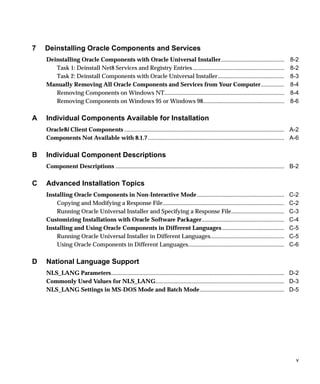
Contents

Send Us Your Comments .................................................................................................................. vii

Preface........................................................................................................................................................... xiii

1       Introducing Oracle8i Client
        Supported Operating Systems .........................................................................................................                    1-2
        New Features and Components on Windows ...............................................................................                                   1-3
           What Is New With 8.1.7? .............................................................................................................                 1-3
           What Is New With 8.1.6? .............................................................................................................                 1-4
        What Documentation Do I Read First?...........................................................................................                           1-6
           Viewing Documentation on the CD-ROM................................................................................                                   1-7

2       Installation Overview
        Oracle Universal Installer .................................................................................................................             2-2
        Installation Types Available for Installation ................................................................................                           2-3
            Licensing Information..................................................................................................................              2-3
        Oracle Universal Installer Component Installation Overview..................................................                                             2-4
        Getting Started with Installation.....................................................................................................                   2-5


                                                                                                                                                                    iii
3    Installation Requirements
     System Requirements for FAT and NTFS File Systems ..............................................................                                        3-2
     Oracle8i Client.....................................................................................................................................    3-3
     Migration and Upgrade Requirements...........................................................................................                           3-4
     Mandatory Individual Component Requirements ......................................................................                                      3-4
     Single Oracle Home Components ...................................................................................................                       3-6
     Networking Protocol Vendor Requirements .................................................................................                               3-7

4    Selecting Net8 Configuration Methods
     Network Configuration Methods .................................................................................................... 4-2
     Selecting a Net8 Configuration Method ........................................................................................ 4-3
     Client Network Configuration ......................................................................................................... 4-4

5    Installing Oracle Components and Documentation
     Installation Differences Between Windows NT and UNIX .......................................................                                            5-2
     Keyboard Navigation .........................................................................................................................           5-2
     Preinstallation Tasks ..........................................................................................................................        5-3
     Installing Oracle8i Client ..................................................................................................................           5-5
              Administrator, Programmer, or Application User ...........................................................                                     5-6
              Custom ....................................................................................................................................    5-7
         Reviewing a Log of an Installation Session...............................................................................                           5-9
     Installing and Viewing the Oracle8i Client Online Documentation......................................                                                  5-10
         Installing the Oracle8i Client Online Documentation ...........................................................                                    5-10
         Installing a Web Browser and Adobe Acrobat Reader .........................................................                                        5-11
         Viewing Documentation With a Web Browser ......................................................................                                    5-12
         Viewing Documentation Without a Web Browser ................................................................                                       5-13

6    Post-installation Configuration Tasks
     Setting NTFS File System and Windows NT Registry Permissions.........................................                                                   7-2
         NTFS File System Security ..........................................................................................................                7-2
         Windows NT Registry Security ..................................................................................................                     7-3
     Individual Component Post-installation Configuration Tasks .................................................                                            7-4


iv
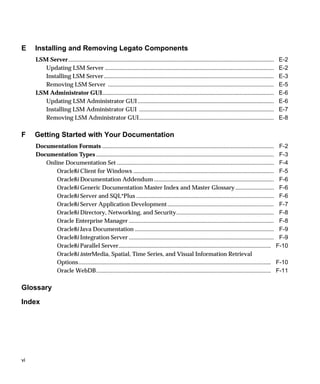
7   Deinstalling Oracle Components and Services
    Deinstalling Oracle Components with Oracle Universal Installer...........................................                               8-2
       Task 1: Deinstall Net8 Services and Registry Entries ..............................................................                  8-2
       Task 2: Deinstall Components with Oracle Universal Installer.............................................                            8-3
    Manually Removing All Oracle Components and Services from Your Computer................                                                 8-4
       Removing Components on Windows NT.................................................................................                   8-4
       Removing Components on Windows 95 or Windows 98.......................................................                               8-6

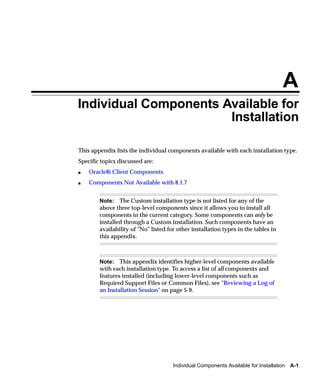
A   Individual Components Available for Installation
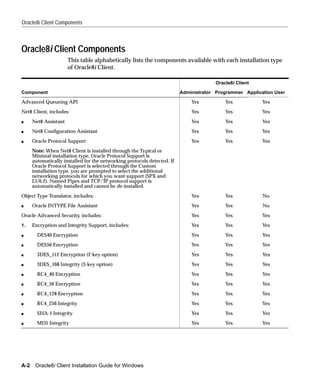
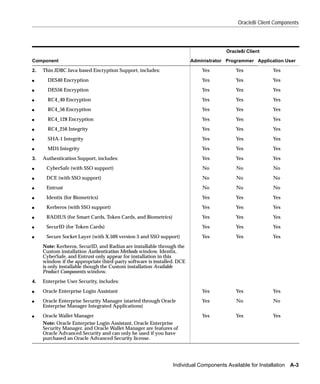
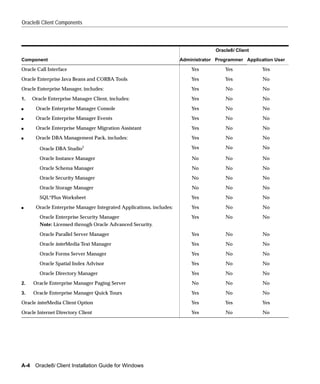
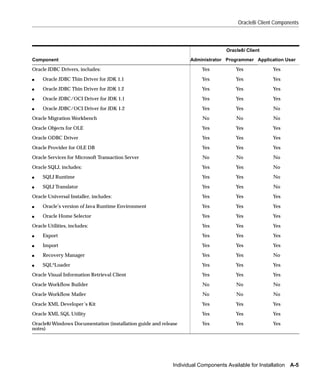
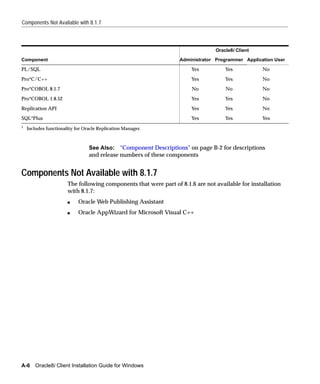
    Oracle8i Client Components ............................................................................................................ A-2
    Components Not Available with 8.1.7 ............................................................................................ A-6

B   Individual Component Descriptions
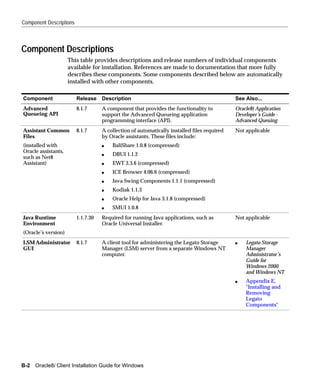
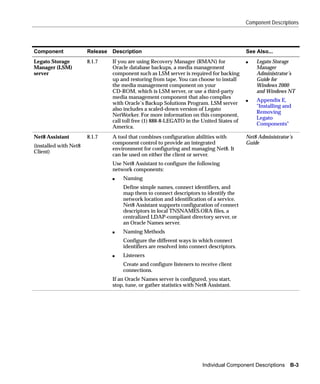
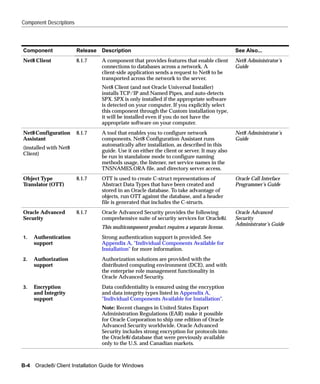
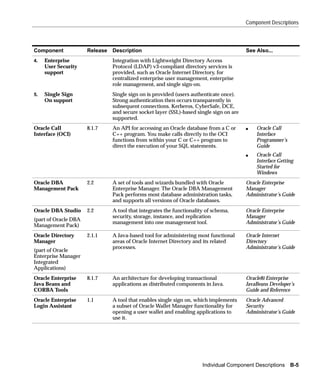
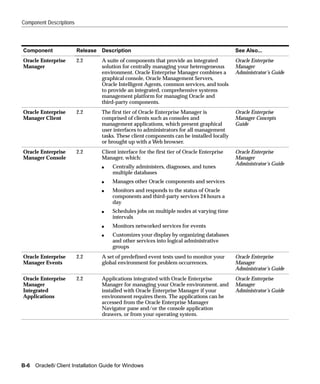
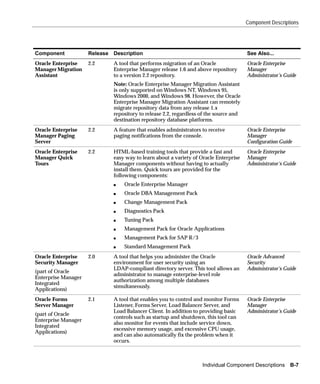
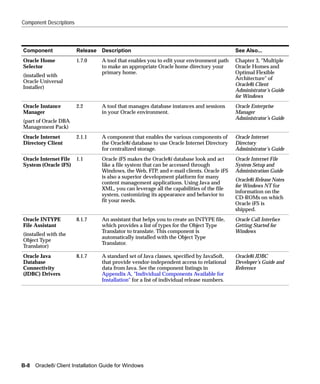
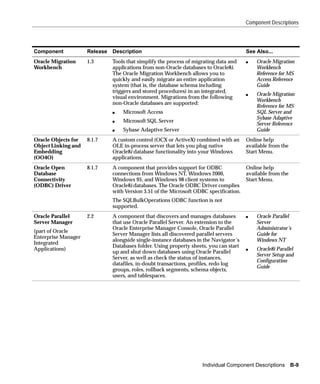
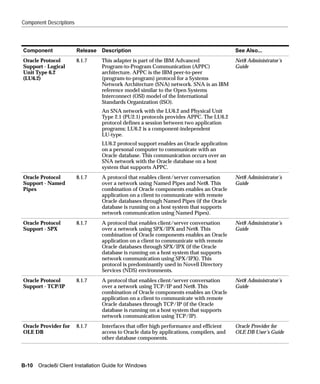
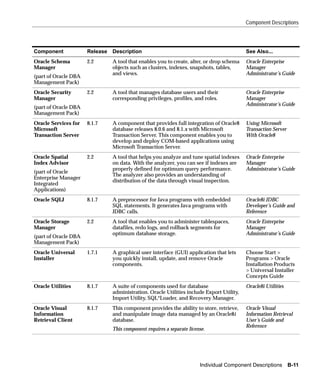
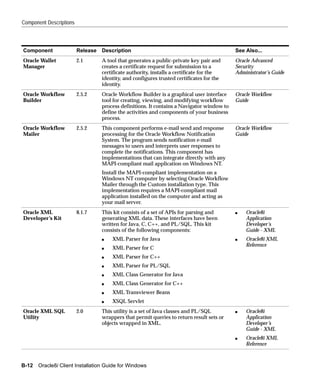
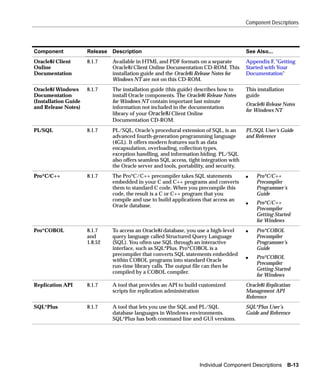
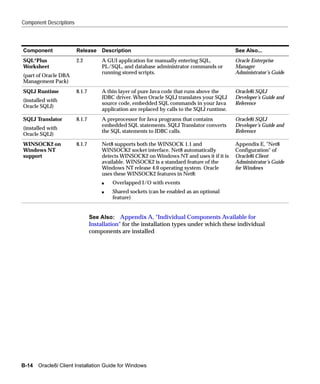
    Component Descriptions .................................................................................................................. B-2

C   Advanced Installation Topics
    Installing Oracle Components in Non-Interactive Mode...........................................................                        C-2
        Copying and Modifying a Response File..................................................................................            C-2
        Running Oracle Universal Installer and Specifying a Response File....................................                              C-3
    Customizing Installations with Oracle Software Packager........................................................                        C-4
    Installing and Using Oracle Components in Different Languages ..........................................                               C-5
        Running Oracle Universal Installer in Different Languages..................................................                        C-5
        Using Oracle Components in Different Languages.................................................................                    C-6

D   National Language Support
    NLS_LANG Parameters..................................................................................................................... D-2
    Commonly Used Values for NLS_LANG....................................................................................... D-3
    NLS_LANG Settings in MS-DOS Mode and Batch Mode......................................................... D-5


                                                                                                                                               v
E    Installing and Removing Legato Components
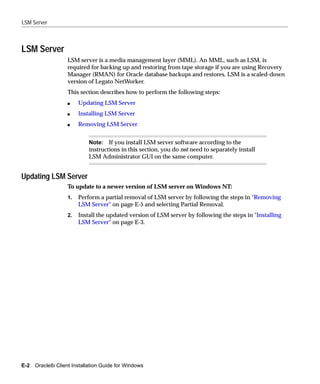
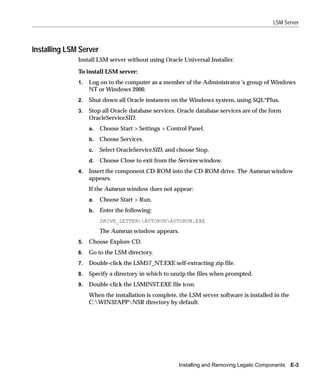
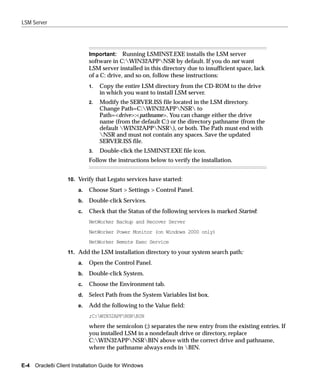
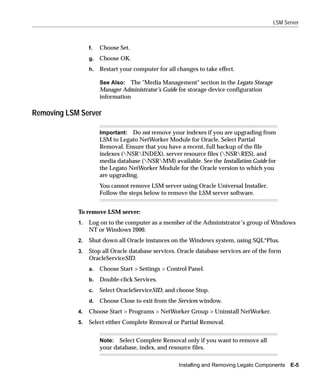
     LSM Server...........................................................................................................................................   E-2
        Updating LSM Server ..................................................................................................................               E-2
        Installing LSM Server...................................................................................................................             E-3
        Removing LSM Server ................................................................................................................                 E-5
     LSM Administrator GUI....................................................................................................................               E-6
        Updating LSM Administrator GUI ............................................................................................                          E-6
        Installing LSM Administrator GUI ...........................................................................................                         E-7
        Removing LSM Administrator GUI...........................................................................................                            E-8

F    Getting Started with Your Documentation
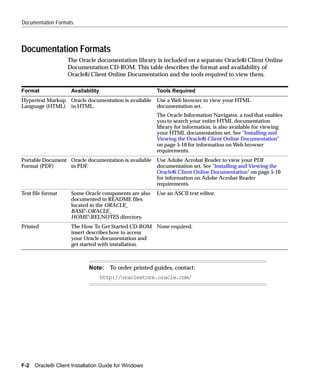
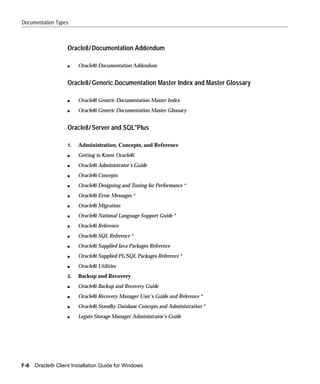
     Documentation Formats ....................................................................................................................               F-2
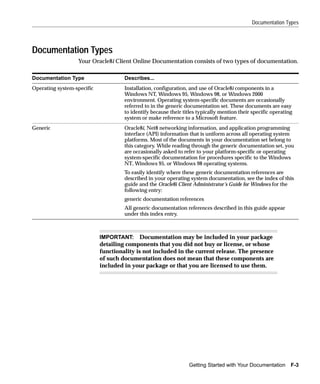
     Documentation Types ........................................................................................................................             F-3
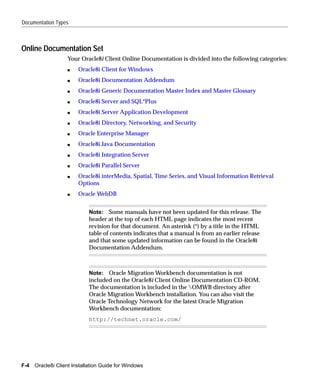
        Online Documentation Set ..........................................................................................................                   F-4
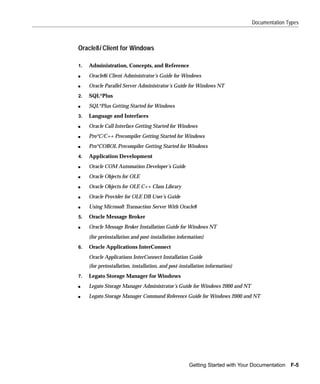
           Oracle8i Client for Windows ...............................................................................................                        F-5
           Oracle8i Documentation Addendum .................................................................................                                  F-6
           Oracle8i Generic Documentation Master Index and Master Glossary ..........................                                                         F-6
           Oracle8i Server and SQL*Plus .............................................................................................                         F-6
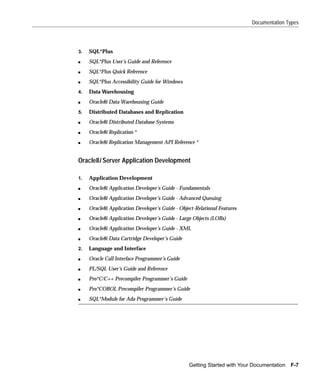
           Oracle8i Server Application Development ........................................................................                                   F-7
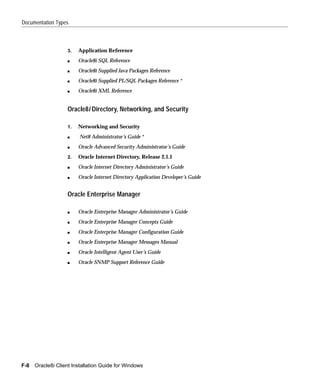
           Oracle8i Directory, Networking, and Security..................................................................                                     F-8
           Oracle Enterprise Manager ..................................................................................................                       F-8
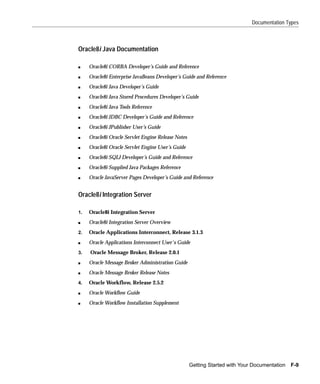
           Oracle8i Java Documentation ..............................................................................................                         F-9
           Oracle8i Integration Server ..................................................................................................                     F-9
           Oracle8i Parallel Server.......................................................................................................                   F-10
           Oracle8i interMedia, Spatial, Time Series, and Visual Information Retrieval
           Options..................................................................................................................................         F-10
           Oracle WebDB......................................................................................................................                F-11

Glossary
Index


vi
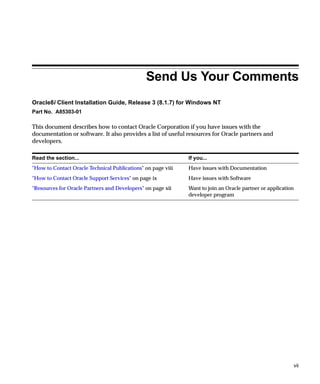
Send Us Your Comments
Oracle8i Client Installation Guide, Release 3 (8.1.7) for Windows NT
Part No. A85303-01

This document describes how to contact Oracle Corporation if you have issues with the
documentation or software. It also provides a list of useful resources for Oracle partners and
developers.

Read the section...                                           If you...
"How to Contact Oracle Technical Publications" on page viii   Have issues with Documentation
"How to Contact Oracle Support Services" on page ix           Have issues with Software
"Resources for Oracle Partners and Developers" on page xii    Want to join an Oracle partner or application
                                                              developer program


                                                                                                          vii
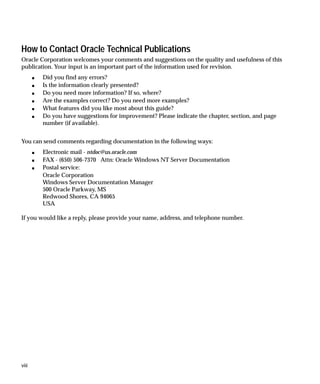
How to Contact Oracle Technical Publications
Oracle Corporation welcomes your comments and suggestions on the quality and usefulness of this
publication. Your input is an important part of the information used for revision.
       s   Did you find any errors?
       s   Is the information clearly presented?
       s   Do you need more information? If so, where?
       s   Are the examples correct? Do you need more examples?
       s   What features did you like most about this guide?
       s   Do you have suggestions for improvement? Please indicate the chapter, section, and page
           number (if available).


You can send comments regarding documentation in the following ways:
       s   Electronic mail - ntdoc@us.oracle.com
       s   FAX - (650) 506-7370 Attn: Oracle Windows NT Server Documentation
       s   Postal service:
           Oracle Corporation
           Windows Server Documentation Manager
           500 Oracle Parkway, MS
           Redwood Shores, CA 94065
           USA

If you would like a reply, please provide your name, address, and telephone number.


viii
How to Contact Oracle Support Services
Please copy this form and distribute within your organization as necessary.
Oracle Support Services can be reached at the following telephone numbers. The hours of business
are detailed in your support contract and the Oracle Customer Support Guide in your kit.


                   Oracle Support
                   Services In... Call...
                   United States of + (650) 506-1500 for customers with support contracts
                   America
                                    + (650) 506-5577 to obtain a support contract
                   Europe            +44 1344 860 160 or the local support center in your country.
                   All other         The telephone number for your country listed at the following Web site:
                   locations
                                     http://www.oracle.com/support/
                                     Oracle Support Services telephone numbers are also listed in the Oracle
                                     Customer Support Guide in your kit.

Please complete the following checklist before you call. If you have this information ready, your call
can be processed much quicker.


                   ❏   Your CPU Support Identification Number (CSI Number) if applicable.


                   ❏   The hardware name on which your application is running.


                   ❏   The operating system name and release number on which your application is
                       running.


                                                                                                               ix
❏   The release numbers of the Oracle Server and associated products involved in
        the current problem. For example, Oracle8i Enterprise Edition release 8.1.7.0.0
        and Oracle Enterprise Manager release 2.2.0.0.0.


    ❏   The third-party software version you are using.


    ❏   The exact error codes and messages. Please write these down as they occur.
        They are critical in helping Oracle Support Services to quickly resolve your
        problem.


    ❏   A description of the issue, including:
        s   What happened? For example, the command used and its result.


x
s   When did it happen? For example, during peak system load, or after a
        certain command, or after an operating system upgrade.


    s   Where did it happen? For example, on a particular system, or within a
        certain procedure or table.


    s   What is the extent of the problem? For example, production system
        unavailable, or moderate impact but increasing with time, or minimal
        impact and stable.


❏   Keep copies of any trace files, core dumps, and redo log files recorded at or near
    the time of the incident. Oracle Support Services may need these to further
    investigate your problem.


                                                                                     xi
Resources for Oracle Partners and Developers
This section provides information on partner programs and resources for Oracle database
administrators and application developers.


Information Source                            Description
Oracle Corporation Home Page                  This Web site is the starting point for general information on
                                              Oracle Corporation.
http://www.oracle.com
Alliance Online                               Oracle provides leading-edge technology, education, and
                                              technical support that enables you to effectively integrate Oracle
http://alliance.oracle.com
                                              into your business. By joining the Oracle Partner Program, you
                                              demonstrate to customers that you are committed to delivering
                                              innovative Oracle-based solutions and services.
                                              The greater your commitment to Oracle, the more we can help
                                              you grow your business. It’s that simple. The value you derive is
                                              associated directly with your level of commitment.
Oracle Education                              Customers come to Oracle Education with a variety of needs.
                                              You may require a complete curriculum based on your job role
http://education.oracle.com/
                                              to enable you to implement new technology. Or you may seek
                                              an understanding of technology related to your key area of
                                              responsibility to help you meet technical challenges. You may be
                                              looking for self-paced training that can be used as an ongoing
                                              resource for reference and hands-on practice. Or, you may be
                                              interested in an overview of a new product upgrade. Whatever
                                              your training need, Oracle Education has the solution.
Oracle Technology Network                     The Oracle Technology Network is your definitive source for
                                              Oracle technical information for developing for the Internet
http://technet.oracle.com/
                                              platform. You will be part of an online community with access
                                              to free software, Oracle Technology Network-sponsored Internet
                                              developer conferences, and discussion groups on up-to-date
                                              Oracle technology. Membership is free.
Oracle Store                                  This is Oracle’s online shopping center. Visit this site to find
                                              special deals on Oracle software, documentation, publications,
http://oraclestore.oracle.com/
                                              computer-based training products, and much more.
Oracle Support Services’ Support Web Center   Oracle Support Services offers a range of programs so you can
                                              select the support services you need and access them in the way
http://www.oracle.com/support/
                                              you prefer: by telephone, electronically, or face to face. These
                                              award-winning programs help you maintain your investment in
                                              Oracle technology and expertise.


xii
Preface

This guide is your primary source of introduction, preinstallation, installation, and
post-installation information for Oracle8i Client.
Specific topics discussed:
s   Audience
s   Organization
s   Conventions


                                                                                    xiii
Audience
           This guide assumes that you are familiar with the following:
           s   Windows NT, 2000, 95, or 98, and have installed and tested it on your computer
               system
           s   Object-relational database management concepts
           This guide is necessary for anyone installing or configuring Oracle8i Client.
           This guide describes only the features of Oracle8i Client software that apply to the
           Windows NT, Windows 95, Windows 98, and Windows 2000 operating systems.


Organization
           This guide is organized as follows:

           Chapter 1, "Introducing Oracle8i Client"
              Introduces you to Oracle8i Client, the supported operating systems, new
              features on Windows since release 8.1.6, and getting started with your Oracle
              documentation

           Chapter 2, "Installation Overview"
              Provides an overview of how to install Oracle components

           Chapter 3, "Installation Requirements"
              Describes requirements for Oracle8i Client installation types and individual
              components

           Chapter 4, "Selecting Net8 Configuration Methods"
              Describes the Net8 client/server network configuration methods available
              during installation

           Chapter 5, "Installing Oracle Components and Documentation"
              Describes how to install Oracle components

           Chapter 6, "Post-installation Configuration Tasks"
              Describes post-installation configuration tasks


xiv
Chapter 7, "Deinstalling Oracle Components and Services"
   Describes how to remove Oracle components and services

Appendix A, "Individual Components Available for Installation"
   Describes the individual components available with each installation type of
   Oracle8i Client

Appendix B, "Individual Component Descriptions"
   Provides descriptions and release numbers of the individual components
   available with each installation type of Oracle8i Client

Appendix C, "Advanced Installation Topics"
   Describes advanced installation topics not covered in Chapter 5

Appendix D, "National Language Support"
   Describes National Language Support (NLS)

Appendix E, "Installing and Removing Legato Components"
   Describes how to install and remove Legato components

Appendix F, "Getting Started with Your Documentation"
   Provides a complete introduction to the Oracle documentation set


                                                                                  xv
Conventions
                      The following conventions are used in this guide:

Convention                Example                                   Meaning
All uppercase plain       C:ORACLEORA81                           Indicates command names, SQL reserved
                                                                    words, and keywords, as in ALTER
                                                                    DATABASE. All uppercase plain is also used
                                                                    for directory names and file names.
Italic                    s   Used to indicate a variable:           Indicates a value that you must provide. For
                                                                     example, if a command asks you to type file
                              file name
                                                                     name, you must type the actual name of the
                          s   Used to indicate the title of a guide. file.
Square brackets [ ]       X:[PATHNAME]ORACLE                     Encloses optional items. For example, when
                          HOME_NAME                                 you create an Oracle home directory, you can
                                                                    place an optional pathname before the
                                                                    ORACLE pathname.
                                                                    Square brackets also indicate a function key,
                                                                    for example [Enter].
Choose Start >            Choose Start > Programs > Oracle -        How to start a program. For example, to start
                          HOME_NAME > Network                       Net8 Assistant, you must click the Start
                          Administration > Net8 Assistant           button on the taskbar and then choose
                                                                    Programs > Oracle - HOME_NAME >
                                                                    Network Administration > Net8 Assistant.
C:>                      C:ORACLEORADATA>                        Represents the Windows NT command
                                                                    prompt of the current hard disk drive. Your
                                                                    prompt reflects the subdirectory in which
                                                                    you are working. Referred to as the MS-DOS
                                                                    command prompt in this guide.
Backslash () before a    ORADATA                                  Indicates that the directory is a subdirectory
directory name                                                      of the root directory.


xvi
Convention        Example                         Meaning
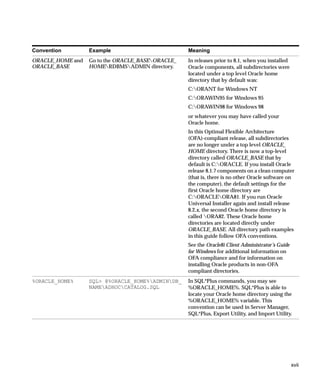
ORACLE_HOME and   Go to the ORACLE_BASEORACLE_   In releases prior to 8.1, when you installed
ORACLE_BASE       HOMERDBMSADMIN directory.     Oracle components, all subdirectories were
                                                  located under a top level Oracle home
                                                  directory that by default was:
                                                  C:ORANT for Windows NT
                                                  C:ORAWIN95 for Windows 95
                                                  C:ORAWIN98 for Windows 98
                                                  or whatever you may have called your
                                                  Oracle home.
                                                  In this Optimal Flexible Architecture
                                                  (OFA)-compliant release, all subdirectories
                                                  are no longer under a top level ORACLE_
                                                  HOME directory. There is now a top-level
                                                  directory called ORACLE_BASE that by
                                                  default is C:ORACLE. If you install Oracle
                                                  release 8.1.7 components on a clean computer
                                                  (that is, there is no other Oracle software on
                                                  the computer), the default settings for the
                                                  first Oracle home directory are
                                                  C:ORACLEORA81. If you run Oracle
                                                  Universal Installer again and install release
                                                  8.2.x, the second Oracle home directory is
                                                  called ORA82. These Oracle home
                                                  directories are located directly under
                                                  ORACLE_BASE. All directory path examples
                                                  in this guide follow OFA conventions.
                                                  See the Oracle8i Client Administrator’s Guide
                                                  for Windows for additional information on
                                                  OFA compliance and for information on
                                                  installing Oracle products in non-OFA
                                                  compliant directories.
%ORACLE_HOME%     SQL> @%ORACLE_HOME%ADMINDB_   In SQL*Plus commands, you may see
                  NAMEADHOCCATALOG.SQL          %ORACLE_HOME%. SQL*Plus is able to
                                                  locate your Oracle home directory using the
                                                  %ORACLE_HOME% variable. This
                                                  convention can be used in Server Manager,
                                                  SQL*Plus, Export Utility, and Import Utility.


                                                                                                  xvii
Convention   Example                      Meaning
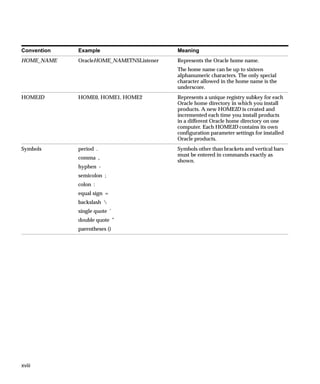
HOME_NAME    OracleHOME_NAMETNSListener   Represents the Oracle home name.
                                          The home name can be up to sixteen
                                          alphanumeric characters. The only special
                                          character allowed in the home name is the
                                          underscore.
HOMEID       HOME0, HOME1, HOME2          Represents a unique registry subkey for each
                                          Oracle home directory in which you install
                                          products. A new HOMEID is created and
                                          incremented each time you install products
                                          in a different Oracle home directory on one
                                          computer. Each HOMEID contains its own
                                          configuration parameter settings for installed
                                          Oracle products.
Symbols      period .                     Symbols other than brackets and vertical bars
                                          must be entered in commands exactly as
             comma ,
                                          shown.
             hyphen -
             semicolon ;
             colon :
             equal sign =
             backslash 
             single quote ’
             double quote "
             parentheses ()


xviii
1
                      Introducing Oracle8i Client

This chapter introduces you to Oracle8i Client.
Specific topics discussed are:
s   Supported Operating Systems
s   New Features and Components on Windows
s   What Documentation Do I Read First?


                                                  Introducing Oracle8i Client   1-1
Supported Operating Systems


Supported Operating Systems
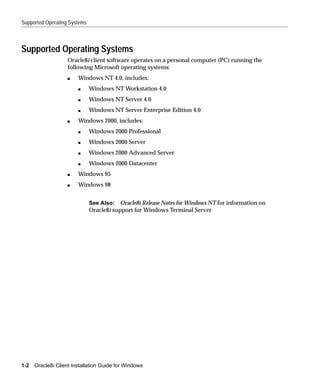
                    Oracle8i client software operates on a personal computer (PC) running the
                    following Microsoft operating systems:
                    s   Windows NT 4.0, includes:
                        s     Windows NT Workstation 4.0
                        s     Windows NT Server 4.0
                        s     Windows NT Server Enterprise Edition 4.0
                    s   Windows 2000, includes:
                        s     Windows 2000 Professional
                        s     Windows 2000 Server
                        s     Windows 2000 Advanced Server
                        s     Windows 2000 Datacenter
                    s   Windows 95
                    s   Windows 98


                              See Also: Oracle8i Release Notes for Windows NT for information on
                              Oracle8i support for Windows Terminal Server


1-2   Oracle8i Client Installation Guide for Windows
New Features and Components on Windows


New Features and Components on Windows
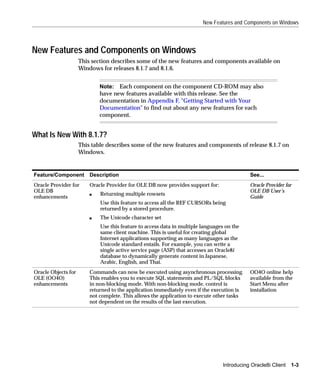
                     This section describes some of the new features and components available on
                     Windows for releases 8.1.7 and 8.1.6.


                             Note: Each component on the component CD-ROM may also
                             have new features available with this release. See the
                             documentation in Appendix F, "Getting Started with Your
                             Documentation" to find out about any new features for each
                             component.


What Is New With 8.1.7?
                     This table describes some of the new features and components of release 8.1.7 on
                     Windows.


Feature/Component        Description                                                         See...
Oracle Provider for      Oracle Provider for OLE DB now provides support for:                Oracle Provider for
OLE DB                                                                                       OLE DB User’s
                         s   Returning multiple rowsets
enhancements                                                                                 Guide
                             Use this feature to access all the REF CURSORs being
                             returned by a stored procedure.
                         s   The Unicode character set
                             Use this feature to access data in multiple languages on the
                             same client machine. This is useful for creating global
                             Internet applications supporting as many languages as the
                             Unicode standard entails. For example, you can write a
                             single active service page (ASP) that accesses an Oracle8i
                             database to dynamically generate content in Japanese,
                             Arabic, English, and Thai.
Oracle Objects for       Commands can now be executed using asynchronous processing.         OO4O online help
OLE (OO4O)               This enables you to execute SQL statements and PL/SQL blocks        available from the
enhancements             in non-blocking mode. With non-blocking mode, control is            Start Menu after
                         returned to the application immediately even if the execution is    installation
                         not complete. This allows the application to execute other tasks
                         not dependent on the results of the last execution.


                                                                                  Introducing Oracle8i Client   1-3
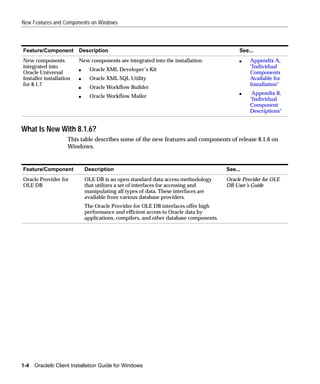
New Features and Components on Windows


Feature/Component        Description                                                        See...
New components           New components are integrated into the installation:               s    Appendix A,
integrated into                                                                                  "Individual
                         s     Oracle XML Developer’s Kit
Oracle Universal                                                                                 Components
Installer installation   s     Oracle XML SQL Utility                                            Available for
for 8.1.7                                                                                        Installation"
                         s     Oracle Workflow Builder
                                                                                            s     Appendix B,
                         s     Oracle Workflow Mailer
                                                                                                 "Individual
                                                                                                 Component
                                                                                                 Descriptions"


What Is New With 8.1.6?
                    This table describes some of the new features and components of release 8.1.6 on
                    Windows.


Feature/Component            Description                                               See...
Oracle Provider for          OLE DB is an open standard data access methodology        Oracle Provider for OLE
OLE DB                       that utilizes a set of interfaces for accessing and       DB User’s Guide
                             manipulating all types of data. These interfaces are
                             available from various database providers.
                             The Oracle Provider for OLE DB interfaces offer high
                             performance and efficient access to Oracle data by
                             applications, compilers, and other database components.


1-4   Oracle8i Client Installation Guide for Windows
New Features and Components on Windows


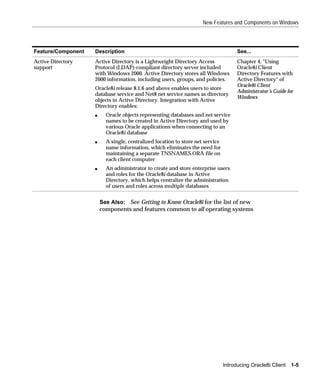
Feature/Component   Description                                                       See...
Active Directory    Active Directory is a Lightweight Directory Access                Chapter 4, "Using
support             Protocol (LDAP)-compliant directory server included               Oracle8i Client
                    with Windows 2000. Active Directory stores all Windows            Directory Features with
                    2000 information, including users, groups, and policies.          Active Directory" of
                                                                                      Oracle8i Client
                    Oracle8i release 8.1.6 and above enables users to store
                                                                                      Administrator’s Guide for
                    database service and Net8 net service names as directory
                                                                                      Windows
                    objects in Active Directory. Integration with Active
                    Directory enables:
                    s     Oracle objects representing databases and net service
                          names to be created in Active Directory and used by
                          various Oracle applications when connecting to an
                          Oracle8i database
                    s     A single, centralized location to store net service
                          name information, which eliminates the need for
                          maintaining a separate TNSNAMES.ORA file on
                          each client computer
                    s     An administrator to create and store enterprise users
                          and roles for the Oracle8i database in Active
                          Directory, which helps centralize the administration
                          of users and roles across multiple databases


                        See Also: See Getting to Know Oracle8i for the list of new
                        components and features common to all operating systems


                                                                                Introducing Oracle8i Client   1-5
What Documentation Do I Read First?


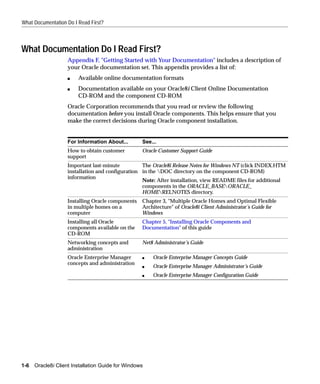
What Documentation Do I Read First?
                    Appendix F, "Getting Started with Your Documentation" includes a description of
                    your Oracle documentation set. This appendix provides a list of:
                    s   Available online documentation formats
                    s   Documentation available on your Oracle8i Client Online Documentation
                        CD-ROM and the component CD-ROM
                    Oracle Corporation recommends that you read or review the following
                    documentation before you install Oracle components. This helps ensure that you
                    make the correct decisions during Oracle component installation.


                    For Information About...       See...
                    How to obtain customer         Oracle Customer Support Guide
                    support
                    Important last-minute          The Oracle8i Release Notes for Windows NT (click INDEX.HTM
                    installation and configuration in the DOC directory on the component CD-ROM)
                    information
                                                   Note: After installation, view README files for additional
                                                   components in the ORACLE_BASEORACLE_
                                                   HOMERELNOTES directory.
                    Installing Oracle components   Chapter 3, "Multiple Oracle Homes and Optimal Flexible
                    in multiple homes on a         Architecture" of Oracle8i Client Administrator’s Guide for
                    computer                       Windows
                    Installing all Oracle          Chapter 5, "Installing Oracle Components and
                    components available on the    Documentation" of this guide
                    CD-ROM
                    Networking concepts and        Net8 Administrator’s Guide
                    administration
                    Oracle Enterprise Manager      s   Oracle Enterprise Manager Concepts Guide
                    concepts and administration
                                                   s   Oracle Enterprise Manager Administrator’s Guide
                                                   s   Oracle Enterprise Manager Configuration Guide


1-6   Oracle8i Client Installation Guide for Windows
What Documentation Do I Read First?


Viewing Documentation on the CD-ROM
             Most Oracle documentation is included on a separate Oracle8i Client Online
             Documentation CD-ROM.


                       Note: This installation guide and the Oracle8i Release Notes for
                       Windows NT are not included on the Oracle8i Client Online
                       Documentation CD-ROM. Access those documents after
                       installation from the Start Menu or by clicking INSTALL.HTM in
                       the DOC directory on your hard drive. You can also access those
                       documents on the component CD-ROM by going to the DOC
                       directory and clicking INDEX.HTM.


             When you insert the Oracle8i Client Online Documentation CD-ROM into the
             CD-ROM drive, the Autorun window automatically appears. This window provides
             easy access to the Oracle8i Client Online Documentation. Follow these instructions
             to view the documentation.
             To view the documentation library on the Oracle8i Client Online Documentation
             CD-ROM:
             1.   Insert the Oracle8i Client Online Documentation CD-ROM into the CD-ROM
                  drive.
                  The Autorun window appears. If the Autorun window does not appear:
                  a.   Choose Start > Run.
                  b.   Enter the following:
                       DRIVE_LETTER:AUTORUNAUTORUN.EXE
                       The Autorun window appears.
             2.   Click Browse Documentation to view the Oracle8i Client Online Documentation
                  for all components. These documents are in hypertext markup language
                  (HTML) and portable document format (PDF) formats. The Oracle Information
                  Navigator, a Java-based search and navigation applet, also starts.
             3.   Review the documentation described in the table in "What Documentation Do I
                  Read First?" on page 1-6 and any other appropriate documentation. See "Online
                  Documentation Set" on page F-4 for a list of documentation titles.


                                                                       Introducing Oracle8i Client   1-7
What Documentation Do I Read First?


                             Note: You can also access your Oracle8i Client Online
                             Documentation without using the Autorun window. To do this:
                             1.   Exit the Autorun window.
                             2.   Go to the DOC directory at the root of the Oracle8i Client
                                  Online Documentation CD-ROM.
                             3.   Double-click either:
                             s    INDEX.HTM (to start the Oracle8i Client Online
                                  Documentation and Oracle Information Navigator, a
                                  Java-based search and navigation applet)
                             s    PRODUCTS.HTM (to start the Oracle8i Client Online
                                  Documentation without starting the Oracle Information
                                  Navigator)
                             s    INDEX.PDF (if you do not have a Web browser, but do have an
                                  Adobe Acrobat Reader installed).


                             See Also: "Installing and Viewing the Oracle8i Client Online
                             Documentation" on page 5-10 for instructions on installing your
                             Oracle8i Client Online Documentation


1-8   Oracle8i Client Installation Guide for Windows
2
                                    Installation Overview

This chapter provides an overview of Oracle component installation.
Specific topics discussed are:
s   Oracle Universal Installer
s   Installation Types Available for Installation
s   Oracle Universal Installer Component Installation Overview
s   Getting Started with Installation


                                                           Installation Overview 2-1
Oracle Universal Installer


Oracle Universal Installer
                     Oracle Universal Installer is a Java-based graphical user interface (GUI) tool that
                     enables you to install Oracle components from your CD-ROM. Oracle Universal
                     Installer provides the following capabilities:
                     s       Component and suite installations
                     s       Web-based installations
                     s       National language and globalization support
                     s       Distributed installation support (Oracle Parallel Server)
                     s       Unattended "silent" installations using response files
                     s       Deinstallation of installed components
                     s       Multiple Oracle homes support

                                 See Also: Oracle Universal Installer Concepts Guide for more
                                 information on Oracle Universal Installer. This guide is not
                                 included in your Oracle8i Client Online Documentation, but is
                                 automatically installed on your hard drive during an Oracle
                                 Universal Installer installation. Choose Start > Programs > Oracle
                                 Installation Products > Universal Installer Concepts Guide to access
                                 this guide.


2-2   Oracle8i Client Installation Guide for Windows
Installation Types Available for Installation


Installation Types Available for Installation
              When you run Oracle Universal Installer from the component CD-ROM, you can
              choose to install Oracle8i Client components from four different installation types.
              Each installation type contains a series of individual installable components. The
              following table lists the four installation types.

              Installation Type      Description
              Administrator          Installs an Oracle Enterprise Manager Console (including enterprise
                                     management tools), networking services, utilities, and basic client
                                     software
              Programmer             Installs development tools (including precompilers) and interfaces
                                     for creating applications that access an Oracle8i database

              Application User       Installs networking services and support files that enable database
                                     application users to connect to and interact with an Oracle8i
                                     database
              Custom                 Lets you selectively install components from the above installation
                                     types


                       See Also: Appendix A, "Individual Components Available for
                       Installation" for a list of individual components installed with each
                       installation type

Licensing Information
              Although the component CD-ROM in your kit contains many Oracle components,
              you may use only those components for which you have purchased licenses. Those
              components that require separately purchasable licenses are identified in their
              descriptions.
              Oracle Support Services does not provide support for components for which licenses
              have not been purchased.

                       See Also:
                       s   Global License Terms for additional licensing information
                       s   "Component Descriptions" on page B-2 for component
                           descriptions


                                                                                 Installation Overview 2-3
Oracle Universal Installer Component Installation Overview


Oracle Universal Installer Component Installation Overview
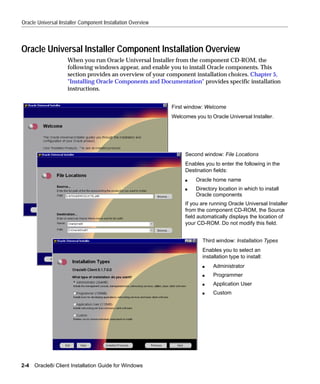
                    When you run Oracle Universal Installer from the component CD-ROM, the
                    following windows appear, and enable you to install Oracle components. This
                    section provides an overview of your component installation choices. Chapter 5,
                    "Installing Oracle Components and Documentation" provides specific installation
                    instructions.


                                                             First window: Welcome
                                                             Welcomes you to Oracle Universal Installer.


                                                                  Second window: File Locations
                                                                  Enables you to enter the following in the
                                                                  Destination fields:
                                                                  s    Oracle home name
                                                                  s    Directory location in which to install
                                                                       Oracle components
                                                                  If you are running Oracle Universal Installer
                                                                  from the component CD-ROM, the Source
                                                                  field automatically displays the location of
                                                                  your CD-ROM. Do not modify this field.


                                                                          Third window: Installation Types
                                                                          Enables you to select an
                                                                          installation type to install:
                                                                          s    Administrator
                                                                          s    Programmer
                                                                          s    Application User
                                                                          s    Custom


2-4   Oracle8i Client Installation Guide for Windows
Getting Started with Installation


Getting Started with Installation
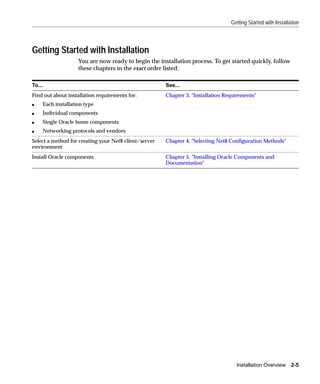
                       You are now ready to begin the installation process. To get started quickly, follow
                       these chapters in the exact order listed:

To...                                                    See...
Find out about installation requirements for:            Chapter 3, "Installation Requirements"
s       Each installation type
s       Individual components
s       Single Oracle home components
s       Networking protocols and vendors
Select a method for creating your Net8 client/server     Chapter 4, "Selecting Net8 Configuration Methods"
environment
Install Oracle components                                Chapter 5, "Installing Oracle Components and
                                                         Documentation"


                                                                                      Installation Overview 2-5
Getting Started with Installation


2-6   Oracle8i Client Installation Guide for Windows
3
                         Installation Requirements

This chapter describes installation requirements.
Specific topics discussed are:
s   System Requirements for FAT and NTFS File Systems
s   Oracle8i Client
s   Migration and Upgrade Requirements
s   Mandatory Individual Component Requirements
s   Single Oracle Home Components
s   Networking Protocol Vendor Requirements


                                                    Installation Requirements   3-1
System Requirements for FAT and NTFS File Systems


System Requirements for FAT and NTFS File Systems
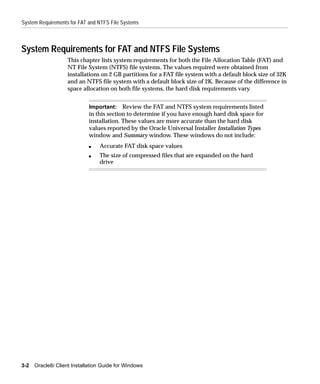
                    This chapter lists system requirements for both the File Allocation Table (FAT) and
                    NT File System (NTFS) file systems. The values required were obtained from
                    installations on 2 GB partitions for a FAT file system with a default block size of 32K
                    and an NTFS file system with a default block size of 2K. Because of the difference in
                    space allocation on both file systems, the hard disk requirements vary.


                             Important: Review the FAT and NTFS system requirements listed
                             in this section to determine if you have enough hard disk space for
                             installation. These values are more accurate than the hard disk
                             values reported by the Oracle Universal Installer Installation Types
                             window and Summary window. These windows do not include:
                             s   Accurate FAT disk space values
                             s   The size of compressed files that are expanded on the hard
                                 drive


3-2   Oracle8i Client Installation Guide for Windows
Oracle8i Client


Oracle8i Client
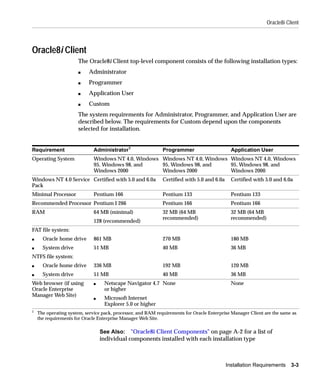
                      The Oracle8i Client top-level component consists of the following installation types:
                      s    Administrator
                      s    Programmer
                      s    Application User
                      s    Custom
                      The system requirements for Administrator, Programmer, and Application User are
                      described below. The requirements for Custom depend upon the components
                      selected for installation.


Requirement                   Administrator1                  Programmer                      Application User
Operating System              Windows NT 4.0, Windows Windows NT 4.0, Windows Windows NT 4.0, Windows
                              95, Windows 98, and     95, Windows 98, and     95, Windows 98, and
                              Windows 2000            Windows 2000            Windows 2000
Windows NT 4.0 Service Certified with 5.0 and 6.0a            Certified with 5.0 and 6.0a     Certified with 5.0 and 6.0a
Pack
Minimal Processor             Pentium 166                     Pentium 133                     Pentium 133
Recommended Processor Pentium I 266                           Pentium 166                     Pentium 166
RAM                           64 MB (minimal)                 32 MB (64 MB                    32 MB (64 MB
                                                              recommended)                    recommended)
                              128 (recommended)
FAT file system:
s     Oracle home drive       861 MB                          270 MB                          180 MB
s     System drive            51 MB                           40 MB                           36 MB
NTFS file system:
s     Oracle home drive       336 MB                          192 MB                          120 MB
s     System drive            51 MB                           40 MB                           36 MB
Web browser (if using         s    Netscape Navigator 4.7 None                                None
Oracle Enterprise                  or higher
Manager Web Site)
                              s    Microsoft Internet
                                   Explorer 5.0 or higher
1
    The operating system, service pack, processor, and RAM requirements for Oracle Enterprise Manager Client are the same as
    the requirements for Oracle Enterprise Manager Web Site.

                                  See Also: "Oracle8i Client Components" on page A-2 for a list of
                                  individual components installed with each installation type


                                                                                            Installation Requirements    3-3
Migration and Upgrade Requirements


Migration and Upgrade Requirements
                    This document does not cover Oracle database migration and upgrade
                    requirements. See Oracle8i Migration for that information.


Mandatory Individual Component Requirements
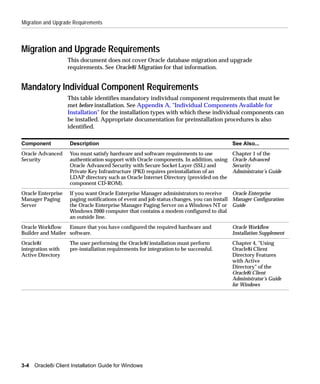
                    This table identifies mandatory individual component requirements that must be
                    met before installation. See Appendix A, "Individual Components Available for
                    Installation" for the installation types with which these individual components can
                    be installed. Appropriate documentation for preinstallation procedures is also
                    identified.

Component            Description                                                          See Also...
Oracle Advanced      You must satisfy hardware and software requirements to use           Chapter 1 of the
Security             authentication support with Oracle components. In addition, using    Oracle Advanced
                     Oracle Advanced Security with Secure Socket Layer (SSL) and          Security
                     Private Key Infrastructure (PKI) requires preinstallation of an      Administrator’s Guide
                     LDAP directory such as Oracle Internet Directory (provided on the
                     component CD-ROM).
Oracle Enterprise    If you want Oracle Enterprise Manager administrators to receive       Oracle Enterprise
Manager Paging       paging notifications of event and job status changes, you can install Manager Configuration
Server               the Oracle Enterprise Manager Paging Server on a Windows NT or Guide
                     Windows 2000 computer that contains a modem configured to dial
                     an outside line.
Oracle Workflow    Ensure that you have configured the required hardware and              Oracle Workflow
Builder and Mailer software.                                                              Installation Supplement
Oracle8i             The user performing the Oracle8i installation must perform           Chapter 4, "Using
integration with     pre-installation requirements for integration to be successful.      Oracle8i Client
Active Directory                                                                          Directory Features
                                                                                          with Active
                                                                                          Directory" of the
                                                                                          Oracle8i Client
                                                                                          Administrator’s Guide
                                                                                          for Windows


3-4   Oracle8i Client Installation Guide for Windows
Mandatory Individual Component Requirements


Component         Description                                                     See Also...
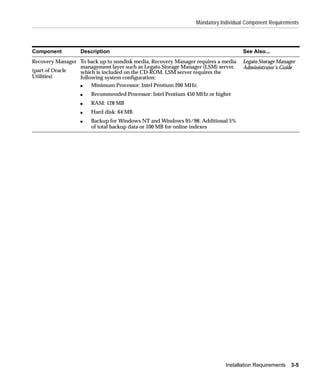
Recovery Manager To back up to nondisk media, Recovery Manager requires a media   Legato Storage Manager
                 management layer such as Legato Storage Manager (LSM) server,    Administrator’s Guide
(part of Oracle  which is included on the CD-ROM. LSM server requires the
Utilities)       following system configuration:
                 s    Minimum Processor: Intel Pentium 200 MHz.
                  s   Recommended Processor: Intel Pentium 450 MHz or higher
                  s   RAM: 128 MB
                  s   Hard disk: 64 MB
                  s   Backup for Windows NT and Windows 95/98: Additional 5%
                      of total backup data or 100 MB for online indexes


                                                                           Installation Requirements   3-5
Single Oracle Home Components


Single Oracle Home Components
                    Most Oracle components can be installed multiple times on the same computer.
                    However, the following components can only be installed once per computer:
                    s   Oracle Objects for OLE
                    s   Oracle Open Database Connectivity (ODBC) Driver
                    s   Oracle Provider for OLE DB
                    If you attempt to install these components a second time, Oracle Universal Installer
                    detects that these products are already installed in another Oracle home and
                    automatically removes them from the installation process without prompting you.
                    The following information is logged to the INSTALLACTIONS.LOG file in the
                    X:PROGRAM FILESORACLEINVENTORYLOGS directory.
                    # product_name is a single oracle home product. It is already installed in
                    currently_installed_location.

                    If you are performing an installation and notice that one or more single Oracle
                    home components are not available for installation during the current session, check
                    to see if any of these components or any previous versions of these components are
                    installed in another Oracle home. If you want to install these in the currently
                    selected Oracle home, you must first deinstall the conflicting version(s).

                             See Also: Appendix A, "Individual Components Available for
                             Installation" for the installation types under which these
                             components are installed.


3-6   Oracle8i Client Installation Guide for Windows
Networking Protocol Vendor Requirements


Networking Protocol Vendor Requirements
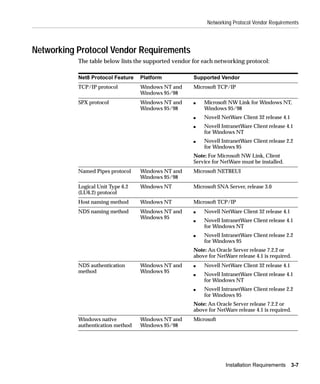
           The table below lists the supported vendor for each networking protocol:

           Net8 Protocol Feature   Platform           Supported Vendor
           TCP/IP protocol         Windows NT and     Microsoft TCP/IP
                                   Windows 95/98
           SPX protocol            Windows NT and     s   Microsoft NW Link for Windows NT,
                                   Windows 95/98          Windows 95/98
                                                      s   Novell NetWare Client 32 release 4.1
                                                      s   Novell IntranetWare Client release 4.1
                                                          for Windows NT
                                                      s   Novell IntranetWare Client release 2.2
                                                          for Windows 95
                                                      Note: For Microsoft NW Link, Client
                                                      Service for NetWare must be installed.
           Named Pipes protocol    Windows NT and     Microsoft NETBEUI
                                   Windows 95/98
           Logical Unit Type 6.2   Windows NT         Microsoft SNA Server, release 3.0
           (LU6.2) protocol
           Host naming method      Windows NT         Microsoft TCP/IP
           NDS naming method       Windows NT and     s   Novell NetWare Client 32 release 4.1
                                   Windows 95
                                                      s   Novell IntranetWare Client release 4.1
                                                          for Windows NT
                                                      s   Novell IntranetWare Client release 2.2
                                                          for Windows 95
                                                      Note: An Oracle Server release 7.2.2 or
                                                      above for NetWare release 4.1 is required.
           NDS authentication      Windows NT and     s   Novell NetWare Client 32 release 4.1
           method                  Windows 95
                                                      s   Novell IntranetWare Client release 4.1
                                                          for Windows NT
                                                      s   Novell IntranetWare Client release 2.2
                                                          for Windows 95
                                                      Note: An Oracle Server release 7.2.2 or
                                                      above for NetWare release 4.1 is required.
           Windows native          Windows NT and     Microsoft
           authentication method   Windows 95/98


                                                                   Installation Requirements     3-7
Networking Protocol Vendor Requirements


3-8   Oracle8i Client Installation Guide for Windows
4
Selecting Net8 Configuration Methods

 This chapter describes the Net8 client/server configuration methods available
 during installation. You must understand these methods before performing an
 installation.
 Specific topics discussed are:
 s   Network Configuration Methods
 s   Selecting a Net8 Configuration Method


         Note: This chapter uses networking terms and concepts with
         which you may be unfamiliar. See the Glossary for definitions of
         terms used in this chapter and the Net8 Administrator’s Guide for
         detailed descriptions of concepts.


                                              Selecting Net8 Configuration Methods 4-1
Network Configuration Methods


Network Configuration Methods
                          Oracle Universal Installer provides several methods for configuring your Net8
                          client/server networking environment during installation.
                          The method to select during installation depends upon:
                          s     Your own expertise with network configuration
                          s     The requirements of your network environment
                          You must understand these methods before you begin installation. By reviewing the
                          information in this chapter, you can ensure that you configure a networking
                          environment that best matches your needs from the beginning.
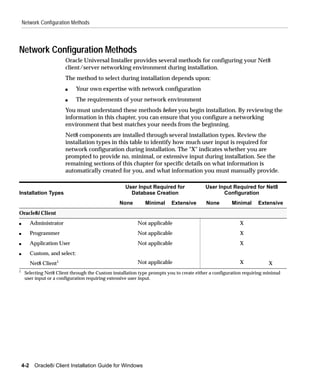
                          Net8 components are installed through several installation types. Review the
                          installation types in this table to identify how much user input is required for
                          network configuration during installation. The "X" indicates whether you are
                          prompted to provide no, minimal, or extensive input during installation. See the
                          remaining sections of this chapter for specific details on what information is
                          automatically created for you, and what information you must manually provide.

                                                    User Input Required for               User Input Required for Net8
Installation Types                                    Database Creation                          Configuration
                                                 None         Minimal     Extensive       None         Minimal     Extensive
Oracle8i Client
s         Administrator                                   Not applicable                                  X
s         Programmer                                      Not applicable                                  X
s         Application User                                Not applicable                                  X
s         Custom, and select:
          Net8 Client1                                    Not applicable                                  X             X
1
     Selecting Net8 Client through the Custom installation type prompts you to create either a configuration requiring minimal
     user input or a configuration requiring extensive user input.


    4-2    Oracle8i Client Installation Guide for Windows
Selecting a Net8 Configuration Method


Selecting a Net8 Configuration Method
           Net8 Configuration Assistant is a tool that enables you to configure your network
           environment to enable Oracle clients to connect to an Oracle8i database. Net8
           Configuration Assistant can be automatically started from Oracle Universal
           Installer through most installation types or manually started as a standalone tool.


                   Note: This chapter describes running Net8 Configuration
                   Assistant from within Oracle Universal Installer. See the Net8
                   Administrator’s Guide or the Net8 Configuration Assistant online
                   help for information on running Net8 Configuration Assistant in
                   standalone mode. See Chapter 2, "Database Tools Overview" of
                   Oracle8i Client Administrator’s Guide for Windows for instructions on
                   starting this tool in standalone mode.


           Depending on the installation type selected, Net8 Configuration Assistant
           configures your network in either of two ways:
           s   Automatically configures your network for standard database connection
               methods
           s   Creates a customized network by prompting you for input
           Configuration consists of creating and modifying a series of network files located in
           the ORACLE_BASEORACLE_HOMENETWORKADMIN directory.


                                                         Selecting Net8 Configuration Methods 4-3
Client Network Configuration


Client Network Configuration
                        The type of network configurations created with the client installation types and the
                        amount of user input required are described below. Review the selections below
                        and identify the network configuration that best matches your requirements and
                        network configuration expertise:

If You Perform
These Steps...             Then...
1.    Select Oracle8i      Net8 Configuration Assistant first prompts you to select one of the following methods
      Client.              by which to configure access to your Oracle8i database:
2.    Select               s   Directory naming
      Administrator,
                               A directory server
      Programmer, or
      Application          s   Local naming
      User.
                               A net service name enables you to make client connections to the Oracle8i database
                           Depending on what you select, you are prompted to provide additional information.
                           Net8 Configuration Assistant then automatically creates your Net8 client environment
                           by configuring information in the following files:
                           s   LDAP.ORA file, if the directory naming method was selected above
                               Configures directory server access by identifying the directory server type. It may
                               also identify the directory location and the administrative context from which the
                               client can look up net service names.
                           s   TNSNAMES.ORA file
                               Configures a net service name, if a local naming method was selected above
                           s   SQLNET.ORA file
                               Configures the client’s domain as the default domain (the domain in which your
                               computer is located). This domain is automatically appended to any unqualified net
                               service name given in the connect string.
                               Configures the naming methods the client uses to resolve a name to a connect
                               descriptor


4-4    Oracle8i Client Installation Guide for Windows
Client Network Configuration


If You Perform
These Steps...              Then...
1.     Select Oracle8i      Net8 Configuration Assistant first prompts you to:
       Client.
                            s    Complete directory server access configuration, including entering a directory
2.     Select Custom.            server type and location and administrative context from which the client can look
3.     Select Net8               up, create, and modify net service names1
       Client.              s    Select the naming method to use to connect to databases. For example, selecting the
                                 local naming method enables the TNSNAMES.ORA file to be used. Depending on
                                 your selection, you are prompted for additional information. For the local naming
                                 method, you are prompted to enter a net service name, a database SID, and a
                                 networking protocol to use.
                            Net8 Configuration Assistant then automatically creates your Net8 client environment
                            by configuring information in the following files:
                            s    SQLNET.ORA file
                                 Configures the client to request operating system authenticated connections (OPS$)
                                 Configures the client’s domain as the default domain (the domain in which your
                                 computer is located). This domain is automatically appended to any unqualified
                                 name.
                                 Configures the naming methods the client uses to resolve a name to a connect
                                 descriptor
                            s    TNSNAMES.ORA file
                                 Configures a net service name, if the local naming method was selected above to
                                 connect to your Oracle8i database
                            s    LDAP.ORA file, if directory access configuration was selected above
                                 Configures directory server access by identifying the directory server type. It may
                                 also identify the directory location and the administrative context.
1
     You are prompted for this information if you have never configured this Oracle home for directory server access.


                                                                                Selecting Net8 Configuration Methods 4-5
Client Network Configuration


4-6   Oracle8i Client Installation Guide for Windows
5
     Installing Oracle Components and
                        Documentation

This chapter describes how to install Oracle components.
Specific topics discussed are:
s   Installation Differences Between Windows NT and UNIX
s   Keyboard Navigation
s   Preinstallation Tasks
s   Installing Oracle8i Client
s   Installing and Viewing the Oracle8i Client Online Documentation


        Note: This chapter describes how to install components from the
        component CD-ROM and documentation from the Oracle8i Client
        Online Documentation CD-ROM. See Appendix C, "Advanced
        Installation Topics" for information on advanced installation topics,
        such as using response files, using Oracle Software Packager, and
        installing and using Oracle components in different languages.


                                  Installing Oracle Components and Documentation   5-1
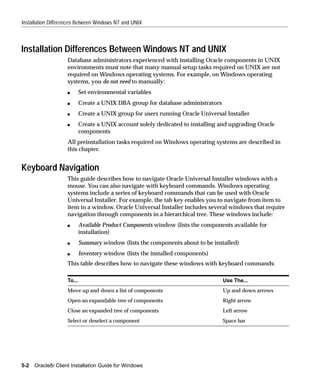
Installation Differences Between Windows NT and UNIX


Installation Differences Between Windows NT and UNIX
                    Database administrators experienced with installing Oracle components in UNIX
                    environments must note that many manual setup tasks required on UNIX are not
                    required on Windows operating systems. For example, on Windows operating
                    systems, you do not need to manually:
                    s       Set environmental variables
                    s       Create a UNIX DBA group for database administrators
                    s       Create a UNIX group for users running Oracle Universal Installer
                    s       Create a UNIX account solely dedicated to installing and upgrading Oracle
                            components
                    All preinstallation tasks required on Windows operating systems are described in
                    this chapter.


Keyboard Navigation
                    This guide describes how to navigate Oracle Universal Installer windows with a
                    mouse. You can also navigate with keyboard commands. Windows operating
                    systems include a series of keyboard commands that can be used with Oracle
                    Universal Installer. For example, the tab key enables you to navigate from item to
                    item in a window. Oracle Universal Installer includes several windows that require
                    navigation through components in a hierarchical tree. These windows include:
                    s       Available Product Components window (lists the components available for
                            installation)
                    s       Summary window (lists the components about to be installed)
                    s       Inventory window (lists the installed components)
                    This table describes how to navigate these windows with keyboard commands:

                    To...                                                         Use The...
                    Move up and down a list of components                         Up and down arrows
                    Open an expandable tree of components                         Right arrow
                    Close an expanded tree of components                          Left arrow
                    Select or deselect a component                                Space bar


5-2   Oracle8i Client Installation Guide for Windows
Preinstallation Tasks


                     See Also: The Microsoft Web site for information on standard
                     keyboard navigational commands:
                     http://www.microsoft.com


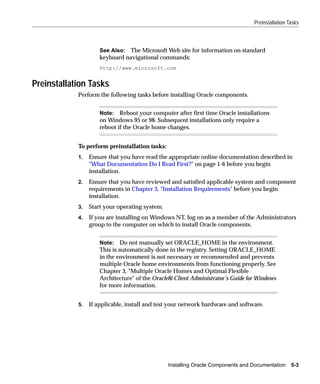
Preinstallation Tasks
            Perform the following tasks before installing Oracle components.


                     Note: Reboot your computer after first time Oracle installations
                     on Windows 95 or 98. Subsequent installations only require a
                     reboot if the Oracle home changes.


            To perform preinstallation tasks:
            1.   Ensure that you have read the appropriate online documentation described in
                 "What Documentation Do I Read First?" on page 1-6 before you begin
                 installation.
            2.   Ensure that you have reviewed and satisfied applicable system and component
                 requirements in Chapter 3, "Installation Requirements" before you begin
                 installation.
            3.   Start your operating system.
            4.   If you are installing on Windows NT, log on as a member of the Administrators
                 group to the computer on which to install Oracle components.


                     Note: Do not manually set ORACLE_HOME in the environment.
                     This is automatically done in the registry. Setting ORACLE_HOME
                     in the environment is not necessary or recommended and prevents
                     multiple Oracle home environments from functioning properly. See
                     Chapter 3, "Multiple Oracle Homes and Optimal Flexible
                     Architecture" of the Oracle8i Client Administrator’s Guide for Windows
                     for more information.


            5.   If applicable, install and test your network hardware and software.


                                                Installing Oracle Components and Documentation     5-3
Preinstallation Tasks


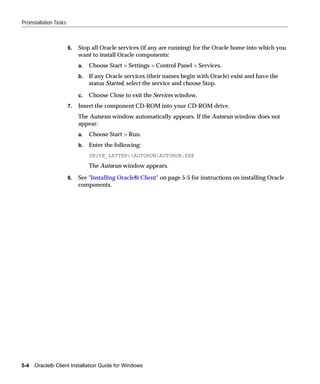
                        6.   Stop all Oracle services (if any are running) for the Oracle home into which you
                             want to install Oracle components:
                             a.   Choose Start > Settings > Control Panel > Services.
                             b.   If any Oracle services (their names begin with Oracle) exist and have the
                                  status Started, select the service and choose Stop.

                             c.   Choose Close to exit the Services window.
                        7.   Insert the component CD-ROM into your CD-ROM drive.
                             The Autorun window automatically appears. If the Autorun window does not
                             appear:
                             a.   Choose Start > Run.
                             b.   Enter the following:
                                  DRIVE_LETTER:AUTORUNAUTORUN.EXE
                                  The Autorun window appears.

                        8.   See "Installing Oracle8i Client" on page 5-5 for instructions on installing Oracle
                             components.


5-4   Oracle8i Client Installation Guide for Windows
Installing Oracle8i Client


Installing Oracle8i Client
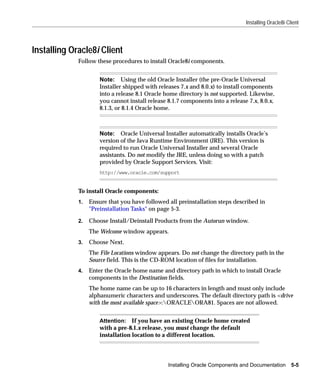
             Follow these procedures to install Oracle8i components.


                      Note: Using the old Oracle Installer (the pre-Oracle Universal
                      Installer shipped with releases 7.x and 8.0.x) to install components
                      into a release 8.1 Oracle home directory is not supported. Likewise,
                      you cannot install release 8.1.7 components into a release 7.x, 8.0.x,
                      8.1.3, or 8.1.4 Oracle home.


                      Note: Oracle Universal Installer automatically installs Oracle’s
                      version of the Java Runtime Environment (JRE). This version is
                      required to run Oracle Universal Installer and several Oracle
                      assistants. Do not modify the JRE, unless doing so with a patch
                      provided by Oracle Support Services. Visit:
                      http://www.oracle.com/support


             To install Oracle components:
             1.   Ensure that you have followed all preinstallation steps described in
                  "Preinstallation Tasks" on page 5-3.

             2.   Choose Install/Deinstall Products from the Autorun window.
                  The Welcome window appears.
             3.   Choose Next.
                  The File Locations window appears. Do not change the directory path in the
                  Source field. This is the CD-ROM location of files for installation.
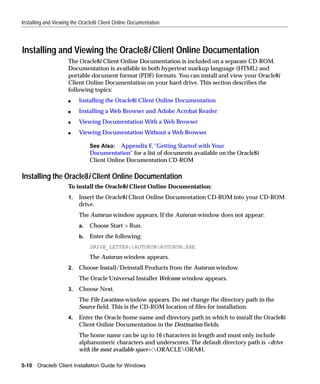
             4.   Enter the Oracle home name and directory path in which to install Oracle
                  components in the Destination fields.
                  The home name can be up to 16 characters in length and must only include
                  alphanumeric characters and underscores. The default directory path is <drive
                  with the most available space>:ORACLEORA81. Spaces are not allowed.


                      Attention: If you have an existing Oracle home created
                      with a pre-8.1.x release, you must change the default
                      installation location to a different location.


                                                 Installing Oracle Components and Documentation       5-5
Installing Oracle8i Client


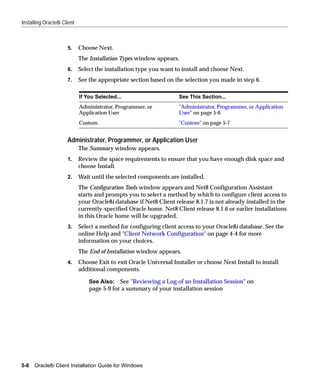
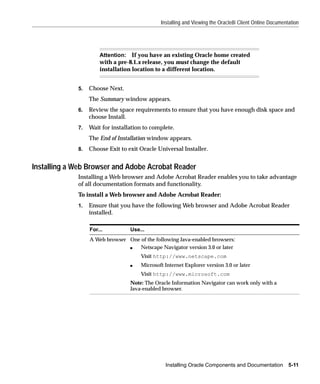
                      5.     Choose Next.
                             The Installation Types window appears.
                      6.     Select the installation type you want to install and choose Next.
                      7.     See the appropriate section based on the selection you made in step 6.

                             If You Selected...                      See This Section...
                             Administrator, Programmer, or           "Administrator, Programmer, or Application
                             Application User                        User" on page 5-6
                             Custom                                  "Custom" on page 5-7


                      Administrator, Programmer, or Application User
                             The Summary window appears.
                      1.     Review the space requirements to ensure that you have enough disk space and
                             choose Install.
                      2.     Wait until the selected components are installed.
                             The Configuration Tools window appears and Net8 Configuration Assistant
                             starts and prompts you to select a method by which to configure client access to
                             your Oracle8i database if Net8 Client release 8.1.7 is not already installed in the
                             currently-specified Oracle home. Net8 Client release 8.1.6 or earlier installations
                             in this Oracle home will be upgraded.
                      3.     Select a method for configuring client access to your Oracle8i database. See the
                             online Help and "Client Network Configuration" on page 4-4 for more
                             information on your choices.
                             The End of Installation window appears.
                      4.     Choose Exit to exit Oracle Universal Installer or choose Next Install to install
                             additional components.

                                 See Also: See "Reviewing a Log of an Installation Session" on
                                 page 5-9 for a summary of your installation session


5-6   Oracle8i Client Installation Guide for Windows
Installing Oracle8i Client


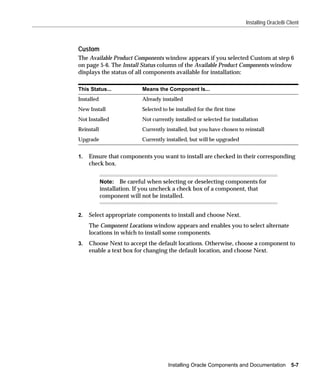
Custom
The Available Product Components window appears if you selected Custom at step 6
on page 5-6. The Install Status column of the Available Product Components window
displays the status of all components available for installation:

This Status...              Means the Component Is...
Installed                   Already installed
New Install                 Selected to be installed for the first time
Not Installed               Not currently installed or selected for installation
Reinstall                   Currently installed, but you have chosen to reinstall
Upgrade                     Currently installed, but will be upgraded


1.   Ensure that components you want to install are checked in their corresponding
     check box.


            Note: Be careful when selecting or deselecting components for
            installation. If you uncheck a check box of a component, that
            component will not be installed.


2.   Select appropriate components to install and choose Next.
     The Component Locations window appears and enables you to select alternate
     locations in which to install some components.
3.   Choose Next to accept the default locations. Otherwise, choose a component to
     enable a text box for changing the default location, and choose Next.


                                       Installing Oracle Components and Documentation           5-7
Installing Oracle8i Client


                      4.     If you selected any of the following components, provide appropriate responses
                             when prompted. Note that most components install silently without prompting
                             you for additional information.
                      .


                             If You Selected...       You Are...
                             Net8 Client              Not prompted to enter any information. However, Net8
                                                      Configuration Assistant starts at the end of installation and
                                                      prompts you to configure client access to your Oracle8i
                                                      database if Net8 Client release 8.1.7 is not already installed in
                                                      the currently-specified Oracle home.
                                                      Note: Net8 Client release 8.1.6 or earlier installations in this
                                                      Oracle home will be upgraded.
                                                      See Also: "Client Network Configuration" on page 4-4 for a
                                                      description of the configuration procedures performed
                             Oracle Advanced          Prompted to select the authentication methods for which you
                             Security                 want Oracle support. Kerberos, SecurID, and Radius
                                                      automatically appear for selection. Identix, CyberSafe, and
                                                      Entrust only appear if the appropriate third-party software is
                                                      installed.
                             Oracle Protocol Support Prompted to select the network protocol adapters for which
                                                     to provide Oracle support. See the online help for a
                                                     description of the Status column on this window.
                             Oracle Services for      Prompted to install Microsoft Transaction Server after
                             Microsoft Transaction    installation, if it is not currently installed.
                             Server


                             The Summary window appears.
                      5.     Review the space requirements to ensure that you have enough disk space and
                             choose Install.
                      6.     Wait until the selected components are installed and any configuration tools
                             have completed running.
                             The End of Installation window appears.
                      7.     Choose Exit to exit Oracle Universal Installer or choose Next Install to install
                             additional components.

                                 See Also: "Reviewing a Log of an Installation Session" on
                                 page 5-9 for a summary of your installation session


5-8   Oracle8i Client Installation Guide for Windows
Installing Oracle8i Client


Reviewing a Log of an Installation Session
                  A log that describes the actions performed and the components installed for the
                  most recent installation session is located in the file:
                  X:PROGRAM FILESORACLEINVENTORYLOGSINSTALLACTIONS.LOG
                  where X is the hard drive on which your operating system is located.
                  INSTALLACTIONS.LOG is the most recent log file. Log file names of previous
                  installation sessions are also in this directory and take the form
                  INSTALLACTIONSDATE_TIME.LOG (for example,
                  INSTALLACTIONS1999-07-14_09-00-56-AM.LOG).
                  You can also view a list of installed components by choosing Installed Products
                  on any window of Oracle Universal Installer. A window of installed programs
                  appears.


                                                Installing Oracle Components and Documentation      5-9
Installing and Viewing the Oracle8i Client Online Documentation


Installing and Viewing the Oracle8i Client Online Documentation
                     The Oracle8i Client Online Documentation is included on a separate CD-ROM.
                     Documentation is available in both hypertext markup language (HTML) and
                     portable document format (PDF) formats. You can install and view your Oracle8i
                     Client Online Documentation on your hard drive. This section describes the
                     following topics:
                     s    Installing the Oracle8i Client Online Documentation
                     s    Installing a Web Browser and Adobe Acrobat Reader
                     s    Viewing Documentation With a Web Browser
                     s    Viewing Documentation Without a Web Browser

                               See Also: Appendix F, "Getting Started with Your
                               Documentation" for a list of documents available on the Oracle8i
                               Client Online Documentation CD-ROM

Installing the Oracle8i Client Online Documentation
                     To install the Oracle8i Client Online Documentation:
                     1.   Insert the Oracle8i Client Online Documentation CD-ROM into your CD-ROM
                          drive.
                          The Autorun window appears. If the Autorun window does not appear:
                          a.   Choose Start > Run.
                          b.   Enter the following:
                               DRIVE_LETTER:AUTORUNAUTORUN.EXE
                               The Autorun window appears.
                     2.   Choose Install/Deinstall Products from the Autorun window.
                          The Oracle Universal Installer Welcome window appears.
                     3.   Choose Next.
                          The File Locations window appears. Do not change the directory path in the
                          Source field. This is the CD-ROM location of files for installation.
                     4.   Enter the Oracle home name and directory path in which to install the Oracle8i
                          Client Online Documentation in the Destination fields.
                          The home name can be up to 16 characters in length and must only include
                          alphanumeric characters and underscores. The default directory path is <drive
                          with the most available space>:ORACLEORA81.

5-10   Oracle8i Client Installation Guide for Windows
Installing and Viewing the Oracle8i Client Online Documentation


                      Attention: If you have an existing Oracle home created
                      with a pre-8.1.x release, you must change the default
                      installation location to a different location.


             5.   Choose Next.
                  The Summary window appears.
             6.   Review the space requirements to ensure that you have enough disk space and
                  choose Install.
             7.   Wait for installation to complete.
                  The End of Installation window appears.
             8.   Choose Exit to exit Oracle Universal Installer.


Installing a Web Browser and Adobe Acrobat Reader
             Installing a Web browser and Adobe Acrobat Reader enables you to take advantage
             of all documentation formats and functionality.
             To install a Web browser and Adobe Acrobat Reader:
             1.   Ensure that you have the following Web browser and Adobe Acrobat Reader
                  installed.

                  For...          Use...
                  A Web browser One of the following Java-enabled browsers:
                                s   Netscape Navigator version 3.0 or later
                                      Visit http://www.netscape.com
                                  s   Microsoft Internet Explorer version 3.0 or later
                                      Visit http://www.microsoft.com
                                  Note: The Oracle Information Navigator can work only with a
                                  Java-enabled browser.


                                                Installing Oracle Components and Documentation 5-11
Installing and Viewing the Oracle8i Client Online Documentation


                          For...            Use...
                          An Adobe       Adobe Acrobat Reader version 3.0 or later. This component is
                          Acrobat Reader available from either of two locations:
                                            From the component CD-ROM:
                                            1.   Go to the ACROREAD directory on the component CD-ROM.
                                            2.   Double-click AR405ENG.EXE (or run this file from the MS-DOS
                                                 command prompt).
                                                 A wizard guides you through Adobe Acrobat Reader installation.
                                            From the Adobe Web site:
                                            Visit http://www.adobe.com


Viewing Documentation With a Web Browser
                    You can view HTML and PDF documentation from a Web browser if both a Web
                    browser and Adobe Acrobat Reader are installed.
                    To view your documentation from a Web browser:
                    1.   Follow the procedures in "Installing a Web Browser and Adobe Acrobat Reader"
                         on page 5-11.
                    2.   Choose Start > Programs > Oracle - HOME_NAME > Documentation Library.
                         Your Web browser is automatically started, and a welcome page listing the
                         documentation categories described in "Online Documentation Set" on page F-4
                         appears.
                         Oracle Information Navigator also appears shortly thereafter.
                    3.   Navigate through your Oracle8i Client Online Documentation. Nearly all
                         documents are available for viewing in both HTML and PDF formats.
                    4.   Choose the question mark icon to access help for instructions on using Oracle
                         Information Navigator.


5-12   Oracle8i Client Installation Guide for Windows
Installing and Viewing the Oracle8i Client Online Documentation


Viewing Documentation Without a Web Browser
             If you do not have a Web browser installed, you can view the PDF formats of your
             documentation set if Adobe Acrobat Reader is installed.
             To view documentation without a Web browser:
             1.   Open Acrobat Reader or Acrobat Exchange.
             2.   Choose the File > Open menu option.
             3.   Select the following documents based on your needs.

                  If You Want to View...       Then...
                  A table of contents of all   1.    Go to the DOC directory.
                  PDF documentation
                                               2.    Double-click INDEX.PDF.
                                                     A top-level library of all categories appears.
                                               3.    Select a category to access a list of individual
                                                     documents.
                  An individual PDF file       1.    Go to the DOC directory.
                  directly without
                                               2.    Go to an appropriate subdirectory (for example,
                  browsing the table of
                                                     WIN.817 contains Oracle on Windows documentation).
                  contents
                                               3.    Double-click the file you want to view. PDF files are
                                                     named for the part number located on the title page of
                                                     each guide (for example, A12345.PDF).


                  Each individual PDF file contains a "PDF Directory" bookmark at the top of the
                  bookmark list. Choosing this bookmark takes you up one level to the table of
                  contents in which your individual file is located.


                      Note: Changes to Microsoft’s Internet Explorer release 3.02 to
                      address security issues can prevent Oracle Information Navigator
                      from starting and displaying properly. This does not affect your
                      access to the Oracle8i Client Online Documentation.


                      Note: After several documents are opened in Adobe Acrobat
                      Reader, you can receive an error message when trying to open an
                      additional document, stating that the document does not exist.
                      This error message occurs because memory is low. To solve the
                      problem, close any open documents that you are not using, and
                      continue.


                                                     Installing Oracle Components and Documentation 5-13
Installing and Viewing the Oracle8i Client Online Documentation


5-14   Oracle8i Client Installation Guide for Windows
6
Post-installation Configuration Tasks

This chapter identifies post-installation configuration tasks. Where appropriate, this
chapter references other guides for procedures on performing these configuration
tasks.
Specific topics discussed are:
s   Setting NTFS File System and Windows NT Registry Permissions
s   Individual Component Post-installation Configuration Tasks


                                               Post-installation Configuration Tasks   6-1
Setting NTFS File System and Windows NT Registry Permissions


Setting NTFS File System and Windows NT Registry Permissions
                    Oracle Corporation recommends that you configure Oracle8i database files,
                    directories, and registry settings to allow only authorized database administrators
                    (DBAs) to have full control. These topics describe how to perform these tasks:
                    s    NTFS File System Security
                    s    Windows NT Registry Security

                             See Also: Your Windows NT documentation for more
                             information about modifying NTFS file system and Windows NT
                             registry settings

NTFS File System Security
                    The Oracle8i database uses files to store database data, backup data, log
                    information, and so on. To do this, the Oracle8i database process runs under a
                    security account. This security account (the Windows NT LocalSystem account
                    called SYSTEM) includes the ability to create and access these files. The security
                    account is assigned to the service that the Oracle8i database uses (in the Control
                    Panel). This account requires full file system permissions to create, read, write,
                    delete, and execute files.
                    To ensure that only authorized users have full file system permissions:
                    1.   Go into Windows NT Explorer.
                    2.   Right-click Oracle8i database files (in the ORACLE_BASEORADATADB_
                         NAME directory), executables and dynamic link libraries (in the ORACLE_
                         BASEORACLE_HOMEBIN directory), and directories.
                    3.   Select Properties from the menu that appears.
                    4.   Adjust the file and directory permissions to ensure that:
                         s   Only the security account that the Oracle8i database is configured to use has
                             full control permissions to these files
                         s   User accounts that must run Oracle applications (for example, SQL*Plus,
                             Server Manager, and Pro*C) have read privileges on their executables (for
                             example, SQLPLUS.EXE for SQL*Plus)


                             Note: The Oracle8i database uses the Windows NT LocalSystem
                             built-in security account. Therefore, file permissions must be
                             granted to the SYSTEM account of the local computer running the
                             Oracle8i database.


6-2   Oracle8i Client Installation Guide for Windows
Setting NTFS File System and Windows NT Registry Permissions


Windows NT Registry Security
             Oracle Corporation recommends that you remove write permissions from users
             who are not Oracle8i DBAs or system administrators in HKEY_LOCAL_
             MACHINESOFTWAREORACLE of the Windows NT registry.
             To remove write permissions:
             1.   Open the registry.
             2.   Go to HKEY_LOCAL_MACHINESOFTWAREORACLE.
             3.   Select Permissions from the Security main menu.
                  The Registry Key Permissions dialog box appears.
             4.   Remove write permissions from any users who are not Oracle8i DBAs or
                  system administrators. Note that the SYSTEM account must have Full Control,
                  since this is the account with which the Oracle8i database runs.
             5.   Ensure that user accounts that must run Oracle applications have read
                  privileges.
             6.   Choose OK.
             7.   Exit the registry.


                                                             Post-installation Configuration Tasks   6-3
Individual Component Post-installation Configuration Tasks


Individual Component Post-installation Configuration Tasks
                      Some individual components require post-installation configuration tasks. Review
                      the following table for configuration requirements and see the sections or
                      documents referenced for specific configuration procedures:

Component               Description                                                     See Also...
Net8 network            Net8 Configuration Assistant is a tool that assists you in      s   Net8 Administrator’s
software                configuring your Oracle network.                                    Guide and the online
                                                                                            help available with both
                        If you installed Net8 Client, Net8 Configuration Assistant
                                                                                            tools
                        automatically started at the end of installation to guide you
                        through network configuration.                                  s   "Selecting a Net8
                                                                                            Configuration Method"
                        You can also configure your Oracle network after
                                                                                            on page 4-3 for a
                        installation with the Net8 Configuration Assistant and
                                                                                            discussion of available
                        Net8 Assistant tools.
                                                                                            configuration choices
Oracle Advanced         Authentication, encryption, integrity support, and              Oracle Advanced Security
Security                enterprise user security require configuration.                 Administrator’s Guide
Oracle Enterprise       After Oracle Enterprise Manager Console installation, you Oracle Enterprise Manager
Manager Console         must perform additional setup tasks (for example, discover Configuration Guide
                        services, create administrator accounts, and specify
                        preferred credentials) to manage and monitor services with
                        Oracle Enterprise Manager.
Oracle Services for     You must manually create and configure a special                s   Using Microsoft
Microsoft               Windows NT service. In addition, you must install                   Transaction Server With
Transaction Server      Microsoft Transaction Server, if it is not already installed.       Oracle8
                                                                                        s   Your Microsoft
                                                                                            documentation
Oracle Workflow         Perform a number of configuration procedures, including:        s   Oracle Workflow
Builder and Mailer                                                                          Installation Supplement
                        s   Editing the INIT.ORA parameter file
                                                                                        s   Oracle Workflow Guide
                        s   Installing and configuring a Web server
                        s   Verifying your base URL
                        s   Setting up Oracle Workflow Monitor and HTML help
Pro*COBOL               Pro*COBOL supports specific compilers.                          Chapter 1, "Introducing
                                                                                        Pro*COBOL" of Pro*COBOL
                                                                                        Precompiler Getting Started
                                                                                        for Windows
SQL*Plus help file      If you want to use online help with SQL*Plus, you must          Chapter 2, "Installing
                        populate the SQL*Plus tables with help files.                   SQL*Plus Help and
                                                                                        Demonstration Tables" of
                                                                                        SQL*Plus Getting Started for
                                                                                        Windows


6-4   Oracle8i Client Installation Guide for Windows
7
Deinstalling Oracle Components and
                          Services

This chapter describes how to deinstall Oracle components and services.
Specific topics discussed are:
s   Deinstalling Oracle Components with Oracle Universal Installer
s   Manually Removing All Oracle Components and Services from Your Computer


                                     Deinstalling Oracle Components and Services   7-1
Deinstalling Oracle Components with Oracle Universal Installer


Deinstalling Oracle Components with Oracle Universal Installer
                     This section describes how to use Oracle Universal Installer to deinstall Oracle
                     components (which deinstalls them from the Oracle Universal Installer inventory)
                     instead of removing them manually. If you delete an Oracle home manually (for
                     example, by deleting the directory structure with Windows NT Explorer), the
                     components in that Oracle home remain registered in the Oracle Universal Installer
                     inventory. If you then attempt an installation in the same Oracle home, some or all
                     of the components selected may not be installed because Oracle Universal Installer
                     determines they are already installed.


                              Note: Manual removal of components is permitted only if you exit
                              Oracle Universal Installer during an installation. For example:
                              s    Choosing Cancel
                              s    Turning off the computer
                              s    If the installation does not complete (that is, all required
                                   configuration tools do not run at the end)
                              In these cases, Oracle Universal Installer does not register the
                              installation in its inventory. However, files may have been copied to
                              your Oracle home. Remove these files manually and restart the
                              installation.


Task 1: Deinstall Net8 Services and Registry Entries
                     If you want to deinstall Net8 Client components on Windows NT, you must first
                     deinstall the registry entries for their services by following these steps. If you do not
                     want to deinstall these components, go to step "Task 2: Deinstall Components with
                     Oracle Universal Installer" on page 7-3 to complete deinstallation.

                     To deinstall Net8 services and registry entries:
                     1.   Choose Start > Settings > Control Panel > Services.
                     2.   If any Oracle services (names begin with Oracle) exist and have the status
                          Started, select the service, and choose Stop.
                     3.   Choose Close to exit the Services window.
                     4.   Exit the Control Panel.
                     5.   Start the registry at the MS-DOS command prompt:
                          C:> REGEDT32


7-2   Oracle8i Client Installation Guide for Windows
Deinstalling Oracle Components with Oracle Universal Installer


              6.   Go to HKEY_LOCAL_MACHINESYSTEMCurrentControlSetServices and
                   delete the OracleHOME_NAMETNSListener registry entry. All other Net8
                   services will be automatically deleted through Oracle Universal Installer.
              7.   Exit the registry.


Task 2: Deinstall Components with Oracle Universal Installer
              To deinstall components with Oracle Universal Installer:
              1.   If you want to deinstall the Net8 listener, ensure that you first follow the
                   instructions in "Task 1: Deinstall Net8 Services and Registry Entries" on
                   page 7-2.
              2.   Choose Start > Programs > Oracle Installation Products > Universal Installer.
                   The Welcome window for Oracle Universal Installer appears.
              3.   Choose Deinstall Products.
                   The Inventory window appears.
              4.   Expand the tree of installed components until you find the components to
                   deinstall.
              5.   Check the boxes of components to deinstall.
              6.   Choose Remove.
                   The Inventory Confirmation window appears.
              7.   Choose Yes to deinstall the selected components.


                       Note: A message may appear indicating that removing some
                       components may cause other components to not function properly.


                   The components are deinstalled from your computer. The Inventory window
                   appears without the deinstalled components.
              8.   Choose Close to close the Inventory window.
              9.   Choose Exit to exit Oracle Universal Installer.


                                                      Deinstalling Oracle Components and Services         7-3
Manually Removing All Oracle Components and Services from Your Computer


Manually Removing All Oracle Components and Services from Your
Computer
                    In rare situations, you may want to correct serious system problems by completely
                    removing Oracle components from the computer.
                    Remove all Oracle components from your computer only as a last resort, and only if
                    you want to remove all Oracle components from your system.


Removing Components on Windows NT
                    To remove all Oracle components from a computer on Windows NT:


                              Caution: These instructions remove all Oracle components,
                              services, and registry entries from your computer. In addition, any
                              database files under ORACLE_BASEORADATADB_NAME are
                              also removed. Exercise extreme care when removing registry
                              entries. Removing incorrect entries can break your system.


                    1.   Ensure you are logged in as a user with Administrator privileges.
                    2.   Stop all Oracle services (if any are running):
                         a.   Choose Start > Settings > Control Panel > Services.
                         b.   If any Oracle services (their names begin with Oracle) exist and have the
                              status Started, select the service and choose Stop.
                         c.   Choose Close to exit the Services window.
                    3.   Start the registry at the MS-DOS command prompt:
                         C:> REGEDT32
                    4.   Go to HKEY_CLASSES_ROOT.
                    5.   Delete any key that starts with Oracle or ORCL.
                    6.   Go to HKEY_LOCAL_MACHINESOFTWAREORACLE.
                    7.   Delete the ORACLE key.
                    8.   Delete the Oracle ODBC Driver key under HKEY_LOCAL_
                         MACHINESOFTWAREODBCODBCINST.INI.


7-4   Oracle8i Client Installation Guide for Windows
Manually Removing All Oracle Components and Services from Your Computer


9.   Go to HKEY_LOCAL_MACHINESYSTEMCurrentControlSetServices and
     remove all keys under here that begin with ORACLE.
10. Go to HKEY_LOCAL_MACHINESYSTEMCurrentControlSetServices
     EventLogApplication, and remove all keys under here that begin with
     ORACLE.
11. Go to HKEY_CURRENT_USERSOFTWAREORACLE.

12. Delete keys that start with Oracle or ORCL (if any exist).

13. Go to HKEY_CURRENT_USERSOFTWAREODBCODBCINST.INI.

14. Delete any Oracle keys (if any exist).

15. Close the registry.

16. Go to Start > Settings > Control Panel > System > Environment tab.

17. Choose the system variable path and modify the Path variable.

18. Remove any Oracle entries from the path. For example, if JRE was installed by
     Oracle, remove the %ORACLE_HOME%BIN path and the JRE path. You may
     see a path similar to this one:
     C:ORACLEORA81BIN;G:PROGRAM FILESORACLEJRE1.1.7BIN
19. Exit the Control Panel.
20. Go to SYSTEM_DRIVE:WINNTPROFILESALL USERSSTART
     MENUPROGRAMS.
21. Delete the following icons:

     s   Oracle - HOME_NAME
     s   Oracle Installation Products
         where HOME_NAME is the previous Oracle home name.
22. Delete SYSTEM_DRIVE:Program FilesOracle through Windows NT Explorer.
23. Delete all ORACLE_BASE directories on your hard drive.

24. Reboot your computer.


                                        Deinstalling Oracle Components and Services     7-5
Manually Removing All Oracle Components and Services from Your Computer


Removing Components on Windows 95 or Windows 98
                    To remove all Oracle components from a computer on Windows 95 or 98:
                    1.   Start the registry at the MS-DOS command prompt:
                         C:> REGEDIT
                    2.   Go to HKEY_CLASSES_ROOT.
                    3.   Delete any key that starts with Oracle or ORCL.
                    4.   Go to HKEY_LOCAL_MACHINESOFTWAREORACLE.
                    5.   Delete the ORACLE key.
                    6.   Delete the Oracle ODBC Driver key under HKEY_LOCAL_
                         MACHINESOFTWAREODBCODBCINST.INI.
                    7.   Go to HKEY_CURRENT_USERSOFTWAREORACLE.
                    8.   Delete keys that start with Oracle or ORCL (if any exist).
                    9.   Go to HKEY_CURRENT_USERSOFTWAREODBCODBCINST.INI.
                    10. Delete any Oracle keys.

                    11. Edit your AUTOEXEC.BAT file and remove your %ORACLE_HOME%BIN
                         and JRE paths from the path setting.
                    12. Delete SYSTEM_DRIVE:Program FilesOracle through Windows Explorer.

                    13. Delete icons from:

                         s   SYSTEM_DRIVE:WINDOWSSTART MENUPROGRAMSORACLE -
                             HOME_NAME
                         s   SYSTEM_DRIVE:WINDOWSSTART MENUPROGRAMSORACLE
                             INSTALLATION PRODUCTS
                             where HOME_NAME is the previous Oracle home name.
                    14. Delete all ORACLE_BASE directories on your hard drive.

                    15. Reboot your computer.


7-6   Oracle8i Client Installation Guide for Windows
A
Individual Components Available for
                       Installation

This appendix lists the individual components available with each installation type.
Specific topics discussed are:
s   Oracle8i Client Components
s   Components Not Available with 8.1.7


        Note: The Custom installation type is not listed for any of the
        above three top-level components since it allows you to install all
        components in the current category. Some components can only be
        installed through a Custom installation. Such components have an
        availability of "No" listed for other installation types in the tables in
        this appendix.


        Note: This appendix identifies higher-level components available
        with each installation type. To access a list of all components and
        features installed (including lower-level components such as
        Required Support Files or Common Files), see "Reviewing a Log of
        an Installation Session" on page 5-9.


                                      Individual Components Available for Installation A-1
Oracle8i Client Components


Oracle8i Client Components
                      This table alphabetically lists the components available with each installation type
                      of Oracle8i Client.

                                                                                       Oracle8i Client

Component                                                                Administrator Programmer Application User

Advanced Queueing API                                                        Yes           Yes           Yes
Net8 Client, includes:                                                       Yes           Yes           Yes
s    Net8 Assistant                                                          Yes           Yes           Yes
s    Net8 Configuration Assistant                                            Yes           Yes           Yes
s    Oracle Protocol Support                                                 Yes           Yes           Yes
     Note: When Net8 Client is installed through the Typical or
     Minimal installation type, Oracle Protocol Support is
     automatically installed for the networking protocols detected. If
     Oracle Protocol Support is selected through the Custom
     installation type, you are prompted to select the additional
     networking protocols for which you want support (SPX and
     LU6.2). Named Pipes and TCP/IP protocol support is
     automatically installed and cannot be de-installed.
Object Type Translator, includes:                                            Yes           Yes           No
s    Oracle INTYPE File Assistant                                            Yes           Yes           No
Oracle Advanced Security, includes:                                          Yes           Yes           Yes
1.   Encryption and Integrity Support, includes:                             Yes           Yes           Yes
s      DES40 Encryption                                                      Yes           Yes           Yes
s      DES56 Encryption                                                      Yes           Yes           Yes
s      3DES_112 Encryption (2-key option)                                    Yes           Yes           Yes
s      3DES_168 Integrity (3-key option)                                     Yes           Yes           Yes
s      RC4_40 Encryption                                                     Yes           Yes           Yes
s      RC4_56 Encryption                                                     Yes           Yes           Yes
s      RC4_128 Encryption                                                    Yes           Yes           Yes
s      RC4_256 Integrity                                                     Yes           Yes           Yes
s      SHA-1 Integrity                                                       Yes           Yes           Yes
s      MD5 Integrity                                                         Yes           Yes           Yes


A-2 Oracle8i Client Installation Guide for Windows
Oracle8i Client Components


                                                                                      Oracle8i Client

Component                                                               Administrator Programmer Application User

2.   Thin JDBC Java-based Encryption Support, includes:                     Yes           Yes             Yes
s      DES40 Encryption                                                     Yes           Yes             Yes
s      DES56 Encryption                                                     Yes           Yes             Yes
s      RC4_40 Encryption                                                    Yes           Yes             Yes
s      RC4_56 Encryption                                                    Yes           Yes             Yes
s      RC4_128 Encryption                                                   Yes           Yes             Yes
s      RC4_256 Integrity                                                    Yes           Yes             Yes
s      SHA-1 Integrity                                                      Yes           Yes             Yes
s      MD5 Integrity                                                        Yes           Yes             Yes
3.   Authentication Support, includes:                                      Yes           Yes             Yes
s     CyberSafe (with SSO support)                                          No            No              No
s     DCE (with SSO support)                                                No            No              No
s     Entrust                                                               No            No              No
s     Identix (for Biometrics)                                              Yes           Yes             Yes
s     Kerberos (with SSO support)                                           Yes           Yes             Yes
s     RADIUS (for Smart Cards, Token Cards, and Biometrics)                 Yes           Yes             Yes
s     SecurID (for Token Cards)                                             Yes           Yes             Yes
s     Secure Socket Layer (with X.509 version 3 and SSO support)            Yes           Yes             Yes
     Note: Kerberos, SecurID, and Radius are installable through the
     Custom installation Authentication Methods window. Identix,
     CyberSafe, and Entrust only appear for installation in this
     window if the appropriate third-party software is installed. DCE
     is only installable though the Custom installation Available
     Product Components window.
4.   Enterprise User Security, includes:
s    Oracle Enterprise Login Assistant                                      Yes           Yes             Yes
s    Oracle Enterprise Security Manager (started through Oracle             Yes           No              No
     Enterprise Manager Integrated Applications)
s    Oracle Wallet Manager                                                  Yes           Yes             Yes
     Note: Oracle Enterprise Login Assistant, Oracle Enterprise
     Security Manager, and Oracle Wallet Manager are features of
     Oracle Advanced Security and can only be used if you have
     purchased an Oracle Advanced Security license.


                                                               Individual Components Available for Installation A-3
Oracle8i Client Components


                                                                                   Oracle8i Client

Component                                                            Administrator Programmer Application User

Oracle Call Interface                                                    Yes           Yes           Yes
Oracle Enterprise Java Beans and CORBA Tools                             Yes           Yes           No
Oracle Enterprise Manager, includes:                                     Yes           No            No
1.   Oracle Enterprise Manager Client, includes:                         Yes           No            No
s     Oracle Enterprise Manager Console                                  Yes           No            No
s     Oracle Enterprise Manager Events                                   Yes           No            No
s     Oracle Enterprise Manager Migration Assistant                      Yes           No            No
s     Oracle DBA Management Pack, includes:                              Yes           No            No

        Oracle DBA Studio1                                               Yes           No            No

        Oracle Instance Manager                                          No            No            No
        Oracle Schema Manager                                            No            No            No
        Oracle Security Manager                                          No            No            No
        Oracle Storage Manager                                           No            No            No
        SQL*Plus Worksheet                                               Yes           No            No
s     Oracle Enterprise Manager Integrated Applications, includes:       Yes           No            No
        Oracle Enterprise Security Manager                               Yes           No            No
        Note: Licensed through Oracle Advanced Security.
        Oracle Parallel Server Manager                                   Yes           No            No
        Oracle interMedia Text Manager                                   Yes           No            No
        Oracle Forms Server Manager                                      Yes           No            No
        Oracle Spatial Index Advisor                                     Yes           No            No
        Oracle Directory Manager                                         Yes           No            No
2.   Oracle Enterprise Manager Paging Server                             No            No            No
3.   Oracle Enterprise Manager Quick Tours                               Yes           No            No
Oracle interMedia Client Option                                          Yes           Yes           Yes
Oracle Internet Directory Client                                         Yes           No            No


A-4 Oracle8i Client Installation Guide for Windows
Oracle8i Client Components


                                                                                  Oracle8i Client

Component                                                          Administrator Programmer Application User

Oracle JDBC Drivers, includes:                                          Yes           Yes             Yes
s    Oracle JDBC Thin Driver for JDK 1.1                                Yes           Yes            Yes
s    Oracle JDBC Thin Driver for JDK 1.2                                Yes           Yes            Yes
s    Oracle JDBC/OCI Driver for JDK 1.1                                 Yes           Yes             Yes
s    Oracle JDBC/OCI Driver for JDK 1.2                                 Yes           Yes             No
Oracle Migration Workbench                                              No            No              No
Oracle Objects for OLE                                                  Yes           Yes             Yes
Oracle ODBC Driver                                                      Yes           Yes             Yes
Oracle Provider for OLE DB                                              Yes           Yes             Yes
Oracle Services for Microsoft Transaction Server                        No            No              No
Oracle SQLJ, includes:                                                  Yes           Yes             No
s    SQLJ Runtime                                                       Yes           Yes             No
s    SQLJ Translator                                                    Yes           Yes             No
Oracle Universal Installer, includes:                                   Yes           Yes             Yes
s    Oracle’s version of Java Runtime Environment                       Yes           Yes             Yes
s    Oracle Home Selector                                               Yes           Yes             Yes
Oracle Utilities, includes:                                             Yes           Yes             Yes
s    Export                                                             Yes           Yes             Yes
s    Import                                                             Yes           Yes             Yes
s    Recovery Manager                                                   Yes           Yes             No
s    SQL*Loader                                                         Yes           Yes             Yes
Oracle Visual Information Retrieval Client                              Yes           Yes             Yes
Oracle Workflow Builder                                                 No            No              No
Oracle Workflow Mailer                                                  No            No              No
Oracle XML Developer’s Kit                                              Yes           Yes             Yes
Oracle XML SQL Utility                                                  Yes           Yes             Yes
Oracle8i Windows Documentation (installation guide and release          Yes           Yes             Yes
notes)


                                                            Individual Components Available for Installation A-5
Components Not Available with 8.1.7


                                                                                Oracle8i Client

Component                                                         Administrator Programmer Application User

PL/SQL                                                                 Yes          Yes           No
Pro*C/C++                                                              Yes          Yes           No
Pro*COBOL 8.1.7                                                        No           No            No
Pro*COBOL 1.8.52                                                       Yes          Yes           No
Replication API                                                        Yes          Yes           No
SQL*Plus                                                               Yes          Yes           Yes
1
    Includes functionality for Oracle Replication Manager.


                                 See Also: "Component Descriptions" on page B-2 for descriptions
                                 and release numbers of these components


Components Not Available with 8.1.7
                       The following components that were part of 8.1.6 are not available for installation
                       with 8.1.7:
                       s    Oracle Web Publishing Assistant
                       s    Oracle AppWizard for Microsoft Visual C++


A-6 Oracle8i Client Installation Guide for Windows
B
    Individual Component Descriptions

This appendix provides descriptions and release numbers of the individual
components available with each installation type.
The specific topic discussed is:
s   Component Descriptions


        Note: Components that require a separate license are identified in
        their descriptions in this appendix.


        Note: Component descriptions are also provided in the Available
        Product Components window that appears when you select the
        Custom installation type in Oracle Universal Installer. Drag your
        cursor over a specific component to display a description.


                                               Individual Component Descriptions B-1
Component Descriptions


Component Descriptions
                     This table provides descriptions and release numbers of individual components
                     available for installation. References are made to documentation that more fully
                     describes these components. Some components described below are automatically
                     installed with other components.

Component                Release    Description                                              See Also...
Advanced                 8.1.7      A component that provides the functionality to           Oracle8i Application
Queueing API                        support the Advanced Queueing application                Developer’s Guide -
                                    programming interface (API).                             Advanced Queuing
Assistant Common         8.1.7      A collection of automatically installed files required   Not applicable
Files                               by Oracle assistants. These files include:
(installed with                     s   BaliShare 1.0.8 (compressed)
Oracle assistants,
                                    s   DBUI 1.1.2
such as Net8
Assistant)                          s   EWT 3.3.6 (compressed)
                                    s   ICE Browser 4.06.6 (compressed)
                                    s   Java Swing Components 1.1.1 (compressed)
                                    s   Kodiak 1.1.3
                                    s   Oracle Help for Java 3.1.8 (compressed)
                                    s   SMUI 1.0.8
Java Runtime             1.1.7.30   Required for running Java applications, such as          Not applicable
Environment                         Oracle Universal Installer.
(Oracle’s version)
LSM Administrator        8.1.7      A client tool for administering the Legato Storage       s   Legato Storage
GUI                                 Manager (LSM) server from a separate Windows NT              Manager
                                    computer.                                                    Administrator’s
                                                                                                 Guide for
                                                                                                 Windows 2000
                                                                                                 and Windows NT
                                                                                             s   Appendix E,
                                                                                                 "Installing and
                                                                                                 Removing
                                                                                                 Legato
                                                                                                 Components"


B-2 Oracle8i Client Installation Guide for Windows
Component Descriptions


Component              Release   Description                                               See Also...
Legato Storage         8.1.7     If you are using Recovery Manager (RMAN) for              s   Legato Storage
Manager (LSM)                    Oracle database backups, a media management                   Manager
server                           component such as LSM server is required for backing          Administrator’s
                                 up and restoring from tape. You can choose to install         Guide for
                                 the media management component on your                        Windows 2000
                                 CD-ROM, which is LSM server, or use a third-party             and Windows NT
                                 media management component that also complies
                                                                                           s   Appendix E,
                                 with Oracle’s Backup Solutions Program. LSM server
                                                                                               "Installing and
                                 also includes a scaled-down version of Legato
                                                                                               Removing
                                 NetWorker. For more information on this component,
                                                                                               Legato
                                 call toll free (1) 888-8-LEGATO in the United States of
                                                                                               Components"
                                 America.
Net8 Assistant         8.1.7     A tool that combines configuration abilities with         Net8 Administrator’s
                                 component control to provide an integrated                Guide
(installed with Net8
                                 environment for configuring and managing Net8. It
Client)
                                 can be used on either the client or server.
                                 Use Net8 Assistant to configure the following
                                 network components:
                                 s   Naming
                                     Define simple names, connect identifiers, and
                                     map them to connect descriptors to identify the
                                     network location and identification of a service.
                                     Net8 Assistant supports configuration of connect
                                     descriptors in local TNSNAMES.ORA files, a
                                     centralized LDAP-compliant directory server, or
                                     an Oracle Names server.
                                 s   Naming Methods
                                     Configure the different ways in which connect
                                     identifiers are resolved into connect descriptors.
                                 s   Listeners
                                     Create and configure listeners to receive client
                                     connections.
                                 If an Oracle Names server is configured, you start,
                                 stop, tune, or gather statistics with Net8 Assistant.


                                                                         Individual Component Descriptions B-3
Component Descriptions


Component                Release   Description                                                 See Also...
Net8 Client              8.1.7     A component that provides features that enable client       Net8 Administrator’s
                                   connections to databases across a network. A                Guide
                                   client-side application sends a request to Net8 to be
                                   transported across the network to the server.
                                   Net8 Client (and not Oracle Universal Installer)
                                   installs TCP/IP and Named Pipes, and auto-detects
                                   SPX. SPX is only installed if the appropriate software
                                   is detected on your computer. If you explicitly select
                                   this component through the Custom installation type,
                                   it will be installed even if you do not have the
                                   appropriate software on your computer.
Net8 Configuration       8.1.7     A tool that enables you to configure network                Net8 Administrator’s
Assistant                          components. Net8 Configuration Assistant runs               Guide
                                   automatically after installation, as described in this
(installed with Net8
                                   guide. Use it on either the client or server. It may also
Client)
                                   be run in standalone mode to configure naming
                                   methods usage, the listener, net service names in the
                                   TNSNAMES.ORA file, and directory server access.
Object Type              8.1.7     OTT is used to create C-struct representations of           Oracle Call Interface
Translator (OTT)                   Abstract Data Types that have been created and              Programmer’s Guide
                                   stored in an Oracle database. To take advantage of
                                   objects, run OTT against the database, and a header
                                   file is generated that includes the C-structs.
Oracle Advanced          8.1.7     Oracle Advanced Security provides the following             Oracle Advanced
Security                           comprehensive suite of security services for Oracle8i.      Security
                                                                                               Administrator’s Guide
                                   This multicomponent product requires a separate license.
1.   Authentication                Strong authentication support is provided. See
     support                       Appendix A, "Individual Components Available for
                                   Installation" for more information.
2.   Authorization                 Authorization solutions are provided with the
     support                       distributed computing environment (DCE), and with
                                   the enterprise role management functionality in
                                   Oracle Advanced Security.
3.   Encryption                    Data confidentiality is ensured using the encryption
     and Integrity                 and data integrity types listed in Appendix A,
     support                       "Individual Components Available for Installation".
                                   Note: Recent changes in United States Export
                                   Administration Regulations (EAR) make it possible
                                   for Oracle Corporation to ship one edition of Oracle
                                   Advanced Security worldwide. Oracle Advanced
                                   Security includes strong encryption for protocols into
                                   the Oracle8i database that were previously available
                                   only to the U.S. and Canadian markets.


B-4 Oracle8i Client Installation Guide for Windows
Component Descriptions


Component             Release   Description                                              See Also...
4.   Enterprise                 Integration with Lightweight Directory Access
     User Security              Protocol (LDAP) v3-compliant directory services is
     support                    provided, such as Oracle Internet Directory, for
                                centralized enterprise user management, enterprise
                                role management, and single sign-on.
5.   Single Sign                Single sign on is provided (users authenticate once).
     On support                 Strong authentication then occurs transparently in
                                subsequent connections. Kerberos, CyberSafe, DCE,
                                and secure socket layer (SSL)-based single sign on are
                                supported.
Oracle Call           8.1.7     An API for accessing an Oracle database from a C or      s   Oracle Call
Interface (OCI)                 C++ program. You make calls directly to the OCI              Interface
                                functions from within your C or C++ program to               Programmer’s
                                direct the execution of your SQL statements.                 Guide
                                                                                         s   Oracle Call
                                                                                             Interface Getting
                                                                                             Started for
                                                                                             Windows
Oracle DBA            2.2       A set of tools and wizards bundled with Oracle           Oracle Enterprise
Management Pack                 Enterprise Manager. The Oracle DBA Management            Manager
                                Pack performs most database administration tasks,        Administrator’s Guide
                                and supports all versions of Oracle databases.
Oracle DBA Studio     2.2       A tool that integrates the functionality of schema,      Oracle Enterprise
                                security, storage, instance, and replication             Manager
(part of Oracle DBA
                                management into one management tool.                     Administrator’s Guide
Management Pack)
Oracle Directory      2.1.1     A Java-based tool for administering most functional      Oracle Internet
Manager                         areas of Oracle Internet Directory and its related       Directory
                                processes.                                               Administrator’s Guide
(part of Oracle
Enterprise Manager
Integrated
Applications)
Oracle Enterprise     8.1.7     An architecture for developing transactional             Oracle8i Enterprise
Java Beans and                  applications as distributed components in Java.          JavaBeans Developer’s
CORBA Tools                                                                              Guide and Reference
Oracle Enterprise     1.1       A tool that enables single sign on, which implements     Oracle Advanced
Login Assistant                 a subset of Oracle Wallet Manager functionality for      Security
                                opening a user wallet and enabling applications to       Administrator’s Guide
                                use it.


                                                                       Individual Component Descriptions B-5
Component Descriptions


Component                Release   Description                                                See Also...
Oracle Enterprise        2.2       A suite of components that provide an integrated           Oracle Enterprise
Manager                            solution for centrally managing your heterogeneous         Manager
                                   environment. Oracle Enterprise Manager combines a          Administrator’s Guide
                                   graphical console, Oracle Management Servers,
                                   Oracle Intelligent Agents, common services, and tools
                                   to provide an integrated, comprehensive systems
                                   management platform for managing Oracle and
                                   third-party components.
Oracle Enterprise        2.2       The first tier of Oracle Enterprise Manager is             Oracle Enterprise
Manager Client                     comprised of clients such as consoles and                  Manager Concepts
                                   management applications, which present graphical           Guide
                                   user interfaces to administrators for all management
                                   tasks. These client components can be installed locally
                                   or brought up with a Web browser.
Oracle Enterprise        2.2       Client interface for the first tier of Oracle Enterprise   Oracle Enterprise
Manager Console                    Manager, which:                                            Manager
                                                                                              Administrator’s Guide
                                   s   Centrally administers, diagnoses, and tunes
                                       multiple databases
                                   s   Manages other Oracle components and services
                                   s   Monitors and responds to the status of Oracle
                                       components and third-party services 24 hours a
                                       day
                                   s   Schedules jobs on multiple nodes at varying time
                                       intervals
                                   s   Monitors networked services for events
                                   s   Customizes your display by organizing databases
                                       and other services into logical administrative
                                       groups
Oracle Enterprise        2.2       A set of predefined event tests used to monitor your       Oracle Enterprise
Manager Events                     global environment for problem occurrences.                Manager
                                                                                              Administrator’s Guide
Oracle Enterprise        2.2       Applications integrated with Oracle Enterprise             Oracle Enterprise
Manager                            Manager for managing your Oracle environment, and          Manager
Integrated                         installed with Oracle Enterprise Manager if your           Administrator’s Guide
Applications                       environment requires them. The applications can be
                                   accessed from the Oracle Enterprise Manager
                                   Navigator pane and/or the console application
                                   drawers, or from your operating system.


B-6 Oracle8i Client Installation Guide for Windows
Component Descriptions


Component            Release Description                                               See Also...
Oracle Enterprise    2.2     A tool that performs migration of an Oracle               Oracle Enterprise
Manager Migration            Enterprise Manager release 1.6 and above repository       Manager
Assistant                    to a version 2.2 repository.                              Administrator’s Guide
                             Note: Oracle Enterprise Manager Migration Assistant
                             is only supported on Windows NT, Windows 95,
                             Windows 2000, and Windows 98. However, the Oracle
                             Enterprise Manager Migration Assistant can remotely
                             migrate repository data from any release 1.x
                             repository to release 2.2, regardless of the source and
                             destination repository database platforms.
Oracle Enterprise    2.2     A feature that enables administrators to receive          Oracle Enterprise
Manager Paging               paging notifications from the console.                    Manager
Server                                                                                 Configuration Guide
Oracle Enterprise    2.2     HTML-based training tools that provide a fast and         Oracle Enterprise
Manager Quick                easy way to learn about a variety of Oracle Enterprise    Manager
Tours                        Manager components without having to actually             Administrator’s Guide
                             install them. Quick tours are provided for the
                             following components:
                             s   Oracle Enterprise Manager
                             s   Oracle DBA Management Pack
                             s   Change Management Pack
                             s   Diagnostics Pack
                             s   Tuning Pack
                             s   Management Pack for Oracle Applications
                             s   Management Pack for SAP R/3
                             s   Standard Management Pack
Oracle Enterprise    2.0     A tool that helps you administer the Oracle               Oracle Advanced
Security Manager             environment for user security using an                    Security
                             LDAP-compliant directory server. This tool allows an      Administrator’s Guide
(part of Oracle
                             administrator to manage enterprise-level role
Enterprise Manager
                             authorization among multiple databases
Integrated
                             simultaneously.
Applications)
Oracle Forms         2.1     A tool that enables you to control and monitor Forms      Oracle Enterprise
Server Manager               Listener, Forms Server, Load Balancer Server, and         Manager
                             Load Balancer Client. In addition to providing basic      Administrator’s Guide
(part of Oracle
                             controls such as startup and shutdown, this tool can
Enterprise Manager
                             also monitor for events that include service down,
Integrated
                             excessive memory usage, and excessive CPU usage,
Applications)
                             and can also automatically fix the problem when it
                             occurs.


                                                                   Individual Component Descriptions B-7
Component Descriptions


Component                Release   Description                                               See Also...
Oracle Home              1.7.0     A tool that enables you to edit your environment path     Chapter 3, "Multiple
Selector                           to make an appropriate Oracle home directory your         Oracle Homes and
                                   primary home.                                             Optimal Flexible
(installed with
                                                                                             Architecture" of
Oracle Universal
                                                                                             Oracle8i Client
Installer)
                                                                                             Administrator’s Guide
                                                                                             for Windows
Oracle Instance          2.2       A tool that manages database instances and sessions       Oracle Enterprise
Manager                            in your Oracle environment.                               Manager
                                                                                             Administrator’s Guide
(part of Oracle DBA
Management Pack)
Oracle Internet          2.1.1     A component that enables the various components of        Oracle Internet
Directory Client                   the Oracle8i database to use Oracle Internet Directory    Directory
                                   for centralized storage.                                  Administrator’s Guide
Oracle Internet File 1.1           Oracle iFS makes the Oracle8i database look and act       Oracle Internet File
System (Oracle iFS)                like a file system that can be accessed through           System Setup and
                                   Windows, the Web, FTP, and e-mail clients. Oracle iFS     Administration Guide
                                   is also a superior development platform for many
                                                                                             Oracle8i Release Notes
                                   content management applications. Using Java and
                                                                                             for Windows NT for
                                   XML, you can leverage all the capabilities of the file
                                                                                             information on the
                                   system, customizing its appearance and behavior to
                                                                                             CD-ROMs on which
                                   fit your needs.
                                                                                             Oracle iFS is
                                                                                             shipped.
Oracle INTYPE            8.1.7     An assistant that helps you to create an INTYPE file,     Oracle Call Interface
File Assistant                     which provides a list of types for the Object Type        Getting Started for
                                   Translator to translate. This component is                Windows
(installed with the
                                   automatically installed with the Object Type
Object Type
                                   Translator.
Translator)
Oracle Java              8.1.7     A standard set of Java classes, specified by JavaSoft,    Oracle8i JDBC
Database                           that provide vendor-independent access to relational      Developer’s Guide and
Connectivity                       data from Java. See the component listings in             Reference
(JDBC) Drivers                     Appendix A, "Individual Components Available for
                                   Installation" for a list of individual release numbers.


B-8 Oracle8i Client Installation Guide for Windows
Component Descriptions


Component            Release   Description                                              See Also...
Oracle Migration     1.3       Tools that simplify the process of migrating data and    s   Oracle Migration
Workbench                      applications from non-Oracle databases to Oracle8i.          Workbench
                               The Oracle Migration Workbench allows you to                 Reference for MS
                               quickly and easily migrate an entire application             Access Reference
                               system (that is, the database schema including               Guide
                               triggers and stored procedures) in an integrated,
                                                                                        s   Oracle Migration
                               visual environment. Migrations from the following
                                                                                            Workbench
                               non-Oracle databases are supported:
                                                                                            Reference for MS
                               s   Microsoft Access                                         SQL Server and
                                                                                            Sybase Adaptive
                               s   Microsoft SQL Server
                                                                                            Server Reference
                               s   Sybase Adaptive Server                                   Guide
Oracle Objects for   8.1.7     A custom control (OCX or ActiveX) combined with an       Online help
Object Linking and             OLE in-process server that lets you plug native          available from the
Embedding                      Oracle8i database functionality into your Windows        Start Menu.
(OO4O)                         applications.
Oracle Open          8.1.7     A component that provides support for ODBC             Online help
Database                       connections from Windows NT, Windows 2000,             available from the
Connectivity                   Windows 95, and Windows 98 client systems to           Start Menu.
(ODBC) Driver                  Oracle8i databases. The Oracle ODBC Driver complies
                               with Version 3.51 of the Microsoft ODBC specification.
                               The SQLBulkOperations ODBC function is not
                               supported.
Oracle Parallel      2.2       A component that discovers and manages databases         s   Oracle Parallel
Server Manager                 that use Oracle Parallel Server. An extension to the         Server
                               Oracle Enterprise Manager Console, Oracle Parallel           Administrator’s
(part of Oracle
                               Server Manager lists all discovered parallel servers         Guide for
Enterprise Manager
                               alongside single-instance databases in the Navigator’s       Windows NT
Integrated
                               Databases folder. Using property sheets, you can start
Applications)                                                                           s   Oracle8i Parallel
                               up and shut down databases using Oracle Parallel
                                                                                            Server Setup and
                               Server, as well as check the status of instances,
                                                                                            Configuration
                               datafiles, in-doubt transactions, profiles, redo log
                                                                                            Guide
                               groups, roles, rollback segments, schema objects,
                               users, and tablespaces.


                                                                     Individual Component Descriptions B-9
Component Descriptions


Component                Release   Description                                             See Also...
Oracle Protocol          8.1.7     This adapter is part of the IBM Advanced                Net8 Administrator’s
Support - Logical                  Program-to-Program Communication (APPC)                 Guide
Unit Type 6.2                      architecture. APPC is the IBM peer-to-peer
(LU6.2)                            (program-to-program) protocol for a Systems
                                   Network Architecture (SNA) network. SNA is an IBM
                                   reference model similar to the Open Systems
                                   Interconnect (OSI) model of the International
                                   Standards Organization (ISO).
                                   An SNA network with the LU6.2 and Physical Unit
                                   Type 2.1 (PU2.1) protocols provides APPC. The LU6.2
                                   protocol defines a session between two application
                                   programs; LU6.2 is a component-independent
                                   LU-type.
                                   LU6.2 protocol support enables an Oracle application
                                   on a personal computer to communicate with an
                                   Oracle database. This communication occurs over an
                                   SNA network with the Oracle database on a host
                                   system that supports APPC.
Oracle Protocol          8.1.7     A protocol that enables client/server conversation      Net8 Administrator’s
Support - Named                    over a network using Named Pipes and Net8. This         Guide
Pipes                              combination of Oracle components enables an Oracle
                                   application on a client to communicate with remote
                                   Oracle databases through Named Pipes (if the Oracle
                                   database is running on a host system that supports
                                   network communication using Named Pipes).
Oracle Protocol          8.1.7     A protocol that enables client/server conversation      Net8 Administrator’s
Support - SPX                      over a network using SPX/IPX and Net8. This             Guide
                                   combination of Oracle components enables an Oracle
                                   application on a client to communicate with remote
                                   Oracle databases through SPX/IPX (if the Oracle
                                   database is running on a host system that supports
                                   network communication using SPX/IPX). This
                                   protocol is predominantly used in Novell Directory
                                   Services (NDS) environments.
Oracle Protocol          8.1.7     A protocol that enables client/server conversation      Net8 Administrator’s
Support - TCP/IP                   over a network using TCP/IP and Net8. This              Guide
                                   combination of Oracle components enables an Oracle
                                   application on a client to communicate with remote
                                   Oracle databases through TCP/IP (if the Oracle
                                   database is running on a host system that supports
                                   network communication using TCP/IP).
Oracle Provider for      8.1.7     Interfaces that offer high performance and efficient    Oracle Provider for
OLE DB                             access to Oracle data by applications, compilers, and   OLE DB User’s Guide
                                   other database components.


B-10   Oracle8i Client Installation Guide for Windows
Component Descriptions


Component             Release   Description                                                See Also...
Oracle Schema         2.2       A tool that enables you to create, alter, or drop schema   Oracle Enterprise
Manager                         objects such as clusters, indexes, snapshots, tables,      Manager
                                and views.                                                 Administrator’s Guide
(part of Oracle DBA
Management Pack)
Oracle Security       2.2       A tool that manages database users and their               Oracle Enterprise
Manager                         corresponding privileges, profiles, and roles.             Manager
                                                                                           Administrator’s Guide
(part of Oracle DBA
Management Pack)
Oracle Services for   8.1.7     A component that provides full integration of Oracle8      Using Microsoft
Microsoft                       database releases 8.0.6 and 8.1.x with Microsoft           Transaction Server
Transaction Server              Transaction Server. This component enables you to          With Oracle8
                                develop and deploy COM-based applications using
                                Microsoft Transaction Server.
Oracle Spatial        2.2       A tool that helps you analyze and tune spatial indexes     Oracle Enterprise
Index Advisor                   on data. With the analyzer, you can see if indexes are     Manager
                                properly defined for optimum query performance.            Administrator’s Guide
(part of Oracle
                                The analyzer also provides an understanding of
Enterprise Manager
                                distribution of the data through visual inspection.
Integrated
Applications)
Oracle SQLJ           8.1.7     A preprocessor for Java programs with embedded             Oracle8i JDBC
                                SQL statements. It generates Java programs with            Developer’s Guide and
                                JDBC calls.                                                Reference
Oracle Storage        2.2       A tool that enables you to administer tablespaces,         Oracle Enterprise
Manager                         datafiles, redo logs, and rollback segments for            Manager
                                optimum database storage.                                  Administrator’s Guide
(part of Oracle DBA
Management Pack)
Oracle Universal      1.7.1     A graphical user interface (GUI) application that lets     Choose Start >
Installer                       you quickly install, update, and remove Oracle             Programs > Oracle
                                components.                                                Installation Products
                                                                                           > Universal Installer
                                                                                           Concepts Guide
Oracle Utilities      8.1.7     A suite of components used for database                    Oracle8i Utilities
                                administration. Oracle Utilities include Export Utility,
                                Import Utility, SQL*Loader, and Recovery Manager.
Oracle Visual         8.1.7     This component provides the ability to store, retrieve,    Oracle Visual
Information                     and manipulate image data managed by an Oracle8i           Information Retrieval
Retrieval Client                database.                                                  User’s Guide and
                                                                                           Reference
                                This component requires a separate license.


                                                                        Individual Component Descriptions       B-11
Component Descriptions


Component                Release   Description                                              See Also...
Oracle Wallet            2.1       A tool that generates a public-private key pair and      Oracle Advanced
Manager                            creates a certificate request for submission to a        Security
                                   certificate authority, installs a certificate for the    Administrator’s Guide
                                   identity, and configures trusted certificates for the
                                   identity.
Oracle Workflow          2.5.2     Oracle Workflow Builder is a graphical user interface    Oracle Workflow
Builder                            tool for creating, viewing, and modifying workflow       Guide
                                   process definitions. It contains a Navigator window to
                                   define the activities and components of your business
                                   process.
Oracle Workflow          2.5.2     This component performs e-mail send and response         Oracle Workflow
Mailer                             processing for the Oracle Workflow Notification          Guide
                                   System. The program sends notification e-mail
                                   messages to users and interprets user responses to
                                   complete the notifications. This component has
                                   implementations that can integrate directly with any
                                   MAPI-compliant mail application on Windows NT.
                                   Install the MAPI-compliant implementation on a
                                   Windows NT computer by selecting Oracle Workflow
                                   Mailer through the Custom installation type. This
                                   implementation requires a MAPI-compliant mail
                                   application installed on the computer and acting as
                                   your mail server.
Oracle XML               8.1.7     This kit consists of a set of APIs for parsing and       s   Oracle8i
Developer’s Kit                    generating XML data. These interfaces have been              Application
                                   written for Java, C, C++, and PL/SQL. This kit               Developer’s
                                   consists of the following components:                        Guide - XML
                                   s   XML Parser for Java                                  s   Oracle8i XML
                                                                                                Reference
                                   s   XML Parser for C
                                   s   XML Parser for C++
                                   s   XML Parser for PL/SQL
                                   s   XML Class Generator for Java
                                   s   XML Class Generator for C++
                                   s   XML Transviewer Beans
                                   s   XSQL Servlet
Oracle XML SQL           2.0       This utility is a set of Java classes and PL/SQL         s   Oracle8i
Utility                            wrappers that permit queries to return result sets or        Application
                                   objects wrapped in XML.                                      Developer’s
                                                                                                Guide - XML
                                                                                            s   Oracle8i XML
                                                                                                Reference


B-12   Oracle8i Client Installation Guide for Windows
Component Descriptions


Component             Release   Description                                               See Also...
Oracle8i Client       8.1.7     Available in HTML and PDF formats on a separate           Appendix F, "Getting
Online                          Oracle8i Client Online Documentation CD-ROM. This         Started with Your
Documentation                   installation guide and the Oracle8i Release Notes for     Documentation"
                                Windows NT are not on this CD-ROM.
Oracle8i Windows      8.1.7     The installation guide (this guide) describes how to      This installation
Documentation                   install Oracle components. The Oracle8i Release Notes     guide
(Installation Guide             for Windows NT contain important last minute
                                                                                          Oracle8i Release Notes
and Release Notes)              information not included in the documentation
                                                                                          for Windows NT
                                library of your Oracle8i Client Online
                                Documentation CD-ROM.
PL/SQL                8.1.7     PL/SQL, Oracle’s procedural extension of SQL, is an       PL/SQL User’s Guide
                                advanced fourth-generation programming language           and Reference
                                (4GL). It offers modern features such as data
                                encapsulation, overloading, collection types,
                                exception handling, and information hiding. PL/SQL
                                also offers seamless SQL access, tight integration with
                                the Oracle server and tools, portability, and security.
Pro*C/C++             8.1.7     The Pro*C/C++ precompiler takes SQL statements            s   Pro*C/C++
                                embedded in your C and C++ programs and converts              Precompiler
                                them to standard C code. When you precompile this             Programmer’s
                                code, the result is a C or C++ program that you               Guide
                                compile and use to build applications that access an
                                                                                          s   Pro*C/C++
                                Oracle database.
                                                                                              Precompiler
                                                                                              Getting Started
                                                                                              for Windows
Pro*COBOL             8.1.7     To access an Oracle8i database, you use a high-level      s   Pro*COBOL
                      and       query language called Structured Query Language               Precompiler
                      1.8.52    (SQL). You often use SQL through an interactive               Programmer’s
                                interface, such as SQL*Plus. Pro*COBOL is a                   Guide
                                precompiler that converts SQL statements embedded
                                                                                          s   Pro*COBOL
                                within COBOL programs into standard Oracle
                                                                                              Precompiler
                                run-time library calls. The output file can then be
                                                                                              Getting Started
                                compiled by a COBOL compiler.
                                                                                              for Windows
Replication API       8.1.7     A tool that provides an API to build customized           Oracle8i Replication
                                scripts for replication administration                    Management API
                                                                                          Reference
SQL*Plus              8.1.7     A tool that lets you use the SQL and PL/SQL               SQL*Plus User’s
                                database languages in Windows environments.               Guide and Reference
                                SQL*Plus has both command line and GUI versions.


                                                                     Individual Component Descriptions        B-13
Component Descriptions


Component                Release      Description                                              See Also...
SQL*Plus                 2.2          A GUI application for manually entering SQL,             Oracle Enterprise
Worksheet                             PL/SQL, and database administrator commands or           Manager
                                      running stored scripts.                                  Administrator’s Guide
(part of Oracle DBA
Management Pack)
SQLJ Runtime             8.1.7        A thin layer of pure Java code that runs above the       Oracle8i SQLJ
                                      JDBC driver. When Oracle SQLJ translates your SQLJ       Developer’s Guide and
(installed with
                                      source code, embedded SQL commands in your Java          Reference
Oracle SQLJ)
                                      application are replaced by calls to the SQLJ runtime.
SQLJ Translator          8.1.7        A preprocessor for Java programs that contains           Oracle8i SQLJ
                                      embedded SQL statements. SQLJ Translator converts        Developer’s Guide and
(installed with
                                      the SQL statements to JDBC calls.                        Reference
Oracle SQLJ)
WINSOCK2 on              8.1.7        Net8 supports both the WINSOCK 1.1 and                   Appendix E, "Net8
Windows NT                            WINSOCK2 socket interface. Net8 automatically            Configuration" of
support                               detects WINSOCK2 on Windows NT and uses it if it is      Oracle8i Client
                                      available. WINSOCK2 is a standard feature of the         Administrator’s Guide
                                      Windows NT release 4.0 operating system. Oracle          for Windows
                                      uses these WINSOCK2 features in Net8:
                                      s   Overlapped I/O with events
                                      s   Shared sockets (can be enabled as an optional
                                          feature)


                                 See Also: Appendix A, "Individual Components Available for
                                 Installation" for the installation types under which these individual
                                 components are installed


B-14   Oracle8i Client Installation Guide for Windows
C
                 Advanced Installation Topics

This appendix describes advanced installation topics.
Specific topics discussed are:
s   Installing Oracle Components in Non-Interactive Mode
s   Customizing Installations with Oracle Software Packager
s   Installing and Using Oracle Components in Different Languages


                                                    Advanced Installation Topics C-1
Installing Oracle Components in Non-Interactive Mode


Installing Oracle Components in Non-Interactive Mode
                    Typically, you run Oracle Universal Installer in interactive mode, which means you
                    are prompted to provide information in windows. However, experienced users can
                    also run Oracle Universal Installer in non-interactive (also called silent) mode by
                    using response files. These are text files containing variables and values used by
                    Oracle Universal Installer during the installation process.
                    Silent installations are recommended in cases when no interaction with the user is
                    intended or when a non-graphical terminal is used. The user needs to first edit a
                    response file to specify the components to install. With Oracle Universal Installer
                    (OUI) release 1.7.x or earlier, the target installation system still requires login to a
                    desktop system on Windows NT.
                    Using silent installation enables you to bypass the graphical user interface (GUI) of
                    Oracle Universal Installer interactive mode. Response files are available for the
                    following components in the RESPONSE directory on the component CD-ROM:

                    Response File Name          This File Silently Runs The...
                    CLIENTADMIN.RSP             Oracle8i Client Administrator installation type
                    CLIENTPROGMR.RSP            Oracle8i Client Programmer installation type
                    CLIENTAPPUSER.RSP           Oracle8i Client Application User installation type
                    CLIENTCUSTOM.RSP            Oracle8i Client Custom installation
                    NETCA.RSP                   Net8 Configuration Assistant to perform the configuration you
                                                receive with an Administrator, Programmer, or Application User
                                                installation type


Copying and Modifying a Response File
                    To copy and modify a response file:
                    1.   Copy the appropriate files from the RESPONSE directory on the component
                         CD-ROM to your hard drive.
                    2.   Choose Start > Programs > Oracle Installation Products > Universal Installer
                         Concepts Guide.
                         The Oracle Universal Installer Concepts Guide appears in HTML format.
                    3.   Modify the templates with any text file editor by following the instructions in
                         both the response files and the Oracle Universal Installer Concepts Guide.


C-2 Oracle8i Client Installation Guide for Windows
Installing Oracle Components in Non-Interactive Mode


Running Oracle Universal Installer and Specifying a Response File
              To run Oracle Universal Installer and specify the response file:
              1.   Go to the MS-DOS command prompt.
              2.   Go to the directory where Oracle Universal Installer is installed:
                   C:PROGRAM FILESORACLEOUIINSTALL> SETUP.EXE -RESPONSEFILE FILENAME
                   [-SILENT] [-NOWELCOME]


                   Where...             Description
                   FILENAME             Identifies the specific response file
                   -SILENT              Runs Oracle Universal Installer in complete silent mode. The
                                        Welcome window is suppressed automatically. This parameter is
                                        optional. If you use -SILENT, -NOWELCOME is not necessary.
                   -NOWELCOME           Suppresses the Welcome window that appears during
                                        installation. This parameter is optional.


              3.   See Oracle Universal Installer Concepts Guide for more information.


                                                                          Advanced Installation Topics C-3
Customizing Installations with Oracle Software Packager


Customizing Installations with Oracle Software Packager
                    Oracle Software Packager enables application developers to create customized
                    component installations with Oracle Universal Installer. Oracle Software Packager
                    provides the following features:

                    Feature                 Description
                    Step-by-step            Enables you to define all installation properties for your computer
                    wizards                 using a graphical interface
                    Code block              Enables you to define calculations and conditions with Oracle
                    grammar                 Software Packager’s own code language, which uses similar
                                            constructs to C/C++ and Java
                    Extensible Java         Enables you to perform tasks through predefined action, query, and
                    libraries               dialog libraries, including copying files, setting environment
                                            variables, and creating registry entries. Custom Java libraries can be
                                            imported into Oracle Software Packager for your specific needs.
                    Easy integration        Does not require editing access to an installation definition for it to be
                    with other              defined as a dependent of the component being packaged. This makes
                    component               it easy for customers, independent software vendors (ISVs), and
                    installations           value-added resellers (VARs) to integrate multiple components into
                                            one common bundle.


                    To find out more about Oracle Software Packager:
                    1.   Visit the Oracle Technology Network:
                         http://technet.oracle.com/
                    2.   Choose Documentation.
                    3.   Choose Software Packager.
                    4.   Enter your Oracle Technology Network user name and password when
                         prompted.


                              Note: If you do not have a user name and password, choose
                              Cancel. You are directed to a site at which you can become a free
                              member of the Oracle Technology Network.


                    5.   Choose the Oracle Software Packager User’s Guide.


C-4 Oracle8i Client Installation Guide for Windows
Installing and Using Oracle Components in Different Languages


Installing and Using Oracle Components in Different Languages
              This section describes the following features:
              s    Running Oracle Universal Installer in Different Languages
              s    Using Oracle Components in Different Languages


Running Oracle Universal Installer in Different Languages
              Oracle Universal Installer runs by default in the selected language of your operating
              system. Oracle Universal Installer can also be run in the following languages:

              s    Brazilian         s   German                s    Japanese           s    Simplified
                   Portuguese                                                               Chinese
              s    French            s   Italian               s    Korean             s    Spanish

              To run Oracle Universal Installer in a different language:
              1.   Change the language in which your operating system is running. For example,
                   on Windows NT:
                   a.   Choose Start > Settings > Control Panel > Regional Settings.
                   b.   Select a language from the above list and choose OK.
              2.   Run Oracle Universal Installer by following the instructions in "Installing
                   Oracle8i Client" on page 5-5.


                        Note: The selected language is assigned to the NLS_LANG
                        registry parameter.


                        See Also: Appendix B, "Oracle8i Configuration Parameters and
                        the Registry" of Oracle8i Client Administrator’s Guide for Windows for
                        more information on using the registry


                                                                           Advanced Installation Topics C-5
Installing and Using Oracle Components in Different Languages


Using Oracle Components in Different Languages
                    You can select other languages in which to use Oracle components (for example,
                    Net8 Configuration Assistant, and so on). Note that this does not change the
                    language in which Oracle Universal Installer is run. For the Oracle component to
                    run in the selected language, it must be the same as the language set for your
                    operating system. You can change your operating system language in the Control
                    Panel’s Regional Settings window.
                    To use components in different languages:
                    1.   Follow the instructions in "Installing Oracle8i Client" on page 5-5 to start Oracle
                         Universal Installer.
                    2.   Select Oracle8i Client.
                    3.   Select the Custom installation type.
                         The Available Product Components window appears.
                    4.   Choose Product Languages.
                         The Language Selection window appears.
                    5.   Select a language in which to use Oracle components from the Available
                         Languages field.
                    6.   Use the > arrow to move the language to the Selected Languages field and
                         choose OK.
                    7.   Select appropriate components for installation and choose Next.
                         After installation is complete, the dialog box wording, messages, and online
                         help for the installed components display in the language you selected.


C-6 Oracle8i Client Installation Guide for Windows
Installing and Using Oracle Components in Different Languages


                        Advanced Installation Topics C-7
Installing and Using Oracle Components in Different Languages


C-8 Oracle8i Client Installation Guide for Windows
D
                     National Language Support

This appendix describes National Language Support (NLS).
Specific topics discussed are:
s   NLS_LANG Parameters
s   Commonly Used Values for NLS_LANG
s   NLS_LANG Settings in MS-DOS Mode and Batch Mode


                                                  National Language Support D-1
NLS_LANG Parameters


NLS_LANG Parameters
                  Oracle provides NLS that enables users to interact with a database in their own
                  language, as defined by the NLS_LANG parameter. When you install Oracle8i
                  components, the NLS_LANG parameter is registered by the Net8 Client installation
                  script.
                  The default value of the NLS_LANG parameter at installation is either that of the
                  existing NLS_LANG parameter of the currently selected Oracle home, or the default
                  language of the operating system. The default language and NLS_LANG value
                  mappings are listed under "Commonly Used Values for NLS_LANG" on page D-3.
                  The NLS_LANG parameter is stored in the registry under the HKEY_LOCAL_
                  MACHINESOFTWAREORACLEHOMEIDNLS_LANG subkey, where ID is
                  the unique number identifying the Oracle home.
                  The NLS_LANG parameter uses the following format:
                  NLS_LANG = LANGUAGE_TERRITORY.CHARACTER_SET
                  where:

                  LANGUAGE                Specifies the language and conventions for displaying
                                          messages, day name, and month name.
                  TERRITORY               Specifies the territory and conventions for calculating week
                                          and day numbers.
                  CHARACTER_SET           Controls the character set used for displaying messages.

                           See Also:
                           s    Appendix B of Oracle8i Client Administrator’s Guide for Windows
                                for more information on the subkey locations for multiple
                                Oracle homes
                           s    Oracle8i National Language Support Guide for information on the
                                NLS_LANG parameter and NLS initialization parameters


D-2 Oracle8i Client Installation Guide for Windows
Commonly Used Values for NLS_LANG


Commonly Used Values for NLS_LANG
          The following table lists commonly used NLS_LANG values for various languages:

          Language               NLS_LANG Value
          Arabic                 ARABIC_UNITED ARAB EMIRATES.AR8MSWIN1256
          Brazilian Portuguese   BRAZILIAN PORTUGUESE_BRAZIL.WE8ISO8859P1
          Bulgarian              BULGARIAN_BULGARIA.CL8MSWIN1251
          Canadian French        CANADIAN FRENCH_CANADA.WE8ISO8859P1
          Catalan                CATALAN_CATALONIA.WE8ISO8859P1
          Croatian               CROATIAN_CROATIA.EE8MSWIN1250
          Czech                  CZECH_CZECH REPUBLIC.EE8MSWIN1250
          Danish                 DANISH_DENMARK.WE8ISO8859P1
          Dutch                  DUTCH_THE NETHERLANDS.WE8ISO8859P1
          Egyptian               ARABIC_UNITED ARAB EMIRATES.AR8MSWIN1256
          English                AMERICAN_AMERICA.WE8ISO8859P1
          English                ENGLISH_UNITED KINGDOM.WE8ISO8859P1
          (United Kingdom)
          Estonian               ESTONIAN_ESTONIA.BLT8MSWIN1257
          Finnish                FINNISH_FINLAND.WE8ISO8859P1
          French                 FRENCH_FRANCE.WE8ISO8859P1
          German                 GERMAN_GERMANY.WE8ISO8859P1
          Greek                  GREEK_GREECE.EL8MSWIN1253
          Hebrew                 HEBREW_ISRAEL.IW8MSWIN1255
          Hungarian              HUNGARIAN_HUNGARY.EE8MSWIN1250
          Icelandic              ICELANDIC_ICELAND.WE8ISO8859P1
          Indonesian             INDONESIAN_INDONESIA.WE8ISO8859P1
          Italian                ITALIAN_ITALY.WE8ISO8859P1
          Japanese               JAPANESE_JAPAN.JA16SJIS
          Korean                 KOREAN_KOREA.KO16KSC5601


                                                              National Language Support D-3
Commonly Used Values for NLS_LANG


                  Language                   NLS_LANG Value
                  Latin American Spanish     LATIN AMERICAN SPANISH_AMERICA.WE8ISO8859P1
                  Latvian                    LATVIAN_LATVIA.BLT8MSWIN1257
                  Lithuanian                 LITHUANIAN_LITHUANIA.BLT8MSWIN1257
                  Mexican Spanish            MEXICAN SPANISH_MEXICO.WE8ISO8859P1
                  Norwegian                  NORWEGIAN_NORWAY.WE8ISO8859P1
                  Polish                     POLISH_POLAND.EE8MSWIN1250
                  Portuguese                 PORTUGUESE_PORTUGAL.WE8ISO8859P1
                  Romanian                   ROMANIAN_ROMANIA.EE8MSWIN1250
                  Russian                    RUSSIAN_CIS.CL8MSWIN1251
                  Simplified Chinese         SIMPLIFIED CHINESE_CHINA.ZHS16GBK
                  Slovak                     SLOVAK_SLOVAKIA.EE8MSWIN1250
                  Spanish                    SPANISH_SPAIN.WE8ISO8859P1
                  Swedish                    SWEDISH_SWEDEN.WE8ISO8859P1
                  Thai                       THAI_THAILAND.TH8TISASCII
                  Traditional Chinese        TRADITIONAL CHINESE_TAIWAN.ZHT16MSWIN950
                  Turkish                    TURKISH_TURKEY.WE8ISO8859P9
                  Ukrainian                  UKRAINIAN_UKRAINE.CL8MSWIN1251
                  Vietnamese                 VIETNAMESE_VIETNAM.VN8MSWIN1258


D-4 Oracle8i Client Installation Guide for Windows
NLS_LANG Settings in MS-DOS Mode and Batch Mode


NLS_LANG Settings in MS-DOS Mode and Batch Mode
          When using the Oracle Internet Directory command line tools and Oracle utilities
          such as SQL*Plus, SQL Loader, Import, and Export in MS-DOS mode, the character
          set field of the NLS_LANG parameter for the session must first be set to the correct
          value.


                    Note: Oracle Internet Directory command line tools are run from
                    the computer’s MS-DOS command prompt. You do not need a
                    UNIX emulation utility for Windows NT to run these tools. An
                    emulation utility is only required for running Oracle Internet
                    Directory’s shell script tools. See Oracle Internet Directory
                    Administrator’s Guide for more information.


          This is required because MS-DOS mode uses, with a few exceptions, a different
          character set (or code-page), for example, OEM code-page, from Windows (ANSI
          code-page), and the default Oracle home NLS_LANG parameter in the registry is
          always set to the appropriate Windows code-page. If the NLS_LANG parameter for
          the MS-DOS mode session is not set appropriately, error messages and data can be
          corrupted due to incorrect character set conversion.
          For Japanese, Korean, Simplified Chinese, and Traditional Chinese, the OEM
          code-page is identical to the ANSI code-page. In this case, there is no need to set the
          NLS_LANG parameter in MS-DOS mode.
          Similarly, in batch mode, set the correct character set value of the NLS_LANG by
          inserting a SET NLS_LANG command at the start of the batch procedure, according
          to the character set of the files to be processed in the procedure.
          The following table lists the Oracle character sets that correspond to the OEM
          primary code-page in MS-DOS mode for each of the supported languages:

          Language                                 Character Set
          Arabic                                   AR8ASMO8X
          Brazilian Portuguese                     WE8PC850
          Catalan                                  WE8PC850
          Czech                                    EE8PC852
          Danish                                   WE8PC850
          Dutch                                    WE8PC850
          English                                  US8PC437


                                                                   National Language Support D-5
NLS_LANG Settings in MS-DOS Mode and Batch Mode


                  Language                                  Character Set
                  Finnish                                   WE8PC850
                  French                                    WE8PC850
                  German                                    WE8PC850
                  Greek                                     EL8PC737
                  Hungarian                                 EE8PC852
                  Italian                                   WE8PC850
                  Japanese                                  JA16SJIS
                  Korean                                    KO16KSC5601
                  Latin American Spanish                    WE8PC850
                  Norwegian                                 WE8PC850
                  Polish                                    EE8PC852
                  Portuguese                                WE8PC850
                  Romanian                                  EE8PC852
                  Russian                                   RU8PC866
                  Simplified Chinese                        ZHS16GBK
                  Slovak                                    EE8PC852
                  Slovenian                                 EE8PC852
                  Spanish                                   WE8PC850
                  Swedish                                   WE8PC850
                  Traditional Chinese                       ZHT16MSWIN950
                  Turkish                                   TR8PC857


                             See Also: Chapter 11 of the Oracle Internet Directory
                             Administrator’s Guide for Oracle Internet Directory NLS issues and
                             required NLS_LANG environment variables for the various
                             components and tools in an Oracle Internet Directory environment


D-6 Oracle8i Client Installation Guide for Windows
E
          Installing and Removing Legato
                            Components

This appendix describes how to install and remove Legato Storage Manager (LSM)
components.
Specific topics discussed are:
s   LSM Server
s   LSM Administrator GUI


        Note: You do not need to separately install these two Legato
        components on the same computer. The LSM server software
        includes LSM Administrator GUI. If you install LSM server, do not
        separately install LSM Administrator GUI on the same computer.
        To administer LSM server from a separate Windows NT or
        Windows 2000 computer, install LSM Administrator GUI on that
        Windows NT or Windows 2000 computer using the instructions in
        "Installing LSM Administrator GUI" on page E-7.


                                     Installing and Removing Legato Components   E-1
LSM Server


LSM Server
                  LSM server is a media management layer (MML). An MML, such as LSM, is
                  required for backing up and restoring from tape storage if you are using Recovery
                  Manager (RMAN) for Oracle database backups and restores. LSM is a scaled-down
                  version of Legato NetWorker.
                  This section describes how to perform the following steps:
                  s    Updating LSM Server
                  s    Installing LSM Server
                  s    Removing LSM Server


                           Note: If you install LSM server software according to the
                           instructions in this section, you do not need to separately install
                           LSM Administrator GUI on the same computer.


Updating LSM Server
                  To update to a newer version of LSM server on Windows NT:
                  1.   Perform a partial removal of LSM server by following the steps in "Removing
                       LSM Server" on page E-5 and selecting Partial Removal.
                  2.   Install the updated version of LSM server by following the steps in "Installing
                       LSM Server" on page E-3.


E-2 Oracle8i Client Installation Guide for Windows
LSM Server


Installing LSM Server
              Install LSM server without using Oracle Universal Installer.

              To install LSM server:
              1.   Log on to the computer as a member of the Administrator’s group of Windows
                   NT or Windows 2000.
              2.   Shut down all Oracle instances on the Windows system, using SQL*Plus.
              3.   Stop all Oracle database services. Oracle database services are of the form
                   OracleServiceSID.
                   a.   Choose Start > Settings > Control Panel.
                   b.   Choose Services.
                   c.   Select OracleServiceSID, and choose Stop.
                   d.   Choose Close to exit from the Services window.
              4.   Insert the component CD-ROM into the CD-ROM drive. The Autorun window
                   appears.
                   If the Autorun window does not appear:
                   a.   Choose Start > Run.
                   b.   Enter the following:
                        DRIVE_LETTER:AUTORUNAUTORUN.EXE
                        The Autorun window appears.
              5.   Choose Explore CD.
              6.   Go to the LSM directory.
              7.   Double-click the LSM57_NT.EXE self-extracting zip file.
              8.   Specify a directory in which to unzip the files when prompted.
              9.   Double-click the LSMINST.EXE file icon.
                   When the installation is complete, the LSM server software is installed in the
                   C:WIN32APPNSR directory by default.


                                                      Installing and Removing Legato Components     E-3
LSM Server


                            Important: Running LSMINST.EXE installs the LSM server
                            software in C:WIN32APPNSR by default. If you do not want
                            LSM server installed in this directory due to insufficient space, lack
                            of a C: drive, and so on, follow these instructions:
                            1.   Copy the entire LSM directory from the CD-ROM to the drive
                                 in which you want to install LSM server.
                            2.   Modify the SERVER.ISS file located in the LSM directory.
                                 Change Path=C:WIN32APPNSR to
                                 Path=<drive>:<pathname>. You can change either the drive
                                 name (from the default C:) or the directory pathname (from the
                                 default WIN32APPNSR), or both. The Path must end with
                                 NSR and must not contain any spaces. Save the updated
                                 SERVER.ISS file.
                            3.   Double-click the LSMINST.EXE file icon.
                            Follow the instructions below to verify the installation.


                  10. Verify that Legato services have started:
                       a.   Choose Start > Settings > Control Panel.
                       b.   Double-click Services.
                       c.   Check that the Status of the following services is marked Started:
                            NetWorker Backup and Recover Server
                            NetWorker Power Monitor (on Windows 2000 only)
                            NetWorker Remote Exec Service
                  11. Add the LSM installation directory to your system search path:

                       a.   Open the Control Panel.
                       b.   Double-click System.
                       c.   Choose the Environment tab.
                       d.   Select Path from the System Variables list box.
                       e.   Add the following to the Value field:
                            ;C:WIN32APPNSRBIN
                            where the semicolon (;) separates the new entry from the existing entries. If
                            you installed LSM in a nondefault drive or directory, replace
                            C:WIN32APPNSRBIN above with the correct drive and pathname,
                            where the pathname always ends in BIN.


E-4 Oracle8i Client Installation Guide for Windows
LSM Server


                 f.   Choose Set.
                 g.   Choose OK.
                 h.   Restart your computer for all changes to take effect.

                      See Also: The "Media Management" section in the Legato Storage
                      Manager Administrator’s Guide for storage device configuration
                      information

Removing LSM Server

                      Important: Do not remove your indexes if you are upgrading from
                      LSM to Legato NetWorker Module for Oracle. Select Partial
                      Removal. Ensure that you have a recent, full backup of the file
                      indexes (NSRINDEX), server resource files (NSRRES), and
                      media database (NSRMM) available. See the Installation Guide for
                      the Legato NetWorker Module for the Oracle version to which you
                      are upgrading.
                      You cannot remove LSM server using Oracle Universal Installer.
                      Follow the steps below to remove the LSM server software.


            To remove LSM server:
            1.   Log on to the computer as a member of the Administrator’s group of Windows
                 NT or Windows 2000.
            2.   Shut down all Oracle instances on the Windows system, using SQL*Plus.
            3.   Stop all Oracle database services. Oracle database services are of the form
                 OracleServiceSID.
                 a.   Choose Start > Settings > Control Panel.
                 b.   Double-click Services.
                 c.   Select OracleServiceSID, and choose Stop.
                 d.   Choose Close to exit from the Services window.
            4.   Choose Start > Programs > NetWorker Group > Uninstall NetWorker.
            5.   Select either Complete Removal or Partial Removal.


                      Note: Select Complete Removal only if you want to remove all
                      your database, index, and resource files.

                                                     Installing and Removing Legato Components   E-5
LSM Administrator GUI


                        The NetWorker Uninstaller removes LSM from your computer.
                   6.   If you are updating from a previous version of the LSM server software on
                        Windows NT, remove the interface file, ORASBT.DLL, from the
                        C:WINNTSYSTEM32 directory, where WINNT is the installation directory
                        for Windows NT.
                   7.   If you selected Partial Removal, be sure to remove the NSRBIN directory
                        manually. For example, if LSM was installed in the default directory, be sure to
                        remove the C:WIN32APPNSRBIN directory.


LSM Administrator GUI
                   If you want to administer LSM server from a separate Windows NT or Windows
                   2000 computer, you need to install LSM Administrator GUI (included on the
                   component CD-ROM) on the computer.
                   This section describes how to perform the following steps:
                   s    Updating LSM Administrator GUI
                   s    Installing LSM Administrator GUI
                   s    Removing LSM Administrator GUI


Updating LSM Administrator GUI
                   To update to a newer version of LSM Administrator GUI on your Windows NT
                   client computer:
                   1.   Perform a complete removal of the existing LSM Administrator GUI using the
                        procedure in "Removing LSM Administrator GUI" on page E-8.
                   2.   Install the updated version of LSM Administrator GUI using the procedure in
                        "Installing LSM Administrator GUI" on page E-7.


E-6 Oracle8i Client Installation Guide for Windows
LSM Administrator GUI


Installing LSM Administrator GUI
              If you plan to use LSM server to back up to tape, and want to administer LSM
              server from a Windows NT or Windows 2000 client computer, you need to install
              LSM Administrator GUI on the client computer.


                       Note: Installation of LSM Administrator GUI is supported only on
                       Windows NT and Windows 2000. Also, before you install LSM
                       Administrator GUI, be sure that LSM server and NetWorker
                       software are not currently installed on your Windows NT or
                       Windows 2000 client computer.


              To install LSM Administrator GUI on your Windows NT or Windows 2000 client
              computer:
              1.   Log on to the computer as a member of the Administrator’s group of Windows
                   NT or Windows 2000.
              2.   Insert the component CD-ROM into your CD-ROM drive.
              3.   Navigate to the LSM folder on the CD-ROM.
              4.   Double-click the LSM57_NT.EXE self-extracting zip file.
              5.   Specify a directory in which to unzip the files when prompted.
              6.   Double-click the SETUP.EXE icon, or run SETUP.EXE from the MS-DOS
                   command prompt without any command options. SETUP Options appears.
              7.   Select Client Only and choose Next.
              8.   Choose Next in the Choose destination directory window to accept the default
                   destination directory, C:Program FilesNSR, for LSM Administrator GUI
                   installation. To choose an alternate destination directory for the installation,
                   choose Browse and select the desired location.

              9.   Leave the field blank and choose Next in the Authorize NetWorker Servers
                   window.
                   A message box appears stating that the software has been installed successfully.
              10. Choose OK.


                                                       Installing and Removing Legato Components      E-7
LSM Administrator GUI


                   11. Verify that Legato services have started:

                        a.   Choose Start > Settings > Control Panel.
                        b.   Double-click Services.
                        c.   Check that the Status of the following services is marked Started:
                             NetWorker Power Monitor (on Windows 2000 only)
                             NetWorker Remote Exec

                             See Also: Legato Storage Manager Administrator’s Guide for more
                             information on using LSM Administrator GUI

Removing LSM Administrator GUI
                   To remove LSM Administrator GUI from your Windows NT or Windows 2000
                   client computer:
                   1.   Log on to the computer as a member of the Administrator’s group of Windows
                        NT or Windows 2000.
                   2.   Shut down all Oracle instances on the Windows system, using SQL*Plus.
                   3.   Stop all Oracle database services. Oracle database services are of the form
                        OracleServiceSID.
                        a.   Choose Start > Settings > Control Panel.
                        b.   Double-click Services.
                        c.   Select OracleServiceSID, and choose Stop.
                        d.   Choose Close to exit from the Services window.
                   4.   Choose Start > Programs > NetWorker Group > Uninstall NetWorker.
                   5.   Select Complete as the uninstall option in the Uninstall NetWorker window, and
                        choose OK.
                   6.   When a message box appears stating that the client has been removed
                        successfully, choose OK.


E-8 Oracle8i Client Installation Guide for Windows
F
Getting Started with Your Documentation

    This appendix introduces you to the documentation set.
    Specific topics discussed are:
    s   Documentation Formats
    s   Documentation Types


            See Also:
            s   "Viewing Documentation on the CD-ROM" on page 1-7 for
                instructions on viewing the Oracle8i Client Online
                Documentation from the CD-ROM
            s   "Installing and Viewing the Oracle8i Client Online
                Documentation" on page 5-10 for instructions on installing the
                Oracle8i Client Online Documentation on your hard drive


            Note: The Oracle8i Client Online Documentation CD-ROM does
            not include this installation guide or the Oracle8i Release Notes for
            Windows NT. Access those documents after installation by:
            s   Choosing Start > Programs > Oracle - Home Name > Installation
                Guide and Release Notes
            s   Clicking INSTALL.HTM in the DOC directory on your hard
                drive
            You can also access those documents on the component CD-ROM
            by clicking INDEX.HTM in the DOC directory.


                                                Getting Started with Your Documentation   F-1
Documentation Formats


Documentation Formats
                   The Oracle documentation library is included on a separate Oracle8i Client Online
                   Documentation CD-ROM. This table describes the format and availability of
                   Oracle8i Client Online Documentation and the tools required to view them.

Format               Availability                        Tools Required
Hypertext Markup Oracle documentation is available       Use a Web browser to view your HTML
Language (HTML) in HTML.                                 documentation set.
                                                         The Oracle Information Navigator, a tool that enables
                                                         you to search your entire HTML documentation
                                                         library for information, is also available for viewing
                                                         your HTML documentation set. See "Installing and
                                                         Viewing the Oracle8i Client Online Documentation"
                                                         on page 5-10 for information on Web browser
                                                         requirements.
Portable Document Oracle documentation is available      Use Adobe Acrobat Reader to view your PDF
Format (PDF)      in PDF.                                documentation set. See "Installing and Viewing the
                                                         Oracle8i Client Online Documentation" on page 5-10
                                                         for information on Adobe Acrobat Reader
                                                         requirements.
Text file format     Some Oracle components are also     Use an ASCII text editor.
                     documented in README files
                     located in the ORACLE_
                     BASEORACLE_
                     HOMERELNOTES directory.
Printed              The How To Get Started CD-ROM None required.
                     insert describes how to access
                     your Oracle documentation and
                     get started with installation.


                             Note:     To order printed guides, contact:
                                    http://oraclestore.oracle.com/


F-2   Oracle8i Client Installation Guide for Windows
Documentation Types


Documentation Types
                  Your Oracle8i Client Online Documentation consists of two types of documentation.

Documentation Type                   Describes...
Operating system-specific            Installation, configuration, and use of Oracle8i components in a
                                     Windows NT, Windows 95, Windows 98, or Windows 2000
                                     environment. Operating system-specific documents are occasionally
                                     referred to in the generic documentation set. These documents are easy
                                     to identify because their titles typically mention their specific operating
                                     system or make reference to a Microsoft feature.
Generic                              Oracle8i, Net8 networking information, and application programming
                                     interface (API) information that is uniform across all operating system
                                     platforms. Most of the documents in your documentation set belong to
                                     this category. While reading through the generic documentation set, you
                                     are occasionally asked to refer to your platform-specific or operating
                                     system-specific documentation for procedures specific to the Windows
                                     NT, Windows 95, or Windows 98 operating systems.
                                     To easily identify where these generic documentation references are
                                     described in your operating system documentation, see the index of this
                                     guide and the Oracle8i Client Administrator’s Guide for Windows for the
                                     following entry:
                                     generic documentation references
                                     All generic documentation references described in this guide appear
                                     under this index entry.


                            IMPORTANT: Documentation may be included in your package
                            detailing components that you did not buy or license, or whose
                            functionality is not included in the current release. The presence
                            of such documentation does not mean that these components are
                            included in your package or that you are licensed to use them.


                                                                 Getting Started with Your Documentation       F-3
Documentation Types


Online Documentation Set
                   Your Oracle8i Client Online Documentation is divided into the following categories:
                   s    Oracle8i Client for Windows
                   s    Oracle8i Documentation Addendum
                   s    Oracle8i Generic Documentation Master Index and Master Glossary
                   s    Oracle8i Server and SQL*Plus
                   s    Oracle8i Server Application Development
                   s    Oracle8i Directory, Networking, and Security
                   s    Oracle Enterprise Manager
                   s    Oracle8i Java Documentation
                   s    Oracle8i Integration Server
                   s    Oracle8i Parallel Server
                   s    Oracle8i interMedia, Spatial, Time Series, and Visual Information Retrieval
                        Options
                   s    Oracle WebDB


                             Note: Some manuals have not been updated for this release. The
                             header at the top of each HTML page indicates the most recent
                             revision for that document. An asterisk (*) by a title in the HTML
                             table of contents indicates that a manual is from an earlier release
                             and that some updated information can be found in the Oracle8i
                             Documentation Addendum.


                             Note: Oracle Migration Workbench documentation is not
                             included on the Oracle8i Client Online Documentation CD-ROM.
                             The documentation is included in the OMWB directory after
                             Oracle Migration Workbench installation. You can also visit the
                             Oracle Technology Network for the latest Oracle Migration
                             Workbench documentation:
                             http://technet.oracle.com/


F-4   Oracle8i Client Installation Guide for Windows
Documentation Types


Oracle8i Client for Windows

1.   Administration, Concepts, and Reference
s    Oracle8i Client Administrator’s Guide for Windows
s    Oracle Parallel Server Administrator’s Guide for Windows NT
2.   SQL*Plus
s    SQL*Plus Getting Started for Windows
3.   Language and Interfaces
s    Oracle Call Interface Getting Started for Windows
s    Pro*C/C++ Precompiler Getting Started for Windows
s    Pro*COBOL Precompiler Getting Started for Windows
4.   Application Development
s    Oracle COM Automation Developer’s Guide
s    Oracle Objects for OLE
s    Oracle Objects for OLE C++ Class Library
s    Oracle Provider for OLE DB User’s Guide
s    Using Microsoft Transaction Server With Oracle8
5.   Oracle Message Broker
s    Oracle Message Broker Installation Guide for Windows NT
     (for preinstallation and post-installation information)
6.   Oracle Applications InterConnect
     Oracle Applications InterConnect Installation Guide
     (for preinstallation, installation, and post-installation information)
7.   Legato Storage Manager for Windows
s    Legato Storage Manager Administrator’s Guide for Windows 2000 and NT
s    Legato Storage Manager Command Reference Guide for Windows 2000 and NT


                                                     Getting Started with Your Documentation   F-5
Documentation Types


                   Oracle8i Documentation Addendum

                   s    Oracle8i Documentation Addendum


                   Oracle8i Generic Documentation Master Index and Master Glossary

                   s    Oracle8i Generic Documentation Master Index
                   s    Oracle8i Generic Documentation Master Glossary


                   Oracle8i Server and SQL*Plus

                   1.   Administration, Concepts, and Reference
                   s    Getting to Know Oracle8i
                   s    Oracle8i Administrator’s Guide
                   s    Oracle8i Concepts
                   s    Oracle8i Designing and Tuning for Performance *
                   s    Oracle8i Error Messages *
                   s    Oracle8i Migration
                   s    Oracle8i National Language Support Guide *
                   s    Oracle8i Reference
                   s    Oracle8i SQL Reference *
                   s    Oracle8i Supplied Java Packages Reference
                   s    Oracle8i Supplied PL/SQL Packages Reference *
                   s    Oracle8i Utilities
                   2.   Backup and Recovery
                   s    Oracle8i Backup and Recovery Guide
                   s    Oracle8i Recovery Manager User’s Guide and Reference *
                   s    Oracle8i Standby Database Concepts and Administration *
                   s    Legato Storage Manager Administrator’s Guide


F-6   Oracle8i Client Installation Guide for Windows
Documentation Types


3.   SQL*Plus
s    SQL*Plus User’s Guide and Reference
s    SQL*Plus Quick Reference
s    SQL*Plus Accessibility Guide for Windows
4.   Data Warehousing
s    Oracle8i Data Warehousing Guide
5.   Distributed Databases and Replication
s    Oracle8i Distributed Database Systems
s    Oracle8i Replication *
s    Oracle8i Replication Management API Reference *


Oracle8i Server Application Development

1.   Application Development
s    Oracle8i Application Developer’s Guide - Fundamentals
s    Oracle8i Application Developer’s Guide - Advanced Queuing
s    Oracle8i Application Developer’s Guide - Object-Relational Features
s    Oracle8i Application Developer’s Guide - Large Objects (LOBs)
s    Oracle8i Application Developer’s Guide - XML
s    Oracle8i Data Cartridge Developer’s Guide
2.   Language and Interface
s    Oracle Call Interface Programmer’s Guide
s    PL/SQL User’s Guide and Reference
s    Pro*C/C++ Precompiler Programmer’s Guide
s    Pro*COBOL Precompiler Programmer’s Guide
s    SQL*Module for Ada Programmer's Guide


                                                  Getting Started with Your Documentation   F-7
Documentation Types


                   3.   Application Reference
                   s    Oracle8i SQL Reference
                   s    Oracle8i Supplied Java Packages Reference
                   s    Oracle8i Supplied PL/SQL Packages Reference *
                   s    Oracle8i XML Reference


                   Oracle8i Directory, Networking, and Security

                   1.   Networking and Security
                   s     Net8 Administrator’s Guide *
                   s    Oracle Advanced Security Administrator’s Guide
                   2.   Oracle Internet Directory, Release 2.1.1
                   s    Oracle Internet Directory Administrator’s Guide
                   s    Oracle Internet Directory Application Developer’s Guide


                   Oracle Enterprise Manager

                   s    Oracle Enterprise Manager Administrator’s Guide
                   s    Oracle Enterprise Manager Concepts Guide
                   s    Oracle Enterprise Manager Configuration Guide
                   s    Oracle Enterprise Manager Messages Manual
                   s    Oracle Intelligent Agent User’s Guide
                   s    Oracle SNMP Support Reference Guide


F-8   Oracle8i Client Installation Guide for Windows
Documentation Types


Oracle8i Java Documentation

s    Oracle8i CORBA Developer’s Guide and Reference
s    Oracle8i Enterprise JavaBeans Developer’s Guide and Reference
s    Oracle8i Java Developer’s Guide
s    Oracle8i Java Stored Procedures Developer’s Guide
s    Oracle8i Java Tools Reference
s    Oracle8i JDBC Developer’s Guide and Reference
s    Oracle8i JPublisher User’s Guide
s    Oracle8i Oracle Servlet Engine Release Notes
s    Oracle8i Oracle Servlet Engine User’s Guide
s    Oracle8i SQLJ Developer’s Guide and Reference
s    Oracle8i Supplied Java Packages Reference
s    Oracle JavaServer Pages Developer’s Guide and Reference


Oracle8i Integration Server

1.   Oracle8i Integration Server
s    Oracle8i Integration Server Overview
2.   Oracle Applications Interconnect, Release 3.1.3
s    Oracle Applications Interconnect User's Guide
3.   Oracle Message Broker, Release 2.0.1
s    Oracle Message Broker Administration Guide
s    Oracle Message Broker Release Notes
4.   Oracle Workflow, Release 2.5.2
s    Oracle Workflow Guide
s    Oracle Workflow Installation Supplement


                                                    Getting Started with Your Documentation   F-9
Documentation Types


                   5.   Other Related Component Documentation
                   s    Oracle Enterprise Manager Administrator’s Guide
                   s    Oracle Internet Directory Application Developer’s Guide
                   s    Oracle8i Application Developer’s Guide - Advanced Queuing
                   s    Oracle8i CORBA Developer’s Guide and Reference
                   s    Oracle8i Distributed Database Systems
                   s    Oracle8i Replication *


                   Oracle8i Parallel Server

                   s    Oracle8i Parallel Server Documentation Online Roadmap
                   s    Oracle8i Parallel Server Concepts *
                   s    Oracle8i Parallel Server Setup and Configuration Guide
                   s    Oracle8i Parallel Server Administration, Deployment, and Performance


                   Oracle8i interMedia, Spatial, Time Series, and Visual Information Retrieval
                   Options

                   1.   Oracle8i interMedia Options
                   s    Oracle8i interMedia Text Migration
                   s    Oracle8i interMedia Text Reference *
                   s    Oracle interMedia Audio, Image, and Video User’s Guide and Reference
                   s    Oracle interMedia Audio, Image, and Video Java Classes User’s Guide and Reference
                   s    Oracle interMedia Locator User’s Guide and Reference
                   2.   Oracle Spatial, Time Series, and Visual Information Retrieval Options
                   s    Oracle Spatial User’s Guide and Reference
                   s    Oracle8i Time Series User’s Guide
                   s    Oracle Visual Information Retrieval User’s Guide and Reference
                   s    Oracle Visual Information Retrieval Java Classes User’s Guide and Reference


F-10   Oracle8i Client Installation Guide for Windows
Documentation Types


Oracle WebDB

s   Oracle WebDB Tutorial
s   Oracle WebDB Installation Guide
s   Oracle WebDB Release Notes
s   Oracle WebDB Creating and Managing Components - Task Help
s   Oracle WebDB Creating and Managing Components - Field-Level Help
s   Oracle WebDB Creating and Managing Sites - Task Help
s   Oracle WebDB Creating and Managing Sites - Field-Level Help


                                             Getting Started with Your Documentation   F-11
Documentation Types


F-12   Oracle8i Client Installation Guide for Windows
Glossary

administrative context
A directory entry under which an Oracle Context resides. An administrative context
can be a directory naming context. During directory access configuration, clients are
configured with an administrative context in the directory configuration file
(LDAP.ORA). The administrative context specifies the location of the Oracle Context
in the directory whose entries a client expects to access. On Windows 2000, your
domain is your administrative context.

connect descriptor
A specially formatted description of the destination for a network connection. A
connect descriptor contains destination service and network route information.
The destination service is indicated by using its service name for the Oracle8i
database or its Oracle system identifier (SID) for Oracle release 8.0 or version 7
databases. The network route provides, at a minimum, the location of the listener
through use of a network address.

connect identifier
A name, net service name, or service name that resolves to a connect descriptor.
Users initiate a connect request by passing a user name and password along with a
connect identifier in a connect string for the service to which they want to connect,
for example:
SQL> CONNECT USERNAME/PASSWORD@CONNECT_IDENTIFIER

default domain
The network domain within which most client requests take place. It can be the
domain where the client resides, or a domain from which the client often requests
network services. The default domain is also the client configuration parameter that


                                                                           Glossary-1
determines what domain to append to unqualified network name requests. A name
             request is unqualified if it does not have a "." character within it.

             Directory Information Tree (DIT)
             A hierarchical tree-like structure in a directory server of the Distinguished Names
             (DNs) of the entries.

             directory naming context
             A subtree which is of significance within a directory server. It is usually the top of
             some organizational subtree. Some directories only allow one such context that is
             fixed; others allow none to many to be configured by the directory administrator.

             directory naming method
             A naming method that resolves a database service or net service name to a connect
             descriptor, stored in a central directory server.
             A directory provides central administration of database services and net service
             names, reducing the work effort associated with adding or relocating services.
             Although net service names can be configured to alias a service, the directory can
             refer to a database service directly without using a net service name. To further aid
             with configuration ease, the database service is automatically added as an entry to
             the directory during installation.

             directory server
             An LDAP-compliant directory server that is accessed with the Lightweight
             Directory Access Protocol (LDAP). A directory can provide centralized storage and
             retrieval of database network components, user and corporate policies preferences,
             user authentication, and security information, replacing client-side and server-side
             localized files.

             IPC
             A protocol used by client applications that reside on the same node as the listener to
             communicate with the database.


Glossary-2
installation types
When you run Oracle Universal Installer from the component CD-ROM, you are
prompted to install an installation type. Each installation type contains a series of
individual components. The following installation types are available for
installation:
s   Administrator
s   Programmer
s   Application User
s   Custom


           See Also: Appendix A, "Individual Components Available for
           Installation" for a list of individual components installed with each
           installation type

LDAP.ORA file
A file created by the Net8 Configuration Assistant that contains the following
directory access information:
s   Type of directory
s   Location of directory
s   Default administrative context the client or server uses to look up or configure
    connect identifiers for connections to database services
The LDAP.ORA file resides in ORACLE_BASEORACLE_
HOMENETWORKADMIN.

listener
A process that resides on the server whose responsibility is to listen for incoming
client connection requests and manage the traffic to the server.
Every time a client requests a network session with a server, a listener receives the
actual request. If the client’s information matches the listener’s information, the
listener grants a connection to the server.


                                                                              Glossary-3
LISTENER.ORA file
             A configuration file for the listener that identifies the:
             s   Listener name
             s   Protocol addresses on which it is accepting connection requests
             s   Services for which it is listening
             The LISTENER.ORA file resides in ORACLE_BASEORACLE_
             HOMENETWORKADMIN.
             An Oracle8i database does not require identification of the database service because
             of service registration. However, static service configuration is required for an
             Oracle8i database if you plan to use Oracle Enterprise Manager.

             local naming method
             A naming method that resolves a net service name, stored in a client’s
             TNSNAMES.ORA file, to the network address and identification of the service.
             Local naming is most appropriate for simple distributed networks with a small
             number of services that change infrequently.

             naming method
             A resolution method used by a client application to resolve a connect identifier to a
             network address when attempting to connect to a database service. Net8 supports
             the following naming methods:
             s   Local naming
             s   Directory naming
             s   Oracle Names
             s   Host naming
             s   External naming

             net service name
             A simple name for a service that resolves to a connect descriptor. Users initiate a
             connect request by passing a user name and password along with a net service
             name in a connect string for the service to which they want to connect:
             SQL> CONNECT USERNAME/PASSWORD@NET_SERVICE_NAME


Glossary-4
Depending on your needs, net service names can be stored in a variety of places,
including:
s   Local configuration file, TNSNAMES.ORA, on each client
s   Directory server
s   Oracle Names server
s   External naming service, such as Novell Directory Services (NDS), Network
    Information Service (NIS), or Cell Directory Service (CDS)

operating system authenticated connections
Windows NT login credentials can be used to authenticate users connecting to an
Oracle8i database. The benefits of Windows NT native authentication include:
s   Enabling users to connect to multiple Oracle8i databases without supplying a
    user name or password
s   Centralizing Oracle8i database user authorization information in Windows NT,
    which frees Oracle8i from storing or managing user passwords

OPS$
The initialization file parameter OS_AUTHENT_PREFIX enables users to specify a
prefix that Oracle uses to authenticate users attempting to connect to the database.
Oracle concatenates the value of this parameter to the beginning of the user’s
operating system account name and password. When a connection request is
attempted, Oracle compares the prefixed user name with Oracle user names in the
database.
The default value of this parameter is "" (a null string), thereby eliminating the
addition of any prefix to operating system account names. In earlier releases, OPS$
(short for operating system specific) was the default setting.

Oracle Context
The root of a directory subtree with a relative distinguished name of
cn=OracleContext, under which all Oracle software information is kept. There may
be one (or more than one) Oracle Context in a directory. An Oracle Context can be
associated with a directory naming context.
The Oracle Context can contain the following Oracle entries:
s   Connect identifiers for use with Net8 directory naming to make database
    connections
s   Enterprise user security for use with Oracle Advanced Security


                                                                           Glossary-5
Oracle home name
             The name of the current Oracle home. Each Oracle home has a home name that
             distinguishes it from all other Oracle homes on your computer. During installation,
             you are prompted to enter an Oracle home name in the Name field of the Oracle
             Universal Installer’s File Locations window.

             Oracle home
             The directory path in which to install Oracle components (for example,
             D:OracleOra81). You are prompted to enter an Oracle home in the Path field of
             the Oracle Universal Installer’s File Locations window.

             Oracle schema
             A set of rules that determine what can be stored in an LDAP-compliant directory
             server. Oracle has its own schema that is applied to many types of Oracle entries,
             including Net8 entries. The Oracle schema for Net8 entries includes the attributes
             the entries may contain.

             Oracle8i Client Online Documentation CD-ROM
             The CD-ROM in your kit that includes the Oracle8i Client Online Documentation.
             The Oracle8i Client Online Documentation CD-ROM is separate from the
             component CD-ROM. The Oracle8i Client Online Documentation CD-ROM does
             not include this installation guide or the Oracle8i Release Notes for Windows NT.
             Those documents are only included on the component CD-ROM.

             protocol address
             An address that identifies the network address of a network object.
             When a connection is made, the client and the receiver of the request, such as the
             listener, Oracle Names Server, or Oracle Connection Manager, are configured with
             identical protocol addresses. The client uses this address to send the connection
             request to a particular network object location, and the recipient "listens" for
             requests on this address. It is important to install the same protocols for the client
             and the connection recipient, as well as configure the same addresses.
             A protocol used by client applications that reside on the same node as the listener to
             communicate with the database.


Glossary-6
SQLNET.ORA file
A configuration file for the client or server that specifies the:
s   Client domain to append to unqualified service names or net service names
s   Order of naming methods for the client to use when resolving a name
s   Logging and tracing features to use
s   Route of connections
s   Preferred Oracle Names servers
s   External naming parameters
s   Oracle Advanced Security parameters
The SQLNET.ORA file resides in ORACLE_BASEORACLE_
HOMENETWORKADMIN.

service registration
A feature by which the PMON process (an instance background process)
automatically registers information with a listener. Since this information is
registered with the listener, the LISTENER.ORA file does not need to be configured
with this static information.
Service registration provides the listener with the following information:
s   Service name(s) for each running instance of the database
s   Instance name(s) of the database
s   Service handlers (dispatchers and dedicated servers) available for each instance
    This allows the listener to direct a client’s request appropriately.
s   Dispatcher, instance, and node load information
    This allows the listener to determine which dispatcher can best handle a client
    connection’s request. If all dispatchers are blocked, the listener can spawn a
    dedicated server for the connection.

TNSNAMES.ORA file
A configuration file that contains net service names mapped to connect descriptors.
This file is used for the local naming method. The TNSNAMES.ORA file resides in
ORACLE_BASEORACLE_HOMENETWORKADMIN.

unqualified name
A net service name that does not contain a network domain.


                                                                             Glossary-7
Glossary-8
Index
Numerics                                              Application User installation type
                                                         components installed with, A-2
3DES_112 encryption support                              defined, 2-3
  installation types available with,   A-2
                                                         installing, 5-6
3DES_168 integrity support
                                                         system requirements for, 3-3
  installation types available with,   A-2            Assistant Common Files
                                                         defined, B-2
A                                                     authentication support
                                                         defined, B-4
Active Directory support
                                                         installation types available with, A-3
  new feature for 8.1.6, 1-5
                                                         preinstallation requirements, 3-4
  preinstallation requirements for integration with
                                                      authorization support
       Oracle, 3-4
                                                         defined, B-4
administrative context
  configuration, 4-4, 4-5
  defined, Glossary-1                                 B
Administrator installation type                       backslash ()
  components installed with, A-2
                                                         defined, xvi
  defined, 2-3
                                                      BaliShare, B-2
  installing, 5-6                                     batch mode
  system requirements for, 3-3
                                                         setting the NLS_LANG parameter,     D-5
Administrators group
                                                      browsers
  requirements for Oracle installations, 5-3             Java-enabled, 5-11
Adobe Acrobat Reader
  installing from the component CD-ROMs, 5-12
  memory error, 5-13                                  C
  viewing documentation after installation, 5-13      C:>
  viewing PDF documentation only from the                defined, xvi
       CD-ROM, 1-8                                    Choose Start >
Advanced Program-to-Program Communication                defined, xvi
    (APPC)                                            CLIENTADMIN.RSP file
  defined, B-10                                          description, C-2
Advanced Queueing API                                 CLIENTAPPUSER.RSP file
  defined, B-2                                           description, C-2
  installation types available with, A-2              CLIENTCUSTOM.RSP file
APPC architecture, B-10


                                                                                                   Index-1
description, C-2                                      of Net8 services and registry entries, 8-2
CLIENTPROGMR.RSP file                                    of Oracle components, 8-2, 8-4, 8-6
   description, C-2                                      of Oracle components with Oracle Universal
code                                                          Installer, 8-2
   conventions used in this guide, xvi                DES40 encryption support
components                                               installation types available with, A-2, A-3
   available for installation, 2-3, A-1               DES56 encryption support
   descriptions, B-1                                     installation types available with, A-2, A-3
   for single Oracle homes, 3-6                       differences
   installing, 5-5                                       between installing Oracle on Windows NT and
   installing single Oracle home components a                 UNIX, 5-2
        second time, 3-6                              Directory Information Tree
   mandatory preinstallation requirements, 3-4           defined, Glossary-2
   new for 8.1.6, 1-4                                 directory names
   new for 8.1.7, 1-3                                    convention used, xvi
   not available with 8.1.7, A-6                      directory naming context
   post-installation configuration guidelines, 7-4       defined, Glossary-2
   removing manually on Windows 95/98, 8-6            directory naming method
   removing manually on Windows NT, 8-4                  defined, Glossary-2
   removing Net8 services and registry entries, 8-2   directory server
   removing with Oracle Universal Installer, 8-2         configuring client access to a directory
   using in different languages, C-6                          server, 4-4, 4-5
connect descriptor                                       defined, Glossary-2
   defined, Glossary-1                                documentation
connect identifier                                       accessing on the CD-ROM, 1-7
   defined, Glossary-1                                   complete list of included manuals, F-4
contact information                                      conventions used in this guide, xvi
   Legato, B-3                                           disabling the Oracle Information Navigator, 1-8
Custom installation type                                 formats supplied, F-2
   defined, 2-3                                          generic, F-3
   installing, 5-7                                       getting started with, 1-6
CyberSafe support                                        HTML, F-2
   installation types available with, A-3                installing, 5-10
   installing through the Custom installation            installing Adobe Acrobat Reader from the
        type, 5-8                                             component CD-ROMs, 5-12
                                                         location of installation guide and release
                                                              notes, F-1
D
                                                         on using Oracle Universal Installer, 2-2
databases                                                on using response files, C-2
   migration requirements, 3-4                           operating system-specific, F-3
DBUI, B-2                                                Oracle Information Navigator, F-2
DCE support                                              order in which to read, 1-6
   installation types available with,   A-3              PDF, F-2
default domain                                           starting the Oracle Information Navigator, 1-7,
   configuration, 4-4, 4-5                                    1-8
   defined, Glossary-1                                   viewing HTML and PDF formats, 1-7, 5-12
deinstallation                                           viewing PDF documentation from the


Index-2
CD-ROM, 1-8                              H
    viewing PDF documentation only after
        installation, 5-13                       HOME_NAME
                                                   defined, xviii
    viewing with a Web browser, 5-12
                                                 HOMEID
    viewing without a Web browser, 5-13
                                                   defined, xviii
                                                 host naming adapter
E                                                  supported vendors, 3-7
encryption and integrity support                 How To Get Started
   defined, B-4                                    CD-ROM insert, F-2
   installation types available with, A-2        HTML
enterprise user security support                   documentation format, F-2
   defined, B-5
   installation types available with, A-3        I
Entrust support
   installation types available with, A-3        ICE Browser, B-2
   installing through the Custom installation    Identix support
                                                    installation types available with, A-3
        type, 5-8
environment                                         installing through the Custom installation
   restrictions on setting ORACLE_HOME, 5-3              type, 5-8
                                                 Import Utility, B-11
EWT, B-2
Export Utility, B-11                                installation types available with, A-5
   installation types available with, A-5        INSTALLACTIONS.LOG file, 3-6, 5-9
                                                 installation
                                                    accessing installation documentation on the
F                                                        CD-ROM, 1-7
FAT                                                 Administrator installation type, 5-6
    system requirements, 3-2                        Application User installation type, 5-6
features                                            available components, 2-3, A-1
    new for 8.1.6, 1-4                              available installation types, A-1
    new for 8.1.7, 1-3                              Custom installation type, 5-7
file names                                          customizing component installations, C-4
    convention used, xvi                            differences between installing Oracle on UNIX
file systems                                             and Windows NT, 5-2
    system requirements, 3-2                        in non-interactive mode, C-2
                                                    keyboard navigation, 5-2
                                                    of documentation, 5-10
G                                                   overview, 2-4
generic documentation references                    preinstallation, 5-3
   Windows NT-specific NLS_LANG values,    D-3      Programmer installation type, 5-6
   Windows NT-specific NLS_TERRITORY                restrictions on installing in pre-8.1.5 homes, 5-5
        values, D-3                                 restrictions on using old Oracle Installer, 5-5
getting started                                     reviewing a log of an installation session, 5-9
   overview of, 2-5                                 steps, 5-5
                                                 installation documentation


                                                                                             Index-3
defined, B-13                                        LDAP.ORA file
    installation types available with,   A-5                 configuring with Net8 Configuration
    location of, F-1                                              Assistant, 4-4, 4-5
installation types                                           defined, Glossary-3
    available, 2-3                                       Legato
    defined, Glossary-3                                      component descriptions, B-2
    with Oracle8i Client, 3-3, A-2                           configuring with Recovery Manager, 3-5
IPC                                                          installing Legato components, E-1
    defined, Glossary-2                                      removing Legato components, E-1
italic letters                                           licensing issues, 2-3
    defined, xvi                                         listener
                                                             defined, Glossary-3
                                                             stopping before installation, 5-4
J
                                                         LISTENER.ORA file
Java Runtime Environment                                     defined, Glossary-4
   defined, B-2                                          local naming method
   installation types available with, A-5                    defined, Glossary-4
   Oracle’s version of, 5-5                              log files
   restrictions on modifying, 5-5                            reviewing an installation session, 5-9
Java Swing Components, B-2                               Logical Unit Type 6.2 (LU6.2) protocol support
Java-enabled browsers, 5-11                                  defined, B-10
JDBC, B-8                                                LSM Administrator GUI
JRE. See Java Runtime Environment                            administering LSM server from a client
                                                                  computer, E-7
K                                                            defined, B-2
                                                             installing, E-7
Kerberos support                                             removing, E-8
   installation types available with, A-3                    updating, E-6
   installing through the Custom installation                using with LSM server, E-2, E-6
        type, 5-8                                        LSM server
keyboard                                                     configuring with Recovery Manager, 3-5, E-2
   navigation, 5-2                                           defined, B-3, E-2
Kodiak, B-2                                                  installing manually, E-3
                                                             removing, E-5
L                                                            updating, E-2
                                                             using with LSM Administrator GUI, E-2, E-6
languages                                                    Windows NT services of, E-4, E-8
   installing Oracle components in different
                                                         LSMINST.EXE file, E-4
        languages, C-5                                   LU6.2 protocol support
   using Oracle components in different                      supported vendors, 3-7
        languages, C-6
                                                             supporting networks, B-10
LDAP-compliant directory server                              supporting topologies, B-10
   configuring clients with a directory server,   4-4,
        4-5


Index-4
M                                                         installation types available with, A-2
                                                       Net8 Client
mandatory individual component                            defined, B-4
    requirements, 3-4
                                                          installation types available with, A-2
MD5 integrity support
                                                          installing through the Custom installation
  installation types available with, A-2, A-3                   type, 5-8
Media Management Layer
                                                       Net8 Configuration Assistant
  defined, E-2
                                                          configuring client access to a directory
Microsoft ODBC specification                                    server, 4-4
  Oracle ODBC Driver compliance with, B-9
                                                          configuring the client environment, 4-4
migration
                                                          configuring the LDAP.ORA file, 4-4, 4-5
  from non-Oracle databases, B-9                          configuring the SQLNET.ORA file, 4-4, 4-5
  requirements, 3-4
                                                          configuring the TNSNAMES.ORA file, 4-4, 4-5
MS-DOS mode
                                                          defined, B-4
  setting the NLS_LANG parameter, D-5                     installation types available with, A-2
multiple Oracle homes
                                                       NETCA.RSP file
  defined, xvii
                                                          description, C-2
                                                       network
N                                                         location of network configuration files, 4-3
                                                          selecting a Net8 configuration method, 4-3
Named Pipes protocol support
                                                          topologies supporting LU6.2 protocol, B-10
   defined, B-10
                                                       network protocols
   supported vendors, 3-7
                                                          Oracle support for, A-2
naming method
                                                       new features and components
   configuration, 4-4, 4-5
                                                          for 8.1.6, 1-4
   defined, Glossary-4
                                                          for 8.1.7, 1-3
NDS external naming support
                                                       NLS support, D-3
   supported vendors, 3-7
                                                       NLS_LANG parameter, D-2
NDS Native Naming Adapter
                                                          setting in MS-DOS mode and batch mode, D-5
   supported vendors, 3-7
                                                          territory and character set defaults, D-3
net service name
                                                       non-interactive installation
   configuration, 4-4
                                                          overview, C-2
   defined, Glossary-4
                                                       NTFS
Net8
                                                          file system permission setting, 7-2
   configuring clients with a directory server, 4-4,
                                                          system requirements, 3-2
        4-5
   configuring the client environment, 4-4
   location of network configuration files, 4-3        O
   post-installation configuration tasks, 7-4
                                                       Object INTYPE File Assistant
   removing, 8-2
                                                         installation types available with,   A-2
   selecting a configuration method, 4-3               Object Type Translator
   supported configuration methods, 4-2
                                                         defined, B-4
   user input required for configuration, 4-2
                                                         installation types available with,   A-2
Net8 Assistant                                         OCI
   defined, B-3
                                                         defined, B-5


                                                                                                    Index-5
installation types available with, A-4            installation types available with, A-4
ODBC. See Oracle ODBC Driver                      Oracle Documentation
Open Systems Interconnect (OSI) model, B-10         defined, B-13
operating system authenticated connections          installing, 5-10
  configuration, 4-5                                overview, F-2
  defined, Glossary-5                               viewing from the CD-ROM, 1-7
OPS$                                              Oracle Enterprise Java Beans and CORBA Tools
  configuration, 4-5                                defined, B-5
  defined, Glossary-5                               installation types available with, A-4
Oracle Advanced Security                          Oracle Enterprise Login Assistant
  authentication support, A-3                       defined, B-5
  authentication support defined, B-4               feature of Oracle Advanced Security, A-3
  authorization support defined, B-4                installation types available with, A-3
  encryption and integrity support, A-2           Oracle Enterprise Manager
  encryption and integrity support defined, B-4     defined, B-6
  enterprise user security, A-3                     installation types available with, A-4
  enterprise user security support defined, B-5     post-installation configuration tasks, 7-4
  installation types available with, A-2          Oracle Enterprise Manager Client
  installing through the Custom installation        defined, B-6
       type, 5-8                                    installation types available with, A-4
  Oracle Enterprise Login Assistant, A-3            Web-enabled system requirements, 3-3
  Oracle Enterprise Security Manager, A-3         Oracle Enterprise Manager Console
  Oracle Wallet Manager, A-3                        defined, B-6
  overview defined, B-4                             installation types available with, A-4
  post-installation configuration tasks, 7-4      Oracle Enterprise Manager Events
  preinstallation requirements, 3-4                 defined, B-6
  SSO support defined, B-5                          installation types available with, A-4
  Thin JDBC Java-based encryption support, A-3    Oracle Enterprise Manager Integrated Applications
Oracle AppWizard for Microsoft Visual C++           defined, B-6
  not available with 8.1.7, A-6                     installation types available with, A-4
Oracle Call Interface                             Oracle Enterprise Manager Migration Assistant
  defined, B-5                                      defined, B-7
  installation types available with, A-4            installation types available with, A-4
Oracle Context                                    Oracle Enterprise Manager Paging Server
  defined, Glossary-5                               defined, B-7
Oracle DBA Management Pack                          installation types available with, A-4
  defined, B-5                                      preinstallation requirements, 3-4
  installation types available with, A-4          Oracle Enterprise Manager Quick Tours
Oracle DBA Studio                                   defined, B-7
  defined, B-5                                      installation types available with, A-4
  includes Oracle Replication Manager             Oracle Enterprise Manager Web Site
       functionality, A-4                           supported Web browsers, 3-3
  installation types available with, A-4          Oracle Enterprise Security Manager
Oracle Directory Manager                            defined, B-7
  defined, B-5                                      installation types available with, A-3, A-4


Index-6
Oracle Forms Server Manager                     Oracle JDBC Thin Driver for JDK 1.2
  defined, B-7                                    installation types available with, A-5
  installation types available with, A-4        Oracle JDBC/OCI Driver for JDK 1.1
Oracle Help for Java, B-2                         installation types available with, A-5
Oracle home                                     Oracle JDBC/OCI Driver for JDK 1.2
  defined, Glossary-6                             installation types available with, A-5
  installing single homes components a second   Oracle Migration Workbench
        time, 3-6                                 defined, B-9
  single Oracle homes components, 3-6             documentation available in OMWB
Oracle home name                                        directory, F-4
  defined, Glossary-6                             installation types available with, A-5
  maximum length, 5-5                             latest documentation on Oracle Technology
Oracle Home Selector                                    Network, F-4
  defined, B-8                                    non-Oracle databases from which migration is
  installation types available with, A-5                supported, B-9
Oracle Information Navigator                    Oracle Objects for OLE
  disabling, 1-8                                  defined, B-9
  starting, 1-7                                   installation types available with, A-5
  using, 1-8                                      single Oracle home component, 3-6
Oracle Instance Manager                         Oracle ODBC Driver
  defined, B-8                                    compliance with Microsoft ODBC
  installation types available with, A-4                specification, B-9
Oracle interMedia Client Option                   defined, B-9
  installation types available with, A-4          installation types available with, A-5
Oracle interMedia Text Manager                    single Oracle home component, 3-6
  installation types available with, A-4        Oracle Open Database Connectivity Driver. See
Oracle Internet Directory                           Oracle ODBC Driver
  NLS issues, D-6                               Oracle Parallel Server Manager
  required NLS_LANG environment variables for     defined, B-9
        tools, D-6                                installation types available with, A-4
  running command line tools in MS-DOS          Oracle Protocol Support
        mode, D-5                                 defined for LU6.2, B-10
Oracle Internet Directory Client                  defined for Named Pipes, B-10
  defined, B-8                                    defined for SPX, B-10
  installation types available with, A-4          defined for TCP/IP, B-10
Oracle Internet File System                       installation types available with, A-2
  CD-ROMs available on, B-8                       installing through the Custom installation
  defined, B-8                                          type, 5-8
Oracle INTYPE File Assistant                    Oracle Provider for OLE DB
  defined, B-8                                    defined, B-10
Oracle JDBC Drivers                               installation types available with, A-5
  defined, B-8                                    new component for 8.1.6, 1-4
  installation types available with, A-5          single Oracle home component, 3-6
Oracle JDBC Thin Driver for JDK 1.1             Oracle Replication Manager
  installation types available with, A-5          functionality included in Oracle DBA


                                                                                         Index-7
Studio, A-4                                       running in different languages, C-5
Oracle schema                                            running in non-interactive mode, C-2
  defined, Glossary-6                                    running Net8 Configuration Assistant, 4-3
Oracle Schema Manager                                    running silently, C-2
  defined, B-11                                          selecting a Net8 configuration method, 4-3
  installation types available with, A-4               Oracle Utilities
Oracle Security Manager                                  defined, B-11
  defined, B-11                                          Export Utility, B-11
  installation types available with, A-4                 Import Utility, B-11
Oracle services                                          installation types available with, A-5
  stopping, 5-4                                          Migration Utility, B-11
Oracle Services for Microsoft Transaction Server         Recovery Manager, B-11
  defined, B-11                                          Server Manager, B-11
  installation types available with, A-5                 setting in MS-DOS mode, D-5
  installing through the Custom installation             SQL*Loader, B-11
       type, 5-8                                       Oracle Visual Information Retrieval Client
  post-installation configuration tasks, 7-4             defined, B-11
  requires installation of Microsoft Transaction         installation types available with, A-5
       Server, 5-8                                       separately licensed, B-11
Oracle Software Packager                               Oracle Wallet Manager
  overview, C-4                                          defined, B-12
  where to obtain further information, C-4               installation types available with, A-3
Oracle Spatial Index Advisor                           Oracle Web Publishing Assistant
  defined, B-11                                          not available with 8.1.7, A-6
  installation types available with, A-4               Oracle Windows NT services
Oracle SQLJ                                              stopping, 5-4
  defined, B-11                                        Oracle Workflow Builder
  installation types available with, A-5                 defined, B-12
Oracle Storage Manager                                   installation types available with, A-5
  defined, B-11                                          post-installation configuration tasks, 7-4
  installation types available with, A-4                 preinstallation requirements for integration with
Oracle Support Services                                       Oracle, 3-4
  URL address of, ix                                   Oracle Workflow Mailer
Oracle Universal Installer                               defined, B-12
  configuring Net8 environment, 4-2                      installation types available with, A-5
  defined, 2-2, B-11                                     post-installation configuration tasks, 7-4
  documentation on using, 2-2                            preinstallation requirements for integration with
  installation types available with, A-5                      Oracle, 3-4
  installing components, 2-4                           Oracle XML Developer’s Kit
  keyboard navigation, 5-2                               defined, B-12
  overview of installation, 2-4                          installation types available with, A-5
  removing components, 8-3                             Oracle XML SQL Utility
  removing Oracle components, 8-2                        defined, B-12
  restrictions on installing in pre-8.1.5 homes, 5-5     installation types available with, A-5
  running components in different languages, C-6       ORACLE_BASE


Index-8
defined, xvii                                             Paging Server, 3-4
ORACLE_HOME                                            requirements for Oracle Workflow Builder, 3-4
  defined, xvii                                        requirements for Oracle Workflow Mailer, 3-4
  restrictions on setting in the environment, 5-3      requirements for Oracle8i integration with Active
ORACLE_HOME environment parameter                           Directory, 3-4
  do not set in path, 5-3                              requirements for Recovery Manager, 3-5
Oracle8i                                               stop services, 5-4
  differences between installing on Windows NT         tasks, 5-3
       and UNIX, 5-2                                Pro*C/C++
  features of, 1-2                                     defined, B-13
Oracle8i Client                                        installation types available with, A-6
  installation types available with, 3-3, A-2       Pro*COBOL
Oracle8i Client Online Documentation CD-ROM            defined, B-13
  defined, Glossary-6                                  installation types available with, A-6
  installing, 5-10                                     post-installation configuration tasks, 7-4
  viewing, 1-7                                      Programmer installation type
Oracle8i Windows Documentation                         components installed with, A-2
  defined, B-13                                        defined, 2-3
  installation types available with, A-5               installing, 5-6
ORASBT.DLL file, E-3, E-6                              system requirements for, 3-3
OTT                                                 protocol address
  defined, B-4                                         defined, Glossary-6
  installation types available with, A-2            protocol stack vendors
overview                                               requirements, 3-7
  of Oracle8i for Windows NT, 1-2                   protocol support
                                                       supported vendors, 3-7
                                                    protocols
P
                                                       Oracle support for, A-2
PDF
   documentation format, F-2
   installing Adobe Acrobat Reader from the
                                                    R
        component CD-ROMs, 5-12                     RADIUS support
   viewing from the component CD-ROMs, 1-8            installation types available with, A-3
PL/SQL                                              Radius support
   defined, B-13                                      installing through the Custom installation
   installation types available with, A-6                  type, 5-8
post-installation                                   RC4_128 encryption support
   configuration requirements for individual          installation types available with, A-2, A-3
        components, 7-4                             RC4_256 integrity support
   setting NTFS file system permissions, 7-2          installation types available with, A-2, A-3
   setting Windows NT registry security, 7-3        RC4_40 encryption support
preinstallation                                       installation types available with, A-2, A-3
   requirements for individual components, 3-4      RC4_56 encryption support
   requirements for Oracle Advanced Security, 3-4     installation types available with, A-2, A-3
   requirements for Oracle Enterprise Manager       README files


                                                                                                Index-9
location of, 1-6, F-2                              supported vendors, 3-7
READMEDOC.HTM                                     SecurID support
   location of, 1-6, F-1                              installation types available with, A-3
Recovery Manager, B-11                                installing through the Custom installation
   configuring with LSM server, 3-5                        type, 5-8
   installation types available with, A-5         Server Manager, B-11
   MML requirements, E-2                          service registration
   preinstallation requirements, 3-5                  defined, Glossary-7
registry                                          services
   exercise care when using, 8-4                      stopping, 5-4
   setting security, 7-3                          SHA-1 encryption support
release notes                                         installation types available with, A-2, A-3
   defined, B-13                                  silent installation
   installation types available with, A-5             overview, C-2
   location on CD-ROM, 1-6, F-1                   single Oracle home
removing                                              components, 3-6
   Net8 services and registry entries, 8-2            installing single home components a second
   Oracle components manually on Windows                   time, 3-6
        95/98, 8-6                                SMUI, B-2
   Oracle components manually on Windows          SNA, B-10
        NT, 8-4                                   SPX protocol support
   Oracle components with Oracle Universal            defined, B-10
        Installer, 8-2                                supported vendors, 3-7
Replication API                                   SQL*Loader, B-11
   defined, B-13                                      installation types available with, A-5
   installation types available with, A-6         SQL*Plus
requirements                                          defined, B-13
   for Administrator installation type, 3-3           installation types available with, A-6
   for Application User installation type, 3-3        installing online help of, 7-4
   for individual components, 3-4                     setting the NLS_LANG parameter in MS-DOS
   for migrating a database, 3-4                           mode, D-5
   for Programmer installation type, 3-3          SQL*Plus Worksheet
   post-installation for Oracle components, 7-4       defined, B-14
   preinstallation, 5-3                               installation types available with, A-4
   preinstallation requirements for individual    SQLJ Runtime
        components, 3-4                               defined, B-14
response files                                        installation types available with, A-5
   documentation on, C-2                          SQLJ Translator
   modifying, C-2                                     defined, B-14
   on CD-ROM, C-2                                     installation types available with, A-5
   specifying during installation, C-3            SQLNET.ORA file
   using, C-2                                         configuring with Net8 Configuration
RMAN. See Recovery Manager                                 Assistant, 4-4, 4-5
                                                      defined, Glossary-7
                                                  square brackets
S
                                                      defined, xvi
SecurID Authentication Adapter                    SSL support


Index-10
installation types available with, A-3        W
SSO support
   defined, B-5                                  Web browser
                                                   installing, 5-11
   installation types available with, A-3
                                                   Microsoft Internet Directory security
support
   URL address of, ix                                   issues, 5-13
                                                   supported browsers for running Oracle
symbols
                                                        Enterprise Manager Web Site, 3-3
   list of, xviii
System Network Architecture (SNA), B-10            viewing documentation after installation,   5-12
                                                 Windows 95
system requirements
                                                   rebooting after first-time Oracle
   for Administrator installation type, 3-3
   for Application User installation type, 3-3          installations, 5-3
                                                 Windows 98
   for FAT and NTFS file systems, 3-2
                                                   rebooting after first-time Oracle
   for Oracle8i Client installation types, 3-3
   for Programmer installation type, 3-3                installations, 5-3
                                                 Windows native authentication
                                                   supported vendors, 3-7
T                                                Windows NT
TCP/IP protocol support                            differences in Oracle installation with
   defined, B-10                                        UNIX, 5-2
   supported vendors, 3-7                        Windows Terminal Server
technical support                                  supported, 1-2
   URL address of, ix                            WINSOCK2 on Windows NT support
terminal servers                                   defined, B-14
   supported, 1-2
Thin JDBC Java-based encryption support          X
   installation types available with, A-3
                                                 X.509 support
TNSNAMES.ORA file
   configuring with Net8 Configuration              installation types available with, A-3
                                                 XML
        Assistant, 4-4, 4-5
                                                    Oracle XML Developer’s Kit, A-5, B-12
   defined, Glossary-7
                                                    Oracle XML SQL Utility, A-5

U
UNIX
  differences between installing Oracle on
       Windows NT, 5-2
unqualified name
  defined, Glossary-7

V
variables
   convention used,   xvi


                                                                                             Index-11
Index-12

Install

  • 1.
    Oracle8i Client Installation Guide Release3 (8.1.7) for Windows November 2000 Part No. A85303-01
  • 2.
    Oracle8i Client InstallationGuide, Release 3 (8.1.7) for Windows Part No. A85303-01 Copyright © 1996, 2000, Oracle Corporation. All rights reserved. Primary Author: Mark Kennedy Contributors: Harish Akali, Warren Briese, Kristy Browder, Toby Close, Jonathan Creighton, Marcel De Maria, Mike DeMarco, Saheli Dey, Raj Gupta, Nicole Haba, Daniella Hansell, Anna Hernandez, Marilyn Hollinger, Clara Jaeckel, Stephen Lee, Matt McKerley, Miranda Nash, Anita Puronto, David Saslav, Helen Slattery, Debbie Steiner, Linus Tanaka, Tom Van Raalte, Alice Watson, Zakia Zerhouni The Programs (which include both the software and documentation) contain proprietary information of Oracle Corporation; they are provided under a license agreement containing restrictions on use and disclosure and are also protected by copyright, patent, and other intellectual and industrial property laws. The information contained in this document is subject to change without notice. If you find any problems in the documentation, please report them to us in writing. Oracle Corporation does not warrant that this document is error free. Except as may be expressly permitted in your license agreement for these Programs, no part of these Programs may be reproduced or transmitted in any form or by any means, electronic or mechanical, for any purpose, without the express written permission of Oracle Corporation. If the Programs are delivered to the U.S. Government or anyone licensing or using the programs on behalf of the U.S. Government, the following notice is applicable: Restricted Rights Notice Programs delivered subject to the DOD FAR Supplement are "commercial computer software" and use, duplication, and disclosure of the Programs, including documentation, shall be subject to the licensing restrictions set forth in the applicable Oracle license agreement. Otherwise, Programs delivered subject to the Federal Acquisition Regulations are "restricted computer software" and use, duplication, and disclosure of the Programs shall be subject to the restrictions in FAR 52.227-19, Commercial Computer Software - Restricted Rights (June, 1987). Oracle Corporation, 500 Oracle Parkway, Redwood City, CA 94065. The Programs are not intended for use in any nuclear, aviation, mass transit, medical, or other inherently dangerous applications. It shall be the licensee's responsibility to take all appropriate fail-safe, backup, redundancy, and other measures to ensure the safe use of such applications if the Programs are used for such purposes, and Oracle Corporation disclaims liability for any damages caused by such use of the Programs. Oracle, Oracle Names, Pro*COBOL, SQL*Loader, SQL*Module, SQL*Net, and SQL*Plus are registered trademarks of Oracle Corporation. Oracle Objects, Oracle Workflow, Oracle8, Oracle8i, Net8, PL/SQL, and Pro*C/C++ are trademarks of Oracle Corporation. All other company or product names mentioned are used for identification purposes only and may be trademarks of their respective owners.
  • 3.
    Contents Send Us YourComments .................................................................................................................. vii Preface........................................................................................................................................................... xiii 1 Introducing Oracle8i Client Supported Operating Systems ......................................................................................................... 1-2 New Features and Components on Windows ............................................................................... 1-3 What Is New With 8.1.7? ............................................................................................................. 1-3 What Is New With 8.1.6? ............................................................................................................. 1-4 What Documentation Do I Read First?........................................................................................... 1-6 Viewing Documentation on the CD-ROM................................................................................ 1-7 2 Installation Overview Oracle Universal Installer ................................................................................................................. 2-2 Installation Types Available for Installation ................................................................................ 2-3 Licensing Information.................................................................................................................. 2-3 Oracle Universal Installer Component Installation Overview.................................................. 2-4 Getting Started with Installation..................................................................................................... 2-5 iii
  • 4.
    3 Installation Requirements System Requirements for FAT and NTFS File Systems .............................................................. 3-2 Oracle8i Client..................................................................................................................................... 3-3 Migration and Upgrade Requirements........................................................................................... 3-4 Mandatory Individual Component Requirements ...................................................................... 3-4 Single Oracle Home Components ................................................................................................... 3-6 Networking Protocol Vendor Requirements ................................................................................. 3-7 4 Selecting Net8 Configuration Methods Network Configuration Methods .................................................................................................... 4-2 Selecting a Net8 Configuration Method ........................................................................................ 4-3 Client Network Configuration ......................................................................................................... 4-4 5 Installing Oracle Components and Documentation Installation Differences Between Windows NT and UNIX ....................................................... 5-2 Keyboard Navigation ......................................................................................................................... 5-2 Preinstallation Tasks .......................................................................................................................... 5-3 Installing Oracle8i Client .................................................................................................................. 5-5 Administrator, Programmer, or Application User ........................................................... 5-6 Custom .................................................................................................................................... 5-7 Reviewing a Log of an Installation Session............................................................................... 5-9 Installing and Viewing the Oracle8i Client Online Documentation...................................... 5-10 Installing the Oracle8i Client Online Documentation ........................................................... 5-10 Installing a Web Browser and Adobe Acrobat Reader ......................................................... 5-11 Viewing Documentation With a Web Browser ...................................................................... 5-12 Viewing Documentation Without a Web Browser ................................................................ 5-13 6 Post-installation Configuration Tasks Setting NTFS File System and Windows NT Registry Permissions......................................... 7-2 NTFS File System Security .......................................................................................................... 7-2 Windows NT Registry Security .................................................................................................. 7-3 Individual Component Post-installation Configuration Tasks ................................................. 7-4 iv
  • 5.
    7 Deinstalling Oracle Components and Services Deinstalling Oracle Components with Oracle Universal Installer........................................... 8-2 Task 1: Deinstall Net8 Services and Registry Entries .............................................................. 8-2 Task 2: Deinstall Components with Oracle Universal Installer............................................. 8-3 Manually Removing All Oracle Components and Services from Your Computer................ 8-4 Removing Components on Windows NT................................................................................. 8-4 Removing Components on Windows 95 or Windows 98....................................................... 8-6 A Individual Components Available for Installation Oracle8i Client Components ............................................................................................................ A-2 Components Not Available with 8.1.7 ............................................................................................ A-6 B Individual Component Descriptions Component Descriptions .................................................................................................................. B-2 C Advanced Installation Topics Installing Oracle Components in Non-Interactive Mode........................................................... C-2 Copying and Modifying a Response File.................................................................................. C-2 Running Oracle Universal Installer and Specifying a Response File.................................... C-3 Customizing Installations with Oracle Software Packager........................................................ C-4 Installing and Using Oracle Components in Different Languages .......................................... C-5 Running Oracle Universal Installer in Different Languages.................................................. C-5 Using Oracle Components in Different Languages................................................................. C-6 D National Language Support NLS_LANG Parameters..................................................................................................................... D-2 Commonly Used Values for NLS_LANG....................................................................................... D-3 NLS_LANG Settings in MS-DOS Mode and Batch Mode......................................................... D-5 v
  • 6.
    E Installing and Removing Legato Components LSM Server........................................................................................................................................... E-2 Updating LSM Server .................................................................................................................. E-2 Installing LSM Server................................................................................................................... E-3 Removing LSM Server ................................................................................................................ E-5 LSM Administrator GUI.................................................................................................................... E-6 Updating LSM Administrator GUI ............................................................................................ E-6 Installing LSM Administrator GUI ........................................................................................... E-7 Removing LSM Administrator GUI........................................................................................... E-8 F Getting Started with Your Documentation Documentation Formats .................................................................................................................... F-2 Documentation Types ........................................................................................................................ F-3 Online Documentation Set .......................................................................................................... F-4 Oracle8i Client for Windows ............................................................................................... F-5 Oracle8i Documentation Addendum ................................................................................. F-6 Oracle8i Generic Documentation Master Index and Master Glossary .......................... F-6 Oracle8i Server and SQL*Plus ............................................................................................. F-6 Oracle8i Server Application Development ........................................................................ F-7 Oracle8i Directory, Networking, and Security.................................................................. F-8 Oracle Enterprise Manager .................................................................................................. F-8 Oracle8i Java Documentation .............................................................................................. F-9 Oracle8i Integration Server .................................................................................................. F-9 Oracle8i Parallel Server....................................................................................................... F-10 Oracle8i interMedia, Spatial, Time Series, and Visual Information Retrieval Options.................................................................................................................................. F-10 Oracle WebDB...................................................................................................................... F-11 Glossary Index vi
  • 7.
    Send Us YourComments Oracle8i Client Installation Guide, Release 3 (8.1.7) for Windows NT Part No. A85303-01 This document describes how to contact Oracle Corporation if you have issues with the documentation or software. It also provides a list of useful resources for Oracle partners and developers. Read the section... If you... "How to Contact Oracle Technical Publications" on page viii Have issues with Documentation "How to Contact Oracle Support Services" on page ix Have issues with Software "Resources for Oracle Partners and Developers" on page xii Want to join an Oracle partner or application developer program vii
  • 8.
    How to ContactOracle Technical Publications Oracle Corporation welcomes your comments and suggestions on the quality and usefulness of this publication. Your input is an important part of the information used for revision. s Did you find any errors? s Is the information clearly presented? s Do you need more information? If so, where? s Are the examples correct? Do you need more examples? s What features did you like most about this guide? s Do you have suggestions for improvement? Please indicate the chapter, section, and page number (if available). You can send comments regarding documentation in the following ways: s Electronic mail - ntdoc@us.oracle.com s FAX - (650) 506-7370 Attn: Oracle Windows NT Server Documentation s Postal service: Oracle Corporation Windows Server Documentation Manager 500 Oracle Parkway, MS Redwood Shores, CA 94065 USA If you would like a reply, please provide your name, address, and telephone number. viii
  • 9.
    How to ContactOracle Support Services Please copy this form and distribute within your organization as necessary. Oracle Support Services can be reached at the following telephone numbers. The hours of business are detailed in your support contract and the Oracle Customer Support Guide in your kit. Oracle Support Services In... Call... United States of + (650) 506-1500 for customers with support contracts America + (650) 506-5577 to obtain a support contract Europe +44 1344 860 160 or the local support center in your country. All other The telephone number for your country listed at the following Web site: locations http://www.oracle.com/support/ Oracle Support Services telephone numbers are also listed in the Oracle Customer Support Guide in your kit. Please complete the following checklist before you call. If you have this information ready, your call can be processed much quicker. ❏ Your CPU Support Identification Number (CSI Number) if applicable. ❏ The hardware name on which your application is running. ❏ The operating system name and release number on which your application is running. ix
  • 10.
    The release numbers of the Oracle Server and associated products involved in the current problem. For example, Oracle8i Enterprise Edition release 8.1.7.0.0 and Oracle Enterprise Manager release 2.2.0.0.0. ❏ The third-party software version you are using. ❏ The exact error codes and messages. Please write these down as they occur. They are critical in helping Oracle Support Services to quickly resolve your problem. ❏ A description of the issue, including: s What happened? For example, the command used and its result. x
  • 11.
    s When did it happen? For example, during peak system load, or after a certain command, or after an operating system upgrade. s Where did it happen? For example, on a particular system, or within a certain procedure or table. s What is the extent of the problem? For example, production system unavailable, or moderate impact but increasing with time, or minimal impact and stable. ❏ Keep copies of any trace files, core dumps, and redo log files recorded at or near the time of the incident. Oracle Support Services may need these to further investigate your problem. xi
  • 12.
    Resources for OraclePartners and Developers This section provides information on partner programs and resources for Oracle database administrators and application developers. Information Source Description Oracle Corporation Home Page This Web site is the starting point for general information on Oracle Corporation. http://www.oracle.com Alliance Online Oracle provides leading-edge technology, education, and technical support that enables you to effectively integrate Oracle http://alliance.oracle.com into your business. By joining the Oracle Partner Program, you demonstrate to customers that you are committed to delivering innovative Oracle-based solutions and services. The greater your commitment to Oracle, the more we can help you grow your business. It’s that simple. The value you derive is associated directly with your level of commitment. Oracle Education Customers come to Oracle Education with a variety of needs. You may require a complete curriculum based on your job role http://education.oracle.com/ to enable you to implement new technology. Or you may seek an understanding of technology related to your key area of responsibility to help you meet technical challenges. You may be looking for self-paced training that can be used as an ongoing resource for reference and hands-on practice. Or, you may be interested in an overview of a new product upgrade. Whatever your training need, Oracle Education has the solution. Oracle Technology Network The Oracle Technology Network is your definitive source for Oracle technical information for developing for the Internet http://technet.oracle.com/ platform. You will be part of an online community with access to free software, Oracle Technology Network-sponsored Internet developer conferences, and discussion groups on up-to-date Oracle technology. Membership is free. Oracle Store This is Oracle’s online shopping center. Visit this site to find special deals on Oracle software, documentation, publications, http://oraclestore.oracle.com/ computer-based training products, and much more. Oracle Support Services’ Support Web Center Oracle Support Services offers a range of programs so you can select the support services you need and access them in the way http://www.oracle.com/support/ you prefer: by telephone, electronically, or face to face. These award-winning programs help you maintain your investment in Oracle technology and expertise. xii
  • 13.
    Preface This guide isyour primary source of introduction, preinstallation, installation, and post-installation information for Oracle8i Client. Specific topics discussed: s Audience s Organization s Conventions xiii
  • 14.
    Audience This guide assumes that you are familiar with the following: s Windows NT, 2000, 95, or 98, and have installed and tested it on your computer system s Object-relational database management concepts This guide is necessary for anyone installing or configuring Oracle8i Client. This guide describes only the features of Oracle8i Client software that apply to the Windows NT, Windows 95, Windows 98, and Windows 2000 operating systems. Organization This guide is organized as follows: Chapter 1, "Introducing Oracle8i Client" Introduces you to Oracle8i Client, the supported operating systems, new features on Windows since release 8.1.6, and getting started with your Oracle documentation Chapter 2, "Installation Overview" Provides an overview of how to install Oracle components Chapter 3, "Installation Requirements" Describes requirements for Oracle8i Client installation types and individual components Chapter 4, "Selecting Net8 Configuration Methods" Describes the Net8 client/server network configuration methods available during installation Chapter 5, "Installing Oracle Components and Documentation" Describes how to install Oracle components Chapter 6, "Post-installation Configuration Tasks" Describes post-installation configuration tasks xiv
  • 15.
    Chapter 7, "DeinstallingOracle Components and Services" Describes how to remove Oracle components and services Appendix A, "Individual Components Available for Installation" Describes the individual components available with each installation type of Oracle8i Client Appendix B, "Individual Component Descriptions" Provides descriptions and release numbers of the individual components available with each installation type of Oracle8i Client Appendix C, "Advanced Installation Topics" Describes advanced installation topics not covered in Chapter 5 Appendix D, "National Language Support" Describes National Language Support (NLS) Appendix E, "Installing and Removing Legato Components" Describes how to install and remove Legato components Appendix F, "Getting Started with Your Documentation" Provides a complete introduction to the Oracle documentation set xv
  • 16.
    Conventions The following conventions are used in this guide: Convention Example Meaning All uppercase plain C:ORACLEORA81 Indicates command names, SQL reserved words, and keywords, as in ALTER DATABASE. All uppercase plain is also used for directory names and file names. Italic s Used to indicate a variable: Indicates a value that you must provide. For example, if a command asks you to type file file name name, you must type the actual name of the s Used to indicate the title of a guide. file. Square brackets [ ] X:[PATHNAME]ORACLE Encloses optional items. For example, when HOME_NAME you create an Oracle home directory, you can place an optional pathname before the ORACLE pathname. Square brackets also indicate a function key, for example [Enter]. Choose Start > Choose Start > Programs > Oracle - How to start a program. For example, to start HOME_NAME > Network Net8 Assistant, you must click the Start Administration > Net8 Assistant button on the taskbar and then choose Programs > Oracle - HOME_NAME > Network Administration > Net8 Assistant. C:> C:ORACLEORADATA> Represents the Windows NT command prompt of the current hard disk drive. Your prompt reflects the subdirectory in which you are working. Referred to as the MS-DOS command prompt in this guide. Backslash () before a ORADATA Indicates that the directory is a subdirectory directory name of the root directory. xvi
  • 17.
    Convention Example Meaning ORACLE_HOME and Go to the ORACLE_BASEORACLE_ In releases prior to 8.1, when you installed ORACLE_BASE HOMERDBMSADMIN directory. Oracle components, all subdirectories were located under a top level Oracle home directory that by default was: C:ORANT for Windows NT C:ORAWIN95 for Windows 95 C:ORAWIN98 for Windows 98 or whatever you may have called your Oracle home. In this Optimal Flexible Architecture (OFA)-compliant release, all subdirectories are no longer under a top level ORACLE_ HOME directory. There is now a top-level directory called ORACLE_BASE that by default is C:ORACLE. If you install Oracle release 8.1.7 components on a clean computer (that is, there is no other Oracle software on the computer), the default settings for the first Oracle home directory are C:ORACLEORA81. If you run Oracle Universal Installer again and install release 8.2.x, the second Oracle home directory is called ORA82. These Oracle home directories are located directly under ORACLE_BASE. All directory path examples in this guide follow OFA conventions. See the Oracle8i Client Administrator’s Guide for Windows for additional information on OFA compliance and for information on installing Oracle products in non-OFA compliant directories. %ORACLE_HOME% SQL> @%ORACLE_HOME%ADMINDB_ In SQL*Plus commands, you may see NAMEADHOCCATALOG.SQL %ORACLE_HOME%. SQL*Plus is able to locate your Oracle home directory using the %ORACLE_HOME% variable. This convention can be used in Server Manager, SQL*Plus, Export Utility, and Import Utility. xvii
  • 18.
    Convention Example Meaning HOME_NAME OracleHOME_NAMETNSListener Represents the Oracle home name. The home name can be up to sixteen alphanumeric characters. The only special character allowed in the home name is the underscore. HOMEID HOME0, HOME1, HOME2 Represents a unique registry subkey for each Oracle home directory in which you install products. A new HOMEID is created and incremented each time you install products in a different Oracle home directory on one computer. Each HOMEID contains its own configuration parameter settings for installed Oracle products. Symbols period . Symbols other than brackets and vertical bars must be entered in commands exactly as comma , shown. hyphen - semicolon ; colon : equal sign = backslash single quote ’ double quote " parentheses () xviii
  • 19.
    1 Introducing Oracle8i Client This chapter introduces you to Oracle8i Client. Specific topics discussed are: s Supported Operating Systems s New Features and Components on Windows s What Documentation Do I Read First? Introducing Oracle8i Client 1-1
  • 20.
    Supported Operating Systems SupportedOperating Systems Oracle8i client software operates on a personal computer (PC) running the following Microsoft operating systems: s Windows NT 4.0, includes: s Windows NT Workstation 4.0 s Windows NT Server 4.0 s Windows NT Server Enterprise Edition 4.0 s Windows 2000, includes: s Windows 2000 Professional s Windows 2000 Server s Windows 2000 Advanced Server s Windows 2000 Datacenter s Windows 95 s Windows 98 See Also: Oracle8i Release Notes for Windows NT for information on Oracle8i support for Windows Terminal Server 1-2 Oracle8i Client Installation Guide for Windows
  • 21.
    New Features andComponents on Windows New Features and Components on Windows This section describes some of the new features and components available on Windows for releases 8.1.7 and 8.1.6. Note: Each component on the component CD-ROM may also have new features available with this release. See the documentation in Appendix F, "Getting Started with Your Documentation" to find out about any new features for each component. What Is New With 8.1.7? This table describes some of the new features and components of release 8.1.7 on Windows. Feature/Component Description See... Oracle Provider for Oracle Provider for OLE DB now provides support for: Oracle Provider for OLE DB OLE DB User’s s Returning multiple rowsets enhancements Guide Use this feature to access all the REF CURSORs being returned by a stored procedure. s The Unicode character set Use this feature to access data in multiple languages on the same client machine. This is useful for creating global Internet applications supporting as many languages as the Unicode standard entails. For example, you can write a single active service page (ASP) that accesses an Oracle8i database to dynamically generate content in Japanese, Arabic, English, and Thai. Oracle Objects for Commands can now be executed using asynchronous processing. OO4O online help OLE (OO4O) This enables you to execute SQL statements and PL/SQL blocks available from the enhancements in non-blocking mode. With non-blocking mode, control is Start Menu after returned to the application immediately even if the execution is installation not complete. This allows the application to execute other tasks not dependent on the results of the last execution. Introducing Oracle8i Client 1-3
  • 22.
    New Features andComponents on Windows Feature/Component Description See... New components New components are integrated into the installation: s Appendix A, integrated into "Individual s Oracle XML Developer’s Kit Oracle Universal Components Installer installation s Oracle XML SQL Utility Available for for 8.1.7 Installation" s Oracle Workflow Builder s Appendix B, s Oracle Workflow Mailer "Individual Component Descriptions" What Is New With 8.1.6? This table describes some of the new features and components of release 8.1.6 on Windows. Feature/Component Description See... Oracle Provider for OLE DB is an open standard data access methodology Oracle Provider for OLE OLE DB that utilizes a set of interfaces for accessing and DB User’s Guide manipulating all types of data. These interfaces are available from various database providers. The Oracle Provider for OLE DB interfaces offer high performance and efficient access to Oracle data by applications, compilers, and other database components. 1-4 Oracle8i Client Installation Guide for Windows
  • 23.
    New Features andComponents on Windows Feature/Component Description See... Active Directory Active Directory is a Lightweight Directory Access Chapter 4, "Using support Protocol (LDAP)-compliant directory server included Oracle8i Client with Windows 2000. Active Directory stores all Windows Directory Features with 2000 information, including users, groups, and policies. Active Directory" of Oracle8i Client Oracle8i release 8.1.6 and above enables users to store Administrator’s Guide for database service and Net8 net service names as directory Windows objects in Active Directory. Integration with Active Directory enables: s Oracle objects representing databases and net service names to be created in Active Directory and used by various Oracle applications when connecting to an Oracle8i database s A single, centralized location to store net service name information, which eliminates the need for maintaining a separate TNSNAMES.ORA file on each client computer s An administrator to create and store enterprise users and roles for the Oracle8i database in Active Directory, which helps centralize the administration of users and roles across multiple databases See Also: See Getting to Know Oracle8i for the list of new components and features common to all operating systems Introducing Oracle8i Client 1-5
  • 24.
    What Documentation DoI Read First? What Documentation Do I Read First? Appendix F, "Getting Started with Your Documentation" includes a description of your Oracle documentation set. This appendix provides a list of: s Available online documentation formats s Documentation available on your Oracle8i Client Online Documentation CD-ROM and the component CD-ROM Oracle Corporation recommends that you read or review the following documentation before you install Oracle components. This helps ensure that you make the correct decisions during Oracle component installation. For Information About... See... How to obtain customer Oracle Customer Support Guide support Important last-minute The Oracle8i Release Notes for Windows NT (click INDEX.HTM installation and configuration in the DOC directory on the component CD-ROM) information Note: After installation, view README files for additional components in the ORACLE_BASEORACLE_ HOMERELNOTES directory. Installing Oracle components Chapter 3, "Multiple Oracle Homes and Optimal Flexible in multiple homes on a Architecture" of Oracle8i Client Administrator’s Guide for computer Windows Installing all Oracle Chapter 5, "Installing Oracle Components and components available on the Documentation" of this guide CD-ROM Networking concepts and Net8 Administrator’s Guide administration Oracle Enterprise Manager s Oracle Enterprise Manager Concepts Guide concepts and administration s Oracle Enterprise Manager Administrator’s Guide s Oracle Enterprise Manager Configuration Guide 1-6 Oracle8i Client Installation Guide for Windows
  • 25.
    What Documentation DoI Read First? Viewing Documentation on the CD-ROM Most Oracle documentation is included on a separate Oracle8i Client Online Documentation CD-ROM. Note: This installation guide and the Oracle8i Release Notes for Windows NT are not included on the Oracle8i Client Online Documentation CD-ROM. Access those documents after installation from the Start Menu or by clicking INSTALL.HTM in the DOC directory on your hard drive. You can also access those documents on the component CD-ROM by going to the DOC directory and clicking INDEX.HTM. When you insert the Oracle8i Client Online Documentation CD-ROM into the CD-ROM drive, the Autorun window automatically appears. This window provides easy access to the Oracle8i Client Online Documentation. Follow these instructions to view the documentation. To view the documentation library on the Oracle8i Client Online Documentation CD-ROM: 1. Insert the Oracle8i Client Online Documentation CD-ROM into the CD-ROM drive. The Autorun window appears. If the Autorun window does not appear: a. Choose Start > Run. b. Enter the following: DRIVE_LETTER:AUTORUNAUTORUN.EXE The Autorun window appears. 2. Click Browse Documentation to view the Oracle8i Client Online Documentation for all components. These documents are in hypertext markup language (HTML) and portable document format (PDF) formats. The Oracle Information Navigator, a Java-based search and navigation applet, also starts. 3. Review the documentation described in the table in "What Documentation Do I Read First?" on page 1-6 and any other appropriate documentation. See "Online Documentation Set" on page F-4 for a list of documentation titles. Introducing Oracle8i Client 1-7
  • 26.
    What Documentation DoI Read First? Note: You can also access your Oracle8i Client Online Documentation without using the Autorun window. To do this: 1. Exit the Autorun window. 2. Go to the DOC directory at the root of the Oracle8i Client Online Documentation CD-ROM. 3. Double-click either: s INDEX.HTM (to start the Oracle8i Client Online Documentation and Oracle Information Navigator, a Java-based search and navigation applet) s PRODUCTS.HTM (to start the Oracle8i Client Online Documentation without starting the Oracle Information Navigator) s INDEX.PDF (if you do not have a Web browser, but do have an Adobe Acrobat Reader installed). See Also: "Installing and Viewing the Oracle8i Client Online Documentation" on page 5-10 for instructions on installing your Oracle8i Client Online Documentation 1-8 Oracle8i Client Installation Guide for Windows
  • 27.
    2 Installation Overview This chapter provides an overview of Oracle component installation. Specific topics discussed are: s Oracle Universal Installer s Installation Types Available for Installation s Oracle Universal Installer Component Installation Overview s Getting Started with Installation Installation Overview 2-1
  • 28.
    Oracle Universal Installer OracleUniversal Installer Oracle Universal Installer is a Java-based graphical user interface (GUI) tool that enables you to install Oracle components from your CD-ROM. Oracle Universal Installer provides the following capabilities: s Component and suite installations s Web-based installations s National language and globalization support s Distributed installation support (Oracle Parallel Server) s Unattended "silent" installations using response files s Deinstallation of installed components s Multiple Oracle homes support See Also: Oracle Universal Installer Concepts Guide for more information on Oracle Universal Installer. This guide is not included in your Oracle8i Client Online Documentation, but is automatically installed on your hard drive during an Oracle Universal Installer installation. Choose Start > Programs > Oracle Installation Products > Universal Installer Concepts Guide to access this guide. 2-2 Oracle8i Client Installation Guide for Windows
  • 29.
    Installation Types Availablefor Installation Installation Types Available for Installation When you run Oracle Universal Installer from the component CD-ROM, you can choose to install Oracle8i Client components from four different installation types. Each installation type contains a series of individual installable components. The following table lists the four installation types. Installation Type Description Administrator Installs an Oracle Enterprise Manager Console (including enterprise management tools), networking services, utilities, and basic client software Programmer Installs development tools (including precompilers) and interfaces for creating applications that access an Oracle8i database Application User Installs networking services and support files that enable database application users to connect to and interact with an Oracle8i database Custom Lets you selectively install components from the above installation types See Also: Appendix A, "Individual Components Available for Installation" for a list of individual components installed with each installation type Licensing Information Although the component CD-ROM in your kit contains many Oracle components, you may use only those components for which you have purchased licenses. Those components that require separately purchasable licenses are identified in their descriptions. Oracle Support Services does not provide support for components for which licenses have not been purchased. See Also: s Global License Terms for additional licensing information s "Component Descriptions" on page B-2 for component descriptions Installation Overview 2-3
  • 30.
    Oracle Universal InstallerComponent Installation Overview Oracle Universal Installer Component Installation Overview When you run Oracle Universal Installer from the component CD-ROM, the following windows appear, and enable you to install Oracle components. This section provides an overview of your component installation choices. Chapter 5, "Installing Oracle Components and Documentation" provides specific installation instructions. First window: Welcome Welcomes you to Oracle Universal Installer. Second window: File Locations Enables you to enter the following in the Destination fields: s Oracle home name s Directory location in which to install Oracle components If you are running Oracle Universal Installer from the component CD-ROM, the Source field automatically displays the location of your CD-ROM. Do not modify this field. Third window: Installation Types Enables you to select an installation type to install: s Administrator s Programmer s Application User s Custom 2-4 Oracle8i Client Installation Guide for Windows
  • 31.
    Getting Started withInstallation Getting Started with Installation You are now ready to begin the installation process. To get started quickly, follow these chapters in the exact order listed: To... See... Find out about installation requirements for: Chapter 3, "Installation Requirements" s Each installation type s Individual components s Single Oracle home components s Networking protocols and vendors Select a method for creating your Net8 client/server Chapter 4, "Selecting Net8 Configuration Methods" environment Install Oracle components Chapter 5, "Installing Oracle Components and Documentation" Installation Overview 2-5
  • 32.
    Getting Started withInstallation 2-6 Oracle8i Client Installation Guide for Windows
  • 33.
    3 Installation Requirements This chapter describes installation requirements. Specific topics discussed are: s System Requirements for FAT and NTFS File Systems s Oracle8i Client s Migration and Upgrade Requirements s Mandatory Individual Component Requirements s Single Oracle Home Components s Networking Protocol Vendor Requirements Installation Requirements 3-1
  • 34.
    System Requirements forFAT and NTFS File Systems System Requirements for FAT and NTFS File Systems This chapter lists system requirements for both the File Allocation Table (FAT) and NT File System (NTFS) file systems. The values required were obtained from installations on 2 GB partitions for a FAT file system with a default block size of 32K and an NTFS file system with a default block size of 2K. Because of the difference in space allocation on both file systems, the hard disk requirements vary. Important: Review the FAT and NTFS system requirements listed in this section to determine if you have enough hard disk space for installation. These values are more accurate than the hard disk values reported by the Oracle Universal Installer Installation Types window and Summary window. These windows do not include: s Accurate FAT disk space values s The size of compressed files that are expanded on the hard drive 3-2 Oracle8i Client Installation Guide for Windows
  • 35.
    Oracle8i Client Oracle8i Client The Oracle8i Client top-level component consists of the following installation types: s Administrator s Programmer s Application User s Custom The system requirements for Administrator, Programmer, and Application User are described below. The requirements for Custom depend upon the components selected for installation. Requirement Administrator1 Programmer Application User Operating System Windows NT 4.0, Windows Windows NT 4.0, Windows Windows NT 4.0, Windows 95, Windows 98, and 95, Windows 98, and 95, Windows 98, and Windows 2000 Windows 2000 Windows 2000 Windows NT 4.0 Service Certified with 5.0 and 6.0a Certified with 5.0 and 6.0a Certified with 5.0 and 6.0a Pack Minimal Processor Pentium 166 Pentium 133 Pentium 133 Recommended Processor Pentium I 266 Pentium 166 Pentium 166 RAM 64 MB (minimal) 32 MB (64 MB 32 MB (64 MB recommended) recommended) 128 (recommended) FAT file system: s Oracle home drive 861 MB 270 MB 180 MB s System drive 51 MB 40 MB 36 MB NTFS file system: s Oracle home drive 336 MB 192 MB 120 MB s System drive 51 MB 40 MB 36 MB Web browser (if using s Netscape Navigator 4.7 None None Oracle Enterprise or higher Manager Web Site) s Microsoft Internet Explorer 5.0 or higher 1 The operating system, service pack, processor, and RAM requirements for Oracle Enterprise Manager Client are the same as the requirements for Oracle Enterprise Manager Web Site. See Also: "Oracle8i Client Components" on page A-2 for a list of individual components installed with each installation type Installation Requirements 3-3
  • 36.
    Migration and UpgradeRequirements Migration and Upgrade Requirements This document does not cover Oracle database migration and upgrade requirements. See Oracle8i Migration for that information. Mandatory Individual Component Requirements This table identifies mandatory individual component requirements that must be met before installation. See Appendix A, "Individual Components Available for Installation" for the installation types with which these individual components can be installed. Appropriate documentation for preinstallation procedures is also identified. Component Description See Also... Oracle Advanced You must satisfy hardware and software requirements to use Chapter 1 of the Security authentication support with Oracle components. In addition, using Oracle Advanced Oracle Advanced Security with Secure Socket Layer (SSL) and Security Private Key Infrastructure (PKI) requires preinstallation of an Administrator’s Guide LDAP directory such as Oracle Internet Directory (provided on the component CD-ROM). Oracle Enterprise If you want Oracle Enterprise Manager administrators to receive Oracle Enterprise Manager Paging paging notifications of event and job status changes, you can install Manager Configuration Server the Oracle Enterprise Manager Paging Server on a Windows NT or Guide Windows 2000 computer that contains a modem configured to dial an outside line. Oracle Workflow Ensure that you have configured the required hardware and Oracle Workflow Builder and Mailer software. Installation Supplement Oracle8i The user performing the Oracle8i installation must perform Chapter 4, "Using integration with pre-installation requirements for integration to be successful. Oracle8i Client Active Directory Directory Features with Active Directory" of the Oracle8i Client Administrator’s Guide for Windows 3-4 Oracle8i Client Installation Guide for Windows
  • 37.
    Mandatory Individual ComponentRequirements Component Description See Also... Recovery Manager To back up to nondisk media, Recovery Manager requires a media Legato Storage Manager management layer such as Legato Storage Manager (LSM) server, Administrator’s Guide (part of Oracle which is included on the CD-ROM. LSM server requires the Utilities) following system configuration: s Minimum Processor: Intel Pentium 200 MHz. s Recommended Processor: Intel Pentium 450 MHz or higher s RAM: 128 MB s Hard disk: 64 MB s Backup for Windows NT and Windows 95/98: Additional 5% of total backup data or 100 MB for online indexes Installation Requirements 3-5
  • 38.
    Single Oracle HomeComponents Single Oracle Home Components Most Oracle components can be installed multiple times on the same computer. However, the following components can only be installed once per computer: s Oracle Objects for OLE s Oracle Open Database Connectivity (ODBC) Driver s Oracle Provider for OLE DB If you attempt to install these components a second time, Oracle Universal Installer detects that these products are already installed in another Oracle home and automatically removes them from the installation process without prompting you. The following information is logged to the INSTALLACTIONS.LOG file in the X:PROGRAM FILESORACLEINVENTORYLOGS directory. # product_name is a single oracle home product. It is already installed in currently_installed_location. If you are performing an installation and notice that one or more single Oracle home components are not available for installation during the current session, check to see if any of these components or any previous versions of these components are installed in another Oracle home. If you want to install these in the currently selected Oracle home, you must first deinstall the conflicting version(s). See Also: Appendix A, "Individual Components Available for Installation" for the installation types under which these components are installed. 3-6 Oracle8i Client Installation Guide for Windows
  • 39.
    Networking Protocol VendorRequirements Networking Protocol Vendor Requirements The table below lists the supported vendor for each networking protocol: Net8 Protocol Feature Platform Supported Vendor TCP/IP protocol Windows NT and Microsoft TCP/IP Windows 95/98 SPX protocol Windows NT and s Microsoft NW Link for Windows NT, Windows 95/98 Windows 95/98 s Novell NetWare Client 32 release 4.1 s Novell IntranetWare Client release 4.1 for Windows NT s Novell IntranetWare Client release 2.2 for Windows 95 Note: For Microsoft NW Link, Client Service for NetWare must be installed. Named Pipes protocol Windows NT and Microsoft NETBEUI Windows 95/98 Logical Unit Type 6.2 Windows NT Microsoft SNA Server, release 3.0 (LU6.2) protocol Host naming method Windows NT Microsoft TCP/IP NDS naming method Windows NT and s Novell NetWare Client 32 release 4.1 Windows 95 s Novell IntranetWare Client release 4.1 for Windows NT s Novell IntranetWare Client release 2.2 for Windows 95 Note: An Oracle Server release 7.2.2 or above for NetWare release 4.1 is required. NDS authentication Windows NT and s Novell NetWare Client 32 release 4.1 method Windows 95 s Novell IntranetWare Client release 4.1 for Windows NT s Novell IntranetWare Client release 2.2 for Windows 95 Note: An Oracle Server release 7.2.2 or above for NetWare release 4.1 is required. Windows native Windows NT and Microsoft authentication method Windows 95/98 Installation Requirements 3-7
  • 40.
    Networking Protocol VendorRequirements 3-8 Oracle8i Client Installation Guide for Windows
  • 41.
    4 Selecting Net8 ConfigurationMethods This chapter describes the Net8 client/server configuration methods available during installation. You must understand these methods before performing an installation. Specific topics discussed are: s Network Configuration Methods s Selecting a Net8 Configuration Method Note: This chapter uses networking terms and concepts with which you may be unfamiliar. See the Glossary for definitions of terms used in this chapter and the Net8 Administrator’s Guide for detailed descriptions of concepts. Selecting Net8 Configuration Methods 4-1
  • 42.
    Network Configuration Methods NetworkConfiguration Methods Oracle Universal Installer provides several methods for configuring your Net8 client/server networking environment during installation. The method to select during installation depends upon: s Your own expertise with network configuration s The requirements of your network environment You must understand these methods before you begin installation. By reviewing the information in this chapter, you can ensure that you configure a networking environment that best matches your needs from the beginning. Net8 components are installed through several installation types. Review the installation types in this table to identify how much user input is required for network configuration during installation. The "X" indicates whether you are prompted to provide no, minimal, or extensive input during installation. See the remaining sections of this chapter for specific details on what information is automatically created for you, and what information you must manually provide. User Input Required for User Input Required for Net8 Installation Types Database Creation Configuration None Minimal Extensive None Minimal Extensive Oracle8i Client s Administrator Not applicable X s Programmer Not applicable X s Application User Not applicable X s Custom, and select: Net8 Client1 Not applicable X X 1 Selecting Net8 Client through the Custom installation type prompts you to create either a configuration requiring minimal user input or a configuration requiring extensive user input. 4-2 Oracle8i Client Installation Guide for Windows
  • 43.
    Selecting a Net8Configuration Method Selecting a Net8 Configuration Method Net8 Configuration Assistant is a tool that enables you to configure your network environment to enable Oracle clients to connect to an Oracle8i database. Net8 Configuration Assistant can be automatically started from Oracle Universal Installer through most installation types or manually started as a standalone tool. Note: This chapter describes running Net8 Configuration Assistant from within Oracle Universal Installer. See the Net8 Administrator’s Guide or the Net8 Configuration Assistant online help for information on running Net8 Configuration Assistant in standalone mode. See Chapter 2, "Database Tools Overview" of Oracle8i Client Administrator’s Guide for Windows for instructions on starting this tool in standalone mode. Depending on the installation type selected, Net8 Configuration Assistant configures your network in either of two ways: s Automatically configures your network for standard database connection methods s Creates a customized network by prompting you for input Configuration consists of creating and modifying a series of network files located in the ORACLE_BASEORACLE_HOMENETWORKADMIN directory. Selecting Net8 Configuration Methods 4-3
  • 44.
    Client Network Configuration ClientNetwork Configuration The type of network configurations created with the client installation types and the amount of user input required are described below. Review the selections below and identify the network configuration that best matches your requirements and network configuration expertise: If You Perform These Steps... Then... 1. Select Oracle8i Net8 Configuration Assistant first prompts you to select one of the following methods Client. by which to configure access to your Oracle8i database: 2. Select s Directory naming Administrator, A directory server Programmer, or Application s Local naming User. A net service name enables you to make client connections to the Oracle8i database Depending on what you select, you are prompted to provide additional information. Net8 Configuration Assistant then automatically creates your Net8 client environment by configuring information in the following files: s LDAP.ORA file, if the directory naming method was selected above Configures directory server access by identifying the directory server type. It may also identify the directory location and the administrative context from which the client can look up net service names. s TNSNAMES.ORA file Configures a net service name, if a local naming method was selected above s SQLNET.ORA file Configures the client’s domain as the default domain (the domain in which your computer is located). This domain is automatically appended to any unqualified net service name given in the connect string. Configures the naming methods the client uses to resolve a name to a connect descriptor 4-4 Oracle8i Client Installation Guide for Windows
  • 45.
    Client Network Configuration IfYou Perform These Steps... Then... 1. Select Oracle8i Net8 Configuration Assistant first prompts you to: Client. s Complete directory server access configuration, including entering a directory 2. Select Custom. server type and location and administrative context from which the client can look 3. Select Net8 up, create, and modify net service names1 Client. s Select the naming method to use to connect to databases. For example, selecting the local naming method enables the TNSNAMES.ORA file to be used. Depending on your selection, you are prompted for additional information. For the local naming method, you are prompted to enter a net service name, a database SID, and a networking protocol to use. Net8 Configuration Assistant then automatically creates your Net8 client environment by configuring information in the following files: s SQLNET.ORA file Configures the client to request operating system authenticated connections (OPS$) Configures the client’s domain as the default domain (the domain in which your computer is located). This domain is automatically appended to any unqualified name. Configures the naming methods the client uses to resolve a name to a connect descriptor s TNSNAMES.ORA file Configures a net service name, if the local naming method was selected above to connect to your Oracle8i database s LDAP.ORA file, if directory access configuration was selected above Configures directory server access by identifying the directory server type. It may also identify the directory location and the administrative context. 1 You are prompted for this information if you have never configured this Oracle home for directory server access. Selecting Net8 Configuration Methods 4-5
  • 46.
    Client Network Configuration 4-6 Oracle8i Client Installation Guide for Windows
  • 47.
    5 Installing Oracle Components and Documentation This chapter describes how to install Oracle components. Specific topics discussed are: s Installation Differences Between Windows NT and UNIX s Keyboard Navigation s Preinstallation Tasks s Installing Oracle8i Client s Installing and Viewing the Oracle8i Client Online Documentation Note: This chapter describes how to install components from the component CD-ROM and documentation from the Oracle8i Client Online Documentation CD-ROM. See Appendix C, "Advanced Installation Topics" for information on advanced installation topics, such as using response files, using Oracle Software Packager, and installing and using Oracle components in different languages. Installing Oracle Components and Documentation 5-1
  • 48.
    Installation Differences BetweenWindows NT and UNIX Installation Differences Between Windows NT and UNIX Database administrators experienced with installing Oracle components in UNIX environments must note that many manual setup tasks required on UNIX are not required on Windows operating systems. For example, on Windows operating systems, you do not need to manually: s Set environmental variables s Create a UNIX DBA group for database administrators s Create a UNIX group for users running Oracle Universal Installer s Create a UNIX account solely dedicated to installing and upgrading Oracle components All preinstallation tasks required on Windows operating systems are described in this chapter. Keyboard Navigation This guide describes how to navigate Oracle Universal Installer windows with a mouse. You can also navigate with keyboard commands. Windows operating systems include a series of keyboard commands that can be used with Oracle Universal Installer. For example, the tab key enables you to navigate from item to item in a window. Oracle Universal Installer includes several windows that require navigation through components in a hierarchical tree. These windows include: s Available Product Components window (lists the components available for installation) s Summary window (lists the components about to be installed) s Inventory window (lists the installed components) This table describes how to navigate these windows with keyboard commands: To... Use The... Move up and down a list of components Up and down arrows Open an expandable tree of components Right arrow Close an expanded tree of components Left arrow Select or deselect a component Space bar 5-2 Oracle8i Client Installation Guide for Windows
  • 49.
    Preinstallation Tasks See Also: The Microsoft Web site for information on standard keyboard navigational commands: http://www.microsoft.com Preinstallation Tasks Perform the following tasks before installing Oracle components. Note: Reboot your computer after first time Oracle installations on Windows 95 or 98. Subsequent installations only require a reboot if the Oracle home changes. To perform preinstallation tasks: 1. Ensure that you have read the appropriate online documentation described in "What Documentation Do I Read First?" on page 1-6 before you begin installation. 2. Ensure that you have reviewed and satisfied applicable system and component requirements in Chapter 3, "Installation Requirements" before you begin installation. 3. Start your operating system. 4. If you are installing on Windows NT, log on as a member of the Administrators group to the computer on which to install Oracle components. Note: Do not manually set ORACLE_HOME in the environment. This is automatically done in the registry. Setting ORACLE_HOME in the environment is not necessary or recommended and prevents multiple Oracle home environments from functioning properly. See Chapter 3, "Multiple Oracle Homes and Optimal Flexible Architecture" of the Oracle8i Client Administrator’s Guide for Windows for more information. 5. If applicable, install and test your network hardware and software. Installing Oracle Components and Documentation 5-3
  • 50.
    Preinstallation Tasks 6. Stop all Oracle services (if any are running) for the Oracle home into which you want to install Oracle components: a. Choose Start > Settings > Control Panel > Services. b. If any Oracle services (their names begin with Oracle) exist and have the status Started, select the service and choose Stop. c. Choose Close to exit the Services window. 7. Insert the component CD-ROM into your CD-ROM drive. The Autorun window automatically appears. If the Autorun window does not appear: a. Choose Start > Run. b. Enter the following: DRIVE_LETTER:AUTORUNAUTORUN.EXE The Autorun window appears. 8. See "Installing Oracle8i Client" on page 5-5 for instructions on installing Oracle components. 5-4 Oracle8i Client Installation Guide for Windows

  • 51.
    Installing Oracle8i Client InstallingOracle8i Client Follow these procedures to install Oracle8i components. Note: Using the old Oracle Installer (the pre-Oracle Universal Installer shipped with releases 7.x and 8.0.x) to install components into a release 8.1 Oracle home directory is not supported. Likewise, you cannot install release 8.1.7 components into a release 7.x, 8.0.x, 8.1.3, or 8.1.4 Oracle home. Note: Oracle Universal Installer automatically installs Oracle’s version of the Java Runtime Environment (JRE). This version is required to run Oracle Universal Installer and several Oracle assistants. Do not modify the JRE, unless doing so with a patch provided by Oracle Support Services. Visit: http://www.oracle.com/support To install Oracle components: 1. Ensure that you have followed all preinstallation steps described in "Preinstallation Tasks" on page 5-3. 2. Choose Install/Deinstall Products from the Autorun window. The Welcome window appears. 3. Choose Next. The File Locations window appears. Do not change the directory path in the Source field. This is the CD-ROM location of files for installation. 4. Enter the Oracle home name and directory path in which to install Oracle components in the Destination fields. The home name can be up to 16 characters in length and must only include alphanumeric characters and underscores. The default directory path is <drive with the most available space>:ORACLEORA81. Spaces are not allowed. Attention: If you have an existing Oracle home created with a pre-8.1.x release, you must change the default installation location to a different location. Installing Oracle Components and Documentation 5-5
  • 52.
    Installing Oracle8i Client 5. Choose Next. The Installation Types window appears. 6. Select the installation type you want to install and choose Next. 7. See the appropriate section based on the selection you made in step 6. If You Selected... See This Section... Administrator, Programmer, or "Administrator, Programmer, or Application Application User User" on page 5-6 Custom "Custom" on page 5-7 Administrator, Programmer, or Application User The Summary window appears. 1. Review the space requirements to ensure that you have enough disk space and choose Install. 2. Wait until the selected components are installed. The Configuration Tools window appears and Net8 Configuration Assistant starts and prompts you to select a method by which to configure client access to your Oracle8i database if Net8 Client release 8.1.7 is not already installed in the currently-specified Oracle home. Net8 Client release 8.1.6 or earlier installations in this Oracle home will be upgraded. 3. Select a method for configuring client access to your Oracle8i database. See the online Help and "Client Network Configuration" on page 4-4 for more information on your choices. The End of Installation window appears. 4. Choose Exit to exit Oracle Universal Installer or choose Next Install to install additional components. See Also: See "Reviewing a Log of an Installation Session" on page 5-9 for a summary of your installation session 5-6 Oracle8i Client Installation Guide for Windows
  • 53.
    Installing Oracle8i Client Custom TheAvailable Product Components window appears if you selected Custom at step 6 on page 5-6. The Install Status column of the Available Product Components window displays the status of all components available for installation: This Status... Means the Component Is... Installed Already installed New Install Selected to be installed for the first time Not Installed Not currently installed or selected for installation Reinstall Currently installed, but you have chosen to reinstall Upgrade Currently installed, but will be upgraded 1. Ensure that components you want to install are checked in their corresponding check box. Note: Be careful when selecting or deselecting components for installation. If you uncheck a check box of a component, that component will not be installed. 2. Select appropriate components to install and choose Next. The Component Locations window appears and enables you to select alternate locations in which to install some components. 3. Choose Next to accept the default locations. Otherwise, choose a component to enable a text box for changing the default location, and choose Next. Installing Oracle Components and Documentation 5-7
  • 54.
    Installing Oracle8i Client 4. If you selected any of the following components, provide appropriate responses when prompted. Note that most components install silently without prompting you for additional information. . If You Selected... You Are... Net8 Client Not prompted to enter any information. However, Net8 Configuration Assistant starts at the end of installation and prompts you to configure client access to your Oracle8i database if Net8 Client release 8.1.7 is not already installed in the currently-specified Oracle home. Note: Net8 Client release 8.1.6 or earlier installations in this Oracle home will be upgraded. See Also: "Client Network Configuration" on page 4-4 for a description of the configuration procedures performed Oracle Advanced Prompted to select the authentication methods for which you Security want Oracle support. Kerberos, SecurID, and Radius automatically appear for selection. Identix, CyberSafe, and Entrust only appear if the appropriate third-party software is installed. Oracle Protocol Support Prompted to select the network protocol adapters for which to provide Oracle support. See the online help for a description of the Status column on this window. Oracle Services for Prompted to install Microsoft Transaction Server after Microsoft Transaction installation, if it is not currently installed. Server The Summary window appears. 5. Review the space requirements to ensure that you have enough disk space and choose Install. 6. Wait until the selected components are installed and any configuration tools have completed running. The End of Installation window appears. 7. Choose Exit to exit Oracle Universal Installer or choose Next Install to install additional components. See Also: "Reviewing a Log of an Installation Session" on page 5-9 for a summary of your installation session 5-8 Oracle8i Client Installation Guide for Windows
  • 55.
    Installing Oracle8i Client Reviewinga Log of an Installation Session A log that describes the actions performed and the components installed for the most recent installation session is located in the file: X:PROGRAM FILESORACLEINVENTORYLOGSINSTALLACTIONS.LOG where X is the hard drive on which your operating system is located. INSTALLACTIONS.LOG is the most recent log file. Log file names of previous installation sessions are also in this directory and take the form INSTALLACTIONSDATE_TIME.LOG (for example, INSTALLACTIONS1999-07-14_09-00-56-AM.LOG). You can also view a list of installed components by choosing Installed Products on any window of Oracle Universal Installer. A window of installed programs appears. Installing Oracle Components and Documentation 5-9
  • 56.
    Installing and Viewingthe Oracle8i Client Online Documentation Installing and Viewing the Oracle8i Client Online Documentation The Oracle8i Client Online Documentation is included on a separate CD-ROM. Documentation is available in both hypertext markup language (HTML) and portable document format (PDF) formats. You can install and view your Oracle8i Client Online Documentation on your hard drive. This section describes the following topics: s Installing the Oracle8i Client Online Documentation s Installing a Web Browser and Adobe Acrobat Reader s Viewing Documentation With a Web Browser s Viewing Documentation Without a Web Browser See Also: Appendix F, "Getting Started with Your Documentation" for a list of documents available on the Oracle8i Client Online Documentation CD-ROM Installing the Oracle8i Client Online Documentation To install the Oracle8i Client Online Documentation: 1. Insert the Oracle8i Client Online Documentation CD-ROM into your CD-ROM drive. The Autorun window appears. If the Autorun window does not appear: a. Choose Start > Run. b. Enter the following: DRIVE_LETTER:AUTORUNAUTORUN.EXE The Autorun window appears. 2. Choose Install/Deinstall Products from the Autorun window. The Oracle Universal Installer Welcome window appears. 3. Choose Next. The File Locations window appears. Do not change the directory path in the Source field. This is the CD-ROM location of files for installation. 4. Enter the Oracle home name and directory path in which to install the Oracle8i Client Online Documentation in the Destination fields. The home name can be up to 16 characters in length and must only include alphanumeric characters and underscores. The default directory path is <drive with the most available space>:ORACLEORA81. 5-10 Oracle8i Client Installation Guide for Windows
  • 57.
    Installing and Viewingthe Oracle8i Client Online Documentation Attention: If you have an existing Oracle home created with a pre-8.1.x release, you must change the default installation location to a different location. 5. Choose Next. The Summary window appears. 6. Review the space requirements to ensure that you have enough disk space and choose Install. 7. Wait for installation to complete. The End of Installation window appears. 8. Choose Exit to exit Oracle Universal Installer. Installing a Web Browser and Adobe Acrobat Reader Installing a Web browser and Adobe Acrobat Reader enables you to take advantage of all documentation formats and functionality. To install a Web browser and Adobe Acrobat Reader: 1. Ensure that you have the following Web browser and Adobe Acrobat Reader installed. For... Use... A Web browser One of the following Java-enabled browsers: s Netscape Navigator version 3.0 or later Visit http://www.netscape.com s Microsoft Internet Explorer version 3.0 or later Visit http://www.microsoft.com Note: The Oracle Information Navigator can work only with a Java-enabled browser. Installing Oracle Components and Documentation 5-11
  • 58.
    Installing and Viewingthe Oracle8i Client Online Documentation For... Use... An Adobe Adobe Acrobat Reader version 3.0 or later. This component is Acrobat Reader available from either of two locations: From the component CD-ROM: 1. Go to the ACROREAD directory on the component CD-ROM. 2. Double-click AR405ENG.EXE (or run this file from the MS-DOS command prompt). A wizard guides you through Adobe Acrobat Reader installation. From the Adobe Web site: Visit http://www.adobe.com Viewing Documentation With a Web Browser You can view HTML and PDF documentation from a Web browser if both a Web browser and Adobe Acrobat Reader are installed. To view your documentation from a Web browser: 1. Follow the procedures in "Installing a Web Browser and Adobe Acrobat Reader" on page 5-11. 2. Choose Start > Programs > Oracle - HOME_NAME > Documentation Library. Your Web browser is automatically started, and a welcome page listing the documentation categories described in "Online Documentation Set" on page F-4 appears. Oracle Information Navigator also appears shortly thereafter. 3. Navigate through your Oracle8i Client Online Documentation. Nearly all documents are available for viewing in both HTML and PDF formats. 4. Choose the question mark icon to access help for instructions on using Oracle Information Navigator. 5-12 Oracle8i Client Installation Guide for Windows
  • 59.
    Installing and Viewingthe Oracle8i Client Online Documentation Viewing Documentation Without a Web Browser If you do not have a Web browser installed, you can view the PDF formats of your documentation set if Adobe Acrobat Reader is installed. To view documentation without a Web browser: 1. Open Acrobat Reader or Acrobat Exchange. 2. Choose the File > Open menu option. 3. Select the following documents based on your needs. If You Want to View... Then... A table of contents of all 1. Go to the DOC directory. PDF documentation 2. Double-click INDEX.PDF. A top-level library of all categories appears. 3. Select a category to access a list of individual documents. An individual PDF file 1. Go to the DOC directory. directly without 2. Go to an appropriate subdirectory (for example, browsing the table of WIN.817 contains Oracle on Windows documentation). contents 3. Double-click the file you want to view. PDF files are named for the part number located on the title page of each guide (for example, A12345.PDF). Each individual PDF file contains a "PDF Directory" bookmark at the top of the bookmark list. Choosing this bookmark takes you up one level to the table of contents in which your individual file is located. Note: Changes to Microsoft’s Internet Explorer release 3.02 to address security issues can prevent Oracle Information Navigator from starting and displaying properly. This does not affect your access to the Oracle8i Client Online Documentation. Note: After several documents are opened in Adobe Acrobat Reader, you can receive an error message when trying to open an additional document, stating that the document does not exist. This error message occurs because memory is low. To solve the problem, close any open documents that you are not using, and continue. Installing Oracle Components and Documentation 5-13
  • 60.
    Installing and Viewingthe Oracle8i Client Online Documentation 5-14 Oracle8i Client Installation Guide for Windows
  • 61.
    6 Post-installation Configuration Tasks Thischapter identifies post-installation configuration tasks. Where appropriate, this chapter references other guides for procedures on performing these configuration tasks. Specific topics discussed are: s Setting NTFS File System and Windows NT Registry Permissions s Individual Component Post-installation Configuration Tasks Post-installation Configuration Tasks 6-1
  • 62.
    Setting NTFS FileSystem and Windows NT Registry Permissions Setting NTFS File System and Windows NT Registry Permissions Oracle Corporation recommends that you configure Oracle8i database files, directories, and registry settings to allow only authorized database administrators (DBAs) to have full control. These topics describe how to perform these tasks: s NTFS File System Security s Windows NT Registry Security See Also: Your Windows NT documentation for more information about modifying NTFS file system and Windows NT registry settings NTFS File System Security The Oracle8i database uses files to store database data, backup data, log information, and so on. To do this, the Oracle8i database process runs under a security account. This security account (the Windows NT LocalSystem account called SYSTEM) includes the ability to create and access these files. The security account is assigned to the service that the Oracle8i database uses (in the Control Panel). This account requires full file system permissions to create, read, write, delete, and execute files. To ensure that only authorized users have full file system permissions: 1. Go into Windows NT Explorer. 2. Right-click Oracle8i database files (in the ORACLE_BASEORADATADB_ NAME directory), executables and dynamic link libraries (in the ORACLE_ BASEORACLE_HOMEBIN directory), and directories. 3. Select Properties from the menu that appears. 4. Adjust the file and directory permissions to ensure that: s Only the security account that the Oracle8i database is configured to use has full control permissions to these files s User accounts that must run Oracle applications (for example, SQL*Plus, Server Manager, and Pro*C) have read privileges on their executables (for example, SQLPLUS.EXE for SQL*Plus) Note: The Oracle8i database uses the Windows NT LocalSystem built-in security account. Therefore, file permissions must be granted to the SYSTEM account of the local computer running the Oracle8i database. 6-2 Oracle8i Client Installation Guide for Windows
  • 63.
    Setting NTFS FileSystem and Windows NT Registry Permissions Windows NT Registry Security Oracle Corporation recommends that you remove write permissions from users who are not Oracle8i DBAs or system administrators in HKEY_LOCAL_ MACHINESOFTWAREORACLE of the Windows NT registry. To remove write permissions: 1. Open the registry. 2. Go to HKEY_LOCAL_MACHINESOFTWAREORACLE. 3. Select Permissions from the Security main menu. The Registry Key Permissions dialog box appears. 4. Remove write permissions from any users who are not Oracle8i DBAs or system administrators. Note that the SYSTEM account must have Full Control, since this is the account with which the Oracle8i database runs. 5. Ensure that user accounts that must run Oracle applications have read privileges. 6. Choose OK. 7. Exit the registry. Post-installation Configuration Tasks 6-3
  • 64.
    Individual Component Post-installationConfiguration Tasks Individual Component Post-installation Configuration Tasks Some individual components require post-installation configuration tasks. Review the following table for configuration requirements and see the sections or documents referenced for specific configuration procedures: Component Description See Also... Net8 network Net8 Configuration Assistant is a tool that assists you in s Net8 Administrator’s software configuring your Oracle network. Guide and the online help available with both If you installed Net8 Client, Net8 Configuration Assistant tools automatically started at the end of installation to guide you through network configuration. s "Selecting a Net8 Configuration Method" You can also configure your Oracle network after on page 4-3 for a installation with the Net8 Configuration Assistant and discussion of available Net8 Assistant tools. configuration choices Oracle Advanced Authentication, encryption, integrity support, and Oracle Advanced Security Security enterprise user security require configuration. Administrator’s Guide Oracle Enterprise After Oracle Enterprise Manager Console installation, you Oracle Enterprise Manager Manager Console must perform additional setup tasks (for example, discover Configuration Guide services, create administrator accounts, and specify preferred credentials) to manage and monitor services with Oracle Enterprise Manager. Oracle Services for You must manually create and configure a special s Using Microsoft Microsoft Windows NT service. In addition, you must install Transaction Server With Transaction Server Microsoft Transaction Server, if it is not already installed. Oracle8 s Your Microsoft documentation Oracle Workflow Perform a number of configuration procedures, including: s Oracle Workflow Builder and Mailer Installation Supplement s Editing the INIT.ORA parameter file s Oracle Workflow Guide s Installing and configuring a Web server s Verifying your base URL s Setting up Oracle Workflow Monitor and HTML help Pro*COBOL Pro*COBOL supports specific compilers. Chapter 1, "Introducing Pro*COBOL" of Pro*COBOL Precompiler Getting Started for Windows SQL*Plus help file If you want to use online help with SQL*Plus, you must Chapter 2, "Installing populate the SQL*Plus tables with help files. SQL*Plus Help and Demonstration Tables" of SQL*Plus Getting Started for Windows 6-4 Oracle8i Client Installation Guide for Windows
  • 65.
    7 Deinstalling Oracle Componentsand Services This chapter describes how to deinstall Oracle components and services. Specific topics discussed are: s Deinstalling Oracle Components with Oracle Universal Installer s Manually Removing All Oracle Components and Services from Your Computer Deinstalling Oracle Components and Services 7-1
  • 66.
    Deinstalling Oracle Componentswith Oracle Universal Installer Deinstalling Oracle Components with Oracle Universal Installer This section describes how to use Oracle Universal Installer to deinstall Oracle components (which deinstalls them from the Oracle Universal Installer inventory) instead of removing them manually. If you delete an Oracle home manually (for example, by deleting the directory structure with Windows NT Explorer), the components in that Oracle home remain registered in the Oracle Universal Installer inventory. If you then attempt an installation in the same Oracle home, some or all of the components selected may not be installed because Oracle Universal Installer determines they are already installed. Note: Manual removal of components is permitted only if you exit Oracle Universal Installer during an installation. For example: s Choosing Cancel s Turning off the computer s If the installation does not complete (that is, all required configuration tools do not run at the end) In these cases, Oracle Universal Installer does not register the installation in its inventory. However, files may have been copied to your Oracle home. Remove these files manually and restart the installation. Task 1: Deinstall Net8 Services and Registry Entries If you want to deinstall Net8 Client components on Windows NT, you must first deinstall the registry entries for their services by following these steps. If you do not want to deinstall these components, go to step "Task 2: Deinstall Components with Oracle Universal Installer" on page 7-3 to complete deinstallation. To deinstall Net8 services and registry entries: 1. Choose Start > Settings > Control Panel > Services. 2. If any Oracle services (names begin with Oracle) exist and have the status Started, select the service, and choose Stop. 3. Choose Close to exit the Services window. 4. Exit the Control Panel. 5. Start the registry at the MS-DOS command prompt: C:> REGEDT32 7-2 Oracle8i Client Installation Guide for Windows
  • 67.
    Deinstalling Oracle Componentswith Oracle Universal Installer 6. Go to HKEY_LOCAL_MACHINESYSTEMCurrentControlSetServices and delete the OracleHOME_NAMETNSListener registry entry. All other Net8 services will be automatically deleted through Oracle Universal Installer. 7. Exit the registry. Task 2: Deinstall Components with Oracle Universal Installer To deinstall components with Oracle Universal Installer: 1. If you want to deinstall the Net8 listener, ensure that you first follow the instructions in "Task 1: Deinstall Net8 Services and Registry Entries" on page 7-2. 2. Choose Start > Programs > Oracle Installation Products > Universal Installer. The Welcome window for Oracle Universal Installer appears. 3. Choose Deinstall Products. The Inventory window appears. 4. Expand the tree of installed components until you find the components to deinstall. 5. Check the boxes of components to deinstall. 6. Choose Remove. The Inventory Confirmation window appears. 7. Choose Yes to deinstall the selected components. Note: A message may appear indicating that removing some components may cause other components to not function properly. The components are deinstalled from your computer. The Inventory window appears without the deinstalled components. 8. Choose Close to close the Inventory window. 9. Choose Exit to exit Oracle Universal Installer. Deinstalling Oracle Components and Services 7-3
  • 68.
    Manually Removing AllOracle Components and Services from Your Computer Manually Removing All Oracle Components and Services from Your Computer In rare situations, you may want to correct serious system problems by completely removing Oracle components from the computer. Remove all Oracle components from your computer only as a last resort, and only if you want to remove all Oracle components from your system. Removing Components on Windows NT To remove all Oracle components from a computer on Windows NT: Caution: These instructions remove all Oracle components, services, and registry entries from your computer. In addition, any database files under ORACLE_BASEORADATADB_NAME are also removed. Exercise extreme care when removing registry entries. Removing incorrect entries can break your system. 1. Ensure you are logged in as a user with Administrator privileges. 2. Stop all Oracle services (if any are running): a. Choose Start > Settings > Control Panel > Services. b. If any Oracle services (their names begin with Oracle) exist and have the status Started, select the service and choose Stop. c. Choose Close to exit the Services window. 3. Start the registry at the MS-DOS command prompt: C:> REGEDT32 4. Go to HKEY_CLASSES_ROOT. 5. Delete any key that starts with Oracle or ORCL. 6. Go to HKEY_LOCAL_MACHINESOFTWAREORACLE. 7. Delete the ORACLE key. 8. Delete the Oracle ODBC Driver key under HKEY_LOCAL_ MACHINESOFTWAREODBCODBCINST.INI. 7-4 Oracle8i Client Installation Guide for Windows
  • 69.
    Manually Removing AllOracle Components and Services from Your Computer 9. Go to HKEY_LOCAL_MACHINESYSTEMCurrentControlSetServices and remove all keys under here that begin with ORACLE. 10. Go to HKEY_LOCAL_MACHINESYSTEMCurrentControlSetServices EventLogApplication, and remove all keys under here that begin with ORACLE. 11. Go to HKEY_CURRENT_USERSOFTWAREORACLE. 12. Delete keys that start with Oracle or ORCL (if any exist). 13. Go to HKEY_CURRENT_USERSOFTWAREODBCODBCINST.INI. 14. Delete any Oracle keys (if any exist). 15. Close the registry. 16. Go to Start > Settings > Control Panel > System > Environment tab. 17. Choose the system variable path and modify the Path variable. 18. Remove any Oracle entries from the path. For example, if JRE was installed by Oracle, remove the %ORACLE_HOME%BIN path and the JRE path. You may see a path similar to this one: C:ORACLEORA81BIN;G:PROGRAM FILESORACLEJRE1.1.7BIN 19. Exit the Control Panel. 20. Go to SYSTEM_DRIVE:WINNTPROFILESALL USERSSTART MENUPROGRAMS. 21. Delete the following icons: s Oracle - HOME_NAME s Oracle Installation Products where HOME_NAME is the previous Oracle home name. 22. Delete SYSTEM_DRIVE:Program FilesOracle through Windows NT Explorer. 23. Delete all ORACLE_BASE directories on your hard drive. 24. Reboot your computer. Deinstalling Oracle Components and Services 7-5
  • 70.
    Manually Removing AllOracle Components and Services from Your Computer Removing Components on Windows 95 or Windows 98 To remove all Oracle components from a computer on Windows 95 or 98: 1. Start the registry at the MS-DOS command prompt: C:> REGEDIT 2. Go to HKEY_CLASSES_ROOT. 3. Delete any key that starts with Oracle or ORCL. 4. Go to HKEY_LOCAL_MACHINESOFTWAREORACLE. 5. Delete the ORACLE key. 6. Delete the Oracle ODBC Driver key under HKEY_LOCAL_ MACHINESOFTWAREODBCODBCINST.INI. 7. Go to HKEY_CURRENT_USERSOFTWAREORACLE. 8. Delete keys that start with Oracle or ORCL (if any exist). 9. Go to HKEY_CURRENT_USERSOFTWAREODBCODBCINST.INI. 10. Delete any Oracle keys. 11. Edit your AUTOEXEC.BAT file and remove your %ORACLE_HOME%BIN and JRE paths from the path setting. 12. Delete SYSTEM_DRIVE:Program FilesOracle through Windows Explorer. 13. Delete icons from: s SYSTEM_DRIVE:WINDOWSSTART MENUPROGRAMSORACLE - HOME_NAME s SYSTEM_DRIVE:WINDOWSSTART MENUPROGRAMSORACLE INSTALLATION PRODUCTS where HOME_NAME is the previous Oracle home name. 14. Delete all ORACLE_BASE directories on your hard drive. 15. Reboot your computer. 7-6 Oracle8i Client Installation Guide for Windows
  • 71.
    A Individual Components Availablefor Installation This appendix lists the individual components available with each installation type. Specific topics discussed are: s Oracle8i Client Components s Components Not Available with 8.1.7 Note: The Custom installation type is not listed for any of the above three top-level components since it allows you to install all components in the current category. Some components can only be installed through a Custom installation. Such components have an availability of "No" listed for other installation types in the tables in this appendix. Note: This appendix identifies higher-level components available with each installation type. To access a list of all components and features installed (including lower-level components such as Required Support Files or Common Files), see "Reviewing a Log of an Installation Session" on page 5-9. Individual Components Available for Installation A-1
  • 72.
    Oracle8i Client Components Oracle8iClient Components This table alphabetically lists the components available with each installation type of Oracle8i Client. Oracle8i Client Component Administrator Programmer Application User Advanced Queueing API Yes Yes Yes Net8 Client, includes: Yes Yes Yes s Net8 Assistant Yes Yes Yes s Net8 Configuration Assistant Yes Yes Yes s Oracle Protocol Support Yes Yes Yes Note: When Net8 Client is installed through the Typical or Minimal installation type, Oracle Protocol Support is automatically installed for the networking protocols detected. If Oracle Protocol Support is selected through the Custom installation type, you are prompted to select the additional networking protocols for which you want support (SPX and LU6.2). Named Pipes and TCP/IP protocol support is automatically installed and cannot be de-installed. Object Type Translator, includes: Yes Yes No s Oracle INTYPE File Assistant Yes Yes No Oracle Advanced Security, includes: Yes Yes Yes 1. Encryption and Integrity Support, includes: Yes Yes Yes s DES40 Encryption Yes Yes Yes s DES56 Encryption Yes Yes Yes s 3DES_112 Encryption (2-key option) Yes Yes Yes s 3DES_168 Integrity (3-key option) Yes Yes Yes s RC4_40 Encryption Yes Yes Yes s RC4_56 Encryption Yes Yes Yes s RC4_128 Encryption Yes Yes Yes s RC4_256 Integrity Yes Yes Yes s SHA-1 Integrity Yes Yes Yes s MD5 Integrity Yes Yes Yes A-2 Oracle8i Client Installation Guide for Windows
  • 73.
    Oracle8i Client Components Oracle8i Client Component Administrator Programmer Application User 2. Thin JDBC Java-based Encryption Support, includes: Yes Yes Yes s DES40 Encryption Yes Yes Yes s DES56 Encryption Yes Yes Yes s RC4_40 Encryption Yes Yes Yes s RC4_56 Encryption Yes Yes Yes s RC4_128 Encryption Yes Yes Yes s RC4_256 Integrity Yes Yes Yes s SHA-1 Integrity Yes Yes Yes s MD5 Integrity Yes Yes Yes 3. Authentication Support, includes: Yes Yes Yes s CyberSafe (with SSO support) No No No s DCE (with SSO support) No No No s Entrust No No No s Identix (for Biometrics) Yes Yes Yes s Kerberos (with SSO support) Yes Yes Yes s RADIUS (for Smart Cards, Token Cards, and Biometrics) Yes Yes Yes s SecurID (for Token Cards) Yes Yes Yes s Secure Socket Layer (with X.509 version 3 and SSO support) Yes Yes Yes Note: Kerberos, SecurID, and Radius are installable through the Custom installation Authentication Methods window. Identix, CyberSafe, and Entrust only appear for installation in this window if the appropriate third-party software is installed. DCE is only installable though the Custom installation Available Product Components window. 4. Enterprise User Security, includes: s Oracle Enterprise Login Assistant Yes Yes Yes s Oracle Enterprise Security Manager (started through Oracle Yes No No Enterprise Manager Integrated Applications) s Oracle Wallet Manager Yes Yes Yes Note: Oracle Enterprise Login Assistant, Oracle Enterprise Security Manager, and Oracle Wallet Manager are features of Oracle Advanced Security and can only be used if you have purchased an Oracle Advanced Security license. Individual Components Available for Installation A-3
  • 74.
    Oracle8i Client Components Oracle8i Client Component Administrator Programmer Application User Oracle Call Interface Yes Yes Yes Oracle Enterprise Java Beans and CORBA Tools Yes Yes No Oracle Enterprise Manager, includes: Yes No No 1. Oracle Enterprise Manager Client, includes: Yes No No s Oracle Enterprise Manager Console Yes No No s Oracle Enterprise Manager Events Yes No No s Oracle Enterprise Manager Migration Assistant Yes No No s Oracle DBA Management Pack, includes: Yes No No Oracle DBA Studio1 Yes No No Oracle Instance Manager No No No Oracle Schema Manager No No No Oracle Security Manager No No No Oracle Storage Manager No No No SQL*Plus Worksheet Yes No No s Oracle Enterprise Manager Integrated Applications, includes: Yes No No Oracle Enterprise Security Manager Yes No No Note: Licensed through Oracle Advanced Security. Oracle Parallel Server Manager Yes No No Oracle interMedia Text Manager Yes No No Oracle Forms Server Manager Yes No No Oracle Spatial Index Advisor Yes No No Oracle Directory Manager Yes No No 2. Oracle Enterprise Manager Paging Server No No No 3. Oracle Enterprise Manager Quick Tours Yes No No Oracle interMedia Client Option Yes Yes Yes Oracle Internet Directory Client Yes No No A-4 Oracle8i Client Installation Guide for Windows
  • 75.
    Oracle8i Client Components Oracle8i Client Component Administrator Programmer Application User Oracle JDBC Drivers, includes: Yes Yes Yes s Oracle JDBC Thin Driver for JDK 1.1 Yes Yes Yes s Oracle JDBC Thin Driver for JDK 1.2 Yes Yes Yes s Oracle JDBC/OCI Driver for JDK 1.1 Yes Yes Yes s Oracle JDBC/OCI Driver for JDK 1.2 Yes Yes No Oracle Migration Workbench No No No Oracle Objects for OLE Yes Yes Yes Oracle ODBC Driver Yes Yes Yes Oracle Provider for OLE DB Yes Yes Yes Oracle Services for Microsoft Transaction Server No No No Oracle SQLJ, includes: Yes Yes No s SQLJ Runtime Yes Yes No s SQLJ Translator Yes Yes No Oracle Universal Installer, includes: Yes Yes Yes s Oracle’s version of Java Runtime Environment Yes Yes Yes s Oracle Home Selector Yes Yes Yes Oracle Utilities, includes: Yes Yes Yes s Export Yes Yes Yes s Import Yes Yes Yes s Recovery Manager Yes Yes No s SQL*Loader Yes Yes Yes Oracle Visual Information Retrieval Client Yes Yes Yes Oracle Workflow Builder No No No Oracle Workflow Mailer No No No Oracle XML Developer’s Kit Yes Yes Yes Oracle XML SQL Utility Yes Yes Yes Oracle8i Windows Documentation (installation guide and release Yes Yes Yes notes) Individual Components Available for Installation A-5
  • 76.
    Components Not Availablewith 8.1.7 Oracle8i Client Component Administrator Programmer Application User PL/SQL Yes Yes No Pro*C/C++ Yes Yes No Pro*COBOL 8.1.7 No No No Pro*COBOL 1.8.52 Yes Yes No Replication API Yes Yes No SQL*Plus Yes Yes Yes 1 Includes functionality for Oracle Replication Manager. See Also: "Component Descriptions" on page B-2 for descriptions and release numbers of these components Components Not Available with 8.1.7 The following components that were part of 8.1.6 are not available for installation with 8.1.7: s Oracle Web Publishing Assistant s Oracle AppWizard for Microsoft Visual C++ A-6 Oracle8i Client Installation Guide for Windows
  • 77.
    B Individual Component Descriptions This appendix provides descriptions and release numbers of the individual components available with each installation type. The specific topic discussed is: s Component Descriptions Note: Components that require a separate license are identified in their descriptions in this appendix. Note: Component descriptions are also provided in the Available Product Components window that appears when you select the Custom installation type in Oracle Universal Installer. Drag your cursor over a specific component to display a description. Individual Component Descriptions B-1
  • 78.
    Component Descriptions Component Descriptions This table provides descriptions and release numbers of individual components available for installation. References are made to documentation that more fully describes these components. Some components described below are automatically installed with other components. Component Release Description See Also... Advanced 8.1.7 A component that provides the functionality to Oracle8i Application Queueing API support the Advanced Queueing application Developer’s Guide - programming interface (API). Advanced Queuing Assistant Common 8.1.7 A collection of automatically installed files required Not applicable Files by Oracle assistants. These files include: (installed with s BaliShare 1.0.8 (compressed) Oracle assistants, s DBUI 1.1.2 such as Net8 Assistant) s EWT 3.3.6 (compressed) s ICE Browser 4.06.6 (compressed) s Java Swing Components 1.1.1 (compressed) s Kodiak 1.1.3 s Oracle Help for Java 3.1.8 (compressed) s SMUI 1.0.8 Java Runtime 1.1.7.30 Required for running Java applications, such as Not applicable Environment Oracle Universal Installer. (Oracle’s version) LSM Administrator 8.1.7 A client tool for administering the Legato Storage s Legato Storage GUI Manager (LSM) server from a separate Windows NT Manager computer. Administrator’s Guide for Windows 2000 and Windows NT s Appendix E, "Installing and Removing Legato Components" B-2 Oracle8i Client Installation Guide for Windows
  • 79.
    Component Descriptions Component Release Description See Also... Legato Storage 8.1.7 If you are using Recovery Manager (RMAN) for s Legato Storage Manager (LSM) Oracle database backups, a media management Manager server component such as LSM server is required for backing Administrator’s up and restoring from tape. You can choose to install Guide for the media management component on your Windows 2000 CD-ROM, which is LSM server, or use a third-party and Windows NT media management component that also complies s Appendix E, with Oracle’s Backup Solutions Program. LSM server "Installing and also includes a scaled-down version of Legato Removing NetWorker. For more information on this component, Legato call toll free (1) 888-8-LEGATO in the United States of Components" America. Net8 Assistant 8.1.7 A tool that combines configuration abilities with Net8 Administrator’s component control to provide an integrated Guide (installed with Net8 environment for configuring and managing Net8. It Client) can be used on either the client or server. Use Net8 Assistant to configure the following network components: s Naming Define simple names, connect identifiers, and map them to connect descriptors to identify the network location and identification of a service. Net8 Assistant supports configuration of connect descriptors in local TNSNAMES.ORA files, a centralized LDAP-compliant directory server, or an Oracle Names server. s Naming Methods Configure the different ways in which connect identifiers are resolved into connect descriptors. s Listeners Create and configure listeners to receive client connections. If an Oracle Names server is configured, you start, stop, tune, or gather statistics with Net8 Assistant. Individual Component Descriptions B-3
  • 80.
    Component Descriptions Component Release Description See Also... Net8 Client 8.1.7 A component that provides features that enable client Net8 Administrator’s connections to databases across a network. A Guide client-side application sends a request to Net8 to be transported across the network to the server. Net8 Client (and not Oracle Universal Installer) installs TCP/IP and Named Pipes, and auto-detects SPX. SPX is only installed if the appropriate software is detected on your computer. If you explicitly select this component through the Custom installation type, it will be installed even if you do not have the appropriate software on your computer. Net8 Configuration 8.1.7 A tool that enables you to configure network Net8 Administrator’s Assistant components. Net8 Configuration Assistant runs Guide automatically after installation, as described in this (installed with Net8 guide. Use it on either the client or server. It may also Client) be run in standalone mode to configure naming methods usage, the listener, net service names in the TNSNAMES.ORA file, and directory server access. Object Type 8.1.7 OTT is used to create C-struct representations of Oracle Call Interface Translator (OTT) Abstract Data Types that have been created and Programmer’s Guide stored in an Oracle database. To take advantage of objects, run OTT against the database, and a header file is generated that includes the C-structs. Oracle Advanced 8.1.7 Oracle Advanced Security provides the following Oracle Advanced Security comprehensive suite of security services for Oracle8i. Security Administrator’s Guide This multicomponent product requires a separate license. 1. Authentication Strong authentication support is provided. See support Appendix A, "Individual Components Available for Installation" for more information. 2. Authorization Authorization solutions are provided with the support distributed computing environment (DCE), and with the enterprise role management functionality in Oracle Advanced Security. 3. Encryption Data confidentiality is ensured using the encryption and Integrity and data integrity types listed in Appendix A, support "Individual Components Available for Installation". Note: Recent changes in United States Export Administration Regulations (EAR) make it possible for Oracle Corporation to ship one edition of Oracle Advanced Security worldwide. Oracle Advanced Security includes strong encryption for protocols into the Oracle8i database that were previously available only to the U.S. and Canadian markets. B-4 Oracle8i Client Installation Guide for Windows
  • 81.
    Component Descriptions Component Release Description See Also... 4. Enterprise Integration with Lightweight Directory Access User Security Protocol (LDAP) v3-compliant directory services is support provided, such as Oracle Internet Directory, for centralized enterprise user management, enterprise role management, and single sign-on. 5. Single Sign Single sign on is provided (users authenticate once). On support Strong authentication then occurs transparently in subsequent connections. Kerberos, CyberSafe, DCE, and secure socket layer (SSL)-based single sign on are supported. Oracle Call 8.1.7 An API for accessing an Oracle database from a C or s Oracle Call Interface (OCI) C++ program. You make calls directly to the OCI Interface functions from within your C or C++ program to Programmer’s direct the execution of your SQL statements. Guide s Oracle Call Interface Getting Started for Windows Oracle DBA 2.2 A set of tools and wizards bundled with Oracle Oracle Enterprise Management Pack Enterprise Manager. The Oracle DBA Management Manager Pack performs most database administration tasks, Administrator’s Guide and supports all versions of Oracle databases. Oracle DBA Studio 2.2 A tool that integrates the functionality of schema, Oracle Enterprise security, storage, instance, and replication Manager (part of Oracle DBA management into one management tool. Administrator’s Guide Management Pack) Oracle Directory 2.1.1 A Java-based tool for administering most functional Oracle Internet Manager areas of Oracle Internet Directory and its related Directory processes. Administrator’s Guide (part of Oracle Enterprise Manager Integrated Applications) Oracle Enterprise 8.1.7 An architecture for developing transactional Oracle8i Enterprise Java Beans and applications as distributed components in Java. JavaBeans Developer’s CORBA Tools Guide and Reference Oracle Enterprise 1.1 A tool that enables single sign on, which implements Oracle Advanced Login Assistant a subset of Oracle Wallet Manager functionality for Security opening a user wallet and enabling applications to Administrator’s Guide use it. Individual Component Descriptions B-5
  • 82.
    Component Descriptions Component Release Description See Also... Oracle Enterprise 2.2 A suite of components that provide an integrated Oracle Enterprise Manager solution for centrally managing your heterogeneous Manager environment. Oracle Enterprise Manager combines a Administrator’s Guide graphical console, Oracle Management Servers, Oracle Intelligent Agents, common services, and tools to provide an integrated, comprehensive systems management platform for managing Oracle and third-party components. Oracle Enterprise 2.2 The first tier of Oracle Enterprise Manager is Oracle Enterprise Manager Client comprised of clients such as consoles and Manager Concepts management applications, which present graphical Guide user interfaces to administrators for all management tasks. These client components can be installed locally or brought up with a Web browser. Oracle Enterprise 2.2 Client interface for the first tier of Oracle Enterprise Oracle Enterprise Manager Console Manager, which: Manager Administrator’s Guide s Centrally administers, diagnoses, and tunes multiple databases s Manages other Oracle components and services s Monitors and responds to the status of Oracle components and third-party services 24 hours a day s Schedules jobs on multiple nodes at varying time intervals s Monitors networked services for events s Customizes your display by organizing databases and other services into logical administrative groups Oracle Enterprise 2.2 A set of predefined event tests used to monitor your Oracle Enterprise Manager Events global environment for problem occurrences. Manager Administrator’s Guide Oracle Enterprise 2.2 Applications integrated with Oracle Enterprise Oracle Enterprise Manager Manager for managing your Oracle environment, and Manager Integrated installed with Oracle Enterprise Manager if your Administrator’s Guide Applications environment requires them. The applications can be accessed from the Oracle Enterprise Manager Navigator pane and/or the console application drawers, or from your operating system. B-6 Oracle8i Client Installation Guide for Windows
  • 83.
    Component Descriptions Component Release Description See Also... Oracle Enterprise 2.2 A tool that performs migration of an Oracle Oracle Enterprise Manager Migration Enterprise Manager release 1.6 and above repository Manager Assistant to a version 2.2 repository. Administrator’s Guide Note: Oracle Enterprise Manager Migration Assistant is only supported on Windows NT, Windows 95, Windows 2000, and Windows 98. However, the Oracle Enterprise Manager Migration Assistant can remotely migrate repository data from any release 1.x repository to release 2.2, regardless of the source and destination repository database platforms. Oracle Enterprise 2.2 A feature that enables administrators to receive Oracle Enterprise Manager Paging paging notifications from the console. Manager Server Configuration Guide Oracle Enterprise 2.2 HTML-based training tools that provide a fast and Oracle Enterprise Manager Quick easy way to learn about a variety of Oracle Enterprise Manager Tours Manager components without having to actually Administrator’s Guide install them. Quick tours are provided for the following components: s Oracle Enterprise Manager s Oracle DBA Management Pack s Change Management Pack s Diagnostics Pack s Tuning Pack s Management Pack for Oracle Applications s Management Pack for SAP R/3 s Standard Management Pack Oracle Enterprise 2.0 A tool that helps you administer the Oracle Oracle Advanced Security Manager environment for user security using an Security LDAP-compliant directory server. This tool allows an Administrator’s Guide (part of Oracle administrator to manage enterprise-level role Enterprise Manager authorization among multiple databases Integrated simultaneously. Applications) Oracle Forms 2.1 A tool that enables you to control and monitor Forms Oracle Enterprise Server Manager Listener, Forms Server, Load Balancer Server, and Manager Load Balancer Client. In addition to providing basic Administrator’s Guide (part of Oracle controls such as startup and shutdown, this tool can Enterprise Manager also monitor for events that include service down, Integrated excessive memory usage, and excessive CPU usage, Applications) and can also automatically fix the problem when it occurs. Individual Component Descriptions B-7
  • 84.
    Component Descriptions Component Release Description See Also... Oracle Home 1.7.0 A tool that enables you to edit your environment path Chapter 3, "Multiple Selector to make an appropriate Oracle home directory your Oracle Homes and primary home. Optimal Flexible (installed with Architecture" of Oracle Universal Oracle8i Client Installer) Administrator’s Guide for Windows Oracle Instance 2.2 A tool that manages database instances and sessions Oracle Enterprise Manager in your Oracle environment. Manager Administrator’s Guide (part of Oracle DBA Management Pack) Oracle Internet 2.1.1 A component that enables the various components of Oracle Internet Directory Client the Oracle8i database to use Oracle Internet Directory Directory for centralized storage. Administrator’s Guide Oracle Internet File 1.1 Oracle iFS makes the Oracle8i database look and act Oracle Internet File System (Oracle iFS) like a file system that can be accessed through System Setup and Windows, the Web, FTP, and e-mail clients. Oracle iFS Administration Guide is also a superior development platform for many Oracle8i Release Notes content management applications. Using Java and for Windows NT for XML, you can leverage all the capabilities of the file information on the system, customizing its appearance and behavior to CD-ROMs on which fit your needs. Oracle iFS is shipped. Oracle INTYPE 8.1.7 An assistant that helps you to create an INTYPE file, Oracle Call Interface File Assistant which provides a list of types for the Object Type Getting Started for Translator to translate. This component is Windows (installed with the automatically installed with the Object Type Object Type Translator. Translator) Oracle Java 8.1.7 A standard set of Java classes, specified by JavaSoft, Oracle8i JDBC Database that provide vendor-independent access to relational Developer’s Guide and Connectivity data from Java. See the component listings in Reference (JDBC) Drivers Appendix A, "Individual Components Available for Installation" for a list of individual release numbers. B-8 Oracle8i Client Installation Guide for Windows
  • 85.
    Component Descriptions Component Release Description See Also... Oracle Migration 1.3 Tools that simplify the process of migrating data and s Oracle Migration Workbench applications from non-Oracle databases to Oracle8i. Workbench The Oracle Migration Workbench allows you to Reference for MS quickly and easily migrate an entire application Access Reference system (that is, the database schema including Guide triggers and stored procedures) in an integrated, s Oracle Migration visual environment. Migrations from the following Workbench non-Oracle databases are supported: Reference for MS s Microsoft Access SQL Server and Sybase Adaptive s Microsoft SQL Server Server Reference s Sybase Adaptive Server Guide Oracle Objects for 8.1.7 A custom control (OCX or ActiveX) combined with an Online help Object Linking and OLE in-process server that lets you plug native available from the Embedding Oracle8i database functionality into your Windows Start Menu. (OO4O) applications. Oracle Open 8.1.7 A component that provides support for ODBC Online help Database connections from Windows NT, Windows 2000, available from the Connectivity Windows 95, and Windows 98 client systems to Start Menu. (ODBC) Driver Oracle8i databases. The Oracle ODBC Driver complies with Version 3.51 of the Microsoft ODBC specification. The SQLBulkOperations ODBC function is not supported. Oracle Parallel 2.2 A component that discovers and manages databases s Oracle Parallel Server Manager that use Oracle Parallel Server. An extension to the Server Oracle Enterprise Manager Console, Oracle Parallel Administrator’s (part of Oracle Server Manager lists all discovered parallel servers Guide for Enterprise Manager alongside single-instance databases in the Navigator’s Windows NT Integrated Databases folder. Using property sheets, you can start Applications) s Oracle8i Parallel up and shut down databases using Oracle Parallel Server Setup and Server, as well as check the status of instances, Configuration datafiles, in-doubt transactions, profiles, redo log Guide groups, roles, rollback segments, schema objects, users, and tablespaces. Individual Component Descriptions B-9
  • 86.
    Component Descriptions Component Release Description See Also... Oracle Protocol 8.1.7 This adapter is part of the IBM Advanced Net8 Administrator’s Support - Logical Program-to-Program Communication (APPC) Guide Unit Type 6.2 architecture. APPC is the IBM peer-to-peer (LU6.2) (program-to-program) protocol for a Systems Network Architecture (SNA) network. SNA is an IBM reference model similar to the Open Systems Interconnect (OSI) model of the International Standards Organization (ISO). An SNA network with the LU6.2 and Physical Unit Type 2.1 (PU2.1) protocols provides APPC. The LU6.2 protocol defines a session between two application programs; LU6.2 is a component-independent LU-type. LU6.2 protocol support enables an Oracle application on a personal computer to communicate with an Oracle database. This communication occurs over an SNA network with the Oracle database on a host system that supports APPC. Oracle Protocol 8.1.7 A protocol that enables client/server conversation Net8 Administrator’s Support - Named over a network using Named Pipes and Net8. This Guide Pipes combination of Oracle components enables an Oracle application on a client to communicate with remote Oracle databases through Named Pipes (if the Oracle database is running on a host system that supports network communication using Named Pipes). Oracle Protocol 8.1.7 A protocol that enables client/server conversation Net8 Administrator’s Support - SPX over a network using SPX/IPX and Net8. This Guide combination of Oracle components enables an Oracle application on a client to communicate with remote Oracle databases through SPX/IPX (if the Oracle database is running on a host system that supports network communication using SPX/IPX). This protocol is predominantly used in Novell Directory Services (NDS) environments. Oracle Protocol 8.1.7 A protocol that enables client/server conversation Net8 Administrator’s Support - TCP/IP over a network using TCP/IP and Net8. This Guide combination of Oracle components enables an Oracle application on a client to communicate with remote Oracle databases through TCP/IP (if the Oracle database is running on a host system that supports network communication using TCP/IP). Oracle Provider for 8.1.7 Interfaces that offer high performance and efficient Oracle Provider for OLE DB access to Oracle data by applications, compilers, and OLE DB User’s Guide other database components. B-10 Oracle8i Client Installation Guide for Windows
  • 87.
    Component Descriptions Component Release Description See Also... Oracle Schema 2.2 A tool that enables you to create, alter, or drop schema Oracle Enterprise Manager objects such as clusters, indexes, snapshots, tables, Manager and views. Administrator’s Guide (part of Oracle DBA Management Pack) Oracle Security 2.2 A tool that manages database users and their Oracle Enterprise Manager corresponding privileges, profiles, and roles. Manager Administrator’s Guide (part of Oracle DBA Management Pack) Oracle Services for 8.1.7 A component that provides full integration of Oracle8 Using Microsoft Microsoft database releases 8.0.6 and 8.1.x with Microsoft Transaction Server Transaction Server Transaction Server. This component enables you to With Oracle8 develop and deploy COM-based applications using Microsoft Transaction Server. Oracle Spatial 2.2 A tool that helps you analyze and tune spatial indexes Oracle Enterprise Index Advisor on data. With the analyzer, you can see if indexes are Manager properly defined for optimum query performance. Administrator’s Guide (part of Oracle The analyzer also provides an understanding of Enterprise Manager distribution of the data through visual inspection. Integrated Applications) Oracle SQLJ 8.1.7 A preprocessor for Java programs with embedded Oracle8i JDBC SQL statements. It generates Java programs with Developer’s Guide and JDBC calls. Reference Oracle Storage 2.2 A tool that enables you to administer tablespaces, Oracle Enterprise Manager datafiles, redo logs, and rollback segments for Manager optimum database storage. Administrator’s Guide (part of Oracle DBA Management Pack) Oracle Universal 1.7.1 A graphical user interface (GUI) application that lets Choose Start > Installer you quickly install, update, and remove Oracle Programs > Oracle components. Installation Products > Universal Installer Concepts Guide Oracle Utilities 8.1.7 A suite of components used for database Oracle8i Utilities administration. Oracle Utilities include Export Utility, Import Utility, SQL*Loader, and Recovery Manager. Oracle Visual 8.1.7 This component provides the ability to store, retrieve, Oracle Visual Information and manipulate image data managed by an Oracle8i Information Retrieval Retrieval Client database. User’s Guide and Reference This component requires a separate license. Individual Component Descriptions B-11
  • 88.
    Component Descriptions Component Release Description See Also... Oracle Wallet 2.1 A tool that generates a public-private key pair and Oracle Advanced Manager creates a certificate request for submission to a Security certificate authority, installs a certificate for the Administrator’s Guide identity, and configures trusted certificates for the identity. Oracle Workflow 2.5.2 Oracle Workflow Builder is a graphical user interface Oracle Workflow Builder tool for creating, viewing, and modifying workflow Guide process definitions. It contains a Navigator window to define the activities and components of your business process. Oracle Workflow 2.5.2 This component performs e-mail send and response Oracle Workflow Mailer processing for the Oracle Workflow Notification Guide System. The program sends notification e-mail messages to users and interprets user responses to complete the notifications. This component has implementations that can integrate directly with any MAPI-compliant mail application on Windows NT. Install the MAPI-compliant implementation on a Windows NT computer by selecting Oracle Workflow Mailer through the Custom installation type. This implementation requires a MAPI-compliant mail application installed on the computer and acting as your mail server. Oracle XML 8.1.7 This kit consists of a set of APIs for parsing and s Oracle8i Developer’s Kit generating XML data. These interfaces have been Application written for Java, C, C++, and PL/SQL. This kit Developer’s consists of the following components: Guide - XML s XML Parser for Java s Oracle8i XML Reference s XML Parser for C s XML Parser for C++ s XML Parser for PL/SQL s XML Class Generator for Java s XML Class Generator for C++ s XML Transviewer Beans s XSQL Servlet Oracle XML SQL 2.0 This utility is a set of Java classes and PL/SQL s Oracle8i Utility wrappers that permit queries to return result sets or Application objects wrapped in XML. Developer’s Guide - XML s Oracle8i XML Reference B-12 Oracle8i Client Installation Guide for Windows
  • 89.
    Component Descriptions Component Release Description See Also... Oracle8i Client 8.1.7 Available in HTML and PDF formats on a separate Appendix F, "Getting Online Oracle8i Client Online Documentation CD-ROM. This Started with Your Documentation installation guide and the Oracle8i Release Notes for Documentation" Windows NT are not on this CD-ROM. Oracle8i Windows 8.1.7 The installation guide (this guide) describes how to This installation Documentation install Oracle components. The Oracle8i Release Notes guide (Installation Guide for Windows NT contain important last minute Oracle8i Release Notes and Release Notes) information not included in the documentation for Windows NT library of your Oracle8i Client Online Documentation CD-ROM. PL/SQL 8.1.7 PL/SQL, Oracle’s procedural extension of SQL, is an PL/SQL User’s Guide advanced fourth-generation programming language and Reference (4GL). It offers modern features such as data encapsulation, overloading, collection types, exception handling, and information hiding. PL/SQL also offers seamless SQL access, tight integration with the Oracle server and tools, portability, and security. Pro*C/C++ 8.1.7 The Pro*C/C++ precompiler takes SQL statements s Pro*C/C++ embedded in your C and C++ programs and converts Precompiler them to standard C code. When you precompile this Programmer’s code, the result is a C or C++ program that you Guide compile and use to build applications that access an s Pro*C/C++ Oracle database. Precompiler Getting Started for Windows Pro*COBOL 8.1.7 To access an Oracle8i database, you use a high-level s Pro*COBOL and query language called Structured Query Language Precompiler 1.8.52 (SQL). You often use SQL through an interactive Programmer’s interface, such as SQL*Plus. Pro*COBOL is a Guide precompiler that converts SQL statements embedded s Pro*COBOL within COBOL programs into standard Oracle Precompiler run-time library calls. The output file can then be Getting Started compiled by a COBOL compiler. for Windows Replication API 8.1.7 A tool that provides an API to build customized Oracle8i Replication scripts for replication administration Management API Reference SQL*Plus 8.1.7 A tool that lets you use the SQL and PL/SQL SQL*Plus User’s database languages in Windows environments. Guide and Reference SQL*Plus has both command line and GUI versions. Individual Component Descriptions B-13
  • 90.
    Component Descriptions Component Release Description See Also... SQL*Plus 2.2 A GUI application for manually entering SQL, Oracle Enterprise Worksheet PL/SQL, and database administrator commands or Manager running stored scripts. Administrator’s Guide (part of Oracle DBA Management Pack) SQLJ Runtime 8.1.7 A thin layer of pure Java code that runs above the Oracle8i SQLJ JDBC driver. When Oracle SQLJ translates your SQLJ Developer’s Guide and (installed with source code, embedded SQL commands in your Java Reference Oracle SQLJ) application are replaced by calls to the SQLJ runtime. SQLJ Translator 8.1.7 A preprocessor for Java programs that contains Oracle8i SQLJ embedded SQL statements. SQLJ Translator converts Developer’s Guide and (installed with the SQL statements to JDBC calls. Reference Oracle SQLJ) WINSOCK2 on 8.1.7 Net8 supports both the WINSOCK 1.1 and Appendix E, "Net8 Windows NT WINSOCK2 socket interface. Net8 automatically Configuration" of support detects WINSOCK2 on Windows NT and uses it if it is Oracle8i Client available. WINSOCK2 is a standard feature of the Administrator’s Guide Windows NT release 4.0 operating system. Oracle for Windows uses these WINSOCK2 features in Net8: s Overlapped I/O with events s Shared sockets (can be enabled as an optional feature) See Also: Appendix A, "Individual Components Available for Installation" for the installation types under which these individual components are installed B-14 Oracle8i Client Installation Guide for Windows
  • 91.
    C Advanced Installation Topics This appendix describes advanced installation topics. Specific topics discussed are: s Installing Oracle Components in Non-Interactive Mode s Customizing Installations with Oracle Software Packager s Installing and Using Oracle Components in Different Languages Advanced Installation Topics C-1
  • 92.
    Installing Oracle Componentsin Non-Interactive Mode Installing Oracle Components in Non-Interactive Mode Typically, you run Oracle Universal Installer in interactive mode, which means you are prompted to provide information in windows. However, experienced users can also run Oracle Universal Installer in non-interactive (also called silent) mode by using response files. These are text files containing variables and values used by Oracle Universal Installer during the installation process. Silent installations are recommended in cases when no interaction with the user is intended or when a non-graphical terminal is used. The user needs to first edit a response file to specify the components to install. With Oracle Universal Installer (OUI) release 1.7.x or earlier, the target installation system still requires login to a desktop system on Windows NT. Using silent installation enables you to bypass the graphical user interface (GUI) of Oracle Universal Installer interactive mode. Response files are available for the following components in the RESPONSE directory on the component CD-ROM: Response File Name This File Silently Runs The... CLIENTADMIN.RSP Oracle8i Client Administrator installation type CLIENTPROGMR.RSP Oracle8i Client Programmer installation type CLIENTAPPUSER.RSP Oracle8i Client Application User installation type CLIENTCUSTOM.RSP Oracle8i Client Custom installation NETCA.RSP Net8 Configuration Assistant to perform the configuration you receive with an Administrator, Programmer, or Application User installation type Copying and Modifying a Response File To copy and modify a response file: 1. Copy the appropriate files from the RESPONSE directory on the component CD-ROM to your hard drive. 2. Choose Start > Programs > Oracle Installation Products > Universal Installer Concepts Guide. The Oracle Universal Installer Concepts Guide appears in HTML format. 3. Modify the templates with any text file editor by following the instructions in both the response files and the Oracle Universal Installer Concepts Guide. C-2 Oracle8i Client Installation Guide for Windows
  • 93.
    Installing Oracle Componentsin Non-Interactive Mode Running Oracle Universal Installer and Specifying a Response File To run Oracle Universal Installer and specify the response file: 1. Go to the MS-DOS command prompt. 2. Go to the directory where Oracle Universal Installer is installed: C:PROGRAM FILESORACLEOUIINSTALL> SETUP.EXE -RESPONSEFILE FILENAME [-SILENT] [-NOWELCOME] Where... Description FILENAME Identifies the specific response file -SILENT Runs Oracle Universal Installer in complete silent mode. The Welcome window is suppressed automatically. This parameter is optional. If you use -SILENT, -NOWELCOME is not necessary. -NOWELCOME Suppresses the Welcome window that appears during installation. This parameter is optional. 3. See Oracle Universal Installer Concepts Guide for more information. Advanced Installation Topics C-3
  • 94.
    Customizing Installations withOracle Software Packager Customizing Installations with Oracle Software Packager Oracle Software Packager enables application developers to create customized component installations with Oracle Universal Installer. Oracle Software Packager provides the following features: Feature Description Step-by-step Enables you to define all installation properties for your computer wizards using a graphical interface Code block Enables you to define calculations and conditions with Oracle grammar Software Packager’s own code language, which uses similar constructs to C/C++ and Java Extensible Java Enables you to perform tasks through predefined action, query, and libraries dialog libraries, including copying files, setting environment variables, and creating registry entries. Custom Java libraries can be imported into Oracle Software Packager for your specific needs. Easy integration Does not require editing access to an installation definition for it to be with other defined as a dependent of the component being packaged. This makes component it easy for customers, independent software vendors (ISVs), and installations value-added resellers (VARs) to integrate multiple components into one common bundle. To find out more about Oracle Software Packager: 1. Visit the Oracle Technology Network: http://technet.oracle.com/ 2. Choose Documentation. 3. Choose Software Packager. 4. Enter your Oracle Technology Network user name and password when prompted. Note: If you do not have a user name and password, choose Cancel. You are directed to a site at which you can become a free member of the Oracle Technology Network. 5. Choose the Oracle Software Packager User’s Guide. C-4 Oracle8i Client Installation Guide for Windows
  • 95.
    Installing and UsingOracle Components in Different Languages Installing and Using Oracle Components in Different Languages This section describes the following features: s Running Oracle Universal Installer in Different Languages s Using Oracle Components in Different Languages Running Oracle Universal Installer in Different Languages Oracle Universal Installer runs by default in the selected language of your operating system. Oracle Universal Installer can also be run in the following languages: s Brazilian s German s Japanese s Simplified Portuguese Chinese s French s Italian s Korean s Spanish To run Oracle Universal Installer in a different language: 1. Change the language in which your operating system is running. For example, on Windows NT: a. Choose Start > Settings > Control Panel > Regional Settings. b. Select a language from the above list and choose OK. 2. Run Oracle Universal Installer by following the instructions in "Installing Oracle8i Client" on page 5-5. Note: The selected language is assigned to the NLS_LANG registry parameter. See Also: Appendix B, "Oracle8i Configuration Parameters and the Registry" of Oracle8i Client Administrator’s Guide for Windows for more information on using the registry Advanced Installation Topics C-5
  • 96.
    Installing and UsingOracle Components in Different Languages Using Oracle Components in Different Languages You can select other languages in which to use Oracle components (for example, Net8 Configuration Assistant, and so on). Note that this does not change the language in which Oracle Universal Installer is run. For the Oracle component to run in the selected language, it must be the same as the language set for your operating system. You can change your operating system language in the Control Panel’s Regional Settings window. To use components in different languages: 1. Follow the instructions in "Installing Oracle8i Client" on page 5-5 to start Oracle Universal Installer. 2. Select Oracle8i Client. 3. Select the Custom installation type. The Available Product Components window appears. 4. Choose Product Languages. The Language Selection window appears. 5. Select a language in which to use Oracle components from the Available Languages field. 6. Use the > arrow to move the language to the Selected Languages field and choose OK. 7. Select appropriate components for installation and choose Next. After installation is complete, the dialog box wording, messages, and online help for the installed components display in the language you selected. C-6 Oracle8i Client Installation Guide for Windows
  • 97.
    Installing and UsingOracle Components in Different Languages Advanced Installation Topics C-7
  • 98.
    Installing and UsingOracle Components in Different Languages C-8 Oracle8i Client Installation Guide for Windows
  • 99.
    D National Language Support This appendix describes National Language Support (NLS). Specific topics discussed are: s NLS_LANG Parameters s Commonly Used Values for NLS_LANG s NLS_LANG Settings in MS-DOS Mode and Batch Mode National Language Support D-1
  • 100.
    NLS_LANG Parameters NLS_LANG Parameters Oracle provides NLS that enables users to interact with a database in their own language, as defined by the NLS_LANG parameter. When you install Oracle8i components, the NLS_LANG parameter is registered by the Net8 Client installation script. The default value of the NLS_LANG parameter at installation is either that of the existing NLS_LANG parameter of the currently selected Oracle home, or the default language of the operating system. The default language and NLS_LANG value mappings are listed under "Commonly Used Values for NLS_LANG" on page D-3. The NLS_LANG parameter is stored in the registry under the HKEY_LOCAL_ MACHINESOFTWAREORACLEHOMEIDNLS_LANG subkey, where ID is the unique number identifying the Oracle home. The NLS_LANG parameter uses the following format: NLS_LANG = LANGUAGE_TERRITORY.CHARACTER_SET where: LANGUAGE Specifies the language and conventions for displaying messages, day name, and month name. TERRITORY Specifies the territory and conventions for calculating week and day numbers. CHARACTER_SET Controls the character set used for displaying messages. See Also: s Appendix B of Oracle8i Client Administrator’s Guide for Windows for more information on the subkey locations for multiple Oracle homes s Oracle8i National Language Support Guide for information on the NLS_LANG parameter and NLS initialization parameters D-2 Oracle8i Client Installation Guide for Windows
  • 101.
    Commonly Used Valuesfor NLS_LANG Commonly Used Values for NLS_LANG The following table lists commonly used NLS_LANG values for various languages: Language NLS_LANG Value Arabic ARABIC_UNITED ARAB EMIRATES.AR8MSWIN1256 Brazilian Portuguese BRAZILIAN PORTUGUESE_BRAZIL.WE8ISO8859P1 Bulgarian BULGARIAN_BULGARIA.CL8MSWIN1251 Canadian French CANADIAN FRENCH_CANADA.WE8ISO8859P1 Catalan CATALAN_CATALONIA.WE8ISO8859P1 Croatian CROATIAN_CROATIA.EE8MSWIN1250 Czech CZECH_CZECH REPUBLIC.EE8MSWIN1250 Danish DANISH_DENMARK.WE8ISO8859P1 Dutch DUTCH_THE NETHERLANDS.WE8ISO8859P1 Egyptian ARABIC_UNITED ARAB EMIRATES.AR8MSWIN1256 English AMERICAN_AMERICA.WE8ISO8859P1 English ENGLISH_UNITED KINGDOM.WE8ISO8859P1 (United Kingdom) Estonian ESTONIAN_ESTONIA.BLT8MSWIN1257 Finnish FINNISH_FINLAND.WE8ISO8859P1 French FRENCH_FRANCE.WE8ISO8859P1 German GERMAN_GERMANY.WE8ISO8859P1 Greek GREEK_GREECE.EL8MSWIN1253 Hebrew HEBREW_ISRAEL.IW8MSWIN1255 Hungarian HUNGARIAN_HUNGARY.EE8MSWIN1250 Icelandic ICELANDIC_ICELAND.WE8ISO8859P1 Indonesian INDONESIAN_INDONESIA.WE8ISO8859P1 Italian ITALIAN_ITALY.WE8ISO8859P1 Japanese JAPANESE_JAPAN.JA16SJIS Korean KOREAN_KOREA.KO16KSC5601 National Language Support D-3
  • 102.
    Commonly Used Valuesfor NLS_LANG Language NLS_LANG Value Latin American Spanish LATIN AMERICAN SPANISH_AMERICA.WE8ISO8859P1 Latvian LATVIAN_LATVIA.BLT8MSWIN1257 Lithuanian LITHUANIAN_LITHUANIA.BLT8MSWIN1257 Mexican Spanish MEXICAN SPANISH_MEXICO.WE8ISO8859P1 Norwegian NORWEGIAN_NORWAY.WE8ISO8859P1 Polish POLISH_POLAND.EE8MSWIN1250 Portuguese PORTUGUESE_PORTUGAL.WE8ISO8859P1 Romanian ROMANIAN_ROMANIA.EE8MSWIN1250 Russian RUSSIAN_CIS.CL8MSWIN1251 Simplified Chinese SIMPLIFIED CHINESE_CHINA.ZHS16GBK Slovak SLOVAK_SLOVAKIA.EE8MSWIN1250 Spanish SPANISH_SPAIN.WE8ISO8859P1 Swedish SWEDISH_SWEDEN.WE8ISO8859P1 Thai THAI_THAILAND.TH8TISASCII Traditional Chinese TRADITIONAL CHINESE_TAIWAN.ZHT16MSWIN950 Turkish TURKISH_TURKEY.WE8ISO8859P9 Ukrainian UKRAINIAN_UKRAINE.CL8MSWIN1251 Vietnamese VIETNAMESE_VIETNAM.VN8MSWIN1258 D-4 Oracle8i Client Installation Guide for Windows
  • 103.
    NLS_LANG Settings inMS-DOS Mode and Batch Mode NLS_LANG Settings in MS-DOS Mode and Batch Mode When using the Oracle Internet Directory command line tools and Oracle utilities such as SQL*Plus, SQL Loader, Import, and Export in MS-DOS mode, the character set field of the NLS_LANG parameter for the session must first be set to the correct value. Note: Oracle Internet Directory command line tools are run from the computer’s MS-DOS command prompt. You do not need a UNIX emulation utility for Windows NT to run these tools. An emulation utility is only required for running Oracle Internet Directory’s shell script tools. See Oracle Internet Directory Administrator’s Guide for more information. This is required because MS-DOS mode uses, with a few exceptions, a different character set (or code-page), for example, OEM code-page, from Windows (ANSI code-page), and the default Oracle home NLS_LANG parameter in the registry is always set to the appropriate Windows code-page. If the NLS_LANG parameter for the MS-DOS mode session is not set appropriately, error messages and data can be corrupted due to incorrect character set conversion. For Japanese, Korean, Simplified Chinese, and Traditional Chinese, the OEM code-page is identical to the ANSI code-page. In this case, there is no need to set the NLS_LANG parameter in MS-DOS mode. Similarly, in batch mode, set the correct character set value of the NLS_LANG by inserting a SET NLS_LANG command at the start of the batch procedure, according to the character set of the files to be processed in the procedure. The following table lists the Oracle character sets that correspond to the OEM primary code-page in MS-DOS mode for each of the supported languages: Language Character Set Arabic AR8ASMO8X Brazilian Portuguese WE8PC850 Catalan WE8PC850 Czech EE8PC852 Danish WE8PC850 Dutch WE8PC850 English US8PC437 National Language Support D-5
  • 104.
    NLS_LANG Settings inMS-DOS Mode and Batch Mode Language Character Set Finnish WE8PC850 French WE8PC850 German WE8PC850 Greek EL8PC737 Hungarian EE8PC852 Italian WE8PC850 Japanese JA16SJIS Korean KO16KSC5601 Latin American Spanish WE8PC850 Norwegian WE8PC850 Polish EE8PC852 Portuguese WE8PC850 Romanian EE8PC852 Russian RU8PC866 Simplified Chinese ZHS16GBK Slovak EE8PC852 Slovenian EE8PC852 Spanish WE8PC850 Swedish WE8PC850 Traditional Chinese ZHT16MSWIN950 Turkish TR8PC857 See Also: Chapter 11 of the Oracle Internet Directory Administrator’s Guide for Oracle Internet Directory NLS issues and required NLS_LANG environment variables for the various components and tools in an Oracle Internet Directory environment D-6 Oracle8i Client Installation Guide for Windows
  • 105.
    E Installing and Removing Legato Components This appendix describes how to install and remove Legato Storage Manager (LSM) components. Specific topics discussed are: s LSM Server s LSM Administrator GUI Note: You do not need to separately install these two Legato components on the same computer. The LSM server software includes LSM Administrator GUI. If you install LSM server, do not separately install LSM Administrator GUI on the same computer. To administer LSM server from a separate Windows NT or Windows 2000 computer, install LSM Administrator GUI on that Windows NT or Windows 2000 computer using the instructions in "Installing LSM Administrator GUI" on page E-7. Installing and Removing Legato Components E-1
  • 106.
    LSM Server LSM Server LSM server is a media management layer (MML). An MML, such as LSM, is required for backing up and restoring from tape storage if you are using Recovery Manager (RMAN) for Oracle database backups and restores. LSM is a scaled-down version of Legato NetWorker. This section describes how to perform the following steps: s Updating LSM Server s Installing LSM Server s Removing LSM Server Note: If you install LSM server software according to the instructions in this section, you do not need to separately install LSM Administrator GUI on the same computer. Updating LSM Server To update to a newer version of LSM server on Windows NT: 1. Perform a partial removal of LSM server by following the steps in "Removing LSM Server" on page E-5 and selecting Partial Removal. 2. Install the updated version of LSM server by following the steps in "Installing LSM Server" on page E-3. E-2 Oracle8i Client Installation Guide for Windows
  • 107.
    LSM Server Installing LSMServer Install LSM server without using Oracle Universal Installer. To install LSM server: 1. Log on to the computer as a member of the Administrator’s group of Windows NT or Windows 2000. 2. Shut down all Oracle instances on the Windows system, using SQL*Plus. 3. Stop all Oracle database services. Oracle database services are of the form OracleServiceSID. a. Choose Start > Settings > Control Panel. b. Choose Services. c. Select OracleServiceSID, and choose Stop. d. Choose Close to exit from the Services window. 4. Insert the component CD-ROM into the CD-ROM drive. The Autorun window appears. If the Autorun window does not appear: a. Choose Start > Run. b. Enter the following: DRIVE_LETTER:AUTORUNAUTORUN.EXE The Autorun window appears. 5. Choose Explore CD. 6. Go to the LSM directory. 7. Double-click the LSM57_NT.EXE self-extracting zip file. 8. Specify a directory in which to unzip the files when prompted. 9. Double-click the LSMINST.EXE file icon. When the installation is complete, the LSM server software is installed in the C:WIN32APPNSR directory by default. Installing and Removing Legato Components E-3
  • 108.
    LSM Server Important: Running LSMINST.EXE installs the LSM server software in C:WIN32APPNSR by default. If you do not want LSM server installed in this directory due to insufficient space, lack of a C: drive, and so on, follow these instructions: 1. Copy the entire LSM directory from the CD-ROM to the drive in which you want to install LSM server. 2. Modify the SERVER.ISS file located in the LSM directory. Change Path=C:WIN32APPNSR to Path=<drive>:<pathname>. You can change either the drive name (from the default C:) or the directory pathname (from the default WIN32APPNSR), or both. The Path must end with NSR and must not contain any spaces. Save the updated SERVER.ISS file. 3. Double-click the LSMINST.EXE file icon. Follow the instructions below to verify the installation. 10. Verify that Legato services have started: a. Choose Start > Settings > Control Panel. b. Double-click Services. c. Check that the Status of the following services is marked Started: NetWorker Backup and Recover Server NetWorker Power Monitor (on Windows 2000 only) NetWorker Remote Exec Service 11. Add the LSM installation directory to your system search path: a. Open the Control Panel. b. Double-click System. c. Choose the Environment tab. d. Select Path from the System Variables list box. e. Add the following to the Value field: ;C:WIN32APPNSRBIN where the semicolon (;) separates the new entry from the existing entries. If you installed LSM in a nondefault drive or directory, replace C:WIN32APPNSRBIN above with the correct drive and pathname, where the pathname always ends in BIN. E-4 Oracle8i Client Installation Guide for Windows
  • 109.
    LSM Server f. Choose Set. g. Choose OK. h. Restart your computer for all changes to take effect. See Also: The "Media Management" section in the Legato Storage Manager Administrator’s Guide for storage device configuration information Removing LSM Server Important: Do not remove your indexes if you are upgrading from LSM to Legato NetWorker Module for Oracle. Select Partial Removal. Ensure that you have a recent, full backup of the file indexes (NSRINDEX), server resource files (NSRRES), and media database (NSRMM) available. See the Installation Guide for the Legato NetWorker Module for the Oracle version to which you are upgrading. You cannot remove LSM server using Oracle Universal Installer. Follow the steps below to remove the LSM server software. To remove LSM server: 1. Log on to the computer as a member of the Administrator’s group of Windows NT or Windows 2000. 2. Shut down all Oracle instances on the Windows system, using SQL*Plus. 3. Stop all Oracle database services. Oracle database services are of the form OracleServiceSID. a. Choose Start > Settings > Control Panel. b. Double-click Services. c. Select OracleServiceSID, and choose Stop. d. Choose Close to exit from the Services window. 4. Choose Start > Programs > NetWorker Group > Uninstall NetWorker. 5. Select either Complete Removal or Partial Removal. Note: Select Complete Removal only if you want to remove all your database, index, and resource files. Installing and Removing Legato Components E-5
  • 110.
    LSM Administrator GUI The NetWorker Uninstaller removes LSM from your computer. 6. If you are updating from a previous version of the LSM server software on Windows NT, remove the interface file, ORASBT.DLL, from the C:WINNTSYSTEM32 directory, where WINNT is the installation directory for Windows NT. 7. If you selected Partial Removal, be sure to remove the NSRBIN directory manually. For example, if LSM was installed in the default directory, be sure to remove the C:WIN32APPNSRBIN directory. LSM Administrator GUI If you want to administer LSM server from a separate Windows NT or Windows 2000 computer, you need to install LSM Administrator GUI (included on the component CD-ROM) on the computer. This section describes how to perform the following steps: s Updating LSM Administrator GUI s Installing LSM Administrator GUI s Removing LSM Administrator GUI Updating LSM Administrator GUI To update to a newer version of LSM Administrator GUI on your Windows NT client computer: 1. Perform a complete removal of the existing LSM Administrator GUI using the procedure in "Removing LSM Administrator GUI" on page E-8. 2. Install the updated version of LSM Administrator GUI using the procedure in "Installing LSM Administrator GUI" on page E-7. E-6 Oracle8i Client Installation Guide for Windows
  • 111.
    LSM Administrator GUI InstallingLSM Administrator GUI If you plan to use LSM server to back up to tape, and want to administer LSM server from a Windows NT or Windows 2000 client computer, you need to install LSM Administrator GUI on the client computer. Note: Installation of LSM Administrator GUI is supported only on Windows NT and Windows 2000. Also, before you install LSM Administrator GUI, be sure that LSM server and NetWorker software are not currently installed on your Windows NT or Windows 2000 client computer. To install LSM Administrator GUI on your Windows NT or Windows 2000 client computer: 1. Log on to the computer as a member of the Administrator’s group of Windows NT or Windows 2000. 2. Insert the component CD-ROM into your CD-ROM drive. 3. Navigate to the LSM folder on the CD-ROM. 4. Double-click the LSM57_NT.EXE self-extracting zip file. 5. Specify a directory in which to unzip the files when prompted. 6. Double-click the SETUP.EXE icon, or run SETUP.EXE from the MS-DOS command prompt without any command options. SETUP Options appears. 7. Select Client Only and choose Next. 8. Choose Next in the Choose destination directory window to accept the default destination directory, C:Program FilesNSR, for LSM Administrator GUI installation. To choose an alternate destination directory for the installation, choose Browse and select the desired location. 9. Leave the field blank and choose Next in the Authorize NetWorker Servers window. A message box appears stating that the software has been installed successfully. 10. Choose OK. Installing and Removing Legato Components E-7
  • 112.
    LSM Administrator GUI 11. Verify that Legato services have started: a. Choose Start > Settings > Control Panel. b. Double-click Services. c. Check that the Status of the following services is marked Started: NetWorker Power Monitor (on Windows 2000 only) NetWorker Remote Exec See Also: Legato Storage Manager Administrator’s Guide for more information on using LSM Administrator GUI Removing LSM Administrator GUI To remove LSM Administrator GUI from your Windows NT or Windows 2000 client computer: 1. Log on to the computer as a member of the Administrator’s group of Windows NT or Windows 2000. 2. Shut down all Oracle instances on the Windows system, using SQL*Plus. 3. Stop all Oracle database services. Oracle database services are of the form OracleServiceSID. a. Choose Start > Settings > Control Panel. b. Double-click Services. c. Select OracleServiceSID, and choose Stop. d. Choose Close to exit from the Services window. 4. Choose Start > Programs > NetWorker Group > Uninstall NetWorker. 5. Select Complete as the uninstall option in the Uninstall NetWorker window, and choose OK. 6. When a message box appears stating that the client has been removed successfully, choose OK. E-8 Oracle8i Client Installation Guide for Windows
  • 113.
    F Getting Started withYour Documentation This appendix introduces you to the documentation set. Specific topics discussed are: s Documentation Formats s Documentation Types See Also: s "Viewing Documentation on the CD-ROM" on page 1-7 for instructions on viewing the Oracle8i Client Online Documentation from the CD-ROM s "Installing and Viewing the Oracle8i Client Online Documentation" on page 5-10 for instructions on installing the Oracle8i Client Online Documentation on your hard drive Note: The Oracle8i Client Online Documentation CD-ROM does not include this installation guide or the Oracle8i Release Notes for Windows NT. Access those documents after installation by: s Choosing Start > Programs > Oracle - Home Name > Installation Guide and Release Notes s Clicking INSTALL.HTM in the DOC directory on your hard drive You can also access those documents on the component CD-ROM by clicking INDEX.HTM in the DOC directory. Getting Started with Your Documentation F-1
  • 114.
    Documentation Formats Documentation Formats The Oracle documentation library is included on a separate Oracle8i Client Online Documentation CD-ROM. This table describes the format and availability of Oracle8i Client Online Documentation and the tools required to view them. Format Availability Tools Required Hypertext Markup Oracle documentation is available Use a Web browser to view your HTML Language (HTML) in HTML. documentation set. The Oracle Information Navigator, a tool that enables you to search your entire HTML documentation library for information, is also available for viewing your HTML documentation set. See "Installing and Viewing the Oracle8i Client Online Documentation" on page 5-10 for information on Web browser requirements. Portable Document Oracle documentation is available Use Adobe Acrobat Reader to view your PDF Format (PDF) in PDF. documentation set. See "Installing and Viewing the Oracle8i Client Online Documentation" on page 5-10 for information on Adobe Acrobat Reader requirements. Text file format Some Oracle components are also Use an ASCII text editor. documented in README files located in the ORACLE_ BASEORACLE_ HOMERELNOTES directory. Printed The How To Get Started CD-ROM None required. insert describes how to access your Oracle documentation and get started with installation. Note: To order printed guides, contact: http://oraclestore.oracle.com/ F-2 Oracle8i Client Installation Guide for Windows
  • 115.
    Documentation Types Documentation Types Your Oracle8i Client Online Documentation consists of two types of documentation. Documentation Type Describes... Operating system-specific Installation, configuration, and use of Oracle8i components in a Windows NT, Windows 95, Windows 98, or Windows 2000 environment. Operating system-specific documents are occasionally referred to in the generic documentation set. These documents are easy to identify because their titles typically mention their specific operating system or make reference to a Microsoft feature. Generic Oracle8i, Net8 networking information, and application programming interface (API) information that is uniform across all operating system platforms. Most of the documents in your documentation set belong to this category. While reading through the generic documentation set, you are occasionally asked to refer to your platform-specific or operating system-specific documentation for procedures specific to the Windows NT, Windows 95, or Windows 98 operating systems. To easily identify where these generic documentation references are described in your operating system documentation, see the index of this guide and the Oracle8i Client Administrator’s Guide for Windows for the following entry: generic documentation references All generic documentation references described in this guide appear under this index entry. IMPORTANT: Documentation may be included in your package detailing components that you did not buy or license, or whose functionality is not included in the current release. The presence of such documentation does not mean that these components are included in your package or that you are licensed to use them. Getting Started with Your Documentation F-3
  • 116.
    Documentation Types Online DocumentationSet Your Oracle8i Client Online Documentation is divided into the following categories: s Oracle8i Client for Windows s Oracle8i Documentation Addendum s Oracle8i Generic Documentation Master Index and Master Glossary s Oracle8i Server and SQL*Plus s Oracle8i Server Application Development s Oracle8i Directory, Networking, and Security s Oracle Enterprise Manager s Oracle8i Java Documentation s Oracle8i Integration Server s Oracle8i Parallel Server s Oracle8i interMedia, Spatial, Time Series, and Visual Information Retrieval Options s Oracle WebDB Note: Some manuals have not been updated for this release. The header at the top of each HTML page indicates the most recent revision for that document. An asterisk (*) by a title in the HTML table of contents indicates that a manual is from an earlier release and that some updated information can be found in the Oracle8i Documentation Addendum. Note: Oracle Migration Workbench documentation is not included on the Oracle8i Client Online Documentation CD-ROM. The documentation is included in the OMWB directory after Oracle Migration Workbench installation. You can also visit the Oracle Technology Network for the latest Oracle Migration Workbench documentation: http://technet.oracle.com/ F-4 Oracle8i Client Installation Guide for Windows
  • 117.
    Documentation Types Oracle8i Clientfor Windows 1. Administration, Concepts, and Reference s Oracle8i Client Administrator’s Guide for Windows s Oracle Parallel Server Administrator’s Guide for Windows NT 2. SQL*Plus s SQL*Plus Getting Started for Windows 3. Language and Interfaces s Oracle Call Interface Getting Started for Windows s Pro*C/C++ Precompiler Getting Started for Windows s Pro*COBOL Precompiler Getting Started for Windows 4. Application Development s Oracle COM Automation Developer’s Guide s Oracle Objects for OLE s Oracle Objects for OLE C++ Class Library s Oracle Provider for OLE DB User’s Guide s Using Microsoft Transaction Server With Oracle8 5. Oracle Message Broker s Oracle Message Broker Installation Guide for Windows NT (for preinstallation and post-installation information) 6. Oracle Applications InterConnect Oracle Applications InterConnect Installation Guide (for preinstallation, installation, and post-installation information) 7. Legato Storage Manager for Windows s Legato Storage Manager Administrator’s Guide for Windows 2000 and NT s Legato Storage Manager Command Reference Guide for Windows 2000 and NT Getting Started with Your Documentation F-5
  • 118.
    Documentation Types Oracle8i Documentation Addendum s Oracle8i Documentation Addendum Oracle8i Generic Documentation Master Index and Master Glossary s Oracle8i Generic Documentation Master Index s Oracle8i Generic Documentation Master Glossary Oracle8i Server and SQL*Plus 1. Administration, Concepts, and Reference s Getting to Know Oracle8i s Oracle8i Administrator’s Guide s Oracle8i Concepts s Oracle8i Designing and Tuning for Performance * s Oracle8i Error Messages * s Oracle8i Migration s Oracle8i National Language Support Guide * s Oracle8i Reference s Oracle8i SQL Reference * s Oracle8i Supplied Java Packages Reference s Oracle8i Supplied PL/SQL Packages Reference * s Oracle8i Utilities 2. Backup and Recovery s Oracle8i Backup and Recovery Guide s Oracle8i Recovery Manager User’s Guide and Reference * s Oracle8i Standby Database Concepts and Administration * s Legato Storage Manager Administrator’s Guide F-6 Oracle8i Client Installation Guide for Windows
  • 119.
    Documentation Types 3. SQL*Plus s SQL*Plus User’s Guide and Reference s SQL*Plus Quick Reference s SQL*Plus Accessibility Guide for Windows 4. Data Warehousing s Oracle8i Data Warehousing Guide 5. Distributed Databases and Replication s Oracle8i Distributed Database Systems s Oracle8i Replication * s Oracle8i Replication Management API Reference * Oracle8i Server Application Development 1. Application Development s Oracle8i Application Developer’s Guide - Fundamentals s Oracle8i Application Developer’s Guide - Advanced Queuing s Oracle8i Application Developer’s Guide - Object-Relational Features s Oracle8i Application Developer’s Guide - Large Objects (LOBs) s Oracle8i Application Developer’s Guide - XML s Oracle8i Data Cartridge Developer’s Guide 2. Language and Interface s Oracle Call Interface Programmer’s Guide s PL/SQL User’s Guide and Reference s Pro*C/C++ Precompiler Programmer’s Guide s Pro*COBOL Precompiler Programmer’s Guide s SQL*Module for Ada Programmer's Guide Getting Started with Your Documentation F-7
  • 120.
    Documentation Types 3. Application Reference s Oracle8i SQL Reference s Oracle8i Supplied Java Packages Reference s Oracle8i Supplied PL/SQL Packages Reference * s Oracle8i XML Reference Oracle8i Directory, Networking, and Security 1. Networking and Security s Net8 Administrator’s Guide * s Oracle Advanced Security Administrator’s Guide 2. Oracle Internet Directory, Release 2.1.1 s Oracle Internet Directory Administrator’s Guide s Oracle Internet Directory Application Developer’s Guide Oracle Enterprise Manager s Oracle Enterprise Manager Administrator’s Guide s Oracle Enterprise Manager Concepts Guide s Oracle Enterprise Manager Configuration Guide s Oracle Enterprise Manager Messages Manual s Oracle Intelligent Agent User’s Guide s Oracle SNMP Support Reference Guide F-8 Oracle8i Client Installation Guide for Windows
  • 121.
    Documentation Types Oracle8i JavaDocumentation s Oracle8i CORBA Developer’s Guide and Reference s Oracle8i Enterprise JavaBeans Developer’s Guide and Reference s Oracle8i Java Developer’s Guide s Oracle8i Java Stored Procedures Developer’s Guide s Oracle8i Java Tools Reference s Oracle8i JDBC Developer’s Guide and Reference s Oracle8i JPublisher User’s Guide s Oracle8i Oracle Servlet Engine Release Notes s Oracle8i Oracle Servlet Engine User’s Guide s Oracle8i SQLJ Developer’s Guide and Reference s Oracle8i Supplied Java Packages Reference s Oracle JavaServer Pages Developer’s Guide and Reference Oracle8i Integration Server 1. Oracle8i Integration Server s Oracle8i Integration Server Overview 2. Oracle Applications Interconnect, Release 3.1.3 s Oracle Applications Interconnect User's Guide 3. Oracle Message Broker, Release 2.0.1 s Oracle Message Broker Administration Guide s Oracle Message Broker Release Notes 4. Oracle Workflow, Release 2.5.2 s Oracle Workflow Guide s Oracle Workflow Installation Supplement Getting Started with Your Documentation F-9
  • 122.
    Documentation Types 5. Other Related Component Documentation s Oracle Enterprise Manager Administrator’s Guide s Oracle Internet Directory Application Developer’s Guide s Oracle8i Application Developer’s Guide - Advanced Queuing s Oracle8i CORBA Developer’s Guide and Reference s Oracle8i Distributed Database Systems s Oracle8i Replication * Oracle8i Parallel Server s Oracle8i Parallel Server Documentation Online Roadmap s Oracle8i Parallel Server Concepts * s Oracle8i Parallel Server Setup and Configuration Guide s Oracle8i Parallel Server Administration, Deployment, and Performance Oracle8i interMedia, Spatial, Time Series, and Visual Information Retrieval Options 1. Oracle8i interMedia Options s Oracle8i interMedia Text Migration s Oracle8i interMedia Text Reference * s Oracle interMedia Audio, Image, and Video User’s Guide and Reference s Oracle interMedia Audio, Image, and Video Java Classes User’s Guide and Reference s Oracle interMedia Locator User’s Guide and Reference 2. Oracle Spatial, Time Series, and Visual Information Retrieval Options s Oracle Spatial User’s Guide and Reference s Oracle8i Time Series User’s Guide s Oracle Visual Information Retrieval User’s Guide and Reference s Oracle Visual Information Retrieval Java Classes User’s Guide and Reference F-10 Oracle8i Client Installation Guide for Windows
  • 123.
    Documentation Types Oracle WebDB s Oracle WebDB Tutorial s Oracle WebDB Installation Guide s Oracle WebDB Release Notes s Oracle WebDB Creating and Managing Components - Task Help s Oracle WebDB Creating and Managing Components - Field-Level Help s Oracle WebDB Creating and Managing Sites - Task Help s Oracle WebDB Creating and Managing Sites - Field-Level Help Getting Started with Your Documentation F-11
  • 124.
    Documentation Types F-12 Oracle8i Client Installation Guide for Windows
  • 125.
    Glossary administrative context A directoryentry under which an Oracle Context resides. An administrative context can be a directory naming context. During directory access configuration, clients are configured with an administrative context in the directory configuration file (LDAP.ORA). The administrative context specifies the location of the Oracle Context in the directory whose entries a client expects to access. On Windows 2000, your domain is your administrative context. connect descriptor A specially formatted description of the destination for a network connection. A connect descriptor contains destination service and network route information. The destination service is indicated by using its service name for the Oracle8i database or its Oracle system identifier (SID) for Oracle release 8.0 or version 7 databases. The network route provides, at a minimum, the location of the listener through use of a network address. connect identifier A name, net service name, or service name that resolves to a connect descriptor. Users initiate a connect request by passing a user name and password along with a connect identifier in a connect string for the service to which they want to connect, for example: SQL> CONNECT USERNAME/PASSWORD@CONNECT_IDENTIFIER default domain The network domain within which most client requests take place. It can be the domain where the client resides, or a domain from which the client often requests network services. The default domain is also the client configuration parameter that Glossary-1
  • 126.
    determines what domainto append to unqualified network name requests. A name request is unqualified if it does not have a "." character within it. Directory Information Tree (DIT) A hierarchical tree-like structure in a directory server of the Distinguished Names (DNs) of the entries. directory naming context A subtree which is of significance within a directory server. It is usually the top of some organizational subtree. Some directories only allow one such context that is fixed; others allow none to many to be configured by the directory administrator. directory naming method A naming method that resolves a database service or net service name to a connect descriptor, stored in a central directory server. A directory provides central administration of database services and net service names, reducing the work effort associated with adding or relocating services. Although net service names can be configured to alias a service, the directory can refer to a database service directly without using a net service name. To further aid with configuration ease, the database service is automatically added as an entry to the directory during installation. directory server An LDAP-compliant directory server that is accessed with the Lightweight Directory Access Protocol (LDAP). A directory can provide centralized storage and retrieval of database network components, user and corporate policies preferences, user authentication, and security information, replacing client-side and server-side localized files. IPC A protocol used by client applications that reside on the same node as the listener to communicate with the database. Glossary-2
  • 127.
    installation types When yourun Oracle Universal Installer from the component CD-ROM, you are prompted to install an installation type. Each installation type contains a series of individual components. The following installation types are available for installation: s Administrator s Programmer s Application User s Custom See Also: Appendix A, "Individual Components Available for Installation" for a list of individual components installed with each installation type LDAP.ORA file A file created by the Net8 Configuration Assistant that contains the following directory access information: s Type of directory s Location of directory s Default administrative context the client or server uses to look up or configure connect identifiers for connections to database services The LDAP.ORA file resides in ORACLE_BASEORACLE_ HOMENETWORKADMIN. listener A process that resides on the server whose responsibility is to listen for incoming client connection requests and manage the traffic to the server. Every time a client requests a network session with a server, a listener receives the actual request. If the client’s information matches the listener’s information, the listener grants a connection to the server. Glossary-3
  • 128.
    LISTENER.ORA file A configuration file for the listener that identifies the: s Listener name s Protocol addresses on which it is accepting connection requests s Services for which it is listening The LISTENER.ORA file resides in ORACLE_BASEORACLE_ HOMENETWORKADMIN. An Oracle8i database does not require identification of the database service because of service registration. However, static service configuration is required for an Oracle8i database if you plan to use Oracle Enterprise Manager. local naming method A naming method that resolves a net service name, stored in a client’s TNSNAMES.ORA file, to the network address and identification of the service. Local naming is most appropriate for simple distributed networks with a small number of services that change infrequently. naming method A resolution method used by a client application to resolve a connect identifier to a network address when attempting to connect to a database service. Net8 supports the following naming methods: s Local naming s Directory naming s Oracle Names s Host naming s External naming net service name A simple name for a service that resolves to a connect descriptor. Users initiate a connect request by passing a user name and password along with a net service name in a connect string for the service to which they want to connect: SQL> CONNECT USERNAME/PASSWORD@NET_SERVICE_NAME Glossary-4
  • 129.
    Depending on yourneeds, net service names can be stored in a variety of places, including: s Local configuration file, TNSNAMES.ORA, on each client s Directory server s Oracle Names server s External naming service, such as Novell Directory Services (NDS), Network Information Service (NIS), or Cell Directory Service (CDS) operating system authenticated connections Windows NT login credentials can be used to authenticate users connecting to an Oracle8i database. The benefits of Windows NT native authentication include: s Enabling users to connect to multiple Oracle8i databases without supplying a user name or password s Centralizing Oracle8i database user authorization information in Windows NT, which frees Oracle8i from storing or managing user passwords OPS$ The initialization file parameter OS_AUTHENT_PREFIX enables users to specify a prefix that Oracle uses to authenticate users attempting to connect to the database. Oracle concatenates the value of this parameter to the beginning of the user’s operating system account name and password. When a connection request is attempted, Oracle compares the prefixed user name with Oracle user names in the database. The default value of this parameter is "" (a null string), thereby eliminating the addition of any prefix to operating system account names. In earlier releases, OPS$ (short for operating system specific) was the default setting. Oracle Context The root of a directory subtree with a relative distinguished name of cn=OracleContext, under which all Oracle software information is kept. There may be one (or more than one) Oracle Context in a directory. An Oracle Context can be associated with a directory naming context. The Oracle Context can contain the following Oracle entries: s Connect identifiers for use with Net8 directory naming to make database connections s Enterprise user security for use with Oracle Advanced Security Glossary-5
  • 130.
    Oracle home name The name of the current Oracle home. Each Oracle home has a home name that distinguishes it from all other Oracle homes on your computer. During installation, you are prompted to enter an Oracle home name in the Name field of the Oracle Universal Installer’s File Locations window. Oracle home The directory path in which to install Oracle components (for example, D:OracleOra81). You are prompted to enter an Oracle home in the Path field of the Oracle Universal Installer’s File Locations window. Oracle schema A set of rules that determine what can be stored in an LDAP-compliant directory server. Oracle has its own schema that is applied to many types of Oracle entries, including Net8 entries. The Oracle schema for Net8 entries includes the attributes the entries may contain. Oracle8i Client Online Documentation CD-ROM The CD-ROM in your kit that includes the Oracle8i Client Online Documentation. The Oracle8i Client Online Documentation CD-ROM is separate from the component CD-ROM. The Oracle8i Client Online Documentation CD-ROM does not include this installation guide or the Oracle8i Release Notes for Windows NT. Those documents are only included on the component CD-ROM. protocol address An address that identifies the network address of a network object. When a connection is made, the client and the receiver of the request, such as the listener, Oracle Names Server, or Oracle Connection Manager, are configured with identical protocol addresses. The client uses this address to send the connection request to a particular network object location, and the recipient "listens" for requests on this address. It is important to install the same protocols for the client and the connection recipient, as well as configure the same addresses. A protocol used by client applications that reside on the same node as the listener to communicate with the database. Glossary-6
  • 131.
    SQLNET.ORA file A configurationfile for the client or server that specifies the: s Client domain to append to unqualified service names or net service names s Order of naming methods for the client to use when resolving a name s Logging and tracing features to use s Route of connections s Preferred Oracle Names servers s External naming parameters s Oracle Advanced Security parameters The SQLNET.ORA file resides in ORACLE_BASEORACLE_ HOMENETWORKADMIN. service registration A feature by which the PMON process (an instance background process) automatically registers information with a listener. Since this information is registered with the listener, the LISTENER.ORA file does not need to be configured with this static information. Service registration provides the listener with the following information: s Service name(s) for each running instance of the database s Instance name(s) of the database s Service handlers (dispatchers and dedicated servers) available for each instance This allows the listener to direct a client’s request appropriately. s Dispatcher, instance, and node load information This allows the listener to determine which dispatcher can best handle a client connection’s request. If all dispatchers are blocked, the listener can spawn a dedicated server for the connection. TNSNAMES.ORA file A configuration file that contains net service names mapped to connect descriptors. This file is used for the local naming method. The TNSNAMES.ORA file resides in ORACLE_BASEORACLE_HOMENETWORKADMIN. unqualified name A net service name that does not contain a network domain. Glossary-7
  • 132.
  • 133.
    Index Numerics Application User installation type components installed with, A-2 3DES_112 encryption support defined, 2-3 installation types available with, A-2 installing, 5-6 3DES_168 integrity support system requirements for, 3-3 installation types available with, A-2 Assistant Common Files defined, B-2 A authentication support defined, B-4 Active Directory support installation types available with, A-3 new feature for 8.1.6, 1-5 preinstallation requirements, 3-4 preinstallation requirements for integration with authorization support Oracle, 3-4 defined, B-4 administrative context configuration, 4-4, 4-5 defined, Glossary-1 B Administrator installation type backslash () components installed with, A-2 defined, xvi defined, 2-3 BaliShare, B-2 installing, 5-6 batch mode system requirements for, 3-3 setting the NLS_LANG parameter, D-5 Administrators group browsers requirements for Oracle installations, 5-3 Java-enabled, 5-11 Adobe Acrobat Reader installing from the component CD-ROMs, 5-12 memory error, 5-13 C viewing documentation after installation, 5-13 C:> viewing PDF documentation only from the defined, xvi CD-ROM, 1-8 Choose Start > Advanced Program-to-Program Communication defined, xvi (APPC) CLIENTADMIN.RSP file defined, B-10 description, C-2 Advanced Queueing API CLIENTAPPUSER.RSP file defined, B-2 description, C-2 installation types available with, A-2 CLIENTCUSTOM.RSP file APPC architecture, B-10 Index-1
  • 134.
    description, C-2 of Net8 services and registry entries, 8-2 CLIENTPROGMR.RSP file of Oracle components, 8-2, 8-4, 8-6 description, C-2 of Oracle components with Oracle Universal code Installer, 8-2 conventions used in this guide, xvi DES40 encryption support components installation types available with, A-2, A-3 available for installation, 2-3, A-1 DES56 encryption support descriptions, B-1 installation types available with, A-2, A-3 for single Oracle homes, 3-6 differences installing, 5-5 between installing Oracle on Windows NT and installing single Oracle home components a UNIX, 5-2 second time, 3-6 Directory Information Tree mandatory preinstallation requirements, 3-4 defined, Glossary-2 new for 8.1.6, 1-4 directory names new for 8.1.7, 1-3 convention used, xvi not available with 8.1.7, A-6 directory naming context post-installation configuration guidelines, 7-4 defined, Glossary-2 removing manually on Windows 95/98, 8-6 directory naming method removing manually on Windows NT, 8-4 defined, Glossary-2 removing Net8 services and registry entries, 8-2 directory server removing with Oracle Universal Installer, 8-2 configuring client access to a directory using in different languages, C-6 server, 4-4, 4-5 connect descriptor defined, Glossary-2 defined, Glossary-1 documentation connect identifier accessing on the CD-ROM, 1-7 defined, Glossary-1 complete list of included manuals, F-4 contact information conventions used in this guide, xvi Legato, B-3 disabling the Oracle Information Navigator, 1-8 Custom installation type formats supplied, F-2 defined, 2-3 generic, F-3 installing, 5-7 getting started with, 1-6 CyberSafe support HTML, F-2 installation types available with, A-3 installing, 5-10 installing through the Custom installation installing Adobe Acrobat Reader from the type, 5-8 component CD-ROMs, 5-12 location of installation guide and release notes, F-1 D on using Oracle Universal Installer, 2-2 databases on using response files, C-2 migration requirements, 3-4 operating system-specific, F-3 DBUI, B-2 Oracle Information Navigator, F-2 DCE support order in which to read, 1-6 installation types available with, A-3 PDF, F-2 default domain starting the Oracle Information Navigator, 1-7, configuration, 4-4, 4-5 1-8 defined, Glossary-1 viewing HTML and PDF formats, 1-7, 5-12 deinstallation viewing PDF documentation from the Index-2
  • 135.
    CD-ROM, 1-8 H viewing PDF documentation only after installation, 5-13 HOME_NAME defined, xviii viewing with a Web browser, 5-12 HOMEID viewing without a Web browser, 5-13 defined, xviii host naming adapter E supported vendors, 3-7 encryption and integrity support How To Get Started defined, B-4 CD-ROM insert, F-2 installation types available with, A-2 HTML enterprise user security support documentation format, F-2 defined, B-5 installation types available with, A-3 I Entrust support installation types available with, A-3 ICE Browser, B-2 installing through the Custom installation Identix support installation types available with, A-3 type, 5-8 environment installing through the Custom installation restrictions on setting ORACLE_HOME, 5-3 type, 5-8 Import Utility, B-11 EWT, B-2 Export Utility, B-11 installation types available with, A-5 installation types available with, A-5 INSTALLACTIONS.LOG file, 3-6, 5-9 installation accessing installation documentation on the F CD-ROM, 1-7 FAT Administrator installation type, 5-6 system requirements, 3-2 Application User installation type, 5-6 features available components, 2-3, A-1 new for 8.1.6, 1-4 available installation types, A-1 new for 8.1.7, 1-3 Custom installation type, 5-7 file names customizing component installations, C-4 convention used, xvi differences between installing Oracle on UNIX file systems and Windows NT, 5-2 system requirements, 3-2 in non-interactive mode, C-2 keyboard navigation, 5-2 of documentation, 5-10 G overview, 2-4 generic documentation references preinstallation, 5-3 Windows NT-specific NLS_LANG values, D-3 Programmer installation type, 5-6 Windows NT-specific NLS_TERRITORY restrictions on installing in pre-8.1.5 homes, 5-5 values, D-3 restrictions on using old Oracle Installer, 5-5 getting started reviewing a log of an installation session, 5-9 overview of, 2-5 steps, 5-5 installation documentation Index-3
  • 136.
    defined, B-13 LDAP.ORA file installation types available with, A-5 configuring with Net8 Configuration location of, F-1 Assistant, 4-4, 4-5 installation types defined, Glossary-3 available, 2-3 Legato defined, Glossary-3 component descriptions, B-2 with Oracle8i Client, 3-3, A-2 configuring with Recovery Manager, 3-5 IPC installing Legato components, E-1 defined, Glossary-2 removing Legato components, E-1 italic letters licensing issues, 2-3 defined, xvi listener defined, Glossary-3 stopping before installation, 5-4 J LISTENER.ORA file Java Runtime Environment defined, Glossary-4 defined, B-2 local naming method installation types available with, A-5 defined, Glossary-4 Oracle’s version of, 5-5 log files restrictions on modifying, 5-5 reviewing an installation session, 5-9 Java Swing Components, B-2 Logical Unit Type 6.2 (LU6.2) protocol support Java-enabled browsers, 5-11 defined, B-10 JDBC, B-8 LSM Administrator GUI JRE. See Java Runtime Environment administering LSM server from a client computer, E-7 K defined, B-2 installing, E-7 Kerberos support removing, E-8 installation types available with, A-3 updating, E-6 installing through the Custom installation using with LSM server, E-2, E-6 type, 5-8 LSM server keyboard configuring with Recovery Manager, 3-5, E-2 navigation, 5-2 defined, B-3, E-2 Kodiak, B-2 installing manually, E-3 removing, E-5 L updating, E-2 using with LSM Administrator GUI, E-2, E-6 languages Windows NT services of, E-4, E-8 installing Oracle components in different LSMINST.EXE file, E-4 languages, C-5 LU6.2 protocol support using Oracle components in different supported vendors, 3-7 languages, C-6 supporting networks, B-10 LDAP-compliant directory server supporting topologies, B-10 configuring clients with a directory server, 4-4, 4-5 Index-4
  • 137.
    M installation types available with, A-2 Net8 Client mandatory individual component defined, B-4 requirements, 3-4 installation types available with, A-2 MD5 integrity support installing through the Custom installation installation types available with, A-2, A-3 type, 5-8 Media Management Layer Net8 Configuration Assistant defined, E-2 configuring client access to a directory Microsoft ODBC specification server, 4-4 Oracle ODBC Driver compliance with, B-9 configuring the client environment, 4-4 migration configuring the LDAP.ORA file, 4-4, 4-5 from non-Oracle databases, B-9 configuring the SQLNET.ORA file, 4-4, 4-5 requirements, 3-4 configuring the TNSNAMES.ORA file, 4-4, 4-5 MS-DOS mode defined, B-4 setting the NLS_LANG parameter, D-5 installation types available with, A-2 multiple Oracle homes NETCA.RSP file defined, xvii description, C-2 network N location of network configuration files, 4-3 selecting a Net8 configuration method, 4-3 Named Pipes protocol support topologies supporting LU6.2 protocol, B-10 defined, B-10 network protocols supported vendors, 3-7 Oracle support for, A-2 naming method new features and components configuration, 4-4, 4-5 for 8.1.6, 1-4 defined, Glossary-4 for 8.1.7, 1-3 NDS external naming support NLS support, D-3 supported vendors, 3-7 NLS_LANG parameter, D-2 NDS Native Naming Adapter setting in MS-DOS mode and batch mode, D-5 supported vendors, 3-7 territory and character set defaults, D-3 net service name non-interactive installation configuration, 4-4 overview, C-2 defined, Glossary-4 NTFS Net8 file system permission setting, 7-2 configuring clients with a directory server, 4-4, system requirements, 3-2 4-5 configuring the client environment, 4-4 location of network configuration files, 4-3 O post-installation configuration tasks, 7-4 Object INTYPE File Assistant removing, 8-2 installation types available with, A-2 selecting a configuration method, 4-3 Object Type Translator supported configuration methods, 4-2 defined, B-4 user input required for configuration, 4-2 installation types available with, A-2 Net8 Assistant OCI defined, B-3 defined, B-5 Index-5
  • 138.
    installation types availablewith, A-4 installation types available with, A-4 ODBC. See Oracle ODBC Driver Oracle Documentation Open Systems Interconnect (OSI) model, B-10 defined, B-13 operating system authenticated connections installing, 5-10 configuration, 4-5 overview, F-2 defined, Glossary-5 viewing from the CD-ROM, 1-7 OPS$ Oracle Enterprise Java Beans and CORBA Tools configuration, 4-5 defined, B-5 defined, Glossary-5 installation types available with, A-4 Oracle Advanced Security Oracle Enterprise Login Assistant authentication support, A-3 defined, B-5 authentication support defined, B-4 feature of Oracle Advanced Security, A-3 authorization support defined, B-4 installation types available with, A-3 encryption and integrity support, A-2 Oracle Enterprise Manager encryption and integrity support defined, B-4 defined, B-6 enterprise user security, A-3 installation types available with, A-4 enterprise user security support defined, B-5 post-installation configuration tasks, 7-4 installation types available with, A-2 Oracle Enterprise Manager Client installing through the Custom installation defined, B-6 type, 5-8 installation types available with, A-4 Oracle Enterprise Login Assistant, A-3 Web-enabled system requirements, 3-3 Oracle Enterprise Security Manager, A-3 Oracle Enterprise Manager Console Oracle Wallet Manager, A-3 defined, B-6 overview defined, B-4 installation types available with, A-4 post-installation configuration tasks, 7-4 Oracle Enterprise Manager Events preinstallation requirements, 3-4 defined, B-6 SSO support defined, B-5 installation types available with, A-4 Thin JDBC Java-based encryption support, A-3 Oracle Enterprise Manager Integrated Applications Oracle AppWizard for Microsoft Visual C++ defined, B-6 not available with 8.1.7, A-6 installation types available with, A-4 Oracle Call Interface Oracle Enterprise Manager Migration Assistant defined, B-5 defined, B-7 installation types available with, A-4 installation types available with, A-4 Oracle Context Oracle Enterprise Manager Paging Server defined, Glossary-5 defined, B-7 Oracle DBA Management Pack installation types available with, A-4 defined, B-5 preinstallation requirements, 3-4 installation types available with, A-4 Oracle Enterprise Manager Quick Tours Oracle DBA Studio defined, B-7 defined, B-5 installation types available with, A-4 includes Oracle Replication Manager Oracle Enterprise Manager Web Site functionality, A-4 supported Web browsers, 3-3 installation types available with, A-4 Oracle Enterprise Security Manager Oracle Directory Manager defined, B-7 defined, B-5 installation types available with, A-3, A-4 Index-6
  • 139.
    Oracle Forms ServerManager Oracle JDBC Thin Driver for JDK 1.2 defined, B-7 installation types available with, A-5 installation types available with, A-4 Oracle JDBC/OCI Driver for JDK 1.1 Oracle Help for Java, B-2 installation types available with, A-5 Oracle home Oracle JDBC/OCI Driver for JDK 1.2 defined, Glossary-6 installation types available with, A-5 installing single homes components a second Oracle Migration Workbench time, 3-6 defined, B-9 single Oracle homes components, 3-6 documentation available in OMWB Oracle home name directory, F-4 defined, Glossary-6 installation types available with, A-5 maximum length, 5-5 latest documentation on Oracle Technology Oracle Home Selector Network, F-4 defined, B-8 non-Oracle databases from which migration is installation types available with, A-5 supported, B-9 Oracle Information Navigator Oracle Objects for OLE disabling, 1-8 defined, B-9 starting, 1-7 installation types available with, A-5 using, 1-8 single Oracle home component, 3-6 Oracle Instance Manager Oracle ODBC Driver defined, B-8 compliance with Microsoft ODBC installation types available with, A-4 specification, B-9 Oracle interMedia Client Option defined, B-9 installation types available with, A-4 installation types available with, A-5 Oracle interMedia Text Manager single Oracle home component, 3-6 installation types available with, A-4 Oracle Open Database Connectivity Driver. See Oracle Internet Directory Oracle ODBC Driver NLS issues, D-6 Oracle Parallel Server Manager required NLS_LANG environment variables for defined, B-9 tools, D-6 installation types available with, A-4 running command line tools in MS-DOS Oracle Protocol Support mode, D-5 defined for LU6.2, B-10 Oracle Internet Directory Client defined for Named Pipes, B-10 defined, B-8 defined for SPX, B-10 installation types available with, A-4 defined for TCP/IP, B-10 Oracle Internet File System installation types available with, A-2 CD-ROMs available on, B-8 installing through the Custom installation defined, B-8 type, 5-8 Oracle INTYPE File Assistant Oracle Provider for OLE DB defined, B-8 defined, B-10 Oracle JDBC Drivers installation types available with, A-5 defined, B-8 new component for 8.1.6, 1-4 installation types available with, A-5 single Oracle home component, 3-6 Oracle JDBC Thin Driver for JDK 1.1 Oracle Replication Manager installation types available with, A-5 functionality included in Oracle DBA Index-7
  • 140.
    Studio, A-4 running in different languages, C-5 Oracle schema running in non-interactive mode, C-2 defined, Glossary-6 running Net8 Configuration Assistant, 4-3 Oracle Schema Manager running silently, C-2 defined, B-11 selecting a Net8 configuration method, 4-3 installation types available with, A-4 Oracle Utilities Oracle Security Manager defined, B-11 defined, B-11 Export Utility, B-11 installation types available with, A-4 Import Utility, B-11 Oracle services installation types available with, A-5 stopping, 5-4 Migration Utility, B-11 Oracle Services for Microsoft Transaction Server Recovery Manager, B-11 defined, B-11 Server Manager, B-11 installation types available with, A-5 setting in MS-DOS mode, D-5 installing through the Custom installation SQL*Loader, B-11 type, 5-8 Oracle Visual Information Retrieval Client post-installation configuration tasks, 7-4 defined, B-11 requires installation of Microsoft Transaction installation types available with, A-5 Server, 5-8 separately licensed, B-11 Oracle Software Packager Oracle Wallet Manager overview, C-4 defined, B-12 where to obtain further information, C-4 installation types available with, A-3 Oracle Spatial Index Advisor Oracle Web Publishing Assistant defined, B-11 not available with 8.1.7, A-6 installation types available with, A-4 Oracle Windows NT services Oracle SQLJ stopping, 5-4 defined, B-11 Oracle Workflow Builder installation types available with, A-5 defined, B-12 Oracle Storage Manager installation types available with, A-5 defined, B-11 post-installation configuration tasks, 7-4 installation types available with, A-4 preinstallation requirements for integration with Oracle Support Services Oracle, 3-4 URL address of, ix Oracle Workflow Mailer Oracle Universal Installer defined, B-12 configuring Net8 environment, 4-2 installation types available with, A-5 defined, 2-2, B-11 post-installation configuration tasks, 7-4 documentation on using, 2-2 preinstallation requirements for integration with installation types available with, A-5 Oracle, 3-4 installing components, 2-4 Oracle XML Developer’s Kit keyboard navigation, 5-2 defined, B-12 overview of installation, 2-4 installation types available with, A-5 removing components, 8-3 Oracle XML SQL Utility removing Oracle components, 8-2 defined, B-12 restrictions on installing in pre-8.1.5 homes, 5-5 installation types available with, A-5 running components in different languages, C-6 ORACLE_BASE Index-8
  • 141.
    defined, xvii Paging Server, 3-4 ORACLE_HOME requirements for Oracle Workflow Builder, 3-4 defined, xvii requirements for Oracle Workflow Mailer, 3-4 restrictions on setting in the environment, 5-3 requirements for Oracle8i integration with Active ORACLE_HOME environment parameter Directory, 3-4 do not set in path, 5-3 requirements for Recovery Manager, 3-5 Oracle8i stop services, 5-4 differences between installing on Windows NT tasks, 5-3 and UNIX, 5-2 Pro*C/C++ features of, 1-2 defined, B-13 Oracle8i Client installation types available with, A-6 installation types available with, 3-3, A-2 Pro*COBOL Oracle8i Client Online Documentation CD-ROM defined, B-13 defined, Glossary-6 installation types available with, A-6 installing, 5-10 post-installation configuration tasks, 7-4 viewing, 1-7 Programmer installation type Oracle8i Windows Documentation components installed with, A-2 defined, B-13 defined, 2-3 installation types available with, A-5 installing, 5-6 ORASBT.DLL file, E-3, E-6 system requirements for, 3-3 OTT protocol address defined, B-4 defined, Glossary-6 installation types available with, A-2 protocol stack vendors overview requirements, 3-7 of Oracle8i for Windows NT, 1-2 protocol support supported vendors, 3-7 protocols P Oracle support for, A-2 PDF documentation format, F-2 installing Adobe Acrobat Reader from the R component CD-ROMs, 5-12 RADIUS support viewing from the component CD-ROMs, 1-8 installation types available with, A-3 PL/SQL Radius support defined, B-13 installing through the Custom installation installation types available with, A-6 type, 5-8 post-installation RC4_128 encryption support configuration requirements for individual installation types available with, A-2, A-3 components, 7-4 RC4_256 integrity support setting NTFS file system permissions, 7-2 installation types available with, A-2, A-3 setting Windows NT registry security, 7-3 RC4_40 encryption support preinstallation installation types available with, A-2, A-3 requirements for individual components, 3-4 RC4_56 encryption support requirements for Oracle Advanced Security, 3-4 installation types available with, A-2, A-3 requirements for Oracle Enterprise Manager README files Index-9
  • 142.
    location of, 1-6,F-2 supported vendors, 3-7 READMEDOC.HTM SecurID support location of, 1-6, F-1 installation types available with, A-3 Recovery Manager, B-11 installing through the Custom installation configuring with LSM server, 3-5 type, 5-8 installation types available with, A-5 Server Manager, B-11 MML requirements, E-2 service registration preinstallation requirements, 3-5 defined, Glossary-7 registry services exercise care when using, 8-4 stopping, 5-4 setting security, 7-3 SHA-1 encryption support release notes installation types available with, A-2, A-3 defined, B-13 silent installation installation types available with, A-5 overview, C-2 location on CD-ROM, 1-6, F-1 single Oracle home removing components, 3-6 Net8 services and registry entries, 8-2 installing single home components a second Oracle components manually on Windows time, 3-6 95/98, 8-6 SMUI, B-2 Oracle components manually on Windows SNA, B-10 NT, 8-4 SPX protocol support Oracle components with Oracle Universal defined, B-10 Installer, 8-2 supported vendors, 3-7 Replication API SQL*Loader, B-11 defined, B-13 installation types available with, A-5 installation types available with, A-6 SQL*Plus requirements defined, B-13 for Administrator installation type, 3-3 installation types available with, A-6 for Application User installation type, 3-3 installing online help of, 7-4 for individual components, 3-4 setting the NLS_LANG parameter in MS-DOS for migrating a database, 3-4 mode, D-5 for Programmer installation type, 3-3 SQL*Plus Worksheet post-installation for Oracle components, 7-4 defined, B-14 preinstallation, 5-3 installation types available with, A-4 preinstallation requirements for individual SQLJ Runtime components, 3-4 defined, B-14 response files installation types available with, A-5 documentation on, C-2 SQLJ Translator modifying, C-2 defined, B-14 on CD-ROM, C-2 installation types available with, A-5 specifying during installation, C-3 SQLNET.ORA file using, C-2 configuring with Net8 Configuration RMAN. See Recovery Manager Assistant, 4-4, 4-5 defined, Glossary-7 square brackets S defined, xvi SecurID Authentication Adapter SSL support Index-10
  • 143.
    installation types availablewith, A-3 W SSO support defined, B-5 Web browser installing, 5-11 installation types available with, A-3 Microsoft Internet Directory security support URL address of, ix issues, 5-13 supported browsers for running Oracle symbols Enterprise Manager Web Site, 3-3 list of, xviii System Network Architecture (SNA), B-10 viewing documentation after installation, 5-12 Windows 95 system requirements rebooting after first-time Oracle for Administrator installation type, 3-3 for Application User installation type, 3-3 installations, 5-3 Windows 98 for FAT and NTFS file systems, 3-2 rebooting after first-time Oracle for Oracle8i Client installation types, 3-3 for Programmer installation type, 3-3 installations, 5-3 Windows native authentication supported vendors, 3-7 T Windows NT TCP/IP protocol support differences in Oracle installation with defined, B-10 UNIX, 5-2 supported vendors, 3-7 Windows Terminal Server technical support supported, 1-2 URL address of, ix WINSOCK2 on Windows NT support terminal servers defined, B-14 supported, 1-2 Thin JDBC Java-based encryption support X installation types available with, A-3 X.509 support TNSNAMES.ORA file configuring with Net8 Configuration installation types available with, A-3 XML Assistant, 4-4, 4-5 Oracle XML Developer’s Kit, A-5, B-12 defined, Glossary-7 Oracle XML SQL Utility, A-5 U UNIX differences between installing Oracle on Windows NT, 5-2 unqualified name defined, Glossary-7 V variables convention used, xvi Index-11
  • 144.