Sponsored & Brought to you by
A Lap around Azure Data Factory
Martin Abbott
http://www.twitter.com/martinabbott
https://au.linkedin.com/in/mjabbott
A Lap around Azure Data Factory
Martin Abbott
@martinabbott
About me
10+ years experience
Integration, messaging and cloud person
Organiser of Perth Microsoft Cloud User Group
Member of GlobalAzure Bootcamp admin team
BizTalk developer and architect
Identity management maven
IoT enthusiast
Soon to be Australian Citizen
Agenda
Overview
Data movement
Data transformation
Development
Monitoring
Demonstration
General information
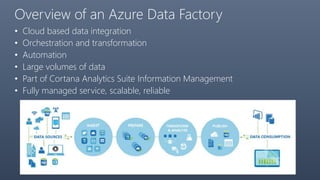
Overview of an Azure Data Factory
• Cloud based data integration
• Orchestration and transformation
• Automation
• Large volumes of data
• Part of Cortana Analytics Suite Information Management
• Fully managed service, scalable, reliable
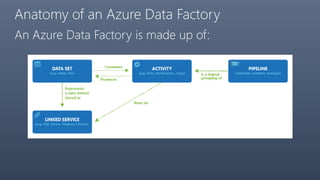
Anatomy of an Azure Data Factory
An Azure Data Factory is made up of:
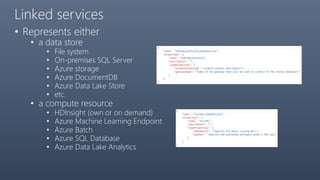
Linked services
• Represents either
• a data store
• File system
• On-premises SQL Server
• Azure storage
• Azure DocumentDB
• Azure Data Lake Store
• etc.
• a compute resource
• HDInsight (own or on demand)
• Azure Machine Learning Endpoint
• Azure Batch
• Azure SQL Database
• Azure Data Lake Analytics
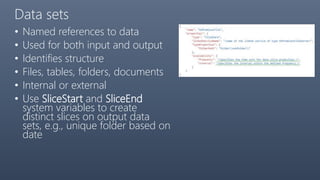
Data sets
• Named references to data
• Used for both input and output
• Identifies structure
• Files, tables, folders, documents
• Internal or external
• Use SliceStart and SliceEnd
system variables to create
distinct slices on output data
sets, e.g., unique folder based on
date
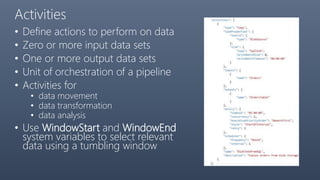
Activities
• Define actions to perform on data
• Zero or more input data sets
• One or more output data sets
• Unit of orchestration of a pipeline
• Activities for
• data movement
• data transformation
• data analysis
• Use WindowStart and WindowEnd
system variables to select relevant
data using a tumbling window
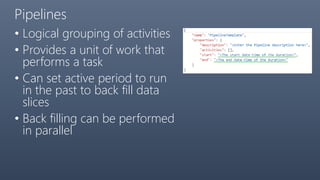
Pipelines
• Logical grouping of activities
• Provides a unit of work that
performs a task
• Can set active period to run
in the past to back fill data
slices
• Back filling can be performed
in parallel
Scheduling
• Data sets have an availability
"availability": { "frequency": "Hour", "interval": 1 }
• Activities have a schedule (tumbling window)
"scheduler": { "frequency": "Hour", "interval": 1 }
• Pipelines have an active period
"start": "2015-01-01T08:00:00Z"
"end": "2015-01-01T11:00:00Z“ OR
“end” = “start” + 48 hours if not specified OR
“end”: “9999-09-09” for indefinite
Data Lineage / Dependencies
• How does Azure Data Factory know how to link
Pipelines?
• Uses Input and Output data sets
• On the Diagram in portal, can toggle data lineage on and
off
• external required (and externalData policy optional) for
data sets created outside Azure Data Factory
• How does Azure Data Factory know how to link data
sets that have different schedules?
• Uses startTime, endTime and dependency model
Functions
• Rich set of functions to
• Specify data selection queries
• Specify input data set dependencies
• [startTime, endTime] – data set slice
• [f(startTime, endTime), g(startTime, endTime)] – dependency
period
• Use system variables as parameters
• Functions for text formatting and date/time selection
• Text.Format('{0:yyyy}',WindowStart)
• Date.AddDays(SliceStart, -7 - Date.DayOfWeek(SliceStart))
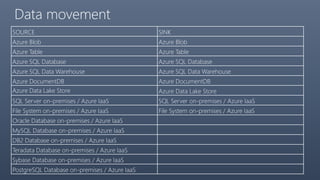
Data movement
Data movement
SOURCE SINK
Azure Blob Azure Blob
Azure Table Azure Table
Azure SQL Database Azure SQL Database
Azure SQL Data Warehouse Azure SQL Data Warehouse
Azure DocumentDB Azure DocumentDB
Azure Data Lake Store Azure Data Lake Store
SQL Server on-premises / Azure IaaS SQL Server on-premises / Azure IaaS
File System on-premises / Azure IaaS File System on-premises / Azure IaaS
Oracle Database on-premises / Azure IaaS
MySQL Database on-premises / Azure IaaS
DB2 Database on-premises / Azure IaaS
Teradata Database on-premises / Azure IaaS
Sybase Database on-premises / Azure IaaS
PostgreSQL Database on-premises / Azure IaaS
Data movement
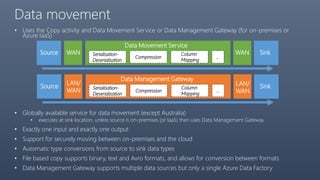
• Uses the Copy activity and Data Movement Service or Data Management Gateway (for on-premises or
Azure IaaS)
• Globally available service for data movement (except Australia)
• executes at sink location, unless source is on-premises (or IaaS) then uses Data Management Gateway
• Exactly one input and exactly one output
• Support for securely moving between on-premises and the cloud
• Automatic type conversions from source to sink data types
• File based copy supports binary, text and Avro formats, and allows for conversion between formats
• Data Management Gateway supports multiple data sources but only a single Azure Data Factory
Source
Data Movement Service
WAN Serialisation-
Deserialisation
Compression
Column
Mapping
…
WAN Sink
Source
Data Management Gateway
LAN/
WAN Serialisation-
Deserialisation
Compression
Column
Mapping
…
SinkLAN/
WAN
Data analysis and transformation
TRANSFORMATION ACTIVITY COMPUTE ENVIRONMENT
Hive HDInsight [Hadoop]
Pig HDInsight [Hadoop]
MapReduce HDInsight [Hadoop]
Hadoop Streaming HDInsight [Hadoop]
Machine Learning activities: Batch Execution and
Update Resource
Azure VM
Stored Procedure Azure SQL Database
Data Lake Analytics U-SQL Azure Data Lake Analytics
DotNet HDInsight [Hadoop] or Azure Batch
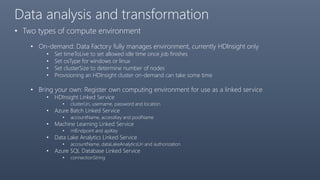
Data analysis and transformation
• Two types of compute environment
• On-demand: Data Factory fully manages environment, currently HDInsight only
• Set timeToLive to set allowed idle time once job finishes
• Set osType for windows or linux
• Set clusterSize to determine number of nodes
• Provisioning an HDInsight cluster on-demand can take some time
• Bring your own: Register own computing environment for use as a linked service
• HDInsight Linked Service
• clusterUri, username, password and location
• Azure Batch Linked Service
• accountName, accessKey and poolName
• Machine Learning Linked Service
• mlEndpoint and apiKey
• Data Lake Analytics Linked Service
• accountName, dataLakeAnalyticsUri and authorization
• Azure SQL Database Linked Service
• connectionString
Development
Development
• JSON for all artefacts
• Ease of management by source control
• Can be developed using:
• Data Factory Editor
• In Azure Portal
• Create and deploy artefacts
• PowerShell
• Cmdlets for each main function in PS ARM
• Visual Studio
• Azure Data Factory Templates
• .NET SDK
Visual Studio
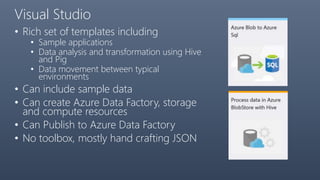
• Rich set of templates including
• Sample applications
• Data analysis and transformation using Hive
and Pig
• Data movement between typical
environments
• Can include sample data
• Can create Azure Data Factory, storage
and compute resources
• Can Publish to Azure Data Factory
• No toolbox, mostly hand crafting JSON
Tips and Tricks with Visual Studio Templates
• Something usually fails
• Issues with sample data
• Run once to create Data Factory and storage accounts
• Usually first run will also create a folder containing Sample Data but NO JSON
artifacts
• May need to manually edit PowerShell scripts or perform manual upload
• Once corrected, deselect Sample Data and run again creating new solution
• Ensure Publish to Data Factory is deselected and JSON artifacts are created
• Issues with Data Factory deployment
• Go to portal and check what failed
• May need to manually create item but deleting published item and recreating with
JSON from project
• When deploying, may need to unselect item that is failing
• You cannot delete from the project
• Need to Exclude From Project
• Once excluded can delete from disk
Deployment
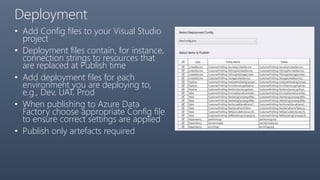
• Add Config files to your Visual Studio
project
• Deployment files contain, for instance,
connection strings to resources that
are replaced at Publish time
• Add deployment files for each
environment you are deploying to,
e.g., Dev, UAT, Prod
• When publishing to Azure Data
Factory choose appropriate Config file
to ensure correct settings are applied
• Publish only artefacts required
Monitoring
Monitoring
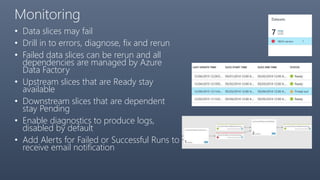
• Data slices may fail
• Drill in to errors, diagnose, fix and rerun
• Failed data slices can be rerun and all
dependencies are managed by Azure
Data Factory
• Upstream slices that are Ready stay
available
• Downstream slices that are dependent
stay Pending
• Enable diagnostics to produce logs,
disabled by default
• Add Alerts for Failed or Successful Runs to
receive email notification
Demonstration
General information
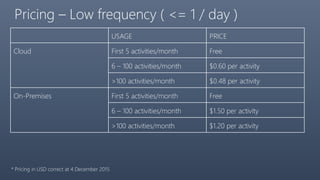
Pricing – Low frequency ( <= 1 / day )
USAGE PRICE
Cloud First 5 activities/month Free
6 – 100 activities/month $0.60 per activity
>100 activities/month $0.48 per activity
On-Premises First 5 activities/month Free
6 – 100 activities/month $1.50 per activity
>100 activities/month $1.20 per activity
* Pricing in USD correct at 4 December 2015
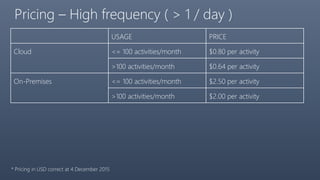
Pricing – High frequency ( > 1 / day )
USAGE PRICE
Cloud <= 100 activities/month $0.80 per activity
>100 activities/month $0.64 per activity
On-Premises <= 100 activities/month $2.50 per activity
>100 activities/month $2.00 per activity
* Pricing in USD correct at 4 December 2015
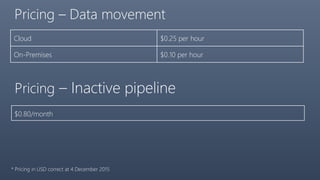
Pricing – Data movement
Cloud $0.25 per hour
On-Premises $0.10 per hour
Pricing – Inactive pipeline
$0.80/month
* Pricing in USD correct at 4 December 2015
Summary
• Use Azure Data Factory if:
• Dealing with Big Data
• Source or destination is in the cloud
• Cut down environment cost
• Cut down administration cost
• Azure is on one side of the movement / transformation
• Consider hybrid scenarios with other data management tools, for example
SQL Server Integration Services
More Information
• Documentation portal
• https://azure.microsoft.com/en-us/documentation/services/data-
factory/
• Learning map
• https://azure.microsoft.com/en-us/documentation/articles/data-
factory-learning-map/
• Samples on github
• https://github.com/Azure/Azure-DataFactory
Thank you!

A lap around Azure Data Factory

  • 1.
    Sponsored & Broughtto you by A Lap around Azure Data Factory Martin Abbott http://www.twitter.com/martinabbott https://au.linkedin.com/in/mjabbott
  • 2.
    A Lap aroundAzure Data Factory Martin Abbott @martinabbott
  • 3.
    About me 10+ yearsexperience Integration, messaging and cloud person Organiser of Perth Microsoft Cloud User Group Member of GlobalAzure Bootcamp admin team BizTalk developer and architect Identity management maven IoT enthusiast Soon to be Australian Citizen
  • 4.
  • 5.
    Overview of anAzure Data Factory
  • 6.
    Overview of anAzure Data Factory • Cloud based data integration • Orchestration and transformation • Automation • Large volumes of data • Part of Cortana Analytics Suite Information Management • Fully managed service, scalable, reliable
  • 7.
    Anatomy of anAzure Data Factory An Azure Data Factory is made up of:
  • 8.
    Linked services • Representseither • a data store • File system • On-premises SQL Server • Azure storage • Azure DocumentDB • Azure Data Lake Store • etc. • a compute resource • HDInsight (own or on demand) • Azure Machine Learning Endpoint • Azure Batch • Azure SQL Database • Azure Data Lake Analytics
  • 9.
    Data sets • Namedreferences to data • Used for both input and output • Identifies structure • Files, tables, folders, documents • Internal or external • Use SliceStart and SliceEnd system variables to create distinct slices on output data sets, e.g., unique folder based on date
  • 10.
    Activities • Define actionsto perform on data • Zero or more input data sets • One or more output data sets • Unit of orchestration of a pipeline • Activities for • data movement • data transformation • data analysis • Use WindowStart and WindowEnd system variables to select relevant data using a tumbling window
  • 11.
    Pipelines • Logical groupingof activities • Provides a unit of work that performs a task • Can set active period to run in the past to back fill data slices • Back filling can be performed in parallel
  • 12.
    Scheduling • Data setshave an availability "availability": { "frequency": "Hour", "interval": 1 } • Activities have a schedule (tumbling window) "scheduler": { "frequency": "Hour", "interval": 1 } • Pipelines have an active period "start": "2015-01-01T08:00:00Z" "end": "2015-01-01T11:00:00Z“ OR “end” = “start” + 48 hours if not specified OR “end”: “9999-09-09” for indefinite
  • 13.
    Data Lineage /Dependencies • How does Azure Data Factory know how to link Pipelines? • Uses Input and Output data sets • On the Diagram in portal, can toggle data lineage on and off • external required (and externalData policy optional) for data sets created outside Azure Data Factory • How does Azure Data Factory know how to link data sets that have different schedules? • Uses startTime, endTime and dependency model
  • 14.
    Functions • Rich setof functions to • Specify data selection queries • Specify input data set dependencies • [startTime, endTime] – data set slice • [f(startTime, endTime), g(startTime, endTime)] – dependency period • Use system variables as parameters • Functions for text formatting and date/time selection • Text.Format('{0:yyyy}',WindowStart) • Date.AddDays(SliceStart, -7 - Date.DayOfWeek(SliceStart))
  • 15.
  • 16.
    Data movement SOURCE SINK AzureBlob Azure Blob Azure Table Azure Table Azure SQL Database Azure SQL Database Azure SQL Data Warehouse Azure SQL Data Warehouse Azure DocumentDB Azure DocumentDB Azure Data Lake Store Azure Data Lake Store SQL Server on-premises / Azure IaaS SQL Server on-premises / Azure IaaS File System on-premises / Azure IaaS File System on-premises / Azure IaaS Oracle Database on-premises / Azure IaaS MySQL Database on-premises / Azure IaaS DB2 Database on-premises / Azure IaaS Teradata Database on-premises / Azure IaaS Sybase Database on-premises / Azure IaaS PostgreSQL Database on-premises / Azure IaaS
  • 17.
    Data movement • Usesthe Copy activity and Data Movement Service or Data Management Gateway (for on-premises or Azure IaaS) • Globally available service for data movement (except Australia) • executes at sink location, unless source is on-premises (or IaaS) then uses Data Management Gateway • Exactly one input and exactly one output • Support for securely moving between on-premises and the cloud • Automatic type conversions from source to sink data types • File based copy supports binary, text and Avro formats, and allows for conversion between formats • Data Management Gateway supports multiple data sources but only a single Azure Data Factory Source Data Movement Service WAN Serialisation- Deserialisation Compression Column Mapping … WAN Sink Source Data Management Gateway LAN/ WAN Serialisation- Deserialisation Compression Column Mapping … SinkLAN/ WAN
  • 18.
    Data analysis andtransformation
  • 19.
    Data analysis andtransformation TRANSFORMATION ACTIVITY COMPUTE ENVIRONMENT Hive HDInsight [Hadoop] Pig HDInsight [Hadoop] MapReduce HDInsight [Hadoop] Hadoop Streaming HDInsight [Hadoop] Machine Learning activities: Batch Execution and Update Resource Azure VM Stored Procedure Azure SQL Database Data Lake Analytics U-SQL Azure Data Lake Analytics DotNet HDInsight [Hadoop] or Azure Batch
  • 20.
    Data analysis andtransformation • Two types of compute environment • On-demand: Data Factory fully manages environment, currently HDInsight only • Set timeToLive to set allowed idle time once job finishes • Set osType for windows or linux • Set clusterSize to determine number of nodes • Provisioning an HDInsight cluster on-demand can take some time • Bring your own: Register own computing environment for use as a linked service • HDInsight Linked Service • clusterUri, username, password and location • Azure Batch Linked Service • accountName, accessKey and poolName • Machine Learning Linked Service • mlEndpoint and apiKey • Data Lake Analytics Linked Service • accountName, dataLakeAnalyticsUri and authorization • Azure SQL Database Linked Service • connectionString
  • 21.
  • 22.
    Development • JSON forall artefacts • Ease of management by source control • Can be developed using: • Data Factory Editor • In Azure Portal • Create and deploy artefacts • PowerShell • Cmdlets for each main function in PS ARM • Visual Studio • Azure Data Factory Templates • .NET SDK
  • 23.
    Visual Studio • Richset of templates including • Sample applications • Data analysis and transformation using Hive and Pig • Data movement between typical environments • Can include sample data • Can create Azure Data Factory, storage and compute resources • Can Publish to Azure Data Factory • No toolbox, mostly hand crafting JSON
  • 24.
    Tips and Trickswith Visual Studio Templates • Something usually fails • Issues with sample data • Run once to create Data Factory and storage accounts • Usually first run will also create a folder containing Sample Data but NO JSON artifacts • May need to manually edit PowerShell scripts or perform manual upload • Once corrected, deselect Sample Data and run again creating new solution • Ensure Publish to Data Factory is deselected and JSON artifacts are created • Issues with Data Factory deployment • Go to portal and check what failed • May need to manually create item but deleting published item and recreating with JSON from project • When deploying, may need to unselect item that is failing • You cannot delete from the project • Need to Exclude From Project • Once excluded can delete from disk
  • 25.
    Deployment • Add Configfiles to your Visual Studio project • Deployment files contain, for instance, connection strings to resources that are replaced at Publish time • Add deployment files for each environment you are deploying to, e.g., Dev, UAT, Prod • When publishing to Azure Data Factory choose appropriate Config file to ensure correct settings are applied • Publish only artefacts required
  • 26.
  • 27.
    Monitoring • Data slicesmay fail • Drill in to errors, diagnose, fix and rerun • Failed data slices can be rerun and all dependencies are managed by Azure Data Factory • Upstream slices that are Ready stay available • Downstream slices that are dependent stay Pending • Enable diagnostics to produce logs, disabled by default • Add Alerts for Failed or Successful Runs to receive email notification
  • 28.
  • 29.
  • 30.
    Pricing – Lowfrequency ( <= 1 / day ) USAGE PRICE Cloud First 5 activities/month Free 6 – 100 activities/month $0.60 per activity >100 activities/month $0.48 per activity On-Premises First 5 activities/month Free 6 – 100 activities/month $1.50 per activity >100 activities/month $1.20 per activity * Pricing in USD correct at 4 December 2015
  • 31.
    Pricing – Highfrequency ( > 1 / day ) USAGE PRICE Cloud <= 100 activities/month $0.80 per activity >100 activities/month $0.64 per activity On-Premises <= 100 activities/month $2.50 per activity >100 activities/month $2.00 per activity * Pricing in USD correct at 4 December 2015
  • 32.
    Pricing – Datamovement Cloud $0.25 per hour On-Premises $0.10 per hour Pricing – Inactive pipeline $0.80/month * Pricing in USD correct at 4 December 2015
  • 33.
    Summary • Use AzureData Factory if: • Dealing with Big Data • Source or destination is in the cloud • Cut down environment cost • Cut down administration cost • Azure is on one side of the movement / transformation • Consider hybrid scenarios with other data management tools, for example SQL Server Integration Services
  • 34.
    More Information • Documentationportal • https://azure.microsoft.com/en-us/documentation/services/data- factory/ • Learning map • https://azure.microsoft.com/en-us/documentation/articles/data- factory-learning-map/ • Samples on github • https://github.com/Azure/Azure-DataFactory
  • 35.