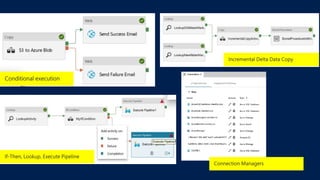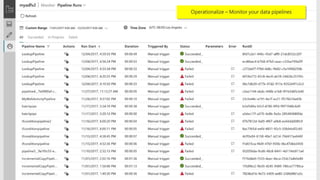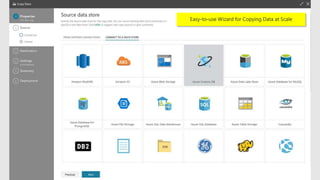
Azure Data Factory
Code-free data integration, at global scale
Sr. Program Manager
Azure Data Management
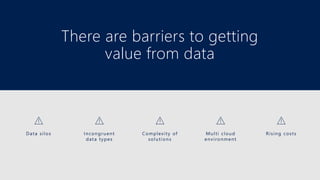
There are barriers to getting
value from data
Complexity of
solutions
Data silos Incongruent
data types
Rising costsMulti cloud
environment
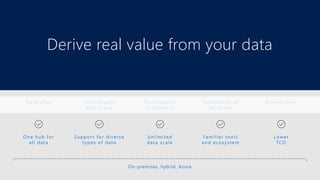
Derive real value from your data
Unlimited
data scale
One hub for
all data
Support for diverse
types of data
Lower
TCO
Familiar tools
and ecosystem
On-premises, hybrid, Azure
Performance
constraints
Data silos Incongruent
data types
Rising costsComplexity of
solutions
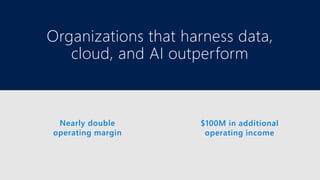
Nearly double
operating margin
$100M in additional
operating income
Organizations that harness data,
cloud, and AI outperform
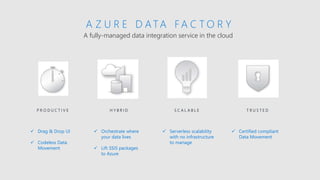
A fully-managed data integration service in the cloud
A Z U R E D ATA F A C T O R Y
H Y B R I D S C A L A B L EP R O D U C T I V E T R U S T E D
 Serverless scalability
with no infrastructure
to manage
 Drag & Drop UI
 Codeless Data
Movement
 Orchestrate where
your data lives
 Lift SSIS packages
to Azure
 Certified compliant
Data Movement
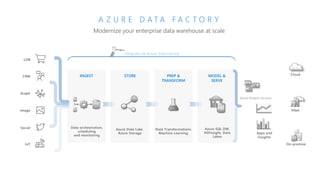
Modernize your enterprise data warehouse at scale
A Z U R E D A T A F A C T O R Y
Social
LOB
Graph
IoT
Image
CRM STORE
Azure Data Lake
Azure Storage
MODEL &
SERVE
Azure SQL DW,
HDInsight, Data
Lakes
PREP &
TRANSFORM
Data Transformations
Machine Learning
INGEST
Data orchestration,
scheduling
and monitoring
Apps and
Insights
Integrate via Azure Data Factory
Cloud
VNet
On-premise
Azure Analysis Services
MODEL & SERVE
Azure Analysis ServicesAzure SQL Data
Warehouse
Power BI
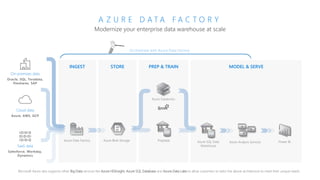
Modernize your enterprise data warehouse at scale
A Z U R E D A T A F A C T O R Y
On-premises data
Oracle, SQL, Teradata,
fileshares, SAP
Cloud data
Azure, AWS, GCP
SaaS data
Salesforce, Workday,
Dynamics
INGEST STORE PREP & TRAIN
Azure Data Factory Azure Blob Storage
Azure Databricks
Polybase
Microsoft Azure also supports other Big Data services like Azure HDInsight, Azure SQL Database and Azure Data Lake to allow customers to tailor the above architecture to meet their unique needs.
Orchestrate with Azure Data Factory
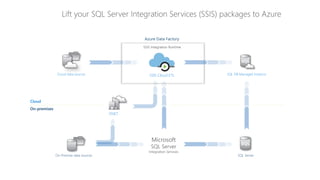
Lift your SQL Server Integration Services (SSIS) packages to Azure
On-Premise data sources
SQL DB Managed Instance
SQL Server
VNET
Azure Data Factory
SSIS Cloud ETL
SSIS Integration Runtime
Cloud data sources
Cloud
On-premises
Microsoft
SQL Server
Integration Services
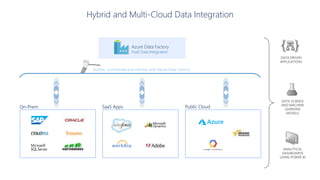
Author, orchestrate and monitor with Azure Data Factory
Hybrid and Multi-Cloud Data Integration
Azure Data Factory
PaaS Data Integration
DATA SCIENCE
AND MACHINE
LEARNING
MODELS
ANALYTICAL
DASHBOARDS
USING POWER BI
DATA DRIVEN
APPLICATIONS
On-Prem SaaS Apps Public Cloud
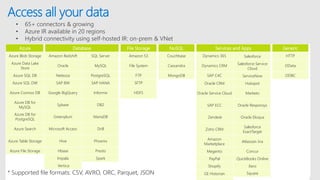
Access all your data
Azure Database File Storage NoSQL Services and Apps Generic
Azure Blob Storage Amazon Redshift SQL Server Amazon S3 Couchbase Dynamics 365 Salesforce HTTP
Azure Data Lake
Store
Oracle MySQL File System Cassandra Dynamics CRM Salesforce Service
Cloud
OData
Azure SQL DB Netezza PostgreSQL FTP MongoDB SAP C4C ServiceNow ODBC
Azure SQL DW SAP BW SAP HANA SFTP Oracle CRM Hubspot
Azure Cosmos DB Google BigQuery Informix HDFS Oracle Service Cloud Marketo
Azure DB for
MySQL
Sybase DB2 SAP ECC Oracle Responsys
Azure DB for
PostgreSQL
Greenplum MariaDB Zendesk Oracle Eloqua
Azure Search Microsoft Access Drill Zoho CRM
Salesforce
ExactTarget
Azure Table Storage Hive Phoenix Amazon
Marketplace
Atlassian Jira
Azure File Storage Hbase Presto Megento Concur
Impala Spark PayPal QuickBooks Online
Vertica Shopify Xero
GE Historian Square* Supported file formats: CSV, AVRO, ORC, Parquet, JSON
• 65+ connectors & growing
• Azure IR available in 20 regions
• Hybrid connectivity using self-hosted IR: on-prem & VNet
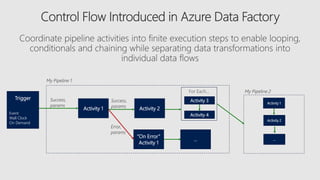
Activity 1 Activity 2
Activity 3
“On Error”
Activity 1
Success,
params
Error,
params
My Pipeline 1
…
My Pipeline 2For Each…
Activity 4
Success,
params
Trigger
Event
Wall Clock
On Demand
Activity 1
Activity 2
…
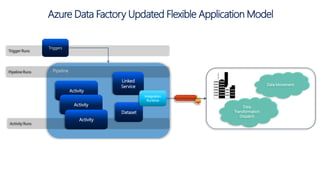
Azure Data Factory Updated Flexible Application Model
Pipeline
Activity
Triggers
Pipeline Runs
Activity Runs
Trigger Runs
Linked
Service
Dataset
Data Movement
Data
Transformation
Dispatch
Integration
Runtime
Activity
Activity
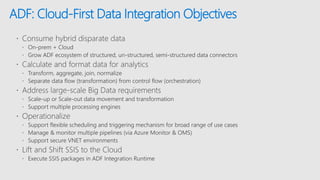
ADF: Cloud-First Data Integration Objectives
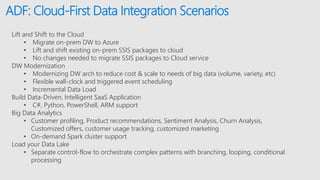
ADF: Cloud-First Data Integration Scenarios
Lift and Shift to the Cloud
• Migrate on-prem DW to Azure
• Lift and shift existing on-prem SSIS packages to cloud
• No changes needed to migrate SSIS packages to Cloud service
DW Modernization
• Modernizing DW arch to reduce cost & scale to needs of big data (volume, variety, etc)
• Flexible wall-clock and triggered event scheduling
• Incremental Data Load
Build Data-Driven, Intelligent SaaS Application
• C#, Python, PowerShell, ARM support
Big Data Analytics
• Customer profiling, Product recommendations, Sentiment Analysis, Churn Analysis,
Customized offers, customer usage tracking, customized marketing
• On-demand Spark cluster support
Load your Data Lake
• Separate control-flow to orchestrate complex patterns with branching, looping, conditional
processing
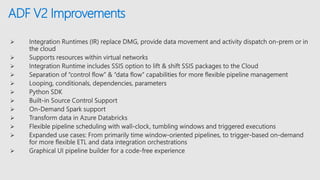
ADF V2 Improvements
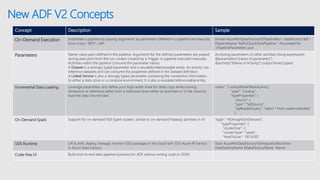
New ADF V2 Concepts
Concept Description Sample
Control Flow Orchestration of pipeline activities that includes chaining activities in a sequence, branching, conditional
branching based on an expression, parameters that can be defined at the pipeline level and arguments
passed while invoking the pipeline on demand or from a trigger. Also includes custom state passing
and looping containers, I.e. For-each, Do-Until iterators.
{ "name":"MyForEachActivityName",
"type":"ForEach",
"typeProperties":{ "isSequential":"true",
"items":"@pipeline().parameters.mySinkDatasetFolderPathCollecti
on",
"activities":[
{
"name":"MyCopyActivity", "type":"Copy", "typeProperties": …
Runs A Run is an instance of the pipeline execution. Pipeline Runs are typically instantiated by passing the
arguments to the parameters defined in the Pipelines. The arguments can be passed manually or
properties created by the Triggers.
POST
https://management.azure.com/subscriptions/<subId>/resour
ceGroups/<resourceGroupName>/providers/Microsoft.DataFa
ctory/factories/<dataFactoryName>/pipelines/<pipelineName
>/createRun?api-version=2017-03-01-preview
Activity Logs Every activity execution in a pipeline generates activity start and activity end logs event
Integration Runtime Replaces DMG as a way to move & process data in Azure PaaS Services, self-hosted or on prem or IaaS
Works with VNETs
Enables SSIS package execution
Set-AzureRmDataFactoryV2IntegrationRuntime -Name
$integrationRuntimeName -Type SelfHosted
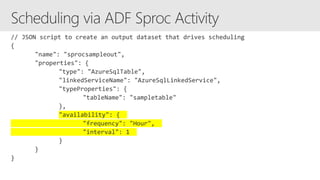
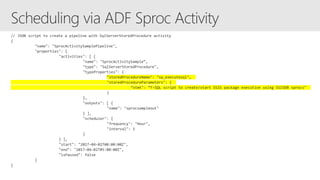
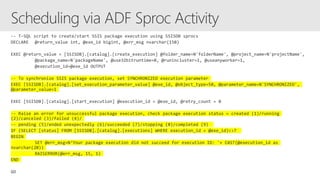
Scheduling Flexible Scheduling
Wall-clock scheduling
Event-based triggers
"type": "ScheduleTrigger",
"typeProperties": {
"recurrence": {
"frequency": <<Minute, Hour, Day, Week, Year>>,
"interval": <<int>>, // optional, how often to fire (default to 1)
"startTime": <<datetime>>,
"endTime": <<datetime>>,
"timeZone": <<default UTC>>
"schedule": { // optional (advanced scheduling specifics)
"hours": [<<0-24>>],
"weekDays": ": [<<Monday-Sunday>>],
"minutes": [<<0-60>>],
"monthDays": [<<1-31>>],
"monthlyOccurences": [
{
"day": <<Monday-Sunday>>,
"occurrence": <<1-5>>
New ADF V2 Concepts
Concept Description Sample
On-Demand Execution Instantiate a pipeline by passing arguments as parameters defined in a pipeline and execute
from script / REST / API.
Invoke-AzureRmDataFactoryV2PipelineRun -DataFactory $df -
PipelineName "Adfv2QuickStartPipeline" -ParameterFile
.PipelineParameters.json
Parameters Name-value pairs defined in the pipeline. Arguments for the defined parameters are passed
during execution from the run context created by a Trigger or pipeline executed manually.
Activities within the pipeline consume the parameter values.
A Dataset is a strongly typed parameter and a reusable/referenceable entity. An activity can
reference datasets and can consume the properties defined in the Dataset definition
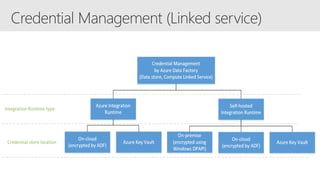
A Linked Service is also a strongly typed parameter containing the connection information
to either a data store or a compute environment. It is also a reusable/referenceable entity.
Accessing parameters of other activities Using expressions
@parameters(“{name of parameter}”)
@activity(“{Name of Activity}”).output.RowsCopied
Incremental Data Loading Leverage parameters and define your high-water mark for delta copy while moving
dimension or reference tables from a relational store either on premises or in the cloud to
load the data into the lake
name": "LookupWaterMarkActivity",
"type": "Lookup",
"typeProperties": {
"source": {
"type": "SqlSource",
"sqlReaderQuery": "select * from watermarktable"
}
On-Demand Spark Support for on-demand HDI Spark clusters, similar to on-demand Hadoop activities in V1 "type": "HDInsightOnDemand",
"typeProperties": {
"clusterSize": 2,
"clusterType": "spark",
"timeToLive": "00:15:00",
SSIS Runtime Lift & shift, deploy, manage, monitor SSIS packages in the cloud with SSIS Azure IR Service
in Azure Data Factory
Start-AzureRmDataFactoryV2IntegrationRuntime -
DataFactoryName $DataFactoryName -Name
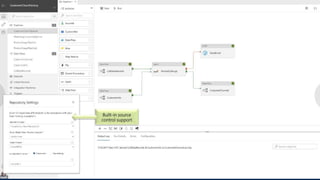
Code-free UI Build end-to-end data pipeline solutions for ADF without writing code or JSON
Built-in source
control support
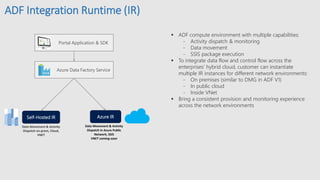
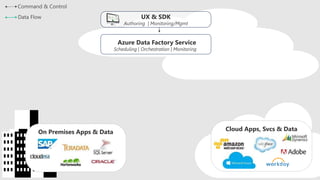
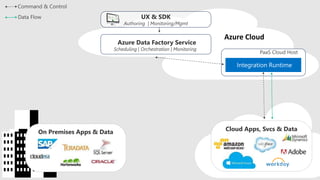
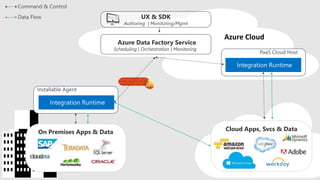
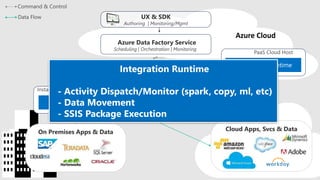
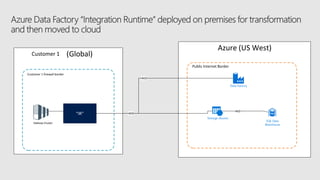
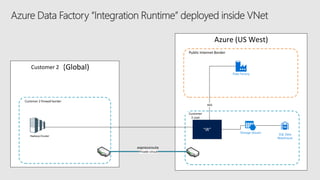
ADF Integration Runtime (IR)
 ADF compute environment with multiple capabilities:
- Activity dispatch & monitoring
- Data movement
- SSIS package execution
 To integrate data flow and control flow across the
enterprises’ hybrid cloud, customer can instantiate
multiple IR instances for different network environments:
- On premises (similar to DMG in ADF V1)
- In public cloud
- Inside VNet
 Bring a consistent provision and monitoring experience
across the network environments
Portal Application & SDK
Azure Data Factory Service
Data Movement & Activity
Dispatch on-prem, Cloud,
VNET
Data Movement & Activity
Dispatch In Azure Public
Network, SSIS
VNET coming soon
Self-Hosted IR Azure IR
Azure Data Factory Service
Cloud Apps, Svcs & DataOn Premises Apps & Data
UX & SDK
Azure Data Factory Service
Cloud Apps, Svcs & DataOn Premises Apps & Data
UX & SDK
Azure Data Factory Service
Cloud Apps, Svcs & DataOn Premises Apps & Data
UX & SDK
Azure Data Factory Service
Cloud Apps, Svcs & DataOn Premises Apps & Data
UX & SDK
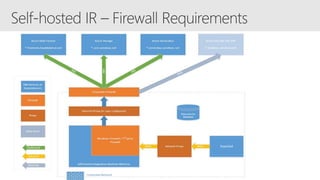
Azure (US West)
Public Internet Border
HP Inc (Global)
HP Prod Firewall Border
HP Hadoop Cluster
Integration Fabric On-prem
Data Factory
(Orchestration
micro-service)
443
Storage (Azure)
443
SQL Data
Warehouse
UAM Server
443
ADF Foo On-prem
“IR”
Customer 1
Customer 1 firewall border
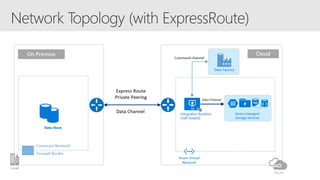
Azure (US West)
Public Internet Border
HP Inc (Global)
HP Prod Firewall Border
HP VNET
Private circuit
expressroute
HP Hadoop Cluster Integration Fabric in VNet
Data Factory
(Orchestration
micro-service)
443
Storage (Azure)
SQL Data
Warehouse
UAM Server
ADF Foo in vnet
“IR”
Customer 2
Customer 2 firewall border
Customer
2 vnet
PowerShell
HIPAA/HITECH
ISO/IEC 27001
ISO/IEC 27018
CSA STAR
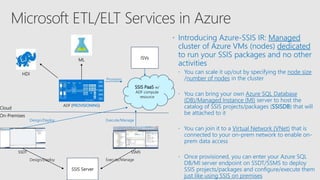
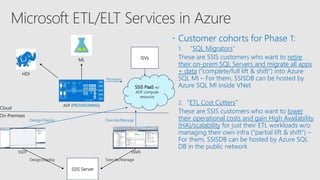
 Introducing Azure-SSIS IR: Managed
cluster of Azure VMs (nodes) dedicated
to run your SSIS packages and no other
activities
 You can scale it up/out by specifying the node size
/number of nodes in the cluster
 You can bring your own Azure SQL Database
(DB)/Managed Instance (MI) server to host the
catalog of SSIS projects/packages (SSISDB) that will
be attached to it
 You can join it to a Virtual Network (VNet) that is
connected to your on-prem network to enable on-
prem data access
 Once provisioned, you can enter your Azure SQL
DB/MI server endpoint on SSDT/SSMS to deploy
SSIS projects/packages and configure/execute them
just like using SSIS on premises
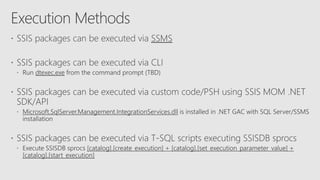
Execute/Manage
Provision
SSDT SSMS
Cloud
On-Premises
Design/Deploy
SSIS Server
Design/Deploy Execute/Manage
ISVs
SSIS PaaS w/
ADF compute
resource
ADF (PROVISIONING)
HDI
ML
 Customer cohorts for Phase 1:
1. "SQL Migrators"
These are SSIS customers who want to retire
their on-prem SQL Servers and migrate all apps
+ data (“complete/full lift & shift”) into Azure
SQL MI – For them, SSISDB can be hosted by
Azure SQL MI inside VNet
2. "ETL Cost Cutters“
These are SSIS customers who want to lower
their operational costs and gain High Availability
(HA)/scalability for just their ETL workloads w/o
managing their own infra (“partial lift & shift") –
For them, SSISDB can be hosted by Azure SQL
DB in the public network
Execute/Manage
Provision
SSDT SSMS
Cloud
On-Premises
Design/Deploy
SSIS Server
Design/Deploy Execute/Manage
ISVs
SSIS PaaS w/
ADF compute
resource
ADF (PROVISIONING)
HDI
ML
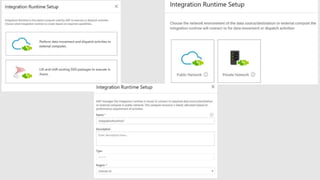
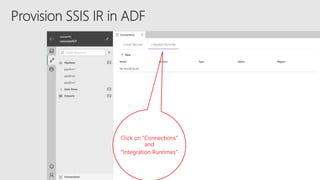
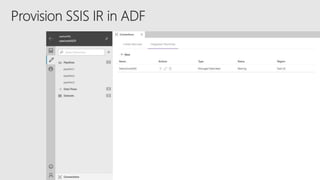
Click on “Connections”
and
”Integration Runtimes”
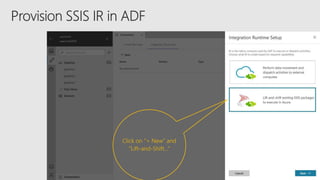
Click on “+ New” and
”Lift-and-Shift…”
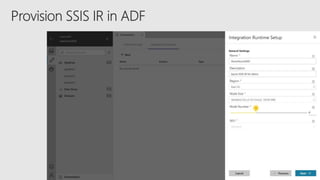
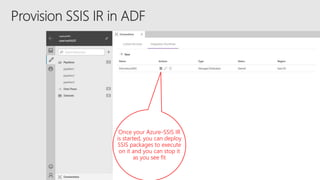
Once your Azure-SSIS IR
is started, you can deploy
SSIS packages to execute
on it and you can stop it
as you see fit
on premises
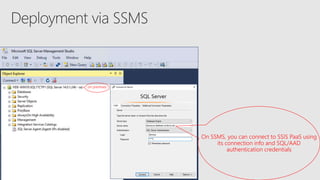
On SSMS, you can connect to SSIS PaaS using
its connection info and SQL/AAD
authentication credentials
on premises
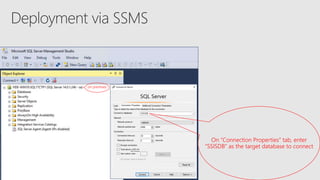
On “Connection Properties” tab, enter
“SSISDB” as the target database to connect
on premises
in Azure
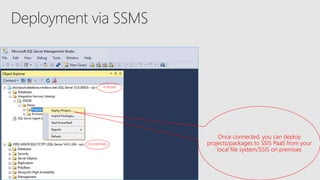
Once connected, you can deploy
projects/packages to SSIS PaaS from your
local file system/SSIS on premises
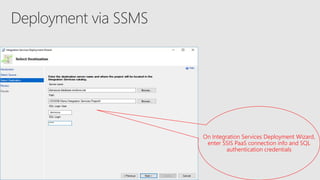
On Integration Services Deployment Wizard,
enter SSIS PaaS connection info and SQL
authentication credentials
on premises
in Azure
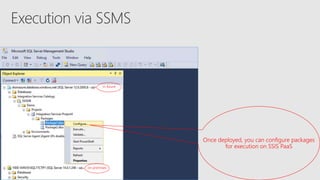
Once deployed, you can configure packages
for execution on SSIS PaaS
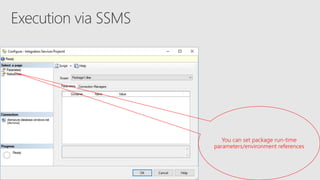
You can set package run-time
parameters/environment references
on premises
in Azure
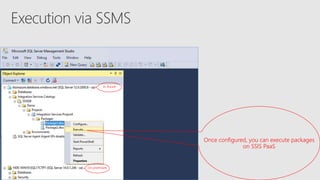
Once configured, you can execute packages
on SSIS PaaS
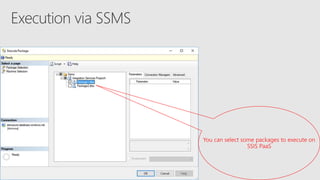
You can select some packages to execute on
SSIS PaaS
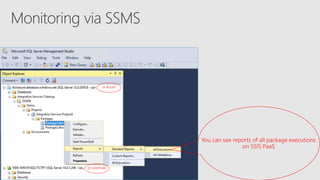
You can see reports of all package executions
on SSIS PaaS
on premises
in Azure
on premises
in Azure
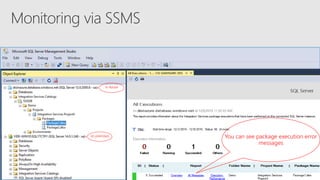
You can see package execution error
messages
on premises
in Azure
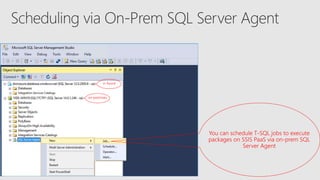
You can schedule T-SQL jobs to execute
packages on SSIS PaaS via on-prem SQL
Server Agent
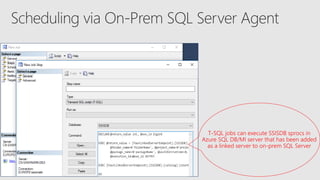
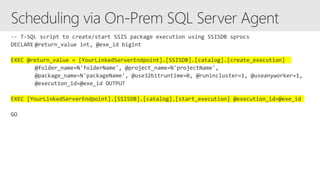
T-SQL jobs can execute SSISDB sprocs in
Azure SQL DB/MI server that has been added
as a linked server to on-prem SQL Server
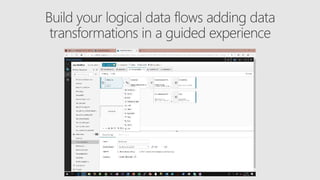
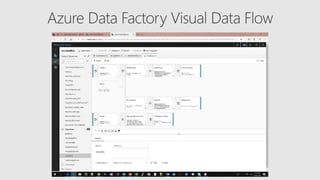
Visual Data Flow
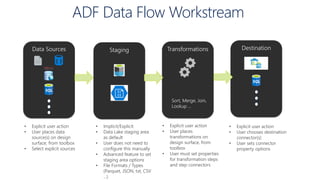
ADF Data Flow Workstream
Data Sources Staging Transformations Destination
Sort, Merge, Join,
Lookup …
• Explicit user action
• User places data
source(s) on design
surface, from toolbox
• Select explicit sources
• Implicit/Explicit
• Data Lake staging area
as default
• User does not need to
configure this manually
• Advanced feature to set
staging area options
• File Formats / Types
(Parquet, JSON, txt, CSV
…)
• Explicit user action
• User places
transformations on
design surface, from
toolbox
• User must set properties
for transformation steps
and step connectors
• Explicit user action
• User chooses destination
connector(s)
• User sets connector
property options
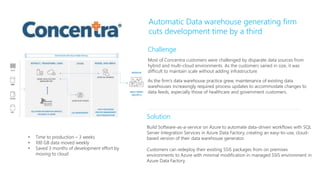
Challenge
Most of Concentra customers were challenged by disparate data sources from
hybrid and multi-cloud environments. As the customers varied in size, it was
difficult to maintain scale without adding infrastructure.
As the firm’s data warehouse practice grew, maintenance of existing data
warehouses increasingly required process updates to accommodate changes to
data feeds, especially those of healthcare and government customers.
Solution
Build Software-as-a-service on Azure to automate data-driven workflows with SQL
Server Integration Services in Azure Data Factory, creating an easy-to-use, cloud-
based version of their data warehouse generator.
Customers can redeploy their existing SSIS packages from on premises
environments to Azure with minimal modification in managed SSIS environment in
Azure Data Factory.
Automatic Data warehouse generating firm
cuts development time by a third
• Time to production – 3 weeks
• 100 GB data moved weekly
• Saved 3 months of development effort by
moving to cloud
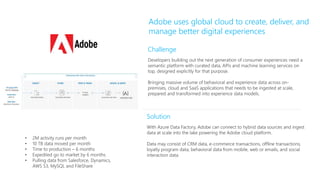
Solution
With Azure Data Factory, Adobe can connect to hybrid data sources and ingest
data at scale into the lake powering the Adobe cloud platform.
Data may consist of CRM data, e-commerce transactions, offline transactions,
loyalty program data, behavioral data from mobile, web or emails, and social
interaction data.
Challenge
Developers building out the next generation of consumer experiences need a
semantic platform with curated data, APIs and machine learning services on
top, designed explicitly for that purpose.
Bringing massive volume of behavioral and experience data across on-
premises, cloud and SaaS applications that needs to be ingested at scale,
prepared and transformed into experience data models.
Adobe uses global cloud to create, deliver, and
manage better digital experiences
• 2M activity runs per month
• 10 TB data moved per month
• Time to production – 6 months
• Expedited go to market by 6 months
• Pulling data from Salesforce, Dynamics,
AWS S3, MySQL and FileShare
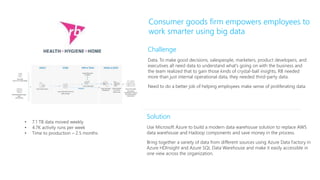
Solution
Use Microsoft Azure to build a modern data warehouse solution to replace AWS
data warehouse and Hadoop components and save money in the process.
Bring together a variety of data from different sources using Azure Data Factory in
Azure HDInsight and Azure SQL Data Warehouse and make it easily accessible in
one view across the organization.
Challenge
Data. To make good decisions, salespeople, marketers, product developers, and
executives all need data to understand what’s going on with the business and
the team realized that to gain those kinds of crystal-ball insights, RB needed
more than just internal operational data, they needed third-party data.
Need to do a better job of helping employees make sense of proliferating data.
Consumer goods firm empowers employees to
work smarter using big data
• 7.1 TB data moved weekly
• 4.7K activity runs per week
• Time to production – 2.5 months
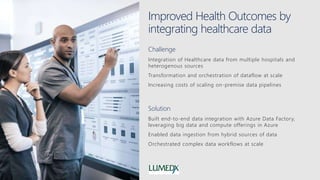
Improved Health Outcomes by
integrating healthcare data
Challenge
Integration of Healthcare data from multiple hospitals and
heterogenous sources
Transformation and orchestration of dataflow at scale
Increasing costs of scaling on-premise data pipelines
Solution
Built end-to-end data integration with Azure Data Factory,
leveraging big data and compute offerings in Azure
Enabled data ingestion from hybrid sources of data
Orchestrated complex data workflows at scale
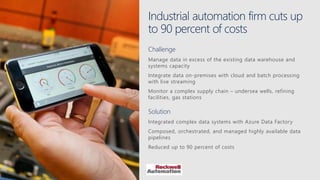
Industrial automation firm cuts up
to 90 percent of costs
Challenge
Manage data in excess of the existing data warehouse and
systems capacity
Integrate data on-premises with cloud and batch processing
with live streaming
Monitor a complex supply chain – undersea wells, refining
facilities, gas stations
Solution
Integrated complex data systems with Azure Data Factory
Composed, orchestrated, and managed highly available data
pipelines
Reduced up to 90 percent of costs
Actuarial firm unlocks the potential
of human capital to drive business
Challenge
Increasing complexity of insurance products and regulations
Diversion from firm’s core purpose
Rise in on-premises hardware investments to handle high-
performance grid computing
Solution
Built software-as-a-service on Azure to address modeling and
reporting of large, compute-intensive workloads and used
Azure Data Factory to automate extract, transform, and load
(ETL) processes
Gained real-time insight into financial data

Azure Data Factory for Redmond SQL PASS UG Sept 2018

  • 1.
    Azure Data Factory Code-freedata integration, at global scale Sr. Program Manager Azure Data Management
  • 2.
    There are barriersto getting value from data Complexity of solutions Data silos Incongruent data types Rising costsMulti cloud environment
  • 3.
    Derive real valuefrom your data Unlimited data scale One hub for all data Support for diverse types of data Lower TCO Familiar tools and ecosystem On-premises, hybrid, Azure Performance constraints Data silos Incongruent data types Rising costsComplexity of solutions
  • 4.
    Nearly double operating margin $100Min additional operating income Organizations that harness data, cloud, and AI outperform
  • 5.
    A fully-managed dataintegration service in the cloud A Z U R E D ATA F A C T O R Y H Y B R I D S C A L A B L EP R O D U C T I V E T R U S T E D  Serverless scalability with no infrastructure to manage  Drag & Drop UI  Codeless Data Movement  Orchestrate where your data lives  Lift SSIS packages to Azure  Certified compliant Data Movement
  • 6.
    Modernize your enterprisedata warehouse at scale A Z U R E D A T A F A C T O R Y Social LOB Graph IoT Image CRM STORE Azure Data Lake Azure Storage MODEL & SERVE Azure SQL DW, HDInsight, Data Lakes PREP & TRANSFORM Data Transformations Machine Learning INGEST Data orchestration, scheduling and monitoring Apps and Insights Integrate via Azure Data Factory Cloud VNet On-premise Azure Analysis Services
  • 7.
    MODEL & SERVE AzureAnalysis ServicesAzure SQL Data Warehouse Power BI Modernize your enterprise data warehouse at scale A Z U R E D A T A F A C T O R Y On-premises data Oracle, SQL, Teradata, fileshares, SAP Cloud data Azure, AWS, GCP SaaS data Salesforce, Workday, Dynamics INGEST STORE PREP & TRAIN Azure Data Factory Azure Blob Storage Azure Databricks Polybase Microsoft Azure also supports other Big Data services like Azure HDInsight, Azure SQL Database and Azure Data Lake to allow customers to tailor the above architecture to meet their unique needs. Orchestrate with Azure Data Factory
  • 8.
    Lift your SQLServer Integration Services (SSIS) packages to Azure On-Premise data sources SQL DB Managed Instance SQL Server VNET Azure Data Factory SSIS Cloud ETL SSIS Integration Runtime Cloud data sources Cloud On-premises Microsoft SQL Server Integration Services
  • 9.
    Author, orchestrate andmonitor with Azure Data Factory Hybrid and Multi-Cloud Data Integration Azure Data Factory PaaS Data Integration DATA SCIENCE AND MACHINE LEARNING MODELS ANALYTICAL DASHBOARDS USING POWER BI DATA DRIVEN APPLICATIONS On-Prem SaaS Apps Public Cloud
  • 10.
    Access all yourdata Azure Database File Storage NoSQL Services and Apps Generic Azure Blob Storage Amazon Redshift SQL Server Amazon S3 Couchbase Dynamics 365 Salesforce HTTP Azure Data Lake Store Oracle MySQL File System Cassandra Dynamics CRM Salesforce Service Cloud OData Azure SQL DB Netezza PostgreSQL FTP MongoDB SAP C4C ServiceNow ODBC Azure SQL DW SAP BW SAP HANA SFTP Oracle CRM Hubspot Azure Cosmos DB Google BigQuery Informix HDFS Oracle Service Cloud Marketo Azure DB for MySQL Sybase DB2 SAP ECC Oracle Responsys Azure DB for PostgreSQL Greenplum MariaDB Zendesk Oracle Eloqua Azure Search Microsoft Access Drill Zoho CRM Salesforce ExactTarget Azure Table Storage Hive Phoenix Amazon Marketplace Atlassian Jira Azure File Storage Hbase Presto Megento Concur Impala Spark PayPal QuickBooks Online Vertica Shopify Xero GE Historian Square* Supported file formats: CSV, AVRO, ORC, Parquet, JSON • 65+ connectors & growing • Azure IR available in 20 regions • Hybrid connectivity using self-hosted IR: on-prem & VNet
  • 11.
    Activity 1 Activity2 Activity 3 “On Error” Activity 1 Success, params Error, params My Pipeline 1 … My Pipeline 2For Each… Activity 4 Success, params Trigger Event Wall Clock On Demand Activity 1 Activity 2 …
  • 12.
    Azure Data FactoryUpdated Flexible Application Model Pipeline Activity Triggers Pipeline Runs Activity Runs Trigger Runs Linked Service Dataset Data Movement Data Transformation Dispatch Integration Runtime Activity Activity
  • 13.
    ADF: Cloud-First DataIntegration Objectives
  • 14.
    ADF: Cloud-First DataIntegration Scenarios Lift and Shift to the Cloud • Migrate on-prem DW to Azure • Lift and shift existing on-prem SSIS packages to cloud • No changes needed to migrate SSIS packages to Cloud service DW Modernization • Modernizing DW arch to reduce cost & scale to needs of big data (volume, variety, etc) • Flexible wall-clock and triggered event scheduling • Incremental Data Load Build Data-Driven, Intelligent SaaS Application • C#, Python, PowerShell, ARM support Big Data Analytics • Customer profiling, Product recommendations, Sentiment Analysis, Churn Analysis, Customized offers, customer usage tracking, customized marketing • On-demand Spark cluster support Load your Data Lake • Separate control-flow to orchestrate complex patterns with branching, looping, conditional processing
  • 15.
  • 16.
    New ADF V2Concepts Concept Description Sample Control Flow Orchestration of pipeline activities that includes chaining activities in a sequence, branching, conditional branching based on an expression, parameters that can be defined at the pipeline level and arguments passed while invoking the pipeline on demand or from a trigger. Also includes custom state passing and looping containers, I.e. For-each, Do-Until iterators. { "name":"MyForEachActivityName", "type":"ForEach", "typeProperties":{ "isSequential":"true", "items":"@pipeline().parameters.mySinkDatasetFolderPathCollecti on", "activities":[ { "name":"MyCopyActivity", "type":"Copy", "typeProperties": … Runs A Run is an instance of the pipeline execution. Pipeline Runs are typically instantiated by passing the arguments to the parameters defined in the Pipelines. The arguments can be passed manually or properties created by the Triggers. POST https://management.azure.com/subscriptions/<subId>/resour ceGroups/<resourceGroupName>/providers/Microsoft.DataFa ctory/factories/<dataFactoryName>/pipelines/<pipelineName >/createRun?api-version=2017-03-01-preview Activity Logs Every activity execution in a pipeline generates activity start and activity end logs event Integration Runtime Replaces DMG as a way to move & process data in Azure PaaS Services, self-hosted or on prem or IaaS Works with VNETs Enables SSIS package execution Set-AzureRmDataFactoryV2IntegrationRuntime -Name $integrationRuntimeName -Type SelfHosted Scheduling Flexible Scheduling Wall-clock scheduling Event-based triggers "type": "ScheduleTrigger", "typeProperties": { "recurrence": { "frequency": <<Minute, Hour, Day, Week, Year>>, "interval": <<int>>, // optional, how often to fire (default to 1) "startTime": <<datetime>>, "endTime": <<datetime>>, "timeZone": <<default UTC>> "schedule": { // optional (advanced scheduling specifics) "hours": [<<0-24>>], "weekDays": ": [<<Monday-Sunday>>], "minutes": [<<0-60>>], "monthDays": [<<1-31>>], "monthlyOccurences": [ { "day": <<Monday-Sunday>>, "occurrence": <<1-5>>
  • 17.
    New ADF V2Concepts Concept Description Sample On-Demand Execution Instantiate a pipeline by passing arguments as parameters defined in a pipeline and execute from script / REST / API. Invoke-AzureRmDataFactoryV2PipelineRun -DataFactory $df - PipelineName "Adfv2QuickStartPipeline" -ParameterFile .PipelineParameters.json Parameters Name-value pairs defined in the pipeline. Arguments for the defined parameters are passed during execution from the run context created by a Trigger or pipeline executed manually. Activities within the pipeline consume the parameter values. A Dataset is a strongly typed parameter and a reusable/referenceable entity. An activity can reference datasets and can consume the properties defined in the Dataset definition A Linked Service is also a strongly typed parameter containing the connection information to either a data store or a compute environment. It is also a reusable/referenceable entity. Accessing parameters of other activities Using expressions @parameters(“{name of parameter}”) @activity(“{Name of Activity}”).output.RowsCopied Incremental Data Loading Leverage parameters and define your high-water mark for delta copy while moving dimension or reference tables from a relational store either on premises or in the cloud to load the data into the lake name": "LookupWaterMarkActivity", "type": "Lookup", "typeProperties": { "source": { "type": "SqlSource", "sqlReaderQuery": "select * from watermarktable" } On-Demand Spark Support for on-demand HDI Spark clusters, similar to on-demand Hadoop activities in V1 "type": "HDInsightOnDemand", "typeProperties": { "clusterSize": 2, "clusterType": "spark", "timeToLive": "00:15:00", SSIS Runtime Lift & shift, deploy, manage, monitor SSIS packages in the cloud with SSIS Azure IR Service in Azure Data Factory Start-AzureRmDataFactoryV2IntegrationRuntime - DataFactoryName $DataFactoryName -Name Code-free UI Build end-to-end data pipeline solutions for ADF without writing code or JSON
  • 19.
  • 24.
    ADF Integration Runtime(IR)  ADF compute environment with multiple capabilities: - Activity dispatch & monitoring - Data movement - SSIS package execution  To integrate data flow and control flow across the enterprises’ hybrid cloud, customer can instantiate multiple IR instances for different network environments: - On premises (similar to DMG in ADF V1) - In public cloud - Inside VNet  Bring a consistent provision and monitoring experience across the network environments Portal Application & SDK Azure Data Factory Service Data Movement & Activity Dispatch on-prem, Cloud, VNET Data Movement & Activity Dispatch In Azure Public Network, SSIS VNET coming soon Self-Hosted IR Azure IR
  • 25.
    Azure Data FactoryService Cloud Apps, Svcs & DataOn Premises Apps & Data UX & SDK
  • 26.
    Azure Data FactoryService Cloud Apps, Svcs & DataOn Premises Apps & Data UX & SDK
  • 27.
    Azure Data FactoryService Cloud Apps, Svcs & DataOn Premises Apps & Data UX & SDK
  • 28.
    Azure Data FactoryService Cloud Apps, Svcs & DataOn Premises Apps & Data UX & SDK
  • 29.
    Azure (US West) PublicInternet Border HP Inc (Global) HP Prod Firewall Border HP Hadoop Cluster Integration Fabric On-prem Data Factory (Orchestration micro-service) 443 Storage (Azure) 443 SQL Data Warehouse UAM Server 443 ADF Foo On-prem “IR” Customer 1 Customer 1 firewall border
  • 30.
    Azure (US West) PublicInternet Border HP Inc (Global) HP Prod Firewall Border HP VNET Private circuit expressroute HP Hadoop Cluster Integration Fabric in VNet Data Factory (Orchestration micro-service) 443 Storage (Azure) SQL Data Warehouse UAM Server ADF Foo in vnet “IR” Customer 2 Customer 2 firewall border Customer 2 vnet
  • 33.
  • 37.
  • 41.
     Introducing Azure-SSISIR: Managed cluster of Azure VMs (nodes) dedicated to run your SSIS packages and no other activities  You can scale it up/out by specifying the node size /number of nodes in the cluster  You can bring your own Azure SQL Database (DB)/Managed Instance (MI) server to host the catalog of SSIS projects/packages (SSISDB) that will be attached to it  You can join it to a Virtual Network (VNet) that is connected to your on-prem network to enable on- prem data access  Once provisioned, you can enter your Azure SQL DB/MI server endpoint on SSDT/SSMS to deploy SSIS projects/packages and configure/execute them just like using SSIS on premises Execute/Manage Provision SSDT SSMS Cloud On-Premises Design/Deploy SSIS Server Design/Deploy Execute/Manage ISVs SSIS PaaS w/ ADF compute resource ADF (PROVISIONING) HDI ML
  • 42.
     Customer cohortsfor Phase 1: 1. "SQL Migrators" These are SSIS customers who want to retire their on-prem SQL Servers and migrate all apps + data (“complete/full lift & shift”) into Azure SQL MI – For them, SSISDB can be hosted by Azure SQL MI inside VNet 2. "ETL Cost Cutters“ These are SSIS customers who want to lower their operational costs and gain High Availability (HA)/scalability for just their ETL workloads w/o managing their own infra (“partial lift & shift") – For them, SSISDB can be hosted by Azure SQL DB in the public network Execute/Manage Provision SSDT SSMS Cloud On-Premises Design/Deploy SSIS Server Design/Deploy Execute/Manage ISVs SSIS PaaS w/ ADF compute resource ADF (PROVISIONING) HDI ML
  • 43.
  • 44.
    Click on “+New” and ”Lift-and-Shift…”
  • 47.
    Once your Azure-SSISIR is started, you can deploy SSIS packages to execute on it and you can stop it as you see fit
  • 51.
    on premises On SSMS,you can connect to SSIS PaaS using its connection info and SQL/AAD authentication credentials
  • 52.
    on premises On “ConnectionProperties” tab, enter “SSISDB” as the target database to connect
  • 53.
    on premises in Azure Onceconnected, you can deploy projects/packages to SSIS PaaS from your local file system/SSIS on premises
  • 54.
    On Integration ServicesDeployment Wizard, enter SSIS PaaS connection info and SQL authentication credentials
  • 56.
    on premises in Azure Oncedeployed, you can configure packages for execution on SSIS PaaS
  • 57.
    You can setpackage run-time parameters/environment references
  • 58.
    on premises in Azure Onceconfigured, you can execute packages on SSIS PaaS
  • 59.
    You can selectsome packages to execute on SSIS PaaS
  • 61.
    You can seereports of all package executions on SSIS PaaS on premises in Azure
  • 62.
    on premises in Azure Youcan see package execution error messages
  • 63.
    on premises in Azure Youcan schedule T-SQL jobs to execute packages on SSIS PaaS via on-prem SQL Server Agent
  • 64.
    T-SQL jobs canexecute SSISDB sprocs in Azure SQL DB/MI server that has been added as a linked server to on-prem SQL Server
  • 70.
  • 74.
    ADF Data FlowWorkstream Data Sources Staging Transformations Destination Sort, Merge, Join, Lookup … • Explicit user action • User places data source(s) on design surface, from toolbox • Select explicit sources • Implicit/Explicit • Data Lake staging area as default • User does not need to configure this manually • Advanced feature to set staging area options • File Formats / Types (Parquet, JSON, txt, CSV …) • Explicit user action • User places transformations on design surface, from toolbox • User must set properties for transformation steps and step connectors • Explicit user action • User chooses destination connector(s) • User sets connector property options
  • 89.
    Challenge Most of Concentracustomers were challenged by disparate data sources from hybrid and multi-cloud environments. As the customers varied in size, it was difficult to maintain scale without adding infrastructure. As the firm’s data warehouse practice grew, maintenance of existing data warehouses increasingly required process updates to accommodate changes to data feeds, especially those of healthcare and government customers. Solution Build Software-as-a-service on Azure to automate data-driven workflows with SQL Server Integration Services in Azure Data Factory, creating an easy-to-use, cloud- based version of their data warehouse generator. Customers can redeploy their existing SSIS packages from on premises environments to Azure with minimal modification in managed SSIS environment in Azure Data Factory. Automatic Data warehouse generating firm cuts development time by a third • Time to production – 3 weeks • 100 GB data moved weekly • Saved 3 months of development effort by moving to cloud
  • 90.
    Solution With Azure DataFactory, Adobe can connect to hybrid data sources and ingest data at scale into the lake powering the Adobe cloud platform. Data may consist of CRM data, e-commerce transactions, offline transactions, loyalty program data, behavioral data from mobile, web or emails, and social interaction data. Challenge Developers building out the next generation of consumer experiences need a semantic platform with curated data, APIs and machine learning services on top, designed explicitly for that purpose. Bringing massive volume of behavioral and experience data across on- premises, cloud and SaaS applications that needs to be ingested at scale, prepared and transformed into experience data models. Adobe uses global cloud to create, deliver, and manage better digital experiences • 2M activity runs per month • 10 TB data moved per month • Time to production – 6 months • Expedited go to market by 6 months • Pulling data from Salesforce, Dynamics, AWS S3, MySQL and FileShare
  • 91.
    Solution Use Microsoft Azureto build a modern data warehouse solution to replace AWS data warehouse and Hadoop components and save money in the process. Bring together a variety of data from different sources using Azure Data Factory in Azure HDInsight and Azure SQL Data Warehouse and make it easily accessible in one view across the organization. Challenge Data. To make good decisions, salespeople, marketers, product developers, and executives all need data to understand what’s going on with the business and the team realized that to gain those kinds of crystal-ball insights, RB needed more than just internal operational data, they needed third-party data. Need to do a better job of helping employees make sense of proliferating data. Consumer goods firm empowers employees to work smarter using big data • 7.1 TB data moved weekly • 4.7K activity runs per week • Time to production – 2.5 months
  • 92.
    Improved Health Outcomesby integrating healthcare data Challenge Integration of Healthcare data from multiple hospitals and heterogenous sources Transformation and orchestration of dataflow at scale Increasing costs of scaling on-premise data pipelines Solution Built end-to-end data integration with Azure Data Factory, leveraging big data and compute offerings in Azure Enabled data ingestion from hybrid sources of data Orchestrated complex data workflows at scale
  • 93.
    Industrial automation firmcuts up to 90 percent of costs Challenge Manage data in excess of the existing data warehouse and systems capacity Integrate data on-premises with cloud and batch processing with live streaming Monitor a complex supply chain – undersea wells, refining facilities, gas stations Solution Integrated complex data systems with Azure Data Factory Composed, orchestrated, and managed highly available data pipelines Reduced up to 90 percent of costs
  • 94.
    Actuarial firm unlocksthe potential of human capital to drive business Challenge Increasing complexity of insurance products and regulations Diversion from firm’s core purpose Rise in on-premises hardware investments to handle high- performance grid computing Solution Built software-as-a-service on Azure to address modeling and reporting of large, compute-intensive workloads and used Azure Data Factory to automate extract, transform, and load (ETL) processes Gained real-time insight into financial data