AUTOMATED FEATURE EXTRACTION FROM
SATELLITE IMAGES
Supervision by:-
Dr. Mahesh Kumar Jat
Department of Civil Engineering, MNIT
Group Member:-
Bhoopendra Singh 2017UCE1394
Himanshu Gupta 2017UCE1667
Karan Nawariya 2017UCE1158
AIM OF THE PROJECT:-
• A satellite image captures the earth surface details which may have different types of
features i.e. buildings, trees, river, mountains, hydrological data, roads, volcanos, moving
vehicle etc.
• Automatically extraction of features from satellite image
Buildings
Transportation Network
Water and Vegetation
Application of our work
• If we do a survey of any area by field visit it involves huge time and cost but ecognition
can do this in very less time and cost without any survey or field visit.
• Output file can be used in many fields like in urbanization survey, forest survey, shore
line changes.
• This method can also be used where physical survey is not possible like mountain, deep
forest.
• Can also be used to monitor border areas.
Introduction
• Geospatial data is information about objects, events, or phenomena that have a
location on the surface of the earth. The location may be static e.g., the location of
a road, buildings or dynamic e.g., a moving vehicle or pedestrian.
• Geospatial data combines
 Location information - usually coordinates on the earth,
 Attribute information - the characteristics of the object,
 Temporal information - the time at which the location and attributes exist.
Geospatial data:
Types of data sets
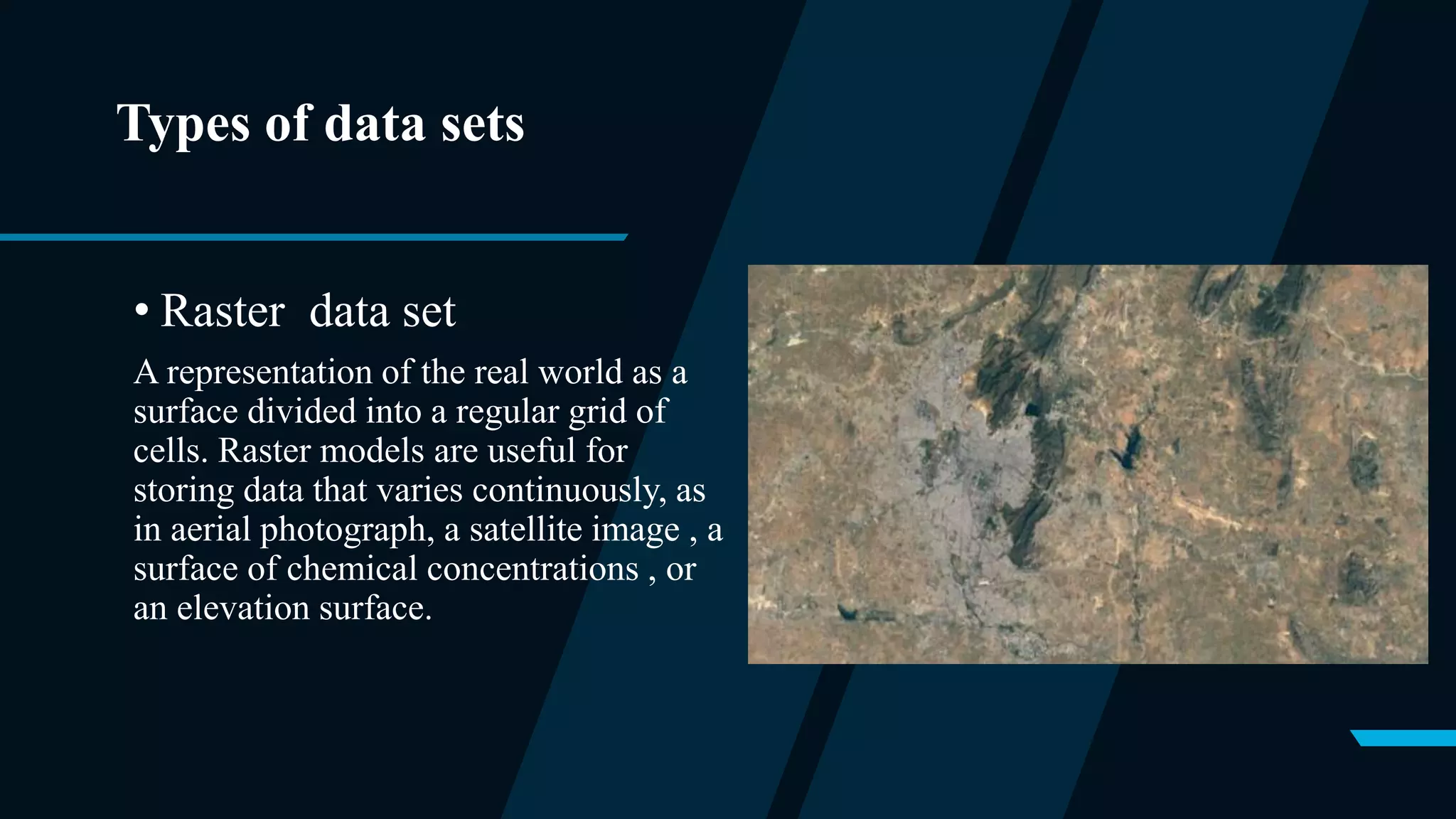
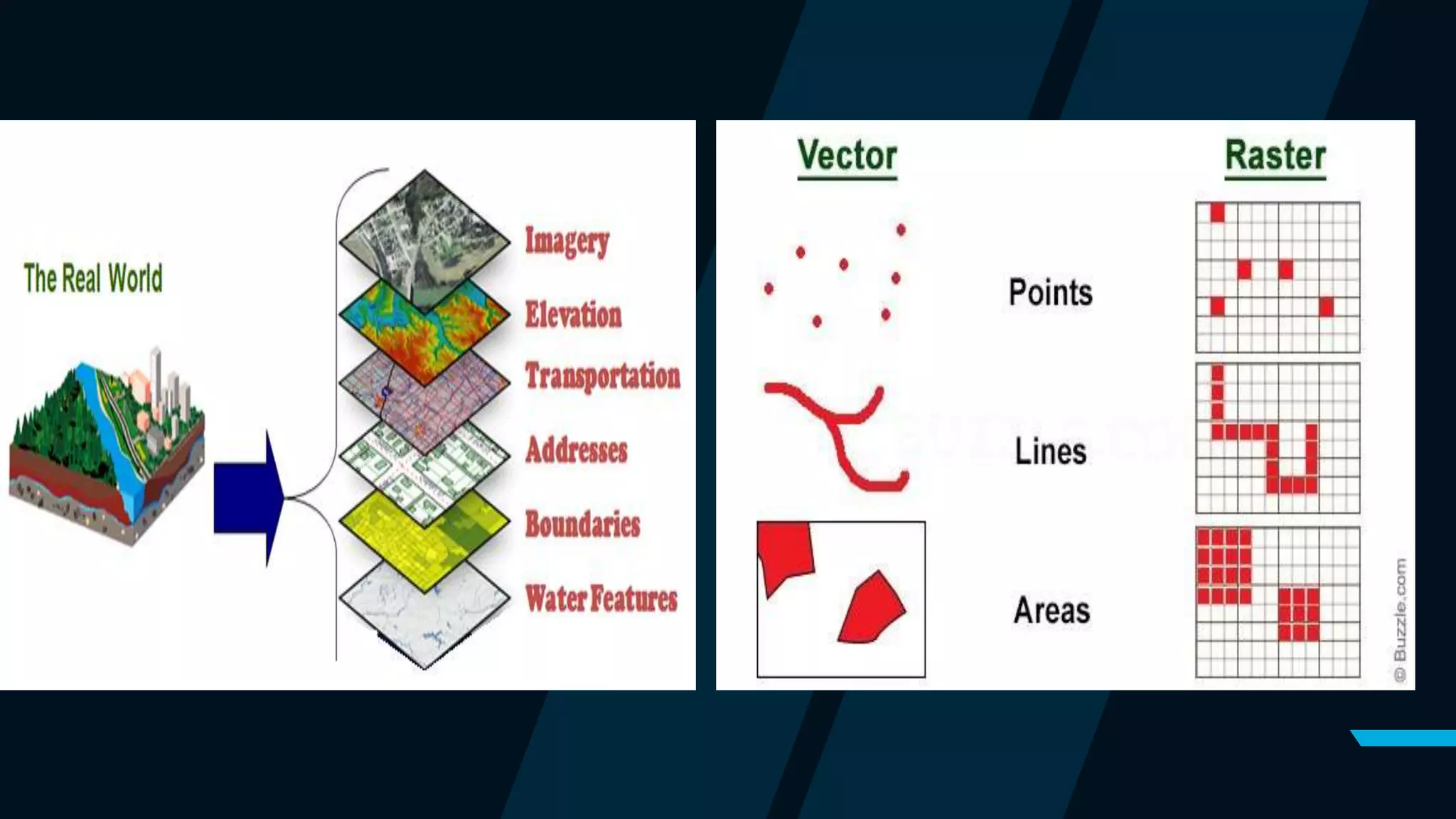
• Raster data set
A representation of the real world as a
surface divided into a regular grid of
cells. Raster models are useful for
storing data that varies continuously, as
in aerial photograph, a satellite image , a
surface of chemical concentrations , or
an elevation surface.
Cont..
• Vector data set
A representation of world using points,
lines and polygons .vector models are
useful for storing data that has discrete
boundary such as country borders , land
parcels and streets.
Remote sensing
• Remote sensing is a method of obtain information about the properties of an object
without coming into physical contact with it.
• RS System capture radiation in different wavelength reflected/ emitted by the
earth's surface features and recorded it either directly on the film as in case of
aerial photography or in digital medium used for generating the images
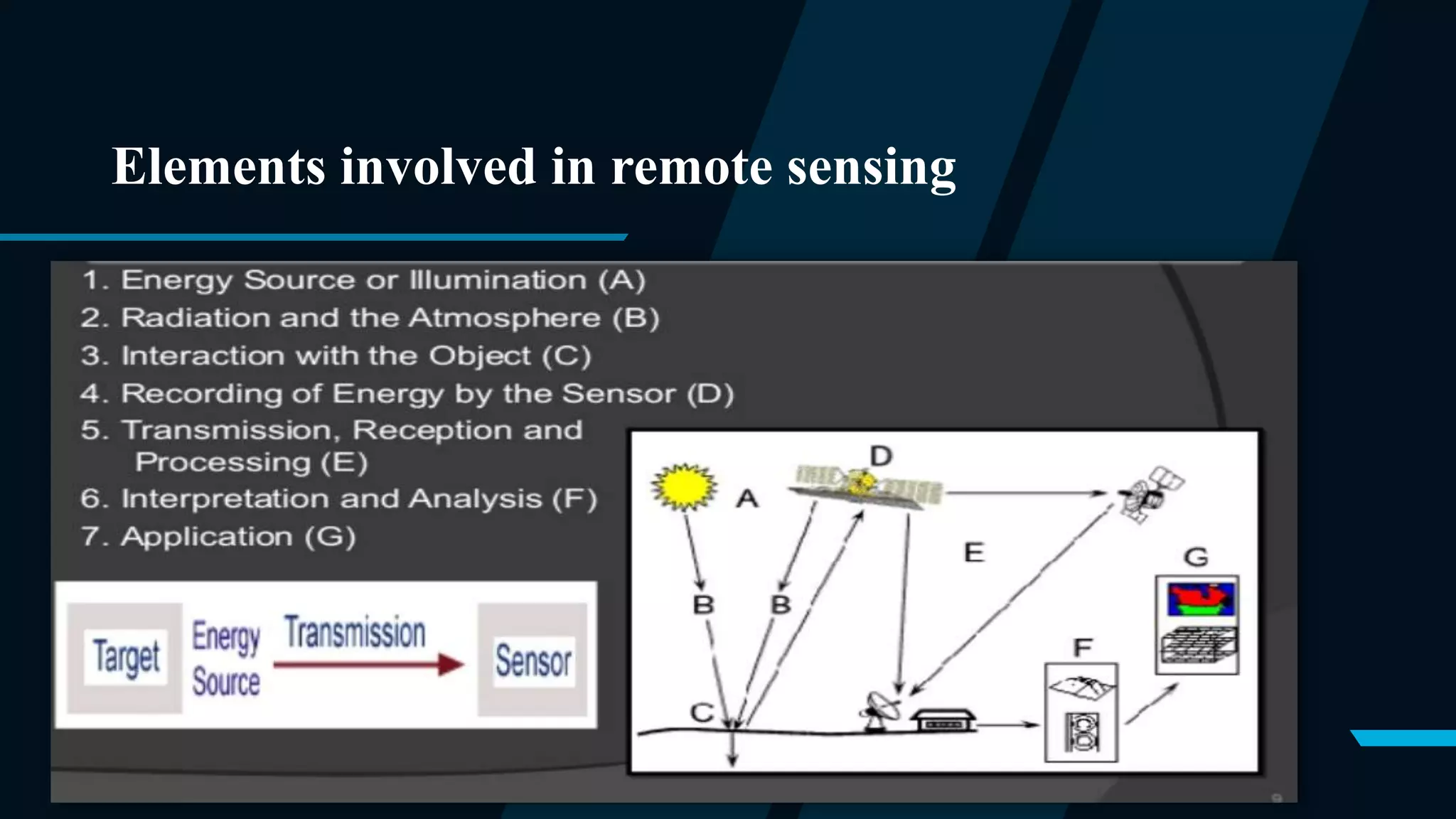
Elements involved in remote sensing
Principle of remote sensing technology
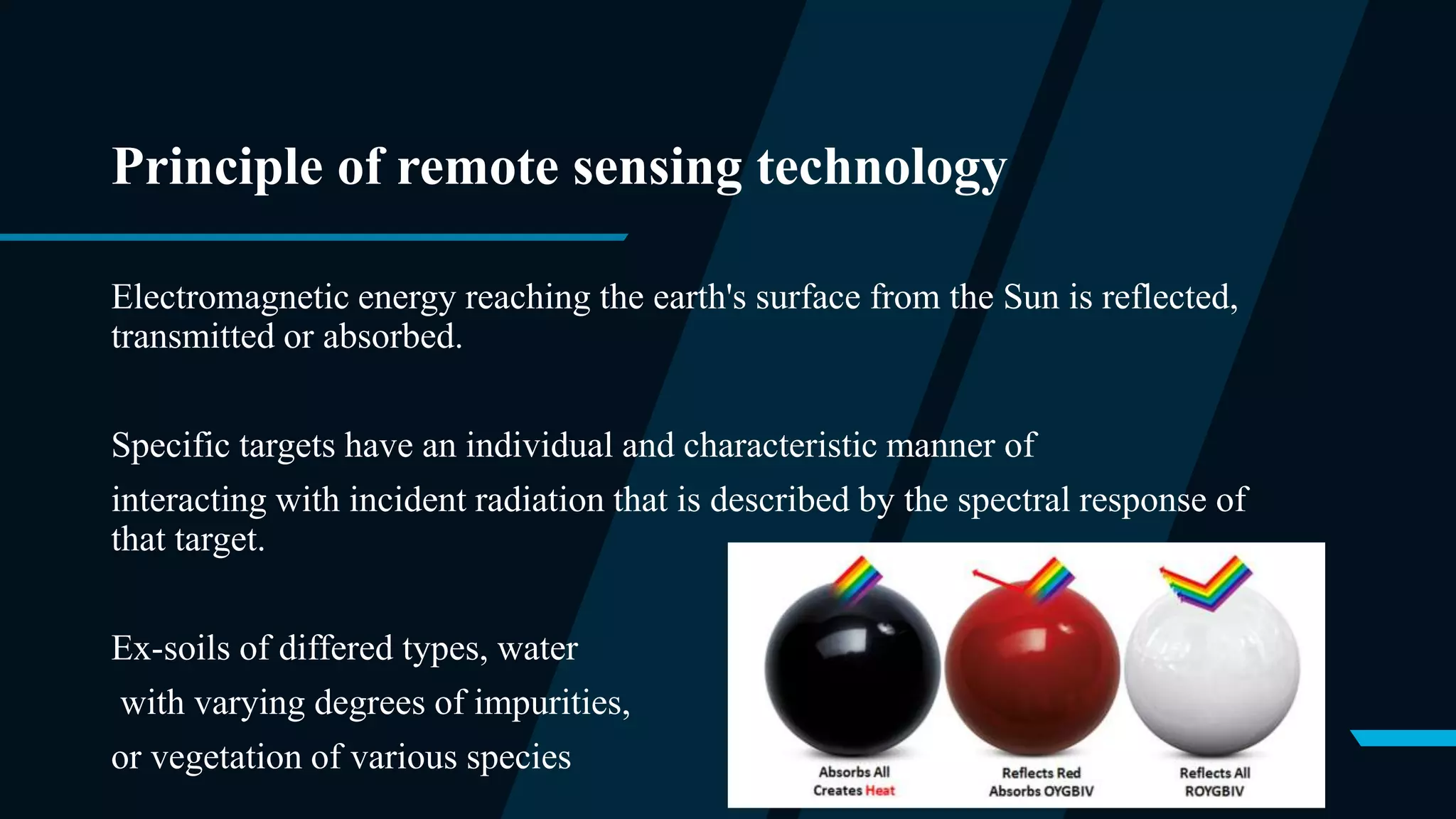
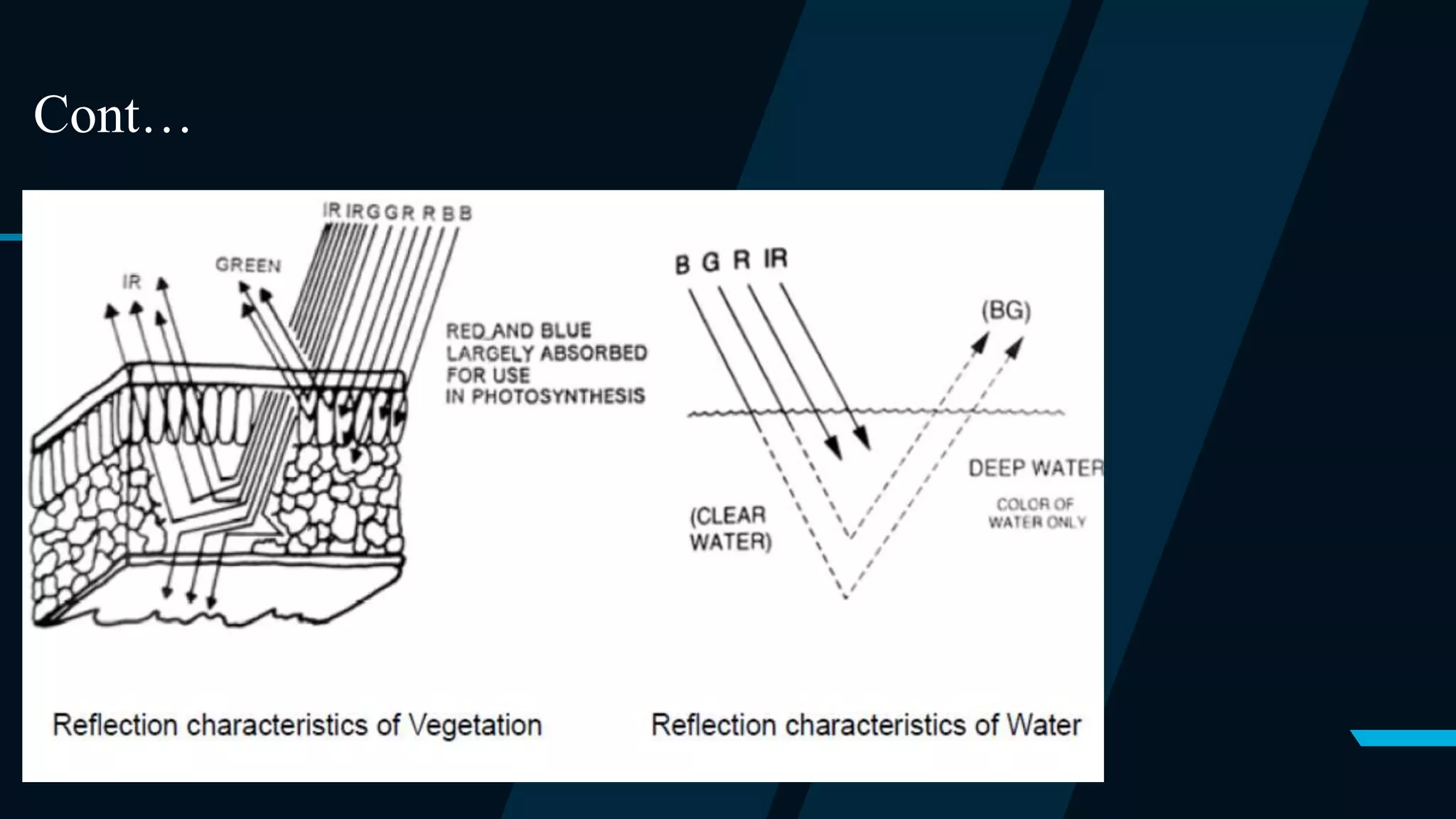
Electromagnetic energy reaching the earth's surface from the Sun is reflected,
transmitted or absorbed.
Specific targets have an individual and characteristic manner of
interacting with incident radiation that is described by the spectral response of
that target.
Ex-soils of differed types, water
with varying degrees of impurities,
or vegetation of various species
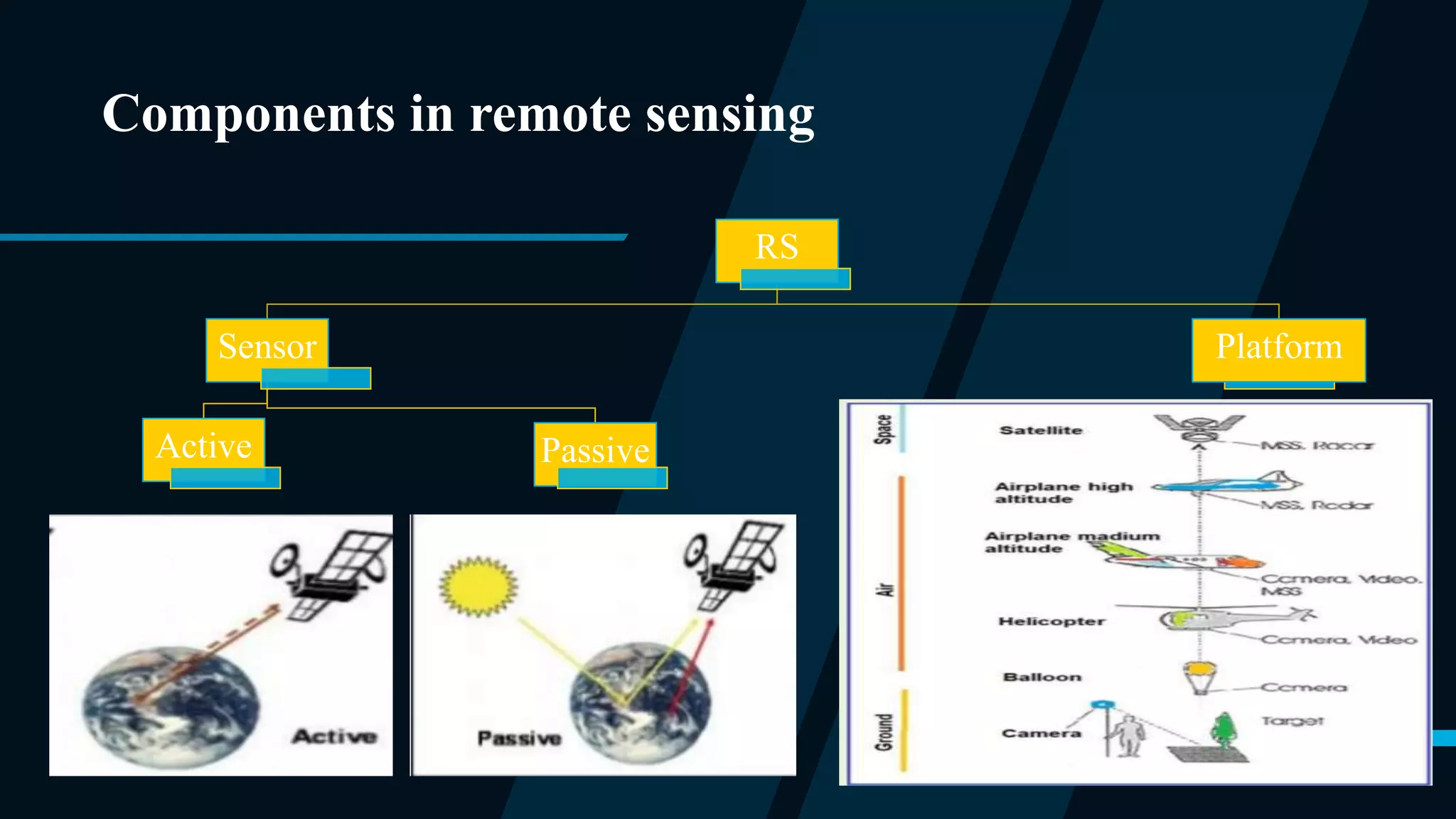
Components in remote sensing
RS
Sensor
Passive
Active
Platform
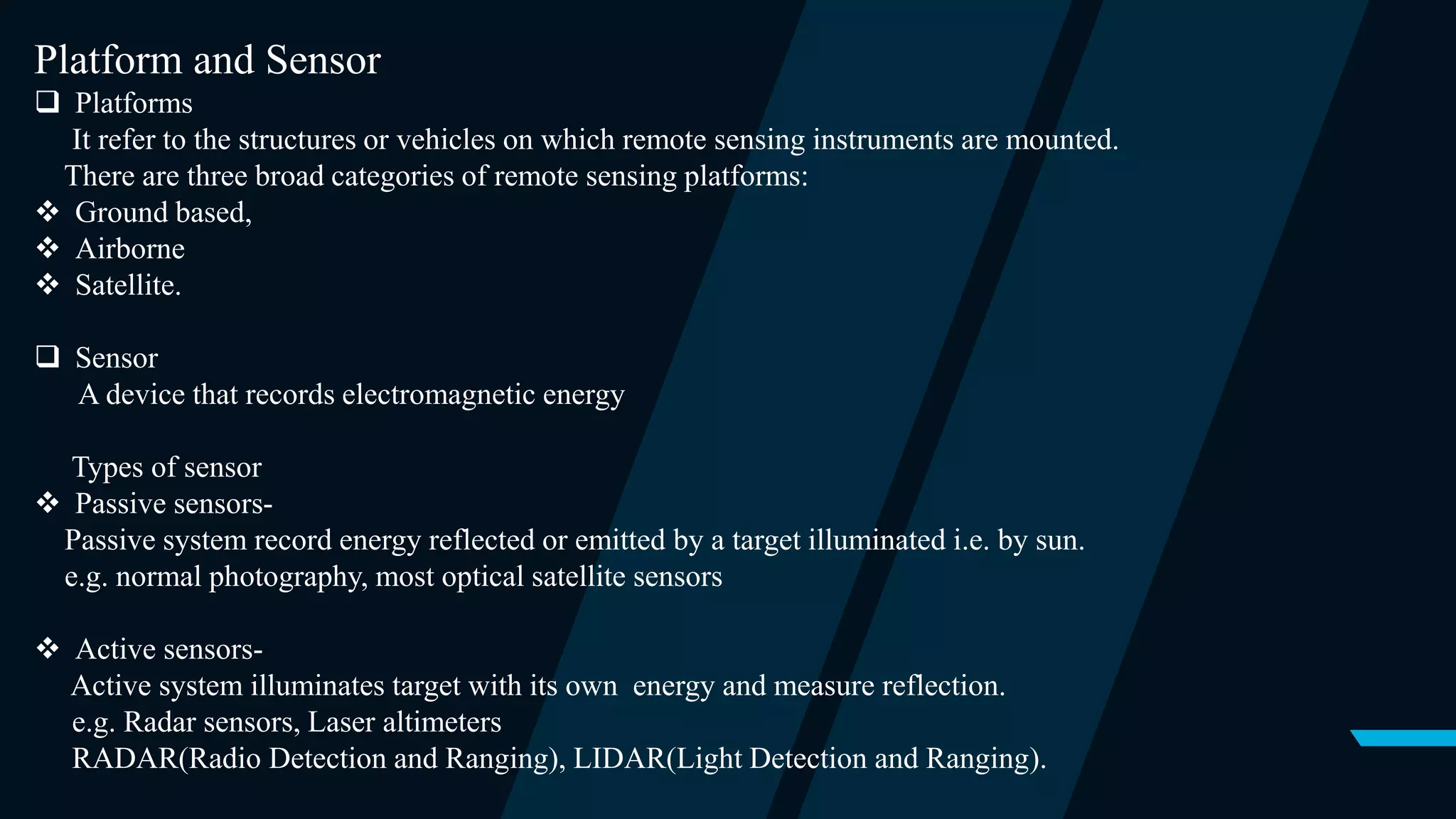
Platform and Sensor
 Platforms
It refer to the structures or vehicles on which remote sensing instruments are mounted.
There are three broad categories of remote sensing platforms:
 Ground based,
 Airborne
 Satellite.
 Sensor
A device that records electromagnetic energy
Types of sensor
 Passive sensors-
Passive system record energy reflected or emitted by a target illuminated i.e. by sun.
e.g. normal photography, most optical satellite sensors
 Active sensors-
Active system illuminates target with its own energy and measure reflection.
e.g. Radar sensors, Laser altimeters
RADAR(Radio Detection and Ranging), LIDAR(Light Detection and Ranging).
Resolution:-
Ability of the system to render the information at the smallest discretely
separable quantity
1. Distance (Spatial resolution)
2. Wavelength band of EMR(Spectral resolution )
3. Time (Temporal resolution )
4. Radiation (Energy resolution )
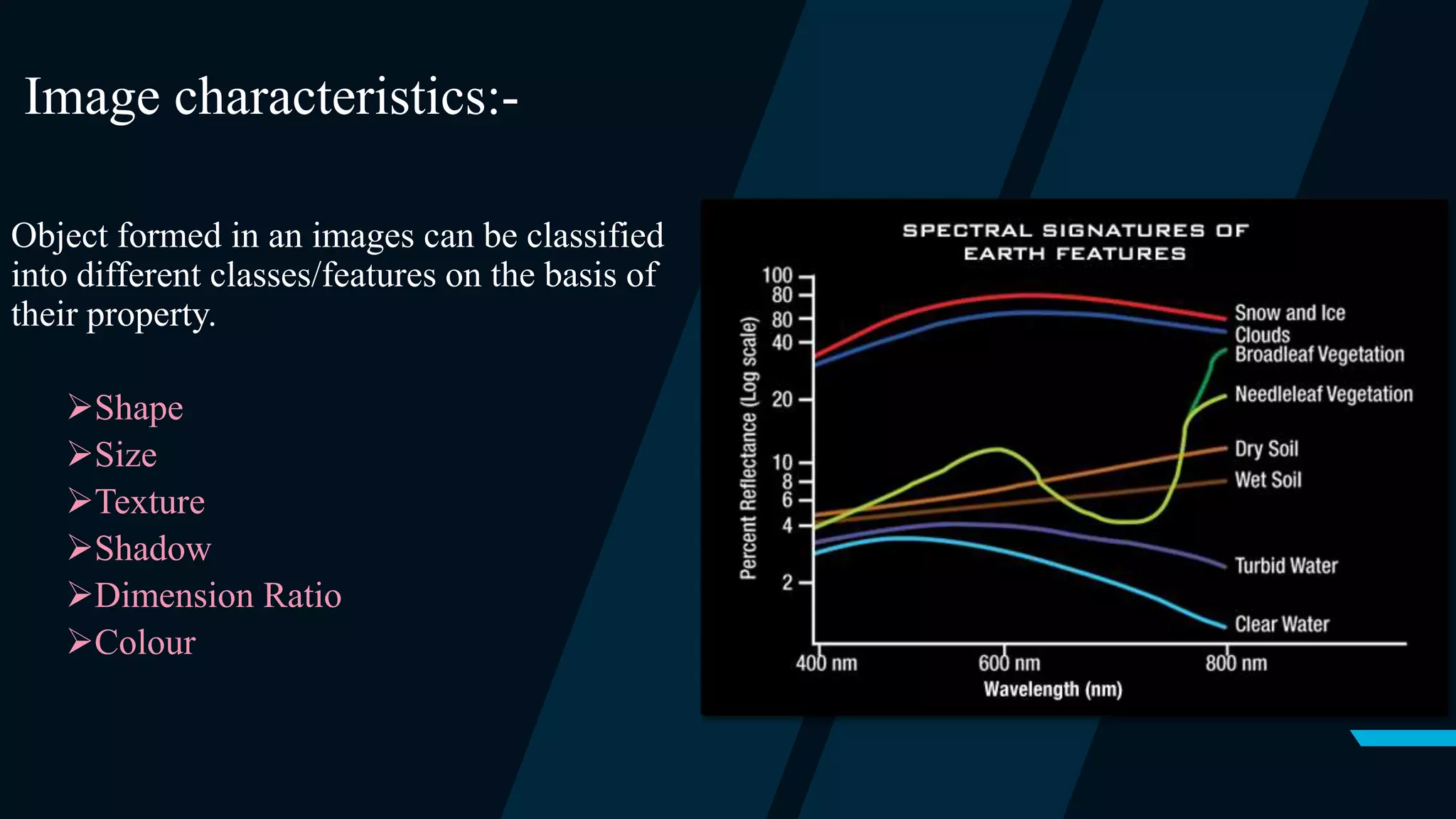
Image characteristics:-
Object formed in an images can be classified
into different classes/features on the basis of
their property.
Shape
Size
Texture
Shadow
Dimension Ratio
Colour
Cont…
ecognition:-
• eCognition is a object based image analysis (OBIA) software.
• eCognition analyze objects of the satellite images on the basis of its color, shape, size,
elevation, texture, area etc.
• eCognition is designed to improve, accelerate and automate the interpretation of
geospatial data.
• eCognition software offers capabilities for all kinds of application fields, i.e. Urban,
Forestry, Agriculture applications and a variety of different use cases (Feature Extraction,
Change Detection).
METHODOLOGY:-
• Steps used to extract features
1. Segmentation
2. Assign class
3. Nearest neighbour algorithm
4. Classification
1. Segmentation:-
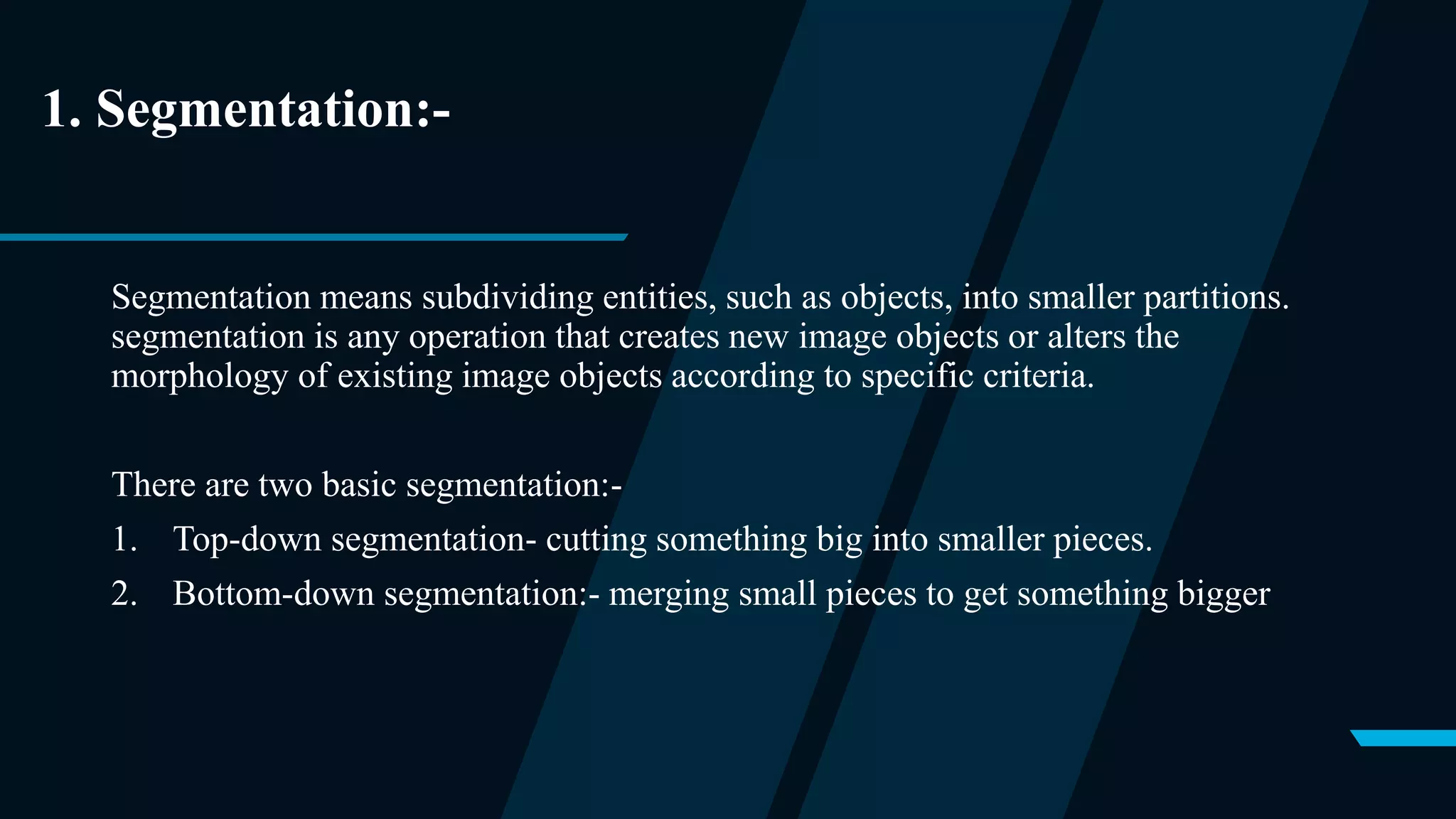
Segmentation means subdividing entities, such as objects, into smaller partitions.
segmentation is any operation that creates new image objects or alters the
morphology of existing image objects according to specific criteria.
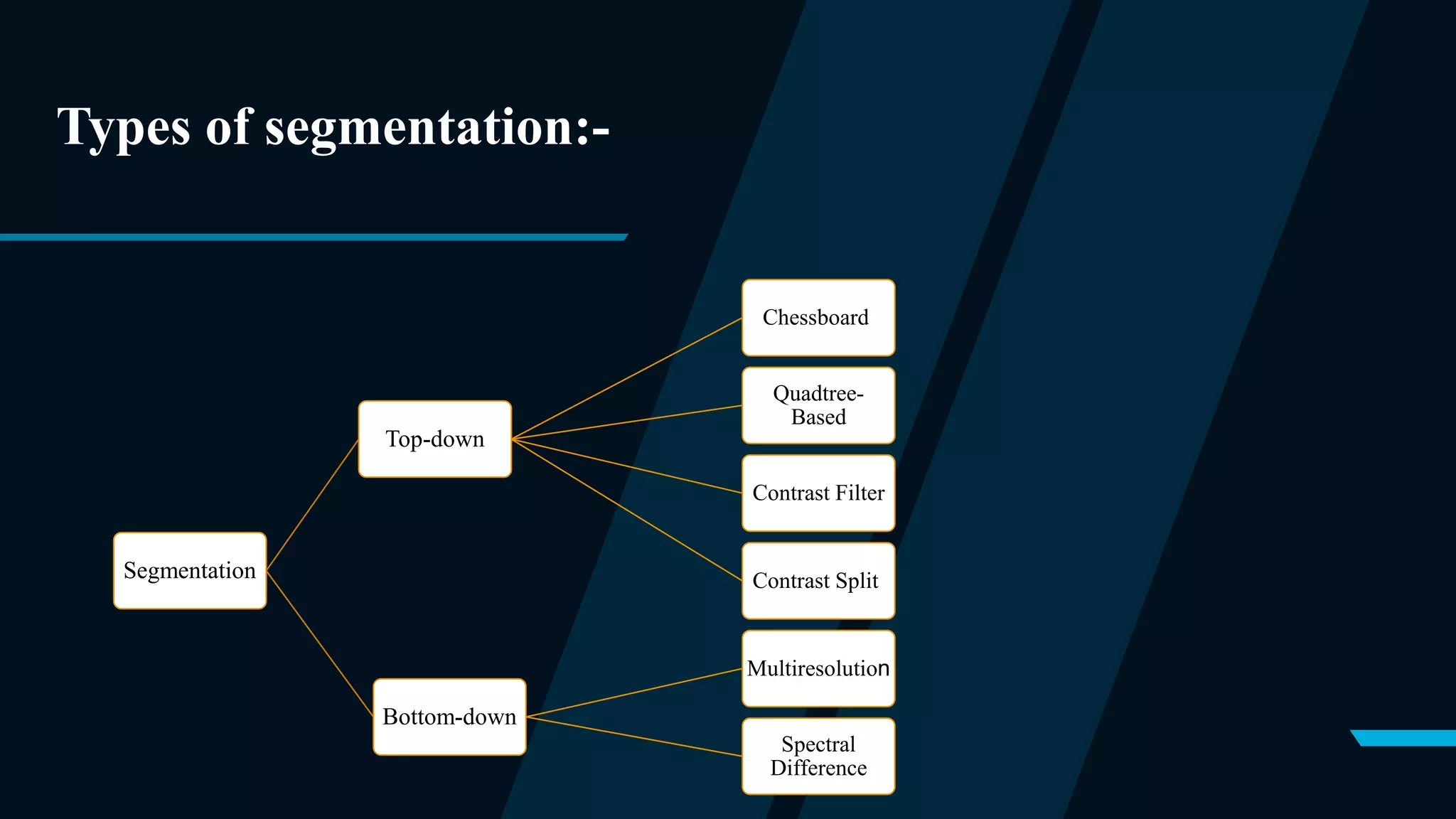
There are two basic segmentation:-
1. Top-down segmentation- cutting something big into smaller pieces.
2. Bottom-down segmentation:- merging small pieces to get something bigger
Types of segmentation:-
Segmentation
Top-down
Chessboard
Quadtree-
Based
Contrast Filter
Contrast Split
Bottom-down
Multiresolution
Spectral
Difference
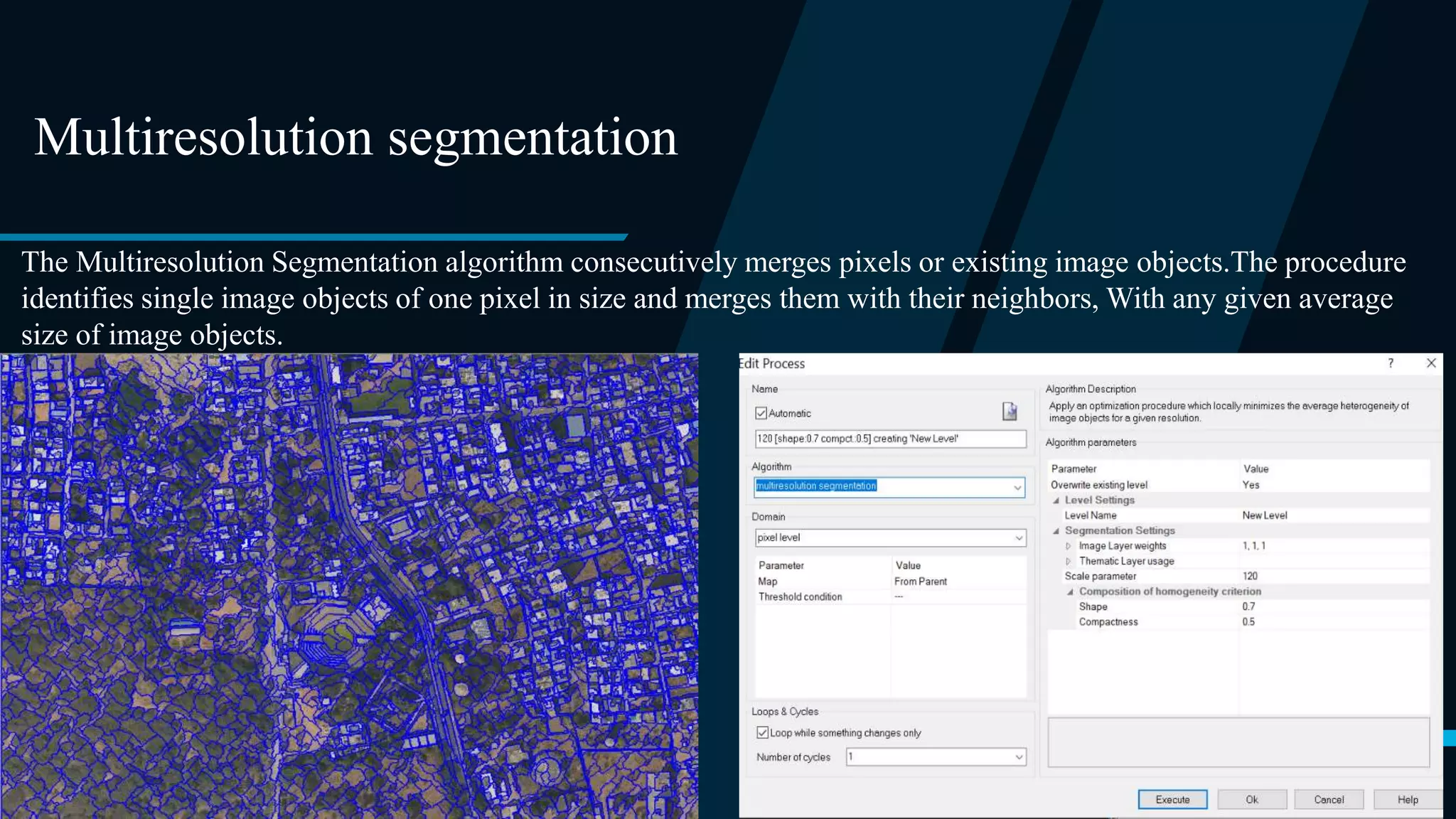
Multiresolution segmentation
The Multiresolution Segmentation algorithm consecutively merges pixels or existing image objects.The procedure
identifies single image objects of one pixel in size and merges them with their neighbors, With any given average
size of image objects.
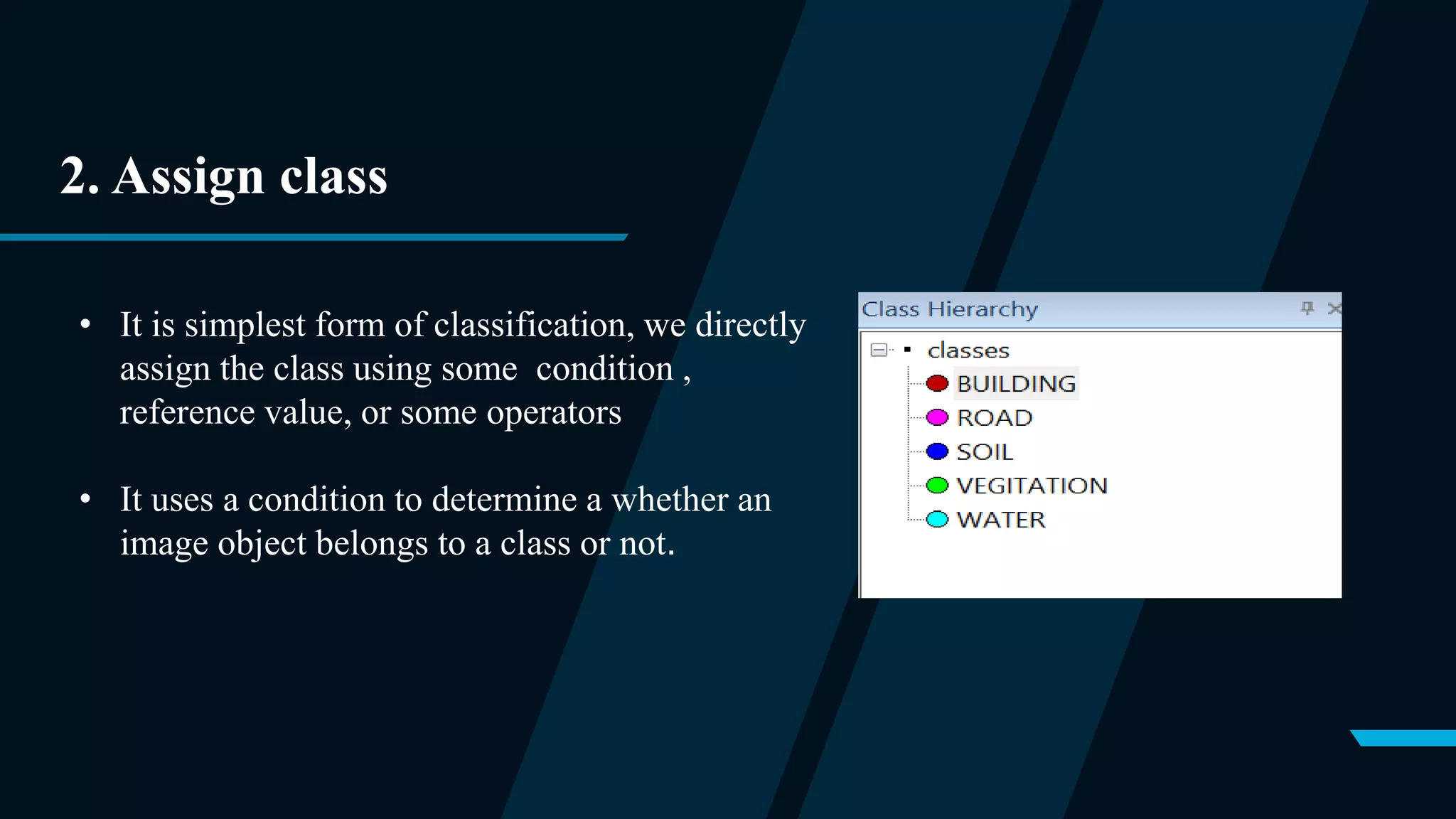
2. Assign class
• It is simplest form of classification, we directly
assign the class using some condition ,
reference value, or some operators
• It uses a condition to determine a whether an
image object belongs to a class or not.
3. Nearest neighnor(NN)
• Nearest neighbor (NN), as a form of proximity search, is the optimization problem of
finding the point in a given set that is closest (or most similar) to a given point. Closeness
is typically expressed in terms of a dissimilarity function: the less similar the objects, the
larger the function values.
• To train the machine we have to select the sample for each class .
• Also we have to define the statics i.e. how will software differentiate between objects.
• Standard NN Feature Space:
a) Mean green (average green value in object)
b) Standard deviation (colour variation in object)
c) Mean blue (average blue value in object)
d) Mean red (average red value in object)
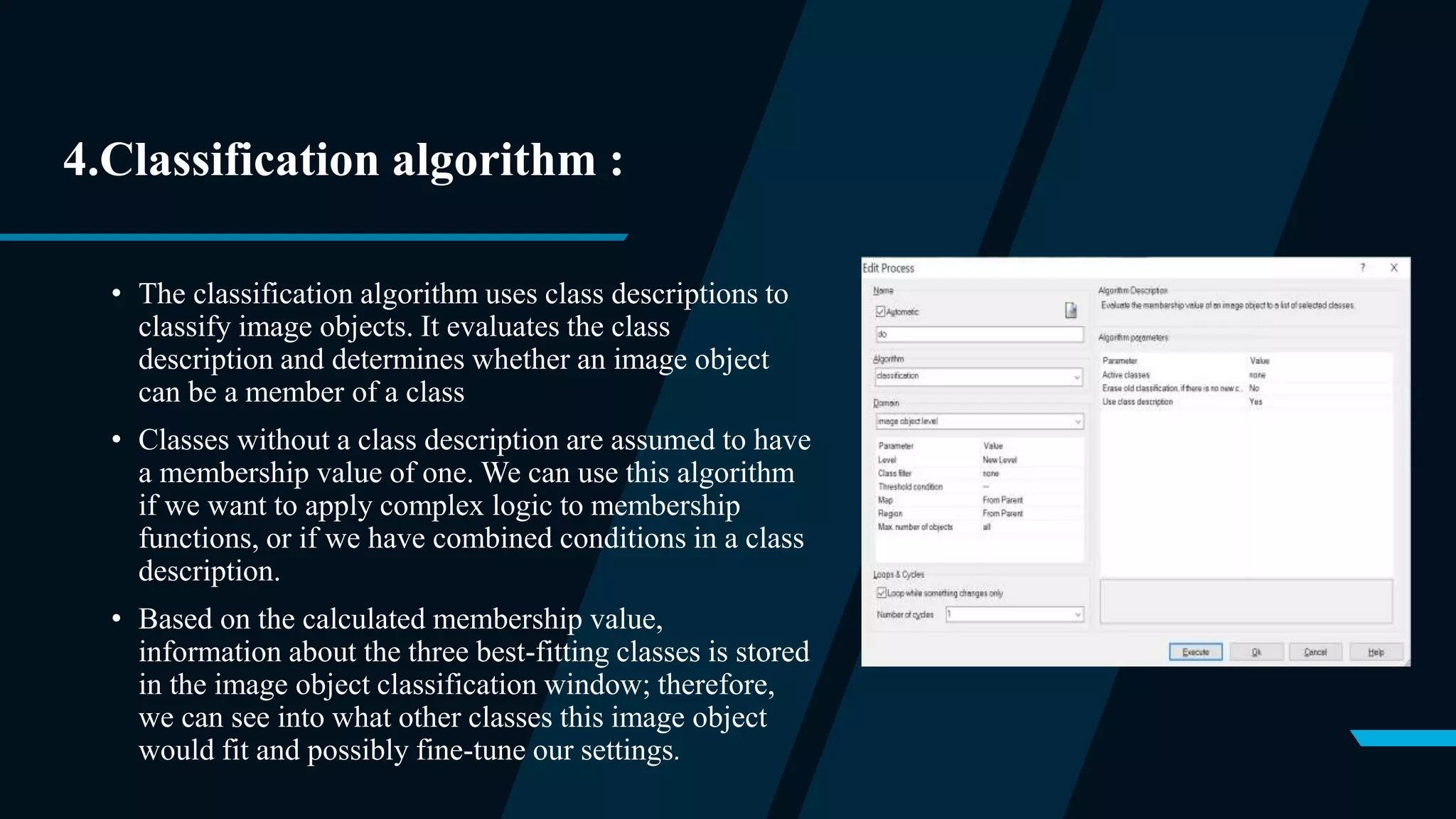
4.Classification algorithm :
• The classification algorithm uses class descriptions to
classify image objects. It evaluates the class
description and determines whether an image object
can be a member of a class
• Classes without a class description are assumed to have
a membership value of one. We can use this algorithm
if we want to apply complex logic to membership
functions, or if we have combined conditions in a class
description.
• Based on the calculated membership value,
information about the three best-fitting classes is stored
in the image object classification window; therefore,
we can see into what other classes this image object
would fit and possibly fine-tune our settings.
Procedure
Step 1: First load the image file.
Since our image file is very large and if perform analysis on whole it takes a lot of time , so we perform
analysis on a sub set region.
Action: (Left-click on files < Modify open project< Select subset region)
Step 2: Perform multiresolution segmentation
Action: In the process tree, add the multiresolution segmentation algorithm. (Right-click process tree
window < Append new < Select multiresolution segmentation algorithm)
Input parameters uses the following criteria:
• Scale: 170
• Shape: 0.7
• Compactness: 0.3
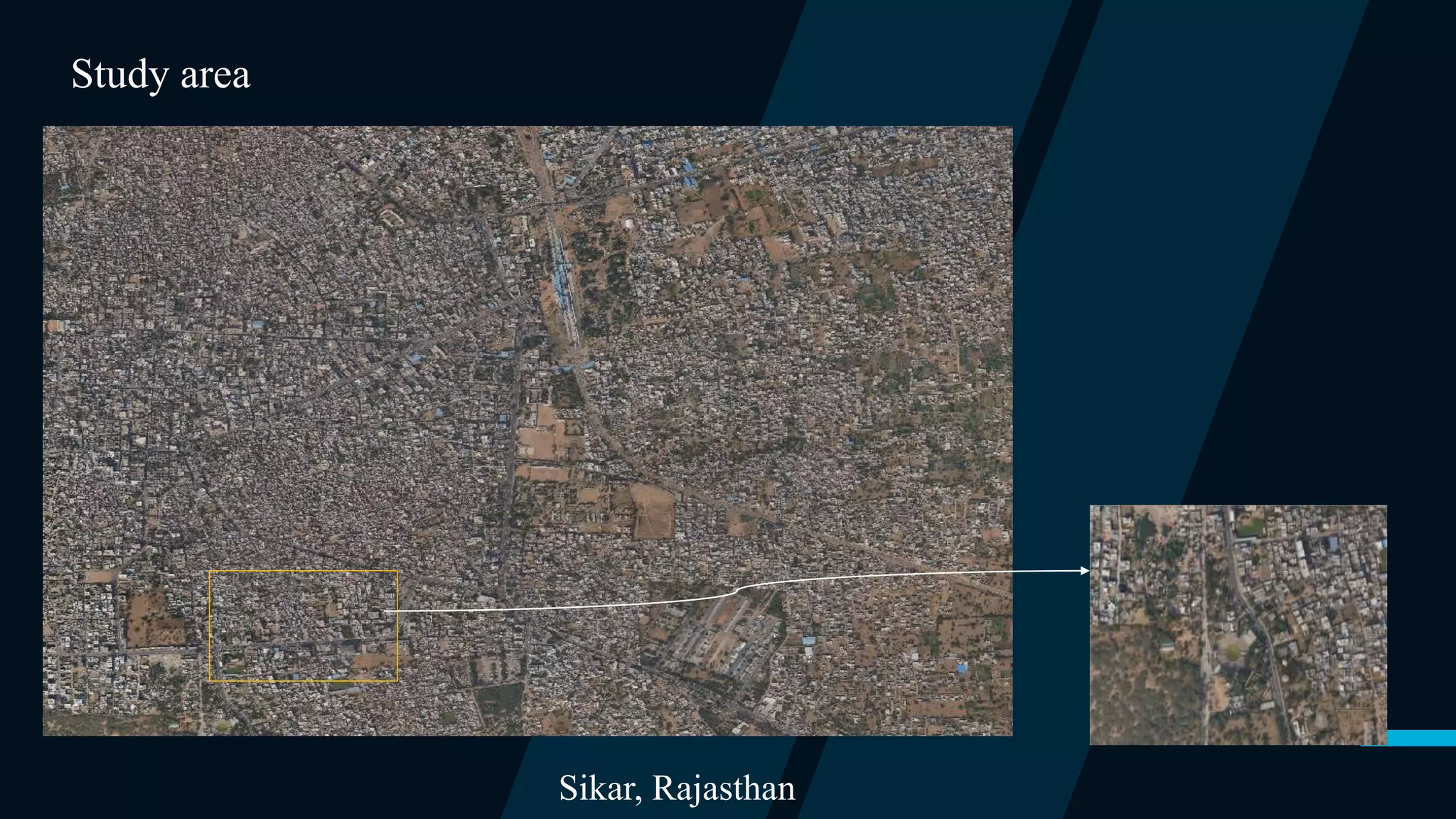
Sikar, Rajasthan
Study area
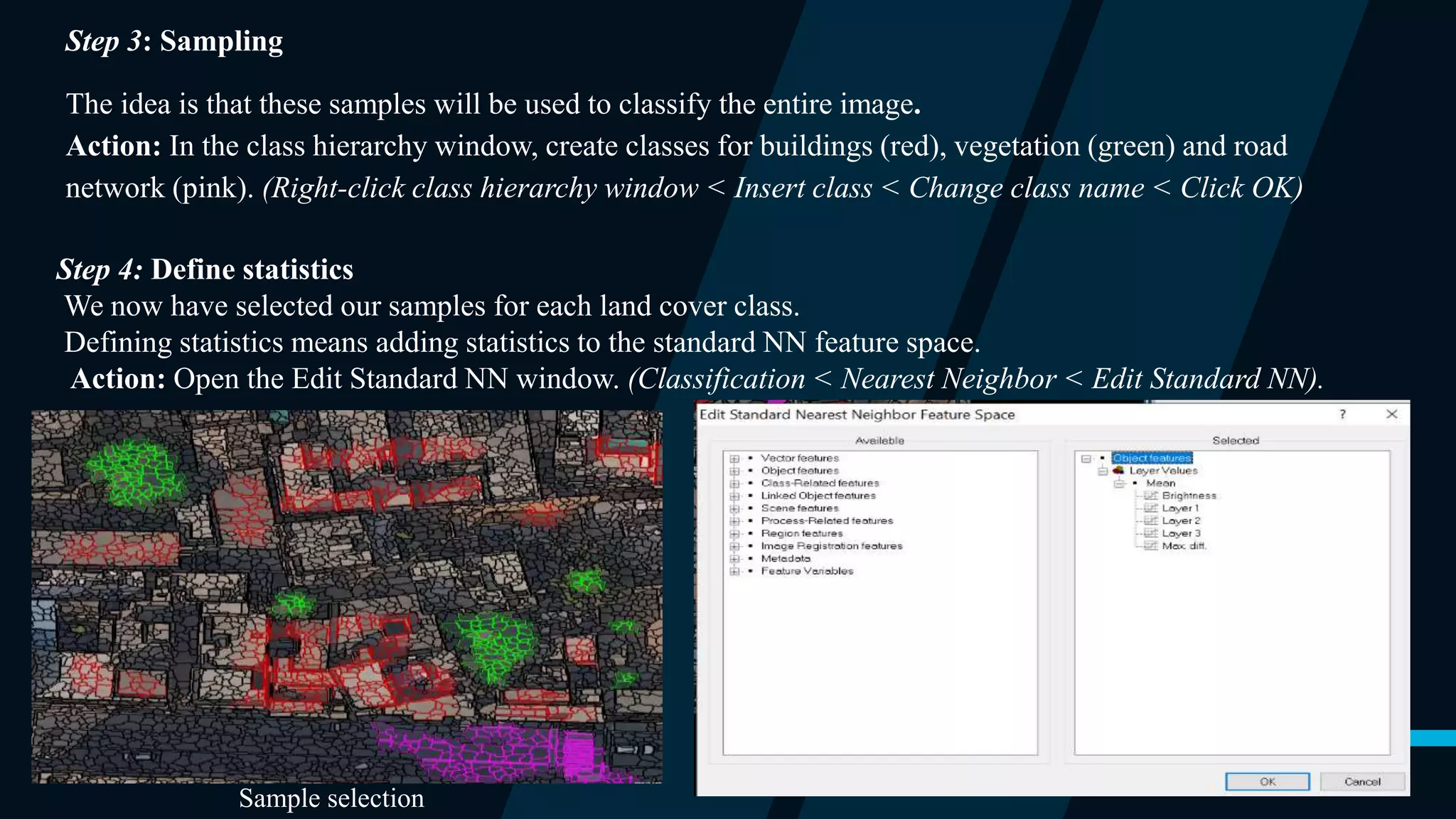
Step 3: Sampling
The idea is that these samples will be used to classify the entire image.
Action: In the class hierarchy window, create classes for buildings (red), vegetation (green) and road
network (pink). (Right-click class hierarchy window < Insert class < Change class name < Click OK)
Step 4: Define statistics
We now have selected our samples for each land cover class.
Defining statistics means adding statistics to the standard NN feature space.
Action: Open the Edit Standard NN window. (Classification < Nearest Neighbor < Edit Standard NN).
Sample selection
Step 5: Classify
The classification process will classify all objects in the entire image based on the selected samples and the
defined statistics. It will classify each object based on their closeness to the training set.
Action: In the class hierarchy; add the “standard nearest neighbor” to each class. (Right-click class< Edit <
Right-click [and min] < Insert new expression < Standard nearest neighbor)
Action: In the process tree, add the “classification” algorithm. (Right-click process tree < Append New <
Select classification algorithm)
Action: Select each class as active classes and press execute. (In parameter window < checkmark all classes <
Right click classification algorithm in process tree < execute)
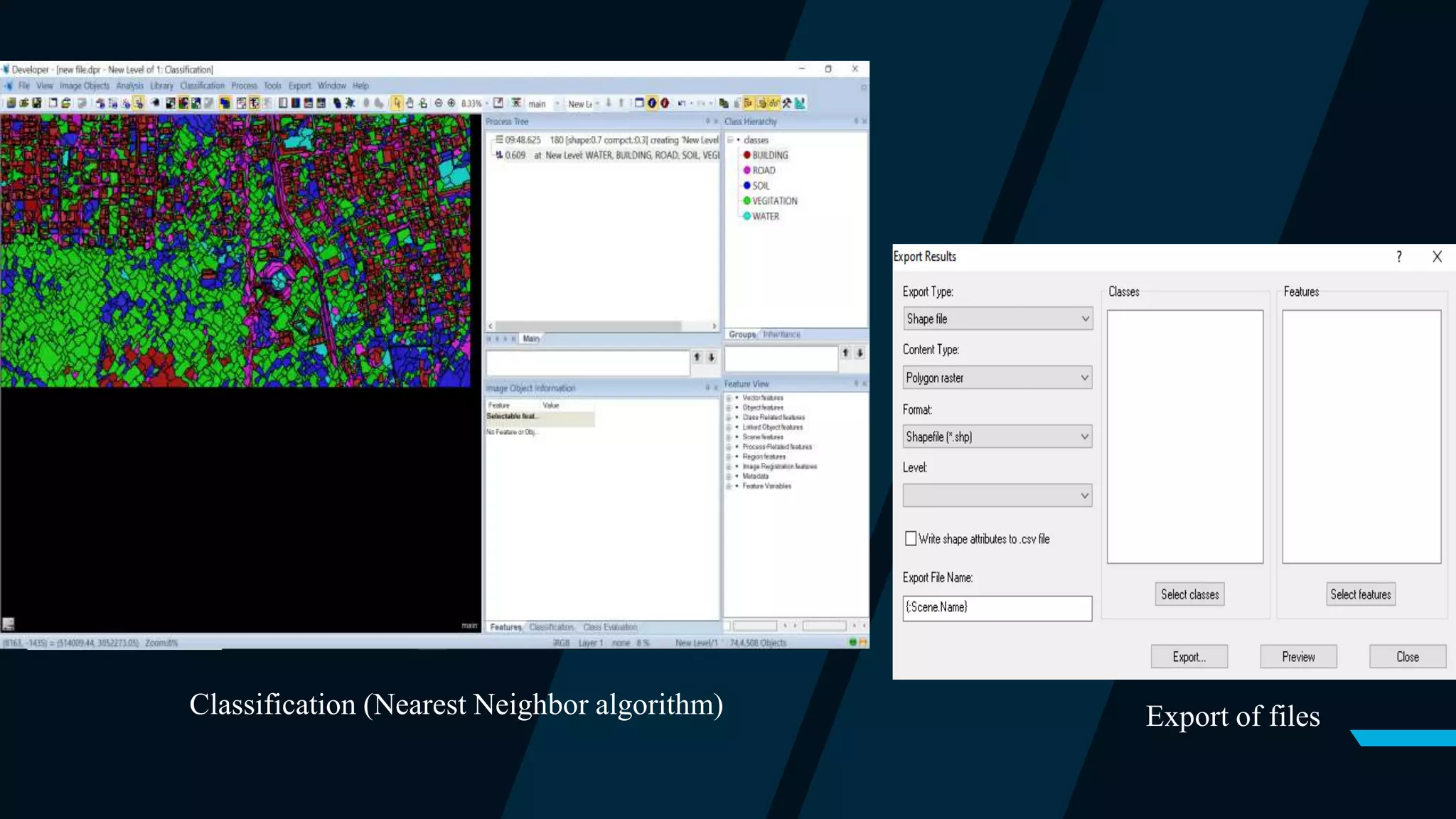
Step 6: Export of vector files
Output result files are saved in vector formats.
Action: (Right-click on Export < Export Results < Export File Name < Select classes < Select Features).
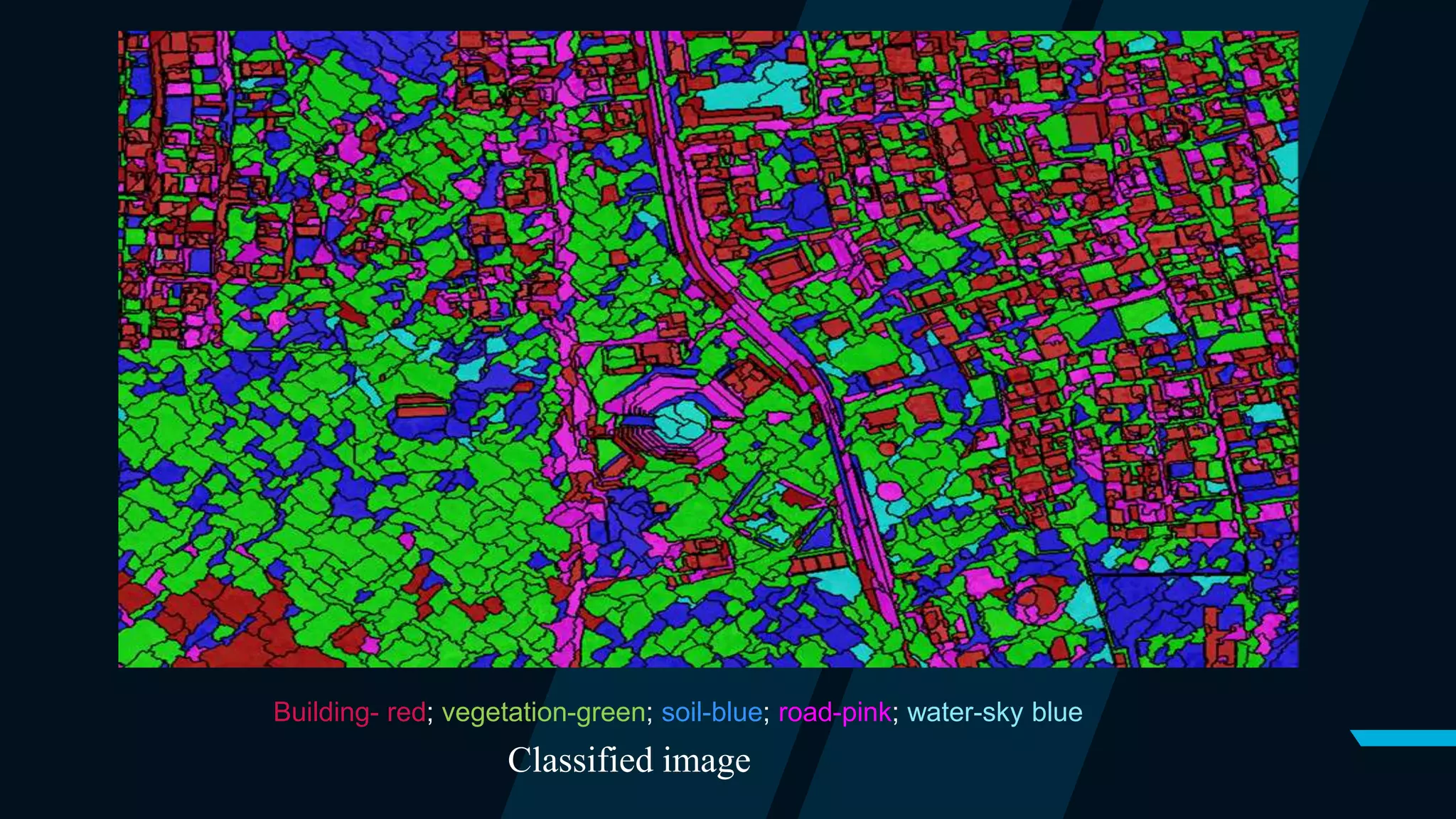
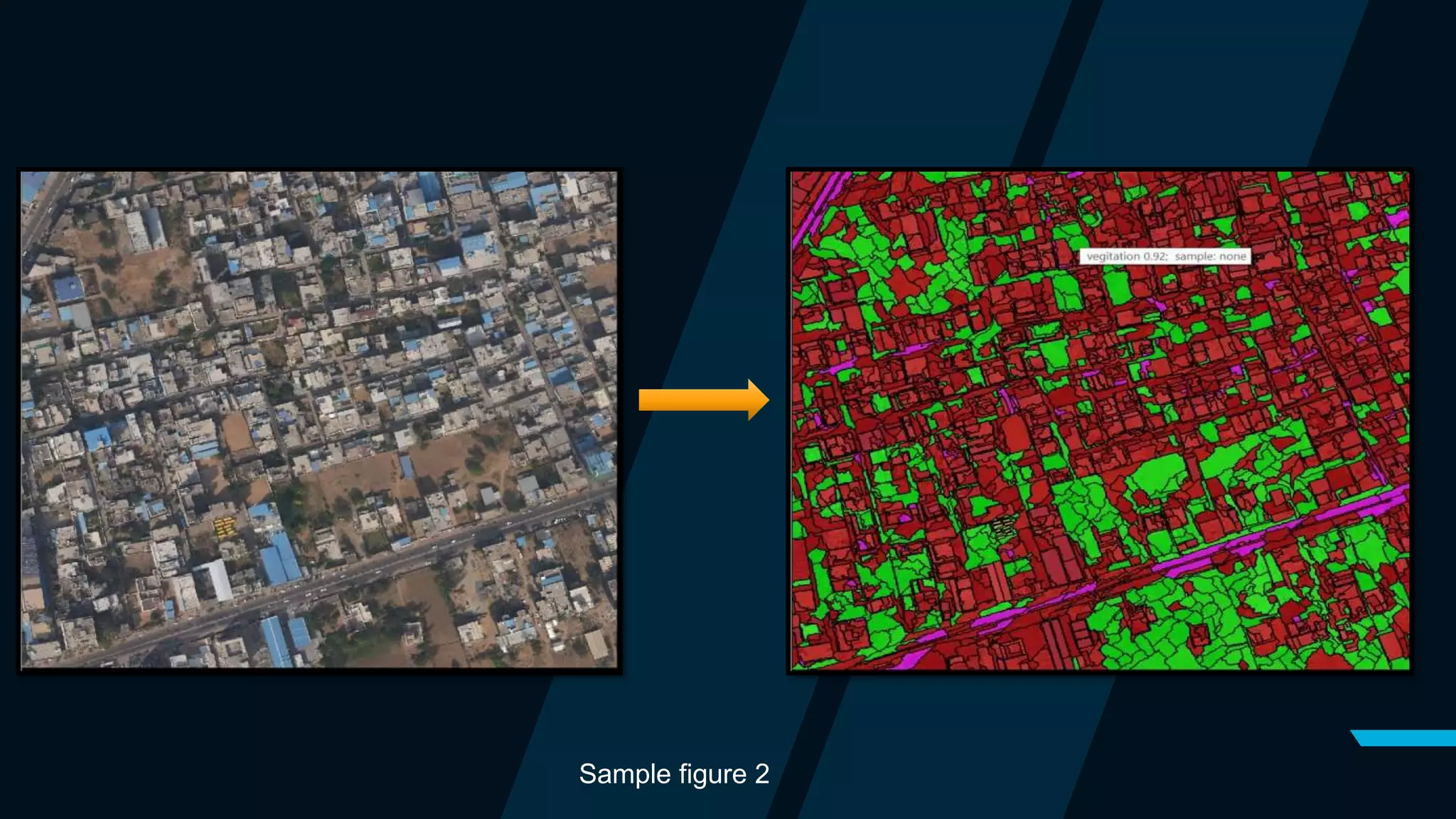
Classified image
Building- red; vegetation-green; soil-blue; road-pink; water-sky blue
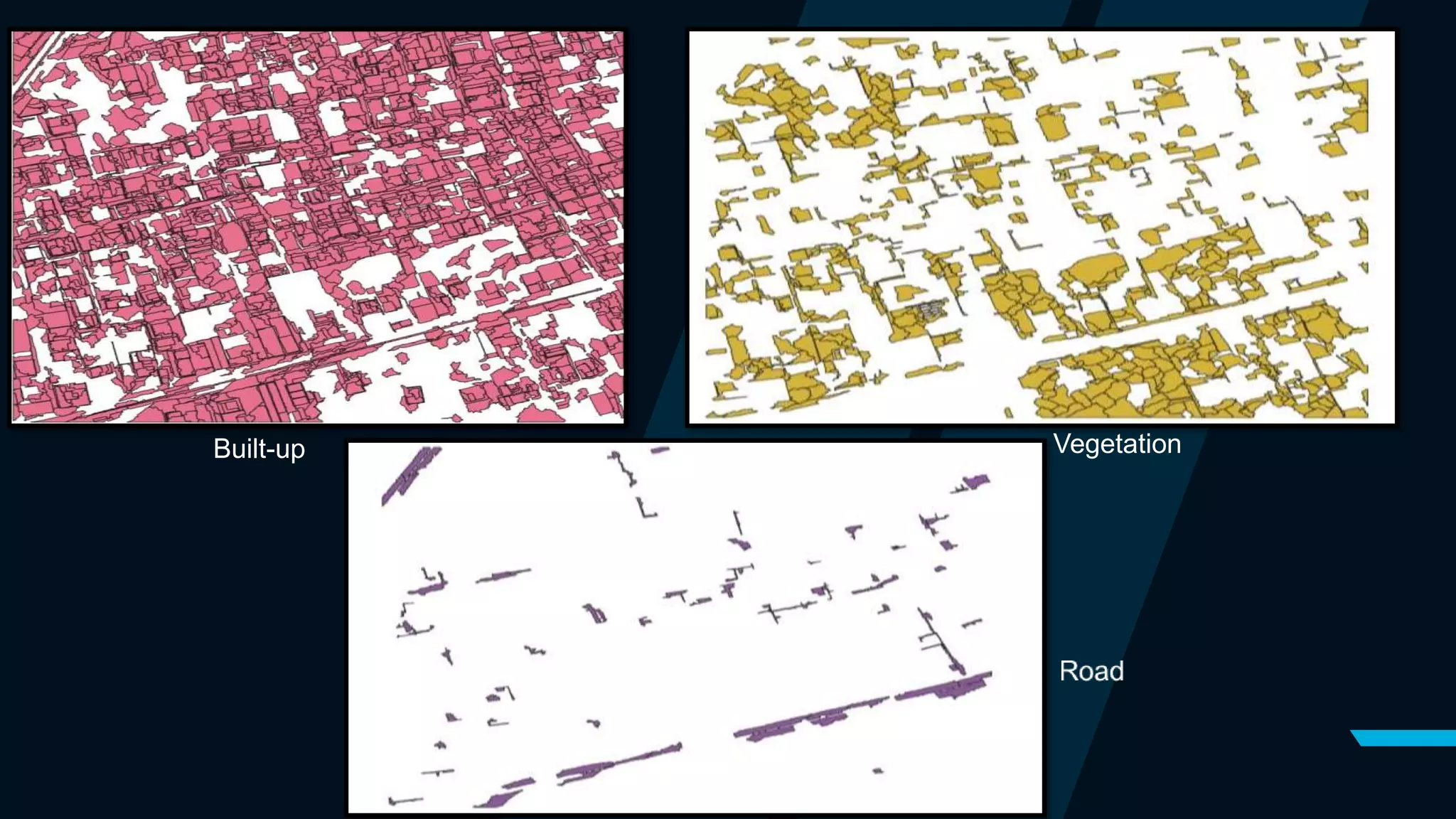
Classification (Nearest Neighbor algorithm) Export of files
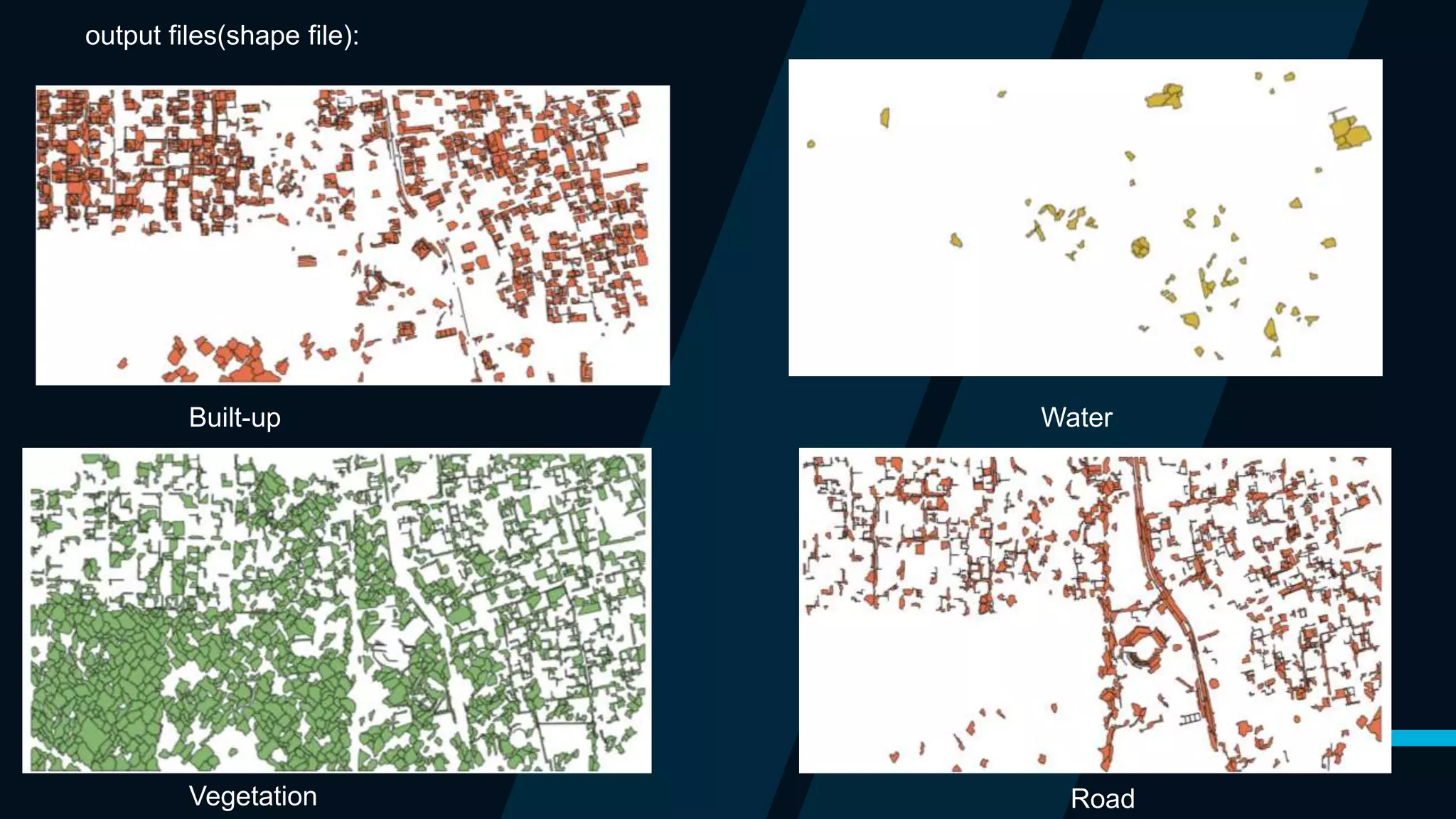
Built-up Water
Vegetation Road
output files(shape file):
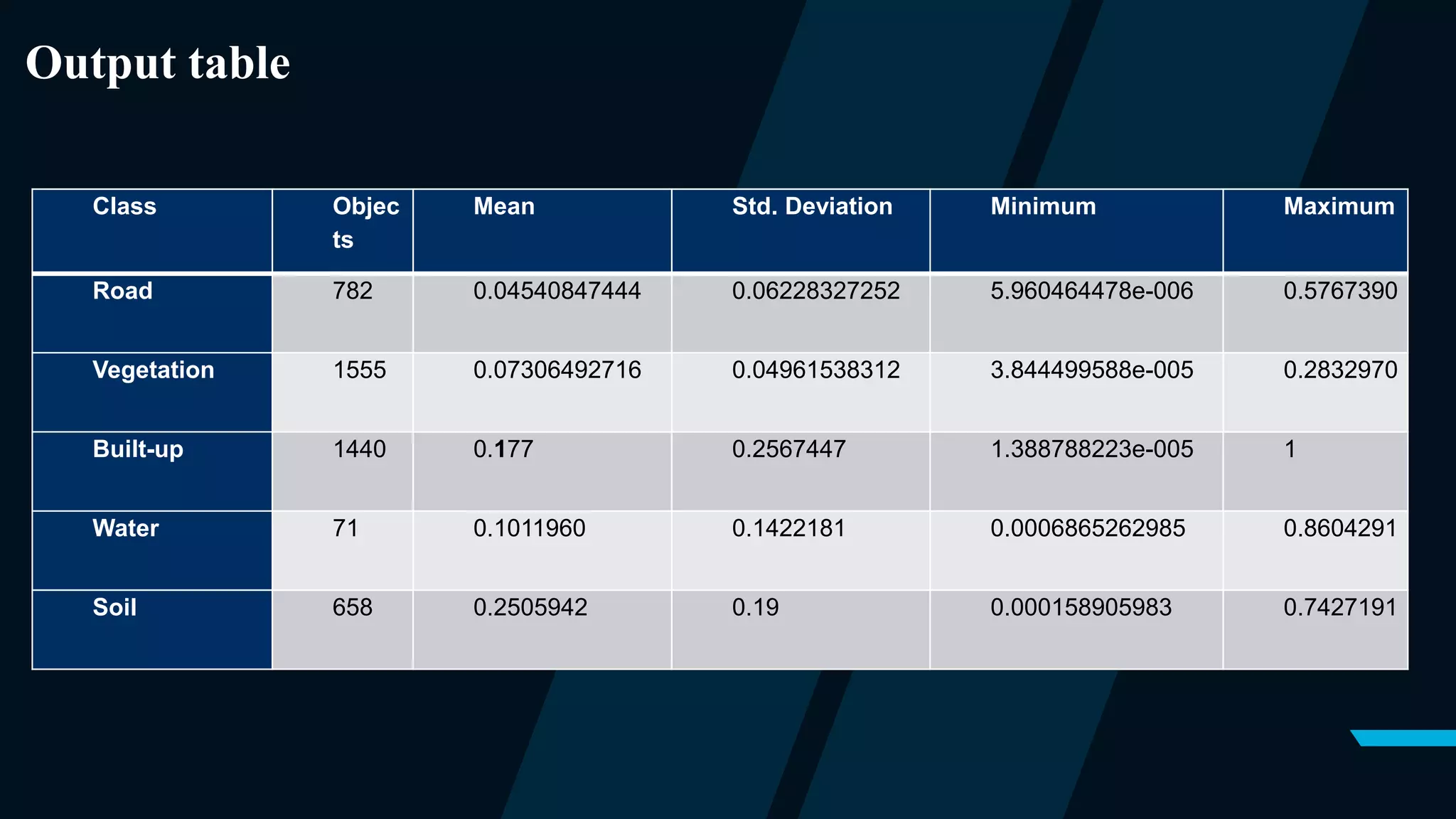
Class Objec
ts
Mean Std. Deviation Minimum Maximum
Road 782 0.04540847444 0.06228327252 5.960464478e-006 0.5767390
Vegetation 1555 0.07306492716 0.04961538312 3.844499588e-005 0.2832970
Built-up 1440 0.177 0.2567447 1.388788223e-005 1
Water 71 0.1011960 0.1422181 0.0006865262985 0.8604291
Soil 658 0.2505942 0.19 0.000158905983 0.7427191
Output table
Sample figure 2
Built-up Vegetation
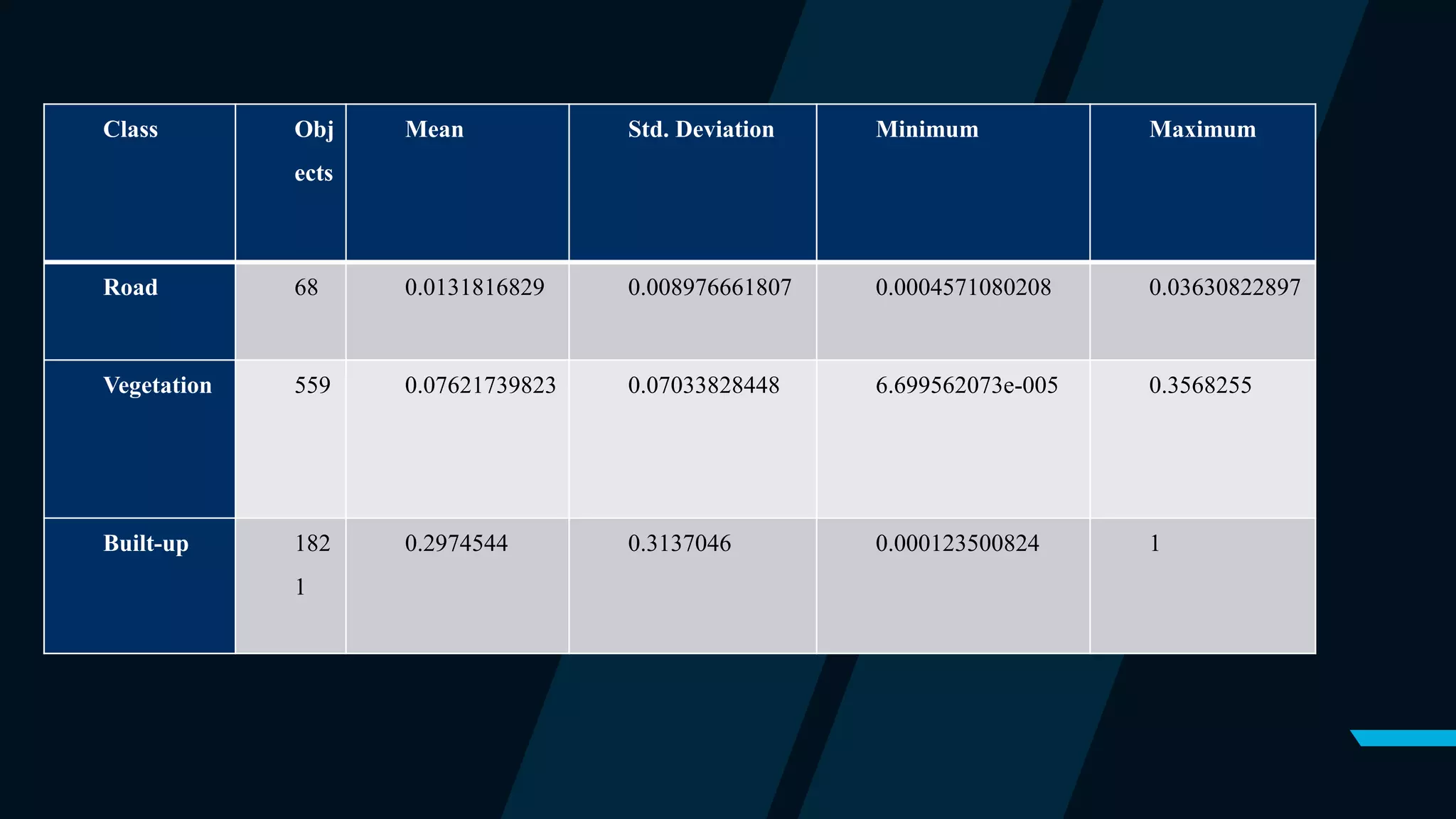
Class Obj
ects
Mean Std. Deviation Minimum Maximum
Road 68 0.0131816829 0.008976661807 0.0004571080208 0.03630822897
Vegetation 559 0.07621739823 0.07033828448 6.699562073e-005 0.3568255
Built-up 182
1
0.2974544 0.3137046 0.000123500824 1
Discussion:
• Built-up areas and vegetation have been captured satisfactorily, however, roads
captured from have lot of errors because of availability of other features on road
such as vehicles, poles, pedestrian or shadow of built-up and trees on road.
• Adopted segmentation and feature extraction techniques have been found to be
effective in capturing the targeted LULC classes.
Conclusion:-
• Object based image classification and feature extraction techniques have been used to
extract the built-up, roads and vegetation land use classes from a satellite image.
• E-cognition software has been used to apply object based techniques for the feature
extraction.
• Study has been found to be successful in extracting the built-up features automatically.
• Limited options of segmentation and techniques have been explored due to COVID
situation.
Cont..
There are false positive and negative in the outputs because of following reasons.
•Limited computing power
•Unavailability of high spectral resolution
•Sample size is small.
Here is a list of options to improve the classification:
Add more samples to the training set.
Define different statistics.
Experiment different scales and criteria in MRS.
If possible, add more bands (NIR, SWIR etc).
References:-
1. https://docs.ecognition.com/v9.5.0/Page%20collection/eCognition%20Suite%20Dev% 20UG.htm
2. https://www.isprs.org/proceedings/XXXVIII/part7/b/pdf/690_XXXVIII-part7B.pdf.
3. https://cdn.csu.edu.au/__data/assets/pdf_file/0008/749942/Knight_Jon_199.pdf
4. https://www.sciencedirect.com/topics/computer-science/geospatial-
data#:~:text=Geospatial%20data%20is%20data%20about,the%20surface%20of%20the%20earth.&te
xt=For%20this%20reason%2C%20whether%20collected,are%20available%20as%20open%20data.
5. IJCSI International Journal of Computer Science Issues, Vol. 11, Issue 3, No 2, May 2014 ISSN
(Print): 1694-0814 | ISSN (Online): 1694-0784.
THANK YOU

Automated features extraction from satellite images.

  • 1.
    AUTOMATED FEATURE EXTRACTIONFROM SATELLITE IMAGES Supervision by:- Dr. Mahesh Kumar Jat Department of Civil Engineering, MNIT Group Member:- Bhoopendra Singh 2017UCE1394 Himanshu Gupta 2017UCE1667 Karan Nawariya 2017UCE1158
  • 2.
    AIM OF THEPROJECT:- • A satellite image captures the earth surface details which may have different types of features i.e. buildings, trees, river, mountains, hydrological data, roads, volcanos, moving vehicle etc. • Automatically extraction of features from satellite image Buildings Transportation Network Water and Vegetation
  • 3.
    Application of ourwork • If we do a survey of any area by field visit it involves huge time and cost but ecognition can do this in very less time and cost without any survey or field visit. • Output file can be used in many fields like in urbanization survey, forest survey, shore line changes. • This method can also be used where physical survey is not possible like mountain, deep forest. • Can also be used to monitor border areas.
  • 4.
    Introduction • Geospatial datais information about objects, events, or phenomena that have a location on the surface of the earth. The location may be static e.g., the location of a road, buildings or dynamic e.g., a moving vehicle or pedestrian. • Geospatial data combines  Location information - usually coordinates on the earth,  Attribute information - the characteristics of the object,  Temporal information - the time at which the location and attributes exist. Geospatial data:
  • 5.
    Types of datasets • Raster data set A representation of the real world as a surface divided into a regular grid of cells. Raster models are useful for storing data that varies continuously, as in aerial photograph, a satellite image , a surface of chemical concentrations , or an elevation surface.
  • 6.
    Cont.. • Vector dataset A representation of world using points, lines and polygons .vector models are useful for storing data that has discrete boundary such as country borders , land parcels and streets.
  • 8.
    Remote sensing • Remotesensing is a method of obtain information about the properties of an object without coming into physical contact with it. • RS System capture radiation in different wavelength reflected/ emitted by the earth's surface features and recorded it either directly on the film as in case of aerial photography or in digital medium used for generating the images
  • 9.
    Elements involved inremote sensing
  • 10.
    Principle of remotesensing technology Electromagnetic energy reaching the earth's surface from the Sun is reflected, transmitted or absorbed. Specific targets have an individual and characteristic manner of interacting with incident radiation that is described by the spectral response of that target. Ex-soils of differed types, water with varying degrees of impurities, or vegetation of various species
  • 11.
    Components in remotesensing RS Sensor Passive Active Platform
  • 12.
    Platform and Sensor Platforms It refer to the structures or vehicles on which remote sensing instruments are mounted. There are three broad categories of remote sensing platforms:  Ground based,  Airborne  Satellite.  Sensor A device that records electromagnetic energy Types of sensor  Passive sensors- Passive system record energy reflected or emitted by a target illuminated i.e. by sun. e.g. normal photography, most optical satellite sensors  Active sensors- Active system illuminates target with its own energy and measure reflection. e.g. Radar sensors, Laser altimeters RADAR(Radio Detection and Ranging), LIDAR(Light Detection and Ranging).
  • 13.
    Resolution:- Ability of thesystem to render the information at the smallest discretely separable quantity 1. Distance (Spatial resolution) 2. Wavelength band of EMR(Spectral resolution ) 3. Time (Temporal resolution ) 4. Radiation (Energy resolution )
  • 14.
    Image characteristics:- Object formedin an images can be classified into different classes/features on the basis of their property. Shape Size Texture Shadow Dimension Ratio Colour
  • 15.
  • 16.
    ecognition:- • eCognition isa object based image analysis (OBIA) software. • eCognition analyze objects of the satellite images on the basis of its color, shape, size, elevation, texture, area etc. • eCognition is designed to improve, accelerate and automate the interpretation of geospatial data. • eCognition software offers capabilities for all kinds of application fields, i.e. Urban, Forestry, Agriculture applications and a variety of different use cases (Feature Extraction, Change Detection).
  • 17.
    METHODOLOGY:- • Steps usedto extract features 1. Segmentation 2. Assign class 3. Nearest neighbour algorithm 4. Classification
  • 18.
    1. Segmentation:- Segmentation meanssubdividing entities, such as objects, into smaller partitions. segmentation is any operation that creates new image objects or alters the morphology of existing image objects according to specific criteria. There are two basic segmentation:- 1. Top-down segmentation- cutting something big into smaller pieces. 2. Bottom-down segmentation:- merging small pieces to get something bigger
  • 19.
    Types of segmentation:- Segmentation Top-down Chessboard Quadtree- Based ContrastFilter Contrast Split Bottom-down Multiresolution Spectral Difference
  • 20.
    Multiresolution segmentation The MultiresolutionSegmentation algorithm consecutively merges pixels or existing image objects.The procedure identifies single image objects of one pixel in size and merges them with their neighbors, With any given average size of image objects.
  • 21.
    2. Assign class •It is simplest form of classification, we directly assign the class using some condition , reference value, or some operators • It uses a condition to determine a whether an image object belongs to a class or not.
  • 22.
    3. Nearest neighnor(NN) •Nearest neighbor (NN), as a form of proximity search, is the optimization problem of finding the point in a given set that is closest (or most similar) to a given point. Closeness is typically expressed in terms of a dissimilarity function: the less similar the objects, the larger the function values. • To train the machine we have to select the sample for each class . • Also we have to define the statics i.e. how will software differentiate between objects.
  • 23.
    • Standard NNFeature Space: a) Mean green (average green value in object) b) Standard deviation (colour variation in object) c) Mean blue (average blue value in object) d) Mean red (average red value in object)
  • 24.
    4.Classification algorithm : •The classification algorithm uses class descriptions to classify image objects. It evaluates the class description and determines whether an image object can be a member of a class • Classes without a class description are assumed to have a membership value of one. We can use this algorithm if we want to apply complex logic to membership functions, or if we have combined conditions in a class description. • Based on the calculated membership value, information about the three best-fitting classes is stored in the image object classification window; therefore, we can see into what other classes this image object would fit and possibly fine-tune our settings.
  • 25.
    Procedure Step 1: Firstload the image file. Since our image file is very large and if perform analysis on whole it takes a lot of time , so we perform analysis on a sub set region. Action: (Left-click on files < Modify open project< Select subset region) Step 2: Perform multiresolution segmentation Action: In the process tree, add the multiresolution segmentation algorithm. (Right-click process tree window < Append new < Select multiresolution segmentation algorithm) Input parameters uses the following criteria: • Scale: 170 • Shape: 0.7 • Compactness: 0.3
  • 26.
  • 27.
    Step 3: Sampling Theidea is that these samples will be used to classify the entire image. Action: In the class hierarchy window, create classes for buildings (red), vegetation (green) and road network (pink). (Right-click class hierarchy window < Insert class < Change class name < Click OK) Step 4: Define statistics We now have selected our samples for each land cover class. Defining statistics means adding statistics to the standard NN feature space. Action: Open the Edit Standard NN window. (Classification < Nearest Neighbor < Edit Standard NN). Sample selection
  • 28.
    Step 5: Classify Theclassification process will classify all objects in the entire image based on the selected samples and the defined statistics. It will classify each object based on their closeness to the training set. Action: In the class hierarchy; add the “standard nearest neighbor” to each class. (Right-click class< Edit < Right-click [and min] < Insert new expression < Standard nearest neighbor) Action: In the process tree, add the “classification” algorithm. (Right-click process tree < Append New < Select classification algorithm) Action: Select each class as active classes and press execute. (In parameter window < checkmark all classes < Right click classification algorithm in process tree < execute) Step 6: Export of vector files Output result files are saved in vector formats. Action: (Right-click on Export < Export Results < Export File Name < Select classes < Select Features).
  • 29.
    Classified image Building- red;vegetation-green; soil-blue; road-pink; water-sky blue
  • 30.
    Classification (Nearest Neighboralgorithm) Export of files
  • 31.
  • 32.
    Class Objec ts Mean Std.Deviation Minimum Maximum Road 782 0.04540847444 0.06228327252 5.960464478e-006 0.5767390 Vegetation 1555 0.07306492716 0.04961538312 3.844499588e-005 0.2832970 Built-up 1440 0.177 0.2567447 1.388788223e-005 1 Water 71 0.1011960 0.1422181 0.0006865262985 0.8604291 Soil 658 0.2505942 0.19 0.000158905983 0.7427191 Output table
  • 33.
  • 34.
  • 35.
    Class Obj ects Mean Std.Deviation Minimum Maximum Road 68 0.0131816829 0.008976661807 0.0004571080208 0.03630822897 Vegetation 559 0.07621739823 0.07033828448 6.699562073e-005 0.3568255 Built-up 182 1 0.2974544 0.3137046 0.000123500824 1
  • 36.
    Discussion: • Built-up areasand vegetation have been captured satisfactorily, however, roads captured from have lot of errors because of availability of other features on road such as vehicles, poles, pedestrian or shadow of built-up and trees on road. • Adopted segmentation and feature extraction techniques have been found to be effective in capturing the targeted LULC classes.
  • 37.
    Conclusion:- • Object basedimage classification and feature extraction techniques have been used to extract the built-up, roads and vegetation land use classes from a satellite image. • E-cognition software has been used to apply object based techniques for the feature extraction. • Study has been found to be successful in extracting the built-up features automatically. • Limited options of segmentation and techniques have been explored due to COVID situation.
  • 38.
    Cont.. There are falsepositive and negative in the outputs because of following reasons. •Limited computing power •Unavailability of high spectral resolution •Sample size is small. Here is a list of options to improve the classification: Add more samples to the training set. Define different statistics. Experiment different scales and criteria in MRS. If possible, add more bands (NIR, SWIR etc).
  • 39.
    References:- 1. https://docs.ecognition.com/v9.5.0/Page%20collection/eCognition%20Suite%20Dev% 20UG.htm 2.https://www.isprs.org/proceedings/XXXVIII/part7/b/pdf/690_XXXVIII-part7B.pdf. 3. https://cdn.csu.edu.au/__data/assets/pdf_file/0008/749942/Knight_Jon_199.pdf 4. https://www.sciencedirect.com/topics/computer-science/geospatial- data#:~:text=Geospatial%20data%20is%20data%20about,the%20surface%20of%20the%20earth.&te xt=For%20this%20reason%2C%20whether%20collected,are%20available%20as%20open%20data. 5. IJCSI International Journal of Computer Science Issues, Vol. 11, Issue 3, No 2, May 2014 ISSN (Print): 1694-0814 | ISSN (Online): 1694-0784.
  • 40.