Assistive Technology
By Jason W. Howland
What is Assistive Technology?
• Assistive Technology(AT) - is any device or service that helps a student with
a disability to participate in the general education curriculum to the
greatest degree possible.
• Broadly speaking Assistive Technology is typically broken into two separate
but related categories: devices and services.
• Assistive Technology can be used for a variety of functions including:
• communication
• performing academic tasks
• accessing materials
• utilizing proper seating and positioning
• moving around the school
• participating in social or extracurricular activities
What is an AT Device?
• The Individuals with Disability Education Improvement Act of 2004 (IDEA
2004) defines an assistive technology device as:
“§ 300.5 Assistive technology device. Assistive technology device means any item,
piece of equipment, or product system, whether acquired commercially off the shelf,
modified, or customized, that is used to increase, maintain, or improve the functional
capabilities of a child with a disability. The term does not include a medical device that
is surgically implanted, or the replacement of such device.”
• From this definition, it is clear that the only key restriction on an assistive
technology device is that it is not a surgically implanted medical device.
This provision has most notably been interpreted to exclude cochlear
implants for children with disabilities related to hearing.
Assistive Technology Devices
• The phrase Assistive Technology devices seems to conjure images of
laptops, tablets, text readers, calculators and other electronic devices
that can be used to assist student’s with disabilities. While the
aforementioned items all could be utilized as AT devices, not all AT
devices are nearly as complex.
• Something as simple as a rubberized pencil grip, an ergonomic chair,
or a slanted desk is still considered an AT device.
What are Assistive Technology Services?
• Assistive technology services are any services that assist a child with a
disability in the selection, acquisition, and use of an AT device.
• Assistive Technology Services include:
• evaluating the functional needs of a child in their customary environment
• purchasing, leasing, or otherwise acquiring AT devices for such a child
• selecting, designing, fitting, customizing, adapting, applying, maintaining, repairing,
or replacing assistive technology devices as needed to best accommodate the child
• training and technical assistance for the child and the family of the child using said AT
devices
• training or technical assistance for teachers or other professionals who are otherwise
substantially involved in the education or rehabilitation of the child.
Assistive Technology Laws – IDEA 1990 & 1997
• Individuals with Disabilities Education Act of 1990 established that
school districts, as a public agency, must ensure that AT devices and
services are provided if required for a student to receive a free,
appropriate, public education.
• In 1997, IDEA was amended to state that AT devices and services
must be considered on all Individualized Education Plans(IEPs).
• IDEA 1997, also recognized that AT may be needed to support a
child’s access to a free, appropriate, public education outside the
school environment in the child’s home or other settings.
Assistive Technology in IDEA 2004
• In 2004, President Bush signed the Individuals with Disability
Education Improvement Act (IDEA 2004)
• IDEA 2004 kept most of the same federal mandates for the use of
assistive technology in public education. It still requires IEP teams to
consider the needs of all children with disabilities.
• IDEA 2004 requires schools to utilize AT devices and services, “to
maximizes accessibility for children with disabilities.”
• IDEA 2004 also requires that schools provide AT training for the child,
parents, and teachers responsible for using AT devices.
Examples of Assistive Technology
• Assistive Technology comes in many shapes and sizes and supports
the educational process for a wide range of individuals with
disabilities.
• Assistive Technology can be used to improve the educational
outcomes of individuals with:
• Hearing impairment
• Visual impairment
• Learning disabilities
• Physical disabilities
Assistive Technology for the Hearing Impaired
• AT devices for the hearing impaired include:
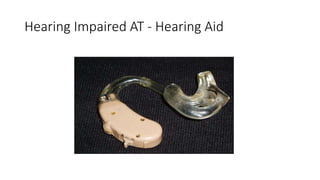
• Hearing aids – Amplify sound in the room so that speech can be more easily
understood
• FM Transmission System – Transmit sound directly into a students
headphones so that other students will not be disturbed
• Microphones – Allow the teacher or students to amplify their voices when
speaking
• Visual lessons, pictures, objects and diagrams – Provide visual cues to replace
or supplement auditory lesson content.
• Closed-Captioning Television – Provide a text based alternative for the hearing
impaired to watch television shows
• Video subtitles – provide visual text for hearing impaired viewer to read the
dialogue of movies
Hearing Impaired AT - Hearing Aid
Assistive Technology for the Visually Impaired
• AT devices for the visually impaired include:
• Braille – Uses tactile bumps to render textbooks, worksheets and all written material
accessible to the blind
• Text-to-Speech software – Converts written text to audio so that blind or visually
impaired students can hear what they would otherwise be reading and writting
• Electronic Magnifying Glass Software – Allows visually impaired students to amplify
the size of text to compensate for impaired vision
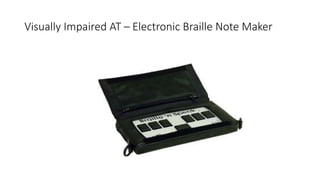
• Electronic Braille Note Maker – Allows blind students to take electronic notes using a
device that uses audio and tactile features to replace sight
• Talking Calculator – Repeats what buttons are pressed so that a student can be sure
they have entered problems correctly
• Audiobooks – Replace visual text read with spoken text
• Voice Recognition Software – translate the speakers voice into typed text to make
writing more accessible
Visually Impaired AT – Electronic Braille Note Maker
Assistive Technology for the Learning Disabled
• AT devices for the learning disabled include:
• Audiobooks – to assist with slow or low proficiency readers
• Optical Character Recognition – to translate typed written text to speech to
assist with reading
• Dictation Devices – to record answers verbally in place of writing
• Portable Word Processors – to replace handwritten assignments with typing
• Spell Checkers – to improve spelling proficiency
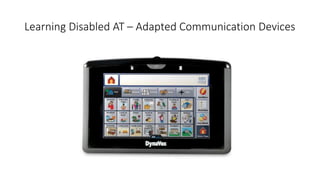
• Adapted Communication Devices – to replace or communication with touch
or eyegazing in non-verbal students
• Graphical Organizers – to help students develop or improve organizational
skills
Learning Disabled AT – Adapted Communication Devices
Assistive Technology for the Physically Disabled
• AT devices for the Physically Disabled Include:
• Speech Recognition Software – to replace and supplement students with disabilities
that affect their ability to move their hands
• Programmable Switches – buttons that can be programs to perform simple tasks for
students with limited hand movement
• Mouth Stick – a straw that allows a person to control a computer or powered
wheelchair using their mouth
• Head Wand – a headrest that allows a person to control a computer or powered
wheelchair using their muscles in their head and neck
• Standing Desk – a desk that a student with lower limb paralysis can use to stretch the
muscles in their legs while they complete schoolwork
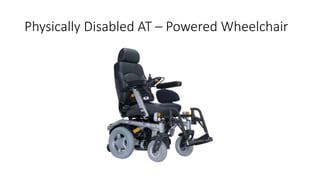
• Power Wheelchairs – a wheelchair that is controlled by a student using a joystick,
mouth stick or head wand to navigate throughout the school and community
• Smart Pens – Assist students who cannot take lengthy notes while in class
Physically Disabled AT – Powered Wheelchair
References
The IRIS Center for Training Enhancements. (2010). Assistive Technology: An Overview. Retrieved on June 8, 2015
from http://iris.peabody.vanderbilt.edu/module/at/
Mittler, J. (2007). Assistive Technology and IDEA: Regulations. Retrieved June 10, 2015, from
http://tamcec.org/pdf/AssistiveTech%20and%20IDEA%20Regs.pdf
Wright, P., & Wright, P. (2010, June 30). Assistive Technology. Retrieved June 8, 2015, from
http://www.wrightslaw.com/info/atech.index.htm

Assistive Technology Presentation ED505

  • 1.
  • 2.
    What is AssistiveTechnology? • Assistive Technology(AT) - is any device or service that helps a student with a disability to participate in the general education curriculum to the greatest degree possible. • Broadly speaking Assistive Technology is typically broken into two separate but related categories: devices and services. • Assistive Technology can be used for a variety of functions including: • communication • performing academic tasks • accessing materials • utilizing proper seating and positioning • moving around the school • participating in social or extracurricular activities
  • 3.
    What is anAT Device? • The Individuals with Disability Education Improvement Act of 2004 (IDEA 2004) defines an assistive technology device as: “§ 300.5 Assistive technology device. Assistive technology device means any item, piece of equipment, or product system, whether acquired commercially off the shelf, modified, or customized, that is used to increase, maintain, or improve the functional capabilities of a child with a disability. The term does not include a medical device that is surgically implanted, or the replacement of such device.” • From this definition, it is clear that the only key restriction on an assistive technology device is that it is not a surgically implanted medical device. This provision has most notably been interpreted to exclude cochlear implants for children with disabilities related to hearing.
  • 4.
    Assistive Technology Devices •The phrase Assistive Technology devices seems to conjure images of laptops, tablets, text readers, calculators and other electronic devices that can be used to assist student’s with disabilities. While the aforementioned items all could be utilized as AT devices, not all AT devices are nearly as complex. • Something as simple as a rubberized pencil grip, an ergonomic chair, or a slanted desk is still considered an AT device.
  • 5.
    What are AssistiveTechnology Services? • Assistive technology services are any services that assist a child with a disability in the selection, acquisition, and use of an AT device. • Assistive Technology Services include: • evaluating the functional needs of a child in their customary environment • purchasing, leasing, or otherwise acquiring AT devices for such a child • selecting, designing, fitting, customizing, adapting, applying, maintaining, repairing, or replacing assistive technology devices as needed to best accommodate the child • training and technical assistance for the child and the family of the child using said AT devices • training or technical assistance for teachers or other professionals who are otherwise substantially involved in the education or rehabilitation of the child.
  • 6.
    Assistive Technology Laws– IDEA 1990 & 1997 • Individuals with Disabilities Education Act of 1990 established that school districts, as a public agency, must ensure that AT devices and services are provided if required for a student to receive a free, appropriate, public education. • In 1997, IDEA was amended to state that AT devices and services must be considered on all Individualized Education Plans(IEPs). • IDEA 1997, also recognized that AT may be needed to support a child’s access to a free, appropriate, public education outside the school environment in the child’s home or other settings.
  • 7.
    Assistive Technology inIDEA 2004 • In 2004, President Bush signed the Individuals with Disability Education Improvement Act (IDEA 2004) • IDEA 2004 kept most of the same federal mandates for the use of assistive technology in public education. It still requires IEP teams to consider the needs of all children with disabilities. • IDEA 2004 requires schools to utilize AT devices and services, “to maximizes accessibility for children with disabilities.” • IDEA 2004 also requires that schools provide AT training for the child, parents, and teachers responsible for using AT devices.
  • 8.
    Examples of AssistiveTechnology • Assistive Technology comes in many shapes and sizes and supports the educational process for a wide range of individuals with disabilities. • Assistive Technology can be used to improve the educational outcomes of individuals with: • Hearing impairment • Visual impairment • Learning disabilities • Physical disabilities
  • 9.
    Assistive Technology forthe Hearing Impaired • AT devices for the hearing impaired include: • Hearing aids – Amplify sound in the room so that speech can be more easily understood • FM Transmission System – Transmit sound directly into a students headphones so that other students will not be disturbed • Microphones – Allow the teacher or students to amplify their voices when speaking • Visual lessons, pictures, objects and diagrams – Provide visual cues to replace or supplement auditory lesson content. • Closed-Captioning Television – Provide a text based alternative for the hearing impaired to watch television shows • Video subtitles – provide visual text for hearing impaired viewer to read the dialogue of movies
  • 10.
    Hearing Impaired AT- Hearing Aid
  • 11.
    Assistive Technology forthe Visually Impaired • AT devices for the visually impaired include: • Braille – Uses tactile bumps to render textbooks, worksheets and all written material accessible to the blind • Text-to-Speech software – Converts written text to audio so that blind or visually impaired students can hear what they would otherwise be reading and writting • Electronic Magnifying Glass Software – Allows visually impaired students to amplify the size of text to compensate for impaired vision • Electronic Braille Note Maker – Allows blind students to take electronic notes using a device that uses audio and tactile features to replace sight • Talking Calculator – Repeats what buttons are pressed so that a student can be sure they have entered problems correctly • Audiobooks – Replace visual text read with spoken text • Voice Recognition Software – translate the speakers voice into typed text to make writing more accessible
  • 12.
    Visually Impaired AT– Electronic Braille Note Maker
  • 13.
    Assistive Technology forthe Learning Disabled • AT devices for the learning disabled include: • Audiobooks – to assist with slow or low proficiency readers • Optical Character Recognition – to translate typed written text to speech to assist with reading • Dictation Devices – to record answers verbally in place of writing • Portable Word Processors – to replace handwritten assignments with typing • Spell Checkers – to improve spelling proficiency • Adapted Communication Devices – to replace or communication with touch or eyegazing in non-verbal students • Graphical Organizers – to help students develop or improve organizational skills
  • 14.
    Learning Disabled AT– Adapted Communication Devices
  • 15.
    Assistive Technology forthe Physically Disabled • AT devices for the Physically Disabled Include: • Speech Recognition Software – to replace and supplement students with disabilities that affect their ability to move their hands • Programmable Switches – buttons that can be programs to perform simple tasks for students with limited hand movement • Mouth Stick – a straw that allows a person to control a computer or powered wheelchair using their mouth • Head Wand – a headrest that allows a person to control a computer or powered wheelchair using their muscles in their head and neck • Standing Desk – a desk that a student with lower limb paralysis can use to stretch the muscles in their legs while they complete schoolwork • Power Wheelchairs – a wheelchair that is controlled by a student using a joystick, mouth stick or head wand to navigate throughout the school and community • Smart Pens – Assist students who cannot take lengthy notes while in class
  • 16.
    Physically Disabled AT– Powered Wheelchair
  • 17.
    References The IRIS Centerfor Training Enhancements. (2010). Assistive Technology: An Overview. Retrieved on June 8, 2015 from http://iris.peabody.vanderbilt.edu/module/at/ Mittler, J. (2007). Assistive Technology and IDEA: Regulations. Retrieved June 10, 2015, from http://tamcec.org/pdf/AssistiveTech%20and%20IDEA%20Regs.pdf Wright, P., & Wright, P. (2010, June 30). Assistive Technology. Retrieved June 8, 2015, from http://www.wrightslaw.com/info/atech.index.htm