By Robin Thompson
University of West Alabama
ED 505
What Is Assistive Technology?
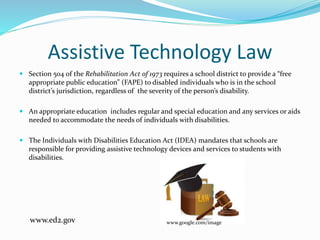
Assistive technology is a term used to describe
devices or services that help individuals with
disabilities obtain a free appropriate education.
www.google.com/images
http://iris.peabody.vanderbilt.edu/module/at/cwrap/#content
Assistive Technology Law
 Section 504 of the Rehabilitation Act of 1973 requires a school district to provide a “free
appropriate public education” (FAPE) to disabled individuals who is in the school
district’s jurisdiction, regardless of the severity of the person’s disability.
 An appropriate education includes regular and special education and any services or aids
needed to accommodate the needs of individuals with disabilities.
 The Individuals with Disabilities Education Act (IDEA) mandates that schools are
responsible for providing assistive technology devices and services to students with
disabilities.
www.google.com/imagewww.ed2.gov
Who Can Benefit From Assistive
Technology
Students who are:
Hearing Impaired
Visually Impaired
Learning Disabled
Physically disabled
www.google.com/images
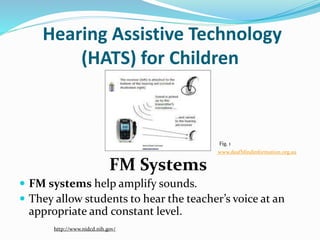
Hearing Assistive Technology
(HATS) for Children
 FM systems help amplify sounds.
 They allow students to hear the teacher’s voice at an
appropriate and constant level.
FM Systems
www.deafblindinformation.org.au
Fig. 1
http://www.nidcd.nih.gov/
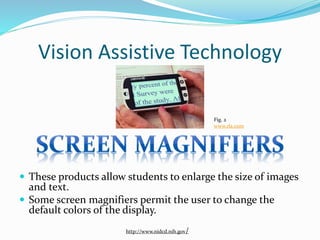
Vision Assistive Technology
 These products allow students to enlarge the size of images
and text.
 Some screen magnifiers permit the user to change the
default colors of the display.
Fig. 2
www.rla.com
http://www.nidcd.nih.gov/
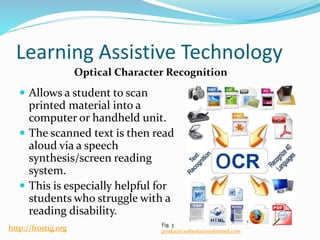
Learning Assistive Technology
 Allows a student to scan
printed material into a
computer or handheld unit.
 The scanned text is then read
aloud via a speech
synthesis/screen reading
system.
 This is especially helpful for
students who struggle with a
reading disability.
Optical Character Recognition
Fig. 3
products.softsolutionslimited.comhttp://frostig.org
Assistive Technology For Physically Disabled
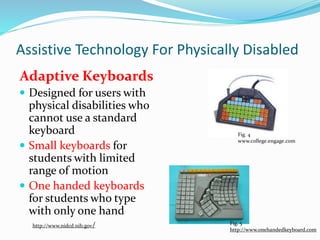
Adaptive Keyboards
 Designed for users with
physical disabilities who
cannot use a standard
keyboard
 Small keyboards for
students with limited
range of motion
 One handed keyboards
for students who type
with only one hand
Fig. 4
www.college.engage.com
Fig. 5
http://www.onehandedkeyboard.com
http://www.nidcd.nih.gov/
Additional Resources
National Institute on Deafness and Other
Communication Disorders
Future of Children.org
www.greatschools.org
www.onlineocr.net
References Cengage Learning (2015). Figure 4: WinMini keyboard. Retrieved from
http://college.cengage.com/education/resources/res_prof/students/spec_ed/tech_resources/alt_computer_iando.html
 Google Images. (n.d.) Retrieved from www.google.com/images.
 Lily Walters (n.d.) Figure 5: One handed Keyboard. Retrieved from http://www.onehandedkeyboard.com/maltron.html
 National Institute on Deafness and Other Communication Disorders (December 2011). Assistive devices for people with
hearing, voice, speech, or language disorders. Retrieved from http://www.nidcd.nih.gov/health/hearing/pages/assistive-
devices.aspx
 Online OCR (n.d.) Figure 3: Optical Character Recognition. Retrieved from products.softsolutionslimited.com
 Raskind, M. H. (2000). Assistive technology for children with learning disabilities. Bridges to Reading, 2nd Edition. San
Mateo, CA: Schwab Foundation for Learning. Retrieved from http://frostig.org/
 RL and Associates. (n.d.) Figure 2: Portable Video Magnifier. Retrieved from www.rla.com
 Senses Australia. (n.d.). Figure 1: Diagram Inspiro FM System. Retrieved from www.deafblindinformation.org.au
 The Iris Center. Assistive Technology Module (n.d.). Retrieved from
http://iris.peabody.vanderbilt.edu/module/at/cwrap/#content
 U.S. Department of Education (2010). Free Appropriate Public Education for Students With Disabilities: Requirements
Under Section 504 of the Rehabilitation Act of 1973. Retrieved from
http://www2.ed.gov/about/offices/list/ocr/docs/edlite-FAPE504.html#reproduction

Assistive technology powerpoint

  • 1.
    By Robin Thompson Universityof West Alabama ED 505
  • 2.
    What Is AssistiveTechnology? Assistive technology is a term used to describe devices or services that help individuals with disabilities obtain a free appropriate education. www.google.com/images http://iris.peabody.vanderbilt.edu/module/at/cwrap/#content
  • 3.
    Assistive Technology Law Section 504 of the Rehabilitation Act of 1973 requires a school district to provide a “free appropriate public education” (FAPE) to disabled individuals who is in the school district’s jurisdiction, regardless of the severity of the person’s disability.  An appropriate education includes regular and special education and any services or aids needed to accommodate the needs of individuals with disabilities.  The Individuals with Disabilities Education Act (IDEA) mandates that schools are responsible for providing assistive technology devices and services to students with disabilities. www.google.com/imagewww.ed2.gov
  • 4.
    Who Can BenefitFrom Assistive Technology Students who are: Hearing Impaired Visually Impaired Learning Disabled Physically disabled www.google.com/images
  • 5.
    Hearing Assistive Technology (HATS)for Children  FM systems help amplify sounds.  They allow students to hear the teacher’s voice at an appropriate and constant level. FM Systems www.deafblindinformation.org.au Fig. 1 http://www.nidcd.nih.gov/
  • 6.
    Vision Assistive Technology These products allow students to enlarge the size of images and text.  Some screen magnifiers permit the user to change the default colors of the display. Fig. 2 www.rla.com http://www.nidcd.nih.gov/
  • 7.
    Learning Assistive Technology Allows a student to scan printed material into a computer or handheld unit.  The scanned text is then read aloud via a speech synthesis/screen reading system.  This is especially helpful for students who struggle with a reading disability. Optical Character Recognition Fig. 3 products.softsolutionslimited.comhttp://frostig.org
  • 8.
    Assistive Technology ForPhysically Disabled Adaptive Keyboards  Designed for users with physical disabilities who cannot use a standard keyboard  Small keyboards for students with limited range of motion  One handed keyboards for students who type with only one hand Fig. 4 www.college.engage.com Fig. 5 http://www.onehandedkeyboard.com http://www.nidcd.nih.gov/
  • 9.
    Additional Resources National Instituteon Deafness and Other Communication Disorders Future of Children.org www.greatschools.org www.onlineocr.net
  • 10.
    References Cengage Learning(2015). Figure 4: WinMini keyboard. Retrieved from http://college.cengage.com/education/resources/res_prof/students/spec_ed/tech_resources/alt_computer_iando.html  Google Images. (n.d.) Retrieved from www.google.com/images.  Lily Walters (n.d.) Figure 5: One handed Keyboard. Retrieved from http://www.onehandedkeyboard.com/maltron.html  National Institute on Deafness and Other Communication Disorders (December 2011). Assistive devices for people with hearing, voice, speech, or language disorders. Retrieved from http://www.nidcd.nih.gov/health/hearing/pages/assistive- devices.aspx  Online OCR (n.d.) Figure 3: Optical Character Recognition. Retrieved from products.softsolutionslimited.com  Raskind, M. H. (2000). Assistive technology for children with learning disabilities. Bridges to Reading, 2nd Edition. San Mateo, CA: Schwab Foundation for Learning. Retrieved from http://frostig.org/  RL and Associates. (n.d.) Figure 2: Portable Video Magnifier. Retrieved from www.rla.com  Senses Australia. (n.d.). Figure 1: Diagram Inspiro FM System. Retrieved from www.deafblindinformation.org.au  The Iris Center. Assistive Technology Module (n.d.). Retrieved from http://iris.peabody.vanderbilt.edu/module/at/cwrap/#content  U.S. Department of Education (2010). Free Appropriate Public Education for Students With Disabilities: Requirements Under Section 504 of the Rehabilitation Act of 1973. Retrieved from http://www2.ed.gov/about/offices/list/ocr/docs/edlite-FAPE504.html#reproduction