PRESENTER: SALAZEC D. SPRATLING
Assistive Technology:
At its core, Assistive Technology (AT) is any item, piece of
equipment, software or product system that is used to
increase, maintain, or improve the functional capabilities of
individuals with disabilities.
What Governs students with disabilities?
The Disabilities Education Act 2004
The Individuals with Disabilities Education Act
(IDEA), is a United States federal law that governs
how states and public agencies provide early
intervention, special education, and related services
to children with disabilities.
Infants and toddlers with disabilities (birth-2) and
their families receive early intervention services
under IDEA Part C. Children and youth (ages 3-21)
receive special education and related services
under IDEA Part B.
What can Assistive Technologies do for your
students:
• Helps curtail learning and attention issues
• Helps students work around their challenges while
playing to their strengths
• Helps students to become more successful and
productive - at the same time their, confidence and
independence grows
• Helps students do things more quickly, easily or
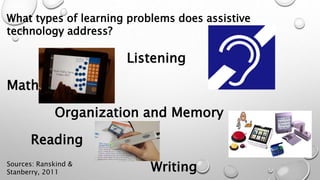
What types of learning problems does assistive
technology address?
Listening
Math
Organization and Memory
Reading
WritingSources: Ranskind &
Stanberry, 2011
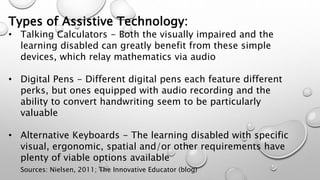
Types of Assistive Technology:
• Talking Calculators - Both the visually impaired and the
learning disabled can greatly benefit from these simple
devices, which relay mathematics via audio
• Digital Pens - Different digital pens each feature different
perks, but ones equipped with audio recording and the
ability to convert handwriting seem to be particularly
valuable
• Alternative Keyboards - The learning disabled with specific
visual, ergonomic, spatial and/or other requirements have
plenty of viable options available
Sources: Nielsen, 2011; The Innovative Educator (blog)
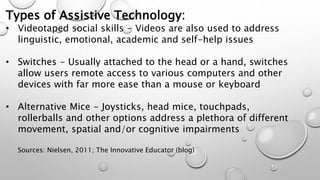
Types of Assistive Technology:
• Videotaped social skills - Videos are also used to address
linguistic, emotional, academic and self-help issues
• Switches - Usually attached to the head or a hand, switches
allow users remote access to various computers and other
devices with far more ease than a mouse or keyboard
• Alternative Mice - Joysticks, head mice, touchpads,
rollerballs and other options address a plethora of different
movement, spatial and/or cognitive impairments
Sources: Nielsen, 2011; The Innovative Educator (blog)
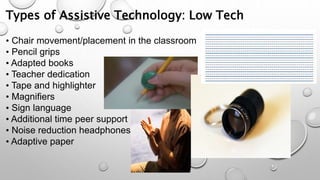
Types of Assistive Technology: Low Tech
• Chair movement/placement in the classroom
• Pencil grips
• Adapted books
• Teacher dedication
• Tape and highlighter
• Magnifiers
• Sign language
• Additional time peer support
• Noise reduction headphones
• Adaptive paper
Factors to consider when evaluating AT
products:
• What are her specific needs and challenges?
• What are his/her strengths? AT should utilize your
child's abilities to help compensate for her
disability.
• What is her interest, skill and experience in using
technology?
AT can help a child with LD function better at school
as well as in other settings such as home, work, social
Educational online resources:
http://www.internet4classrooms.com/ Provides links for PreK-12 teachers, students and
parents, step-by-step technology tutorials for learning applications commonly used in K-12
classrooms, language and mathematics activities.
http://www.mrcpl.org/literacy/lessons/sight/index.html Flash media for learning Dolch
words.
http://www.kidsknowit.com/ Elementary skill level - games and free websites, science,
social studies, math, reading.
http://www.funbrain.com/ Reading and math games, grades K-8.
http://www.starfall.com/ Games for practicing phonics and phonemic awareness.
https://www.bookshare.org/cms Free electronic text and reader for students with qualifying
print disabilities.
Best practices
• Make it ongoing – Schools should offer group and
individual training to teachers and special education
support staff year-round
• Foster peer-to-peer learning - Teachers and resource
personnel will excel if they have access to a community of
practice to share ideas and learn from peers what works
— and what doesn’t
• Go outside - Online research will reveal a wealth of
resources — including lesson plans, templates, digital
reading materials, visual/audio supplements that can help
teachers incorporate AT and applications into classroom
Best practices
• Let the students teach - Give them opportunities to play
with, explore and demonstrate what these new devices
can do, she says, and “chances are, they’ll figure out and
show you things you’d never figure out on your own
• Know what works - Whatever technology you choose to
use and however you choose to use it, make sure it has a
purpose and that it truly meets the students’ unique
needs
Sources: Hayes, 2013; Ed Tech
References
L Nielsen. (2011). 25 Incredible Assistive Technologies. Retrieved from
http://theinnovativeeducator.blogspot.com/2011/09/25-incredible-
assistive- technologies.html
Raskind, M., & Stanberry K. (2009). Assistive Technology for Kids with
Learning Disabilities: An Overview. Retrieved from
http://www.readingrockets.org/article/assistive-technology-kids-
learning- disabilities-overview
Hayes, H. (2013). How to Help Teachers Integrate Assistive Technology in
the Classroom. Retrieved from
http://www.edtechmagazine.com/k12/article/2013/04/how-help-
teachers-integrate-assistive- technology-classroom
IDEA 2004: Building the Legacy. Retrieved from http://idea.ed.gov/part-
c/search/new

Assistive Technology Presentation

  • 1.
  • 2.
    Assistive Technology: At itscore, Assistive Technology (AT) is any item, piece of equipment, software or product system that is used to increase, maintain, or improve the functional capabilities of individuals with disabilities.
  • 3.
    What Governs studentswith disabilities? The Disabilities Education Act 2004 The Individuals with Disabilities Education Act (IDEA), is a United States federal law that governs how states and public agencies provide early intervention, special education, and related services to children with disabilities. Infants and toddlers with disabilities (birth-2) and their families receive early intervention services under IDEA Part C. Children and youth (ages 3-21) receive special education and related services under IDEA Part B.
  • 4.
    What can AssistiveTechnologies do for your students: • Helps curtail learning and attention issues • Helps students work around their challenges while playing to their strengths • Helps students to become more successful and productive - at the same time their, confidence and independence grows • Helps students do things more quickly, easily or
  • 5.
    What types oflearning problems does assistive technology address? Listening Math Organization and Memory Reading WritingSources: Ranskind & Stanberry, 2011
  • 6.
    Types of AssistiveTechnology: • Talking Calculators - Both the visually impaired and the learning disabled can greatly benefit from these simple devices, which relay mathematics via audio • Digital Pens - Different digital pens each feature different perks, but ones equipped with audio recording and the ability to convert handwriting seem to be particularly valuable • Alternative Keyboards - The learning disabled with specific visual, ergonomic, spatial and/or other requirements have plenty of viable options available Sources: Nielsen, 2011; The Innovative Educator (blog)
  • 7.
    Types of AssistiveTechnology: • Videotaped social skills - Videos are also used to address linguistic, emotional, academic and self-help issues • Switches - Usually attached to the head or a hand, switches allow users remote access to various computers and other devices with far more ease than a mouse or keyboard • Alternative Mice - Joysticks, head mice, touchpads, rollerballs and other options address a plethora of different movement, spatial and/or cognitive impairments Sources: Nielsen, 2011; The Innovative Educator (blog)
  • 8.
    Types of AssistiveTechnology: Low Tech • Chair movement/placement in the classroom • Pencil grips • Adapted books • Teacher dedication • Tape and highlighter • Magnifiers • Sign language • Additional time peer support • Noise reduction headphones • Adaptive paper
  • 9.
    Factors to considerwhen evaluating AT products: • What are her specific needs and challenges? • What are his/her strengths? AT should utilize your child's abilities to help compensate for her disability. • What is her interest, skill and experience in using technology? AT can help a child with LD function better at school as well as in other settings such as home, work, social
  • 10.
    Educational online resources: http://www.internet4classrooms.com/Provides links for PreK-12 teachers, students and parents, step-by-step technology tutorials for learning applications commonly used in K-12 classrooms, language and mathematics activities. http://www.mrcpl.org/literacy/lessons/sight/index.html Flash media for learning Dolch words. http://www.kidsknowit.com/ Elementary skill level - games and free websites, science, social studies, math, reading. http://www.funbrain.com/ Reading and math games, grades K-8. http://www.starfall.com/ Games for practicing phonics and phonemic awareness. https://www.bookshare.org/cms Free electronic text and reader for students with qualifying print disabilities.
  • 11.
    Best practices • Makeit ongoing – Schools should offer group and individual training to teachers and special education support staff year-round • Foster peer-to-peer learning - Teachers and resource personnel will excel if they have access to a community of practice to share ideas and learn from peers what works — and what doesn’t • Go outside - Online research will reveal a wealth of resources — including lesson plans, templates, digital reading materials, visual/audio supplements that can help teachers incorporate AT and applications into classroom
  • 12.
    Best practices • Letthe students teach - Give them opportunities to play with, explore and demonstrate what these new devices can do, she says, and “chances are, they’ll figure out and show you things you’d never figure out on your own • Know what works - Whatever technology you choose to use and however you choose to use it, make sure it has a purpose and that it truly meets the students’ unique needs Sources: Hayes, 2013; Ed Tech
  • 13.
    References L Nielsen. (2011).25 Incredible Assistive Technologies. Retrieved from http://theinnovativeeducator.blogspot.com/2011/09/25-incredible- assistive- technologies.html Raskind, M., & Stanberry K. (2009). Assistive Technology for Kids with Learning Disabilities: An Overview. Retrieved from http://www.readingrockets.org/article/assistive-technology-kids- learning- disabilities-overview Hayes, H. (2013). How to Help Teachers Integrate Assistive Technology in the Classroom. Retrieved from http://www.edtechmagazine.com/k12/article/2013/04/how-help- teachers-integrate-assistive- technology-classroom IDEA 2004: Building the Legacy. Retrieved from http://idea.ed.gov/part- c/search/new