Assistive
Technology
EXAMPLES FROM A HIGH SCHOOL UNITED STATES HISTORY CLASSROOM
Individuals with Disabilities
Education Act (IDEA) of 2004
 Defines an Assistive Technology Device as, “Any item, piece of
equipment or product system, whether acquired commercially off
the shelf, modified, or customized, that is used to increase, maintain,
or improve the functional capabilities of children with disabilities.”
 But, “The term does not include a medical device that is surgically
implanted, or the replacement of such device.”
 Mandates that Assistive Technology be considered for all students
with Individualized Education Programs (IEPs).
(Individuals with Disabilities Education Act, 2004)
Adaptive vs. Assistive Technology
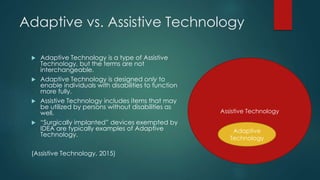
 Adaptive Technology is a type of Assistive
Technology, but the terms are not
interchangeable.
 Adaptive Technology is designed only to
enable individuals with disabilities to function
more fully.
 Assistive Technology includes items that may
be utilized by persons without disabilities as
well.
 “Surgically implanted” devices exempted by
IDEA are typically examples of Adaptive
Technology.
(Assistive Technology, 2015)
Assistive Technology
Adaptive
Technology
Levels of Assistive Technology
 No Tech – Inexpensive
 Pencil grip for student who has difficulty grasping
 Low Tech – More expensive
 Calculators and tape recorders
 High Tech – Most expensive
 Computers, tablets, speech-to-text technology
(Behrmann & Jerome, 2002)
Selected Examples of Assistive Devices
 Academic and Learning Aids
 Calculators
 Spell Checkers
 Concept Map Software
 Computer Access
 Alternative or modified keyboards
 Switches
 Tracking Balls
 Visual Aids
 Braille Writers
 Magnifiers
 Comprehensive list at http://www.gpat.org/Georgia-Project-for-
Assistive-Technology/Pages/Assistive-Technology-Definition.aspx
(Georgia Department of Education, 2014)
How is Assistive Technology
Chosen?
 Solutions identified through six-step process as outlined at LD Online:
http://www.ldonline.org/article/8088
 Step 1: Collect child and family information.
 Step 2: Identify activities for participation.
 Step 3: What can be observed that indicates the intervention is
successful?
 Step 4: Brainstorm AT solutions.
 Step 5: Try it out.
 Step 6: Identify what worked.
(National Center for Technology Innovation and Center for
Implementing Technology in Education, 2015).
Who Chooses?
 The IEP Team May Include:
 A psychologist
 a physical therapist
 an occupational therapist
 a speech therapist
 a special educator
 a vision or hearing specialist
 others, depending on the child's specific needs
(The Nemours Foundation, n.d.)
Real-World Application
 High School History classroom.
 One student has IEP for auditory disability and wears a Behind the
Ear (BTE) hearing aid.
 Three students have IEPs based on a diagnosis of Attention Deficit
Hyperactivity Disorder (ADHD).
 Several more students have IEPs for a broad range of learning
disabilities; in each case, primarily reading and writing are affected.
 Solutions identified through six-step process as outlined at LD Online:
http://www.ldonline.org/article/8088 (National Center for
Technology Innovation and Center for Implementing Technology in
Education (CITEd), 2015).
Student with Auditory Disability
 Requires no differentiation of instruction, only accommodation for
impaired hearing.
 The hearing aid provided by his doctor is not sufficient
accommodation by itself.
 Students who use hearing aids have difficulty hearing the teacher at
a distance of more than three feet and over background noise
(American Speech-Language-Hearing Association, n.d.), (Deaf and
Hard of Hearing Services, 2015).
 Solution: an FM Assistive Hearing Device (AHD). The receiver is
enclosed in the same case as his BTE hearing aid. His teacher wears
a microphone and transmitter as in this video:
https://www.youtube.com/watch?v=1l37lzLIgQU (Bombacino,
2011).
Students with ADHD
 Require overall differentiated instruction.
 Overview of instructional strategies for students with ADHD provided
here: http://www2.ed.gov/rschstat/research/pubs/adhd/adhd-
teaching_pg3.html.
 Divided into guidelines for Academic Instruction, Behavioral
Interventions, and Classroom Accommodations.
 Assistive Technology can simultaneously address all three areas.
(U.S. Department of Education, 2008)
Assistive Technology Examples for
ADHD High School History Students
 Audiovisual presentations (low tech).
 Pre-highlighting worksheets (no tech).
 Students create own PowerPoint presentations on stories from American
History (high tech).
 School provides all students on IEPs with MacBooks (high tech). All ADHD
and Learning Disabled students in U.S. History provided with the app
SoundNotes, which allows them to simultaneously make an audio
recordings of lectures and activities and take notes (Estes, 2015). See
http://soundnote.com/.
 Students with ADHD can return later and use the audio to fill in missing
portions of notes and sync the notes and audio.
Assistive Technology Examples for
Students with Various Learning Disabilities
 SoundNotes (High Tech). Allows students with difficulty transposing
speech and ideas to writing to return to lectures and activities, fill in
gaps, and make connections between the spoken and written
word.
 Each student might require different additional apps. The following
resource allows you to search for apps according to a student’s age
and disability: https://www.understood.org/en/tools/tech-finder
(UNDERSTOOD.ORG, 2015).
 Additional strategies, ranging from no-tech to high-tech, can be
found here: http://www.ericdigests.org/2003-1/assistive.htm
(Behrmann & Jerome, 2002).
Selected Examples of Assistive Technology for
Various Learning Disabilities
 Word prediction software for writing (high tech).
 Structured outlines for note-taking (no tech).
 Video recording of class activities to improve retention among visual
learners (distributed by thumb drive or DVD—high tech).
 Calendar, scheduling, and reminder software for computer or
smartphone (high tech).
(Behrmann & Jerome, 2002)
 Text to speech (high-tech).
 Annotations in digital textbooks (high-tech).
(Brann & Gray, 2012)
Summary
 IDEA mandates that the use of assistive
technology be considered for all students with
IEPs.
 Schools are not required to consider, provide, or
maintain surgically implanted adaptive
technology.
 What IDEA refers to as “assistive devices” can be
no-tech, low-tech, or high-tech.
Thanks for your
participation!
 American Speech-Language-Hearing Association. (n.d.). Hearing Assistive
Technology. Retrieved from American Speech-Language-Hearing Association:
http://www.asha.org/public/hearing/treatment/assist_tech.htm
 Assistive Technology. (2015, September 21). In Wikipedia. Retrieved from
https://en.wikipedia.org/wiki/Assistive_technology
 Behrmann, M., & Jerome, M. K. (2002, January). Assistive Technology for Students
with Mild Disabilities. Retrieved from ERIC Digests:
http://www.ericdigests.org/2003-1/assistive.htm
 Bombacino, J. [. (2011, January 23). Speech Through a Hearing Aid and FM System: A
Simulation [video file]. Retrieved from
https://www.youtube.com/watch?v=1l37lzLIgQU
 Brann, A., & Gray, T. (2012). Embedded Supports to Differentiate Instruction for
Struggling Students. Retrieved from ReadingRockets:
http://www.readingrockets.org/article/embedded-supports-differentiate-
instruction-struggling-students
References
 Deaf and Hard of Hearing Services. (2015). Assistive Listening Devices. Retrieved
from North Essex Community College:
https://www.necc.mass.edu/academics/support-services/learning-
accommodations/deaf-and-hard-of-hearing-services/student-
resources/accommodations-tipsheets/assistive-listening-devices/
 Estes, D. (2015). SoundNote. Retrieved from http://soundnote.com/
 Georgia Department of Education. (2014). Georgia Project for Assistive
Technology. Retrieved from Georgia Department of Education:
http://www.gpat.org/Georgia-Project-for-Assistive-
Technology/Pages/default.aspx
 Individuals with Disabilities Education Act. (2004). I U.S.C., Sec. 602.
 National Center for Technology Innovation and Center for Implementing
Technology in Education (CITEd). (2015). The Educators' Guide to Learning
Disabilities and ADHD. Retrieved from LD Online:
http://www.ldonline.org/article/8088
 The Nemours Foundation. (n.d.). Individualized Education Programs (IEPs).
Retrieved from Nemours:
http://kidshealth.org/parent/positive/learning/iep.html
 U.S. Department of Education. (2008, October 3). Teaching Children With
Attention Deficit Hyperactivity Disorder: Instructional Strategies and
Practices. Retrieved from U.S. Department of Education:
http://www2.ed.gov/rschstat/research/pubs/adhd/adhd-
teaching_pg3.html
 UNDERSTOOD.ORG. (2015). Tech Finder. Retrieved from Understood: For
learning & attention issues: https://www.understood.org/en/tools/tech-finder

Assistive technology presentation

  • 1.
    Assistive Technology EXAMPLES FROM AHIGH SCHOOL UNITED STATES HISTORY CLASSROOM
  • 2.
    Individuals with Disabilities EducationAct (IDEA) of 2004  Defines an Assistive Technology Device as, “Any item, piece of equipment or product system, whether acquired commercially off the shelf, modified, or customized, that is used to increase, maintain, or improve the functional capabilities of children with disabilities.”  But, “The term does not include a medical device that is surgically implanted, or the replacement of such device.”  Mandates that Assistive Technology be considered for all students with Individualized Education Programs (IEPs). (Individuals with Disabilities Education Act, 2004)
  • 3.
    Adaptive vs. AssistiveTechnology  Adaptive Technology is a type of Assistive Technology, but the terms are not interchangeable.  Adaptive Technology is designed only to enable individuals with disabilities to function more fully.  Assistive Technology includes items that may be utilized by persons without disabilities as well.  “Surgically implanted” devices exempted by IDEA are typically examples of Adaptive Technology. (Assistive Technology, 2015) Assistive Technology Adaptive Technology
  • 4.
    Levels of AssistiveTechnology  No Tech – Inexpensive  Pencil grip for student who has difficulty grasping  Low Tech – More expensive  Calculators and tape recorders  High Tech – Most expensive  Computers, tablets, speech-to-text technology (Behrmann & Jerome, 2002)
  • 5.
    Selected Examples ofAssistive Devices  Academic and Learning Aids  Calculators  Spell Checkers  Concept Map Software  Computer Access  Alternative or modified keyboards  Switches  Tracking Balls  Visual Aids  Braille Writers  Magnifiers  Comprehensive list at http://www.gpat.org/Georgia-Project-for- Assistive-Technology/Pages/Assistive-Technology-Definition.aspx (Georgia Department of Education, 2014)
  • 6.
    How is AssistiveTechnology Chosen?  Solutions identified through six-step process as outlined at LD Online: http://www.ldonline.org/article/8088  Step 1: Collect child and family information.  Step 2: Identify activities for participation.  Step 3: What can be observed that indicates the intervention is successful?  Step 4: Brainstorm AT solutions.  Step 5: Try it out.  Step 6: Identify what worked. (National Center for Technology Innovation and Center for Implementing Technology in Education, 2015).
  • 7.
    Who Chooses?  TheIEP Team May Include:  A psychologist  a physical therapist  an occupational therapist  a speech therapist  a special educator  a vision or hearing specialist  others, depending on the child's specific needs (The Nemours Foundation, n.d.)
  • 8.
    Real-World Application  HighSchool History classroom.  One student has IEP for auditory disability and wears a Behind the Ear (BTE) hearing aid.  Three students have IEPs based on a diagnosis of Attention Deficit Hyperactivity Disorder (ADHD).  Several more students have IEPs for a broad range of learning disabilities; in each case, primarily reading and writing are affected.  Solutions identified through six-step process as outlined at LD Online: http://www.ldonline.org/article/8088 (National Center for Technology Innovation and Center for Implementing Technology in Education (CITEd), 2015).
  • 9.
    Student with AuditoryDisability  Requires no differentiation of instruction, only accommodation for impaired hearing.  The hearing aid provided by his doctor is not sufficient accommodation by itself.  Students who use hearing aids have difficulty hearing the teacher at a distance of more than three feet and over background noise (American Speech-Language-Hearing Association, n.d.), (Deaf and Hard of Hearing Services, 2015).  Solution: an FM Assistive Hearing Device (AHD). The receiver is enclosed in the same case as his BTE hearing aid. His teacher wears a microphone and transmitter as in this video: https://www.youtube.com/watch?v=1l37lzLIgQU (Bombacino, 2011).
  • 10.
    Students with ADHD Require overall differentiated instruction.  Overview of instructional strategies for students with ADHD provided here: http://www2.ed.gov/rschstat/research/pubs/adhd/adhd- teaching_pg3.html.  Divided into guidelines for Academic Instruction, Behavioral Interventions, and Classroom Accommodations.  Assistive Technology can simultaneously address all three areas. (U.S. Department of Education, 2008)
  • 11.
    Assistive Technology Examplesfor ADHD High School History Students  Audiovisual presentations (low tech).  Pre-highlighting worksheets (no tech).  Students create own PowerPoint presentations on stories from American History (high tech).  School provides all students on IEPs with MacBooks (high tech). All ADHD and Learning Disabled students in U.S. History provided with the app SoundNotes, which allows them to simultaneously make an audio recordings of lectures and activities and take notes (Estes, 2015). See http://soundnote.com/.  Students with ADHD can return later and use the audio to fill in missing portions of notes and sync the notes and audio.
  • 12.
    Assistive Technology Examplesfor Students with Various Learning Disabilities  SoundNotes (High Tech). Allows students with difficulty transposing speech and ideas to writing to return to lectures and activities, fill in gaps, and make connections between the spoken and written word.  Each student might require different additional apps. The following resource allows you to search for apps according to a student’s age and disability: https://www.understood.org/en/tools/tech-finder (UNDERSTOOD.ORG, 2015).  Additional strategies, ranging from no-tech to high-tech, can be found here: http://www.ericdigests.org/2003-1/assistive.htm (Behrmann & Jerome, 2002).
  • 13.
    Selected Examples ofAssistive Technology for Various Learning Disabilities  Word prediction software for writing (high tech).  Structured outlines for note-taking (no tech).  Video recording of class activities to improve retention among visual learners (distributed by thumb drive or DVD—high tech).  Calendar, scheduling, and reminder software for computer or smartphone (high tech). (Behrmann & Jerome, 2002)  Text to speech (high-tech).  Annotations in digital textbooks (high-tech). (Brann & Gray, 2012)
  • 14.
    Summary  IDEA mandatesthat the use of assistive technology be considered for all students with IEPs.  Schools are not required to consider, provide, or maintain surgically implanted adaptive technology.  What IDEA refers to as “assistive devices” can be no-tech, low-tech, or high-tech.
  • 15.
  • 16.
     American Speech-Language-HearingAssociation. (n.d.). Hearing Assistive Technology. Retrieved from American Speech-Language-Hearing Association: http://www.asha.org/public/hearing/treatment/assist_tech.htm  Assistive Technology. (2015, September 21). In Wikipedia. Retrieved from https://en.wikipedia.org/wiki/Assistive_technology  Behrmann, M., & Jerome, M. K. (2002, January). Assistive Technology for Students with Mild Disabilities. Retrieved from ERIC Digests: http://www.ericdigests.org/2003-1/assistive.htm  Bombacino, J. [. (2011, January 23). Speech Through a Hearing Aid and FM System: A Simulation [video file]. Retrieved from https://www.youtube.com/watch?v=1l37lzLIgQU  Brann, A., & Gray, T. (2012). Embedded Supports to Differentiate Instruction for Struggling Students. Retrieved from ReadingRockets: http://www.readingrockets.org/article/embedded-supports-differentiate- instruction-struggling-students References
  • 17.
     Deaf andHard of Hearing Services. (2015). Assistive Listening Devices. Retrieved from North Essex Community College: https://www.necc.mass.edu/academics/support-services/learning- accommodations/deaf-and-hard-of-hearing-services/student- resources/accommodations-tipsheets/assistive-listening-devices/  Estes, D. (2015). SoundNote. Retrieved from http://soundnote.com/  Georgia Department of Education. (2014). Georgia Project for Assistive Technology. Retrieved from Georgia Department of Education: http://www.gpat.org/Georgia-Project-for-Assistive- Technology/Pages/default.aspx  Individuals with Disabilities Education Act. (2004). I U.S.C., Sec. 602.  National Center for Technology Innovation and Center for Implementing Technology in Education (CITEd). (2015). The Educators' Guide to Learning Disabilities and ADHD. Retrieved from LD Online: http://www.ldonline.org/article/8088
  • 18.
     The NemoursFoundation. (n.d.). Individualized Education Programs (IEPs). Retrieved from Nemours: http://kidshealth.org/parent/positive/learning/iep.html  U.S. Department of Education. (2008, October 3). Teaching Children With Attention Deficit Hyperactivity Disorder: Instructional Strategies and Practices. Retrieved from U.S. Department of Education: http://www2.ed.gov/rschstat/research/pubs/adhd/adhd- teaching_pg3.html  UNDERSTOOD.ORG. (2015). Tech Finder. Retrieved from Understood: For learning & attention issues: https://www.understood.org/en/tools/tech-finder