International Journal of Trend in Scientific Research and Development (IJTSRD)
Volume 3 Issue 5, August 2019 Available Online: www.ijtsrd.com e-ISSN: 2456 – 6470
@ IJTSRD | Unique Paper ID – IJTSRD26395 | Volume – 3 | Issue – 5 | July - August 2019 Page 514
Arduino Based Scientific Calculator
Ma Hnin Yu Myaing1, Ma Naing2
1Lecturer, Department of Electronic Engineering, Technological University, Mandalay, Myanmar
2Lecturer, Department of Electronic Engineering, Technological University, Magway, Myanmar
How to cite this paper: Ma Hnin Yu
Myaing | Ma Naing "Arduino Based
Scientific Calculator" Published in
International
Journal of Trend in
Scientific Research
and Development
(ijtsrd), ISSN: 2456-
6470, Volume-3 |
Issue-5, August
2019, pp.514-518,
https://doi.org/10.31142/ijtsrd26395
Copyright © 2019 by author(s) and
International Journalof Trendin Scientific
Research and Development Journal. This
is an Open Access article distributed
under the terms of
the Creative
CommonsAttribution
License (CC BY 4.0)
(http://creativecommons.org/licenses/by
/4.0)
ABSTRACT
This paper describes the implementation of electronic scientific calculator
using Arduino. The mathematical process for scientific calculation processes
are based on the digital electronic technology. The calculator takes inputfrom
a user in real-time via a keypad and displays output on a LCD display module.
The control, arithmetic algorithm and calculation functions are performed
using a Arduino Mega 2560. The prototype of the system is configuredand the
simulation results for basic mathematical functions and some scientific
functions of calculator are expressed with the help of Proteus simulation
software. And then the experimental results are tested with the constructed
calculator circuit.
KEYWORDS: Arduino Mega, LCD, Keypad, Proteus, C Programming
I. INTRODUCTION
Scientific calculators all use the same order for carrying out mathematical
operations. This order is not necessarily the same as just reading a calculation
from left to right. The rules for carrying out mathematical calculations specify
the priority and so the order in which a calculation should be done – scientific
calculators follow the same order. This order is sometimes abbreviated by
terms such as BODMAS and BIDMAS to help students remember the order of
doing calculations.
Brackets (all calculations within bracket are done first)
Operations (eg. squaring, square rooting, sin, cosine)
Division and Multiplication
Addition and Subtraction
Being aware of this order is necessary in order to use a
scientific calculator properly. This order should always be
used in all mathematical calculations whether using a
calculator or not. The calculator is an extension of a
mathematician and it has opened upnewpossibilitieswithin
mathematics. It is a machine though, and it is only capable of
doing what it is programmed to do. Accordingly, this work
aims to develop the internal programmed computational
code in the form of a computer program that a scientific
calculator could use to compute functions such as square
root, sine function and cosine functions. The idea of this
project is to develop the basic addition, subtraction,
multiplication, division and integer splicing functions. Then
using these basic functions, the program will then compute
other more complicated functions Arduino software found
on a typical scientific calculator such as the sine and
logarithmic functions. the C programming language is chose
to work. Computing multiplication and division takes
significantly longer time than computing addition and
subtraction, and therefore should be avoided whenever
possible. Thus throughout the program there are instances
where addition and subtraction is used toeliminatetheneed
for multiplication. Another issue is that the program is
constantly rounding numbers and thus losing trailing digits.
II. Hardware Implementation
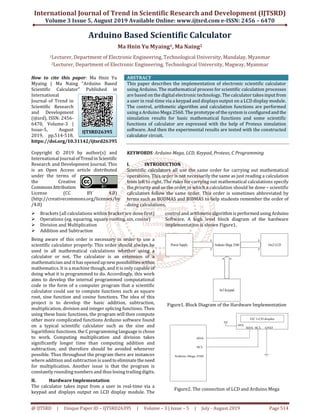
The calculator takes input from a user in real-time via a
keypad and displays output on LCD display module. The
control and arithmeticalgorithmisperformed usingArduino
Software. A high level block diagram of the hardware
implementation is shown Figure1.
Arduino Mega 2560Power Supply 16x2 LCD
4x5 Keypad
Figure1. Block Diagram of the Hardware Implementation
5V
SCL GNDSDA
VCC
I2C LCD display
SDA
SCL
Arduino Mega 2560
Figure2. The connection of LCD and Arduino Mega
IJTSRD26395
International Journal of Trend in Scientific Research and Development (IJTSRD) @ www.ijtsrd.com eISSN: 2456-6470
@ IJTSRD | Unique Paper ID – IJTSRD26395 | Volume – 3 | Issue – 5 | July - August 2019 Page 515
III. Overall Circuit Operation
Figure3 shows the overall circuit diagram of the scientific calculator. The system includes Arduino Mega 2560, 4x5 keypad,
16x2 LCD display and other peripheral circuit components.TheArduinoMegaisused asarithmeticlogicunitand all calculation
function perform. And then the result displays on LCD. Each part of the circuit and theirconnectiontoArduinoare describedin
below.
Figure3. Overall Circuit Diagram
IV. Flowchart of the System Operation
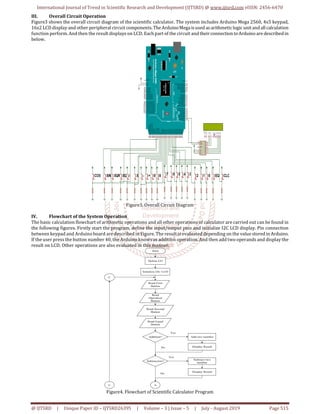
The basic calculation flowchart of arithmetic operations and all other operations of calculator are carried out can be found in
the following figures. Firstly start the program, define the input/output pins and initialize I2C LCD display. Pin connection
between keypad and Arduino board are described in Figure. The result is evaluated depending on the valuestoredinArduino.
If the user press the button number 40, the Arduino knows as addition operation. And then add two operands and display the
result on LCD. Other operations are also evaluated in this manner.
Start
Define I/O
Initialize I2C LCD
Read First
Button
Read
Operation
Button
Read Second
Button
Read Equal
Button
A
Addition? Add two number
Display Result
Subtraction?
Subtract two
number
Display Result
C
Yes
No
Yes
No
C
Figure4. Flowchart of Scientific Calculator Program
International Journal of Trend in Scientific Research and Development (IJTSRD) @ www.ijtsrd.com eISSN: 2456-6470
@ IJTSRD | Unique Paper ID – IJTSRD26395 | Volume – 3 | Issue – 5 | July - August 2019 Page 516
A
Multiplication? Multiply two number
Display Result
Division? Divide two number
Display Result
Square? Square the number
Display Result
B
Square Root?
Square Root the
number
Display Result
Yes
No
Yes
No
Yes
No
Yes
No
C
C
Figure5. Flowchart of Scientific Calculator Program
B
Sine?
Take Sine function of the
number
Display Result
Cosine?
Take Cosine function of the
number
Display Result
Read again?
End
C
Yes
No
Yes
Yes
No
C
Clear LCD
No
Figure6. Flowchart of Scientific Calculator Program
International Journal of Trend in Scientific Research and Development (IJTSRD) @ www.ijtsrd.com eISSN: 2456-6470
@ IJTSRD | Unique Paper ID – IJTSRD26395 | Volume – 3 | Issue – 5 | July - August 2019 Page 517
V. Results
All of first, the calculator circuit is designed and the calculation program is implemented. After that the calculator circuit is
simulated using Proteus software. The schematic diagram of the main components of the calculator including the Arduino
circuit is drawn in the Proteus software and then run the simulator program. A screenshot of the Proteus schematic capture
and interactive simulation test is shown in Figure7and Figure8. After testing the calculator function withtheProteusSoftware
the small model of the system is configured as shown in Figure9 and Figure10. Basic mathematical functions and some
scientific functions can calculate in this constructed calculator. In this system, basic mathematical functions and scientific
functions can be calculated. These functions are as follows:
1. Addition
2. Subtraction
3. Multiplication
4. Division
5. Square
6. Square root
7. Sine
8. Cosine
Figure7. Screenshot of the Proteus Schematic Capture
Figure8. Simulation Result of Addition Function
International Journal of Trend in Scientific Research and Development (IJTSRD) @ www.ijtsrd.com eISSN: 2456-6470
@ IJTSRD | Unique Paper ID – IJTSRD26395 | Volume – 3 | Issue – 5 | July - August 2019 Page 518
Figure9. Photo of the Constructed Calculator Circuit
Figure10. Experimental Result of “Addition” Function
VI. Discussions
This scientific calculator contains the basic arithmetic
operations and some scientific functions that can be used
easily. Scientific calculator all use the same order for
carrying out mathematical operations. This order is not
necessarily the same as just reading a calculationfromleftto
right. There are two types of scientific calculator, the most
recent type being algebraic scientific calculators. Algebraic
scientific calculators allowtheuserstotypeincalculationsin
the order in which they have been written down. Older
scientific calculators need users to press the mathematical
operation key after they have entered the number. For
example to find the Sine of ninety, in algebraic scientific
calculator it must be pressed [SINE, 90, =]. In non algebraic
scientific calculator, it is need to press [90, SINE, =]. In this
study, non algebraic type scientific calculator is developed.
This research aims to develop the Arduino based scientific
calculator that can use to compute the basic mathematical
functions and some scientific functions such as square,
square root, sine function and cosine function. The systemis
demonstrated with a small model whichiscomposedofLCD,
a keypad and the Arduino Mega.
VII. Conclusion
This paper aims to develop the Arduino based scientific
calculator that can use to compute the basic mathematical
functions and some scientific functions such as square,
square root, sine function and cosine function. The systemis
demonstrated with a small model whichiscomposedofLCD,
a keypad and the Arduino Mega. The code is as easily
programmed as possible and that the program is to be as
efficient as possible at computing the functions. In theory
and through all practical testing, it is found that the
calculations that are output are accurate to the two
significant Figure requirement. It is extremely unlikely for
any realistic design of a commercial calculator to use a
Arduino Mega Board. The role and operation of Arduino in
scientific calculator are explained. This focus on successful
algorithm implementation that could properlyhandleallthe
cases of calculation functions.
VIII. REFERENCES
[1] [18Ano1] Anonymous, Arduino–ArduinoBoard
Mega2560, 2018.http://www.ard-uino.cc/en/Main
/ArduinoBoard Mega2560?setlang
[2] [18Ano2] Anonymous, Arduino-PinMapping 2560,
2018.http://www.arduino.cc/en/Hacking/PinMapping
2560
[3] [17Tar] Tarun Agarwal, Different Types of Arduino
Boards, 2017. http://www. elprocus. com/different-
types-of-arduino boards/
[4] [13Wik] Wikipedia: Push-button, 2013.
https://en.wikipedia.org/wiki/Push-button
[5] [12Ano] Anonymous, Serial I2C 1602 16x2 Character
LCD Module, 2012.www. geeetech.com/
Serial_I2C_1602_16x2_Character_LCD_Module
[6] [08Ano] Anonymous, LCD - Liquid Crystal Display
tutorial, 2008.
http://www.microcontrollerboard.com/lcd.html
[7] [06Ano] Anonymous, Liquid Crystal Display (LCD),
2006.http://www.chipdoc.com/datasheets/liquidcryst
aldisplay.html

Arduino Based Scientific Calculator

  • 1.
    International Journal ofTrend in Scientific Research and Development (IJTSRD) Volume 3 Issue 5, August 2019 Available Online: www.ijtsrd.com e-ISSN: 2456 – 6470 @ IJTSRD | Unique Paper ID – IJTSRD26395 | Volume – 3 | Issue – 5 | July - August 2019 Page 514 Arduino Based Scientific Calculator Ma Hnin Yu Myaing1, Ma Naing2 1Lecturer, Department of Electronic Engineering, Technological University, Mandalay, Myanmar 2Lecturer, Department of Electronic Engineering, Technological University, Magway, Myanmar How to cite this paper: Ma Hnin Yu Myaing | Ma Naing "Arduino Based Scientific Calculator" Published in International Journal of Trend in Scientific Research and Development (ijtsrd), ISSN: 2456- 6470, Volume-3 | Issue-5, August 2019, pp.514-518, https://doi.org/10.31142/ijtsrd26395 Copyright © 2019 by author(s) and International Journalof Trendin Scientific Research and Development Journal. This is an Open Access article distributed under the terms of the Creative CommonsAttribution License (CC BY 4.0) (http://creativecommons.org/licenses/by /4.0) ABSTRACT This paper describes the implementation of electronic scientific calculator using Arduino. The mathematical process for scientific calculation processes are based on the digital electronic technology. The calculator takes inputfrom a user in real-time via a keypad and displays output on a LCD display module. The control, arithmetic algorithm and calculation functions are performed using a Arduino Mega 2560. The prototype of the system is configuredand the simulation results for basic mathematical functions and some scientific functions of calculator are expressed with the help of Proteus simulation software. And then the experimental results are tested with the constructed calculator circuit. KEYWORDS: Arduino Mega, LCD, Keypad, Proteus, C Programming I. INTRODUCTION Scientific calculators all use the same order for carrying out mathematical operations. This order is not necessarily the same as just reading a calculation from left to right. The rules for carrying out mathematical calculations specify the priority and so the order in which a calculation should be done – scientific calculators follow the same order. This order is sometimes abbreviated by terms such as BODMAS and BIDMAS to help students remember the order of doing calculations. Brackets (all calculations within bracket are done first) Operations (eg. squaring, square rooting, sin, cosine) Division and Multiplication Addition and Subtraction Being aware of this order is necessary in order to use a scientific calculator properly. This order should always be used in all mathematical calculations whether using a calculator or not. The calculator is an extension of a mathematician and it has opened upnewpossibilitieswithin mathematics. It is a machine though, and it is only capable of doing what it is programmed to do. Accordingly, this work aims to develop the internal programmed computational code in the form of a computer program that a scientific calculator could use to compute functions such as square root, sine function and cosine functions. The idea of this project is to develop the basic addition, subtraction, multiplication, division and integer splicing functions. Then using these basic functions, the program will then compute other more complicated functions Arduino software found on a typical scientific calculator such as the sine and logarithmic functions. the C programming language is chose to work. Computing multiplication and division takes significantly longer time than computing addition and subtraction, and therefore should be avoided whenever possible. Thus throughout the program there are instances where addition and subtraction is used toeliminatetheneed for multiplication. Another issue is that the program is constantly rounding numbers and thus losing trailing digits. II. Hardware Implementation The calculator takes input from a user in real-time via a keypad and displays output on LCD display module. The control and arithmeticalgorithmisperformed usingArduino Software. A high level block diagram of the hardware implementation is shown Figure1. Arduino Mega 2560Power Supply 16x2 LCD 4x5 Keypad Figure1. Block Diagram of the Hardware Implementation 5V SCL GNDSDA VCC I2C LCD display SDA SCL Arduino Mega 2560 Figure2. The connection of LCD and Arduino Mega IJTSRD26395
  • 2.
    International Journal ofTrend in Scientific Research and Development (IJTSRD) @ www.ijtsrd.com eISSN: 2456-6470 @ IJTSRD | Unique Paper ID – IJTSRD26395 | Volume – 3 | Issue – 5 | July - August 2019 Page 515 III. Overall Circuit Operation Figure3 shows the overall circuit diagram of the scientific calculator. The system includes Arduino Mega 2560, 4x5 keypad, 16x2 LCD display and other peripheral circuit components.TheArduinoMegaisused asarithmeticlogicunitand all calculation function perform. And then the result displays on LCD. Each part of the circuit and theirconnectiontoArduinoare describedin below. Figure3. Overall Circuit Diagram IV. Flowchart of the System Operation The basic calculation flowchart of arithmetic operations and all other operations of calculator are carried out can be found in the following figures. Firstly start the program, define the input/output pins and initialize I2C LCD display. Pin connection between keypad and Arduino board are described in Figure. The result is evaluated depending on the valuestoredinArduino. If the user press the button number 40, the Arduino knows as addition operation. And then add two operands and display the result on LCD. Other operations are also evaluated in this manner. Start Define I/O Initialize I2C LCD Read First Button Read Operation Button Read Second Button Read Equal Button A Addition? Add two number Display Result Subtraction? Subtract two number Display Result C Yes No Yes No C Figure4. Flowchart of Scientific Calculator Program
  • 3.
    International Journal ofTrend in Scientific Research and Development (IJTSRD) @ www.ijtsrd.com eISSN: 2456-6470 @ IJTSRD | Unique Paper ID – IJTSRD26395 | Volume – 3 | Issue – 5 | July - August 2019 Page 516 A Multiplication? Multiply two number Display Result Division? Divide two number Display Result Square? Square the number Display Result B Square Root? Square Root the number Display Result Yes No Yes No Yes No Yes No C C Figure5. Flowchart of Scientific Calculator Program B Sine? Take Sine function of the number Display Result Cosine? Take Cosine function of the number Display Result Read again? End C Yes No Yes Yes No C Clear LCD No Figure6. Flowchart of Scientific Calculator Program
  • 4.
    International Journal ofTrend in Scientific Research and Development (IJTSRD) @ www.ijtsrd.com eISSN: 2456-6470 @ IJTSRD | Unique Paper ID – IJTSRD26395 | Volume – 3 | Issue – 5 | July - August 2019 Page 517 V. Results All of first, the calculator circuit is designed and the calculation program is implemented. After that the calculator circuit is simulated using Proteus software. The schematic diagram of the main components of the calculator including the Arduino circuit is drawn in the Proteus software and then run the simulator program. A screenshot of the Proteus schematic capture and interactive simulation test is shown in Figure7and Figure8. After testing the calculator function withtheProteusSoftware the small model of the system is configured as shown in Figure9 and Figure10. Basic mathematical functions and some scientific functions can calculate in this constructed calculator. In this system, basic mathematical functions and scientific functions can be calculated. These functions are as follows: 1. Addition 2. Subtraction 3. Multiplication 4. Division 5. Square 6. Square root 7. Sine 8. Cosine Figure7. Screenshot of the Proteus Schematic Capture Figure8. Simulation Result of Addition Function
  • 5.
    International Journal ofTrend in Scientific Research and Development (IJTSRD) @ www.ijtsrd.com eISSN: 2456-6470 @ IJTSRD | Unique Paper ID – IJTSRD26395 | Volume – 3 | Issue – 5 | July - August 2019 Page 518 Figure9. Photo of the Constructed Calculator Circuit Figure10. Experimental Result of “Addition” Function VI. Discussions This scientific calculator contains the basic arithmetic operations and some scientific functions that can be used easily. Scientific calculator all use the same order for carrying out mathematical operations. This order is not necessarily the same as just reading a calculationfromleftto right. There are two types of scientific calculator, the most recent type being algebraic scientific calculators. Algebraic scientific calculators allowtheuserstotypeincalculationsin the order in which they have been written down. Older scientific calculators need users to press the mathematical operation key after they have entered the number. For example to find the Sine of ninety, in algebraic scientific calculator it must be pressed [SINE, 90, =]. In non algebraic scientific calculator, it is need to press [90, SINE, =]. In this study, non algebraic type scientific calculator is developed. This research aims to develop the Arduino based scientific calculator that can use to compute the basic mathematical functions and some scientific functions such as square, square root, sine function and cosine function. The systemis demonstrated with a small model whichiscomposedofLCD, a keypad and the Arduino Mega. VII. Conclusion This paper aims to develop the Arduino based scientific calculator that can use to compute the basic mathematical functions and some scientific functions such as square, square root, sine function and cosine function. The systemis demonstrated with a small model whichiscomposedofLCD, a keypad and the Arduino Mega. The code is as easily programmed as possible and that the program is to be as efficient as possible at computing the functions. In theory and through all practical testing, it is found that the calculations that are output are accurate to the two significant Figure requirement. It is extremely unlikely for any realistic design of a commercial calculator to use a Arduino Mega Board. The role and operation of Arduino in scientific calculator are explained. This focus on successful algorithm implementation that could properlyhandleallthe cases of calculation functions. VIII. REFERENCES [1] [18Ano1] Anonymous, Arduino–ArduinoBoard Mega2560, 2018.http://www.ard-uino.cc/en/Main /ArduinoBoard Mega2560?setlang [2] [18Ano2] Anonymous, Arduino-PinMapping 2560, 2018.http://www.arduino.cc/en/Hacking/PinMapping 2560 [3] [17Tar] Tarun Agarwal, Different Types of Arduino Boards, 2017. http://www. elprocus. com/different- types-of-arduino boards/ [4] [13Wik] Wikipedia: Push-button, 2013. https://en.wikipedia.org/wiki/Push-button [5] [12Ano] Anonymous, Serial I2C 1602 16x2 Character LCD Module, 2012.www. geeetech.com/ Serial_I2C_1602_16x2_Character_LCD_Module [6] [08Ano] Anonymous, LCD - Liquid Crystal Display tutorial, 2008. http://www.microcontrollerboard.com/lcd.html [7] [06Ano] Anonymous, Liquid Crystal Display (LCD), 2006.http://www.chipdoc.com/datasheets/liquidcryst aldisplay.html