
Social Media
ACADEMIC PRACTICE

Wayne Barry
Learning & Teaching Enhancement Unit

Image: “Working in Free Space” by Kailash Gyawali. Creative Commons licence CC BY-NC - http://www.flickr.com/photos/48805491@N00/3206216434/
About Me?

Wayne Barry
-

Learning Technologist
PGCLT(HE) Tutor
Change Agent
Blogger
EdD Student
CTA EDC-MOOC

email: wayne.barry@canterbury.ac.uk | web: www.waynebarry.com | twitter: @heywayne
A Show of Hands…
How many of you are currently using
some form of social media to support
your academic/professional practice?

Image: “Showing Hands” by OregonDOT. Creative Commons licence CC BY - http://www.flickr.com/photos/oregondot/4132135156/
CCCU Policies
 The Social Media Policy (for Staff);
 The Social Media Policy for Students;
 Social Media Guidelines for Promotion
and Communication;
 Using Social Media: Guidelines for
Learning & Teaching.

Image: “CCCU-Canterbury_16-12-2009_B” by HeyWayne. Creative Commons licence CC BY-NC-SA - http://www.flickr.com/photos/heywayne/4129138428/
What is Social Media?
...websites and applications that enable
users to create and share content or to
participate in social networking.

Source: OED (2013)
Image: “Growing Social Media” by mkhmarketing. Creative Commons licence CC BY - http://www.flickr.com/photos/93212162@N08/8539048913
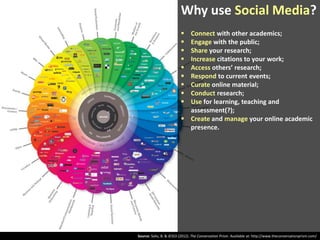
Why use Social Media?










Connect with other academics;
Engage with the public;
Share your research;
Increase citations to your work;
Access others’ research;
Respond to current events;
Curate online material;
Conduct research;
Use for learning, teaching and
assessment(?);
 Create and manage your online academic
presence.

Source: Solis, B. & JESS3 (2012). The Conversation Prism. Available at: http://www.theconversationprism.com/
Social Media &
Academic Practice

Networking

Resources
LinkedIn
RSS Feeds

Facebook

Social Bookmarking
MOOCs

Google Docs

Collaboration

Academia.edu
Google+

Wikis

Twitter Blogs

CReaTE
SlideShare
Dissemination

Adapted From: Coverdale, A. (2012). Using Social Media for Academic Practice and Impact. School of Social Sciences, Cardiff University, 5 July 2012
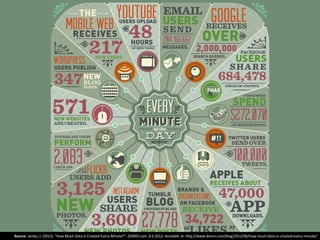
Some Statistics...
...the practice or science of collecting
and analysing numerical data in large
quantities, especially for the purpose of
inferring proportions in a whole from
those in a representative sample.

Source: OED (2013)
Image: “...More Than You Probably Bargained For” by Unhindered by Talent. Creative Commons licence CC BY-SA - http://www.flickr.com/photos/nicmcphee/422440966/
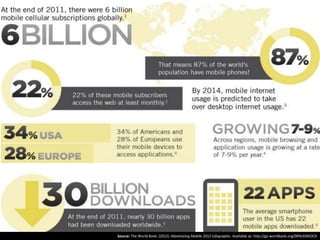
Source: The World Bank. (2012). Maximizing Mobile 2012 Infographic. Available at: http://go.worldbank.org/0R9UEMJOC0
Source: James, J. (2012). "How Much Data Is Created Every Minute?". DOMO.com, 8.6.2012. Available at: http://www.domo.com/blog/2012/06/how-much-data-is-created-every-minute/
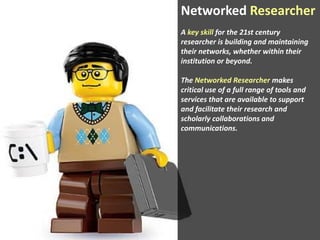
Networked Researcher
A key skill for the 21st century
researcher is building and maintaining
their networks, whether within their
institution or beyond.

The Networked Researcher makes
critical use of a full range of tools and
services that are available to support
and facilitate their research and
scholarly collaborations and
communications.
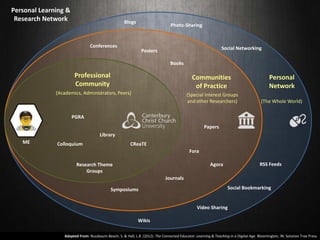
Personal Learning &
Research Network

Blogs

Photo-Sharing

Conferences

Social Networking

Posters
Books

Professional
Community

Communities
of Practice

Personal
Network

(Academics, Administrators, Peers)

(Special Interest Groups
and other Researchers)

(The Whole World)

PGRA
Papers
Library
ME

Colloquium

CReaTE
Fora
RSS Feeds

Agora

Research Theme
Groups
Journals
Symposiums

Social Bookmarking

Video Sharing
Wikis
Adapted From: Nussbaum-Beach, S. & Hall, L.R. (2012). The Connected Educator: Learning & Teaching in a Digital Age. Bloomington, IN: Solution Tree Press
Digital Literacy...
... is the awareness, attitude and ability
of individuals to appropriately use
digital tools and facilities to identify,
access, manage, integrate, evaluate,
analyse and synthesise digital resources,
construct new knowledge, create media
expressions, and communicate with
others, in the context of specific life
situations, in order to enable
constructive social action, and to reflect
upon this process…
…suggests that digital literacy is cultural
rather than technological and is socially
located ... no ‘one size fits all’, e-literacy
is dynamic – needs of individuals will
change as their situation and
environment change.
Source: Martin & Grudziecki (2006)
Image: “Rosetta Stone” by skëne. Creative Commons licence CC BY-NC-ND - http://www.flickr.com/photos/skene/3874882162/
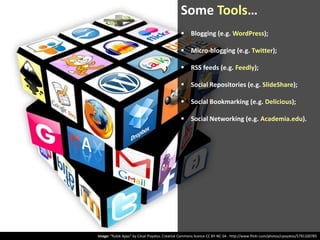
Some Tools…
 Blogging (e.g. WordPress);
 Micro-blogging (e.g. Twitter);
 RSS feeds (e.g. Feedly);
 Social Repositories (e.g. SlideShare);
 Social Bookmarking (e.g. Delicious);
 Social Networking (e.g. Academia.edu).

Image: “Rubik Apps” by César Poyatos. Creative Commons licence CC BY-NC-SA - http://www.flickr.com/photos/cpoyatos/5791320785
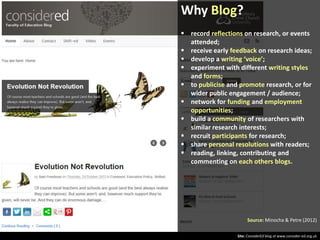
Why Blog?
 record reflections on research, or events
attended;
 receive early feedback on research ideas;
 develop a writing ‘voice’;
 experiment with different writing styles
and forms;
 to publicise and promote research, or for
wider public engagement / audience;
 network for funding and employment
opportunities;
 build a community of researchers with
similar research interests;
 recruit participants for research;
 share personal resolutions with readers;
 reading, linking, contributing and
commenting on each others blogs.

Source: Minocha & Petre (2012)
Site: ConsiderEd blog at www.consider-ed.org.uk
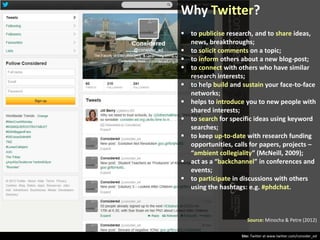
Why Twitter?
 to publicise research, and to share ideas,
news, breakthroughs;
 to solicit comments on a topic;
 to inform others about a new blog-post;
 to connect with others who have similar
research interests;
 to help build and sustain your face-to-face
networks;
 helps to introduce you to new people with
shared interests;
 to search for specific ideas using keyword
searches;
 to keep up-to-date with research funding
opportunities, calls for papers, projects –
“ambient collegiality” (McNeill, 2009);
 act as a “backchannel” in conferences and
events;
 to participate in discussions with others
using the hashtags: e.g. #phdchat.

Source: Minocha & Petre (2012)
Site: Twitter at www.twitter.com/consider_ed
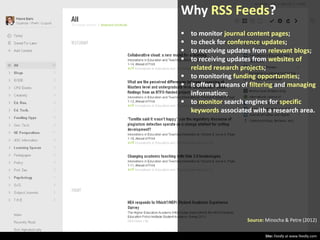
Why RSS Feeds?





to monitor journal content pages;
to check for conference updates;
to receiving updates from relevant blogs;
to receiving updates from websites of
related research projects;
 to monitoring funding opportunities;
 it offers a means of filtering and managing
information;
 to monitor search engines for specific
keywords associated with a research area.

Source: Minocha & Petre (2012)
Site: Feedly at www.feedly.com
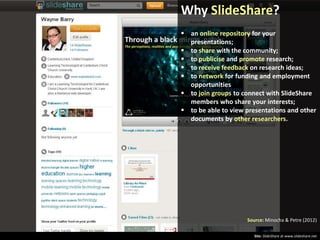
Why SlideShare?
 an online repository for your
presentations;
 to share with the community;
 to publicise and promote research;
 to receive feedback on research ideas;
 to network for funding and employment
opportunities
 to join groups to connect with SlideShare
members who share your interests;
 to be able to view presentations and other
documents by other researchers.

Source: Minocha & Petre (2012)
Site: SlideShare at www.slideshare.net
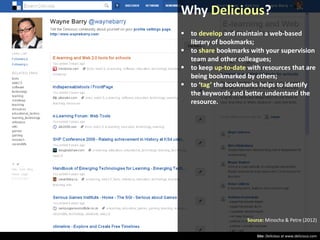
Why Delicious?
 to develop and maintain a web-based
library of bookmarks;
 to share bookmarks with your supervision
team and other colleagues;
 to keep up-to-date with resources that are
being bookmarked by others;
 to ‘tag’ the bookmarks helps to identify
the keywords and better understand the
resource.

Source: Minocha & Petre (2012)
Site: Delicious at www.delicious.com
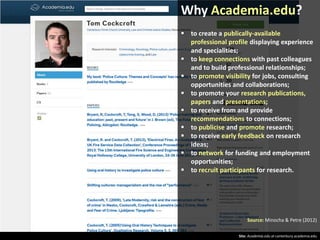
Why Academia.edu?
 to create a publically-available
professional profile displaying experience
and specialities;
 to keep connections with past colleagues
and to build professional relationships;
 to promote visibility for jobs, consulting
opportunities and collaborations;
 to promote your research publications,
papers and presentations;
 to receive from and provide
recommendations to connections;
 to publicise and promote research;
 to receive early feedback on research
ideas;
 to network for funding and employment
opportunities;
 to recruit participants for research.

Source: Minocha & Petre (2012)
Site: Academia.edu at canterbury.academia.edu
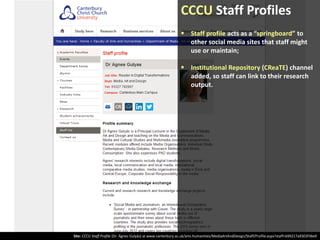
CCCU Staff Profiles
 Staff profile acts as a “springboard” to
other social media sites that staff might
use or maintain;
 Institutional Repository (CReaTE) channel
added, so staff can link to their research
output.

Site: CCCU Staff Profile (Dr. Ágnes Gulyás) at www.canterbury.ac.uk/arts-humanities/MediaArtAndDesign/Staff/Profile.aspx?staff=b99217a9303f36e9
Some Considerations...
What?
Type of research work / activities /
content, etc.
Where?
Social media – platforms and tools
When?
Stages of project / study / tenure
How might this support / compromise
formal publication?
How?
Type of media / format, etc.
Who?
Audience – academic / discipline / public
Stakeholders – participants / partners

Image: “Thinking” by ores2K. Creative Commons licence CC BY-NC-SA - http://www.flickr.com/photos/63379251@N00/394359583/
Some Issues & Barriers
 perceived as a time-consuming activity;
 perceived as egocentric, narcissistic and
self-indulgent;
 a lack of knowledge or awareness of what
is “out there”;
 a reluctance to engage with new
technologies or methods of dissemination;
 a lack of recognition or reward by the
institution;
 there are tensions around the types of
access… open vs. closed;
 there are tensions around Intellectual
Property… attribution vs. copyright;
 there are issues around privacy and
confidentiality;
 it could compromise tutor/student
relationships;
 it could expose existing personal use &
online identity;
 there are threats to representation and
reputation (self/institution/research).
Source: Weller (2011)
Image: “Windsor’s Rising Bollard” by synx508. Creative Commons licence CC BY-NC - http://www.flickr.com/photos/65615735@N00/3795304430/
Best Practice
 create and maintain a consistent
professional online presence;
 be selective on tool choices – ensure these
are ‘fit for purpose’;
 regularly evaluate the tools you use;
 if a particular tool is not providing value,
then give it up!;
 keep your purpose and audience in mind;
 take care not to overload your followers;
 be aware of IPR, copyright and other legal
issues and risks when using social media
tools;
 schedule time for using social media to
support your activities;
 develop a “critical filter” (Barry, 2013) to
assess & assimilate new information;
 REMEMBER: social media is not the only
form of communication.

Source: Minocha & Petre (2012)

Image: “Look Towards The Light” by r0ldy. Creative Commons licence CC BY-NC-SA - http://www.flickr.com/photos/r0ldy/4858590705/
Some Resources…
Cann, A., Dimitriou, K. & Hooley, T. (2011). Social Media: A Guide for Researchers. London, England: Research Information
Network. Available at: http://www.rin.ac.uk/system/files/attachments/social_media_guide_for_screen_0.pdf
Czuczman, K. (2006). A Networked Research Approach: A Guide to Conducting Research in a Network Setting. London,
England: International Forum for Rural Transport and Development. Available at:
http://ifrtd.org/files/uploads/en_nr_manual.pdf
Minocha, S. & Petre, M. (2012). Handbook of Social Media for Researchers and Supervisors: Digital Technologies for
Research Dialogues. Milton Keynes, England: Centre for Research in Computing, The Open University. Available at:
http://oro.open.ac.uk/34271/
Mollett, A., Moran, D. & Dunleavy, P. (2011). Using Twitter in University Research, Teaching and Impact Activities: A Guide
for Academics and Researchers. London, England: LSE Public Policy Group, London School of Economics and Political
Science. Available at: http://eprints.lse.ac.uk/38489/
NSBA. (2007). Creating & Connecting: Research & Guidelines on Social - and Educational - Networking. Alexandria, VA:
National Schools Board Association. Available at: http://www.ila.org/pdf/creatingandconnecting.pdf
Quinnell, S-L. (2011). “Becoming a Networked Researcher – using social media for research and researcher development”.
Impact of Social Sciences blog, 7.7.2011. Available at:
http://blogs.lse.ac.uk/impactofsocialsciences/2011/07/07/becoming-a-networked-researcher-using-social-media-forresearch/
Weller, M. (2011). The Digital Scholar: How technology is transforming scholarly practice. London: BloomsburyAcademic.

Image: “Librarian at the Card Files at Senior High School..., 10/1974” by The U.S. National Archives. No Copyright Restrictions - http://www.flickr.com/photos/usnationalarchives/3930932575/
Any Questions?

Image: “Question Mark” by djking. Creative Commons licence CC BY-NC-SA - http://www.flickr.com/photos/djking/8578067721/

Social Media and Academic Practice

  • 1.
    Social Media ACADEMIC PRACTICE WayneBarry Learning & Teaching Enhancement Unit Image: “Working in Free Space” by Kailash Gyawali. Creative Commons licence CC BY-NC - http://www.flickr.com/photos/48805491@N00/3206216434/
  • 2.
    About Me? Wayne Barry - LearningTechnologist PGCLT(HE) Tutor Change Agent Blogger EdD Student CTA EDC-MOOC email: wayne.barry@canterbury.ac.uk | web: www.waynebarry.com | twitter: @heywayne
  • 3.
    A Show ofHands… How many of you are currently using some form of social media to support your academic/professional practice? Image: “Showing Hands” by OregonDOT. Creative Commons licence CC BY - http://www.flickr.com/photos/oregondot/4132135156/
  • 4.
    CCCU Policies  TheSocial Media Policy (for Staff);  The Social Media Policy for Students;  Social Media Guidelines for Promotion and Communication;  Using Social Media: Guidelines for Learning & Teaching. Image: “CCCU-Canterbury_16-12-2009_B” by HeyWayne. Creative Commons licence CC BY-NC-SA - http://www.flickr.com/photos/heywayne/4129138428/
  • 5.
    What is SocialMedia? ...websites and applications that enable users to create and share content or to participate in social networking. Source: OED (2013) Image: “Growing Social Media” by mkhmarketing. Creative Commons licence CC BY - http://www.flickr.com/photos/93212162@N08/8539048913
  • 6.
    Why use SocialMedia?          Connect with other academics; Engage with the public; Share your research; Increase citations to your work; Access others’ research; Respond to current events; Curate online material; Conduct research; Use for learning, teaching and assessment(?);  Create and manage your online academic presence. Source: Solis, B. & JESS3 (2012). The Conversation Prism. Available at: http://www.theconversationprism.com/
  • 7.
    Social Media & AcademicPractice Networking Resources LinkedIn RSS Feeds Facebook Social Bookmarking MOOCs Google Docs Collaboration Academia.edu Google+ Wikis Twitter Blogs CReaTE SlideShare Dissemination Adapted From: Coverdale, A. (2012). Using Social Media for Academic Practice and Impact. School of Social Sciences, Cardiff University, 5 July 2012
  • 8.
    Some Statistics... ...the practiceor science of collecting and analysing numerical data in large quantities, especially for the purpose of inferring proportions in a whole from those in a representative sample. Source: OED (2013) Image: “...More Than You Probably Bargained For” by Unhindered by Talent. Creative Commons licence CC BY-SA - http://www.flickr.com/photos/nicmcphee/422440966/
  • 9.
    Source: The WorldBank. (2012). Maximizing Mobile 2012 Infographic. Available at: http://go.worldbank.org/0R9UEMJOC0
  • 10.
    Source: James, J.(2012). "How Much Data Is Created Every Minute?". DOMO.com, 8.6.2012. Available at: http://www.domo.com/blog/2012/06/how-much-data-is-created-every-minute/
  • 11.
    Networked Researcher A keyskill for the 21st century researcher is building and maintaining their networks, whether within their institution or beyond. The Networked Researcher makes critical use of a full range of tools and services that are available to support and facilitate their research and scholarly collaborations and communications.
  • 12.
    Personal Learning & ResearchNetwork Blogs Photo-Sharing Conferences Social Networking Posters Books Professional Community Communities of Practice Personal Network (Academics, Administrators, Peers) (Special Interest Groups and other Researchers) (The Whole World) PGRA Papers Library ME Colloquium CReaTE Fora RSS Feeds Agora Research Theme Groups Journals Symposiums Social Bookmarking Video Sharing Wikis Adapted From: Nussbaum-Beach, S. & Hall, L.R. (2012). The Connected Educator: Learning & Teaching in a Digital Age. Bloomington, IN: Solution Tree Press
  • 13.
    Digital Literacy... ... isthe awareness, attitude and ability of individuals to appropriately use digital tools and facilities to identify, access, manage, integrate, evaluate, analyse and synthesise digital resources, construct new knowledge, create media expressions, and communicate with others, in the context of specific life situations, in order to enable constructive social action, and to reflect upon this process… …suggests that digital literacy is cultural rather than technological and is socially located ... no ‘one size fits all’, e-literacy is dynamic – needs of individuals will change as their situation and environment change. Source: Martin & Grudziecki (2006) Image: “Rosetta Stone” by skëne. Creative Commons licence CC BY-NC-ND - http://www.flickr.com/photos/skene/3874882162/
  • 14.
    Some Tools…  Blogging(e.g. WordPress);  Micro-blogging (e.g. Twitter);  RSS feeds (e.g. Feedly);  Social Repositories (e.g. SlideShare);  Social Bookmarking (e.g. Delicious);  Social Networking (e.g. Academia.edu). Image: “Rubik Apps” by César Poyatos. Creative Commons licence CC BY-NC-SA - http://www.flickr.com/photos/cpoyatos/5791320785
  • 15.
    Why Blog?  recordreflections on research, or events attended;  receive early feedback on research ideas;  develop a writing ‘voice’;  experiment with different writing styles and forms;  to publicise and promote research, or for wider public engagement / audience;  network for funding and employment opportunities;  build a community of researchers with similar research interests;  recruit participants for research;  share personal resolutions with readers;  reading, linking, contributing and commenting on each others blogs. Source: Minocha & Petre (2012) Site: ConsiderEd blog at www.consider-ed.org.uk
  • 16.
    Why Twitter?  topublicise research, and to share ideas, news, breakthroughs;  to solicit comments on a topic;  to inform others about a new blog-post;  to connect with others who have similar research interests;  to help build and sustain your face-to-face networks;  helps to introduce you to new people with shared interests;  to search for specific ideas using keyword searches;  to keep up-to-date with research funding opportunities, calls for papers, projects – “ambient collegiality” (McNeill, 2009);  act as a “backchannel” in conferences and events;  to participate in discussions with others using the hashtags: e.g. #phdchat. Source: Minocha & Petre (2012) Site: Twitter at www.twitter.com/consider_ed
  • 17.
    Why RSS Feeds?     tomonitor journal content pages; to check for conference updates; to receiving updates from relevant blogs; to receiving updates from websites of related research projects;  to monitoring funding opportunities;  it offers a means of filtering and managing information;  to monitor search engines for specific keywords associated with a research area. Source: Minocha & Petre (2012) Site: Feedly at www.feedly.com
  • 18.
    Why SlideShare?  anonline repository for your presentations;  to share with the community;  to publicise and promote research;  to receive feedback on research ideas;  to network for funding and employment opportunities  to join groups to connect with SlideShare members who share your interests;  to be able to view presentations and other documents by other researchers. Source: Minocha & Petre (2012) Site: SlideShare at www.slideshare.net
  • 19.
    Why Delicious?  todevelop and maintain a web-based library of bookmarks;  to share bookmarks with your supervision team and other colleagues;  to keep up-to-date with resources that are being bookmarked by others;  to ‘tag’ the bookmarks helps to identify the keywords and better understand the resource. Source: Minocha & Petre (2012) Site: Delicious at www.delicious.com
  • 20.
    Why Academia.edu?  tocreate a publically-available professional profile displaying experience and specialities;  to keep connections with past colleagues and to build professional relationships;  to promote visibility for jobs, consulting opportunities and collaborations;  to promote your research publications, papers and presentations;  to receive from and provide recommendations to connections;  to publicise and promote research;  to receive early feedback on research ideas;  to network for funding and employment opportunities;  to recruit participants for research. Source: Minocha & Petre (2012) Site: Academia.edu at canterbury.academia.edu
  • 21.
    CCCU Staff Profiles Staff profile acts as a “springboard” to other social media sites that staff might use or maintain;  Institutional Repository (CReaTE) channel added, so staff can link to their research output. Site: CCCU Staff Profile (Dr. Ágnes Gulyás) at www.canterbury.ac.uk/arts-humanities/MediaArtAndDesign/Staff/Profile.aspx?staff=b99217a9303f36e9
  • 22.
    Some Considerations... What? Type ofresearch work / activities / content, etc. Where? Social media – platforms and tools When? Stages of project / study / tenure How might this support / compromise formal publication? How? Type of media / format, etc. Who? Audience – academic / discipline / public Stakeholders – participants / partners Image: “Thinking” by ores2K. Creative Commons licence CC BY-NC-SA - http://www.flickr.com/photos/63379251@N00/394359583/
  • 23.
    Some Issues &Barriers  perceived as a time-consuming activity;  perceived as egocentric, narcissistic and self-indulgent;  a lack of knowledge or awareness of what is “out there”;  a reluctance to engage with new technologies or methods of dissemination;  a lack of recognition or reward by the institution;  there are tensions around the types of access… open vs. closed;  there are tensions around Intellectual Property… attribution vs. copyright;  there are issues around privacy and confidentiality;  it could compromise tutor/student relationships;  it could expose existing personal use & online identity;  there are threats to representation and reputation (self/institution/research). Source: Weller (2011) Image: “Windsor’s Rising Bollard” by synx508. Creative Commons licence CC BY-NC - http://www.flickr.com/photos/65615735@N00/3795304430/
  • 24.
    Best Practice  createand maintain a consistent professional online presence;  be selective on tool choices – ensure these are ‘fit for purpose’;  regularly evaluate the tools you use;  if a particular tool is not providing value, then give it up!;  keep your purpose and audience in mind;  take care not to overload your followers;  be aware of IPR, copyright and other legal issues and risks when using social media tools;  schedule time for using social media to support your activities;  develop a “critical filter” (Barry, 2013) to assess & assimilate new information;  REMEMBER: social media is not the only form of communication. Source: Minocha & Petre (2012) Image: “Look Towards The Light” by r0ldy. Creative Commons licence CC BY-NC-SA - http://www.flickr.com/photos/r0ldy/4858590705/
  • 25.
    Some Resources… Cann, A.,Dimitriou, K. & Hooley, T. (2011). Social Media: A Guide for Researchers. London, England: Research Information Network. Available at: http://www.rin.ac.uk/system/files/attachments/social_media_guide_for_screen_0.pdf Czuczman, K. (2006). A Networked Research Approach: A Guide to Conducting Research in a Network Setting. London, England: International Forum for Rural Transport and Development. Available at: http://ifrtd.org/files/uploads/en_nr_manual.pdf Minocha, S. & Petre, M. (2012). Handbook of Social Media for Researchers and Supervisors: Digital Technologies for Research Dialogues. Milton Keynes, England: Centre for Research in Computing, The Open University. Available at: http://oro.open.ac.uk/34271/ Mollett, A., Moran, D. & Dunleavy, P. (2011). Using Twitter in University Research, Teaching and Impact Activities: A Guide for Academics and Researchers. London, England: LSE Public Policy Group, London School of Economics and Political Science. Available at: http://eprints.lse.ac.uk/38489/ NSBA. (2007). Creating & Connecting: Research & Guidelines on Social - and Educational - Networking. Alexandria, VA: National Schools Board Association. Available at: http://www.ila.org/pdf/creatingandconnecting.pdf Quinnell, S-L. (2011). “Becoming a Networked Researcher – using social media for research and researcher development”. Impact of Social Sciences blog, 7.7.2011. Available at: http://blogs.lse.ac.uk/impactofsocialsciences/2011/07/07/becoming-a-networked-researcher-using-social-media-forresearch/ Weller, M. (2011). The Digital Scholar: How technology is transforming scholarly practice. London: BloomsburyAcademic. Image: “Librarian at the Card Files at Senior High School..., 10/1974” by The U.S. National Archives. No Copyright Restrictions - http://www.flickr.com/photos/usnationalarchives/3930932575/
  • 26.
    Any Questions? Image: “QuestionMark” by djking. Creative Commons licence CC BY-NC-SA - http://www.flickr.com/photos/djking/8578067721/