
SparkR
SparkR
SparkR (R on Spark)
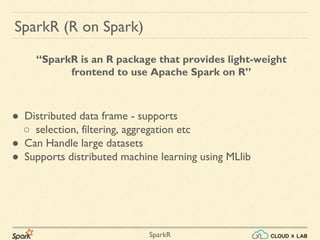
● Distributed data frame - supports
○ selection, filtering, aggregation etc
● Can Handle large datasets
● Supports distributed machine learning using MLlib
“SparkR is an R package that provides light-weight
frontend to use Apache Spark on R”
SparkR
● A DataFrame is a distributed collection of data organized into
named columns
● Equivalent to a table in a relational database or a data frame in
R, but with richer optimizations under the hood
● Can be constructed from a wide array of sources such as:
structured data files, tables in Hive, external databases, or
existing local R data frames
SparkR DataFrames
SparkR
Launch SparkR
# Login to CloudxLab web console
/usr/spark2.0.2/bin/sparkR
SparkR
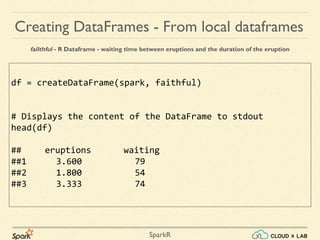
Creating DataFrames - From local dataframes
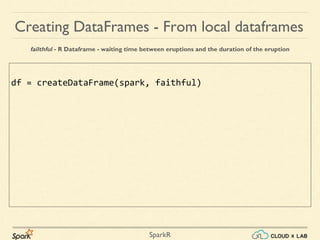
failthful - R Dataframe - waiting time between eruptions and the duration of the eruption
SparkR
df = createDataFrame(spark, faithful)
Creating DataFrames - From local dataframes
failthful - R Dataframe - waiting time between eruptions and the duration of the eruption
SparkR
df = createDataFrame(spark, faithful)
# Displays the content of the DataFrame to stdout
head(df)
## eruptions waiting
##1 3.600 79
##2 1.800 54
##3 3.333 74
Creating DataFrames - From local dataframes
failthful - R Dataframe - waiting time between eruptions and the duration of the eruption
SparkR
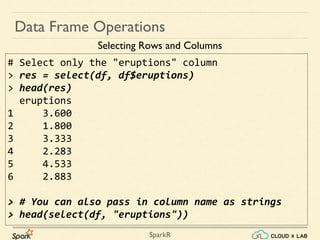
# Select only the "eruptions" column
> res = select(df, df$eruptions)
> head(res)
eruptions
1 3.600
2 1.800
3 3.333
4 2.283
5 4.533
6 2.883
> # You can also pass in column name as strings
> head(select(df, "eruptions"))
Data Frame Operations
Selecting Rows and Columns
SparkR
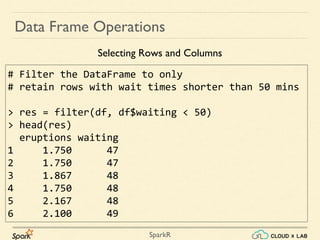
# Filter the DataFrame to only
# retain rows with wait times shorter than 50 mins
> res = filter(df, df$waiting < 50)
> head(res)
eruptions waiting
1 1.750 47
2 1.750 47
3 1.867 48
4 1.750 48
5 2.167 48
6 2.100 49
Data Frame Operations
Selecting Rows and Columns
SparkR
Data Frame Operations
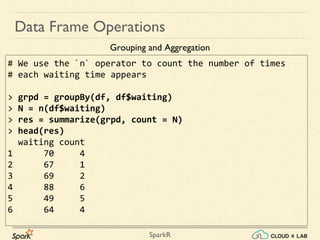
# We use the `n` operator to count the number of times
# each waiting time appears
> grpd = groupBy(df, df$waiting)
> N = n(df$waiting)
> res = summarize(grpd, count = N)
> head(res)
waiting count
1 70 4
2 67 1
3 69 2
4 88 6
5 49 5
6 64 4
Grouping and Aggregation
SparkR
Data Frame Operations
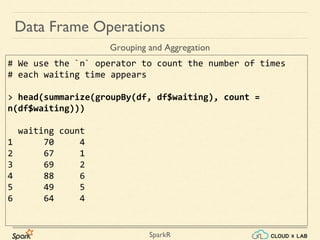
# We use the `n` operator to count the number of times
# each waiting time appears
> head(summarize(groupBy(df, df$waiting), count =
n(df$waiting)))
waiting count
1 70 4
2 67 1
3 69 2
4 88 6
5 49 5
6 64 4
Grouping and Aggregation
SparkR
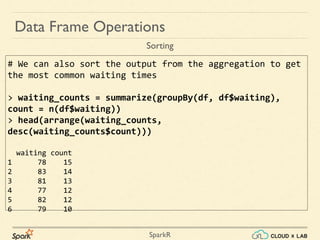
# We can also sort the output from the aggregation to get
the most common waiting times
> waiting_counts = summarize(groupBy(df, df$waiting),
count = n(df$waiting))
> head(arrange(waiting_counts,
desc(waiting_counts$count)))
waiting count
1 78 15
2 83 14
3 81 13
4 77 12
5 82 12
6 79 10
Data Frame Operations
Sorting
SparkR
Operating on Columns
Data Frame Operations
# Convert waiting time from hours to seconds.
# Note that we can assign this to a new column in the same DataFrame
df$waiting_secs = df$waiting * 60
head(df)
eruptions waiting waiting_secs
1 3.600 79 4740
2 1.800 54 3240
3 3.333 74 4440
4 2.283 62 3720
5 4.533 85 5100
6 2.883 55 3300
SparkR
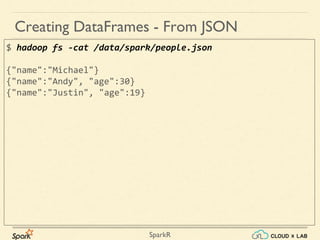
$ hadoop fs -cat /data/spark/people.json
{"name":"Michael"}
{"name":"Andy", "age":30}
{"name":"Justin", "age":19}
Creating DataFrames - From JSON
SparkR
$ hadoop fs -cat /data/spark/people.json
{"name":"Michael"}
{"name":"Andy", "age":30}
{"name":"Justin", "age":19}
$ /usr/spark2.0.1/bin/sparkR
> people = read.df(spark, "/data/spark/people.json","json")
Creating DataFrames - From JSON
SparkR
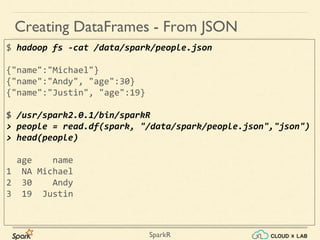
$ hadoop fs -cat /data/spark/people.json
{"name":"Michael"}
{"name":"Andy", "age":30}
{"name":"Justin", "age":19}
$ /usr/spark2.0.1/bin/sparkR
> people = read.df(spark, "/data/spark/people.json","json")
> head(people)
age name
1 NA Michael
2 30 Andy
3 19 Justin
Creating DataFrames - From JSON
SparkR
Running SQL Queries from SparkR
# Load a JSON file
people = read.df(spark, "/data/spark/people.json", "json")
# Register this DataFrame as a table.
createOrReplaceTempView(people, "peopleview")
# SQL statements can be run by using the sql method
teenagers = sql(spark, "SELECT name FROM peopleview WHERE age >= 13 AND
age <= 19")
head(teenagers)
name
1 Justin
Thank you!
SparkR

Introduction to SparkR | Big Data Hadoop Spark Tutorial | CloudxLab

  • 1.
  • 2.
    SparkR SparkR (R onSpark) ● Distributed data frame - supports ○ selection, filtering, aggregation etc ● Can Handle large datasets ● Supports distributed machine learning using MLlib “SparkR is an R package that provides light-weight frontend to use Apache Spark on R”
  • 3.
    SparkR ● A DataFrameis a distributed collection of data organized into named columns ● Equivalent to a table in a relational database or a data frame in R, but with richer optimizations under the hood ● Can be constructed from a wide array of sources such as: structured data files, tables in Hive, external databases, or existing local R data frames SparkR DataFrames
  • 4.
    SparkR Launch SparkR # Loginto CloudxLab web console /usr/spark2.0.2/bin/sparkR
  • 5.
    SparkR Creating DataFrames -From local dataframes failthful - R Dataframe - waiting time between eruptions and the duration of the eruption
  • 6.
    SparkR df = createDataFrame(spark,faithful) Creating DataFrames - From local dataframes failthful - R Dataframe - waiting time between eruptions and the duration of the eruption
  • 7.
    SparkR df = createDataFrame(spark,faithful) # Displays the content of the DataFrame to stdout head(df) ## eruptions waiting ##1 3.600 79 ##2 1.800 54 ##3 3.333 74 Creating DataFrames - From local dataframes failthful - R Dataframe - waiting time between eruptions and the duration of the eruption
  • 8.
    SparkR # Select onlythe "eruptions" column > res = select(df, df$eruptions) > head(res) eruptions 1 3.600 2 1.800 3 3.333 4 2.283 5 4.533 6 2.883 > # You can also pass in column name as strings > head(select(df, "eruptions")) Data Frame Operations Selecting Rows and Columns
  • 9.
    SparkR # Filter theDataFrame to only # retain rows with wait times shorter than 50 mins > res = filter(df, df$waiting < 50) > head(res) eruptions waiting 1 1.750 47 2 1.750 47 3 1.867 48 4 1.750 48 5 2.167 48 6 2.100 49 Data Frame Operations Selecting Rows and Columns
  • 10.
    SparkR Data Frame Operations #We use the `n` operator to count the number of times # each waiting time appears > grpd = groupBy(df, df$waiting) > N = n(df$waiting) > res = summarize(grpd, count = N) > head(res) waiting count 1 70 4 2 67 1 3 69 2 4 88 6 5 49 5 6 64 4 Grouping and Aggregation
  • 11.
    SparkR Data Frame Operations #We use the `n` operator to count the number of times # each waiting time appears > head(summarize(groupBy(df, df$waiting), count = n(df$waiting))) waiting count 1 70 4 2 67 1 3 69 2 4 88 6 5 49 5 6 64 4 Grouping and Aggregation
  • 12.
    SparkR # We canalso sort the output from the aggregation to get the most common waiting times > waiting_counts = summarize(groupBy(df, df$waiting), count = n(df$waiting)) > head(arrange(waiting_counts, desc(waiting_counts$count))) waiting count 1 78 15 2 83 14 3 81 13 4 77 12 5 82 12 6 79 10 Data Frame Operations Sorting
  • 13.
    SparkR Operating on Columns DataFrame Operations # Convert waiting time from hours to seconds. # Note that we can assign this to a new column in the same DataFrame df$waiting_secs = df$waiting * 60 head(df) eruptions waiting waiting_secs 1 3.600 79 4740 2 1.800 54 3240 3 3.333 74 4440 4 2.283 62 3720 5 4.533 85 5100 6 2.883 55 3300
  • 14.
    SparkR $ hadoop fs-cat /data/spark/people.json {"name":"Michael"} {"name":"Andy", "age":30} {"name":"Justin", "age":19} Creating DataFrames - From JSON
  • 15.
    SparkR $ hadoop fs-cat /data/spark/people.json {"name":"Michael"} {"name":"Andy", "age":30} {"name":"Justin", "age":19} $ /usr/spark2.0.1/bin/sparkR > people = read.df(spark, "/data/spark/people.json","json") Creating DataFrames - From JSON
  • 16.
    SparkR $ hadoop fs-cat /data/spark/people.json {"name":"Michael"} {"name":"Andy", "age":30} {"name":"Justin", "age":19} $ /usr/spark2.0.1/bin/sparkR > people = read.df(spark, "/data/spark/people.json","json") > head(people) age name 1 NA Michael 2 30 Andy 3 19 Justin Creating DataFrames - From JSON
  • 17.
    SparkR Running SQL Queriesfrom SparkR # Load a JSON file people = read.df(spark, "/data/spark/people.json", "json") # Register this DataFrame as a table. createOrReplaceTempView(people, "peopleview") # SQL statements can be run by using the sql method teenagers = sql(spark, "SELECT name FROM peopleview WHERE age >= 13 AND age <= 19") head(teenagers) name 1 Justin
  • 18.