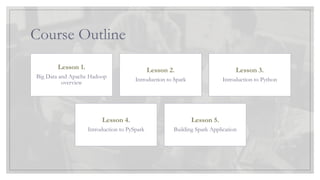
Course Outline
Lesson 1.
BigData and Apache Hadoop
overview
Lesson 2.
Introduction to Spark
Lesson 3.
Introduction to Python
Lesson 4.
Introduction to PySpark
Lesson 5.
Building Spark Application
3.
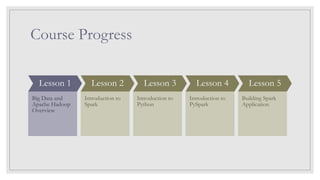
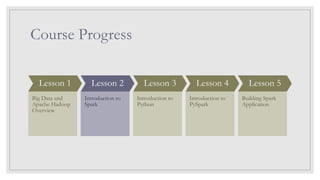
Course Progress
Lesson 1
BigData and
Apache Hadoop
Overview
Lesson 2
Introduction to
Spark
Lesson 3
Introduction to
Python
Lesson 4
Introduction to
PySpark
Lesson 5
Building Spark
Application
4.
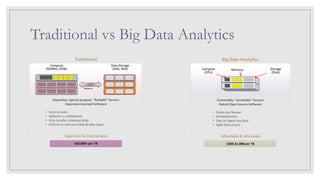
Traditional vs BigData Analytics
Big Data Analytics
Traditional
$30,000+ per TB
Expensive & Unattainable
• Hard to scale
• Network is a bottleneck
• Only handles relational data
• Difficult to add new fields & data types
Expensive, Special purpose, “Reliable” Servers
Expensive Licensed Software
Network
Data Storage
(SAN, NAS)
Compute
(RDBMS, EDW)
$300-$1,000 per TB
Affordable & Attainable
• Scales out forever
• No bottlenecks
• Easy to ingest any data
• Agile data access
Commodity “Unreliable” Servers
Hybrid Open Source Software
Compute
(CPU)
Memory Storage
(Disk)
z
z
5.
Big Data Scalability
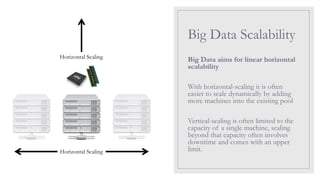
BigData aims for linear horizontal
scalability
With horizontal-scaling it is often
easier to scale dynamically by adding
more machines into the existing pool
Vertical-scaling is often limited to the
capacity of a single machine, scaling
beyond that capacity often involves
downtime and comes with an upper
limit.
Horizontal Scaling
Horizontal Scaling
6.
Big Data Scalability
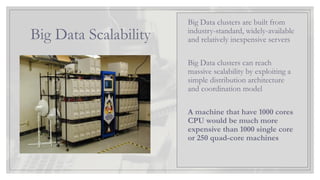
BigData clusters are built from
industry-standard, widely-available
and relatively inexpensive servers
Big Data clusters can reach
massive scalability by exploiting a
simple distribution architecture
and coordination model
A machine that have 1000 cores
CPU would be much more
expensive than 1000 single core
or 250 quad-core machines
7.
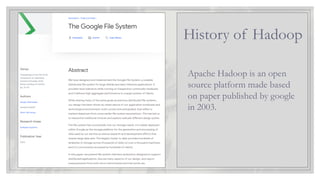
Apache Hadoop isan open
source platform made based
on paper published by google
in 2003.
History of Hadoop
Course Progress
Lesson 1
BigData and
Apache Hadoop
Overview
Lesson 2
Introduction to
Spark
Lesson 3
Introduction to
Python
Lesson 4
Introduction to
PySpark
Lesson 5
Building Spark
Application
11.
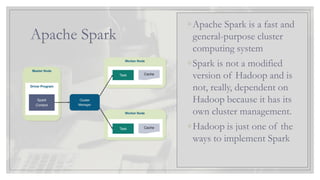
Apache Spark
◦Apache Sparkis a fast and
general-purpose cluster
computing system
◦Spark is not a modified
version of Hadoop and is
not, really, dependent on
Hadoop because it has its
own cluster management.
◦Hadoop is just one of the
ways to implement Spark
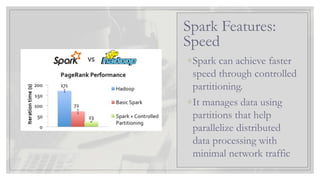
12.
◦Spark can achievefaster
speed through controlled
partitioning.
◦It manages data using
partitions that help
parallelize distributed
data processing with
minimal network traffic
Spark Features:
Speed
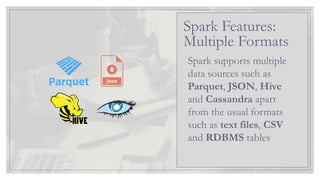
Spark supports multiple
datasources such as
Parquet, JSON, Hive
and Cassandra apart
from the usual formats
such as text files, CSV
and RDBMS tables
Spark Features:
Multiple Formats
15.
◦Apache Spark delaysits
evaluation till it is
absolutely necessary
◦Spark’s computation is
real-time and has
low latency because of
its in-memory
computation
Spark Features:
Lazy & Real Time
16.
Spark Components
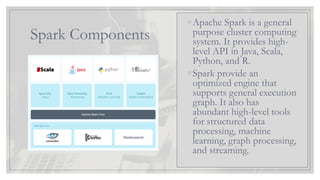
◦Apache Sparkis a general
purpose cluster computing
system. It provides high-
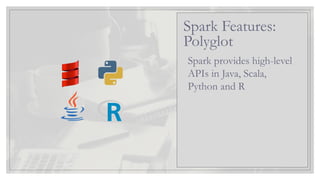
level API in Java, Scala,
Python, and R.
◦Spark provide an
optimized engine that
supports general execution
graph. It also has
abundant high-level tools
for structured data
processing, machine
learning, graph processing,
and streaming.
17.
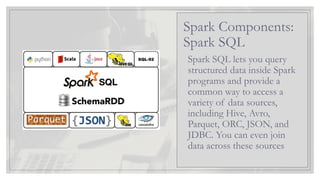
Spark SQL letsyou query
structured data inside Spark
programs and provide a
common way to access a
variety of data sources,
including Hive, Avro,
Parquet, ORC, JSON, and
JDBC. You can even join
data across these sources
Spark Components:
Spark SQL
18.
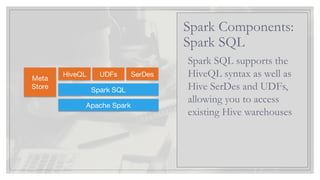
Spark SQL supportsthe
HiveQL syntax as well as
Hive SerDes and UDFs,
allowing you to access
existing Hive warehouses
Spark Components:
Spark SQL
19.
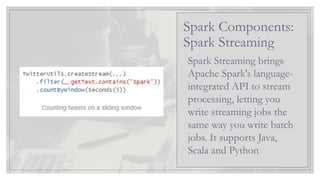
Spark Streaming brings
ApacheSpark's language-
integrated API to stream
processing, letting you
write streaming jobs the
same way you write batch
jobs. It supports Java,
Scala and Python
Spark Components:
Spark Streaming
20.
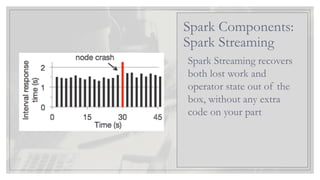
Spark Streaming recovers
bothlost work and
operator state out of the
box, without any extra
code on your part
Spark Components:
Spark Streaming
21.
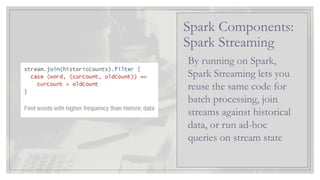
By running onSpark,
Spark Streaming lets you
reuse the same code for
batch processing, join
streams against historical
data, or run ad-hoc
queries on stream state
Spark Components:
Spark Streaming
22.
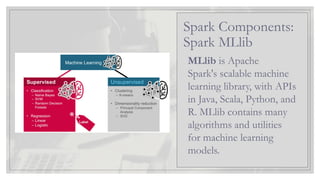
MLlib is Apache
Spark'sscalable machine
learning library, with APIs
in Java, Scala, Python, and
R. MLlib contains many
algorithms and utilities
for machine learning
models.
Spark Components:
Spark MLlib
23.
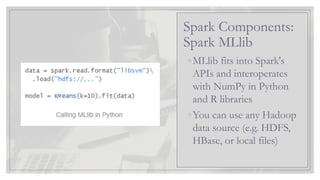
◦MLlib fits intoSpark's
APIs and interoperates
with NumPy in Python
and R libraries
◦You can use any Hadoop
data source (e.g. HDFS,
HBase, or local files)
Spark Components:
Spark MLlib
24.
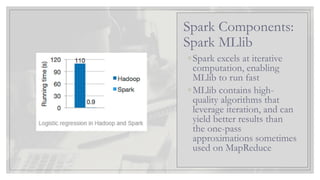
◦Spark excels atiterative
computation, enabling
MLlib to run fast
◦MLlib contains high-
quality algorithms that
leverage iteration, and can
yield better results than
the one-pass
approximations sometimes
used on MapReduce
Spark Components:
Spark MLlib
25.
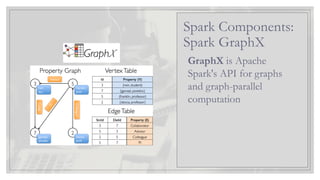
GraphX is Apache
Spark'sAPI for graphs
and graph-parallel
computation
Spark Components:
Spark GraphX
26.
Course Progress
Lesson 1
BigData and
Apache Hadoop
Overview
Lesson 2
Introduction to
Spark
Lesson 3
Introduction to
Python
Lesson 4
Introduction to
PySpark
Lesson 5
Building Spark
Application
27.
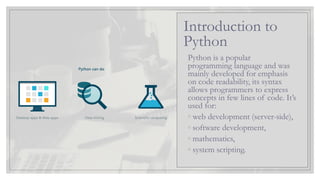
Python is apopular
programming language and was
mainly developed for emphasis
on code readability, its syntax
allows programmers to express
concepts in few lines of code. It’s
used for:
◦ web development (server-side),
◦ software development,
◦ mathematics,
◦ system scripting.
Introduction to
Python
Exercise
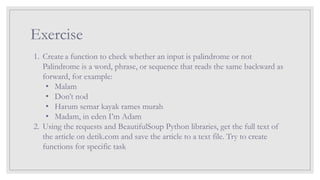
1. Create afunction to check whether an input is palindrome or not
Palindrome is a word, phrase, or sequence that reads the same backward as
forward, for example:
• Malam
• Don’t nod
• Harum semar kayak rames murah
• Madam, in eden I’m Adam
2. Using the requests and BeautifulSoup Python libraries, get the full text of
the article on detik.com and save the article to a text file. Try to create
functions for specific task
31.
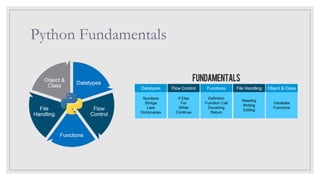
Exercise Answer: Palindrome
importre
def is_palindrome(str_text):
str_text = re.sub(
"[^a-z0-9]", "", str_text, 0, re.IGNORECASE).lower()
if str_text == str_text[::-1]:
return True
else:
return False
str_test = input("Input text for testing: ")
print("'%s' is%s a palindrome!" % (
str_test,
"" if is_palindrome(str_test) else "n't"
))
Output:
Input text for testing: Madam, in eden I’m Adam
'Madam, in eden I’m Adam' is a palindrome!
32.
Course Progress
Lesson 1
BigData and
Apache Hadoop
Overview
Lesson 2
Introduction to
Spark
Lesson 3
Introduction to
Python
Lesson 4
Introduction to
PySpark
Lesson 5
Building Spark
Application
33.
PySpark: Spark Session
Thefirst thing a Spark program must do is to create a SparkSession object,
which tells Spark how to access a cluster. First, you need to import some
Spark classes into your program. Add the following line
from pyspark.sql import SparkSession
Then, build a SparkSession that contains information about your application.
spark = SparkSession
.builder
.appName("Test Spark")
.master("local[4]")
.getOrCreate()
34.
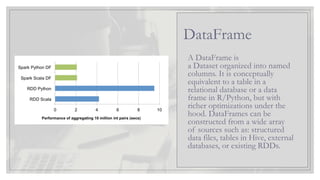
A DataFrame is
aDataset organized into named
columns. It is conceptually
equivalent to a table in a
relational database or a data
frame in R/Python, but with
richer optimizations under the
hood. DataFrames can be
constructed from a wide array
of sources such as: structured
data files, tables in Hive, external
databases, or existing RDDs.
DataFrame
35.
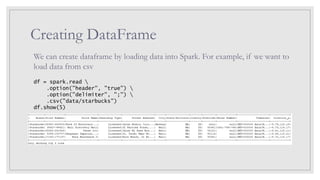
Creating DataFrame
We cancreate dataframe by loading data into Spark. For example, if we want to
load data from csv
df = spark.read
.option("header", "true")
.option("delimiter", ";")
.csv("data/starbucks")
df.show(5)
36.
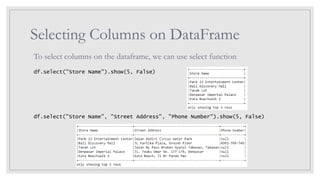
Selecting Columns onDataFrame
To select columns on the dataframe, we can use select function
df.select("Store Name").show(5, False)
df.select("Store Name", "Street Address", "Phone Number").show(5, False)
37.
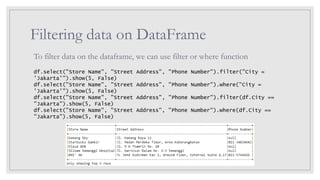
Filtering data onDataFrame
To filter data on the dataframe, we can use filter or where function
df.select("Store Name", "Street Address", "Phone Number").filter("City =
'Jakarta'").show(5, False)
df.select("Store Name", "Street Address", "Phone Number").where("City =
'Jakarta'").show(5, False)
df.select("Store Name", "Street Address", "Phone Number").filter(df.City ==
"Jakarta").show(5, False)
df.select("Store Name", "Street Address", "Phone Number").where(df.City ==
"Jakarta").show(5, False)
38.
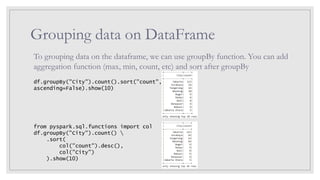
Grouping data onDataFrame
To grouping data on the dataframe, we can use groupBy function. You can add
aggregation function (max, min, count, etc) and sort after groupBy
df.groupBy("City").count().sort("count",
ascending=False).show(10)
from pyspark.sql.functions import col
df.groupBy("City").count()
.sort(
col("count").desc(),
col("City")
).show(10)
39.
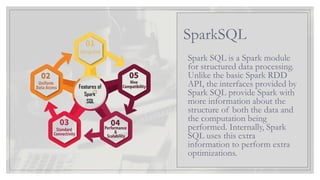
Spark SQL isa Spark module
for structured data processing.
Unlike the basic Spark RDD
API, the interfaces provided by
Spark SQL provide Spark with
more information about the
structure of both the data and
the computation being
performed. Internally, Spark
SQL uses this extra
information to perform extra
optimizations.
SparkSQL
40.
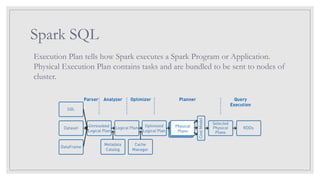
Spark SQL
Execution Plantells how Spark executes a Spark Program or Application.
Physical Execution Plan contains tasks and are bundled to be sent to nodes of
cluster.
41.
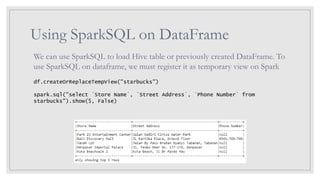
Using SparkSQL onDataFrame
We can use SparkSQL to load Hive table or previously created DataFrame. To
use SparkSQL on dataframe, we must register it as temporary view on Spark
df.createOrReplaceTempView("starbucks")
spark.sql("select `Store Name`, `Street Address`, `Phone Number` from
starbucks").show(5, False)
42.
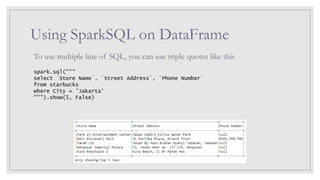
Using SparkSQL onDataFrame
To use multiple line of SQL, you can use triple quotes like this
spark.sql("""
select `Store Name`, `Street Address`, `Phone Number`
from starbucks
where City = 'Jakarta'
""").show(5, False)
43.
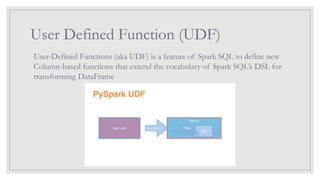
User Defined Function(UDF)
User-Defined Functions (aka UDF) is a feature of Spark SQL to define new
Column-based functions that extend the vocabulary of Spark SQL’s DSL for
transforming DataFrame
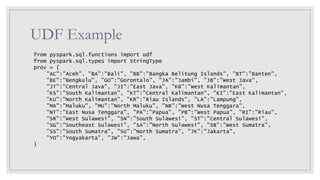
UDF Example
def trans_prov(provName):
returnprov[provName]
spark.udf.register("trans_prov_udf", trans_prov, StringType())
spark.sql("""
select `Store Name`, trans_prov_udf(`State/Province`) Province, City `Street
Address`
from starbucks
""").show(10, False)
46.
Course Progress
Lesson 1
BigData and
Apache Hadoop
Overview
Lesson 2
Introduction to
Spark
Lesson 3
Introduction to
Python
Lesson 4
Introduction to
PySpark
Lesson 5
Building Spark
Application
47.
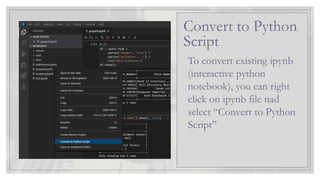
To convert existingipynb
(interactive python
notebook), you can right
click on ipynb file nad
select “Convert to Python
Script”
Convert to Python
Script
48.
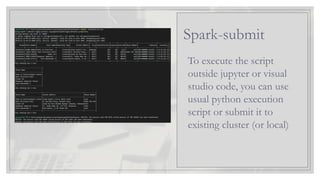
To execute thescript
outside jupyter or visual
studio code, you can use
usual python execution
script or submit it to
existing cluster (or local)
Spark-submit
49.
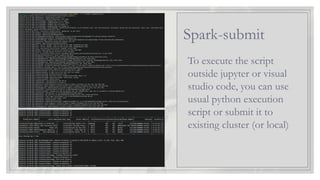
To execute thescript
outside jupyter or visual
studio code, you can use
usual python execution
script or submit it to
existing cluster (or local)
Spark-submit
50.
Challenge
1. Create afunction to check whether an input is palindrome or not
Palindrome is a word, phrase, or sequence that reads the same backward as
forward, for example:
• Malam
• Don’t nod
• Harum semar kayak rames murah
• Madam, in eden I’m Adam
2. Using the requests and BeautifulSoup Python libraries, get the full text of
the article on detik.com and save the article to a text file. Try to create
functions for specific task
![Exercise Answer: Palindrome
import re
def is_palindrome(str_text):
str_text = re.sub(
"[^a-z0-9]", "", str_text, 0, re.IGNORECASE).lower()
if str_text == str_text[::-1]:
return True
else:
return False
str_test = input("Input text for testing: ")
print("'%s' is%s a palindrome!" % (
str_test,
"" if is_palindrome(str_test) else "n't"
))
Output:
Input text for testing: Madam, in eden I’m Adam
'Madam, in eden I’m Adam' is a palindrome!](https://image.slidesharecdn.com/sparkprogramingbasic-250708082818-23bad8de/85/Spark-Programming-Basic-Training-Handout-31-320.jpg)
![PySpark: Spark Session
The first thing a Spark program must do is to create a SparkSession object,
which tells Spark how to access a cluster. First, you need to import some
Spark classes into your program. Add the following line
from pyspark.sql import SparkSession
Then, build a SparkSession that contains information about your application.
spark = SparkSession
.builder
.appName("Test Spark")
.master("local[4]")
.getOrCreate()](https://image.slidesharecdn.com/sparkprogramingbasic-250708082818-23bad8de/85/Spark-Programming-Basic-Training-Handout-33-320.jpg)
![UDF Example
def trans_prov(provName):
return prov[provName]
spark.udf.register("trans_prov_udf", trans_prov, StringType())
spark.sql("""
select `Store Name`, trans_prov_udf(`State/Province`) Province, City `Street
Address`
from starbucks
""").show(10, False)](https://image.slidesharecdn.com/sparkprogramingbasic-250708082818-23bad8de/85/Spark-Programming-Basic-Training-Handout-45-320.jpg)



![[@NaukriEngineering] Apache Spark](https://cdn.slidesharecdn.com/ss_thumbnails/apachesparkppt-170105054406-thumbnail.jpg?width=640&height=640&fit=bounds)


