


Welcome to Oozie
Oozie
Oozie - Introduction
● Is a Java Web application used to schedule Apache Hadoop
jobs
● Is integrated with the rest of the Hadoop stack
● Can execute Hadoop jobs out of the box such as Java
MapReduce, Streaming MapReduce, Pig, Hive, Sqoop and
Distcp
● Can execute system specific jobs such as Java programs and
shell scripts
Oozie
Oozie - Jobs
● Workflow jobs
● Coordinator jobs
Oozie
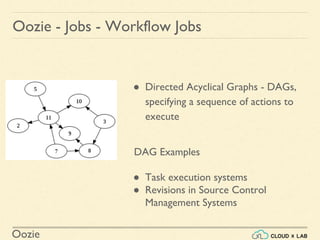
Oozie - Jobs - Workflow Jobs
● Directed Acyclical Graphs - DAGs,
specifying a sequence of actions to
execute
DAG Examples
● Task execution systems
● Revisions in Source Control
Management Systems
Oozie
Oozie - Jobs - Coordinator Jobs
Recurrent Oozie workflow jobs that are triggered by time and
data availability.
Oozie
Oozie - Use Case
Flume
HDFS
Web ServerPig
HDFSHDFS
Spark MLlib
MySQL
Sqoop
Run daily using Oozie workflow
1 2
3
4
5
6
7
8
Oozie
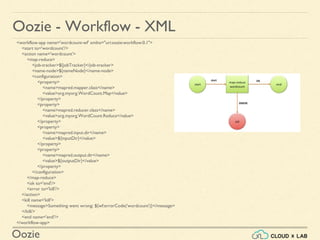
Oozie - Workflow - XML
<workflow-app name='wordcount-wf' xmlns="uri:oozie:workflow:0.1">
<start to='wordcount'/>
<action name='wordcount'>
<map-reduce>
<job-tracker>${jobTracker}</job-tracker>
<name-node>${nameNode}</name-node>
<configuration>
<property>
<name>mapred.mapper.class</name>
<value>org.myorg.WordCount.Map</value>
</property>
<property>
<name>mapred.reducer.class</name>
<value>org.myorg.WordCount.Reduce</value>
</property>
<property>
<name>mapred.input.dir</name>
<value>${inputDir}</value>
</property>
<property>
<name>mapred.output.dir</name>
<value>${outputDir}</value>
</property>
</configuration>
</map-reduce>
<ok to='end'/>
<error to='kill'/>
</action>
<kill name='kill'>
<message>Something went wrong: ${wf:errorCode('wordcount')}</message>
</kill/>
<end name='end'/>
</workflow-app>
Oozie
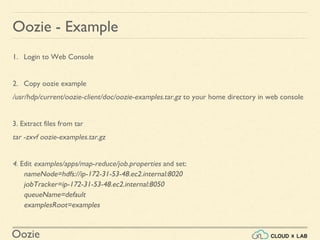
Oozie - Example
1. Login to Web Console
2. Copy oozie example
/usr/hdp/current/oozie-client/doc/oozie-examples.tar.gz to your home directory in web console
3. Extract files from tar
tar -zxvf oozie-examples.tar.gz
4. Edit examples/apps/map-reduce/job.properties and set:
nameNode=hdfs://ip-172-31-53-48.ec2.internal:8020
jobTracker=ip-172-31-53-48.ec2.internal:8050
queueName=default
examplesRoot=examples
Oozie
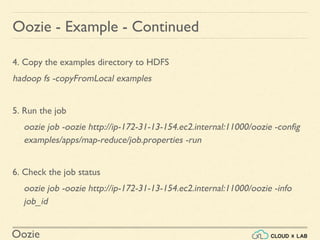
Oozie - Example - Continued
4. Copy the examples directory to HDFS
hadoop fs -copyFromLocal examples
5. Run the job
oozie job -oozie http://ip-172-31-13-154.ec2.internal:11000/oozie -config
examples/apps/map-reduce/job.properties -run
6. Check the job status
oozie job -oozie http://ip-172-31-13-154.ec2.internal:11000/oozie -info
job_id
Oozie
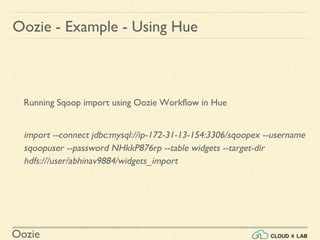
Oozie - Example - Using Hue
Running Sqoop import using Oozie Workflow in Hue
import --connect jdbc:mysql://ip-172-31-13-154:3306/sqoopex --username
sqoopuser --password NHkkP876rp --table widgets --target-dir
hdfs:///user/abhinav9884/widgets_import
Oozie
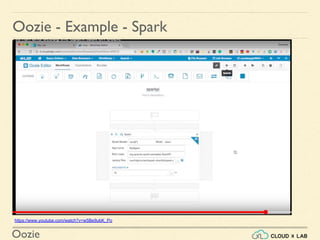
Oozie - Example - Spark
https://www.youtube.com/watch?v=w5Be9ubK_Po
Oozie
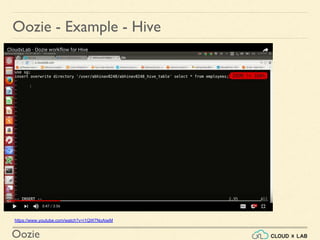
Oozie - Example - Hive
https://www.youtube.com/watch?v=i1QW7NoAiwM
Oozie
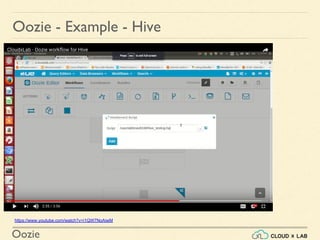
Oozie - Example - Hive
https://www.youtube.com/watch?v=i1QW7NoAiwM
Oozie
Oozie - More Videos
Find more Oozie hands-on at:
https://www.youtube.com/results?search_quer
y=cloudxlab+oozie
Oozie
Oozie - Documentation
Read More at:
https://oozie.apache.org/docs/4.2.0/index.html
Oozie
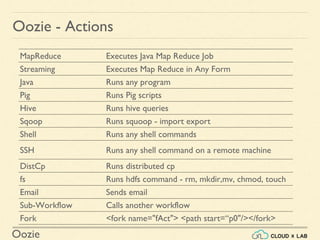
Oozie - Actions
MapReduce Executes Java Map Reduce Job
Streaming Executes Map Reduce in Any Form
Java Runs any program
Pig Runs Pig scripts
Hive Runs hive queries
Sqoop Runs squoop - import export
Shell Runs any shell commands
SSH Runs any shell command on a remote machine
DistCp Runs distributed cp
fs Runs hdfs command - rm, mkdir,mv, chmod, touch
Email Sends email
Sub-Workflow Calls another workflow
Fork <fork name="fAct"> <path start=“p0"/></fork>
Oozie
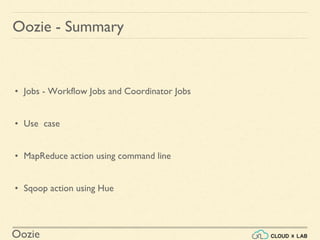
Oozie - Summary
• Jobs - Workflow Jobs and Coordinator Jobs
• Use case
• MapReduce action using command line
• Sqoop action using Hue
Thank you!

Introduction to Oozie | Big Data Hadoop Spark Tutorial | CloudxLab

  • 1.
  • 2.
    Oozie Oozie - Introduction ●Is a Java Web application used to schedule Apache Hadoop jobs ● Is integrated with the rest of the Hadoop stack ● Can execute Hadoop jobs out of the box such as Java MapReduce, Streaming MapReduce, Pig, Hive, Sqoop and Distcp ● Can execute system specific jobs such as Java programs and shell scripts
  • 3.
    Oozie Oozie - Jobs ●Workflow jobs ● Coordinator jobs
  • 4.
    Oozie Oozie - Jobs- Workflow Jobs ● Directed Acyclical Graphs - DAGs, specifying a sequence of actions to execute DAG Examples ● Task execution systems ● Revisions in Source Control Management Systems
  • 5.
    Oozie Oozie - Jobs- Coordinator Jobs Recurrent Oozie workflow jobs that are triggered by time and data availability.
  • 6.
    Oozie Oozie - UseCase Flume HDFS Web ServerPig HDFSHDFS Spark MLlib MySQL Sqoop Run daily using Oozie workflow 1 2 3 4 5 6 7 8
  • 7.
    Oozie Oozie - Workflow- XML <workflow-app name='wordcount-wf' xmlns="uri:oozie:workflow:0.1"> <start to='wordcount'/> <action name='wordcount'> <map-reduce> <job-tracker>${jobTracker}</job-tracker> <name-node>${nameNode}</name-node> <configuration> <property> <name>mapred.mapper.class</name> <value>org.myorg.WordCount.Map</value> </property> <property> <name>mapred.reducer.class</name> <value>org.myorg.WordCount.Reduce</value> </property> <property> <name>mapred.input.dir</name> <value>${inputDir}</value> </property> <property> <name>mapred.output.dir</name> <value>${outputDir}</value> </property> </configuration> </map-reduce> <ok to='end'/> <error to='kill'/> </action> <kill name='kill'> <message>Something went wrong: ${wf:errorCode('wordcount')}</message> </kill/> <end name='end'/> </workflow-app>
  • 8.
    Oozie Oozie - Example 1.Login to Web Console 2. Copy oozie example /usr/hdp/current/oozie-client/doc/oozie-examples.tar.gz to your home directory in web console 3. Extract files from tar tar -zxvf oozie-examples.tar.gz 4. Edit examples/apps/map-reduce/job.properties and set: nameNode=hdfs://ip-172-31-53-48.ec2.internal:8020 jobTracker=ip-172-31-53-48.ec2.internal:8050 queueName=default examplesRoot=examples
  • 9.
    Oozie Oozie - Example- Continued 4. Copy the examples directory to HDFS hadoop fs -copyFromLocal examples 5. Run the job oozie job -oozie http://ip-172-31-13-154.ec2.internal:11000/oozie -config examples/apps/map-reduce/job.properties -run 6. Check the job status oozie job -oozie http://ip-172-31-13-154.ec2.internal:11000/oozie -info job_id
  • 10.
    Oozie Oozie - Example- Using Hue Running Sqoop import using Oozie Workflow in Hue import --connect jdbc:mysql://ip-172-31-13-154:3306/sqoopex --username sqoopuser --password NHkkP876rp --table widgets --target-dir hdfs:///user/abhinav9884/widgets_import
  • 11.
    Oozie Oozie - Example- Spark https://www.youtube.com/watch?v=w5Be9ubK_Po
  • 12.
    Oozie Oozie - Example- Hive https://www.youtube.com/watch?v=i1QW7NoAiwM
  • 13.
    Oozie Oozie - Example- Hive https://www.youtube.com/watch?v=i1QW7NoAiwM
  • 14.
    Oozie Oozie - MoreVideos Find more Oozie hands-on at: https://www.youtube.com/results?search_quer y=cloudxlab+oozie
  • 15.
    Oozie Oozie - Documentation ReadMore at: https://oozie.apache.org/docs/4.2.0/index.html
  • 16.
    Oozie Oozie - Actions MapReduceExecutes Java Map Reduce Job Streaming Executes Map Reduce in Any Form Java Runs any program Pig Runs Pig scripts Hive Runs hive queries Sqoop Runs squoop - import export Shell Runs any shell commands SSH Runs any shell command on a remote machine DistCp Runs distributed cp fs Runs hdfs command - rm, mkdir,mv, chmod, touch Email Sends email Sub-Workflow Calls another workflow Fork <fork name="fAct"> <path start=“p0"/></fork>
  • 17.
    Oozie Oozie - Summary •Jobs - Workflow Jobs and Coordinator Jobs • Use case • MapReduce action using command line • Sqoop action using Hue
  • 18.