Motivation
 Analysis of Data made by both engineering
and non-engineering people.
 The data are growing fast. In 2007, the
volume was 15TB and it grew up to 200TB in
2010.
 Current RDBMS can NOT handle it.
 Current solution are not available, not
scalable, Expensive and Proprietary.


                                             2
Map/Reduce -Apache Hadoop
  MapReduce is a programing model and an
associated implementation introduced by
Goolge in 2004.
  Apache Hadoop is a software framework
inspired by Google's MapReduce.


                                           3
Motivation (cont.)
 Hadoop supports data-intensive distributed
applications.
However...
  –Map-reduce hard to program (users know
  sql/bash/python).
  –No schema.


                                              4
What is HIVE?
A data warehouse infrastructure built on top
of Hadoop for providing data
summarization, query, and analysis.
   –ETL.
   –Structure.
   –Access to different storage.
   –Query execution via MapReduce.
Key Building Principles:
   –SQL is a familiar language
   –Extensibility –
   Types, Functions, Formats, Scripts
   –Performance                                5
Hive Applications
Log  processing
Text mining
Document indexing
Customer-facing business intelligence
(e.g., Google Analytics)
Predictive modeling, hypothesis testing


                                           6
Hive Architecture


                    7
Data Units
Databases.
Tables.
Partitions.
Buckets (or Clusters).


                         8
Type System
Primitive types
 –Integers:TINYINT, SMALLINT, INT, BIGINT.
 –Boolean: BOOLEAN.
 –Floating point numbers: FLOAT, DOUBLE .
 –String: STRING.
Complex types
 –Structs: {a INT; b INT}.
 –Maps: M['group'].
 –Arrays: ['a', 'b', 'c'], A[1] returns 'b'.


                                               9
Physical Layout
Warehouse   directory in HDFS
 – e.g., /user/hive/warehouse
Table  row data stored in subdirectories of
warehouse
Partitions form subdirectories of table
directories
Actual data stored in flat files
 – Control char-delimited text, or SequenceFiles
 – With custom SerDe, can use arbitrary format


                                                   1
                                                   0
HiveQL


         1
         1
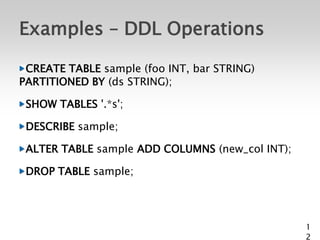
Examples – DDL Operations

 CREATE TABLE sample (foo INT, bar STRING)
PARTITIONED BY (ds STRING);

 SHOW TABLES '.*s';

 DESCRIBE sample;

 ALTER TABLE sample ADD COLUMNS (new_col INT);

 DROP TABLE sample;


                                                 1
                                                 2
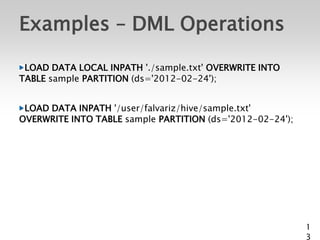
Examples – DML Operations

 LOAD DATA LOCAL INPATH './sample.txt' OVERWRITE INTO
TABLE sample PARTITION (ds='2012-02-24');


 LOAD DATA INPATH '/user/falvariz/hive/sample.txt'
OVERWRITE INTO TABLE sample PARTITION (ds='2012-02-24');


                                                           1
                                                           3
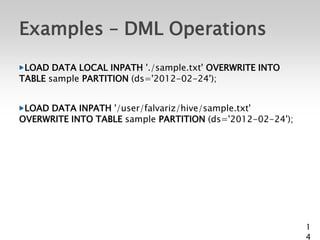
Examples – DML Operations
 LOAD DATA LOCAL INPATH './sample.txt' OVERWRITE INTO
TABLE sample PARTITION (ds='2012-02-24');


 LOAD DATA INPATH '/user/falvariz/hive/sample.txt'
OVERWRITE INTO TABLE sample PARTITION (ds='2012-02-24');


                                                           1
                                                           4
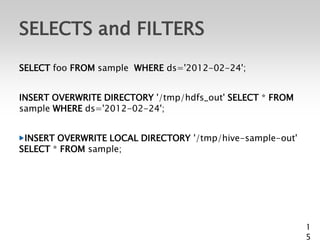
SELECTS and FILTERS
SELECT foo FROM sample WHERE ds='2012-02-24';


INSERT OVERWRITE DIRECTORY '/tmp/hdfs_out' SELECT * FROM
sample WHERE ds='2012-02-24';


 INSERT OVERWRITE LOCAL DIRECTORY '/tmp/hive-sample-out'
SELECT * FROM sample;


                                                           1
                                                           5
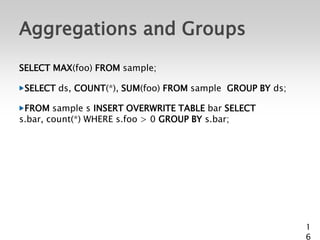
Aggregations and Groups
SELECT MAX(foo) FROM sample;

 SELECT ds, COUNT(*), SUM(foo) FROM sample GROUP BY ds;

 FROM sample s INSERT OVERWRITE TABLE bar SELECT
s.bar, count(*) WHERE s.foo > 0 GROUP BY s.bar;


                                                          1
                                                          6
Extension mechanisms


                       1
                       8
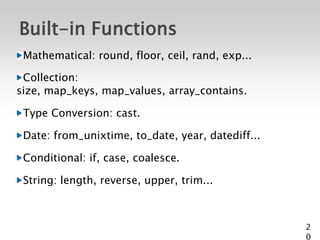
Built-in Functions
 Mathematical: round, floor, ceil, rand, exp...

 Collection:
size, map_keys, map_values, array_contains.

 Type Conversion: cast.

 Date: from_unixtime, to_date, year, datediff...

 Conditional: if, case, coalesce.

 String: length, reverse, upper, trim...


                                                   2
                                                   0
Install and Config Hive


                          2
                          2
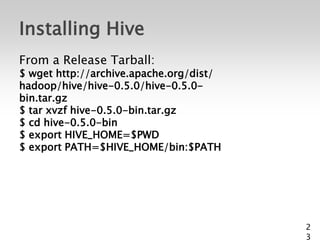
Installing Hive
From a Release Tarball:
$ wget http://archive.apache.org/dist/
hadoop/hive/hive-0.5.0/hive-0.5.0-
bin.tar.gz
$ tar xvzf hive-0.5.0-bin.tar.gz
$ cd hive-0.5.0-bin
$ export HIVE_HOME=$PWD
$ export PATH=$HIVE_HOME/bin:$PATH


                                         2
                                         3
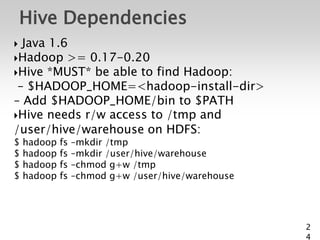
Hive Dependencies
 Java 1.6
Hadoop >= 0.17-0.20
Hive *MUST* be able to find Hadoop:
 – $HADOOP_HOME=<hadoop-install-dir>
– Add $HADOOP_HOME/bin to $PATH
Hive needs r/w access to /tmp and
/user/hive/warehouse on HDFS:
$   hadoop   fs   –mkdir /tmp
$   hadoop   fs   –mkdir /user/hive/warehouse
$   hadoop   fs   –chmod g+w /tmp
$   hadoop   fs   –chmod g+w /user/hive/warehouse


                                                    2
                                                    4
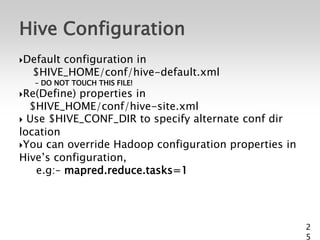
Hive Configuration
Default
       configuration in
  $HIVE_HOME/conf/hive-default.xml
   – DO NOT TOUCH THIS FILE!
Re(Define) properties in
  $HIVE_HOME/conf/hive-site.xml
 Use $HIVE_CONF_DIR to specify alternate conf dir
location
You can override Hadoop configuration properties in
Hive’s configuration,
   e.g:– mapred.reduce.tasks=1


                                                       2
                                                       5
Hive CLI


           2
           6
Hive CLI Commands
Start  a terminal and run
   $ hive
Should see a prompt like:
    hive>
Set a Hive or Hadoop conf prop:
    – hive> set propkey=value;
 List all properties and values:
    – hive> set –v;
 Add a resource to the DCache:
   – hive> add [ARCHIVE|FILE|JAR] filename;


                                              2
                                              7
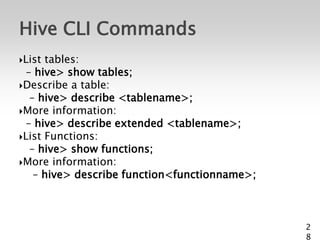
Hive CLI Commands
List tables:
  – hive> show tables;
Describe a table:
   – hive> describe <tablename>;
More information:
  – hive> describe extended <tablename>;
List Functions:
   – hive> show functions;
More information:
    – hive> describe function<functionname>;


                                               2
                                               8
Conclusion
 A easy way to process large scale data.
 Support SQL-based queries.
 Provide more user defined interfaces to extend
Programmability.
 Files in HDFS are immutable. Tipically:
   –Log processing: Daily Report, User Activity
   Measurement
   –Data/Text mining: Machine learning (Training Data)
   –Business intelligence: Advertising Delivery,Spam
   Detection


                                                         2
                                                         9
Apache Hive

Apache Hive

  • 2.
    Motivation Analysis ofData made by both engineering and non-engineering people. The data are growing fast. In 2007, the volume was 15TB and it grew up to 200TB in 2010. Current RDBMS can NOT handle it. Current solution are not available, not scalable, Expensive and Proprietary. 2
  • 3.
    Map/Reduce -Apache Hadoop MapReduce is a programing model and an associated implementation introduced by Goolge in 2004. Apache Hadoop is a software framework inspired by Google's MapReduce. 3
  • 4.
    Motivation (cont.) Hadoopsupports data-intensive distributed applications. However... –Map-reduce hard to program (users know sql/bash/python). –No schema. 4
  • 5.
    What is HIVE? Adata warehouse infrastructure built on top of Hadoop for providing data summarization, query, and analysis. –ETL. –Structure. –Access to different storage. –Query execution via MapReduce. Key Building Principles: –SQL is a familiar language –Extensibility – Types, Functions, Formats, Scripts –Performance 5
  • 6.
    Hive Applications Log processing Text mining Document indexing Customer-facing business intelligence (e.g., Google Analytics) Predictive modeling, hypothesis testing 6
  • 7.
  • 8.
  • 9.
    Type System Primitive types –Integers:TINYINT, SMALLINT, INT, BIGINT. –Boolean: BOOLEAN. –Floating point numbers: FLOAT, DOUBLE . –String: STRING. Complex types –Structs: {a INT; b INT}. –Maps: M['group']. –Arrays: ['a', 'b', 'c'], A[1] returns 'b'. 9
  • 10.
    Physical Layout Warehouse directory in HDFS – e.g., /user/hive/warehouse Table row data stored in subdirectories of warehouse Partitions form subdirectories of table directories Actual data stored in flat files – Control char-delimited text, or SequenceFiles – With custom SerDe, can use arbitrary format 1 0
  • 11.
  • 12.
    Examples – DDLOperations CREATE TABLE sample (foo INT, bar STRING) PARTITIONED BY (ds STRING); SHOW TABLES '.*s'; DESCRIBE sample; ALTER TABLE sample ADD COLUMNS (new_col INT); DROP TABLE sample; 1 2
  • 13.
    Examples – DMLOperations LOAD DATA LOCAL INPATH './sample.txt' OVERWRITE INTO TABLE sample PARTITION (ds='2012-02-24'); LOAD DATA INPATH '/user/falvariz/hive/sample.txt' OVERWRITE INTO TABLE sample PARTITION (ds='2012-02-24'); 1 3
  • 14.
    Examples – DMLOperations LOAD DATA LOCAL INPATH './sample.txt' OVERWRITE INTO TABLE sample PARTITION (ds='2012-02-24'); LOAD DATA INPATH '/user/falvariz/hive/sample.txt' OVERWRITE INTO TABLE sample PARTITION (ds='2012-02-24'); 1 4
  • 15.
    SELECTS and FILTERS SELECTfoo FROM sample WHERE ds='2012-02-24'; INSERT OVERWRITE DIRECTORY '/tmp/hdfs_out' SELECT * FROM sample WHERE ds='2012-02-24'; INSERT OVERWRITE LOCAL DIRECTORY '/tmp/hive-sample-out' SELECT * FROM sample; 1 5
  • 16.
    Aggregations and Groups SELECTMAX(foo) FROM sample; SELECT ds, COUNT(*), SUM(foo) FROM sample GROUP BY ds; FROM sample s INSERT OVERWRITE TABLE bar SELECT s.bar, count(*) WHERE s.foo > 0 GROUP BY s.bar; 1 6
  • 18.
  • 20.
    Built-in Functions Mathematical:round, floor, ceil, rand, exp... Collection: size, map_keys, map_values, array_contains. Type Conversion: cast. Date: from_unixtime, to_date, year, datediff... Conditional: if, case, coalesce. String: length, reverse, upper, trim... 2 0
  • 22.
  • 23.
    Installing Hive From aRelease Tarball: $ wget http://archive.apache.org/dist/ hadoop/hive/hive-0.5.0/hive-0.5.0- bin.tar.gz $ tar xvzf hive-0.5.0-bin.tar.gz $ cd hive-0.5.0-bin $ export HIVE_HOME=$PWD $ export PATH=$HIVE_HOME/bin:$PATH 2 3
  • 24.
    Hive Dependencies  Java1.6 Hadoop >= 0.17-0.20 Hive *MUST* be able to find Hadoop: – $HADOOP_HOME=<hadoop-install-dir> – Add $HADOOP_HOME/bin to $PATH Hive needs r/w access to /tmp and /user/hive/warehouse on HDFS: $ hadoop fs –mkdir /tmp $ hadoop fs –mkdir /user/hive/warehouse $ hadoop fs –chmod g+w /tmp $ hadoop fs –chmod g+w /user/hive/warehouse 2 4
  • 25.
    Hive Configuration Default configuration in $HIVE_HOME/conf/hive-default.xml – DO NOT TOUCH THIS FILE! Re(Define) properties in $HIVE_HOME/conf/hive-site.xml  Use $HIVE_CONF_DIR to specify alternate conf dir location You can override Hadoop configuration properties in Hive’s configuration, e.g:– mapred.reduce.tasks=1 2 5
  • 26.
  • 27.
    Hive CLI Commands Start a terminal and run $ hive Should see a prompt like: hive> Set a Hive or Hadoop conf prop: – hive> set propkey=value;  List all properties and values: – hive> set –v;  Add a resource to the DCache: – hive> add [ARCHIVE|FILE|JAR] filename; 2 7
  • 28.
    Hive CLI Commands Listtables: – hive> show tables; Describe a table: – hive> describe <tablename>; More information: – hive> describe extended <tablename>; List Functions: – hive> show functions; More information: – hive> describe function<functionname>; 2 8
  • 29.
    Conclusion A easyway to process large scale data. Support SQL-based queries. Provide more user defined interfaces to extend Programmability. Files in HDFS are immutable. Tipically: –Log processing: Daily Report, User Activity Measurement –Data/Text mining: Machine learning (Training Data) –Business intelligence: Advertising Delivery,Spam Detection 2 9