Isotope
An exquisite jQuery plugin for magical layouts
Sem Gebresilassie
What is it?
 Isotope is a jquery plugin that make Intelligent, dynamic layouts that are difficult to
accomplish using CSS alone
 Using jquery selectors, isotope makes filtering more appealing to hide and reveal DOM elements
 Developed by David DeSandro
 With Isotope behind, it is also possible to reorder and sort extracted data fashionably
 Mainly used to create things like filterable portfolios or display contents in other incredibly
cool dynamic ways.
 Isotope can be used in commercial projects and applications with a one time licencing fee
Requirments
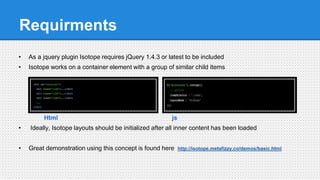
• As a jquery plugin Isotope requires jQuery 1.4.3 or latest to be included
• Isotope works on a container element with a group of similar child items
Html js
• Ideally, Isotope layouts should be initialized after all inner content has been loaded
• Great demonstration using this concept is found here http://isotope.metafizzy.co/demos/basic.html
Layout modes
• Isotope has a versatile layout engine that can accommodate multiple layout modes
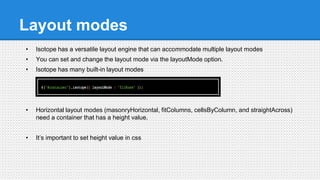
• You can set and change the layout mode via the layoutMode option.
• Isotope has many built-in layout modes
• Horizontal layout modes (masonryHorizontal, fitColumns, cellsByColumn, and straightAcross)
need a container that has a height value.
• It’s important to set height value in css
Filtering
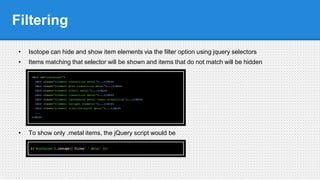
• Isotope can hide and show item elements via the filter option using jquery selectors
• Items matching that selector will be shown and items that do not match will be hidden
• To show only .metal items, the jQuery script would be
Example
• For the HTML markup in the previous slide
1. .alkali, .alkaline-earth will show .alkali AND .alkaline-earth item elements.
2. .metal.transition will show item elements that have BOTH .metal and .transition classes.
3. .metal:not(.transition) will show .metal item elements that are NOT .transition.
• Filtering functionality needs the following Recommended CSS
Sorting
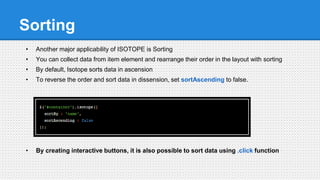
• Another major applicability of ISOTOPE is Sorting
• You can collect data from item element and rearrange their order in the layout with sorting
• By default, Isotope sorts data in ascension
• To reverse the order and sort data in dissension, set sortAscending to false.
• By creating interactive buttons, it is also possible to sort data using .click function
Animating
• Isotope provides JavaScript animation fall back for lesser browsers
• You can control how Isotope handles animation with the animationEngine options
• 'best-available': if browser supports CSS transitions, Isotope uses .css(). If not, falls back to using
.animate().
• 'css': Isotope uses .css()
• 'jquery': Isotope uses .animate()
• animationEngine determines the jQuery method to apply styles, .css() or .animate()
• useful for relying on CSS transitions to handle animation
Adding new elements
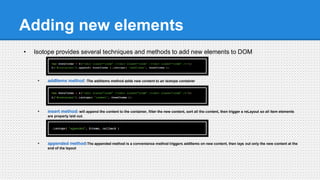
• Isotope provides several techniques and methods to add new elements to DOM
• addItems method :The addItems method adds new content to an Isotope container
• insert method: will append the content to the container, filter the new content, sort all the content, then trigger a reLayout so all item elements
are properly laid out.
• appended method:The appended method is a convenience method triggers addItems on new content, then lays out only the new content at the
end of the layout
• insert method: will append the content to the container, filter the new content, sort all the content, then trigger a reLayout so all item
elements are properly laid out.
• When adding items you’ll need these styles in your CSS for the reveal animation to work
properly
Demo http://users.metropolia.fi/~semg/eservice/isotope/
...
Resources
• Home page
http://isotope.metafizzy.co/docs/introduction.html
• Repository
https://github.com/desandro/isotope
• Author’s David DeSandro page
http://v3.desandro.com/
• Tut
http://www.9bitstudios.com/2013/04/jquery-isotope-tutorial/

Isotope.js

  • 1.
    Isotope An exquisite jQueryplugin for magical layouts Sem Gebresilassie
  • 2.
    What is it? Isotope is a jquery plugin that make Intelligent, dynamic layouts that are difficult to accomplish using CSS alone  Using jquery selectors, isotope makes filtering more appealing to hide and reveal DOM elements  Developed by David DeSandro  With Isotope behind, it is also possible to reorder and sort extracted data fashionably  Mainly used to create things like filterable portfolios or display contents in other incredibly cool dynamic ways.  Isotope can be used in commercial projects and applications with a one time licencing fee
  • 3.
    Requirments • As ajquery plugin Isotope requires jQuery 1.4.3 or latest to be included • Isotope works on a container element with a group of similar child items Html js • Ideally, Isotope layouts should be initialized after all inner content has been loaded • Great demonstration using this concept is found here http://isotope.metafizzy.co/demos/basic.html
  • 4.
    Layout modes • Isotopehas a versatile layout engine that can accommodate multiple layout modes • You can set and change the layout mode via the layoutMode option. • Isotope has many built-in layout modes • Horizontal layout modes (masonryHorizontal, fitColumns, cellsByColumn, and straightAcross) need a container that has a height value. • It’s important to set height value in css
  • 5.
    Filtering • Isotope canhide and show item elements via the filter option using jquery selectors • Items matching that selector will be shown and items that do not match will be hidden • To show only .metal items, the jQuery script would be
  • 6.
    Example • For theHTML markup in the previous slide 1. .alkali, .alkaline-earth will show .alkali AND .alkaline-earth item elements. 2. .metal.transition will show item elements that have BOTH .metal and .transition classes. 3. .metal:not(.transition) will show .metal item elements that are NOT .transition. • Filtering functionality needs the following Recommended CSS
  • 7.
    Sorting • Another majorapplicability of ISOTOPE is Sorting • You can collect data from item element and rearrange their order in the layout with sorting • By default, Isotope sorts data in ascension • To reverse the order and sort data in dissension, set sortAscending to false. • By creating interactive buttons, it is also possible to sort data using .click function
  • 8.
    Animating • Isotope providesJavaScript animation fall back for lesser browsers • You can control how Isotope handles animation with the animationEngine options • 'best-available': if browser supports CSS transitions, Isotope uses .css(). If not, falls back to using .animate(). • 'css': Isotope uses .css() • 'jquery': Isotope uses .animate() • animationEngine determines the jQuery method to apply styles, .css() or .animate() • useful for relying on CSS transitions to handle animation
  • 9.
    Adding new elements •Isotope provides several techniques and methods to add new elements to DOM • addItems method :The addItems method adds new content to an Isotope container • insert method: will append the content to the container, filter the new content, sort all the content, then trigger a reLayout so all item elements are properly laid out. • appended method:The appended method is a convenience method triggers addItems on new content, then lays out only the new content at the end of the layout
  • 10.
    • insert method:will append the content to the container, filter the new content, sort all the content, then trigger a reLayout so all item elements are properly laid out. • When adding items you’ll need these styles in your CSS for the reveal animation to work properly Demo http://users.metropolia.fi/~semg/eservice/isotope/ ...
  • 11.
    Resources • Home page http://isotope.metafizzy.co/docs/introduction.html •Repository https://github.com/desandro/isotope • Author’s David DeSandro page http://v3.desandro.com/ • Tut http://www.9bitstudios.com/2013/04/jquery-isotope-tutorial/