1
Android UI Adapters
Topics
• AdapterView & Adapter
• AdapterView responsibilities
• ListActivity, ListView, and ListAdapter
• Spinner, SpinnerAdapter
AdapterView & Adapter
What is AdapterView?
• The AdapterView is a ViewGroup subclass
whose child Views are determined by an
Adapter that binds AdapterView object to data
of some type.
• Typically you are going to use subsclasses of
AdapterView class instead of using it directly
• Example subclasses of AdapterView class
> ListView
> Spinner
> Gallery
What is an Adapter?
• An Adapter object acts as a bridge between an
AdapterView and the underlying data for that
view.
> The Adapter provides access to the data items.
• The Adapter is also responsible for making a
View for each item in the data set.
• Types of Adatpers - they implements
ListAdatper interface
> ArrayAdatper
> CursorAdatper
> There are a few more
Adapter Class Hierarchy
• BaseAdatper abstract class implements
ListAdapter and SpinnerAdatper interfaces
• ArrayAdapter and CursorAdapter classes are
subclasses of BaseAdapter class
AdapterView
Responsibilities
AdapterView Responsibilities
• Two main responsibilities of AdapterView
> Filling the layout with data (with a help from
Adapter)
> Handling user selections - when a user selects an
item, perform some action
Filling the Layout with Data
• Inserting data into the layout is typically done
by binding the AdapterView class to an Adapter,
which retrieves data from an external source
(perhaps a list that the code supplies or query
results from the device's database).
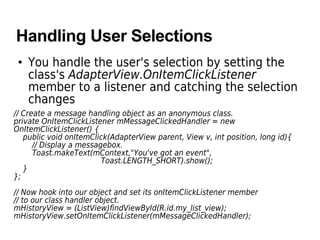
Handling User Selections
• You handle the user's selection by setting the
class's AdapterView.OnItemClickListener
member to a listener and catching the selection
changes
// Create a message handling object as an anonymous class.
private OnItemClickListener mMessageClickedHandler = new
OnItemClickListener() {
public void onItemClick(AdapterView parent, View v, int position, long id){
// Display a messagebox.
Toast.makeText(mContext,"You've got an event",
Toast.LENGTH_SHORT).show();
}
};
// Now hook into our object and set its onItemClickListener member
// to our class handler object.
mHistoryView = (ListView)findViewById(R.id.my_list_view);
mHistoryView.setOnItemClickListener(mMessageClickedHandler);
ListActivity class, ListView,
ListAdapter
(ArrayAdapter, CursorAdapter)
ListActivity Activity class
• Android-provided class specially designed for
displaying a list of items by binding to a data
source such as an array or Cursor, and exposes
event handlers when the user selects an item.
> ListActivity hosts a ListView object that can be
bound through an adatper to different data
sources, typically either an array or a Cursor
holding query results.
> setListAdapter(ListAdatper adapter) method
automatically creates ListView object from the
ListAdapter object
• Has a default layout that consists of a single,
full-screen list in the center of the screen
Example of ListActivity Class
public class HelloListView extends ListActivity {
static final String[] COUNTRIES = new String[] {
"Yemen", "Yugoslavia", "Zambia", "Zimbabwe"
};
/** Called when the activity is first created. */
@Override
public void onCreate(Bundle savedInstanceState) {
super.onCreate(savedInstanceState);
// Create an adapter
ArrayAdapter<String> arrayAdapter = new ArrayAdapter<String>(
this, // Application context
R.layout.list_item, // layout description for each list item
COUNTRIES); // String array of countries defined
// Notice that this does not load a layout file for the Activity (which you
// usually do with setContentView(int)). Instead, setListAdapter(ListAdapter)
// automatically adds a ListView to fill the entire screen of the ListActivity.
setListAdapter(arrayAdapter);
}
}
Spinner, SpinnerAdapter
Spinner
• A view that displays one child at a time and lets
the user pick among them.
• The items in the Spinner come from the
Adapter associated with this view.
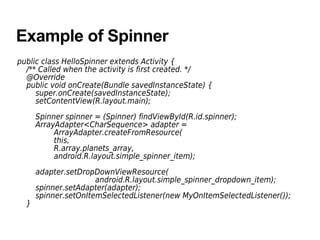
Example of Spinner
public class HelloSpinner extends Activity {
/** Called when the activity is first created. */
@Override
public void onCreate(Bundle savedInstanceState) {
super.onCreate(savedInstanceState);
setContentView(R.layout.main);
Spinner spinner = (Spinner) findViewById(R.id.spinner);
ArrayAdapter<CharSequence> adapter =
ArrayAdapter.createFromResource(
this,
R.array.planets_array,
android.R.layout.simple_spinner_item);
adapter.setDropDownViewResource(
android.R.layout.simple_spinner_dropdown_item);
spinner.setAdapter(adapter);
spinner.setOnItemSelectedListener(new MyOnItemSelectedListener());
}
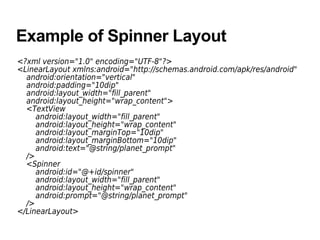
Example of Spinner Layout
<?xml version="1.0" encoding="UTF-8"?>
<LinearLayout xmlns:android="http://schemas.android.com/apk/res/android"
android:orientation="vertical"
android:padding="10dip"
android:layout_width="fill_parent"
android:layout_height="wrap_content">
<TextView
android:layout_width="fill_parent"
android:layout_height="wrap_content"
android:layout_marginTop="10dip"
android:layout_marginBottom="10dip"
android:text="@string/planet_prompt"
/>
<Spinner
android:id="@+id/spinner"
android:layout_width="fill_parent"
android:layout_height="wrap_content"
android:prompt="@string/planet_prompt"
/>
</LinearLayout>
Thank you

Android ui adapter

  • 1.
  • 2.
    Topics • AdapterView &Adapter • AdapterView responsibilities • ListActivity, ListView, and ListAdapter • Spinner, SpinnerAdapter
  • 3.
  • 4.
    What is AdapterView? •The AdapterView is a ViewGroup subclass whose child Views are determined by an Adapter that binds AdapterView object to data of some type. • Typically you are going to use subsclasses of AdapterView class instead of using it directly • Example subclasses of AdapterView class > ListView > Spinner > Gallery
  • 5.
    What is anAdapter? • An Adapter object acts as a bridge between an AdapterView and the underlying data for that view. > The Adapter provides access to the data items. • The Adapter is also responsible for making a View for each item in the data set. • Types of Adatpers - they implements ListAdatper interface > ArrayAdatper > CursorAdatper > There are a few more
  • 6.
    Adapter Class Hierarchy •BaseAdatper abstract class implements ListAdapter and SpinnerAdatper interfaces • ArrayAdapter and CursorAdapter classes are subclasses of BaseAdapter class
  • 7.
  • 8.
    AdapterView Responsibilities • Twomain responsibilities of AdapterView > Filling the layout with data (with a help from Adapter) > Handling user selections - when a user selects an item, perform some action
  • 9.
    Filling the Layoutwith Data • Inserting data into the layout is typically done by binding the AdapterView class to an Adapter, which retrieves data from an external source (perhaps a list that the code supplies or query results from the device's database).
  • 10.
    Handling User Selections •You handle the user's selection by setting the class's AdapterView.OnItemClickListener member to a listener and catching the selection changes // Create a message handling object as an anonymous class. private OnItemClickListener mMessageClickedHandler = new OnItemClickListener() { public void onItemClick(AdapterView parent, View v, int position, long id){ // Display a messagebox. Toast.makeText(mContext,"You've got an event", Toast.LENGTH_SHORT).show(); } }; // Now hook into our object and set its onItemClickListener member // to our class handler object. mHistoryView = (ListView)findViewById(R.id.my_list_view); mHistoryView.setOnItemClickListener(mMessageClickedHandler);
  • 11.
  • 12.
    ListActivity Activity class •Android-provided class specially designed for displaying a list of items by binding to a data source such as an array or Cursor, and exposes event handlers when the user selects an item. > ListActivity hosts a ListView object that can be bound through an adatper to different data sources, typically either an array or a Cursor holding query results. > setListAdapter(ListAdatper adapter) method automatically creates ListView object from the ListAdapter object • Has a default layout that consists of a single, full-screen list in the center of the screen
  • 13.
    Example of ListActivityClass public class HelloListView extends ListActivity { static final String[] COUNTRIES = new String[] { "Yemen", "Yugoslavia", "Zambia", "Zimbabwe" }; /** Called when the activity is first created. */ @Override public void onCreate(Bundle savedInstanceState) { super.onCreate(savedInstanceState); // Create an adapter ArrayAdapter<String> arrayAdapter = new ArrayAdapter<String>( this, // Application context R.layout.list_item, // layout description for each list item COUNTRIES); // String array of countries defined // Notice that this does not load a layout file for the Activity (which you // usually do with setContentView(int)). Instead, setListAdapter(ListAdapter) // automatically adds a ListView to fill the entire screen of the ListActivity. setListAdapter(arrayAdapter); } }
  • 14.
  • 15.
    Spinner • A viewthat displays one child at a time and lets the user pick among them. • The items in the Spinner come from the Adapter associated with this view.
  • 16.
    Example of Spinner publicclass HelloSpinner extends Activity { /** Called when the activity is first created. */ @Override public void onCreate(Bundle savedInstanceState) { super.onCreate(savedInstanceState); setContentView(R.layout.main); Spinner spinner = (Spinner) findViewById(R.id.spinner); ArrayAdapter<CharSequence> adapter = ArrayAdapter.createFromResource( this, R.array.planets_array, android.R.layout.simple_spinner_item); adapter.setDropDownViewResource( android.R.layout.simple_spinner_dropdown_item); spinner.setAdapter(adapter); spinner.setOnItemSelectedListener(new MyOnItemSelectedListener()); }
  • 17.
    Example of SpinnerLayout <?xml version="1.0" encoding="UTF-8"?> <LinearLayout xmlns:android="http://schemas.android.com/apk/res/android" android:orientation="vertical" android:padding="10dip" android:layout_width="fill_parent" android:layout_height="wrap_content"> <TextView android:layout_width="fill_parent" android:layout_height="wrap_content" android:layout_marginTop="10dip" android:layout_marginBottom="10dip" android:text="@string/planet_prompt" /> <Spinner android:id="@+id/spinner" android:layout_width="fill_parent" android:layout_height="wrap_content" android:prompt="@string/planet_prompt" /> </LinearLayout>
  • 18.