Android Bluetooth Introduction


               Erin Yueh
              2009/06/26


Agenda
    ●   Android Bluetooth architecture
    ●   Related source code
    ●   Init Bluetooth 
    ●   Connect with other BT devices (dbus)
    ●   RFCOMM
    ●   OBEX (socket)


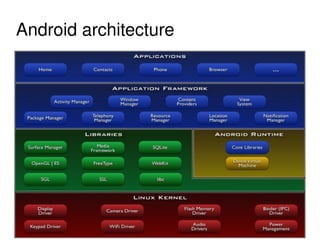
Android architecture


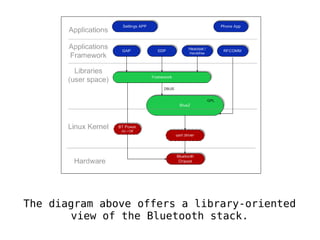
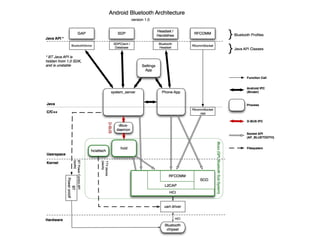
The diagram above offers a library-oriented
 
           view of the Bluetooth stack.
                          
     
Related source code
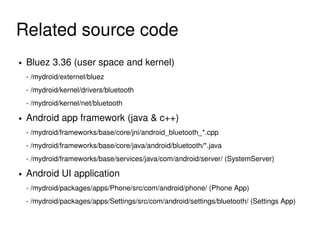
    ●   Bluez 3.36 (user space and kernel)
        ­ /mydroid/externel/bluez
        ­ /mydroid/kernel/drivers/bluetooth
        ­ /mydroid/kernel/net/bluetooth
    ●   Android app framework (java & c++)
        ­ /mydroid/frameworks/base/core/jni/android_bluetooth_*.cpp 
        ­ /mydroid/frameworks/base/core/java/android/bluetooth/*.java
        ­ /mydroid/frameworks/base/services/java/com/android/server/ (SystemServer)
    ●   Android UI application 
        ­ /mydroid/packages/apps/Phone/src/com/android/phone/ (Phone App)
        ­ /mydroid/packages/apps/Settings/src/com/android/settings/bluetooth/ (Settings App)

                                                  
Init Bluetooth 
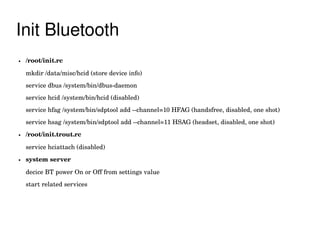
    ●   /root/init.rc 

        mkdir /data/misc/hcid (store device info)
        service dbus /system/bin/dbus­daemon
        service hcid /system/bin/hcid (disabled)
        service hfag /system/bin/sdptool add ­­channel=10 HFAG (handsfree, disabled, one shot)
        service hsag /system/bin/sdptool add ­­channel=11 HSAG (headset, disabled, one shot)
    ●   /root/init.trout.rc

        service hciattach (disabled) 
    ●   system server

        decice BT power On or Off from settings value
        start related services


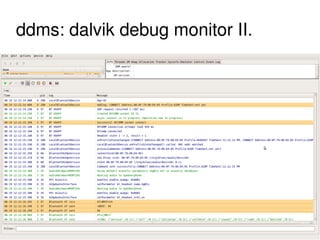
ddms: dalvik debug monitor I.


ddms: dalvik debug monitor II.


Bluetooth headset


    Music player + Dialer 
                              
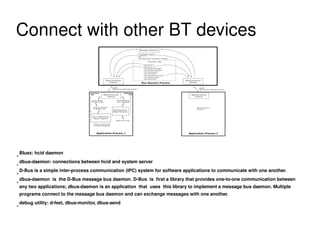
Connect with other BT devices


●
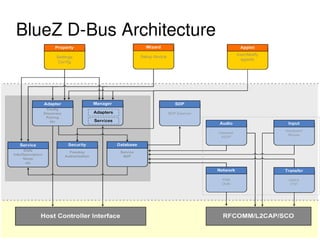
    Bluez: hcid daemon

●
    dbus-daemon: connections between hcid and system server

●
    D-Bus is a simple inter-process communication (IPC) system for software applications to communicate with one another.

●
    dbus-daemon is the D-Bus message bus daemon. D-Bus is first a library that provides one-to-one communication between
    any two applications; dbus-daemon is an application that uses this library to implement a message bus daemon. Multiple
    programs connect to the message bus daemon and can exchange messages with one another.

●
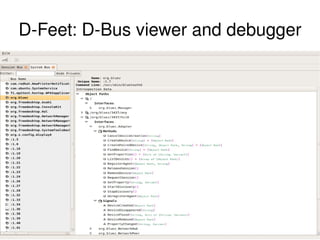
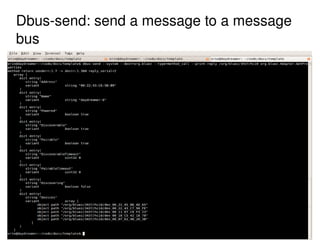
    debug utility: d-feet, dbus-monitor, dbus-send


BlueZ D­Bus Architecture 


D­Feet: D­Bus viewer and debugger


Dbus­send: send a message to a message 
bus


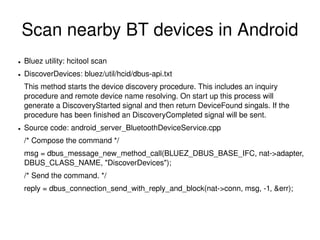
Scan nearby BT devices in Android
    ●   Bluez utility: hcitool scan
    ●   DiscoverDevices: bluez/util/hcid/dbus­api.txt
        This method starts the device discovery procedure. This includes an inquiry 
        procedure and remote device name resolving. On start up this process will 
        generate a DiscoveryStarted signal and then return DeviceFound singals. If the 
        procedure has been finished an DiscoveryCompleted signal will be sent.
    ●   Source code: android_server_BluetoothDeviceService.cpp
        /* Compose the command */
        msg = dbus_message_new_method_call(BLUEZ_DBUS_BASE_IFC, nat­>adapter, 
        DBUS_CLASS_NAME, "DiscoverDevices");
        /* Send the command. */
        reply = dbus_connection_send_with_reply_and_block(nat­>conn, msg, ­1, &err);


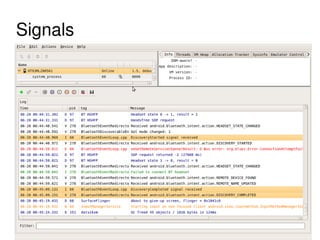
Signals


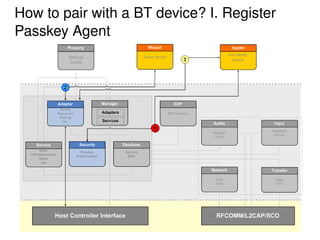
How to pair with a BT device? I. Register 
Passkey Agent


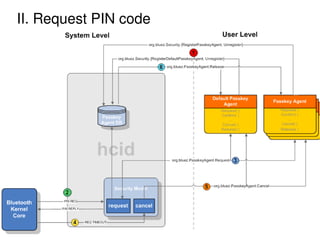
II. Request PIN code


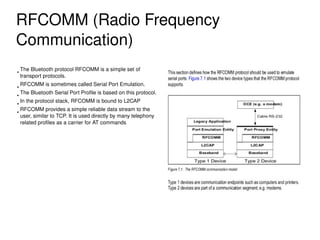
RFCOMM (Radio Frequency 
Communication)
●
    The Bluetooth protocol RFCOMM is a simple set of 
    transport protocols.
●
    RFCOMM is sometimes called Serial Port Emulation. 
●
    The Bluetooth Serial Port Profile is based on this protocol.
●
    In the protocol stack, RFCOMM is bound to L2CAP
●
    RFCOMM provides a simple reliable data stream to the 
    user, similar to TCP. It is used directly by many telephony 
    related profiles as a carrier for AT commands


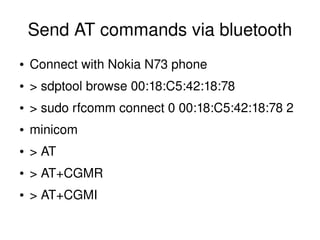
Send AT commands via bluetooth
    ●   Connect with Nokia N73 phone
    ●   > sdptool browse 00:18:C5:42:18:78
    ●   > sudo rfcomm connect 0 00:18:C5:42:18:78 2
    ●   minicom
    ●   > AT
    ●   > AT+CGMR
    ●   > AT+CGMI
                              
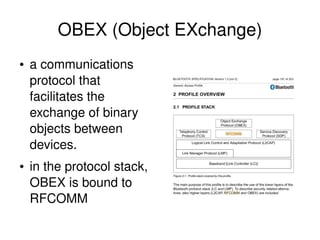
OBEX (Object EXchange)
    ●   a communications 
        protocol that 
        facilitates the 
        exchange of binary 
        objects between 
        devices.
    ●   in the protocol stack, 
        OBEX is bound to 
        RFCOMM
                                   
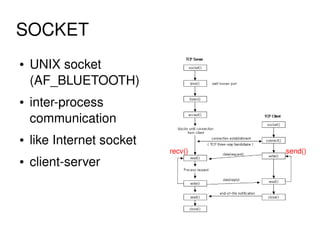
SOCKET 
    ●   UNIX socket 
        (AF_BLUETOOTH)
    ●   inter­process 
        communication 
    ●   like Internet socket
                                   recv()   send()
    ●   client­server


Receive files via BT in Android
    ●   openobex + obexpushd  
    ●   Run an OBEX data server in Android
    ●   > obexpushd
    ●   listen RFCOMM connections
    ●   File permission


Send files via BT in Android
    ●   Openobex + obexftp
    ●   Connect to a RFCOMM connection
    ●   > obex_test ­b BTADDR CHANNEL
    ●   > obexftp ­b BTADDR ­B CHANNEL ­­list


Thank You!


Android Bluetooth Introduction

  • 1.
    Android Bluetooth Introduction Erin Yueh 2009/06/26    
  • 2.
    Agenda ● Android Bluetooth architecture ● Related source code ● Init Bluetooth  ● Connect with other BT devices (dbus) ● RFCOMM ● OBEX (socket)    
  • 3.
  • 4.
    The diagram aboveoffers a library-oriented   view of the Bluetooth stack.  
  • 5.
       
  • 6.
    Related source code ● Bluez 3.36 (user space and kernel) ­ /mydroid/externel/bluez ­ /mydroid/kernel/drivers/bluetooth ­ /mydroid/kernel/net/bluetooth ● Android app framework (java & c++) ­ /mydroid/frameworks/base/core/jni/android_bluetooth_*.cpp  ­ /mydroid/frameworks/base/core/java/android/bluetooth/*.java ­ /mydroid/frameworks/base/services/java/com/android/server/ (SystemServer) ● Android UI application  ­ /mydroid/packages/apps/Phone/src/com/android/phone/ (Phone App) ­ /mydroid/packages/apps/Settings/src/com/android/settings/bluetooth/ (Settings App)    
  • 7.
    Init Bluetooth  ● /root/init.rc  mkdir /data/misc/hcid (store device info) service dbus /system/bin/dbus­daemon service hcid /system/bin/hcid (disabled) service hfag /system/bin/sdptool add ­­channel=10 HFAG (handsfree, disabled, one shot) service hsag /system/bin/sdptool add ­­channel=11 HSAG (headset, disabled, one shot) ● /root/init.trout.rc service hciattach (disabled)  ● system server decice BT power On or Off from settings value start related services    
  • 8.
  • 9.
  • 10.
    Bluetooth headset Music player + Dialer     
  • 11.
    Connect with other BT devices ● Bluez: hcid daemon ● dbus-daemon: connections between hcid and system server ● D-Bus is a simple inter-process communication (IPC) system for software applications to communicate with one another. ● dbus-daemon is the D-Bus message bus daemon. D-Bus is first a library that provides one-to-one communication between any two applications; dbus-daemon is an application that uses this library to implement a message bus daemon. Multiple programs connect to the message bus daemon and can exchange messages with one another. ● debug utility: d-feet, dbus-monitor, dbus-send    
  • 12.
  • 13.
  • 14.
  • 15.
    Scan nearby BT devices in Android ● Bluez utility: hcitool scan ● DiscoverDevices: bluez/util/hcid/dbus­api.txt This method starts the device discovery procedure. This includes an inquiry  procedure and remote device name resolving. On start up this process will  generate a DiscoveryStarted signal and then return DeviceFound singals. If the  procedure has been finished an DiscoveryCompleted signal will be sent. ● Source code: android_server_BluetoothDeviceService.cpp /* Compose the command */ msg = dbus_message_new_method_call(BLUEZ_DBUS_BASE_IFC, nat­>adapter,  DBUS_CLASS_NAME, "DiscoverDevices"); /* Send the command. */ reply = dbus_connection_send_with_reply_and_block(nat­>conn, msg, ­1, &err);    
  • 16.
  • 17.
  • 18.
  • 19.
    RFCOMM (Radio Frequency  Communication) ● The Bluetooth protocol RFCOMM is a simple set of  transport protocols. ● RFCOMM is sometimes called Serial Port Emulation.  ● The Bluetooth Serial Port Profile is based on this protocol. ● In the protocol stack, RFCOMM is bound to L2CAP ● RFCOMM provides a simple reliable data stream to the  user, similar to TCP. It is used directly by many telephony  related profiles as a carrier for AT commands    
  • 20.
    Send AT commands via bluetooth ● Connect with Nokia N73 phone ● > sdptool browse 00:18:C5:42:18:78 ● > sudo rfcomm connect 0 00:18:C5:42:18:78 2 ● minicom ● > AT ● > AT+CGMR ● > AT+CGMI    
  • 21.
    OBEX (Object EXchange) ● a communications  protocol that  facilitates the  exchange of binary  objects between  devices. ● in the protocol stack,  OBEX is bound to  RFCOMM    
  • 22.
    SOCKET  ● UNIX socket  (AF_BLUETOOTH) ● inter­process  communication  ● like Internet socket recv() send() ● client­server    
  • 23.
    Receive files via BT in Android ● openobex + obexpushd   ● Run an OBEX data server in Android ● > obexpushd ● listen RFCOMM connections ● File permission    
  • 24.
    Send files via BT in Android ● Openobex + obexftp ● Connect to a RFCOMM connection ● > obex_test ­b BTADDR CHANNEL ● > obexftp ­b BTADDR ­B CHANNEL ­­list    
  • 25.