ANDROID HACKING VILLAGE
             ANKUR | MRIGESH | ANANT
WHOAMI
TOPICS
Day 1 : Basics                          Day 2 : Advanced
   • Android Architecture                • Malware Analysis and Design
       • Operating System Overview           • Exploits survey
       • File system Overview                • Common malware samples
       • Security Model                      • Detection, prevention and cure

   • Developer Overview                  • ROM cooking
       • Application Components              • Rooting basics
       • Application Structure               • Simple Mods
       • The SDK and Android Tools           • Mid-range Mods
       • Developing a basic                  • Hardcode Cooking
       application
                                         • Advanced Pentesting and
   • Intro to PenTesting                 Forensics
         • Setting up the environment        • Black Box PT
                                             • Reverse Engineering
Android Arrives
• Android Inc. founded in 2003 in Palo Alto, California by Andy Rubin,
  Rich Miner, Nick Sears and Chris White.

• Acquired in August 2005 by Google Inc. Key employees retained.

• Design continued on a Linux powered mobile device. Marketed by Google to
  carriers as a flexible and easily upgradable OS.

• On November 5, 2007, a consortium of mobile operators, software companies
  commercialization companies, semiconductor companies and handset
  manufacturers formed the Open Handset Consortium, with the stated aim of
  developing open standards for mobile devices.

• On the same day, they released their first product ….

• …. Android.
Android – An Introduction
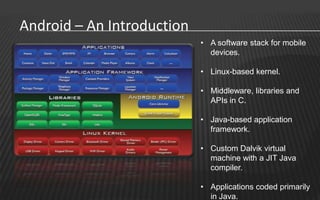
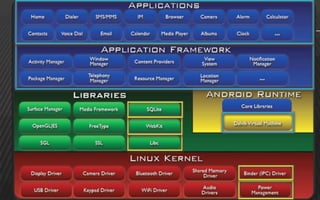
                            • A software stack for mobile
                              devices.

                            • Linux-based kernel.

                            • Middleware, libraries and
                              APIs in C.

                            • Java-based application
                              framework.

                            • Custom Dalvik virtual
                              machine with a JIT Java
                              compiler.

                            • Applications coded primarily
                              in Java.
Android – An Introduction
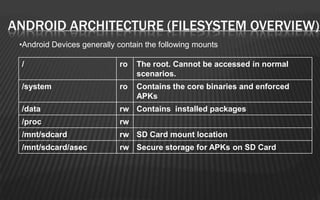
ANDROID ARCHITECTURE (FILESYSTEM OVERVIEW)
 •Android Devices generally contain the following mounts

 /                          ro   The root. Cannot be accessed in normal
                                 scenarios.
 /system                    ro   Contains the core binaries and enforced
                                 APKs
 /data                      rw Contains installed packages
 /proc                      rw
 /mnt/sdcard                rw SD Card mount location
 /mnt/sdcard/asec           rw Secure storage for APKs on SD Card
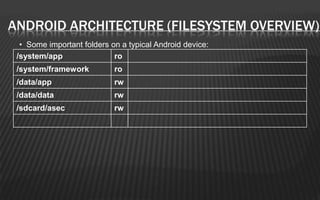
ANDROID ARCHITECTURE (FILESYSTEM OVERVIEW)
  • Some important folders on a typical Android device:
 /system/app                ro
 /system/framework          ro
 /data/app                  rw
 /data/data                 rw
 /sdcard/asec               rw
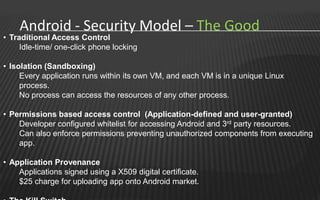
Android - Security Model – The Good
• Traditional Access Control
     Idle-time/ one-click phone locking

• Isolation (Sandboxing)
     Every application runs within its own VM, and each VM is in a unique Linux
     process.
     No process can access the resources of any other process.

• Permissions based access control (Application-defined and user-granted)
    Developer configured whitelist for accessing Android and 3rd party resources.
    Can also enforce permissions preventing unauthorized components from executing
    app.

• Application Provenance
    Applications signed using a X509 digital certificate.
    $25 charge for uploading app onto Android market.
Android - Security Model – The Bad
• No hardware-based encryption

• No non-executable memory area

• Limited Developer Accountability

• Poor Code Obfuscation options

• Applications can easily be ‘trojanized’

• Difficult environment for anti-virii

• Long Patch cycle

• Recovery/Boot process

• Security enforcement reliant on end-users
Android - Security Model – Updates
• 2.2 (Froyo)
    • Built-in remote wipe capability.
    • Built-in 4-digit-pin and alphanumeric password options for enterprise security.
    • Enterprise security additions like remote-wipe, device admin and password
      protect.

• 2.3 (Gingerbread)
    • In certain architectures (ARMv6), Android supports non-executable pages by
      default including non-executable stack and heap using an eXecute Never bit.

• 3.0 (Honeycomb)
    • Android after 3.0 provides full filesystem encryption


• 4.0 (Ice Cream Sandwich)
    • Introduced face-unlock
Android Applications - An Introduction
• Android installables are known as Application File Packages (APKs)

• ZIP-formatted packages based on the jar file format

• An APK is a collection of components. The components share certain resources.

• These include a Linux process, a JVM, SQLite DBs, Shared Preferences, a File
  Space…

• An APK also contains a store of other non-code resources
Android Applications - Structure
Android Applications – The SDK
• Includes a vast array of development tools.

• The officially supported IDE is Eclipse using the Android Development Tools Plugin.
       *You may also use any text editor along with various command-line tools to build and debug apps as
                                                                  well as connect to an emulator/device.


• ADT includes a suite of tools that can be easily integrated with Eclipse’s IDE. Some
  important ones are.:
    • adb
    • android
    • DDMS
    • emulator
    • logcat
    • ProGuard

• ADT controls synchronizes all the above tools with as many devices (real/virtual)
  as you can connect to.
Android Applications – Building a sample app
                                                                 [THE COMPONENTS]
•   Activities                                     • Responds to broadcast intents
     • UI component for one focused task.          • Must be declared in manifest/code
     • Usually a single screen in your app.
     • Stack-based lifecycle                  • Content Providers
                                                  • Manages Persistent Data
• Services                                        • Publishes it to other apps
     • Long-lived worker code. No UI.
     • Can be connected to using Binder.      • Shared Preferences
                                                  • Persistent data stored as name-value
• Intents                                           pairs
      • Mechanism for IPC.
      • Defined using an Action/data pair     • Uses-Permissions
                                                  • Describes permissions used by your app
• Intent Filters
      • Describes what intents a comonent can • Permissions
        handle                                     • Restricts access to your components
      • Registers activities/services/receivers.
Android Applications – Building a sample app
                                                                    [GUI BUILDING]
• Layouts are defined in XML (similar to Swing)

• In Android, we implement the Activity interface in Java.

• We need to overwrite a single function, i.e. onCreate()

• XML layouts are later expanded into Java to generate a UI.

• This is done using setContentView(Reference.to.the.XML.file)

• Any controls defined in your XML layouts can be referred to in Java by their ids
  using the findViewById() function.

• For each view, a set of event listeners and responders can be defined.
Android Applications – Building a sample app
                                                            [COMMON ERRORS]
• Build path error.

• AAPT unable to parse

• Invalid Imports

• Component unimplemented in manifest

• Attempting to access without taking the required permissions

• Expired debug certificate
Mobile Application Penetration Testing
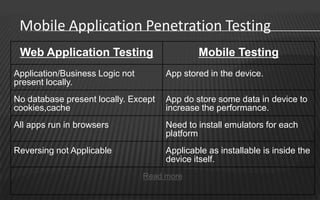
 Web Application Testing                      Mobile Testing
Application/Business Logic not        App stored in the device.
present locally.
No database present locally. Except   App do store some data in device to
cookies,cache                         increase the performance.
All apps run in browsers              Need to install emulators for each
                                      platform
Reversing not Applicable              Applicable as installable is inside the
                                      device itself.
                                 Read more
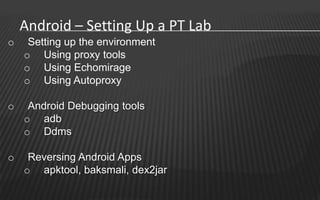
Android – Setting Up a PT Lab
o    Setting up the environment
    o Using proxy tools
    o Using Echomirage
    o Using Autoproxy

o    Android Debugging tools
    o adb
    o Ddms

o    Reversing Android Apps
    o apktool, baksmali, dex2jar
TOPICS
Day 1 : Basics                          Day 2 : Advanced
   • Android Architecture                • Malware Analysis and Design
       • Operating System Overview           • Exploits survey
       • File system Overview                • Common malware samples
       • Security Model                      • Detection, prevention and cure

   • Developer Overview                  • ROM cooking
       • Application Components              • Rooting basics
       • Application Structure               • Simple Mods
       • The SDK and Android Tools           • Mid-range Mods
       • Developing a basic                  • Hardcode Cooking
       application
                                         • Advanced Pentesting and
   • Intro to PenTesting                 Forensics
         • Setting up the environment        • Black Box PT
                                             • Reverse Engineering
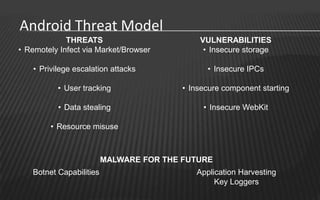
Android Threat Model
             THREATS                         VULNERABILITIES
• Remotely Infect via Market/Browser          • Insecure storage

    • Privilege escalation attacks             • Insecure IPCs

           • User tracking               • Insecure component starting

           • Data stealing                    • Insecure WebKit

         • Resource misuse


                         MALWARE FOR THE FUTURE
   Botnet Capabilities                      Application Harvesting
                                                 Key Loggers
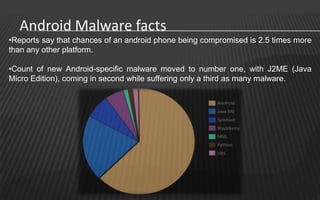
Android Malware facts
•Reports say that chances of an android phone being compromised is 2.5 times more
than any other platform.

•Count of new Android-specific malware moved to number one, with J2ME (Java
Micro Edition), coming in second while suffering only a third as many malware.
Android Malware
•Increase in for-profit mobile malware, including simple SMS-sending Trojans and
complex Trojans that use exploits to compromise smartphones

•Mobile threats already take advantage of exploits, employ botnet functionality, and
even use rootkit features for stealth and permanence.

•Maliciously modified apps are still a popular vector for infecting devices: Modify a
legitimate app or game and users will download and install malware on their
smartphones by themselves.
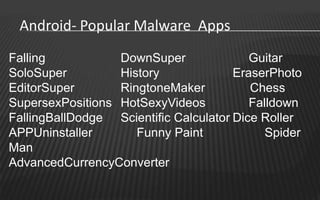
Android- Popular Malware Apps
Falling           DownSuper               Guitar
SoloSuper         History              EraserPhoto
EditorSuper       RingtoneMaker           Chess
SupersexPositions HotSexyVideos           Falldown
FallingBallDodge Scientific Calculator Dice Roller
APPUninstaller       Funny Paint             Spider
Man
AdvancedCurrencyConverter
Android- Popular Malware
   The Android/DrdDream infected over 50+ apps in google
    market. Included root exploits and installed one more
    application in system/app. It uses DES to encrypt the data
    it sends to the attacker.

   The Android/DroidKungFu family is similar to
    Android/DrdDream; it also uses a pair of root exploits to
    maintain itself on a device.The exploits are actually
    identical to those used by the Android/DrdDream except
    they have been encrypted with AES. These variants can
    also load URLs and install additional software and
    updates.
Android- Exploits
   KillingInTheNameOf
     Affected Android <= 2.2
     Remapped Android property space to writable
     Vulnerability in Ashmem implementation
     Applications having permissions to change shared
      properties.
     Toggled ro.secure property to 0
     ADB Daemon now runs as root
     Physical local root through ADB shell
Android- Exploits
   RageAgainstTheCage
       Affected Android <= 2.2
          ADBd   initially runs as root and use setuid() to move to uid
           shell
          If NPROC resource limit is reached for uid shell,
          setuid() from uid root to uid shell will fail
          If setuid() fails, ADBd continues running as root
          If ADBd runs as root, ADB shell also runs as root

       Fork()’s processes as shell user until NPROC is
        reached
          Restart   ADBd (bringing uid shell to NPROC-1) and
ROM AND ROOT   ANKUR | MRIGESH | ANANT
AGENDA
 Custom v/s stock
 Types of Modding
     Simple Mod : GUI element modding + automated
     Mid level mod : decompiling, reversing.
     Hard Core : cross compiling, drivers modding

 Rooting Fundamental’s
 How Exploits Work
CUSTOM ROM V/S STOCK ROM
 Stock Rom are build for generic usage and
  large masses, they are non rooted by default.
 Custom ROMs
       can have variants like
          Gaming   ROM
          Battery Saver
          Overclocking, Undervolting etc.
     Bleeding edge
     Pre-Rooted
SIMPLE MODDING
   Removing unnecessary /system/app
     More free space.
     Faster system (low ram consumption)

   Adding general usage applications as system
    app.
       Disadvantage : your updates will take dual space.
 Removing/replacing av files, animation etc
 Changing the GUI elements.
Simple Modding

DEMO TIME
MID LEVEL MODDING
 This is where we start getting serious 
 Application decompiling and reversing to
  modify default behavior of application.
 Application will include CORE Applications
  also.
 Focus area’s
     /system/app
     /system/framework
Mid Level Mod

DEMO TIME
HARD CORE MOD
 This is where we start getting serious 
 Application decompiling and reversing to
  modify default behavior of application.
 Application will include CORE Applications
  also.
 Focus area’s
     /system/app

     /system/framework
Simple Modding

DEMO TIME
HOW ROOTING WORKS
   Simplest Allow user to have root access
     Temporary and
     Permanent
 Temporary root, Exploit an application gain root
  access
 Permanent make abover condition permenent
  by installing a backdoorr
 SU and SUPERUSER.apk
 Review su source code
Questions?
CONTACT US
   Anant Srivastava
          Mob –
          Email – anant@anantshri.info
          Blog – http://anantshri.info

   Ankur Bhargava
          Mob – 9538995298
          Email – ankurbhargava87@gmail.com
          Blog – http://www.hakers.info

   Mrigesh
          Email – me@mrigesh.com
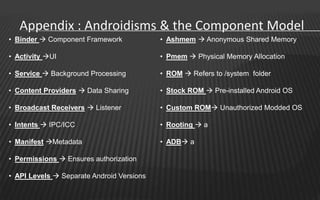
Appendix : Androidisms & the Component Model
• Binder  Component Framework             • Ashmem  Anonymous Shared Memory

• Activity UI                             • Pmem  Physical Memory Allocation

• Service  Background Processing          • ROM  Refers to /system folder

• Content Providers  Data Sharing         • Stock ROM  Pre-installed Android OS

• Broadcast Receivers  Listener           • Custom ROM Unauthorized Modded OS

• Intents  IPC/ICC                        • Rooting  a

• Manifest Metadata                       • ADB a

• Permissions  Ensures authorization

• API Levels  Separate Android Versions

Android village @nullcon 2012

  • 1.
    ANDROID HACKING VILLAGE ANKUR | MRIGESH | ANANT
  • 2.
  • 3.
    TOPICS Day 1 :Basics Day 2 : Advanced • Android Architecture • Malware Analysis and Design • Operating System Overview • Exploits survey • File system Overview • Common malware samples • Security Model • Detection, prevention and cure • Developer Overview • ROM cooking • Application Components • Rooting basics • Application Structure • Simple Mods • The SDK and Android Tools • Mid-range Mods • Developing a basic • Hardcode Cooking application • Advanced Pentesting and • Intro to PenTesting Forensics • Setting up the environment • Black Box PT • Reverse Engineering
  • 4.
    Android Arrives • AndroidInc. founded in 2003 in Palo Alto, California by Andy Rubin, Rich Miner, Nick Sears and Chris White. • Acquired in August 2005 by Google Inc. Key employees retained. • Design continued on a Linux powered mobile device. Marketed by Google to carriers as a flexible and easily upgradable OS. • On November 5, 2007, a consortium of mobile operators, software companies commercialization companies, semiconductor companies and handset manufacturers formed the Open Handset Consortium, with the stated aim of developing open standards for mobile devices. • On the same day, they released their first product …. • …. Android.
  • 5.
    Android – AnIntroduction • A software stack for mobile devices. • Linux-based kernel. • Middleware, libraries and APIs in C. • Java-based application framework. • Custom Dalvik virtual machine with a JIT Java compiler. • Applications coded primarily in Java.
  • 6.
    Android – AnIntroduction
  • 7.
    ANDROID ARCHITECTURE (FILESYSTEMOVERVIEW) •Android Devices generally contain the following mounts / ro The root. Cannot be accessed in normal scenarios. /system ro Contains the core binaries and enforced APKs /data rw Contains installed packages /proc rw /mnt/sdcard rw SD Card mount location /mnt/sdcard/asec rw Secure storage for APKs on SD Card
  • 8.
    ANDROID ARCHITECTURE (FILESYSTEMOVERVIEW) • Some important folders on a typical Android device: /system/app ro /system/framework ro /data/app rw /data/data rw /sdcard/asec rw
  • 9.
    Android - SecurityModel – The Good • Traditional Access Control Idle-time/ one-click phone locking • Isolation (Sandboxing) Every application runs within its own VM, and each VM is in a unique Linux process. No process can access the resources of any other process. • Permissions based access control (Application-defined and user-granted) Developer configured whitelist for accessing Android and 3rd party resources. Can also enforce permissions preventing unauthorized components from executing app. • Application Provenance Applications signed using a X509 digital certificate. $25 charge for uploading app onto Android market.
  • 10.
    Android - SecurityModel – The Bad • No hardware-based encryption • No non-executable memory area • Limited Developer Accountability • Poor Code Obfuscation options • Applications can easily be ‘trojanized’ • Difficult environment for anti-virii • Long Patch cycle • Recovery/Boot process • Security enforcement reliant on end-users
  • 11.
    Android - SecurityModel – Updates • 2.2 (Froyo) • Built-in remote wipe capability. • Built-in 4-digit-pin and alphanumeric password options for enterprise security. • Enterprise security additions like remote-wipe, device admin and password protect. • 2.3 (Gingerbread) • In certain architectures (ARMv6), Android supports non-executable pages by default including non-executable stack and heap using an eXecute Never bit. • 3.0 (Honeycomb) • Android after 3.0 provides full filesystem encryption • 4.0 (Ice Cream Sandwich) • Introduced face-unlock
  • 12.
    Android Applications -An Introduction • Android installables are known as Application File Packages (APKs) • ZIP-formatted packages based on the jar file format • An APK is a collection of components. The components share certain resources. • These include a Linux process, a JVM, SQLite DBs, Shared Preferences, a File Space… • An APK also contains a store of other non-code resources
  • 13.
  • 14.
    Android Applications –The SDK • Includes a vast array of development tools. • The officially supported IDE is Eclipse using the Android Development Tools Plugin. *You may also use any text editor along with various command-line tools to build and debug apps as well as connect to an emulator/device. • ADT includes a suite of tools that can be easily integrated with Eclipse’s IDE. Some important ones are.: • adb • android • DDMS • emulator • logcat • ProGuard • ADT controls synchronizes all the above tools with as many devices (real/virtual) as you can connect to.
  • 15.
    Android Applications –Building a sample app [THE COMPONENTS] • Activities • Responds to broadcast intents • UI component for one focused task. • Must be declared in manifest/code • Usually a single screen in your app. • Stack-based lifecycle • Content Providers • Manages Persistent Data • Services • Publishes it to other apps • Long-lived worker code. No UI. • Can be connected to using Binder. • Shared Preferences • Persistent data stored as name-value • Intents pairs • Mechanism for IPC. • Defined using an Action/data pair • Uses-Permissions • Describes permissions used by your app • Intent Filters • Describes what intents a comonent can • Permissions handle • Restricts access to your components • Registers activities/services/receivers.
  • 16.
    Android Applications –Building a sample app [GUI BUILDING] • Layouts are defined in XML (similar to Swing) • In Android, we implement the Activity interface in Java. • We need to overwrite a single function, i.e. onCreate() • XML layouts are later expanded into Java to generate a UI. • This is done using setContentView(Reference.to.the.XML.file) • Any controls defined in your XML layouts can be referred to in Java by their ids using the findViewById() function. • For each view, a set of event listeners and responders can be defined.
  • 17.
    Android Applications –Building a sample app [COMMON ERRORS] • Build path error. • AAPT unable to parse • Invalid Imports • Component unimplemented in manifest • Attempting to access without taking the required permissions • Expired debug certificate
  • 18.
    Mobile Application PenetrationTesting Web Application Testing Mobile Testing Application/Business Logic not App stored in the device. present locally. No database present locally. Except App do store some data in device to cookies,cache increase the performance. All apps run in browsers Need to install emulators for each platform Reversing not Applicable Applicable as installable is inside the device itself. Read more
  • 19.
    Android – SettingUp a PT Lab o Setting up the environment o Using proxy tools o Using Echomirage o Using Autoproxy o Android Debugging tools o adb o Ddms o Reversing Android Apps o apktool, baksmali, dex2jar
  • 20.
    TOPICS Day 1 :Basics Day 2 : Advanced • Android Architecture • Malware Analysis and Design • Operating System Overview • Exploits survey • File system Overview • Common malware samples • Security Model • Detection, prevention and cure • Developer Overview • ROM cooking • Application Components • Rooting basics • Application Structure • Simple Mods • The SDK and Android Tools • Mid-range Mods • Developing a basic • Hardcode Cooking application • Advanced Pentesting and • Intro to PenTesting Forensics • Setting up the environment • Black Box PT • Reverse Engineering
  • 21.
    Android Threat Model THREATS VULNERABILITIES • Remotely Infect via Market/Browser • Insecure storage • Privilege escalation attacks • Insecure IPCs • User tracking • Insecure component starting • Data stealing • Insecure WebKit • Resource misuse MALWARE FOR THE FUTURE Botnet Capabilities Application Harvesting Key Loggers
  • 22.
    Android Malware facts •Reportssay that chances of an android phone being compromised is 2.5 times more than any other platform. •Count of new Android-specific malware moved to number one, with J2ME (Java Micro Edition), coming in second while suffering only a third as many malware.
  • 23.
    Android Malware •Increase infor-profit mobile malware, including simple SMS-sending Trojans and complex Trojans that use exploits to compromise smartphones •Mobile threats already take advantage of exploits, employ botnet functionality, and even use rootkit features for stealth and permanence. •Maliciously modified apps are still a popular vector for infecting devices: Modify a legitimate app or game and users will download and install malware on their smartphones by themselves.
  • 24.
    Android- Popular MalwareApps Falling DownSuper Guitar SoloSuper History EraserPhoto EditorSuper RingtoneMaker Chess SupersexPositions HotSexyVideos Falldown FallingBallDodge Scientific Calculator Dice Roller APPUninstaller Funny Paint Spider Man AdvancedCurrencyConverter
  • 25.
    Android- Popular Malware  The Android/DrdDream infected over 50+ apps in google market. Included root exploits and installed one more application in system/app. It uses DES to encrypt the data it sends to the attacker.  The Android/DroidKungFu family is similar to Android/DrdDream; it also uses a pair of root exploits to maintain itself on a device.The exploits are actually identical to those used by the Android/DrdDream except they have been encrypted with AES. These variants can also load URLs and install additional software and updates.
  • 26.
    Android- Exploits  KillingInTheNameOf  Affected Android <= 2.2  Remapped Android property space to writable  Vulnerability in Ashmem implementation  Applications having permissions to change shared properties.  Toggled ro.secure property to 0  ADB Daemon now runs as root  Physical local root through ADB shell
  • 27.
    Android- Exploits  RageAgainstTheCage  Affected Android <= 2.2  ADBd initially runs as root and use setuid() to move to uid shell  If NPROC resource limit is reached for uid shell,  setuid() from uid root to uid shell will fail  If setuid() fails, ADBd continues running as root  If ADBd runs as root, ADB shell also runs as root  Fork()’s processes as shell user until NPROC is reached  Restart ADBd (bringing uid shell to NPROC-1) and
  • 28.
    ROM AND ROOT ANKUR | MRIGESH | ANANT
  • 29.
    AGENDA  Custom v/sstock  Types of Modding  Simple Mod : GUI element modding + automated  Mid level mod : decompiling, reversing.  Hard Core : cross compiling, drivers modding  Rooting Fundamental’s  How Exploits Work
  • 30.
    CUSTOM ROM V/SSTOCK ROM  Stock Rom are build for generic usage and large masses, they are non rooted by default.  Custom ROMs  can have variants like  Gaming ROM  Battery Saver  Overclocking, Undervolting etc.  Bleeding edge  Pre-Rooted
  • 31.
    SIMPLE MODDING  Removing unnecessary /system/app  More free space.  Faster system (low ram consumption)  Adding general usage applications as system app.  Disadvantage : your updates will take dual space.  Removing/replacing av files, animation etc  Changing the GUI elements.
  • 32.
  • 33.
    MID LEVEL MODDING This is where we start getting serious   Application decompiling and reversing to modify default behavior of application.  Application will include CORE Applications also.  Focus area’s  /system/app  /system/framework
  • 34.
  • 35.
    HARD CORE MOD This is where we start getting serious   Application decompiling and reversing to modify default behavior of application.  Application will include CORE Applications also.  Focus area’s  /system/app  /system/framework
  • 36.
  • 37.
    HOW ROOTING WORKS  Simplest Allow user to have root access  Temporary and  Permanent  Temporary root, Exploit an application gain root access  Permanent make abover condition permenent by installing a backdoorr  SU and SUPERUSER.apk  Review su source code
  • 38.
  • 39.
    CONTACT US  Anant Srivastava Mob – Email – anant@anantshri.info Blog – http://anantshri.info  Ankur Bhargava Mob – 9538995298 Email – ankurbhargava87@gmail.com Blog – http://www.hakers.info  Mrigesh Email – me@mrigesh.com
  • 40.
    Appendix : Androidisms& the Component Model • Binder  Component Framework • Ashmem  Anonymous Shared Memory • Activity UI • Pmem  Physical Memory Allocation • Service  Background Processing • ROM  Refers to /system folder • Content Providers  Data Sharing • Stock ROM  Pre-installed Android OS • Broadcast Receivers  Listener • Custom ROM Unauthorized Modded OS • Intents  IPC/ICC • Rooting  a • Manifest Metadata • ADB a • Permissions  Ensures authorization • API Levels  Separate Android Versions

Editor's Notes

  • #5 Android founders:Andy Rubin (co-founder of Danger)Rich Miner (co-founder of Wildfire Communications, Inc.)Nick Sears (former VP at T-Mobile)Chris White (headed design and interface development at WebTV)
  • #9 Refer to :http://anantshri.info/andro/file_system.htmlandhttps://github.com/keesj/gomo/wiki/AndroidUserland
  • #10 The ChallengeAndroid was designed to be truly openDesigned with developers in mind. Security controls were created in a simple way to reduce the burden on developersNew developers protected by safe defaults. Advanced developers free to experiment.The SolutionMulti-layered security framework. Allows flexibility and open as well as protects users.Android can be configured to accept a user-supplied password before granting access to devices. Apart from preventing unauthorized use of the device, this password is also used to protect the key used for fullsystem encryption in later releases.Each application runs in an isolated environment.Note: The sandbox is based on separation of Linux processes and user ids for each application. The Dalvik VM is not a sandbox. However, even native code is constrained by the sandbox.ADDITIONAL FEATURESMemory Management Security Enhancements (from source.android.com)Android includes many features that make common security issues harder to exploit. The Android SDK, compilers, and OS use tools to make common memory corruption issues significantly harder to exploit, including:Address Space Layout Randomization (ASLR) to randomize key locations in memoryHardware-based No eXecute (NX) to prevent code execution on the stack and heapProPolice to prevent stack buffer overrunssafe_iop to reduce integer overflowsExtensions to OpenBSDdlmalloc to prevent double free() vulnerabilities and to prevent chunk consolidation attacks. Chunk consolidation attacks are a common way to exploit heap corruption.OpenBSDcalloc to prevent integer overflows during memory allocationLinux mmap_min_addr() to mitigate null pointer dereference privilege escalationFor an overview of all the security features please visit:http://source.android.com/tech/security/index.html
  • #11 1. Hardware-based encryption implemented on tablets from v3.0 onward.2.Android v2.3 onwards makes provisions for a Never-eXecute (NX) / noexec flag.noexec flags enforced on supporting hardware (like Nexus S) enforce memory executable permissions.
  • #12 2.2 (Froyo)Improved enterprise security policy enforcement with the addition of numeric pin and alphanumeric passwords.Remote wipe facilityintroduced.Creation of device policy management APIs Improved performance (by a factor of 5 on most benchmarks) due to Dalvik JIT.Improved memory reclaim leads to faster app switching on memory-constrained devices.2.3 (Gingerbread)Hardware-based No eXecute (NX) to prevent code execution on the stack and heap3.0 (Honeycomb)Added support for full filesystem encryption.Details here: http://source.android.com/tech/encryption/android_crypto_implementation.html4.0 (Ice Cream Sandwich)ABOther Security MeasuresThe Kill SwitchBouncerAntivirus Apps (Lookout, AVG Technologies, Avast!, F-Secure, Kaspersky, McAfee and Symantec)For a security overview: http://source.android.com/tech/security/index.html
  • #13 Associated MIME type : application/vnd.android.package-archive
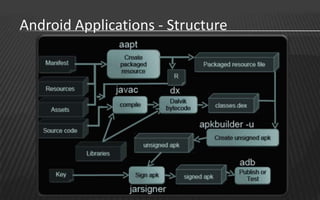
  • #14 Special files AndroidManifest.xml R.java Classes.dex META_INF directoryaaptjavacdxapkbuilderjarsigneradb Package Manager (also cover setInstallLocation) Non-code resources are generally XML, PNG or JPEG files. Although initially externalized from the source code, they are compiled into a fast-loading binary format. Strings are also compressed into an efficient storage method. R is an auto-generated Java subclass that holds identifiers to non-code resources. Allows you to refer to all the resources defined in your project.AndroidManifest.xml : Required for every Android app. Describes metadata, global values and provides a definition as to the nature of the app’s components (public/private, access control for each component etc.). Besides declaring your application&apos;s Activities, Content Providers, Services, and Intent Receivers, you can also specify permissions in AndroidManifest.xml. .dex is short for Dalvik Executable. A tool called dx is used to convert some (but not all) Java .class files into the .dex format. Multiple classes are included in a single .dex file. Duplicate strings and other constants used in multiple class files are included only once in the .dex output to conserve space. Java bytecode is also converted into an alternative instruction set used by the Dalvik VM. An uncompressed .dex file is typically a few percent smaller in size than a compressed .jar (Java Archive) derived from the same .class files.A Detailed Look at the Build ProcessThe build process involves many tools and processes that generate intermediate files on the way to producing an .apk. If you are developing in Eclipse, the complete build process is automatically done periodically as you develop and save your code changes. If you are using other IDEs, this build process is done every time you run the generated Ant build script for your project. It is useful, however, to understand what is happening under the hood since much of the tools and processes are masked from you. The general process for a typical build is outlined below:The Android Asset Packaging Tool (aapt) takes your application resource files, such as the AndroidManifest.xml file and the XML files for your Activities, and compiles them. An R.java is also produced so you can reference your resources from your Java code.The aidl tool converts any .aidl interfaces that you have into Java interfaces.All of your Java code, including the R.java and .aidl files, are compiled by the Java compiler and .class files are output.The dex tool converts the .class files to Dalvik byte code. Any 3rd party libraries and .class files that you have included in your project are also converted into .dex files so that they can be packaged into the final .apk file.All non-compiled resources (such as images), compiled resources, and the .dex files are sent to the apkbuilder tool to be packaged into an .apk file.Once the .apk is built, it must be signed with either a debug or release key before it can be installed to a device.Finally, if the application is being signed in release mode, you must align the .apk with the zipalign tool. Aligning the final .apk decreases memory usage when the application is running on a device.
  • #15 A complete list of tools can be found here: http://developer.android.com/guide/developing/tools/index.htmladb (http://developer.android.com/guide/developing/tools/adb.html)android (http://developer.android.com/guide/developing/tools/android.html)DDMS (http://developer.android.com/guide/developing/debugging/ddms.html)emulator (http://developer.android.com/guide/developing/tools/emulator.html)ProGuard (http://developer.android.com/guide/developing/tools/proguard.html)Android Debug Bridge (adb) is a versatile command line tool that lets you communicate with an emulator instance or connected Android-powered device. It is a client-server program that includes three components:A client, which runs on your development machine. You can invoke a client from a shell by issuing an adb command. Other Android tools such as the ADT plugin and DDMS also create adb clients.A server, which runs as a background process on your development machine. The server manages communication between the client and the adb daemon running on an emulator or device.A daemon, which runs as a background process on each emulator or device instance.Android ships with a debugging tool called the Dalvik Debug Monitor Server (DDMS), which provides port-forwarding services, screen capture on the device, thread and heap information on the device, logcat, process, and radio state information, incoming call and SMS spoofing, location data spoofing, and more.
  • #17 To learn to use various GUI controls, refer to: http://developer.android.com/resources/tutorials/views/hello-formstuff.html
  • #18 Developer Tutorials:http://developer.android.com/resources/browser.html?tag=tutorial
  • #19 Find more info on http://hakers.info/site/2011/10/android-penetration-testing-pentesting-android-apps/
  • #20 More info : Setting up the environment : http://hakers.info/site/2011/08/setting-up-proxy-for-android-emulator/Android Debugging tools : http://hakers.info/site/2011/10/using-adb-and-ddms-for-android-penetration-testing/Reversing Android Applications : http://hakers.info/site/2011/10/reversing-and-spoofing-android-applications/
  • #22 Some examples of what the Android Security Team believes to be malicious software is any application that:uses a bug or security vulnerability to gain permissions that have not been granted by the usershows the user unsolicited messages (especially messages urging the user to buy something);resists (or attempts to resist) the user&apos;s effort to uninstall it;attempts to automatically spread itself to other devices;hides its files and/or processes;discloses the user&apos;s private information to a third party, without the user&apos;s knowledge and consent;destroys the user&apos;s data (or the device itself) without the user&apos;s knowledge and consent;impersonates the user (such as by sending email or buying things from a web store) without the user&apos;s knowledge and consent; orotherwise degrades the user&apos;s experience with the device.
  • #28 http://www.hakers.info
  • #41 ROM:The system partition contains Android&apos;s kernel as well as the operating system libraries, application runtime, application framework, and applications. This partition is set to read-only and is what Android users/developers refer to as the ROM.