ANDROID KITKAT 4.4
AND
ANDROID PHONES
Prepared by,
Nishant P. Mehare
Contents
 History
 Introduction of android
 Android versions
 Android architecture
 Discription of android kitkat 4.4
 Android market share
 Whats new in android kitkat 4.4
 Conclusion
HISTORY OF ANDROID
 Android Inc.founded in Palo
Alto,california ,united states in October
2003 by Andy Rubin[co-founder of
danger ],rich miner[co-founder of
wildfire communication Inc.],nick
sears[once VP at T-mobile],
and Chris white[headed design and
interface development at web TV] to
develop.
WHAT IS ANDROID?
• It is a open source software platform and operating
system for mobile devices
• Based on the Linux kernel
• Developed by Google and later the Open Handset
Alliance (OHA)
◦ Allows writing managed code in the Java language
• Android has its own virtual machine i.e. DVM(Dalvik
Virtual Machine),which is used for executing the
android applicatn.
• Google purchased the initial developer of the
software , android incorporated in 2005.
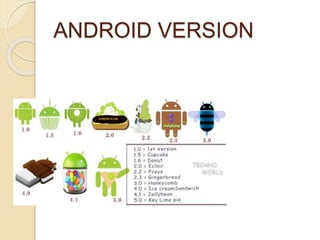
ANDROID VERSION
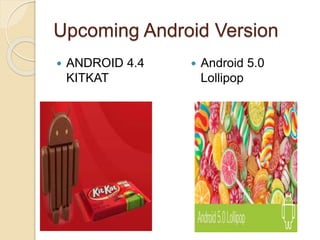
Upcoming Android Version
 ANDROID 4.4
KITKAT
 Android 5.0
Lollipop
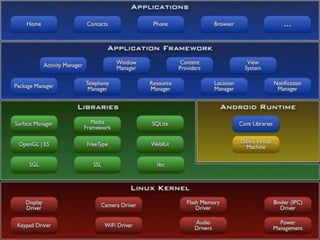
ANDROID ARCHITECTURE
The software stack is split into Four Layers::
• The application layer
• The application framework
• The libraries and runtime
• The kernel
KitKat
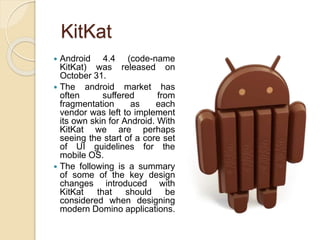
 Android 4.4 (code-name
KitKat) was released on
October 31.
 The android market has
often suffered from
fragmentation as each
vendor was left to implement
its own skin for Android. With
KitKat we are perhaps
seeing the start of a core set
of UI guidelines for the
mobile OS.
 The following is a summary
of some of the key design
changes introduced with
KitKat that should be
considered when designing
modern Domino applications.
Android Market Share
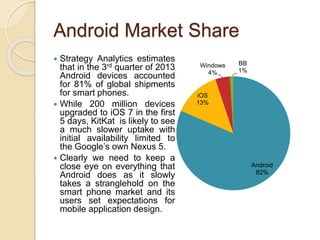
 Strategy Analytics estimates
that in the 3rd quarter of 2013
Android devices accounted
for 81% of global shipments
for smart phones.
 While 200 million devices
upgraded to iOS 7 in the first
5 days, KitKat is likely to see
a much slower uptake with
initial availability limited to
the Google’s own Nexus 5.
 Clearly we need to keep a
close eye on everything that
Android does as it slowly
takes a stranglehold on the
smart phone market and its
users set expectations for
mobile application design.
Android
82%
iOS
13%
Windows
4%
BB
1%
Android kitkat 4.4 - What is
new in Android Update ?
Branding Color
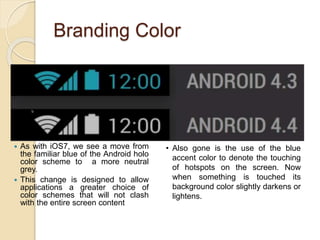
 As with iOS7, we see a move from
the familiar blue of the Android holo
color scheme to a more neutral
grey.
 This change is designed to allow
applications a greater choice of
color schemes that will not clash
with the entire screen content
• Also gone is the use of the blue
accent color to denote the touching
of hotspots on the screen. Now
when something is touched its
background color slightly darkens or
lightens.
Full Screen
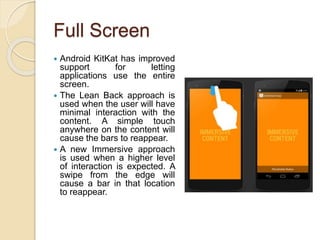
 Android KitKat has improved
support for letting
applications use the entire
screen.
 The Lean Back approach is
used when the user will have
minimal interaction with the
content. A simple touch
anywhere on the content will
cause the bars to reappear.
 A new Immersive approach
is used when a higher level
of interaction is expected. A
swipe from the edge will
cause a bar in that location
to reappear.
Translucent Bars
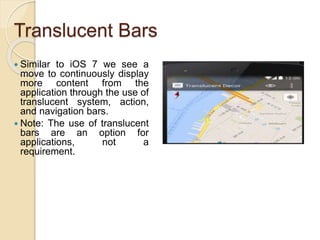
 Similar to iOS 7 we see a
move to continuously display
more content from the
application through the use of
translucent system, action,
and navigation bars.
 Note: The use of translucent
bars are an option for
applications, not a
requirement.
Gestures
 The double touch gesture
has now been formally
defined to scale up the
targeted area to fill the
screen.
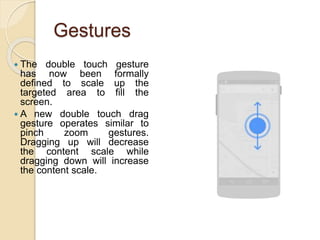
 A new double touch drag
gesture operates similar to
pinch zoom gestures.
Dragging up will decrease
the content scale while
dragging down will increase
the content scale.
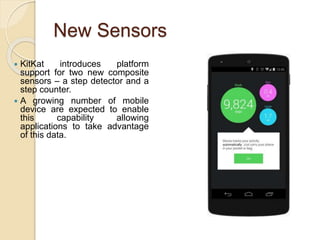
New Sensors
 KitKat introduces platform
support for two new composite
sensors – a step detector and a
step counter.
 A growing number of mobile
device are expected to enable
this capability allowing
applications to take advantage
of this data.
Prepared by:-
Nishant P. Mehare
second year I.T.
Thank You

Android kitkat 4.4

  • 1.
    ANDROID KITKAT 4.4 AND ANDROIDPHONES Prepared by, Nishant P. Mehare
  • 2.
    Contents  History  Introductionof android  Android versions  Android architecture  Discription of android kitkat 4.4  Android market share  Whats new in android kitkat 4.4  Conclusion
  • 3.
    HISTORY OF ANDROID Android Inc.founded in Palo Alto,california ,united states in October 2003 by Andy Rubin[co-founder of danger ],rich miner[co-founder of wildfire communication Inc.],nick sears[once VP at T-mobile], and Chris white[headed design and interface development at web TV] to develop.
  • 4.
    WHAT IS ANDROID? •It is a open source software platform and operating system for mobile devices • Based on the Linux kernel • Developed by Google and later the Open Handset Alliance (OHA) ◦ Allows writing managed code in the Java language • Android has its own virtual machine i.e. DVM(Dalvik Virtual Machine),which is used for executing the android applicatn. • Google purchased the initial developer of the software , android incorporated in 2005.
  • 5.
  • 6.
    Upcoming Android Version ANDROID 4.4 KITKAT  Android 5.0 Lollipop
  • 7.
    ANDROID ARCHITECTURE The softwarestack is split into Four Layers:: • The application layer • The application framework • The libraries and runtime • The kernel
  • 9.
    KitKat  Android 4.4(code-name KitKat) was released on October 31.  The android market has often suffered from fragmentation as each vendor was left to implement its own skin for Android. With KitKat we are perhaps seeing the start of a core set of UI guidelines for the mobile OS.  The following is a summary of some of the key design changes introduced with KitKat that should be considered when designing modern Domino applications.
  • 10.
    Android Market Share Strategy Analytics estimates that in the 3rd quarter of 2013 Android devices accounted for 81% of global shipments for smart phones.  While 200 million devices upgraded to iOS 7 in the first 5 days, KitKat is likely to see a much slower uptake with initial availability limited to the Google’s own Nexus 5.  Clearly we need to keep a close eye on everything that Android does as it slowly takes a stranglehold on the smart phone market and its users set expectations for mobile application design. Android 82% iOS 13% Windows 4% BB 1%
  • 11.
    Android kitkat 4.4- What is new in Android Update ?
  • 12.
    Branding Color  Aswith iOS7, we see a move from the familiar blue of the Android holo color scheme to a more neutral grey.  This change is designed to allow applications a greater choice of color schemes that will not clash with the entire screen content • Also gone is the use of the blue accent color to denote the touching of hotspots on the screen. Now when something is touched its background color slightly darkens or lightens.
  • 13.
    Full Screen  AndroidKitKat has improved support for letting applications use the entire screen.  The Lean Back approach is used when the user will have minimal interaction with the content. A simple touch anywhere on the content will cause the bars to reappear.  A new Immersive approach is used when a higher level of interaction is expected. A swipe from the edge will cause a bar in that location to reappear.
  • 14.
    Translucent Bars  Similarto iOS 7 we see a move to continuously display more content from the application through the use of translucent system, action, and navigation bars.  Note: The use of translucent bars are an option for applications, not a requirement.
  • 15.
    Gestures  The doubletouch gesture has now been formally defined to scale up the targeted area to fill the screen.  A new double touch drag gesture operates similar to pinch zoom gestures. Dragging up will decrease the content scale while dragging down will increase the content scale.
  • 16.
    New Sensors  KitKatintroduces platform support for two new composite sensors – a step detector and a step counter.  A growing number of mobile device are expected to enable this capability allowing applications to take advantage of this data.
  • 17.
    Prepared by:- Nishant P.Mehare second year I.T.
  • 18.

Editor's Notes

  • #12 Android Training Course For Students and fresher's