• Android is an open source operating system, created by
Google specifically for use on mobile devices (cell phones
and tablets)
• Linux based (2.6 kernel)
• Can be programmed in C/C++ but most app development
is done in Java (Java access to C Libraries via JNI (Java
Native Interface))
• Supports Bluetooth, Wi-Fi, and 3G and 4G networking
What is Android
History of Android
Android Inc.founded in Palo
Alto,california ,united states in October
2003 by
Andy Rubin[co-founder of danger],rich
miner[co-founder of wildfire
communicationInc.],nick sears[once VP
at T-Mobile],and Chris white[headed
design and interface development at
web TV] to develop.
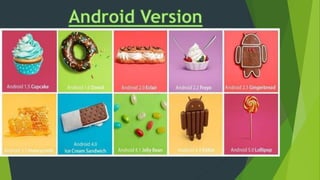
 On 30 April 2009, the Android 1.5 update, dubbed Cupcake, was released,
based on Linux kernel 2.6.27. Its predecessor was Android 1 and its successor
was Android 1.6 Doughnut. The update included several new features and UI
amendments.
 On 15 September 2009, the
Android 1.6 SDK – dubbed
Donut – was released, based on
Linux kernel 2.6.29. Its
predecessor was Android 1.5
Cupcake and its successor
was Android 2.0 Eclair. Included
in the update were numerous
new features.
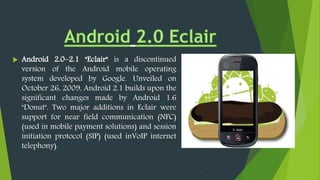
 Android 2.0–2.1 "Eclair" is a discontinued
version of the Android mobile operating
system developed by Google. Unveiled on
October 26, 2009, Android 2.1 builds upon the
significant changes made by Android 1.6
"Donut". Two major additions in Eclair were
support for near field communication (NFC)
(used in mobile payment solutions) and session
initiation protocol (SIP) (used inVoIP internet
telephony).
 Android 2.2 is a minor platform release including
user features, developer features, API changes, and
bug fixes. For information on developer features and
API changes, see the Framework API section.
 For developers, the Android 2.2 platform is available
as a downloadable component for the Android SDK.
The downloadable platform includes an Android
library and system image, as well as a set of
emulator skins and more. To get started developing
or testing against Android 2.2, use the Android SDK
Manager to download the platform into your SDK.
 Android 2.3–2.3.7 "Gingerbread" is a discontinued version of
the Android mobile operating system developed by Google and released in
December 2010. The Gingerbread release introduced support for near field
communication (NFC) (used in mobile payment solutions) and session
initiation protocol (SIP) (used in VoIP internet telephony).
 Gingerbread's user interface was refined in many ways, making it easier to
master, faster to use, and more power-efficient. A simplified color scheme
with a black background gave vividness and contrast to the notification bar,
menus, and other user interface components. Improvements in menus and
settings resulted in easier navigation and system control.
 The Nexus S smartphone, released in 2010, was the first phone from
the Google Nexus line that ran Gingerbread, and also the first one from the
line with built-in NFC functionality.
 Gingerbread uses version 2.6.35 of the Linux kernel.
 Android 3.0–3.2.6 "Honeycomb" is a discontinued and still
available version of the Android platform that was designed for
devices with larger screen sizes, particularly tablets. Besides the
addition of new features, Honeycomb introduced a new so-
called "holographic" user interface theme and an interaction
model that built on the main features of Android, such as
multitasking, notifications and widgets.
 Android 4.0 "Ice Cream Sandwich" is a version of
the Android mobile operating system developed by Google.
Unveiled on October 19, 2011, Android 4.0 builds upon
the significant changes made by the tablet-only
release Android 3.0 "Honeycomb", in an effort to create a
unified platform for both smartphones and tablets, whilst
simplifying and modernizing the overall Android
experience around a new set of human interface
guidelines. As part of these efforts, Android 4.0 introduced
a new visual appearance codenamed "Holo", which is built
around a cleaner, minimalistic design, and a new
default typeface named Roboto.
 Android Jelly Bean is the name given to three major point
releases of the Android mobile operating system developed
by Google, spanning versions between 4.1 and 4.3.1.
 The first of these three, 4.1, was unveiled at
Google's I/O developer conference in June 2012, focusing on
performance improvements designed to give the operating
system a smoother and more responsive feel, improvements to
the notification system allowing for "expandable" notifications
with action buttons, and other internal changes.
 Two more releases were made under the Jelly Bean name in
October 2012 and July 2013 respectively, including 4.2—which
included further optimizations, multi-user support for
tablets, lock screen widgets, quick settings, and screen savers, and
4.3—contained further improvements and updates to the
underlying Android platform.
 Android 4.4 "KitKat" was officially announced on September
3, 2013. The release was internally codenamed "Key Lime
Pie"; John Lagerling, director of Android global partnerships,
and his team, decided to drop the name, arguing that "very
few people actually know the taste of a key lime pie".
 Aiming for a codename that was "fun and unexpected", his
team pursued the possibility of naming the release "KitKat"
instead. Lagering phoned a representative of Nestlé,
 who owns the Kit Kat brand and produces the confectionery
outside the United States (where it is produced by The
Hershey Company under license), and quickly reached a
preliminary deal for a promotional collaboration between
the two companies,
 later finalized in a meeting at Mobile World Congress in
February 2013. The partnership was not revealed publicly,
or even to other Google employees and Android developers
(who otherwise continued to internally refer to the OS as
"KLP"), until its official announcement in September.
 Android Lollipop is a version of the Android mobile operating
system developed by Google, spanning versions between 5.0 and
5.1.1. Unveiled on June 25, 2014, during the Google
I/O conference, it became available through official over-the-
air (OTA) updates on November 12, 2014, for select devices that
run distributions of Android serviced by Google (such
as Nexus and Google Play edition devices). Its source code was
made available on November 3, 2014.
 One of the most prominent changes in the Lollipop release is a
redesigned user interface built around a design language known
as "Material design". Other changes include improvements to the
notifications, which can be accessed from the lockscreen and
displayed within applications as top-of-the-screen banners.
Google also made internal changes to the platform, with
the Android Runtime (ART) officially replacing Dalvik for
improved application performance, and with changes intended
to improve and optimize battery usage.
 Lollipop is succeeded by Android Marshmallow (version 6.0),
which was released in October 2015.
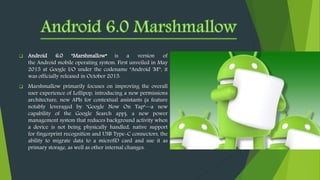
 Android 6.0 "Marshmallow“ is a version of
the Android mobile operating system. First unveiled in May
2015 at Google I/O under the codename "Android 'M'", it
was officially released in October 2015.
 Marshmallow primarily focuses on improving the overall
user experience of Lollipop, introducing a new permissions
architecture, new APIs for contextual assistants (a feature
notably leveraged by "Google Now On Tap"—a new
capability of the Google Search app), a new power
management system that reduces background activity when
a device is not being physically handled, native support
for fingerprint recognition and USB Type-C connectors, the
ability to migrate data to a microSD card and use it as
primary storage, as well as other internal changes.
What can an Android Phone do?
 Android phones are highly customizable and as such can be altered to suit your tastes and needs with
wallpapers, themes and launchers which completely change the look of your device's interface. You can
download applications to do all sorts of things like check your Facebook and Twitter feeds, manage your bank
account, order pizza and play games. You can plan events on from your phone's calendar and see them on
your computer or browse websites on your desktop and pick them up on your phone.
 Another neat feature of Android is that it automatically backs up your contacts for you. When you set up an
Android phone you’ll need to create a Google Account or sign in with an existing one. Every time you save a
number to the address book of your Android phone it will be synced to your Google Account.
 The benefit of this is that if you lose your phone all of your numbers will be saved. The next time you get an
Android phone (or and iPhone or Windows Phone if you prefer) and sign in with your Google Account, all of
your contacts and friend's numbers will be displayed in your new phone’s address book immediately, no need
to transfer or back them up anywhere else.
 FEATURES OF ANDROID
1. Background Wi-Fi location still runs even when
2. Wi-Fi is turned off.
3. Developer logging and analyzing enhancements
4. It is optimized for mobile devices.
5. It enables reuse and replacement of components.
6. Java support ,media support, multi touch, video
calling,multi tasking, voice based features, screen
capture, camera ,bluetooth,gps,compass and
accelerometer,3G.
The software stack is split into Four Layers:
1. The application layer
2. The application framework
3. The libraries and runtime
4. The kernel
ANDROID ARCHITECTURE
 The ability for anyone to customize the Google Android platform
 The consumer will benefit from having a wide range of mobile
applications to choose from since the monopoly will be broken by
Google Android
 Men will be able to customize a mobile phones using Google
Android platform like never before
 Features like weather details, opening screen, live RSS feeds and
even the icons on the opening screen will be able to be customized
 As a result of many mobile phones carrying Google Android,
companies will come up with such innovative products like the
location
 In addition the entertainment functionalities will be taken a notch
higher by Google Android being able to offer online real time
multiplayer games
Development requirements in
•Java
•Android SDK
Eclipse IDE (optional)
Bluetooth limitations
Firefox mobile isn't coming to android because
of android limitations
 LIMITATIONS OF ANDROID
We hope that the next versions of
Android have overcome the actual
limitations and that the future
possibilities became a reality and
may this software is also developed
to use in PC’s also.
Android Project By Susovan

Android Project By Susovan

  • 3.
    • Android isan open source operating system, created by Google specifically for use on mobile devices (cell phones and tablets) • Linux based (2.6 kernel) • Can be programmed in C/C++ but most app development is done in Java (Java access to C Libraries via JNI (Java Native Interface)) • Supports Bluetooth, Wi-Fi, and 3G and 4G networking What is Android
  • 4.
    History of Android AndroidInc.founded in Palo Alto,california ,united states in October 2003 by Andy Rubin[co-founder of danger],rich miner[co-founder of wildfire communicationInc.],nick sears[once VP at T-Mobile],and Chris white[headed design and interface development at web TV] to develop.
  • 9.
     On 30April 2009, the Android 1.5 update, dubbed Cupcake, was released, based on Linux kernel 2.6.27. Its predecessor was Android 1 and its successor was Android 1.6 Doughnut. The update included several new features and UI amendments.
  • 10.
     On 15September 2009, the Android 1.6 SDK – dubbed Donut – was released, based on Linux kernel 2.6.29. Its predecessor was Android 1.5 Cupcake and its successor was Android 2.0 Eclair. Included in the update were numerous new features.
  • 11.
     Android 2.0–2.1"Eclair" is a discontinued version of the Android mobile operating system developed by Google. Unveiled on October 26, 2009, Android 2.1 builds upon the significant changes made by Android 1.6 "Donut". Two major additions in Eclair were support for near field communication (NFC) (used in mobile payment solutions) and session initiation protocol (SIP) (used inVoIP internet telephony).
  • 12.
     Android 2.2is a minor platform release including user features, developer features, API changes, and bug fixes. For information on developer features and API changes, see the Framework API section.  For developers, the Android 2.2 platform is available as a downloadable component for the Android SDK. The downloadable platform includes an Android library and system image, as well as a set of emulator skins and more. To get started developing or testing against Android 2.2, use the Android SDK Manager to download the platform into your SDK.
  • 13.
     Android 2.3–2.3.7"Gingerbread" is a discontinued version of the Android mobile operating system developed by Google and released in December 2010. The Gingerbread release introduced support for near field communication (NFC) (used in mobile payment solutions) and session initiation protocol (SIP) (used in VoIP internet telephony).  Gingerbread's user interface was refined in many ways, making it easier to master, faster to use, and more power-efficient. A simplified color scheme with a black background gave vividness and contrast to the notification bar, menus, and other user interface components. Improvements in menus and settings resulted in easier navigation and system control.  The Nexus S smartphone, released in 2010, was the first phone from the Google Nexus line that ran Gingerbread, and also the first one from the line with built-in NFC functionality.  Gingerbread uses version 2.6.35 of the Linux kernel.
  • 14.
     Android 3.0–3.2.6"Honeycomb" is a discontinued and still available version of the Android platform that was designed for devices with larger screen sizes, particularly tablets. Besides the addition of new features, Honeycomb introduced a new so- called "holographic" user interface theme and an interaction model that built on the main features of Android, such as multitasking, notifications and widgets.
  • 15.
     Android 4.0"Ice Cream Sandwich" is a version of the Android mobile operating system developed by Google. Unveiled on October 19, 2011, Android 4.0 builds upon the significant changes made by the tablet-only release Android 3.0 "Honeycomb", in an effort to create a unified platform for both smartphones and tablets, whilst simplifying and modernizing the overall Android experience around a new set of human interface guidelines. As part of these efforts, Android 4.0 introduced a new visual appearance codenamed "Holo", which is built around a cleaner, minimalistic design, and a new default typeface named Roboto.
  • 16.
     Android JellyBean is the name given to three major point releases of the Android mobile operating system developed by Google, spanning versions between 4.1 and 4.3.1.  The first of these three, 4.1, was unveiled at Google's I/O developer conference in June 2012, focusing on performance improvements designed to give the operating system a smoother and more responsive feel, improvements to the notification system allowing for "expandable" notifications with action buttons, and other internal changes.  Two more releases were made under the Jelly Bean name in October 2012 and July 2013 respectively, including 4.2—which included further optimizations, multi-user support for tablets, lock screen widgets, quick settings, and screen savers, and 4.3—contained further improvements and updates to the underlying Android platform.
  • 17.
     Android 4.4"KitKat" was officially announced on September 3, 2013. The release was internally codenamed "Key Lime Pie"; John Lagerling, director of Android global partnerships, and his team, decided to drop the name, arguing that "very few people actually know the taste of a key lime pie".  Aiming for a codename that was "fun and unexpected", his team pursued the possibility of naming the release "KitKat" instead. Lagering phoned a representative of Nestlé,  who owns the Kit Kat brand and produces the confectionery outside the United States (where it is produced by The Hershey Company under license), and quickly reached a preliminary deal for a promotional collaboration between the two companies,  later finalized in a meeting at Mobile World Congress in February 2013. The partnership was not revealed publicly, or even to other Google employees and Android developers (who otherwise continued to internally refer to the OS as "KLP"), until its official announcement in September.
  • 18.
     Android Lollipopis a version of the Android mobile operating system developed by Google, spanning versions between 5.0 and 5.1.1. Unveiled on June 25, 2014, during the Google I/O conference, it became available through official over-the- air (OTA) updates on November 12, 2014, for select devices that run distributions of Android serviced by Google (such as Nexus and Google Play edition devices). Its source code was made available on November 3, 2014.  One of the most prominent changes in the Lollipop release is a redesigned user interface built around a design language known as "Material design". Other changes include improvements to the notifications, which can be accessed from the lockscreen and displayed within applications as top-of-the-screen banners. Google also made internal changes to the platform, with the Android Runtime (ART) officially replacing Dalvik for improved application performance, and with changes intended to improve and optimize battery usage.  Lollipop is succeeded by Android Marshmallow (version 6.0), which was released in October 2015.
  • 19.
     Android 6.0"Marshmallow“ is a version of the Android mobile operating system. First unveiled in May 2015 at Google I/O under the codename "Android 'M'", it was officially released in October 2015.  Marshmallow primarily focuses on improving the overall user experience of Lollipop, introducing a new permissions architecture, new APIs for contextual assistants (a feature notably leveraged by "Google Now On Tap"—a new capability of the Google Search app), a new power management system that reduces background activity when a device is not being physically handled, native support for fingerprint recognition and USB Type-C connectors, the ability to migrate data to a microSD card and use it as primary storage, as well as other internal changes.
  • 21.
    What can anAndroid Phone do?  Android phones are highly customizable and as such can be altered to suit your tastes and needs with wallpapers, themes and launchers which completely change the look of your device's interface. You can download applications to do all sorts of things like check your Facebook and Twitter feeds, manage your bank account, order pizza and play games. You can plan events on from your phone's calendar and see them on your computer or browse websites on your desktop and pick them up on your phone.  Another neat feature of Android is that it automatically backs up your contacts for you. When you set up an Android phone you’ll need to create a Google Account or sign in with an existing one. Every time you save a number to the address book of your Android phone it will be synced to your Google Account.  The benefit of this is that if you lose your phone all of your numbers will be saved. The next time you get an Android phone (or and iPhone or Windows Phone if you prefer) and sign in with your Google Account, all of your contacts and friend's numbers will be displayed in your new phone’s address book immediately, no need to transfer or back them up anywhere else.
  • 22.
     FEATURES OFANDROID 1. Background Wi-Fi location still runs even when 2. Wi-Fi is turned off. 3. Developer logging and analyzing enhancements 4. It is optimized for mobile devices. 5. It enables reuse and replacement of components. 6. Java support ,media support, multi touch, video calling,multi tasking, voice based features, screen capture, camera ,bluetooth,gps,compass and accelerometer,3G.
  • 23.
    The software stackis split into Four Layers: 1. The application layer 2. The application framework 3. The libraries and runtime 4. The kernel ANDROID ARCHITECTURE
  • 24.
     The abilityfor anyone to customize the Google Android platform  The consumer will benefit from having a wide range of mobile applications to choose from since the monopoly will be broken by Google Android  Men will be able to customize a mobile phones using Google Android platform like never before  Features like weather details, opening screen, live RSS feeds and even the icons on the opening screen will be able to be customized  As a result of many mobile phones carrying Google Android, companies will come up with such innovative products like the location  In addition the entertainment functionalities will be taken a notch higher by Google Android being able to offer online real time multiplayer games
  • 25.
    Development requirements in •Java •AndroidSDK Eclipse IDE (optional) Bluetooth limitations Firefox mobile isn't coming to android because of android limitations  LIMITATIONS OF ANDROID
  • 26.
    We hope thatthe next versions of Android have overcome the actual limitations and that the future possibilities became a reality and may this software is also developed to use in PC’s also.