Introduction to Android
Week # 1
Instructor: Rida Zahra
Google
Classroom
Codes
Google Classroom
code: o37sz7d
For queries related to course(Assignments/Projects) just leave an email
at rida.zahra@uow.edu.pk
during office timings 08:00AM - 04:00 PM
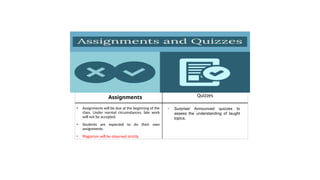
Quizzes
• Assignments will be due at the beginning of the
class. Under normal circumstances, late work
will not be accepted.
• Students are expected to do their own
assignments.
• Plagiarism will be observed strictly.
Assignments
• Surprise/ Announced quizzes to
assess the understanding of taught
topics.
How to perform well?
• Revise the topic covered in class the same day.
• Complete the tasks given, you might get bonus points for that. 
• Feel free to consult me during my office hours.
Few Things to Remember
 Show sensibility in your conduct.
 Learning should be your primary objective.
 Attendance will be marked within 15 minutes at the start of the class.
 80% of your attendance is mandatory.
 Zero tolerance policy on attendance, discipline in class during lectures.
 Assignments must be submitted on time, no late submissions.
 In case of copied assignment both parties will be given zero.
 Don’t miss your Classes, Quizzes, Presentations, Assignments and
Projects/Presentations.
 You all need to be a good human being.
Course Objectives
The key objectives of this course include:
1. To make students be exposed to technology and business trends impacting
mobile applications
2. Students should be able to design, implement and deploy intermediate level
mobile applications for the Android platform.
3. The course demonstrates standard practices and tools used in market to develop
robust mobile applications.
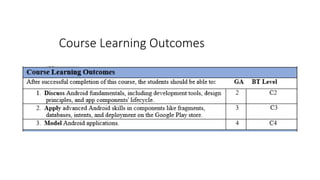
Course Learning Outcomes
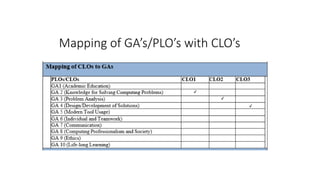
Mapping of GA’s/PLO’s with CLO’s
Recommended Textbook
and Reference Books
•Text Book:
•1. Beginning Android Programming with
Android Studio by Jerome DiMarzio, 4th
Edition,2016
•Reference Book:
•1. Professional Android 2 Application
Development by Reto Meier, 2nd edition,
2010
Class Participation
 Active participation is very important.
 Attendance will count for students.
Course Details
Course Title: Mobile Application Development
Course Code: CS-472
Course Outline
Introduction to Android
Android UI
Activities and Intents
Dynamic Views
Fragments
User Navigation
Data Storage
Networking
Sensors
Graphics and Multimedia
Google Play and App Development
Prerequisites
Android SDK
Java Runtime Environment
Preferred Android IDE
Android Device or Emulator
Basic knowledge of programming concepts and implementations
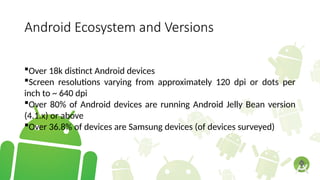
Android Ecosystem and Versions
Over 18k distinct Android devices
Screen resolutions varying from approximately 120 dpi or dots per
inch to ~ 640 dpi
Over 80% of Android devices are running Android Jelly Bean version
(4.1.x) or above
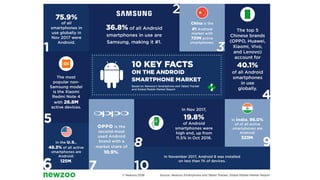
Over 36.8% of devices are Samsung devices (of devices surveyed)
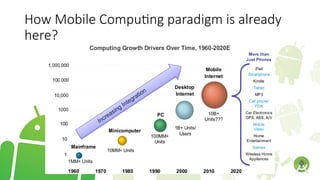
How Mobile Computing paradigm is already
here?
What is a Mobile App ?
“Software applications that run on mobile devices, principally
smartphones and tablet computers “
What is Mobile App Market ?
It is a portal or a repository from where applications can be
downloaded and installed on mobile devices.
Android Market tops 4 million apps while Apple App Store has reached
25 billion downloads count !
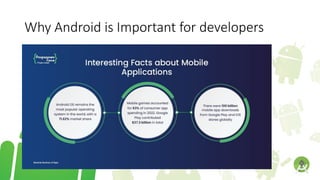
Why Android is Important for developers
Android is based on:
Linux 2.6 Kernel, providing
Memory management
Security
Process management
Network stack
Driver model
Abstraction layer
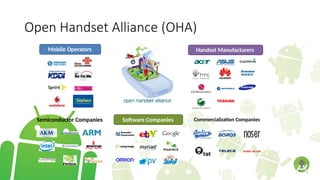
Open Handset Alliance (OHA)
Mobile Operators Handset Manufacturers
Semiconductor Companies Software Companies Commercialization Companies
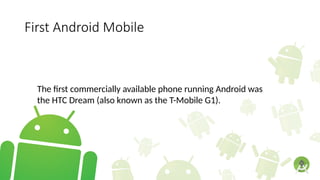
First Android Mobile
The first commercially available phone running Android was
the HTC Dream (also known as the T-Mobile G1).
What is Android?
• Android delivers a complete set of software for
mobile devices
Operating System
Middleware
Key mobile applications
:Open
• Breaking down Application Boundaries
• Fast & Easy Application Development
History of Android
• The history of Android begins in October 2003 — well before
the term smartphone was widely used and several years
before Apple announced its first iPhone and iOS.
• Android Inc was founded in Palo Alto, California. Its four
founders were Rich Miner, Nick Sears, Chris White, and Andy
Rubin.
•Google bought Android in 2005 and everything
changed.
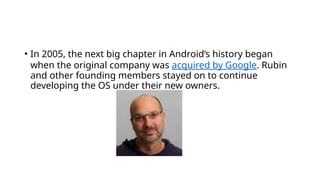
• In 2005, the next big chapter in Android’s history began
when the original company was acquired by Google. Rubin
and other founding members stayed on to continue
developing the OS under their new owners.
Android Logo
Cont.
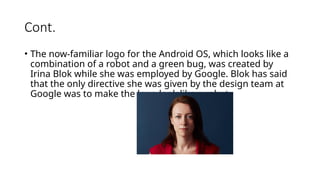
• The now-familiar logo for the Android OS, which looks like a
combination of a robot and a green bug, was created by
Irina Blok while she was employed by Google. Blok has said
that the only directive she was given by the design team at
Google was to make the logo look like a robot.
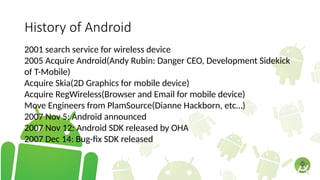
History of Android
2001 search service for wireless device
2005 Acquire Android(Andy Rubin: Danger CEO, Development Sidekick
of T-Mobile)
Acquire Skia(2D Graphics for mobile device)
Acquire RegWireless(Browser and Email for mobile device)
Move Engineers from PlamSource(Dianne Hackborn, etc…)
2007 Nov 5: Android announced
2007 Nov 12: Android SDK released by OHA
2007 Dec 14: Bug-fix SDK released
History of Android
2008 Jan 3: Android Developer Challenge I starts accepting submissions
2008 Feb 13: m5-rc15 SDK released
2008 Apr 14: 1788 total submissions for Challenge I
2008 May 12: Top 50 Applications in Challenge I announced
2008 Nov: Android Phone(G1 Phone by HTC/T-mobile)
2008 Nov: Full Source Open
2009 Apr: HTC Magic
2009 July: HTC Hero, Samsung i7500, Android Netbook, Set-top……
2009 Aug: Android Developer Challenge II
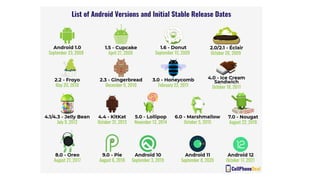
Android Versions
Android 1.0 : Where it all began with launch of G1 on 22nd
October,
2008
Android 1.5 “Cupcake” : We saw the first touchscreen-only phone on
the market
Android 1.6 “Donut” : Android was capable of running on a variety of
screen resolutions and aspect ratios
Android 2.0/2.1 “Eclair” : Droid was by far the most powerful Android
handset the world had seen at that point & introduced improved
Navigation on Google Map
Android 2.2 “Froyo” : Home screen improved
Android 2.3 “Gingerbread” : Improved Keyboard, Support for multiple
cameras and granular control over copy and paste
Android Versions
Android 3.0 “Honeycomb” : Targeted Tablets, death of physical buttons
and new paradigm for app layout.
Android 4.0 “Ice Cream Sandwich” : Android Beam, Face unlock.
Android 4.1 “Jelly Bean” : Platform Development Kit
Android KitKat 4.4 - 4.4.4
Android Lollipop 5.0 – 5.1.1
Android Versions
Android Marshmallow 6.0 – 6.0.1
Android Nougat 7.0- 7.1.2
Android Oreo 8.0 – 8.1
Android Pie 9.0
Android 10 -2019
Android 11- September 2020
Android 12- developer version February 2021
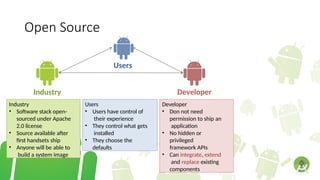
Open Source
Users
Industry Developer
Users
• Users have control of
their experience
• They control what gets
installed
• They choose the
defaults
Industry
• Software stack open-
sourced under Apache
2.0 license
• Source available after
first handsets ship
• Anyone will be able to
build a system image
Developer
• Don not need
permission to ship an
application
• No hidden or
privileged
framework APIs
• Can integrate, extend
and replace existing
components
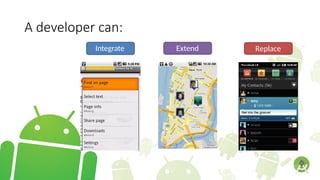
A developer can:
Integrate Extend Replace
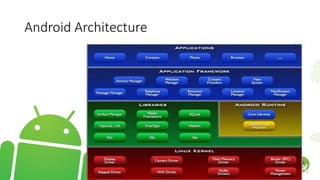
Android Architecture
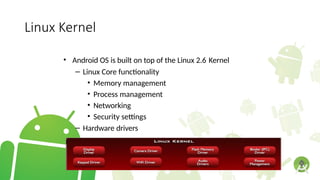
Linux Kernel
• Android OS is built on top of the Linux 2.6 Kernel
– Linux Core functionality
• Memory management
• Process management
• Networking
• Security settings
– Hardware drivers
l
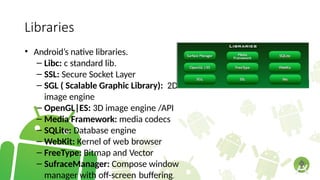
Libraries
• Android’s native libraries.
– Libc: c standard lib.
– SSL: Secure Socket Layer
– SGL ( Scalable Graphic Library): 2D
image engine
– OpenGL|ES: 3D image engine /API
– Media Framework: media codecs
– SQLite: Database engine
– WebKit: Kernel of web browser
– FreeType: Bitmap and Vector
– SufraceManager: Compose window
manager with off-screen buffering.
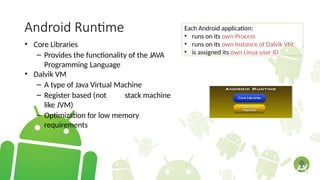
Android Runtime
• Core Libraries
– Provides the functionality of the JAVA
Programming Language
• Dalvik VM
– A type of Java Virtual Machine
– Register based (not stack machine
like JVM)
– Optimization for low memory
requirements
Each Android application:
• runs on its own Process
• runs on its own Instance of Dalvik VM
• is assigned its own Linux user ID
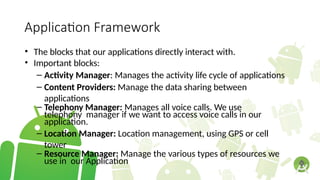
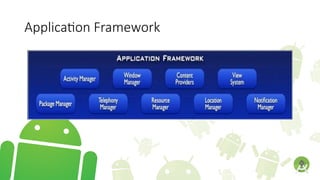
Application Framework
• The blocks that our applications directly interact with.
• Important blocks:
– Activity Manager: Manages the activity life cycle of applications
– Content Providers: Manage the data sharing between
applications
– Telephony Manager: Manages all voice calls. We use
telephony manager if we want to access voice calls in our
application.
– Location Manager: Location management, using GPS or cell
tower
– Resource Manager: Manage the various types of resources we
use in our Application
Application Framework
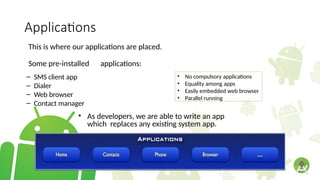
Applications
This is where our applications are placed.
Some pre-installed applications:
– SMS client app
– Dialer
– Web browser
– Contact manager
• As developers, we are able to write an app
which replaces any existing system app.
• No compulsory applications
• Equality among apps
• Easily embedded web browser
• Parallel running
App Development in Android
Design applications for a variety of devices
Build anything from 3D games to social networks
Use a diverse set of information in your apps including location,
movement, touch interactions, images, sounds, and much more
Release an preview version of your application to a select group of users
Deploy your applications to the Google play store and make it available
to millions of users
Collect actual user data to upgrade and add new features to your
application
Android SDK
SDK – Software Development Kit Provides tools to create, develop,
debug, analyze and enhance Android applications including:
. Android emulators – to test your software on a simulation of a wide
range of configurations, screen sizes, and resolutions.
Debugging tools – to help you find the issues in your applications and
fix them as quickly as possible.
Android SDK
Analyzing and Optimizing tools – so that once you build your
application you can optimize it to reach its full potential in speed and
performance.
Code Samples: There is also lots of documentation and actual Android
source code available in the Android SDK so you can learn from the
actual developers of Android about naming conventions and code
syntax.
Android Studio
Based on JetBrains IntelliJ IDEA software
Designed specifically for Android development
Currently offers features including
WYSIWYG Editor with real-time app rendering
Gradle-based build support
Lint tools to catch performance, usability, version compatibility and
other problems
Template-based wizards to create common Android designs and
components
ProGuard and app-signing capabilities
Now the official Android IDE (integrated development environment)
Android Studio Keyboard Shortcuts
CTRL+SHIFT+A – Command look-up
ALT+ENTER – Quick fix
CTRL+ALT+L – Reformat code
CTRL+Q – Show documents
CTRL+P – Show method params
ALT+Insert – Generate method
F4 – Jump to source
Android Studio Keyboard Shortcuts
CTRL+Y – Delete line
CTRL+ALT+SHIFT+N – Search symbol
CTRL+F9 – Build
SHIFT+F10 – Build and run
ALT+1 – Toggle project visibility
ALT+left-arrow or ALT+right-arrow – Navigate open tabs
ALT+F8 – Evaluate Expression
CTRL+mouse-click – Drill Down
Install Android Studio
System Requirements
Microsoft® Windows® 8/7/Vista/2003 (32 or 64-bit) or Mac® OS X® 10.8.5 or
higher, up to 10.9 (Mavericks) or GNOME or KDE desktop
2 GB RAM minimum, 4 GB RAM recommended
400 MB hard disk space + at least 1 G for Android SDK, emulator system images,
and caches
1280 x 800 minimum screen resolution
Java Development Kit (JDK) 7
Android Studio can be downloaded from
http://developer.android.com/sdk/index.html
Lecture_on_IntroductionToAndroidApp.pptx

Lecture_on_IntroductionToAndroidApp.pptx

  • 2.
    Introduction to Android Week# 1 Instructor: Rida Zahra
  • 3.
  • 4.
    For queries relatedto course(Assignments/Projects) just leave an email at rida.zahra@uow.edu.pk during office timings 08:00AM - 04:00 PM
  • 5.
    Quizzes • Assignments willbe due at the beginning of the class. Under normal circumstances, late work will not be accepted. • Students are expected to do their own assignments. • Plagiarism will be observed strictly. Assignments • Surprise/ Announced quizzes to assess the understanding of taught topics.
  • 6.
    How to performwell? • Revise the topic covered in class the same day. • Complete the tasks given, you might get bonus points for that.  • Feel free to consult me during my office hours.
  • 7.
    Few Things toRemember  Show sensibility in your conduct.  Learning should be your primary objective.  Attendance will be marked within 15 minutes at the start of the class.  80% of your attendance is mandatory.  Zero tolerance policy on attendance, discipline in class during lectures.  Assignments must be submitted on time, no late submissions.  In case of copied assignment both parties will be given zero.  Don’t miss your Classes, Quizzes, Presentations, Assignments and Projects/Presentations.  You all need to be a good human being.
  • 8.
    Course Objectives The keyobjectives of this course include: 1. To make students be exposed to technology and business trends impacting mobile applications 2. Students should be able to design, implement and deploy intermediate level mobile applications for the Android platform. 3. The course demonstrates standard practices and tools used in market to develop robust mobile applications.
  • 9.
  • 10.
  • 11.
    Recommended Textbook and ReferenceBooks •Text Book: •1. Beginning Android Programming with Android Studio by Jerome DiMarzio, 4th Edition,2016 •Reference Book: •1. Professional Android 2 Application Development by Reto Meier, 2nd edition, 2010
  • 12.
    Class Participation  Activeparticipation is very important.  Attendance will count for students.
  • 13.
    Course Details Course Title:Mobile Application Development Course Code: CS-472
  • 14.
    Course Outline Introduction toAndroid Android UI Activities and Intents Dynamic Views Fragments User Navigation Data Storage Networking Sensors Graphics and Multimedia Google Play and App Development
  • 15.
    Prerequisites Android SDK Java RuntimeEnvironment Preferred Android IDE Android Device or Emulator Basic knowledge of programming concepts and implementations
  • 16.
    Android Ecosystem andVersions Over 18k distinct Android devices Screen resolutions varying from approximately 120 dpi or dots per inch to ~ 640 dpi Over 80% of Android devices are running Android Jelly Bean version (4.1.x) or above Over 36.8% of devices are Samsung devices (of devices surveyed)
  • 18.
    How Mobile Computingparadigm is already here?
  • 19.
    What is aMobile App ? “Software applications that run on mobile devices, principally smartphones and tablet computers “
  • 20.
    What is MobileApp Market ? It is a portal or a repository from where applications can be downloaded and installed on mobile devices. Android Market tops 4 million apps while Apple App Store has reached 25 billion downloads count !
  • 21.
    Why Android isImportant for developers
  • 22.
    Android is basedon: Linux 2.6 Kernel, providing Memory management Security Process management Network stack Driver model Abstraction layer
  • 23.
    Open Handset Alliance(OHA) Mobile Operators Handset Manufacturers Semiconductor Companies Software Companies Commercialization Companies
  • 24.
    First Android Mobile Thefirst commercially available phone running Android was the HTC Dream (also known as the T-Mobile G1).
  • 25.
    What is Android? •Android delivers a complete set of software for mobile devices Operating System Middleware Key mobile applications :Open • Breaking down Application Boundaries • Fast & Easy Application Development
  • 26.
    History of Android •The history of Android begins in October 2003 — well before the term smartphone was widely used and several years before Apple announced its first iPhone and iOS. • Android Inc was founded in Palo Alto, California. Its four founders were Rich Miner, Nick Sears, Chris White, and Andy Rubin.
  • 27.
    •Google bought Androidin 2005 and everything changed.
  • 28.
    • In 2005,the next big chapter in Android’s history began when the original company was acquired by Google. Rubin and other founding members stayed on to continue developing the OS under their new owners.
  • 29.
  • 30.
    Cont. • The now-familiarlogo for the Android OS, which looks like a combination of a robot and a green bug, was created by Irina Blok while she was employed by Google. Blok has said that the only directive she was given by the design team at Google was to make the logo look like a robot.
  • 31.
    History of Android 2001search service for wireless device 2005 Acquire Android(Andy Rubin: Danger CEO, Development Sidekick of T-Mobile) Acquire Skia(2D Graphics for mobile device) Acquire RegWireless(Browser and Email for mobile device) Move Engineers from PlamSource(Dianne Hackborn, etc…) 2007 Nov 5: Android announced 2007 Nov 12: Android SDK released by OHA 2007 Dec 14: Bug-fix SDK released
  • 32.
    History of Android 2008Jan 3: Android Developer Challenge I starts accepting submissions 2008 Feb 13: m5-rc15 SDK released 2008 Apr 14: 1788 total submissions for Challenge I 2008 May 12: Top 50 Applications in Challenge I announced 2008 Nov: Android Phone(G1 Phone by HTC/T-mobile) 2008 Nov: Full Source Open 2009 Apr: HTC Magic 2009 July: HTC Hero, Samsung i7500, Android Netbook, Set-top…… 2009 Aug: Android Developer Challenge II
  • 33.
    Android Versions Android 1.0: Where it all began with launch of G1 on 22nd October, 2008 Android 1.5 “Cupcake” : We saw the first touchscreen-only phone on the market Android 1.6 “Donut” : Android was capable of running on a variety of screen resolutions and aspect ratios Android 2.0/2.1 “Eclair” : Droid was by far the most powerful Android handset the world had seen at that point & introduced improved Navigation on Google Map Android 2.2 “Froyo” : Home screen improved Android 2.3 “Gingerbread” : Improved Keyboard, Support for multiple cameras and granular control over copy and paste
  • 34.
    Android Versions Android 3.0“Honeycomb” : Targeted Tablets, death of physical buttons and new paradigm for app layout. Android 4.0 “Ice Cream Sandwich” : Android Beam, Face unlock. Android 4.1 “Jelly Bean” : Platform Development Kit Android KitKat 4.4 - 4.4.4 Android Lollipop 5.0 – 5.1.1
  • 35.
    Android Versions Android Marshmallow6.0 – 6.0.1 Android Nougat 7.0- 7.1.2 Android Oreo 8.0 – 8.1 Android Pie 9.0 Android 10 -2019 Android 11- September 2020 Android 12- developer version February 2021
  • 37.
    Open Source Users Industry Developer Users •Users have control of their experience • They control what gets installed • They choose the defaults Industry • Software stack open- sourced under Apache 2.0 license • Source available after first handsets ship • Anyone will be able to build a system image Developer • Don not need permission to ship an application • No hidden or privileged framework APIs • Can integrate, extend and replace existing components
  • 38.
  • 39.
  • 40.
    Linux Kernel • AndroidOS is built on top of the Linux 2.6 Kernel – Linux Core functionality • Memory management • Process management • Networking • Security settings – Hardware drivers l
  • 41.
    Libraries • Android’s nativelibraries. – Libc: c standard lib. – SSL: Secure Socket Layer – SGL ( Scalable Graphic Library): 2D image engine – OpenGL|ES: 3D image engine /API – Media Framework: media codecs – SQLite: Database engine – WebKit: Kernel of web browser – FreeType: Bitmap and Vector – SufraceManager: Compose window manager with off-screen buffering.
  • 42.
    Android Runtime • CoreLibraries – Provides the functionality of the JAVA Programming Language • Dalvik VM – A type of Java Virtual Machine – Register based (not stack machine like JVM) – Optimization for low memory requirements Each Android application: • runs on its own Process • runs on its own Instance of Dalvik VM • is assigned its own Linux user ID
  • 43.
    Application Framework • Theblocks that our applications directly interact with. • Important blocks: – Activity Manager: Manages the activity life cycle of applications – Content Providers: Manage the data sharing between applications – Telephony Manager: Manages all voice calls. We use telephony manager if we want to access voice calls in our application. – Location Manager: Location management, using GPS or cell tower – Resource Manager: Manage the various types of resources we use in our Application
  • 44.
  • 45.
    Applications This is whereour applications are placed. Some pre-installed applications: – SMS client app – Dialer – Web browser – Contact manager • As developers, we are able to write an app which replaces any existing system app. • No compulsory applications • Equality among apps • Easily embedded web browser • Parallel running
  • 46.
    App Development inAndroid Design applications for a variety of devices Build anything from 3D games to social networks Use a diverse set of information in your apps including location, movement, touch interactions, images, sounds, and much more Release an preview version of your application to a select group of users Deploy your applications to the Google play store and make it available to millions of users Collect actual user data to upgrade and add new features to your application
  • 47.
    Android SDK SDK –Software Development Kit Provides tools to create, develop, debug, analyze and enhance Android applications including: . Android emulators – to test your software on a simulation of a wide range of configurations, screen sizes, and resolutions. Debugging tools – to help you find the issues in your applications and fix them as quickly as possible.
  • 48.
    Android SDK Analyzing andOptimizing tools – so that once you build your application you can optimize it to reach its full potential in speed and performance. Code Samples: There is also lots of documentation and actual Android source code available in the Android SDK so you can learn from the actual developers of Android about naming conventions and code syntax.
  • 49.
    Android Studio Based onJetBrains IntelliJ IDEA software Designed specifically for Android development Currently offers features including WYSIWYG Editor with real-time app rendering Gradle-based build support Lint tools to catch performance, usability, version compatibility and other problems Template-based wizards to create common Android designs and components ProGuard and app-signing capabilities Now the official Android IDE (integrated development environment)
  • 50.
    Android Studio KeyboardShortcuts CTRL+SHIFT+A – Command look-up ALT+ENTER – Quick fix CTRL+ALT+L – Reformat code CTRL+Q – Show documents CTRL+P – Show method params ALT+Insert – Generate method F4 – Jump to source
  • 51.
    Android Studio KeyboardShortcuts CTRL+Y – Delete line CTRL+ALT+SHIFT+N – Search symbol CTRL+F9 – Build SHIFT+F10 – Build and run ALT+1 – Toggle project visibility ALT+left-arrow or ALT+right-arrow – Navigate open tabs ALT+F8 – Evaluate Expression CTRL+mouse-click – Drill Down
  • 52.
    Install Android Studio SystemRequirements Microsoft® Windows® 8/7/Vista/2003 (32 or 64-bit) or Mac® OS X® 10.8.5 or higher, up to 10.9 (Mavericks) or GNOME or KDE desktop 2 GB RAM minimum, 4 GB RAM recommended 400 MB hard disk space + at least 1 G for Android SDK, emulator system images, and caches 1280 x 800 minimum screen resolution Java Development Kit (JDK) 7 Android Studio can be downloaded from http://developer.android.com/sdk/index.html

Editor's Notes

  • #15 In order to fully participate in the material in this course, some requirements are necessary. These include downloading and installing a recent version of the Android SDK or software development kit. Installing a Java Runtime Environment. Installing and configuring an IDE for Android development (preferably either eclipse with the adt plugin or Android studio). In this video series we will mainly be using the Android Studio IDE. An Android device or Android emulator or simulator to run the example code and lab exercises for this video series. And also a basic knowledge of programing concepts and implementations.
  • #16 Currently Android runs on over eighteen thousand different devices throughout the world. These devices can be anything from your garden variety smartphone in your pocket, to smart refrigerators or microwaves running Android in your kitchen, and soon to be running on the very cars that take us to work. With this wide variety, the screen resolutions for devices can range from the lower end of about 120 dpi which stands for dots per inch on a screen, to 640 dpi. The DPI value denotes the “quantity of pixels within a physical area of the screen.” The higher the DPI the higher the resolution and sharper an image that screen can generate. Over 80% of Android devices are running the Jelly Bean version of Android or above. We will get more into the different versions of Android later on in this lesson. Also a whopping 40% of devices running Android right now are from the Samsung corporation.
  • #22 A kernel is the central part of an operating system. It manages the operations of the computer and the hardware, most notably memory and CPU time
  • #23 The Open Handset Alliance is a consortium of 84 firms to develop open standards for mobile devices. Member firms include HTC, Sony, Dell, Intel, Motorola, Qualcomm, Texas Instruments, Google, Samsung Electronics, LG Electronics, T-Mobile, Sprint Corporation, Nvidia, and Wind River Systems Founded by Google, November 5, 2007.
  • #25  Android uses the Linux kernel under the hood. Because Linux is open-source, Google's Android developers could modify the Linux kernel to fit their needs. Linux gives the Android developers a pre-built, already maintained operating system kernel to start with so they don't have to write their own kernel The kernel is a computer program that is the core of a computer's operating system, with complete control over everything in the system.[1] On most systems, it is one of the first programs loaded on start-up Middleware is computer software that provides services to software applications beyond those available from the operating system. It can be described as "software glue"
  • #49 Android Studio is an IDE based off of JetBrains IntelliJ IDEA software. Android studio was announced in May of 2013 at the Google I/O conference. It was available as an early access preview at that time. Android studio entered the beta stage in June 2014 and in December 2014 was released as a stable build starting from version 1.0. Android Studio is specifically designed for Android development and it has been made available for use on Windows, Max OS X and Linux. With Android Studio Google aimed to develop an IDE with the “needs of Android developers in mind.” The development of the IDE is also open source allowing for everyone to view the source code and even apply to contribute to the IDE. Android Studio offers a wide array of new and improved features for Android Development. This includes an improved WSYWYG editor for building UI for your applications. This specialized editor has been built to optimize development for multiple screen sizes, resolutions, ,and proportions, allowing us to design UI for everything from smartphones and tablets to apps running on smart watches and cars. With Android Studio we are introduced to the Gradle based build system which features components allowing us to customize, configure, and extend the build process, create multiple APKs for your app with different features using the same project and modules, and reuse code and resources across source sets. In Android Studio we also have an improved inspection tool which is called Lint. Lint has improved features including checks for fragment injection, gradle plugin version and sdk compatibility, where property assignments no longer work as expected, and much more. When starting a project in Android Studio there is a selection of preconfigured templates that can be used for a quick jump start into a project. These templates come with pre-constructed components like login screens and settings screen. Using the built in templates can allow for quick development using a solid well constructed base. Once we have finished developing our application, Android studio will give us the tools we need to build and sign that application for later distribution via the Google play store. Android Studio also includes the ability to use the ProGuard tool which “shrinks, optimizes, and obfuscates your code by removing unused code and renaming classes, fields, and methods with semantically obscure names. “ This creates a smaller apk and makes it harder for others to reverse engineer your application. With the release of Android Studio 1.0, Android Studio is now the official IDE or Integrated development environment for developing applications, libraries, and components for the android operating system.