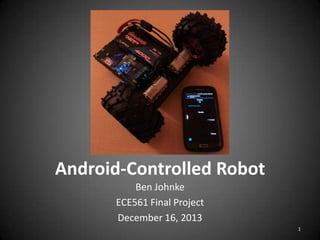
Android-Controlled Robot
Ben Johnke
ECE561 Final Project
December 16, 2013
1
Project Overview
• What?
– Vehicle which can be controlled remotely by an
Android smartphone

• How?
– Write an Android app which allows the user to
provide throttle and steering inputs
– The app sends commands via Bluetooth
– Commands received by Bluetooth modem
connected to microcontroller
– Microcontroller controls motors
2
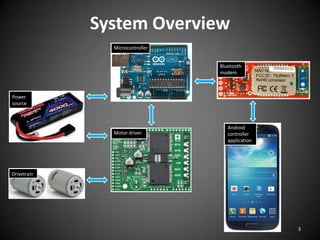
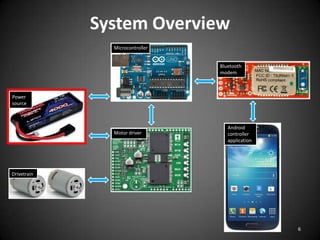
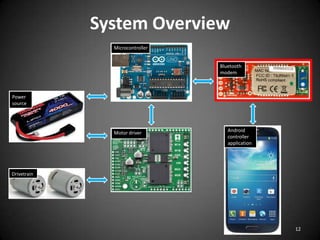
System Overview
Microcontroller
Bluetooth
modem

Power
source

Motor driver

Android
controller
application

Drivetrain

3
System Overview
Microcontroller
Bluetooth
modem

Power
source

Motor driver

Android
controller
application

Drivetrain

4
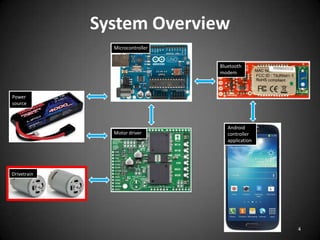
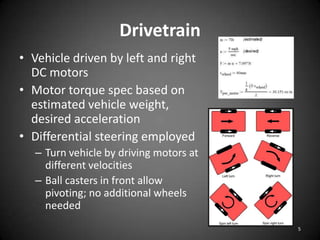
Drivetrain
• Vehicle driven by left and right
DC motors
• Motor torque spec based on
estimated vehicle weight,
desired acceleration
• Differential steering employed
– Turn vehicle by driving motors at
different velocities
– Ball casters in front allow
pivoting; no additional wheels
needed
5
System Overview
Microcontroller
Bluetooth
modem

Power
source

Motor driver

Android
controller
application

Drivetrain

6
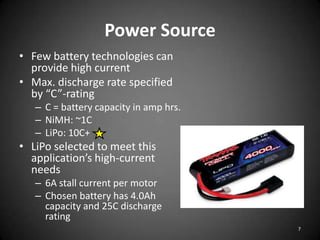
Power Source
• Few battery technologies can
provide high current
• Max. discharge rate specified
by “C”-rating
– C = battery capacity in amp hrs.
– NiMH: ~1C
– LiPo: 10C+

• LiPo selected to meet this
application’s high-current
needs
– 6A stall current per motor
– Chosen battery has 4.0Ah
capacity and 25C discharge
rating
7
System Overview
Microcontroller
Bluetooth
modem

Power
source

Motor driver

Android
controller
application

Drivetrain

8
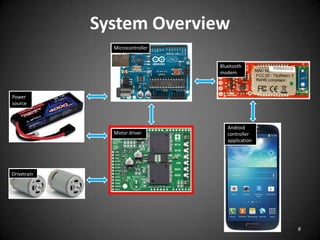
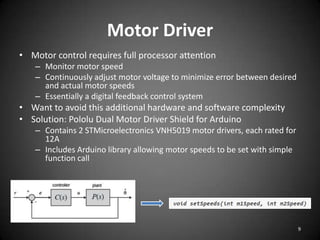
Motor Driver
• Motor control requires full processor attention
– Monitor motor speed
– Continuously adjust motor voltage to minimize error between desired
and actual motor speeds
– Essentially a digital feedback control system

• Want to avoid this additional hardware and software complexity
• Solution: Pololu Dual Motor Driver Shield for Arduino
– Contains 2 STMicroelectronics VNH5019 motor drivers, each rated for
12A
– Includes Arduino library allowing motor speeds to be set with simple
function call

9
System Overview
Microcontroller
Bluetooth
modem

Power
source

Motor driver

Android
controller
application

Drivetrain

10
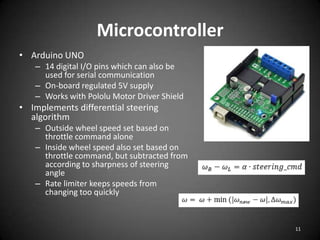
Microcontroller
• Arduino UNO
– 14 digital I/O pins which can also be
used for serial communication
– On-board regulated 5V supply
– Works with Pololu Motor Driver Shield

• Implements differential steering
algorithm
– Outside wheel speed set based on
throttle command alone
– Inside wheel speed also set based on
throttle command, but subtracted from
according to sharpness of steering
angle
– Rate limiter keeps speeds from
changing too quickly

11
System Overview
Microcontroller
Bluetooth
modem

Power
source

Motor driver

Android
controller
application

Drivetrain

12
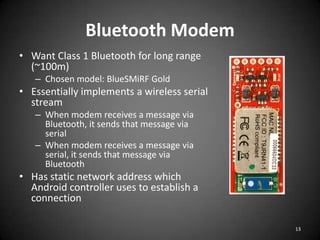
Bluetooth Modem
• Want Class 1 Bluetooth for long range
(~100m)
– Chosen model: BlueSMiRF Gold

• Essentially implements a wireless serial
stream
– When modem receives a message via
Bluetooth, it sends that message via
serial
– When modem receives a message via
serial, it sends that message via
Bluetooth

• Has static network address which
Android controller uses to establish a
connection
13
System Overview
Microcontroller
Bluetooth
modem

Power
source

Motor driver

Android
controller
application

Drivetrain

14
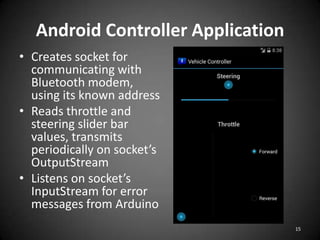
Android Controller Application
• Creates socket for
communicating with
Bluetooth modem,
using its known address
• Reads throttle and
steering slider bar
values, transmits
periodically on socket’s
OutputStream
• Listens on socket’s
InputStream for error
messages from Arduino
15
Lessons Learned
• Skills
–
–
–
–

Android app development (Java, XML)
Selecting parts based on datasheets
Practical aspects: sourcing parts, mechanical fabrication
Bringing a design from concept to implementation

• Conclusion
– It is feasible to implement Bluetooth communication
between smartphone and microcontroller
– This opens door for wide range of possible similar
applications
• Remote starter for car
• Automation of household tasks
16
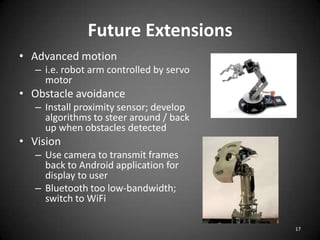
Future Extensions
• Advanced motion
– i.e. robot arm controlled by servo
motor

• Obstacle avoidance
– Install proximity sensor; develop
algorithms to steer around / back
up when obstacles detected

• Vision
– Use camera to transmit frames
back to Android application for
display to user
– Bluetooth too low-bandwidth;
switch to WiFi
17
Video
• https://www.youtube.com/watch?v=LB0zt2BY
d84

18

Android controlled robot

Editor's Notes

  • #4 -Power source for microcontroller and motor driver-Microcontroller receives commands from smartphone via Bluetooth modem-Microcontroller then sends appropriate signals to motor driver
  • #12 -Serial communication via computer, BT modem-5V supply to power BT modem
  • #14 Arduino interacts with modem just as it would any other serial connectionSits on static network address and listens for any attempted connections