Storage
Storage
The platform allows you to choose how your data persistence
based on the specific needs of each situation:
● SharedPreferences: storage of key - value for primitive types
● Internal Storage: generic data storage in a private folder of
the application
● External Storage: storage of data in the public folder
accessible from outside the application
● SQLite DB: data storage in a private DataBase
● Network connection: storing data on a remote server
Storage Options
Storage
The SharedPreferences allow to save key-value pairs in the
application DataBase. you can only save data of primitive types.
This type of storage is persistent on user sessions.
There are 2 methods to access SharedPreferences:
● Context.getSharedPreferences(): used to create multiple
instances of preferences identified by the name that is passed
as the first parameter
● Context.getPreferences(): used to create a single preference
file for the application.
Once retrieved the instance of SharedPreferences you can invoke
methods to retrieve primitive types, specifying a default:
SharedPreferences.getInt()
SharedPreferences.getString()...
Shared Preferences
Storage
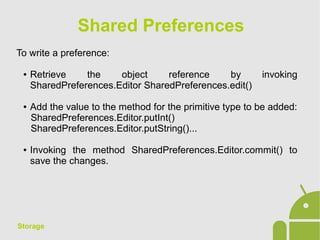
To write a preference:
● Retrieve the object reference by invoking
SharedPreferences.Editor SharedPreferences.edit()
● Add the value to the method for the primitive type to be added:
SharedPreferences.Editor.putInt()
SharedPreferences.Editor.putString()...
● Invoking the method SharedPreferences.Editor.commit() to
save the changes.
Shared Preferences
Storage
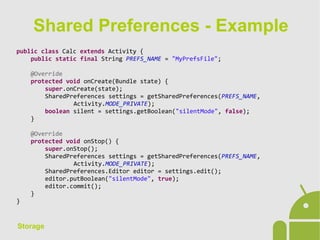
public class Calc extends Activity {
public static final String PREFS_NAME = "MyPrefsFile";
@Override
protected void onCreate(Bundle state) {
super.onCreate(state);
SharedPreferences settings = getSharedPreferences(PREFS_NAME,
Activity.MODE_PRIVATE);
boolean silent = settings.getBoolean("silentMode", false);
}
@Override
protected void onStop() {
super.onStop();
SharedPreferences settings = getSharedPreferences(PREFS_NAME,
Activity.MODE_PRIVATE);
SharedPreferences.Editor editor = settings.edit();
editor.putBoolean("silentMode", true);
editor.commit();
}
}
Shared Preferences - Example
Storage
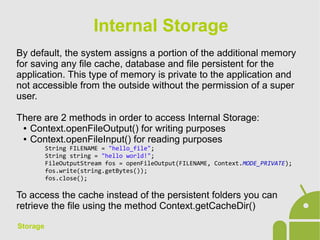
By default, the system assigns a portion of the additional memory
for saving any file cache, database and file persistent for the
application. This type of memory is private to the application and
not accessible from the outside without the permission of a super
user.
There are 2 methods in order to access Internal Storage:
● Context.openFileOutput() for writing purposes
● Context.openFileInput() for reading purposes
String FILENAME = "hello_file";
String string = "hello world!";
FileOutputStream fos = openFileOutput(FILENAME, Context.MODE_PRIVATE);
fos.write(string.getBytes());
fos.close();
To access the cache instead of the persistent folders you can
retrieve the file using the method Context.getCacheDir()
Internal Storage
Storage
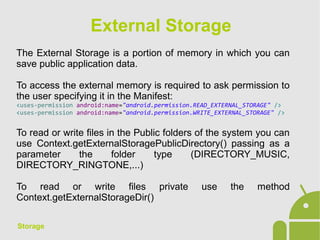
The External Storage is a portion of memory in which you can
save public application data.
To access the external memory is required to ask permission to
the user specifying it in the Manifest:
<uses-permission android:name="android.permission.READ_EXTERNAL_STORAGE" />
<uses-permission android:name="android.permission.WRITE_EXTERNAL_STORAGE" />
To read or write files in the Public folders of the system you can
use Context.getExternalStoragePublicDirectory() passing as a
parameter the folder type (DIRECTORY_MUSIC,
DIRECTORY_RINGTONE,...)
To read or write files private use the method
Context.getExternalStorageDir()
External Storage
Storage
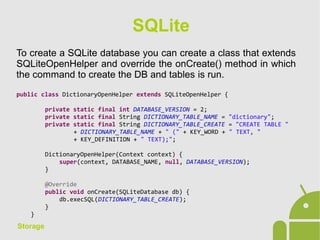
To create a SQLite database you can create a class that extends
SQLiteOpenHelper and override the onCreate() method in which
the command to create the DB and tables is run.
public class DictionaryOpenHelper extends SQLiteOpenHelper {
private static final int DATABASE_VERSION = 2;
private static final String DICTIONARY_TABLE_NAME = "dictionary";
private static final String DICTIONARY_TABLE_CREATE = "CREATE TABLE "
+ DICTIONARY_TABLE_NAME + " (" + KEY_WORD + " TEXT, "
+ KEY_DEFINITION + " TEXT);";
DictionaryOpenHelper(Context context) {
super(context, DATABASE_NAME, null, DATABASE_VERSION);
}
@Override
public void onCreate(SQLiteDatabase db) {
db.execSQL(DICTIONARY_TABLE_CREATE);
}
}
SQLite
Storage
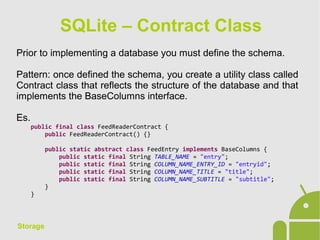
Prior to implementing a database you must define the schema.
Pattern: once defined the schema, you create a utility class called
Contract class that reflects the structure of the database and that
implements the BaseColumns interface.
Es.
public final class FeedReaderContract {
public FeedReaderContract() {}
public static abstract class FeedEntry implements BaseColumns {
public static final String TABLE_NAME = "entry";
public static final String COLUMN_NAME_ENTRY_ID = "entryid";
public static final String COLUMN_NAME_TITLE = "title";
public static final String COLUMN_NAME_SUBTITLE = "subtitle";
}
}
SQLite – Contract Class
Storage
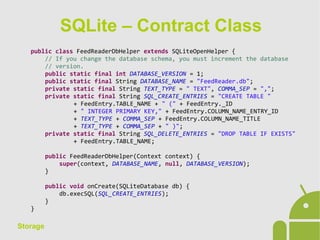
public class FeedReaderDbHelper extends SQLiteOpenHelper {
// If you change the database schema, you must increment the database
// version.
public static final int DATABASE_VERSION = 1;
public static final String DATABASE_NAME = "FeedReader.db";
private static final String TEXT_TYPE = " TEXT", COMMA_SEP = ",";
private static final String SQL_CREATE_ENTRIES = "CREATE TABLE "
+ FeedEntry.TABLE_NAME + " (" + FeedEntry._ID
+ " INTEGER PRIMARY KEY," + FeedEntry.COLUMN_NAME_ENTRY_ID
+ TEXT_TYPE + COMMA_SEP + FeedEntry.COLUMN_NAME_TITLE
+ TEXT_TYPE + COMMA_SEP + " )";
private static final String SQL_DELETE_ENTRIES = "DROP TABLE IF EXISTS"
+ FeedEntry.TABLE_NAME;
public FeedReaderDbHelper(Context context) {
super(context, DATABASE_NAME, null, DATABASE_VERSION);
}
public void onCreate(SQLiteDatabase db) {
db.execSQL(SQL_CREATE_ENTRIES);
}
}
SQLite – Contract Class
Storage
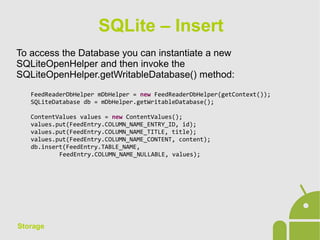
To access the Database you can instantiate a new
SQLiteOpenHelper and then invoke the
SQLiteOpenHelper.getWritableDatabase() method:
FeedReaderDbHelper mDbHelper = new FeedReaderDbHelper(getContext());
SQLiteDatabase db = mDbHelper.getWritableDatabase();
ContentValues values = new ContentValues();
values.put(FeedEntry.COLUMN_NAME_ENTRY_ID, id);
values.put(FeedEntry.COLUMN_NAME_TITLE, title);
values.put(FeedEntry.COLUMN_NAME_CONTENT, content);
db.insert(FeedEntry.TABLE_NAME,
FeedEntry.COLUMN_NAME_NULLABLE, values);
SQLite – Insert
Storage
String[] projection = {
FeedEntry._ID,
FeedEntry.COLUMN_NAME_TITLE,
FeedEntry.COLUMN_NAME_UPDATED,
...
};
// How you want the results sorted in the resulting Cursor
String sortOrder =
FeedEntry.COLUMN_NAME_UPDATED + " DESC";
Cursor c = db.query(
FeedEntry.TABLE_NAME, // The table to query
projection, // The columns to return
selection, // The columns for the WHERE clause
selectionArgs, // The values for the WHERE clause
null, // don't group the rows
null, // don't filter by row groups
sortOrder // The sort order
);
SQLite – Query
Storage
// Define 'where' part of query.
String selection = FeedEntry.COLUMN_NAME_ENTRY_ID + " LIKE ?";
// Specify arguments in placeholder order.
String[] selectionArgs = { String.valueOf(rowId) };
// Issue SQL statement.
db.delete(table_name, selection, selectionArgs);
SQLite – Delete
Storage
// New value for one column
ContentValues values = new ContentValues();
values.put(FeedEntry.COLUMN_NAME_TITLE, title);
// Which row to update, based on the ID
String selection = FeedEntry.COLUMN_NAME_ENTRY_ID + " LIKE ?";
String[] selectionArgs = { String.valueOf(rowId) };
int count = db.update(
FeedReaderDbHelper.FeedEntry.TABLE_NAME,
values,
selection,
selectionArgs);
SQLite – Update

Android App Development - 09 Storage

  • 1.
  • 2.
    Storage The platform allowsyou to choose how your data persistence based on the specific needs of each situation: ● SharedPreferences: storage of key - value for primitive types ● Internal Storage: generic data storage in a private folder of the application ● External Storage: storage of data in the public folder accessible from outside the application ● SQLite DB: data storage in a private DataBase ● Network connection: storing data on a remote server Storage Options
  • 3.
    Storage The SharedPreferences allowto save key-value pairs in the application DataBase. you can only save data of primitive types. This type of storage is persistent on user sessions. There are 2 methods to access SharedPreferences: ● Context.getSharedPreferences(): used to create multiple instances of preferences identified by the name that is passed as the first parameter ● Context.getPreferences(): used to create a single preference file for the application. Once retrieved the instance of SharedPreferences you can invoke methods to retrieve primitive types, specifying a default: SharedPreferences.getInt() SharedPreferences.getString()... Shared Preferences
  • 4.
    Storage To write apreference: ● Retrieve the object reference by invoking SharedPreferences.Editor SharedPreferences.edit() ● Add the value to the method for the primitive type to be added: SharedPreferences.Editor.putInt() SharedPreferences.Editor.putString()... ● Invoking the method SharedPreferences.Editor.commit() to save the changes. Shared Preferences
  • 5.
    Storage public class Calcextends Activity { public static final String PREFS_NAME = "MyPrefsFile"; @Override protected void onCreate(Bundle state) { super.onCreate(state); SharedPreferences settings = getSharedPreferences(PREFS_NAME, Activity.MODE_PRIVATE); boolean silent = settings.getBoolean("silentMode", false); } @Override protected void onStop() { super.onStop(); SharedPreferences settings = getSharedPreferences(PREFS_NAME, Activity.MODE_PRIVATE); SharedPreferences.Editor editor = settings.edit(); editor.putBoolean("silentMode", true); editor.commit(); } } Shared Preferences - Example
  • 6.
    Storage By default, thesystem assigns a portion of the additional memory for saving any file cache, database and file persistent for the application. This type of memory is private to the application and not accessible from the outside without the permission of a super user. There are 2 methods in order to access Internal Storage: ● Context.openFileOutput() for writing purposes ● Context.openFileInput() for reading purposes String FILENAME = "hello_file"; String string = "hello world!"; FileOutputStream fos = openFileOutput(FILENAME, Context.MODE_PRIVATE); fos.write(string.getBytes()); fos.close(); To access the cache instead of the persistent folders you can retrieve the file using the method Context.getCacheDir() Internal Storage
  • 7.
    Storage The External Storageis a portion of memory in which you can save public application data. To access the external memory is required to ask permission to the user specifying it in the Manifest: <uses-permission android:name="android.permission.READ_EXTERNAL_STORAGE" /> <uses-permission android:name="android.permission.WRITE_EXTERNAL_STORAGE" /> To read or write files in the Public folders of the system you can use Context.getExternalStoragePublicDirectory() passing as a parameter the folder type (DIRECTORY_MUSIC, DIRECTORY_RINGTONE,...) To read or write files private use the method Context.getExternalStorageDir() External Storage
  • 8.
    Storage To create aSQLite database you can create a class that extends SQLiteOpenHelper and override the onCreate() method in which the command to create the DB and tables is run. public class DictionaryOpenHelper extends SQLiteOpenHelper { private static final int DATABASE_VERSION = 2; private static final String DICTIONARY_TABLE_NAME = "dictionary"; private static final String DICTIONARY_TABLE_CREATE = "CREATE TABLE " + DICTIONARY_TABLE_NAME + " (" + KEY_WORD + " TEXT, " + KEY_DEFINITION + " TEXT);"; DictionaryOpenHelper(Context context) { super(context, DATABASE_NAME, null, DATABASE_VERSION); } @Override public void onCreate(SQLiteDatabase db) { db.execSQL(DICTIONARY_TABLE_CREATE); } } SQLite
  • 9.
    Storage Prior to implementinga database you must define the schema. Pattern: once defined the schema, you create a utility class called Contract class that reflects the structure of the database and that implements the BaseColumns interface. Es. public final class FeedReaderContract { public FeedReaderContract() {} public static abstract class FeedEntry implements BaseColumns { public static final String TABLE_NAME = "entry"; public static final String COLUMN_NAME_ENTRY_ID = "entryid"; public static final String COLUMN_NAME_TITLE = "title"; public static final String COLUMN_NAME_SUBTITLE = "subtitle"; } } SQLite – Contract Class
  • 10.
    Storage public class FeedReaderDbHelperextends SQLiteOpenHelper { // If you change the database schema, you must increment the database // version. public static final int DATABASE_VERSION = 1; public static final String DATABASE_NAME = "FeedReader.db"; private static final String TEXT_TYPE = " TEXT", COMMA_SEP = ","; private static final String SQL_CREATE_ENTRIES = "CREATE TABLE " + FeedEntry.TABLE_NAME + " (" + FeedEntry._ID + " INTEGER PRIMARY KEY," + FeedEntry.COLUMN_NAME_ENTRY_ID + TEXT_TYPE + COMMA_SEP + FeedEntry.COLUMN_NAME_TITLE + TEXT_TYPE + COMMA_SEP + " )"; private static final String SQL_DELETE_ENTRIES = "DROP TABLE IF EXISTS" + FeedEntry.TABLE_NAME; public FeedReaderDbHelper(Context context) { super(context, DATABASE_NAME, null, DATABASE_VERSION); } public void onCreate(SQLiteDatabase db) { db.execSQL(SQL_CREATE_ENTRIES); } } SQLite – Contract Class
  • 11.
    Storage To access theDatabase you can instantiate a new SQLiteOpenHelper and then invoke the SQLiteOpenHelper.getWritableDatabase() method: FeedReaderDbHelper mDbHelper = new FeedReaderDbHelper(getContext()); SQLiteDatabase db = mDbHelper.getWritableDatabase(); ContentValues values = new ContentValues(); values.put(FeedEntry.COLUMN_NAME_ENTRY_ID, id); values.put(FeedEntry.COLUMN_NAME_TITLE, title); values.put(FeedEntry.COLUMN_NAME_CONTENT, content); db.insert(FeedEntry.TABLE_NAME, FeedEntry.COLUMN_NAME_NULLABLE, values); SQLite – Insert
  • 12.
    Storage String[] projection ={ FeedEntry._ID, FeedEntry.COLUMN_NAME_TITLE, FeedEntry.COLUMN_NAME_UPDATED, ... }; // How you want the results sorted in the resulting Cursor String sortOrder = FeedEntry.COLUMN_NAME_UPDATED + " DESC"; Cursor c = db.query( FeedEntry.TABLE_NAME, // The table to query projection, // The columns to return selection, // The columns for the WHERE clause selectionArgs, // The values for the WHERE clause null, // don't group the rows null, // don't filter by row groups sortOrder // The sort order ); SQLite – Query
  • 13.
    Storage // Define 'where'part of query. String selection = FeedEntry.COLUMN_NAME_ENTRY_ID + " LIKE ?"; // Specify arguments in placeholder order. String[] selectionArgs = { String.valueOf(rowId) }; // Issue SQL statement. db.delete(table_name, selection, selectionArgs); SQLite – Delete
  • 14.
    Storage // New valuefor one column ContentValues values = new ContentValues(); values.put(FeedEntry.COLUMN_NAME_TITLE, title); // Which row to update, based on the ID String selection = FeedEntry.COLUMN_NAME_ENTRY_ID + " LIKE ?"; String[] selectionArgs = { String.valueOf(rowId) }; int count = db.update( FeedReaderDbHelper.FeedEntry.TABLE_NAME, values, selection, selectionArgs); SQLite – Update