Introduction
â—Ź Introduction
â—Ź Activity and Intent
â—Ź Resources
â—Ź Views and Layouts
â—Ź ActionBar
â—Ź Fragments
â—Ź Threading
â—Ź Services
â—Ź Storage
â—Ź Content Providers
Course structure
â—Ź Lists, Grids and Adapters
â—Ź Dialogs and Toasts
â—Ź Animations
â—Ź BroadcastReceivers
â—Ź AppWidgets
â—Ź Location
â—Ź Media
â—Ź Notifications
Android
Definition: Android is a stack of Contexts
Features:
â—Ź Open Source
â—Ź Based on Linux Kernel 3.x
â—Ź Runs dex-code (Dalvik Executable)
â—Ź Run on ARM and x86 architecture
â—Ź Supports OpenGL 1.1, 2.0, 3.0
â—Ź Uses SQLite
â—Ź Handles different input types
â—Ź Location services
â—Ź Used in Smartphone, Tablet, PC, TV, Wearable, Game
console...
Introduction
Versioni Android
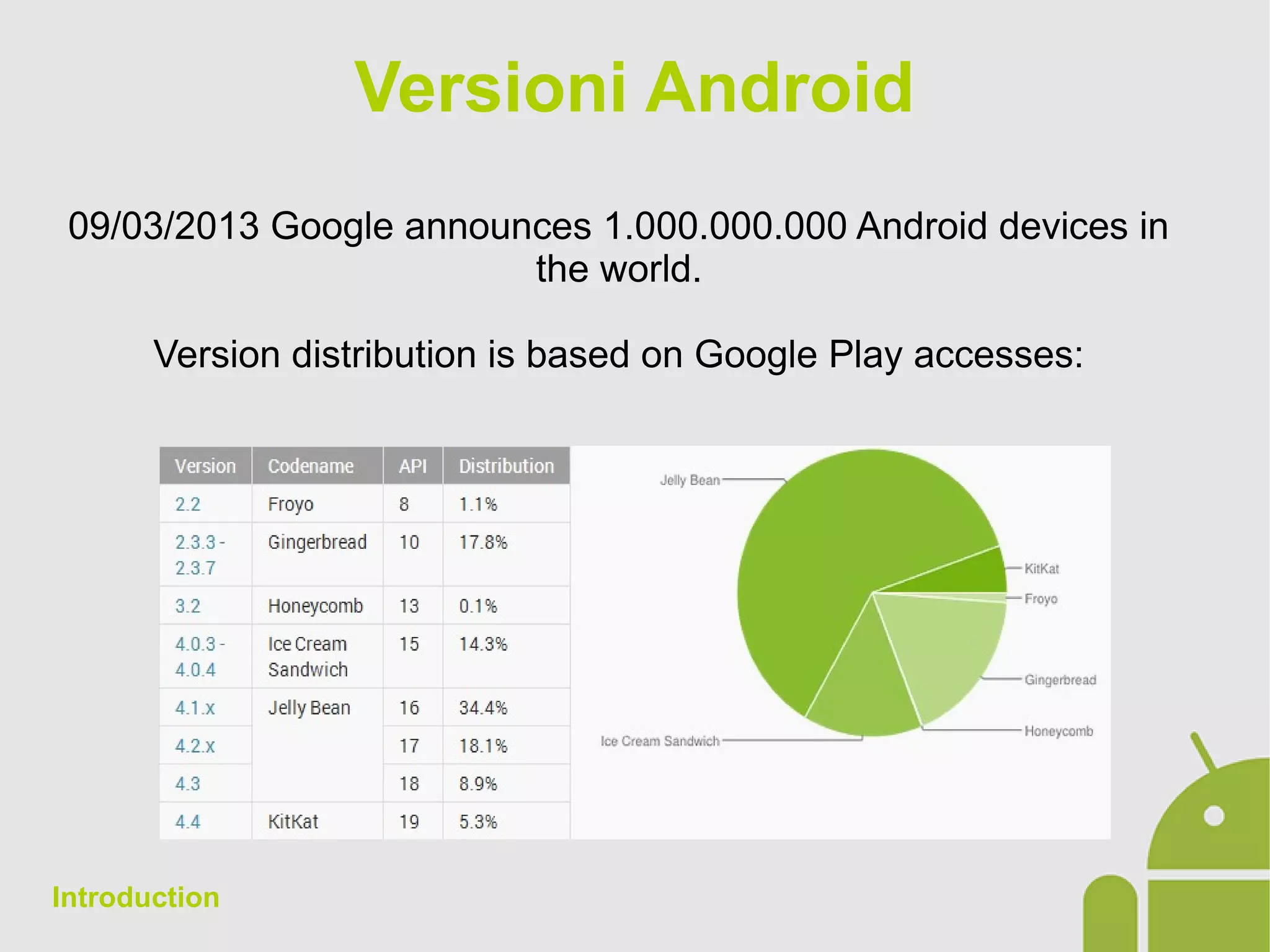
09/03/2013 Google announces 1.000.000.000 Android devices in
the world.
Version distribution is based on Google Play accesses:
Introduction
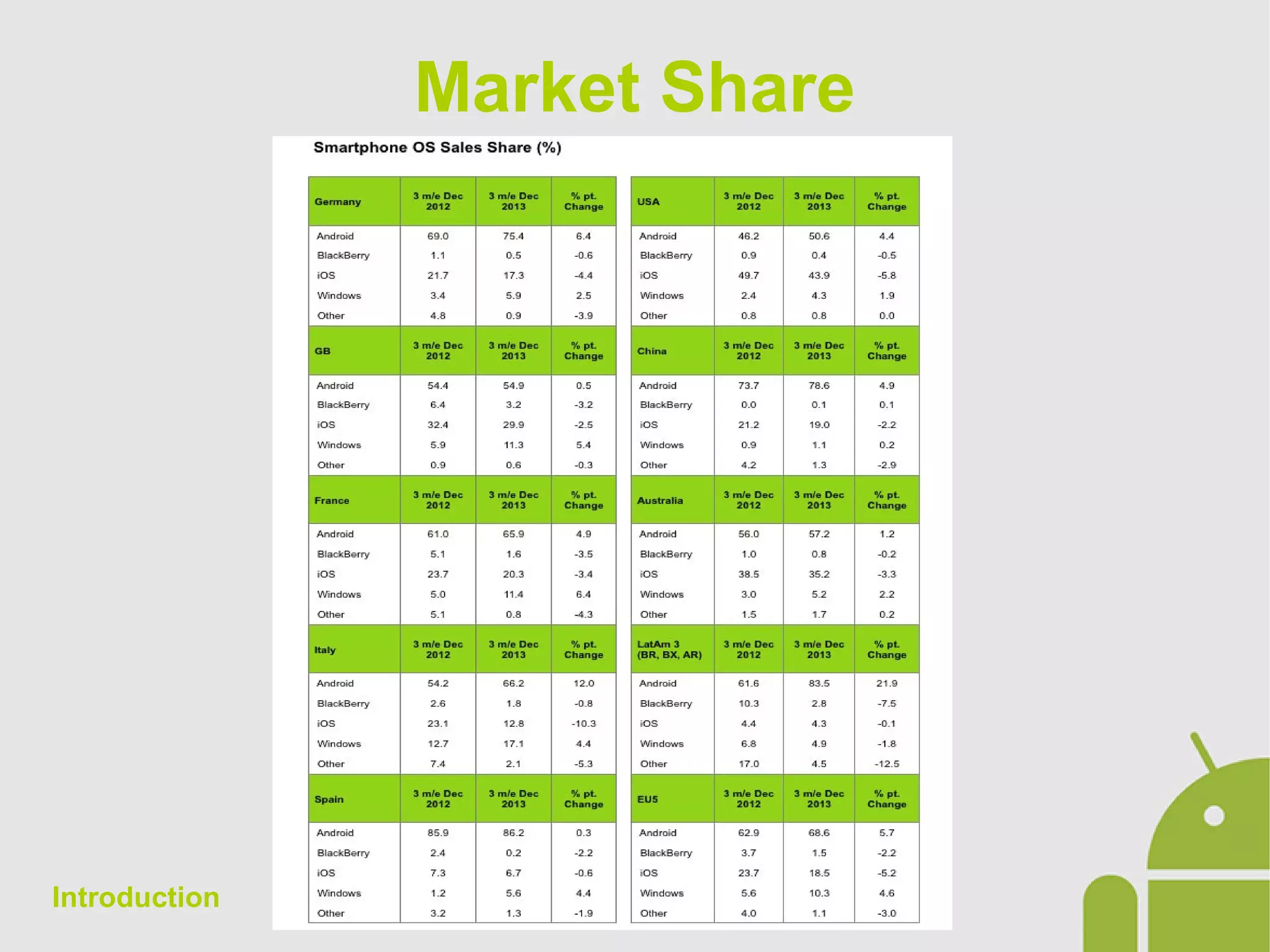
Market Share
Introduction
Fragmentation
The main platform issue to deal with is Fragmentation.
â—Ź As said, the last Android release is never the most used. You
have to deal with, therefore, customers who demand the
integration of new features on the new releases, but not present
on previous ones.
â—Ź Devices with different display, form factor, resolution, memory,
CPU, sensors, etc ...
â—Ź The trend for manufacturers is to enlarge the terminals with a
ride to the higher resolution (Nexus 10: 2560x1600px)
â—Ź If all this were not enough, each new release of Android always
has its teething problems.
Introduction
Android SDK
Virtual Machine
â—Ź DVM (Dalvik Virtual Machine)
â—Ź ART (Android RunTime)
IDE
â—Ź Android Developer Tool (Eclipse)
â—Ź Android Studio (JetBrains IntelliJ)
Development tools
â—Ź DDMS (Dalvik Debug Monitor Service)
â—Ź ADB (Android Debug Gridge)
â—Ź Emulator
â—Ź Lint
Introduction
Android Documentation
References to the official Android documentation are as follows:
â—Ź Design: http://developer.android.com/design/index.html
â—Ź Develop: http://developer.android.com/develop/index.html
â—Ź Training: http://developer.android.com/training/index.html
â—Ź Guides: http://developer.android.com/guide/index.html
â—Ź JavaDoc: http://developer.android.com/reference/packages.html
â—Ź Tools: http://developer.android.com/tools/index.html
â—Ź Google Services:
http://developer.android.com/google/index.html
â—Ź Distribute: http://developer.android.com/distribute/index.html
Introduction
Android Application – The
Structure
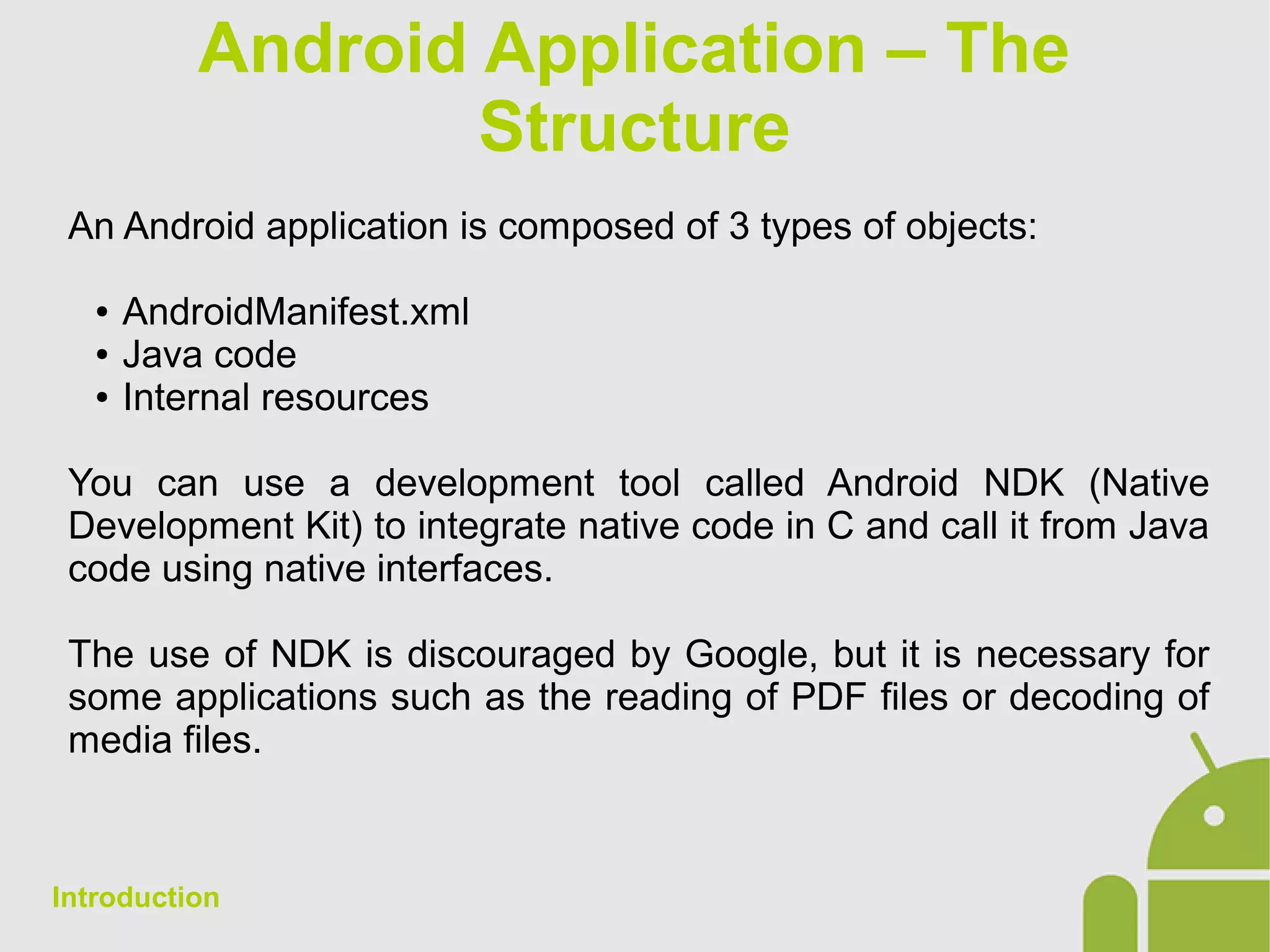
An Android application is composed of 3 types of objects:
â—Ź AndroidManifest.xml
â—Ź Java code
â—Ź Internal resources
You can use a development tool called Android NDK (Native
Development Kit) to integrate native code in C and call it from Java
code using native interfaces.
The use of NDK is discouraged by Google, but it is necessary for
some applications such as the reading of PDF files or decoding of
media files.
Introduction
Android Application-
Components
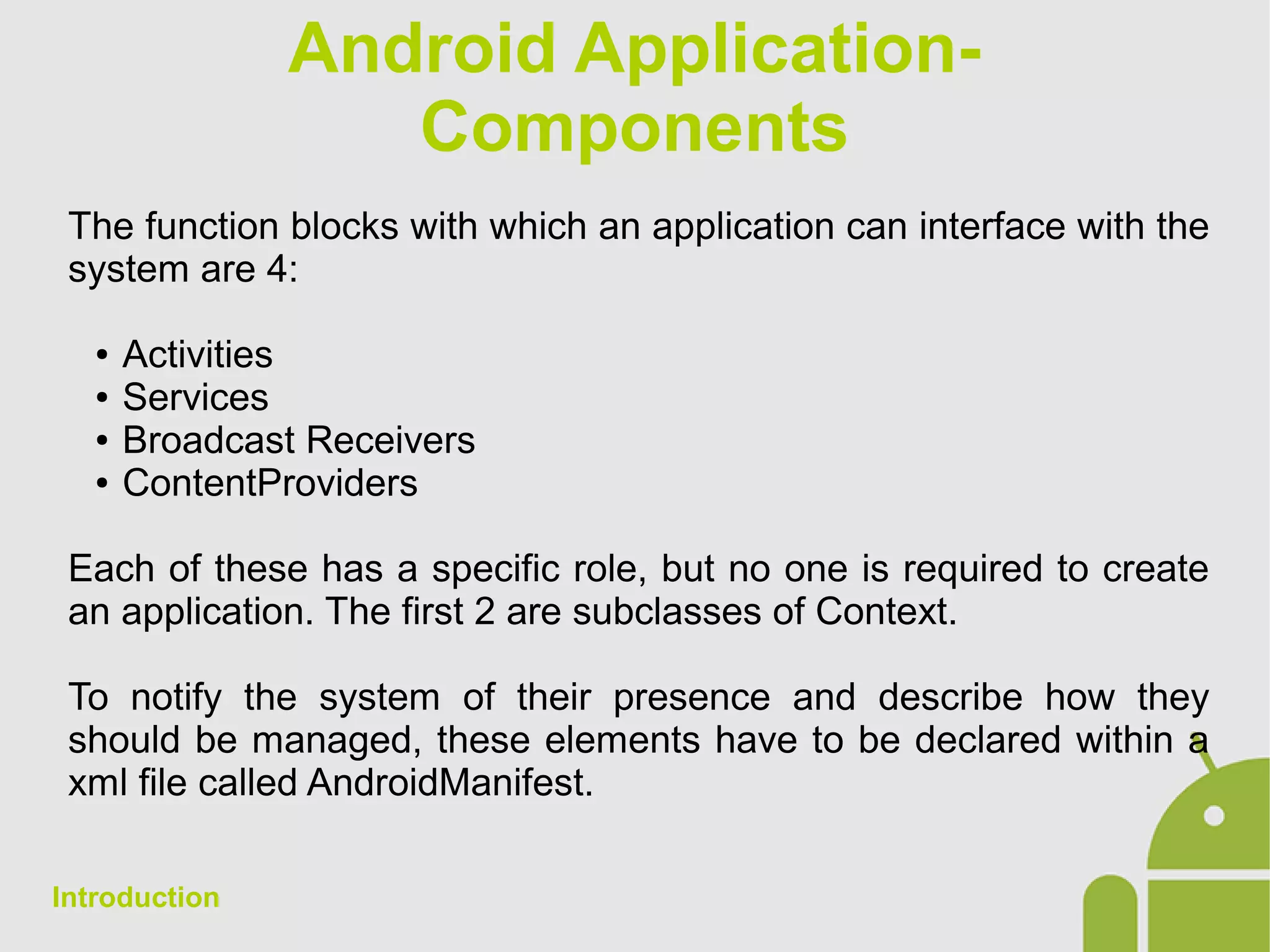
The function blocks with which an application can interface with the
system are 4:
â—Ź Activities
â—Ź Services
â—Ź Broadcast Receivers
â—Ź ContentProviders
Each of these has a specific role, but no one is required to create
an application. The first 2 are subclasses of Context.
To notify the system of their presence and describe how they
should be managed, these elements have to be declared within a
xml file called AndroidManifest.
Introduction
Manifest
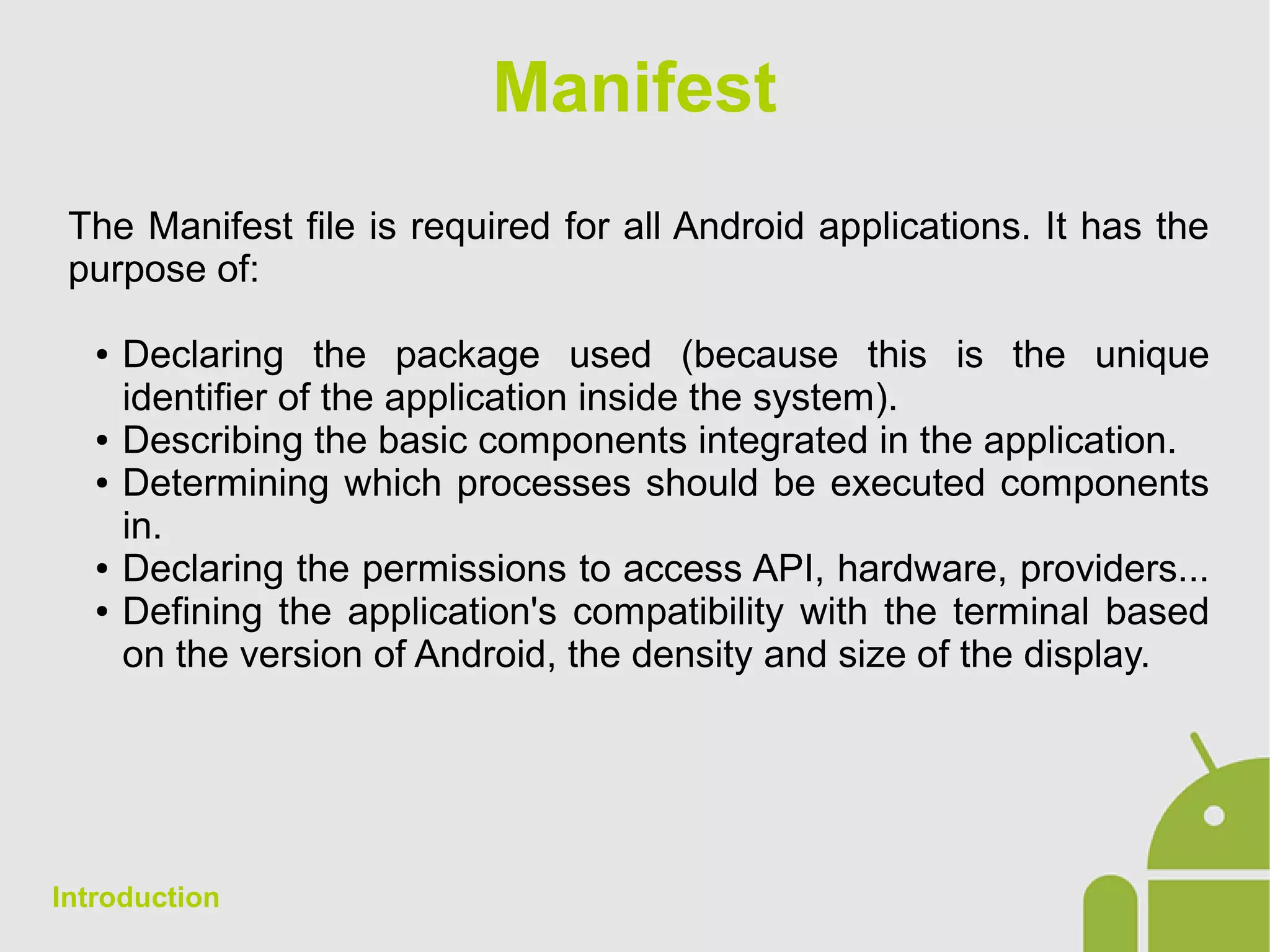
The Manifest file is required for all Android applications. It has the
purpose of:
â—Ź Declaring the package used (because this is the unique
identifier of the application inside the system).
â—Ź Describing the basic components integrated in the application.
â—Ź Determining which processes should be executed components
in.
â—Ź Declaring the permissions to access API, hardware, providers...
â—Ź Defining the application's compatibility with the terminal based
on the version of Android, the density and size of the display.
Introduction
AndroidManifest Structure
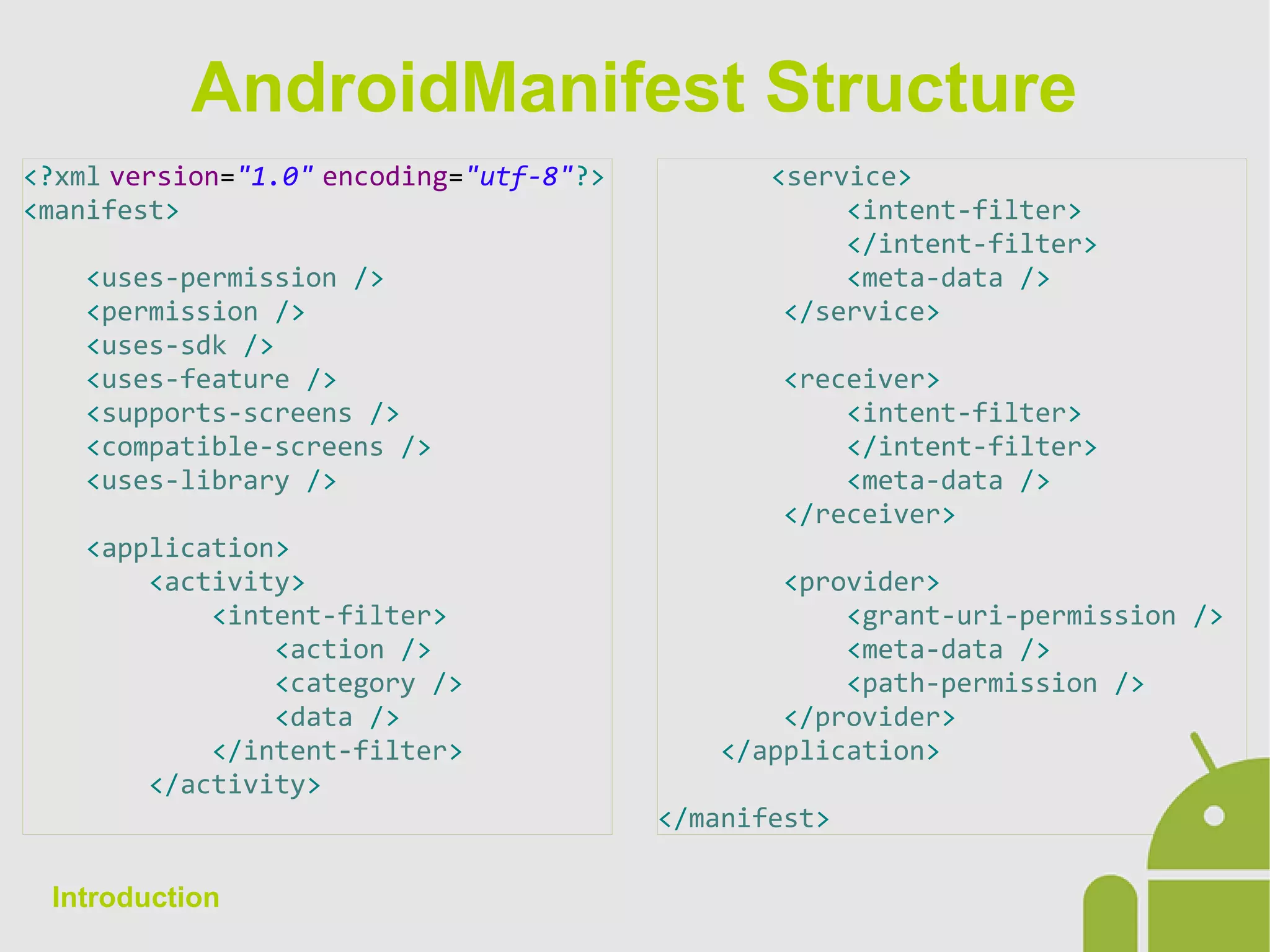
<?xml version="1.0" encoding="utf-8"?>
<manifest>
<uses-permission />
<permission />
<uses-sdk />
<uses-feature />
<supports-screens />
<compatible-screens />
<uses-library />
<application>
<activity>
<intent-filter>
<action />
<category />
<data />
</intent-filter>
</activity>
Introduction
<service>
<intent-filter>
</intent-filter>
<meta-data />
</service>
<receiver>
<intent-filter>
</intent-filter>
<meta-data />
</receiver>
<provider>
<grant-uri-permission />
<meta-data />
<path-permission />
</provider>
</application>
</manifest>
APK Android Package
Android applications are written in the Java language. The Android
SDK tools compile the code and allow you to produce an APK file:
Android Package, which is an archive file with a .apk suffix.
An APK file contains all the contents of an Android app and is the
file that Android devices use to install the application.
During installation the device copies the APK file to the internal
memory selecting all the resources to adapt them to its
configuration (we will see this later).
An APK is always signed with a certificate: the ADT generates a
debug certificate not valid for publication.
Introduction
Build
The ADT has a tool to export the APK which can then be published
on the Store. Once published an APK with a certificate, all
subsequent updates must be signed with the same certificate,
otherwise users must uninstall the application resulting in the
cancellation of the entire cache and persistent data stored on the
device from earlier versions.
It's possible to export multiple APK for publication in defining the
Manifest Destination: smartphone or tablet, Android versions, etc.
This practice is discouraged due to the reduced maintainability of
the code.
Introduction

Android App Development - 01 Introduction

  • 1.
  • 2.
    â—Ź Introduction â—Ź Activityand Intent â—Ź Resources â—Ź Views and Layouts â—Ź ActionBar â—Ź Fragments â—Ź Threading â—Ź Services â—Ź Storage â—Ź Content Providers Course structure â—Ź Lists, Grids and Adapters â—Ź Dialogs and Toasts â—Ź Animations â—Ź BroadcastReceivers â—Ź AppWidgets â—Ź Location â—Ź Media â—Ź Notifications
  • 3.
    Android Definition: Android isa stack of Contexts Features: â—Ź Open Source â—Ź Based on Linux Kernel 3.x â—Ź Runs dex-code (Dalvik Executable) â—Ź Run on ARM and x86 architecture â—Ź Supports OpenGL 1.1, 2.0, 3.0 â—Ź Uses SQLite â—Ź Handles different input types â—Ź Location services â—Ź Used in Smartphone, Tablet, PC, TV, Wearable, Game console... Introduction
  • 4.
    Versioni Android 09/03/2013 Googleannounces 1.000.000.000 Android devices in the world. Version distribution is based on Google Play accesses: Introduction
  • 5.
  • 6.
    Fragmentation The main platformissue to deal with is Fragmentation. â—Ź As said, the last Android release is never the most used. You have to deal with, therefore, customers who demand the integration of new features on the new releases, but not present on previous ones. â—Ź Devices with different display, form factor, resolution, memory, CPU, sensors, etc ... â—Ź The trend for manufacturers is to enlarge the terminals with a ride to the higher resolution (Nexus 10: 2560x1600px) â—Ź If all this were not enough, each new release of Android always has its teething problems. Introduction
  • 7.
    Android SDK Virtual Machine â—ŹDVM (Dalvik Virtual Machine) â—Ź ART (Android RunTime) IDE â—Ź Android Developer Tool (Eclipse) â—Ź Android Studio (JetBrains IntelliJ) Development tools â—Ź DDMS (Dalvik Debug Monitor Service) â—Ź ADB (Android Debug Gridge) â—Ź Emulator â—Ź Lint Introduction
  • 8.
    Android Documentation References tothe official Android documentation are as follows: â—Ź Design: http://developer.android.com/design/index.html â—Ź Develop: http://developer.android.com/develop/index.html â—Ź Training: http://developer.android.com/training/index.html â—Ź Guides: http://developer.android.com/guide/index.html â—Ź JavaDoc: http://developer.android.com/reference/packages.html â—Ź Tools: http://developer.android.com/tools/index.html â—Ź Google Services: http://developer.android.com/google/index.html â—Ź Distribute: http://developer.android.com/distribute/index.html Introduction
  • 9.
    Android Application –The Structure An Android application is composed of 3 types of objects: ● AndroidManifest.xml ● Java code ● Internal resources You can use a development tool called Android NDK (Native Development Kit) to integrate native code in C and call it from Java code using native interfaces. The use of NDK is discouraged by Google, but it is necessary for some applications such as the reading of PDF files or decoding of media files. Introduction
  • 10.
    Android Application- Components The functionblocks with which an application can interface with the system are 4: â—Ź Activities â—Ź Services â—Ź Broadcast Receivers â—Ź ContentProviders Each of these has a specific role, but no one is required to create an application. The first 2 are subclasses of Context. To notify the system of their presence and describe how they should be managed, these elements have to be declared within a xml file called AndroidManifest. Introduction
  • 11.
    Manifest The Manifest fileis required for all Android applications. It has the purpose of: â—Ź Declaring the package used (because this is the unique identifier of the application inside the system). â—Ź Describing the basic components integrated in the application. â—Ź Determining which processes should be executed components in. â—Ź Declaring the permissions to access API, hardware, providers... â—Ź Defining the application's compatibility with the terminal based on the version of Android, the density and size of the display. Introduction
  • 12.
    AndroidManifest Structure <?xml version="1.0"encoding="utf-8"?> <manifest> <uses-permission /> <permission /> <uses-sdk /> <uses-feature /> <supports-screens /> <compatible-screens /> <uses-library /> <application> <activity> <intent-filter> <action /> <category /> <data /> </intent-filter> </activity> Introduction <service> <intent-filter> </intent-filter> <meta-data /> </service> <receiver> <intent-filter> </intent-filter> <meta-data /> </receiver> <provider> <grant-uri-permission /> <meta-data /> <path-permission /> </provider> </application> </manifest>
  • 13.
    APK Android Package Androidapplications are written in the Java language. The Android SDK tools compile the code and allow you to produce an APK file: Android Package, which is an archive file with a .apk suffix. An APK file contains all the contents of an Android app and is the file that Android devices use to install the application. During installation the device copies the APK file to the internal memory selecting all the resources to adapt them to its configuration (we will see this later). An APK is always signed with a certificate: the ADT generates a debug certificate not valid for publication. Introduction
  • 14.
    Build The ADT hasa tool to export the APK which can then be published on the Store. Once published an APK with a certificate, all subsequent updates must be signed with the same certificate, otherwise users must uninstall the application resulting in the cancellation of the entire cache and persistent data stored on the device from earlier versions. It's possible to export multiple APK for publication in defining the Manifest Destination: smartphone or tablet, Android versions, etc. This practice is discouraged due to the reduced maintainability of the code. Introduction