Busy Android Developer's Guide to Peristence Ted Neward Neward & Associates http://www.tedneward.com | ted@tedneward.com
Credentials Who is this guy? Architectural Consultant, Neudesic Software Principal, Architect, Consultant and Mentor ask me how I can help your project or your team Microsoft MVP (F#, C#, Architect) JSR 175, 277 Expert Group Member Author Professional F# 2.0 (w/Erickson, et al; Wrox, 2010) Effective Enterprise Java (Addison-Wesley, 2004) C# In a Nutshell (w/Drayton, et all; OReilly, 2003) SSCLI Essentials (w/Stutz, et al; OReilly, 2003) Server-Based Java Programming (Manning, 2000) Blog: http://blogs.tedneward.com Papers: http://www.tedneward.com/writings Twitter: @tedneward
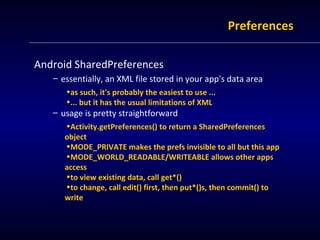
Preferences Android SharedPreferences essentially, an XML file stored in your app's data area as such, it's probably the easiest to use ... ... but it has the usual limitations of XML usage is pretty straightforward Activity.getPreferences() to return a SharedPreferences object MODE_PRIVATE makes the prefs invisible to all but this app MODE_WORLD_READABLE/WRITEABLE allows other apps access to view existing data, call get*() to change, call edit() first, then put*()s, then commit() to write
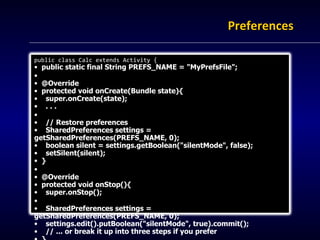
Preferences public class Calc extends Activity { public static final String PREFS_NAME = "MyPrefsFile"; @Override protected void onCreate(Bundle state){ super.onCreate(state); . . . // Restore preferences SharedPreferences settings = getSharedPreferences(PREFS_NAME, 0); boolean silent = settings.getBoolean("silentMode", false); setSilent(silent); } @Override protected void onStop(){ super.onStop(); SharedPreferences settings = getSharedPreferences(PREFS_NAME, 0); settings.edit().putBoolean("silentMode", true).commit(); // ... or break it up into three steps if you prefer } }
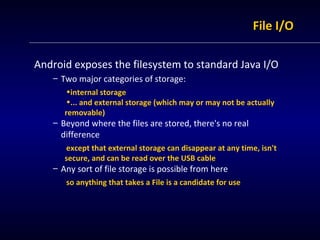
File I/O Android exposes the filesystem to standard Java I/O Two major categories of storage: internal storage ... and external storage (which may or may not be actually removable) Beyond where the files are stored, there's no real difference except that external storage can disappear at any time, isn't secure, and can be read over the USB cable Any sort of file storage is possible from here so anything that takes a File is a candidate for use
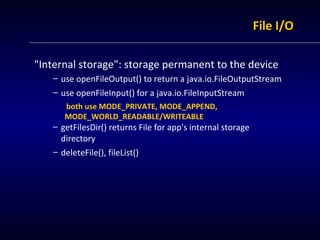
File I/O "Internal storage": storage permanent to the device use openFileOutput() to return a java.io.FileOutputStream use openFileInput() for a java.io.FileInputStream both use MODE_PRIVATE, MODE_APPEND, MODE_WORLD_READABLE/WRITEABLE getFilesDir() returns File for app's internal storage directory deleteFile(), fileList()
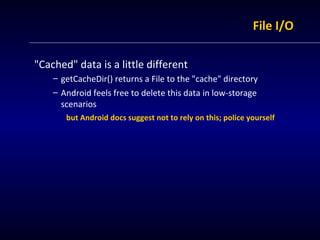
File I/O "Cached" data is a little different getCacheDir() returns a File to the "cache" directory Android feels free to delete this data in low-storage scenarios but Android docs suggest not to rely on this; police yourself
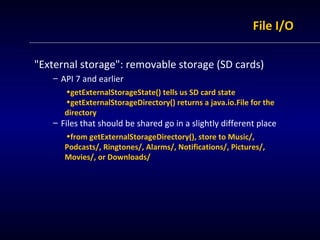
File I/O "External storage": removable storage (SD cards) API 7 and earlier getExternalStorageState() tells us SD card state getExternalStorageDirectory() returns a java.io.File for the directory Files that should be shared go in a slightly different place from getExternalStorageDirectory(), store to Music/, Podcasts/, Ringtones/, Alarms/, Notifications/, Pictures/, Movies/, or Downloads/
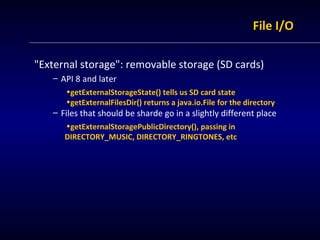
File I/O "External storage": removable storage (SD cards) API 8 and later getExternalStorageState() tells us SD card state getExternalFilesDir() returns a java.io.File for the directory Files that should be sharde go in a slightly different place getExternalStoragePublicDirectory(), passing in DIRECTORY_MUSIC, DIRECTORY_RINGTONES, etc
SQLite SQLite is a small-scale footprint RDBMS ".. a software library that implements a self-contained, serverless, zero-configuration, transactional SQL database engine." http://www.sqlite.org Mostly SQL-92 compliant, but there are a few SQLisms unsupported: RIGHT and FULL OUTER JOIN Complete ALTER TABLE support Complete trigger support Writing to VIEWs GRANT and REVOKE Storage is single-file database, stored locally
SQLite Android supports SQLite (android.database.sqlite) SQLiteDatabase: core class for all things SQLite openDatabase() or openOrCreateDatabase() beginTransaction(), endTransaction() insert(), delete(), update(), replace(), query() execSQL() queries return either a "projection" (String[]) or a Cursor object either can generally be bound to a View Adapter ... or you can manually iterate/bind
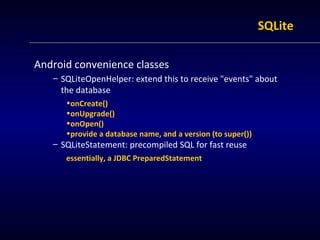
SQLite Android convenience classes SQLiteOpenHelper: extend this to receive "events" about the database onCreate() onUpgrade() onOpen() provide a database name, and a version (to super()) SQLiteStatement: precompiled SQL for fast reuse essentially, a JDBC PreparedStatement
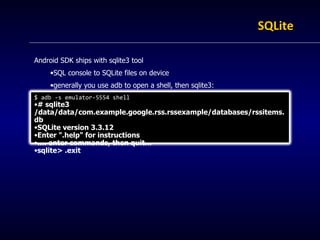
SQLite Android SDK ships with sqlite3 tool SQL console to SQLite files on device generally you use adb to open a shell, then sqlite3: $ adb -s emulator-5554 shell # sqlite3 /data/data/com.example.google.rss.rssexample/databases/rssitems.db SQLite version 3.3.12 Enter ".help" for instructions .... enter commands, then quit... sqlite> .exit
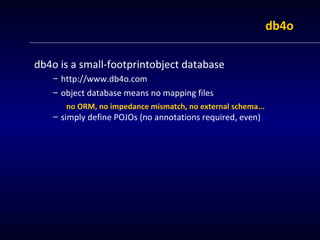
db4o db4o is a small-footprintobject database http://www.db4o.com object database means no mapping files no ORM, no impedance mismatch, no external schema... simply define POJOs (no annotations required, even)
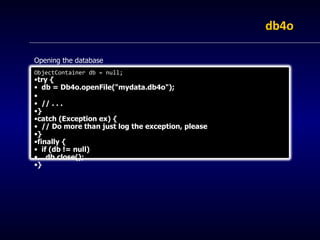
db4o Opening the database ObjectContainer db = null; try { db = Db4o.openFile("mydata.db4o"); // . . . } catch (Exception ex) { // Do more than just log the exception, please } finally {  if (db != null) db.close(); }
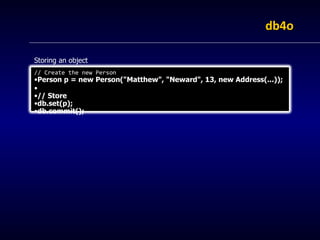
db4o Storing an object // Create the new Person Person p = new Person("Matthew", "Neward", 13, new Address(...)); // Store db.set(p); db.commit();
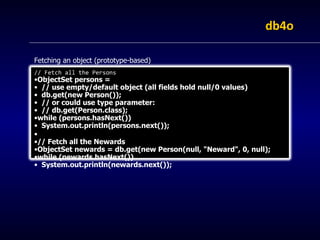
db4o Fetching an object (prototype-based) // Fetch all the Persons ObjectSet persons =  // use empty/default object (all fields hold null/0 values) db.get(new Person()); // or could use type parameter:  // db.get(Person.class); while (persons.hasNext()) System.out.println(persons.next()); // Fetch all the Newards ObjectSet newards = db.get(new Person(null, "Neward", 0, null); while (newards.hasNext()) System.out.println(newards.next());
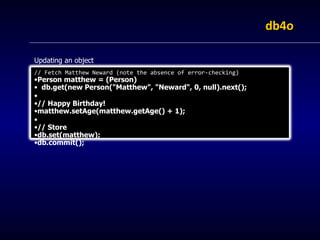
db4o Updating an object // Fetch Matthew Neward (note the absence of error-checking) Person matthew = (Person) db.get(new Person("Matthew", "Neward", 0, null).next(); // Happy Birthday! matthew.setAge(matthew.getAge() + 1); // Store db.set(matthew); db.commit();
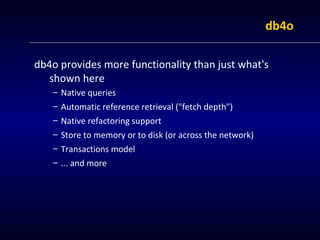
db4o db4o provides more functionality than just what's shown here Native queries Automatic reference retrieval ("fetch depth") Native refactoring support Store to memory or to disk (or across the network) Transactions model ... and more
Wrapping up "What do you know?"
Summary Android provides a local-storage option ... that offers the traditional storage options ... that can be customized in many ways ... that ultimately will only get more powerful
Resources Busy Coder's Guide to Android (and more) Mark Murphy, http://www.commonsware.com Android website http://developer.android.com Presentations by this guy Busy Android Dev's Guide to UI Busy Android Dev's Guide to Communication ... and more

Android | Busy Java Developers Guide to Android: Persistence | Ted Neward

  • 1.
    Busy Android Developer'sGuide to Peristence Ted Neward Neward & Associates http://www.tedneward.com | ted@tedneward.com
  • 2.
    Credentials Who isthis guy? Architectural Consultant, Neudesic Software Principal, Architect, Consultant and Mentor ask me how I can help your project or your team Microsoft MVP (F#, C#, Architect) JSR 175, 277 Expert Group Member Author Professional F# 2.0 (w/Erickson, et al; Wrox, 2010) Effective Enterprise Java (Addison-Wesley, 2004) C# In a Nutshell (w/Drayton, et all; OReilly, 2003) SSCLI Essentials (w/Stutz, et al; OReilly, 2003) Server-Based Java Programming (Manning, 2000) Blog: http://blogs.tedneward.com Papers: http://www.tedneward.com/writings Twitter: @tedneward
  • 3.
    Preferences Android SharedPreferencesessentially, an XML file stored in your app's data area as such, it's probably the easiest to use ... ... but it has the usual limitations of XML usage is pretty straightforward Activity.getPreferences() to return a SharedPreferences object MODE_PRIVATE makes the prefs invisible to all but this app MODE_WORLD_READABLE/WRITEABLE allows other apps access to view existing data, call get*() to change, call edit() first, then put*()s, then commit() to write
  • 4.
    Preferences public classCalc extends Activity { public static final String PREFS_NAME = "MyPrefsFile"; @Override protected void onCreate(Bundle state){ super.onCreate(state); . . . // Restore preferences SharedPreferences settings = getSharedPreferences(PREFS_NAME, 0); boolean silent = settings.getBoolean("silentMode", false); setSilent(silent); } @Override protected void onStop(){ super.onStop(); SharedPreferences settings = getSharedPreferences(PREFS_NAME, 0); settings.edit().putBoolean("silentMode", true).commit(); // ... or break it up into three steps if you prefer } }
  • 5.
    File I/O Androidexposes the filesystem to standard Java I/O Two major categories of storage: internal storage ... and external storage (which may or may not be actually removable) Beyond where the files are stored, there's no real difference except that external storage can disappear at any time, isn't secure, and can be read over the USB cable Any sort of file storage is possible from here so anything that takes a File is a candidate for use
  • 6.
    File I/O "Internalstorage": storage permanent to the device use openFileOutput() to return a java.io.FileOutputStream use openFileInput() for a java.io.FileInputStream both use MODE_PRIVATE, MODE_APPEND, MODE_WORLD_READABLE/WRITEABLE getFilesDir() returns File for app's internal storage directory deleteFile(), fileList()
  • 7.
    File I/O "Cached"data is a little different getCacheDir() returns a File to the "cache" directory Android feels free to delete this data in low-storage scenarios but Android docs suggest not to rely on this; police yourself
  • 8.
    File I/O "Externalstorage": removable storage (SD cards) API 7 and earlier getExternalStorageState() tells us SD card state getExternalStorageDirectory() returns a java.io.File for the directory Files that should be shared go in a slightly different place from getExternalStorageDirectory(), store to Music/, Podcasts/, Ringtones/, Alarms/, Notifications/, Pictures/, Movies/, or Downloads/
  • 9.
    File I/O "Externalstorage": removable storage (SD cards) API 8 and later getExternalStorageState() tells us SD card state getExternalFilesDir() returns a java.io.File for the directory Files that should be sharde go in a slightly different place getExternalStoragePublicDirectory(), passing in DIRECTORY_MUSIC, DIRECTORY_RINGTONES, etc
  • 10.
    SQLite SQLite isa small-scale footprint RDBMS ".. a software library that implements a self-contained, serverless, zero-configuration, transactional SQL database engine." http://www.sqlite.org Mostly SQL-92 compliant, but there are a few SQLisms unsupported: RIGHT and FULL OUTER JOIN Complete ALTER TABLE support Complete trigger support Writing to VIEWs GRANT and REVOKE Storage is single-file database, stored locally
  • 11.
    SQLite Android supportsSQLite (android.database.sqlite) SQLiteDatabase: core class for all things SQLite openDatabase() or openOrCreateDatabase() beginTransaction(), endTransaction() insert(), delete(), update(), replace(), query() execSQL() queries return either a "projection" (String[]) or a Cursor object either can generally be bound to a View Adapter ... or you can manually iterate/bind
  • 12.
    SQLite Android convenienceclasses SQLiteOpenHelper: extend this to receive "events" about the database onCreate() onUpgrade() onOpen() provide a database name, and a version (to super()) SQLiteStatement: precompiled SQL for fast reuse essentially, a JDBC PreparedStatement
  • 13.
    SQLite Android SDKships with sqlite3 tool SQL console to SQLite files on device generally you use adb to open a shell, then sqlite3: $ adb -s emulator-5554 shell # sqlite3 /data/data/com.example.google.rss.rssexample/databases/rssitems.db SQLite version 3.3.12 Enter ".help" for instructions .... enter commands, then quit... sqlite> .exit
  • 14.
    db4o db4o isa small-footprintobject database http://www.db4o.com object database means no mapping files no ORM, no impedance mismatch, no external schema... simply define POJOs (no annotations required, even)
  • 15.
    db4o Opening thedatabase ObjectContainer db = null; try { db = Db4o.openFile("mydata.db4o"); // . . . } catch (Exception ex) { // Do more than just log the exception, please } finally { if (db != null) db.close(); }
  • 16.
    db4o Storing anobject // Create the new Person Person p = new Person("Matthew", "Neward", 13, new Address(...)); // Store db.set(p); db.commit();
  • 17.
    db4o Fetching anobject (prototype-based) // Fetch all the Persons ObjectSet persons = // use empty/default object (all fields hold null/0 values) db.get(new Person()); // or could use type parameter: // db.get(Person.class); while (persons.hasNext()) System.out.println(persons.next()); // Fetch all the Newards ObjectSet newards = db.get(new Person(null, "Neward", 0, null); while (newards.hasNext()) System.out.println(newards.next());
  • 18.
    db4o Updating anobject // Fetch Matthew Neward (note the absence of error-checking) Person matthew = (Person) db.get(new Person("Matthew", "Neward", 0, null).next(); // Happy Birthday! matthew.setAge(matthew.getAge() + 1); // Store db.set(matthew); db.commit();
  • 19.
    db4o db4o providesmore functionality than just what's shown here Native queries Automatic reference retrieval ("fetch depth") Native refactoring support Store to memory or to disk (or across the network) Transactions model ... and more
  • 20.
    Wrapping up "Whatdo you know?"
  • 21.
    Summary Android providesa local-storage option ... that offers the traditional storage options ... that can be customized in many ways ... that ultimately will only get more powerful
  • 22.
    Resources Busy Coder'sGuide to Android (and more) Mark Murphy, http://www.commonsware.com Android website http://developer.android.com Presentations by this guy Busy Android Dev's Guide to UI Busy Android Dev's Guide to Communication ... and more