Android Storage
- Internal & External Storages
(Honeycomb 3.2)
William.L
wiliwe@gmail.com
2011-09-10
Outline
Storage Configuration File
Internal Storage Configuration
External Storage Configuration
Storage Settings
Storage Configuration File (1/2)
Since Android Honeycomb 3.0 , it uses a
configuration file to control which volume should
be mounted.
Storage Configuration File
Honeycomb 3.0 :
/device/SoCVendorName/SoCModelName/overlay/fram
eworks/base/core/res/res/values/config.xml
Honeycomb 3.2 :
/device/SoCVendorName/SoCModelName/overlay/fram
eworks/base/core/res/res/xml/storage_list.xml
Storage Configuration File (2/2)
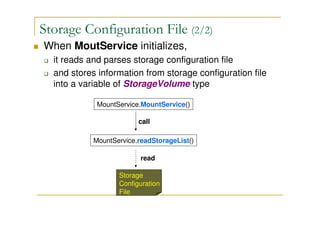
When MoutService initializes,
it reads and parses storage configuration file
and stores information from storage configuration file
into a variable of StorageVolume type
MountService.MountService()
MountService.readStorageList()
Storage
Configuration
File
call
read
Internal Storage Configuration (1/2)
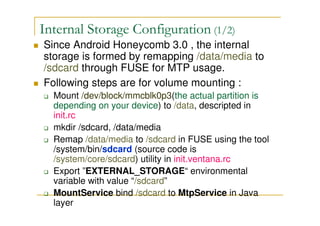
Since Android Honeycomb 3.0 , the internal
storage is formed by remapping /data/media to
/sdcard through FUSE for MTP usage.
Following steps are for volume mounting :
Mount /dev/block/mmcblk0p3(the actual partition is
depending on your device) to /data, descripted in
init.rc
mkdir /sdcard, /data/media
Remap /data/media to /sdcard in FUSE using the tool
/system/bin/sdcard (source code is
/system/core/sdcard) utility in init.ventana.rc
Export ”EXTERNAL_STORAGE“ environmental
variable with value “/sdcard”
MountService bind /sdcard to MtpService in Java
layer
Internal Storage Configuration (2/2)
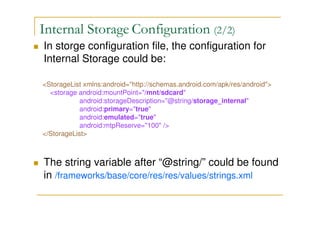
In storge configuration file, the configuration for
Internal Storage could be:
<StorageList xmlns:android="http://schemas.android.com/apk/res/android">
<storage android:mountPoint="/mnt/sdcard"
android:storageDescription="@string/storage_internal"
android:primary="true"
android:emulated="true"
android:mtpReserve="100" />
</StorageList>
The string variable after “@string/” could be found
in /frameworks/base/core/res/res/values/strings.xml
External Storage Configuration (1/2)
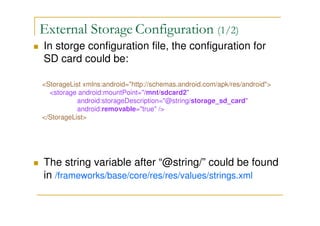
In storge configuration file, the configuration for
SD card could be:
<StorageList xmlns:android="http://schemas.android.com/apk/res/android">
<storage android:mountPoint="/mnt/sdcard2"
android:storageDescription="@string/storage_sd_card"
android:removable="true" />
</StorageList>
The string variable after “@string/” could be found
in /frameworks/base/core/res/res/values/strings.xml
External Storage Configuration (2/2)
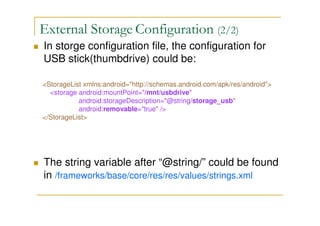
In storge configuration file, the configuration for
USB stick(thumbdrive) could be:
<StorageList xmlns:android="http://schemas.android.com/apk/res/android">
<storage android:mountPoint="/mnt/usbdrive"
android:storageDescription="@string/storage_usb"
android:removable="true" />
</StorageList>
The string variable after “@string/” could be found
in /frameworks/base/core/res/res/values/strings.xml
Storage Settings (1/5)
The "Storage" settings form(layout)
/packages/apps/Settings/res/xml/device_info_memory.
xml
UI strings like "Available space", "Total space"
values are defined in
/packages/apps/Settings/res/values/strings.xml
Storage Settings (2/5)
/packages/apps/Settings/src/com/android/settings/
deviceinfo/Memory.java
Use StorageManager to get MountService instance
and the number of storages in the system.
There has a BroadcastReceiver,
MediaScannerReceiver, that receives
ACTION_MEDIA_SCANNER_STARTED intent when
a storage plugging into the device.
Register a storage listener (of IMountService)
implementing onStorageStateChanged() interface
which is called by MountService's method
updatePublicVolumeState().
Storage Settings (3/5)
/packages/apps/Settings/src/com/android/settings/
deviceinfo/Memory.java
When MoutService initializes, it parses storage_list.xml
and stores information likes the amount of storages in the
system, mount-point, removable or not, storage name in
a variable typed in StorageVolume. These storage
information will be stored in an array in type of
StorageVolumePreferenceCategory when onCreate() is
run. The sequence to put the information into the array
(StorageVolumePreferenceCategory type) determines
the showing sequence in storage settings.
Storage Settings (4/5)
/packages/apps/Settings/src/com/android/settings/
deviceinfo/Memory.java
Finally, using StorageVolumePreferenceCategory.init() to
create storage usage statics diagram。
P.S : this class process click event of Preference in the
method onPreferenceTreeClick()
Storage Settings (5/5)
/packages/apps/Settings/src/com/android/settings/
deviceinfo/StorageVolumePreferenceCatagory.java
In method getInstance(), it uses StorageMeasurement
class to recored the usage of each storage volume.
Using Map data structure to record StorageVolume and
StorageMeasurement pair.
Each StorageVolume object correspond to a
StorageVolumePreferenceCategory object; each
StorageVolumePreferenceCategory object has a
StorageMeasurement object.

Android Storage - Internal and External Storages

  • 1.
    Android Storage - Internal& External Storages (Honeycomb 3.2) William.L wiliwe@gmail.com 2011-09-10
  • 2.
    Outline Storage Configuration File InternalStorage Configuration External Storage Configuration Storage Settings
  • 3.
    Storage Configuration File(1/2) Since Android Honeycomb 3.0 , it uses a configuration file to control which volume should be mounted. Storage Configuration File Honeycomb 3.0 : /device/SoCVendorName/SoCModelName/overlay/fram eworks/base/core/res/res/values/config.xml Honeycomb 3.2 : /device/SoCVendorName/SoCModelName/overlay/fram eworks/base/core/res/res/xml/storage_list.xml
  • 4.
    Storage Configuration File(2/2) When MoutService initializes, it reads and parses storage configuration file and stores information from storage configuration file into a variable of StorageVolume type MountService.MountService() MountService.readStorageList() Storage Configuration File call read
  • 5.
    Internal Storage Configuration(1/2) Since Android Honeycomb 3.0 , the internal storage is formed by remapping /data/media to /sdcard through FUSE for MTP usage. Following steps are for volume mounting : Mount /dev/block/mmcblk0p3(the actual partition is depending on your device) to /data, descripted in init.rc mkdir /sdcard, /data/media Remap /data/media to /sdcard in FUSE using the tool /system/bin/sdcard (source code is /system/core/sdcard) utility in init.ventana.rc Export ”EXTERNAL_STORAGE“ environmental variable with value “/sdcard” MountService bind /sdcard to MtpService in Java layer
  • 6.
    Internal Storage Configuration(2/2) In storge configuration file, the configuration for Internal Storage could be: <StorageList xmlns:android="http://schemas.android.com/apk/res/android"> <storage android:mountPoint="/mnt/sdcard" android:storageDescription="@string/storage_internal" android:primary="true" android:emulated="true" android:mtpReserve="100" /> </StorageList> The string variable after “@string/” could be found in /frameworks/base/core/res/res/values/strings.xml
  • 7.
    External Storage Configuration(1/2) In storge configuration file, the configuration for SD card could be: <StorageList xmlns:android="http://schemas.android.com/apk/res/android"> <storage android:mountPoint="/mnt/sdcard2" android:storageDescription="@string/storage_sd_card" android:removable="true" /> </StorageList> The string variable after “@string/” could be found in /frameworks/base/core/res/res/values/strings.xml
  • 8.
    External Storage Configuration(2/2) In storge configuration file, the configuration for USB stick(thumbdrive) could be: <StorageList xmlns:android="http://schemas.android.com/apk/res/android"> <storage android:mountPoint="/mnt/usbdrive" android:storageDescription="@string/storage_usb" android:removable="true" /> </StorageList> The string variable after “@string/” could be found in /frameworks/base/core/res/res/values/strings.xml
  • 9.
    Storage Settings (1/5) The"Storage" settings form(layout) /packages/apps/Settings/res/xml/device_info_memory. xml UI strings like "Available space", "Total space" values are defined in /packages/apps/Settings/res/values/strings.xml
  • 10.
    Storage Settings (2/5) /packages/apps/Settings/src/com/android/settings/ deviceinfo/Memory.java UseStorageManager to get MountService instance and the number of storages in the system. There has a BroadcastReceiver, MediaScannerReceiver, that receives ACTION_MEDIA_SCANNER_STARTED intent when a storage plugging into the device. Register a storage listener (of IMountService) implementing onStorageStateChanged() interface which is called by MountService's method updatePublicVolumeState().
  • 11.
    Storage Settings (3/5) /packages/apps/Settings/src/com/android/settings/ deviceinfo/Memory.java WhenMoutService initializes, it parses storage_list.xml and stores information likes the amount of storages in the system, mount-point, removable or not, storage name in a variable typed in StorageVolume. These storage information will be stored in an array in type of StorageVolumePreferenceCategory when onCreate() is run. The sequence to put the information into the array (StorageVolumePreferenceCategory type) determines the showing sequence in storage settings.
  • 12.
    Storage Settings (4/5) /packages/apps/Settings/src/com/android/settings/ deviceinfo/Memory.java Finally,using StorageVolumePreferenceCategory.init() to create storage usage statics diagram。 P.S : this class process click event of Preference in the method onPreferenceTreeClick()
  • 13.
    Storage Settings (5/5) /packages/apps/Settings/src/com/android/settings/ deviceinfo/StorageVolumePreferenceCatagory.java Inmethod getInstance(), it uses StorageMeasurement class to recored the usage of each storage volume. Using Map data structure to record StorageVolume and StorageMeasurement pair. Each StorageVolume object correspond to a StorageVolumePreferenceCategory object; each StorageVolumePreferenceCategory object has a StorageMeasurement object.