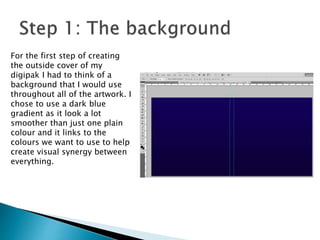
For the first step of creating
the outside cover of my
digipak I had to think of a
background that I would use
throughout all of the artwork. I
chose to use a dark blue
gradient as it look a lot
smoother than just one plain
colour and it links to the
colours we want to use to help
create visual synergy between
everything.
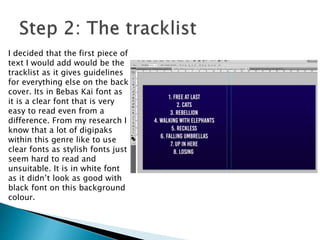
I decided that the first piece of
text I would add would be the
tracklist as it gives guidelines
for everything else on the back
cover. Its in Bebas Kai font as
it is a clear font that is very
easy to read even from a
difference. From my research I
know that a lot of digipaks
within this genre like to use
clear fonts as stylish fonts just
seem hard to read and
unsuitable. It is in white font
as it didn’t look as good with
black font on this background
colour.
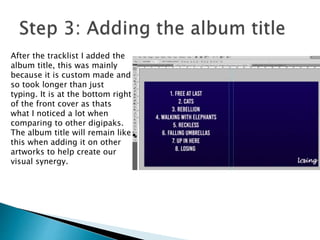
After the tracklist I added the
album title, this was mainly
because it is custom made and
so took longer than just
typing. It is at the bottom right
of the front cover as thats
what I noticed a lot when
comparing to other digipaks.
The album title will remain like
this when adding it on other
artworks to help create our
visual synergy.
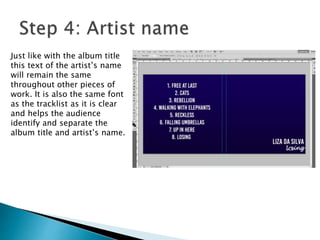
Just like with the album title
this text of the artist’s name
will remain the same
throughout other pieces of
work. It is also the same font
as the tracklist as it is clear
and helps the audience
identify and separate the
album title and artist’s name.
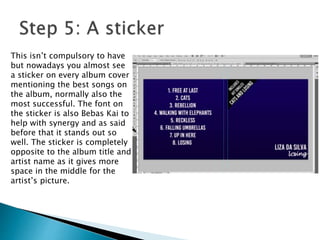
This isn’t compulsory to have
but nowadays you almost see
a sticker on every album cover
mentioning the best songs on
the album, normally also the
most successful. The font on
the sticker is also Bebas Kai to
help with synergy and as said
before that it stands out so
well. The sticker is completely
opposite to the album title and
artist name as it gives more
space in the middle for the
artist’s picture.
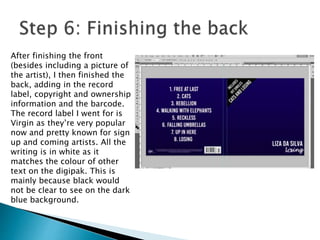
After finishing the front
(besides including a picture of
the artist), I then finished the
back, adding in the record
label, copyright and ownership
information and the barcode.
The record label I went for is
Virgin as they’re very popular
now and pretty known for sign
up and coming artists. All the
writing is in white as it
matches the colour of other
text on the digipak. This is
mainly because black would
not be clear to see on the dark
blue background.
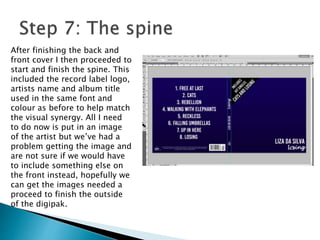
After finishing the back and
front cover I then proceeded to
start and finish the spine. This
included the record label logo,
artists name and album title
used in the same font and
colour as before to help match
the visual synergy. All I need
to do now is put in an image
of the artist but we’ve had a
problem getting the image and
are not sure if we would have
to include something else on
the front instead, hopefully we
can get the images needed a
proceed to finish the outside
of the digipak.

Ancillaryworkoutside

  • 2.
    For the firststep of creating the outside cover of my digipak I had to think of a background that I would use throughout all of the artwork. I chose to use a dark blue gradient as it look a lot smoother than just one plain colour and it links to the colours we want to use to help create visual synergy between everything.
  • 3.
    I decided thatthe first piece of text I would add would be the tracklist as it gives guidelines for everything else on the back cover. Its in Bebas Kai font as it is a clear font that is very easy to read even from a difference. From my research I know that a lot of digipaks within this genre like to use clear fonts as stylish fonts just seem hard to read and unsuitable. It is in white font as it didn’t look as good with black font on this background colour.
  • 4.
    After the tracklistI added the album title, this was mainly because it is custom made and so took longer than just typing. It is at the bottom right of the front cover as thats what I noticed a lot when comparing to other digipaks. The album title will remain like this when adding it on other artworks to help create our visual synergy.
  • 5.
    Just like withthe album title this text of the artist’s name will remain the same throughout other pieces of work. It is also the same font as the tracklist as it is clear and helps the audience identify and separate the album title and artist’s name.
  • 6.
    This isn’t compulsoryto have but nowadays you almost see a sticker on every album cover mentioning the best songs on the album, normally also the most successful. The font on the sticker is also Bebas Kai to help with synergy and as said before that it stands out so well. The sticker is completely opposite to the album title and artist name as it gives more space in the middle for the artist’s picture.
  • 7.
    After finishing thefront (besides including a picture of the artist), I then finished the back, adding in the record label, copyright and ownership information and the barcode. The record label I went for is Virgin as they’re very popular now and pretty known for sign up and coming artists. All the writing is in white as it matches the colour of other text on the digipak. This is mainly because black would not be clear to see on the dark blue background.
  • 8.
    After finishing theback and front cover I then proceeded to start and finish the spine. This included the record label logo, artists name and album title used in the same font and colour as before to help match the visual synergy. All I need to do now is put in an image of the artist but we’ve had a problem getting the image and are not sure if we would have to include something else on the front instead, hopefully we can get the images needed a proceed to finish the outside of the digipak.