ANALYTICS FOR 2014:
THE NUMBERS THAT MATTER
BEFORE WE GET STARTED
•

Having technical difficulties?
− Use the Q&A chat box to let us
know.

Today’s moderator:

− If we can’t help you, call Citrix at
888-259-8414 for technical
support.
− Or you can chat with a Citrix
representative at
www.citrixgcs.com/chat.
•

•

To submit questions during the
webinar, use the Q&A chat box.
Everyone will receive a link to a
recording of the presentation and a
copy of the slide deck within 1 - 2
business days.

Agatha Niedzwiecki
Director of Marketing
WhatCounts

2
TWEET!

Follow us on Twitter!
@WhatCounts
@ugigirl
@timbrechlin
Tweet about this webinar using
#NumbersthatMatter

3
TODAY’S SPEAKERS

Tim Brechlin
Inbound Marketing
Manager
WhatCounts

Joy Ugi
Digital Marketing
Coordinator
WhatCounts

4
WEBSITE ANALYTICS

Identify and
measure based on:
• Purpose of your
website
• Goals
• Key Performance
Indicators (KPIs)

5
WEBSITE ANALYTICS

What are good KPIs?
The numbers that show success for YOUR
particular company.

6
WEBSITE ANALYTICS: AUDIENCE
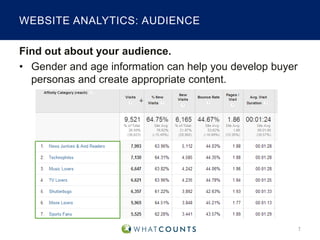
Find out about your audience.
• Gender and age information can help you develop buyer
personas and create appropriate content.

7
WEBSITE ANALYTICS: TRAFFIC
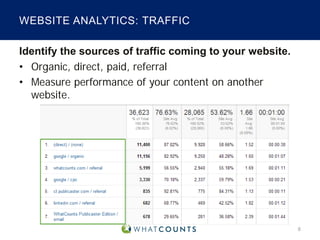
Identify the sources of traffic coming to your website.
• Organic, direct, paid, referral
• Measure performance of your content on another
website.

8
WEBSITE ANALYTICS: TECHNOLOGY

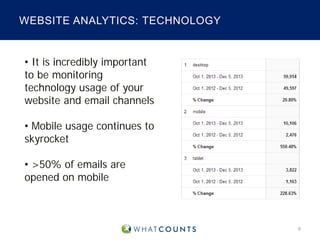
• It is incredibly important
to be monitoring
technology usage of your
website and email channels
• Mobile usage continues to
skyrocket
• >50% of emails are
opened on mobile

9
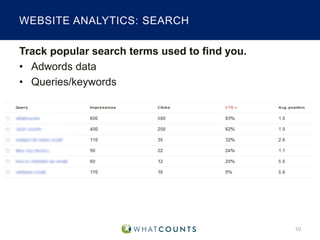
WEBSITE ANALYTICS: SEARCH
Track popular search terms used to find you.
• Adwords data
• Queries/keywords

10
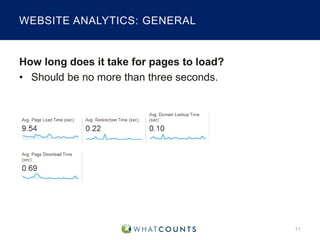
WEBSITE ANALYTICS: GENERAL

How long does it take for pages to load?
• Should be no more than three seconds.

11
WEBSITE ANALYTICS: GENERAL

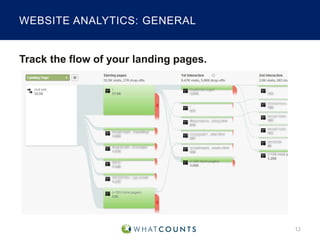
Track the flow of your landing pages.

12
WEBSITE ANALYTICS: GENERAL
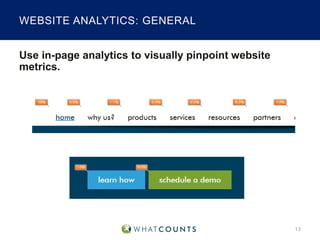
Use in-page analytics to visually pinpoint website
metrics.

13
WEBSITE ANALYTICS: GENERAL

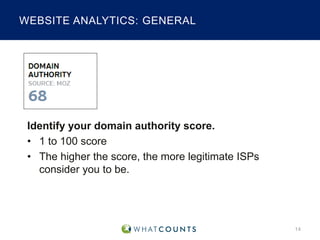
Identify your domain authority score.
• 1 to 100 score
• The higher the score, the more legitimate ISPs
consider you to be.

14
WEBSITE ANALYTICS: GENERAL

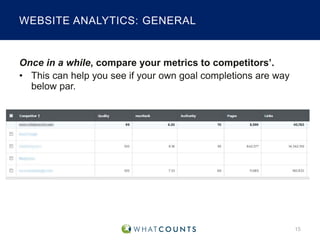
Once in a while, compare your metrics to competitors’.
• This can help you see if your own goal completions are way
below par.

15
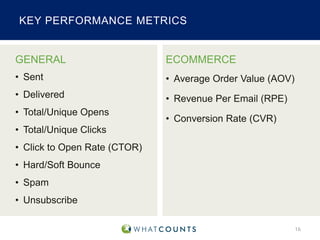
KEY PERFORMANCE METRICS

GENERAL

ECOMMERCE

• Sent

• Average Order Value (AOV)

• Delivered

• Revenue Per Email (RPE)

• Total/Unique Opens

• Conversion Rate (CVR)

• Total/Unique Clicks
• Click to Open Rate (CTOR)
• Hard/Soft Bounce
• Spam
• Unsubscribe
16
SYSTEM REPORTING
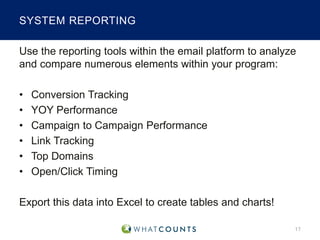
Use the reporting tools within the email platform to analyze
and compare numerous elements within your program:
•
•
•
•
•
•

Conversion Tracking
YOY Performance
Campaign to Campaign Performance
Link Tracking
Top Domains
Open/Click Timing

Export this data into Excel to create tables and charts!
17
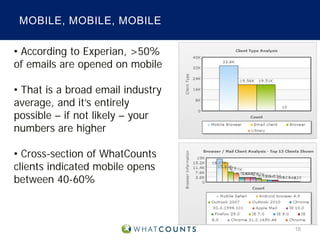
MOBILE, MOBILE, MOBILE
• According to Experian, >50%
of emails are opened on mobile
• That is a broad email industry
average, and it’s entirely
possible – if not likely – your
numbers are higher
• Cross-section of WhatCounts
clients indicated mobile opens
between 40-60%

18
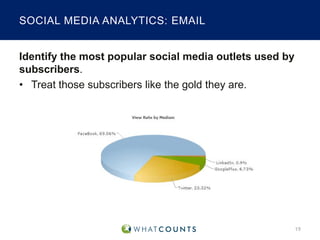
SOCIAL MEDIA ANALYTICS: EMAIL
Identify the most popular social media outlets used by
subscribers.
• Treat those subscribers like the gold they are.

19
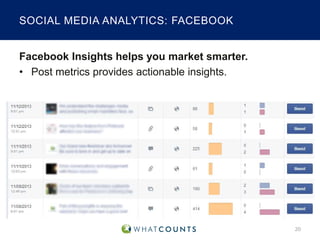
SOCIAL MEDIA ANALYTICS: FACEBOOK
Facebook Insights helps you market smarter.
• Post metrics provide actionable insights.

20
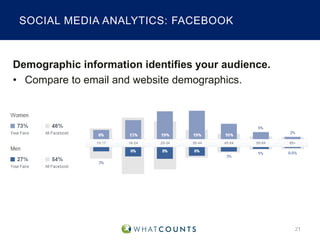
SOCIAL MEDIA ANALYTICS: FACEBOOK

Demographic information identifies your audience.
• Compare to email and website demographics.

21
KEY TAKEAWAYS
• There’s no secret sauce for measuring analytics across
web, email and social.
• Analyze metrics based on your own KPIs.
• Metrics tell you what happened so you can figure out
why it happened.
• Isolate one area to work on. Create and test a
hypothesis to improve.

22
TIME FOR QUESTIONS!

23
CHECK OUT OUR RESOURCES PAGE

eBooks
White papers
Past webinar downloads
Events
http://www.whatcounts.com/email-marketing-resources/

Preview our new user interface:
www.TheNewUI.com

24
REACH OUT TO US

WhatCounts
3630 Peachtree Road, NE
Suite 900
Atlanta, GA 30326
1-866-804-0076
www.whatcounts.com
Twitter: @whatcounts
sales@whatcounts.com

25
THANK YOU FOR ATTENDING!

26

Analytics for 2014: The Numbers that Matter

  • 1.
    ANALYTICS FOR 2014: THENUMBERS THAT MATTER
  • 2.
    BEFORE WE GETSTARTED • Having technical difficulties? − Use the Q&A chat box to let us know. Today’s moderator: − If we can’t help you, call Citrix at 888-259-8414 for technical support. − Or you can chat with a Citrix representative at www.citrixgcs.com/chat. • • To submit questions during the webinar, use the Q&A chat box. Everyone will receive a link to a recording of the presentation and a copy of the slide deck within 1 - 2 business days. Agatha Niedzwiecki Director of Marketing WhatCounts 2
  • 3.
    TWEET! Follow us onTwitter! @WhatCounts @ugigirl @timbrechlin Tweet about this webinar using #NumbersthatMatter 3
  • 4.
    TODAY’S SPEAKERS Tim Brechlin InboundMarketing Manager WhatCounts Joy Ugi Digital Marketing Coordinator WhatCounts 4
  • 5.
    WEBSITE ANALYTICS Identify and measurebased on: • Purpose of your website • Goals • Key Performance Indicators (KPIs) 5
  • 6.
    WEBSITE ANALYTICS What aregood KPIs? The numbers that show success for YOUR particular company. 6
  • 7.
    WEBSITE ANALYTICS: AUDIENCE Findout about your audience. • Gender and age information can help you develop buyer personas and create appropriate content. 7
  • 8.
    WEBSITE ANALYTICS: TRAFFIC Identifythe sources of traffic coming to your website. • Organic, direct, paid, referral • Measure performance of your content on another website. 8
  • 9.
    WEBSITE ANALYTICS: TECHNOLOGY •It is incredibly important to be monitoring technology usage of your website and email channels • Mobile usage continues to skyrocket • >50% of emails are opened on mobile 9
  • 10.
    WEBSITE ANALYTICS: SEARCH Trackpopular search terms used to find you. • Adwords data • Queries/keywords 10
  • 11.
    WEBSITE ANALYTICS: GENERAL Howlong does it take for pages to load? • Should be no more than three seconds. 11
  • 12.
    WEBSITE ANALYTICS: GENERAL Trackthe flow of your landing pages. 12
  • 13.
    WEBSITE ANALYTICS: GENERAL Usein-page analytics to visually pinpoint website metrics. 13
  • 14.
    WEBSITE ANALYTICS: GENERAL Identifyyour domain authority score. • 1 to 100 score • The higher the score, the more legitimate ISPs consider you to be. 14
  • 15.
    WEBSITE ANALYTICS: GENERAL Oncein a while, compare your metrics to competitors’. • This can help you see if your own goal completions are way below par. 15
  • 16.
    KEY PERFORMANCE METRICS GENERAL ECOMMERCE •Sent • Average Order Value (AOV) • Delivered • Revenue Per Email (RPE) • Total/Unique Opens • Conversion Rate (CVR) • Total/Unique Clicks • Click to Open Rate (CTOR) • Hard/Soft Bounce • Spam • Unsubscribe 16
  • 17.
    SYSTEM REPORTING Use thereporting tools within the email platform to analyze and compare numerous elements within your program: • • • • • • Conversion Tracking YOY Performance Campaign to Campaign Performance Link Tracking Top Domains Open/Click Timing Export this data into Excel to create tables and charts! 17
  • 18.
    MOBILE, MOBILE, MOBILE •According to Experian, >50% of emails are opened on mobile • That is a broad email industry average, and it’s entirely possible – if not likely – your numbers are higher • Cross-section of WhatCounts clients indicated mobile opens between 40-60% 18
  • 19.
    SOCIAL MEDIA ANALYTICS:EMAIL Identify the most popular social media outlets used by subscribers. • Treat those subscribers like the gold they are. 19
  • 20.
    SOCIAL MEDIA ANALYTICS:FACEBOOK Facebook Insights helps you market smarter. • Post metrics provide actionable insights. 20
  • 21.
    SOCIAL MEDIA ANALYTICS:FACEBOOK Demographic information identifies your audience. • Compare to email and website demographics. 21
  • 22.
    KEY TAKEAWAYS • There’sno secret sauce for measuring analytics across web, email and social. • Analyze metrics based on your own KPIs. • Metrics tell you what happened so you can figure out why it happened. • Isolate one area to work on. Create and test a hypothesis to improve. 22
  • 23.
  • 24.
    CHECK OUT OURRESOURCES PAGE eBooks White papers Past webinar downloads Events http://www.whatcounts.com/email-marketing-resources/ Preview our new user interface: www.TheNewUI.com 24
  • 25.
    REACH OUT TOUS WhatCounts 3630 Peachtree Road, NE Suite 900 Atlanta, GA 30326 1-866-804-0076 www.whatcounts.com Twitter: @whatcounts sales@whatcounts.com 25
  • 26.
    THANK YOU FORATTENDING! 26