






ALTUS ALLIANCE 2016
Technology Premiere:
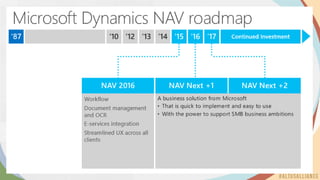
Announcing NAV 2016
Introductions
• James Faw
• VP Product Innovation,
Founding Partner
• Dynamics NAV Product
Specialties
• Teodora Buhteva
• Product Manager
• Dynamics NAV
Product Specialties
• Alex Abelev
• Solution Architect/Senior
Developer (NAV)
• Dynamics NAV Solution
Developer
Session Agenda
1. About this session
2. Introductions
3. What’s New in NAV 2016
4. Questions
2016
Announcing…
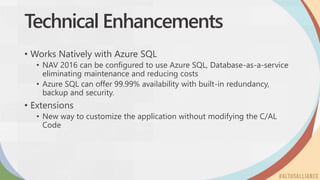
Technical Enhancements
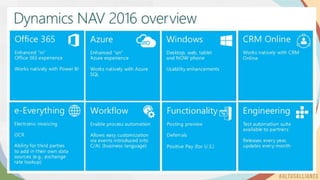
• Works Natively with Azure SQL
• NAV 2016 can be configured to use Azure SQL, Database-as-a-service
eliminating maintenance and reducing costs
• Azure SQL can offer 99.99% availability with built-in redundancy,
backup and security.
• Extensions
• New way to customize the application without modifying the C/AL
Code
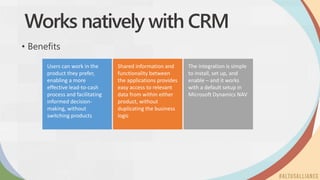
Users can work in the
product they prefer,
enabling a more
effective lead-to-cash
process and facilitating
informed decision-
making, without
switching products
Shared information and
functionality between
the applications provides
easy access to relevant
data from within either
product, without
duplicating the business
logic
The integration is simple
to install, set up, and
enable – and it works
with a default setup in
Microsoft Dynamics NAV
Works natively with CRM
• Benefits
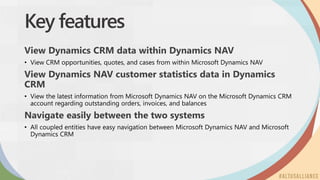
Key features
View Dynamics CRM data within Dynamics NAV
View Dynamics NAV customer statistics data in Dynamics
CRM
Navigate easily between the two systems
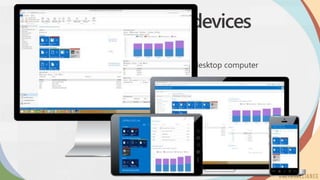
Universal App on all devices
• Role Tailored experience for:
• Smartphone, tablet, notebook, 2-in-1, and desktop computer
• Touch, keyboard and mouse interface
Web Client Enhancements
• Over 60 enhancements to the web client including:
• Cross-column search
• Collapsible Fast Tabs
• Freeze pane
• Search-as-you-type
• Language selections
• Change Company
• Others
Finance Enhancements
• Posting Preview
• Deferrals
• Word Form and Email Enhancements
• North America
• Positive Pay
• Report Enhancements
• Document Totals
Let’s have a look:
• Deferrals
• Preview Posting
Document Management
• OCR Document Capture (Lexmark Invoice Capture Service)
• Capture, Store and Find Incoming Documents
• Extract data using the OCR data services
• Create Purchase Invoices or Journal line drafts automatically
• Can be integrated with Workflow for approval and posting
Using OCR service to capture invoices
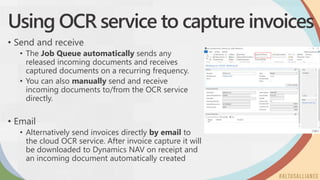
• Send and receive
• The Job Queue automatically sends any
released incoming documents and receives
captured documents on a recurring frequency.
• You can also manually send and receive
incoming documents to/from the OCR service
directly.
• Email
• Alternatively send invoices directly by email to
the cloud OCR service. After invoice capture it will
be downloaded to Dynamics NAV on receipt and
an incoming document automatically created
Creating documents using captured data
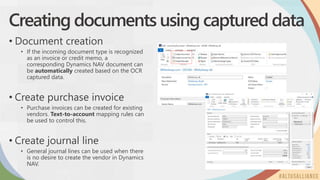
• Document creation
• If the incoming document type is recognized
as an invoice or credit memo, a
corresponding Dynamics NAV document can
be automatically created based on the OCR
captured data.
• Create purchase invoice
• Purchase invoices can be created for existing
vendors. Text-to-account mapping rules can
be used to control this.
• Create journal line
• General journal lines can be used when there
is no desire to create the vendor in Dynamics
NAV.
Let’s have a look:
• OCR Data Capture Service
Out-of-the-box workflow
templates, with
situation-specific
parameters, are ready in
just a few clicks,
facilitating sales &
purchase approvals and
incoming document
handling
Redesigned approvals
functionality offers more
capabilities and is
incorporated in the
workflow system to
allow for easy extension
The workflow designer
contains intuitive layout
and terminology, such as
“When Event” and
“Then Response”,
making it easy to model
company processes
Workflows
• Benefits
Email notifications and
approvals by phone app
mean that workflow
users can be anyone in
the organization and
don’t require access to a
PC to complete simple
steps
A workflow is a movement of steps or tasks through a work process
Workflows help connect business processes to best practices or industry-standard
practices
For example, ensuring a customer’s credit limit has been verified
For example, requiring a two-person approval of a significant vendor payment
In Microsoft Dynamics NAV 2016, a workflow is likely to contain steps related to
approval, notification, or business-process automation
What?
Workflows
Let’s have a look:
• Workflows
E-Everything
• Integration services that support getting currency exchange
rates automatically from an exchange rate service
Questions & Answers
ALTUS ALLIANCE 2016
Altus Ideas
Thenewwayforyoutosubmitfeature
requeststous.
ALTUS ALLIANCE 2016
Altus Advocates
Membershiphasitrewards.
Enrolltoday.
ALTUS ALLIANCE 2016
Submit your
evaluations to win!
Thanks for coming!
@altusdynamics
altusdynamics.com
linkedin.com/company/altus-dynamics

Altus Alliance 2016 - Altus Dynamics Announcing NAV 2016

  • 1.
    ALTUS ALLIANCE 2016 TechnologyPremiere: Announcing NAV 2016
  • 2.
    Introductions • James Faw •VP Product Innovation, Founding Partner • Dynamics NAV Product Specialties • Teodora Buhteva • Product Manager • Dynamics NAV Product Specialties • Alex Abelev • Solution Architect/Senior Developer (NAV) • Dynamics NAV Solution Developer
  • 3.
    Session Agenda 1. Aboutthis session 2. Introductions 3. What’s New in NAV 2016 4. Questions
  • 4.
  • 8.
    Technical Enhancements • WorksNatively with Azure SQL • NAV 2016 can be configured to use Azure SQL, Database-as-a-service eliminating maintenance and reducing costs • Azure SQL can offer 99.99% availability with built-in redundancy, backup and security. • Extensions • New way to customize the application without modifying the C/AL Code
  • 9.
    Users can workin the product they prefer, enabling a more effective lead-to-cash process and facilitating informed decision- making, without switching products Shared information and functionality between the applications provides easy access to relevant data from within either product, without duplicating the business logic The integration is simple to install, set up, and enable – and it works with a default setup in Microsoft Dynamics NAV Works natively with CRM • Benefits
  • 10.
    Key features View DynamicsCRM data within Dynamics NAV View Dynamics NAV customer statistics data in Dynamics CRM Navigate easily between the two systems
  • 11.
    Universal App onall devices • Role Tailored experience for: • Smartphone, tablet, notebook, 2-in-1, and desktop computer • Touch, keyboard and mouse interface
  • 12.
    Web Client Enhancements •Over 60 enhancements to the web client including: • Cross-column search • Collapsible Fast Tabs • Freeze pane • Search-as-you-type • Language selections • Change Company • Others
  • 13.
    Finance Enhancements • PostingPreview • Deferrals • Word Form and Email Enhancements • North America • Positive Pay • Report Enhancements • Document Totals
  • 14.
    Let’s have alook: • Deferrals • Preview Posting
  • 15.
    Document Management • OCRDocument Capture (Lexmark Invoice Capture Service) • Capture, Store and Find Incoming Documents • Extract data using the OCR data services • Create Purchase Invoices or Journal line drafts automatically • Can be integrated with Workflow for approval and posting
  • 16.
    Using OCR serviceto capture invoices • Send and receive • The Job Queue automatically sends any released incoming documents and receives captured documents on a recurring frequency. • You can also manually send and receive incoming documents to/from the OCR service directly. • Email • Alternatively send invoices directly by email to the cloud OCR service. After invoice capture it will be downloaded to Dynamics NAV on receipt and an incoming document automatically created
  • 17.
    Creating documents usingcaptured data • Document creation • If the incoming document type is recognized as an invoice or credit memo, a corresponding Dynamics NAV document can be automatically created based on the OCR captured data. • Create purchase invoice • Purchase invoices can be created for existing vendors. Text-to-account mapping rules can be used to control this. • Create journal line • General journal lines can be used when there is no desire to create the vendor in Dynamics NAV.
  • 18.
    Let’s have alook: • OCR Data Capture Service
  • 19.
    Out-of-the-box workflow templates, with situation-specific parameters,are ready in just a few clicks, facilitating sales & purchase approvals and incoming document handling Redesigned approvals functionality offers more capabilities and is incorporated in the workflow system to allow for easy extension The workflow designer contains intuitive layout and terminology, such as “When Event” and “Then Response”, making it easy to model company processes Workflows • Benefits Email notifications and approvals by phone app mean that workflow users can be anyone in the organization and don’t require access to a PC to complete simple steps
  • 20.
    A workflow isa movement of steps or tasks through a work process Workflows help connect business processes to best practices or industry-standard practices For example, ensuring a customer’s credit limit has been verified For example, requiring a two-person approval of a significant vendor payment In Microsoft Dynamics NAV 2016, a workflow is likely to contain steps related to approval, notification, or business-process automation What? Workflows
  • 21.
    Let’s have alook: • Workflows
  • 22.
    E-Everything • Integration servicesthat support getting currency exchange rates automatically from an exchange rate service
  • 23.
  • 24.
    ALTUS ALLIANCE 2016 AltusIdeas Thenewwayforyoutosubmitfeature requeststous.
  • 25.
    ALTUS ALLIANCE 2016 AltusAdvocates Membershiphasitrewards. Enrolltoday.
  • 26.
    ALTUS ALLIANCE 2016 Submityour evaluations to win!
  • 27.