




Scribe Online or Insight
Making the right choice and understanding the
differences
4
Session Abstract
In this session we will help you understand the differences between
Scribe Online and Insight to help you choose the right product for a
project. We will also explore some of the common design patterns and
how each product handles them differently. We will conclude with how
these products can work together on a project when you need the joint
capability of the products to achieve integration goals.
5
Agenda
• Overview of Insight and Online
• Review capabilities matrix
• Common design patterns
• Popular Insight features in Scribe Online terms
• How you can work with both together
Insight and Scribe Online Overview
Guidelines for which product to choose
7
Overview of Insight
• Server based
• Integration management tooling
• Thought of as for larger more complex integrations
• Focus on CRM and ERP connectivity
8
Overview of Scribe Online
• iPaaS – integration Platform as a Service
• Simpler, more approachable user interface
• Embeddable integration
• Expanding connectivity, including CRM, ERP, Marketing, BI, Data
Services
• Extensible
◦ CDK
◦ API
9
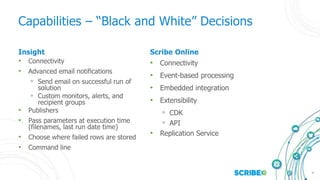
Insight
• Connectivity
• Advanced email notifications
◦ Send email on successful run of
solution
◦ Custom monitors, alerts, and
recipient groups
• Publishers
• Pass parameters at execution time
(filenames, last run date time)
• Choose where failed rows are stored
• Command line
Scribe Online
• Connectivity
• Event-based processing
• Embedded integration
• Extensibility
◦ CDK
◦ API
• Replication Service
Capabilities – “Black and White” Decisions
10
Capabilities – Gray Areas
• Customer preference
◦ Integration tool in cloud (Scribe Online) or on-premise
(Insight)
◦ License type: perpetual or subscription
• Scribe Online has multi-user capabilities that Insight does not
◦ Easier remote access to development and admin environment
◦ Locking of maps
• Custom database queries are more flexible with Insight and only
available with SQL Server with Scribe Online
Design Patterns
Exploring design patterns through common use cases
12
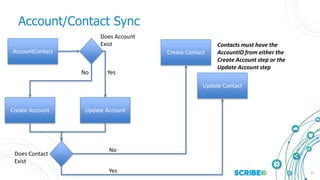
Use Case: Account/Contact Sync
• Parent and child data is in the source result set
• Referential integrity: relate a contact to its account
• Update/Insert logic
13
Account/Contact Sync
AccountContact
Update AccountCreate Account
Update Contact
Create Contact
Does Account
Exist
Does Contact
Exist
Yes
Yes
No
No
Contacts must have the
AccountID from either the
Create Account step or the
Update Account step
14
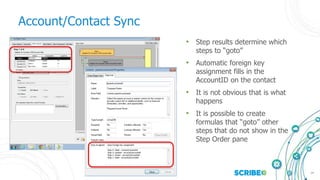
Account/Contact Sync
• Step results determine which
steps to “goto”
• Automatic foreign key
assignment fills in the
AccountID on the contact
• It is not obvious that is what
happens
• It is possible to create
formulas that “goto” other
steps that do not show in the
Step Order pane
15
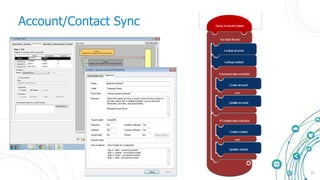
Account/Contact Sync
16
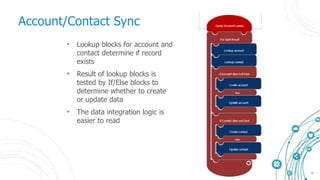
Account/Contact Sync
• Lookup blocks for account and
contact determine if record
exists
• Result of lookup blocks is
tested by If/Else blocks to
determine whether to create
or update data
• The data integration logic is
easier to read
17
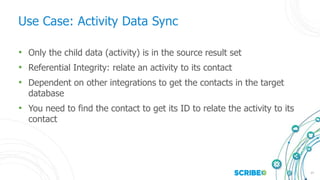
Use Case: Activity Data Sync
• Only the child data (activity) is in the source result set
• Referential Integrity: relate an activity to its contact
• Dependent on other integrations to get the contacts in the target
database
• You need to find the contact to get its ID to relate the activity to its
contact
18
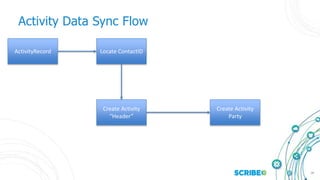
Activity Data Sync Flow
ActivityRecord
Create Activity
“Header”
Create Activity
Party
Locate ContactID
19
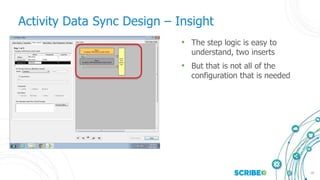
Activity Data Sync Design – Insight
• The step logic is easy to
understand, two inserts
• But that is not all of the
configuration that is needed
20
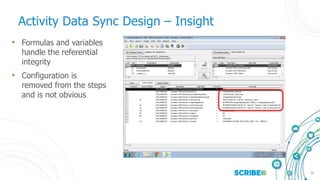
Activity Data Sync Design – Insight
• Formulas and variables
handle the referential
integrity
• Configuration is
removed from the steps
and is not obvious
21
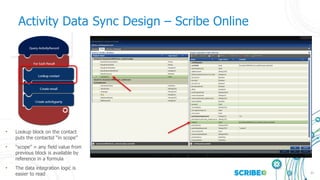
Activity Data Sync Design – Scribe Online
• Lookup block on the contact
puts the contactid “in scope”
• “scope” = any field value from
previous block is available by
reference in a formula
• The data integration logic is
easier to read
22
Use Case: Sales Order Processing
• Hierarchical relationships important
• Many objects involved
• Complex integration
23
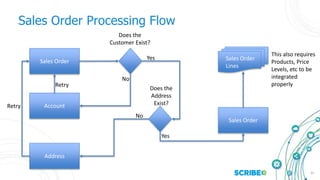
Sales Order Processing Flow
Sales Order
Account
Address
Sales Order
Sales Order
Lines
Does the
Customer Exist?
Does the
Address
Exist?
Yes
Yes
No
No
Retry
Retry
This also requires
Products, Price
Levels, etc to be
integrated
properly
24
Sales Order Processing Design – Insight
26
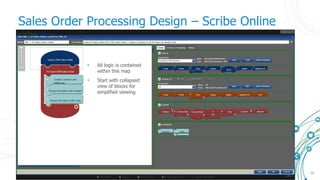
Sales Order Processing Design – Scribe Online
• All logic is contained
within this map
• Start with collapsed
view of blocks for
simplified viewing
27
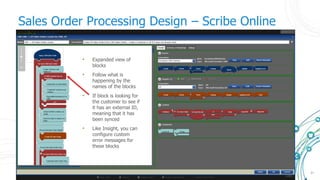
Sales Order Processing Design – Scribe Online
• Expanded view of
blocks
• Follow what is
happening by the
names of the blocks
• If block is looking for
the customer to see if
it has an external ID,
meaning that it has
been synced
• Like Insight, you can
configure custom
error messages for
these blocks
28
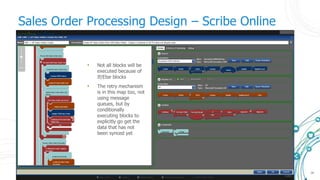
Sales Order Processing Design – Scribe Online
• Not all blocks will be
executed because of
If/Else blocks
• The retry mechanism
is in this map too, not
using message
queues, but by
conditionally
executing blocks to
explicitly go get the
data that has not
been synced yet
29
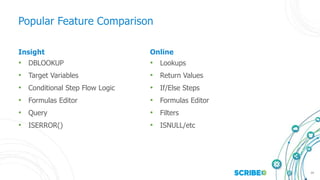
Insight
• DBLOOKUP
• Target Variables
• Conditional Step Flow Logic
• Formulas Editor
• Query
• ISERROR()
Online
• Lookups
• Return Values
• If/Else Steps
• Formulas Editor
• Filters
• ISNULL/etc
Popular Feature Comparison
30
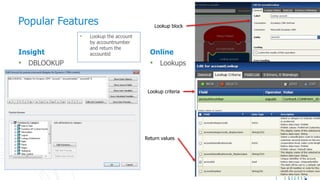
Insight
• DBLOOKUP
Online
• Lookups
Popular Features
• Lookup the account
by accountnumber
and return the
accountid
Lookup block
Lookup criteria
Return values
31
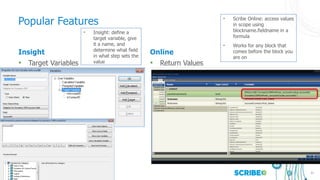
Insight
• Target Variables
Online
• Return Values
Popular Features
• Insight: define a
target variable, give
it a name, and
determine what field
in what step sets the
value
• Scribe Online: access values
in scope using
blockname.fieldname in a
formula
• Works for any block that
comes before the block you
are on
32
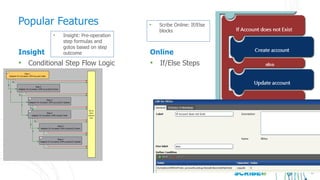
Insight
• Conditional Step Flow Logic
Online
• If/Else Steps
Popular Features
• Insight: Pre-operation
step formulas and
gotos based on step
outcome
• Scribe Online: If/Else
blocks
33
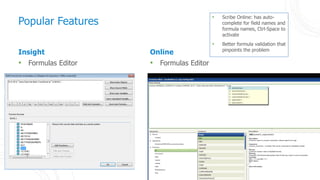
Insight
• Formulas Editor
Online
• Formulas Editor
Popular Features
• Scribe Online: has auto-
complete for field names and
formula names, Ctrl-Space to
activate
• Better formula validation that
pinpoints the problem
34
Insight
• Query
Online
• Filters
Popular Features
• Insight: custom query
builder
• Return one 1 child
and up to 3 parents
• Scribe Online: no
restrictions on
parent/child, access
whatever is defined in
the API
• And/Or in filters are
the same
35
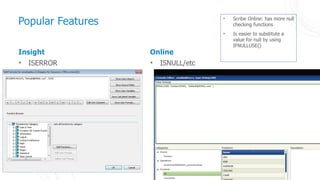
Insight
• ISERROR
Online
• ISNULL/etc
Popular Features • Scribe Online: has more null
checking functions
• Is easier to substitute a
value for null by using
IFNULLUSE()
36
Insight and Scribe Online Can Work Together
• Insight Connector – Message Queue
• CSV
• Databases
37
Wrap Up
• Connectivity drives major decision on what product to use
◦ You can create connectors for Scribe Online
• Insight and Scribe Online use a different approach to common
integration requirements
• Insight has more hidden features
◦ The assumption that Scribe Online has the same hidden features
can lead to misunderstandings
◦ Scribe Online is more “what you see is what you get”
• When needed, you can use both products together
Thank You!

General 06 scribe online or insight

  • 1.
    Scribe Online orInsight Making the right choice and understanding the differences
  • 2.
    4 Session Abstract In thissession we will help you understand the differences between Scribe Online and Insight to help you choose the right product for a project. We will also explore some of the common design patterns and how each product handles them differently. We will conclude with how these products can work together on a project when you need the joint capability of the products to achieve integration goals.
  • 3.
    5 Agenda • Overview ofInsight and Online • Review capabilities matrix • Common design patterns • Popular Insight features in Scribe Online terms • How you can work with both together
  • 4.
    Insight and ScribeOnline Overview Guidelines for which product to choose
  • 5.
    7 Overview of Insight •Server based • Integration management tooling • Thought of as for larger more complex integrations • Focus on CRM and ERP connectivity
  • 6.
    8 Overview of ScribeOnline • iPaaS – integration Platform as a Service • Simpler, more approachable user interface • Embeddable integration • Expanding connectivity, including CRM, ERP, Marketing, BI, Data Services • Extensible ◦ CDK ◦ API
  • 7.
    9 Insight • Connectivity • Advancedemail notifications ◦ Send email on successful run of solution ◦ Custom monitors, alerts, and recipient groups • Publishers • Pass parameters at execution time (filenames, last run date time) • Choose where failed rows are stored • Command line Scribe Online • Connectivity • Event-based processing • Embedded integration • Extensibility ◦ CDK ◦ API • Replication Service Capabilities – “Black and White” Decisions
  • 8.
    10 Capabilities – GrayAreas • Customer preference ◦ Integration tool in cloud (Scribe Online) or on-premise (Insight) ◦ License type: perpetual or subscription • Scribe Online has multi-user capabilities that Insight does not ◦ Easier remote access to development and admin environment ◦ Locking of maps • Custom database queries are more flexible with Insight and only available with SQL Server with Scribe Online
  • 9.
    Design Patterns Exploring designpatterns through common use cases
  • 10.
    12 Use Case: Account/ContactSync • Parent and child data is in the source result set • Referential integrity: relate a contact to its account • Update/Insert logic
  • 11.
    13 Account/Contact Sync AccountContact Update AccountCreateAccount Update Contact Create Contact Does Account Exist Does Contact Exist Yes Yes No No Contacts must have the AccountID from either the Create Account step or the Update Account step
  • 12.
    14 Account/Contact Sync • Stepresults determine which steps to “goto” • Automatic foreign key assignment fills in the AccountID on the contact • It is not obvious that is what happens • It is possible to create formulas that “goto” other steps that do not show in the Step Order pane
  • 13.
  • 14.
    16 Account/Contact Sync • Lookupblocks for account and contact determine if record exists • Result of lookup blocks is tested by If/Else blocks to determine whether to create or update data • The data integration logic is easier to read
  • 15.
    17 Use Case: ActivityData Sync • Only the child data (activity) is in the source result set • Referential Integrity: relate an activity to its contact • Dependent on other integrations to get the contacts in the target database • You need to find the contact to get its ID to relate the activity to its contact
  • 16.
    18 Activity Data SyncFlow ActivityRecord Create Activity “Header” Create Activity Party Locate ContactID
  • 17.
    19 Activity Data SyncDesign – Insight • The step logic is easy to understand, two inserts • But that is not all of the configuration that is needed
  • 18.
    20 Activity Data SyncDesign – Insight • Formulas and variables handle the referential integrity • Configuration is removed from the steps and is not obvious
  • 19.
    21 Activity Data SyncDesign – Scribe Online • Lookup block on the contact puts the contactid “in scope” • “scope” = any field value from previous block is available by reference in a formula • The data integration logic is easier to read
  • 20.
    22 Use Case: SalesOrder Processing • Hierarchical relationships important • Many objects involved • Complex integration
  • 21.
    23 Sales Order ProcessingFlow Sales Order Account Address Sales Order Sales Order Lines Does the Customer Exist? Does the Address Exist? Yes Yes No No Retry Retry This also requires Products, Price Levels, etc to be integrated properly
  • 22.
    24 Sales Order ProcessingDesign – Insight
  • 23.
    26 Sales Order ProcessingDesign – Scribe Online • All logic is contained within this map • Start with collapsed view of blocks for simplified viewing
  • 24.
    27 Sales Order ProcessingDesign – Scribe Online • Expanded view of blocks • Follow what is happening by the names of the blocks • If block is looking for the customer to see if it has an external ID, meaning that it has been synced • Like Insight, you can configure custom error messages for these blocks
  • 25.
    28 Sales Order ProcessingDesign – Scribe Online • Not all blocks will be executed because of If/Else blocks • The retry mechanism is in this map too, not using message queues, but by conditionally executing blocks to explicitly go get the data that has not been synced yet
  • 26.
    29 Insight • DBLOOKUP • TargetVariables • Conditional Step Flow Logic • Formulas Editor • Query • ISERROR() Online • Lookups • Return Values • If/Else Steps • Formulas Editor • Filters • ISNULL/etc Popular Feature Comparison
  • 27.
    30 Insight • DBLOOKUP Online • Lookups PopularFeatures • Lookup the account by accountnumber and return the accountid Lookup block Lookup criteria Return values
  • 28.
    31 Insight • Target Variables Online •Return Values Popular Features • Insight: define a target variable, give it a name, and determine what field in what step sets the value • Scribe Online: access values in scope using blockname.fieldname in a formula • Works for any block that comes before the block you are on
  • 29.
    32 Insight • Conditional StepFlow Logic Online • If/Else Steps Popular Features • Insight: Pre-operation step formulas and gotos based on step outcome • Scribe Online: If/Else blocks
  • 30.
    33 Insight • Formulas Editor Online •Formulas Editor Popular Features • Scribe Online: has auto- complete for field names and formula names, Ctrl-Space to activate • Better formula validation that pinpoints the problem
  • 31.
    34 Insight • Query Online • Filters PopularFeatures • Insight: custom query builder • Return one 1 child and up to 3 parents • Scribe Online: no restrictions on parent/child, access whatever is defined in the API • And/Or in filters are the same
  • 32.
    35 Insight • ISERROR Online • ISNULL/etc PopularFeatures • Scribe Online: has more null checking functions • Is easier to substitute a value for null by using IFNULLUSE()
  • 33.
    36 Insight and ScribeOnline Can Work Together • Insight Connector – Message Queue • CSV • Databases
  • 34.
    37 Wrap Up • Connectivitydrives major decision on what product to use ◦ You can create connectors for Scribe Online • Insight and Scribe Online use a different approach to common integration requirements • Insight has more hidden features ◦ The assumption that Scribe Online has the same hidden features can lead to misunderstandings ◦ Scribe Online is more “what you see is what you get” • When needed, you can use both products together
  • 35.