
Microsoft Dynamics 365
Business Financials &
NAV 2017 Product
Update
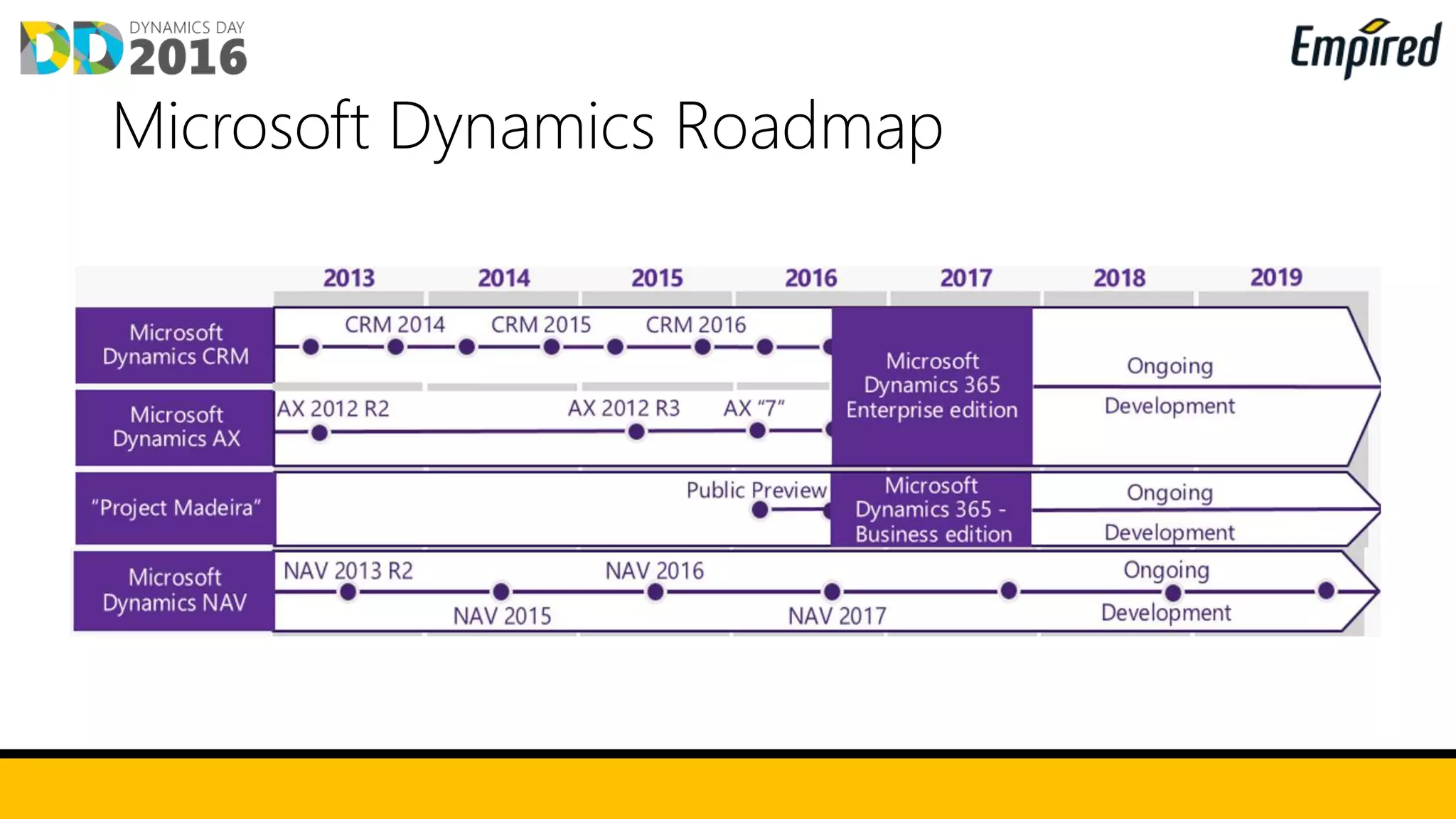
Microsoft Dynamics Roadmap
Functionality
Deployment Options
Client Options
Dynamics NAV 2017
Customization Options
Licensing
Dynamics365
Financials
On Premise or Cloud
(IaaS or SaaS)
Cloud Only (SaaS)
NAV Standard Pack &
Extended Pack
NAV Standard Pack
Windows, Web &
Universal Clients
Web & Universal
Clients only
ISV Solutions, Base
Code, Extensions
Extensions Only
Perpetual &
Subscription
Apps & Plan Licensing
Availability Available 40+ Counties
including Australia
Available in US &
Canada Only
Differentiator Maximum Flexibility
Power of Choice
Extensions and
continued updates
IN OFFICE 365 EXPERIENCE
Improved office 365 experience, contact
synchronisations and simplified outlook
experience
EMBEDDED POWERBI
View PowerBI from within Dynamics NAV
TWO WORLDS
TOGETHER
Enriched Office experience
You can use the Microsoft Outlook add-in to manage
business interactions directly in Outlook. You can
quickly access financial information, and create and
send documents without leaving Outlook.
You can automatically synchronize customer and
service item records with Microsoft Bookings in Office
365, viewing financial information about a customer,
and creating and sending invoices directly from a
Bookings appointment.
You can also create a data connection from Microsoft
Excel directly to your Microsoft Dynamics NAV data,
and be able to view, edit, and update the data.
Your business
inbox is ready
Enriched Office experience
You can use the Microsoft Outlook add-in to manage
business interactions directly in Outlook. You can
quickly access financial information, and create and
send documents without leaving Outlook.
You can automatically synchronize customer and
service item records with Microsoft Bookings in Office
365, viewing financial information about a customer,
and creating and sending invoices directly from a
Bookings appointment.
You can also create a data connection from Microsoft
Excel directly to your Microsoft Dynamics NAV data,
and be able to view, edit, and update the data.
Be prepared for
meetings
Embedded PowerBI
You can use embedded Power BI to easily
create insightful charts and reports using Power
BI, and make them available within your
Microsoft Dynamics NAV 2017 role center.
Leverage the Microsoft Dynamics NAV 2017
Power BI Content Pack to get started, and
utilize existing Power BI security to manage
reports.
Enriched Office experience
You can use the Microsoft Outlook add-in to manage
business interactions directly in Outlook. You can
quickly access financial information, and create and
send documents without leaving Outlook.
You can automatically synchronize customer and
service item records with Microsoft Bookings in Office
365, viewing financial information about a customer,
and creating and sending invoices directly from a
Bookings appointment.
You can also create a data connection from Microsoft
Excel directly to your Microsoft Dynamics NAV data,
and be able to view, edit, and update the data.
Power BI
Embedded in the
Role Centre
Enriched Office experience
You can use the Microsoft Outlook add-in to manage
business interactions directly in Outlook. You can
quickly access financial information, and create and
send documents without leaving Outlook.
You can automatically synchronize customer and
service item records with Microsoft Bookings in Office
365, viewing financial information about a customer,
and creating and sending invoices directly from a
Bookings appointment.
You can also create a data connection from Microsoft
Excel directly to your Microsoft Dynamics NAV data,
and be able to view, edit, and update the data.
Power BI Tile
Integration
You can use the Sales, Inventory & Cashflow
Forecast extension to get deep insights about
potential sales and a clear overview of expected
stock-outs.
• Predict Potential Sales
• Overview of Expected Stock outs
• Best Choice
• Transparency
You can use the Sales and Inventory Forecast
extension to get deep insights about potential
sales and a clear overview of expected stock-
outs.
• Predict Potential Sales
• Overview of Expected Stock outs
• Best Choice
• Transparency
You can use the Sales and Inventory Forecast
extension to get deep insights about potential
sales and a clear overview of expected stock-
outs.
• Predict Potential Sales
• Overview of Expected Stock outs
• Best Choice
• Transparency
E-EVERYTHING
Dynamics Connector to provide a single point of
integration
CORTANA INTELLIGENCE
Azure Machine Learning
Enable you to work with your data
The future of Development
NEW
OPPORTUNITIES
Single connector to read and write odata end
points for:
• PowerBI
• PowerApps
• Flow
NAV
Connector
Extensions will become the way in
which any project is customized and
every add-on/vertical solution is built
Appsource is where you will be
able to purchase extensions
USER EXPERIENCE
Continuing the significant improvements from 2016
to simplicity, productivity, and performance,
Microsoft Dynamics NAV 2017 simplifies the
experience even further, in particular for novice
users.
APPLICATION IMPROVEMENTS
Finance, Jobs, CRM and Items improvementsENHANCE THE
CORE
Finance
improvements
Improvements include:
• Account Categories & Financial Reports
• Easily cancel and correct Invoices
• PayPal Integration
You can use the Microsoft Outlook add-in to manage
business interactions directly in Outlook. You can
quickly access financial information, and create and
send documents without leaving Outlook.
You can automatically synchronize customer and
service item records with Microsoft Bookings in Office
365, viewing financial information about a customer,
and creating and sending invoices directly from a
Bookings appointment.
You can also create a data connection from Microsoft
Excel directly to your Microsoft Dynamics NAV data,
and be able to view, edit, and update the data.
Correct or Cancel
posted Invoices
You can use the Microsoft Outlook add-in to manage
business interactions directly in Outlook. You can
quickly access financial information, and create and
send documents without leaving Outlook.
You can automatically synchronize customer and
service item records with Microsoft Bookings in Office
365, viewing financial information about a customer,
and creating and sending invoices directly from a
Bookings appointment.
You can also create a data connection from Microsoft
Excel directly to your Microsoft Dynamics NAV data,
and be able to view, edit, and update the data.
G/L Account
Categories
You can use the Microsoft Outlook add-in to manage
business interactions directly in Outlook. You can
quickly access financial information, and create and
send documents without leaving Outlook.
You can automatically synchronize customer and
service item records with Microsoft Bookings in Office
365, viewing financial information about a customer,
and creating and sending invoices directly from a
Bookings appointment.
You can also create a data connection from Microsoft
Excel directly to your Microsoft Dynamics NAV data,
and be able to view, edit, and update the data.
Automated Bank
Reconciliation
Feeds
Simplified Jobs
You can enjoy a streamlined experience in Jobs,
to help you manage your projects better
On the Job Card, you can see tasks, use the new
Project Manager field, and get better visibility
into the costs and billings for your jobs.
A new Job Quote report enables you to quickly
email a customer the price for a project.
You can use the Microsoft Outlook add-in to manage
business interactions directly in Outlook. You can
quickly access financial information, and create and
send documents without leaving Outlook.
You can automatically synchronize customer and
service item records with Microsoft Bookings in Office
365, viewing financial information about a customer,
and creating and sending invoices directly from a
Bookings appointment.
You can also create a data connection from Microsoft
Excel directly to your Microsoft Dynamics NAV data,
and be able to view, edit, and update the data.
PayPal Integration
You can work more effectively with Relationship
Management from your phone, taking
advantage of enhancements to the Sales and
Relationship Management Role Center.
A simplified CRM includes contact
management, interactions, and sales
opportunities. You can also use improved
interactions logging from your phone, logging
email messages using Office 365
Keep your contacts synchronized between
Microsoft Dynamics NAV 2017 and Office 365
or Microsoft Outlook, and automatically run a
background synchronisation at scheduled
times.
Dynamics NAV and Dynamics365 Financials is Microsoft’s solution for
small and Mid Sized business
Microsoft is investing heavily in both products
Start of with Dynamics365 Financials and migrate to NAV as you grow
Use of Extensions allow for faster and more cost effective upgrades
Migration path between products

Dynamics Day 2016 - Microsoft Dynamics 365 business financials (NAV) - roadmap

  • 1.
    Microsoft Dynamics 365 BusinessFinancials & NAV 2017 Product Update
  • 2.
  • 3.
    Functionality Deployment Options Client Options DynamicsNAV 2017 Customization Options Licensing Dynamics365 Financials On Premise or Cloud (IaaS or SaaS) Cloud Only (SaaS) NAV Standard Pack & Extended Pack NAV Standard Pack Windows, Web & Universal Clients Web & Universal Clients only ISV Solutions, Base Code, Extensions Extensions Only Perpetual & Subscription Apps & Plan Licensing Availability Available 40+ Counties including Australia Available in US & Canada Only Differentiator Maximum Flexibility Power of Choice Extensions and continued updates
  • 5.
    IN OFFICE 365EXPERIENCE Improved office 365 experience, contact synchronisations and simplified outlook experience EMBEDDED POWERBI View PowerBI from within Dynamics NAV TWO WORLDS TOGETHER
  • 6.
    Enriched Office experience Youcan use the Microsoft Outlook add-in to manage business interactions directly in Outlook. You can quickly access financial information, and create and send documents without leaving Outlook. You can automatically synchronize customer and service item records with Microsoft Bookings in Office 365, viewing financial information about a customer, and creating and sending invoices directly from a Bookings appointment. You can also create a data connection from Microsoft Excel directly to your Microsoft Dynamics NAV data, and be able to view, edit, and update the data. Your business inbox is ready
  • 7.
    Enriched Office experience Youcan use the Microsoft Outlook add-in to manage business interactions directly in Outlook. You can quickly access financial information, and create and send documents without leaving Outlook. You can automatically synchronize customer and service item records with Microsoft Bookings in Office 365, viewing financial information about a customer, and creating and sending invoices directly from a Bookings appointment. You can also create a data connection from Microsoft Excel directly to your Microsoft Dynamics NAV data, and be able to view, edit, and update the data. Be prepared for meetings
  • 8.
    Embedded PowerBI You canuse embedded Power BI to easily create insightful charts and reports using Power BI, and make them available within your Microsoft Dynamics NAV 2017 role center. Leverage the Microsoft Dynamics NAV 2017 Power BI Content Pack to get started, and utilize existing Power BI security to manage reports.
  • 9.
    Enriched Office experience Youcan use the Microsoft Outlook add-in to manage business interactions directly in Outlook. You can quickly access financial information, and create and send documents without leaving Outlook. You can automatically synchronize customer and service item records with Microsoft Bookings in Office 365, viewing financial information about a customer, and creating and sending invoices directly from a Bookings appointment. You can also create a data connection from Microsoft Excel directly to your Microsoft Dynamics NAV data, and be able to view, edit, and update the data. Power BI Embedded in the Role Centre
  • 10.
    Enriched Office experience Youcan use the Microsoft Outlook add-in to manage business interactions directly in Outlook. You can quickly access financial information, and create and send documents without leaving Outlook. You can automatically synchronize customer and service item records with Microsoft Bookings in Office 365, viewing financial information about a customer, and creating and sending invoices directly from a Bookings appointment. You can also create a data connection from Microsoft Excel directly to your Microsoft Dynamics NAV data, and be able to view, edit, and update the data. Power BI Tile Integration
  • 11.
    You can usethe Sales, Inventory & Cashflow Forecast extension to get deep insights about potential sales and a clear overview of expected stock-outs. • Predict Potential Sales • Overview of Expected Stock outs • Best Choice • Transparency
  • 12.
    You can usethe Sales and Inventory Forecast extension to get deep insights about potential sales and a clear overview of expected stock- outs. • Predict Potential Sales • Overview of Expected Stock outs • Best Choice • Transparency
  • 13.
    You can usethe Sales and Inventory Forecast extension to get deep insights about potential sales and a clear overview of expected stock- outs. • Predict Potential Sales • Overview of Expected Stock outs • Best Choice • Transparency
  • 14.
    E-EVERYTHING Dynamics Connector toprovide a single point of integration CORTANA INTELLIGENCE Azure Machine Learning Enable you to work with your data The future of Development NEW OPPORTUNITIES
  • 15.
    Single connector toread and write odata end points for: • PowerBI • PowerApps • Flow NAV Connector
  • 16.
    Extensions will becomethe way in which any project is customized and every add-on/vertical solution is built
  • 17.
    Appsource is whereyou will be able to purchase extensions
  • 18.
    USER EXPERIENCE Continuing thesignificant improvements from 2016 to simplicity, productivity, and performance, Microsoft Dynamics NAV 2017 simplifies the experience even further, in particular for novice users. APPLICATION IMPROVEMENTS Finance, Jobs, CRM and Items improvementsENHANCE THE CORE
  • 19.
    Finance improvements Improvements include: • AccountCategories & Financial Reports • Easily cancel and correct Invoices • PayPal Integration
  • 20.
    You can usethe Microsoft Outlook add-in to manage business interactions directly in Outlook. You can quickly access financial information, and create and send documents without leaving Outlook. You can automatically synchronize customer and service item records with Microsoft Bookings in Office 365, viewing financial information about a customer, and creating and sending invoices directly from a Bookings appointment. You can also create a data connection from Microsoft Excel directly to your Microsoft Dynamics NAV data, and be able to view, edit, and update the data. Correct or Cancel posted Invoices
  • 21.
    You can usethe Microsoft Outlook add-in to manage business interactions directly in Outlook. You can quickly access financial information, and create and send documents without leaving Outlook. You can automatically synchronize customer and service item records with Microsoft Bookings in Office 365, viewing financial information about a customer, and creating and sending invoices directly from a Bookings appointment. You can also create a data connection from Microsoft Excel directly to your Microsoft Dynamics NAV data, and be able to view, edit, and update the data. G/L Account Categories
  • 22.
    You can usethe Microsoft Outlook add-in to manage business interactions directly in Outlook. You can quickly access financial information, and create and send documents without leaving Outlook. You can automatically synchronize customer and service item records with Microsoft Bookings in Office 365, viewing financial information about a customer, and creating and sending invoices directly from a Bookings appointment. You can also create a data connection from Microsoft Excel directly to your Microsoft Dynamics NAV data, and be able to view, edit, and update the data. Automated Bank Reconciliation Feeds
  • 23.
    Simplified Jobs You canenjoy a streamlined experience in Jobs, to help you manage your projects better On the Job Card, you can see tasks, use the new Project Manager field, and get better visibility into the costs and billings for your jobs. A new Job Quote report enables you to quickly email a customer the price for a project.
  • 24.
    You can usethe Microsoft Outlook add-in to manage business interactions directly in Outlook. You can quickly access financial information, and create and send documents without leaving Outlook. You can automatically synchronize customer and service item records with Microsoft Bookings in Office 365, viewing financial information about a customer, and creating and sending invoices directly from a Bookings appointment. You can also create a data connection from Microsoft Excel directly to your Microsoft Dynamics NAV data, and be able to view, edit, and update the data. PayPal Integration
  • 25.
    You can workmore effectively with Relationship Management from your phone, taking advantage of enhancements to the Sales and Relationship Management Role Center. A simplified CRM includes contact management, interactions, and sales opportunities. You can also use improved interactions logging from your phone, logging email messages using Office 365
  • 26.
    Keep your contactssynchronized between Microsoft Dynamics NAV 2017 and Office 365 or Microsoft Outlook, and automatically run a background synchronisation at scheduled times.
  • 27.
    Dynamics NAV andDynamics365 Financials is Microsoft’s solution for small and Mid Sized business Microsoft is investing heavily in both products Start of with Dynamics365 Financials and migrate to NAV as you grow Use of Extensions allow for faster and more cost effective upgrades Migration path between products