Alerting Essentials
Nick Kephart, Sr. Director of Product Marketing
1
About ThousandEyes
Established and
backed by
network experts
Relied on for
critical operations by
leading enterprises
Recognized as
an innovative
new approach
ThousandEyes delivers visibility into every network your organization relies on.
24 of the Fortune 500
2
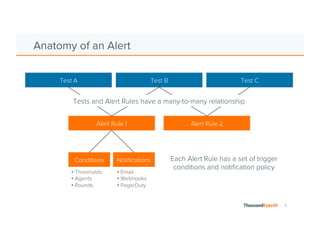
Anatomy of an Alert
Alert Rule 1
Conditions Notifications
Test A Test B Test C
Alert Rule 2
• Email
• Webhooks
• PagerDuty
• Thresholds
• Agents
• Rounds
Each Alert Rule has a set of trigger
conditions and notification policy
Tests and Alert Rules have a many-to-many relationship
3
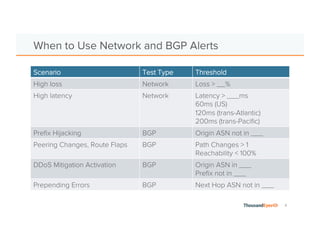
Network and BGP Alerts
Scenario Test Type Threshold
High loss Network Loss > __%
High latency Network Latency > ___ms
60ms (US)
120ms (trans-Atlantic)
200ms (trans-Pacific)
Prefix Hijacking BGP Origin ASN not in ___
Peering Changes, Route Flaps BGP Path Changes > 1
Reachability < 100%
DDoS Mitigation Activation BGP Origin ASN in ___
Prefix not in ___
Prepending Errors BGP Next Hop ASN not in ___
4
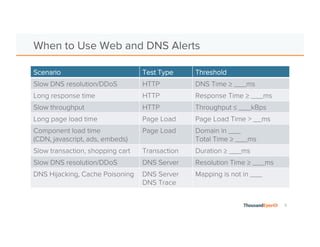
Web and DNS Alerts
Scenario Test Type Threshold
Slow DNS resolution/DDoS HTTP DNS Time ≥ ___ms
Long response time HTTP Response Time ≥ ___ms
Slow throughput HTTP Throughput ≤ ___kBps
Long page load time Page Load Page Load Time > __ms
Component load time
(CDN, javascript, ads, embeds)
Page Load Domain in ___
Total Time ≥ ___ms
Slow transaction, shopping cart Transaction Duration ≥ ___ms
Slow DNS resolution/DDoS DNS Server Resolution Time ≥ ___ms
DNS Hijacking, Cache Poisoning DNS Server
DNS Trace
Mapping is not in ___
5
Scope by Component or Geography
Scope by geo
Scope by
domain
6
Scope by Network or Device
Scope by
rDNS, IP
Scope by
ASN
7
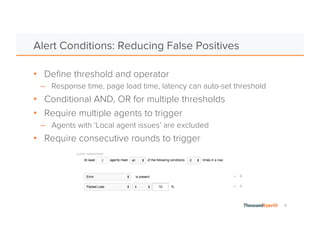
Alert Conditions: Reducing False Positives
• Define threshold and operator
• Response time, page load time, latency can auto-set threshold
• Conditional AND, OR for multiple thresholds
• Require multiple agents to trigger
• NEW! Percentage of agents in the test
• Agents with ‘Local agent issues’ are excluded
• Require consecutive rounds to trigger
8
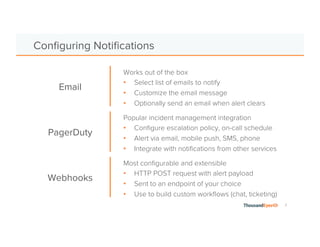
Works out of the box
• Select list of emails to notify
• Customize the email message
• Optionally send an email when alert clears
Configuring Notifications
Most configurable and extensible
• HTTP POST request with alert payload
• Sent to an endpoint of your choice
• Use to build custom workflows (chat, ticketing)
Email
Webhooks
Popular incident management integration
• Configure escalation policy, on-call schedule
• Alert via email, mobile push, SMS, phone
• Integrate with notifications from other services
PagerDuty
9
Additional Resources
• Reducing Alert Fatigue
– https://blog.thousandeyes.com/top-5-prescriptions-for-alert-fatigue/
• Alerts by Type
– https://blog.thousandeyes.com/proactive-bgp-alerting/
– https://blog.thousandeyes.com/tips-instrumenting-dns-alerts/
– https://blog.thousandeyes.com/alerting-on-network-performance/
– https://blog.thousandeyes.com/alerting-by-geography-network-and-device/
• PagerDuty
– https://blog.thousandeyes.com/thousandeyes-pagerduty-integration/
– https://support.thousandeyes.com/entries/58264440-PagerDuty-Integration
– http://www.pagerduty.com/docs/guides/thousandeyes-integration-guide/
• Webhooks
– https://support.thousandeyes.com/entries/58631344-Using-Webhooks-server-sample-code-
included-
10
Demo
11
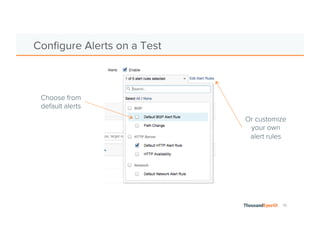
Configure Alerts on a Test
Choose from
default alerts
Or customize
your own
alert rules
12
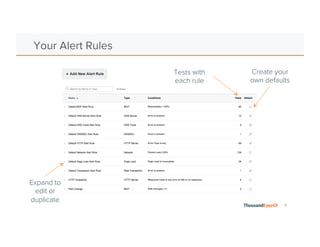
Your Alert Rules
Tests with
each rule
Create your
own defaults
Expand to
edit or
duplicate
13
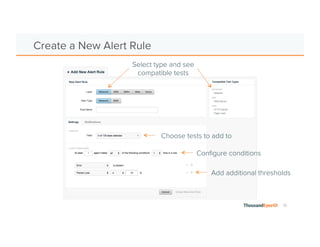
Create a New Alert Rule
Select type and see
compatible tests
Choose tests to add to
Add additional thresholds
Configure conditions
14
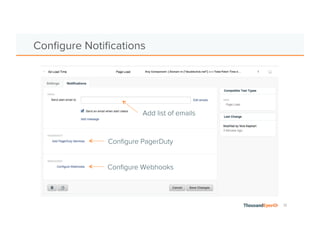
Configure Notifications
Add list of emails
Configure PagerDuty
Configure Webhooks
15
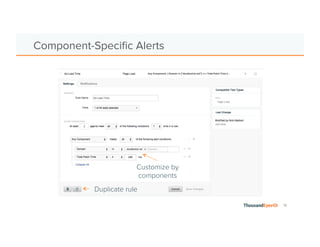
Component-Specific Alerts
Customize by
components
Duplicate rule
16
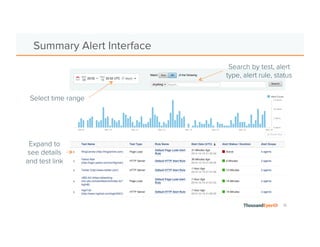
Active Alerts and Alert History
Select time range
for past 90 days
Search by test, alert
type, alert rule, status
Expand to
see details
and test link
See what you’re missing.
Watch the webinar
www.thousandeyes.com/webinars/alerting

ThousandEyes Alerting Essentials for Your Network

  • 1.
    Alerting Essentials Nick Kephart,Sr. Director of Product Marketing
  • 2.
    1 About ThousandEyes Established and backedby network experts Relied on for critical operations by leading enterprises Recognized as an innovative new approach ThousandEyes delivers visibility into every network your organization relies on. 24 of the Fortune 500
  • 3.
    2 Anatomy of anAlert Alert Rule 1 Conditions Notifications Test A Test B Test C Alert Rule 2 • Email • Webhooks • PagerDuty • Thresholds • Agents • Rounds Each Alert Rule has a set of trigger conditions and notification policy Tests and Alert Rules have a many-to-many relationship
  • 4.
    3 Network and BGPAlerts Scenario Test Type Threshold High loss Network Loss > __% High latency Network Latency > ___ms 60ms (US) 120ms (trans-Atlantic) 200ms (trans-Pacific) Prefix Hijacking BGP Origin ASN not in ___ Peering Changes, Route Flaps BGP Path Changes > 1 Reachability < 100% DDoS Mitigation Activation BGP Origin ASN in ___ Prefix not in ___ Prepending Errors BGP Next Hop ASN not in ___
  • 5.
    4 Web and DNSAlerts Scenario Test Type Threshold Slow DNS resolution/DDoS HTTP DNS Time ≥ ___ms Long response time HTTP Response Time ≥ ___ms Slow throughput HTTP Throughput ≤ ___kBps Long page load time Page Load Page Load Time > __ms Component load time (CDN, javascript, ads, embeds) Page Load Domain in ___ Total Time ≥ ___ms Slow transaction, shopping cart Transaction Duration ≥ ___ms Slow DNS resolution/DDoS DNS Server Resolution Time ≥ ___ms DNS Hijacking, Cache Poisoning DNS Server DNS Trace Mapping is not in ___
  • 6.
    5 Scope by Componentor Geography Scope by geo Scope by domain
  • 7.
    6 Scope by Networkor Device Scope by rDNS, IP Scope by ASN
  • 8.
    7 Alert Conditions: ReducingFalse Positives • Define threshold and operator • Response time, page load time, latency can auto-set threshold • Conditional AND, OR for multiple thresholds • Require multiple agents to trigger • NEW! Percentage of agents in the test • Agents with ‘Local agent issues’ are excluded • Require consecutive rounds to trigger
  • 9.
    8 Works out ofthe box • Select list of emails to notify • Customize the email message • Optionally send an email when alert clears Configuring Notifications Most configurable and extensible • HTTP POST request with alert payload • Sent to an endpoint of your choice • Use to build custom workflows (chat, ticketing) Email Webhooks Popular incident management integration • Configure escalation policy, on-call schedule • Alert via email, mobile push, SMS, phone • Integrate with notifications from other services PagerDuty
  • 10.
    9 Additional Resources • ReducingAlert Fatigue – https://blog.thousandeyes.com/top-5-prescriptions-for-alert-fatigue/ • Alerts by Type – https://blog.thousandeyes.com/proactive-bgp-alerting/ – https://blog.thousandeyes.com/tips-instrumenting-dns-alerts/ – https://blog.thousandeyes.com/alerting-on-network-performance/ – https://blog.thousandeyes.com/alerting-by-geography-network-and-device/ • PagerDuty – https://blog.thousandeyes.com/thousandeyes-pagerduty-integration/ – https://support.thousandeyes.com/entries/58264440-PagerDuty-Integration – http://www.pagerduty.com/docs/guides/thousandeyes-integration-guide/ • Webhooks – https://support.thousandeyes.com/entries/58631344-Using-Webhooks-server-sample-code- included-
  • 11.
  • 12.
    11 Configure Alerts ona Test Choose from default alerts Or customize your own alert rules
  • 13.
    12 Your Alert Rules Testswith each rule Create your own defaults Expand to edit or duplicate
  • 14.
    13 Create a NewAlert Rule Select type and see compatible tests Choose tests to add to Add additional thresholds Configure conditions
  • 15.
    14 Configure Notifications Add listof emails Configure PagerDuty Configure Webhooks
  • 16.
  • 17.
    16 Active Alerts andAlert History Select time range for past 90 days Search by test, alert type, alert rule, status Expand to see details and test link
  • 18.
    See what you’remissing. Watch the webinar www.thousandeyes.com/webinars/alerting