Addressing Modes Chapter 6 S. Dandamudi
Outline Addressing modes Simple addressing modes Register addressing mode Immediate addressing mode Memory addressing modes 16-bit and 32-bit addressing Operand and address size override prefixes Direct addressing Indirect addressing Based addressing Indexed addressing Based-indexed addressing Examples Sorting (insertion sort) Binary search Arrays One-dimensional arrays Multidimensional arrays Examples Sum of 1-d array Sum of a column in a 2-d array Performance: Usefulness of addressing modes
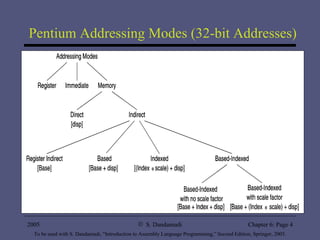
Addressing Modes Addressing mode refers to the specification of the location of data required by an operation Pentium supports three fundamental addressing modes: Register mode Immediate mode Memory mode Specification of operands located in memory can be done in a variety of ways Mainly to support high-level language constructs and data structures
Pentium Addressing Modes (32-bit Addresses)
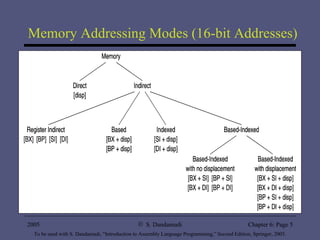
Memory Addressing Modes (16-bit Addresses)
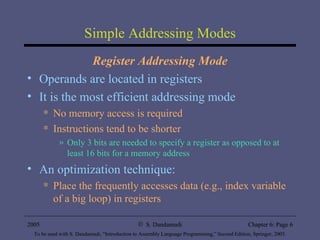
Simple Addressing Modes Register Addressing Mode Operands are located in registers It is the most efficient addressing mode No memory access is required Instructions tend to be shorter  Only 3 bits are needed to specify a register as opposed to at least 16 bits for a memory address An optimization technique: Place the frequently accesses data (e.g., index variable of a big loop) in registers
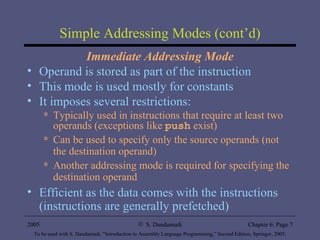
Simple Addressing Modes (cont’d) Immediate Addressing Mode Operand is stored as part of the instruction This mode is used mostly for constants It imposes several restrictions: Typically used in instructions that require at least two operands (exceptions like  push  exist) Can be used to specify only the source operands (not the destination operand) Another addressing mode is required for specifying the destination operand Efficient as the data comes with the instructions (instructions are generally prefetched)
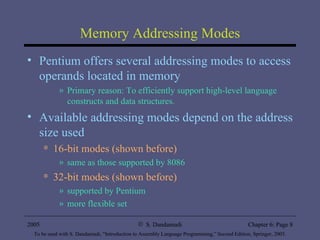
Memory Addressing Modes Pentium offers several addressing modes to access operands located in memory Primary reason: To efficiently support high-level language constructs and data structures. Available addressing modes depend on the address size used 16-bit modes (shown before) same as those supported by 8086 32-bit modes (shown before) supported by Pentium more flexible set
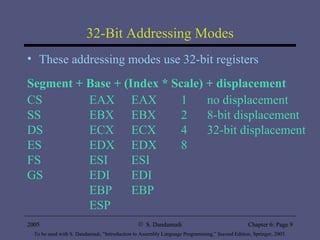
32-Bit Addressing Modes These addressing modes use 32-bit registers Segment + Base + (Index * Scale) + displacement CS EAX EAX 1 no displacement SS EBX EBX 2 8-bit displacement DS ECX ECX 4 32-bit displacement ES EDX EDX 8 FS ESI ESI GS EDI EDI EBP EBP ESP
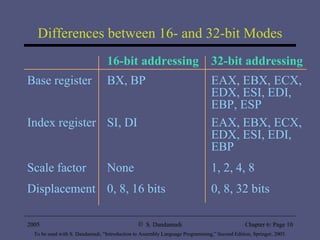
Differences between 16- and 32-bit Modes 16-bit addressing 32-bit addressing Base register BX, BP EAX, EBX, ECX, EDX, ESI, EDI, EBP, ESP Index register SI, DI EAX, EBX, ECX, EDX, ESI, EDI, EBP Scale factor None 1, 2, 4, 8 Displacement 0, 8, 16 bits 0, 8, 32 bits
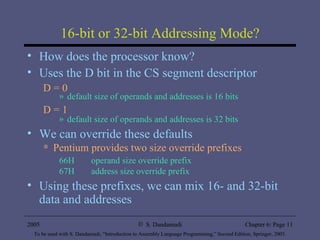
16-bit or 32-bit Addressing Mode? How does the processor know? Uses the D bit in the CS segment descriptor D = 0 default size of operands and addresses is 16 bits  D = 1 default size of operands and addresses is 32 bits We can override these defaults Pentium provides two size override prefixes 66H operand size override prefix  67H address size override prefix Using these prefixes, we can mix 16- and 32-bit data and addresses
Examples: Override Prefixes Our default mode is 16-bit data and addresses Example 1:  Data size override mov  EAX,123  ==>  B8 0000007B mov  AX,123  ==>  66 | B8 007B Example 2:  Address size override mov  EAX,[BX] ==> 67 | 8B 07 Example 3:  Address and data size override mov  AX,[BX]  ==> 66 | 67 | 8B 07
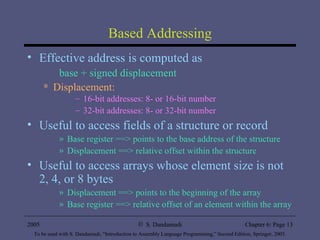
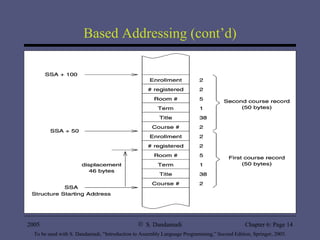
Based Addressing Effective address is computed as base + signed displacement Displacement: 16-bit addresses: 8- or 16-bit number 32-bit addresses: 8- or 32-bit number Useful to access fields of a structure or record Base register ==> points to the base address of the structure Displacement ==> relative offset within the structure Useful to access arrays whose element size is not 2, 4, or 8 bytes Displacement ==> points to the beginning of the array Base register ==> relative offset of an element within the array
Based Addressing (cont’d)
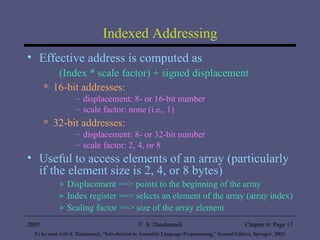
Indexed Addressing Effective address is computed as (Index * scale factor) + signed displacement 16-bit addresses: displacement: 8- or 16-bit number scale factor: none (i.e., 1) 32-bit addresses: displacement: 8- or 32-bit number scale factor: 2, 4, or 8 Useful to access elements of an array (particularly if the element size is 2, 4, or 8 bytes) Displacement ==> points to the beginning of the array Index register ==> selects an element of the array (array index) Scaling factor ==> size of the array element
Indexed Addressing (cont’d) Examples add  EAX,[EDI+20] We have seen similar usage to access parameters off the stack (in Chapter 5) add  EAX,[marks_table+ESI*4] Assembler replaces  marks_table  by a constant (i.e., supplies the displacement) Each element of  marks_table  takes 4 bytes (the scale factor value) ESI needs to hold the element subscript value add  EAX,[table1+ESI] ESI needs to hold the element offset in  bytes When we use the scale factor we avoid such byte counting
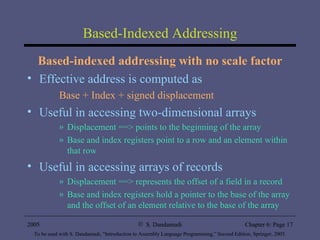
Based-Indexed Addressing Based-indexed addressing with no scale factor Effective address is computed as Base + Index + signed displacement Useful in accessing two-dimensional arrays Displacement ==> points to the beginning of the array Base and index registers point to a row and an element within that row Useful in accessing arrays of records Displacement ==> represents the offset of a field in a record Base and index registers hold a pointer to the base of the array and the offset of an element relative to the base of the array
Based-Indexed Addressing (cont’d) Useful in accessing arrays passed on to a procedure Base register ==> points to the beginning of the array Index register ==> represents the offset of an element relative to the base of the array  Example Assuming EBX points to  table1 mov  EAX,[EBX+ESI] cmp EAX,[EBX+ESI+4]   compares two successive elements of  table1
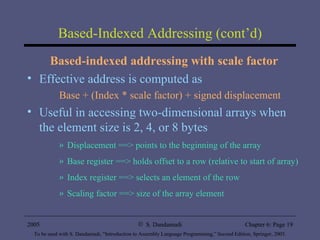
Based-Indexed Addressing (cont’d) Based-indexed addressing with scale factor Effective address is computed as Base + (Index * scale factor) + signed displacement Useful in accessing two-dimensional arrays when the element size is 2, 4, or 8 bytes Displacement ==> points to the beginning of the array Base register ==> holds offset to a row (relative to start of array) Index register ==> selects an element of the row Scaling factor ==> size of the array element
Illustrative Examples Insertion sort ins_sort.asm Sorts an integer array using insertion sort algorithm Inserts a new number into the sorted array in its right place Binary search bin_srch.asm Uses binary search to locate a data item in a sorted array Efficient search algorithm
Arrays One-Dimensional Arrays Array declaration in HLL (such as C) int  test_marks[10]; specifies a lot of information about the array: Name of the array ( test_marks ) Number of elements (10) Element size (2 bytes) Interpretation of each element ( int  i.e., signed integer) Index range (0 to 9 in C) You get very little help in assembly language!
Arrays (cont’d) In assembly language, declaration such as test_marks  resd  10 only assigns name and allocates storage space. You, as the assembly language programmer, have to “properly” access the array elements by taking element size and the range of subscripts. Accessing an array element requires its displacement or offset relative to the start of the array in  bytes
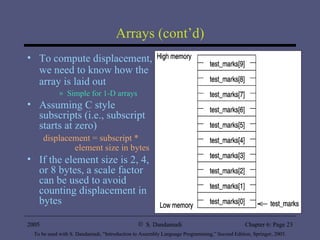
Arrays (cont’d) To compute displacement, we need to know how the array is laid out Simple for 1-D arrays Assuming C style subscripts (i.e., subscript starts at zero) displacement = subscript *    element size in bytes If the element size is 2, 4, or 8 bytes, a scale factor can be used to avoid counting displacement in bytes
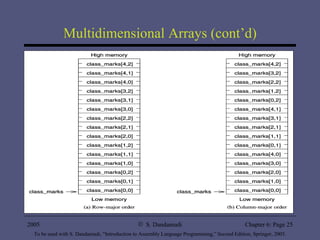
Multidimensional Arrays We focus on two-dimensional arrays Our discussion can be generalized to higher dimensions A 5x3 array can be declared in C as int  class_marks[5][3]; Two dimensional arrays can be stored in one of two ways: Row-major order Array is stored row by row Most HLL including C and Pascal use this method Column-major order Array is stored column by column FORTRAN uses this method
Multidimensional Arrays (cont’d)
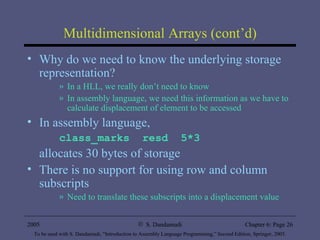
Multidimensional Arrays (cont’d) Why do we need to know the underlying storage representation? In a HLL, we really don’t need to know In assembly language, we need this information as we have to calculate displacement of element to be accessed In assembly language, class_marks  resd  5*3 allocates 30 bytes of storage There is no support for using row and column subscripts Need to translate these subscripts into a displacement value
Multidimensional Arrays (cont’d) Assuming C language subscript convention, we can express displacement of an element in a 2-D array at row  i  and column  j  as displacement = ( i  * COLUMNS +  j ) * ELEMENT_SIZE where COLUMNS = number of columns in the array ELEMENT_SIZE = element size in bytes Example: Displacement of  class_marks[3,1] element is (3*3 + 1) * 4 = 40
Examples of Arrays Example 1 One-dimensional array  Computes array sum (each element is 4 bytes long e.g., long integers) Uses scale factor 4 to access elements of the array by using a 32-bit addressing mode (uses ESI rather than SI) Also illustrates the use of predefined location counter $ Example 2 Two-dimensional array Finds sum of a column Uses “based-indexed addressing with scale factor” to access elements of a column
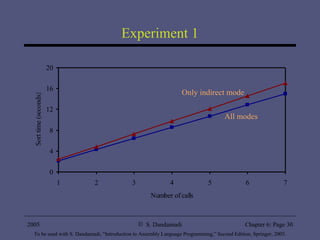
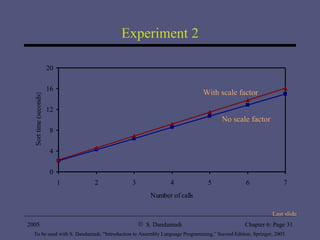
Performance: Usefulness of Addressing Modes Experiment 1 Advantage of Based-Indexed Mode Performance impact on insertion sort:  Only indirect mode vs. all addressing modes Shows the usefulness of providing more flexible addressing modes than the basic indirect addressing mode Experiment 2 Impact of scale factor Insertion sort is rewritten using based-indexed addressing mode that uses a scale factor
Experiment 1 All modes Only indirect mode
Experiment 2 With scale factor No scale factor Last slide

Al2ed chapter6

  • 1.
  • 2.
    Outline Addressing modesSimple addressing modes Register addressing mode Immediate addressing mode Memory addressing modes 16-bit and 32-bit addressing Operand and address size override prefixes Direct addressing Indirect addressing Based addressing Indexed addressing Based-indexed addressing Examples Sorting (insertion sort) Binary search Arrays One-dimensional arrays Multidimensional arrays Examples Sum of 1-d array Sum of a column in a 2-d array Performance: Usefulness of addressing modes
  • 3.
    Addressing Modes Addressingmode refers to the specification of the location of data required by an operation Pentium supports three fundamental addressing modes: Register mode Immediate mode Memory mode Specification of operands located in memory can be done in a variety of ways Mainly to support high-level language constructs and data structures
  • 4.
    Pentium Addressing Modes(32-bit Addresses)
  • 5.
    Memory Addressing Modes(16-bit Addresses)
  • 6.
    Simple Addressing ModesRegister Addressing Mode Operands are located in registers It is the most efficient addressing mode No memory access is required Instructions tend to be shorter Only 3 bits are needed to specify a register as opposed to at least 16 bits for a memory address An optimization technique: Place the frequently accesses data (e.g., index variable of a big loop) in registers
  • 7.
    Simple Addressing Modes(cont’d) Immediate Addressing Mode Operand is stored as part of the instruction This mode is used mostly for constants It imposes several restrictions: Typically used in instructions that require at least two operands (exceptions like push exist) Can be used to specify only the source operands (not the destination operand) Another addressing mode is required for specifying the destination operand Efficient as the data comes with the instructions (instructions are generally prefetched)
  • 8.
    Memory Addressing ModesPentium offers several addressing modes to access operands located in memory Primary reason: To efficiently support high-level language constructs and data structures. Available addressing modes depend on the address size used 16-bit modes (shown before) same as those supported by 8086 32-bit modes (shown before) supported by Pentium more flexible set
  • 9.
    32-Bit Addressing ModesThese addressing modes use 32-bit registers Segment + Base + (Index * Scale) + displacement CS EAX EAX 1 no displacement SS EBX EBX 2 8-bit displacement DS ECX ECX 4 32-bit displacement ES EDX EDX 8 FS ESI ESI GS EDI EDI EBP EBP ESP
  • 10.
    Differences between 16-and 32-bit Modes 16-bit addressing 32-bit addressing Base register BX, BP EAX, EBX, ECX, EDX, ESI, EDI, EBP, ESP Index register SI, DI EAX, EBX, ECX, EDX, ESI, EDI, EBP Scale factor None 1, 2, 4, 8 Displacement 0, 8, 16 bits 0, 8, 32 bits
  • 11.
    16-bit or 32-bitAddressing Mode? How does the processor know? Uses the D bit in the CS segment descriptor D = 0 default size of operands and addresses is 16 bits D = 1 default size of operands and addresses is 32 bits We can override these defaults Pentium provides two size override prefixes 66H operand size override prefix 67H address size override prefix Using these prefixes, we can mix 16- and 32-bit data and addresses
  • 12.
    Examples: Override PrefixesOur default mode is 16-bit data and addresses Example 1: Data size override mov EAX,123 ==> B8 0000007B mov AX,123 ==> 66 | B8 007B Example 2: Address size override mov EAX,[BX] ==> 67 | 8B 07 Example 3: Address and data size override mov AX,[BX] ==> 66 | 67 | 8B 07
  • 13.
    Based Addressing Effectiveaddress is computed as base + signed displacement Displacement: 16-bit addresses: 8- or 16-bit number 32-bit addresses: 8- or 32-bit number Useful to access fields of a structure or record Base register ==> points to the base address of the structure Displacement ==> relative offset within the structure Useful to access arrays whose element size is not 2, 4, or 8 bytes Displacement ==> points to the beginning of the array Base register ==> relative offset of an element within the array
  • 14.
  • 15.
    Indexed Addressing Effectiveaddress is computed as (Index * scale factor) + signed displacement 16-bit addresses: displacement: 8- or 16-bit number scale factor: none (i.e., 1) 32-bit addresses: displacement: 8- or 32-bit number scale factor: 2, 4, or 8 Useful to access elements of an array (particularly if the element size is 2, 4, or 8 bytes) Displacement ==> points to the beginning of the array Index register ==> selects an element of the array (array index) Scaling factor ==> size of the array element
  • 16.
    Indexed Addressing (cont’d)Examples add EAX,[EDI+20] We have seen similar usage to access parameters off the stack (in Chapter 5) add EAX,[marks_table+ESI*4] Assembler replaces marks_table by a constant (i.e., supplies the displacement) Each element of marks_table takes 4 bytes (the scale factor value) ESI needs to hold the element subscript value add EAX,[table1+ESI] ESI needs to hold the element offset in bytes When we use the scale factor we avoid such byte counting
  • 17.
    Based-Indexed Addressing Based-indexedaddressing with no scale factor Effective address is computed as Base + Index + signed displacement Useful in accessing two-dimensional arrays Displacement ==> points to the beginning of the array Base and index registers point to a row and an element within that row Useful in accessing arrays of records Displacement ==> represents the offset of a field in a record Base and index registers hold a pointer to the base of the array and the offset of an element relative to the base of the array
  • 18.
    Based-Indexed Addressing (cont’d)Useful in accessing arrays passed on to a procedure Base register ==> points to the beginning of the array Index register ==> represents the offset of an element relative to the base of the array Example Assuming EBX points to table1 mov EAX,[EBX+ESI] cmp EAX,[EBX+ESI+4] compares two successive elements of table1
  • 19.
    Based-Indexed Addressing (cont’d)Based-indexed addressing with scale factor Effective address is computed as Base + (Index * scale factor) + signed displacement Useful in accessing two-dimensional arrays when the element size is 2, 4, or 8 bytes Displacement ==> points to the beginning of the array Base register ==> holds offset to a row (relative to start of array) Index register ==> selects an element of the row Scaling factor ==> size of the array element
  • 20.
    Illustrative Examples Insertionsort ins_sort.asm Sorts an integer array using insertion sort algorithm Inserts a new number into the sorted array in its right place Binary search bin_srch.asm Uses binary search to locate a data item in a sorted array Efficient search algorithm
  • 21.
    Arrays One-Dimensional ArraysArray declaration in HLL (such as C) int test_marks[10]; specifies a lot of information about the array: Name of the array ( test_marks ) Number of elements (10) Element size (2 bytes) Interpretation of each element ( int i.e., signed integer) Index range (0 to 9 in C) You get very little help in assembly language!
  • 22.
    Arrays (cont’d) Inassembly language, declaration such as test_marks resd 10 only assigns name and allocates storage space. You, as the assembly language programmer, have to “properly” access the array elements by taking element size and the range of subscripts. Accessing an array element requires its displacement or offset relative to the start of the array in bytes
  • 23.
    Arrays (cont’d) Tocompute displacement, we need to know how the array is laid out Simple for 1-D arrays Assuming C style subscripts (i.e., subscript starts at zero) displacement = subscript * element size in bytes If the element size is 2, 4, or 8 bytes, a scale factor can be used to avoid counting displacement in bytes
  • 24.
    Multidimensional Arrays Wefocus on two-dimensional arrays Our discussion can be generalized to higher dimensions A 5x3 array can be declared in C as int class_marks[5][3]; Two dimensional arrays can be stored in one of two ways: Row-major order Array is stored row by row Most HLL including C and Pascal use this method Column-major order Array is stored column by column FORTRAN uses this method
  • 25.
  • 26.
    Multidimensional Arrays (cont’d)Why do we need to know the underlying storage representation? In a HLL, we really don’t need to know In assembly language, we need this information as we have to calculate displacement of element to be accessed In assembly language, class_marks resd 5*3 allocates 30 bytes of storage There is no support for using row and column subscripts Need to translate these subscripts into a displacement value
  • 27.
    Multidimensional Arrays (cont’d)Assuming C language subscript convention, we can express displacement of an element in a 2-D array at row i and column j as displacement = ( i * COLUMNS + j ) * ELEMENT_SIZE where COLUMNS = number of columns in the array ELEMENT_SIZE = element size in bytes Example: Displacement of class_marks[3,1] element is (3*3 + 1) * 4 = 40
  • 28.
    Examples of ArraysExample 1 One-dimensional array Computes array sum (each element is 4 bytes long e.g., long integers) Uses scale factor 4 to access elements of the array by using a 32-bit addressing mode (uses ESI rather than SI) Also illustrates the use of predefined location counter $ Example 2 Two-dimensional array Finds sum of a column Uses “based-indexed addressing with scale factor” to access elements of a column
  • 29.
    Performance: Usefulness ofAddressing Modes Experiment 1 Advantage of Based-Indexed Mode Performance impact on insertion sort: Only indirect mode vs. all addressing modes Shows the usefulness of providing more flexible addressing modes than the basic indirect addressing mode Experiment 2 Impact of scale factor Insertion sort is rewritten using based-indexed addressing mode that uses a scale factor
  • 30.
    Experiment 1 Allmodes Only indirect mode
  • 31.
    Experiment 2 Withscale factor No scale factor Last slide